Someone in your organisation needs a Windows desktop they can reach from a laptop at home, a tablet on the road, or a thin client in a branch office — and you have two Microsoft answers that look almost identical from the login screen and could not be more different behind it. Windows 365 gives each person a Cloud PC: a dedicated, always-on, fixed-monthly-price Windows desktop in the cloud that feels like a PC because it is a PC, just virtual. Azure Virtual Desktop (AVD) gives you a platform for building virtual desktops — pooled or personal, sized and scaled by you, billed by the Azure resources they consume by the hour. One is a finished product with a price tag per seat; the other is a kit of Azure parts you assemble, and choosing wrong costs real money and real operational pain.
This article is the comparison I wish every team had read before the procurement call — not a feature checklist, but two crisp mental models (“a Cloud PC is a per-user subscription you barely manage” versus “AVD is per-host infrastructure you operate and scale”) and the three questions that actually decide it: cost, control, and use-case fit. By the end you will have a decision table you can defend in an architecture review and a sense of where a hybrid of both is right — which, for most mid-sized estates, it is.
Both stream the same Windows 10/11 Enterprise desktop over the Remote Desktop Protocol (RDP), authenticate through Microsoft Entra ID, and are managed through Microsoft Intune. The difference is the billing and operating model wrapped around that shared core — and that wrapper is the whole decision.
What problem this solves
The problem is delivering a managed Windows desktop to a person who is not sitting at a managed Windows PC — without shipping, securing, patching, and eventually recovering physical hardware. Remote and hybrid work made this mainstream; regulated industries (finance, healthcare, BPO) needed it long before, because keeping data in the datacentre while users work from anywhere is a compliance requirement. Contractors who must never copy data to an unmanaged laptop, developers who need a workstation reachable from a Mac, branch offices on cheap thin clients, and seasonal surges of temporary staff are all the same shape: a desktop that lives in the cloud and follows the user.
Without one, organisations buy and ship laptops, image them, courier them back when someone leaves, and hope the disk encryption held if one is lost — while sensitive data sits outside the perimeter. The cloud-desktop model — generically Desktop-as-a-Service (DaaS) for the packaged kind and Virtual Desktop Infrastructure (VDI) for the build-it-yourself kind — moves the desktop into Azure, keeps the data there, and turns “ship and recover hardware” into “assign and unassign a licence or a session.”
Who hits the choice between the two: essentially every organisation that does cloud desktops at all. Put 2,000 always-on Cloud PCs under a one-shift call centre and you pay for 16 idle hours a day per seat; pick AVD for fifty executives who each want a personal machine and you have signed up to operate session hosts, images, and autoscaling you could have skipped. Choosing wrong costs both the invoice and the engineering hours spent running the wrong thing.
Learning objectives
By the end of this article you can:
- Explain what a Windows 365 Cloud PC is and what Azure Virtual Desktop is — and why “per-user subscription” versus “per-host platform” is the load-bearing distinction.
- Tell personal (1:1) desktops apart from pooled (multi-session) desktops, and say which product gives you which.
- Reason about cost correctly: fixed per-seat Windows 365 pricing versus AVD’s consumption billing, and when “switch it off at night” makes AVD cheaper or more expensive.
- List the licensing and identity prerequisites for each (the Entra ID, Intune, and Windows/M365 entitlements that gate them).
- Use a decision table to map a user population — knowledge workers, shift workers, contractors, GPU users — to the right product.
- Read an architecture diagram of both side by side and name what you operate versus what Microsoft operates.
- Describe a sensible hybrid estate that uses Windows 365 for some cohorts and AVD for others, from one Intune console.
- Diagnose the three most common “users can’t connect” failures and know where to look first.
Prerequisites & where this fits
You should be comfortable with the Azure basics: resources live in a subscription inside a resource group (see Azure Resource Hierarchy Explained: Subscriptions, Resource Groups and Resources), compute runs as VMs in a region with optional availability zones (Azure Regions and Availability Zones: Designing for Resilience), and those VMs sit in a virtual network (Azure Virtual Network, Subnets and NSGs: Networking Fundamentals). Know that Microsoft Entra ID is the identity directory and Microsoft Intune the endpoint-management service. No prior VDI experience is assumed.
This sits in the End-User Compute track as a concept and decision article — the upstream “which one, and why,” not a build guide. If you pick AVD, the architecture is covered in Azure Virtual Desktop Architecture Explained: Control Plane, Host Pools, Workspaces, and Session Hosts in Plain English, the pooled-versus-personal choice in Personal vs Pooled Host Pools: A Decision Framework for Picking the Right AVD Desktop Model and Sizing It, and the build in Deploy Your First AVD Pooled Host Pool End to End. When you optimise the bill, Azure FinOps and Cost Management: Controlling Cloud Spend at Scale quantifies the consumption-versus-fixed debate.
Get the cast of characters straight before the comparison — the same words mean subtly different things in each product:
| Term | What it means here | Windows 365 | Azure Virtual Desktop |
|---|---|---|---|
| Cloud PC | A dedicated virtual Windows desktop for one user | The core unit you license | Not a Windows 365 term; AVD calls this a personal host |
| Session host | A VM that serves desktops to users | Hidden — Microsoft runs it | You create, size, patch, and scale it |
| Host pool | A group of session hosts sharing users | Not exposed | The central object you design (pooled or personal) |
| Personal (1:1) | One VM dedicated to one user | Every Cloud PC is this | A host-pool type you choose |
| Pooled (1:many) | One VM shared by many users via multi-session | Not available | A host-pool type you choose |
| Consumption billing | Pay per VM-hour the resource runs | No — fixed per seat | Yes — Azure compute + storage by the hour |
| Control plane | The brokering/gateway service that connects users | Microsoft-run, included | Microsoft-run, free; you pay only for the VMs |
Core concepts
Four mental models make every later cost, control, and use-case decision obvious; the rest of the article is mostly confirmation.
A Cloud PC is a per-user subscription, not infrastructure you run. With Windows 365 you buy a named SKU — say “2 vCPU / 8 GB / 128 GB” — and assign a licence to a person. Microsoft provisions a dedicated VM, joins it to your Microsoft Entra ID, enrols it in Microsoft Intune, and hands you a machine your endpoint team manages like a physical laptop. No host pool, no VM fleet to size, no gateway. The price is fixed and per-seat, regardless of hours worked — assign a licence and a desktop appears, unassign it and the desktop and its disk are removed. That simplicity is the product.
AVD is a per-host platform you operate and scale. Azure Virtual Desktop runs only the brokering control plane — gateway, connection broker, diagnostics, clients — and gives it to you free. Everything that costs money you build and own: the session host VMs, their disks, the image they boot, the network they sit in, and the autoscaling that turns them on and off, billed at Azure consumption rates. You control everything, so you are responsible for everything — scheduled well it is far cheaper than per-seat, scheduled badly it is more expensive and more work.
Personal versus pooled is the architecture fork. A personal (1:1) desktop dedicates a whole VM to one user. A pooled (multi-session) desktop runs Windows 11 Enterprise multi-session, where many users get isolated interactive sessions on the same VM, sharing its CPU and RAM. Pooled is far cheaper per user because one VM amortises across many people, but it demands stateless users whose profile lives elsewhere (via FSLogix containers on shared storage). Windows 365 does personal only; AVD does both — and pooled multi-session is the lever that makes AVD cheap at scale.
Both share the same engine; only the wrapper differs. Under both, the desktop is Windows 10/11 Enterprise, streamed over RDP, authenticated by Entra ID, managed by Intune, reached through the same Windows App / web client. What differs is the operating and billing model: a finished, fixed-price, low-management subscription versus a flexible, consumption-billed, fully-operated platform. You are not comparing desktops — you are comparing how much you operate and how you pay.
The two models, side by side
The single table to internalise — everything downstream elaborates it:
| Dimension | Windows 365 Cloud PC | Azure Virtual Desktop (AVD) |
|---|---|---|
| Product type | Finished SaaS/DaaS — buy a seat | Platform/IaaS+ — build it from Azure parts |
| Billing | Fixed price per user per month | Consumption: Azure VM + disk + storage by the hour |
| Desktop model | Personal (1:1) only | Personal (1:1) or pooled (1:many multi-session) |
| Who runs the hosts | Microsoft (invisible to you) | You (create, size, image, patch, scale) |
| Scaling | Per-licence (assign/unassign) | Autoscale VMs up/down; switch off when idle |
| Sizing knob | Pick a fixed SKU per user | Pick any Azure VM size; mix sizes per pool |
| Control plane cost | Included | Free (you pay only the VMs) |
| GPU desktops | Limited / not the core story | Yes — NV-series GPU VMs supported |
| Management plane | Intune (+ Windows 365 admin) | Azure portal + Intune (+ AVD objects) |
| Best for | Predictable knowledge workers, simple ops | Shift work, scale, GPU, cost-optimised fleets |
| Worst for | Idle-heavy fleets paid 24×7 | Tiny estates that don’t want to operate VMs |
Cost: fixed per-seat versus consumption you can switch off
Cost is where most teams choose wrong, because a per-seat number isn’t comparable to a per-hour one. The honest question: does this user run the desktop few enough hours that consumption beats a flat seat — and will you actually operate the autoscaling that makes consumption cheap?
Windows 365 is a flat per-user-per-month price — the same whether the user works sixteen hours or never logs in. No compute meter, no autoscale to design; the SKU price is the bill. That predictability is valuable, but brutal for the wrong workload: a fleet busy eight hours and idle sixteen pays full price for two-thirds idle time with no lever. AVD is Azure consumption, so idle time is mostly free if you switch the VMs off — deallocate a session-host VM and the per-second compute meter stops (you still pay the small disk/storage cost). That is the whole case: autoscaling powers hosts off out of hours and on for the shift, and pooled multi-session packs many users onto each VM, so a daytime-shift call centre runs AVD for a fraction of an always-on per-seat price. But the savings are conditional on running autoscale well; leave hosts on 24×7 and AVD has no inherent advantage.
The cost model on the axes that decide it:
| Cost axis | Windows 365 Cloud PC | Azure Virtual Desktop (AVD) |
|---|---|---|
| Pricing unit | Per user, per month, flat | Per VM-second compute + per-GB storage |
| Idle cost | Full price even when unused | ~Zero compute when deallocated (disk only) |
| Cheapest when | Active most of the day, every day | Defined shifts; off-hours hosts powered down |
| Most expensive when | Idle-heavy fleets paid 24×7 | Hosts left running 24×7, low utilisation |
| Hidden costs | Minimal | FSLogix storage, networking, your ops time |
The pattern, which the real-world scenario below makes concrete: AVD wins where you can reclaim idle time or pack users (shift work, dense fleets); Windows 365 wins where you cannot (always-on personal desktops), and values simplicity. One caveat that bends many comparisons: AVD’s Windows licence is usually already covered by existing Microsoft 365 / Windows Enterprise E3/E5 entitlements, so AVD costs Azure infrastructure only — don’t double-count it against the bundled seat.
Control: a packaged service versus full infrastructure knobs
The second axis is how much of the stack you want to touch — a deliberate trade of control for simplicity, where the right answer depends on your team’s appetite and skills.
Windows 365 deliberately hides the infrastructure. You cannot pick the VM SKU, design the host-pool topology, or write autoscale rules — those are made for you. What you do control is the desktop itself, through Intune, exactly as a physical PC: policies, apps, compliance, Conditional Access, the provisioning image, and the network the Cloud PC joins (Microsoft-hosted, or your own via Azure network connection). The bargain is explicit — give up infrastructure knobs, get a desktop you barely operate.
AVD exposes everything, because you build it. Host-pool type, VM size and count, the OS image and patching, FSLogix storage, the VNet and its security, the load-balancing algorithm (breadth-first to spread users, depth-first to fill hosts), autoscale schedules, and Conditional Access are all yours — enormous power (a GPU CAD pool, a regulated-data pool, and a cheap shift-worker pool side by side, each tuned exactly), but every knob is a thing you must keep running. AVD rewards infrastructure depth and punishes teams that just wanted desktops.
The control surface, item by item:
| Control surface | Windows 365 Cloud PC | Azure Virtual Desktop (AVD) |
|---|---|---|
| Choose VM SKU | No — pick from fixed Cloud PC sizes | Yes — any supported Azure VM size, mixed per pool |
| Host-pool topology | Hidden / not applicable | You design it (pooled vs personal, host count) |
| OS image management | Provisioning image, simplified | Full custom images; you own patching/Image Builder |
| Profile storage (FSLogix) | Not needed (1:1, local) | You deploy and operate it for pooled hosts |
| Autoscale rules | None to write | You author schedules and scaling thresholds |
| Load-balancing mode | Not exposed | Breadth-first vs depth-first, your choice |
| Network placement | Microsoft-hosted or your own (ANC) | Always your VNet — full control and responsibility |
| Desktop policy (Intune) | Yes — same as physical PC | Yes — for the session hosts/desktops |
| Operational burden | Low — Microsoft runs the hosts | High — you run the hosts |
| Time-to-first-desktop | Minutes (assign a licence) | Longer (build pool, image, scaling, network) |
The decision underneath the table is cultural as much as technical. If your team hears “you can tune the load-balancing algorithm and write custom autoscale schedules” and thinks excellent, finally — AVD is your tool. If it thinks we just want people to have desktops — Windows 365 is, and the seat premium to never operate a host pool is money well spent.
Use-case fit: matching product to user population
Cost and control converge into the question actually asked in the room: for this group of users, which one? The answer is almost always per-cohort, not per-organisation. Three questions usually settle it:
| Ask of the cohort… | If yes → | Because |
|---|---|---|
| Can you reclaim idle time (defined shifts, off-hours)? | AVD | Autoscale powers hosts off; you pay for hours worked |
| Can many users share one VM (stateless, dense)? | AVD pooled | Multi-session amortises one VM across many seats |
| Do they need GPU, custom images, or bespoke isolation? | AVD | Full SKU/image/network control Windows 365 won’t give |
| None of the above — persistent personal, steady, low-ops? | Windows 365 | No idle to reclaim; flat price + simplicity wins |
Mapped onto real populations, the answer usually picks itself:
| If your users are… | Lean toward | Why |
|---|---|---|
| Knowledge workers, ~8h/day, every day, personal desktop | Windows 365 | No idle to reclaim; flat price + simplicity wins |
| A call centre on defined shifts | AVD (pooled) | Power off out of hours; pack users; pay for hours worked |
| Contractors needing a desktop in a hurry | Windows 365 | Assign a licence; no infra project; data stays in cloud |
| A large fleet wanting the lowest possible cost | AVD (pooled + RIs) | Density + consumption + reservations beat per-seat at scale |
| GPU users (CAD, design, ML, rendering) | AVD | NV-series GPU VMs; Windows 365 isn’t the GPU story |
| Developers needing custom images / big VMs | AVD | Full SKU and image control |
| Executives wanting an always-on personal machine | Windows 365 | Persistent, simple, no host pool to run for a few seats |
| A small org with no VDI ops team | Windows 365 | Microsoft runs the hosts; you just manage endpoints |
| Highly regulated, bespoke network isolation | AVD | Full VNet, image, and policy control |
| Seasonal/temporary surge capacity | AVD | Spin up and tear down on demand |
Notice how often a single organisation lands in both columns — the normal, healthy outcome, and the architecture below shows why running them together costs almost nothing extra.
Licensing & identity prerequisites
Neither product is “just buy it and go” — both gate on identity and licensing, the most common reason a proof-of-concept stalls. The prerequisites overlap because both lean on Microsoft Entra ID (identity, with Conditional Access + MFA on the connection) and Microsoft Intune (endpoint management — effectively required for full Windows 365 management).
The pricing models diverge sharply. Windows 365 is a per-user subscription in two flavours — Enterprise (Intune-managed, mainstream) and Business (lighter, smaller orgs) — where Enterprise also needs a qualifying Windows Enterprise + Entra ID P1 + Intune entitlement, commonly satisfied by Microsoft 365 E3/E5. AVD has no per-user product to buy for the desktop right: the right to run Windows 10/11 Enterprise comes from an existing eligible licence (M365 / Windows Enterprise E3/E5, Business Premium) your users likely already hold — you pay only Azure consumption, and external users via per-user access pricing.
Side by side, with the gotchas that trip people:
| Prerequisite | Windows 365 Cloud PC | Azure Virtual Desktop (AVD) |
|---|---|---|
| Identity directory | Microsoft Entra ID (required) | Microsoft Entra ID (required) |
| Endpoint management | Intune (Enterprise edition) | Intune recommended; Entra/AD join required |
| Desktop-use licence | Windows 365 Enterprise/Business per user | Eligible M365/Windows E3/E5 entitlement (often already owned) |
| What you actually buy | A per-user Windows 365 seat | Azure consumption for the VMs (control plane free) |
| External / unlicensed users | Each needs a Windows 365 seat | AVD per-user access pricing |
| Conditional Access / MFA | Supported and recommended | Supported and recommended |
| Domain join | Entra join (or Hybrid join via ANC) | Entra join or AD/Hybrid join |
| Common gotcha | Forgetting the underlying M365/Windows entitlement | Assuming there’s a paid “AVD licence” to buy — there isn’t |
The single most common licensing mistake is comparing a Windows 365 seat price against an AVD Azure bill and forgetting that AVD’s Windows licence is usually already paid for inside M365 — so the true AVD cost is infrastructure only, and AVD has no hidden per-user product for eligible users. Pin down what your users already hold before you build the comparison, or every number will be wrong.
Architecture at a glance
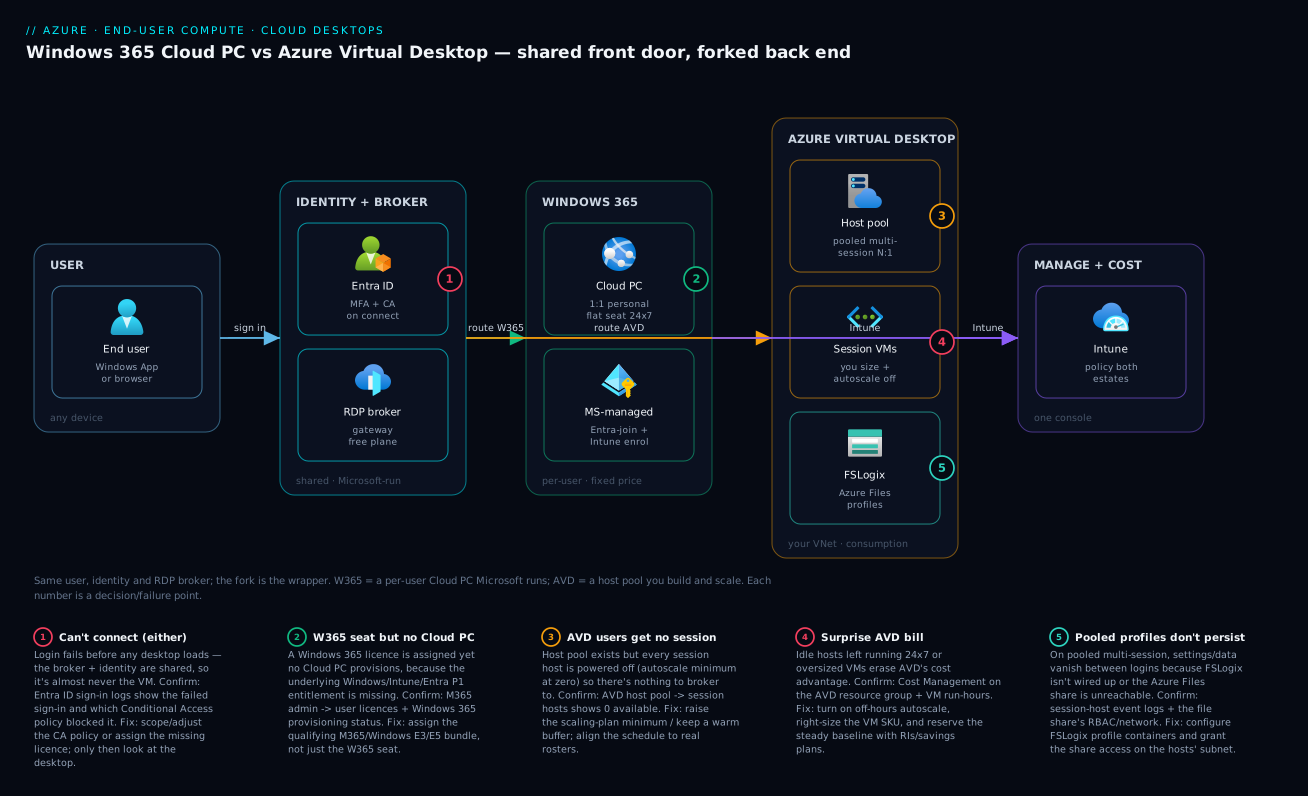
Read both architectures left to right and the difference becomes physical. A user on any device opens the same Windows App / web client and authenticates against Microsoft Entra ID with Conditional Access and MFA — this front part is identical for both. The fork is behind the broker. Down the Windows 365 path, Microsoft’s managed control plane routes the user to a dedicated Cloud PC — one VM, one user, always there — that Microsoft provisioned, Entra-joined, and Intune-enrolled; you never size the host, only manage the desktop as policy. Down the AVD path, the same kind of free Microsoft-run broker routes the user into a host pool of session-host VMs that you built, sized, imaged, and wired into your virtual network — and that pool can be pooled multi-session (many users per VM) with FSLogix profiles on shared storage and autoscale powering hosts on for the shift and off afterward.
The numbered badges mark the failures that most often bite — a shared “can’t connect,” a Windows 365 seat with no Cloud PC, AVD hosts powered off, a surprise bill, and FSLogix profiles not persisting — and the legend narrates each as symptom, confirm, fix. The shared spine on the left and the divergence on the right are the whole article in one picture.
Real-world scenario
Meridian Support Services is a fictional but typical 1,400-person business-process-outsourcing firm in Pune with two distinct populations under one roof, who tried — as many do — to serve both with a single product, then corrected course. The bulk is 1,100 contact-centre agents on two defined eight-hour shifts, on cheap thin clients, handling regulated data that must never leave the datacentre. The other 300 are corporate staff — finance, HR, team leads, a small design team — who work irregular hours from laptops, expect their desktop to persist with installed tools, and a dozen of whom (the designers) need GPU acceleration for rendering.
Their first instinct was everyone on Windows 365 for simplicity. The corporate staff loved it — but finance flagged the agent fleet within a quarter: 1,100 always-on Cloud PCs, billed flat, used for at most two shifts a day. They were paying around the clock for desktops idle most of the night — roughly two to three times the desktop-hours consumed — with no lever to reduce it, because Windows 365 has no idle reclaim and no multi-session density.
So they split the estate along cohort lines. The 1,100 agents moved to AVD on pooled Windows 11 multi-session: a few dozen session-host VMs packed with agents per shift, FSLogix profiles on Azure Files so any agent lands on any host, autoscale powering most hosts off between shifts, and a locked-down image with the regulated apps — so compute now billed roughly for hours worked. The 300 corporate staff stayed on Windows 365 — persistent personal desktops, no host pool to operate, predictable billing — and the 12 designers got a small AVD personal pool on NV-series GPU VMs, which Windows 365 could not have delivered.
What they learned: the AVD cutover was not trivial — the team had to learn host-pool design, FSLogix, image management, and autoscale, exactly the burden Windows 365 had spared them. Their first autoscale schedule de-allocated hosts mid-shift during an overtime push and dropped sessions, fixed by aligning to real rosters and adding a warm buffer; and they nearly mis-costed the comparison by pricing the AVD Windows licence as an extra until someone noted the agents’ M365 E3 covered it. The end state — AVD pooled for agents, an AVD GPU pool for designers, Windows 365 for corporate staff, all from one Intune console — is the textbook hybrid, and it cut the agent-fleet desktop bill substantially while keeping the corporate experience simple.
Advantages and disadvantages
No product is universally better; each trades the same things in opposite directions.
| Windows 365 Cloud PC | Azure Virtual Desktop (AVD) | |
|---|---|---|
| Advantages | Fixed, predictable per-seat price; near-zero infra ops; minutes to a desktop; Intune-managed like a physical PC; ideal for persistent personal desktops | Pay only for what runs (switch off idle hosts); pooled density; full SKU/image/network/scaling control; GPU desktops; cheapest at scale with density + reservations |
| Disadvantages | No idle reclaim — pay 24×7; personal (1:1) only, no density; can’t pick SKU/topology; not the GPU story; per-seat premium adds up on idle-heavy fleets | You operate everything (hosts, images, FSLogix, autoscale, network); variable bill misconfig can blow up; slower to first desktop; needs real infra skill; savings hinge on autoscale |
Windows 365 advantages matter most on small-to-mid estates, teams without VDI operators, and persistent personal desktops for steady knowledge workers — anywhere a predictable bill and minimal operations beat squeezing out idle-time savings. AVD advantages matter most on large fleets, shift-based or seasonal usage where powering hosts down reclaims real money, dense multi-session cohorts, GPU and custom-image needs, and teams that already operate Azure and want the control. The variable bill is an advantage precisely when you have the discipline to keep utilisation high — and a liability when you don’t.
Hands-on lab
You cannot meaningfully provision a real Cloud PC or AVD host pool for free — both incur licensing and Azure compute costs. So this is a no-spend decision and inspection lab: model a population, run it through the decision logic, and inspect the control planes with read-only az commands. Everything here is free.
Step 1 — Confirm your context. In Cloud Shell (free), check you are on the right subscription:
az account show --query "{name:name, id:id, tenant:tenantId}" -o table
Step 2 — Classify a sample population with a tiny decision script. Run this to turn cohorts into a recommendation using this article’s rules:
cat > classify.sh <<'EOF'
#!/usr/bin/env bash
# Inputs per cohort: name shift_based(y/n) gpu(y/n) persistent_personal(y/n) ops_team(y/n)
classify() {
  local name=$1 shift=$2 gpu=$3 personal=$4 ops=$5
  if [ "$gpu" = "y" ]; then echo "$name -> AVD (GPU NV-series pool)"; return; fi
  if [ "$shift" = "y" ] && [ "$ops" = "y" ]; then echo "$name -> AVD (pooled multi-session + autoscale)"; return; fi
  if [ "$personal" = "y" ]; then echo "$name -> Windows 365 (persistent personal, low ops)"; return; fi
  echo "$name -> Windows 365 (default: simplest)"
}
classify "ContactCentre"  y n n y
classify "CorporateStaff" n n y n
classify "DesignTeam"     n y n y
classify "Contractors"    n n y n
EOF
bash classify.sh
Output maps each cohort as the Meridian scenario did — agents to pooled AVD, corporate and contractors to Windows 365, designers to GPU AVD.
Step 3 — Inspect AVD objects (read-only). Confirm the provider and list any pools to see the object model AVD exposes (and Windows 365 hides):
# Confirm the Desktop Virtualization provider is registered
az provider show --namespace Microsoft.DesktopVirtualization \
  --query "{provider:namespace, state:registrationState}" -o table

# List any AVD host pools in the subscription (empty is fine — shows the object exists)
az desktopvirtualization hostpool list \
  --query "[].{name:name, type:hostPoolType, loadBalancer:loadBalancerType}" -o table
The point is the shape: AVD has hostpool, loadBalancerType, and host objects you operate. There is no equivalent az surface that sizes a Windows 365 Cloud PC host — Microsoft runs it, and Cloud PCs are assigned as per-user licences in the Entra/M365 admin surface, not Azure resources. That split is the difference between the two products.
Step 4 — (Optional) sketch a cost intuition. On paper with your own rates, compare Windows 365 (headcount × flat seat, 24×7) against AVD (VM-hours during working hours ÷ users-per-host). The cohort where AVD’s number is much lower is the one with reclaimable idle time or high density.
Teardown. Nothing to tear down — you created no billable resources. Delete the scripts if you like:
rm -f classify.sh
Common mistakes & troubleshooting
The moment you deploy either product, the same handful of failures appear. The short playbook — symptom, cause, where to confirm, fix. The lesson in every row: the control plane and identity are shared, so most “can’t connect” problems are identity/Conditional Access, not the desktop.
| # | Symptom | Likely root cause | Where to confirm | Fix |
|---|---|---|---|---|
| 1 | User can’t sign in to Cloud PC or AVD at all | Conditional Access policy blocks the connection (device/MFA/location) | Entra sign-in logs → the failed sign-in’s CA policy | Adjust/scope the CA policy; require compliant device correctly |
| 2 | Windows 365: licence assigned but no Cloud PC appears | Missing underlying entitlement (Windows/Intune/Entra P1) | M365 admin → user’s licences; Windows 365 provisioning status | Assign the qualifying M365/Windows bundle, not just the W365 seat |
| 3 | AVD: host pool exists but users can’t get a session | No session hosts running, or autoscale powered them all off | AVD host pool → session hosts (count/availability) | Power on hosts; fix the autoscale schedule’s minimum |
| 4 | AVD: sessions dropped mid-shift | Autoscale de-allocated hosts users were on | Azure Monitor / scaling-plan run history | Align schedule to real rosters; keep a warm buffer; drain before scale-in |
| 5 | AVD pooled: profiles/settings don’t persist | FSLogix not configured or storage unreachable | Session host event logs; Azure Files share permissions | Configure FSLogix profile containers; fix share RBAC/networking |
| 6 | Surprise bill (either product) | AVD: hosts run 24×7 / oversized. W365: idle cohort on flat seats | Cost Management → resource group / assigned seats vs usage | AVD: autoscale off-hours, right-size, reserve. W365: move cohort to AVD |
| 7 | Slow/laggy desktop experience | Wrong region, or undersized SKU/VM | Connection round-trip; VM/SKU CPU & RAM metrics | Deploy in the nearest region; size up the SKU/VM |
| 8 | “It works for some users, not others” | Per-user licence, group, or CA scoping gaps | Entra group membership; per-user licence state | Fix group/licence assignment; align CA scope |
One rule above the rest: for any “can’t connect,” check Entra sign-in logs before touching the desktop — the shared broker/identity layer means it’s usually Conditional Access or licensing, not the VM.
Best practices
- Choose per cohort, not per organisation — map each population to the product via the decision table; large estates run both.
- Default to AVD pooled where you can reclaim idle time or pack users (shift work, large fleets, multi-session) and to Windows 365 where you can’t (persistent personal, steady, small-ops).
- Always count the AVD Windows licence as already-paid if users hold eligible M365/Windows E3/E5 — compare AVD infrastructure against the full Windows 365 seat, or every comparison is wrong.
- Automate the AVD off-switch from day one. Autoscale is what makes AVD cheap — align schedules to real rosters and keep a warm buffer.
- Use pooled multi-session + FSLogix so any user lands on any host — that combination is the whole point of pooled.
- Right-size and reserve — smallest VM/SKU that performs, then Reserved Instances / savings plans.
- Deploy close to your users — RDP latency is felt directly; pick the nearest region.
- Manage everything from one Intune plane — Cloud PCs and AVD session hosts alike.
- Put Conditional Access + MFA on every connection, both products, scoped per cohort — the connection is the security boundary.
- Pilot before you commit a fleet — measure real cost and ops effort, and let the numbers, not the brochure, decide.
Security notes
Both products inherit Azure and Microsoft 365’s security model, and the controls largely overlap because the identity and management planes are shared — but the responsibility split differs.
Identity is the front door for both. Authentication is Microsoft Entra ID; enforce MFA and Conditional Access on the connection for both Cloud PCs and AVD, scoped by group, device compliance, and sign-in risk — because the broker and identity layer are shared, that posture applies consistently. Endpoint hardening is likewise identical via Microsoft Intune — compliance policies, disk encryption, ASR rules, app control, and update rings hit Cloud PCs and AVD session hosts from one set of baselines.
The network responsibility differs. With AVD the session hosts live in your VNet, so isolation — NSGs, private endpoints to data, no public inbound, egress control — is yours to get right (Azure Private Endpoint vs Service Endpoint is the building block when desktops reach private data). With Windows 365 the default is a Microsoft-hosted network you don’t have to secure, or you bring your own via Azure network connection. Whatever the desktops connect to should use least-privilege identities and secrets in Azure Key Vault, never credentials baked into images (Azure Key Vault: Secrets, Keys and Certificates Done Right) — image hygiene matters most on AVD, where a leaked secret in a golden image lands on every host.
Cost & sizing
What drives the bill differs per product, so size them differently. Figures are illustrative — always verify current Azure and Windows 365 pricing for your region and currency before budgeting. Sizing Windows 365 is “pick the smallest SKU that performs, for persistent users only”; sizing AVD is the VM size, the users-per-host density for pooled, and above all the hours hosts run under autoscale. The drivers, and the lever for each:
| Cost driver | Windows 365 Cloud PC | Azure Virtual Desktop (AVD) | How to reduce it |
|---|---|---|---|
| Primary meter | Flat seat × user × month | VM-seconds of compute | W365: fewer/right-sized seats. AVD: fewer running hours |
| Idle time | Paid in full | ~Free if deallocated | AVD: autoscale off-hours; W365: move idle cohorts off it |
| Density | None (1:1) | Many users per pooled host | AVD: tune users-per-host within CPU/RAM limits |
| Storage | Bundled | FSLogix profiles + OS disks | AVD: right-size profile quota; tier the share |
| Windows licence | In the seat price | Usually already in M365/Windows E3/E5 | AVD: don’t pay twice — use existing entitlement |
| Commitment discount | N/A | Reserved Instances / savings plans | AVD: reserve steady baseline capacity |
| Region | Pick near users | Pick near users | Both: nearest region cuts latency, not just cost |
The free-tier reality: there is no free tier for either desktop — both cost money from the first user. What is free is the AVD control plane and Cloud Shell. Budget the desktop, not the broker.
Interview & exam questions
These map to AZ-140 (Configuring and Operating Microsoft Azure Virtual Desktop), MD-102 (Endpoint Administrator), and the architecture reasoning in AZ-305.
-
What is a Windows 365 Cloud PC vs Azure Virtual Desktop? A Cloud PC is a dedicated, fixed-price-per-user, Microsoft-managed personal Windows desktop. AVD is a Microsoft-run brokering platform on which you build and scale your own session-host VMs (pooled or personal), billed by Azure consumption.
-
The single biggest difference in billing? Windows 365 is flat per-user-per-month regardless of usage; AVD is consumption — VM-hours plus storage, with idle compute essentially free when hosts are deallocated.
-
Which offers pooled multi-session, and why does it matter? AVD only. Many users share one VM, amortising cost across them — the main reason AVD is cheaper at scale. Windows 365 is personal (1:1) only.
-
A 1,000-seat call centre on one daytime shift — which, and why? AVD pooled with autoscale: power hosts off out of hours and pack agents onto multi-session hosts, paying roughly for hours worked, not 24×7 flat seats.
-
200 executives wanting always-on personal desktops — which, and why? Windows 365: no idle to reclaim and no density to exploit, so the flat, zero-ops seat is both cheaper to operate and simpler than running a host pool.
-
Do you buy a per-user “AVD licence”? No. The right to run Windows Enterprise on AVD comes from existing eligible entitlements (M365/Windows E3/E5); you pay only Azure consumption. External users use AVD per-user access pricing.
-
What runs the AVD control plane, and what does it cost? Microsoft runs it (gateway, broker, diagnostics) and it is free — you pay only the session-host VMs and storage.
-
Name two things you control in AVD that Windows 365 hides. Any two of: VM SKU, host-pool topology, OS image/patching, FSLogix storage, autoscale rules, load-balancing algorithm, VNet placement.
-
A user can’t connect to either — where first, and why? Entra ID sign-in logs — the broker and identity layer are shared, so it’s usually Conditional Access or licensing, not the desktop VM.
-
When does AVD’s cost advantage disappear, and what’s the most common costing mistake? It disappears when you can’t reclaim idle time or exploit density (always-on personal desktops), or you leave hosts on 24×7 without autoscale. The classic mistake is pricing the AVD Windows licence as an extra when it’s already in the users’ M365 entitlement — compare AVD infrastructure against the full Windows 365 seat. Hybrid usually wins: AVD for shift/dense/GPU cohorts, Windows 365 for persistent personal ones.
Quick check
- Which product gives you pooled multi-session desktops?
- True or false: a Windows 365 Cloud PC costs the same whether the user logs in for ten hours or not at all.
- What runs the AVD control plane, and what does it cost you?
- For a fleet that works one defined shift and sits idle overnight, which product usually wins on cost, and what feature makes it win?
- When a user can’t connect to either product, which log do you check first?
Answers
- Azure Virtual Desktop (AVD). Windows 365 is personal (1:1) only; pooled multi-session is exclusively an AVD capability.
- True. Windows 365 is flat per-seat, billed 24×7 regardless of actual usage — which is exactly why idle-heavy fleets are the wrong fit.
- Microsoft runs it (gateway, broker, diagnostics) and it is free. You pay only for the session-host VMs and their storage.
- AVD wins, because autoscale powers the session hosts off out of hours (idle compute is ~free when deallocated) and pooled multi-session packs many users onto each running VM.
- Microsoft Entra ID sign-in logs. The broker and identity layer are shared by both products, so a connection failure is usually Conditional Access or licensing, not the desktop itself.
Glossary
- Windows 365 / Cloud PC — Microsoft’s DaaS product: a dedicated, fixed-price-per-user, always-on Windows desktop (one VM per user), managed via Intune.
- Azure Virtual Desktop (AVD) — A Microsoft-run brokering platform for building your own virtual desktops (pooled or personal) on Azure VMs, billed by consumption.
- Session host — A VM that serves desktop sessions; in AVD you create and operate them, in Windows 365 Microsoft runs them invisibly.
- Host pool — The AVD object grouping session hosts and their users; configured as pooled or personal.
- Personal (1:1) — One VM dedicated to one user; the only model Windows 365 offers.
- Pooled / multi-session — An AVD model where many users share isolated interactive sessions on one Windows multi-session VM; the key density/cost lever.
- FSLogix — Profile-container technology storing a user’s profile on shared storage so they get a consistent experience on any pooled host.
- Autoscale (scaling plan) — AVD logic that powers session hosts on/off on a schedule or metric — the main AVD cost-saver.
- Consumption billing — Paying for Azure resources by the second of use, as AVD does — versus a flat subscription.
- RDP (Remote Desktop Protocol) — The protocol streaming the desktop’s screen, input, and devices to the client; used by both products.
- Microsoft Intune — The endpoint-management service applying policy, compliance, and apps to Cloud PCs and AVD session hosts alike.
- Microsoft Entra ID — Microsoft’s cloud identity directory; authenticates and gates connections (with CA/MFA) for both products.
- Azure network connection (ANC) — The Windows 365 mechanism for joining Cloud PCs to your own VNet instead of the Microsoft-hosted network.
Next steps
- Quantify the consumption-versus-fixed debate for your cohorts with Azure FinOps and Cost Management: Controlling Cloud Spend at Scale.
- Get the foundations both products depend on straight with Azure Virtual Network, Subnets and NSGs: Networking Fundamentals and Azure Regions and Availability Zones: Designing for Resilience.
- Secure what the desktops connect to using Azure Key Vault: Secrets, Keys and Certificates Done Right and Azure Private Endpoint vs Service Endpoint.
- When you operate AVD at scale, wire up Azure Monitor and Application Insights: Full-Stack Observability.