Almost nothing you build on AWS talks to the internet directly. In front of your EC2 instances, your containers, your Lambda functions, and even your on-prem servers sits a load balancer — the single, stable front door that takes incoming connections and spreads them across a fleet of backends, hides individual instance failures, terminates TLS, and gives you one DNS name that survives every scale-out, deploy, and instance replacement underneath it. Get it right and your application is highly available, horizontally scalable, and secure by default. Get it wrong and you discover, usually at 3 a.m., that health checks were failing silently, that cross-zone traffic was lop-sided, that sticky sessions pinned everyone to one dying instance, or that you paid for a Network Load Balancer when you needed Layer-7 path routing.
Elastic Load Balancing (ELB) is the AWS service that gives you four flavours of load balancer for four different jobs: the Application Load Balancer (ALB) for HTTP/HTTPS and content-based routing at Layer 7; the Network Load Balancer (NLB) for raw TCP/UDP throughput and ultra-low latency at Layer 4; the Gateway Load Balancer (GWLB) for inserting third-party security appliances transparently at Layer 3; and the Classic Load Balancer (CLB), the original, now legacy and slated for retirement. This is the exhaustive lesson. We go through the whole family — the comparison that decides which one you pick, then listeners and routing rules, target groups in every shape (instance, IP, Lambda, ALB-as-target), health checks down to the field, deregistration delay, the three stickiness modes, slow start, cross-zone load balancing and its billing twist, TLS termination with SNI and mutual TLS, access logs, and the security-group model that differs between ALB and NLB — until you can whiteboard an AWS load-balancing design from memory and answer every follow-up the SAA and Advanced Networking exams will throw at you.
Learning objectives
- Choose the right load balancer — ALB, NLB, GWLB, or (never again) CLB — from the OSI layer, protocol, and feature requirements, and justify the choice in an interview.
- Configure listeners and rules on an ALB: host-based, path-based, header, query-string, source-IP and HTTP-method conditions; redirect, fixed-response, forward, weighted forward, and authenticate actions.
- Build target groups of every target type (instance, IP, Lambda, ALB) and tune health checks, deregistration delay, stickiness, and slow start field by field.
- Reason correctly about cross-zone load balancing — the default per load-balancer type, the traffic distribution it produces, and the inter-AZ data-transfer cost it can incur.
- Implement TLS termination with SNI for many certificates on one listener, configure security policies, and stand up mutual TLS (mTLS) on an ALB.
- Apply the correct security model — security groups on ALB/GWLB, the NLB’s special behaviour and
preserve_client_ip— and turn on access logs for audit and troubleshooting.
Prerequisites & where this fits
You need an AWS account, the AWS CLI configured (see AWS Hands-On First Steps), and a working mental model of a VPC — subnets across Availability Zones, route tables, and security groups vs NACLs. If those are shaky, read Amazon VPC, In Depth and AWS Security Groups vs Network ACLs, In Depth first — this lesson assumes you know what a subnet and a security group are and goes deep on every load-balancer knob. This is the Networking deep-dive of the AWS Zero-to-Hero course, the layer that sits between your VPC and your compute. It pairs naturally with EC2 Auto Scaling (a load balancer’s target group is what an Auto Scaling group registers into) and with Route 53, which puts a friendly name in front of the load balancer’s own DNS name — the next lesson, Amazon Route 53, In Depth, covers that.
Core concepts
A load balancer accepts incoming connections on one side and distributes them across a pool of targets on the other, so that no single backend is a bottleneck or a single point of failure. The AWS implementation is a fully managed, horizontally scaling fleet of nodes that AWS runs for you — you never see or patch the underlying instances; you just get a DNS name and an endpoint that scales with load.
Anchor everything that follows on these mental models:
- The load balancer is a fleet, addressed by DNS — never by IP. When you create an ELB, AWS places one or more nodes in each subnet you select (one per Availability Zone). The endpoint you get is a DNS name (e.g.
my-alb-123456.eu-west-1.elb.amazonaws.com) that resolves to the nodes’ IP addresses, and that set of IPs changes over time as AWS scales and heals the fleet. You always point clients (or Route 53 alias records) at the DNS name, never at a resolved IP. (The one exception: an NLB can be given static Elastic IPs — more on that later.) - Layers decide the family. ELB maps to the OSI model. ALB operates at Layer 7 (the application layer) — it understands HTTP, sees URLs, headers, cookies, and methods, and routes on them. NLB operates at Layer 4 (transport) — it sees TCP/UDP and ports, not content, and is brutally fast. GWLB operates at Layer 3 (network) — it transparently steers IP packets to and from inspection appliances. Which layer your requirement lives at picks your load balancer.
- Listener → rules → target group → targets. A listener checks for connections on a protocol and port (e.g. HTTPS:443). On an ALB it evaluates rules in priority order; each rule has conditions (match on host, path, header…) and actions (forward to a target group, redirect, return a fixed response…). The chosen action sends the request to a target group, which is a set of registered targets (instances, IPs, a Lambda function, or another ALB) plus the health check that decides which targets are eligible.
- Health checks are the whole game. A load balancer only sends traffic to healthy targets. The health check — its protocol, path, codes, thresholds, and timing — is what defines “healthy”. Most production load-balancer incidents are health-check misconfigurations: a check that’s too strict flaps targets in and out; one that’s too loose sends users to broken instances.
- AZs and cross-zone. A load balancer node lives in one AZ. Cross-zone load balancing controls whether a node may send traffic to targets in other AZs or only its own. This one toggle changes both your traffic distribution and, sometimes, your bill.
Key terms you’ll see throughout: target group (the pool of backends + health check), listener (protocol/port the LB accepts on), rule (ALB condition→action), deregistration delay / connection draining (the grace period before a removed target stops receiving traffic), stickiness / session affinity (pinning a client to one target), SNI (Server Name Indication — multiple TLS certificates on one listener), mTLS (mutual TLS — the client also presents a certificate), and cross-zone load balancing (whether nodes spread traffic across AZs).
The ELB family: ALB vs NLB vs GWLB vs CLB
Four load balancers, four jobs. Three of them — ALB, NLB, GWLB — share a modern code base and are collectively the v2 / “Elastic Load Balancing v2” generation built on the target-group model. The CLB is the v1 original, predating target groups, and AWS has announced its retirement; treat it as legacy only.
| Capability | ALB (Application) | NLB (Network) | GWLB (Gateway) | CLB (Classic — legacy) |
|---|---|---|---|---|
| OSI layer | 7 (application) | 4 (transport) | 3 (network) + 4 | 4 and 7 (limited) |
| Protocols | HTTP, HTTPS, gRPC, HTTP/2, WebSocket | TCP, UDP, TCP_UDP, TLS | IP (GENEVE encapsulation, port 6081) | TCP, SSL, HTTP, HTTPS |
| Routing intelligence | Host, path, header, query, method, source IP | By flow (5-tuple hash) — no content awareness | Transparent — forwards all packets to appliances | Round-robin / least-outstanding; basic |
| Performance | High; adds a few ms latency | Millions of req/s, ultra-low latency, sub-ms | High; bump-in-the-wire | Lower; older engine |
| Static IP / Elastic IP | No (DNS name only) | Yes (one EIP per AZ) | No (uses endpoints) | No |
| Preserve client source IP | No (use X-Forwarded-For header) |
Yes by default (instance/IP targets) | Yes (encapsulated) | No (XFF for HTTP) |
| Security group | Yes (attached to the ALB) | Yes (since Aug 2023) | No | Yes |
| Target types | instance, IP, Lambda, ALB | instance, IP, ALB | n/a (GWLB endpoints) | instance only |
| TLS termination | Yes (+ SNI, mTLS) | Yes (TLS listener; + mTLS) | No (passes through) | Yes (SSL) |
| WAF integration | Yes (AWS WAF attaches to ALB) | No | No | No |
| Authentication (OIDC/Cognito) | Yes | No | No | No |
| Sticky sessions | Duration cookie + app cookie | Source-IP affinity | n/a | Duration cookie |
| Slow start | Yes | No | No | No |
| Typical use | Web apps, microservices, API routing | Extreme TCP/UDP throughput, static IP, PrivateLink front | Inline firewalls/IDS/IPS appliances | Existing EC2-Classic / don’t use for new |
The decision in one breath: HTTP/HTTPS with any content-based routing → ALB. Raw TCP/UDP, static IPs, extreme performance, or fronting a PrivateLink service → NLB. Inserting third-party security appliances inline → GWLB. New workload → never CLB. The “when each” section at the end works through the edge cases.
Application Load Balancer (ALB) — Layer 7
The ALB speaks HTTP. It terminates the connection, parses the request, and routes on anything in the request: the Host header, the URL path, arbitrary headers, query strings, the HTTP method, even the source IP. That intelligence is why it’s the default for web applications and microservices — one ALB can route /api/* to one service, /static/* to another, admin.example.com to a third, all from a single listener. It supports HTTP/1.1, HTTP/2, gRPC, and WebSockets, integrates with AWS WAF for L7 protection, and can authenticate users via OIDC or Amazon Cognito before the request ever reaches your code. Because it operates at L7, it does not preserve the client’s source IP at the TCP layer — your application reads the original client address from the X-Forwarded-For header instead. It always uses a DNS name (no static IP) and always has a security group.
Network Load Balancer (NLB) — Layer 4
The NLB doesn’t read your traffic — it forwards flows. It hashes the connection’s 5-tuple (source IP, source port, destination IP, destination port, protocol) to pick a target and sends the packets on, which makes it astonishingly fast: millions of requests per second, single-digit-millisecond (often sub-millisecond) latency, and the ability to scale to sudden, spiky traffic without pre-warming. It’s the only ELB that can have a static Elastic IP per AZ — essential when clients need to allowlist your IPs by firewall rule. It preserves the client source IP by default for instance and IP targets, handles TCP, UDP, TCP_UDP, and TLS listeners, and is the load balancer you put behind an AWS PrivateLink endpoint service. Since August 2023 NLBs support security groups too (and you must decide at creation time — you cannot add one to an SG-less NLB later). Reach for the NLB when you need extreme performance, non-HTTP protocols, static IPs, or source-IP preservation.
Gateway Load Balancer (GWLB) — Layer 3
The GWLB exists for one job: inserting third-party network appliances — firewalls, IDS/IPS, deep packet inspection — transparently into your traffic path, as a “bump in the wire”. It operates at Layer 3, distributing IP packets across a fleet of appliances and using the GENEVE protocol (UDP port 6081) to encapsulate traffic so the appliance sees the original packet unchanged. You don’t point clients at a GWLB directly; you create Gateway Load Balancer Endpoints (a PrivateLink type) and route traffic to them with VPC route tables. It preserves flow stickiness so a connection’s packets always reach the same appliance. If you’re deploying a Palo Alto, Fortinet, Check Point, or similar virtual appliance for centralised inspection, the GWLB is the AWS-native way to do it — see AWS Network Firewall: egress filtering & centralized inspection for the AWS-managed alternative.
Classic Load Balancer (CLB) — legacy
The original ELB from 2009, predating target groups and the v2 generation. It straddles L4 and a limited L7, supports only instance targets, has none of the modern routing rules, no SNI, no Lambda targets, and a weaker feature set across the board. AWS has announced the retirement of the Classic Load Balancer and is actively steering customers off it. The only reason to touch a CLB today is to migrate an old workload away from it. Every new design uses ALB or NLB.
Listeners and rules
A listener is the front door: a protocol and port the load balancer accepts connections on. You can have multiple listeners on one load balancer (e.g. an ALB with both HTTP:80 — usually redirecting — and HTTPS:443). What a listener does with a connection differs by load-balancer type: on an NLB and CLB the listener simply forwards to a target group (or, on CLB, to instances); on an ALB, the listener runs an ordered list of rules, and this is where the L7 power lives.
Listener fields
| Field | What it does | Choices / default | When to change / gotcha |
|---|---|---|---|
| Protocol | The protocol the listener accepts | ALB: HTTP, HTTPS. NLB: TCP, UDP, TCP_UDP, TLS. | Match the client’s protocol; TLS/HTTPS unlocks certificate and security-policy fields. |
| Port | The port clients connect on | 1–65535 | 80/443 are conventional; nothing stops you using others. One listener per port. |
| Default action | What happens when no rule matches (ALB) or for every connection (NLB) | forward / redirect / fixed-response / authenticate | Always set a sensible default — often a fixed 404 or a redirect, so unmatched traffic isn’t accidentally forwarded. |
| SSL/TLS certificate | The server certificate (HTTPS/TLS only) | ACM or IAM certificate | Use ACM — free public certs, auto-renewal. One default cert; add more via SNI. |
| Security policy | The negotiable TLS protocols/ciphers | A named ELBSecurityPolicy-* |
Pick a current TLS-1.2/1.3 policy; older policies allow weak ciphers (see Security notes). |
| mTLS mode | Whether clients must present a certificate (ALB HTTPS) | off / verify / passthrough | Turn on only when you need client-certificate auth; see the mTLS section. |
| ALPN | Application-Layer Protocol Negotiation (NLB TLS) | None / HTTP1Only / HTTP2Only / HTTP2Optional / etc. | Set for HTTP/2 over a TLS NLB listener. |
ALB rules: conditions and actions
Each ALB listener has a default rule (the catch-all) plus up to 100 custom rules, evaluated in priority order, lowest number first; the first rule whose conditions all match wins, and evaluation stops. A rule is a set of conditions (ANDed together) and exactly one terminal action (plus optional non-terminal actions like authenticate that run first).
Rule conditions — the things you can match on:
| Condition | Matches on | Example |
|---|---|---|
| Host header | The Host: / domain |
shop.example.com, *.example.com |
| Path | The URL path | /api/*, /images/* |
| HTTP header | Any request header (name + value) | X-Tenant: acme |
| HTTP request method | GET/POST/PUT/DELETE/… | route writes vs reads differently |
| Query string | ?key=value pairs |
?version=beta |
| Source IP | Client CIDR | 203.0.113.0/24 (allowlist an office) |
Conditions support wildcards (*, ?) and you can have several values per condition. All conditions in a rule must match for the rule to fire.
Rule actions — what happens when a rule matches:
| Action | What it does | Notes |
|---|---|---|
| forward | Send to one target group | The bread-and-butter action. |
| weighted forward | Split across multiple target groups by weight | Enables blue/green and canary at the load-balancer layer; combine with target-group stickiness to keep a session on one group. |
| redirect | Return a 301/302 to a new URL | The standard HTTP→HTTPS redirect; can rewrite host, path, port, query. |
| fixed-response | Return a hard-coded status + body | Maintenance pages, blocking, health endpoints without a backend. |
| authenticate-oidc | Require login via an OIDC IdP | Runs before forward; offloads auth from your app. |
| authenticate-cognito | Require login via Amazon Cognito | Same idea, Cognito user pools. |
A canonical setup: an HTTP:80 listener whose default action is a redirect to HTTPS, and an HTTPS:443 listener with rules — Host shop.example.com + Path /api/* → forward to tg-api; Path /static/* → forward to tg-static; default → forward to tg-web. That’s content-based routing, and it’s why teams pick the ALB.
# Add an HTTPS listener with a default forward to a target group
aws elbv2 create-listener \
  --load-balancer-arn "$ALB_ARN" \
  --protocol HTTPS --port 443 \
  --certificates CertificateArn="$ACM_CERT_ARN" \
  --ssl-policy ELBSecurityPolicy-TLS13-1-2-2021-06 \
  --default-actions Type=forward,TargetGroupArn="$TG_WEB_ARN"

# Add a path-based rule: /api/* -> tg-api, priority 10
aws elbv2 create-rule \
  --listener-arn "$LISTENER_ARN" \
  --priority 10 \
  --conditions Field=path-pattern,Values='/api/*' \
  --actions Type=forward,TargetGroupArn="$TG_API_ARN"

# HTTP:80 listener that redirects everything to HTTPS
aws elbv2 create-listener \
  --load-balancer-arn "$ALB_ARN" \
  --protocol HTTP --port 80 \
  --default-actions \
  'Type=redirect,RedirectConfig={Protocol=HTTPS,Port=443,StatusCode=HTTP_301}'
Target groups
A target group is the pool of backends a listener or rule forwards to, plus the health check that decides which of those backends are eligible, plus the per-group attributes (deregistration delay, stickiness, slow start, etc.). Target groups are first-class resources you create independently and attach to listeners — and one target group can be referenced by multiple listeners or rules, even across more than one load balancer. The most important decision is the target type, because it’s fixed at creation and changes everything else.
Target types
| Target type | What you register | Source IP your app sees | When to use | Gotcha |
|---|---|---|---|---|
| instance | EC2 instance IDs | The LB’s private IP (ALB) / client IP (NLB) | The default for EC2 fleets behind an ALB/NLB; Auto Scaling registers here | Targets must be in the LB’s VPC; routes traffic to the instance’s primary IP. |
| ip | IP addresses (in-VPC, peered VPC, or on-prem over VPN/DX) | Same as instance | Containers (ECS awsvpc), on-prem servers, peered VPCs, higher target density | You manage registration; IPs must be RFC1918 within reachable ranges (or the VPC CIDR). |
| lambda | A Lambda function | n/a (event payload) | Serverless backends behind an ALB | ALB only; the ALB invokes the function and maps the response to HTTP. |
| alb | Another Application Load Balancer | n/a | Front an ALB with an NLB (static IP / PrivateLink in front of L7 routing) | Target type alb is for an NLB target group pointing at an ALB. |
The alb target type is the clever one: it lets you put an NLB in front of an ALB, so you get the NLB’s static Elastic IPs and PrivateLink support plus the ALB’s Layer-7 routing behind it — the standard way to expose an HTTP service over PrivateLink.
Target group core settings
| Setting | What it does | Values / default | When to change / gotcha |
|---|---|---|---|
| Target type | Instance / IP / Lambda / ALB | As above; fixed at creation | Choose deliberately; to change it you recreate the group. |
| Protocol | Protocol to the targets | HTTP/HTTPS (ALB); TCP/UDP/TLS (NLB) | Use HTTP to targets unless you need end-to-end encryption (then HTTPS/TLS — re-encryption). |
| Port | Port on the target | 1–65535 | The port your app listens on; for dynamic-port containers, the registration overrides it. |
| Protocol version | HTTP/1.1, HTTP/2, or gRPC | HTTP1 (default) | Set gRPC for gRPC services; HTTP2 for h2c to targets. |
| VPC | The VPC the targets live in | Any VPC the LB can reach | IP targets can be in peered VPCs / on-prem; instance targets must match the LB’s VPC. |
| IP address type | IPv4 or IPv6 targets | IPv4 (default) | Match your fleet; dual-stack ALBs can have IPv6 target groups. |
Health checks — field by field
The health check is the most consequential thing in a target group. The load balancer probes each target on a schedule; a target becomes healthy after N consecutive passes and unhealthy after M consecutive failures, and only healthy targets receive traffic.
| Field | What it does | Default (ALB) | Notes / gotcha |
|---|---|---|---|
| Protocol | Protocol used to probe | HTTP | NLB can health-check with TCP/HTTP/HTTPS even for a TCP listener — prefer an HTTP check so you test the app, not just the port. |
| Path | The URL path probed (HTTP/HTTPS) | / |
Point it at a real /healthz that checks dependencies — but not so deep it cascades failures. |
| Port | Port to probe | traffic-port (same as the target port) |
Override to use a dedicated health port if your app exposes one. |
| Healthy threshold | Consecutive passes to mark healthy | 5 (ALB) / 3 (NLB) | Higher = slower to add a recovered target; lower = faster but flappier. |
| Unhealthy threshold | Consecutive failures to mark unhealthy | 2 | Lower = quicker to eject a bad target; too low flaps on transient blips. |
| Timeout | Seconds to wait for a probe response | 5s (ALB) | Must be less than the interval. A slow /healthz causes false failures. |
| Interval | Seconds between probes | 30s (ALB) / 30s (NLB) | Lower for faster detection (min 5s); raises probe volume on targets. |
| Success codes (Matcher) | HTTP codes counted as healthy | 200 (ALB) |
Use a range like 200-299 if your health endpoint can return 204; gRPC uses status codes. |
The classic failure mode: a security group that doesn’t allow the load balancer’s traffic to the health-check port, so every target shows unhealthy and the ALB returns 503 Service Unavailable. Always allow the LB’s SG (ALB) or the LB nodes’ subnet/CIDR (NLB) inbound to the target on both the traffic port and the health-check port.
Deregistration delay (connection draining)
When a target is deregistered — because Auto Scaling is terminating it, you’re deploying, or it failed — you rarely want to cut its in-flight requests dead. Deregistration delay (a.k.a. connection draining) is the grace period during which the load balancer stops sending new requests to the target but lets existing connections finish.
| Attribute | What it does | Default | When to change |
|---|---|---|---|
deregistration_delay.timeout_seconds |
Seconds to wait for in-flight requests to drain before fully removing the target | 300s | Lower (e.g. 30s) for stateless, short-request web apps to speed deploys; raise for long-lived requests/uploads. |
deregistration_delay.connection_termination.enabled (NLB) |
Whether to forcibly terminate connections at the end of the delay | false | Set true to hard-close lingering NLB flows. |
Tie this to your Auto Scaling lifecycle hooks and ALB health-check grace period so instances drain cleanly on scale-in and on rolling deploys.
Stickiness (session affinity)
By default a load balancer spreads requests; stickiness pins a client to the same target for a window, which matters for apps that hold session state in memory. There are three flavours:
| Mode | How it works | Where | When to use / gotcha |
|---|---|---|---|
| Duration-based (LB cookie) | The ALB issues its own cookie (AWSALB) and routes that client back to the same target for the configured duration (1s–7 days) |
ALB target group | Simple session affinity; the LB owns the cookie. Defeats even load spreading. |
| Application-based cookie | The ALB honours a cookie your application sets (you name it; the ALB wraps it in AWSALBAPP) |
ALB target group | Use when the app already manages a session cookie and you want affinity tied to it. |
| Source-IP affinity | The NLB hashes the client source IP (and optionally port) to a fixed target | NLB target group | The L4 equivalent; note clients behind one NAT all land on the same target. |
Stickiness is a smell as often as a solution: it undermines even distribution and means a target’s death takes its pinned sessions with it. Prefer stateless backends with session state in ElastiCache/DynamoDB, and use stickiness only when you truly cannot.
Slow start
When a fresh target joins a busy target group, sending it a full share of traffic immediately can overwhelm a cold JVM, an empty cache, or a connection pool that hasn’t warmed. Slow start ramps a new target’s traffic linearly from zero to its full share over a configured window (30–900 seconds; 0 = disabled, the default).
| Attribute | What it does | Default | When to change |
|---|---|---|---|
slow_start.duration_seconds |
Linear ramp-up window for newly healthy targets | 0 (off) | Set 30–300s for JIT-compiled / cache-warming apps so new instances aren’t crushed on join. |
Slow start applies to ALB and CLB target groups only (not NLB), and it does not apply while a target group is empty or only has one target — there’s no one else to share with.
Cross-zone load balancing
A load balancer has one node per Availability Zone. Cross-zone load balancing decides whether each node may send traffic only to targets in its own AZ or to all registered targets across every AZ. This single setting changes both distribution fairness and your bill, and — crucially — the default differs by load-balancer type.
| Behaviour | Cross-zone ON | Cross-zone OFF |
|---|---|---|
| Where a node sends traffic | Any healthy target in any AZ | Only healthy targets in the node’s own AZ |
| Distribution | Even across all targets regardless of per-AZ counts | Even across AZs first, so uneven per-AZ target counts → uneven per-target load |
| Inter-AZ data transfer cost | ALB: free. NLB/GWLB: charged for cross-zone traffic | None (traffic stays in-AZ) |
| Default | ALB: ON (always; not configurable off at LB level — set per target group). | NLB & GWLB: OFF. CLB via console: ON; via API/CLI: OFF |
Why the uneven-distribution warning matters: imagine AZ-a has 1 instance and AZ-b has 4, and Route 53 sends roughly half the clients to each AZ’s node. With cross-zone off, the single instance in AZ-a gets the whole of AZ-a’s 50% while each of AZ-b’s four instances gets 12.5% — a 4× imbalance. With cross-zone on, all five instances share equally. The defence is to keep target counts balanced across AZs (Auto Scaling’s AZ rebalancing does this) or turn cross-zone on.
The billing twist: for the ALB cross-zone traffic is free, so leaving it on is a no-brainer. For the NLB and GWLB, cross-zone traffic incurs inter-AZ data-transfer charges, so enabling it trades even distribution for cost — on a high-throughput NLB that can be significant. On v2 load balancers cross-zone is configured as a target-group attribute (load_balancing.cross_zone.enabled), so you can even mix policies per target group.
# Turn cross-zone ON for an NLB target group (off by default)
aws elbv2 modify-target-group-attributes \
  --target-group-arn "$TG_ARN" \
  --attributes Key=load_balancing.cross_zone.enabled,Value=true
TLS termination, SNI and mTLS
TLS termination means the load balancer decrypts HTTPS/TLS at the edge so your backends can speak plain HTTP — offloading the cryptographic work, centralising certificate management, and letting the ALB read the request for routing. (You can also re-encrypt to the targets by using an HTTPS/TLS target-group protocol when end-to-end encryption is required.)
Certificates and security policies
You attach a server certificate to an HTTPS (ALB) or TLS (NLB) listener. Use AWS Certificate Manager (ACM) — public certificates are free and auto-renew, so you never get paged for an expired cert. The security policy (ELBSecurityPolicy-*) is the named set of TLS protocol versions and cipher suites the listener will negotiate; pick a current TLS 1.2/1.3 policy (e.g. ELBSecurityPolicy-TLS13-1-2-2021-06) so you don’t allow legacy TLS 1.0/1.1 or weak ciphers.
SNI — many certificates, one listener
Server Name Indication (SNI) lets a single HTTPS listener serve multiple TLS certificates and present the right one based on the hostname the client requests in the TLS handshake. You set one default certificate and add others; the ALB matches the SNI hostname to the best certificate (a NLB TLS listener supports SNI too). This is how one ALB fronts app.example.com, api.example.com, and customer-vanity-domain.com each with its own certificate — no need for a load balancer per domain.
# Add an extra SNI certificate to an existing HTTPS listener
aws elbv2 add-listener-certificates \
  --listener-arn "$LISTENER_ARN" \
  --certificates CertificateArn="$SECOND_CERT_ARN"
Mutual TLS (mTLS)
In ordinary TLS the server proves its identity to the client. In mutual TLS the client also presents a certificate that the load balancer validates — strong, certificate-based client authentication for B2B APIs, IoT fleets, and zero-trust designs. The ALB supports mTLS on HTTPS listeners in two modes:
verify— the ALB validates the client certificate against a trust store (a bundle of CA certificates you upload to S3), optionally checking a certificate revocation list (CRL). Connections without a valid client cert are rejected. The ALB passes the validated certificate details to your app inX-Amz-Mtls-*headers.passthrough— the ALB does not validate; it forwards the whole client-certificate chain to your application in a header so your code does the verification.
The NLB also supports a form of TLS mutual authentication on TLS listeners. Use mTLS when you need cryptographic proof of client identity rather than (or in addition to) tokens.
Access logs and security groups
Access logs
Access logs capture detailed records of every request the load balancer processed — client IP, target, latencies, status codes, the matched rule, TLS cipher, and more — written to an S3 bucket you specify. They’re off by default and free to enable (you pay only S3 storage and the request charges). For an ALB they’re the primary forensic and analytics source: who hit what, how slow it was, which target served it, and whether the LB or the target returned an error. Turn them on in production; query them with Athena. (For real-time, there are also connection logs on the ALB and flow logs at the VPC level.)
# Enable ALB access logs to an S3 bucket (bucket policy must allow the ELB account)
aws elbv2 modify-load-balancer-attributes \
  --load-balancer-arn "$ALB_ARN" \
  --attributes \
  Key=access_logs.s3.enabled,Value=true \
  Key=access_logs.s3.bucket,Value=my-alb-logs-bucket \
  Key=access_logs.s3.prefix,Value=prod-alb
Security groups — ALB vs NLB
This trips people up because the two behave differently.
- ALB always has a security group attached to the load balancer itself. Inbound, allow
443/80from the world (or your clients); outbound, the ALB needs to reach targets. Then the target’s security group must allow inbound from the ALB’s security group on the traffic and health-check ports — reference the SG, don’t hard-code IPs. - NLB historically had no security group; targets had to allow the clients’ IPs (because the NLB preserves the source IP) or the VPC CIDR / NLB subnet ranges. Since August 2023 an NLB can have a security group — but you must enable it at creation (an SG-less NLB cannot gain one later). With an SG, you also control whether the SG is evaluated for traffic where
preserve_client_ipis on, via theenforce_security_group_inbound_rules_on_private_link_trafficstyle attributes. The historical gotcha — “my NLB targets reject traffic because their SG allows the NLB but the NLB preserves the client IP, which the SG doesn’t allow” — is exactly why you must reason about source-IP preservation when writing target SG rules.
Note also that a Network ACL sits at the subnet level and is stateless: it must allow both the inbound request and the outbound ephemeral-port response in each direction, or return traffic silently dies. See AWS Security Groups vs Network ACLs for that interaction.
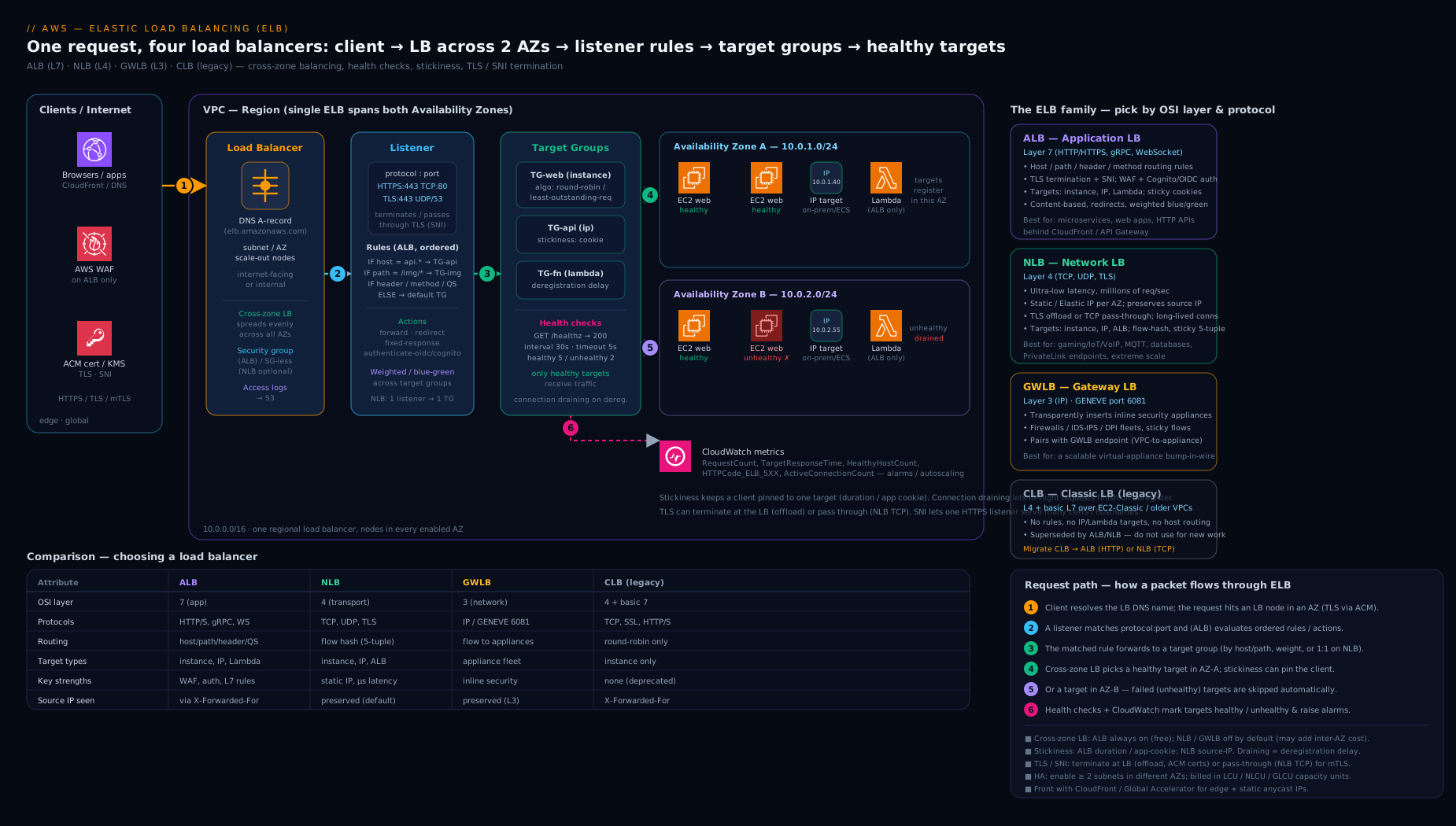
The diagram above maps the family onto the OSI stack — ALB at L7 reading paths and hosts into multiple target groups, the NLB at L4 hashing flows (with its optional static EIPs), and the GWLB at L3 steering packets through inspection appliances — with the shared listener → rules → target group → health-checked targets pipeline beneath them.
Hands-on lab
We’ll stand up an internet-facing ALB in front of a tiny two-instance target group, watch health checks turn the targets healthy, hit the DNS name, add a path-based rule, and clean everything up. This uses small t3.micro instances and an ALB; the ALB has an hourly + LCU charge, so we tear it down at the end. Run it in a non-production account, in a region with at least two AZs.
0. Set variables (replace the VPC and two subnet IDs from two different AZs).
REGION=eu-west-1
VPC_ID=vpc-xxxxxxxx
SUBNET_A=subnet-aaaaaaa   # AZ a
SUBNET_B=subnet-bbbbbbb   # AZ b
1. Create a security group for the ALB (allow HTTP from the world).
ALB_SG=$(aws ec2 create-security-group --group-name lab-alb-sg \
  --description "ALB SG" --vpc-id $VPC_ID --query GroupId --output text)
aws ec2 authorize-security-group-ingress --group-id $ALB_SG \
  --protocol tcp --port 80 --cidr 0.0.0.0/0
2. Create a security group for the instances that allows port 80 from the ALB’s SG.
WEB_SG=$(aws ec2 create-security-group --group-name lab-web-sg \
  --description "web SG" --vpc-id $VPC_ID --query GroupId --output text)
aws ec2 authorize-security-group-ingress --group-id $WEB_SG \
  --protocol tcp --port 80 --source-group $ALB_SG
3. Launch two t3.micro instances (Amazon Linux 2023) running a one-line web server via user data — one per subnet. Look up the latest AL2023 AMI from SSM:
AMI=$(aws ssm get-parameters --names \
  /aws/service/ami-amazon-linux-latest/al2023-ami-kernel-default-x86_64 \
  --query 'Parameters[0].Value' --output text)

USERDATA=$(printf '#!/bin/bash\ndnf -y install httpd\necho "Hello from $(hostname -f)" > /var/www/html/index.html\nsystemctl enable --now httpd\n' | base64)

for SUBNET in $SUBNET_A $SUBNET_B; do
  aws ec2 run-instances --image-id $AMI --instance-type t3.micro \
    --security-group-ids $WEB_SG --subnet-id $SUBNET \
    --user-data "$USERDATA" \
    --tag-specifications 'ResourceType=instance,Tags=[{Key=Name,Value=lab-web}]'
done
Wait until both instances are running, then capture their IDs:
INSTANCE_IDS=$(aws ec2 describe-instances \
  --filters Name=tag:Name,Values=lab-web Name=instance-state-name,Values=running \
  --query 'Reservations[].Instances[].InstanceId' --output text)
echo $INSTANCE_IDS
4. Create a target group (instance type, HTTP:80, health check /).
TG_ARN=$(aws elbv2 create-target-group --name lab-tg --protocol HTTP --port 80 \
  --vpc-id $VPC_ID --target-type instance \
  --health-check-path / --matcher HttpCode=200 \
  --query 'TargetGroups[0].TargetGroupArn' --output text)

for ID in $INSTANCE_IDS; do
  aws elbv2 register-targets --target-group-arn $TG_ARN --targets Id=$ID
done
5. Create the ALB across both subnets and a listener forwarding to the target group.
ALB_ARN=$(aws elbv2 create-load-balancer --name lab-alb \
  --type application --scheme internet-facing \
  --subnets $SUBNET_A $SUBNET_B --security-groups $ALB_SG \
  --query 'LoadBalancers[0].LoadBalancerArn' --output text)

aws elbv2 create-listener --load-balancer-arn $ALB_ARN \
  --protocol HTTP --port 80 \
  --default-actions Type=forward,TargetGroupArn=$TG_ARN
6. Validate — watch health, then curl the DNS name.
# Targets should move from "initial" to "healthy" within ~1-2 minutes
aws elbv2 describe-target-health --target-group-arn $TG_ARN \
  --query 'TargetHealthDescriptions[].{id:Target.Id,state:TargetHealth.State}' \
  --output table

DNS=$(aws elbv2 describe-load-balancers --load-balancer-arns $ALB_ARN \
  --query 'LoadBalancers[0].DNSName' --output text)
echo "http://$DNS"

# Repeat a few times — you should see responses from BOTH hostnames (ALB spreads load)
for i in 1 2 3 4 5 6; do curl -s "http://$DNS"; done
Expected: describe-target-health shows both targets healthy, and the curl loop returns “Hello from …” alternating between the two instance hostnames — proof the ALB is load-balancing across AZs (cross-zone is on by default for ALB).
7. (Optional) Add a path-based rule that returns a fixed maintenance response for /maintenance:
LISTENER_ARN=$(aws elbv2 describe-listeners --load-balancer-arn $ALB_ARN \
  --query 'Listeners[0].ListenerArn' --output text)

aws elbv2 create-rule --listener-arn $LISTENER_ARN --priority 10 \
  --conditions Field=path-pattern,Values='/maintenance' \
  --actions 'Type=fixed-response,FixedResponseConfig={StatusCode=503,ContentType=text/plain,MessageBody=Down for maintenance}'

curl -s "http://$DNS/maintenance"   # -> "Down for maintenance"
Cleanup — delete in dependency order (listener/rules go with the LB):
aws elbv2 delete-load-balancer --load-balancer-arn $ALB_ARN
sleep 30
aws elbv2 delete-target-group --target-group-arn $TG_ARN
aws ec2 terminate-instances --instance-ids $INSTANCE_IDS
aws ec2 wait instance-terminated --instance-ids $INSTANCE_IDS
aws ec2 delete-security-group --group-id $WEB_SG
aws ec2 delete-security-group --group-id $ALB_SG
Cost note: an ALB is not free-tier-free in the way EC2 micro is — it bills an hourly rate plus Load Balancer Capacity Units (LCUs), together roughly US$0.02–0.03 per hour in most regions, so an hour of lab time costs a few cents; the two t3.micro instances fall under the EC2 free tier for the first 12 months (750 hrs/month combined) or cost a couple of cents each per hour otherwise. Delete the ALB promptly — an idle ALB still bills its hourly charge 24×7.
Common mistakes & troubleshooting
| Symptom | Likely cause | Fix |
|---|---|---|
All targets unhealthy, ALB returns 503 |
Target SG doesn’t allow the ALB SG on the health-check port, or /healthz returns a non-matching code |
Allow the ALB’s SG inbound to the target on the traffic and health-check ports; align the matcher with what /healthz actually returns. |
502 Bad Gateway from the ALB |
Target closed the connection, returned a malformed/oversized response, or app crashed | Check the app logs and access logs; verify keep-alive timeout on the target ≥ the ALB idle timeout (default 60s). |
504 Gateway Timeout |
Target took longer than the ALB idle timeout to respond | Raise the idle timeout, or speed up the backend; long uploads need a higher timeout. |
| Uneven load: one instance hammered | Cross-zone off (NLB/GWLB default) with unequal target counts per AZ | Balance targets across AZs (ASG rebalancing) or enable cross-zone (mind NLB inter-AZ cost). |
| NLB targets reject traffic, SG looks correct | NLB preserves client source IP; the target SG allows the NLB/VPC range, not the real client | Allow the client CIDRs, or the VPC CIDR, on the target SG — reason from source-IP preservation. |
| New deploys drop in-flight requests | Deregistration delay too low, or no draining tie-in to ASG lifecycle hook | Set a sensible deregistration_delay.timeout_seconds; add an ASG lifecycle hook to drain before terminate. |
| Wrong certificate served on a multi-domain ALB | No SNI certificate for that host; client falls back to the default cert | Add the per-host certificate via add-listener-certificates; verify the SNI hostname matches the cert SAN. |
| Lambda target returns errors behind ALB | Response not in the ALB’s required JSON shape, or Lambda perms missing | Return {statusCode, headers, body, isBase64Encoded}; grant the ALB lambda:InvokeFunction. |
Best practices
- Pick the layer first. HTTP routing → ALB; raw TCP/UDP, static IP, or PrivateLink front → NLB; inline appliances → GWLB; never CLB for anything new.
- Always redirect HTTP→HTTPS and terminate TLS with an ACM certificate so renewal is automatic; choose a current TLS 1.2/1.3 security policy.
- Health-check the application, not just the port. Use an HTTP
/healthzthat verifies critical dependencies, with thresholds tuned so you eject bad targets fast without flapping. - Spread across at least two (ideally three) AZs and keep target counts balanced per AZ; enable cross-zone on the ALB (it’s free) and weigh the inter-AZ cost on the NLB.
- Tune deregistration delay to your request profile and wire it to Auto Scaling lifecycle hooks so deploys and scale-in drain cleanly.
- Prefer stateless backends. Push session state to ElastiCache/DynamoDB and avoid stickiness unless an app genuinely requires it.
- Turn on access logs to S3 in production and analyse them with Athena; add AWS WAF on the ALB for L7 protection.
- Reference security groups, not IPs, between the ALB and its targets; treat the SG chain as part of the design, not an afterthought.
Security notes
- Front the ALB with AWS WAF for OWASP-class protection (SQLi, XSS, rate limiting, bot control) and consider AWS Shield Advanced for DDoS on internet-facing load balancers.
- Enforce strong TLS: pick a TLS 1.2/1.3
ELBSecurityPolicy, disable legacy protocols, and useFS(forward-secrecy) policies; rotate via ACM automatically. - Use mTLS on the ALB where you need cryptographic client authentication (B2B/IoT/zero-trust) rather than relying solely on bearer tokens.
- Lock down the security-group chain: the ALB SG allows only the ports you serve from only the clients you intend; the target SG allows only the ALB SG. For NLBs, reason from source-IP preservation when writing target rules.
- Use internal (
internal) load balancers for service-to-service traffic so backends never get a public endpoint; reserveinternet-facingfor the true edge. - Authenticate at the edge with
authenticate-oidc/authenticate-cognitoto keep unauthenticated traffic off your application entirely. - Audit with access logs and CloudTrail: access logs answer “who hit what”; CloudTrail records configuration changes to the load balancer and target groups.
Interview & exam questions
-
What’s the core difference between an ALB and an NLB, and how do you choose? The ALB is a Layer-7 load balancer that understands HTTP and routes on content (host, path, headers, method); the NLB is a Layer-4 load balancer that forwards TCP/UDP flows with ultra-low latency, supports static Elastic IPs, and preserves the client source IP. Choose the ALB for web apps and content-based routing; the NLB for extreme performance, non-HTTP protocols, static IPs, or PrivateLink fronts.
-
Why does my application read the load balancer’s IP as the source address, and how do I get the real client IP? An ALB terminates the connection and opens a new one to the target, so the target sees the ALB’s IP; the original client IP is in the
X-Forwarded-Forheader. An NLB with instance/IP targets preserves the client source IP at the TCP layer by default, so the target sees the real client IP directly. -
Explain cross-zone load balancing, its defaults, and its cost implication. Cross-zone lets a node in one AZ send traffic to targets in all AZs (even distribution) rather than only its own (per-AZ-then-per-target distribution, which is uneven if AZ target counts differ). It’s on by default and free for the ALB, and off by default for the NLB/GWLB, where enabling it incurs inter-AZ data-transfer charges.
-
A user reports their session keeps “logging out”. How might the load balancer be involved, and how do you fix it properly? If the app holds session state in memory and stickiness is off, requests land on different targets that don’t share state. The quick fix is stickiness (duration cookie or app cookie on the ALB); the proper fix is stateless backends with session state in ElastiCache/DynamoDB so any target can serve any request.
-
All your ALB targets are unhealthy and clients get 503. Walk through the diagnosis. 503 means no healthy targets. Check the target SG allows the ALB SG inbound on the traffic and health-check ports; confirm the health-check path/port/matcher match a real endpoint and code; verify the app is actually listening; check the NACL allows return traffic. Use
describe-target-healthfor the per-target reason code. -
What target types can an ALB target group contain, and what’s special about the
albtype? instance, IP, and Lambda (ALB only). Thealbtarget type belongs to an NLB target group and points at an ALB, so you can put an NLB (static EIPs, PrivateLink) in front of an ALB’s L7 routing. -
What is SNI and why does it matter on an ALB? Server Name Indication lets one HTTPS listener serve multiple certificates and present the correct one based on the hostname in the TLS handshake, so a single ALB can front many domains each with its own certificate — no load balancer per domain.
-
What is deregistration delay / connection draining, and what value would you set? It’s the grace period during which a deregistering target receives no new requests but finishes in-flight ones (default 300s). Lower it (e.g. 30s) for short, stateless requests to speed deploys; raise it for long uploads or long-lived connections — and tie it to ASG lifecycle hooks.
-
When would you reach for a Gateway Load Balancer? To insert third-party security appliances (firewall, IDS/IPS) transparently into the traffic path at Layer 3, using GENEVE encapsulation and GWLB endpoints, while preserving flow stickiness — the AWS-native pattern for centralised appliance-based inspection.
-
Does an NLB have a security group? Historically no — you secured targets against client/VPC CIDRs (because the NLB preserves the source IP). Since August 2023 an NLB can have a security group, but it must be enabled at creation; an SG-less NLB cannot gain one later.
-
What is mTLS on an ALB and what are the two modes? Mutual TLS makes the client present a certificate that the ALB validates.
verifychecks the client cert against an uploaded trust store (CA bundle in S3) with optional CRL;passthroughforwards the client certificate chain to your app to validate. Used for strong client authentication. -
What is slow start and which load balancers support it? Slow start ramps a newly healthy target’s traffic linearly from zero to full over 30–900s so cold instances aren’t overwhelmed on join. It applies to ALB and CLB target groups (not NLB) and only when the group has other targets to share with.
Quick check
- Which load balancer operates at Layer 7 and can route on URL path and host header?
- Which load balancer can be assigned a static Elastic IP per Availability Zone?
- What is the default value of
deregistration_delay.timeout_seconds? - Cross-zone load balancing is on-by-default and free for which load-balancer type?
- What ALB feature lets one HTTPS listener serve certificates for many different domains?
Answers
- The Application Load Balancer (ALB).
- The Network Load Balancer (NLB) — one Elastic IP per AZ.
- 300 seconds (5 minutes).
- The ALB (cross-zone is always on for ALB and incurs no inter-AZ charge; it’s off-by-default and chargeable on the NLB/GWLB).
- SNI (Server Name Indication) with multiple listener certificates.
Exercise
Design and build, using the CLI, an internet-facing ALB that serves two microservices behind one HTTPS listener: requests to api.<yourdomain> path /v1/* go to a target group tg-api, and everything else goes to tg-web. Requirements: (1) an HTTP:80 listener that redirects to HTTPS; (2) an HTTPS:443 listener using an ACM certificate and a TLS 1.3 security policy; (3) a path-based rule for /v1/*; (4) access logs enabled to an S3 bucket; (5) health checks on a dedicated /healthz path with a 200-299 matcher. Then deliberately break it: tighten the tg-api target SG to remove the ALB SG rule and observe the targets go unhealthy and the listener return 503 — confirming you understand the SG chain. Restore it, verify both routes, and tear everything down. Bonus: put an NLB with a static EIP in front of the ALB using the alb target type and curl the NLB’s EIP.
Certification mapping
- AWS Certified Solutions Architect – Associate (SAA-C03): choosing ALB vs NLB vs GWLB, target groups and health checks, cross-zone load balancing, TLS termination and SNI, sticky sessions, and integrating load balancers with Auto Scaling and multi-AZ designs are core, frequently tested topics.
- AWS Certified Advanced Networking – Specialty (ANS-C01): the deep end — NLB source-IP preservation and security groups, GWLB and GENEVE appliance insertion, mTLS, PrivateLink with NLB, cross-zone cost trade-offs, and access-log analysis.
- AWS Certified SysOps Administrator – Associate (SOA-C02): operating load balancers — health-check troubleshooting, the 502/503/504 distinctions, deregistration delay and draining, access logs, and CloudWatch metrics (
HealthyHostCount,TargetResponseTime,HTTPCode_ELB_5XX). - AWS Certified Developer – Associate (DVA-C02): ALB path/host routing for microservices, Lambda targets, authentication actions, and the
X-Forwarded-Forheader.
Glossary
- Elastic Load Balancing (ELB): the AWS service family providing ALB, NLB, GWLB, and the legacy CLB.
- Application Load Balancer (ALB): a Layer-7 load balancer that routes HTTP/HTTPS on request content.
- Network Load Balancer (NLB): a Layer-4 load balancer for TCP/UDP with ultra-low latency, static EIPs, and source-IP preservation.
- Gateway Load Balancer (GWLB): a Layer-3 load balancer that transparently inserts inspection appliances using GENEVE.
- Classic Load Balancer (CLB): the original ELB; legacy and being retired.
- Listener: the protocol/port on which a load balancer accepts connections.
- Rule (ALB): a priority-ordered condition→action pairing on an ALB listener.
- Target group: the pool of registered targets plus the health check and per-group attributes.
- Target type: instance, IP, Lambda, or ALB — fixed when the target group is created.
- Health check: the probe (protocol/path/port/thresholds/matcher) that determines target health.
- Deregistration delay (connection draining): the grace period before a removed target stops receiving traffic.
- Stickiness (session affinity): pinning a client to one target (LB cookie, app cookie, or source-IP).
- Slow start: linear traffic ramp-up for a newly healthy target (ALB/CLB).
- Cross-zone load balancing: whether nodes distribute traffic across all AZs or only their own.
- SNI (Server Name Indication): serving multiple TLS certificates on one listener by hostname.
- mTLS (mutual TLS): TLS where the client also presents a validated certificate.
- X-Forwarded-For: the HTTP header carrying the original client IP through an ALB.
- LCU (Load Balancer Capacity Unit): the metered unit (new connections, active connections, bandwidth, rule evaluations) that, with the hourly rate, determines ELB cost.
Next steps
- Put a friendly name in front of your load balancer’s DNS name and add health-based failover with Amazon Route 53, In Depth: Hosted Zones, Records, Routing Policies & Health Checks.
- Revisit the network the load balancer lives in — Amazon VPC, In Depth — and the firewalling that wraps it, AWS Security Groups vs Network ACLs, In Depth.
- See how containers use the same load balancers in ECS Service Connect vs Load Balancers: discovery & resilience.
- Front an HTTP service privately with AWS PrivateLink: provider & consumer, cross-account using an NLB and the
albtarget type. - When something breaks across services, work it methodically with AWS Troubleshooting Methodology: EC2, VPC, IAM, S3 & Lambda.