There is a particular kind of panic that hits when something in AWS breaks in production. An EC2 instance you could reach yesterday refuses SSH; a Lambda function that worked in testing starts timing out under load; a perfectly valid S3 request comes back 403 AccessDenied; an IAM role that definitely has the right policy is told it can’t call an API. The temptation is to start clicking — open the security group to 0.0.0.0/0, bump the Lambda timeout to the maximum, attach AdministratorAccess to the role, make the bucket public — and hope. That is gambling, not troubleshooting, and it is how a five-minute incident becomes a two-hour one with three new security holes layered on top of the original fault.
This lesson teaches the opposite habit: a repeatable method that turns “it’s broken and I don’t know why” into a short, ordered set of questions that converge on the real cause — plus per-service playbooks (EC2, VPC, IAM, S3, Lambda) mapping a symptom to its likely cause, the one diagnostic that confirms it, and the fix. A senior engineer is not someone who has memorised every error code; it is someone who can take an unfamiliar failure and narrow it down calmly. By the end you will have that instinct, plus a reference to keep open during an incident.
This is a methodology lesson — it teaches how to think, using just enough of each tool to act. The next lesson, Advanced AWS Troubleshooting: Complex Multi-Service Incidents & Root-Cause Analysis, takes the same method up a level to incidents that span several services at once, with CloudWatch Logs Insights, X-Ray and the AWS Health Dashboard. Everything here maps to SOA-C02 (AWS Certified SysOps Administrator – Associate), where troubleshooting is a major exam domain.
Learning objectives
By the end of this lesson you can:
- Apply an eight-step troubleshooting method — reproduce → isolate the layer → compare config vs desired → inspect CloudWatch/CloudTrail → form and test a hypothesis → fix → verify → prevent — to any AWS incident.
- Isolate the failing layer quickly (identity? network? the resource itself? the application?) instead of fixing the wrong thing.
- Diagnose the most common EC2 failures — can’t SSH/RDP, instance status-check failures, capacity and state issues — without reflexively opening the firewall.
- Diagnose VPC connectivity using route tables, the internet and NAT gateways, security groups versus network ACLs, peering, DNS and the VPC Reachability Analyzer.
- Diagnose IAM
AccessDeniedusing the policy-evaluation logic (explicit deny, identity vs resource policy, permission boundaries, SCPs), the IAM Policy Simulator and CloudTrail. - Diagnose S3
403/AccessDeniedacross its layered access controls, and Lambda errors, timeouts, throttling and cold starts. - Use CloudTrail to answer “who did what, when?” and turn every fix into a prevention (an alarm, a guardrail, a runbook) so the same incident does not recur.
Prerequisites & where this fits
You should already understand AWS’s core building blocks: the account and Region/AZ model, IAM users, roles and policies, VPCs with subnets, route tables and security groups, EC2 instances, S3 buckets and Lambda functions — all covered in earlier lessons. You needn’t be an expert in any; troubleshooting is precisely the skill of reasoning about a system you only partly understand. This is Lesson A3, the first of two in the Troubleshooting & Operations module of the AWS Zero-to-Hero course. It builds directly on AWS IAM Fundamentals (the policy-evaluation logic the IAM playbook leans on) and AWS VPC Networking Fundamentals (the routing and security-group model the VPC playbook leans on), and it leads into the complex-incident lesson. Everything here maps to SOA-C02, where “Troubleshooting and Optimization” is an exam domain.
The troubleshooting mindset: eight steps that always work
Tools change; the method does not. Whether you are debugging a 2003-era on-prem server or a 2026 AWS landing zone, the same loop applies. Internalise these eight steps and you will never again be the person frantically toggling settings.
| # | Step | The question it answers | Why it matters |
|---|---|---|---|
| 1 | Reproduce | Can I make it fail on demand? | A fault you can’t reproduce, you can’t confirm you’ve fixed. Pin down exactly who, what, where, and when. |
| 2 | Isolate the layer | Which layer is actually failing — identity, network, the resource, or the app? | This is the master move. Most wasted time comes from fixing the wrong layer. |
| 3 | Config vs desired | Does the current configuration match what I intended? | Most AWS incidents are config drift or a recent change, not a platform fault. |
| 4 | Inspect CloudWatch & CloudTrail | What does the evidence say? | Metrics, logs and the API audit trail are ground truth. Read them before theorising, not after. |
| 5 | Hypothesise & test | What’s my single best guess, and what one test confirms or kills it? | One variable at a time. A test that can only “succeed” proves nothing. |
| 6 | Fix | What is the smallest change that addresses the root cause? | Fix the cause, not the symptom; change one thing so you know what worked. |
| 7 | Verify | Is it actually fixed — from the user’s perspective? | Re-run the reproduction from step 1. “It looks fine in the console” is not verification. |
| 8 | Prevent | How do I make sure this never silently recurs? | Turn the fix into an alarm, a guardrail (SCP/Config rule), a runbook, or a test. This is what makes you senior. |
A few principles make the loop sharper:
- Change one thing at a time. Flip three settings and it starts working, and you’ve learned nothing — and maybe introduced two new problems. Revert speculative changes that didn’t help.
- Read before you write. Almost every diagnostic in this lesson is read-only — it inspects state without changing it. Exhaust the read-only checks before you touch anything.
- Believe the evidence, not the assumption. “But it should work” is the most expensive phrase in operations. The effective policy, the actual log line, the real route table, the real DNS answer — those are reality.
- Ask “what changed?” first. AWS CloudTrail is a per-account audit of every API call (who called what, from where, with which result, and when); a fault that started at 14:05 next to a
ModifySecurityGroupRulesorPutBucketPolicyat 14:03 is rarely a coincidence. CloudTrail records management events for the last 90 days in Event history at no cost, before you even configure a trail.
Isolating the layer — the master skill
Step 2 deserves its own model because it is where time is won or lost. Almost every AWS failure lives in one of five layers. Ask the questions top to bottom and you will usually localise the fault in under a minute:
| Layer | “Is the problem here?” — quick test | Typical symptoms |
|---|---|---|
| Identity / authorization | Can the caller authenticate, and does its policy allow this action on this resource? | AccessDenied, UnauthorizedOperation, 403 on a control-plane call, “not authorized to perform” |
| Network / connectivity | Can the packet physically reach the target on the right port? | Timeouts, “connection refused”, can’t SSH/RDP, intermittent drops |
| DNS / name resolution | Does the name resolve to the IP (or endpoint) you expect? | “could not resolve host”, connecting to a public IP of a private resource, gateway/VPC-endpoint misses |
| The resource / service | Is the resource itself healthy, running and within its limits? | Status-check failure, throttling, 503 from a stopped backend, service-quota errors |
| The application | Is the code/config inside the resource the problem? | App-level 500, stack traces, bad connection string, unhandled exception in a Lambda |
The trick is to test the cheapest, most likely layer first and to bisect: if a request fails from one machine but succeeds from another, the difference between them is your fault. If the same request fails everywhere, the problem is central (the resource or its config), not the caller.
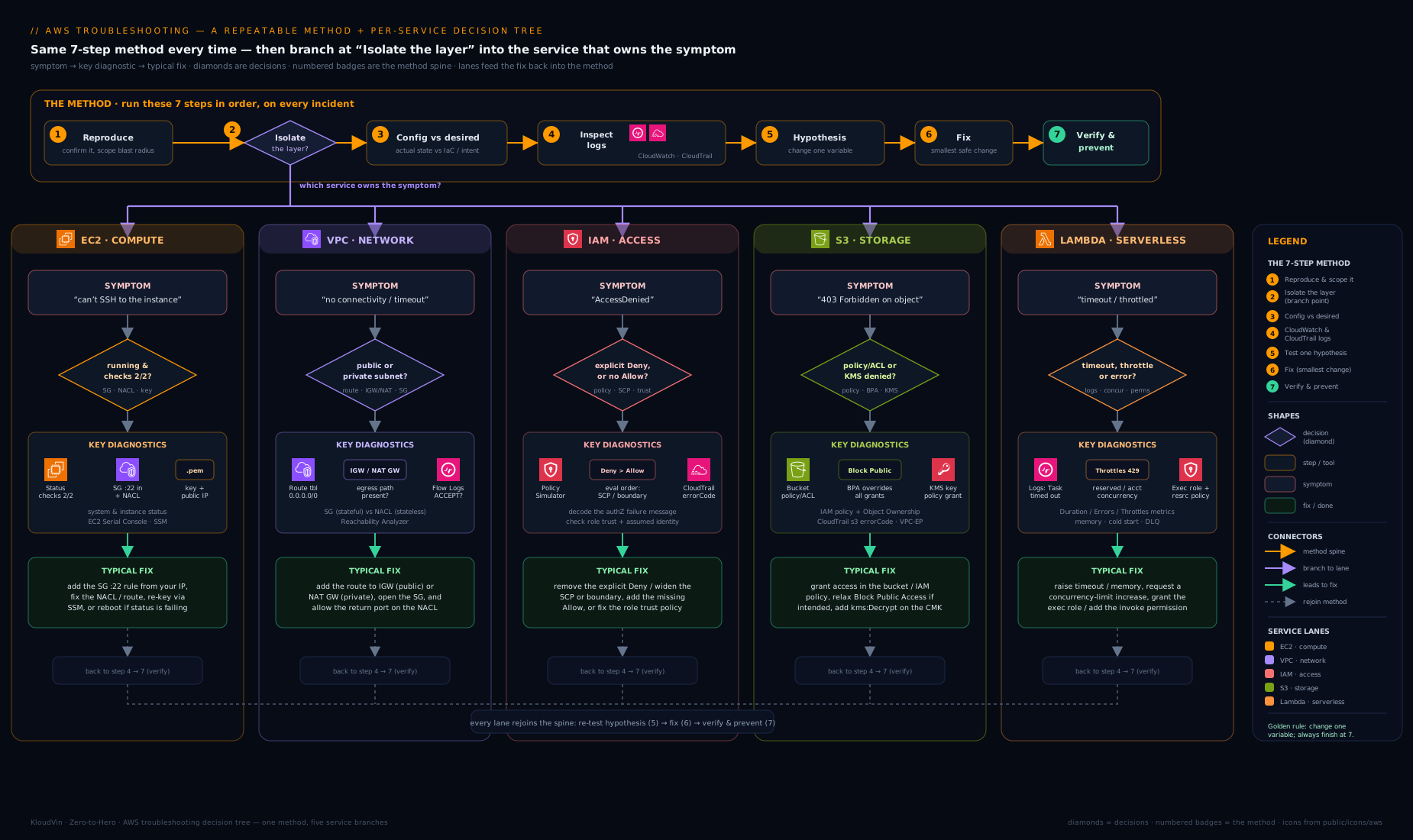
The decision tree above is the same logic rendered as a flowchart: start from the symptom, ask “can it authenticate and is it authorised?”, then “can the packet arrive?”, then “does the name resolve?”, then “is the resource healthy and within quota?”, and finally “is it the app?” — branching to the matching playbook below at each point.
EC2 playbook: “I can’t connect to my instance”
Failing to reach an EC2 instance is the single most common AWS support case, and almost all of them come down to a handful of causes: a security group not allowing the port, a network ACL denying it, the instance in a subnet with no route to the internet, a missing or wrong key pair, or the instance failing its status checks. Beginners stare at the operating system; the fix is to inspect the network path and the instance state AWS actually applied, from the outside, before touching the box.
Two facts shortcut most cases. Security groups are stateful (if you allow inbound on a port, the return traffic is automatically allowed) and have allow rules only. Network ACLs are stateless (you must allow both the inbound request and the outbound ephemeral-port response, e.g. 1024–65535) and can have explicit deny rules. The instance status check (does the instance reach the network?) and the system status check (is the underlying host healthy?) are two different signals — read both before you reboot anything. EC2 Instance Connect, the serial console, and EC2 Instance Connect Endpoint (browser-based SSH with no inbound port and no public IP) let you in when normal SSH is blocked.
| Symptom | Likely cause | Diagnostic step | Fix |
|---|---|---|---|
| SSH/RDP times out (no response) | Security group not allowing 22/3389 from your IP, or NACL denying it | Check the security group inbound rules; check the subnet NACL (both directions); confirm a public IP/route | Add an inbound Allow for the port scoped to your IP (not 0.0.0.0/0); fix the NACL; ensure a public IP + IGW route |
| Connection refused (fast reject) | sshd/RDP not running, wrong port, or host firewall (iptables/Windows Firewall) inside the OS |
Use EC2 Serial Console or Instance Connect; check the service is listening | Start/repair the service; bind the right port; open the in-guest firewall |
| “Permission denied (publickey)” | Wrong key pair, wrong username, or bad ~/.ssh/authorized_keys permissions |
Confirm the key matches the instance’s key pair; use the right user (ec2-user, ubuntu, admin) |
Use the correct .pem; fix chmod 600 on the key; repair authorized_keys via serial console |
| Reachable from one place, not another | The instance has no public IP / is in a private subnet; you need a bastion or endpoint | Check the instance’s public/private IP and the subnet’s route table | Use a bastion, Session Manager, or EC2 Instance Connect Endpoint for private instances |
| Instance status check failed (1/2 or 2/2) | OS-level problem (instance check) or impaired host (system check) | EC2 console → Status checks; read instance vs system result | Instance check: reboot / fix the OS via serial console. System check: stop/start to move to a healthy host |
Instance stuck in stopping/pending or won’t start |
Underlying capacity issue, or InsufficientInstanceCapacity in the AZ |
CloudTrail + EC2 events; try another AZ/instance type | Stop/start to relocate; launch in a different AZ/type; consider a capacity reservation |
| Connect by DNS name fails, IP works | VPC DNS resolution/hostnames disabled, or stale record | Check VPC enableDnsSupport/enableDnsHostnames; nslookup the name |
Enable DNS support/hostnames on the VPC; fix the Route 53 record |
| High CPU credit / sudden slowdown (T-family) | CPU credit balance exhausted on a burstable instance | CloudWatch CPUCreditBalance / CPUSurplusCreditBalance |
Enable unlimited mode, move to a larger/non-burstable type, or right-size |
A grounding example: an instance is unreachable on port 22. The security group shows an inbound Allow 22 from your IP, so identity-of-port is fine — but the subnet’s NACL has a DENY on the ephemeral range, so the response never returns. You found it by remembering NACLs are stateless, in two read-only checks, without ever rebooting the box.
VPC playbook: “there’s no connectivity”
VPC connectivity issues are about the path a packet takes. The usual suspects are a route table missing the route, the internet gateway (IGW) or NAT gateway absent or misconfigured, a security group or network ACL blocking traffic, a peering/Transit Gateway route missing on one side, or DNS resolving the wrong endpoint. The decisive tool is the VPC Reachability Analyzer, which computes — without sending a packet — whether traffic from a source ENI can reach a destination, and names the blocking component (the security group, NACL, route, or gateway) when it cannot.
The mental checklist for “private subnet can’t reach the internet” is: public subnets route 0.0.0.0/0 to an IGW; private subnets route 0.0.0.0/0 to a NAT gateway that itself sits in a public subnet. For “can’t reach S3/DynamoDB privately”, you want a gateway VPC endpoint with a route; for other services, an interface endpoint (PrivateLink) with the right security group and private DNS.
| Symptom | Likely cause | Diagnostic step | Fix |
|---|---|---|---|
| Public instance has no internet | Missing 0.0.0.0/0 → IGW route, or no public IP |
Check the subnet route table for an IGW route; confirm an Elastic/public IP | Add 0.0.0.0/0 → igw-…; assign a public IP / Elastic IP |
| Private instance has no outbound internet | No 0.0.0.0/0 → NAT gateway, or the NAT is in a private subnet |
Route table for the NAT route; confirm the NAT sits in a public subnet with an IGW route | Add 0.0.0.0/0 → nat-…; place the NAT in a public subnet with an EIP |
| Traffic silently dropped between instances | Security group or NACL blocking; SG doesn’t reference the peer SG | Reachability Analyzer source→dest; check SG/NACL | Allow the port (reference the source SG as the source); fix the NACL both directions |
| Can’t reach a peered VPC | Missing route to the peer CIDR on one side, or overlapping CIDRs | Check route tables on both VPCs; verify non-overlapping CIDRs | Add the peer-CIDR route on both sides; peering can’t route overlapping ranges |
| Can’t reach S3/DynamoDB from a private subnet | No gateway endpoint or its route missing | Check for a gateway VPC endpoint and the prefix-list route | Create the gateway endpoint; it adds a managed prefix-list route automatically |
| Interface (PrivateLink) endpoint unreachable | Endpoint security group blocks 443, or private DNS off | Check the endpoint SG; resolve the service FQDN | Allow 443 to the endpoint SG; enable private DNS on the endpoint |
| Resolves to a public IP of a private resource | Private DNS/Route 53 private hosted zone not associated | nslookup the FQDN — expect a private IP |
Associate the private hosted zone with the VPC; enable DNS hostnames |
| Intermittent outbound failures under load | NAT gateway SNAT port exhaustion, or NAT/EIP throughput limit | CloudWatch NAT ErrorPortAllocation/ActiveConnectionCount |
Add NAT gateways (per-AZ), reuse connections, or move to multiple destinations |
A grounding example: a private EC2 instance can’t reach the internet. Reachability Analyzer reports not reachable, blocked at the route table — there’s no 0.0.0.0/0 to the NAT. You fixed the route, not the security group, because the evidence named the exact component.
IAM playbook: “Access Denied”
IAM failures feel mysterious until you remember the policy-evaluation logic, which is deterministic. By default everything is implicitly denied; an explicit Allow in any applicable policy grants access; and an explicit Deny in any policy overrides every allow. Multiple policy types apply at once: identity-based policies (on the user/role), resource-based policies (on the bucket, queue, function, KMS key), permission boundaries (a ceiling on what an identity can be granted), Service Control Policies (SCPs) (an Organizations-wide ceiling), and session policies. An action is allowed only if it survives every one of them.
The decisive read-only tools are the IAM Policy Simulator (does this principal’s effective policy allow this action on this resource?), the error message itself (User: arn:… is not authorized to perform: <action> on resource: <arn> tells you the exact action and ARN to grant), and CloudTrail, where a denied call records errorCode: AccessDenied along with the principal, the action, the resource, and often the reason in errorMessage (e.g. “with an explicit deny in a service control policy”).
| Symptom | Likely cause | Diagnostic step | Fix |
|---|---|---|---|
AccessDenied / not authorized to perform |
No Allow for that action/resource in the identity policy |
Read the error’s action+ARN; run the Policy Simulator | Add a least-privilege Allow for the exact action on the exact resource ARN |
Has an Allow but still denied |
An explicit Deny somewhere (identity, resource, SCP, boundary) overrides it |
CloudTrail errorMessage names the deny source; Policy Simulator |
Remove/scope the deny; if it’s an SCP, fix it at the Organizations level |
| Allowed in one account, denied in another | SCP on the target account’s OU, or missing cross-account trust | Check the account’s SCPs; check the role’s trust policy | Adjust the SCP; add the principal to the role’s trust policy (sts:AssumeRole) |
AccessDenied calling a service from a role |
Permission boundary caps the role below the action it needs | Compare the boundary with the action; Policy Simulator | Widen the boundary (carefully) or grant the action within the boundary |
| Can assume a role but can’t act | Session policy or the role’s own policy is too narrow | Inspect the assumed-role session; check the role policy | Broaden the role/session policy to the needed action; re-assume |
Resource owner denies despite identity Allow |
Resource-based policy (bucket/KMS/queue) doesn’t allow the principal | Read the resource policy; check Principal/Condition |
Add the principal to the resource policy; both sides must allow cross-account |
| Worked yesterday, denied today | A recent policy change (SCP, boundary, or policy edit) | CloudTrail for Put*Policy/Attach*/Detach* events |
Revert/fix the change; codify policies in IaC so edits are reviewed |
| MFA-conditioned action denied | A Condition requires MFA (aws:MultiFactorAuthPresent) and the session lacks it |
Read the policy Condition; check the session |
Re-authenticate with MFA; or scope the condition correctly |
A common trap: a role “has the policy” but a call still fails. CloudTrail’s errorMessage reads “explicit deny in a service control policy” — the identity policy was never the problem; an SCP on the OU blocks it for everyone in that account. Read the evidence; don’t attach AdministratorAccess to paper over a guardrail that is doing its job.
S3 playbook: “403 / Access Denied”
S3 403s are notorious because a single request is evaluated against several independent access controls, and any one can deny it. In rough order: the caller’s IAM identity policy, the bucket policy, the legacy ACL (now off by default under Object Ownership: bucket-owner-enforced), S3 Block Public Access (account- and bucket-level, which overrides any policy that would grant public access), the VPC endpoint policy if access is via a gateway endpoint, and KMS key permissions if the object is encrypted with SSE-KMS (you need kms:Decrypt on the key, not just s3:GetObject). Diagnose in that order, because an identity-policy gap and a KMS-permission gap both surface as 403.
The decisive tools are the error context (the request via CloudTrail’s S3 data events shows the principal and the denied operation), the bucket policy/Block Public Access settings in the console, and IAM Access Analyzer, which flags buckets exposed beyond the account and validates policies. Crucially, S3 returns 403 AccessDenied for a missing object too when the caller lacks s3:ListBucket, to avoid leaking existence — so a “403” can really be a “404 in disguise”.
| Symptom | Likely cause | Diagnostic step | Fix |
|---|---|---|---|
403 AccessDenied reading an object |
IAM identity policy or bucket policy doesn’t allow s3:GetObject |
Check the identity policy and bucket policy for the object ARN (arn:…:bucket/*) |
Grant s3:GetObject on the object ARN; remember the /* for objects vs the bucket ARN for the bucket |
403 on an object encrypted with SSE-KMS |
Missing kms:Decrypt on the CMK |
Check the KMS key policy/grants for the caller | Add kms:Decrypt (and kms:GenerateDataKey for writes) on the key to the principal |
Public/anonymous read returns 403 |
S3 Block Public Access is on (the secure default) | Check account- and bucket-level Block Public Access | Prefer a presigned URL or CloudFront + OAC; only relax BPA if truly required |
AccessDenied but the object “doesn’t exist” |
Caller lacks s3:ListBucket, so 404 is masked as 403 |
Check for s3:ListBucket on the bucket ARN |
Grant s3:ListBucket on the bucket; verify the key actually exists |
| Cross-account access denied | Bucket policy doesn’t allow the other account’s principal, or Object Ownership issue | Read the bucket policy Principal; check Object Ownership |
Allow the external principal in the bucket policy; set bucket-owner-enforced or grant ownership |
403 only from inside a VPC |
VPC gateway endpoint policy restricts the bucket/action | Check the endpoint policy attached to the route’s endpoint | Allow the bucket/action in the endpoint policy (it defaults to full, but may be locked down) |
AccessDenied writing with ACL |
Request sends a canned ACL but bucket is bucket-owner-enforced | Check Object Ownership; inspect the x-amz-acl header |
Drop the ACL header; rely on bucket policy (ACLs are disabled by default now) |
Signature/403 SignatureDoesNotMatch |
Wrong region endpoint, clock skew, or wrong credentials | Verify the bucket Region, client clock, and the access key | Use the correct regional endpoint; fix NTP; use current credentials (prefer roles over keys) |
The single most common S3 403: an identity has s3:GetObject but the object is SSE-KMS-encrypted and the principal lacks kms:Decrypt. S3 and KMS are separate authorization systems — granting the S3 action without the KMS permission denies the read every time. Heavily tested, heavily tripped over.
Lambda playbook: “errors, timeouts and throttling”
Lambda hides the server, so debugging shifts to CloudWatch Logs (every invocation writes a log group /aws/lambda/<function>, including the REPORT line with duration, billed duration, memory used and init duration), CloudWatch metrics (Errors, Throttles, Duration, ConcurrentExecutions, IteratorAge for stream sources), and AWS X-Ray for traces. Separate three different failure modes: the function errors (your code throws, or its execution role lacks a permission), the function times out (it ran past the configured timeout — often a downstream call with no timeout of its own), and the function is throttled (it hit a concurrency limit and returned 429/TooManyRequestsException). Cold starts are a latency symptom, not an error.
The fastest first move is to open the function’s log group and read the actual exception or the Task timed out after N seconds line, rather than guessing from a metric. The execution role is the usual culprit for AccessDenied inside a function — it needs both the permission for what the code calls and the basic logging permissions to even write to CloudWatch.
| Symptom | Likely cause | Diagnostic step | Fix |
|---|---|---|---|
Function errors with AccessDenied |
Execution role lacks the permission for an AWS call the code makes | CloudWatch Logs stack trace; check the execution role | Add the action to the execution role (e.g. dynamodb:PutItem, s3:GetObject, kms:Decrypt) |
Task timed out after N seconds |
Code exceeds the timeout, usually a downstream call that hangs | Logs REPORT line; check the downstream call’s own timeout |
Set a client-side timeout on the downstream call; raise the function timeout only if genuinely needed |
Throttling/429/TooManyRequestsException |
Hit the account/function concurrency limit | CloudWatch Throttles and ConcurrentExecutions |
Raise the account quota, set reserved concurrency, or smooth the source (SQS, batching) |
| First/occasional calls slow (cold start) | New execution environment init (large package, VPC ENI, heavy init) | Logs Init Duration; check package size and VPC config |
Provisioned concurrency or SnapStart; slim the package; move init out of the handler |
| Function in a VPC can’t reach the internet/AWS APIs | No NAT gateway for the private subnets, or missing VPC endpoints | Check the function’s subnets’ routes; check endpoints | Add a NAT gateway, or VPC endpoints for the services (S3/DynamoDB gateway, others interface) |
Errors spike but code looks fine |
Unhandled exception, bad input, or a deployment regression | Logs around the spike; CloudTrail for UpdateFunctionCode |
Fix the code/handler; roll back via versions/aliases; add input validation |
Stream source lagging (IteratorAge climbing) |
Function too slow / failing on Kinesis/DynamoDB Streams, blocking the shard | CloudWatch IteratorAge, Errors |
Speed up/parallelise; add a batch bisect on error/on-failure destination; increase shards |
429 from API Gateway in front of Lambda |
API Gateway throttle/quota or downstream Lambda throttling | API Gateway metrics; Lambda Throttles |
Adjust the usage plan/throttle; raise Lambda concurrency; cache |
Tie this to deployments: many Lambda error spikes appear immediately after a deploy. The robust pattern is versions and aliases with weighted (canary) routing — shift a small percentage of traffic to the new version, watch the Errors and Duration alarms, then complete the shift or roll back instantly by pointing the alias back. Covered in Lambda Performance: Cold Starts, Provisioned Concurrency & SnapStart.
Hands-on lab: diagnose a deliberately broken EC2 instance
In this lab you will create a fault on purpose, then use the method to find and fix it. We’ll launch a tiny Free Tier instance, lock its security group so SSH is blocked, diagnose the block with the VPC Reachability Analyzer and read-only checks (never touching the instance), then fix it. Everything uses t2.micro/t3.micro (Free Tier eligible) and is deleted at the end. Run it in AWS CloudShell (Bash), which has the CLI and your credentials pre-configured.
1. Set variables and find a default VPC + subnet.
REGION=us-east-1
AMI=$(aws ssm get-parameters \
  --names /aws/service/ami-amazon-linux-latest/al2023-ami-kernel-default-x86_64 \
  --query 'Parameters[0].Value' --output text --region $REGION)
VPC=$(aws ec2 describe-vpcs --filters Name=isDefault,Values=true \
  --query 'Vpcs[0].VpcId' --output text --region $REGION)
SUBNET=$(aws ec2 describe-subnets --filters Name=vpc-id,Values=$VPC \
  --query 'Subnets[0].SubnetId' --output text --region $REGION)
echo "AMI=$AMI VPC=$VPC SUBNET=$SUBNET"
2. Create a key pair and a security group that allows SSH from your IP.
aws ec2 create-key-pair --key-name ts-lab-key \
  --query 'KeyMaterial' --output text --region $REGION > ts-lab-key.pem
chmod 600 ts-lab-key.pem

MYIP=$(curl -s https://checkip.amazonaws.com)
SG=$(aws ec2 create-security-group --group-name ts-lab-sg \
  --description "TS lab" --vpc-id $VPC \
  --query 'GroupId' --output text --region $REGION)
aws ec2 authorize-security-group-ingress --group-id $SG \
  --protocol tcp --port 22 --cidr ${MYIP}/32 --region $REGION
echo "SG=$SG (SSH allowed from ${MYIP}/32)"
3. Launch a Free Tier instance with a public IP.
IID=$(aws ec2 run-instances --image-id $AMI --instance-type t2.micro \
  --key-name ts-lab-key --security-group-ids $SG --subnet-id $SUBNET \
  --associate-public-ip-address \
  --tag-specifications 'ResourceType=instance,Tags=[{Key=Name,Value=ts-lab}]' \
  --query 'Instances[0].InstanceId' --output text --region $REGION)
aws ec2 wait instance-running --instance-ids $IID --region $REGION
PUBIP=$(aws ec2 describe-instances --instance-ids $IID \
  --query 'Reservations[0].Instances[0].PublicIpAddress' --output text --region $REGION)
echo "Instance $IID at $PUBIP"
Confirm SSH works (answer yes to the host-key prompt, then exit):
ssh -i ts-lab-key.pem ec2-user@$PUBIP 'echo connected; exit'
4. Break it. Revoke the SSH ingress rule — simulating “someone tightened the firewall and now I can’t get in”:
aws ec2 revoke-security-group-ingress --group-id $SG \
  --protocol tcp --port 22 --cidr ${MYIP}/32 --region $REGION
Now retry the SSH from step 3 — it hangs and times out. Resist the urge to terminate and relaunch. Apply the method.
5. Isolate the layer with the Reachability Analyzer (read-only). Ask “can the internet reach this instance on port 22?”:
IGW=$(aws ec2 describe-internet-gateways \
  --filters Name=attachment.vpc-id,Values=$VPC \
  --query 'InternetGateways[0].InternetGatewayId' --output text --region $REGION)
PATHID=$(aws ec2 create-network-insights-path \
  --source $IGW --destination $IID --protocol tcp --destination-port 22 \
  --query 'NetworkInsightsPath.NetworkInsightsPathId' --output text --region $REGION)
ANALYSIS=$(aws ec2 start-network-insights-analysis \
  --network-insights-path-id $PATHID \
  --query 'NetworkInsightsAnalysis.NetworkInsightsAnalysisId' --output text --region $REGION)
aws ec2 wait network-insights-analysis-available \
  --network-insights-analysis-ids $ANALYSIS --region $REGION
aws ec2 describe-network-insights-analyses \
  --network-insights-analysis-ids $ANALYSIS \
  --query 'NetworkInsightsAnalyses[0].{Reachable:NetworkPathFound,Blocker:Explanations[0].ExplanationCode}' \
  --output table --region $REGION
Expected output: Reachable = False, with a blocker pointing at the security group (e.g. an explanation code such as ENI_SG_RULES_MISMATCH). In read-only calls you’ve proven the fault is the security group (not the instance, not SSH, not your client) — the whole point of the method.
6. Corroborate by reading the effective security-group rules.
aws ec2 describe-security-groups --group-ids $SG \
  --query 'SecurityGroups[0].IpPermissions' --output table --region $REGION
The inbound rules are empty — there is no longer an allow for port 22. That’s the merged, real ruleset AWS is applying.
7. Fix the root cause (re-add the scoped rule) and verify by re-running the original reproduction:
aws ec2 authorize-security-group-ingress --group-id $SG \
  --protocol tcp --port 22 --cidr ${MYIP}/32 --region $REGION
# Verify from the user's perspective — the reproduction from step 3:
ssh -i ts-lab-key.pem ec2-user@$PUBIP 'echo reconnected; exit'
It connects again. You diagnosed and fixed a connectivity incident without ever logging into the instance — because the evidence pointed at the network layer.
8. Prevent (discuss). In production you’d codify the working security group in CloudFormation/Terraform so an ad-hoc revoke can’t drift in unreviewed, and add an EventBridge rule (or AWS Config rule) that alerts on AuthorizeSecurityGroupIngress/RevokeSecurityGroupIngress — guards covered in the complex-incidents and governance lessons.
Cleanup — delete everything so you pay nothing further:
aws ec2 terminate-instances --instance-ids $IID --region $REGION
aws ec2 wait instance-terminated --instance-ids $IID --region $REGION
aws ec2 delete-network-insights-analysis --network-insights-analysis-id $ANALYSIS --region $REGION
aws ec2 delete-network-insights-path --network-insights-path-id $PATHID --region $REGION
aws ec2 delete-security-group --group-id $SG --region $REGION
aws ec2 delete-key-pair --key-name ts-lab-key --region $REGION
rm -f ts-lab-key.pem
Cost note. A t2.micro/t3.micro instance is Free Tier eligible (750 hours/month for the first 12 months); run for a few minutes and the compute is free or a rounding error. The Reachability Analyzer charges a small per-analysis fee (cents) — well under ₹10 / ~US$0.10 for this lab — so delete the path/analysis as shown. Confirm the instance is terminated afterwards so nothing lingers on the bill.
Common mistakes & troubleshooting
The meta-mistakes — the errors people make while troubleshooting — cost more than any single misconfiguration:
| Mistake | Why it bites | Do this instead |
|---|---|---|
| Changing several settings at once | You can’t tell what fixed it (or what broke worse) | Change one variable, test, then the next |
| Fixing the symptom, not the cause | The incident recurs tomorrow | Trace to root cause; capture a prevention (step 8) |
| Trusting the intended config over the effective one | SGs/NACLs/routes/policies combine; what you set ≠ what’s applied | Read effective SG rules, route tables, and run the Policy Simulator |
Opening a security group to 0.0.0.0/0 to “test” |
Leaves a permanent hole; often isn’t even the cause | Scope to your IP/32; use Session Manager/Instance Connect Endpoint |
Attaching AdministratorAccess to end an AccessDenied |
Creates standing over-privilege; hides the real gap | Read the error’s action+ARN; grant the least-privilege action |
| Confusing the S3 action with the KMS permission | s3:GetObject without kms:Decrypt still returns 403 |
Grant the KMS permission for SSE-KMS objects |
| Forgetting NACLs are stateless | Return traffic blocked even when the SG allows the request | Allow both the request and the ephemeral-port response |
| Skipping “what changed?” | You debug from scratch when an API call caused it | Check CloudTrail Event history first |
Best practices
- Lead with read-only diagnostics. Reachability Analyzer, effective SG/route reads, the IAM Policy Simulator, CloudWatch Logs, CloudTrail Event history — all inspect without mutating. Exhaust them first.
- Bisect to localise. Works here but not there? The difference is your fault. Same failure everywhere? It’s central.
- Keep the playbooks at hand. Match the symptom to the table, run the one diagnostic, apply the fix — don’t improvise under pressure.
- Codify the good state. Infrastructure as code (CloudFormation/Terraform) makes “config vs desired” trivial —
cfn drift detection/terraform planshows drift instantly, and re-applying is the fix. - Close the loop with prevention. Every incident should leave behind a CloudWatch alarm, an AWS Config rule, an SCP guardrail, an EventBridge alert, a runbook entry, or a test. An incident you don’t prevent is one you’ll repeat.
- Write it down. A two-line symptom → root cause → fix note is the seed of your team’s runbook and the fastest path for the next person (often future-you).
Security notes
Troubleshooting under pressure is exactly when security hygiene erodes — guard against it:
- Never “fix” access by granting
AdministratorAccessor*. Over-privileging to end an incident is how standing privilege accumulates. Read the denied action+ARN from the error/CloudTrail and grant the least-privilege action; prefer roles over long-lived access keys. - Don’t make S3 public to dodge a
403. The durable fix is almost always an IAM/bucket-policy grant, a presigned URL, or CloudFront + OAC — not disabling Block Public Access, which exists to stop exactly the leak you’d create. - Don’t widen the network to make it work. Setting a security group source to
0.0.0.0/0or exposing SSH/RDP “to test” leaves a hole. Scope to your/32, and reach instances via Session Manager or EC2 Instance Connect Endpoint so management ports need no public exposure. - Treat logs as sensitive. CloudTrail, VPC Flow Logs and application logs hold principals, IPs and sometimes payloads. Restrict who can read them with IAM; never paste them into untrusted places.
- Revert speculative changes. Anything you loosened to diagnose and that didn’t help must go back — left-behind diagnostic changes (an open SG rule, an over-broad policy) are a classic source of the next incident, and of an audit finding.
Interview & exam questions
1. Walk me through how you troubleshoot an AWS issue. The loop: reproduce → isolate the layer → compare config vs desired → inspect CloudWatch/CloudTrail → hypothesise and test (one variable) → fix the root cause → verify by re-running the reproduction → prevent. Emphasise isolating the layer and read-only first.
2. An EC2 instance is unreachable on port 22. First moves? Check the security group inbound rules and the subnet NACL (remembering NACLs are stateless — the ephemeral response must be allowed too); confirm a public IP and an IGW route. The Reachability Analyzer computes the whole path and names the blocking component. Don’t reboot or open the SG to the world until the evidence points there.
3. Security group vs network ACL — the key differences. Security groups are stateful (return traffic auto-allowed), attach to ENIs, and have allow rules only. Network ACLs are stateless (you must allow both directions, including ephemeral ports), attach to subnets, are evaluated by rule number, and can have explicit deny rules. A stateless NACL blocking the response is a classic “the SG allows it but it still times out” cause.
4. Explain the IAM policy-evaluation logic. Default implicit deny; an explicit Allow in any applicable policy grants; an explicit Deny anywhere overrides every allow. The applicable policies are identity-based, resource-based, permission boundaries, SCPs and session policies — the request must be allowed by all of them (and denied by none). Explicit deny > allow > implicit deny.
5. A role “has the right policy” but still gets AccessDenied. Name three causes. (a) An explicit deny elsewhere — an SCP on the account’s OU, a permission boundary, or a resource policy; (b) a resource-based policy that doesn’t allow the principal (e.g. cross-account bucket/KMS); © the action/resource ARN in the policy doesn’t match what’s being called. CloudTrail’s errorMessage often names the deny source; the Policy Simulator confirms.
6. List the access controls an S3 request is evaluated against. IAM identity policy, bucket policy, ACLs (disabled by default under bucket-owner-enforced), S3 Block Public Access (overrides public grants), VPC endpoint policy (if via a gateway endpoint), and KMS key permissions for SSE-KMS objects. Any one can return 403.
7. An identity with s3:GetObject gets 403 on an encrypted object. Why? The object is SSE-KMS encrypted and the principal lacks kms:Decrypt on the key. S3 and KMS are separate authorization systems; you need both the S3 action and the KMS permission (plus kms:GenerateDataKey to write).
8. Distinguish a Lambda timeout, an error and a throttle, and the metric for each. A timeout = ran past the configured timeout (Task timed out; often a hanging downstream call) — watch Duration near the limit. An error = the code threw or the execution role lacks a permission — watch Errors and read the stack trace in CloudWatch Logs. A throttle = hit a concurrency limit (429/TooManyRequestsException) — watch Throttles and ConcurrentExecutions.
9. How do you reach a private EC2 instance with no public IP and no bastion? AWS Systems Manager Session Manager (needs the SSM agent and an instance role with the SSM managed policy, plus network to the SSM endpoints) or an EC2 Instance Connect Endpoint — both give shell access with no inbound port and no public IP, which is also the more secure pattern in general.
10. A private subnet’s instances can’t reach the internet. What do you check, and what’s the fix? The subnet’s route table for 0.0.0.0/0 → a NAT gateway, and that the NAT itself sits in a public subnet with an IGW route and an Elastic IP. Reachability Analyzer will name a missing route. Fix the route/NAT, not the security group, unless the evidence says otherwise.
11. How do you answer “who changed this, and when?” AWS CloudTrail — its Event history (90 days, no setup) and any configured trail record every API call: the principal, the action, the source IP, the parameters and the result. Filter for the relevant Modify*/Put*/Delete* events around the incident start.
12. What turns a junior troubleshooter into a senior one? The last step: prevention. Juniors fix the symptom; seniors trace the root cause and leave behind a CloudWatch alarm, an AWS Config rule, an SCP guardrail, infrastructure-as-code, or a runbook so it can’t silently recur — and they reason by isolating the layer instead of guessing.
Quick check
- In the eight-step method, which step is the “master move” that saves the most time, and what does it determine?
- An EC2 instance’s security group allows inbound SSH, but the connection still times out. Name the stateless component that could be the cause and why.
- You get
AccessDeniedcalling an API from a role that has anAllowfor that action. Where do you look first to find what’s overriding the allow, and what could it be? - An object read returns
403even though the caller hass3:GetObject. Give the most common reason on an encrypted bucket. - A Lambda function returns
429 TooManyRequestsException. Which failure mode is this, and which CloudWatch metric confirms it?
Answers
- Isolate the layer (step 2). It determines which layer is failing — identity, network, DNS, the resource, or the app — so you fix the right thing instead of the first thing.
- The subnet’s network ACL (NACL). NACLs are stateless, so even when the security group allows the inbound request, a NACL that doesn’t allow the outbound ephemeral-port response (1024–65535) drops the return traffic and the connection times out.
- CloudTrail — the denied call’s
errorMessageoften names the deny source (e.g. “explicit deny in a service control policy”); the IAM Policy Simulator corroborates. The override is an explicitDeny: an SCP on the OU, a permission boundary, or a resource-based policy. - The object is SSE-KMS encrypted and the principal lacks
kms:Decrypton the KMS key. S3 and KMS are separate authorization systems — the S3 action alone isn’t enough. - A throttle — the function hit its (account or reserved) concurrency limit. The
Throttlesmetric (alongsideConcurrentExecutions) confirms it.
Exercise
You’re handed this incident cold: “Our order-processing Lambda, triggered by an SQS queue, started failing at 09:10. The queue is backing up and the dead-letter queue is filling. The app team swears nothing changed in the code.”
Work it with the method and write down, for each step, what you would do and why:
- Reproduce — how do you make the failure observable on demand (hint: a test invocation with a captured SQS message payload)?
- Isolate the layer — walk the five layers; for this symptom (a queue-triggered function failing, DLQ filling), which layers are most likely and which can you quickly rule out?
- Config vs desired / what changed — where do you look to test “nothing changed” (think beyond the function’s own code)?
- Inspect — name the two or three read-only diagnostics you’d run (hint: one is the function’s CloudWatch log group, one is a metric, one is CloudTrail) and what each result would tell you.
- Hypothesise & test, fix, verify, prevent — state your single most likely hypothesis, the one test that confirms it, the fix, how you’d verify from the queue’s perspective, and the prevention you’d leave behind.
A strong answer recognises that a queue-triggered function failing points hardest at either an execution-role permission that was changed (read the log stack trace; check CloudTrail for Put*Policy/SCP changes), a downstream dependency timing out (the Duration/timeout signal), or a throttle (the Throttles metric); that CloudTrail is where you verify “nothing changed” even when the code didn’t; that the fix is the least-privilege grant or a client-side timeout, not raising every limit blindly; and that the prevention is an alarm on Errors/IteratorAge plus codifying the role in IaC, with the DLQ giving you a safe replay once fixed.
Certification mapping
This lesson maps to SOA-C02: AWS Certified SysOps Administrator – Associate, chiefly the Troubleshooting and Optimization and Monitoring, Logging, and Remediation domains:
- Troubleshoot connectivity — security groups vs NACLs, route tables, IGW/NAT, peering, the VPC Reachability Analyzer, DNS and VPC endpoints.
- Troubleshoot EC2 — status checks (instance vs system), stop/start to relocate, EC2 Serial Console, Instance Connect (Endpoint), CPU-credit issues.
- Troubleshoot IAM/authorization — the policy-evaluation logic, explicit deny, identity vs resource policies, permission boundaries, SCPs, the Policy Simulator, CloudTrail
AccessDenied. - Troubleshoot S3 — the layered access controls (IAM, bucket policy, ACLs, Block Public Access, endpoint policy, KMS),
403vs masked404. - Troubleshoot Lambda — errors vs timeouts vs throttling, execution-role permissions, cold starts, VPC networking, stream
IteratorAge(overlaps DVA-C02). - Monitoring & audit — CloudWatch metrics/Logs and CloudTrail as the evidence base; alarms and AWS Config as prevention.
The method here is also what SAA-C03 and SAP-C02 — and real architecture interviews — probe when they ask how you’d approach an unfamiliar failure. The companion complex-incidents lesson takes it to multi-service root-cause analysis.
Glossary
- Reproduce — making a fault occur on demand, so you can confirm both the cause and, later, the fix.
- Isolate the layer — determining which layer (identity, network, DNS, resource, application) is failing before changing anything.
- Security group — a stateful virtual firewall on an ENI with allow rules only; return traffic for an allowed request is automatically permitted.
- Network ACL (NACL) — a stateless subnet-level firewall evaluated by rule number, with allow and deny rules; both directions (including ephemeral ports) must be allowed.
- Reachability Analyzer — a VPC tool that computes (without sending a packet) whether a source can reach a destination, and names the blocking component when it can’t.
- Policy-evaluation logic — IAM’s deterministic rule: implicit deny by default, an explicit
Allowgrants, an explicitDenyanywhere overrides; the request must survive identity, resource, boundary, SCP and session policies. - Explicit deny — a
Denystatement that overrides anyAllow, in any applicable policy (including SCPs and permission boundaries). - Permission boundary — a managed policy that sets the maximum permissions an IAM identity can be granted.
- Service Control Policy (SCP) — an AWS Organizations policy that sets a permissions ceiling for accounts in an OU; it can’t grant, only limit.
- S3 Block Public Access — account/bucket settings that override any policy or ACL granting public access (on by default).
- SSE-KMS /
kms:Decrypt— server-side encryption with a KMS key; reading such objects needs the KMS decrypt permission in addition to the S3 action. - Status checks (instance vs system) — EC2’s two health signals: the instance check (can the OS reach the network?) and the system check (is the underlying host healthy?).
- Throttle (Lambda) — a
429/TooManyRequestsExceptionwhen a function hits its concurrency limit; distinct from an error or a timeout. - Cold start — the latency of initialising a new Lambda execution environment; a performance symptom, not an error.
- CloudTrail — the per-account audit of API calls: who called what, from where, with which result, and when (Event history is free for 90 days).
- CloudWatch — AWS’s metrics, logs and alarms service; the
/aws/lambda/<fn>log group and metrics likeErrors,Throttles,Durationare the Lambda evidence base. - Session Manager / Instance Connect Endpoint — ways to get a shell on an instance with no inbound port and no public IP — the secure replacement for opening SSH/RDP.
- Prevention — the alarm, Config rule, SCP guardrail, IaC guard, or runbook left behind so an incident can’t silently recur.
Next steps
You now have a method that works on any AWS failure and playbooks for the services that break most often. The natural next move is to take that same method up a level — to incidents that span several services at once and demand correlation across signals:
- Next lesson: Advanced AWS Troubleshooting: Complex Multi-Service Incidents & Root-Cause Analysis — the incident-response lifecycle, correlating CloudWatch Logs Insights, CloudTrail, X-Ray and the Health Dashboard, worked cross-service scenarios, service quotas and blameless postmortems.
Related reading:
- AWS IAM Fundamentals: Users, Roles, Policies & the Evaluation Logic — the policy-evaluation model the IAM and S3 playbooks lean on, in full.
- AWS VPC Networking Fundamentals — subnets, route tables, gateways, security groups and NACLs, so the VPC playbook becomes second nature.
- Lambda Performance: Cold Starts, Provisioned Concurrency & SnapStart — fix the cold-start latency the Lambda playbook flags, and ship safely with versions and aliases.
- S3 Data Protection & Governance at Scale — Block Public Access, bucket policies and encryption, so the S3
403playbook ties back to a secure-by-default design.