An order gets placed on your e-commerce site, and five things need to happen: the warehouse system needs to reserve stock, the billing service needs to charge the card, the notification service needs to email the buyer, the analytics pipeline needs to record the event, and the fraud team’s function needs to score it. The naive design has your checkout code call all five services in a loop — which means checkout is now coupled to five systems, slows to the speed of the slowest one, and breaks entirely when the analytics endpoint is down. Amazon SNS (Simple Notification Service) exists to break exactly that coupling. Your checkout code publishes one message to a topic and moves on; SNS pushes a copy to every interested subscriber. Checkout never knows — and never needs to know — who is listening.
That pattern is publish/subscribe (pub/sub), and SNS is AWS’s managed, serverless implementation of it. A publisher sends a message to a topic (a named channel); zero or more subscribers attach to that topic through a subscription, each naming a protocol — an SQS queue, a Lambda function, an HTTP/S webhook, an email address, an SMS number, a mobile push endpoint, or a Kinesis Data Firehose stream. When you publish once, SNS fans out the message to all of them in parallel, in milliseconds, with no code on your side to manage the list. Add a subscriber next quarter and no publisher changes. That decoupling — one-to-many, push-based, publisher-blind — is the entire value proposition, and it is the backbone of most event-driven architectures on AWS.
By the end of this article you will have built the real thing with your own hands: a topic that fans out to two SQS queues with different filter policies (so each queue receives only the events it asked for) plus a Lambda function (that receives everything), with a subscription dead-letter queue catching anything SNS can’t deliver — first with the aws CLI, then the identical stack as Terraform, then torn down. Along the way you will learn why fronting Lambda with SQS beats subscribing Lambda directly, when you actually need a FIFO topic, how filter policies and raw message delivery change what a subscriber sees, how the topic policy and KMS encryption gate cross-account publishing, and — critically — a symptom-to-fix troubleshooting playbook for the dozen ways a fan-out silently drops messages. Read the prose once; keep the tables open when your own topic misbehaves.
What problem this solves
Without a pub/sub broker, every producer must know every consumer. That is fine with one consumer and unbearable with five: the producer holds a hard-coded list of endpoints, retries each one, handles each one’s outages, and redeploys every time the list changes. Worse, the producer’s latency becomes the sum of all downstream calls, and a single slow or failing consumer can stall or crash the producer. This is temporal coupling (everyone must be up at once) layered on implementation coupling (the producer knows everyone’s address), and it is the reason monoliths are so hard to split.
SNS deletes both couplings at once. The publisher’s only dependency is the topic ARN; it publishes and returns in a few milliseconds regardless of how many subscribers exist or whether they are healthy. SNS owns the fan-out, the parallel delivery, the retries, and the durability. A subscriber that is down does not affect the publisher or the other subscribers — SNS retries it and, if you configured one, drops the undeliverable message into a DLQ for later replay rather than losing it. New subscribers self-serve: they subscribe to the topic (subject to the topic policy) without touching the producer.
Who hits the pain this solves: anyone wiring more than one consumer to an event, anyone splitting a monolith into services, anyone building “when X happens, do A and B and C” workflows. And SNS bites beginners in a very specific set of places — the SQS queue that stays empty because its queue policy doesn’t allow the topic; the subscriber that receives nothing because its filter policy is too strict; the email that never arrives because the subscription is unconfirmed; the consumer that chokes because it’s parsing the SNS envelope instead of turning on raw delivery; the events that vanish under an outage because no DLQ was attached. Get those five right and fan-out is boringly reliable. Here is the whole field on one screen — every piece you will meet, what it is, and the classic trap attached to it:
| Piece | What it is | You configure it as | The beginner trap |
|---|---|---|---|
| Topic | A named pub/sub channel | create-topic (Standard or FIFO) |
Using FIFO “to be safe” and capping throughput |
| Subscription | A binding of one endpoint to a topic | subscribe (protocol + endpoint) |
Left in PendingConfirmation, silently receiving nothing |
| Protocol | How SNS delivers (SQS, Lambda, HTTP…) | Chosen at subscribe time | Assuming raw body when it’s an SNS envelope |
| Publisher | Anything that sends to the topic | publish / publish-batch |
Forgetting message attributes that filtering needs |
| Filter policy | A per-subscription rule that drops non-matches | Subscription attribute (JSON) | Too strict / wrong scope → subscriber gets nothing |
| Message attributes | Typed metadata beside the body | --message-attributes |
Filtering on an attribute you never attached |
| Fan-out | One publish → many subscribers | The topic + N subscriptions | Subscribing Lambda direct instead of via SQS |
| Raw message delivery | Strip the SNS JSON envelope | Subscription attribute | Consumer breaks parsing .Message |
| DLQ (redrive) | Where undeliverable messages land | Subscription RedrivePolicy |
No DLQ → events dropped on endpoint failure |
| Topic policy | Who may publish/subscribe | Resource-based policy on the topic | Cross-account publish denied; SQS can’t receive |
| KMS encryption | Encrypt messages at rest | KmsMasterKeyId on the topic |
Encrypted topic, SQS can’t decrypt → stuck |
Learning objectives
By the end of this article you can:
- Explain the pub/sub model — publishers, topics, subscriptions, subscribers — and why it decouples producers from consumers in both time and implementation.
- Name every subscription protocol (SQS, Lambda, HTTP/S, email, email-json, SMS, mobile push/application, Kinesis Data Firehose) and know each one’s confirmation, payload shape and retry behaviour.
- Build the fan-out pattern — one publish to many SQS queues — and articulate exactly why SNS→SQS beats subscribing Lambda directly for durability, retry, backpressure and replay.
- Choose between Standard and FIFO topics by their ordering, deduplication, throughput and subscriber constraints (FIFO topic → FIFO queue).
- Write filter policies scoped to message attributes or the message body, using string, numeric, prefix,
anything-butandexistsoperators, so each subscriber receives only what it wants. - Use message attributes, per-protocol message structure, and raw message delivery correctly, and attach a subscription DLQ (redrive policy) so undeliverable messages are captured, not lost.
- Encrypt a topic with KMS, write a topic access policy, and wire cross-account publish and subscribe (including the SQS queue policy that lets a topic deliver into it).
- Decide SNS vs SQS vs EventBridge for a given integration, and run a symptom → cause → confirm → fix troubleshooting playbook for a dozen classic fan-out failures.
Prerequisites & where this fits
You need an AWS account with permission to create SNS topics, SQS queues, IAM roles and Lambda functions (a personal or dev sandbox account — never straight into production). Install and configure the AWS CLI v2 (aws configure or aws sso login), and for the IaC half, Terraform ≥ 1.5. You should be comfortable reading JSON and running shell commands; you do not need prior SNS experience. Everything in the lab sits inside the always-free SNS tier (1 million requests/month) and free-tier SQS and Lambda, so the running cost is effectively ₹0 — the only line items that could bill a few paise are CloudWatch Logs and, if you send them, SMS/email deliveries (the lab uses neither).
Where this sits: SNS is one of the three application-integration primitives you wire everything else with. It pairs constantly with SQS (the durable queue you fan out into) and sits alongside EventBridge (the content-routing event bus). This article is the SNS-focused, hands-on companion to the broader Event-Driven Architecture on AWS: EventBridge, SQS, SNS, Lambda and Step Functions, which shows how all four fit together, and to AWS Lambda Patterns: Event-Driven Functions That Scale to Zero, which goes deep on the consumer side (idempotency, DLQs, batching). Two wave siblings drill into the neighbours this article only touches: a dedicated SQS Standard vs FIFO hands-on for the queue mechanics (visibility timeout, long polling, redrive) that the fan-out relies on, and an EventBridge rules & event bus hands-on for the content-routing alternative to SNS — reach for those when you need queue or bus depth beyond what you build here.
A quick map of who owns what, so when a fan-out misbehaves you look in the right place first:
| Layer | What lives here | Who “owns” it | What it can cause |
|---|---|---|---|
| Publisher | The app/service calling Publish |
You | Missing attributes → nothing matches a filter |
| Topic + topic policy | The channel + who may publish/subscribe | You (SNS) | Cross-account publish denied; wrong ordering (Standard vs FIFO) |
| Subscription + filter | The binding, its filter, raw delivery, DLQ | You (SNS) | Over-strict filter, unconfirmed sub, envelope confusion |
| Delivery + retries | SNS pushing to the endpoint | AWS (SNS) | Retried then dropped with no DLQ |
| Endpoint policy | SQS queue policy / Lambda permission / KMS key policy | You (SQS/Lambda/KMS) | “Confirmed but empty queue”; Lambda not invoked |
| Subscriber code | The consumer processing the message | You | Duplicate side effects (at-least-once); parse errors |
Core concepts
Five ideas make everything later obvious. Read them once; the deep sections just expand each.
A topic is a channel; publishers and subscribers never meet. You create a topic and get back a topic ARN (arn:aws:sns:ap-south-1:1234:orders-topic). Publishers call Publish against that ARN; subscribers call Subscribe against it. Neither side holds a reference to the other. That indirection is the point: the topic is the single stable contract, and both sides evolve independently behind it.
Publish is one beat; delivery is many. A single Publish call is accepted, durably stored across multiple Availability Zones, and then delivered independently to every matching subscription. Each delivery has its own protocol, its own retry state, its own filter evaluation and its own success/failure. One publish can produce a dozen deliveries; nine can succeed while three retry. You reason about the publish and each delivery as separate things.
SNS is push; SQS is pull — and they compose. SNS pushes to endpoints (it calls them). SQS is a queue that consumers poll. The most important pattern in this whole article — fan-out — is SNS pushing into several SQS queues so each downstream system can pull at its own pace, durably, with replay. SNS gives you the one-to-many broadcast; SQS gives each consumer a durable buffer. Together they are the standard way to decouple a producer from many independent, resilient consumers.
Delivery is at-least-once (Standard), so consumers must be idempotent. A Standard topic optimises for throughput and availability, which means a message can occasionally be delivered more than once and ordering is best-effort, not guaranteed. If your subscriber charges a card or inserts a row, design it to tolerate seeing the same message twice (a dedupe key, a conditional write). A FIFO topic trades throughput for strict ordering and exactly-once processing within a group — use it only when you truly need order.
Every gate is a policy, and there are three of them. Who may publish to and subscribe to a topic is the topic policy (resource-based, on the topic). Whether SNS may deliver into an SQS queue is the SQS queue policy (on the queue). Whether SNS may invoke a Lambda is the Lambda resource policy (on the function). The console wires these for you when you click “subscribe”; the CLI and Terraform do not, which is why “the subscription exists but the queue is empty” is the single most common fan-out bug.
The vocabulary in one table
Pin every moving part down before the deep dive. The glossary at the end repeats these for lookup; this is the mental model side by side:
| Term | One-line definition | Where you set/see it | Why it matters |
|---|---|---|---|
| Topic | A named pub/sub channel | create-topic → topic ARN |
The single stable contract both sides share |
| Subscription | One endpoint bound to a topic | subscribe |
Nothing is delivered until this exists and is confirmed |
| Protocol | Delivery mechanism for a subscription | subscribe --protocol |
Sets payload shape, confirmation, retry |
| Publisher | Anything that calls Publish |
Your code / an AWS service | Decoupled — never lists subscribers |
| Subscriber / endpoint | The thing that receives (queue, fn, URL) | subscribe --notification-endpoint |
Where the message actually lands |
| Fan-out | One publish delivered to many subs | Topic + N subscriptions | The core one-to-many pattern |
| Message attributes | Typed key/values beside the body | --message-attributes |
Drive filtering; some protocols read them |
| Filter policy | A rule that delivers only matches | Subscription attribute | Each subscriber gets only what it asked for |
| Raw message delivery | Deliver the body without the SNS envelope | Subscription attribute (SQS/HTTP) | Consumer gets your JSON, not SNS metadata |
| Redrive policy (DLQ) | Where undeliverable messages go | Subscription attribute | Captures failures instead of dropping them |
| Standard topic | High-throughput, best-effort order, at-least-once | Topic type | The default; needs idempotent consumers |
| FIFO topic | Strict order + dedup, lower throughput | Topic type (.fifo) |
Only when ordering truly matters |
| Topic policy | Who may publish/subscribe | Resource-based policy | Gates cross-account and service publishing |
The publish → deliver contract
Everything SNS does is one of these four beats. Knowing which beat you’re debugging tells you where to look:
| Beat | What happens | Owned by | Fails as |
|---|---|---|---|
| Publish | Message accepted, stored across AZs, returns a MessageId |
Publisher + SNS | AuthorizationError (topic policy), InvalidParameter (size/attrs) |
| Filter | Each subscription’s filter policy is evaluated | SNS | Silent — non-matches are simply not delivered |
| Deliver | SNS pushes to each matching endpoint | SNS + endpoint policy | 403/AccessDenied (queue/fn policy), retries |
| Confirm / process | Endpoint receives; consumer processes | Subscriber | Duplicates (at-least-once), parse errors, DLQ on give-up |
The pub/sub model and topics
A topic is the unit you create, secure, and publish to. It has a type (Standard or FIFO), a policy, optional encryption, and a set of subscriptions. Nothing about a topic references its subscribers — that asymmetry is what lets you add and remove consumers freely.
Standard vs FIFO topics
The single biggest topic decision is Standard vs FIFO, and beginners over-reach for FIFO. FIFO guarantees ordering and deduplication, but at roughly 300 messages/second per topic and with hard constraints on which subscribers it can serve. Standard is virtually unlimited and is the right default for the overwhelming majority of fan-outs — you just make consumers idempotent.
| Dimension | Standard topic | FIFO topic |
|---|---|---|
| Ordering | Best-effort (not guaranteed) | Strict, within a MessageGroupId |
| Delivery | At-least-once (possible duplicates) | Exactly-once (dedup within 5 min) |
| Deduplication | None | Content-based or MessageDeduplicationId |
| Throughput | Virtually unlimited | ~300 msg/s (up to 3,000 with batching) |
| Subscriber protocols | SQS, Lambda, HTTP/S, email, SMS, push, Firehose | SQS (FIFO for end-to-end order; Standard allowed), plus Lambda/HTTP/S/Firehose |
| Topic name | orders-topic |
Must end in .fifo (orders-topic.fifo) |
| Message filtering | Yes | Yes |
| Typical use | Notifications, fan-out, broadcast | Bank ledgers, inventory, ordered state changes |
| Price (per 1M publishes) | ~$0.50 | ~$0.30 + FIFO delivery/data fees |
The rule: use Standard and make consumers idempotent unless you can name a concrete correctness bug caused by out-of-order or duplicate processing. FIFO exists for cases like “apply account debits in order” where reordering is genuinely wrong — and even then, ordering is only preserved end-to-end if the FIFO topic delivers into FIFO SQS queues (a FIFO topic can fan out to Standard queues too, but you lose the guarantee at that hop).
FIFO ordering and deduplication knobs
If you do go FIFO, two parameters govern behaviour and beginners routinely misuse them:
| Parameter | What it controls | Value | Gotcha |
|---|---|---|---|
MessageGroupId |
The ordering scope | Any string (e.g. account-42) |
Order is only guaranteed within a group; pick a business key |
MessageDeduplicationId |
The dedupe key | Explicit id, or content hash | Same id within 5 min = dropped as a duplicate |
ContentBasedDeduplication |
Auto-hash the body as the dedupe id | Topic attribute (true/false) | If body varies but is logically the same event, you get dups |
| Throughput mode | Per-group vs per-topic scaling | Topic setting | High-throughput FIFO shards by group id |
Topic attributes and limits
A topic carries a handful of attributes you set once and mostly forget — but each maps to a real failure mode:
| Attribute | What it is | Default | Note |
|---|---|---|---|
DisplayName |
Friendly name (used as SMS/email sender) | none | Required for SMS |
Policy |
The topic access (resource) policy | Owner-only | Edit for cross-account / service publish |
KmsMasterKeyId |
KMS key for SSE at rest | none (unencrypted) | Use alias/aws/sns or a CMK |
DeliveryPolicy |
Default retry policy for HTTP/S subs | Managed default | Per-subscription policy overrides it |
SignatureVersion |
Message signing version (1 or 2) | 1 | Use 2 (SHA-256) for HTTP/S verification |
TracingConfig |
X-Ray active tracing | PassThrough |
Set Active to trace publishes |
FifoTopic |
Whether this is FIFO | false | Set at create time only; immutable |
| Quota | Value | Note |
|---|---|---|
| Max message size | 256 KB (262,144 bytes) | Body + attributes; use the Extended Client (S3-backed) for up to 2 GB |
| Subscriptions per topic | 12,500,000 | Effectively unlimited for fan-out |
| Topics per account | 100,000 (default, soft) | Raise via a quota request |
| FIFO topic throughput | ~300 msg/s (3,000 batched) | Per topic |
| Standard topic throughput | Virtually unlimited | Regional soft limits apply |
| Filter policy combinations | 150 total value combinations | Across all attribute names in the policy |
| Message attributes per message | 10 (reserved) / effectively many | Counts toward the 256 KB total |
Subscriptions and delivery protocols
A subscription binds one endpoint to a topic under one protocol. The protocol decides three things a beginner must know up front: whether the subscription needs confirmation, what payload shape the endpoint receives, and how retries/DLQ behave.
The protocol matrix
| Protocol | Endpoint | Confirmation | Payload shape | Raw delivery? |
|---|---|---|---|---|
sqs |
SQS queue ARN | Auto-confirmed | SNS envelope JSON (or raw body) | Yes |
lambda |
Lambda function ARN | Auto-confirmed | SNS envelope in Records[].Sns |
No (always envelope) |
http / https |
A URL | Endpoint must confirm (token) | SNS envelope JSON (or raw body) | Yes |
email |
An email address | User clicks confirm link | Plain-text message | No |
email-json |
An email address | User clicks confirm link | JSON envelope emailed | No |
sms |
A phone number (E.164) | None (sandbox needs verified #) | Plain SMS text | No |
application |
A mobile push endpoint ARN | Per-endpoint | Push payload (APNS/FCM) | No |
firehose |
A Firehose stream ARN (+ IAM role) | Auto-confirmed | Record to the stream | Yes |
Two facts save hours. First, SQS, Lambda and Firehose subscriptions auto-confirm, but email, email-json and HTTP/S do not — until confirmed they show SubscriptionArn: PendingConfirmation and receive nothing. Second, Lambda always receives the full SNS envelope (you read event['Records'][0]['Sns']['Message']); raw message delivery is not available for Lambda, only for SQS, HTTP/S and Firehose.
Confirmation behaviour
| Protocol | How confirmation works | State until confirmed | Common failure |
|---|---|---|---|
| SQS / Lambda / Firehose | Auto (SNS trusts the ARN + policies) | Confirmed immediately | Not confirmation — it’s the endpoint policy |
| HTTP/S | SNS POSTs a SubscriptionConfirmation; endpoint calls ConfirmSubscription with the token |
PendingConfirmation |
Endpoint 500s on the confirm POST, never subscribes |
| Email / email-json | SNS emails a confirm link; the human clicks it | PendingConfirmation |
Link ignored / in spam → silent |
| SMS | No confirmation, but SMS sandbox requires verified destination numbers | n/a | Unverified number in sandbox → not sent |
Subscription attributes you actually set
Every subscription has attributes that turn features on. These four are the ones you’ll touch constantly:
| Attribute | What it does | Values | Applies to |
|---|---|---|---|
FilterPolicy |
Deliver only matching messages | JSON policy | All protocols |
FilterPolicyScope |
Filter on attributes or the body | MessageAttributes (default) / MessageBody |
All protocols |
RawMessageDelivery |
Strip the SNS envelope | true / false |
SQS, HTTP/S, Firehose |
RedrivePolicy |
DLQ for undeliverable messages | {"deadLetterTargetArn":"<sqs>"} |
All protocols |
DeliveryPolicy |
Per-subscription retry policy | JSON (HTTP/S) | HTTP/S |
SubscriptionRoleArn |
IAM role for delivery | Role ARN | Firehose |
The fan-out pattern (and why SNS→SQS beats SNS→Lambda direct)
Fan-out is the reason most teams adopt SNS: one publish, delivered to many independent subscribers, each processing on its own terms. The canonical, production-grade shape is SNS → several SQS queues, with each queue owned by one consumer (a Lambda, an ECS service, an EC2 worker). This is what you build in the lab.
Why put SQS between SNS and your compute?
You can subscribe a Lambda directly to a topic — it works, and it’s tempting because it’s one fewer resource. But a direct Lambda subscription is an asynchronous push with all the fragility that implies. Fronting the Lambda with an SQS queue turns a fragile push into a durable, replayable pull. This is one of the most important design lessons in AWS integration, so here it is in full:
| Concern | SNS → Lambda (direct) | SNS → SQS → Lambda |
|---|---|---|
| Delivery model | Async push; SNS invokes Lambda | SNS delivers to SQS; Lambda polls SQS |
| Buffering | None — invoked immediately | Durable buffer (up to 14 days retention) |
| Backpressure | Lambda concurrency spikes with the topic | SQS absorbs the spike; Lambda drains at its pace |
| Retry on failure | SNS retries, then needs a subscription DLQ | Message stays in the queue; SQS redrive to an SQS DLQ |
| Replay | Hard — the event is gone once retries exhaust | Easy — re-drive the DLQ back into the queue |
| Throttling / partial failure | Whole invocation fails or succeeds | ReportBatchItemFailures commits good records |
| Ordering / batching | One message per invoke | Batches (up to 10) per invoke |
| When it’s fine | Truly fire-and-forget, loss-tolerant, low volume | Almost everything else |
The thesis: SNS gives you the broadcast; SQS gives each consumer durability, buffering and replay. If a consumer is down for an hour, the SQS-fronted version keeps its messages safe and drains them when it recovers; the direct-Lambda version depends entirely on SNS retries and a DLQ, and offers no easy replay. Use direct Lambda only for genuinely loss-tolerant notifications; use SNS→SQS for anything that matters.
Fan-out variations
| Variation | Shape | Use when |
|---|---|---|
| Classic fan-out | SNS → N SQS queues (one per consumer) | Multiple independent consumers, each durable |
| Filtered fan-out | SNS → N SQS, each with a filter policy | Consumers want different subsets of events |
| Fan-out + direct | SNS → SQS queues + a Lambda + an HTTP webhook | Mix of durable and real-time subscribers |
| Cross-account fan-out | SNS (acct A) → SQS (acct B, C) | Platform team owns the topic; app teams own queues |
| Message-bus alt | EventBridge instead of SNS | You need content routing across many event types |
Message filtering with filter policies
Fan-out delivers to every subscriber by default. Filter policies let each subscription say “only send me the messages I care about,” so SNS evaluates the policy per message and delivers only matches. This is how one topic serves many consumers with different interests without a firehose of irrelevant traffic — SQS-A gets order_placed, SQS-B gets premium-tier events, and neither pays to receive the other’s.
Filter policy scope: attributes vs body
A filter policy has a scope that decides what it inspects:
| Scope | Inspects | Set as | When to use |
|---|---|---|---|
MessageAttributes (default) |
The typed message attributes you attach at publish | FilterPolicyScope: MessageAttributes |
Publisher can tag messages with attributes |
MessageBody |
The JSON message body itself | FilterPolicyScope: MessageBody |
You can’t/won’t add attributes; filter on payload fields |
Attribute-scoped filtering is the classic approach (cheap, explicit); body-scoped filtering (newer) lets you route on the payload directly — handy when the publisher is a service you don’t control and can’t make attach attributes.
Filter operators
A filter policy is a JSON object mapping attribute (or body-field) names to an array of match conditions. The value must satisfy at least one entry in the array (OR within a key), and all keys must match (AND across keys). The operators:
| Operator | Example | Matches |
|---|---|---|
| Exact string | "event": ["order_placed"] |
Exactly order_placed |
| Multiple values (OR) | "tier": ["premium", "gold"] |
premium or gold |
anything-but |
"event": [{"anything-but": ["test"]}] |
Anything except test |
| Prefix | "region": [{"prefix": "ap-"}] |
ap-south-1, ap-east-1, … |
| Suffix | "file": [{"suffix": ".jpg"}] |
Ends in .jpg |
| Numeric equals | "amount": [{"numeric": ["=", 100]}] |
Exactly 100 |
| Numeric range | "amount": [{"numeric": [">", 1000]}] |
Greater than 1000 |
| Numeric between | "amount": [{"numeric": [">=", 100, "<", 500]}] |
100–499 |
exists |
"coupon": [{"exists": true}] |
The attribute is present |
exists: false |
"coupon": [{"exists": false}] |
The attribute is absent |
| IP address | "ip": [{"cidr": "10.0.0.0/24"}] |
In the CIDR block |
Worked filtering examples
Here is how the two lab queues route differently from the same topic:
| Subscription | Filter policy | Receives | Skips |
|---|---|---|---|
| SQS-A (orders) | {"event": ["order_placed"]} |
Any message tagged event=order_placed |
order_shipped, order_cancelled |
| SQS-B (premium) | {"tier": ["premium"]} |
Any message tagged tier=premium |
tier=standard |
| Lambda (all) | (no filter policy) | Every message | Nothing |
| Big-orders (example) | {"amount": [{"numeric": [">", 1000]}]} |
Orders over 1000 | Small orders |
A single publish with attributes event=order_placed, tier=premium, amount=2500 matches SQS-A (event), SQS-B (tier) and Lambda (no filter) — three deliveries from one publish. A publish with event=order_shipped, tier=standard matches only Lambda. That’s filtered fan-out in one sentence.
Filter policy limits and gotchas
| Rule | Detail | Failure if violated |
|---|---|---|
| 150-combination limit | Total value combinations across all keys ≤ 150 | InvalidParameter on set |
| AND across keys | Every key in the policy must match | Over-strict policy → nothing delivered |
| OR within a key | Any array entry may match | Too broad → noise |
| Missing attribute ≠ match | If the attribute isn’t present, that key fails (unless exists:false) |
Silent drop |
| Scope must match publisher | MessageAttributes scope needs attributes; MessageBody needs valid JSON |
Nothing matches |
| Numeric needs a number type | amount must be a Number attribute, not String |
Numeric operator never matches |
| Case-sensitive | Premium ≠ premium |
Silent drop |
The number-one filtering bug: a policy that is correct but too strict, so the subscriber silently receives nothing. Always test a filter with a message you expect to match, and confirm with get-subscription-attributes.
Message attributes, structure and raw delivery
Three related concepts control what bytes a subscriber actually sees.
Message attributes
Message attributes are typed key/value pairs you attach beside the body. They exist for two reasons: to drive filtering (as above) and to carry metadata some protocols read (e.g. SMS sender id). They are part of the 256 KB total size.
| Data type | Example | Used for |
|---|---|---|
String |
{"DataType":"String","StringValue":"order_placed"} |
Most filtering |
Number |
{"DataType":"Number","StringValue":"2500"} |
Numeric filter operators |
String.Array |
{"DataType":"String.Array","StringValue":"[\"a\",\"b\"]"} |
Multi-value attributes |
Binary |
{"DataType":"Binary","BinaryValue":<blob>} |
Opaque bytes (not filterable by content) |
Message structure: per-protocol payloads
By default, every subscriber gets the same --message string. But with --message-structure json, you send a JSON object whose keys are protocols, so each subscriber type gets a tailored payload — a short SMS, a rich email, a full JSON to SQS:
--message-structure |
--message value |
Behaviour |
|---|---|---|
| (default / raw) | A plain string | Same body to every subscriber |
json |
{"default":"...","sqs":"...","email":"...","sms":"...","https":"..."} |
Per-protocol body; default is the fallback |
Example: {"default":"Order update","sms":"Order shipped!","email":"Your order has shipped. Track: ...","sqs":"{\"orderId\":\"1001\",\"status\":\"shipped\"}"} sends a terse SMS, a friendly email, and structured JSON to the queue — from one publish.
Raw message delivery: envelope vs raw
By default SNS wraps your message in a JSON envelope (metadata: Type, MessageId, TopicArn, Message, Timestamp, Signature, MessageAttributes). An SQS consumer then has to parse .Message out of that envelope. Raw message delivery strips the envelope so the subscriber receives exactly your body:
| Aspect | Envelope (default) | Raw delivery (RawMessageDelivery=true) |
|---|---|---|
| What SQS receives | {"Type":"Notification","Message":"<your body>","MessageAttributes":{...},...} |
<your body> verbatim |
| Consumer code | Parse JSON, then read .Message |
Read the body directly |
| Message attributes | Inside the envelope JSON | Mapped to SQS message attributes |
| Best for | You need SNS metadata/signature | You just want the payload (most cases) |
| Applies to | — | SQS, HTTP/S, Firehose only (not Lambda/email/SMS) |
Turn raw delivery on for SQS subscriptions unless you specifically need the SNS metadata — it removes a whole class of “why is my JSON double-wrapped?” bugs.
Delivery retries and the subscription DLQ
SNS does not deliver once and forget. When an endpoint fails (a 500 from a webhook, a throttled Lambda, an SQS queue that briefly denies access), SNS retries on a policy that depends on the endpoint type. Whatever it still can’t deliver is either dropped or — if you configured a redrive policy — sent to a dead-letter queue.
The retry phases
SNS’s delivery retry policy has four phases, most relevant to HTTP/S where you can tune them:
| Phase | Parameter | Meaning |
|---|---|---|
| Immediate (no delay) | numNoDelayRetries |
Instant retries before any wait |
| Pre-backoff | numMinDelayRetries at minDelayTarget |
Retries at the minimum delay |
| Backoff | numRetries with backoffFunction |
Grows delay from min → max (linear/geometric/exponential) |
| Post-backoff | numMaxDelayRetries at maxDelayTarget |
Retries at the maximum delay |
Retry policy by endpoint type
| Endpoint type | Retry policy | Customizable? | After retries exhaust |
|---|---|---|---|
| SQS, Lambda, Firehose (AWS-managed) | Aggressive, multi-phase, spans an extended window | No | Drop, or → subscription DLQ if set |
| HTTP/S (customer endpoint) | Default: 3 retries, 20s linear; tunable up to 100 | Yes (DeliveryPolicy) |
Drop, or → subscription DLQ if set |
| Email / SMS / push | Managed by SNS | No | Drop (no DLQ for these) |
The redrive policy (subscription DLQ)
A redrive policy on a subscription names an SQS queue that catches messages SNS could not deliver after all retries — instead of losing them, you keep them for inspection and replay. This is the “DLQ on a subscription” the lab attaches.
| Aspect | Detail |
|---|---|
| Set on | The subscription (not the topic), via RedrivePolicy |
| Format | {"deadLetterTargetArn":"arn:aws:sqs:...:kv-sns-dlq"} |
| DLQ type | An SQS queue (Standard for Standard topics; FIFO for FIFO) |
| DLQ queue policy | Must allow the SNS topic to sqs:SendMessage (same as any SNS→SQS) |
| What lands there | The message plus metadata about the failed delivery attempt |
| Replay | Read from the DLQ, fix the cause, re-publish or re-drive |
| Scope | Per-subscription — each subscription can have its own DLQ |
The rule mirrors Lambda’s: a subscription with no redrive policy silently drops messages it can’t deliver. Attach a DLQ to every subscription whose messages matter, and remember the DLQ’s own queue policy must let the topic write to it — a DLQ you can’t deliver into is no DLQ at all.
Encryption, topic policy and cross-account
KMS encryption at rest
SNS encrypts messages in transit over HTTPS always. For encryption at rest, enable server-side encryption (SSE) with a KMS key:
| Option | KmsMasterKeyId |
Cost | Cross-service gotcha |
|---|---|---|---|
| Unencrypted | (none) | Free | Fine for non-sensitive data |
| AWS-managed key | alias/aws/sns |
Free (key), KMS API usage tiny | Can’t be used across accounts |
| Customer-managed key (CMK) | Your key ARN/alias | ~$1/key/month + API calls | The key policy must allow SNS and every subscriber |
The classic encryption trap: you encrypt the topic with a CMK, and now SQS delivery fails silently because the SQS service (delivering on SNS’s behalf) can’t use the key. Fix: the CMK key policy must grant kms:Decrypt and kms:GenerateDataKey to the relevant service principals (and, for cross-account, the other account). Encrypting a topic is one line; making every consumer able to decrypt is the real work.
The topic access policy
The topic policy is a resource-based policy that answers “who may Publish and Subscribe?” The default policy allows only the topic owner’s account. You edit it to let another account or an AWS service publish:
| Policy element | Controls | Typical value |
|---|---|---|
Principal |
Who the statement is about | An account ARN, or a service like s3.amazonaws.com |
Action |
What they may do | SNS:Publish, SNS:Subscribe |
Resource |
Which topic | The topic ARN |
Condition aws:SourceArn |
Restrict to a specific source | An S3 bucket / CloudWatch alarm ARN |
Condition aws:SourceAccount |
Restrict to an account | Prevents the confused-deputy problem |
Cross-account publish and subscribe
Cross-account fan-out (platform team owns the topic; app teams own the queues) has three moving policies. Get all three and it works; miss one and you get a specific, diagnosable failure:
| Direction | What must allow what | Where | Failure if missing |
|---|---|---|---|
| Cross-account publish | Topic policy allows account A’s principal to SNS:Publish |
Topic (acct B) | AuthorizationErrorException on publish |
| Cross-account subscribe | Topic policy allows account C to SNS:Subscribe |
Topic (acct B) | AuthorizationError on subscribe |
| Deliver into SQS | Queue policy allows sns.amazonaws.com to SendMessage with SourceArn=topic |
Queue (acct C) | Subscription confirmed, queue stays empty |
| Invoke Lambda | Function policy allows sns.amazonaws.com to InvokeFunction |
Function | Lambda never invoked |
| Decrypt (if CMK) | Key policy allows the subscriber/account | KMS key | Silent delivery failure |
SNS vs SQS vs EventBridge — which integration?
These three are constantly confused. The one-liner: SQS is a queue (one-to-one, pull, buffer), SNS is a broadcaster (one-to-many, push, fan-out), EventBridge is a router (content-based routing across many event types and sources).
| Question | SQS | SNS | EventBridge |
|---|---|---|---|
| Pattern | Point-to-point queue | Pub/sub fan-out | Event bus / content router |
| Delivery | Consumer pulls | SNS pushes | EventBridge pushes to targets |
| Consumers | One logical consumer group | Many subscribers | Many targets via rules |
| Routing | None (all to one queue) | Filter policies (attr/body) | Rich content rules (JSON patterns) |
| Sources | Anything that sends | Anything that publishes | 200+ AWS services, SaaS, custom |
| Latency | Low | Very low (ms) | Low (slightly higher than SNS) |
| Throughput | Very high | Very high | High (lower per-bus limits) |
| Ordering | FIFO queues | FIFO topics | No ordering |
| Replay / archive | DLQ / retention | Subscription DLQ | Archive + replay built in |
| Schema registry | No | No | Yes |
| Typical use | Decouple + buffer one consumer | Broadcast to many; fan-out to SQS | Route diverse events by content; SaaS ingestion |
| If you need… | Reach for… |
|---|---|
| A durable buffer between one producer and one consumer | SQS |
| One event delivered to many consumers, fast, with simple filtering | SNS |
| Content-based routing across many event types/sources, with archive/replay and schemas | EventBridge |
| Broadcast and durability/replay per consumer | SNS → SQS (fan-out) |
| High-throughput, low-latency fan-out at the lowest cost | SNS |
| To ingest events from a SaaS product (Datadog, Zendesk, Shopify) | EventBridge |
A useful mental model: many mature architectures use all three — EventBridge routes diverse events by content, SNS fans a chosen event out to many consumers, and each consumer sits behind its own SQS queue for durability. They compose; they don’t compete.
Architecture at a glance
The diagram below is the exact stack you build in the lab, drawn as a left-to-right flow. A publisher calls Publish on the SNS topic with a message plus message attributes (event, tier, amount). SNS evaluates each subscription’s filter policy and fans the message out: SQS-A keeps only event=order_placed, SQS-B keeps only tier=premium (both with raw message delivery so consumers get the body, not the envelope), and the Lambda subscription has no filter so it receives everything. Any delivery SNS can’t complete after its retries lands in the subscription DLQ (an SQS queue) instead of being dropped, and the whole thing is gated by the topic policy and KMS.
The six numbered badges mark the six places a fan-out fails, and the legend narrates each as symptom · confirm · fix — the same map as the troubleshooting playbook, drawn onto the architecture so you can see where each failure lives.
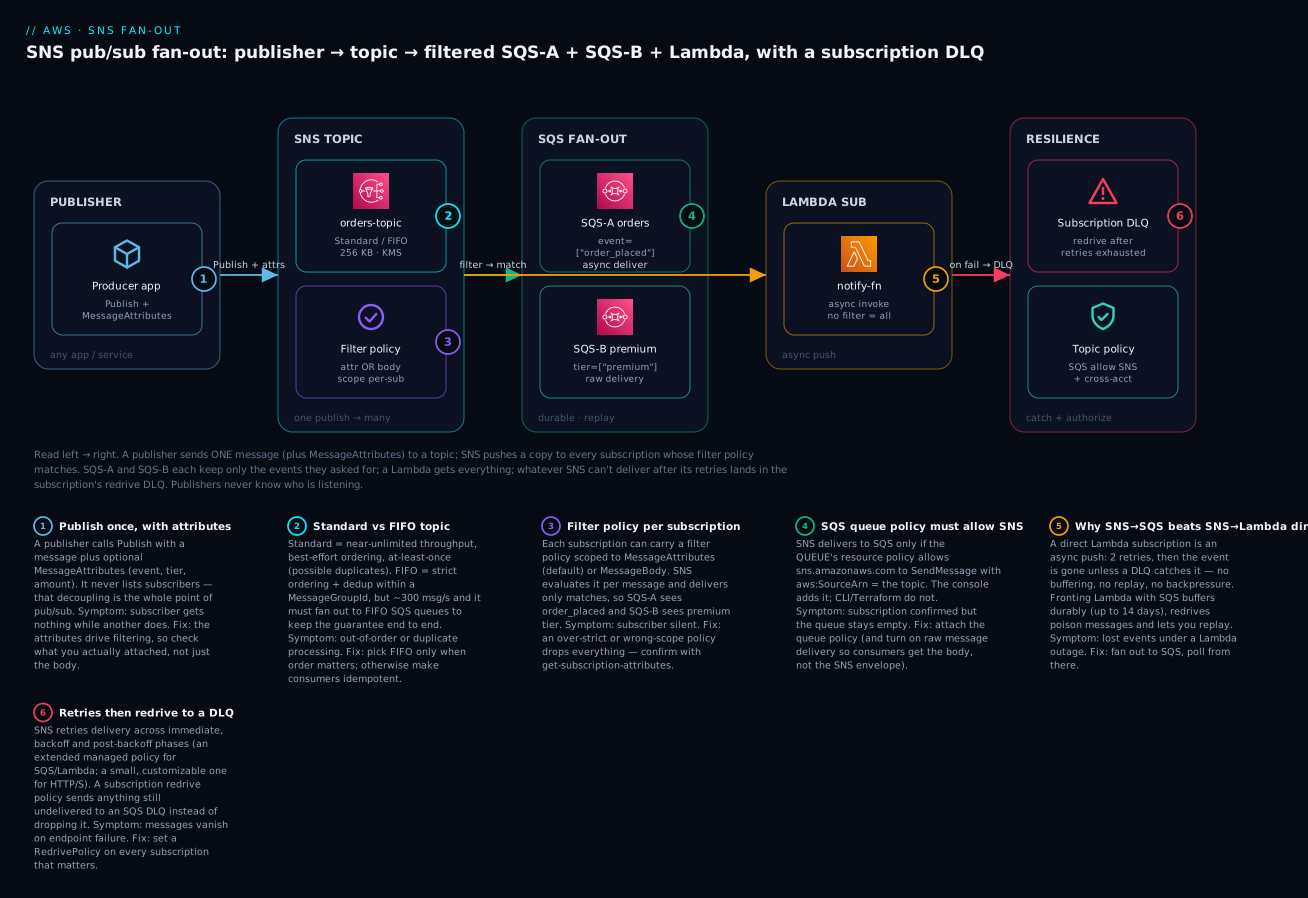
| Badge | Failure class | Lives at | Playbook row |
|---|---|---|---|
| 1 | Missing/mismatched attributes | The publish call | rows 3, 4 |
| 2 | Wrong topic type / ordering lost | The topic | rows 10, 11 |
| 3 | Filter too strict / wrong scope | The subscription filter | rows 1, 2 |
| 4 | SQS queue policy missing SNS | The queue | row 5 |
| 5 | Lambda not invoked (permission) | The function policy | row 6 |
| 6 | Messages dropped on failure | Retries + redrive DLQ | rows 8, 9 |
Real-world scenario
KloudCart, a mid-sized marketplace in Pune, had a checkout service that, on every order, synchronously called five downstream systems in a loop: inventory, billing, email, analytics and fraud. It worked until Black Friday, when the analytics endpoint slowed to 4 seconds per call. Because checkout awaited every downstream call, checkout latency ballooned to 12 seconds and the analytics timeout began throwing exceptions that rolled back otherwise-successful orders. One slow, non-critical consumer was taking down the critical path. Their senior engineer, Rohan, was tasked with decoupling it in a week.
He introduced an SNS topic, kc-order-events, and made checkout do exactly one thing after persisting the order: Publish an order_placed message with attributes event=order_placed, tier, and amount. Checkout latency dropped to the single publish call — about 8 milliseconds. Then he fanned out. Inventory, billing and analytics each got their own SQS queue subscribed to the topic; each queue was consumed by that team’s existing worker. The analytics slowdown now just meant its queue backed up harmlessly while checkout and the other consumers ran at full speed — the durable SQS buffer absorbed the lag that used to crash the order.
Filtering earned its keep immediately. The billing queue only needed paid orders, so Rohan added {"event": ["order_placed"], "payment": ["card", "upi"]} and billing stopped seeing cash-on-delivery noise. The fraud team only cared about high-value orders, so their subscription carried {"amount": [{"numeric": [">", 50000]}]} — one topic, five consumers, each receiving exactly its slice. He turned on raw message delivery for every SQS subscription so the workers read the order JSON directly instead of unwrapping the SNS envelope, which let him migrate the consumers with zero code changes to their message parsing.
Two failures during rollout mapped exactly to this article’s playbook. First, the billing queue stayed empty even though the subscription showed as confirmed — the SQS queue policy didn’t allow sns.amazonaws.com to SendMessage (the console adds it, but Rohan had used Terraform without an aws_sqs_queue_policy). Second, during a deploy the email consumer’s webhook was down for 20 minutes; without a subscription DLQ those notifications would have been dropped after retries. Rohan had attached a redrive policy to a kc-sns-dlq queue, so the 340 undelivered messages sat safely in the DLQ and were re-driven once the webhook recovered — zero lost emails. Post-migration: checkout p99 fell from 12 s to under 50 ms, a single slow consumer could no longer affect the order, and adding a new “loyalty points” consumer next quarter was a five-minute self-service subscribe with no checkout change. Rohan’s wiki note became team doctrine: “Publish once, fan out to a queue per consumer, filter at the subscription, and put a DLQ on everything that matters.”
Advantages and disadvantages
| Advantages | Disadvantages |
|---|---|
| Full producer/consumer decoupling (time + implementation) | At-least-once on Standard — consumers must be idempotent |
| One-to-many fan-out with no publisher-side list | No message persistence/replay in SNS itself (needs SQS/DLQ) |
| Very low latency, very high throughput | Best-effort ordering on Standard (FIFO caps throughput) |
| Per-subscription filtering (attributes or body) | 256 KB message cap (larger needs the S3 extended client) |
| Many native protocols, no glue code | Consumers can’t pull/backlog — SNS pushes (front with SQS) |
| Generous always-free tier (1M requests/mo) | No built-in schema registry or archive (EventBridge has these) |
| Serverless — nothing to run or scale | Cross-account/KMS wiring is three policies deep |
| Subscription DLQ captures failures for replay | Email/HTTP/S need confirmation — silent until confirmed |
When each side matters: SNS dominates for one-to-many broadcast and fan-out — notifications, event distribution, “when X, do A and B and C.” The disadvantages bite when you need durable per-consumer backlogs (add SQS), content routing across many event types with replay/schemas (use EventBridge), or strict ordering at high volume (FIFO’s throughput ceiling fights you). The honest rule: reach for SNS whenever one event must reach many consumers quickly; put SQS behind each consumer that needs durability; and switch to EventBridge when routing logic, source variety, or archive/replay become the point.
| Choose SNS when… | Reconsider when… |
|---|---|
| One event must reach many consumers | Only one consumer needs it (use SQS directly) |
| You want push delivery in milliseconds | Consumers must pull at their own pace (front with SQS) |
| Simple attribute/body filtering is enough | You need rich content routing (EventBridge) |
| Throughput matters more than strict order | Global ordering is a correctness requirement (FIFO, or rethink) |
| You’re fanning out to SQS/Lambda/webhooks | You need archive, replay and schemas out of the box (EventBridge) |
Hands-on lab
You will build the diagram: a Standard topic that fans out to two SQS queues with different filter policies (raw delivery on) and a Lambda (no filter), with a subscription DLQ on the Lambda subscription. First with the aws CLI, then the identical stack as Terraform, then a clean teardown. Everything is free-tier. Pick a region and stick to it (this lab uses ap-south-1, Mumbai).
⚠️ Cost note: SNS publishes/deliveries to SQS and Lambda are free at this volume (1M requests/mo free tier). We deliberately avoid SMS and email (those do cost). The only paise-level items are CloudWatch Logs; we delete everything at the end.
What you’ll create
| Resource | Purpose | Cost at lab volume |
|---|---|---|
SNS topic kv-orders-topic |
The fan-out channel | Free (within 1M req) |
SQS queue kv-sqs-a |
Subscriber, filter event=order_placed |
Free |
SQS queue kv-sqs-b |
Subscriber, filter tier=premium |
Free |
SQS queue kv-sns-dlq |
Subscription dead-letter queue | Free |
Lambda kv-notify-fn + role |
Subscriber (no filter, logs the event) | Free (free tier) |
| Subscriptions (×3) | Bind the endpoints, with filters + DLQ | Free |
Part A — the CLI path
Step 1 — Create the topic. A Standard topic; capture its ARN:
TOPIC_ARN=$(aws sns create-topic \
  --name kv-orders-topic \
  --region ap-south-1 \
  --query TopicArn --output text)
echo "$TOPIC_ARN"
# arn:aws:sns:ap-south-1:111122223333:kv-orders-topic
Step 2 — Create the three SQS queues and grab their ARNs and URLs.
for q in kv-sqs-a kv-sqs-b kv-sns-dlq; do
  aws sqs create-queue --queue-name "$q" --region ap-south-1 >/dev/null
done

get_url() { aws sqs get-queue-url --queue-name "$1" --region ap-south-1 --query QueueUrl --output text; }
get_arn() { aws sqs get-queue-attributes --queue-url "$1" --attribute-names QueueArn --region ap-south-1 --query 'Attributes.QueueArn' --output text; }

A_URL=$(get_url kv-sqs-a);   A_ARN=$(get_arn "$A_URL")
B_URL=$(get_url kv-sqs-b);   B_ARN=$(get_arn "$B_URL")
DLQ_URL=$(get_url kv-sns-dlq); DLQ_ARN=$(get_arn "$DLQ_URL")
Step 3 — Let the topic deliver into each queue (the step the console hides). Each queue’s policy must allow sns.amazonaws.com to SendMessage, scoped to this topic. Do it for all three (including the DLQ, which SNS also writes to):
set_queue_policy() {
  local url="$1" arn="$2"
  local policy=$(cat <<JSON
{"Version":"2012-10-17","Statement":[{
  "Sid":"AllowSNS","Effect":"Allow",
  "Principal":{"Service":"sns.amazonaws.com"},
  "Action":"sqs:SendMessage","Resource":"$arn",
  "Condition":{"ArnEquals":{"aws:SourceArn":"$TOPIC_ARN"}}
}]}
JSON
)
  aws sqs set-queue-attributes --queue-url "$url" \
    --attributes "{\"Policy\":$(jq -Rs . <<<"$policy")}" \
    --region ap-south-1
}
set_queue_policy "$A_URL" "$A_ARN"
set_queue_policy "$B_URL" "$B_ARN"
set_queue_policy "$DLQ_URL" "$DLQ_ARN"
Step 4 — Subscribe SQS-A with a filter policy + raw delivery. SQS subscriptions auto-confirm, so this is live immediately:
SUB_A=$(aws sns subscribe \
  --topic-arn "$TOPIC_ARN" \
  --protocol sqs \
  --notification-endpoint "$A_ARN" \
  --attributes '{"RawMessageDelivery":"true","FilterPolicy":"{\"event\":[\"order_placed\"]}"}' \
  --region ap-south-1 \
  --query SubscriptionArn --output text)
Step 5 — Subscribe SQS-B with a different filter policy.
SUB_B=$(aws sns subscribe \
  --topic-arn "$TOPIC_ARN" \
  --protocol sqs \
  --notification-endpoint "$B_ARN" \
  --attributes '{"RawMessageDelivery":"true","FilterPolicy":"{\"tier\":[\"premium\"]}"}' \
  --region ap-south-1 \
  --query SubscriptionArn --output text)
Step 6 — Create the Lambda and let SNS invoke it. A trivial handler that logs the event, an execution role for logs, then the resource-based permission SNS needs:
cat > notify.py <<'PY'
import json
def handler(event, context):
    for rec in event["Records"]:
        msg = rec["Sns"]["Message"]          # Lambda always gets the SNS envelope
        print(f"notify-fn received: {msg}")
    return {"ok": True}
PY
zip notify.zip notify.py

cat > trust.json <<'JSON'
{"Version":"2012-10-17","Statement":[{"Effect":"Allow",
 "Principal":{"Service":"lambda.amazonaws.com"},"Action":"sts:AssumeRole"}]}
JSON
aws iam create-role --role-name kv-notify-role \
  --assume-role-policy-document file://trust.json >/dev/null
aws iam attach-role-policy --role-name kv-notify-role \
  --policy-arn arn:aws:iam::aws:policy/service-role/AWSLambdaBasicExecutionRole
sleep 10   # let the role propagate

ACCOUNT_ID=$(aws sts get-caller-identity --query Account --output text)
aws lambda create-function --function-name kv-notify-fn \
  --runtime python3.12 --architectures arm64 \
  --handler notify.handler --zip-file fileb://notify.zip \
  --role arn:aws:iam::${ACCOUNT_ID}:role/kv-notify-role \
  --region ap-south-1 >/dev/null

# The resource-based policy that lets SNS invoke the function:
aws lambda add-permission --function-name kv-notify-fn \
  --statement-id sns-invoke --action lambda:InvokeFunction \
  --principal sns.amazonaws.com --source-arn "$TOPIC_ARN" \
  --region ap-south-1
Step 7 — Subscribe the Lambda (no filter → receives everything) and attach a DLQ.
FN_ARN=arn:aws:lambda:ap-south-1:${ACCOUNT_ID}:function:kv-notify-fn
SUB_L=$(aws sns subscribe \
  --topic-arn "$TOPIC_ARN" --protocol lambda \
  --notification-endpoint "$FN_ARN" \
  --region ap-south-1 --query SubscriptionArn --output text)

# Subscription DLQ: undeliverable messages go to kv-sns-dlq instead of being dropped
aws sns set-subscription-attributes \
  --subscription-arn "$SUB_L" \
  --attribute-name RedrivePolicy \
  --attribute-value "{\"deadLetterTargetArn\":\"$DLQ_ARN\"}" \
  --region ap-south-1
Step 8 — Publish and watch filtering route the same topic three ways. First a message that matches both queues and the Lambda:
aws sns publish --topic-arn "$TOPIC_ARN" \
  --message '{"orderId":"1001","amount":2500}' \
  --message-attributes '{"event":{"DataType":"String","StringValue":"order_placed"},"tier":{"DataType":"String","StringValue":"premium"}}' \
  --region ap-south-1
Now one that matches neither queue (only the unfiltered Lambda):
aws sns publish --topic-arn "$TOPIC_ARN" \
  --message '{"orderId":"1002","status":"shipped"}' \
  --message-attributes '{"event":{"DataType":"String","StringValue":"order_shipped"},"tier":{"DataType":"String","StringValue":"standard"}}' \
  --region ap-south-1
Step 9 — Verify the routing. Read each queue: SQS-A should have only order 1001; SQS-B should have only order 1001; the Lambda logs should show both 1001 and 1002.
aws sqs receive-message --queue-url "$A_URL" --max-number-of-messages 10 --region ap-south-1 \
  --query 'Messages[].Body' --output text
# {"orderId":"1001","amount":2500}      <-- raw body, no SNS envelope

aws sqs receive-message --queue-url "$B_URL" --max-number-of-messages 10 --region ap-south-1 \
  --query 'Messages[].Body' --output text
# {"orderId":"1001","amount":2500}      <-- 1002 was filtered out (tier=standard)

aws logs tail /aws/lambda/kv-notify-fn --region ap-south-1 --since 5m
# notify-fn received: {"orderId":"1001","amount":2500}
# notify-fn received: {"orderId":"1002","status":"shipped"}   <-- Lambda has no filter
That contrast — SQS-A/B each hold only their matching message while the Lambda holds both — is filtered fan-out. Notice the SQS bodies are your raw JSON (raw delivery on), while the Lambda received the full envelope (rec["Sns"]["Message"]).
Step 10 — Tear down. Delete in dependency order:
aws sns unsubscribe --subscription-arn "$SUB_A" --region ap-south-1
aws sns unsubscribe --subscription-arn "$SUB_B" --region ap-south-1
aws sns unsubscribe --subscription-arn "$SUB_L" --region ap-south-1
aws sns delete-topic --topic-arn "$TOPIC_ARN" --region ap-south-1
for u in "$A_URL" "$B_URL" "$DLQ_URL"; do aws sqs delete-queue --queue-url "$u" --region ap-south-1; done
aws lambda delete-function --function-name kv-notify-fn --region ap-south-1
aws logs delete-log-group --log-group-name /aws/lambda/kv-notify-fn --region ap-south-1
aws iam detach-role-policy --role-name kv-notify-role \
  --policy-arn arn:aws:iam::aws:policy/service-role/AWSLambdaBasicExecutionRole
aws iam delete-role --role-name kv-notify-role
| Teardown step | Command | Why it must be explicit |
|---|---|---|
| Unsubscribe (×3) | sns unsubscribe |
Deleting the topic leaves subs Deleted but tidy first |
| Delete topic | sns delete-topic |
Stops all fan-out |
| Delete queues (×3) | sqs delete-queue |
Queues persist and can hold messages otherwise |
| Delete function | lambda delete-function |
Stops invocations |
| Delete log group | logs delete-log-group |
Logs bill after the function is gone |
| Detach + delete role | detach-role-policy then delete-role |
Can’t delete a role with attached policies |
Part B — the same stack as Terraform
The CLI teaches the moving parts; Terraform is how you keep them. Note the three things people forget in IaC that the console does automatically: the SQS queue policy (aws_sqs_queue_policy), the Lambda permission (aws_lambda_permission), and the filter policy / raw delivery / redrive on the subscription.
terraform {
  required_providers {
    aws     = { source = "hashicorp/aws", version = "~> 5.0" }
    archive = { source = "hashicorp/archive", version = "~> 2.4" }
  }
}
provider "aws" { region = "ap-south-1" }

data "aws_caller_identity" "me" {}

# --- Topic ---
resource "aws_sns_topic" "orders" {
  name = "kv-orders-topic"
}

# --- Queues (A, B, DLQ) ---
resource "aws_sqs_queue" "a"   { name = "kv-sqs-a" }
resource "aws_sqs_queue" "b"   { name = "kv-sqs-b" }
resource "aws_sqs_queue" "dlq" { name = "kv-sns-dlq" }

# --- Queue policies: allow THIS topic to SendMessage ---
data "aws_iam_policy_document" "allow_sns" {
  for_each = { a = aws_sqs_queue.a.arn, b = aws_sqs_queue.b.arn, dlq = aws_sqs_queue.dlq.arn }
  statement {
    effect    = "Allow"
    actions   = ["sqs:SendMessage"]
    resources = [each.value]
    principals { type = "Service", identifiers = ["sns.amazonaws.com"] }
    condition {
      test     = "ArnEquals"
      variable = "aws:SourceArn"
      values   = [aws_sns_topic.orders.arn]
    }
  }
}
resource "aws_sqs_queue_policy" "a"   { queue_url = aws_sqs_queue.a.id,   policy = data.aws_iam_policy_document.allow_sns["a"].json }
resource "aws_sqs_queue_policy" "b"   { queue_url = aws_sqs_queue.b.id,   policy = data.aws_iam_policy_document.allow_sns["b"].json }
resource "aws_sqs_queue_policy" "dlq" { queue_url = aws_sqs_queue.dlq.id, policy = data.aws_iam_policy_document.allow_sns["dlq"].json }

# --- SQS subscriptions with distinct filter policies + raw delivery ---
resource "aws_sns_topic_subscription" "a" {
  topic_arn            = aws_sns_topic.orders.arn
  protocol             = "sqs"
  endpoint             = aws_sqs_queue.a.arn
  raw_message_delivery = true
  filter_policy        = jsonencode({ event = ["order_placed"] })
  depends_on           = [aws_sqs_queue_policy.a]
}
resource "aws_sns_topic_subscription" "b" {
  topic_arn            = aws_sns_topic.orders.arn
  protocol             = "sqs"
  endpoint             = aws_sqs_queue.b.arn
  raw_message_delivery = true
  filter_policy        = jsonencode({ tier = ["premium"] })
  depends_on           = [aws_sqs_queue_policy.b]
}

# --- Lambda subscriber (no filter) + its permission + a subscription DLQ ---
data "archive_file" "fn" {
  type        = "zip"
  source_file = "${path.module}/notify.py"
  output_path = "${path.module}/notify.zip"
}
resource "aws_iam_role" "fn" {
  name = "kv-notify-role"
  assume_role_policy = jsonencode({
    Version = "2012-10-17",
    Statement = [{ Effect = "Allow", Principal = { Service = "lambda.amazonaws.com" }, Action = "sts:AssumeRole" }]
  })
}
resource "aws_iam_role_policy_attachment" "logs" {
  role       = aws_iam_role.fn.name
  policy_arn = "arn:aws:iam::aws:policy/service-role/AWSLambdaBasicExecutionRole"
}
resource "aws_lambda_function" "fn" {
  function_name    = "kv-notify-fn"
  role             = aws_iam_role.fn.arn
  runtime          = "python3.12"
  architectures    = ["arm64"]
  handler          = "notify.handler"
  filename         = data.archive_file.fn.output_path
  source_code_hash = data.archive_file.fn.output_base64sha256
}
resource "aws_lambda_permission" "sns" {
  statement_id  = "sns-invoke"
  action        = "lambda:InvokeFunction"
  function_name = aws_lambda_function.fn.function_name
  principal     = "sns.amazonaws.com"
  source_arn    = aws_sns_topic.orders.arn
}
resource "aws_sns_topic_subscription" "lambda" {
  topic_arn  = aws_sns_topic.orders.arn
  protocol   = "lambda"
  endpoint   = aws_lambda_function.fn.arn
  redrive_policy = jsonencode({ deadLetterTargetArn = aws_sqs_queue.dlq.arn })
  depends_on = [aws_lambda_permission.sns]
}
terraform init
terraform apply        # review the plan, type yes
# publish a test message the same way as Step 8, then:
terraform destroy      # one-command teardown
| Terraform detail | Why it’s there | If you omit it |
|---|---|---|
aws_sqs_queue_policy |
Lets the topic deliver into each queue | Subscription confirmed, queue empty |
aws_lambda_permission |
Lets SNS invoke the function | Lambda never invoked |
raw_message_delivery = true |
SQS gets the body, not the envelope | Consumers parse SNS metadata |
filter_policy = jsonencode(...) |
Per-subscription routing | Every queue gets every message |
redrive_policy on the sub |
Subscription DLQ | Undeliverable messages dropped |
depends_on on policy/permission |
Order creation before the subscription | First deliveries fail |
Common mistakes & troubleshooting
This is the section you’ll return to. Match your symptom, run the confirm command, apply the fix.
| # | Symptom | Root cause | Confirm (exact command / console path) | Fix |
|---|---|---|---|---|
| 1 | Subscriber receives nothing, others do | Filter policy too strict / wrong values | aws sns get-subscription-attributes --subscription-arn <arn> → read FilterPolicy |
Loosen the policy; test with a message you know matches |
| 2 | Filtering ignores attributes you send | FilterPolicyScope mismatch (body vs attributes) |
Check FilterPolicyScope; check whether you sent attributes or only a body |
Match scope to how you publish (MessageAttributes vs MessageBody) |
| 3 | Numeric filter never matches | Attribute sent as String, not Number |
Inspect the publish --message-attributes DataType |
Publish the attribute as {"DataType":"Number",...} |
| 4 | Subscriber gets every message | No filter policy on that subscription | get-subscription-attributes shows no FilterPolicy |
Add a FilterPolicy (or accept it’s the “all” subscriber) |
| 5 | Subscription confirmed, SQS queue empty | Queue policy doesn’t allow sns.amazonaws.com to SendMessage |
aws sqs get-queue-attributes --attribute-names Policy — no SNS statement |
Add the queue policy with Principal sns.amazonaws.com + SourceArn |
| 6 | Lambda never invoked | Missing resource-based permission for SNS | aws lambda get-policy --function-name <fn> — no sns.amazonaws.com statement |
aws lambda add-permission ... --principal sns.amazonaws.com --source-arn <topic> |
| 7 | SQS consumer chokes parsing JSON | Envelope, not raw body (double-wrapped) | Inspect the SQS body — starts with {"Type":"Notification"... |
Set RawMessageDelivery=true, or parse .Message |
| 8 | Messages disappear on endpoint failure | No redrive policy; retried then dropped | get-subscription-attributes → no RedrivePolicy |
Add a RedrivePolicy pointing to an SQS DLQ |
| 9 | DLQ configured but stays empty on failures | DLQ queue policy doesn’t allow the topic to write | sqs get-queue-attributes --attribute-names Policy on the DLQ |
Add the same SNS SendMessage policy to the DLQ queue |
| 10 | Duplicate processing | Standard topic is at-least-once; consumer not idempotent | Compare MessageIds / your business key in logs |
Make the consumer idempotent (dedupe key / conditional write) |
| 11 | Ordering lost | Standard topic (best-effort), or FIFO → Standard queue | Check topic type (.fifo?) and the subscribed queue type |
Use a FIFO topic and FIFO queues; set MessageGroupId |
| 12 | Email/HTTP sub never delivers | Subscription stuck PendingConfirmation |
aws sns list-subscriptions-by-topic → SubscriptionArn: PendingConfirmation |
Click the email link / have the endpoint call ConfirmSubscription |
| 13 | Cross-account publish denied | Topic policy doesn’t allow the other account | aws sns get-topic-attributes → read Policy |
Add SNS:Publish for the account principal to the topic policy |
| 14 | Encrypted topic, SQS gets nothing | CMK key policy doesn’t allow SQS/subscriber | KMS console → key policy; CloudTrail kms:Decrypt denials |
Grant the service/account kms:Decrypt+GenerateDataKey on the CMK |
| 15 | Publish fails AuthorizationErrorException |
Publisher IAM or topic policy forbids it | aws sns get-topic-attributes; check the caller’s IAM |
Grant sns:Publish in IAM and/or the topic policy |
| 16 | FIFO publish rejected | Missing MessageGroupId (required for FIFO) |
Error: “MessageGroupId is required” | Add --message-group-id; add dedup id or content-based dedup |
SNS / delivery error reference
| Error / status | Meaning | Likely cause | Fix |
|---|---|---|---|
AuthorizationErrorException |
Not authorized | IAM or topic policy denies Publish/Subscribe |
Grant the action in IAM and/or the topic policy |
InvalidParameterException (size) |
Message too big | Body+attributes > 256 KB | Shrink, or use the SNS Extended Client (S3) |
InvalidParameter (filter) |
Bad filter policy | > 150 combinations / malformed JSON | Simplify the policy; validate JSON |
NotFoundException |
Topic/subscription missing | Wrong ARN / region | Verify the ARN and --region |
EndpointDisabled |
Push endpoint disabled | Mobile token invalid/expired | Re-register the device endpoint |
KMSAccessDenied (in delivery) |
Can’t use the CMK | Key policy missing the service/account | Fix the KMS key policy |
PendingConfirmation (state) |
Sub not active | Email/HTTP not confirmed | Confirm the subscription |
Throttled / FIFO 300/s |
FIFO throughput cap | Publishing faster than 300 msg/s | Batch (publish-batch), shard by group, or use Standard |
Delivery status: how to actually see what SNS did
SNS delivery is invisible until you turn on delivery status logging — an IAM role plus a sample rate that writes success/failure to CloudWatch Logs. It is the single best tool for “did SNS even try, and what did the endpoint say?”
| Attribute | What it enables | Set on |
|---|---|---|
SQSSuccessFeedbackRoleArn / ...FailureFeedbackRoleArn |
Log SQS delivery outcomes | Topic |
LambdaSuccessFeedbackRoleArn / Failure... |
Log Lambda delivery outcomes | Topic |
HTTPSuccessFeedbackRoleArn / Failure... |
Log HTTP/S delivery + status codes | Topic |
*SuccessFeedbackSampleRate |
0–100 (% of successes to log) | Topic |
The three nastiest, explained
“Subscription confirmed but the queue is empty” (row 5) wastes the most hours because the subscription genuinely exists and looks healthy — so you debug SNS when the problem is the SQS queue policy. SNS delivers to SQS by calling sqs:SendMessage as the SNS service principal; if the queue’s resource policy doesn’t allow sns.amazonaws.com (scoped to your topic ARN), every delivery is denied and the queue stays empty. The console adds this policy when you subscribe; the CLI and Terraform do not. Always attach the queue policy, and use aws sqs get-queue-attributes --attribute-names Policy to confirm the SNS statement is there.
“The subscriber receives nothing” (rows 1–2) is almost always a filter policy that is correct-but-too-strict, or scoped to the wrong thing. Remember the semantics: AND across keys, OR within a key, and a missing attribute fails its key (unless you used exists:false). If you filter on MessageAttributes but publish only a body (or vice-versa via FilterPolicyScope), nothing matches. Debug by publishing a message you are certain should match, then dump get-subscription-attributes and compare field-by-field. A numeric filter silently failing is usually a String attribute where a Number was required.
“Messages disappear under an outage” (rows 8–9) catches teams who added fan-out but not resilience. SNS retries, but a Standard topic does not persist messages after retries exhaust — without a redrive policy the message is gone. And the DLQ itself is an SQS queue that SNS must be allowed to write to, so a DLQ whose queue policy doesn’t grant the topic SendMessage is a DLQ that also silently drops. Attach a redrive policy to every subscription that matters, give the DLQ the same SNS-allow policy as any other queue, and you turn “lost forever” into “sitting in the DLQ, ready to replay.”
Best practices
- Fan out into an SQS queue per consumer. Give each independent consumer its own queue subscribed to the topic. You get durability, backpressure, per-consumer replay and batching for free — the single most important SNS design rule.
- Prefer SNS→SQS over SNS→Lambda direct. Reserve direct Lambda subscriptions for genuinely loss-tolerant, low-volume notifications; put SQS in front of anything that must not be lost.
- Filter at the subscription, not in the consumer. A filter policy drops non-matches before delivery, so you don’t pay to deliver, store, poll and discard irrelevant messages. Move routing logic to the subscription.
- Turn on raw message delivery for SQS/HTTP subscribers. Unless you need the SNS signature/metadata, raw delivery gives consumers your payload directly and removes envelope-parsing bugs.
- Attach a DLQ (redrive policy) to every subscription that matters — and remember the DLQ’s own queue policy must let the topic write to it. A DLQ you can’t deliver into isn’t a DLQ.
- Make Standard-topic consumers idempotent. At-least-once means duplicates happen. Use a dedupe key or a conditional write; don’t reach for FIFO just to avoid designing for it.
- Use FIFO only when ordering is a correctness requirement — and pair a FIFO topic with FIFO queues to keep the guarantee end-to-end. Expect ~300 msg/s and pick a
MessageGroupIdthat reflects your real ordering scope. - Encrypt with KMS, and fix the key policy for every consumer. Enabling SSE is one line; letting SQS/Lambda/cross-account principals decrypt is the actual work — do it at the same time.
- Scope the topic policy tightly. Grant
Publish/Subscribeto specific principals withaws:SourceArn/aws:SourceAccountconditions; never leave a topic open to*. - Deploy with IaC, not the console. The console silently adds the queue policy and Lambda permission; IaC does not. Encode them explicitly so your stack is reproducible and reviewable.
- Turn on delivery status logging in production. The success/failure feedback roles are the only way to see what endpoints actually returned — invaluable when a subscriber “isn’t getting messages.”
Security notes
SNS’s security surface is small but every piece gates delivery. Get these right from the start:
| Control | What to do | Why |
|---|---|---|
| Topic access policy | Grant Publish/Subscribe to named principals with SourceArn/SourceAccount conditions |
Stops the confused-deputy problem and unwanted publishers |
| KMS encryption at rest | Set KmsMasterKeyId; use a CMK for sensitive data |
Encrypts messages in the topic; CMK gives you audit + key control |
| KMS key policy for consumers | Allow SQS/Lambda/cross-account principals kms:Decrypt+GenerateDataKey |
Otherwise delivery silently fails on an encrypted topic |
| SQS queue policy | Allow only sns.amazonaws.com + your topic ARN |
The queue accepts SNS deliveries but nothing else |
| Lambda resource policy | Scope InvokeFunction to sns.amazonaws.com + the topic ARN |
Only your topic can invoke the function |
| HTTPS + signature verification | Verify the SNS message signature (SignatureVersion 2) on HTTP/S endpoints | Confirms the message really came from SNS |
| Least-privilege publishers | Grant sns:Publish only on the specific topic ARN |
A compromised publisher can’t spam other topics |
| No PII in message bodies for SMS/email | Keep sensitive data out of low-control channels | SMS/email leave the AWS trust boundary |
| VPC endpoints (PrivateLink) | Publish to SNS over a VPC endpoint | Keeps publish traffic off the public internet |
| CloudTrail on | Audit Publish, Subscribe, SetTopicAttributes |
Detect tampering and rogue subscriptions |
The two you’ll get wrong first: encrypting a topic with a CMK and forgetting to let SQS decrypt (silent delivery failure), and leaving a topic policy that allows Subscribe too broadly (someone subscribes their own endpoint to your event stream). Lock the policy to named principals with conditions.
Cost & sizing
SNS pricing is refreshingly simple: you pay per request (a publish or a delivery) plus per-delivery fees that depend on the protocol, and the free tier covers most beginner and small-production usage. SQS/Lambda deliveries are the cheap, high-value path.
| Cost driver | How it’s charged (Standard, ap-south-1 approx.) | Lever |
|---|---|---|
| Requests | First 1,000,000/month free, then ~$0.50 per 1M | Batch with publish-batch (10/call) |
| SQS deliveries | Free (SQS charges its own requests) | The reason SNS→SQS is the default |
| Lambda deliveries | Free (Lambda charges its own invocations) | — |
| HTTP/S deliveries | ~$0.60 per 1M | Fine at scale |
| Email / email-json | ~$2.00 per 100,000 | Use sparingly; not for high volume |
| SMS | Per-message, country-specific (India relatively high) | Use only for real user alerts |
| Mobile push | ~$0.50 per 1M | Cheap for app notifications |
| FIFO | ~$0.30 per 1M publishes + delivery + payload/GB fees | Only when you need ordering |
| Data transfer | Standard AWS egress applies | Keep consumers in-region |
A worked example to make it concrete (rough INR at ~₹84/USD):
| Scenario | Publishes/mo | Deliveries | Protocols | Est. monthly cost |
|---|---|---|---|---|
| This lab | ~10 | ~30 | SQS + Lambda | ₹0 (free tier) |
| Order fan-out | 1,000,000 | 5,000,000 (5 SQS) | SQS | ~₹0 (within/near free; SQS deliveries free) |
| Notifications | 2,000,000 | 2,000,000 | HTTP/S webhook | Requests ~$0.50 + HTTP ~$1.20 ≈ ₹145 |
| Email digests | 500,000 | 500,000 | Email ~$10 ≈ ₹840 (email is the pricey bit) | |
| SMS OTPs | 100,000 | 100,000 | SMS | Dominated by per-SMS India rates (budget separately) |
The takeaways: SQS and Lambda deliveries are free, which is exactly why the SNS→SQS fan-out is both the most robust and the cheapest pattern; email and SMS are the expensive protocols (price them before you fan out to them at volume); and 1M requests/month free means small apps run at ₹0. To right-size, batch publishes where you can, filter at the subscription so you don’t pay to deliver noise, and keep consumers in-region to avoid egress.
Interview & exam questions
1. What is Amazon SNS in one sentence, and how does it differ from SQS? SNS is a managed pub/sub service: publishers send a message to a topic and SNS pushes a copy to every subscriber (one-to-many, push). SQS is a queue: one producer, one consumer group, and the consumer pulls (one-to-one, pull, durable buffer). SNS broadcasts; SQS buffers. (CLF-C02, SAA-C03)
2. Explain the fan-out pattern and why you’d put SQS between SNS and a consumer. Fan-out is one publish delivered to many subscribers. Fronting each consumer with its own SQS queue adds a durable buffer, backpressure, easy replay, and per-record retry/redrive — so a slow or down consumer doesn’t lose messages or affect others. A direct Lambda subscription has none of that beyond SNS retries and a DLQ. (SAA-C03, DVA-C02)
3. When do you need a FIFO topic, and what’s the cost? Only when strict ordering and exactly-once processing within a group are correctness requirements (e.g. financial ledgers). The cost is throughput — about 300 messages/second — and the constraint that end-to-end ordering requires FIFO SQS queues as subscribers. Otherwise use Standard and make consumers idempotent. (SAA-C03, DVA-C02)
4. How does message filtering work, and what are the two scopes? Each subscription can carry a filter policy that SNS evaluates per message, delivering only matches. The scope is either MessageAttributes (filter on typed attributes attached at publish) or MessageBody (filter on JSON fields in the payload). Semantics are AND across keys, OR within a key. (DVA-C02)
5. Your SQS queue is subscribed and confirmed but receives nothing. First hypothesis? The SQS queue’s resource policy doesn’t allow sns.amazonaws.com to sqs:SendMessage for the topic ARN. The console adds this automatically; CLI/Terraform don’t. Confirm with sqs get-queue-attributes --attribute-names Policy. (DVA-C02, SCS)
6. What is raw message delivery and when do you enable it? By default SNS wraps the body in a JSON envelope (metadata + Message). Raw message delivery (SQS/HTTP/Firehose only) strips the envelope so the subscriber receives your body verbatim, with attributes mapped to native SQS attributes. Enable it unless you need the SNS signature/metadata. (DVA-C02)
7. How do you stop SNS from losing messages when an endpoint is down? Attach a redrive policy (subscription DLQ) pointing to an SQS queue; after retries exhaust, undeliverable messages go there instead of being dropped, ready to inspect and replay. Ensure the DLQ’s queue policy allows the topic to write to it. (DVA-C02, SAA-C03)
8. Describe delivery/retry differences between endpoint types. For AWS-managed endpoints (SQS, Lambda, Firehose), SNS uses an aggressive managed multi-phase retry policy. For HTTP/S you can customize the delivery policy (immediate, pre-backoff, backoff, post-backoff; default ~3 retries at 20s). Email/SMS/push retries are managed and have no DLQ. (DVA-C02)
9. How do you publish cross-account, and what three policies are involved? The topic policy must allow the publisher’s account SNS:Publish (and a subscriber account SNS:Subscribe); the subscriber’s SQS queue policy must allow sns.amazonaws.com to SendMessage; and if the topic uses a CMK, the key policy must allow the relevant principals to decrypt. (SCS, SAA-C03)
10. SNS vs EventBridge — when each? SNS for high-throughput, low-latency, one-to-many fan-out with simple attribute/body filtering. EventBridge for content-based routing across many event types and 200+ AWS/SaaS sources, with a schema registry and built-in archive/replay. Many designs use EventBridge to route and SNS to fan out. (SAA-C03, DVA-C02)
11. Why must Standard-topic consumers be idempotent? Standard topics deliver at-least-once, so a consumer can occasionally see the same message twice; ordering is best-effort too. If processing has side effects (charging, inserting), design for duplicates with a dedupe key or conditional write. (DVA-C02)
12. What’s the maximum SNS message size and how do you exceed it? 256 KB (body + attributes). For larger payloads, use the SNS Extended Client Library, which stores the payload in S3 and sends a reference through SNS (up to 2 GB). (DVA-C02)
Quick check
- A publisher sends one message with attributes
event=order_placed, tier=standard. SQS-A filters{"event":["order_placed"]}, SQS-B filters{"tier":["premium"]}, Lambda has no filter. Which endpoints receive it? - You subscribed an SQS queue via the CLI; it’s confirmed but empty. What single resource is almost certainly misconfigured?
- Name two concrete advantages of SNS→SQS→Lambda over subscribing the Lambda directly.
- Your consumer is receiving
{"Type":"Notification","Message":"..."}and choking on it. What subscription setting fixes this? - You must guarantee ordered, exactly-once processing of account transactions. What topic type and which subscriber queue type do you use?
Answers
- SQS-A (event matches) and Lambda (no filter). SQS-B does not —
tier=standardfails itstier=premiumfilter. - The SQS queue’s resource policy — it must allow
sns.amazonaws.comtosqs:SendMessagescoped to the topic ARN. The console adds this; the CLI/Terraform don’t. - Any two of: a durable buffer (up to 14 days) so a down consumer loses nothing; backpressure so spikes queue rather than overwhelm; easy replay by re-driving the DLQ; batching and partial-failure handling on the poll.
- Turn on raw message delivery (
RawMessageDelivery=true) so the consumer gets the body directly instead of the SNS envelope (or parse.Messageout of the envelope). - A FIFO topic delivering to FIFO SQS queues, with a
MessageGroupIdthat scopes ordering (e.g. per account) and deduplication enabled.
Glossary
| Term | Definition |
|---|---|
| Pub/Sub | A messaging pattern where publishers send to a topic and subscribers receive, without knowing each other. |
| Topic | A named SNS channel that publishers send to and subscribers attach to; Standard or FIFO. |
| Subscription | A binding of one endpoint to a topic under one protocol; must be confirmed to receive. |
| Protocol | The delivery mechanism for a subscription: SQS, Lambda, HTTP/S, email, SMS, application (push) or Firehose. |
| Fan-out | Delivering a single published message to many subscribers in parallel. |
| Message attribute | A typed key/value (String/Number/Binary) attached beside the body, used for filtering and metadata. |
| Filter policy | A per-subscription JSON rule that delivers only matching messages; scoped to attributes or the body. |
| Raw message delivery | A subscription option (SQS/HTTP/Firehose) that strips the SNS envelope so the body is delivered verbatim. |
| SNS envelope | The default JSON wrapper (Type, MessageId, Message, Signature, attributes) around a delivered message. |
| Redrive policy (DLQ) | A subscription setting naming an SQS queue that captures messages SNS couldn’t deliver after retries. |
| Standard topic | High-throughput topic with best-effort ordering and at-least-once delivery. |
| FIFO topic | Ordered, deduplicated topic (~300 msg/s) whose name ends in .fifo; pairs with FIFO queues. |
| MessageGroupId | The FIFO ordering scope; messages within a group are strictly ordered. |
| Topic policy | The resource-based policy on a topic controlling who may publish and subscribe. |
| Delivery status logging | Optional CloudWatch logging of per-delivery success/failure via feedback IAM roles. |
| Extended Client Library | A client that stores payloads > 256 KB in S3 and sends a reference through SNS (up to 2 GB). |
Next steps
- See how SNS fits the bigger picture. Wire topics, queues, buses and functions together in Event-Driven Architecture on AWS: EventBridge, SQS, SNS, Lambda and Step Functions.
- Go deep on the consumer side. Learn idempotency, DLQs, batching and scale-to-zero patterns in AWS Lambda Patterns: Event-Driven Functions That Scale to Zero.
- Master the queue you fan out into. Follow the wave’s SQS Standard vs FIFO hands-on for visibility timeout, long polling and redrive mechanics that the fan-out depends on.
- Compare the routing alternative. Work through the wave’s EventBridge rules & event bus hands-on to see when content-based routing beats simple pub/sub filtering.
- Harden it for production. Add KMS encryption, tighten the topic policy, and turn on delivery status logging before you put a fan-out on your critical path.