You created your first Azure Kubernetes Service (AKS) cluster, deployed a few apps, and everything worked. Six months later you try to scale out and pods get stuck in Pending with a one-line event: Failed to allocate address. Your nodes have CPU and memory to spare. Nothing is broken in your code. You have simply run out of IP addresses — and the reason is a decision you made (or let the portal make for you) on day one, in a dropdown labelled “Network configuration” that you probably clicked past in four seconds.
That dropdown is the single most consequential choice in an AKS cluster, and it is almost impossible to change later without rebuilding the cluster. It picks the networking model — the plumbing that decides how every pod gets an IP address, how pod-to-pod traffic flows, and crucially how many addresses from your corporate network each pod consumes. Get it right and a cluster scales for years on a small slice of address space. Get it wrong and you hit a wall that no amount of bigger VMs can fix. This article makes that choice obvious.
We will compare the three models you actually choose between today — kubenet (the old, IP-frugal default), Azure CNI (the integrated, IP-hungry one, now called node-subnet mode), and Azure CNI Overlay (the modern best-of-both that most new clusters should use). You will get a clear mental model of how a packet flows in each, a sizing formula so you never run out of addresses, a decision table for picking one in under a minute, and copy-pasteable az and Bicep to build each. By the end, that four-second dropdown will be a deliberate, defensible decision.
What problem this solves
Kubernetes gives every pod its own IP address — that is a founding rule of the platform, and it is what lets containers talk to each other as if they were ordinary hosts. But Kubernetes does not say where those IP addresses come from. On a laptop with kind it invents a private range nobody else sees. On Azure, your AKS nodes live inside a virtual network (VNet) — the same address space your databases, private endpoints, on-premises VPN and other teams share — and the question of whether pod IPs come from that shared VNet or from a separate private overlay changes everything about how the cluster scales and connects.
Here is the pain in production terms. Most enterprises do not own unlimited private address space. A platform team hands you a subnet — say a /24, which is 251 usable addresses after Azure reserves five. If every pod takes one address from that subnet, a cluster running 50 pods per node fills a /24 with just four or five nodes. You cannot scale past that, and the fix is not “add RAM” — it is to rebuild the cluster on the right networking model, which on a production cluster means a migration, a maintenance window, and a very awkward conversation.
Who hits this: anyone who picked Azure CNI without doing the IP math, anyone whose platform team is stingy with address space (most large orgs, because RFC 1918 space is finite and overlaps with on-prem), and anyone running pod-dense workloads — many small microservices, batch jobs, or per-tenant pods. The teams who don’t hit it picked kubenet or CNI Overlay, where pods consume zero VNet IPs. This article gets you into that camp on purpose, with eyes open.
Learning objectives
By the end of this article you can:
- Explain in one sentence each how kubenet, Azure CNI (node-subnet), and Azure CNI Overlay assign pod IPs, and what each does to your VNet address space.
- Trace how a packet flows from one pod to another — and out to the internet — in all three models, and say where NAT happens and where it doesn’t.
- Calculate exactly how many subnet IP addresses a cluster will consume from a node count and
--max-pods, so you can size a subnet that will never run out. - Pick the right model for a given workload using a decision table, and justify the choice to a security or platform reviewer.
- Build a cluster in each model with
az aks createand with Bicep, setting the rightnetwork-plugin,network-plugin-mode, and CIDR ranges. - Recognise the warning signs of IP exhaustion (
Failed to allocate address,Pendingpods, scale-out failures) and confirm the cause fast. - Understand where Azure CNI Powered by Cilium and Network Policy fit on top of these models, without confusing the data-plane choice with the model choice.
Prerequisites & where this fits
You should know what a pod and a node are (a pod is one or more containers scheduled together; a node is the VM that runs pods), and that AKS gives you a managed Kubernetes cluster where Azure runs the control plane for you. You should be comfortable reading CIDR notation — that /24 means 256 addresses and /16 means 65,536 — and able to run az in Cloud Shell. A working knowledge of Azure VNets and subnets helps; if that is shaky, read Azure Virtual Network, Subnets and NSGs: Networking Fundamentals first, because every model here lands nodes (and sometimes pods) inside a subnet you must size.
This sits in the Networking fundamentals track for AKS and is the natural next step after you understand the cluster shape itself. If you have not seen how the managed control plane, node pools and Azure integrations fit together, AKS Architecture Explained: Managed Control Plane, Node Pools, and the Azure Integrations That Make It Tick is the upstream read. Once you have picked a model here, Azure Load Balancer vs Application Gateway: Picking the Right Traffic Manager covers how traffic gets into the cluster, which is a separate decision from how pods talk inside it.
A quick map of where each piece sits, so the rest of the article has a frame:
| Layer | What lives here | Who owns it | What the networking model decides |
|---|---|---|---|
| VNet / subnet | Address space (CIDR), routing | Platform / network team | Whether pods consume these IPs |
| Node | The VM running the kubelet | AKS (you size the pool) | How many pods per node (--max-pods) |
| Pod | Your containers, each with an IP | App team | Where the pod IP comes from |
| Service / LB | Stable cluster-internal + external entry | App + platform | Unaffected by model (separate CIDR) |
| Internet egress | Outbound NAT to public IPs | Platform | Whether pods are NAT’d or routed |
Core concepts
Four mental models make every comparison below obvious. Read these once and the rest of the article is mostly confirmation.
Every pod needs an IP, and the model decides where it comes from. This is the whole topic in one line. Kubernetes assigns each pod an address; the networking model (also called the network plugin, configured with --network-plugin) is the component that hands out those addresses and wires up routing. The three models differ on exactly one big axis — do pod IPs come from your VNet subnet (real Azure addresses, routable across peerings and to on-prem) or from a separate overlay CIDR that exists only inside the cluster — and a few smaller axes that follow from that choice.
“Routable” vs “overlay” is the fork that matters. A routable pod IP is a real VNet address: anything peered to your VNet, or reachable over your VPN/ExpressRoute, can send a packet straight to that pod by its IP, with no translation. An overlay pod IP is private to the cluster — it is invisible outside, and when a pod talks to the rest of the VNet or the internet, its source address is rewritten (NAT’d) to the node’s IP. Routable is powerful when something outside the cluster must reach pods directly; overlay is frugal because pods cost zero VNet addresses. Almost every “which model?” decision reduces to: does anything outside the cluster need to dial a pod by its own IP?
--max-pods is the multiplier that fills your subnet. Each node can run up to --max-pods pods (default 30 for Azure CNI, 110 for kubenet and Overlay). In models where pods consume VNet IPs, AKS pre-reserves --max-pods addresses per node the moment the node joins — not when pods actually land. So a 3-node cluster with --max-pods=30 reserves ~90 pod IPs plus the node IPs immediately, whether you run 3 pods or 90. This pre-reservation is why subnets fill faster than people expect, and it is the number one cause of “I have free addresses but pods won’t schedule.”
The model is not the data plane, the policy, or the ingress. Three things often get bundled with “AKS networking” but are separate decisions layered on top of the model. The data plane (standard kernel routing vs Cilium/eBPF, chosen with --network-dataplane) changes how packets are processed, not where IPs come from. Network Policy (--network-policy, e.g. azure, calico, or cilium) controls which pods may talk to which — a firewall, not an addressing scheme. Ingress (Load Balancer, Application Gateway) is how outside traffic enters. You pick the model first; these stack on afterward.
The vocabulary in one table
Pin these down before the deep sections. The glossary at the end repeats them for lookup; this is the mental model side by side.
| Term | One-line definition | Why it matters here |
|---|---|---|
| Network plugin | The component that assigns pod IPs and wires routing (--network-plugin) |
This is the model: kubenet vs azure |
| Plugin mode | A modifier on Azure CNI (--network-plugin-mode overlay) |
Turns Azure CNI into the Overlay model |
| kubenet | Pods get IPs from a private cluster CIDR; nodes get VNet IPs | IP-frugal, but uses route tables and UDR |
| Azure CNI (node-subnet) | Pods get real IPs from the VNet subnet | Routable pods; burns VNet addresses fast |
| Azure CNI Overlay | Pods get IPs from a private overlay CIDR; nodes get VNet IPs | Frugal and high-scale; the modern default |
| Pod CIDR | The private address range pods draw from (kubenet/Overlay) | Cluster-internal; must not overlap your VNet |
--max-pods |
Max pods per node | The multiplier that pre-reserves IPs |
| Routable | A pod IP reachable from outside the cluster with no NAT | Only true in Azure CNI node-subnet |
| Overlay | Pod IPs private to the cluster; NAT’d on egress | kubenet and CNI Overlay |
| UDR (route table) | User-defined routes AKS programs for kubenet | kubenet’s mechanism; has a 400-route ceiling |
| Network Policy | Pod-to-pod firewall rules (--network-policy) |
Layered on top; not the model itself |
The three models, in one comparison
Before walking each model packet by packet, here is the whole field on one screen. This is the table to keep open while you read the rest. Every row is a real, current behaviour — --max-pods defaults, the IP source, and the scale ceilings are from how AKS actually provisions today.
| Property | kubenet | Azure CNI (node-subnet) | Azure CNI Overlay |
|---|---|---|---|
--network-plugin |
kubenet |
azure |
azure + --network-plugin-mode overlay |
| Where pod IPs come from | Private Pod CIDR (not the VNet) | The VNet subnet directly | Private Pod CIDR (not the VNet) |
| Does a pod consume a VNet IP? | No | Yes — one each | No |
| Are pods routable from outside? | No (NAT’d via node) | Yes — direct | No (NAT’d via node) |
Default --max-pods |
110 | 30 | 110 |
| VNet IPs per node | 1 (the node) | 1 + --max-pods (pre-reserved) |
1 (the node) |
| How traffic leaves a pod | UDR + NAT to node IP | Native VNet routing | Overlay → NAT to node |
| Route table (UDR)? | Yes — AKS-managed | No | No |
| Windows node pools | Not supported | Supported | Supported |
| Pod scale ceiling | ~400 nodes (route limit) | Subnet-size bound | Very high (250 pods/node) |
| Best for | Scarce IPs, small (legacy) | Pods dialled directly | Most new clusters |
The pattern jumps out: kubenet and Overlay both keep pods off the VNet (frugal), while only Azure CNI puts pods on the VNet (routable but hungry). Overlay is essentially “kubenet’s IP frugality without kubenet’s route-table ceiling and limitations” — which is why Microsoft now steers new clusters to it.
And here is the same comparison as a one-minute decision table — read top to bottom, stop at the first row that matches:
| If… | Then pick | Because |
|---|---|---|
| Something outside must reach a pod by its own IP | Azure CNI (node-subnet) | Only model with routable pods |
| Need Windows/Cilium/1000s of nodes + scarce IPs | Azure CNI Overlay | Frugal + full features + scale |
| Brand-new cluster, no routable-pod need | Azure CNI Overlay | The modern default |
| Legacy cluster already on it | kubenet (then migrate) | Works, but deprecating |
| IPs plentiful and you want native routing | Azure CNI (node-subnet) | Lowest overhead when IPs aren’t the limit |
How traffic flows in each model
The fastest way to understand a model rather than memorise a table is to follow a packet. In all three, a node always gets a normal VNet IP and reaches Azure services normally — the difference is entirely about pods.
kubenet: frugal, but route-table bound
In kubenet, nodes sit in your subnet with real VNet IPs, but pods draw from a separate Pod CIDR (--pod-cidr, default 10.244.0.0/16) that is not part of your VNet. AKS carves that CIDR into a per-node slice and programs a route table (UDR) so the VNet knows “to reach pod range X, send to node Y.” Cross-node pod traffic goes pod → node → (route table) → other node → pod; egress to anything outside the cluster is NAT’d to the node’s IP, because the Pod CIDR is meaningless on the VNet.
The win: pods cost zero VNet addresses, so a /24 can host a large cluster. The catch is the route table — Azure caps it at ~400 routes, and kubenet needs one per node, so a kubenet cluster maxes near 400 nodes. It also does not support Windows node pools or the Cilium data plane. This is the legacy frugal option, now being deprecated in favour of Overlay, which does the same frugal job without the route-table ceiling.
Azure CNI (node-subnet): routable, but IP-hungry
In Azure CNI node-subnet mode, there is no separate Pod CIDR and no route table — pods get real IP addresses straight from the VNet subnet, exactly like nodes. A pod is a first-class VNet citizen: a peered VM, an on-prem host over ExpressRoute, or a private endpoint can reach that pod’s IP directly with no NAT, and east-west traffic is plain VNet routing — the lowest-overhead path of the three.
The cost is in the model: every pod permanently consumes one VNet address, and AKS pre-reserves --max-pods addresses per node at join. At the default --max-pods=30, each node reserves 31 addresses, so a /24 (251 usable) is full at eight nodes — before you run a single extra pod. This is the model that produces the day-one /24 that strangles a cluster at month six. Choose it only when something genuinely needs to reach pods by their own IP; otherwise you pay a heavy address tax for routability you don’t use.
Azure CNI Overlay: frugal and high-scale
Azure CNI Overlay is the model most new clusters should pick, because it takes kubenet’s frugality and removes its ceilings. Nodes get VNet IPs; pods get IPs from a private overlay Pod CIDR invisible outside the cluster — so, like kubenet, pods consume zero VNet addresses. But instead of a route table, Overlay uses the Azure CNI data path for pod traffic, lifting the ~400-node ceiling entirely: it scales to 250 pods per node and into the thousands of nodes. Egress to the VNet or internet is NAT’d to the node IP, exactly like kubenet.
Overlay also supports what kubenet cannot: Windows node pools, the Cilium/eBPF data plane (--network-dataplane cilium), and modern network-policy options. The only real trade-off versus node-subnet CNI is that pods are not directly routable from outside — which, for most workloads, is exactly what you want anyway (you expose apps through a Service/Load Balancer, not by dialling individual pods). In short, Overlay gives you Azure CNI’s plugin and feature set with kubenet’s IP economy and far better scale. Unless a requirement forces routable pods, this is the default.
Same scenario, three outcomes
To make the address impact concrete, here is the same cluster — 3 nodes, 30 pods per node — sized in each model against a /24 subnet (251 usable addresses):
Metric (3 nodes, --max-pods=30) |
kubenet | Azure CNI (node-subnet) | Azure CNI Overlay |
|---|---|---|---|
| Node VNet IPs used | 3 | 3 | 3 |
| Pod VNet IPs used | 0 | 90 (pre-reserved) | 0 |
| Total VNet IPs from the subnet | 3 | 93 | 3 |
| Pod IPs (from Pod CIDR, off-VNet) | 90 | 0 | 90 |
Room left in a /24 (251 usable) |
~248 | ~158 | ~248 |
Max nodes before the /24 is full |
~80 (route-limited sooner) | ~8 | ~80+ |
That single column — 93 VNet IPs versus 3 — is the entire reason this article exists. Same workload, same VMs; node-subnet CNI burns 31× the address space of the others.
Sizing the subnet so you never run out
The Pending-pod incident is 100% preventable with one formula. The rule depends on the model.
For Azure CNI (node-subnet), where pods consume VNet IPs, the subnet must hold:
IPs needed = (max nodes the pool can ever reach) × (1 + --max-pods)
“Max nodes the pool can ever reach” is the critical, most-missed term — your autoscaler maximum plus headroom for upgrades (AKS adds a surge node during upgrades, so add max-surge). A pool that autoscales to 20 nodes with --max-pods=30 and max-surge=1 needs 21 × 31 = 651 addresses — a /24 (251) is far too small; you need at least a /22 (1019 usable). For kubenet and Overlay, pods don’t touch the VNet, so the node subnet only needs max nodes + surge addresses — a /27 or /26 is plenty — and you size the Pod CIDR (default /16) separately.
This table gives the right node-subnet size for Azure CNI directly. Find your max node count and --max-pods; the cell is the smallest subnet that fits (Azure’s 5 reserved addresses accounted for):
Max nodes ↓ / --max-pods → |
30 | 50 | 110 | 250 |
|---|---|---|---|---|
| 5 nodes | /26 (64) | /25 (128) | /24 (256) | /23 (512) |
| 10 nodes | /25 (128) | /24 (256) | /23 (512) | /22 (1024) |
| 20 nodes | /24 (256) | /23 (512) | /22 (1024) | /21 (2048) |
| 50 nodes | /23 (512) | /22 (1024) | /21 (2048) | /20 (4096) |
| 100 nodes | /22 (1024) | /21 (2048) | /20 (4096) | /19 (8192) |
Two rules that save the most pain. First, always size for the autoscaler maximum, not today’s node count — the day the cluster scales to its ceiling is the day it runs out, and that day is usually a traffic spike or an incident, the worst possible time. Second, never resize a subnet that has an AKS cluster in it as a fix — you cannot shrink it, growing it is fiddly, and the real remedy for an exhausted CNI cluster is usually to migrate to Overlay. Size generously up front; address space inside a /16 VNet is effectively free.
A quick reference for what each CIDR actually gives you (Azure reserves the first four addresses and the last one in every subnet):
| CIDR | Total addresses | Usable in Azure | Rough Azure CNI capacity (--max-pods=30) |
|---|---|---|---|
| /27 | 32 | 27 | ~0 nodes (node-subnet); fine for kubenet/Overlay nodes |
| /26 | 64 | 59 | ~1 node + pods |
| /25 | 128 | 123 | ~3 nodes |
| /24 | 256 | 251 | ~8 nodes |
| /23 | 512 | 507 | ~16 nodes |
| /22 | 1024 | 1019 | ~32 nodes |
| /21 | 2048 | 2043 | ~65 nodes |
Architecture at a glance
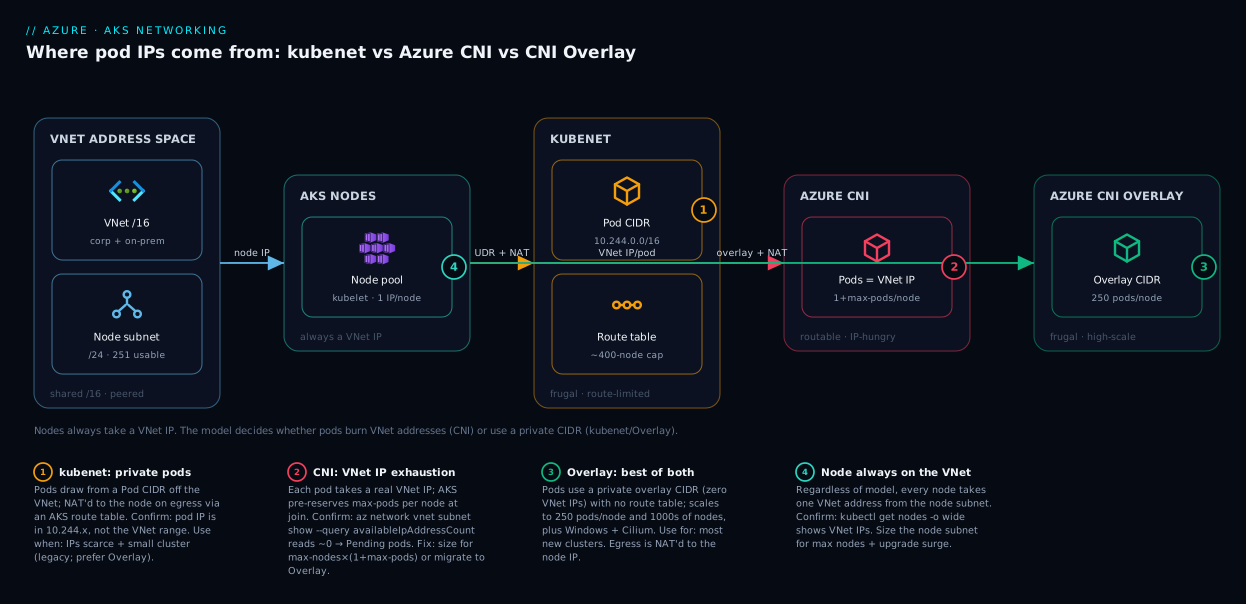
The diagram below puts all three models on one canvas so you can see, at a glance, the one thing that differs: where the pod IP comes from. Trace it left to right. On the far left is your VNet address space — the shared /16 your platform team owns. In the middle sit the AKS nodes, which always take a normal VNet IP regardless of model. The right-hand zones show the three plumbing choices: kubenet hangs a private Pod CIDR off a route table; Azure CNI reaches straight back into the VNet subnet to give each pod a real address (the red badge marks where IPs get burned and exhaustion happens); CNI Overlay uses a private Pod CIDR like kubenet but with no route table and far higher scale.
Follow a packet to read the model. In kubenet and Overlay, a pod talking to the database or the internet has its source address NAT’d to the node’s VNet IP — the green egress flow — because its pod IP is private to the cluster. In Azure CNI node-subnet, the pod’s own IP is already a VNet address, so it routes natively with no translation, which is exactly why an external caller can dial it directly (and exactly why it costs you a VNet address per pod). The numbered badges call out the three decisions and the one failure that flows from them; the legend reads each as what it is · how to confirm · what to do.
Real-world scenario
Northwind Retail runs an online store on AKS in the Central India region. The platform team, being disciplined about address space (their /16 is carved across thirty teams and peered to an on-prem datacentre over ExpressRoute), handed the store team a single /24 subnet — 251 usable addresses — and said “that’s your lot.” The store team, following an old internal wiki, ran az aks create with --network-plugin azure and the default --max-pods=30. The cluster came up on three nodes. Each node pre-reserved 31 addresses, so the subnet was already 93 addresses deep on day one. Nobody noticed; there were 158 left.
Black Friday planning meant load-testing to ten nodes. At node eight the cluster autoscaler tried to add node nine and Azure refused — the subnet was full (8 nodes × 31 = 248 of 251). New nodes joined but their pods sat in Pending with Failed to allocate address. The on-call engineer, seeing healthy CPU and memory, assumed a quota issue and opened a Microsoft ticket; meanwhile the load test stalled and the dashboards lit up red. It took ninety minutes and a second pair of eyes to spot that the wall was IP addresses, not compute — the giveaway was az network vnet subnet show reporting near-zero availableIpAddressCount.
The remedy was not a bigger subnet (they had no adjacent space to grow into, and the cluster couldn’t be paused during peak prep). It was a migration to Azure CNI Overlay. They built a new node pool — same VMs, same /24 node subnet — running Overlay with a private 10.244.0.0/16 Pod CIDR. On Overlay, nodes consume one VNet IP each and pods consume none, so the same /24 now comfortably holds the cluster scaled to its ceiling, with 240+ addresses to spare. They cordoned and drained the old CNI nodes, and the store carried Black Friday on Overlay without touching a single line of application code.
The lessons the team wrote into their runbook: (1) the networking model is an IP-budget decision, not a performance one — pick it with the subnet size in hand; (2) --max-pods is a multiplier on address consumption in Azure CNI, so the default 30 is not free; (3) when pods are Pending, check availableIpAddressCount before assuming compute or quota; and (4) a store that exposes everything through a Load Balancer never needs routable pods — Overlay was the right model all along.
Advantages and disadvantages
Each model is a set of trade-offs, not a winner and two losers. Here is the explicit two-column view per model, then the prose on when each edge actually matters.
| Model | Advantages | Disadvantages |
|---|---|---|
| kubenet | Pods cost zero VNet IPs; smallest possible subnet; simple mental model | ~400-node route-table ceiling; no Windows pools; no Cilium; being deprecated; extra UDR hop |
| Azure CNI (node-subnet) | Pods are real VNet IPs — directly routable; lowest network overhead; no UDR; full feature support | Burns a VNet IP per pod; pre-reserves --max-pods/node; subnet exhaustion is the classic failure; needs careful sizing |
| Azure CNI Overlay | Frugal like kubenet and high-scale (250 pods/node, 1000s of nodes); Windows + Cilium support; the modern default | Pods not directly routable from outside; slight overlay overhead; pod IPs invisible to peered networks |
When does routability (the one thing only node-subnet CNI gives you) actually matter? Rarely, but concretely: when a legacy system outside the cluster must connect to a specific pod by IP, when a network appliance or virtual-node integration expects pods on the VNet, or when a compliance tool insists on per-pod source IPs without NAT. If none of those apply — and for a typical web app or API exposed through a Service, none do — you are paying a steep address tax for a capability you will never use, and Overlay is strictly better.
When does frugality matter? Almost always in a real enterprise, because address space is shared and finite and RFC 1918 ranges overlap with on-prem. kubenet and Overlay both deliver it, but Overlay wins on nearly every axis — higher scale, Windows support, modern data plane — so the only reason to still reach for kubenet is an old cluster or a tool that hasn’t caught up. For a brand-new cluster, the honest default is Overlay; you move off it only when a need forces node-subnet CNI.
Hands-on lab
This builds one cluster in each model and proves the IP difference with your own eyes. It uses small VMs and tears everything down at the end. You need an Azure subscription, the Azure CLI (or Cloud Shell), and a resource group.
Step 1 — Set up variables and a resource group.
RG=rg-aks-net-lab
LOC=centralindia
az group create -n "$RG" -l "$LOC"
Step 2 — Create a VNet with a small node subnet to make exhaustion visible. A /27 (27 usable) is deliberately tiny so the Azure CNI cluster fills fast.
az network vnet create -g "$RG" -n vnet-aks \
  --address-prefixes 10.10.0.0/16 \
  --subnet-name snet-nodes --subnet-prefixes 10.10.1.0/27
SUBNET_ID=$(az network vnet subnet show -g "$RG" --vnet-name vnet-aks -n snet-nodes --query id -o tsv)
Step 3 — Build the Azure CNI (node-subnet) cluster and watch the subnet fill. With the default --max-pods 30 even one node overflows a /27, so drop to --max-pods 8 and one node to fit the demo:
az aks create -g "$RG" -n aks-cni \
  --network-plugin azure \
  --vnet-subnet-id "$SUBNET_ID" \
  --node-count 1 --max-pods 8 \
  --node-vm-size Standard_B2s --no-ssh-key
Now inspect how many addresses are left in the subnet:
az network vnet subnet show -g "$RG" --vnet-name vnet-aks -n snet-nodes \
  --query "{used: ipConfigurations | length(@)}" -o table
You will see roughly 9 addresses consumed (1 node + 8 pre-reserved pod slots) from a 27-address subnet — one node already took a third of it. Delete this cluster before the next step so the subnet frees up: az aks delete -g "$RG" -n aks-cni --yes --no-wait.
Step 4 — Build the Azure CNI Overlay cluster in the SAME tiny subnet. Overlay puts pods on a private CIDR, so the /27 is no longer the bottleneck — --max-pods can go back to 110:
az aks create -g "$RG" -n aks-overlay \
  --network-plugin azure --network-plugin-mode overlay \
  --pod-cidr 192.168.0.0/16 \
  --vnet-subnet-id "$SUBNET_ID" \
  --node-count 1 --max-pods 110 \
  --node-vm-size Standard_B2s --no-ssh-key
Inspect the subnet again — only the node’s single IP is consumed, even though the node can host 110 pods. That is the entire lesson in one command.
Step 5 — Tear everything down. This deletes the cluster, the VNet, and all node resources in one shot:
az group delete -n "$RG" --yes --no-wait
Expected outcome: the CNI cluster consumed ~9 of 27 addresses for a single node, while the Overlay cluster in the same subnet consumed 1 — visibly proving that the model, not the workload, drives address consumption. (To see kubenet for contrast, swap in --network-plugin kubenet --pod-cidr 10.244.0.0/16 and drop --vnet-subnet-id.)
For repeatable infrastructure, here is the Overlay cluster as Bicep — note the networkPlugin: 'azure' plus networkPluginMode: 'overlay' pairing, which is the one combination people get wrong:
param location string = resourceGroup().location
param clusterName string = 'aks-overlay'

resource aks 'Microsoft.ContainerService/managedClusters@2024-09-01' = {
  name: clusterName
  location: location
  identity: { type: 'SystemAssigned' }
  properties: {
    dnsPrefix: clusterName
    agentPoolProfiles: [
      {
        name: 'systempool'
        count: 2
        vmSize: 'Standard_D2s_v5'
        mode: 'System'
        maxPods: 110
        // vnetSubnetID: '<your node subnet resourceId>'
      }
    ]
    networkProfile: {
      networkPlugin: 'azure'
      networkPluginMode: 'overlay'   // makes it CNI Overlay, not node-subnet
      podCidr: '192.168.0.0/16'      // private; must NOT overlap the VNet
      serviceCidr: '10.0.0.0/16'
      dnsServiceIP: '10.0.0.10'
    }
  }
}
To build node-subnet Azure CNI instead, drop networkPluginMode and podCidr and set vnetSubnetID to a generously sized subnet. To build kubenet, set networkPlugin: 'kubenet' and keep podCidr.
Common mistakes & troubleshooting
The failure modes here are few but expensive. Each is symptom → root cause → how to confirm → fix.
| # | Symptom | Root cause | Confirm | Fix |
|---|---|---|---|---|
| 1 | Pods Pending: Failed to allocate address |
Subnet out of IPs (Azure CNI) | availableIpAddressCount reads ~0 |
Migrate to Overlay, or use a bigger subnet |
| 2 | Autoscaler won’t add nodes past N | Subnet full; node can’t reserve --max-pods |
Subnet free count low; nodes flat | Size for max nodes × (1+max-pods); or Overlay |
| 3 | Create fails: “subnet overlaps pod CIDR” | Pod CIDR collides with VNet | Compare --pod-cidr vs addressPrefixes |
Pick a non-overlapping CIDR (e.g. 192.168.0.0/16) |
| 4 | Pod-to-pod across nodes fails (kubenet) | Route table edited or 400-route cap hit | az network route-table show; count routes |
Restore AKS routes; if >400 nodes, use Overlay |
| 5 | External system can’t reach a pod IP | Overlay/kubenet pods are NAT’d, not routable | Pod IP is in Pod CIDR, not VNet range | Use a Service/LB; or node-subnet CNI if required |
| 6 | Want to switch models on a live cluster | Plugin is fixed at create time | az aks show --query networkProfile.networkPlugin |
Can’t flip in place; migrate via new pool/cluster |
| 7 | --max-pods change didn’t take |
--max-pods is per-pool, set at creation |
kubectl get node -o jsonpath='{..maxPods}' |
Set on a new node pool; existing nodes are fixed |
| 8 | Outbound/SNAT failures under load | Pods share node SNAT ports on egress | High outbound connections per node | Add a NAT Gateway / more outbound IPs |
The single most useful command in this whole topic is the IP-availability check — run it the instant a pod is Pending, before you suspect anything else:
az network vnet subnet show -g "$RG" --vnet-name vnet-aks -n snet-nodes \
  --query "{subnet:name, free:availableIpAddressCount}" -o table
If free is at or near zero, the diagnosis is over — you are out of addresses, and no amount of CPU, memory, or quota investigation will help.
Best practices
- Default to Azure CNI Overlay for new clusters. It gives you the Azure CNI plugin, Windows support, and the Cilium data plane with kubenet’s IP economy and far higher scale. Move off it only when a concrete requirement forces routable pods.
- Pick the model with the subnet size in your hand. The model is an IP-budget decision. Know your max node count and
--max-podsbefore you choose, and never let the portal default decide silently. - Size Azure CNI subnets for the autoscaler maximum, plus upgrade surge. Use
max nodes × (1 + --max-pods) + surge. The day you hit the ceiling is the day you run out, and that is always the worst moment. - Keep the Pod CIDR (and Service CIDR) clear of every range you peer to. Overlapping CIDRs break creation or routing. Pick ranges that don’t collide with the VNet, on-prem, or other peered networks.
- Treat
--max-podsas a cost lever, not a free knob — in Azure CNI. Higher--max-podsmultiplies pre-reserved addresses. Lower it if pods are light and addresses are scarce (node-subnet only; in Overlay it’s nearly free). - Expose apps through Services and Load Balancers, not pod IPs. This keeps you model-agnostic and lets you use frugal Overlay. Dialling individual pods couples you to node-subnet CNI.
- Add a NAT Gateway for egress-heavy clusters. kubenet and Overlay pods share node SNAT ports on the way out; a NAT Gateway gives you a large, predictable outbound port pool.
- Decide the data plane and policy separately. Choose the model first; then layer
--network-policy(cilium/azure/calico) and--network-dataplane ciliumas independent decisions. - Document the model and subnet plan in the cluster’s IaC. The choice is effectively permanent, so it belongs in version-controlled Bicep/Terraform with a comment explaining the IP math.
- Plan migrations off kubenet now. kubenet is on a deprecation path; new work should target Overlay, and existing kubenet clusters should have a migration story.
Security notes
The networking model changes your blast radius and how you reason about pod reachability, so a few security points follow directly from the choice. In Azure CNI node-subnet, pods carry real VNet IPs, which means an NSG on the subnet (or Network Policy inside the cluster) directly governs pod traffic, and a misconfigured peering can expose pods to other teams — routability cuts both ways. In kubenet and Overlay, pods are NAT’d behind the node, so from the VNet’s view “the node” is the security principal; you control pod-to-pod traffic with Network Policy rather than VNet NSGs alone.
Independent of the model, apply Network Policy (--network-policy azure, calico, or cilium) to enforce least-privilege pod-to-pod traffic — by default every pod can talk to every other pod. Keep the API server private with a private cluster where compliance demands it, and front internet-facing apps with a WAF-capable ingress — see Azure Load Balancer vs Application Gateway: Picking the Right Traffic Manager. Pull images only from a private, trusted registry; Securing Azure Container Registry: Private Endpoints, ACR Tasks, Content Trust, and Geo-Replication covers that. Finally, because pod IPs differ by model, key your egress firewall rules off the node/NAT IP (Overlay/kubenet) or the pod range (node-subnet CNI) — a mismatch silently breaks outbound allow-lists.
Cost & sizing
The networking model itself is free — Azure does not bill for kubenet, Azure CNI, or Overlay as a line item. What the model influences is indirect cost, and it is real. The most expensive failure is the one this article prevents: an exhausted CNI subnet that forces an emergency migration during peak load — the cost there is downtime and engineer-hours, not an invoice. Choosing Overlay up front makes that bill zero.
The components that do cost money are the same across all three models: the node VMs (the dominant cost), the Load Balancer, any NAT Gateway for egress, and Log Analytics if you enable Container Insights. The AKS control plane is free on the default tier; the Standard tier adds an uptime SLA for roughly USD 0.10/hour (~₹6,000/month) per cluster. None of it changes with the networking model — the table below makes the split explicit.
| Cost driver | Varies with model? | Rough figure | Note |
|---|---|---|---|
| Networking model (plugin) | No | ₹0 | kubenet/CNI/Overlay are all free |
| Node VMs | No | e.g. Standard_D2s_v5 ~₹6–7k/mo each |
Dominant cost; size by workload, not model |
| Control plane (Free tier) | No | ₹0 | Default; no uptime SLA |
| Control plane (Standard tier) | No | ~₹6,000/mo per cluster | Optional uptime SLA |
| Load Balancer (Standard) | No | ~₹1,500–2,000/mo + data | Fronts ingress; needed regardless |
| NAT Gateway (optional) | Indirectly | ~₹3,000/mo + data | Recommended for egress-heavy Overlay/kubenet |
The sizing rule for the frugal models is liberating: because pods don’t touch the VNet, the node subnet can be a humble /27 or /26 and the Pod CIDR a generous /16 that costs nothing. For node-subnet CNI, follow the sizing table earlier and err large — a /22 you never fill is free, while a /24 you exhaust is a migration.
Interview & exam questions
These map to the AZ-104 (Azure Administrator) and AZ-700 (Azure Network Engineer) networking domains, and to AKS architecture interviews.
1. What is the core difference between kubenet and Azure CNI? In Azure CNI (node-subnet), every pod gets a real IP from the VNet subnet and is directly routable; in kubenet, pods get IPs from a separate private Pod CIDR and are NAT’d behind the node, so they consume no VNet addresses but rely on a route table.
2. Why do Azure CNI clusters run out of IPs unexpectedly? Because AKS pre-reserves --max-pods addresses per node when the node joins — not when pods are scheduled. With the default 30, each node consumes 31 VNet addresses immediately, so a /24 fills at about eight nodes regardless of actual pod count.
3. What problem does Azure CNI Overlay solve? It combines kubenet’s IP frugality (pods on a private CIDR, zero VNet consumption) with Azure CNI’s plugin, Windows and Cilium support, while removing kubenet’s ~400-node route-table ceiling — scaling to 250 pods per node and thousands of nodes. It is the recommended default for new clusters.
4. Can you change an AKS cluster’s network plugin after creation? Generally no — the plugin is fixed at create time. Switching models (e.g. CNI node-subnet to Overlay) requires migrating via new node pools or rebuilding the cluster, not an in-place flip.
5. How do you size a subnet for Azure CNI? max nodes × (1 + --max-pods), where “max nodes” is the autoscaler maximum plus upgrade surge. For 20 max nodes at --max-pods=30 you need ~651 addresses, so at least a /22.
6. Why is kubenet limited to ~400 nodes? kubenet relies on an Azure route table with one route per node, and route tables cap at ~400 routes. Overlay avoids this by not using a route table at all.
7. Are pods routable from outside the cluster in Overlay? No. Overlay pod IPs are private to the cluster and NAT’d to the node IP on egress, so external systems cannot dial a pod by its IP — you expose apps through a Service/Load Balancer instead. Only node-subnet Azure CNI gives directly routable pods.
8. What’s the difference between the network plugin and the network policy? The plugin (--network-plugin) decides where pod IPs come from and how traffic is routed; the network policy (--network-policy) is a firewall that decides which pods may talk to which. They are independent choices layered on each other.
9. Where does NAT happen in each model? In kubenet and Overlay, pod egress to the VNet/internet is NAT’d to the node’s IP. In Azure CNI node-subnet, pods already have VNet IPs and route natively, so no per-pod NAT occurs for east-west VNet traffic.
10. A pod is Pending with Failed to allocate address. First step? Run az network vnet subnet show ... --query availableIpAddressCount. If it’s near zero, you’re out of VNet IPs — the model/subnet is the cause, not compute or quota.
11. What is --network-plugin-mode overlay for? It converts Azure CNI from node-subnet mode (pods on the VNet) into Overlay mode (pods on a private CIDR). The pairing --network-plugin azure --network-plugin-mode overlay is what selects CNI Overlay.
12. Why does --max-pods matter so much for CNI but barely for Overlay? In node-subnet CNI, --max-pods multiplies pre-reserved VNet addresses per node, so it directly drives subnet exhaustion. In Overlay, those pod IPs come from the private Pod CIDR, so raising --max-pods costs essentially no VNet space.
Quick check
- In which model does each pod consume one IP address from your VNet subnet?
- What command tells you instantly whether a
Pendingpod is caused by IP exhaustion? - You have a
/24subnet and use Azure CNI with--max-pods=30. Roughly how many nodes can you run before the subnet is full? - Which two models keep pods off the VNet, and which one of those two should you prefer for a new cluster?
- Can you switch a running cluster from Azure CNI node-subnet to Overlay by editing a setting?
Answers
- Azure CNI (node-subnet) — pods get real VNet IPs; kubenet and Overlay use a private Pod CIDR.
az network vnet subnet show ... --query availableIpAddressCount— if it reads ~0, you are out of addresses.- About eight — each node pre-reserves 1 + 30 = 31 addresses, and 251 usable ÷ 31 ≈ 8.
- kubenet and Azure CNI Overlay keep pods off the VNet; prefer Overlay for new clusters (higher scale, Windows + Cilium, kubenet is deprecating).
- No — the plugin/mode is set at create time; moving to Overlay requires a migration via new node pools or a rebuild, not an in-place edit.
Glossary
- Network plugin — The AKS component (
--network-plugin) that assigns pod IPs and wires routing; choosingkubenetvsazure(and overlay mode) is choosing the model. - kubenet — Networking model where pods draw IPs from a private Pod CIDR (not the VNet) and are NAT’d behind the node via an AKS-managed route table; frugal but route-limited and being deprecated.
- Azure CNI (node-subnet) — Model where pods get real IP addresses directly from the VNet subnet; pods are routable but each consumes a VNet address.
- Azure CNI Overlay — Model (
--network-plugin azure --network-plugin-mode overlay) where pods use a private overlay Pod CIDR; frugal like kubenet but high-scale with full feature support — the modern default. - Pod CIDR — The private address range pods draw from in kubenet and Overlay; must not overlap the VNet or any peered network.
- Service CIDR — A separate private range for Kubernetes Service (ClusterIP) addresses; independent of the pod networking model.
--max-pods— Maximum pods per node; in node-subnet CNI it pre-reserves that many VNet addresses per node, driving subnet consumption.- Routable — A pod IP reachable from outside the cluster with no NAT; true only in Azure CNI node-subnet mode.
- Overlay — Pod IPs private to the cluster, NAT’d to the node IP on egress; the behaviour of kubenet and CNI Overlay.
- UDR / route table — User-defined routes AKS programs for kubenet so the VNet can reach per-node pod ranges; capped near 400 routes.
- NAT (Source NAT) — Rewriting a pod’s source IP to the node/NAT-gateway IP so private pod addresses can talk to the VNet and internet.
- Network Policy — Pod-to-pod firewall rules (
--network-policy), an independent layer that controls which pods may communicate; not the addressing model. - Data plane — How packets are processed (kernel routing vs Cilium/eBPF, via
--network-dataplane); separate from where pod IPs come from. - availableIpAddressCount — The subnet property reporting free addresses; the first thing to check when pods are
Pending.
Next steps
- Understand the cluster you are networking: AKS Architecture Explained: Managed Control Plane, Node Pools, and the Azure Integrations That Make It Tick.
- Get the VNet fundamentals every model depends on: Azure Virtual Network, Subnets and NSGs: Networking Fundamentals.
- Decide whether AKS is even the right compute first: Azure App Service vs Container Apps vs AKS: Choose the Right Compute.
- Choose how traffic gets into the cluster: Azure Load Balancer vs Application Gateway: Picking the Right Traffic Manager.
- Lock down the images your pods run: Securing Azure Container Registry: Private Endpoints, ACR Tasks, Content Trust, and Geo-Replication.