You created an Azure Kubernetes Service (AKS) cluster, deployed an app, and it worked. Then someone asked: “Why is there a node pool called agentpool you didn’t make? Can we run our batch jobs on cheap spot VMs? Why did our background workers land on the same machines as CoreDNS and take the whole cluster down?” The single pile of VMs you thought of as “the cluster” turns out to be distinct, purpose-built groups — node pools — and the rules for which pods land where are doing real work you never configured on purpose.
A node pool is a set of identical virtual machines that share one VM size, one OS, and one scaling configuration. Every AKS cluster has at least one. The art is knowing when one pool stops being enough — when to peel spiky batch jobs onto interruptible spot VMs to cut their compute bill by 60–90%, when to wall off the cluster’s own plumbing onto a protected system pool so a noisy app can never starve CoreDNS, and how three small levers — taints, tolerations, and labels — steer each pod onto the right machine. Get this wrong and you either overpay for everything on premium VMs, or let a memory-hungry workload evict the components that keep the cluster alive.
This article builds the mental model from the ground up: a node pool defined plainly, the two roles a pool can play (system vs user), spot pools as a pricing mode rather than a separate species, and the scheduling primitives — nodeSelector, taints/tolerations, and node affinity — that decide placement. You leave with decision tables for when to split a workload onto its own pool, real az aks nodepool commands and Bicep for each move, an architecture you can read left to right, and a troubleshooting playbook for the classic “my pod is stuck Pending” moment. No prior Kubernetes scheduling theory assumed — just that you can create a cluster and run kubectl get nodes.
What problem this solves
A cluster with one node pool forces every workload to share one VM shape and one fate — fine for a demo, dangerous in production. The control-loop components AKS runs for you — CoreDNS (cluster DNS), metrics-server (the source of kubectl top and the data the autoscaler reads), konnectivity (the tunnel to the managed control plane), and the cloud-provider controllers — all run as pods on your nodes. If those pods share a machine with a batch job that suddenly eats all the RAM, the Linux OOM killer starts evicting processes, DNS resolution fails cluster-wide, and you are now debugging a “the whole cluster is broken” incident that started as one greedy workload.
The second pain is money. Your steady web tier and your nightly data-crunch job have opposite cost profiles. The web tier wants reliable, always-on VMs. The batch job runs for two hours, doesn’t care if a node disappears (it reschedules the work), and would happily run on Azure’s spare capacity at a deep discount — spot pricing — if it weren’t sharing a pool with the web tier, which cannot tolerate a 30-second eviction notice. One pool means one pricing decision for both: you either overpay for the batch job or under-protect the web tier.
The third pain is heterogeneity. A GPU inference service needs Standard_NC-family VMs; a memory-cache wants Standard_E (memory-optimised); a CPU-bound API wants Standard_F (compute-optimised); a Windows microservice needs a Windows node pool because Linux and Windows containers cannot run on the same node. A single pool is exactly one of these. Splitting into purpose-built pools — then steering each workload to its pool with taints, tolerations, and labels — is how you stop paying GPU prices for a logging sidecar, deliberately instead of discovering it during an outage.
Here is the map: every reason to reach for a second (or third) pool, the lever that makes it work, and the failure it prevents.
| You want to… | The pool move | The lever that steers pods | What it prevents |
|---|---|---|---|
| Protect cluster plumbing from apps | A dedicated system pool (apps tainted off it) | CriticalAddonsOnly taint + toleration |
App OOMs killing CoreDNS / metrics-server |
| Cut cost on interruptible work | Add a spot pool | Spot taint + matching toleration | Spot evictions hitting always-on services |
| Run GPU / memory / Windows work | A pool with that VM size / OS | nodeSelector on labels + OS taint |
Paying premium VM prices for every pod |
| Isolate a noisy or risky tenant | A separate user pool | Custom taint + toleration + labels | One tenant’s load starving the rest |
| Scale parts independently | Per-pool cluster autoscaler min/max | (autoscaler reacts to Pending pods) | Over-provisioning the whole cluster |
Learning objectives
By the end of this article you can:
- Define a node pool precisely and explain why every AKS cluster needs at least one system pool.
- Distinguish a system node pool from a user node pool by role, and list what a system pool does that a user pool must not.
- Explain spot node pools as a pricing/eviction mode, decide when a workload is spot-safe, and add one with the right taint and
--eviction-policy. - Read and write the three placement levers —
nodeSelector(labels), taints + tolerations, and node affinity — and say which to reach for in a given situation. - Apply the decision tables to answer “should this workload get its own pool?” for batch jobs, GPU services, Windows apps, and noisy tenants.
- Add, scale, taint, label, upgrade, and delete a node pool with
az aks nodepooland express the same pool in Bicep. - Diagnose the two classic node-pool failures — a pod stuck Pending because nothing tolerates a taint, and a workload that landed on the wrong (or spot) pool — using
kubectl describeand node labels.
Prerequisites & where this fits
You should be able to create an AKS cluster (portal, az aks create, or Terraform), run kubectl get nodes and kubectl get pods -A, and read a small YAML manifest. You should know that a pod is the smallest deployable unit (one or more containers) and that the kube-scheduler decides which node each pod runs on. You do not need prior knowledge of taints, affinity, or the autoscaler — those are built here from scratch. Familiarity with Azure VM sizes (the Standard_D/E/F/NC families) helps but isn’t required.
This sits at the data-plane layer of AKS. The broader picture — how the managed control plane, networking, and identity fit together — is covered in AKS Architecture Explained: Managed Control Plane, Node Pools, and the Azure Integrations That Make It Tick; this article zooms all the way into the node pools that article introduces. Before you commit to AKS at all, the trade-off against simpler compute is in Azure App Service vs Container Apps vs AKS: Choose the Right Compute. Node pools live inside a VNet, so the subnet and IP-planning concepts from Azure Virtual Network, Subnets and NSGs: Networking Fundamentals matter when you size them, and the cost levers connect to Azure FinOps and Cost Management: Controlling Cloud Spend at Scale.
Who owns which decision, so you know whose call each lever is:
| Decision | Who usually owns it | The lever | Lives in |
|---|---|---|---|
| How many pools, of what role | Platform / cluster team | --mode System/User |
Cluster config |
| VM size & OS per pool | Platform team | --node-vm-size, --os-type |
Pool config |
| Spot vs regular for a workload | Platform + app team | spot pool + toleration | Pool + manifest |
| Which pool a pod lands on | App / dev team | nodeSelector, tolerations, affinity |
Pod manifest |
| Min/max nodes per pool | Platform + FinOps | autoscaler --min/--max-count |
Pool config |
Core concepts
Five mental models make every later decision obvious.
A node pool is a uniform group of VMs; the cluster is the sum of its pools. Every node in a pool shares the same VM size (Standard_D4s_v5), the same OS (Linux or Windows), the same OS disk, and the same scaling rules. Each pool has a name (≤ 12 chars for Linux, ≤ 6 for Windows, lowercase alphanumeric). When you “scale the cluster” you scale one pool. Two workloads with different VM needs must live in different pools — a pool cannot be half one size and half another.
Every cluster has a system pool, and system ≠ user is about role, not hardware. Creating a cluster gives you a system node pool (default name agentpool / nodepool1 — the one you “didn’t make”). A system pool is required to host the critical add-ons (CoreDNS, metrics-server, konnectivity-agent, the cloud controllers). A user pool is optional and runs your application pods. The difference is enforced by Kubernetes scheduling rules, not a different SKU — both can use the identical VM size yet behave differently, because the system pool is the safe home AKS guarantees for cluster plumbing.
Taints repel; tolerations and selectors attract. A taint marks a node: “don’t schedule pods here unless they explicitly say they can stand it.” A toleration marks a pod: “I can stand that taint.” A label is a free-form key/value on a node, and a pod’s nodeSelector (or node affinity) says “only put me on nodes with this label.” Taints are a velvet rope (default-deny placement); labels are a signpost (opt-in targeting). You use them together: taint a pool so random pods stay off, label it so the right pods find it, and give those pods both a toleration (to pass the rope) and a selector (to choose the pool).
Spot is a pricing mode with one string attached: Azure can take the VM back. A spot node pool runs on Azure’s spare capacity at a steep discount (often 60–90% off pay-as-you-go), but Azure can evict those nodes with 30 seconds of notice when it needs the capacity back, and a spot pool only fills when capacity exists at or below your max price. AKS automatically taints spot nodes (kubernetes.azure.com/scalesetpriority=spot:NoSchedule) so nothing lands there by accident; only pods that tolerate it run on spot. Spot can never be a system pool — the critical add-ons can’t ride capacity that vanishes.
The cluster autoscaler works per pool, reacting to unschedulable pods. Each pool can have its own cluster autoscaler with --min-count and --max-count. When a pod can’t be scheduled, the autoscaler adds a node to a pool that could host it; when nodes sit underused, it removes them down to the min. Per-pool means your spot pool can scale 0→50 for a batch burst while the system pool holds at 3. (Distinct from the Horizontal Pod Autoscaler, which adds pod replicas; the cluster autoscaler adds nodes to fit them.)
The vocabulary in one table
Pin down every moving part before the deep sections. The glossary repeats these for lookup; this is the model side by side.
| Term | One-line definition | Set on | Why it matters |
|---|---|---|---|
| Node pool | A group of identical VMs in the cluster | The cluster | The unit you scale, size, and split |
| System pool | Pool that must host critical add-ons | Pool (--mode System) |
Keeps cluster plumbing alive |
| User pool | Optional pool for your app pods | Pool (--mode User) |
Where workloads should live |
| Spot pool | User pool on cheap, evictable spare capacity | Pool (--priority Spot) |
60–90% cheaper, can vanish |
| Taint | “Repel pods unless they tolerate me” | Node / pool | Default-deny placement |
| Toleration | “This pod can stand that taint” | Pod | Lets a pod onto a tainted pool |
| Label | Free-form key/value tag | Node / pool | Target signpost for selectors |
nodeSelector |
“Only schedule me on nodes with this label” | Pod | Simple hard targeting |
| Node affinity | Richer label rules (required/preferred) | Pod | Soft or complex targeting |
| Cluster autoscaler | Adds/removes nodes per pool | Pool | Right-sizes capacity automatically |
| Eviction | Azure reclaiming a spot node | Spot pool | The 30-second risk you design for |
System vs user node pools
This is the first and most important split — it keeps the cluster alive, and it costs nothing to get right on day one.
A system node pool is the home AKS guarantees for its control-loop pods. Those add-ons carry a built-in toleration for the CriticalAddonsOnly taint: taint a pool CriticalAddonsOnly=true:NoSchedule and ordinary app pods are repelled while the add-ons (which tolerate it) stay — reserving the pool for cluster plumbing only. A user node pool has no such obligation; it runs your apps and can be scaled to zero, deleted, or made entirely from spot VMs without endangering the cluster.
The hard rules that trip people up:
| Property | System pool | User pool |
|---|---|---|
| Required in a cluster? | Yes — at least one | No (optional) |
| Hosts critical add-ons (CoreDNS etc.)? | Yes (its job) | No |
| OS | Linux only | Linux or Windows |
| Can scale to zero nodes? | No (must keep ≥ 1 running) | Yes |
| Can be spot priority? | No | Yes |
| Minimum node count guidance | ≥ 1 (use ≥ 3 for prod HA) | 0+ |
| Can you delete the last one? | No — cluster needs a system pool | Yes |
| Recommended VM size floor | ≥ 2 vCPU / 4 GB (Microsoft guidance) | Any |
Best practice: in production, run a dedicated system pool tainted CriticalAddonsOnly=true:NoSchedule so no app pod can share a node with CoreDNS or metrics-server, then put every workload on user pools. A small 3-node system pool (one per zone) is cheap insurance against a noisy app taking out cluster DNS.
Create a cluster with a clean dedicated system pool, then add a user pool:
# 1) Cluster with a 3-node system pool across 3 zones
az aks create \
  --resource-group rg-aks-prod \
  --name aks-prod \
  --nodepool-name systempool \
  --node-count 3 \
  --zones 1 2 3 \
  --node-vm-size Standard_D4s_v5 \
  --generate-ssh-keys

# 2) Add a user pool for your apps (autoscaling 2..10)
az aks nodepool add \
  --resource-group rg-aks-prod \
  --cluster-name aks-prod \
  --name apps \
  --mode User \
  --node-count 2 \
  --enable-cluster-autoscaler --min-count 2 --max-count 10 \
  --node-vm-size Standard_D4s_v5

# 3) Reserve the system pool for add-ons only (repel app pods)
az aks nodepool update \
  --resource-group rg-aks-prod \
  --cluster-name aks-prod \
  --name systempool \
  --node-taints CriticalAddonsOnly=true:NoSchedule
Note: applying
CriticalAddonsOnlyto a pool that is currently running app pods will not move them until they reschedule. Plan the taint at creation or drain the pool. Someazversions set node taints only atnodepool addtime — ifupdaterejects it, recreate the pool with--node-taints.
The same dedicated user pool in Bicep:
resource appsPool 'Microsoft.ContainerService/managedClusters/agentPools@2024-09-01' = {
  parent: aks
  name: 'apps'
  properties: {
    mode: 'User'
    osType: 'Linux'
    vmSize: 'Standard_D4s_v5'
    count: 2
    enableAutoScaling: true
    minCount: 2
    maxCount: 10
    availabilityZones: ['1', '2', '3']
  }
}
Why the OS matters: Windows is always a separate pool
Linux and Windows containers can’t run on the same node — runtime and base OS differ. So a Windows workload forces a second pool with --os-type Windows (name ≤ 6 characters, never a system pool). Steer Windows pods to it with a nodeSelector on the OS label (the scheduler already won’t put a Windows pod on a Linux node, but the selector makes intent explicit):
nodeSelector:
  kubernetes.io/os: windows
Spot node pools: cheap, interruptible capacity
Spot produces the biggest single line-item savings in most AKS bills — and the most likely 2 a.m. incident if you put the wrong workload on it. The idea: Azure rents its spare VM capacity cheap rather than leaving it idle, on the condition that it can reclaim the VM when a pay-as-you-go customer needs it. You get the discount; you accept the eviction risk.
When Azure reclaims a spot node it sends a 30-second termination notice, signals the kubelet, and the pods are killed and rescheduled elsewhere (onto a regular pool if one has room, else Pending until capacity returns). For a stateless batch worker that checkpoints, that’s a non-event. For a database or long-lived stateful service, it’s data loss or downtime.
The properties to internalise:
| Property | Spot pool behaviour | Implication |
|---|---|---|
| Discount | Often 60–90% off PAYG (varies by region/SKU) | Big savings on the right workload |
| Eviction notice | ~30 seconds | Workload must tolerate sudden loss |
| Auto-applied taint | kubernetes.azure.com/scalesetpriority=spot:NoSchedule |
Nothing lands here without a toleration |
| Auto-applied label | kubernetes.azure.com/scalesetpriority=spot |
Target spot explicitly with a selector |
--eviction-policy |
Delete (default) or Deallocate |
Delete removes the node on eviction |
--spot-max-price |
-1 = pay up to PAYG; or a USD cap |
Cap your price; -1 evicts only on capacity |
| Can be a system pool? | No | Add-ons must not ride spare capacity |
| Scales to zero? | Yes, with the cluster autoscaler | Pay nothing when idle |
Add a spot pool that autoscales from 0 to 20 nodes and never pays more than pay-as-you-go:
az aks nodepool add \
  --resource-group rg-aks-prod \
  --cluster-name aks-prod \
  --name spotbatch \
  --priority Spot \
  --eviction-policy Delete \
  --spot-max-price -1 \
  --enable-cluster-autoscaler --min-count 0 --max-count 20 \
  --node-vm-size Standard_D8s_v5 \
  --labels workload=batch \
  --node-taints workload=batch:NoSchedule
Note the two taints on those nodes: AKS’s automatic spot taint and a custom workload=batch:NoSchedule so even spot-tolerating pods don’t land here unless they’re your batch jobs. A batch pod must tolerate both and select the pool:
spec:
  tolerations:
    - key: "kubernetes.azure.com/scalesetpriority"
      operator: "Equal"
      value: "spot"
      effect: "NoSchedule"
    - key: "workload"
      operator: "Equal"
      value: "batch"
      effect: "NoSchedule"
  nodeSelector:
    workload: batch
The same spot pool in Bicep:
resource spotPool 'Microsoft.ContainerService/managedClusters/agentPools@2024-09-01' = {
  parent: aks
  name: 'spotbatch'
  properties: {
    mode: 'User'
    osType: 'Linux'
    vmSize: 'Standard_D8s_v5'
    scaleSetPriority: 'Spot'
    scaleSetEvictionPolicy: 'Delete'
    spotMaxPrice: -1
    enableAutoScaling: true
    minCount: 0
    maxCount: 20
    nodeLabels: { workload: 'batch' }
    nodeTaints: ['workload=batch:NoSchedule']
  }
}
Is this workload spot-safe? A decision table
The question that decides spot eligibility is “what happens if a node disappears in 30 seconds?”
| Workload | Spot-safe? | Why |
|---|---|---|
| Stateless batch / data processing | Yes | Reschedules; checkpoint and continue |
| CI build agents, render farm | Yes | Idempotent, retryable jobs |
| Dev / test / ephemeral environments | Yes | Interruption is acceptable |
| Stateless web API with surplus replicas | Maybe | Only if other pools absorb evicted replicas |
| Stateful database / queue broker | No | Eviction = data loss / split-brain risk |
| Cluster add-ons (CoreDNS, ingress core) | No | Must never ride evictable capacity |
| Singleton with no replica | No | Eviction = outage with no failover |
Rule of thumb: spot is for work that is stateless, replicated, idempotent, and off the critical request path — or paired with a regular fallback pool so evicted pods have somewhere reliable to land.
The placement levers: how a pod chooses a pool
You have multiple pools — how does a specific pod end up on the right one? Three levers, used alone or together.
nodeSelector — the simplest signpost. A pod lists label key/values; the scheduler only considers nodes carrying all of them. A hard requirement with no “preferred” mode — use it when targeting is simple (“GPU pods → GPU pool”). AKS auto-labels every node, and you add your own with --labels.
Taints + tolerations — the velvet rope. A node taint repels pods; only those with a matching toleration get past. Crucially, a toleration does not attract a pod — it merely permits it. So taints keep the wrong pods off a pool; pair them with a selector to pull the right pods on. The three taint effects differ in severity:
| Taint effect | What it does | When to use |
|---|---|---|
NoSchedule |
New pods without a toleration won’t be placed here | Reserve a pool (spot, GPU, system) |
PreferNoSchedule |
Scheduler tries to avoid, but will place if it must | Soft preference, rarely needed |
NoExecute |
As NoSchedule plus evicts already-running pods that don’t tolerate it |
Drain wrong pods off a node now |
Node affinity — selectors with nuance. nodeAffinity is nodeSelector’s richer cousin: operators (In, NotIn, Exists) and two strengths — requiredDuringScheduling… (hard, like a selector) and preferredDuringScheduling… (soft, “prefer but don’t insist”). Reach for it for “prefer zone 1 but any zone is fine” or “any of these three VM sizes.”
When to use which:
| Situation | Reach for | Why |
|---|---|---|
| “GPU pods only on the GPU pool” | nodeSelector + node taint |
Simple hard target, repel others |
| “Keep apps off the system pool” | Taint (CriticalAddonsOnly) |
Repel; add-ons already tolerate it |
| “Batch only on the spot pool” | Toleration + nodeSelector |
Pass spot rope and choose the pool |
| “Prefer zone 1, accept any” | preferred node affinity |
Soft preference |
| “Any of 3 acceptable VM sizes” | required node affinity with In |
Multi-value match |
| “Move wrong pods off a node now” | NoExecute taint |
Evicts non-tolerating pods |
A worked manifest that uses all three — a GPU inference pod that must run on the GPU pool, prefers a zone, and tolerates the GPU taint:
apiVersion: apps/v1
kind: Deployment
metadata: { name: inference }
spec:
  replicas: 2
  selector: { matchLabels: { app: inference } }
  template:
    metadata: { labels: { app: inference } }
    spec:
      nodeSelector:
        workload: gpu                     # hard: GPU pool only
      tolerations:
        - key: "sku"                       # pass the GPU pool's velvet rope
          operator: "Equal"
          value: "gpu"
          effect: "NoSchedule"
      affinity:
        nodeAffinity:
          preferredDuringSchedulingIgnoredDuringExecution:
            - weight: 100
              preference:
                matchExpressions:
                  - key: topology.kubernetes.io/zone
                    operator: In
                    values: ["eastus-1"]   # soft: prefer zone 1
      containers:
        - name: app
          image: myacr.azurecr.io/inference:1.4
          resources:
            limits: { nvidia.com/gpu: 1 }
Useful built-in node labels
You don’t have to invent every label — AKS stamps these on automatically, and you can select on them:
| Label key | Example value | Use it to target |
|---|---|---|
kubernetes.io/os |
linux / windows |
OS-specific workloads |
kubernetes.io/arch |
amd64 / arm64 |
Architecture (Ampere Arm pools) |
agentpool |
apps |
A specific node pool by name |
kubernetes.azure.com/agentpool |
apps |
Same, AKS-namespaced form |
topology.kubernetes.io/zone |
eastus-1 |
Availability-zone placement |
node.kubernetes.io/instance-type |
Standard_D4s_v5 |
A specific VM size |
kubernetes.azure.com/scalesetpriority |
spot |
Spot nodes specifically |
When to split a workload onto its own pool
Splitting has a cost: more pools mean more to patch, more minimum nodes burning money, and more scheduling rules to maintain. The default is fewer pools; split only when a workload’s needs genuinely diverge.
| If the workload… | …then give it | Because |
|---|---|---|
| Is cluster add-ons / control-loop | The dedicated system pool | Must never be starved by apps |
| Is interruptible and cost-sensitive | A spot pool | 60–90% savings, tolerates eviction |
| Needs GPUs | A GPU pool (Standard_NC*) |
Don’t pay GPU rates for other pods |
| Needs lots of RAM | A memory-optimised pool (Standard_E*) |
Right-size the VM to the need |
| Is Windows | A Windows pool (forced) | Can’t share a node with Linux |
| Has bursty, independent scaling | Its own pool + autoscaler | Scale it without scaling everything |
| Is a noisy/risky tenant | An isolated user pool | Blast-radius containment |
| Needs Arm64 for price/perf | An Arm (Dpls v6 / Ampere) pool |
Cheaper per-core for fitting workloads |
And the mirror image — reasons not to split, because over-splitting is a common mistake:
| Don’t split when… | Do this instead |
|---|---|
| Two workloads have identical VM + OS needs | One pool; separate with namespaces/quotas |
| You only need priority separation | Use PriorityClasses, not a new pool |
| The “isolation” is purely logical | Namespaces + NetworkPolicy + resource quotas |
| Traffic is tiny and steady | One small pool; revisit when it grows |
| You’re tempted to mirror your microservice count | Pools are infra units, not per-service |
Rule of thumb: a pool earns its existence when it differs in VM size, OS, cost mode (spot), or hard isolation from everything else. “A different team’s app” alone is a namespace problem, not a pool problem.
Architecture at a glance
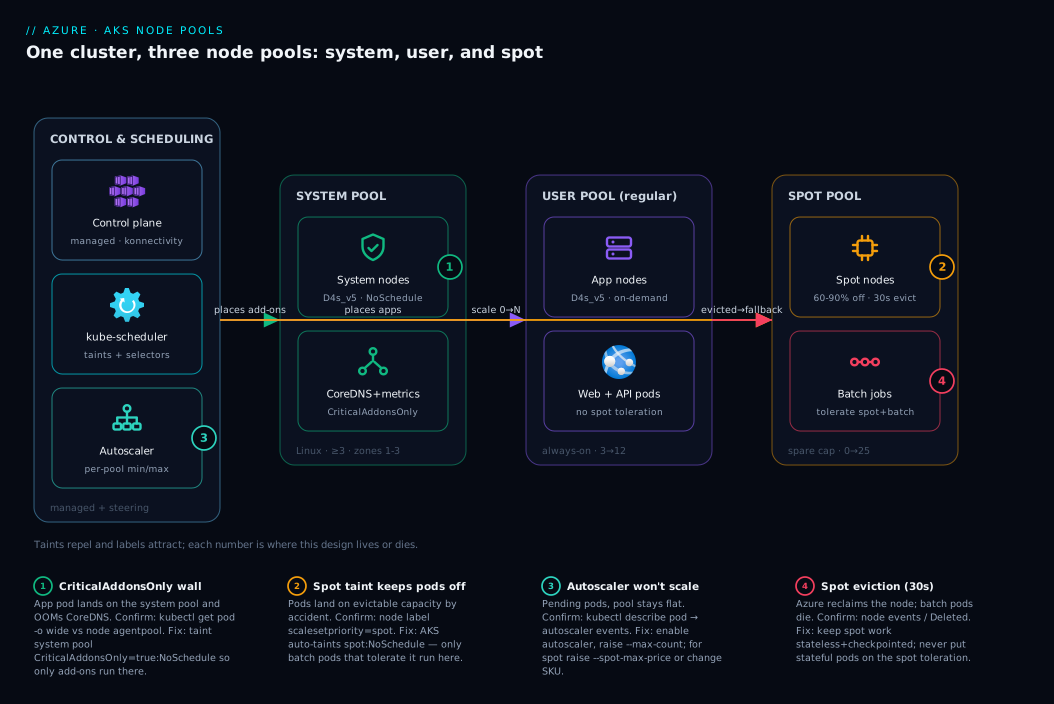
Read the system left to right. The cluster is one logical thing but physically three node pools in the same VNet subnet, each a separate VM scale set. On the left, the system pool runs only the cluster’s plumbing — CoreDNS, metrics-server, the konnectivity tunnel to the managed control plane — carrying the CriticalAddonsOnly taint, so no app pod lands here: the wall protecting cluster DNS. In the middle, the user pool of regular always-on VMs hosts your steady web and API workloads; with no special tolerations, the scheduler keeps them off both the tainted system pool and the spot pool, leaving this pool as their only home. On the right, the spot pool runs on spare capacity at a deep discount, auto-tainted scalesetpriority=spot, so only batch jobs that tolerate it (and select workload=batch) run there.
The flows finish the story. The kube-scheduler places each pod by matching its tolerations and selectors against node taints and labels — the steering arrow into each pool. The cluster autoscaler watches for Pending pods and adds nodes to whichever pool could host them: the spot pool scales 0→N for a burst then back to 0, while the system pool stays pinned. The failure path is the dashed arrow on the right: when Azure reclaims capacity it sends a 30-second eviction notice, batch pods die and reschedule — harmless for stateless work, fatal for stateful, which is why stateful pods never tolerate that taint. The numbered badges mark the four places this design lives or dies; the legend maps each to symptom, confirm, and fix.
Real-world scenario
Northwind Retail runs an e-commerce platform on a single AKS cluster: a React storefront, a .NET checkout API, background workers that re-index the catalogue and recompute recommendations, and a nightly job that crunches clickstream into a reporting store. At launch they did the simplest thing — one node pool, six Standard_D4s_v5 nodes — and it worked for months.
Two failures changed their mind. On a big sale day, the recommendation re-indexer (memory-hungry, bursty) spiked RAM on three nodes; the OOM killer started reaping processes, and on two nodes the victims included CoreDNS replicas. For ninety seconds, cluster DNS degraded: the checkout API couldn’t resolve the payment gateway hostname, and customers saw failed purchases. A background job took down checkout because they shared nodes with cluster DNS. Second, finance flagged the bill: the nightly job ran two hours on six premium nodes, which then sat near-idle the rest of the day because the pool was sized for the batch peak.
The platform team restructured into three pools. A dedicated system pool — three nodes, one per zone, tainted CriticalAddonsOnly=true:NoSchedule — so CoreDNS, metrics-server, and konnectivity live alone; no app pod can share their nodes. The storefront and checkout API went on a regular user pool (autoscaling 3→12) because checkout cannot tolerate eviction. And the re-indexer and clickstream job moved to a spot pool of Standard_D8s_v5 nodes, autoscaling 0→25, tainted workload=batch, with the jobs tolerating both taints and checkpointing every few minutes so an eviction just resumes elsewhere.
Over the next month: the batch compute bill dropped roughly 74% because it ran on spot and scaled to zero between runs instead of holding six premium nodes idle. Cluster DNS incidents went to zero — the CriticalAddonsOnly wall made the original failure mode structurally impossible. The one discipline they had to internalise: spot evictions do happen (a few times a week), so every spot workload had to be genuinely restartable. The extra cost of three small always-on system nodes was a fraction of what spot saved.
Advantages and disadvantages
Splitting a cluster into purpose-built node pools is powerful but not free. The trade-off, head-on:
| Advantages | Disadvantages |
|---|---|
| Protect cluster plumbing from app load (system pool) | More pools = more to patch, upgrade, monitor |
| Deep cost savings on interruptible work (spot) | Spot evictions force restartable design discipline |
| Right-size VMs per workload (GPU/memory/CPU) | Each pool’s min-count is a standing cost floor |
| Independent per-pool autoscaling | Scheduling rules (taints/tolerations) add complexity |
| Blast-radius isolation between tenants | Mis-set taints strand pods in Pending |
| Windows + Linux in one cluster | Cross-pool capacity planning is harder |
| Mix architectures (Arm64 for price/perf) | More node labels/taints to keep consistent |
The advantages dominate in production at real scale — the system-pool wall and spot savings alone justify the model, and most teams reach two pools (system + user) by their first serious incident or invoice. The disadvantages dominate for small or early clusters — a dev cluster or tiny steady service is better off with one pool and namespace-level separation, since every extra pool is a fixed minimum-node cost and another thing to patch. The failure mode to avoid is premature pool sprawl: ten pools mirroring ten microservices, each with a 1-node minimum, burning money and breeding Pending-pod incidents from inconsistent taints. Split on real divergence (size, OS, cost mode, hard isolation), not org chart.
Hands-on lab
Create a cluster with a clean system pool, add a spot user pool, steer a batch job onto it, watch placement, tear it down. Runs on a pay-as-you-go subscription; keep node counts tiny, and delete the cluster at the end — AKS nodes are billed VMs.
1. Create a cluster with a dedicated, tainted system pool.
az group create --name rg-aks-lab --location eastus

az aks create \
  --resource-group rg-aks-lab \
  --name aks-lab \
  --nodepool-name systempool \
  --node-count 1 \
  --node-vm-size Standard_D2s_v5 \
  --generate-ssh-keys

az aks get-credentials --resource-group rg-aks-lab --name aks-lab
kubectl get nodes -o wide        # expect 1 systempool node
2. Add a spot user pool that scales from zero.
az aks nodepool add \
  --resource-group rg-aks-lab \
  --cluster-name aks-lab \
  --name spotpool \
  --priority Spot \
  --eviction-policy Delete \
  --spot-max-price -1 \
  --enable-cluster-autoscaler --min-count 0 --max-count 3 \
  --node-vm-size Standard_D2s_v5 \
  --labels workload=batch \
  --node-taints workload=batch:NoSchedule

# Inspect the taints AKS applied (you'll see BOTH spot + your custom taint)
kubectl get nodes -L kubernetes.azure.com/scalesetpriority,workload
3. Deploy a job WITHOUT tolerations — watch it stay Pending. Save as batch.yaml:
apiVersion: batch/v1
kind: Job
metadata: { name: cruncher }
spec:
  completions: 2
  parallelism: 2
  template:
    spec:
      restartPolicy: Never
      containers:
        - name: work
          image: busybox
          command: ["sh", "-c", "echo crunching; sleep 30"]
kubectl apply -f batch.yaml
kubectl get pods                          # Pending
kubectl describe pod -l job-name=cruncher | grep -A3 Events
# Expect: "0/1 nodes are available: 1 node(s) had untolerated taint
#          {workload: batch}, ..."  -> nothing tolerates the spot/batch taints
That Pending with an untolerated taint message is the single most common node-pool symptom — you just reproduced it on purpose.
4. Add tolerations + selector — watch the spot pool scale up and place the pods. Replace the spec.template.spec block with:
      restartPolicy: Never
      nodeSelector:
        workload: batch
      tolerations:
        - key: "kubernetes.azure.com/scalesetpriority"
          operator: "Equal"
          value: "spot"
          effect: "NoSchedule"
        - key: "workload"
          operator: "Equal"
          value: "batch"
          effect: "NoSchedule"
      containers:
        - name: work
          image: busybox
          command: ["sh", "-c", "echo crunching; sleep 30"]
kubectl delete job cruncher
kubectl apply -f batch.yaml
kubectl get nodes -w        # within ~2-4 min a spotpool node appears (0->1)
kubectl get pods -o wide    # pods land on the spotpool node
5. Confirm the placement and the labels.
# Which pool did the pods land on?
kubectl get pods -l job-name=cruncher \
  -o custom-columns=POD:.metadata.name,NODE:.spec.nodeName
# Confirm that node is spot
kubectl get node <node-name> -L kubernetes.azure.com/scalesetpriority
6. Tear down — stop the billing.
kubectl delete -f batch.yaml
az aks nodepool delete --resource-group rg-aks-lab --cluster-name aks-lab --name spotpool
az group delete --name rg-aks-lab --yes --no-wait
You created two roles of pool, reproduced the Pending-taint failure, fixed it with a toleration and selector, and watched the autoscaler add a spot node on demand and the pods land exactly where intended.
Common mistakes & troubleshooting
The handful of failures that account for nearly every node-pool support ticket. Symptom → root cause → how to confirm → fix.
| # | Symptom | Root cause | Confirm with | Fix |
|---|---|---|---|---|
| 1 | Pod stuck Pending, “had untolerated taint” | Pool is tainted; pod has no matching toleration | kubectl describe pod <p> → Events |
Add the toleration (and usually a nodeSelector) |
| 2 | Pod Pending, “didn’t match node selector” | nodeSelector label exists on no node |
kubectl get nodes --show-labels |
Fix the label value, or add --labels to a pool |
| 3 | App pod landed on the system pool | System pool wasn’t tainted CriticalAddonsOnly |
kubectl get pod -o wide vs node agentpool |
Taint the system pool; reschedule the pod |
| 4 | Workload keeps dying every few hours | It’s on a spot pool and getting evicted | Node events / scalesetpriority=spot label |
Move stateful work to a regular pool |
| 5 | Spot pool never scales up | No capacity at/below max price, or max-count 0 | kubectl describe autoscaler events |
Raise --spot-max-price; try another SKU/region |
| 6 | Can’t delete a node pool | It’s the last system pool | az aks nodepool list -o table (mode) |
Add another system pool first, then delete |
| 7 | Pod Pending, “Insufficient cpu/memory” | Pool at capacity; autoscaler off or at max | kubectl describe pod + --max-count |
Enable/raise autoscaler; bigger VM size |
| 8 | New nodes join but pods still won’t schedule | Pod requests exceed a single node’s capacity | Compare pod requests to node allocatable |
Lower requests, or use a larger VM size |
| 9 | Windows pod Pending forever | No Windows pool, or wrong OS selector | kubectl get nodes -L kubernetes.io/os |
Add --os-type Windows pool; select os: windows |
| 10 | Taint applied but old pods still there | NoSchedule doesn’t evict running pods |
kubectl get pod -o wide |
Use NoExecute, or drain/cordon the node |
The reading note that saves the most time: read the Events at the bottom of kubectl describe pod. A Pending pod almost always tells you exactly why — untolerated taint, didn't match node selector, or Insufficient cpu — mapping one-to-one to rows 1, 2, and 7. Then kubectl get pod -o wide shows the node and kubectl get node <n> --show-labels shows its pool and whether it’s spot. Two commands resolve most node-pool incidents.
# The two commands that diagnose almost any placement problem:
kubectl describe pod <pod> | sed -n '/Events:/,$p'   # WHY it won't schedule
kubectl get pod <pod> -o wide                          # WHERE it landed (node)
Best practices
- Run a dedicated, tainted system pool in production —
CriticalAddonsOnly=true:NoSchedule, ≥ 3 nodes across zones — so apps can never starve CoreDNS or metrics-server. - Keep app workloads off the system pool entirely; every workload goes on a user pool.
- Default to fewer pools. Split only on real divergence — VM size, OS, cost mode, or hard isolation. Use namespaces, quotas, and PriorityClasses for the rest.
- Pair every spot pool with a reliable fallback; never let critical replicas exist only on spot.
- Only put stateless, restartable, idempotent work on spot. If a 30-second eviction means data loss, it’s not spot-safe.
- Taints repel and selectors/affinity attract — use them together. A toleration permits but doesn’t place; pair it with a
nodeSelector. - Enable the cluster autoscaler per pool with sane min/max — spot/batch pools to 0, system pool min ≥ 3.
- Spread pools across availability zones (
--zones 1 2 3) so one zone outage doesn’t down a whole pool. - Keep node labels and taints consistent; inconsistent taints are the top cause of mystery
Pendingpods. - Right-size the VM family to the workload (
D/E/F/NC/Arm) — don’t pay GPU rates for a generic API. - Upgrade pools one at a time with
az aks nodepool upgradesurge settings; never sweep system and user pools together. - Treat node pools as infrastructure code in Bicep/Terraform so taints, labels, and counts are reviewed and reproducible.
Security notes
Node pools are where your container processes actually run, so they’re part of your security boundary even though Kubernetes RBAC gets most of the attention.
- Isolation between pools is scheduling, not a hard security boundary. Taints control placement, not network reachability or kernel isolation. For real tenant isolation, layer NetworkPolicy, namespace RBAC, and consider separate clusters for hostile multi-tenancy. A taint keeps pods off a node; it doesn’t stop a compromised pod elsewhere reaching it over the network.
- Use managed identities, not secrets. Prefer workload identity (federated) so pods get Azure AD tokens without stored credentials; keep the node kubelet identity least-privilege.
- Keep nodes patched. Enable node-image / node-OS auto-upgrade channels; pools you forget to upgrade are stale attack surface.
- Pull images privately. Use a private registry over Private Link — see Securing Azure Container Registry: Private Endpoints, ACR Tasks, Content Trust, and Geo-Replication — so pools don’t pull from the public internet.
- Spot doesn’t change the trust model, but plan for churn: frequent node bootstraps mean your bootstrap (image, identity, secrets) must be hardened because it runs often.
Cost & sizing
Node pools are your AKS compute bill. The Free tier control plane is free (the Standard tier adds a ~$0.10/hour, roughly ₹600/month, uptime-SLA charge), so nearly everything you pay is the VMs in your pools plus their disks, load balancer, and egress.
| Cost driver | What it is | How to control it |
|---|---|---|
| Pool node count × VM size | The VMs themselves (the bulk) | Right-size SKU; autoscale; min-count discipline |
| System pool floor | Always-on add-on nodes | Keep small (3 × 2–4 vCPU) but ≥ 3 for HA |
| Spot vs regular | Pricing mode per pool | Move interruptible work to spot (60–90% off) |
| Idle minimum nodes | Each pool’s --min-count standing cost |
Let batch/spot pools scale to 0 |
| Reservations / savings plan | 1- or 3-yr commit on steady VMs | Reserve the always-on user/system pools |
| Managed disks + LB + egress | Per-node OS disk, the LB, data out | Smaller OS disks; consolidate egress |
| Control-plane tier | Free vs Standard (SLA) | Free for non-prod; Standard for prod SLA |
Right-sizing approach: put steady load on a regular user pool sized to typical load and reserved for 1–3 years (big discount on always-on VMs), letting it autoscale for peaks. Put bursty/interruptible load on a spot pool with --min-count 0 so you pay nothing between runs and 60–90% less while running. Keep the system pool small but never below 3 nodes in production — cheap insurance, not a place to economise. Use the discipline and tagging from Azure FinOps and Cost Management: Controlling Cloud Spend at Scale to attribute pool spend to teams.
Interview & exam questions
1. What is a node pool, and why does every AKS cluster need a system pool? A node pool is a group of identical VMs sharing one size, OS, and scaling config. Every cluster needs at least one system pool because the critical add-ons (CoreDNS, metrics-server, konnectivity) must have a guaranteed Linux home; without a system pool the cluster control loops have nowhere safe to run. Maps to AZ-104 / CKA cluster-architecture topics.
2. How does a system node pool differ from a user node pool?
By role, not hardware. A system pool is required, hosts critical add-ons, is Linux-only, and can’t scale to zero or be spot. A user pool is optional, runs your apps, can be Linux or Windows, can scale to zero, and can be spot. You typically taint the system pool CriticalAddonsOnly so apps stay off it.
3. What is a spot node pool and what is the catch? A user pool on Azure’s spare capacity at 60–90% off, with the catch that Azure can evict nodes on ~30 seconds’ notice when it needs the capacity. AKS auto-taints spot nodes so only tolerating pods run there. Suitable only for stateless, restartable, idempotent workloads.
4. Explain taints versus tolerations versus labels.
A taint marks a node to repel pods; a toleration on a pod lets it withstand a taint (permits, doesn’t attract); a label is a tag a pod’s nodeSelector/affinity uses to target a node. You combine a taint (keep others off) with a label+selector (pull the right pods on).
5. A toleration lets a pod onto a tainted pool — does it guarantee it lands there?
No. A toleration only permits placement past the taint; it does not attract. Without a nodeSelector or node affinity pointing at the pool, the scheduler may place the pod on any node it tolerates. You need both to guarantee a pool.
6. What are the three taint effects and how do they differ?
NoSchedule (don’t place new non-tolerating pods), PreferNoSchedule (try to avoid, but place if needed), and NoExecute (don’t place and evict already-running non-tolerating pods). Use NoExecute when you need to drain the wrong pods off a node immediately.
7. When should you split a workload onto its own node pool? When it diverges in VM size, OS, cost mode (spot), or needs hard isolation — e.g., GPU work, Windows apps, interruptible batch, or a noisy tenant. Not merely because it’s a different team’s service; that’s a namespace/quota concern, not a pool.
8. How does the cluster autoscaler differ from the HPA? The cluster autoscaler runs per pool with a min/max and adds nodes when pods can’t schedule, removing them when underused. The Horizontal Pod Autoscaler adds pod replicas on metrics; the cluster autoscaler then adds nodes to fit them. They work together.
9. Why can’t a Windows workload share a node pool with Linux pods?
Linux and Windows containers require different host OSes and runtimes, so they can’t run on the same node. A Windows workload forces a separate --os-type Windows pool (name ≤ 6 chars), which can never be a system pool.
10. A pod is stuck Pending with “had untolerated taint.” Fix it.
The target pool is tainted and the pod lacks a matching toleration, so the scheduler won’t place it. Confirm with kubectl describe pod (Events). Fix by adding the toleration — and usually a nodeSelector to ensure it lands on the intended pool.
11. How do you keep a noisy batch job from taking down cluster DNS?
Run a dedicated system pool tainted CriticalAddonsOnly=true:NoSchedule so CoreDNS/metrics-server have nodes to themselves, and place the batch job on a separate user (often spot) pool. The taint makes co-location impossible.
12. Your spot pool isn’t scaling up despite Pending pods. Name two causes.
Either no spare capacity at/below your --spot-max-price in that region/SKU (try another VM size or region, or raise the price), or --max-count is too low / autoscaler disabled. Confirm via autoscaler events in kubectl describe.
Quick check
- Name two things a system node pool can do (or must do) that a user pool cannot.
- True or false: adding a toleration to a pod guarantees it runs on the tainted pool.
- What auto-applied taint does AKS put on spot nodes, and why?
- Which taint effect evicts already-running pods that don’t tolerate it?
- Give one workload that is spot-safe and one that is not, with a one-line reason for each.
Answers
- A system pool must host the critical add-ons (CoreDNS, metrics-server, konnectivity) and cannot scale to zero (it must keep ≥ 1 node); it also cannot be spot and is Linux-only. A user pool does none of these obligations and can be spot, Windows, or scaled to zero.
- False. A toleration only permits the pod past the taint; it does not attract it. You need a
nodeSelectoror node affinity to target the pool. Without one, the pod may land on any node whose taints it tolerates. kubernetes.azure.com/scalesetpriority=spot:NoSchedule. It ensures nothing lands on evictable spare capacity unless the pod explicitly tolerates the taint — protecting always-on workloads from spot evictions.NoExecute. It behaves likeNoSchedulefor new pods and evicts already-running pods on the node that don’t tolerate it.NoScheduleandPreferNoScheduleleave running pods alone.- Spot-safe: a stateless batch/data-processing job (it just reschedules and resumes from a checkpoint). Not spot-safe: a stateful database pod (a 30-second eviction risks data loss or split-brain with no failover).
Glossary
- Node pool — A group of identical VMs in an AKS cluster sharing one size, OS, OS disk, and scaling config; the unit you scale and split.
- System node pool — The required pool that hosts the cluster’s critical add-ons (CoreDNS, metrics-server, konnectivity); Linux-only, can’t scale to zero or be spot.
- User node pool — An optional pool for your application workloads; can be Linux/Windows, spot, and scaled to zero.
- Spot node pool — A user pool on Azure’s spare capacity at a steep discount (60–90%) that Azure can evict on ~30 seconds’ notice.
- Eviction — Azure reclaiming a spot node, sending a ~30-second termination notice; pods are killed and rescheduled.
- Taint — A mark on a node that repels pods unless they carry a matching toleration; default-deny placement.
- Toleration — A mark on a pod that lets it withstand (be permitted past) a node taint; permits, does not attract.
- Label — A free-form key/value tag on a node used as a target by selectors and affinity.
nodeSelector— A pod field requiring the node to carry specific label key/values; a hard, simple target.- Node affinity — Richer label-based placement rules supporting operators and required/preferred strengths.
CriticalAddonsOnly— The taint AKS add-ons tolerate; apply it to a pool to reserve it for cluster plumbing only.- Cluster autoscaler — Per-pool controller that adds nodes when pods can’t schedule and removes underused nodes down to the min.
- Horizontal Pod Autoscaler (HPA) — Scales pod replicas on metrics; distinct from the cluster autoscaler, which scales nodes.
- OOM killer — The Linux kernel mechanism that terminates processes under memory pressure; on shared nodes it can kill add-ons.
- VM scale set — The Azure construct backing each node pool’s set of identical VMs.
Next steps
- Zoom back out to how pools fit the whole cluster in AKS Architecture Explained: Managed Control Plane, Node Pools, and the Azure Integrations That Make It Tick.
- Decide whether AKS is even the right tool versus simpler compute in Azure App Service vs Container Apps vs AKS: Choose the Right Compute.
- Plan the subnet and IP space your node pools consume in Azure Virtual Network, Subnets and NSGs: Networking Fundamentals.
- Wire up the cluster metrics that tell you when to scale or split with Azure Monitor and Application Insights: Full-Stack Observability.
- Attribute and shrink your pool spend using Azure FinOps and Cost Management: Controlling Cloud Spend at Scale.