You have a container image. It builds, it runs on your laptop, and now it needs to live in Azure. You open the portal and find at least three services that all promise to “run containers”: Azure Kubernetes Service (AKS), Azure Container Apps (ACA) and Azure Container Instances (ACI). They overlap enough to be confusing and differ enough that picking wrong costs you money, time, or a 2 a.m. page. The same docker run works locally; in Azure the question is no longer can it run but which runtime should own it — and that choice shapes your bill, your operational load, and your blast radius for years.
This article is the decision guide. The trick is to stop comparing feature lists and instead place the three on a single axis: how much of the plumbing do you want to own? ACI hands you a single running container and nothing else — no orchestrator, no scaling, no ingress. ACA gives you a managed serverless platform (built on Kubernetes you never see) that scales your container from zero to many and back, with HTTPS, revisions and event-driven triggers handled for you. AKS gives you the whole Kubernetes cluster — every knob, every node, every responsibility. The more control you take, the more power you get and the more you must operate. That one sentence answers ninety percent of “which should I use?” questions, and the rest of this article makes it concrete.
By the end you will be able to look at a workload — a web API, a nightly batch job, an event-driven microservice, a GPU training run — and name the right runtime in under a minute, defend the choice on cost and operations, and deploy the same container to whichever you picked with both az CLI and Bicep. We will keep it concrete: real SKUs, real limits, real prices, and the exact commands. This is a concept-and-decision article, so the emphasis is on mental models and comparison tables, but you will still leave with a working lab and a short troubleshooting section for the mistakes that bite first.
What problem this solves
The pain is real and common: teams over-buy AKS for a workload that a 5-line ACI command or one ACA app would have run for a fraction of the cost and zero cluster maintenance. The opposite also happens — a team picks ACI for a public-facing API, then spends weeks bolting on a load balancer, TLS, autoscaling and health checks that ACA gives for free, slowly rebuilding a worse version of a platform that already exists. Both mistakes come from the same root: not having a clear mental model of what each runtime is for.
Without that model, the symptoms are predictable. You run a Kubernetes cluster (and pay for idle nodes, and patch them monthly, and own every CVE) to serve one stateless web app. Or you wire ACI containers together by hand and discover there is no built-in service discovery, no scale-to-zero, no revision rollback — features you assumed every “container service” had. Or you reach for ACA and only later learn it cannot run privileged containers or give you raw kubectl access to install a custom controller your platform team requires. Each is a real production story, and each was avoidable with a thirty-second decision check.
Who hits this: every team moving a containerised app to Azure for the first time, every architect sizing a new platform, and everyone studying for AZ-104 or AZ-305, where “choose the appropriate compute service” is a recurring question type. The fix is not memorising feature matrices — it is internalising the control-vs-effort axis, then knowing the handful of hard limits (no scale-to-zero on AKS without extra components, no Kubernetes API on ACA, no autoscaling on ACI) that turn a soft preference into a firm decision.
To frame the whole field before the deep dive, here is the one-line identity of each runtime, the workload it was built for, and the single biggest reason you would not pick it:
| Runtime | One-line identity | Built for | Biggest reason NOT to pick it |
|---|---|---|---|
| ACI (Container Instances) | A single container, run on demand, billed per second | Short jobs, burst, build agents, simple sidecars | No autoscaling, no ingress/TLS, no orchestration |
| ACA (Container Apps) | Serverless containers with scale-to-zero + HTTPS | Web APIs, microservices, event-driven jobs | No raw kubectl; can’t run privileged/host-level workloads |
| AKS (Kubernetes Service) | A managed Kubernetes cluster you operate | Complex platforms, full control, ecosystem tooling | You own nodes, upgrades, patching, ingress, security |
Learning objectives
By the end of this article you can:
- Explain the control-vs-effort axis that orders ACI, ACA and AKS, and place any new workload on it.
- Describe what each runtime is in one sentence and name its signature feature (per-second billing, scale-to-zero, full Kubernetes API).
- Read a workload’s requirements — ingress, scaling shape, statefulness, ecosystem needs — and pick the right runtime with a decision table.
- Deploy the same container image to ACI, ACA and AKS with both
azCLI and Bicep, and explain what each deployment did for you. - Reason about cost: per-second vs per-vCPU-second vs per-node billing, scale-to-zero economics, and rough INR/USD figures.
- Spot the hard limits that disqualify a runtime (no ACA
kubectl, no ACI autoscaling, no native scale-to-zero on AKS) before you commit. - Diagnose the first failures each runtime throws — image-pull errors, scale-to-zero cold starts, and “my container exited” — and fix them.
- Map the choice to AZ-104 and AZ-305 exam scenarios and answer “which compute service?” with confidence.
Prerequisites & where this fits
You should be comfortable with the basics of containers: what a container image is, that it comes from a registry (Docker Hub or, in Azure, Azure Container Registry / ACR), and how docker run starts a container from an image. You do not need to know Kubernetes — explaining where Kubernetes does and doesn’t surface is part of the job here. You should be able to open Azure Cloud Shell, run an az command, and read JSON output. A free or pay-as-you-go Azure subscription is enough for the lab.
This article sits at the front of the Compute track and is the decision upstream of everything else. Once you have chosen a runtime, the deeper articles take over: for the full cluster internals see AKS Cluster Architecture: Control Plane vs Data Plane Explained; for the broader PaaS-vs-containers framing that includes App Service see App Service vs Container Apps vs AKS. All three runtimes pull from a registry, so Azure Container Registry: Secure Supply Chain with Private ACR and Tasks is the shared dependency, and all three send telemetry to Azure Monitor & Application Insights for Observability.
A quick map of where each runtime fits in the wider Azure compute picture, so you can see the neighbours:
| Layer | Examples | Containers here? | Relationship to this article |
|---|---|---|---|
| IaaS (VMs) | Virtual Machines, VM Scale Sets | You install Docker yourself | Below all three; you own the OS |
| Container runtimes | ACI, ACA, AKS | Yes — the subject | This article |
| PaaS (code-first) | App Service, Functions | Optional (custom container) | Sibling choice; code-first vs container-first |
| Shared services | ACR, Key Vault, Monitor, VNet | Consumed by all | Dependencies every runtime uses |
Core concepts
Five mental models make every later decision obvious.
The control-vs-effort axis is the whole game. Picture a slider. At one end, the cloud owns almost everything and you own almost nothing — that is ACI: you hand over an image and a couple of parameters, a container appears, and when it exits you stop paying. At the other end, you own almost everything — that is AKS: a real Kubernetes cluster where you choose node sizes, run upgrades, configure ingress controllers, and carry responsibility for patching and security. ACA sits deliberately in the middle: it runs on Kubernetes internally, but Azure operates that Kubernetes for you and exposes a smaller, friendlier surface (apps, revisions, scale rules) instead of raw cluster APIs. More control means more capability and more operational burden; there is no free lunch on the right-hand end of the slider.
“Serverless” here means scale-to-zero and pay-for-use, not no-servers. Both ACI and ACA are serverless in the sense that you do not manage VMs and you are billed by consumption. ACA goes further with scale-to-zero: when no requests or events arrive, it can drop your app to zero running replicas and you pay nothing for compute until the next request wakes it. That waking is a cold start — the first request after idle pays a startup penalty. AKS, by contrast, is not serverless by default: your node pool of VMs runs (and bills) whether or not any pods are busy, unless you add the Cluster Autoscaler and Scale-to-Zero / Virtual Nodes components yourself.
Kubernetes is the engine; how much of it you touch varies. All three can be thought of in Kubernetes terms, but the exposure differs. AKS gives you the full Kubernetes API — kubectl, Helm, CRDs, operators, DaemonSets, the lot. ACA is built on Kubernetes and KEDA (the event-driven autoscaler) and Dapr (a microservices runtime), but hides the API: you get apps and revisions, not pods and nodes. ACI exposes no Kubernetes at all — it is just a container. So the question “do you need to run a Kubernetes-native tool (an operator, a service mesh you control, a custom scheduler)?” is a clean discriminator: yes → AKS; no → ACA or ACI.
Ingress, scaling and orchestration are included or they are not. ACA gives you built-in HTTPS ingress with an Azure-managed certificate, automatic load balancing across replicas, revisions (versioned, rollback-able deployments) and traffic splitting — for free, no setup. AKS gives you the ability to have all of that, but you install and operate the ingress controller, configure TLS, and wire autoscaling yourself. ACI gives you none of it: a public IP and a port if you ask, but no TLS termination, no autoscaling, no orchestration across multiple containers. If your workload needs an internet-facing endpoint with HTTPS and elastic scale and you do not want to build it, that requirement alone points at ACA.
Billing models differ as much as the features. ACI bills per second for the exact vCPU and memory you request, while the container runs — ideal for short or bursty jobs, wasteful for an always-on service. ACA bills for active vCPU-seconds and memory-seconds plus a small per-request charge, with a generous monthly free grant and zero compute cost while scaled to zero — ideal for spiky or event-driven traffic. AKS bills for the VM nodes in your pools (plus an optional control-plane SLA fee), running 24/7 unless you scale them in — most cost-effective for steady, high-density, always-busy workloads. The billing shape often decides the runtime before any feature does.
The vocabulary in one table
Before the deep sections, pin down every moving part. The glossary at the end repeats these for lookup; this table is the mental model side by side:
| Concept | One-line definition | Which runtime | Why it matters to the choice |
|---|---|---|---|
| Container instance | A single running container | ACI | The unit of work; no orchestration around it |
| Container app | A scalable, versioned app | ACA | Carries ingress, revisions, scale rules |
| Pod | One or more containers scheduled together | AKS (and ACA internally) | The Kubernetes unit you manage on AKS |
| Node pool | A group of VM workers | AKS | What you pay for and patch on AKS |
| Revision | An immutable version of an ACA app | ACA | Enables rollback + traffic split |
| KEDA | Event-driven autoscaler | ACA (built-in), AKS (add-on) | Powers scale-to-zero / queue scaling |
| Dapr | Microservices building-blocks runtime | ACA (built-in), AKS (add-on) | Service invocation, state, pub/sub |
| Scale-to-zero | Drop to 0 replicas when idle | ACA only (native) | Pay nothing at rest; cold start on wake |
| Cold start | First-request latency after idle | ACA (and ACI starts) | Latency trade-off of scale-to-zero |
| Ingress | Inbound HTTP(S) entry point | ACA (built-in), AKS (you build) | Public endpoint + TLS |
| Control plane | The Kubernetes brain (API server, etc.) | AKS (managed), ACA (hidden) | What Azure runs vs what you run |
The three runtimes, side by side
This is the central reference of the article — the one table to keep open. It lines up every dimension that actually drives a decision. Read it once top to bottom, then return to the rows that matter for your workload.
| Dimension | ACI (Container Instances) | ACA (Container Apps) | AKS (Kubernetes Service) |
|---|---|---|---|
| What it is | One container, run on demand | Serverless container platform | Managed Kubernetes cluster |
| Abstraction level | Lowest effort, lowest control | Middle | Highest control, highest effort |
| You manage | Nothing but the container | App config + scale rules | Nodes, upgrades, ingress, add-ons |
| Orchestration | None | Built-in (managed K8s) | Full Kubernetes |
| Scaling | Manual (run more groups) | Auto 0→N via KEDA | HPA / Cluster Autoscaler (you set up) |
| Scale-to-zero | N/A (stops when job ends) | Yes, native | Not native (needs extra components) |
| Built-in HTTPS ingress | No (public IP/port only) | Yes, managed cert | No (install ingress controller) |
Kubernetes API / kubectl |
No | No | Yes |
| Dapr / KEDA | No | Yes, built-in | Add-on / install yourself |
| Persistent volumes | Azure Files mount | Azure Files mount | Full CSI (disks, files, more) |
| GPU support | Yes (limited SKUs) | Limited (workload profiles) | Yes (GPU node pools) |
| Best for | Jobs, burst, build agents, sidecars | Web apps, microservices, events | Complex platforms, ecosystem tooling |
| Billing unit | Per second, per vCPU + GB | Active vCPU-s + GB-s + requests | Per VM node (+ optional SLA) |
| Startup speed | Seconds (per group) | Seconds (warm) / cold start | Pod start on warm node (fast) |
| Ops burden | Near zero | Low | High |
| Typical learning curve | Hours | A day | Weeks |
Three reading notes that prevent the most common mis-reads:
- “No autoscaling” on ACI does not mean “can’t scale” — it means you scale by launching more container groups yourself. There is no built-in rule that adds instances under load. For a job that runs once and exits, that is fine; for a service under variable traffic, it is disqualifying.
- ACA hiding the Kubernetes API is a feature, not a gap. You lose
kubectlbut gain a platform you do not operate. Only treat it as a limitation if you genuinely need Kubernetes-native tooling. - AKS being “highest control” is also “highest cost of ownership.” The cluster does not run itself. Budget for the engineer-time of upgrades, security patching and ingress operations, not just the node bill.
Runtime 1 — Azure Container Instances (ACI)
ACI is the simplest way to run a container in Azure: you give it an image, CPU, memory and (optionally) a port, and it runs. There is no cluster, no node pool, no orchestrator. The unit is a container group — one or more containers that share a lifecycle, a network and storage, scheduled together on the same host (analogous to a Kubernetes pod). You are billed per second for the vCPU and memory you requested, only while the group runs. When the container’s process exits, the group stops and billing stops.
That shape makes ACI ideal for finite, bursty or simple work: a nightly data-processing job, a CI/CD build agent that spins up for a pipeline and tears down, a one-off migration container, an event handler triggered occasionally, or a sidecar/helper that does not need orchestration. It is the wrong tool for a long-lived public web service, because it has no autoscaling, no built-in HTTPS, no load balancing and no rolling-update orchestration — you would have to build all of that around it.
Here is the option surface you actually set when you create a container group:
| Setting | What it controls | Typical value | Limit / gotcha |
|---|---|---|---|
--image |
The container image to run | mcr.microsoft.com/... or your ACR |
Private images need --registry-* creds or MI |
--cpu |
vCPU count requested | 0.5–4 (more in some regions) | You pay for what you request, not use |
--memory |
GB of RAM | 0.5–16 (region-dependent) | CPU:memory ratios are bounded per region |
--ports |
Ports to expose | 80, 443 |
No TLS termination — it’s raw TCP |
--ip-address |
Public or Private (VNet) |
Public for demos |
Public = internet-reachable; lock down for prod |
--restart-policy |
Always / OnFailure / Never |
OnFailure for jobs |
Always makes a job loop forever |
--os-type |
Linux or Windows |
Linux |
Windows groups cost more, fewer features |
--command-line |
Override the container command | optional | Quoting differs across shells |
--environment-variables |
Plain env vars | config values | Use --secure-environment-variables for secrets |
--azure-file-volume-* |
Mount Azure Files | for persistence | Containers are otherwise ephemeral |
Deploy a container group with the CLI:
# Create a resource group, then a public ACI running a sample image
az group create -n rg-aci-demo -l eastus

az container create \
  --resource-group rg-aci-demo \
  --name aci-hello \
  --image mcr.microsoft.com/azuredocs/aci-helloworld:latest \
  --cpu 1 --memory 1.5 \
  --ports 80 \
  --ip-address Public \
  --restart-policy OnFailure \
  --dns-name-label aci-hello-kv$RANDOM

# Read the public FQDN and current state
az container show -g rg-aci-demo -n aci-hello \
  --query "{fqdn:ipAddress.fqdn,state:instanceView.state}" -o table
The same thing as Bicep, so it is repeatable and reviewable:
param location string = resourceGroup().location

resource aci 'Microsoft.ContainerInstance/containerGroups@2023-05-01' = {
  name: 'aci-hello'
  location: location
  properties: {
    osType: 'Linux'
    restartPolicy: 'OnFailure'
    ipAddress: {
      type: 'Public'
      ports: [ { protocol: 'TCP', port: 80 } ]
      dnsNameLabel: 'aci-hello-${uniqueString(resourceGroup().id)}'
    }
    containers: [
      {
        name: 'hello'
        properties: {
          image: 'mcr.microsoft.com/azuredocs/aci-helloworld:latest'
          ports: [ { port: 80 } ]
          resources: { requests: { cpu: 1, memoryInGB: json('1.5') } }
        }
      }
    ]
  }
}

output fqdn string = aci.properties.ipAddress.fqdn
When ACI is exactly right vs when it quietly betrays you:
| Use ACI when… | Avoid ACI when… |
|---|---|
| The work is a finite job that starts and ends | You need an always-on, internet-facing web service |
| You need burst capacity for minutes, not days | You need autoscaling under variable load |
| You want the cheapest path for occasional runs | You need built-in HTTPS / TLS termination |
| You need a quick build/CI agent | You need orchestration across many containers |
| You want per-second billing with no idle cost | You need rolling updates / blue-green out of the box |
Runtime 2 — Azure Container Apps (ACA)
ACA is a serverless container platform that gives you the good parts of Kubernetes without the cluster. You deploy a container app; Azure runs it on a fully managed Kubernetes-plus-KEDA-plus-Dapr foundation you never touch. Out of the box you get HTTPS ingress with an Azure-managed certificate, automatic load balancing across replicas, revisions (each deploy is an immutable version you can roll back to or split traffic across), and autoscaling from zero to many driven by HTTP traffic, CPU, or any KEDA event source (a queue depth, a Service Bus topic, a cron schedule).
This is the default answer for most container workloads that are not a one-shot job and do not need raw Kubernetes. Web APIs, front-ends, background processors, event-driven microservices — ACA carries the platform plumbing so you ship the app. Its signature trick is scale-to-zero: with minReplicas: 0, an idle app costs nothing for compute, then wakes on the next request (paying a cold-start latency). For latency-critical apps you set minReplicas: 1 to keep one warm replica resident.
The settings that shape an ACA app and where they bite:
| Setting | What it controls | Default / typical | Trade-off / gotcha |
|---|---|---|---|
minReplicas |
Floor on running replicas | 0 |
0 = scale-to-zero (cold start); 1 = always warm, always billed |
maxReplicas |
Ceiling on replicas | 10 |
Cap protects cost; too low throttles bursts |
Ingress external |
Public vs internal endpoint | varies | external: true exposes to internet over HTTPS |
targetPort |
Port your container listens on | none — must set | Wrong port → ingress can’t reach container |
| Scale rule (HTTP) | Concurrent requests per replica | 10 |
Lower = more replicas sooner; tune for latency |
| Scale rule (KEDA) | Event source to scale on | optional | Enables queue/topic-driven scaling to zero |
cpu / memory |
Per-replica resources | 0.5 vCPU / 1 GiB | Bounded combinations (e.g. 0.25→2 vCPU steps) |
| Revision mode | Single or Multiple |
Single |
Multiple enables traffic splitting / blue-green |
| Dapr enabled | Sidecar for microservices | off | Adds service invocation, state, pub/sub |
| Environment | The shared boundary apps live in | one per app group | Apps in one environment share a VNet + Log Analytics |
Deploy the same image to ACA with the CLI:
# Install the extension and register the provider (one-time)
az extension add --name containerapp --upgrade
az provider register --namespace Microsoft.App

az group create -n rg-aca-demo -l eastus

# 'up' creates the environment + app in one shot
az containerapp up \
  --name aca-hello \
  --resource-group rg-aca-demo \
  --location eastus \
  --image mcr.microsoft.com/azuredocs/aci-helloworld:latest \
  --target-port 80 \
  --ingress external \
  --query properties.configuration.ingress.fqdn
To control scale-to-zero explicitly, set the replica range:
az containerapp update \
  --name aca-hello --resource-group rg-aca-demo \
  --min-replicas 0 --max-replicas 5
The same app declared in Bicep (environment + app):
param location string = resourceGroup().location

resource law 'Microsoft.OperationalInsights/workspaces@2022-10-01' = {
  name: 'law-aca'
  location: location
  properties: { sku: { name: 'PerGB2018' } }
}

resource env 'Microsoft.App/managedEnvironments@2024-03-01' = {
  name: 'aca-env'
  location: location
  properties: {
    appLogsConfiguration: {
      destination: 'log-analytics'
      logAnalyticsConfiguration: {
        customerId: law.properties.customerId
        sharedKey: law.listKeys().primarySharedKey
      }
    }
  }
}

resource app 'Microsoft.App/containerApps@2024-03-01' = {
  name: 'aca-hello'
  location: location
  properties: {
    managedEnvironmentId: env.id
    configuration: {
      ingress: { external: true, targetPort: 80 }
    }
    template: {
      containers: [
        {
          name: 'hello'
          image: 'mcr.microsoft.com/azuredocs/aci-helloworld:latest'
          resources: { cpu: json('0.5'), memory: '1Gi' }
        }
      ]
      scale: { minReplicas: 0, maxReplicas: 5 }
    }
  }
}

output fqdn string = app.properties.configuration.ingress.fqdn
When ACA is the right call vs when you should look elsewhere:
| Use ACA when… | Look elsewhere when… |
|---|---|
| You run a web API / microservice and want HTTPS + scale for free | You need raw kubectl / Kubernetes-native operators → AKS |
| Traffic is spiky and you want scale-to-zero economics | You need privileged or host-network containers → AKS |
| You want revisions, traffic splitting, blue-green without building it | You need a GPU-heavy training cluster with custom scheduling → AKS |
| You want Dapr/KEDA without operating them | The work is a single finite job with no scaling → ACI is simpler |
| You want low ops with real platform features | You have an existing Helm/CRD ecosystem to keep → AKS |
Runtime 3 — Azure Kubernetes Service (AKS)
AKS is a managed Kubernetes cluster: Azure runs the control plane, you own the data plane. The control plane (API server, scheduler, etcd) is operated and free by default; you can pay for an uptime-SLA tier if you need a guarantee. The data plane is your node pools — VM Scale Sets of worker nodes you choose the size and count of, where your pods actually run. With AKS you get the full Kubernetes API: kubectl, Helm, CRDs, operators, service meshes, DaemonSets, custom schedulers, the entire ecosystem. That power is the point — and the price is that you operate it.
Choose AKS when the workload genuinely needs Kubernetes: a complex multi-service platform, custom networking (your own CNI), GPU node pools with bespoke scheduling, operators and CRDs from a vendor, strict multi-tenant isolation, or an existing Kubernetes investment you are lifting into Azure. If none of those apply, AKS is usually over-buying — you take on upgrades, security patching, ingress operations and capacity planning that ACA would have handled.
What “you operate it” concretely means, mapped to who would otherwise own it:
| Responsibility | On AKS, owned by… | On ACA, owned by… | Why it matters |
|---|---|---|---|
| Kubernetes version upgrades | You (schedule + run) | Azure | Falling behind → unsupported, CVEs |
| Node OS patching | You (or node auto-upgrade) | Azure | Unpatched nodes = attack surface |
| Ingress controller | You install + run | Azure (built-in) | Your public endpoint + TLS |
| Autoscaling setup | You (HPA + Cluster Autoscaler) | Azure (KEDA built-in) | Right-sizing under load |
| Networking (CNI) | You choose + configure | Azure (managed) | Pod IPs, VNet integration, policy |
| Capacity / node sizing | You | Azure | Idle nodes still bill |
| Security hardening | You (Azure Policy, RBAC) | Mostly Azure | Cluster is your responsibility |
Create a small AKS cluster and deploy the same image:
az group create -n rg-aks-demo -l eastus

# A minimal 1-node cluster (demo sizing — not production)
az aks create \
  --resource-group rg-aks-demo \
  --name aks-demo \
  --node-count 1 \
  --node-vm-size Standard_B2s \
  --generate-ssh-keys \
  --tier free

# Get kubeconfig credentials
az aks get-credentials -g rg-aks-demo -n aks-demo

# Deploy + expose the same container via a LoadBalancer service
kubectl create deployment hello \
  --image=mcr.microsoft.com/azuredocs/aci-helloworld:latest
kubectl expose deployment hello --type=LoadBalancer --port=80 --target-port=80
kubectl get service hello -w   # wait for EXTERNAL-IP to populate
A minimal AKS cluster in Bicep (control plane + one node pool):
param location string = resourceGroup().location

resource aks 'Microsoft.ContainerService/managedClusters@2024-02-01' = {
  name: 'aks-demo'
  location: location
  identity: { type: 'SystemAssigned' }
  sku: { name: 'Base', tier: 'Free' }
  properties: {
    dnsPrefix: 'aksdemo'
    agentPoolProfiles: [
      {
        name: 'systempool'
        mode: 'System'
        count: 1
        vmSize: 'Standard_B2s'
        osType: 'Linux'
      }
    ]
  }
}

output clusterName string = aks.name
When AKS earns its complexity vs when it is a trap:
| Use AKS when… | Don’t use AKS when… |
|---|---|
You need the full Kubernetes API (kubectl, CRDs, operators) |
A single web API would run happily on ACA |
| You run a complex, multi-service platform | You only have one or two stateless containers |
| You need custom CNI, GPU scheduling, DaemonSets | You don’t want to own upgrades and patching |
| You have an existing Helm/Kubernetes ecosystem | Your team has no Kubernetes expertise or appetite |
| You need fine-grained multi-tenant isolation | The workload is a finite batch job → ACI |
The decision in one table
If you remember nothing else, remember how to read a workload into a runtime. Match your dominant requirement on the left to the runtime on the right:
| If your workload is… | …then pick | Because |
|---|---|---|
| A nightly/batch job that runs then exits | ACI | Per-second billing, no idle cost, no orchestration needed |
| A CI/CD build or test agent | ACI | Spin up, run, tear down; cheapest for short bursts |
| A one-off migration or admin task | ACI | No need for a platform; just run the container |
| A public web API / front-end with spiky traffic | ACA | Built-in HTTPS + scale-to-zero economics |
| An event-driven microservice (queue/topic) | ACA | KEDA scales to zero on the event source |
| A small set of microservices wanting Dapr | ACA | Dapr built-in; no cluster to operate |
| A blue-green / canary web app | ACA | Revisions + traffic splitting out of the box |
| A complex platform with many services + operators | AKS | Full Kubernetes API and ecosystem |
| A GPU training cluster with custom scheduling | AKS | GPU node pools + scheduler control |
| A lift-and-shift of an existing Kubernetes app | AKS | Keep Helm/CRDs/manifests as-is |
| A multi-tenant platform needing strict isolation | AKS | Namespace + network-policy + node-pool isolation |
A second lens is a short funnel of discriminating questions you ask in order, stopping at the first “yes.” (1) Does it need raw kubectl or Kubernetes-native tooling — operators, CRDs, custom CNI? Yes → AKS. (2) Is it a finite job that starts and exits? Yes → ACI. (3) Does it need internet HTTPS ingress plus autoscaling without you building them? Yes → ACA. (4) Is traffic spiky enough that scale-to-zero saves real money? Yes → ACA. (5) None of the above — just a simple container to run cheaply on demand? → ACI. The first “yes” wins, which is why “needs Kubernetes?” sits at the top: it is the only question whose answer cannot be satisfied by the simpler runtimes.
Architecture at a glance
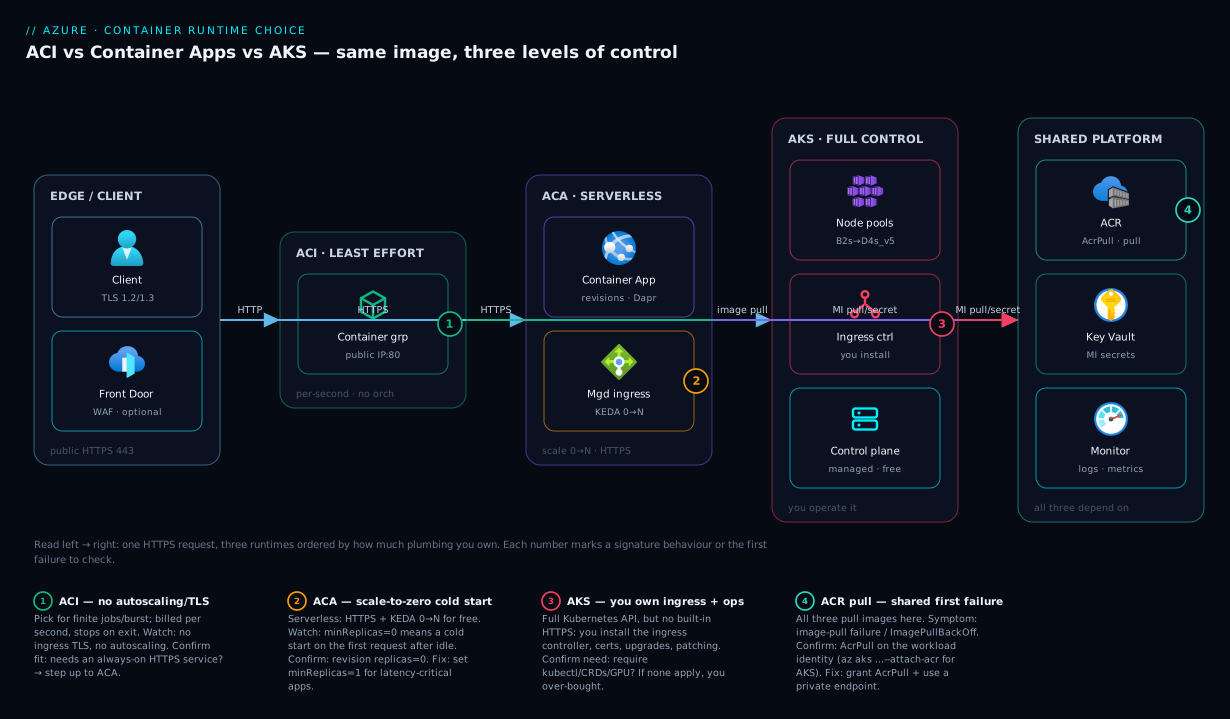
The diagram below puts all three runtimes on a single left-to-right path so you can see the control-vs-effort axis as a picture, not a list. On the far left is the shared front every container workload starts from: a client over HTTPS and an optional Front Door / Application Gateway edge. Moving right, the three middle zones are the runtimes themselves, arranged from least to most control. ACI is one box — a container group with a public IP and port, no platform around it. ACA is the managed-serverless zone — your container plus an Azure-operated ingress and the KEDA autoscaler that drives it from zero to N replicas. AKS is the full-cluster zone — your node pools and an ingress controller you install and run, with the Kubernetes control plane behind it. On the far right is the shared platform all three depend on: ACR for image pulls, Key Vault for secrets via managed identity, and Azure Monitor for logs and metrics.
Read the flows as “the same HTTPS request, three landing zones of control,” and read the numbered badges as the spots where each runtime’s signature behaviour — or its first failure — appears: ACI’s lack of scaling, ACA’s scale-to-zero cold start, AKS’s self-operated ingress, and the ACR image-pull step that every runtime shares and that is the single most common first-deploy failure across all three. The legend narrates each number as what it is · how to confirm · what to do, so the diagram doubles as a quick diagnostic map.
Real-world scenario
Lumio Retail is a mid-size e-commerce company on Azure. Their platform team — six engineers, none of them full-time Kubernetes operators — runs three very different workloads and, early on, made the classic mistake: they put all three on a single AKS cluster because “we’re a container shop now.” Within a quarter the bill and the operational drag told them they had over-bought, and they re-platformed each workload onto the runtime that actually fit. Here is what they ran and where each landed.
The first workload is the storefront API — a public, internet-facing service with sharply spiky traffic: quiet overnight, a morning ramp, and flash-sale spikes that briefly 10x the load. On AKS this meant either over-provisioning nodes for the peak (paying for idle capacity all night) or fighting the Cluster Autoscaler’s lag. They moved it to ACA: built-in HTTPS ingress replaced the ingress controller they had been hand-operating, an HTTP scale rule replaced their HPA, and minReplicas: 1 kept one warm replica to avoid cold starts on the morning’s first shoppers while maxReplicas: 30 absorbed the flash sales. Their compute cost for the storefront dropped because they no longer paid for idle nodes overnight, and the ingress-and-TLS maintenance burden went to zero.
The second workload is a nightly catalog reindex — a batch job that runs for about forty minutes after midnight, processes the day’s product changes, and exits. It needs no ingress, no autoscaling and no orchestration; it just needs to run once and stop. On AKS it had been a CronJob occupying cluster capacity and complexity it did not need. They moved it to ACI, launched by a scheduled trigger: a container group spins up, runs the reindex, exits, and billing stops. Per-second billing for forty minutes a night is a rounding error compared to a node reserved to host it, and there is nothing to patch.
The third workload is their internal platform — a dozen interdependent microservices with a vendor’s Kubernetes operator, custom CRDs, a service mesh the platform team controls, and strict per-team namespace isolation. This one genuinely needs Kubernetes, so it stayed on AKS — but now it is the only tenant, sized for its real footprint, with the team’s operational attention focused on one cluster instead of spread across unrelated workloads. The lesson Lumio took away, and the one this article exists to teach: the runtime is not a company-wide standard, it is a per-workload decision, and matching each workload to its place on the control-vs-effort axis cut both their bill and their on-call load.
Advantages and disadvantages
Each runtime’s strengths are the mirror image of its weaknesses — the same trait that makes it great for one workload disqualifies it for another. The two-column view:
| Runtime | Advantages | Disadvantages |
|---|---|---|
| ACI | Simplest model; per-second billing; near-zero ops; fast to start; great for jobs/burst | No autoscaling; no built-in HTTPS; no orchestration; not for always-on services |
| ACA | Scale-to-zero; built-in HTTPS + ingress; revisions + traffic split; Dapr/KEDA; low ops; serverless economics | No raw kubectl; no privileged/host-network; less control than AKS; cold starts at zero |
| AKS | Full Kubernetes API; total control; entire ecosystem; GPU/CNI/operators; multi-tenant isolation | High ops burden (upgrades, patching, ingress); steep learning curve; idle nodes bill; you own security |
The trade-off that decides most real choices is operational burden vs control. ACA’s lack of kubectl is only a disadvantage if you actually need Kubernetes-native tooling; for the majority of web and microservice workloads it is pure upside, because you shed the entire operations stack. AKS’s full control is only an advantage if your workload exercises it; otherwise the control is just unused complexity you pay for in engineer-hours. And ACI’s missing features are irrelevant for a job that runs and exits, but fatal for a public service. The discipline is to weigh each runtime against the specific workload, never in the abstract — the “best” runtime is the one whose strengths your workload uses and whose weaknesses it never touches.
A second trade-off worth naming explicitly is cost shape vs traffic shape. Steady, always-busy, high-density workloads are cheapest on AKS (you pack many pods onto reserved nodes). Spiky or event-driven workloads are cheapest on ACA (you pay only while busy and nothing at rest). Short, infrequent jobs are cheapest on ACI (per-second, no platform overhead). Putting a spiky service on always-on nodes, or an always-busy service on per-second instances, is how teams overpay — match the billing curve to the traffic curve.
Hands-on lab
This lab deploys the same public sample image to all three runtimes so you feel the difference in effort directly. It is free-tier-friendly: ACI and ACA cost cents for a few minutes, and AKS uses the free control-plane tier with a single small node — just remember the teardown at the end so the AKS node does not keep billing. Run everything in Cloud Shell (Bash).
Step 1 — set up. Pick a region and confirm you are logged in.
az account show -o table          # confirm subscription
LOC=eastus
az group create -n rg-runtime-lab -l $LOC -o table
Step 2 — ACI: one command, one container. This is the whole deployment.
az container create \
  --resource-group rg-runtime-lab \
  --name lab-aci \
  --image mcr.microsoft.com/azuredocs/aci-helloworld:latest \
  --cpu 1 --memory 1 --ports 80 --ip-address Public \
  --dns-name-label lab-aci-$RANDOM \
  --restart-policy OnFailure

# Expected: provisioningState "Succeeded" and an FQDN you can curl
az container show -g rg-runtime-lab -n lab-aci \
  --query "{state:instanceView.state,fqdn:ipAddress.fqdn}" -o table
Open the FQDN in a browser — you should see the “Welcome to Azure Container Instances!” page. Notice what you did not do: no cluster, no ingress, no TLS, no scaling config.
Step 3 — ACA: serverless with ingress for free. One up command provisions the environment and the app.
az extension add --name containerapp --upgrade -y
az provider register --namespace Microsoft.App --wait

az containerapp up \
  --name lab-aca \
  --resource-group rg-runtime-lab \
  --location $LOC \
  --image mcr.microsoft.com/azuredocs/aci-helloworld:latest \
  --target-port 80 --ingress external

# Expected output ends with an https:// FQDN — note it carries a managed cert
az containerapp show -g rg-runtime-lab -n lab-aca \
  --query properties.configuration.ingress.fqdn -o tsv
Open the https URL — TLS is already terminated by an Azure-managed certificate you never created. Now make scale-to-zero explicit and watch replicas drop to 0 when idle:
az containerapp update -g rg-runtime-lab -n lab-aca \
  --min-replicas 0 --max-replicas 3
az containerapp revision list -g rg-runtime-lab -n lab-aca \
  --query "[].{rev:name,replicas:properties.replicas}" -o table
Step 4 — AKS: the full cluster. This step takes a few minutes and shows how much more is involved.
az aks create -g rg-runtime-lab -n lab-aks \
  --node-count 1 --node-vm-size Standard_B2s \
  --tier free --generate-ssh-keys

az aks get-credentials -g rg-runtime-lab -n lab-aks --overwrite-existing

kubectl create deployment hello \
  --image=mcr.microsoft.com/azuredocs/aci-helloworld:latest
kubectl expose deployment hello --type=LoadBalancer --port=80 --target-port=80

# Wait for EXTERNAL-IP (was <pending>) to become a real IP
kubectl get service hello -w
Count the steps: you created a cluster, fetched credentials, created a deployment, and created a service to expose it — and you still have no HTTPS until you install an ingress controller and a certificate manager. That gap between Step 3 and Step 4 is the control-vs-effort axis made tangible.
Step 5 — compare and reflect. You deployed one image three ways. ACI was one command and gave you a container. ACA was one command and gave you a platform (HTTPS, scaling, revisions). AKS was several commands and gave you a cluster you now own.
Step 6 — teardown (do this!). Delete everything so the AKS node stops billing.
az group delete -n rg-runtime-lab --yes --no-wait
Common mistakes & troubleshooting
The first failures on each runtime are predictable, and the same image-pull problem bites on all three. Here is the playbook — symptom, root cause, how to confirm, and the fix.
| # | Symptom | Root cause | Confirm (exact command / path) | Fix |
|---|---|---|---|---|
| 1 | Container won’t start; “image pull” failure | Private registry needs auth; identity lacks AcrPull |
ACI: az container show ... --query instanceView.events; AKS: kubectl describe pod (ImagePullBackOff) |
Grant AcrPull to the identity, or pass registry creds; attach ACR to AKS with --attach-acr |
| 2 | ACA app returns 404 / “no healthy upstream” | targetPort doesn’t match the port the app listens on |
az containerapp show --query properties.configuration.ingress.targetPort |
Set --target-port to the container’s real port |
| 3 | ACA first request after idle is slow | Scale-to-zero cold start (minReplicas: 0) |
az containerapp revision list --query "[].properties.replicas" shows 0 |
Set --min-replicas 1 to keep a warm replica |
| 4 | ACI container exits immediately, status “Terminated” | Process ended (it’s a job) or crashed at startup | az container logs -g <rg> -n <name>; check instanceView.currentState |
Fix the command/crash; for a service, the workload must stay running |
| 5 | ACI with restartPolicy Always loops forever |
A finite job restarting after each successful exit | az container show --query instanceView.events (repeated starts) |
Use OnFailure or Never for jobs |
| 6 | AKS service stuck EXTERNAL-IP <pending> |
LoadBalancer still provisioning, or quota/SKU issue | kubectl get svc -w; kubectl describe svc <name> |
Wait; check public-IP quota and load-balancer SKU |
| 7 | AKS pod CrashLoopBackOff |
App crashes on start (bad config, missing secret) | kubectl logs <pod>; kubectl describe pod <pod> |
Fix config/secret; add readiness probe |
| 8 | “Picked the wrong runtime” — paying for idle AKS nodes | Always-on cluster for spiky/finite work | Review node count vs actual pod usage in Monitor | Move spiky → ACA, finite → ACI; right-size AKS |
| 9 | ACA secret/env value empty → app misbehaves | Key Vault reference can’t resolve (identity/role) | az containerapp show --query properties.template.containers[0].env |
Grant the app’s MI Key Vault Secrets User; check vault firewall |
| 10 | Region capacity / SKU not available | Chosen VM size or feature not in the region | Error text from az aks create / az container create |
Pick a supported region/SKU; check quotas |
Three notes that resolve the most confusion:
- Image-pull (row 1) is the universal first failure. All three runtimes pull from a registry, and a private ACR needs an identity with the
AcrPullrole. On AKS,az aks update --attach-acr <acr>wires it up; on ACA and ACI, assign a managed identity and grant itAcrPull. If your first deploy fails, check this before anything else. - A container “exiting” is not always a bug. ACI is built for jobs; a job that finishes and stops is working correctly. Only treat an exit as a failure if the workload was supposed to stay running (a service) or if the logs show a crash.
- “Wrong runtime” is the most expensive bug and has no error code. It shows up as a surprising bill or a heavy on-call load, not a stack trace. Re-run the decision table whenever a workload’s cost or operational burden feels disproportionate.
Best practices
- Match the runtime to the workload, not to a company standard. Run the decision table per workload; a mixed estate (ACI + ACA + AKS) is healthy, not messy.
- Default to ACA for new web/microservice workloads. It gives the most value (HTTPS, scaling, revisions) for the least operational cost. Step up to AKS only when a concrete requirement forces it.
- Reach for ACI for anything finite or bursty. Jobs, build agents, one-offs — per-second billing and zero platform overhead win.
- Only choose AKS when you can name the Kubernetes feature you need. “We might need it later” is not a reason; over-bought clusters cost real money and attention.
- Always pull from a private registry with managed identity. Use ACR with
AcrPullgranted to the workload identity; avoid admin keys and Docker Hub for production. - Set
minReplicasdeliberately on ACA.0for cost-sensitive, latency-tolerant apps;1+ for anything where the first request must be fast. - Right-size AKS node pools and enable autoscaling. Idle nodes bill 24/7; use the Cluster Autoscaler and separate system/user node pools.
- Send every runtime’s telemetry to one place. Wire ACI, ACA and AKS to Log Analytics / Azure Monitor so you can compare and diagnose consistently.
- Use revisions and traffic splitting on ACA for safe deploys. Roll out new versions to a slice of traffic before shifting 100%.
- Tear down ephemeral resources. ACI and lab AKS clusters left running are a common surprise on the bill; automate cleanup.
- Keep AKS upgraded. Stay within supported Kubernetes versions; enable node auto-upgrade channels so patching doesn’t slip.
Security notes
Security responsibilities shift along the same control-vs-effort axis: the more you own, the more you must secure. On ACI and ACA, Azure secures the host, the runtime and (for ACA) the platform, so your job is the container image, the identity, and the network exposure. On AKS, the cluster is yours to harden — RBAC, network policies, Azure Policy, node image patching and admission control are all your responsibility.
| Concern | ACI | ACA | AKS |
|---|---|---|---|
| Identity for pulls/secrets | Managed identity + AcrPull / Key Vault Secrets User |
Same, per app | Workload Identity + AcrPull; per-workload RBAC |
| Secrets | --secure-environment-variables or Key Vault |
App secrets / Key Vault references | Key Vault via CSI Secrets Store driver |
| Network isolation | Deploy into a VNet; use private IP | Internal ingress; VNet-integrated environment | Private cluster, NSGs, network policy |
| Public exposure | Avoid Public IP in prod |
external: false for internal-only |
Internal load balancer; restrict ingress |
| TLS | You terminate it (none built-in) | Managed cert built-in | You run cert-manager / managed certs |
| Image trust | Pull from private ACR; scan images | Same | Same + admission policy (e.g. only signed) |
| Patching responsibility | Azure (host) | Azure (platform) | You (nodes) + Azure (control plane) |
The cross-cutting rules: never embed registry admin credentials or plaintext secrets in a container or env var — use managed identity and Key Vault everywhere. Keep production endpoints internal (private ingress / private cluster) unless they must be public, and front public ones with a WAF. Scan images in ACR before they reach any runtime. And on AKS specifically, treat the cluster as a first-class security surface: enable RBAC, network policy, and Azure Policy, and keep node images current — the convenience of full control comes with the full responsibility for it.
Cost & sizing
The three billing models map cleanly to three traffic shapes, and getting the match right is where most savings live. ACI bills per second for the exact vCPU and memory you request, only while running — cheap for short or infrequent work, expensive if left always-on. ACA bills for active vCPU-seconds and memory-seconds plus a small per-million-requests charge, with a monthly free grant and zero compute charge while scaled to zero — cheapest for spiky and event-driven traffic. AKS bills for the VM nodes in your pools 24/7 (the control plane is free unless you buy the uptime SLA) — cheapest for steady, dense, always-busy workloads where you pack many pods per node.
| Runtime | What drives the bill | Free / low-cost angle | Cheapest when… | Most wasteful when… |
|---|---|---|---|---|
| ACI | vCPU-seconds + GB-seconds while running | Per-second; nothing when stopped | Short/bursty jobs run occasionally | Left running as an always-on service |
| ACA | Active vCPU-s + GB-s + per-request; free monthly grant | Scale-to-zero = ₹0 compute at rest | Spiky/event-driven traffic | High, perfectly steady 24/7 load (AKS may beat it) |
| AKS | Per VM node (Scale Set) 24/7; optional SLA fee | Free control plane (no SLA) | Steady, high-density, always-busy | A single small workload on a multi-node cluster |
Rough sizing intuition (always confirm with the Azure Pricing Calculator for your region; figures vary):
| Workload | Likely runtime | Rough monthly order of magnitude |
|---|---|---|
| 40-min nightly job (1 vCPU/1 GB) | ACI | A few ₹ / cents — per-second for ~20 hours total/month |
| Spiky web API, scale-to-zero at night | ACA | Low — pay only for busy seconds + free grant |
Always-warm API (minReplicas: 1, 0.5 vCPU) |
ACA | Modest, steady — one replica billed continuously |
Small dev/test cluster (1× B2s node) |
AKS | The node’s hourly rate × 730 (control plane free) |
Production platform (3× D4s_v5, busy) |
AKS | The dominant line item — size nodes to real usage |
The single biggest cost mistake is the wrong-runtime tax: a spiky service on always-on AKS nodes, or a busy 24/7 service on per-second ACI. Pick the runtime whose billing curve matches your traffic curve, set ACA minReplicas and AKS node counts deliberately, and revisit the choice whenever the bill surprises you — re-platforming a workload to the right runtime is often a larger saving than any in-place tuning.
Interview & exam questions
Q1. In one sentence each, what are ACI, ACA and AKS? ACI runs a single container on demand billed per second; ACA is a serverless container platform with built-in HTTPS and scale-to-zero; AKS is a managed Kubernetes cluster where you own the nodes and operations. They sit on a control-vs-effort axis from least to most. (AZ-104 / AZ-305 compute selection.)
Q2. A public web API has spiky traffic and the team has no Kubernetes experience. Which runtime? ACA. It provides built-in HTTPS ingress, autoscaling and scale-to-zero with no cluster to operate, matching both the traffic shape and the team’s skills. AKS would add operational burden they cannot carry; ACI lacks ingress and autoscaling.
Q3. What does “scale-to-zero” mean and which runtime offers it natively? It means dropping to zero running replicas when idle so you pay nothing for compute, waking on the next request. ACA offers it natively via KEDA. AKS does not natively (it needs extra components); ACI simply stops when a job ends.
Q4. Why might choosing AKS for a single stateless web app be a mistake? You take on node management, upgrades, patching, ingress operation and security for a workload that ACA would run with none of that overhead, paying for idle nodes and engineer time you didn’t need. AKS’s control is only worth its cost when the workload uses it.
Q5. A nightly batch job runs 30 minutes then exits. Best runtime and why? ACI. Per-second billing means you pay only for the 30 minutes, there’s no platform to operate, and no autoscaling or ingress is needed. A CronJob on AKS would reserve cluster capacity and complexity for no benefit.
Q6. What does ACA give you that ACI does not? Built-in HTTPS ingress with a managed certificate, automatic load balancing, autoscaling (including scale-to-zero) via KEDA, revisions with rollback and traffic splitting, and optional Dapr — i.e. an orchestration platform versus a single container.
Q7. When do you genuinely need AKS over ACA?
When you need the raw Kubernetes API: kubectl, Helm, CRDs and operators, custom CNI, GPU node pools with bespoke scheduling, privileged/host-network workloads, or strict multi-tenant isolation — capabilities ACA deliberately hides.
Q8. How does each runtime authenticate to a private ACR?
Via a managed identity granted the AcrPull role (or registry credentials). AKS can use az aks update --attach-acr; ACA and ACI assign a managed identity with AcrPull. Image-pull failures are the most common first-deploy error on all three.
Q9. Compare the billing models in one line each. ACI: per-second per requested vCPU/GB while running. ACA: active vCPU-seconds + GB-seconds + per-request, free monthly grant, nothing at scale-to-zero. AKS: per VM node 24/7, free control plane unless you buy the uptime SLA.
Q10. Your storefront API on AKS pays for idle nodes overnight. What do you change?
Move it to ACA with an HTTP scale rule, minReplicas: 1 for a warm morning request and a higher maxReplicas for peaks — paying only for busy capacity and shedding the ingress/TLS/node-ops burden. Reserve AKS for workloads that need Kubernetes.
Q11. What does ACA hide that AKS exposes, and is that good or bad?
ACA hides the Kubernetes control plane and API (no kubectl, no node management). It is good for most workloads (you shed operations) and bad only when you need Kubernetes-native tooling — then you choose AKS.
Q12. Map each runtime to a one-word “best for.” ACI: jobs. ACA: apps. AKS: platforms. (A useful mnemonic for AZ-305 scenarios — instances for tasks, apps for services, the cluster for complex systems.)
Quick check
- Order ACI, ACA and AKS from least to most control/effort.
- Which runtime offers native scale-to-zero, and what is its first downside?
- You have a CI build agent that runs per pipeline and exits. Which runtime?
- Name two things ACA gives you for free that you would have to build on AKS.
- What single role must a runtime’s managed identity have to pull from a private ACR?
Answers
- ACI → ACA → AKS (least control/effort to most).
- ACA offers native scale-to-zero; its first downside is a cold start — the first request after idle pays a startup penalty (mitigate with
minReplicas: 1). - ACI — per-second billing, no platform overhead, ideal for a finite job that exits.
- Any two of: built-in HTTPS ingress with a managed certificate, automatic load balancing, autoscaling (including scale-to-zero), revisions with rollback / traffic splitting. On AKS you install and operate these yourself.
AcrPull— granted to the workload’s managed identity (or useaz aks update --attach-acrfor AKS).
Glossary
- ACI (Azure Container Instances) — Service that runs a single container (a container group) on demand, billed per second, with no orchestrator.
- ACA (Azure Container Apps) — Serverless container platform built on managed Kubernetes + KEDA + Dapr, offering ingress, scaling and revisions without a visible cluster.
- AKS (Azure Kubernetes Service) — Managed Kubernetes: Azure runs the control plane, you operate the node pools and the full Kubernetes API.
- Container group — ACI’s unit: one or more containers sharing lifecycle, network and storage on the same host (akin to a pod).
- Control plane — The Kubernetes brain (API server, scheduler, etcd); managed by Azure on AKS, hidden on ACA.
- Node pool — A set of VM worker nodes in AKS where pods run; what you size, scale and pay for.
- Revision — An immutable version of an ACA app, enabling rollback and traffic splitting.
- KEDA — Kubernetes Event-Driven Autoscaler; powers ACA’s scale-to-zero and event-source scaling.
- Dapr — Distributed Application Runtime providing service invocation, state and pub/sub; built into ACA, an add-on on AKS.
- Scale-to-zero — Dropping to zero replicas when idle so compute costs nothing until the next request; native to ACA.
- Cold start — The latency the first request pays when a runtime spins a container up from idle/zero.
- Ingress — The inbound HTTP(S) entry point; built-in on ACA, self-operated on AKS, absent on ACI.
AcrPull— The Azure RBAC role that lets an identity pull images from Azure Container Registry.- Workload profile — An ACA capacity option (consumption or dedicated) that determines the compute backing your apps.
- Cluster Autoscaler — The AKS component that adds/removes nodes based on pending pods; not enabled by default.
Next steps
- Go deep on the cluster you might choose: AKS Cluster Architecture: Control Plane vs Data Plane Explained.
- See the code-first sibling comparison that includes App Service: App Service vs Container Apps vs AKS.
- Secure the image supply chain every runtime depends on: Azure Container Registry: Secure Supply Chain with Private ACR and Tasks.
- Wire up telemetry for whichever runtime you pick: Azure Monitor & Application Insights for Observability.
- Keep the bill honest once you’ve chosen: Azure FinOps & Cost Management at Scale.