You are asked to “just put API Management in front of the APIs” and an hour later you are staring at a pricing page with six tier names, a “v2” column that appeared recently, an option called self-hosted gateway, and a checkbox for virtual network injection that silently triples the cost. Azure API Management (APIM) is not one thing — it is a small distributed system you rent, made of a gateway data plane, a management plane, a developer portal, and, underneath them all, a compute platform (the fleet of VMs that actually runs your gateway) that Azure has quietly re-architected twice. The reason the tier table is confusing is that the tiers are really selling you different compute platforms with different capabilities, and the marketing names (Developer, Basic, Standard, Premium) hide that fact.
This article gives you the mental model that makes the whole product legible. We separate the four planes, name what each does, and map every tier to the compute platform it runs on — stv1 (original, being retired), stv2 (the current VNet-capable platform), and the newer v2 line (faster-provisioning, differently priced). Once you can see “this tier = this gateway on this platform with these networking options and limits,” choosing a SKU stops being a guess. Every concept comes with the exact az apim command and the Bicep, and the tier matrix, limits, networking modes and cost drivers are laid out as scannable tables you can return to mid-design.
By the end you can read a requirement — “internal-only APIs, regional failover, custom domain, OAuth validation at the edge” — and name the tier, compute platform, networking mode and rough monthly cost in under a minute, instead of provisioning a Developer instance “to try it,” discovering it has no SLA, and rebuilding on Premium three weeks later. APIM is one of the most expensive PaaS services to get wrong, because the tier is baked into provisioning and several migrations are re-create, not resize. Understanding the architecture first is how you avoid that bill.
What problem this solves
Teams reach for API Management to solve a recurring pain: you have a sprawl of backend APIs — App Service apps, Azure Functions, AKS services, SaaS — and every consumer (a partner, a mobile app, another team) needs authentication, rate limits, a consistent base URL, request/response shaping, caching and observability. Without a gateway, each concern gets reimplemented badly in every backend, and you have no single place to enforce a policy, revoke a key, or see who is calling what. APIM is the facade and policy-enforcement layer that centralises all of it: one front door, one place for keys and OAuth validation, one throttle, one analytics surface.
What breaks without understanding the architecture underneath it: you pick a tier on price alone and hit a wall that is structural, not configurable. Choose Consumption for cost and discover it cannot do VNet integration or the self-hosted gateway and has a smaller policy surface. Choose Developer because it is cheap with “all the features” and learn it carries no SLA and is a single instance — fine for dev, a career-limiting move in production. Choose Premium and inject it into a VNet for “security” and watch provisioning take 45 minutes and config changes 20, because stv2 VNet-injected instances are heavyweight. None of these are bugs; they are the compute platform showing through the tier name.
Who hits this: anyone standing up an API gateway on Azure — platform teams, integration engineers, architects sizing a landing zone. It bites hardest when the decision is made early and cheaply (“start on Developer, upgrade later”), because upgrade paths between tiers are limited and some are one-way or require a fresh deployment. The fix is to understand the four planes and the compute platforms first, so the tier you provision on day one is the one the workload actually needs.
Learning objectives
By the end of this article you can:
- Separate APIM into its four planes — gateway (data plane), management plane, developer portal, and the underlying compute platform — and say what each does.
- Explain the stv1 / stv2 / v2 compute platforms, how they differ in provisioning time, networking and scale, and which tiers run on which.
- Map every tier (Consumption, Developer, Basic, Standard, Premium, plus the v2 line) to its SLA, scale model, networking and headline limits — and pick the right one for a requirement.
- Distinguish the VNet modes — external vs internal injection (stv2) versus VNet integration / private endpoints (v2) — and choose correctly for an internal-only API.
- Describe how a request flows through APIM: DNS → gateway → inbound/backend/outbound pipeline → backend, and where each capability (auth, cache, rate-limit, transform) sits.
- Explain products, subscriptions, APIs, operations and policies as the object model, and how a subscription key differs from an OAuth token at the gateway.
- Read the Capacity metric and decide when to scale up a tier, scale out units, or add a region.
- Estimate monthly cost from tier, unit count, regions and networking mode, and avoid the expensive mistakes (needless VNet injection, over-provisioned Premium, Developer in production).
Prerequisites & where this fits
You should be comfortable with an API gateway as a reverse proxy between clients and backends, and with basic HTTP (methods, status codes, headers, TLS). You should know how to run az in Cloud Shell, read JSON output, and recognise Bicep/ARM syntax. Familiarity with Azure networking primitives — VNet, subnet, NSG, private endpoint — helps a great deal, because half the tier decision is a networking decision. No prior APIM experience needed; this builds the model from the ground up.
This sits in the Integration track, upstream of any hands-on APIM work (policies, the developer portal, GraphQL, versioning) — all of which assume you provisioned the right tier on the right platform. It connects outward to the backends you front (Azure App Service vs Container Apps vs AKS sits behind it; Azure Functions triggers and bindings is a common backend), the front-of-front-door layer (Application Gateway with WAF and end-to-end TLS and Application Gateway vs Load Balancer), the identity layer (OIDC and OAuth2 flows in Entra ID, exactly what APIM validates at the edge), and the network isolation it depends on (Private Link and private DNS for PaaS).
Involve the right people before you provision: the network team owns the VNet/subnet/private-DNS decision (which gates internal mode and therefore the tier), the identity team owns the Entra app registrations the gateway validates tokens against, app teams own the backends (driving API count and any self-hosted-gateway need), and architecture/FinOps owns the irreversible tier-equals-bill-and-SLA call. The networking decision in particular is upstream of the tier choice — settle it first.
Core concepts
Five mental models make every later decision obvious.
API Management is four planes, not one box. Creating “an APIM instance” provisions four cooperating things. The gateway is the data plane: the reverse proxy that receives every call, runs the policy pipeline, and forwards to your backend. The management plane is the control surface — the ARM resource, portal blades, the REST/az API, and the config store where APIs, products and policies live. The developer portal is a customisable website where consumers discover APIs, read docs, get keys and try calls. Underneath all three is the compute platform — the VM fleet that runs the gateway, which you never see but which sets your provisioning time, networking options and scale. The tier you buy is really a choice of which gateway, on which compute platform, with which planes and limits.
The compute platform is the hidden variable the tiers are really selling. Azure has shipped the gateway on three generations of compute. stv1 is the original (classic tiers launched on it; being retired). stv2 is the current platform for the classic dedicated tiers — it gives Premium its VNet injection, availability zones and multi-region, but is heavyweight: provisioning and scaling take tens of minutes because each unit is a managed VM with a public IP and load balancer. v2 (Basic/Standard/Premium v2) is a newer platform built for fast provisioning (minutes), a simpler networking model (VNet integration and private endpoints rather than subnet injection), and a different price/limit curve. When two tiers look alike on paper but behave totally differently, the compute platform is why.
Subscription keys and OAuth tokens are two different gates, and the gateway can enforce both. A subscription in APIM is not an Azure subscription — it is an access grant that issues a subscription key (Ocp-Apim-Subscription-Key header or query param) a consumer presents to call APIs in a product: APIM’s native access model, cheap and revocable. Separately, validate-jwt policy checks an OAuth 2.0 / OpenID Connect bearer token from Entra ID on every request — issuer, audience, scopes, signature — at the edge before the backend sees it. Real systems use both: a key to identify the app/product, a token to authenticate the user.
Every request runs a four-stage policy pipeline, and that is where APIM earns its keep. A call passes through inbound policy (auth, rate-limit, IP filter, rewrite headers), then APIM forwards to the backend (optional retries, circuit breaker, load balancing), then outbound policy on the response (cache, transform, strip headers), with on-error on any failure. Policies are XML, scoped at four levels (global / product / API / operation), composed via <base />. Almost everything you think a gateway “does” — caching, throttling, transformation, JWT validation, mock responses, CORS — is a policy in one of these stages.
Scale is “units” within a region; HA is “regions” — but only some tiers do either. Dedicated tiers scale by adding scale units (a fixed slice of throughput each, the exact figure varying with policy weight) and regions (Premium only — multi-region active-active behind one global gateway URL). Availability zones are Premium-only on stv2. Consumption is serverless (no units; autoscale, per-call billing); v2 tiers scale by units on the faster platform. So “how do I make this HA and how big can it go?” has a per-tier answer — and that answer, not the feature checkboxes, usually forces a Premium decision.
The vocabulary in one table
Before the deep sections, pin down every moving part. The glossary at the end repeats these for lookup; this table is the mental model side by side:
| Concept | One-line definition | Plane | Why it matters to the tier choice |
|---|---|---|---|
| Gateway | The reverse proxy that runs policies and forwards calls | Data plane | The thing you scale; its platform = the tier |
| Management plane | ARM resource, portal, az/REST, config store |
Control plane | Where you author APIs/policies |
| Developer portal | Customisable site for API consumers | Portal | Absent on Consumption; present on dedicated/v2 |
| Compute platform | The VM fleet under the gateway (stv1/stv2/v2) | Infrastructure | Determines provision time, networking, scale |
| Tier (SKU) | Consumption / Developer / Basic / Standard / Premium / v2 | — | Baked in at create; the irreversible decision |
| Scale unit | A fixed slice of gateway throughput you add | Data plane | How you scale dedicated tiers |
| Subscription | An access grant that issues a key | Config object | APIM-native auth (not an Azure subscription) |
| Product | A bundle of APIs with access + policy + terms | Config object | What consumers subscribe to |
| API / Operation | A façade for a backend / a single endpoint | Config object | What you import and expose |
| Policy | XML rule in inbound/backend/outbound/on-error | Data plane | Where auth, throttle, cache, transform live |
| Self-hosted gateway | A containerised gateway you run yourself | Data plane | Hybrid/on-prem; Premium (+ v2) feature |
| VNet injection | Deploying the gateway into a subnet (stv2) | Networking | Developer/Premium only; external vs internal |
| VNet integration / PE | Outbound integration + private inbound (v2) | Networking | The v2-platform networking model |
The four planes, in detail
One APIM instance is four cooperating planes. The split tells you where each capability lives and why some tiers omit entire planes.
The gateway (data plane)
The gateway handles live traffic: every request is TLS-terminated, matched to an API operation, run through inbound policies, forwarded to the backend, run through outbound policies, and returned. It is stateless per request (apart from cache and rate-limit counters), scaled by units, and the only plane on the hot path — if it is down, your APIs are down, which is why its SLA and compute platform dominate the tier decision.
Crucially, the gateway can be multiple gateways. The default is the managed gateway Azure runs in your instance. On Premium (and the v2 line) you can also run self-hosted gateways — the same gateway as a container deployed to your own Kubernetes/Docker, on-prem or in another cloud, while managing APIs centrally from Azure — which is how APIM fronts APIs that cannot leave a data centre. The gateway flavours and where they run:
| Gateway flavour | Where it runs | Tiers | Use it for |
|---|---|---|---|
| Managed gateway | Azure-managed, in your instance’s region(s) | All tiers | The normal case — Azure runs it |
| Self-hosted gateway | Your K8s/Docker, on-prem or other cloud | Premium (and v2 line) | APIs that must stay on-prem / in another cloud |
| Workspace gateway | Isolated managed gateway per workspace | Premium (workspaces) | Decentralised teams with isolated runtimes |
The management plane
The management plane is everything not on the hot path: the ARM resource, the portal, the management REST API / az apim commands, and the config store of APIs, products, policies, subscriptions and named values. Importing a spec, writing a policy or creating a product writes here; the gateway pulls and enforces it. It is what your CI/CD pipeline talks to. Key implication: management-plane outages affect changes, not live traffic — the gateway keeps serving the last-known-good config.
The developer portal
The developer portal is a customisable, auto-generated website for your API consumers: they browse the catalogue, read reference docs from your OpenAPI definitions, sign up, get subscription keys, and try calls in a built-in interactive console. It is a CMS-style site you can rebrand. Two things to know: it is absent on Consumption, and its content is a separate publish step from your API config. For a partner-facing programme, it is a major reason to pick a dedicated or v2 tier over Consumption.
The compute platform (the part you do not see)
Beneath all three sits the compute platform — the VMs running the gateway. You never touch them, but their generation governs three things you feel constantly: provisioning/scaling time, what networking you can do, and how big you can scale. It is the most under-appreciated fact about APIM, so the next section is devoted to it.
stv1, stv2 and v2 — the compute platforms decoded
The tier names hide the compute platform, and the platform is what actually changes the behaviour. The decode:
stv1 is the original platform; the classic tiers first shipped on it. It used an older networking model and is now being retired — instances still on stv1 must migrate to stv2. New classic-tier instances today land on stv2; if you inherited an old one, check its platform (exposed in the portal and API) and plan the migration. Do not build anything new on stv1 assumptions.
stv2 is the current platform for the classic dedicated tiers (Developer, Basic, Standard, Premium run on it today). It introduced the modern VNet injection model (a managed VM fleet deployed into a delegated subnet), availability zones and multi-region (both Premium). Its defining trait is being heavyweight: each scale unit is a real managed VM with networking, so provisioning or changing scale/networking takes tens of minutes (commonly 30–45+ for VNet-injected Premium). Use it when you need true subnet injection, AZs, multi-region or the self-hosted gateway.
v2 (the Basic v2 / Standard v2 / Premium v2 line) is the newer, re-architected platform that fixes stv2’s two pain points: slow provisioning and an awkward networking story. v2 instances provision in minutes, scale faster, and use a simpler networking model — VNet integration for outbound (reaching private backends without subnet injection) and private endpoints for private inbound. It has a different price/limit curve and is the go-forward line for most new workloads. The historical trade-off is parity timing: some advanced capabilities arrived on v2 after the classic tiers, so verify a feature you depend on is GA on your chosen v2 tier before committing.
The platform comparison that drives the real decision:
| Trait | stv1 (legacy) | stv2 (classic dedicated) | v2 (Basic/Standard/Premium v2) |
|---|---|---|---|
| Status | Retiring — migrate off | Current for classic tiers | Newer go-forward line |
| Tiers on it | old Dev/Basic/Std/Premium | Developer, Basic, Standard, Premium | Basic v2, Standard v2, Premium v2 |
| Provisioning time | tens of minutes | tens of minutes (30–45+ for VNet) | minutes |
| Scaling/config-change time | slow | slow (VM-based units) | fast |
| Networking model | legacy VNet | VNet injection (external/internal subnet) | VNet integration + private endpoints |
| Availability zones | no | Premium | per-tier (verify current GA) |
| Multi-region | no | Premium only | per-tier (verify; Premium v2 trajectory) |
| Self-hosted gateway | no | Premium | per-tier (verify current GA) |
| Best for | nothing new | deep network integration, AZ, multi-region | most new workloads wanting fast provisioning |
Two rules fall straight out of this table. First, “Premium + VNet injection on stv2” means slow — provisioning, scaling and even some config changes take tens of minutes, so never put an stv2 Premium create on a launch’s critical path. Second, prefer the v2 line for new internet-or-VNet-integrated workloads unless you specifically need a still-classic-only capability — you get the same gateway with far faster operations.
The tiers — what each one actually buys
Now overlay the tiers onto the planes and platforms — classic line first, then v2, then the decision.
Consumption — serverless, per-call, no portal
Consumption is serverless: no units, automatic scaling, billed per call (with a free monthly grant). It shares a multi-tenant gateway, has no developer portal and a reduced policy/feature set (no VNet, no self-hosted gateway). Use it for lightweight, spiky, internet-facing APIs (often fronting Azure Functions) where you want a gateway’s policies and keys without an always-on instance; avoid it when you need the portal, private networking or predictable high throughput.
Developer — full features, no SLA, single instance
Developer is the cheapest dedicated tier with the full feature surface (portal, VNet injection, most policies) — but no SLA and a single, non-scalable instance. It is for non-production: dev, test, demos, learning. Running it in production is the most common APIM mistake — it looks fully featured and is cheap, but one instance with no SLA means any platform event is an unmitigated outage. Use it to build and test the exact config you will run on a higher tier.
Basic, Standard, Premium — the production dedicated line
The production-grade dedicated tiers, ascending in scale and capability. Basic and Standard are general-purpose (SLA-backed, unit-scalable, with the portal); Premium unlocks the heavy-hitters — multi-region, availability zones, VNet injection (internal mode for fully private), the self-hosted gateway, workspaces, the highest unit ceiling. The Standard→Premium jump is large in price and justified almost entirely by networking and resilience, not throughput.
The v2 line — Basic v2, Standard v2, Premium v2
The v2 tiers mirror the classic Basic/Standard/Premium roles on the faster v2 platform with the simpler VNet-integration model. Basic v2 and Standard v2 suit most teams wanting quick provisioning and private backends without subnet injection; Premium v2 is the high-end v2 tier. As the go-forward line, green-field designs should default here and fall back to classic only for a still-classic-only capability.
The tier matrix you actually use to choose — SLA, platform, scaling, networking, portal:
| Tier | Platform | SLA | Scaling model | Networking | Dev portal | Self-hosted GW | Multi-region | Typical use |
|---|---|---|---|---|---|---|---|---|
| Consumption | shared serverless | ~99.95% | auto (serverless) | none | No | No | No | Spiky, lightweight, internet APIs (often Functions) |
| Developer | stv2 | None | single instance | VNet injection (ext/int) | Yes | No | No | Non-prod only — dev/test/demo |
| Basic | stv2 | ~99.95% | units (low ceiling) | none | Yes | No | No | Small production APIs, public |
| Standard | stv2 | ~99.95% | units (mid ceiling) | none | Yes | No | No | Mainstream production, public |
| Premium | stv2 | ~99.99% (multi-AZ) | units (high ceiling) + regions | VNet injection (ext/int) | Yes | Yes | Yes | Private/internal, multi-region, enterprise |
| Basic v2 | v2 | ~99.95% | units (fast) | VNet integration | Yes | per-tier | No | New workloads, quick provisioning |
| Standard v2 | v2 | ~99.95% | units (fast) | VNet integration + PE | Yes | per-tier | No | Mainstream new workloads with private backends |
| Premium v2 | v2 | ~99.99% (target) | units (fast) | VNet integration + PE | Yes | per-tier | trajectory | High-end new workloads on v2 platform |
Three reading notes that save the most pain. Developer vs Basic: Developer has more features and is cheaper, but with no SLA and one instance — it is for building the config, never running it. Standard vs Premium: throughput rarely forces Premium; internal/private VNet, multi-region, AZ or the self-hosted gateway do. Classic vs v2: same gateway, different platform — v2 provisions in minutes with simpler networking, so default to v2 for new builds and verify the one feature you need is GA.
Networking modes — the decision inside the decision
Half of “which tier” is really “what networking.” There are two fundamentally different models by platform, and within stv2 two sub-modes that are easy to confuse.
On stv2 (Developer/Premium), you inject the gateway into a subnet. You delegate a dedicated subnet and the managed VM fleet lands inside it with private IPs. Two modes: in external mode the gateway keeps a public IP (internet-reachable and able to call private backends) — a public API with private dependencies; in internal mode it has no public endpoint, reachable only from the VNet (or via something you front it with), and the developer portal and management endpoints are private too — a fully private gateway for internal-only or partner-via-private-link scenarios. Internal mode is the classic enterprise pattern and is Premium (Developer for testing) only.
On v2 (Standard v2/Premium v2), you use VNet integration and private endpoints. Rather than injecting the fleet into a subnet, the gateway uses VNet integration for outbound (reaching private backends without being in the subnet) and a private endpoint for private inbound. This is the modern App Service model — much simpler to operate (no subnet sizing, NSG/UDR gymnastics or 30-minute applies) — at the cost of the all-or-nothing “whole instance in my VNet” semantics of injection.
The networking modes side by side — what each enables, and its gotcha:
| Mode | Platform / tiers | Inbound reachability | Outbound to private backends | Public IP | Key gotcha |
|---|---|---|---|---|---|
| No VNet | Consumption, Basic, Standard | Public internet | Public/internet only | Yes | Cannot reach private-only backends |
| External injection | stv2: Developer, Premium | Public | Yes (in-VNet) | Yes | Needs a dedicated subnet + NSG rules; slow applies |
| Internal injection | stv2: Developer, Premium | Private only (VNet) | Yes (in-VNet) | No | Portal/mgmt also private; front with App GW for public exposure |
| VNet integration | v2: (Basic v2)/Standard v2/Premium v2 | Public (unless PE) | Yes (integrated) | Yes | Outbound integration only — pair with PE for private inbound |
| Private endpoint (inbound) | v2 tiers | Private via PE | (with integration) | optional | Private DNS zone required; resolves the gateway privately |
The decision is mechanical once you state two facts: must inbound be private? and must outbound reach private backends?
| Inbound private? | Outbound to private backends? | Choose |
|---|---|---|
| No | No | Consumption / Basic / Standard / Basic v2 (cheapest that fits) |
| No | Yes | Standard v2 + VNet integration (simple) or stv2 external injection (Premium) |
| Yes | Yes | v2: Standard/Premium v2 + private endpoint + VNet integration, or stv2 internal injection (Premium) |
| Yes | No (calls public APIs only) | v2 + private endpoint, or stv2 internal (Premium) — rare |
A note that prevents a classic outage: in internal mode the developer portal and management/Git endpoints become private too, so your CI/CD agent and any browser hitting the portal must be on the VNet (or routed in via private link / a jump host). Teams flip to internal for security and then cannot reach the portal or deploy — by design, not a bug.
The configuration object model — APIs, products, subscriptions, policies
Now the management-plane object model you actually author. Five object types compose every APIM configuration.
An API is a façade for a backend — imported from an OpenAPI/Swagger spec, a WSDL, an Azure Function or App Service, or hand-built — exposed under a path, containing operations (individual endpoints like GET /orders/{id}). A product bundles one or more APIs with an access model, policies, terms and a visibility setting; consumers subscribe to a product (not directly to an API, in the classic model), and the subscription issues a subscription key. Policies are the XML rules at four scopes that govern traffic. Together: a consumer subscribes to a product, gets a key, calls an operation of an API, and the policies at the relevant scopes run.
The object model in one table:
| Object | What it is | Contains / issues | Scope of policy attachment |
|---|---|---|---|
| API | A façade for one backend (imported or hand-built) | Operations | API-level and operation-level policy |
| Operation | A single endpoint (verb + path template) | — | Operation-level policy (most specific) |
| Product | A bundle of APIs + access + terms + visibility | Subscriptions | Product-level policy |
| Subscription | An access grant a consumer holds | A subscription key (primary + secondary) | — |
| Policy | XML rules: inbound/backend/outbound/on-error | — | Global / Product / API / Operation |
| Named value | A reusable config/secret (can be Key Vault-backed) | — | Referenced inside policies |
The policy pipeline — where capability lives
Policies are the heart of the gateway. Each request runs inbound → backend → outbound, with on-error on failure, composed across scopes via <base />. A minimal but real policy — JWT validation and rate limiting on inbound, header stripping on outbound:
<policies>
  <inbound>
    <base />
    <!-- Validate an Entra ID OAuth token at the edge -->
    <validate-jwt header-name="Authorization" failed-validation-httpcode="401">
      <openid-config url="https://login.microsoftonline.com/<tenant-id>/v2.0/.well-known/openid-configuration" />
      <required-claims>
        <claim name="aud"><value>api://orders-api</value></claim>
      </required-claims>
    </validate-jwt>
    <!-- Throttle per subscription key: 100 calls / 60s -->
    <rate-limit-by-key calls="100" renewal-period="60"
                       counter-key="@(context.Subscription.Id)" />
  </inbound>
  <backend>
    <base />
  </backend>
  <outbound>
    <base />
    <set-header name="Server" exists-action="delete" /> <!-- don't leak server header -->
  </outbound>
  <on-error>
    <base />
  </on-error>
</policies>
The capabilities you reach for most, by stage and tier:
| Capability | Policy | Stage | Notes / tier |
|---|---|---|---|
| Subscription-key auth | (built-in product setting) | inbound | All tiers |
| OAuth/JWT validation | validate-jwt |
inbound | All tiers |
| Rate limit / quota | rate-limit-by-key, quota-by-key |
inbound | All tiers (counters per-instance vary) |
| IP allow/deny | ip-filter |
inbound | All tiers |
| Response caching | cache-lookup / cache-store |
inbound/outbound | Internal cache varies; external Redis on dedicated |
| Transform / headers / CORS / mock | set-body, set-header, cors, mock-response |
inbound/outbound | All tiers (mock is great for design-first) |
| Backend retry / circuit breaker | retry, backend circuit breaker |
backend | Dedicated/v2 |
| Backend load-balancing pool | backend pool | backend | Dedicated/v2 |
Subscription keys vs OAuth tokens — the two gates
A frequent confusion: a subscription key identifies which consumer/product is calling (APIM’s native access control, sent as Ocp-Apim-Subscription-Key); an OAuth token authenticates who (user or app, from Entra ID, validated by validate-jwt). Different questions, routinely used together. You can also make a product open (no subscription) and rely solely on OAuth — common for public, user-authenticated APIs. The contrast:
| Gate | Issued by | Presented as | Answers | Revoke by |
|---|---|---|---|---|
| Subscription key | APIM subscription | Ocp-Apim-Subscription-Key header / query |
“Which product/consumer?” | Delete/regenerate the subscription key |
| OAuth token | Entra ID (or any IdP) | Authorization: Bearer … |
“Which user/app, with which scopes?” | Token lifetime / revoke at IdP |
Architecture at a glance
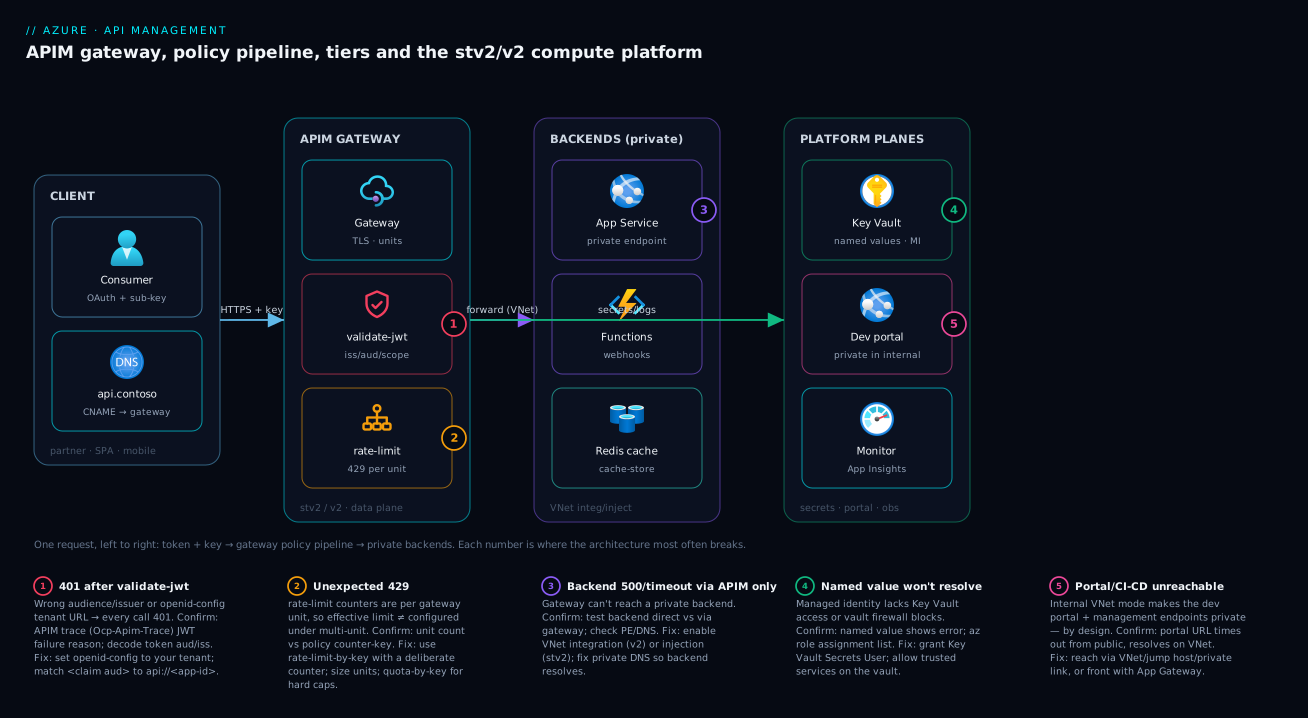
Walk the request left to right. A client (partner app, SPA, mobile) resolves your custom domain — say api.contoso.com, a CNAME to the gateway hostname — presenting an OAuth bearer token and, if the product requires one, a subscription key. The request lands on the APIM gateway (the data plane on stv2 or v2), which terminates TLS and runs the inbound pipeline: validate-jwt checks the Entra ID token’s issuer/audience/scope at the edge, ip-filter and rate-limit-by-key apply, headers are rewritten; a cacheable GET may short-circuit via cache-lookup. Otherwise it forwards to the backend, where networking mode decides the path: a VNet-integrated/injected instance reaches private backends (App Service behind a private endpoint, an AKS service, a Function) over the VNet; a public instance calls public endpoints. The backend responds, the outbound pipeline strips server headers and optionally caches the response, and the client gets the answer. In parallel, the gateway streams metrics to Azure Monitor / Application Insights, the developer portal serves docs and keys, and policy secrets are pulled from Key Vault via the instance’s managed identity.
The numbered badges mark the five places this architecture most often breaks: the token gate (1), the throttle (2), the private-backend hop where networking mode bites (3), the secret/identity dependency (4), and the portal/management plane that goes private in internal mode (5). Read the diagram as the live request path, then use the legend as a fast triage map.
Real-world scenario
Helios Retail runs an e-commerce platform on Azure: a public storefront, a mobile app, and a growing set of partner integrations (logistics, payments, a loyalty SaaS). Their backends are a mix — the catalogue and orders APIs run on App Service behind private endpoints, inventory runs on AKS, and a few lightweight webhooks are Azure Functions. The brief from the head of platform: “One API front door. Partners authenticate with OAuth, the mobile app uses keys, everything is rate-limited, the order API must never be reachable from the public internet, and we need regional failover for the storefront APIs during a sale.”
The team’s first instinct was Developer (“cheap, has all the features, we’ll upgrade later”). They built the entire configuration on it — imported the specs, wrote the validate-jwt and rate-limit-by-key policies, branded the portal — which was exactly the right use of Developer. The mistake came when someone proposed launching on it. Two facts killed that: Developer has no SLA and a single instance, and “order API never public” needs internal VNet mode, which on stv2 is Premium (Developer supports it only for testing). “Regional failover” independently requires multi-region — also Premium-only on stv2.
So the production decision became Premium on stv2 with internal VNet injection, two regions active-active, two units per region. They delegated a subnet per region, set the gateway to internal mode, and fronted it with an Application Gateway + WAF to expose only the public-facing APIs while the order API stayed private — partners reach the private APIs over Private Link. Two surprises hit. Provisioning the VNet-injected Premium instance took ~40 minutes, the second region another long wait — never put an APIM create on a launch’s critical path. And the portal went private in internal mode, so their CI/CD agent (which publishes portal content and API config) had to move onto the VNet.
Six weeks in: orders never traverse the public internet, the sale survived a regional blip because the second region absorbed traffic transparently behind the single global gateway URL, and partners are throttled and authenticated at the edge. The bill landed around ₹2.3–2.8 lakh/month (two regions × two Premium units, plus WAF and Private Link) — 4× what the Developer price tag implied. The lesson to internalise: the networking and HA requirements — not throughput — forced Premium, and the tier had to be chosen on day one because migrating off Developer would have been a re-build. Green-field with no hard “full subnet injection” requirement, Standard v2 + private endpoint + VNet integration would have given the same private inbound and private backends on the faster platform — worth checking before defaulting to Premium.
Advantages and disadvantages
API Management is powerful and expensive; the trade-off is real and worth stating plainly before you commit.
| Advantages | Disadvantages |
|---|---|
| One front door: centralised auth, keys, throttling, transformation, analytics | Cost is high and tier-baked; the wrong SKU is an expensive re-deploy |
| Programmable policy pipeline (JWT, cache, rate-limit, transform) without backend changes | Policy XML has a learning curve; complex policies are hard to test |
| Developer portal gives partners self-service docs + keys | No portal on Consumption; portal goes private in internal mode |
| Decouples consumers from backends — version and refactor freely | Adds a hop (latency + a thing to operate and scale) |
| Premium: multi-region, AZ, internal VNet, self-hosted gateway | stv2 provisioning/scaling/config changes take tens of minutes |
| Managed identity + Key Vault for secrets; deep Azure Monitor integration | Per-tier feature gaps (v2 parity timing); some limits are hard ceilings |
| v2 platform: fast provisioning, simple VNet integration | Migration paths between tiers/platforms are limited / sometimes one-way |
Advantages dominate with multiple consumers and backends, real auth/throttle/governance needs and a partner programme — APIM removes per-backend reinvention and gives one revocation point. Disadvantages bite hardest for a single internal API with one consumer (a gateway is overkill) or a cost-sensitive workload not needing Premium’s networking premium (use Consumption or v2). The decision: “do I need a programmable, governed, self-service gateway,” and if yes, “the smallest tier/platform meeting my networking and HA needs.”
Hands-on lab
Provision a real APIM instance on the cheapest dedicated tier (Developer — fine for a lab, never production), import an API, attach a rate-limit policy, call it through the gateway, then tear it down. Run in Cloud Shell (Bash). Even Developer provisioning takes 20–40 minutes on stv2 — expected, and itself the lesson.
Step 1 — Variables and resource group.
RG=rg-apim-lab
LOC=centralindia
APIM=apim-lab-$RANDOM          # globally-unique
PUBLISHER_EMAIL=you@example.com
PUBLISHER_NAME="KloudVin Lab"
az group create -n $RG -l $LOC -o table
Step 2 — Create a Developer-tier instance (this takes 20–40 min — the point of the lesson).
az apim create -n $APIM -g $RG -l $LOC \
  --publisher-email "$PUBLISHER_EMAIL" --publisher-name "$PUBLISHER_NAME" \
  --sku-name Developer --sku-capacity 1 -o table
# Go get coffee. stv2 provisioning is slow BY DESIGN — internalise this now.
Expected: the command blocks for tens of minutes, then returns an instance with gatewayUrl like https://<name>.azure-api.net.
Step 3 — Import a public sample API (the classic “Echo API” / a Swagger URL).
az apim api import -g $RG --service-name $APIM \
  --path echo \
  --specification-format OpenApi \
  --specification-url https://conferenceapi.azurewebsites.net/?format=json \
  --api-id conference-api -o table
Expected: an API with operations imported from the OpenAPI definition, exposed under /echo (or /conference).
Step 4 — Attach a simple rate-limit policy at the API scope. Write the policy XML and apply it:
cat > policy.xml <<'XML'
<policies>
  <inbound>
    <base />
    <rate-limit calls="5" renewal-period="60" />
  </inbound>
  <backend><base /></backend>
  <outbound><base /></outbound>
  <on-error><base /></on-error>
</policies>
XML

az apim api policy create -g $RG --service-name $APIM \
  --api-id conference-api --xml-path policy.xml
Expected: the policy is attached; calls beyond 5/min now return 429 Too Many Requests.
Step 5 — Get a subscription key and call the API through the gateway.
# The built-in all-APIs subscription key
KEY=$(az apim subscription show -g $RG --service-name $APIM \
  --sid master --query primaryKey -o tsv 2>/dev/null) || \
KEY=$(az apim subscription list -g $RG --service-name $APIM \
  --query "[0].primaryKey" -o tsv)

GW=$(az apim show -n $APIM -g $RG --query gatewayUrl -o tsv)

# Call an operation through the gateway with the key
curl -s -o /dev/null -w "%{http_code}\n" \
  "$GW/echo/speakers" -H "Ocp-Apim-Subscription-Key: $KEY"
# Hammer it to trip the rate limit:
for i in $(seq 1 8); do
  curl -s -o /dev/null -w "%{http_code} " \
    "$GW/echo/speakers" -H "Ocp-Apim-Subscription-Key: $KEY"
done; echo
Expected: the first calls return 200, then 429 once you exceed 5/min — you have just seen the inbound policy pipeline enforce a throttle at the edge.
Step 6 — Peek at the planes. Open the developer portal (management plane gives you the URL) and confirm the API shows up with its try-it console:
az apim show -n $APIM -g $RG \
  --query "{gateway:gatewayUrl, portal:developerPortalUrl, mgmt:managementApiUrl, sku:sku.name}" -o jsonc
Expected: four distinct URLs — gateway, developer portal, management — proving the planes are separate surfaces of one instance.
Validation checklist. You provisioned an instance (and felt the stv2 provisioning time first-hand), imported an API as a façade, attached an inbound rate-limit policy, called it through the gateway with a subscription key, watched the throttle return 429, and saw the gateway / portal / management URLs as distinct planes. The steps mapped to the architecture:
| Step | What you did | What it proves |
|---|---|---|
| 2 | Created Developer instance (slow) | stv2 provisioning is heavyweight — plan around it |
| 3 | Imported an OpenAPI API | An API is a façade; operations come from the spec |
| 4 | Attached rate-limit |
The inbound policy pipeline is where governance lives |
| 5 | Called via gateway + key | Subscription key is APIM’s native access gate; 429 = throttle worked |
| 6 | Listed the URLs | Gateway, portal and management are separate planes of one instance |
Cleanup (Developer still bills hourly — delete it).
az group delete -n $RG --yes --no-wait
Cost note. A Developer instance bills roughly a few hundred rupees per day; an hour or two of lab is well under ₹200, and deleting the resource group stops it. Never leave a Developer instance running as if it were free — it is the cheapest dedicated tier, not a free one.
Common mistakes & troubleshooting
The failure modes that actually bite, as a scannable table first, then the detail for the ones that cost the most time.
| # | Symptom | Root cause | Confirm (exact cmd / portal path) | Fix |
|---|---|---|---|---|
| 1 | Provisioning/scaling “stuck” for 30+ min | Normal stv2 behaviour, not a hang | Activity log shows the operation in progress | Wait; never put stv2 create on a launch’s critical path |
| 2 | Picked Developer, now needs production SLA | Developer has no SLA, single instance | az apim show --query "sku.name" = Developer |
Re-create on Basic/Standard/Premium or a v2 tier |
| 3 | Need internal/private but on Standard | Internal VNet injection is Premium-only (stv2) | Tier ≠ Premium; no virtualNetworkType |
Move to Premium (internal) or Standard v2 + PE |
| 4 | After internal mode, portal/CI/CD unreachable | Internal mode makes portal + mgmt private | Portal URL times out from public | Reach via VNet/jump host; or front with App Gateway |
| 5 | 401 on every call after adding validate-jwt |
Wrong audience/issuer/openid-config URL | Trace shows JWT validation failure reason | Fix aud/openid-config tenant URL; check token aud |
| 6 | 429 unexpectedly under modest load |
Rate-limit counter is per gateway instance | More units → higher effective limit; check policy | Use rate-limit-by-key with right counter; size units |
| 7 | VNet-injected instance “Unhealthy” / degraded | Required NSG/UDR/ports blocked on the subnet | APIM network-status blade; NSG effective rules | Open required mgmt ports; fix UDR; allow service tags |
| 8 | Key Vault-backed named value fails to resolve | Identity lacks Key Vault access / firewall blocks | Named value shows error; az webapp identity analog |
Grant Key Vault Secrets User; allow trusted services |
| 9 | Backend 500/timeout only through APIM |
Gateway can’t reach a private backend | Test backend directly vs via gateway | Enable VNet integration/injection; fix DNS/PE |
| 10 | Custom domain returns cert / TLS error | Missing/expired custom-domain cert binding | az apim show hostname configs |
Bind a valid cert (Key Vault); set the hostname correctly |
1. Provisioning, scaling, or a config change appears stuck for tens of minutes. Root cause: This is normal stv2 behaviour — each scale unit is a managed VM with networking, so create/scale/VNet changes legitimately take 30–45+ minutes, especially VNet-injected. It is not a hang. Confirm: The activity log shows the operation running (not failed); the instance status is “Updating.” Fix: Wait. Architecturally, never put an stv2 APIM create or scale on the critical path of a launch; provision ahead of time, and prefer the v2 platform for new builds when you need fast provisioning.
2. You built on Developer and now need a production SLA.
Root cause: Developer has no SLA and is a single, non-scalable instance — it is for non-production only.
Confirm: az apim show -n <name> -g <rg> --query "sku.name" -o tsv returns Developer.
Fix: Stand up the production tier (Basic/Standard/Premium or a v2 tier) and migrate the config (export/import APIs and policies, or deploy from your IaC). Because you authored the config on Developer, this is a clean re-deploy of known-good config — which is exactly what Developer is for.
3. You need internal/private inbound but provisioned Standard.
Root cause: On stv2, internal VNet injection is Premium-only (Developer supports it for testing). Standard has no VNet injection at all.
Confirm: The tier is not Premium; there is no virtualNetworkConfiguration of type Internal.
Fix: Move to Premium with --virtual-network Internal, or — if green-field — use Standard v2 / Premium v2 with a private endpoint for private inbound on the faster platform.
4. After switching to internal mode, the developer portal and CI/CD can no longer reach the instance. Root cause: Internal mode makes the developer portal and management/Git endpoints private — by design. Anything public (a browser, a hosted build agent) can’t reach them. Confirm: The portal URL times out from a public network but resolves from inside the VNet. Fix: Reach the portal/management plane from within the VNet (a jump host, self-hosted agent on the VNet, or private link), or front the gateway with Application Gateway to expose only the public APIs while keeping management private.
5. Every call returns 401 right after you add validate-jwt.
Root cause: The openid-config URL points at the wrong tenant, or the required aud/issuer doesn’t match the token.
Confirm: Enable the APIM trace (Ocp-Apim-Trace) and read the JWT-validation failure reason; decode the incoming token and compare aud/iss.
Fix: Set openid-config url to your tenant’s .well-known/openid-configuration, and make <claim name="aud"> match the API’s App ID URI (api://<app-id>).
6. You get 429 under load that seems lower than your configured limit.
Root cause: rate-limit counters are maintained per gateway instance/unit, so with multiple units the effective limit differs from what you expect.
Confirm: Compare unit count and the policy’s counter-key.
Fix: Use rate-limit-by-key with a deliberate counter (subscription/IP/custom), size units knowing counters are per-instance, and use quota-by-key for hard global quotas.
7. A VNet-injected instance shows “Unhealthy.” The delegated subnet is missing required NSG/UDR rules or blocking management ports/service tags. The portal’s Network status blade flags the failing dependency; allow the documented inbound/outbound rules and Azure service tags, and fix any UDR that black-holes APIM’s control traffic.
The fast control-plane checks to keep handy: az apim show --query "{sku:sku.name, capacity:sku.capacity, state:provisioningState}" confirms the tier, unit count and that provisioning is Succeeded (not stuck Updating after hours); --query "{gw:gatewayUrl, portal:developerPortalUrl}" returns the URLs to test from the right network; the portal’s Network blade shows all VNet dependencies green; and az apim subscription list shows keys (regenerate to revoke).
Best practices
- Choose the tier from networking and HA, not throughput. Decide “private inbound? private backends? multi-region? AZ?” first — those force Premium (stv2) or a v2 private-endpoint design. Throughput is usually a units question.
- Default new builds to the v2 line. Fast provisioning and the simpler VNet-integration/private-endpoint model make Basic/Standard v2 the right start unless you need a still-classic-only capability — verify it is GA on v2 first.
- Use Developer only to author config, never to run production. No SLA, one instance. Build on it, then deploy the same config to the production tier via IaC.
- Never put an stv2 create/scale on a launch’s critical path. Provision ahead; treat 30–45-minute applies as a planning constraint.
- Validate OAuth at the edge with
validate-jwt— issuer, audience, scopes — so unauthenticated calls never reach the backend. - Put secrets in Key Vault via named values and managed identity — signing keys, backend credentials, certs — not inline in policy XML.
- Keep policies and API definitions in source control and deploy via CI/CD, reviewed in PRs; the management plane is the API surface.
- Use products and subscriptions deliberately — model access boundaries as products, issue per-consumer subscriptions so you can throttle and revoke per consumer.
- Front internal-mode gateways with Application Gateway/Front Door to expose some APIs publicly while keeping management and other APIs private.
- Wire Application Insights from day one — its diagnostic logging turns “why is this call 500” into a trace; without it you debug blind.
- Right-size units with the
Capacitymetric, not guesswork — scale out when capacity trends high, and remember rate-limit counters are per-instance. - Plan the stv1 → stv2 migration now if you inherited a legacy instance; stv1 is retiring and the migration is not instantaneous.
Security notes
- Managed identity + Key Vault for every secret. Give the instance a managed identity, store backend credentials, certs and signing keys in Key Vault, and reference them via named values — nothing sensitive in plaintext policy. Grant least privilege (Key Vault Secrets User).
- Authenticate and authorise at the gateway. Enforce OAuth/OIDC with
validate-jwton inbound, combined with subscription keys to identify the calling product/app — stop bad requests before they touch a backend. - Prefer private inbound for non-public APIs. Internal VNet injection (Premium) or a private endpoint (v2) keeps the gateway off the public internet; expose only what must be public, behind a WAF (Application Gateway / Front Door).
- Lock outbound to private backends. Call backends over private endpoints so API traffic never traverses the public internet; pair with private DNS so the gateway resolves them privately.
- Restrict the management and portal surfaces. Internal mode makes them private automatically; otherwise restrict access, require Entra ID, and treat portal admin as privileged.
- Mask and strip on outbound. Use
set-headerto delete server/version headers and redact sensitive fields, so the gateway doesn’t leak backend internals. - Enforce TLS and a sane minimum version, and bind custom-domain certs from Key Vault so renewals don’t cause outages.
The security controls that also improve resilience — they pull the same way:
| Control | Mechanism | Secures against | Also helps |
|---|---|---|---|
| Managed identity + Key Vault | identity + named values |
Secrets in plaintext config | Cert renewal without redeploy |
validate-jwt at edge |
inbound policy | Unauthenticated calls hitting backends | Offloads auth from every backend |
| Internal mode / private endpoint | VNet injection / PE | Public exposure of internal APIs | Keeps traffic on the backbone |
| Subscription keys + products | access model | Untracked/un-revocable access | Per-consumer throttling + analytics |
| WAF in front (App GW/Front Door) | upstream layer | OWASP attacks, bad bots | TLS offload, routing, public exposure of subset |
Cost & sizing
The bill drivers and how they interact with the architecture:
- Tier × units × regions dominates. Dedicated and v2 tiers bill per scale unit per hour regardless of traffic — you pay for the instance, not the calls — and Premium multiplies by regions. Cheapest paths: Consumption (per-call, near-zero at idle) for spiky public APIs; Basic v2/Standard v2 for steady workloads wanting the portal and private backends without injection.
- Networking is where Premium’s cost hides. Internal VNet injection is Premium, whose per-unit price is several times Standard’s — “we need it private” can quietly multiply the bill. Standard v2 + private endpoint often delivers private inbound far cheaper than stv2 Premium internal mode; check it first.
- Developer is cheap but not free (bills hourly); Consumption has a free monthly call grant then bills per call. Don’t leave Developer running as if it were free.
- Scale by the
Capacitymetric, not vibes. Add units when capacity trends high under real policy load (JWT validation, transformation and caching consume more per call); scale back when idle. Over-provisioned units are the most common APIM waste. - Self-hosted gateways (Premium/v2) bill per gateway, but can beat extra regions for fronting on-prem/other-cloud backends.
The three scaling moves and when each is the right one:
| If you need… | Do this | Tier requirement | Watch-out |
|---|---|---|---|
| More throughput in one region | Scale out units (raise unit count) | Any dedicated/v2 tier | Linear cost per unit; rate-limit counters are per-instance |
| More per-call headroom / bigger limits | Scale up the tier (e.g. Standard→Premium) | the higher tier | Standard→Premium is a big price jump — justify by networking/HA |
| Regional resilience / failover | Add a region (multi-region) | Premium only (stv2) | N× the per-region cost; single global gateway URL |
| Resilience within a region | Availability zones | Premium (stv2) | Enable at/around create; highest SLA |
A rough monthly picture to anchor estimates (INR; order-of-magnitude — confirm on the pricing page):
| Configuration | What you get | Rough INR / month | When it’s the right call |
|---|---|---|---|
| Consumption (moderate traffic) | Serverless gateway, per-call, no portal | low (per-call + free grant) | Spiky, lightweight, public APIs (often Functions) |
| Developer × 1 | Full features, no SLA, single instance | a few thousand | Non-prod only — build/test the config |
| Basic v2 / Standard v2 × 1–2 | SLA, portal, fast provision, VNet integration | mid (per unit) | Most new production APIs |
| Standard × 2 (stv2) | SLA, portal, units, public | mid-high (per unit) | Mainstream public production on classic line |
| Premium × 2 units, internal, 1 region | Private inbound, AZ, self-hosted GW option | high (several × Standard) | Internal-only enterprise APIs |
| Premium × 2 units × 2 regions, internal | Multi-region active-active, private | highest (~2× the above) | Regional failover + private (Helios case) |
The one-line cost rule: the tier and networking mode set the bill before a single call is made — pick the smallest tier whose SLA, networking and HA meet the requirement, and reach for v2 to avoid paying the stv2 Premium premium when a private endpoint would do.
Interview & exam questions
1. What are the four planes of Azure API Management? The gateway (data plane) that proxies and runs policies; the management plane (ARM resource, portal, az/REST, config store) where you author APIs; the developer portal where consumers get docs and keys; and the underlying compute platform (stv1/stv2/v2) that runs the gateway. The tier is effectively a choice of which gateway on which platform with which planes and limits.
2. What is the difference between stv2 and the v2 tiers? stv2 is the current platform for the classic dedicated tiers; it supports full VNet injection, AZ and multi-region (Premium) but is heavyweight — provisioning/scaling take tens of minutes. v2 (Basic/Standard/Premium v2) is newer, provisions in minutes, and uses VNet integration + private endpoints instead of subnet injection. v2 is the go-forward line for most new workloads.
3. Why should you never run Developer in production? It has the full feature set at a low price but no SLA and a single, non-scalable instance — any platform event is an unmitigated outage. It exists to build and test the config you will run on a higher tier.
4. “The order API must never be reachable from the public internet.” Which tier and mode? Classic line: Premium with internal VNet injection (no public endpoint, VNet-only). v2 line: Standard/Premium v2 with a private endpoint. Note internal mode also makes the portal and management endpoints private, so CI/CD and browsers must reach them via the VNet.
5. What forces a Premium decision — throughput or networking? Almost always networking and resilience: internal VNet mode, multi-region active-active, AZ and the self-hosted gateway are Premium-only on stv2. Throughput is usually a scale-units question solvable on lower tiers — people over-buy Premium “for performance” when the real driver is privacy or HA.
6. Difference between a subscription key and an OAuth token at the gateway? A subscription key (Ocp-Apim-Subscription-Key) identifies which product/consumer is calling (revoked by regenerating it). An OAuth token (Authorization: Bearer) authenticates who, validated by validate-jwt against the IdP’s issuer/audience/scopes. Different questions, commonly used together.
7. What is the policy pipeline and what runs where? Every request runs inbound → backend → outbound with on-error on failure, composed across global/product/API/operation scopes via <base />. Inbound holds auth, throttling, IP filtering and request shaping; backend handles retries/circuit-breaker/load-balancing; outbound handles response transforms, caching and header stripping.
8. External vs internal VNet mode (stv2)? External injection gives the gateway a public IP (internet-reachable and able to call private backends). Internal gives it no public endpoint — VNet-only — for fully private APIs; the portal and management endpoints also become private. Both need a dedicated delegated subnet and are Premium (Developer for testing).
9. What is the self-hosted gateway and when do you use it? A containerised APIM gateway you deploy to your own Kubernetes/Docker — on-prem or another cloud — while managing APIs centrally from Azure. Use it to front APIs that cannot leave a data centre, keeping a single control plane. It is a Premium (and v2-line) capability.
10. How do you scale APIM, and the gotcha with rate limits? Dedicated/v2 tiers add scale units (Premium adds regions); Consumption is serverless. Size units off the Capacity metric. Gotcha: rate-limit counters are per gateway instance, so with multiple units the effective limit differs from the configured per-instance number — use rate-limit-by-key with a deliberate counter.
11. You inherited an APIM instance on stv1. What do you do? stv1 is being retired, so plan and execute the migration to stv2 (Azure provides tooling). Confirm the platform via the portal/API, schedule the migration (not instantaneous), and validate VNet/config behaviour — stv2’s networking model differs from stv1’s.
12. When is APIM the wrong tool? For a single internal API with one consumer, a full programmable gateway is overkill — front it with Application Gateway or nothing. When cost is tight and you don’t need private networking or the portal, Consumption or a low v2 tier beats Premium; reserve Premium for genuine internal/multi-region/AZ needs.
These map to AZ-204 (Developer Associate) — implement API Management (gateways, products, subscriptions, policies, securing APIs) — and AZ-305 (Solutions Architect) — design an API integration / governance strategy (tier selection, networking, HA). The networking-mode angle (VNet injection, private endpoints) also touches AZ-700. A compact cert mapping:
| Question theme | Primary cert | Objective area |
|---|---|---|
| Planes, policies, products/subscriptions | AZ-204 | Implement API Management |
| Tier selection, HA, networking design | AZ-305 | Design integration & governance |
validate-jwt, keys, securing APIs |
AZ-204 / AZ-500 | Secure APIs; identity |
| VNet injection vs private endpoint | AZ-700 | Network connectivity design |
Quick check
- Name the four planes of an APIM instance and which one is on the request hot path.
- Your team wants to launch a production API privately (no public inbound) with regional failover. Which tier and platform on the classic line, and what one thing forces it?
- True or false: Developer tier is a fine cost-saving choice for a small production API because it has all the features.
- What is the difference between what a subscription key and an OAuth token tell the gateway?
- You provisioned a Premium instance with internal VNet injection and now your CI/CD pipeline can’t publish to the developer portal. Why, and what’s the fix?
Answers
- The gateway (data plane) — the only one on the hot path — plus the management plane, the developer portal, and the underlying compute platform (stv1/stv2/v2). The gateway runs policies and proxies every call; the others are control/portal/infrastructure surfaces.
- Premium on stv2 with internal VNet injection, and two regions for failover (multi-region is Premium-only on the classic line). The thing that forces Premium is the combination of private inbound (internal mode) and multi-region — both Premium-only; throughput would not force it. (Green-field, Standard/Premium v2 + private endpoint is the faster-platform alternative for the private-inbound part.)
- False. Developer has the full feature set but no SLA and a single instance — it is for non-production. Running it in production means any platform event is an outage with no recourse. Build on Developer, run on a higher/v2 tier.
- A subscription key identifies which product/consumer is calling (APIM’s native access grant, revoked by regenerating the key); an OAuth token authenticates who (user/app, validated by
validate-jwtagainst the IdP for issuer/audience/scopes). Different questions, often used together. - Internal mode makes the developer portal and management/Git endpoints private, so a public CI/CD agent can’t reach them — by design. Fix: run the pipeline from within the VNet (self-hosted agent / jump host / private link), or front the gateway with Application Gateway to expose only public APIs while keeping management private.
Glossary
- API Management (APIM) — Azure’s managed API gateway + management plane + developer portal, fronting backends with auth, throttling, transformation and analytics.
- Gateway (data plane) — the reverse proxy that runs the policy pipeline and forwards each call to the backend; the only plane on the hot path.
- Management plane — the ARM resource, portal,
az/REST API and config store where you author APIs, products and policies. - Developer portal — a customisable site where consumers discover APIs, read docs, get subscription keys and try calls; absent on Consumption.
- Compute platform — the VM fleet under the gateway: stv1 (legacy, retiring), stv2 (current classic dedicated), v2 (newer fast-provisioning line).
- stv2 — current platform for Developer/Basic/Standard/Premium; supports VNet injection, AZ, multi-region (Premium); heavyweight (tens-of-minutes provisioning).
- v2 tiers — Basic/Standard/Premium v2 on a newer platform: fast provisioning, VNet integration + private endpoints instead of subnet injection.
- Tier (SKU) — Consumption/Developer/Basic/Standard/Premium/v2; chosen at create time, hard to change; sets SLA, platform, limits and features.
- Scale unit — a fixed slice of gateway throughput you add to scale dedicated/v2 tiers; sized via the
Capacitymetric. - Consumption tier — serverless, per-call billing, autoscaling, no portal, reduced feature set; for spiky lightweight public APIs.
- VNet injection — deploying the stv2 gateway into a delegated subnet; external keeps a public IP, internal is fully private.
- VNet integration / private endpoint — the v2 networking model: outbound integration for private backends + a private endpoint for private inbound.
- Self-hosted gateway — a containerised gateway you run on your own K8s/Docker (on-prem/other cloud) while managing APIs from Azure; Premium/v2.
- Product — a bundle of APIs with an access model, policies, terms and visibility; consumers subscribe to products.
- Subscription — an APIM access grant (not an Azure subscription) that issues a subscription key (
Ocp-Apim-Subscription-Key). - API / Operation — a façade for a backend / a single endpoint within it; imported from OpenAPI/WSDL/Function/App Service or hand-built.
- Policy — XML rules at global/product/API/operation scope, running in the inbound/backend/outbound/on-error pipeline.
validate-jwt— the inbound policy validating an OAuth/OIDC bearer token (issuer, audience, scopes, signature) at the edge.- Named value — a reusable config/secret referenced in policies, optionally Key Vault-backed via the instance’s managed identity.
- Capacity metric — the gateway-utilisation metric you scale units against; heavy policies consume more per call.
Next steps
You can now read an APIM requirement and name the tier, platform, networking mode and rough cost before provisioning. Build outward:
- Related: Azure App Service vs Container Apps vs AKS — the backends APIM most often fronts, and how that choice shapes your API surface.
- Related: Azure Functions: Triggers and Bindings Explained — the serverless backend that pairs perfectly with the Consumption tier.
- Related: Application Gateway with WAF, mTLS & End-to-End TLS — the WAF layer you put in front of an internal-mode gateway to expose a public subset safely.
- Related: Application Gateway vs Load Balancer — where APIM sits relative to the L4/L7 load-balancing layer.
- Related: OIDC & OAuth2 Flows in Entra ID — exactly the tokens
validate-jwtchecks at the edge. - Related: Private Link & Private DNS for PaaS — the private-endpoint and DNS mechanics behind v2’s private-inbound and private-backend story.