Your product page loads in 900 milliseconds. You profile it and the answer is boring: the same five database queries run on every request, returning the same rows you returned a second ago, for data that changes maybe twice a day. The database is busy not doing hard work, but doing the same easy work over and over. Azure Cache for Redis is the standard fix: a managed, in-memory key-value store beside your app that hands back those rows in under a millisecond, so the database is only asked when the answer genuinely changed. It is one of the highest-leverage, lowest-effort performance wins in cloud architecture — and one of the easiest to get subtly wrong.
Redis is an open-source, in-memory data store; Azure Cache for Redis is Microsoft’s fully managed version — they run, patch, replicate and back up the servers, and you get a connection string and a fast cache. At heart it is a giant hash map in RAM: you SET a value under a string key and GET it back, and because it never touches disk on the read path, a lookup is typically under 1 ms in-region. Give every entry a time-to-live (TTL) and stale data expires on its own. Fast reads plus automatic expiry make it the default caching layer for web apps, APIs and sessions on Azure.
This article is the on-ramp. We build the mental model (cache vs database, cache-aside, hits and misses), walk every tier — Basic, Standard, Premium and Enterprise — so you can pick one without overpaying, then provision a real cache with az CLI and Bicep and connect a first app. We keep it concrete: real SKUs, ports, limits and commands, plus the mistakes (no TTL, one shared key, a stampede on expiry) that turn a cache into an outage. By the end you will know not just how to switch Redis on, but what to cache, for how long, and what happens when it fills up.
What problem this solves
Databases are expensive per query and slow relative to RAM. Every time your app reads the same catalogue, profile, config flag or rendered fragment, it pays the full cost: a network round trip, a query parse, an index seek, sometimes a disk read, then serialisation back over the wire. Under load that repeated work tips the database over — connections pile up, CPU climbs, p95 latency balloons — and the instinctive fix (scale the database up) costs far more than the problem deserves, because you are paying a transactional database to behave like a lookup table.
What breaks without a cache: read-heavy endpoints saturate the database long before the app tier is stressed, so you scale the wrong layer; session state in the database (or pinned to one web server’s memory) blocks scale-out, logging users out as requests bounce between machines; expensive computed results get recomputed on every hit; and traffic spikes hit the database directly because nothing absorbs them.
Who hits this: essentially every web app and API with more reads than writes — most of them — hardest on read-dominated workloads (catalogues, profiles, feeds, pricing), apps that need shared session state to scale out, and anything bursty. A cache is the shock absorber: it serves repeated reads in microseconds and lets the database do what it is uniquely good at — durable, transactional writes — instead of acting as a slow, costly key-value store.
| Pain without a cache | What you observe | What a cache changes |
|---|---|---|
| Same queries every request | DB CPU high, app CPU low | Repeat reads served from RAM, DB load drops |
| Session in one server’s memory | Scale-out logs users out | Shared session store, any server serves any user |
| Expensive computed results recomputed | Slow dashboards, spiky latency | Compute once, cache the result with a TTL |
| Traffic spike hits DB directly | DB tips over during a sale | Cache absorbs the burst, DB sees a fraction |
| Cross-region or chatty lookups | Latency adds up per request | Sub-millisecond reads beside the app |
Learning objectives
By the end of this article you can:
- Explain what an in-memory cache is, how it differs from a database, and why a sub-millisecond RAM read beats a query for repeated reads.
- Define a cache hit, miss, TTL and eviction, and use hit ratio as the single metric for whether the cache earns its keep.
- Implement the cache-aside (lazy-loading) pattern correctly — populate on miss, invalidate-or-write-through on update — and name two other patterns and when they fit.
- Choose between the Basic, Standard, Premium and Enterprise tiers using size, SLA, clustering, persistence and network isolation.
- Avoid the classic traps: no TTL, a single hot key, a cache stampede on expiry, caching write-heavy data, and secrets in plaintext keys.
- Provision a cache with
az redis createand Bicep, then connect a first app via the primary access key (or Microsoft Entra ID auth) over TLS on port 6380. - Read the cost levers — you pay for reserved RAM, not requests — and right-size a first cache without overpaying.
Prerequisites & where this fits
You should be comfortable with an Azure subscription and resource groups, able to run az in Cloud Shell, and have a web app or API in mind (any language — the patterns are universal). Knowing roughly what a database query costs you today helps. No prior Redis experience is assumed; we define every term as we go.
This sits in the Data & Performance track, one layer above your datastore. A cache is not a replacement for a database — it is a fast, optional, rebuildable copy of a subset of your data; the database stays the source of truth. That framing prevents most caching disasters. The datastore underneath is usually Your First Azure SQL Database: Create, Configure Firewall Rules and Connect Securely or Choosing a Cosmos DB API: NoSQL vs MongoDB vs Cassandra vs Gremlin vs Table Decoded; for production you will reach for Azure Private Endpoint vs Service Endpoint: Secure PaaS Access and store the connection string in Azure Key Vault: Secrets, Keys and Certificates Done Right.
| You already have | This article adds | You will later add |
|---|---|---|
| A database (source of truth) | A cache in front of read-heavy paths | Private Endpoint + Key Vault for the secret |
| A web app / API | The cache-aside pattern with TTLs | Clustering / persistence as you grow |
| An Azure subscription | A provisioned cache + connection | Geo-replication for multi-region |
| Slow repeated reads | Sub-ms hits, lower DB load | Alerts on hit ratio and evictions |
Core concepts
Five mental models make everything else obvious.
A cache is a fast, disposable copy — not a second database. The cache holds a subset of the database in RAM for speed. If it vanishes you lose nothing but performance — every value rebuilds from the database. So a cache should never hold the only copy of anything, and it is always safe to flush. Treat it as authoritative and you have built a fragile, un-backed database by accident.
A read is a hit or a miss. Your app asks the cache first. A cache hit means the value was there — sub-millisecond, no database touched. A cache miss means it wasn’t, so you fall back to the database and put the result in the cache so the next request hits. The fraction of reads that are hits is your hit ratio, the one number that proves the cache is worth it: 95% means 19 of every 20 reads never reach the database.
Every cached value should expire. A TTL (time-to-live) is a per-key timer; when it elapses, Redis deletes the key automatically. It keeps a cache roughly fresh without tracking every change: cache the product for 5 minutes and you accept “up to 5 minutes stale” for RAM-speed reads. Choosing the TTL is choosing your staleness budget. No TTL is the most common beginner mistake — values live forever, drift out of sync, and the cache fills with junk that never leaves.
RAM is finite, so the cache evicts. A cache has a fixed memory size set by its tier. When it fills, Redis applies an eviction policy — the default volatile-lru removes the least-recently-used key that has a TTL set (another reason to always set one; keys without a TTL aren’t eligible and can wedge a full cache). Eviction is healthy when sized right; constant eviction of hot keys means it is too small.
Cache-aside is the default pattern. Your application owns the logic: on read, check cache → on miss, load from DB and populate → on write, update the DB then invalidate or update the cached copy. The cache doesn’t know about your database; you wire them together in code. Also called lazy loading, it is simple, resilient (a cache outage just means slower reads, not errors), and the right starting point for almost everyone.
The vocabulary in one table
| Term | One-line definition | Why it matters |
|---|---|---|
| In-memory store | Data held in RAM, not on disk | Sub-ms reads; the whole point |
| Key / value | A string key maps to a value | Redis is a giant hash map |
| Cache hit | Requested value was in the cache | Fast path; no DB touched |
| Cache miss | Value absent; fall back to DB | Slow path; then populate cache |
| Hit ratio | Hits ÷ total reads | The metric that proves the cache works |
| TTL | Per-key expiry timer | Keeps data roughly fresh automatically |
| Eviction | Removing keys when RAM is full | How a full cache makes room |
| Cache-aside | App reads/writes cache around the DB | The default caching pattern |
| Stampede | Many misses hit the DB at once | The failure mode on hot-key expiry |
| Source of truth | The authoritative datastore (DB) | The cache is never this |
What to cache (and what not to)
A cache pays off when reads vastly outnumber writes and the data tolerates some staleness; it backfires on write-heavy or must-be-exact data. Rule of thumb: cache what is read often, changes rarely, and is costly to produce.
| Good cache candidate | Why it fits | Typical TTL |
|---|---|---|
| Product / catalogue data | Read constantly, changes rarely | 5–60 min |
| User profile / settings | Read on most requests, rare writes | 5–30 min |
| Reference / lookup data (countries, tax rates) | Nearly static, read everywhere | hours–days |
| Computed results (leaderboards, facet counts) | Expensive to compute, reused | 1–10 min |
| Rendered HTML fragments / API responses | Identical for many users | 30 s–10 min |
| Session state | Must be shared across web servers | session length (sliding) |
| Poor cache candidate | Why it backfires | Better approach |
|---|---|---|
| Frequently-updated counters per request | Constant invalidation, low hit ratio | Redis INCR (atomic) if needed, or DB |
| Data that must be exactly current | Any staleness is wrong (e.g. account balance shown at payment) | Read from DB at the critical moment |
| Large blobs (images, files) | RAM is expensive; wrong tool | Blob Storage + CDN |
| The only copy of anything | Cache loss = data loss | Keep the source of truth in the DB |
| Secrets in plaintext keys | Cache is not a secret store | Key Vault |
The cache-aside pattern, step by step
Cache-aside is the pattern you will use first and most: the app sits between cache and database and orchestrates both. Two flows — the read and the write.
The read path (lazy loading)
- App needs
product:123and asks Redis:GET product:123. - Hit → Redis returns the value in under a millisecond. The database is never touched.
- Miss → Redis returns nothing, so the app queries the database for product 123.
- The app writes the result back with a TTL:
SET product:123 <json> EX 300. - The app returns the value; the next request for it is now a hit.
It is “lazy” because data loads only when asked for — you never pre-load the whole database, so the cache fills with exactly what is being read and unread data never wastes RAM.
The write path (keep the cache honest)
When data changes, the cached copy is now wrong. Two correct fixes:
- Invalidate on write (recommended default): update the database, then delete the key (
DEL product:123); the next read misses and reloads fresh data. Hard to get wrong. - Write-through: update the database and overwrite the cached value together, so the cache is never stale. Lower miss rate, but more code and a risk of the two writes diverging if one fails.
The cardinal sin is updating the database and not touching the cache — it then serves stale data until the TTL saves you (and with no TTL, forever). Always pair every write to the source of truth with an invalidate-or-update.
Caching patterns at a glance
Cache-aside is the right default; know the others so you recognise when they fit:
| Pattern | Who owns the logic | Best for | Trade-off |
|---|---|---|---|
| Cache-aside (lazy) | The application | General reads; default choice | App code on every read/write path |
| Read-through | A cache library/provider | Hiding cache logic behind a data layer | Needs a provider that supports it |
| Write-through | App or provider, on write | Read-after-write must be fresh | More write cost; sync complexity |
| Write-behind (write-back) | Provider, async to DB | Very write-heavy, can tolerate delay | Risk of data loss if cache dies |
Choosing a tier: Basic, Standard, Premium, Enterprise
The tiers trade price against availability, size and features. For a first cache it is usually Standard (anything you care about) or Basic (dev/test only); Premium and Enterprise unlock features you reach for as you grow.
| Tier | What you get | SLA | Use it for |
|---|---|---|---|
| Basic | Single node, no replication, no SLA | None | Dev/test, throwaway caches only |
| Standard | Two-node primary/replica, auto-failover | 99.9% | Most production caches start here |
| Premium | Bigger sizes, clustering, persistence, VNet injection, geo-replication, zone redundancy | 99.9% (higher with zones) | Scale, HA, network isolation, durability |
| Enterprise | Redis Enterprise engine, RediSearch/RedisJSON/RedisBloom modules, active geo-replication, higher throughput | up to 99.999% | Heavy workloads, modules, multi-region active-active |
| Enterprise Flash | Tiered RAM + NVMe flash, very large datasets cheaper | up to 99.999% | Big caches where pure-RAM cost hurts |
The single most important upgrade is Basic → Standard: Basic has no replica and no SLA, so any maintenance or failure takes the cache fully offline, while Standard adds a replica and automatic failover for a near-trivial cost increase. Never run anything you care about on it.
| If you need… | Smallest tier that does it |
|---|---|
| A throwaway dev cache, cheapest possible | Basic |
| Production HA with failover and an SLA | Standard |
| More than ~53 GB, or clustering, or persistence (RDB/AOF) | Premium |
| Injection into your own VNet (legacy isolation model) | Premium |
| Availability-zone redundancy | Premium (or Enterprise) |
| Redis modules (search, JSON, bloom) | Enterprise |
| Active-active geo-replication across regions | Enterprise |
| A very large dataset without paying for all-RAM | Enterprise Flash |
Sizes within a tier
Each tier offers cache sizes (C0–C6 for Basic/Standard, P1–P5 for Premium) that set the memory, network bandwidth and (roughly) the connection limit. You pay for the size you reserve, billed per hour, busy or not.
| Size (Basic/Standard) | Memory | Notes |
|---|---|---|
| C0 | 250 MB | Shared infrastructure; dev only, no Standard SLA benefit |
| C1 | 1 GB | Smallest dedicated; common starter size |
| C2 | 2.5 GB | Light production |
| C3 | 6 GB | Mid-size apps |
| C4 | 13 GB | Larger caches |
| C5 | 26 GB | High-volume |
| C6 | 53 GB | Largest in Standard; above this go Premium |
Premium sizes P1–P5 run from 6 GB to 120 GB per node and can cluster (shard across up to 10 nodes by default) to scale beyond one node. Start small (C1): scaling up (C1→C3) is online, but scaling across tiers is more involved, so pick the tier deliberately even at the smallest size in it.
How Redis keeps your data safe (or doesn’t)
By default a cache is not durable like a database; two mechanisms change that. Replication (Standard and above) keeps a second copy on a replica node and promotes it automatically if the primary fails — protecting against a node failure but not a flush or region outage. Persistence (Premium and Enterprise) writes the cache to storage so it survives a full restart: RDB takes periodic snapshots, AOF logs every write for finer recovery with more overhead. Most caches need neither — the database is the source of truth and the cache rebuildable; enable persistence only when rebuilding a cold cache would overload the database.
| Mechanism | Tier | Protects against | Does NOT protect against |
|---|---|---|---|
| Replica + failover | Standard+ | A single node failing | Flush, region outage, code bug |
| Zone redundancy | Premium/Enterprise | An availability-zone outage | Region outage |
| RDB persistence | Premium/Enterprise | Full restart (loses since last snapshot) | Snapshot-interval data loss |
| AOF persistence | Premium/Enterprise | Full restart (minimal loss) | Performance overhead; region loss |
| Geo-replication | Premium (passive) / Enterprise (active) | Region outage | Misconfiguration, app bugs |
Architecture at a glance
Walk the request left to right. A browser hits your App Service web app, which for a read asks Azure Cache for Redis over TLS on port 6380 with GET <key>. On a cache hit the value returns from RAM in under a millisecond — the database is never involved. On a cache miss, the app falls through to Azure SQL Database (the source of truth), runs the query, writes the result back with a TTL (SET <key> <value> EX 300), and returns it, so the next read is a hit. Writes hit SQL first, then invalidate the key (DEL <key>) so nobody serves stale data.
Around that hot path sit the supporting pieces. The connection string lives in Key Vault, not app config, read with a managed identity; in a hardened setup the cache is reached through a Private Endpoint so traffic never leaves your VNet. Three things bite beginners, marked on the diagram: the wrong port (non-TLS 6379 is disabled — use 6380), a creeping low hit ratio, and an over-full cache evicting hot keys because it is sized too small.
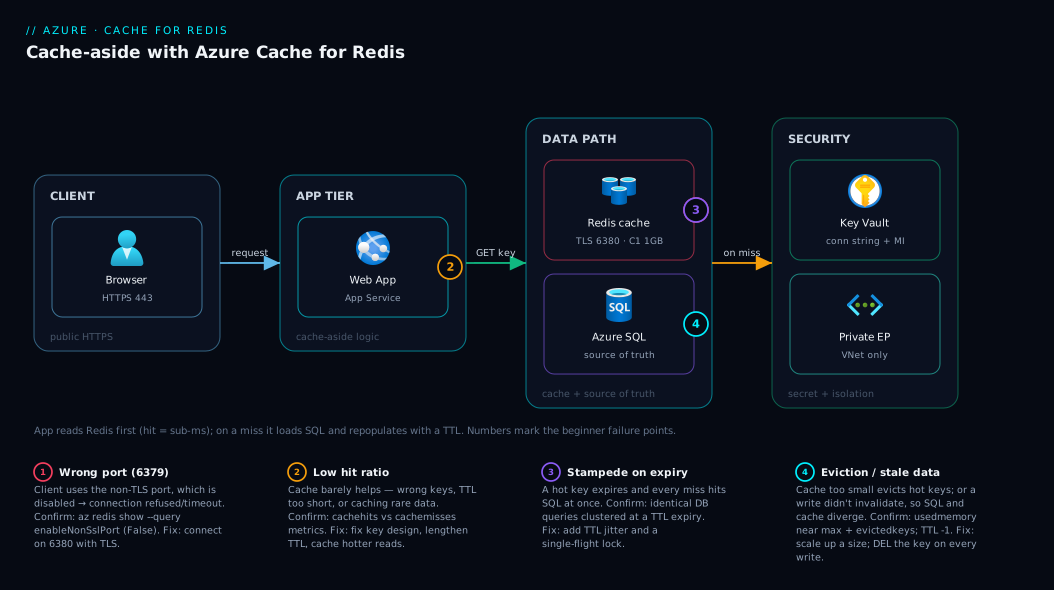
The shape to remember: the cache is a sidecar on the read path, the database stays the source of truth, and every value carries a TTL so the system self-heals toward correct.
Real-world scenario
ShopLite, a fictional mid-sized retailer, ran a 40,000-item catalogue on an Azure SQL Database behind an App Service web app. Most of the day traffic was modest, but every weekday at 10:00 a promotional email sent a wave of shoppers to the same dozen product pages. Each load fired six queries (detail, price, inventory, related items, reviews, breadcrumb), and almost every shopper requested the same products. Database CPU spiked to 95%, p95 latency went from 300 ms to 2.4 s, and a few requests timed out. The team scaled the database up; it helped for a week, then the next campaign was bigger and the problem returned at twice the cost.
The fix was a cache. They provisioned a Standard C1 (1 GB) in the same region and wrapped the six queries in cache-aside: a key per object (product:123, price:123, …), a 5-minute TTL on catalogue data and a 30-second TTL on inventory. On the next campaign the hit ratio reached 96% within two minutes — the first shopper for each product warmed the cache and the next thousand were served from RAM. Spike-time database CPU dropped from 95% to 22% and p95 latency fell to 180 ms, better than the pre-spike baseline.
Two things went wrong, both instructive. First, inventory initially shared product detail’s 5-minute TTL and a few oversold items slipped through a flash sale — fixed by the 30-second inventory TTL plus a live SQL read on the final “add to cart” check, the one place staleness was unacceptable. Second, the dozen hottest TTLs expired at once and a brief stampede of identical queries hit SQL — harmless at that scale, but they added TTL jitter (270–330 s) so popular keys no longer expire in lockstep. At roughly ₹1,400/month the cache paid for itself, and the architecture now absorbs campaign spikes instead of buckling.
Advantages and disadvantages
| Advantages | Disadvantages |
|---|---|
| Sub-millisecond reads; massive latency win | Adds a moving part and a failure mode to reason about |
| Offloads read pressure off the database | Stale-data risk if invalidation/TTL is wrong |
| Cheap relative to scaling the DB up | You pay for reserved RAM 24/7, busy or not |
| Enables shared session state for scale-out | Not durable by default (cache loss = cold cache) |
| Fully managed (patching, failover, backups) | Cache-aside logic lives in your app code |
Atomic ops (INCR, sets, sorted sets, etc.) |
Easy to misuse (no TTL, hot keys, stampedes) |
A cache is almost always worth it for read-heavy workloads — large latency and offload wins for small cost. The disadvantages are real but manageable: every one is a discipline problem (set TTLs, invalidate on write, size correctly, don’t treat it as durable), not a technology flaw. Where it genuinely does not fit is write-dominated or strictly-consistent data. When in doubt, ask: do reads outnumber writes, and can the data be a little stale? If yes, cache it; if not, leave it on the database.
Hands-on lab
This provisions a small cache, connects, exercises the cache-aside flow, and tears it down. Everything is az CLI for Cloud Shell; a Bicep equivalent follows. A Basic C0 is the cheapest throwaway lab — delete it when done so it stops billing.
1. Create a resource group and a cache
# Variables
RG=rg-redis-lab
LOC=centralindia
CACHE=kv-redis-lab-$RANDOM   # must be globally unique

az group create --name $RG --location $LOC

# Basic C0 (250 MB) — cheapest, dev only. Use Standard C1 for real work.
az redis create \
  --name $CACHE \
  --resource-group $RG \
  --location $LOC \
  --sku Basic \
  --vm-size c0 \
  --minimum-tls-version 1.2
Provisioning takes 15–20 minutes — a cache is a real managed service, not instant. We pin TLS 1.2 as the minimum; always do this, as older TLS is a finding.
2. Get the connection details
# Hostname and SSL port (6380 is the TLS port)
az redis show --name $CACHE --resource-group $RG \
  --query "{host:hostName, sslPort:sslPort, nonSslPort:port, enableNonSslPort:enableNonSslPort}" -o table

# Primary access key (treat like a password)
az redis list-keys --name $CACHE --resource-group $RG \
  --query primaryKey -o tsv
Expected: host like kv-redis-lab-1234.redis.cache.windows.net, sslPort 6380, enableNonSslPort False (plaintext 6379 disabled — good). The key is a long base64 string; anyone with it plus the host can read and write the cache, so keep it secret.
3. Connect and run the cache-aside flow
Using redis-cli over TLS:
HOST=$(az redis show -n $CACHE -g $RG --query hostName -o tsv)
KEY=$(az redis list-keys -n $CACHE -g $RG --query primaryKey -o tsv)
r() { redis-cli -h $HOST -p 6380 -a "$KEY" --tls "$@"; }   # TLS helper on 6380

r PING                                                       # Expected: PONG

# Cache-aside by hand: set a value with a 60s TTL, read it, watch it expire
r SET product:123 '{"name":"Widget","price":499}' EX 60
r GET product:123        # the JSON (cache hit)
r TTL product:123        # seconds remaining
# ...wait 60s...
r GET product:123        # (nil) — expired = cache miss
PONG confirms TLS on 6380. The SET ... EX 60 populates the cache; GET is a hit; after expiry the same GET returns (nil) — a miss, where your app falls back to the database.
4. Check the metric that matters
# Cache hits vs misses over the last hour
az monitor metrics list \
  --resource $(az redis show -n $CACHE -g $RG --query id -o tsv) \
  --metric cachehits cachemisses \
  --interval PT1M --aggregation Total -o table
Hits ÷ (hits + misses) is your hit ratio. Watch it trend up after deploying caching; a low or falling ratio means short TTLs, wrong keys, or the wrong data.
5. Tear down
az group delete --name $RG --yes --no-wait
Deleting the group removes the cache and stops billing.
Bicep equivalent
@description('Globally unique cache name')
param cacheName string
param location string = resourceGroup().location

resource redis 'Microsoft.Cache/redis@2024-03-01' = {
  name: cacheName
  location: location
  properties: {
    sku: {
      name: 'Standard'   // use Standard for production HA, not Basic
      family: 'C'
      capacity: 1        // C1 = 1 GB
    }
    enableNonSslPort: false      // keep plaintext 6379 disabled
    minimumTlsVersion: '1.2'
    redisConfiguration: {
      'maxmemory-policy': 'volatile-lru'  // evict LRU keys that have a TTL
    }
  }
}

output hostName string = redis.properties.hostName
output sslPort int = redis.properties.sslPort
This is the version you would actually commit: Standard tier, TLS 1.2, non-SSL port off, explicit eviction policy. The access key never appears in the template — fetch it at deploy time, or use Entra ID auth and skip keys entirely.
Common mistakes & troubleshooting
These are the failures that turn a cache from a win into an incident. Scan the table, then read the detail for the row that bit you.
| # | Symptom | Root cause | Confirm | Fix |
|---|---|---|---|---|
| 1 | Connection refused / timeout on 6379 | App using the non-TLS port (disabled) | az redis show --query enableNonSslPort → False |
Connect on 6380 with TLS enabled |
| 2 | Stale data served indefinitely | No TTL set, or write doesn’t invalidate | TTL <key> returns -1 (no expiry) |
Set a TTL; DEL the key on every write |
| 3 | Low / falling hit ratio | Wrong keys, TTL too short, caching rare data | cachehits/cachemisses metrics |
Fix key design; lengthen TTL; cache hotter data |
| 4 | DB spikes when a hot key expires | Cache stampede — many misses at once | Many identical DB queries clustered in time | Add TTL jitter; use a lock / single-flight |
| 5 | Hot keys keep getting evicted | Cache too small for the working set | usedmemory near maxmemory; high evictedkeys |
Scale up a size; cache less; shorten TTLs |
| 6 | Intermittent errors under load | Too many connections / client churn | connectedclients near the size limit |
Reuse one multiplexed connection per app instance |
| 7 | App slow even with cache | Caching write-heavy or per-request data | Hit ratio low despite caching | Don’t cache that data; cache stable reads instead |
| 8 | WRONGPASS / auth failure |
Stale or wrong access key | Compare app’s key to az redis list-keys |
Update the key; rotate via secondary then primary |
Connecting on the wrong port (6379 vs 6380)
The most common first-day failure. The cache disables the non-TLS port 6379 by default and expects TLS on 6380; a client configured for plaintext 6379 just times out. Confirm with az redis show --query enableNonSslPort (should be False); fix by enabling TLS in your client and pointing it at 6380 — never re-enable the plaintext port to “make it work.”
Caching with no TTL, and the stampede
A SET without an expiry lives forever, drifts out of sync, and (because volatile-lru only evicts keys with a TTL) can’t be evicted, eventually rejecting writes (TTL <key> returns -1). Always pass an expiry and DEL on every write. Relatedly, when a hot key expires every concurrent request misses at once and they all rebuild it — a stampede. Fix with TTL jitter (±10%) and, for the hottest keys, a single-flight lock so only one request rebuilds while others wait or serve slightly-stale data.
Eviction and connection churn
If the working set exceeds the cache, Redis evicts keys you are about to need again and the hit ratio craters — watch usedmemory near the ceiling and evictedkeys climbing; fix by scaling up a size, caching less, or (past one node) Premium clustering. Separately, opening a connection per request exhausts the limit and adds latency. Redis clients (StackExchange.Redis, ioredis, redis-py) hold one long-lived, multiplexed connection per instance — create it once and reuse it (watch connectedclients). This one change resolves most “intermittent errors under load.”
Best practices
- Always set a TTL. Every cached value gets an expiry sized to your staleness budget; no-TTL caching is the root of most cache bugs.
- Invalidate on every write. Pair every update to the source of truth with a
DEL(or write-through) of the key; never let DB and cache silently diverge. - Design keys deliberately. Use a consistent, namespaced scheme (
product:123,user:42:profile) so keys are predictable and easy to invalidate. Avoid one giant key. - Start on Standard, not Basic. Basic has no replica and no SLA; the step to Standard is tiny and buys you failover.
- Right-size, then scale up. Begin small (C1), watch memory and eviction, and scale up before the cache thrashes.
- Add TTL jitter to hot keys. Randomise expiries so popular keys don’t all expire at once and stampede the database.
- Reuse one connection per instance. Create the client once and share it; never per request.
- Keep the cache in the app’s region. Cross-region cache calls add latency that defeats the purpose.
- Never store the only copy in the cache. The database is the source of truth; the cache must stay rebuildable.
- Don’t cache plaintext secrets. Use Key Vault; the cache is not a secret store.
- Monitor hit ratio and evictions. Alert if hit ratio falls or evictions climb — both mean the cache has stopped earning its keep.
Security notes
A cache often holds copies of your most-read data — profiles, session tokens, carts — so secure it like the datastore it shadows.
- Use TLS (port 6380) only. Keep 6379 disabled and pin
minimumTlsVersionto 1.2; plaintext traffic is readable on the wire. - Prefer Microsoft Entra ID auth over access keys. Newer caches support Entra ID auth, so the app authenticates with a managed identity and stores no long-lived key. When you must use keys, store the connection string in Azure Key Vault: Secrets, Keys and Certificates Done Right and read it with a managed identity — never hard-code it.
- Lock down the network. In production put the cache behind a Private Endpoint so traffic stays on your VNet and public access can be disabled entirely — see Azure Private Endpoint vs Service Endpoint: Secure PaaS Access.
- Rotate keys safely. Move clients to the secondary, regenerate the primary (
az redis regenerate-keys --key-type Primary), then move back — no outage. - Minimise sensitive data. Treat anything sensitive as if on disk: minimise it, keep TTLs short, encrypt in transit (and at rest on supported tiers).
- Scope access narrowly. With Entra ID auth, assign data-access roles per identity rather than handing out the access key.
Cost & sizing
The mental model is simple and a little surprising: you pay for the RAM you reserve, per hour, not for the requests you make. A cache serving a billion hits costs the same as an idle one of the same size — price is set by tier and size, with no per-request charge within a region.
| Cost lever | Effect on bill | Guidance |
|---|---|---|
| Tier | Basic < Standard < Premium < Enterprise | Standard for most; go up only for the features you need |
| Size (C0–C6 / P1–P5) | Bigger RAM = higher hourly cost | Start small, scale up on eviction |
| Replication (Standard+) | Roughly doubles node cost vs Basic | Worth it for the SLA; don’t skip it in prod |
| Persistence (Premium) | Adds storage cost | Only if rebuilding a cold cache would hurt the DB |
| Geo-replication / extra regions | Pay per region | Only for genuine multi-region needs |
| Clustering (Premium) | Pay per shard node | Scale-out only when one node is too small |
Rough figures (Central India, pay-as-you-go, indicative — check the pricing calculator): a Basic C0 runs ~₹1,000–1,300/month, a Standard C1 (1 GB) ~₹3,000–3,500/month, a Standard C3 (6 GB) several times that, and Premium higher again for its sizes and features. There is no free tier, so even a dev/test cache costs money — provision a small one and delete it when done. Right-size by picking the smallest size whose memory holds your hot working set with headroom, then scale up only when the eviction metric says so; over-provisioning RAM you never use is the most common way to overpay.
Interview & exam questions
1. What is Azure Cache for Redis and when would you use it? A managed, in-memory key-value store based on Redis. Use it to cache read-heavy data (catalogues, profiles, computed results), hold shared session state for scaled-out apps, and absorb spikes off the database. It shines when reads outnumber writes and some staleness is acceptable.
2. Explain the cache-aside pattern. The app checks the cache first; on a hit it returns the value, on a miss it loads from the database, populates the cache with a TTL, and returns. On writes it updates the database then invalidates or updates the key. The app owns the logic; the cache never talks to the database itself.
3. What is a cache hit ratio and why does it matter? Hits divided by total reads — the single metric proving the cache is worth it. A high ratio means most reads never reach the database; a low or falling one signals wrong keys, too-short TTLs, or caching data that isn’t reused.
4. Why must you set a TTL on cached values?
TTL bounds staleness and lets the cache self-clean. Without it, values live forever, drift out of sync, and (under volatile-lru) can’t be evicted, eventually wedging a full cache.
5. What is a cache stampede and how do you prevent it? When a hot key expires, many concurrent requests miss at once and all rebuild it from the database — a thundering herd that can topple the DB. Prevent it with TTL jitter and a single-flight lock so only one request rebuilds while others wait or serve slightly-stale data.
6. Basic vs Standard vs Premium — what changes? Basic is a single node, no replica, no SLA (dev only). Standard adds a primary/replica pair with automatic failover and a 99.9% SLA. Premium adds larger sizes, clustering, persistence, VNet injection, zone redundancy and geo-replication. Enterprise adds the Redis Enterprise engine, modules and active geo-replication.
7. Which port does it use, and how do you connect securely? TLS on port 6380; the non-TLS port 6379 is disabled by default and should stay that way. Connect with TLS, authenticate with the access key or (preferably) Microsoft Entra ID, and keep the connection string in Key Vault, not app config.
8. Is a Redis cache durable? Can you lose data? By default no — it is in-memory and rebuildable, with the database as source of truth. Standard’s replica survives a node failure but not a flush or region loss. Premium/Enterprise persistence (RDB/AOF) survives a restart, enabled only when rebuilding a cold cache would itself overload the database.
9. What is an eviction policy and what is the default?
When the cache fills, Redis removes keys per the eviction policy. The default volatile-lru evicts the least-recently-used key that has a TTL — another reason to always set TTLs, since keys without one aren’t eligible.
10. How is it billed? By reserved capacity — tier and size set a per-hour price regardless of request volume, with no per-request charge and no free tier. Levers are tier, size, replication, persistence, clustering and extra regions; right-size to the hot working set with headroom.
11. When should you NOT use a cache? For write-dominated data (constant invalidation, low hit ratio) or data that must be exactly current. Caching those adds complexity for little gain — read from the source of truth instead.
12. How do you keep the cache consistent with the database? Invalidate (or update) the cached key on every write to the source of truth, with TTL as a backstop so a missed invalidation self-corrects within the staleness budget. Never write the database without touching the cache.
These map to AZ-204 (Developing Solutions for Azure) — the “develop for Azure Cache for Redis” objective — and the caching portions of AZ-305 (Designing Azure Infrastructure Solutions).
Quick check
- In cache-aside, what does the app do on a cache miss?
- What does a TTL do, and why is caching with no TTL dangerous?
- Which tier is the minimum for production HA, and why not Basic?
- Which port and protocol should your app use to connect, by default?
- Name one way to prevent a cache stampede when a hot key expires.
Answers
- Load the value from the database, write it into the cache with a TTL, and return it — so the next identical read is a hit.
- A TTL is a per-key expiry timer that bounds staleness and lets the cache self-clean. Without one, values live forever, drift out of sync, and can’t be evicted under
volatile-lru, eventually wedging a full cache. - Standard — it adds a primary/replica pair with automatic failover and a 99.9% SLA. Basic is a single node with no replica and no SLA, so any failure takes it fully offline.
- TLS over port 6380. The non-TLS port 6379 is disabled by default.
- Add TTL jitter so hot keys don’t expire in lockstep, and/or a single-flight lock so only one request rebuilds while others wait or serve slightly-stale data.
Glossary
- Azure Cache for Redis — Microsoft’s fully managed, in-memory key-value store based on open-source Redis.
- In-memory store — a datastore that keeps data in RAM rather than on disk, giving sub-ms reads.
- Cache hit / miss — a read where the value was present (hit) or absent (miss) in the cache.
- Hit ratio — hits ÷ total reads; the metric that shows whether the cache is effective.
- TTL (time-to-live) — a per-key expiry timer; when it elapses the key is deleted automatically.
- Eviction — removing keys when the cache is full, per the eviction policy (default
volatile-lru). - Cache-aside (lazy loading) — the pattern where the app reads/populates the cache around the database.
- Write-through — updating the cache and database together on each write so the cache is never stale.
- Cache stampede — many concurrent misses on an expired hot key all hitting the database at once.
- Source of truth — the authoritative datastore (your database); the cache is a disposable copy of part of it.
- Replica — a second data copy (Standard+) promoted automatically if the primary fails.
- Persistence (RDB/AOF) — writing cache contents to storage (Premium+) to survive a full restart.
- Clustering — sharding data across nodes (Premium+) to scale memory and throughput.
- Access key — the primary/secondary credential granting full read/write access to the cache.
- Entra ID authentication — authenticating with a managed identity instead of a stored key.
Next steps
- Secure the connection string with Azure Key Vault: Secrets, Keys and Certificates Done Right.
- Take the cache off the public internet with Azure Private Endpoint vs Service Endpoint: Secure PaaS Access.
- Watch hit ratio, evictions and latency with Azure Monitor & Application Insights for observability.
- Harden the datastore behind the cache with Your First Azure SQL Database: Create, Configure Firewall Rules and Connect Securely.
- If your source of truth is Cosmos DB, see Choosing a Cosmos DB API: NoSQL vs MongoDB vs Cassandra vs Gremlin vs Table Decoded.