You need a MySQL database for an app — a WordPress site, a Laravel API, a Django backend — and you want Azure to run it so you are not patching engines and babysitting replicas at 2am. Azure Database for MySQL Flexible Server is the managed service that does exactly that: it runs the open-source MySQL community engine (8.0 and 5.7) on a single Azure VM you size, with automated backups, point-in-time restore, a maintenance window you control, and a choice between a public endpoint guarded by a firewall or a fully private endpoint inside your own virtual network. “Flexible Server” is the current, recommended deployment model — it replaced the older Single Server model (now on a retirement path), and the difference matters because almost every tutorial older than a couple of years describes the wrong one.
The trap for a first deployment is not the database itself — CREATE TABLE is CREATE TABLE. The trap is the three decisions Azure forces on you before the server exists, each awkward or impossible to change later: the networking model (public access with firewall rules, or private VNet integration — chosen at create time, and you cannot switch a public server to private afterwards), the compute tier and SKU (Burstable for dev, General Purpose or Business Critical for production), and how backups and high availability are set. Get those three right at creation and the rest is ordinary MySQL administration; get them wrong and you are deleting the server and starting over, or paying for a tier you do not need.
This article walks you end to end. You will learn the core concepts (what a Flexible Server is, the two networking models, the tier ladder, how backups and HA work), then do the real thing three ways — the Azure portal, the az CLI, and Bicep — with exact commands, expected output at each step, validation, your first TLS-secured connection, and a clean teardown. By the end you can deploy a production-shaped MySQL Flexible Server, connect to it securely, and explain every choice you made.
What problem this solves
Running your own MySQL on a VM means you own everything below the query: OS patching, engine upgrades, my.cnf, setting up and testing backups, building a replica for failover, monitoring disk fill, and being the pager target when the disk fills at midnight. That is real, recurring toil, and most teams do at least one part of it badly — the backup that was never restore-tested, the replica that silently fell behind, the engine two versions out of date with a known CVE.
A managed MySQL service takes that off your plate. Azure Database for MySQL Flexible Server gives you automated daily + transaction-log backups with point-in-time restore, a one-checkbox zone-redundant high-availability standby, a maintenance window you schedule, server parameters you tune from the portal/CLI instead of editing config over SSH, and built-in metrics and slow-query logging. You still own the schema, queries, indexes and connection-handling in your app — but not the plumbing.
Who hits this: anyone deploying a web app that needs a relational store and does not want to run a database server — WordPress, Laravel, Drupal and Django shops are the classic case. The friction on Azure specifically is the three create-time decisions above, especially networking: choosing public access when you needed private means a rebuild, and an oversized SKU quietly burns budget. This guide front-loads those decisions so you make them once, correctly.
To frame the whole exercise, here is the deployment at a glance — the decisions you make, when you make them, and whether you can undo them:
| Decision | When you choose it | Default / common pick | Reversible later? |
|---|---|---|---|
| Engine version (8.0 / 5.7) | Create time | 8.0 (use unless an app needs 5.7) | Major-version upgrade is one-way; no downgrade |
| Compute tier (Burstable / General Purpose / Business Critical) | Create time | Burstable for dev, General Purpose for prod | Tier and SKU can be scaled later (brief restart) |
| Networking (Public access vs Private VNet) | Create time only | Private for prod; public+firewall for a quick start | Public → private is NOT reversible — rebuild |
| Backup retention (1–35 days) | Create time, editable later | 7 days | Yes — adjustable anytime |
| High availability (None / Zone-redundant / Same-zone) | Create time or later | None for dev, Zone-redundant for prod | Enable/disable later (HA needs ≥2 zones) |
| Admin username/password | Create time | Your choice (not admin/root) |
Password resettable; username is fixed |
Learning objectives
By the end of this article you can:
- Explain what Azure Database for MySQL Flexible Server is, how it differs from the retiring Single Server, and when to choose it over MySQL-on-a-VM.
- Choose correctly between the two networking models — public access with firewall rules vs private VNet integration — and state why the choice is permanent.
- Pick the right compute tier and SKU (Burstable / General Purpose / Business Critical) and storage size for a workload, and right-size it without overpaying.
- Configure automated backups, set a sensible retention window, and understand point-in-time restore and zone-redundant HA.
- Deploy a Flexible Server three ways — Azure portal,
az mysql flexible-serverCLI, and Bicep — with the exact parameters and expected output. - Make your first secure connection with the
mysqlclient over TLS, create a database, and run a sanity query. - Diagnose the most common first-deploy failures (can’t connect, TLS errors, firewall blocks) using the exact command or portal path to confirm and fix.
- Tear the lab down cleanly so you incur no further charges.
Prerequisites & where this fits
You need an Azure subscription (the free trial works for the Burstable lab), the Azure CLI (az) installed locally or just use Cloud Shell in the portal (it has az and the mysql client pre-installed), and the MySQL command-line client if you want to connect from your own machine. Basic SQL familiarity (CREATE DATABASE, SELECT) is assumed; you do not need to be a DBA. Knowing what a resource group, a region and an availability zone are will help — if those are fuzzy, skim Azure Resource Hierarchy Explained: Subscriptions, Resource Groups and Resources and Azure Regions and Availability Zones: Designing for Resilience first.
This sits in the Data / Databases track and is the MySQL counterpart to Your First Azure SQL Database: Create, Configure Firewall Rules and Connect Securely. If your app speaks MySQL (WordPress, Laravel, Drupal), this is your store; if it can speak SQL Server or you want serverless auto-pause, read that one too and compare. The private networking choice here is the same concept covered in depth in Azure Private Endpoint vs Service Endpoint: Secure PaaS Access and Azure Virtual Network, Subnets and NSGs: Networking Fundamentals — though Flexible Server’s private model is VNet injection, which is slightly different, as we will see.
This is for building a fresh server from zero. (Global multi-region writes are a different product, Cosmos DB; migrating an existing MySQL uses separate tooling, Azure Database Migration Service.)
Core concepts
Five ideas make every later choice obvious.
A Flexible Server is one MySQL engine on one managed VM you size. Azure provisions a Linux VM running the MySQL community engine, attaches managed storage, and operates everything below your data — OS, engine binaries, patching, backups, and (optionally) a failover standby. You get a server endpoint (<name>.mysql.database.azure.com), an admin login, and full control of databases, users and server parameters, but you never SSH to the box. The “flexibility” is what you do control: compute size, storage, the maintenance window, and stop/start to save money on dev servers.
Flexible Server replaced Single Server — use Flexible. The older Single Server model is on a retirement path; Flexible Server is the current recommendation and the only one Microsoft is investing in, adding zone-resilient HA, stop/start, VNet co-location, granular maintenance scheduling and better price/performance. Every command here uses az mysql flexible-server, not the deprecated az mysql server.
Networking is one of two models, chosen forever at create time. Either public access (a public endpoint with a firewall allowing only the IP ranges you list) or private access (VNet integration) (the server injected into a delegated subnet with a private IP only, no public endpoint, traffic staying inside your VNet). The hard rule: you cannot convert public to private (or vice-versa) after creation — pick wrong and you rebuild. For anything beyond a throwaway, choose private; the quick-start lab below uses public so you can connect from your laptop in one command.
Backups are automatic; retention and restore are yours to set. Flexible Server backs up continuously (a daily snapshot plus transaction-log backups) with no action from you. You choose the retention period (1–35 days, default 7) and the backup redundancy (LRS / ZRS / geo-redundant). Those backups power point-in-time restore (PITR) — restore to any second in the window into a new server (never overwriting the original). It is your “undo” for an accidental DROP TABLE.
Compute is a tier ladder; storage scales independently. Pick a compute tier — Burstable (cheap, CPU-credit-based, dev/test), General Purpose (balanced, production default) or Business Critical (high-memory, the former “Memory Optimized”) — then a SKU (vCores + RAM). Storage (size and IOPS) is chosen separately and can be grown but never shrunk; enable auto-grow so you never wake to a full disk. HA, when enabled, doubles compute cost because it runs a hot standby.
The vocabulary in one table
Pin these down before the deep sections; the glossary repeats them for lookup:
| Term | One-line definition | Where it lives | Why it matters |
|---|---|---|---|
| Flexible Server | A managed single-VM MySQL instance you size | Resource group / region | The thing you create |
| Single Server | The older, retiring deployment model | (legacy) | Do NOT use for new work |
| Compute tier | Burstable / General Purpose / Business Critical | Server config | Sets price and performance class |
| SKU | The specific size (e.g. Standard_B1ms) within a tier |
Server config | vCores + RAM you pay for |
| Public access | Public endpoint guarded by a firewall | Networking (create time) | Simple; choose for quick starts |
| Private access (VNet) | Server injected into a delegated subnet, private IP only | Networking (create time) | Production isolation; permanent choice |
| Firewall rule | An allowed IP range on the public endpoint | Networking | Wrong/missing = can’t connect |
| Backup retention | Days of automated backups kept (1–35) | Backup config | Sets your PITR window |
| Point-in-time restore | Restore to any second in the window, into a new server | Backup feature | Your undo for data loss |
| High availability | A hot standby in another (or same) zone | HA config | Auto-failover; doubles compute cost |
| Maintenance window | The weekly slot Azure patches the server | Server config | Schedule it off-peak |
require_secure_transport |
Server parameter enforcing TLS connections | Server parameters | On by default; affects how you connect |
Choosing the networking model (the permanent decision)
This is the decision you cannot take back, so make it first and deliberately. Both models exist on every tier; the trade-off is reachability versus isolation.
Public access with firewall rules
The server gets a hostname resolving to a public IP, and a built-in firewall denies everything except the source IP ranges you allow — your machine’s IP, your app’s outbound IP, or the special “Allow public access from any Azure service” toggle (all Azure IPs — convenient but broad). Connections still travel over TLS, and the firewall is checked before the MySQL handshake. Use it for a quick start, a learning lab, or a dev database you hit from your laptop. Its weakness is exposure: the endpoint is on the internet, and a too-broad rule (the dreaded 0.0.0.0–255.255.255.255 “allow all”) turns your database into an internet-facing target.
Private access (VNet integration / injection)
The server has no public endpoint at all. It is injected into a delegated subnet (delegated to Microsoft.DBforMySQL/flexibleServers, used only by MySQL servers) with a private IP inside your VNet. Only resources in that VNet (or peered VNets, or on-prem over VPN/ExpressRoute) can reach it; DNS resolves the name to the private IP via a private DNS zone (<name>.private.mysql.database.azure.com), and reachability is governed by VNet/NSG routing rather than a firewall list. Use it for anything production — the database is unreachable from the internet and traffic never leaves the Azure backbone. The cost is a little more setup (a VNet, a delegated subnet, a private DNS zone — the CLI and Bicep can create these for you). Note this VNet-injection model differs from the private endpoint model used by Azure SQL and most PaaS: there is no separate NIC resource, the server itself lives in your subnet. The isolation concepts are the same as in Azure Private Endpoint vs Service Endpoint: Secure PaaS Access.
The two models, side by side:
| Aspect | Public access (firewall) | Private access (VNet injection) |
|---|---|---|
| Endpoint | Public IP + hostname | Private IP only, no public endpoint |
| Reachable from | Allowed IP ranges, anywhere on internet | The VNet / peered VNets / on-prem (VPN/ER) |
| Access control | Firewall rules (IP allow-list) | VNet routing + NSGs (no firewall list) |
| DNS | <name>.mysql.database.azure.com (public) |
<name>.private.mysql.database.azure.com (private DNS zone) |
| Setup effort | Lowest — just add your IP | Higher — VNet, delegated subnet, private DNS zone |
| Internet exposure | Yes (mitigated by firewall) | None |
| Best for | Quick start, dev, simple apps | Production, regulated workloads, app-in-VNet |
| Switch later? | No — permanent at create time | No — permanent at create time |
Decision rule, stated plainly:
| If… | Choose | Because |
|---|---|---|
| It’s a learning lab or you connect from your laptop today | Public access | One firewall rule and you’re in |
| The app runs in an Azure VNet (App Service VNet-integrated, AKS, VMs) | Private access | Same VNet = no internet exposure, low latency |
| You have any compliance/data-residency requirement | Private access | No public endpoint to defend or audit |
| You’re unsure and it might go to production | Private access | You can’t upgrade public → private; start private |
Choosing the compute tier and SKU
Three tiers, climbing in capability and price. Within each you pick a SKU (vCores + RAM), and storage is chosen separately.
- Burstable runs on a CPU-credit model — it accrues credits while idle and spends them under load, so it is cheap but throttles to a baseline if run hot continuously. Perfect for dev/test and low-traffic sites; the entry SKU
Standard_B1ms(1 vCore, 2 GB) is the cheapest way to run a real MySQL server. - General Purpose gives consistent (non-bursting) CPU on Ddsv4/Ddsv5-class VMs with a balanced CPU-to-memory ratio — the production default for most web apps. Start around
Standard_D2ds_v4(2 vCores, 8 GB) and scale up as load demands. - Business Critical (formerly Memory Optimized) offers the highest memory-to-vCore ratio and local-SSD throughput for memory-hungry, high-throughput or analytics workloads. The most expensive tier — use it when you have measured a need.
Storage is independent: pick a size (which also sets baseline IOPS), optionally provision extra IOPS, and enable storage auto-grow. Storage only grows — you cannot shrink it — so start modest and let auto-grow handle growth rather than over-provisioning on day one.
The tier ladder at a glance:
| Tier | VM class | Best for | Entry SKU | CPU behaviour | Relative cost |
|---|---|---|---|---|---|
| Burstable | B-series | Dev/test, low-traffic, idle-heavy | Standard_B1ms (1 vCore / 2 GB) |
Credit-based; throttles when credits exhausted | Lowest |
| General Purpose | Ddsv4 / Ddsv5 | Most production web apps & APIs | Standard_D2ds_v4 (2 vCore / 8 GB) |
Consistent, no throttling | Medium |
| Business Critical | Edsv4 / Edsv5 | Memory-heavy, high-throughput, analytics | Standard_E2ds_v4 (2 vCore / 16 GB) |
Consistent + high memory + local SSD | Highest |
Match the workload to the tier:
| Workload | Tier | Reasoning |
|---|---|---|
| Learning, personal project, low-traffic blog | Burstable B1ms/B2s |
Cheap; idle most of the time; bursts cover spikes |
| Production WordPress / Laravel / small SaaS | General Purpose D2ds_v4+ |
Predictable CPU under steady traffic |
| Reporting DB, large working set, heavy joins | Business Critical E*ds |
Memory ratio and local-SSD throughput |
| Dev DB you only use business hours | Burstable + stop/start | Stop it overnight/weekends to slash cost |
A note that saves money: a Flexible Server can be stopped when idle (az mysql flexible-server stop), and while stopped you pay only for storage, not compute. For dev databases this is the single biggest lever — stop it at the end of the day. (A stopped server auto-starts after 30 days to receive maintenance.)
Backups, point-in-time restore and high availability
These are configured at (or shortly after) create time and define your data-loss and downtime posture.
Automated backups run with no setup — a daily full backup plus continuous transaction-log backups. You control the retention period (1–35 days; default 7) and the backup redundancy (LRS / ZRS / geo-redundant). Backup is free up to your provisioned storage size, then billed per GB.
Point-in-time restore (PITR) uses those backups to create a brand-new server restored to any second within the retention window — it never overwrites the source. This is your recovery for “someone ran DELETE without a WHERE clause at 14:32”: restore to 14:31 into a new server, extract the rows, done.
High availability (HA) runs a hot standby the platform fails over to automatically if the primary’s zone or VM fails. Two modes:
- Zone-redundant HA — the standby lives in a different availability zone in the same region; survives a whole-zone outage. Requires a region with availability zones.
- Same-zone HA — the standby is in the same zone (lower replication latency, but no protection against a zone outage).
HA roughly doubles your compute cost because the standby is fully provisioned and running. Enable it for production where downtime is expensive; leave it off for dev. HA can be turned on or off after creation (subject to zone availability).
The data-protection options, compared:
| Feature | What it protects against | Cost impact | How to enable |
|---|---|---|---|
| Automated backups (always on) | Accidental data loss, corruption | Free up to provisioned storage size, then per-GB | Automatic; set retention 1–35 days |
| Geo-redundant backup | Regional disaster (restore to paired region) | Extra backup storage | --geo-redundant-backup Enabled (set at create) |
| Point-in-time restore | A specific bad change at a known time | Cost of the new server you create | az mysql flexible-server restore |
| Same-zone HA | VM/host failure within a zone | ~2× compute | --high-availability SameZone |
| Zone-redundant HA | A full availability-zone outage | ~2× compute | --high-availability ZoneRedundant |
| Read replicas | Read scaling / reporting offload | +1 server per replica | az mysql flexible-server replica create |
The maintenance window rounds this out: Azure patches the engine and OS on a schedule, and you choose the day and hour (a one-hour weekly slot) so it lands off-peak. Set it; do not leave it on “system-managed” for a production server where a surprise restart matters.
Architecture at a glance
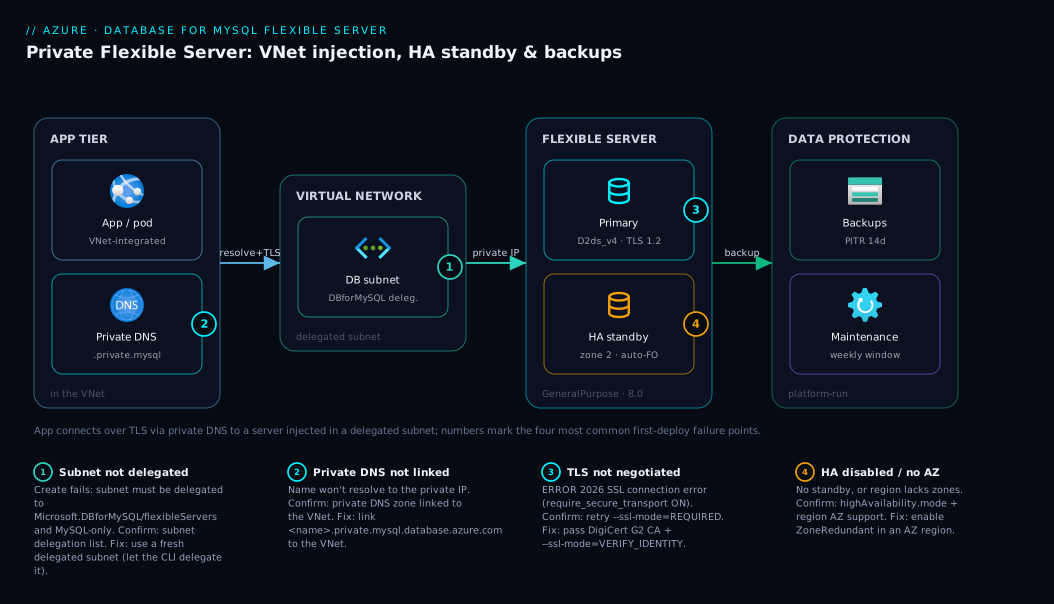
The diagram traces a real production-shaped deployment left to right: a client or application reaching a private Flexible Server inside a VNet, with the managed plumbing (backups, HA standby, maintenance) shown as the platform’s responsibility. Read it as the path a connection takes plus the safety nets behind the server. On the left, the app tier — your App Service, AKS pod or VM — lives in an application subnet of the virtual network. It opens a TLS connection to the MySQL endpoint; because this is the private model, the name db.private.mysql.database.azure.com resolves via a private DNS zone to a private IP in the delegated database subnet, where the Flexible Server primary is injected. No traffic touches the public internet.
Behind the primary sit the things the platform runs for you: a zone-redundant standby in a second availability zone that the service fails over to automatically, automated backups flowing to backup storage (powering point-in-time restore), and a scheduled maintenance window. The numbered badges mark the spots where first-time deployments go wrong — a subnet not delegated, a missing private DNS link, TLS not negotiated, or HA left off when it was needed. The legend maps each number to the symptom, the way to confirm it, and the fix.
Real-world scenario
Saffron Cart, a mid-size Indian e-commerce store, ran its WordPress + WooCommerce catalogue on a self-managed MySQL 5.7 instance on a single Azure VM (D2s_v3) in Central India, maintained by two engineers. Patching happened “when they remembered,” backups were a nightly mysqldump to a blob container nobody had ever restore-tested, and there was no standby — if the VM died, the store was down until they rebuilt.
The wake-up call came during a Diwali sale: the VM’s disk hit 100% at 21:40 (dumps plus binlogs plus growth had quietly filled it) and MySQL stopped accepting writes. Checkout failed for ninety minutes during the busiest window of the year while an engineer SSH’d in, deleted old dump files, and restarted the engine. The post-mortem found three latent gaps — no disk-full alerting, no tested backups, no failover — and they moved to managed MySQL.
They chose Flexible Server and planned the three create-time decisions before touching the portal. Engine: on 5.7 but the app supported 8.0, so they provisioned 8.0 fresh and migrated the data (a clean cut, not an in-place upgrade). Networking: WordPress ran on App Service, so they chose private access (VNet injection) — no public endpoint, App Service reaching it over VNet integration — the decision they were most careful about, knowing it was permanent. Compute: General Purpose D2ds_v4 (2 vCores, 8 GB) with storage auto-grow on so the disk-full incident could never recur. Resilience: zone-redundant HA (downtime during a sale far outweighed the doubled compute cost), backup retention 14 days, geo-redundant backup on, and a maintenance window at Tuesday 03:00 IST.
Migration was a mysqldump restored into the new server over the private endpoint, a WordPress connection-string swap to the private hostname, and a TLS certificate — cut over in a 20-minute window at 2am. Monthly cost rose from roughly ₹9,000 (VM plus uncounted engineer time) to about ₹19,000 (D2ds_v4 + HA + 14-day geo-redundant backups), but the operational toil, disk-full risk and untested-backup risk all vanished. The next festival sale ran clean: a forced HA failover test completed in under 90 seconds with no manual intervention, and auto-grow absorbed a 30% data jump unnoticed. The lesson on the wall: “Pick the networking model and HA before you create the server — those are the two you can’t redo cheaply.”
Advantages and disadvantages
The managed-MySQL model trades control and a little cost for the removal of operational toil. Weigh it honestly:
| Advantages | Disadvantages |
|---|---|
| No OS/engine patching, no backup scripts, no replica plumbing — Azure runs it | You don’t get OS/SSH access or SUPER privilege; some my.cnf knobs are exposed as parameters, others not at all |
| Automated, restore-tested-by-design backups with point-in-time restore | Backup retention caps at 35 days; longer needs your own export strategy |
| One-checkbox zone-redundant HA with automatic failover | HA roughly doubles compute cost |
| Stop/start lets you pay only for storage on idle dev servers | A stopped server auto-starts after 30 days (for maintenance) |
| Scale compute up/down and grow storage without rebuilding | Storage only grows — you can never shrink it |
| Scheduled maintenance window — patching never surprises you | The networking model (public vs private) is fixed at create time |
| Built-in metrics, slow-query log, server parameters via portal/CLI | Some extensions/plugins available on self-hosted MySQL aren’t supported |
| Lower-latency co-location with your app via VNet injection | VNet injection consumes a whole delegated subnet (MySQL-only) |
The model is right for the overwhelming majority of apps that need a relational store and a small team that should be writing features, not operating databases. It is the wrong fit only when you need OS-level control, an unsupported plugin, or retention beyond 35 days — edge cases most teams never hit. The two disadvantages that bite hardest are the permanent networking choice and storage-only-grows — both create-time decisions, and both the reason this article front-loads them.
Hands-on lab
This is the centerpiece. You will deploy a real MySQL Flexible Server three ways — portal, az CLI, and Bicep — connect to it securely over TLS, create a database, validate, and tear it down. The lab uses the Burstable B1ms tier with public access so you can connect from your own machine in one command; total cost for an hour is well under ₹50, and we delete everything at the end. A private variant is shown at the end of the CLI section.
Run the CLI parts in Cloud Shell (Bash) — it has az and the mysql client pre-installed, and its IP is already an Azure IP, which simplifies the firewall step. If you run locally, install the Azure CLI and the MySQL client first.
Prerequisites check
Before anything, confirm your tooling and capture your public IP (you will allow it through the firewall):
# Azure CLI present and logged in
az --version | head -n 1
az account show --query "{subscription:name, id:id}" -o table

# The MySQL client (skip if using Cloud Shell — it's preinstalled)
mysql --version

# Your machine's public IP, to allow through the firewall
MYIP=$(curl -s https://api.ipify.org)
echo "My public IP: $MYIP"
Expected: a CLI version line, your subscription name/ID, a mysql Ver 8.x line, and a public IPv4 address. If az account show errors, run az login first.
Part A — Deploy with the Azure portal
If you prefer click-ops or want to see every option, do it once in the portal; otherwise skip to Part B.
- Open the create wizard. In the Azure portal, search “Azure Database for MySQL flexible servers” → Create → choose Flexible server (NOT Single server).
- Basics tab. Set Subscription and Resource group (create
rg-mysql-lab). Server name: a globally-unique name likemysql-lab-<yourinitials>-01(becomes<name>.mysql.database.azure.com). Region:Central India(or nearest). MySQL version: 8.0. Workload type: “For development or hobby projects” — this preselects BurstableB1ms. - Compute + storage. Click Configure server. Confirm Burstable,
Standard_B1ms, Storage 20 GB, and enable Storage auto-grow. Leave High availability disabled for the lab. Set Backup retention to 7 days. Save. - Authentication. Choose MySQL authentication only. Set Admin username (e.g.
dbadmin— notadminorroot, which are reserved) and a strong Password. Record both. - Networking tab. Connectivity method: Public access (allowed IP addresses). Tick Add current client IP address (the portal detects your IP). Leave “Allow public access from any Azure service…” unticked for least exposure. Ensure Enforce SSL connection (require_secure_transport) is ON (default).
- Review + create. Review the cost estimate, then Create. Provisioning takes 3–7 minutes.
- Get the connection details. When deployment finishes, open the resource → Overview; copy the Server name (full hostname) and note the admin username. The portal’s Connect blade shows ready-to-paste
mysqlcommands.
The portal mirrors the CLI exactly — every field above maps to a flag in Part B. The portal is best for your first one (to see the options); automate with CLI/Bicep thereafter.
Part B — Deploy with the az CLI
This is the fast path and what you will use day to day.
Step 1 — Variables. Set names once so the rest is copy-paste:
RG=rg-mysql-lab
LOC=centralindia
SERVER=mysql-lab-$RANDOM        # must be globally unique
ADMIN=dbadmin
PASSWORD='Ch4ngeMe!$(openssl rand -hex 4)'   # replace with your own strong password
MYIP=$(curl -s https://api.ipify.org)
echo "Server: $SERVER  | My IP: $MYIP"
Step 2 — Resource group.
az group create -n $RG -l $LOC -o table
Expected: a table row with ProvisioningState = Succeeded.
Step 3 — Create the Flexible Server (public access, Burstable). The flexible-server create command provisions the server, sets the admin login, and (with --public-access) creates a firewall rule for your IP in one shot:
az mysql flexible-server create \
  --resource-group $RG \
  --name $SERVER \
  --location $LOC \
  --admin-user $ADMIN \
  --admin-password "$PASSWORD" \
  --sku-name Standard_B1ms \
  --tier Burstable \
  --version 8.0.21 \
  --storage-size 20 \
  --storage-auto-grow Enabled \
  --backup-retention 7 \
  --public-access $MYIP \
  --yes \
  -o table
Expected (after 3–7 minutes): a JSON/table summary including the host (<server>.mysql.database.azure.com), state: Ready, and a note that a firewall rule for your IP was created. Save the host value:
HOST=$(az mysql flexible-server show -g $RG -n $SERVER --query fullyQualifiedDomainName -o tsv)
echo "Host: $HOST"
The key flags, explained:
| Flag | What it sets | Lab value | Notes |
|---|---|---|---|
--tier / --sku-name |
Compute tier and size | Burstable / Standard_B1ms |
Cheapest real server |
--version |
MySQL engine version | 8.0.21 |
Use 8.0 unless an app needs 5.7 |
--storage-size |
Storage in GB | 20 |
Grows only; start modest |
--storage-auto-grow |
Auto-expand on near-full | Enabled |
Prevents disk-full outages |
--backup-retention |
Retention days (1–35) | 7 |
Your PITR window |
--public-access |
Firewall: an IP, range, all, or None |
$MYIP |
None = no public rule; 0.0.0.0 = Azure services only |
--high-availability |
HA mode | (omitted = Disabled) | ZoneRedundant for prod |
--yes |
Skip confirmation prompts | — | For scripting |
Step 4 — (Optional) Add another firewall rule. If your IP changes or you need a teammate in, add a rule explicitly:
az mysql flexible-server firewall-rule create \
  --resource-group $RG --name $SERVER \
  --rule-name allow-office \
  --start-ip-address 203.0.113.10 --end-ip-address 203.0.113.10 \
  -o table
To allow connections from other Azure services (e.g. App Service on a public endpoint), use the special all-zeros rule:
az mysql flexible-server firewall-rule create \
  --resource-group $RG --name $SERVER \
  --rule-name AllowAzureServices \
  --start-ip-address 0.0.0.0 --end-ip-address 0.0.0.0 -o table
0.0.0.0–0.0.0.0 is the documented sentinel for “allow Azure services,” not an open-to-the-world rule. Never use 0.0.0.0–255.255.255.255 (that is the whole internet).
Step 5 — Create a database. The server ships with system databases; create your application database:
az mysql flexible-server db create \
  --resource-group $RG --server-name $SERVER \
  --database-name appdb -o table
Expected: a row showing appdb created.
Step 6 — Connect over TLS and validate. Azure MySQL enforces TLS (require_secure_transport = ON). Download the certificate bundle and connect:
# Download the public CA bundle Azure uses (DigiCert Global Root G2)
curl -s -o DigiCertGlobalRootG2.crt.pem \
  https://dl.cacerts.digicert.com/DigiCertGlobalRootG2.crt.pem

# Connect with TLS enforced and CA verification
mysql -h "$HOST" -u $ADMIN -p"$PASSWORD" \
  --ssl-ca=DigiCertGlobalRootG2.crt.pem --ssl-mode=VERIFY_IDENTITY \
  -e "SELECT VERSION() AS mysql_version; SHOW DATABASES;"
Expected output: the MySQL version (8.0.x) and a database list that includes appdb and the system schemas (information_schema, mysql, performance_schema, sys). If you see ERROR 2026 (SSL connection error) or a cert error, your --ssl-ca path or --ssl-mode is the issue — see troubleshooting below. The Cloud Shell mysql client can often connect with just --ssl-mode=REQUIRED (no CA file) because TLS is still negotiated; VERIFY_IDENTITY is the stricter, recommended mode that also checks the server name.
Step 7 — Run a real sanity workload. Prove writes work end to end:
mysql -h "$HOST" -u $ADMIN -p"$PASSWORD" \
  --ssl-ca=DigiCertGlobalRootG2.crt.pem --ssl-mode=VERIFY_IDENTITY appdb \
  -e "CREATE TABLE IF NOT EXISTS visits (id INT AUTO_INCREMENT PRIMARY KEY, seen DATETIME DEFAULT CURRENT_TIMESTAMP);
      INSERT INTO visits () VALUES (); INSERT INTO visits () VALUES ();
      SELECT COUNT(*) AS rows_inserted FROM visits;"
Expected: rows_inserted = 2. You now have a working, TLS-secured MySQL database with a table and rows.
Step 8 — Inspect what you built. Confirm the server’s shape:
az mysql flexible-server show -g $RG -n $SERVER \
  --query "{name:name, tier:sku.tier, sku:sku.name, version:version, state:state, ha:highAvailability.mode, storageGB:storage.storageSizeGb, autoGrow:storage.autoGrow, retention:backup.backupRetentionDays}" \
  -o table
Expected: Burstable, Standard_B1ms, 8.0.21, Ready, HA Disabled, 20 GB, auto-grow Enabled, retention 7.
Validation checklist:
| Check | Command / action | Pass condition |
|---|---|---|
| Server is up | az mysql flexible-server show … state |
Ready |
| Firewall lets you in | the mysql connect in Step 6 |
returns a version + DB list |
| TLS is enforced | connect without --ssl-mode from a strict client |
rejected unless secure transport |
| Database exists | SHOW DATABASES |
appdb present |
| Writes work | the INSERT/SELECT in Step 7 | rows_inserted = 2 |
The private-access variant (production shape)
To build the private model instead, the CLI can create the VNet, delegated subnet and private DNS zone for you — replace --public-access with VNet flags:
az mysql flexible-server create \
  --resource-group $RG --name $SERVER --location $LOC \
  --admin-user $ADMIN --admin-password "$PASSWORD" \
  --tier GeneralPurpose --sku-name Standard_D2ds_v4 --version 8.0.21 \
  --storage-size 32 --storage-auto-grow Enabled --backup-retention 14 \
  --high-availability ZoneRedundant \
  --vnet myVNet --subnet mySubnet \
  --private-dns-zone mysql-lab.private.mysql.database.azure.com \
  --yes -o table
This injects the server into mySubnet (auto-delegated to Microsoft.DBforMySQL/flexibleServers), links a private DNS zone, and enables zone-redundant HA. There is no firewall rule and no public endpoint — you can only reach it from inside myVNet (e.g. a VM in the same VNet, or a VNet-integrated App Service). This is the shape Saffron Cart ran.
Part C — Deploy with Bicep (infrastructure as code)
For repeatable, reviewable deployments, declare the server in Bicep. Save as mysql.bicep:
@description('Globally-unique server name')
param serverName string
param location string = resourceGroup().location
@secure()
param adminPassword string
param adminUser string = 'dbadmin'
@description('Your public IP to allow through the firewall')
param clientIp string

resource mysql 'Microsoft.DBforMySQL/flexibleServers@2023-12-30' = {
  name: serverName
  location: location
  sku: {
    name: 'Standard_B1ms'
    tier: 'Burstable'
  }
  properties: {
    administratorLogin: adminUser
    administratorLoginPassword: adminPassword
    version: '8.0.21'
    storage: {
      storageSizeGB: 20
      autoGrow: 'Enabled'
    }
    backup: {
      backupRetentionDays: 7
      geoRedundantBackup: 'Disabled'
    }
    highAvailability: {
      mode: 'Disabled'   // 'ZoneRedundant' for production
    }
  }
}

resource fwClient 'Microsoft.DBforMySQL/flexibleServers/firewallRules@2023-12-30' = {
  parent: mysql
  name: 'allow-client'
  properties: {
    startIpAddress: clientIp
    endIpAddress: clientIp
  }
}

resource appdb 'Microsoft.DBforMySQL/flexibleServers/databases@2023-12-30' = {
  parent: mysql
  name: 'appdb'
  properties: {
    charset: 'utf8mb4'
    collation: 'utf8mb4_0900_ai_ci'
  }
}

output host string = mysql.properties.fullyQualifiedDomainName
Deploy it, passing the password and your IP as parameters (never hard-code secrets):
az deployment group create \
  --resource-group $RG \
  --template-file mysql.bicep \
  --parameters serverName=$SERVER adminPassword="$PASSWORD" clientIp=$MYIP \
  --query "properties.outputs.host.value" -o tsv
Expected: after 3–7 minutes, the deployment outputs the server host. Connect with the same mysql command from Step 6. The Bicep models exactly what the CLI did — server, firewall rule, database — but now it lives in source control, can be diffed in a PR, and redeploys identically every time.
Teardown (do this to stop charges)
Delete the whole resource group — it removes the server, its backups, firewall rules and database in one call:
az group delete -n $RG --yes --no-wait
Expected: the command returns immediately; deletion proceeds in the background. Cost note: a B1ms server for an hour is a few rupees; the whole lab is well under ₹50. There is no free tier for Flexible Server compute, but Burstable + prompt teardown keeps it negligible. If you only want to pause a dev server (keep data, stop paying for compute), stop it instead of deleting:
az mysql flexible-server stop -g $RG -n $SERVER
# ...later...
az mysql flexible-server start -g $RG -n $SERVER
Common mistakes & troubleshooting
The failures every first-time deployer hits, with the exact way to confirm and fix each. Scan the table, then read the detail for your row.
| # | Symptom | Root cause | Confirm (exact cmd / portal path) | Fix |
|---|---|---|---|---|
| 1 | ERROR 2002 … can't connect / timeout |
Your IP isn’t in a firewall rule (public model) | az mysql flexible-server firewall-rule list -g $RG -n $SERVER -o table; compare to curl ifconfig.me |
Add a rule for your current IP |
| 2 | ERROR 2026 (HY000): SSL connection error |
TLS not negotiated / wrong CA or mode | Retry with --ssl-mode=REQUIRED; check require_secure_transport |
Add --ssl-ca + --ssl-mode=VERIFY_IDENTITY; or REQUIRED |
| 3 | ERROR 1045 … Access denied |
Wrong admin user/password, or @host form |
Re-check $ADMIN/$PASSWORD; reset password |
az mysql flexible-server update --admin-password … |
| 4 | Server name already taken at create | Server names are globally unique | Creation errors with a name-conflict message | Pick a different --name |
| 5 | Can’t reach a private server from your laptop | By design — no public endpoint | az mysql flexible-server show … network shows no public access |
Connect from inside the VNet (a VM/Cloud Shell-in-VNet) |
| 6 | Private deploy fails: subnet error | Subnet not delegated / already in use | Subnet must be delegated to Microsoft.DBforMySQL/flexibleServers, MySQL-only |
Use a fresh subnet; let the CLI delegate it |
| 7 | App connects but inserts fail: “read-only” | You’re hitting a read replica, not primary | Check which endpoint the app uses | Point writes at the primary endpoint |
| 8 | Can’t enable HA after create | Region/zone lacks availability zones, or same-zone limits | az mysql flexible-server show … highAvailability |
Use a region with AZs; pick ZoneRedundant |
| 9 | “Cannot shrink storage” | Storage only grows | Attempt to lower --storage-size is rejected |
Migrate to a smaller new server if truly needed |
| 10 | Connection works from CLI, fails from app | App not using TLS / wrong driver setting | App driver’s SSL flag (e.g. PHP MYSQLI_CLIENT_SSL) |
Enable TLS in the driver; ship the CA bundle |
The ones that bite hardest, expanded:
1. ERROR 2002/timeout — the firewall. The most common first-deploy failure on the public model. The firewall is checked before the handshake, so a missing rule looks like a network timeout, not an auth error. Confirm: az mysql flexible-server firewall-rule list -g $RG -n $SERVER -o table and compare to your current public IP (which may have changed since create). Fix: add a rule for your current IP, or re-run with --public-access $(curl -s https://api.ipify.org).
2. ERROR 2026 SSL connection error. require_secure_transport = ON rejects non-TLS connections, and VERIFY_IDENTITY needs the right CA bundle and a matching hostname. Confirm: retry with --ssl-mode=REQUIRED (TLS, no cert verification) — if that works, your CA path/mode was the problem, not connectivity. Fix: pass the DigiCert Global Root G2 PEM via --ssl-ca=… --ssl-mode=VERIFY_IDENTITY; point app drivers at the same bundle.
5. Can’t reach a private server from your laptop. Not a bug — a VNet-injected server has no public endpoint and is unreachable from the internet by design. Confirm: az mysql flexible-server show … --query network shows public access disabled and a delegated subnet. Fix: connect from inside the VNet — a VM in the same/peered VNet, a VNet-integrated App Service, or a jump host / Bastion for admin access.
6. Private deploy fails with a subnet error. VNet injection needs a subnet delegated to Microsoft.DBforMySQL/flexibleServers and used only by MySQL servers. Confirm: the error names the delegation/usage requirement. Fix: let the --subnet/--vnet flags create and delegate a fresh subnet, or pre-create a dedicated, delegated, empty one.
9. “Cannot shrink storage.” Storage only grows. Confirm: an attempt to lower --storage-size is rejected. Fix: if it truly matters, create a right-sized new server and migrate; otherwise leave it — you only pay for what’s provisioned, which is why the lab starts at 20 GB with auto-grow on.
Best practices
- Use Flexible Server, never Single Server — the latter is retiring; all new work goes on Flexible Server.
- Decide networking before you create. Choose private (VNet) for anything production; you cannot convert public → private later. Use public + a tight firewall only for labs and simple dev.
- Never use a
0.0.0.0-255.255.255.255firewall rule. That opens the database to the entire internet. Allow specific IPs; use the0.0.0.0-0.0.0.0sentinel only for Azure-service access. - Enforce TLS and verify the server. Keep
require_secure_transport = ONand connect with--ssl-mode=VERIFY_IDENTITYplus the DigiCert CA bundle; ship that bundle with your app. - Pick a non-obvious admin username (not
admin/root), store the password in Azure Key Vault: Secrets, Keys and Certificates Done Right, and never hard-code it in Bicep or app config. - Enable storage auto-grow so a full disk never takes you down — the cheapest insurance there is.
- Set backup retention to your real RPO (default 7; bump to 14–35 for production) and enable geo-redundant backup if you need cross-region disaster recovery.
- Turn on zone-redundant HA for production, accepting the ~2× compute cost where downtime is expensive; leave it off for dev.
- Schedule the maintenance window for an off-peak hour rather than leaving it system-managed on a production server.
- Stop dev servers when idle (
az mysql flexible-server stop) to pay only for storage — the biggest dev-cost lever. - Right-size from measured load, starting Burstable for dev and General Purpose for prod; scale up only when metrics show you need it.
- Manage it as code (Bicep) so every server is reproducible, reviewable and consistent across environments.
Security notes
- Private networking first. A VNet-injected server has no internet-facing endpoint at all — the strongest control. If you must use public access, keep the firewall tight and audited.
- Least-exposure firewall. Allow only the specific IPs that need access; never the whole internet. Review the rule list periodically and remove stale entries.
- TLS in transit, enforced.
require_secure_transport = ONis the default — leave it on. UseVERIFY_IDENTITYso the client also validates the server’s certificate, defeating man-in-the-middle. - Encryption at rest is automatic — data and backups are encrypted with service-managed keys; you can bring your own key (customer-managed key in Key Vault) for stricter compliance.
- Secrets out of config. Keep the admin password and connection string in Key Vault, referenced by your app’s managed identity — not in plaintext app settings or source. Azure MySQL also supports Microsoft Entra (Azure AD) authentication so apps can connect with a token instead of a password.
- Least-privilege database users. Don’t let the app connect as the admin. Create a dedicated MySQL user with grants scoped to its database only (
GRANT SELECT, INSERT, UPDATE, DELETE ON appdb.*). - Audit and monitor. Enable the slow query log and audit log, and route metrics/logs to a Log Analytics workspace — the same observability approach as Azure Monitor and Application Insights: Full-Stack Observability.
The security knobs, summarised:
| Control | Setting / mechanism | Protects against |
|---|---|---|
| Network isolation | Private access (VNet injection) | Internet exposure of the endpoint |
| Firewall (public model) | IP allow-list rules | Unauthorised source IPs |
| TLS enforcement | require_secure_transport = ON, VERIFY_IDENTITY |
Eavesdropping, man-in-the-middle |
| Encryption at rest | Service-managed or customer-managed key | Data theft from storage/backups |
| Identity auth | Microsoft Entra authentication | Static-password compromise |
| Least-privilege users | Scoped GRANTs, non-admin app user |
Blast radius of a leaked app credential |
| Secret storage | Key Vault + managed identity | Plaintext secrets in config/source |
Cost & sizing
What drives the bill, and how to keep it small:
- Compute (vCores × hours) dominates, set by your tier and SKU. Burstable
B1msis the cheap floor (roughly ₹1,200–1,800/month running continuously); General PurposeD2ds_v4is the production starting point (roughly ₹8,000–11,000/month); Business Critical is materially more. You pay per second the server is running — which is why stopping idle dev servers matters. - High availability roughly doubles compute, because the standby is fully provisioned. Budget ~2× the SKU price when HA is on.
- Storage is billed per provisioned GB/month (modest), plus any extra provisioned IOPS. Backup storage is free up to your provisioned storage size, then per-GB — so long retention on a large DB adds up.
- Geo-redundant backup adds cross-region backup-storage cost (worth it for DR).
- Networking is negligible for the database itself; private access just consumes a subnet.
A rough monthly picture: a dev DB on B1ms stopped nights/weekends can run under ₹800; a small production app on D2ds_v4 + 14-day backups + no HA lands around ₹9,000–11,000; the same with zone-redundant HA roughly ₹18,000–22,000 (Saffron Cart’s ~₹19,000). The cost levers, ranked by impact:
| Lever | Effect on bill | When to pull it |
|---|---|---|
| Stop idle dev servers | Pay storage only (compute → ₹0) | Always, for non-prod |
| Right-size the SKU | Linear with vCores | Start small; scale on measured load |
| HA on/off | ~2× compute when on | On for prod, off for dev |
| Backup retention | Backup storage beyond provisioned size | Match to real RPO, not “max” |
| Geo-redundant backup | Extra backup storage | Only if you need cross-region DR |
| Storage size + IOPS | Per-GB + per-provisioned-IOPS | Start modest; auto-grow handles growth |
There is no free tier for Flexible Server compute, but a Burstable server stopped when idle is the cheapest way to run real, persistent MySQL on Azure. For a deeper treatment of tagging, budgets and right-sizing across a subscription, see Azure FinOps and Cost Management: Controlling Cloud Spend at Scale.
Interview & exam questions
1. What is Azure Database for MySQL Flexible Server, and how does it differ from Single Server? Flexible Server is the current managed MySQL deployment model — one community-engine instance on a VM you size, with stop/start, zone-redundant HA, VNet co-location and granular maintenance control. Single Server is the older model on a retirement path; all new work should use Flexible Server.
2. You chose public access at create time but now need the database to be private. What are your options? You cannot convert a public-access Flexible Server to private (or vice-versa) — the networking model is fixed at creation. The only path is to create a new server with private access and migrate the data. This is why the choice is made deliberately up front.
3. What are the two networking models and when do you choose each? Public access gives a public endpoint guarded by IP firewall rules — good for quick starts and simple dev. Private access (VNet injection) puts the server in a delegated subnet with a private IP and no public endpoint — the production choice for isolation and low latency to an app in the same VNet.
4. Explain point-in-time restore. Does it overwrite the original server? PITR uses automated backups (daily + transaction logs) to restore the server to any second within the retention window (1–35 days) into a brand-new server. It never overwrites the source — you validate the restored copy and cut over. It’s your recovery path for an accidental destructive change.
5. What does Burstable tier mean, and when is it the right choice? Burstable runs on a CPU-credit model: it banks credits while idle and spends them under load, throttling to a baseline if run hot continuously. It’s ideal for dev/test and low-traffic, idle-heavy workloads — and the cheapest way to run a real server. For steady production load, use General Purpose.
6. How does high availability work, and what does it cost? A hot standby the platform fails over to automatically. Zone-redundant HA puts the standby in a different availability zone (survives a zone outage); same-zone HA keeps it in the same zone (lower latency, no zone protection). HA roughly doubles compute cost since the standby is fully provisioned.
7. A teammate says “just shrink the storage to save money.” What do you tell them? Storage on Flexible Server only grows — it cannot be shrunk. To use less storage you’d have to create a new, smaller server and migrate. The lesson is to provision storage modestly at create time and rely on auto-grow rather than over-provisioning.
8. Your app connects fine from Cloud Shell but the production app gets an SSL error. What’s likely wrong? The server enforces TLS (require_secure_transport = ON), and the app’s driver isn’t negotiating TLS or lacks the CA bundle. Enable the driver’s SSL option and ship the DigiCert Global Root G2 certificate; use a verify-identity mode where supported.
9. What’s the difference between Flexible Server’s private model and a private endpoint? Flexible Server uses VNet injection — the server itself is placed into your delegated subnet with a private IP (no separate NIC resource). A private endpoint (used by Azure SQL and most PaaS) creates a separate network interface that maps a private IP to the PaaS service. Both keep traffic off the internet; the mechanism differs.
10. How do you minimise the cost of a development MySQL database? Use the Burstable tier (e.g. B1ms), provision modest storage with auto-grow, and stop the server when idle (az mysql flexible-server stop) so you pay only for storage, not compute. Leave HA off for dev.
11. Which firewall rule allows other Azure services to reach a public-access server, and which one must you never use? The sentinel rule 0.0.0.0-0.0.0.0 allows access from Azure services. Never create 0.0.0.0-255.255.255.255 — that opens the database to the entire public internet.
12. Name three create-time decisions that are hard or impossible to reverse. (1) Networking model — public vs private is permanent. (2) Engine major version — you can upgrade 5.7→8.0 but not downgrade. (3) Storage size can grow but never shrink. Tier/SKU and HA, by contrast, can be changed later.
These map to AZ-104 (Administrator) — deploy and manage Azure database services, configure connectivity and backups — and AZ-204 (Developer) — provision and connect to data stores, secure connection strings. The networking-model depth touches AZ-700. A compact cert map:
| Question theme | Primary cert | Objective area |
|---|---|---|
| Flexible vs Single, tiers, HA | AZ-104 | Deploy & manage Azure database services |
| Networking models, VNet injection | AZ-104 / AZ-700 | Configure secure connectivity |
| TLS, secrets, least privilege | AZ-204 / AZ-500 | Secure data and connection strings |
| Backups, PITR, retention | AZ-104 | Implement backup & recovery |
Quick check
- You created a Flexible Server with public access and now your security team wants it private. Can you flip a setting, and if not, what do you do?
- Which compute tier uses a CPU-credit model and is cheapest for an idle dev database?
- True or false: point-in-time restore overwrites your existing server with the older state.
- You connect from Cloud Shell and get
ERROR 2026 (SSL connection error). What’s the most likely cause and a quick way to narrow it down? - Name two create-time decisions you cannot cheaply undo later.
Answers
- No — you cannot convert public to private (the networking model is fixed at create time). You must create a new private (VNet-injected) server and migrate the data to it.
- The Burstable tier — it banks CPU credits while idle and spends them under load, making it the cheapest option for low-traffic/idle dev databases (e.g.
Standard_B1ms). - False. PITR restores into a brand-new server; the original is untouched. You validate the restored copy and cut over yourself.
- The server enforces TLS and your client either isn’t using it or has the wrong CA/mode. Narrow it down by retrying with
--ssl-mode=REQUIRED— if that connects, the issue was your--ssl-ca/VERIFY_IDENTITYsettings, not connectivity. - Any two of: the networking model (public vs private), the engine major version (no downgrade), and storage size (grows but never shrinks).
Glossary
- Azure Database for MySQL Flexible Server — the current managed MySQL deployment model: one community-engine instance on a sized VM, with managed backups, HA, maintenance and networking.
- Single Server — the older, retiring MySQL deployment model; not for new work.
- Compute tier — Burstable (credit-based, dev), General Purpose (consistent, prod default), or Business Critical (high-memory, high-throughput).
- SKU — the specific compute size within a tier (e.g.
Standard_B1ms= 1 vCore / 2 GB). - Public access — a public endpoint reachable only from IP ranges in the server firewall.
- Private access (VNet injection) — the server placed into a delegated subnet with a private IP and no public endpoint.
- Delegated subnet — a subnet delegated to
Microsoft.DBforMySQL/flexibleServersand used only by MySQL Flexible Servers. - Firewall rule — an allowed start–end IP range on a public-access server;
0.0.0.0-0.0.0.0is the “allow Azure services” sentinel. - Backup retention — the number of days (1–35, default 7) of automated backups kept; sets the PITR window.
- Point-in-time restore (PITR) — restoring to any second within the retention window into a new server; never overwrites the source.
- High availability (HA) — a hot standby (zone-redundant or same-zone) the platform fails over to automatically; ~2× compute cost.
- Storage auto-grow — automatic storage expansion as the disk nears full; storage grows but never shrinks.
- Maintenance window — the weekly slot you schedule for Azure to patch the engine/OS.
require_secure_transport— the server parameter (ON by default) that forces TLS-encrypted connections.- DigiCert Global Root G2 — the public CA whose certificate clients use to verify the server’s TLS identity.
- Stop/start — pausing a server so you pay only for storage (compute → ₹0); auto-starts after 30 days for maintenance.
Next steps
You can now deploy, secure, connect to and tear down a MySQL Flexible Server with confidence. Build outward:
- Next: Your First Azure SQL Database: Create, Configure Firewall Rules and Connect Securely — the same quickstart for SQL Server, to compare engines and connection patterns.
- Related: Azure Private Endpoint vs Service Endpoint: Secure PaaS Access — go deeper on the private-networking models behind the production deployment.
- Related: Azure Virtual Network, Subnets and NSGs: Networking Fundamentals — the VNet/subnet foundation that VNet injection sits on.
- Related: Azure Key Vault: Secrets, Keys and Certificates Done Right — keep the admin password and connection string out of config.
- Related: Azure Monitor and Application Insights: Full-Stack Observability — wire up metrics, slow-query logs and alerting for the database.
- Related: Azure FinOps and Cost Management: Controlling Cloud Spend at Scale — budgets, tagging and right-sizing to keep the bill in check.