A delivery app emits a tiny event every time a rider moves: rider 7421 is now at this lat/long. At peak that’s a few hundred thousand events a minute, and four teams want them — live map, ETA engine, fraud checks, and the warehouse. Reach for a database and you’ll melt it; reach for a queue and you’ll find it hands each message to one reader then deletes it — exactly wrong when four teams each need every event. What you want is a stream: an append-only log many readers can each read independently, at their own pace, without taking the data away from anyone. On Azure that log is Azure Event Hubs — a managed, high-throughput event-ingestion service built for millions of events per second.
Event Hubs confuses beginners because three words do all the heavy lifting: partitions, consumer groups, and offsets/checkpoints. Get those straight and the service clicks. A partition is one ordered lane of the log — events land in order within a lane, and more lanes mean more parallel readers. A consumer group is one independent view of the entire hub — each team gets its own so each reads all events without interfering with the others. An offset (and its bookmark, the checkpoint) is how far a reader has got in a lane, so a restarting consumer resumes where it stopped instead of re-reading a day of data or skipping it.
This article builds those mental models from scratch. You’ll leave able to reason about a hub: how many partitions to pick and why you can’t change it casually, why two services on different consumer groups don’t steal each other’s events, what a checkpoint stores and what happens when it’s missing. We use real limits, real az commands, a Bicep template, and a short troubleshooting table — but the goal is understanding. By the end the rider-tracking problem will look obvious.
What problem this solves
Plenty of systems need to move events — small facts about something that just happened — from many producers to many consumers, fast, and keep them in order long enough for everyone to catch up. Think clickstreams, IoT telemetry, application logs, financial ticks, or database change events. The defining traits: high volume (thousands to millions/sec), many independent consumers who each want the full feed, and a need to replay history (catch up after a crash, or backfill a new analytics job). A request/response database or a plain work-queue handles none of these well.
What breaks without a stream: teams either hammer a shared database with polling (which throttles under bursts), or bolt a queue onto the problem and find its semantics wrong — a queue is competing consumers (one message, one winner, then gone), whereas a stream is broadcast + replay. And without offsets a restarting consumer doesn’t know whether it already processed an event, so it double-counts or loses data.
Who hits this: anyone building real-time dashboards, telemetry ingestion, log/metrics pipelines, event-driven microservices that need ordering, or feeding a lake/stream processor (Stream Analytics, Spark, Databricks). The Azure Service Bus: Queues vs Topics and Azure Event Grid system topics articles cover the other two messaging styles; this one is the high-throughput log. The fastest way to see the boundary:
| Pattern | One message goes to… | Stays after read? | Ordering | Built for | Azure service |
|---|---|---|---|---|---|
| Queue (competing consumers) | exactly one consumer | no — removed on completion | per-queue/session | work distribution, commands | Service Bus queue |
| Topic (pub/sub) | each subscription gets a copy | no — per-subscription delete | per-subscription/session | fan-out of discrete messages | Service Bus topic |
| Event routing | matching subscribers (push) | no — delivered then done | none guaranteed | reactive event delivery | Event Grid |
| Stream (log) | every reader, independently | yes — kept for a retention window | per-partition | high-volume telemetry, replay | Event Hubs |
Learning objectives
By the end of this article you can:
- Explain what an event stream is and how it differs from a queue and a pub/sub topic, in production terms.
- Describe a partition as an ordered, append-only lane, and explain why partition count sets your maximum read parallelism and your per-partition ordering guarantee.
- Choose a partition key sensibly and predict what happens when one key gets a disproportionate share of traffic (a hot partition).
- Explain what a consumer group is and why each downstream application should own one, with the per-group read-concurrency rule of thumb.
- Define offset, sequence number and enqueued time, and explain how a checkpoint lets a consumer resume exactly where it left off.
- Reason about Throughput Units / Processing Units, retention, and the basic limits so your first hub is sized sanely.
- Create a hub with
azand Bicep, send and read test events, and recognise the handful of mistakes every beginner makes first.
Prerequisites & where this fits
You should be comfortable with an Azure resource group and subscription, have the az CLI working in Cloud Shell or locally, and know basic messaging vocabulary (producer/consumer, message, topic). No streaming background is assumed. If you’ve read Azure Storage Account Fundamentals you already know Blob storage, which matters here because the standard place to store checkpoints is a Blob container.
Where this sits: Event Hubs is the ingest front door of most real-time data architectures. Producers push events in; downstream you wire stream processors and sinks — Azure Stream Analytics, Functions, Databricks/Spark, or Event Hubs Capture landing raw events into a lake. The Azure Data Services Landscape frames that ingest → store → process → serve pipeline; Event Hubs is the ingest box. To process events with serverless code, Azure Functions Triggers & Bindings shows a Function consuming an Event Hub with checkpointing handled for you.
One naming note that trips everyone up: an Event Hubs namespace is the billing/SKU container, and an event hub (a Kafka topic) is the actual stream inside it. A namespace can hold many hubs. Keep the two levels straight:
| Level | What it is | Analogy (Kafka) | What you configure on it |
|---|---|---|---|
| Namespace | The SKU/capacity + DNS endpoint container | The Kafka cluster | Tier, Throughput/Processing Units, network, auth |
| Event hub | One named stream inside the namespace | A Kafka topic | Partition count, retention, Capture |
| Partition | One ordered lane inside a hub | A Kafka partition | (count is fixed at hub create — see below) |
| Consumer group | One independent read view of the hub | A Kafka consumer group | Just a name; up to 20 per hub (Standard) |
Core concepts
Five mental models make everything later obvious; the rest is detail hanging off them.
A stream is an append-only log, not a queue. Producers only ever append to the end. Reading does not remove anything — your read just advances your own bookmark. Events live for a retention period (default 1 day on Standard, up to 7; far longer on Premium/Dedicated), then age out automatically. This is why many teams can each read the full feed and why a crashed consumer can replay: the data is still in the log, waiting.
A partition is one ordered lane; the hub is several lanes side by side. Event Hubs splits a hub into a fixed number of partitions (lanes). Within one lane events are strictly ordered, each with a monotonically increasing position. Across lanes there is no global order — partition 0 and partition 3 are independent. Partitions are also how the hub scales: each can be read by its own consumer in parallel, so 8 partitions means up to 8 readers pulling at once. Ordering is per partition, parallelism is across partitions — the same dial pointing two ways.
A partition key decides which lane an event lands in. A producer can attach a partition key (e.g. riderId); Event Hubs hashes it to pick a partition, and the same key always maps to the same partition. That keeps all of one rider’s events in order: same key → same lane → ordered. No key means round-robin spreading for even load, but you lose per-entity ordering.
A consumer group is an independent view of the whole hub. Every hub has a $Default group and you can add more (up to 20 on Standard). Each group is a separate set of bookmarks over the same log: the live-map team reads on one, the fraud team on another, each seeing every event and tracking its own progress. They can’t steal events from each other because reading doesn’t consume. Within one group the partitions are divided up among that group’s reader instances (one partition, one reader, at a time — that’s how you avoid double-processing inside a single app).
An offset/checkpoint is your bookmark in a lane. Per event a consumer receives an offset (a byte-position-like token), a sequence number (the count-style position) and an enqueued time. Periodically it writes a checkpoint — “processed partition 3 up to sequence 95012” — to durable storage (a Blob container, by convention) and resumes from there on restart. No checkpoint means it starts wherever you told it (latest = only new events, earliest = the whole retained log). It’s the difference between “exactly resumes” and “re-reads a day.”
The five terms side by side
The glossary repeats these for lookup; this is the mental model on one screen:
| Term | One-line definition | Scope | Why a beginner cares |
|---|---|---|---|
| Partition | An ordered, append-only lane of the log | Per hub (fixed count) | Sets max parallelism + the ordering boundary |
| Partition key | Value hashed to choose the lane | Per event | Same key → same lane → ordered per entity |
| Consumer group | An independent read view of the hub | Per hub (≤ 20) | Each app gets the full feed without conflict |
| Offset | A position token within a partition | Per partition, per reader | Where this reader is in the lane |
| Sequence number | Monotonic count of events in a partition | Per partition | Human-readable “event #N” position |
| Checkpoint | Persisted “processed up to here” bookmark | Per partition, per consumer group | Lets a restart resume exactly, not re-read |
Partitions: the ordered lanes that set your scale
A partition is the unit of both ordering and parallelism, and the one decision you can’t easily undo — so it deserves the most care.
Why ordering is per-partition (and never global)
Inside partition 3, event A enqueued before event B is guaranteed to be read before B, with sequence numbers to prove it. Across partition 3 and partition 5 there is no ordering — separate logs written concurrently. So “all of rider 7421’s positions in order” means landing them all in one partition via a key (riderId); if you only want even throughput and don’t care about per-entity order, send with no key. The trade-off in one grid:
| You send with… | Lands in | Ordering you get | Load spread | Use when |
|---|---|---|---|---|
A partition key (e.g. riderId) |
The one partition that key hashes to | Ordered per key | Uneven if keys are skewed | You need per-entity ordering |
| No key (round-robin) | Spread across all partitions | None across the hub | Even | You only need throughput, order doesn’t matter |
| An explicit partition id | That exact partition | Ordered within it | You manage it manually | Rare; advanced pinning |
Why partition count is (almost) permanent
On the Standard tier, you choose partition count at hub create and cannot change it afterwards — it’s fixed for the life of that hub (Premium and Dedicated can increase it; on Standard, treat the number as permanent). This is the single most important sizing decision because partition count caps your maximum read parallelism: a consumer group usefully runs at most one active reader per partition, so 4 partitions means at most 4 parallel readers, forever. The practical limits and a starting heuristic:
| Aspect | Standard tier | Note for beginners |
|---|---|---|
| Partitions per hub | 1–32 (default 4 if unspecified) | Higher counts available by request/Dedicated |
| Change after create? | No (fixed) | Premium/Dedicated can increase; Standard cannot |
| Max parallel readers per consumer group | = partition count | This is the real reason to size up front |
| Throughput per partition (ingress) | ~1 MB/s or 1,000 events/s | Whichever you hit first |
| Throughput per partition (egress) | ~2 MB/s or 4,096 events/s | Reads can outpace writes |
| Sensible starting point | partitions ≈ your expected peak parallel consumers | Round up; you can’t add later on Standard |
To choose: estimate peak ingress in MB/s ÷ ~1 MB/s per partition, also count how many consumer instances you’ll want in parallel, take the larger and round up. 4 is fine for a small first project; 8–16 buys growth headroom you can never add later on Standard.
Hot partitions: the skew trap
Because a key always maps to the same lane, a popular key concentrates load. Key by country with 70% of traffic in one country and that partition becomes a hot partition — it saturates its ~1 MB/s while others idle and its consumer falls behind. The symptom: one partition’s lag climbing while the rest stay flat. The fix is a higher-cardinality key (userId/deviceId, not country/region), or no key if you don’t need ordering. The diagnostic and remedy:
| Symptom | Likely cause | Confirm | Fix |
|---|---|---|---|
| One partition’s lag grows, others flat | Low-cardinality / skewed partition key | Per-partition incoming-messages metric | Re-key to a high-cardinality field |
| Throttling on send (errors/slow) | Hitting per-partition or namespace TU limit | IncomingThrottledRequests metric |
Add Throughput Units; spread the key |
| Uneven partition sizes in Capture output | Same skew, visible in the lake files | Compare Capture file sizes per partition | Re-key; or drop the key for round-robin |
Consumer groups: one stream, many independent readers
A consumer group is the feature that turns a queue-shaped problem into a stream-shaped one. It’s just a named view — it stores no data of its own; it’s the anchor checkpoints are scoped to and the boundary across which readers don’t interfere.
Why each application gets its own group
Picture the rider stream feeding four teams. Give each its own consumer group — cg-livemap, cg-eta, cg-fraud, cg-warehouse — and each reads the entire hub independently, at its own speed, with its own checkpoints. The warehouse job can fall a day behind and replay while the live map stays real-time; neither affects the other. If all four shared $Default they’d compete within one group — partitions split among them, each event reaching only one of the four, the very queue behaviour you were escaping. Rule: one consumer group per independent consuming application.
| Question | Same consumer group | Different consumer groups |
|---|---|---|
| Do both apps see every event? | No — partitions are split between them | Yes — each gets the full feed |
| Do they share progress/checkpoints? | Yes (one shared position) | No — independent positions |
| Can one replay without the other? | No | Yes |
| When to use | Scaling ONE app horizontally | Separate apps each needing all events |
Reader concurrency within a group
Inside a single group, partition ownership is distributed among that group’s reader instances — a partition has one active reader per group at a time (the modern epoch/ownership model the SDK manages for you). Run 8 instances against an 8-partition hub on one group and each owns one partition; run 10 and 2 sit idle; run 2 and each owns 4. This is why max useful parallelism per group equals partition count — your scaling ceiling.
| Reader instances in the group | Partitions (hub has 8) | Result |
|---|---|---|
| 1 | 8 | One reader owns all 8; works, but no parallelism |
| 4 | 8 | Each owns 2; balanced |
| 8 | 8 | Each owns 1; ideal |
| 10 | 8 | 8 own one each; 2 idle (wasted) |
Offsets and checkpoints: never lose your place
This is where beginners gain or lose confidence; the mechanics are simple once named precisely.
The three position markers on every event
Every event a consumer receives carries three pieces of positional metadata that answer slightly different questions:
| Marker | What it is | Looks like | Best used for |
|---|---|---|---|
| Offset | A token marking a byte-ish position in the partition | An opaque string/number | The exact resume token the SDK stores |
| Sequence number | A monotonic counter of events in the partition | 0, 1, 2, … 95012 |
Human-readable “how far along”, gap detection |
| Enqueued time | UTC timestamp the event was accepted | 2026-06-24T09:15:32Z |
“Replay everything since 9 a.m.” |
Offsets and sequence numbers are per partition — sequence 95012 in partition 3 has nothing to do with 95012 in partition 5. There is no single global hub position; position is always (partition, offset/sequence).
What a checkpoint stores and where
A checkpoint is a tiny persisted record: for consumer group G, partition P, processed up to offset/sequence N. The standard SDK pattern (EventProcessorClient with a checkpoint store) writes these to a Blob Storage container — one small blob per (group, partition), holding both the checkpoint and the partition ownership lease (which reader instance owns the partition, so another can take over if the owner dies). On start or takeover, a reader reads that blob and resumes right after N. This is why you pair an Event Hub consumer with a Storage account: the hub holds the events, Blob holds your bookmarks.
Where you start when there’s no checkpoint
The first time a consumer group runs against a partition there’s no checkpoint, so you tell the SDK where to begin. This starting position is a classic beginner gotcha — pick wrong and you either reprocess the whole retained log or silently skip everything that arrived before you started:
| Starting position | Behaviour | Beginner gotcha |
|---|---|---|
Latest (@latest, the usual default) |
Only events that arrive after you connect | Anything sent before your first run is invisible — looks like “it’s not receiving” |
| Earliest | The whole retained log, oldest first | Floods you with up to a full retention window of history on first run |
| From a sequence number | Resume after a specific event | Must be a valid, still-retained sequence number |
| From an enqueued time | Everything since a timestamp | Great for “replay since the incident at 09:00” |
The golden rule: checkpoint regularly, but only after successfully processing the events. Checkpoint too early and a crash loses the in-flight events; too rarely and a crash makes you reprocess a large backlog. Either way your processing must be idempotent (safe to run twice), because at-least-once redelivery on restart is normal.
Architecture at a glance
Follow the rider-tracking stream left to right. Producers — the rider apps and the dispatch backend — send events to a single event hub (evh-rider-positions) inside a Standard namespace sized with Throughput Units. Each event carries riderId as its partition key, so every event for a given rider lands in the same one of the hub’s 8 partitions (lanes 0–7), giving per-rider ordering inside a lane and up to eight parallel readers across lanes. Events append to the tail of their lane and stay for the retention window (1 day default), available to every reader the whole time.
Downstream, three consumer groups each take an independent view of the same log. cg-livemap runs reader instances (one per partition) that update the map; cg-fraud runs its own readers scoring anomalies; and cg-capture is Event Hubs Capture, writing raw events to a Blob/Data Lake container for the warehouse with no code. The live-map and fraud consumers persist checkpoints to a small Blob Storage container (one blob per group/partition), so a restarting reader resumes exactly where it left off rather than re-reading the day. The numbered badges mark the four places a beginner’s stream most often goes wrong; the legend names each as symptom → confirm → fix.
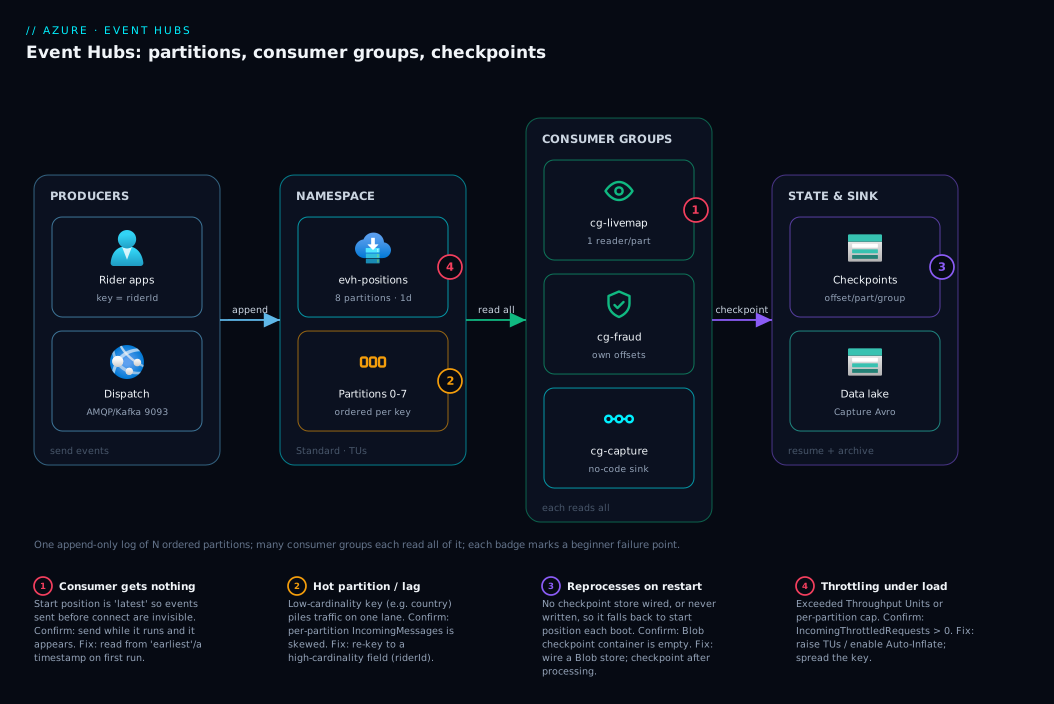
The shape to remember: producers → one hub of N ordered partitions → many consumer groups each reading all of it → checkpoints in Blob so each can resume. Everything else is sizing and error-handling around that spine.
Real-world scenario
Lumio Mobility (fictional, but a very real shape) runs a ride-hailing platform across three Indian cities. Their original design pushed every rider GPS ping into an Azure SQL table and had four services poll it every few seconds. Under evening surge — roughly 220,000 pings/minute — SQL throttled (DTU pinned at 100%), the live map lagged 40–90 seconds, and the fraud service’s polling blocked the warehouse’s. Every team fought over one table.
They moved ingestion to Event Hubs Standard, and the early mistakes were instructive. A junior engineer created the hub with 2 partitions (“we’ll grow it later”) and keyed by city (three values). One partition carried two cities and ran hot, its consumer lagging while the other sat half-idle — and because it was Standard they could not add partitions without recreating the hub. They rebuilt evh-rider-positions with 8 partitions, keyed by riderId (hundreds of thousands of values, evenly spread). Lag flattened across all lanes.
The second mistake was checkpoints. The live-map service set its start position to earliest and forgot to wire a checkpoint store, so every deploy reprocessed the entire retained day — a 30-minute storm of duplicate map updates per release. A Blob checkpoint store plus switching the default start to latest fixed it: restarts resume from the last checkpoint, a fresh group only gets new events. They also made the map-update idempotent (keyed by riderId + timestamp) so the unavoidable at-least-once redelivery was harmless.
Finally they gave each team its own consumer group instead of sharing $Default. Before, the four services on one group were unknowingly splitting the stream — each event reached only one of them, so the fraud service was “missing” three-quarters of events and nobody understood why. With four groups, each service saw 100% of the feed. The warehouse stopped polling entirely: Event Hubs Capture wrote raw Avro to a Data Lake container every five minutes.
Net result: evening lag dropped from ~60s to under 2s, SQL CPU fell off a cliff, and the only ongoing cost was a couple of Throughput Units plus Capture storage — near ₹6,000–8,000/month. Every fix was a concept fix (right partition count, right key, real checkpoints, one group per app), not a bigger SKU.
Advantages and disadvantages
Event Hubs is superb at one shape of problem and a poor fit for others:
| Advantages | Disadvantages |
|---|---|
| Massive ingest throughput (millions/sec on higher tiers) | Partition count is fixed at create on Standard — a permanent decision |
| Many independent consumers via consumer groups (broadcast + replay) | No per-message ack/dead-letter like a queue; you manage offsets yourself |
| Per-partition ordering with a partition key | No global ordering across the hub |
| Built-in replay within the retention window | Retention is bounded (7 days on Standard) — not a permanent store |
| Capture lands raw events to a lake with zero code | Not a request/response or competing-consumers system |
| Kafka-protocol compatible (Standard+) — reuse Kafka clients/tools | Checkpointing + idempotency are your responsibility |
When each side matters: choose Event Hubs for high-volume telemetry, multiple consumers each needing the full feed, and replay. Reach for a queue (Service Bus) instead for work distribution, dead-lettering, scheduling, or transactions — command/work semantics, not stream semantics. Reach for Event Grid for lightweight reactive push of discrete events (a blob was created) rather than a log you pull from. The three coexist; they solve different problems.
Hands-on lab
This lab creates a Standard namespace and hub, sends a few events, and adds a consumer group — cheap to run briefly (delete it after). You won’t build a full processor; you’ll see the moving parts. Run in Cloud Shell (Bash).
1. Set variables and create the namespace and hub.
RG=rg-evh-lab
LOC=centralindia
NS=evhns-lab-$RANDOM          # namespace name must be globally unique
HUB=evh-rider-positions

az group create -n $RG -l $LOC

# Standard namespace (consumer groups, Capture, Kafka all need Standard+)
az eventhubs namespace create -g $RG -n $NS -l $LOC --sku Standard

# Event hub with 8 partitions and 1-day retention (partition count is FIXED here)
az eventhubs eventhub create -g $RG --namespace-name $NS -n $HUB \
  --partition-count 8 --cleanup-policy Delete --retention-time-in-hours 24
Expected: both return JSON with "provisioningState": "Succeeded". The partition count you set is now locked in.
2. Inspect the partitions and the default consumer group.
# List partition ids (0..7) — proves the lanes exist
az eventhubs eventhub partition list -g $RG --namespace-name $NS \
  --eventhub-name $HUB --query "[].partitionId" -o tsv

# Every hub starts with the $Default consumer group
az eventhubs eventhub consumer-group list -g $RG --namespace-name $NS \
  --eventhub-name $HUB --query "[].name" -o tsv
Expected: the partition list prints 0 through 7; the consumer-group list prints $Default.
3. Add a second consumer group — this is the “each app gets its own view” step.
az eventhubs eventhub consumer-group create -g $RG --namespace-name $NS \
  --eventhub-name $HUB -n cg-livemap
Expected: JSON for the new cg-livemap group. You now have two independent views of the same hub.
4. Get a connection string and send a few test events. Create a send/listen auth rule and grab its key:
az eventhubs eventhub authorization-rule create -g $RG --namespace-name $NS \
  --eventhub-name $HUB -n labrule --rights Send Listen

CONN=$(az eventhubs eventhub authorization-rule keys list -g $RG \
  --namespace-name $NS --eventhub-name $HUB -n labrule \
  --query primaryConnectionString -o tsv)
echo "Got a connection string (keep it secret)."
Send a few events with a tiny Python script (pip install azure-eventhub); note the partition_key, which keeps one rider’s events in one ordered partition. Export the vars first (export CONN HUB):
import os, json
from azure.eventhub import EventHubProducerClient, EventData

producer = EventHubProducerClient.from_connection_string(
    os.environ["CONN"], eventhub_name=os.environ["HUB"])
with producer:
    batch = producer.create_batch(partition_key="rider-7421")  # same key → one lane → ordered
    for i in range(5):
        batch.add(EventData(json.dumps({"riderId": "rider-7421", "seq": i})))
    producer.send_batch(batch)
print("Sent 5 events keyed by rider-7421")
Expected: Sent 5 events keyed by rider-7421 — sharing a key, all five land in the same partition, in order.
5. Confirm they arrived via the namespace metrics:
NSID=$(az eventhubs namespace show -g $RG -n $NS --query id -o tsv)
az monitor metrics list --resource "$NSID" \
  --metric IncomingMessages --interval PT1M --aggregation Total -o table
Expected: a non-zero Total for IncomingMessages in the latest minute.
6. Tear down so nothing bills:
az group delete -n $RG --yes --no-wait
For reference, the same hub as Bicep — note partition count is a create-time property you can’t later change on Standard:
param location string = resourceGroup().location
param namespaceName string
param hubName string = 'evh-rider-positions'

resource ns 'Microsoft.EventHub/namespaces@2024-01-01' = {
  name: namespaceName
  location: location
  sku: { name: 'Standard', tier: 'Standard', capacity: 1 } // capacity = Throughput Units
  properties: { isAutoInflateEnabled: true, maximumThroughputUnits: 4 }
}

resource hub 'Microsoft.EventHub/namespaces/eventhubs@2024-01-01' = {
  parent: ns
  name: hubName
  properties: {
    partitionCount: 8          // FIXED for the life of the hub on Standard
    messageRetentionInDays: 1  // 1–7 on Standard
  }
}

resource cg 'Microsoft.EventHub/namespaces/eventhubs/consumergroups@2024-01-01' = {
  parent: hub
  name: 'cg-livemap'
}
Common mistakes & troubleshooting
The failures every beginner hits in their first week — symptom → root cause → confirm → fix:
| # | Symptom | Root cause | Confirm | Fix |
|---|---|---|---|---|
| 1 | “My consumer receives nothing” (but sends succeed) | Starting position is latest and events were sent before the consumer connected | Send a new event while the consumer runs — it appears | Use earliest for a first read, or start the consumer before sending |
| 2 | Service reprocesses the whole day on every restart/deploy | No checkpoint store wired, or checkpoint never written | Inspect the Blob checkpoint container — empty/missing blobs | Add a Blob checkpoint store; checkpoint after processing |
| 3 | Two services on one group each “miss” most events | They share one consumer group, so partitions are split between them | Count events each receives — they sum to the total | Give each app its own consumer group |
| 4 | One partition lags; others are fine | Hot partition from a low-cardinality key (e.g. city) |
Per-partition IncomingMessages metric is skewed |
Re-key to a high-cardinality field (riderId) |
| 5 | Sends start failing/throttling under load | Exceeded Throughput Units (namespace) or per-partition cap | IncomingThrottledRequests metric > 0 |
Raise TUs / enable Auto-Inflate; spread the key |
| 6 | “I need to add partitions” but the option is greyed out | Partition count is fixed at create on Standard | az eventhubs eventhub show shows the count |
Recreate the hub with more partitions (Premium/Dedicated can grow) |
| 7 | Older events vanished before a consumer caught up | Retention elapsed (default 1 day) | Check messageRetentionInDays |
Increase retention (≤7 on Standard) or process faster |
| 8 | Duplicate processing after a crash | At-least-once redelivery on restart is normal | Logs show the same sequence reprocessed | Make processing idempotent; checkpoint after success |
| 9 | Two reader instances fight over a partition | Both started against the same partition without ownership coordination | SDK logs show ownership/epoch churn | Use the processor SDK (EventProcessorClient) so ownership is managed |
| 10 | Can’t connect with a Kafka client | Kafka endpoint needs Standard+ and the right port/SASL config | Tier is Basic, or wrong endpoint/port | Use Standard+; connect to port 9093 with SASL over TLS |
The most common single mistake is #1 — latest vs earliest. A beginner sends ten events, starts a consumer, sees nothing, and concludes the hub is broken. It isn’t: a stream only shows what arrives after you join unless you ask for history.
Best practices
- Pick partition count for future peak parallelism, not today’s load — on Standard you can’t add later, so round up (8–16 for growth; 4 for a throwaway).
- Key by a high-cardinality field (
userId,deviceId,riderId) so load spreads evenly; never key by something with a handful of values. - One consumer group per independent consuming application — never make separate apps share a group.
- Always wire a checkpoint store (Blob) and checkpoint after processing, at a sensible interval (every N events or T seconds) — not on every event (slow), not never (reprocessing storm).
- Make processing idempotent — at-least-once redelivery on restart is guaranteed, so handlers must be safe to run twice.
- Choose the starting position deliberately —
latestfor “only new events,”earliest/timestamp for backfills and replays. - Enable Auto-Inflate so Throughput Units scale under bursts instead of throttling; right-size retention to slowest-consumer lag plus a margin, not “max just in case.”
- Use Event Hubs Capture to land raw events in a lake rather than writing custom archival consumers.
- Authenticate with managed identity / Microsoft Entra, not long-lived connection strings, beyond a lab.
- Prefer the processor SDK (
EventProcessorClient) so ownership, checkpoint coordination, and rebalancing are handled for you.
Security notes
- Use Microsoft Entra ID + managed identity for producers and consumers wherever you can, with RBAC roles Azure Event Hubs Data Sender and Azure Event Hubs Data Receiver — least privilege, no shared keys to leak. SAS connection strings are fine for a lab but a credential burden in production. See Managed Identity: System- vs User-Assigned.
- Scope SAS rules narrowly when you must use them — only
Sendto producers, onlyListento consumers, at the hub level not the namespace, and rotate keys. - Lock down the network with Private Endpoints and the namespace firewall so the hub isn’t public; allow only trusted subnets/IPs. Protect the checkpoint Blob container too (it reveals consumer progress and topology).
- Don’t put secrets in event bodies — events flow to many consumers and into Capture files in a lake; treat the payload as broadly readable. Enable diagnostic logging to Azure Monitor for audit, pairing with Azure Monitor & Application Insights.
Cost & sizing
What drives the Event Hubs bill, and how to keep it small:
- Throughput Units (Standard) / Processing Units (Premium) are the main lever. One TU buys ~1 MB/s or 1,000 events/s ingress and ~2 MB/s egress, billed per TU-hour. Start with 1 TU and enable Auto-Inflate to scale only when needed.
- Ingress events are billed per million — usually tiny next to TU cost, but worth knowing for very chatty streams.
- Capture (if enabled) bills a separate per-TU charge plus the Blob/Data Lake storage it writes to.
- Premium/Dedicated and longer retention cost more — step up only when Standard’s limits (32 partitions, 7-day retention, TU ceiling) genuinely bind.
A rough monthly picture for a small production stream (a few MB/s, 8 partitions):
| Tier / item | What it gives you | Rough INR / month | When to pick it |
|---|---|---|---|
| Basic | Queue-like, no consumer groups beyond $Default, 1-day retention, no Capture/Kafka | lowest | Almost never for real streams — too limited |
| Standard, 1–2 TU | Consumer groups, Capture, Kafka, 7-day retention, Auto-Inflate | ~₹2,000–6,000 | The default for most first projects |
| Standard + Capture | Above + raw events to a lake | + ~₹1,500–3,000 (incl. storage) | You want analytics/audit without custom code |
| Premium (1 PU) | Isolation, more partitions, longer retention, lower latency | ~₹40,000+ | High/steady throughput, strict isolation |
| Dedicated | A whole reserved cluster | very high | Massive scale; rarely a beginner’s first move |
Sizing heuristic: 1 TU per ~1 MB/s of peak ingress, partitions ≥ peak parallel consumers, retention = slowest-consumer lag + margin, Auto-Inflate on. Most first projects live comfortably on Standard with 1–2 TU. There’s no permanent free tier, but the lab above costs only paise if you delete it promptly.
Interview & exam questions
1. Difference between Event Hubs and a Service Bus queue? A queue is competing consumers — each message goes to one consumer and is removed when completed. Event Hubs is a stream/log — events are appended and retained, and many consumers (via consumer groups) each read the full feed independently and can replay within the retention window. Queues are for work distribution; Event Hubs for high-volume telemetry.
2. What is a partition and why does its count matter? An ordered, append-only lane of the hub — the unit of ordering (within a partition, not across) and parallelism (one active reader per partition per group). On Standard the count is fixed at create, permanently capping read parallelism, so size for future peak.
3. What does a partition key do? It’s hashed to choose the partition an event lands in, and the same key always maps to the same partition — keeping one entity’s events (e.g. one riderId) in one ordered lane. No key means round-robin (even load, no per-entity order); a low-cardinality key causes a hot partition.
4. What is a consumer group and why give each app its own? An independent view of the whole hub with its own bookmarks. Separate apps each get their own group so each sees every event and tracks progress independently; sharing one group splits the partitions between them and each event reaches only one app (queue behaviour).
5. Define offset, sequence number and checkpoint. Offset = a per-partition position token (the resume marker). Sequence number = a per-partition monotonic event counter (human-readable position). Checkpoint = a persisted “group G processed partition P up to N,” stored by convention in Blob, so a restart resumes exactly.
6. A consumer receives no events though producers are sending. Why? Its start position is latest and the events were enqueued before it connected — a stream only shows new arrivals unless you ask for history. Fix by starting from earliest (or a timestamp), or run the consumer before producing.
7. Is processing exactly-once, and what follows from that? No — it’s at-least-once: after a crash, events processed but not yet checkpointed are redelivered. So processing must be idempotent (safe to run twice), typically by de-duplicating on a business key, and you should checkpoint only after successful processing.
8. What is Event Hubs Capture, and how does Event Hubs relate to Kafka? Capture auto-writes incoming events to Blob/Data Lake (Avro) on a size/time window with no consumer code — the standard way to land raw events for analytics or audit. Separately, Standard+ exposes a Kafka-protocol endpoint, so Kafka clients work against Event Hubs (topic ≈ event hub, partition ≈ partition, consumer group ≈ consumer group) without running your own cluster.
These map to AZ-204 (Developer Associate) — develop event-based and message-based solutions — and DP-203 / AZ-305, where Event Hubs is the ingest layer of real-time data architectures. A compact mapping:
| Question theme | Primary cert | Objective area |
|---|---|---|
| Stream vs queue vs event routing | AZ-204 | Develop message/event-based solutions |
| Partitions, keys, consumer groups | AZ-204 / DP-203 | Event Hubs design; real-time ingestion |
| Offsets, checkpoints, idempotency | AZ-204 | Implement event processing reliably |
| Capture to a lake | DP-203 | Ingest & store streaming data |
| Throughput Units, scaling, tiers | AZ-204 / AZ-305 | Size and operate messaging |
Quick check
- You have one event hub with 4 partitions and run two separate applications that each need every event. How many consumer groups do you create, and why?
- Your stream is keyed by
countryand one partition is lagging while the others are idle. What’s the cause and the fix? - True or false: scaling a consumer app to 12 instances against an 8-partition hub (one consumer group) gives you 12-way parallel reading.
- A consumer reprocesses the entire retained log every time it restarts. What single thing is almost certainly missing?
- You start a brand-new consumer, send 100 events, and it receives 0. What’s the most likely setting, and the two ways to fix it?
Answers
- Two consumer groups — one per application. Each group is an independent view, so both apps see all events and track progress separately. Sharing a single group would split the 4 partitions between them, so each event would reach only one app.
- A hot partition:
countryis low-cardinality, so one busy country concentrates on one lane while others idle. Confirm with the per-partitionIncomingMessagesmetric; fix by re-keying to a high-cardinality field (e.g.userId/deviceId) — or send with no key if you don’t need ordering. - False. Max useful parallelism per consumer group equals the partition count, so only 8 instances do work; the other 4 sit idle with nothing to own.
- A checkpoint store (or actually writing checkpoints). Without a persisted bookmark it falls back to its start position every restart. Wire a Blob checkpoint store and checkpoint after successful processing.
- The starting position is
latest, so events enqueued before the consumer connected are invisible. Fix by reading from earliest (or a timestamp) for the first run, or start the consumer before producing.
Glossary
- Event Hubs namespace — the SKU/capacity + endpoint container holding one or more event hubs; the billing boundary.
- Event hub — one named stream inside a namespace (a Kafka topic); where you set partition count, retention, and Capture.
- Partition — an ordered, append-only lane of a hub; the unit of ordering (within it) and parallelism (one reader per group). Fixed at create on Standard.
- Partition key — a value hashed to choose a partition; the same key always maps to the same partition, preserving per-entity order.
- Hot partition — a partition overloaded because a low-cardinality key concentrates traffic onto it.
- Consumer group — an independent view of the whole hub (its own checkpoints); each consuming app should own one.
$Defaultexists on every hub. - Offset — a per-partition position token marking where a reader is; the resume marker stored in a checkpoint.
- Sequence number — a per-partition monotonic event counter (“event #N”); for human-readable position and gap detection.
- Enqueued time — the UTC timestamp an event was accepted; used to replay “everything since” a moment.
- Checkpoint — a persisted “group G processed partition P up to N,” stored by convention in Blob, enabling exact resume after a restart.
- Checkpoint store — the durable store (typically Blob) holding checkpoints and partition ownership/leases for a group.
- Starting position — where a consumer begins with no checkpoint:
latest,earliest, or a sequence/timestamp. - Retention — how long events stay before ageing out (default 1 day, up to 7 on Standard); the replay window.
- Throughput Unit (TU) — the Standard capacity unit (~1 MB/s or 1,000 events/s ingress; ~2 MB/s egress); Processing Unit (PU) is the Premium equivalent.
- Auto-Inflate — automatically raises Throughput Units under load up to a configured maximum, avoiding throttling.
- Event Hubs Capture — built-in auto-writing of raw events to Blob/Data Lake (Avro) on a size/time window, no consumer code.
- At-least-once / idempotency — the delivery guarantee (events may be redelivered after a crash) and its design response (make processing safe to run twice).
Next steps
You can now reason about any Event Hubs design — partitions, keys, consumer groups, offsets and checkpoints. Build outward:
- Next: Azure Functions Triggers & Bindings for Beginners — consume an Event Hub with a serverless function where checkpointing is handled for you.
- Related: Azure Service Bus: Queues vs Topics — When to Use Which — the competing-consumers alternative and exactly when it beats a stream.
- Related: Azure Event Grid System Topics & Event-Driven Storage Events — lightweight reactive event push, the third messaging style.
- Related: Azure Data Services Landscape: Ingest, Store, Process, Serve — where Event Hubs sits as the ingest layer of a real-time pipeline.
- Related: Azure Storage Account Fundamentals — the Blob storage that backs your checkpoints and Event Hubs Capture output.