You have a queue full of work and a database that needs to absorb it. The naive version is a worker that opens a QueueClient, polls in a loop, deserialises each message, opens a CosmosClient, builds an item, handles the retry, acks the message, and prays the process never crashes mid-batch. That is fifty lines of plumbing you will write, get subtly wrong, and maintain forever. Azure Functions bindings delete almost all of it. A trigger binding wakes your function when a message lands on a Storage Queue and hands you the deserialised payload as a method parameter. An output binding takes whatever object you return and writes it to Cosmos DB — no client, no connection string in code, no retry loop. You write the one function in the middle that turns an order message into an order document, and the platform owns the rest.
This is a hands-on tutorial, not a tour. By the end you will have stood up the real thing twice — once by clicking through the Azure portal and once with az CLI — plus a Bicep template that provisions the whole stack reproducibly. You will see the exact function.json (or C# attribute / Python decorator) that declares the bindings, the app settings that wire them to your storage account and Cosmos container, and what the platform does when a message poisons. Every step has an expected output so you know immediately whether it worked, and the article ends with a teardown so the lab costs you nothing.
The mental shift bindings demand is small but real: you stop thinking “connect, then act” and start thinking “declare what flows in and what flows out, then write only the transform.” A queue message flows in through a trigger; a Cosmos document flows out through an output binding; the function body is pure logic. Get that contract right — the binding type, direction, the connection setting name, the queueName, the Cosmos databaseName/containerName — and you have a durable, autoscaling, pay-per-execution pipeline. Get one field wrong and the function silently never fires, which is exactly the failure mode this tutorial teaches you to diagnose.
What problem this solves
The pain bindings remove is integration boilerplate — the repetitive, error-prone glue between a message source and a data sink. Without bindings, every function that touches a queue and a database carries its own copy of: client construction, connection-string handling, trigger wiring, deserialisation, batching, retry-on-throttle, message acknowledgement, and dead-lettering. Multiply that across ten functions and you have ten slightly different, slightly buggy implementations of the same plumbing, plus connection strings smeared across your code.
What breaks without this discipline is subtle and expensive. A hand-written queue consumer that acks a message before the database write completes loses data on a crash. One that opens a CosmosClient per invocation exhausts SNAT ports under load. One that swallows a transient 429 Too Many Requests drops orders silently. One that hard-codes a connection string ships a secret to git history. These are the four most common ways a roll-your-own serverless integration fails in production, and the binding model makes each of them the default-safe path instead.
Who hits this: anyone building event-driven or batch pipelines on Azure serverless — order processing, image-resize fan-out, IoT telemetry landing, webhook ingestion, ETL staging. The queue-in/database-out shape is the single most common Functions pattern, and Cosmos DB is its most common sink because both scale elastically and bill per use. If you are studying for AZ-204 (Developing Solutions for Microsoft Azure), triggers and bindings are a guaranteed exam topic, and the Storage-Queue-to-Cosmos pipeline is the canonical worked example. This tutorial is that example, built for real.
To frame the whole pipeline before the deep dive, here is each moving part, what it does, and the one thing that breaks if you get it wrong:
| Part | Role in the pipeline | Declared as | What breaks if misconfigured |
|---|---|---|---|
| Queue trigger | Wakes the function when a message lands | type: queueTrigger, direction: in |
Wrong queueName → function never fires |
| Queue message | The work item (JSON or string) | Method parameter | Non-JSON body → deserialisation 500s, message poisons |
| Function body | Transforms message → document | Your code | Throws on bad data → 5 retries → poison queue |
| Cosmos output | Writes the returned object as an item | type: cosmosDB, direction: out |
Missing id/partition key → write rejected |
connection setting |
Names the app setting holding the auth | App setting key, not the value | Setting absent → host fails to start the trigger |
| Host (Functions runtime) | Polls, batches, retries, scales | host.json + plan |
Bad batchSize → throughput or memory issues |
Learning objectives
By the end of this article you can:
- Explain the trigger / input / output binding model and state the difference between a binding
directionofinandout, and why a queue trigger is special. - Read and write the binding contract —
function.jsonfor script languages, C# attributes for the isolated worker, and Python v2 decorators — and name every required field for a queue trigger and a Cosmos output. - Provision the full stack — storage account + queue, Cosmos DB account + database + container, and a Function App — three ways: portal,
azCLI, and Bicep. - Wire the bindings to their backing services through the
connectionapp setting, using either a connection string or, preferably, a managed identity with the correct data-plane role. - Drive the pipeline end to end: enqueue a message, watch the function fire, and confirm the document landed in Cosmos — with the exact command/portal path to verify each hop.
- Tune throughput with
batchSize,maxDequeueCount, and Cosmos partition-key design, and explain the trade-off each one makes. - Diagnose the five classic failures — function never fires, message poisons, Cosmos
429, missing partition key, and auth denied — from symptom to root cause to fix.
Prerequisites & where this fits
You should already know what an Azure Function is — a small piece of code the platform runs in response to an event, billed per execution — and ideally have written a basic HTTP-triggered function. If triggers and bindings are brand new, read Azure Functions triggers and bindings explained for beginners first; this article assumes you grasp that a trigger starts a function and a binding connects it to data. You should be comfortable running az in Cloud Shell, reading JSON output, and editing a JSON or code file. Basic familiarity with Azure Storage (the Azure Storage account fundamentals — accounts, queues, blobs) and with Cosmos DB (Azure Cosmos DB APIs explained — we use the NoSQL / Core API throughout) helps, but the lab provisions both from scratch.
This sits in the Serverless integration track. It is the practical counterpart to the conceptual Azure Functions serverless patterns overview — that piece tells you which pattern to reach for; this one builds the most common one brick by brick. It pairs with managed identity: system-assigned vs user-assigned patterns, because the secure way to wire bindings is identity, not keys, and with Azure Key Vault: secrets, keys and certificates if you must keep a connection string. If your source is a richer broker than a queue, the Service Bus queue with a .NET sender and receiver walkthrough is the next step up, and its trigger binding works identically to the one here. For deploying the Bicep, the deploy your first Bicep file from scratch primer covers the az deployment group create mechanics.
A quick map of who owns what during a binding incident, so you debug in the right place:
| Layer | What lives here | Failure classes it causes |
|---|---|---|
| Queue (Storage) | Messages, visibility timeout, poison queue | Function never fires (wrong name); poison loop |
| Function host | Trigger polling, batching, scaling, retries | Trigger won’t start (missing connection); throughput |
| Binding config | type/direction/connection/names |
Silent no-op; deserialisation 500 |
| Function code | The transform logic | Throws → retry → poison; bad output shape |
| Cosmos DB | Items, partition keys, RU/s | 429 throttling; partition-key rejection |
| Identity / RBAC | Managed identity, data-plane roles | Auth denied (403) on read or write |
Core concepts
Five ideas make every later step obvious.
A binding is a declarative connection between your function and a data source. Instead of writing code to talk to a service, you declare a binding — its type (the service, e.g. queueTrigger, cosmosDB), its direction (in for data flowing into your function, out for data flowing out), and a connection setting that names where the credentials live. The Functions runtime reads that declaration and does the I/O for you: it fetches the queue message and hands it to your parameter, or it takes your returned object and writes it to Cosmos. Your code never constructs a QueueClient or CosmosClient.
A trigger is a special input binding that also starts the function. Every function has exactly one trigger. An ordinary input binding (direction: in) fetches reference data when the function already ran. A trigger does both — it is what causes the function to run at all and it delivers the triggering payload. The queue trigger fires when a message appears on a named queue, hands you the message body, and — crucially — only deletes the message after your function returns successfully. If your function throws, the message becomes visible again and is retried. This automatic, after-success acknowledgement is the single most valuable thing the trigger gives you.
Direction is the whole grammar. in means “the platform reads this and gives it to me.” out means “I produce this and the platform writes it.” A queue trigger is in. A Cosmos output is out. You can also have a Cosmos input binding (in) that looks up an existing document by id, and a queue output binding (out) that posts a new message — bindings compose freely. This tutorial uses a queue trigger (in) and a Cosmos output (out); that is the queue-to-database pipeline.
The connection field names a setting, not a secret. A binding’s connection property is the name of an app setting, never the connection string itself. Write "connection": "StorageConnection" and the runtime looks up an app setting called StorageConnection. That indirection keeps secrets out of function.json and your repo, and lets the same binding use a connection string in dev and a managed identity in production (identity-based connections use a prefix like StorageConnection__serviceUri). Get this name wrong and the host cannot start the trigger — a very common first-run failure.
The binding does the marshalling, so the message shape and the document shape matter. A queue message is text. If your function parameter is a string, you get the raw text; if it is a typed object (a POCO / dataclass / plain object), the runtime deserialises the JSON for you — and a message that is not valid JSON will fail to bind and poison after retries. On the output side, the object you hand the Cosmos binding becomes a document, so it must carry an id (or the binding generates one) and a value for the container’s partition key. The contract is invisible until it breaks, which is why the troubleshooting section spends most of its time here.
The binding vocabulary in one table
Pin these down before the deep sections; the glossary repeats them for lookup:
| Concept | One-line definition | Where it lives | Why it matters here |
|---|---|---|---|
| Trigger | The one binding that starts the function | function.json / attribute |
Queue trigger fires on a message |
| Input binding | Data the platform reads in for you (in) |
Binding config | Cosmos lookup by id (optional) |
| Output binding | Data the platform writes out for you (out) |
Binding config | Writes your object to Cosmos |
direction |
in or out |
Each binding | The entire grammar of bindings |
connection |
App-setting name holding auth | Binding config | Indirection keeps secrets out of code |
queueName |
The queue the trigger watches | Trigger config | Wrong name → never fires |
| Partition key | The field Cosmos shards on | Cosmos container + each item | Missing it → write rejected |
| Poison queue | <name>-poison for repeated failures |
Storage, auto-created | Where bad messages land after retries |
maxDequeueCount |
Retries before a message poisons | host.json |
Default 5; tune for flaky work |
batchSize |
Messages fetched per poll | host.json |
Throughput vs concurrency knob |
| Isolated worker | .NET runs out-of-process from host | Project model | The current, recommended .NET model |
The binding contract: function.json, attributes, and decorators
Bindings are declared differently per language, but the fields are identical because they all compile to the same runtime contract. The canonical function.json makes every language click, so start there even if you write C#.
function.json — the canonical declaration (script languages)
For script-based languages (JavaScript, PowerShell, Python v1) each function is a folder with a function.json listing its bindings. For our pipeline:
{
  "bindings": [
    {
      "name": "orderMessage",
      "type": "queueTrigger",
      "direction": "in",
      "queueName": "orders",
      "connection": "StorageConnection"
    },
    {
      "name": "orderDocument",
      "type": "cosmosDB",
      "direction": "out",
      "databaseName": "ShopDB",
      "containerName": "orders",
      "createIfNotExists": false,
      "partitionKey": "/customerId",
      "connection": "CosmosConnection"
    }
  ]
}
Read it top to bottom: a queue trigger named orderMessage watches the orders queue using the StorageConnection setting; a Cosmos output named orderDocument writes to the orders container in ShopDB using CosmosConnection. The name values become the parameters/return your code sees. Every required field and its meaning:
| Field | Applies to | Required? | Meaning | Gotcha |
|---|---|---|---|---|
name |
All | Yes | The variable name in your code | Must match the code parameter exactly |
type |
All | Yes | The binding type | queueTrigger not queue for the trigger |
direction |
All | Yes | in or out |
Trigger is always in |
connection |
Both | Yes | App-setting name for auth | Not the connection string itself |
queueName |
Queue | Yes | Queue to watch / write | Lowercase, 3–63 chars, no underscores |
databaseName |
Cosmos | Yes | Target database | Must already exist (unless creating) |
containerName |
Cosmos | Yes | Target container | Older runtimes call it collectionName |
partitionKey |
Cosmos | If creating | Partition key path | Needed when createIfNotExists is true |
createIfNotExists |
Cosmos | No | Auto-create the container | Default false; true provisions at 400 RU/s |
C# isolated worker — attributes
The modern .NET model is the isolated worker process (your code runs in its own process, decoupled from the host runtime — the recommended model for .NET 6+). Bindings are C# attributes; there is no function.json (it is generated at build). The same pipeline:
using Microsoft.Azure.Functions.Worker;

public class ProcessOrder
{
    [Function("ProcessOrder")]
    [CosmosDBOutput("ShopDB", "orders",
        Connection = "CosmosConnection",
        PartitionKey = "/customerId",
        CreateIfNotExists = false)]
    public OrderDocument Run(
        [QueueTrigger("orders", Connection = "StorageConnection")] Order order,
        FunctionContext context)
    {
        var log = context.GetLogger("ProcessOrder");
        log.LogInformation("Processing order {id} for {cust}", order.OrderId, order.CustomerId);

        return new OrderDocument
        {
            id = order.OrderId,            // Cosmos item id
            customerId = order.CustomerId, // partition key value
            total = order.Total,
            status = "received"
        };
    }
}
The [QueueTrigger] attribute is the trigger; the [CosmosDBOutput] attribute on the method declares the return value goes to Cosmos. The runtime deserialises the queue JSON into your Order POCO and serialises the returned OrderDocument into a Cosmos item. Note id and customerId (the partition key) on the output — non-negotiable.
Python v2 — decorators
The Python v2 programming model uses decorators on a single file, no function.json:
import azure.functions as func

app = func.FunctionApp()

@app.function_name(name="ProcessOrder")
@app.queue_trigger(arg_name="msg", queue_name="orders",
                   connection="StorageConnection")
@app.cosmos_db_output(arg_name="doc", database_name="ShopDB",
                      container_name="orders",
                      connection="CosmosConnection",
                      create_if_not_exists=False)
def process_order(msg: func.QueueMessage, doc: func.Out[func.Document]) -> None:
    body = msg.get_json()  # raises if not valid JSON
    doc.set(func.Document.from_dict({
        "id": body["orderId"],
        "customerId": body["customerId"],  # partition key
        "total": body["total"],
        "status": "received"
    }))
Here the output is an explicit func.Out[Document] parameter you .set(), rather than a return value. The three models are interchangeable in behaviour; pick by language. How they line up:
| Concern | function.json (script) | C# isolated (attributes) | Python v2 (decorators) |
|---|---|---|---|
| Trigger declaration | type: queueTrigger |
[QueueTrigger("orders")] |
@app.queue_trigger(...) |
| Output declaration | type: cosmosDB, direction: out |
[CosmosDBOutput(...)] on method |
@app.cosmos_db_output(...) |
| Message → object | Auto-deserialise to param type | Auto-deserialise to POCO | msg.get_json() |
| Writing the doc | Return / set the named output | return the object |
doc.set(...) |
| Where config lives | function.json file |
Compiled from attributes | Compiled from decorators |
| Connection setting | connection field |
Connection = property |
connection= kwarg |
How the queue trigger actually behaves
The trigger is more than “run when a message arrives” — its polling, locking, retry and scaling semantics decide your throughput and your data safety. Knowing them prevents the two worst mistakes: assuming exactly-once delivery, and tuning blindly.
Polling, visibility, and at-least-once delivery
The host polls the queue on an exponential back-off (fast when busy, backing off toward a ceiling — default max 1 minute — when idle). When messages exist it fetches up to batchSize of them and runs your function concurrently for each. While a message is being processed it is invisible (the visibility timeout), so no other host instance grabs it. On success the host deletes the message; on failure (your function throws or times out) it does nothing, the visibility timeout lapses, and the message reappears for another attempt.
This gives you at-least-once delivery, never exactly-once. If your function writes to Cosmos then crashes before the host deletes the message, the message is redelivered and you write the document again. The defence is idempotency: use a deterministic id (e.g. the order id) so the second write is an upsert of the same item, not a duplicate. Bindings make at-least-once easy and exactly-once impossible — design for it.
Retries, the poison queue, and dequeue count
Each redelivery increments the message’s dequeue count. When it exceeds maxDequeueCount (default 5), the host stops retrying and moves the message to a poison queue named <queueName>-poison (here, orders-poison), auto-created on first use. The poison queue is your dead-letter: bad payloads, persistent bugs, and downstream outages that outlast five attempts all land there for inspection instead of looping forever and burning money. The knobs that govern all of this live in host.json:
Setting (host.json) |
Controls | Default | Range / note | When to change |
|---|---|---|---|---|
batchSize |
Messages fetched per poll, run concurrently | 16 | 1–32 | Lower for heavy/memory-bound work; higher for tiny messages |
newBatchThreshold |
Fetch a new batch when in-flight drops below this | batchSize/2 |
≥0 | Raise to keep the pipeline fuller |
maxDequeueCount |
Retries before poison | 5 | ≥1 | Raise for flaky downstreams; lower to fail fast |
visibilityTimeout |
How long a message stays hidden while processing | 0 (immediate retry) | up to 7 days | Set to back off between retries |
maxPollingInterval |
Idle back-off ceiling | 1 min | 1s–7 days | Lower for snappier pickup on bursty low traffic |
A worked intuition: with batchSize: 16 and newBatchThreshold: 8, a single instance keeps up to 24 messages in flight. On Consumption the platform also scales out instances by queue depth, so total concurrency is instances × (batchSize + newBatchThreshold). That is why a Functions queue consumer absorbs spikes a single VM never could.
Message types your parameter can be
The runtime adapts the message to your parameter type. Choosing the right one avoids manual parsing:
| Parameter type | You receive | Use when |
|---|---|---|
string |
Raw message text | Message is plain text, or you parse yourself |
| POCO / class / dict | Deserialised JSON object | Message is JSON (the common case) |
byte[] |
Raw bytes | Binary payloads |
QueueMessage (SDK type) |
Full envelope: id, dequeue count, insertion time | You need metadata (e.g. retry count) |
BinaryData / JObject |
Loosely-typed JSON | Schema varies per message |
If you bind to a POCO and the message is not valid JSON, binding fails before your code runs, the attempt counts as a failure, and after maxDequeueCount the message poisons. That is the most common “my function never logs anything but messages disappear” mystery — the failure is in the bind, not your body.
How the Cosmos DB output binding actually behaves
The output binding turns a returned object into a Cosmos item via an upsert. Two things decide whether it succeeds: the item shape and the container’s throughput.
The item shape: id and partition key are mandatory
Cosmos requires every item to have an id (unique within a logical partition) and a value for the container’s partition key path. The output binding uses the id on your object if present (otherwise generates a GUID) and reads the partition-key value from the field the container’s key path points at (/customerId → the object’s customerId).
If your object lacks the partition-key field, the write is rejected — the item has nowhere to shard. If two objects share an id and partition key, the binding upserts (overwrites), exactly what you want for idempotent redelivery. Make id the natural business key (order id, event id) so retries are safe. The binding’s key properties:
| Binding property | Meaning | Default | Gotcha |
|---|---|---|---|
databaseName |
Target database | — (required) | Must exist unless createIfNotExists |
containerName |
Target container | — (required) | Older API: collectionName |
partitionKey |
Key path, used only when creating | — | Item must carry a value at this path regardless |
createIfNotExists |
Auto-create container | false |
Creates at 400 RU/s manual throughput |
connection |
App-setting name for auth | — (required) | Connection string or identity prefix |
preferredLocations |
Region hint for multi-region accounts | none | Set for geo-distributed reads/writes |
Throughput, 429s, and why the binding retries
Every Cosmos write costs Request Units (RU/s) — a normalised currency for throughput. A small (~1 KB) point write costs roughly 5 RU. If your incoming write rate exceeds the container’s provisioned RU/s, Cosmos returns 429 Too Many Requests with a x-ms-retry-after-ms header. The Cosmos output binding (via the SDK underneath) automatically retries 429s up to a bounded count, honouring the retry-after — so transient throttling is handled for you. But sustained over-rate still surfaces as failures, which means the message eventually poisons. The fixes are real Cosmos levers:
| Symptom | Cause | Fix | Trade-off |
|---|---|---|---|
Occasional 429, recovers |
Brief spike over provisioned RU/s | Binding’s built-in retry handles it | None — expected |
Sustained 429, messages poison |
Write rate > provisioned RU/s for minutes | Raise manual RU/s, or use autoscale RU/s | Higher cost; autoscale bills up to max |
429 only at flash-sale peaks |
Bursty, hard to provision flat | Autoscale (scales 10%→100% of max) | Pay for the peak ceiling briefly |
Hot partition 429 while account underused |
Skewed partition key | Redesign partition key for even spread | Schema/migration effort |
Partition-key choice is the highest-leverage Cosmos decision and it lives in your transform. A good key (high cardinality, even access — customerId, tenantId) spreads load; a bad one (a constant, or status with three values) creates hot partitions that throttle even when the account has spare RU/s. The binding cannot fix a bad key — you choose it when you shape the document.
Wiring the connection: keys vs managed identity
The connection setting is where security is won or lost. Two ways to authenticate a binding to its backing service.
Connection string (simplest, least secure). The app setting holds the full secret — a storage account key or a Cosmos primary key. Easy to start with, but the secret sits in app settings, can leak, and must be rotated manually. Use it only for local dev or a quick lab.
Identity-based connection (recommended). The Function App gets a managed identity, is granted a data-plane RBAC role on the storage and Cosmos accounts, and the binding authenticates as that identity — no secret anywhere. Instead of one setting holding a string, you set a prefix of settings pointing at the resource by URI:
# Identity-based storage connection: a prefix, not a connection string
StorageConnection__serviceUri = https://stshopprod.queue.core.windows.net
StorageConnection__credential = managedidentity     # (optional; implied for MI)

# Identity-based Cosmos connection
CosmosConnection__accountEndpoint = https://cosmos-shop-prod.documents.azure.com:443/
The runtime sees the __serviceUri / __accountEndpoint suffix and switches to token auth via the identity. The roles you must grant (data-plane, not control-plane — a common trip-up):
| Service | Role for this pipeline | What it allows | Note |
|---|---|---|---|
| Storage Queue (trigger) | Storage Queue Data Message Processor | Get + delete messages (peek-lock semantics) | Reader role can’t delete → message never acks |
| Storage Queue (also) | Storage Queue Data Contributor | Full message R/W incl. add | Use if the function also enqueues |
| Cosmos DB (output) | Cosmos DB Built-in Data Contributor | Read + write items (data plane) | Assigned via az cosmosdb sql role assignment, not IAM blade |
| Blob (host storage) | Storage Blob Data Owner | Host’s AzureWebJobsStorage internals |
Needed if the host storage itself is identity-based |
A critical gotcha: Cosmos data-plane RBAC is separate from Azure IAM. You assign it with az cosmosdb sql role assignment create, not the portal’s Access Control (IAM) blade — “Contributor” in IAM gives control-plane rights (manage the account) but zero data access, so the binding still gets 403. This catches almost everyone the first time.
Architecture at a glance
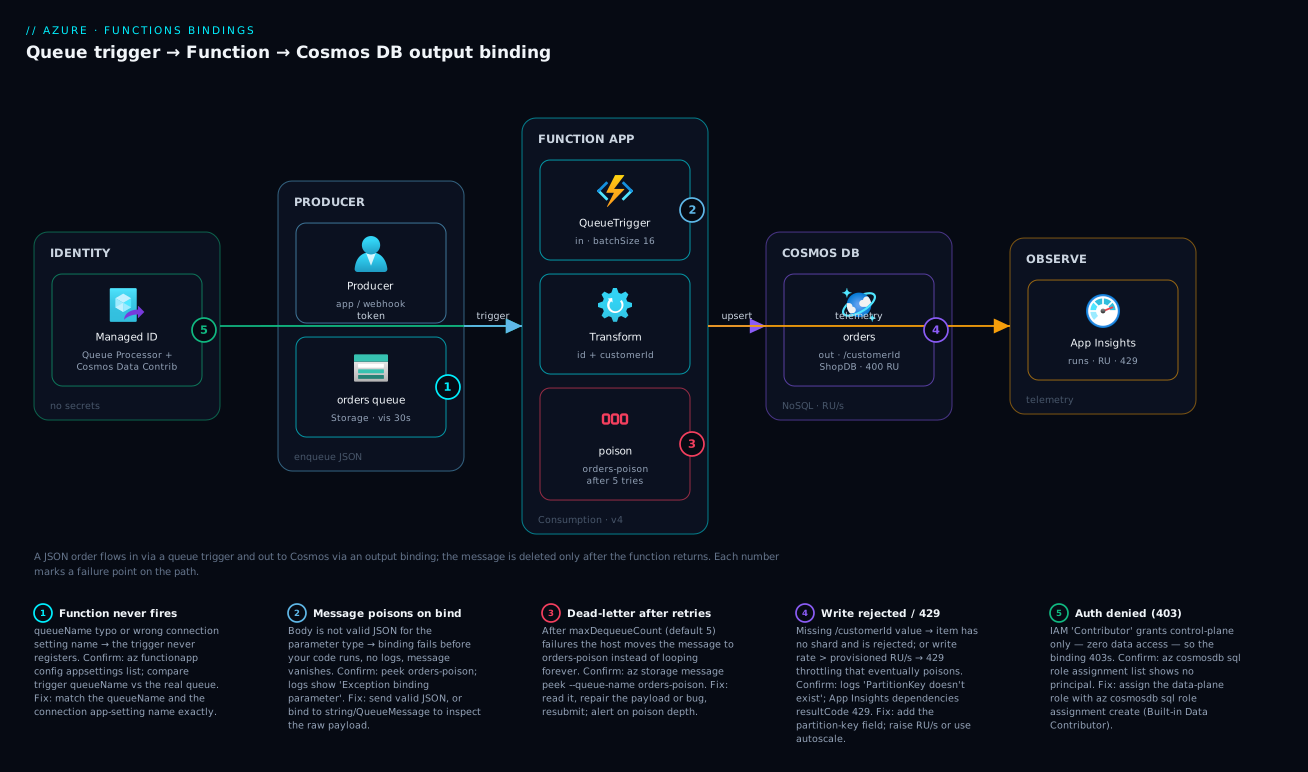
Walk the diagram left to right and you have read the whole pipeline. A producer — any app, a webhook, a load test, even you with one az command — drops a JSON order message onto the orders queue in a standard storage account. The message sits there durably (up to 7 days by default) until the Function App’s queue trigger notices it. The trigger fetches a batch, marks each message invisible, and invokes your ProcessOrder function once per message, handing it the deserialised order. Your code does the only real work — shaping the order into a document with an id and a customerId partition key — and returns it. The Cosmos DB output binding upserts that document into the orders container in the ShopDB database. The instant your function returns without throwing, the host deletes the queue message; if it threw, the message reappears and is retried up to five times before landing in the orders-poison queue.
Two cross-cutting concerns ride alongside the happy path. Identity sits to the left of both data stores: the Function App’s managed identity carries the Storage Queue Data Message Processor role (to get and delete messages) and the Cosmos DB Built-in Data Contributor role (to write items), so no key appears in code or config. Observability sits to the right: every invocation, the queue depth, the Cosmos RU charge, and any 429 or poison event flow into Application Insights / Azure Monitor, which is where you confirm the pipeline is healthy and where you catch a poison build-up before it becomes a backlog. The numbered badges mark the five hops where this pipeline breaks in practice, and the legend names each one as symptom · how to confirm · fix.
Real-world scenario
Northwind Retail runs a flash-sale platform. On a normal day their storefront posts a few hundred orders an hour; during a sale, 8,000 orders land in ninety seconds. The original design was a single Linux VM running a Node worker that polled a Storage Queue, built a CosmosClient per message, wrote the order, then deleted the message. It worked in testing. The first real sale took it down in four minutes.
Three things failed at once. First, the worker created a new CosmosClient on every invocation; under burst, the VM exhausted outbound connections and SNAT ports, and writes timed out. Second, because the code deleted the message before confirming the Cosmos write under load (a race introduced in a “performance” refactor), roughly 1.2% of orders were acknowledged but never persisted — silent data loss found only in reconciliation the next morning. Third, the single VM could not scale with queue depth, so the backlog grew to 40 minutes and customers saw “order pending” spinners until it drained.
The rebuild replaced the worker with a single Azure Function on a Consumption plan: a queue trigger on orders and a Cosmos output binding to the orders container. The function body went from ~70 lines to 9 — read the order, set id = orderId and customerId as the partition key, return the document. Four wins fell out of the binding model for free. The platform now deletes the message only after the function returns successfully, eliminating the ack-before-write data loss outright. The Cosmos binding reuses a pooled, host-managed client, so the per-invocation connection storm vanished. The Consumption plan scaled to 47 instances at peak based on queue depth and drained the 8,000-order burst in under two minutes. And making id the deterministic order id turned the inevitable at-least-once redeliveries into harmless upserts instead of duplicates.
The one real tuning task was Cosmos throughput. The first sale threw a wave of 429s because the container ran a flat 1,000 RU/s. They switched it to autoscale RU/s with a 10,000 max; outside sales it idles near the floor, and during a sale it scales to absorb the write rate, the binding’s built-in 429 retry smoothing the brief overshoots. Total ingestion cost dropped versus the always-on VM, because Consumption Functions and autoscale Cosmos both bill for the burst and idle cheap. The lesson on the wall: the binding gave us correctness for free; we only had to size the database.
Advantages and disadvantages
Bindings are a strong default, but they are not free of trade-offs. The honest two-column view:
| Advantages | Disadvantages |
|---|---|
| No client/connection code — far less to write and get wrong | Less control over the client (timeouts, custom serialisers, policies) |
Secrets stay out of code via the connection indirection |
Identity-based setup (roles) has real first-time friction |
| Message deleted only after success → at-least-once safety | At-least-once means you must design for idempotency yourself |
| Host pools and reuses clients → no per-call connection storm | Harder to share one tuned client across many functions |
| Poison queue + retries built in → no dead-letter plumbing | Poison handling is fixed-ish; complex DLQ logic needs code |
| Scales with queue depth on Consumption automatically | Cold starts on Consumption add first-message latency |
| Declarative config is readable and reviewable | A one-character config typo fails silently (never fires) |
| Same model across queues, blobs, Cosmos, Service Bus, Event Hubs | Niche operations (bulk, transactional batch) need the SDK directly |
When the advantages dominate: standard event-driven and batch pipelines — queue/blob/event in, database/queue out — where the transform is simple and throughput is bursty. This is the 90% case, and bindings win decisively. When to drop to the SDK: bulk or transactional-batch Cosmos writes, custom retry/circuit-breaker policies, a shared pre-tuned client, or fine serialisation control. You can mix — keep the trigger binding to start and acknowledge safely, but write to Cosmos with an injected CosmosClient when you need bulk semantics. The trigger’s safety is the part you almost never give up; the output binding is the part you sometimes outgrow.
Hands-on lab
This is the centrepiece. You will build the full pipeline three ways and run it end to end. Pick the portal path or the CLI path to provision (they produce the same thing); the Bicep version is a reproducible bonus. Then deploy the function, enqueue a message, and verify the document landed. Every step states the expected output so you know it worked. Teardown is at the end — do it, and the lab costs effectively nothing.
Lab prerequisites:
| Requirement | How to get it | Verify |
|---|---|---|
| Azure subscription | Free account works | az account show returns your sub |
| Azure CLI ≥ 2.55 (or Cloud Shell) | az upgrade |
az version |
| Functions Core Tools v4 | npm i -g azure-functions-core-tools@4 |
func --version → 4.x |
| .NET 8 SDK or Python 3.11 | per your chosen language | dotnet --version / python --version |
| A region | pick one near you | used as $LOC below |
Set shared variables once (CLI users):
RG=rg-fnbind-lab
LOC=centralindia
SA=stfnbind$RANDOM           # storage: globally unique, lowercase, ≤24 chars
COSMOS=cosmos-fnbind-$RANDOM # cosmos account: globally unique
FUNC=func-fnbind-$RANDOM     # function app: globally unique
echo "SA=$SA COSMOS=$COSMOS FUNC=$FUNC"   # note these — you'll reuse them
Part A — Provision with the Azure portal (click path)
If you prefer CLI, skip to Part B; the result is identical.
-
Create the resource group. Portal → Resource groups → Create. Name
rg-fnbind-lab, pick your region, Review + create → Create. Expected: the group appears in Resource groups within a few seconds. -
Create the storage account. Create a resource → Storage account. Resource group
rg-fnbind-lab; name a unique lowercase value (e.g.stfnbindlab01); Redundancy LRS (cheapest, fine for a lab); leave the rest default; Review + create → Create. Expected: deployment succeeds; the account opens. -
Create the queue. Open the storage account → Data storage → Queues → + Queue. Name it
orders(lowercase, 3–63 chars) → OK. Expected:ordersshows in the queue list, 0 messages. -
Create the Cosmos DB account. Create a resource → Azure Cosmos DB → Azure Cosmos DB for NoSQL → Create. Resource group
rg-fnbind-lab; account name a unique value (e.g.cosmos-fnbind-lab01); Capacity mode Provisioned throughput; check Apply Free Tier Discount if available (1,000 RU/s + 25 GB free); Review + create → Create. This takes a few minutes. Expected: the account deploys; Data Explorer opens. -
Create the database and container. In Data Explorer → New Container. Database id
ShopDB(create new); Container idorders; Partition key/customerId; throughput Manual 400 RU/s (or autoscale 1000 max). OK. Expected:ShopDB > ordersappears in the tree. -
Create the Function App. Create a resource → Function App → Consumption hosting. Resource group
rg-fnbind-lab; a unique app name; Runtime stack your language (.NET 8 isolated, or Python 3.11); region as before; it will create or reuse a storage account (point it atstfnbindlab01). Review + create → Create. Expected: the Function App deploys; its Overview shows Running. -
Add the two app settings. Function App → Settings → Environment variables (or Configuration) → + Add. Add
StorageConnection= the storage account’s connection string (Storage account → Access keys → Connection string), andCosmosConnection= the Cosmos Primary Connection String (Cosmos account → Keys). Apply. Expected: both settings list under App settings; the app restarts. -
Enable Application Insights. Function App → Settings → Application Insights → Turn on (or it was created with the app). Apply. Expected: a linked Application Insights resource appears.
Provisioning is done. Jump to Part D to deploy the function code.
Part B — Provision with az CLI (scripted path)
- Create the resource group.
az group create --name $RG --location $LOC
Expected: JSON with "provisioningState": "Succeeded".
- Create the storage account and the queue.
az storage account create --name $SA --resource-group $RG \
  --location $LOC --sku Standard_LRS --kind StorageV2

# Create the orders queue (auth via the account key for the lab)
KEY=$(az storage account keys list -g $RG -n $SA --query "[0].value" -o tsv)
az storage queue create --name orders --account-name $SA --account-key "$KEY"
Expected: the account JSON shows Succeeded; the queue command returns { "created": true }.
- Create the Cosmos account, database, and container.
# NoSQL (Core) API account; --enable-free-tier if you have no free-tier account yet
az cosmosdb create --name $COSMOS --resource-group $RG \
  --locations regionName=$LOC --default-consistency-level Session

az cosmosdb sql database create --account-name $COSMOS \
  --resource-group $RG --name ShopDB

az cosmosdb sql container create --account-name $COSMOS \
  --resource-group $RG --database-name ShopDB \
  --name orders --partition-key-path "/customerId" --throughput 400
Expected: three Succeeded results. The container create echoes "partitionKey": { "paths": ["/customerId"] }.
- Create a storage account for the Function host, then the Function App. (A Function App needs its own backing storage for the host; reuse
$SAto keep it simple.)
az functionapp create --name $FUNC --resource-group $RG \
  --storage-account $SA --consumption-plan-location $LOC \
  --runtime dotnet-isolated --runtime-version 8 --functions-version 4
# For Python: --runtime python --runtime-version 3.11 --os-type Linux
Expected: JSON ending in Succeeded; "state": "Running".
- Wire the two binding connections as app settings.
STORAGE_CS=$(az storage account show-connection-string -g $RG -n $SA -o tsv)
COSMOS_CS=$(az cosmosdb keys list --type connection-strings -g $RG -n $COSMOS \
  --query "connectionStrings[0].connectionString" -o tsv)

az functionapp config appsettings set --name $FUNC --resource-group $RG \
  --settings "StorageConnection=$STORAGE_CS" "CosmosConnection=$COSMOS_CS"
Expected: the command prints the full app-settings array including StorageConnection and CosmosConnection.
- (Recommended) Switch to managed identity instead of keys. Assign the app a system identity and grant the two data-plane roles, then point the bindings at URIs:
# 1. Give the Function App a system-assigned identity
PRINCIPAL=$(az functionapp identity assign -g $RG -n $FUNC --query principalId -o tsv)

# 2. Storage Queue role (get + delete messages)
SA_ID=$(az storage account show -g $RG -n $SA --query id -o tsv)
az role assignment create --assignee $PRINCIPAL \
  --role "Storage Queue Data Message Processor" --scope $SA_ID

# 3. Cosmos DATA-PLANE role (NOT the IAM blade) — built-in Data Contributor = 00000000-0000-0000-0000-000000000002
COSMOS_ID=$(az cosmosdb show -g $RG -n $COSMOS --query id -o tsv)
az cosmosdb sql role assignment create --account-name $COSMOS -g $RG \
  --role-definition-id 00000000-0000-0000-0000-000000000002 \
  --principal-id $PRINCIPAL --scope $COSMOS_ID

# 4. Repoint the bindings at URIs (identity-based connection)
QUEUE_URI=$(az storage account show -g $RG -n $SA --query "primaryEndpoints.queue" -o tsv)
COSMOS_EP=$(az cosmosdb show -g $RG -n $COSMOS --query documentEndpoint -o tsv)
az functionapp config appsettings set -g $RG -n $FUNC --settings \
  "StorageConnection__serviceUri=$QUEUE_URI" \
  "CosmosConnection__accountEndpoint=$COSMOS_EP"
# Then remove the plain connection strings so the binding uses identity:
az functionapp config appsettings delete -g $RG -n $FUNC \
  --setting-names StorageConnection CosmosConnection
Expected: the role assignments return JSON with the role name and principal; the final settings list shows the __serviceUri and __accountEndpoint keys. Allow a couple of minutes for RBAC to propagate before the first run.
Part C — Provision with Bicep (reproducible bonus)
Save as main.bicep and deploy with az deployment group create. This provisions everything except the function code, using identity-based connections by default.
@description('Location for all resources')
param location string = resourceGroup().location
@description('Globally-unique base name')
param baseName string = 'fnbind${uniqueString(resourceGroup().id)}'

var storageName = toLower(take(replace('st${baseName}', '-', ''), 24))
var cosmosName  = toLower('cosmos-${baseName}')
var funcName    = toLower('func-${baseName}')
var planName    = 'plan-${baseName}'

// --- Storage account + orders queue ---
resource storage 'Microsoft.Storage/storageAccounts@2023-05-01' = {
  name: storageName
  location: location
  sku: { name: 'Standard_LRS' }
  kind: 'StorageV2'
}
resource queueSvc 'Microsoft.Storage/storageAccounts/queueServices@2023-05-01' = {
  parent: storage
  name: 'default'
}
resource ordersQueue 'Microsoft.Storage/storageAccounts/queueServices/queues@2023-05-01' = {
  parent: queueSvc
  name: 'orders'
}

// --- Cosmos DB (NoSQL) account + ShopDB + orders container ---
resource cosmos 'Microsoft.DocumentDB/databaseAccounts@2024-05-15' = {
  name: cosmosName
  location: location
  kind: 'GlobalDocumentDB'
  properties: {
    databaseAccountOfferType: 'Standard'
    consistencyPolicy: { defaultConsistencyLevel: 'Session' }
    locations: [ { locationName: location, failoverPriority: 0 } ]
  }
}
resource shopDb 'Microsoft.DocumentDB/databaseAccounts/sqlDatabases@2024-05-15' = {
  parent: cosmos
  name: 'ShopDB'
  properties: { resource: { id: 'ShopDB' } }
}
resource ordersContainer 'Microsoft.DocumentDB/databaseAccounts/sqlDatabases/containers@2024-05-15' = {
  parent: shopDb
  name: 'orders'
  properties: {
    resource: {
      id: 'orders'
      partitionKey: { paths: [ '/customerId' ], kind: 'Hash' }
    }
    options: { throughput: 400 }
  }
}

// --- Consumption plan + Function App with a system identity ---
resource plan 'Microsoft.Web/serverfarms@2023-12-01' = {
  name: planName
  location: location
  sku: { name: 'Y1', tier: 'Dynamic' }
}
resource func 'Microsoft.Web/sites@2023-12-01' = {
  name: funcName
  location: location
  kind: 'functionapp'
  identity: { type: 'SystemAssigned' }
  properties: {
    serverFarmId: plan.id
    siteConfig: {
      appSettings: [
        { name: 'FUNCTIONS_EXTENSION_VERSION', value: '~4' }
        { name: 'FUNCTIONS_WORKER_RUNTIME', value: 'dotnet-isolated' }
        { name: 'AzureWebJobsStorage', value: 'DefaultEndpointsProtocol=https;AccountName=${storage.name};AccountKey=${storage.listKeys().keys[0].value};EndpointSuffix=${environment().suffixes.storage}' }
        // Identity-based binding connections (no secrets)
        { name: 'StorageConnection__serviceUri', value: storage.properties.primaryEndpoints.queue }
        { name: 'CosmosConnection__accountEndpoint', value: cosmos.properties.documentEndpoint }
      ]
    }
  }
}

// --- Data-plane role: Storage Queue Data Message Processor for the func identity ---
var queueProcessorRoleId = subscriptionResourceId('Microsoft.Authorization/roleDefinitions', '8a0f0c08-91a1-4084-bc3d-661d67233fed')
resource queueRole 'Microsoft.Authorization/roleAssignments@2022-04-01' = {
  name: guid(storage.id, func.id, 'queue-processor')
  scope: storage
  properties: {
    roleDefinitionId: queueProcessorRoleId
    principalId: func.identity.principalId
    principalType: 'ServicePrincipal'
  }
}

// --- Cosmos DATA-PLANE role assignment (built-in Data Contributor) ---
resource cosmosDataRole 'Microsoft.DocumentDB/databaseAccounts/sqlRoleAssignments@2024-05-15' = {
  parent: cosmos
  name: guid(cosmos.id, func.id, 'data-contributor')
  properties: {
    roleDefinitionId: '${cosmos.id}/sqlRoleDefinitions/00000000-0000-0000-0000-000000000002'
    principalId: func.identity.principalId
    scope: cosmos.id
  }
}

output functionAppName string = func.name
output cosmosEndpoint string = cosmos.properties.documentEndpoint
Deploy and verify:
az deployment group create -g $RG --template-file main.bicep
az deployment group show -g $RG -n main --query "properties.provisioningState" -o tsv
Expected: Succeeded, and the outputs print the function app name and Cosmos endpoint.
The Bicep parameters and what to tune:
| Param / value | Purpose | Default | Change when |
|---|---|---|---|
baseName |
Unique seed for all names | uniqueString(rg) |
You want readable fixed names |
Storage sku |
Redundancy | Standard_LRS |
Prod → Standard_ZRS/GRS |
Container throughput |
Cosmos RU/s | 400 | Raise, or swap to autoscaleSettings |
Plan sku |
Hosting tier | Y1 Dynamic (Consumption) |
Premium for no cold start / VNet |
Identity type |
Auth model | SystemAssigned |
UserAssigned to share across apps |
Part D — Deploy the function code
Now the code, regardless of how you provisioned. We show the C# isolated path; Python steps are noted inline.
- Scaffold the project.
mkdir fnbind-lab && cd fnbind-lab
func init . --worker-runtime dotnet-isolated      # Python: --worker-runtime python
Expected: a project with host.json and Program.cs (C#) or function_app.py (Python).
- Add the function with both bindings. For C#, create
ProcessOrder.cswith the isolated-worker code from the binding contract section (the[QueueTrigger("orders")]+[CosmosDBOutput(...)]example), and add theOrder/OrderDocumentmodel classes plus the Cosmos extension package:
dotnet add package Microsoft.Azure.Functions.Worker.Extensions.CosmosDB
dotnet add package Microsoft.Azure.Functions.Worker.Extensions.Storage.Queues
For Python, paste the decorator function from the contract section into function_app.py.
Expected: the project builds (dotnet build → Build succeeded).
- Set
maxDequeueCountand batch tuning inhost.json(optional but instructive):
{
  "version": "2.0",
  "extensions": {
    "queues": {
      "batchSize": 16,
      "maxDequeueCount": 5,
      "visibilityTimeout": "00:00:30"
    }
  }
}
- Deploy to the Function App.
func azure functionapp publish $FUNC
Expected: output ending with Functions in $FUNC: and ProcessOrder - [queueTrigger]. If you see that line, the trigger registered.
- Confirm the function is listed and enabled.
az functionapp function list -g $RG -n $FUNC --query "[].{name:name, disabled:config.disabled}" -o table
Expected: ProcessOrder with disabled false.
Part E — Run the pipeline end to end
- Enqueue a test order. The message must be valid JSON matching your model. Storage Queue messages are base64 by default for the SDK; the CLI handles encoding:
az storage message put --queue-name orders --account-name $SA --account-key "$KEY" \
  --content '{"orderId":"ord-1001","customerId":"cust-42","total":129.50}'
Expected: JSON describing the queued message (an id, insertionTime, expirationTime).
- Watch the function fire (live logs).
func azure functionapp logstream $FUNC
# or: az webapp log tail (for the underlying site)
Expected: within seconds, a log line Processing order ord-1001 for cust-42 and an Executed 'ProcessOrder' (Succeeded ...) entry.
- Confirm the document landed in Cosmos. Query the container for the item:
az cosmosdb sql query --account-name $COSMOS -g $RG \
  --database-name ShopDB --container-name orders \
  --query-text "SELECT * FROM c WHERE c.id = 'ord-1001'"
Expected: one item with id: ord-1001, customerId: cust-42, total: 129.5, status: received, plus Cosmos system fields (_rid, _ts). You can also see it in Data Explorer → ShopDB → orders → Items.
- Confirm the queue is empty (the message was deleted on success):
az storage message peek --queue-name orders --account-name $SA --account-key "$KEY" --num-messages 5
Expected: [] — empty. The trigger deleted the message after the function returned.
- (Optional) Prove the poison path. Enqueue a deliberately broken message and watch it retry then poison:
az storage message put --queue-name orders --account-name $SA --account-key "$KEY" \
  --content 'this-is-not-json'
# after ~5 attempts:
az storage message peek --queue-name orders-poison --account-name $SA --account-key "$KEY"
Expected: logs show repeated failures; after maxDequeueCount attempts the message appears in orders-poison. This is the dead-letter safety net working.
Part F — Teardown
One command removes everything and stops all billing:
az group delete --name $RG --yes --no-wait
Expected: the command returns immediately; the resource group and all resources delete in the background. Confirm with az group exists -n $RG (returns false once done). For the portal path, delete the rg-fnbind-lab resource group from Resource groups → … → Delete.
| Lab artefact | Cost while running | Removed by teardown |
|---|---|---|
| Storage account + queue | Pennies (LRS, tiny data) | Yes |
| Cosmos 400 RU/s container | ~$23/mo if left (free tier: $0) | Yes |
| Function App (Consumption) | $0 idle; per-execution only | Yes |
| Application Insights | Free tier covers lab volume | Yes |
Common mistakes & troubleshooting
These are the failures you will hit, in rough order of how often. Each: symptom → root cause → how to confirm → fix.
| # | Symptom | Root cause | Confirm (exact path/command) | Fix |
|---|---|---|---|---|
| 1 | Function never fires; messages pile up | queueName typo or wrong connection setting |
az functionapp config appsettings list — is the named setting present? Check trigger queueName vs actual queue |
Match the queueName and the connection app-setting name exactly |
| 2 | Messages disappear but no logs / no document | Bind-time JSON deserialisation fails (message not valid JSON for the POCO) | Peek orders-poison; logs show Exception binding parameter |
Send valid JSON; bind to string/QueueMessage to inspect raw |
| 3 | 403 Forbidden writing to Cosmos |
Granted IAM “Contributor” not the data-plane role | az cosmosdb sql role assignment list — is the principal listed? |
az cosmosdb sql role assignment create with ...000000000002 |
| 4 | Cosmos write rejected: missing partition key | Output object lacks the partition-key field | Logs show PartitionKey ... doesn't exist; inspect the returned object |
Add the customerId (key path) field to the document |
| 5 | Intermittent failures under load, then poison | Cosmos 429 throttling beyond retry budget |
App Insights dependencies to Cosmos with resultCode 429 |
Raise RU/s or switch container to autoscale |
| 6 | Host won’t start; “Microsoft.Azure.WebJobs … cannot find” | Missing binding extension package | func start locally shows the missing-extension error |
Add ...Extensions.CosmosDB / .Storage.Queues packages |
| 7 | Same message processed twice (duplicate docs) | At-least-once redelivery + non-deterministic id |
Two items differing only by generated GUID id |
Make id the business key (order id) → upsert idempotency |
| 8 | Trigger works locally, silent in Azure | AzureWebJobsStorage invalid, or identity lacks blob role |
Function App → Diagnose and solve → Function runtime down | Fix AzureWebJobsStorage; grant host storage the blob role |
| 9 | collectionName vs containerName error |
Old binding property name on a new runtime | Build/start error naming the property | Use containerName (current); collectionName is legacy |
| 10 | Messages retry forever, never poison | maxDequeueCount very high, or poison queue write blocked |
host.json value; check identity can add to orders-poison |
Set sane maxDequeueCount; grant Data Contributor if identity-based |
Two diagnostic habits cut these in half. First, inspect the poison queue early — if messages vanish without a document, peek orders-poison before anything else; the original payload is sitting there telling you what broke. Second, for any silent no-op, suspect the binding before the body — a wrong connection name or queueName makes the trigger never register, so there is nothing in your code logs. The clue is the absence of Executed 'ProcessOrder' lines in func azure functionapp logstream.
Best practices
- Make the output
ida deterministic business key (order id, event id). At-least-once delivery means redelivery happens; a stableidturns the duplicate write into a harmless upsert instead of a second document. - Use a managed identity, not a connection string, for both the queue trigger and the Cosmos output. No secret in app settings, automatic credential rotation, and the same binding config works across environments.
- Grant the Cosmos data-plane role with
az cosmosdb sql role assignment, never the IAM blade. IAM “Contributor” manages the account but grants zero data access — the binding will still 403. - Choose a high-cardinality partition key in the transform (
customerId,tenantId), never a low-value field likestatus. The binding cannot fix a hot partition; you prevent it when you shape the document. - Keep the function body to the transform only. No client construction, no retry loops — let the bindings own I/O. If you find yourself building a
CosmosClient, you have probably outgrown the binding for that path; that is fine, but do it deliberately. - Tune
batchSizeto the work, not the default. Heavy, memory-hungry processing → lowerbatchSizeto limit concurrency; tiny messages → raise it to keep instances busy. - Set
maxDequeueCountdeliberately and monitor the poison queue. Five is sane for code bugs; raise it for genuinely flaky downstreams, but alert onorders-poisondepth so dead-lettered work never rots silently. - Use Cosmos autoscale RU/s for bursty pipelines and rely on the binding’s built-in 429 retry for the brief overshoots. Flat provisioning either wastes money at idle or throttles at peak.
- Bind to a typed object when the message is JSON so the runtime deserialises for you; bind to
QueueMessageonly when you need metadata like dequeue count. - Provision with Bicep and version it. The whole stack — storage, queue, Cosmos, container, function, identity, roles — fits in one template, so environments are reproducible and the RBAC is not click-ops.
- Keep
host.jsonunder review. It is the only place trigger-wide throughput and retry behaviour lives; a one-line change here affects every message.
Security notes
The binding model is more secure than hand-rolled clients by default — but only if you take the identity path. The least-privilege posture for this pipeline:
| Concern | Default-safe approach | What to avoid |
|---|---|---|
| Authentication | System-assigned managed identity per Function App | Connection strings / account keys in app settings |
| Storage queue access | Storage Queue Data Message Processor (get + delete only) | Account key, or over-broad Contributor |
| Cosmos access | Cosmos DB Built-in Data Contributor, data-plane, scoped to the account | Primary key in CosmosConnection; IAM Owner |
| Secrets (if unavoidable) | Key Vault reference in the app setting | Plaintext secret committed or in config |
| Network exposure | Private endpoints for Storage + Cosmos; VNet-integrate the app | Public endpoints with keys on the internet |
| Least privilege scope | Role scoped to the specific account, not the subscription | Subscription-level data roles |
Three specifics worth internalising. The queue trigger needs delete, not just read — Storage Queue Data Reader lets the trigger fetch a message but not acknowledge it, so every message reprocesses forever; use Data Message Processor (the smallest role that includes delete). Cosmos data-plane RBAC is granted and listed with az cosmosdb sql role assignment list/create and is invisible in the IAM blade, so audits that only check IAM miss it — check both. And if a connection string is truly unavoidable, store it as a Key Vault reference (@Microsoft.KeyVault(SecretUri=...)) so the secret lives in the vault with rotation and access logging. See Azure Key Vault: secrets, keys and certificates for the syntax and managed identity patterns for choosing system- vs user-assigned.
Cost & sizing
This pipeline is cheap by design — both ends bill for what you use — but two line items can surprise you. Rough figures (USD; INR ≈ ×83):
| Cost driver | Pricing model | Free-tier / idle | Watch out for |
|---|---|---|---|
| Function executions | Per execution + GB-seconds (Consumption) | 1M executions + 400,000 GB-s free/month | High-frequency tiny messages add up |
| Cosmos RU/s | Provisioned per 100 RU/s-hour, or autoscale | 1,000 RU/s + 25 GB free (one free-tier acct) | Flat over-provisioning is the silent waste |
| Cosmos storage | Per GB-month | Within the 25 GB free | Unbounded document growth |
| Storage (queue) | Per GB + per 10k transactions | Negligible at lab scale | Huge message volume × transactions |
| Application Insights | Per GB ingested | 5 GB/month free | Verbose logging at high throughput |
The two real decisions. On Functions, Consumption is almost always right for queue-driven work — you pay per message and nothing at idle, matching bursty pipelines. Move to Premium only if cold-start latency on the first message after idle is unacceptable, or you need VNet integration; Premium carries an always-on baseline cost. On Cosmos, the partition-key and throughput-mode choices dominate the bill. A flat 1,000 RU/s container costs roughly $58/month whether or not you use it; the same workload on autoscale (max 1,000) bills only for the RU/s consumed each hour (down to 100 RU/s at idle), which for a bursty pipeline is far cheaper. For sizing: estimate peak writes/sec × ~5 RU per ~1 KB write, set that as the autoscale max, and let it idle down between bursts.
Interview & exam questions
Pitched for AZ-204 and senior serverless interviews. Question, then a model answer.
1. What is the difference between a trigger and an input binding?
A trigger is the single binding that causes the function to run and delivers the triggering payload; every function has exactly one. An input binding (direction: in) supplies additional reference data to a function that has already been triggered. A queue trigger both starts the function and hands you the message.
2. What does direction mean, and what are the values?
direction declares data flow relative to your function: in means the platform reads the source and gives it to your code; out means your code produces data the platform writes to the target. A queue trigger is in; a Cosmos output is out.
3. The connection property holds what — the connection string?
No. connection is the name of an app setting that holds the credentials, never the secret itself. This indirection keeps secrets out of function.json/code and lets the same binding use a connection string in dev and a managed identity (via a __serviceUri/__accountEndpoint prefix) in production.
4. When is a Storage Queue message deleted?
Only after the function returns successfully. If the function throws or times out, the message becomes visible again after its visibility timeout and is retried, giving at-least-once delivery. After maxDequeueCount failures it moves to the <queue>-poison queue.
5. Why must your Cosmos output object carry an id and a partition-key value?
Cosmos requires both for every item: id is unique within a logical partition; the partition-key value tells Cosmos which shard the item belongs to. The binding generates an id if absent but cannot invent the partition-key value — without it the write is rejected.
6. How do you make at-least-once delivery safe against duplicates?
Design idempotently: use a deterministic id (the business key) so a redelivered message upserts the same item rather than creating a duplicate. The binding writes via upsert, so identical id + partition key overwrites in place.
7. What is the poison queue and when is it used?
A queue named <queueName>-poison, auto-created, where the host moves a message after it has failed more than maxDequeueCount times (default 5). It is the built-in dead-letter so persistently failing messages don’t loop forever.
8. You granted the Function App “Contributor” on the Cosmos account but writes still 403. Why?
Cosmos data-plane access is separate from Azure IAM. “Contributor” is a control-plane role (manage the account) and grants no data access. You must assign a Cosmos data-plane role (e.g. Built-in Data Contributor) with az cosmosdb sql role assignment create.
9. How does the queue trigger scale on the Consumption plan?
The Functions scale controller monitors queue depth and adds instances; each instance processes up to batchSize + newBatchThreshold messages concurrently, so total throughput is roughly instances × (batchSize + newBatchThreshold). It scales to zero when the queue is empty.
10. When would you bypass the Cosmos output binding and use the SDK directly?
When you need operations the binding doesn’t expose well: bulk/transactional-batch writes, custom retry/circuit-breaker policies, a shared pre-tuned client, or fine serialisation control. A common hybrid keeps the queue trigger (for safe acknowledgement) but injects a CosmosClient for bulk writes.
11. What’s the difference between binding to string versus a typed object for a queue message?
Binding to string gives you the raw text to parse yourself. Binding to a typed object makes the runtime deserialise the JSON into that type before your code runs — convenient, but a non-JSON message fails at bind time and poisons after retries, before your body executes.
12. Which host.json setting limits how many messages a single instance processes at once, and what’s the trade-off?
batchSize (default 16, max 32) plus newBatchThreshold. Higher values raise per-instance concurrency and throughput but increase memory/CPU pressure per instance; lower them for heavy work, raise them for tiny messages.
Quick check
- A queue trigger has
directionset to what value? - What is the name of the queue that receives messages after they exceed
maxDequeueCount? - The
connectionfield in a binding holds the connection string — true or false? - Which two fields must an object carry for a Cosmos output binding to write it successfully?
- Granting Azure IAM “Contributor” on a Cosmos account lets a binding write items — true or false?
Answers
in. A trigger is an input binding (it reads the event in and starts the function); only output bindings useout.<queueName>-poison(e.g.orders-poison), auto-created on first poison.- False. It holds the name of an app setting that contains the credentials, keeping secrets out of the binding config.
- An
id(the binding generates one if absent) and a value for the partition-key path (e.g.customerId). The partition-key value cannot be auto-generated. - False. That is a control-plane role; data access needs a Cosmos data-plane role assigned via
az cosmosdb sql role assignment create.
Glossary
- Binding — A declarative connection between a function and a data source; the runtime does the I/O so your code doesn’t construct clients.
- Trigger — The one binding that starts a function and delivers the triggering payload; a queue trigger fires on a new message.
- Input binding (
in) — Data the platform reads and passes to your function (e.g. a Cosmos lookup by id). - Output binding (
out) — Data your function produces that the platform writes to a target (e.g. a Cosmos upsert). direction—inorout; the flow of data relative to your function. The core grammar of bindings.connection— The name of an app setting holding the binding’s credentials (string or identity prefix), never the secret itself.queueName— The Storage Queue a queue trigger watches or an output binding writes to; lowercase, 3–63 chars.- Partition key — The field Cosmos shards on; every item needs a value at this path, and a high-cardinality choice prevents hot partitions.
- Poison queue —
<queueName>-poison, where the host moves a message after it fails more thanmaxDequeueCounttimes. maxDequeueCount— Retries before a message poisons (default 5), set inhost.json.batchSize— Messages a single instance fetches per poll and runs concurrently (default 16, max 32).- At-least-once delivery — The guarantee that a message is processed one or more times (never exactly once), because the trigger deletes only after success; design idempotently.
- Request Unit (RU/s) — Cosmos’s normalised throughput currency; a ~1 KB point write costs ~5 RU. Exceeding provisioned RU/s yields
429. - Managed identity — An Azure-managed credential for the Function App, used by bindings to authenticate without secrets.
- Isolated worker — The recommended .NET model where function code runs out-of-process from the host runtime.
Next steps
- Swap the source for a richer broker with Azure Service Bus: create a namespace, queue and .NET sender/receiver — the Service Bus trigger binding works just like the queue trigger here but adds sessions, topics and a real dead-letter sub-queue.
- Master the sink with Azure Cosmos DB APIs explained to choose partition keys, consistency levels, and the right API for your workload.
- Lock down the auth using managed identity: system-assigned vs user-assigned patterns so the whole pipeline runs with zero secrets.
- See the bigger picture in Azure Functions serverless patterns — fan-out/fan-in, chaining, and when bindings give way to Durable Functions.
- Make it observable with Azure Monitor and Application Insights for observability to watch invocations, RU charges, and poison-queue depth in production.