Every Azure service you will ever use — a virtual machine, a database, a storage account — ultimately runs on a real computer, in a real building, in a real country, plugged into real power and cooling. That physical reality is Azure’s global infrastructure, and understanding it is the difference between an app that quietly survives a building fire and one that vanishes when a single rack loses power. It is also the most-asked beginner and interview topic in the whole Azure world: “What’s the difference between a region and an availability zone?”, “Fault domain versus update domain?”, “What SLA do I get from an availability set?” come up in screening calls, on the AZ-900 exam, and again on AZ-104.
This lesson builds the complete picture from a single server in a rack out to the worldwide map of geographies, and gives you the precise, confident answer to every one of those questions. It is beginner-friendly (every term is defined the first time it appears) yet deep enough that you can reason about real availability decisions and the SLAs that back them.
Learning objectives
By the end of this lesson you can:
- Describe Azure’s physical hierarchy from the bottom up: datacentre → availability zone → region → region pair → geography, and say what each layer is for.
- Explain availability sets and the difference between fault domains (FD) and update domains (UD) precisely — defaults, maximums, and how Azure spreads VMs across the FD×UD grid.
- Distinguish zonal from zone-redundant services and pick the right one.
- Recite the SLA ladder — single VM 99.9% → availability set 99.95% → availability zones 99.99% — and explain why each number is what it is.
- Choose an Azure region using the five real criteria: data residency, latency, service availability, price, and region pairs.
- Explain what sovereign (government) clouds are and when they apply.
- Use the
azCLI to list regions and zones, and to create an availability set and a zonal VM and read back their FD/UD placement.
Prerequisites & where this fits
You need only basic IT literacy — you know what a server, a network, and a data centre are — and, for the hands-on lab, a free Azure account (the lab itself costs nothing if you clean up). No prior Azure knowledge is assumed; this is Lesson 2 of Module 1 — Foundations in the Azure Zero-to-Hero course, following the cloud-fundamentals lesson and preceding your first hands-on tooling lesson. The mental models here — failure domains, zones, region pairs — are not VM trivia: they recur in every Azure service (databases, load balancers, Kubernetes, storage redundancy), so the time you invest now pays off for the rest of the course.
Core concept: the failure domain
Before the map, internalise the single idea the topic hangs on. A failure domain is a set of components that share a single point of failure — if one thing breaks, all of them go down together. A power distribution unit feeds a rack of servers: if it fails, every server in that rack dies at once, so that rack is one failure domain. A whole building shares a power feed, a cooling plant, and a network entry point: lose those and the building is a failure domain.
High availability is nothing more than spreading copies of your workload across different failure domains so no single failure can take all of them. Everything in Azure’s physical hierarchy is, at heart, a progressively larger failure-domain boundary you can spread across — different racks, buildings, cities, countries. Climb that ladder and your “blast radius” (how much breaks when one thing fails) shrinks, in exchange for a little more cost and complexity. The rest of the lesson is just naming the rungs.
From datacentre to geography: the physical hierarchy
Azure’s global infrastructure is a clean set of nested boundaries. We will build it from the smallest physical unit outward.
Datacentres — the physical foundation
A datacentre is a single, secured building full of racks of servers, with its own power feeds, cooling, and network connectivity. This is the lowest level of Azure’s physical infrastructure and one you almost never touch directly — Microsoft does not let you choose an individual datacentre, and a single building is a failure domain you would never bet a production workload on. Datacentres are the raw material; the boundaries above them are what you deploy into.
Availability zones — physically separate datacentres within a region
An availability zone (AZ) is one or more datacentres inside a region with independent power, cooling, and networking, physically separated from the other zones (far enough that a single fire, flood, or power event cannot affect more than one) yet connected by a high-speed, low-latency private network. Every region that supports zones has at least three, numbered 1, 2, and 3.
The point of zones is datacentre-level fault tolerance: spread your workload across Zone 1, 2, and 3, and the loss of an entire building keeps your app running in the other two. Zones are the standard way to achieve high availability within a single region. One subtlety worth knowing early: zone numbers are logical and per-subscription — my “Zone 1” is not guaranteed to be the same physical building as your “Zone 1” — which is why Microsoft also exposes physical zone identifiers for the rare cases that need exact co-location.
Regions — the unit you actually deploy into
A region is a set of datacentres within a latency-defined perimeter connected by a dedicated low-latency network — in practice a metropolitan area such as Central India (Pune), West Europe (Netherlands), or East US (Virginia). The region is what you pick when you create almost any resource: “deploy this VM in Central India.” Azure has 60+ regions worldwide, more than any other provider — a genuine advantage for data-residency and latency needs.
Regions come in two flavours: regions with availability zones (offering the three-zone HA story above) and non-zonal regions (older or smaller regions where you fall back to availability sets for local HA). When zone-level resilience matters, choose a zone-enabled region; new regions launch with zones by default.
Region pairs — two regions tied together for resilience
Most regions are joined into a region pair: two regions within the same geography (so they stay on the same side of any residency boundary), usually a few hundred kilometres apart. Central India pairs with South India; East US with West US. Pairing gives three concrete benefits:
- Sequential platform updates — Microsoft rolls planned Azure updates out to one region of a pair at a time, never both at once, so a bad update can’t take down both halves of your DR setup.
- Prioritised recovery — in a broad outage, Microsoft prioritises bringing at least one region of every pair back first.
- Geo-replication target — many services default their geo-redundant copies to the paired region (e.g. geo-redundant storage), giving you a far-away copy for disaster recovery.
A modern caveat: Microsoft also offers some regions without a fixed pair (you arrange cross-region redundancy yourself), and zones now make many workloads resilient enough to skip cross-region DR. But for the exam, “region pairs are used for DR and sequential updates” is the answer.
Geographies — the data-residency boundary
A geography is a discrete market — typically a country or area such as India, the EU, the US, or the UK — containing one or more regions and preserving data-residency and compliance boundaries. Geographies are the level at which Microsoft promises “your data stays within India.” Region pairs always live inside a single geography, so failing over never moves data across a residency boundary. When a regulation says data must stay in a country, you are really choosing a geography.
To anchor the hierarchy: a VM you create lives on a server in a rack (a fault domain), in a datacentre, which belongs to an availability zone (say Zone 2), inside the Central India region, paired with South India, both within the India geography. Each layer out is a larger failure domain and a stronger residency boundary.
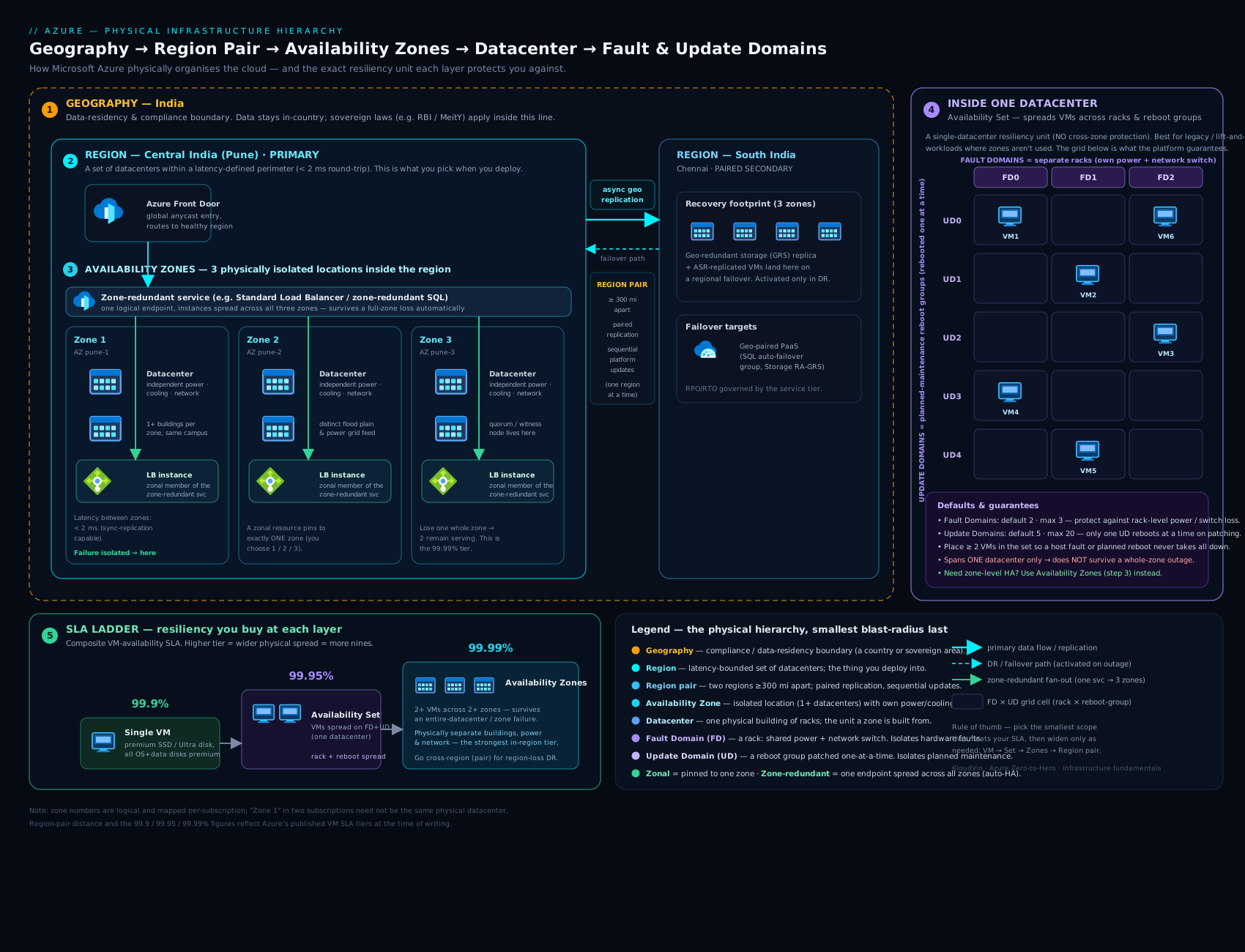
The diagram above shows the full picture: the worldwide geographies at the top, each holding paired regions, each region holding its three availability zones, and — zoomed in — a single availability set spreading VMs across a grid of fault domains and update domains. Read it outside-in for residency and disaster recovery, and inside-out for local high availability; almost every Azure resilience decision is a point somewhere on this diagram.
Availability sets: fault domains and update domains
Availability zones are the modern, building-level HA mechanism — but they are only offered in zone-enabled regions, and they are not the only way to get redundancy. The original, datacentre-local mechanism is the availability set, and it is where the famous fault domain and update domain concepts live. This pairing is the single most-probed sub-topic in Azure interviews, so we will be precise.
An availability set is a logical grouping you place two or more VMs into so Azure guarantees it spreads them across different physical hardware within a single datacentre. It costs nothing extra (you pay only for the VMs), and its entire job is to ensure one rack failure or one wave of host maintenance can never take down all the VMs doing the same job. It is built from two independent kinds of failure domain.
Fault domains (FD) — protection from unplanned hardware failure
A fault domain is a group of hardware sharing a common power source and network switch — essentially a server rack. If that rack’s power feed or top-of-rack switch fails, every VM in that fault domain goes down together, but VMs in other fault domains carry on unaffected. Fault domains protect you against unplanned failures: the dead power supply, the failed switch, the rack that trips offline. When you create a set you choose how many to spread across: the default is 2, the maximum is 3 (the exact ceiling varies slightly by region). With two fault domains, a single rack outage takes at most half your instances.
Update domains (UD) — protection from planned maintenance
An update domain is a logical group of VMs that Azure reboots together, one update domain at a time, during planned host maintenance. While one update domain is patched and rebooted, all the others stay running — so a maintenance wave only ever takes a slice of your fleet offline at once, then moves to the next. Update domains protect you against planned maintenance. The default is 5, the maximum is 20; with five, at most one-fifth of your VMs reboot together.
How VMs spread across the FD × UD grid
The two domain types are independent axes of a grid, and Azure stripes your VMs across both as you create them — incrementing the update domain and alternating the fault domain per VM — so no single rack failure or maintenance wave takes a disproportionate share. With 2 fault domains and 5 update domains, the first six VMs land like this:
| VM | Fault domain | Update domain |
|---|---|---|
| VM 1 | FD 0 | UD 0 |
| VM 2 | FD 1 | UD 1 |
| VM 3 | FD 0 | UD 2 |
| VM 4 | FD 1 | UD 3 |
| VM 5 | FD 0 | UD 4 |
| VM 6 | FD 1 | UD 0 |
The crucial consequence: an availability set is only meaningful with two or more VMs — with one VM there is nothing to spread. Because every VM in the set should do the same job (e.g. identical web servers), you put a load balancer with health probes in front so traffic reaches only the instances currently up. Two more facts interviewers love: fault and update domain counts are fixed at creation (to change them, create a new set and recreate the VMs), and you cannot move an existing VM into or out of a set in place.
This lesson covers availability sets at the depth you need for AZ-900 and most interviews. For the exhaustive, exam-grade treatment — including how VM Scale Sets layer on top, Uniform vs Flexible orchestration, autoscale, live migration and maintenance configurations — see the companion deep-dive linked in Next steps.
Zonal vs zone-redundant services
Once a region has availability zones, services use them in one of two distinct ways, and confusing the two is a classic mistake.
- Zonal — the resource is pinned to a single zone you choose, and you deploy copies across zones for redundancy. A VM created with
--zone 1is zonal: it lives in Zone 1, and for HA you create another in Zone 2 and a third in Zone 3 yourself. Zonal gives precise placement (handy for co-locating chatty components to minimise latency) but the redundancy is your job. - Zone-redundant — Azure automatically spreads a single logical resource across multiple zones, transparently handling the loss of a zone. A zone-redundant Standard Load Balancer, zone-redundant storage (ZRS), and a zone-redundant SQL Database are single resources that already survive a zone outage with no extra work from you.
Remember it as: zonal = you place copies in zones; zone-redundant = Azure spreads one resource across zones. A well-architected app mixes both — zonal VMs you spread across three zones, behind a zone-redundant load balancer, with state in zone-redundant storage.
The SLA ladder: 99.9% → 99.95% → 99.99%
An SLA (Service Level Agreement) is a financially backed monthly uptime promise — a percentage Microsoft commits to, with service credits if it misses. The percentages look almost identical, but the allowed downtime is wildly different, and which one you qualify for depends entirely on how you deploy. First, what the numbers mean:
| Monthly SLA | Allowed downtime / month | Allowed downtime / year |
|---|---|---|
| 99.9% (“three nines”) | ~43.2 minutes | ~8.77 hours |
| 99.95% | ~21.9 minutes | ~4.38 hours |
| 99.99% (“four nines”) | ~4.38 minutes | ~52.6 minutes |
Now the ladder — the deployment pattern that earns each rung for Azure VMs:
| Deployment | VM SLA | Survives | The catch |
|---|---|---|---|
| Single VM | 99.9% | Host issues only | Only if all OS and data disks are Premium SSD or Ultra Disk. With Standard SSD it drops to 99.5%; with Standard HDD there is no SLA at all. |
| 2+ VMs in an availability set | 99.95% | Rack/power/network faults and planned host maintenance — within one datacentre | Does not survive a whole-datacentre (zone) outage. |
| 2+ VMs across 2+ availability zones | 99.99% | The loss of an entire datacentre (zone) | Only in zone-enabled regions; you must spread instances across at least two zones. |
The interview trap hidden in this table: a single VM has no 99.95% SLA — that number requires two or more VMs in an availability set, and a single VM only earns any SLA when its disks are premium. The lesson Azure is teaching is that high availability comes from redundancy of instances, not from making one instance bulletproof — the instant you need a real promise, you deploy multiple instances: in a set for 99.95%, across zones for 99.99%.
Choosing a region: the five criteria
When you create a resource you must pick a region, and the choice is not arbitrary. Weigh these five criteria, roughly in order:
- Data residency and compliance — does the law or your policy require data to stay within a country or geography? This often eliminates most regions before anything else. (Choosing residency really means choosing a geography.)
- Latency / proximity to users — pick a region physically close to the people or systems that call your service; every thousand kilometres adds measurable round-trip latency.
- Service and feature availability — not every service, VM size, or feature exists in every region; new services and the newest GPU/VM SKUs land in a handful of large regions first. Confirm the specific services and SKUs you need exist before committing.
- Price — prices for the same service vary by region (driven by local power, land, and tax). A region one country over can be noticeably cheaper at scale.
- Region pairs / DR strategy — if you need cross-region DR, prefer a paired region and check its pair also offers the services you need. The pair is your failover target.
A sensible default: choose a zone-enabled region in the right geography, close to your users, with the services you need at an acceptable price, whose pair can serve as your DR target.
Sovereign and government clouds
Most of the world runs on Azure public (commercial) cloud. But for customers with extraordinary regulatory, security, or national-sovereignty needs, Microsoft operates sovereign clouds — physically and logically isolated, separate instances of Azure with their own datacentres, portal endpoints, compliance accreditations, and (often) operations staffed by screened in-country personnel. The two to know:
- Azure Government (US) — a dedicated cloud for US federal, state, and local government and their partners, meeting US-government compliance standards (FedRAMP High, DoD impact levels), with separate URLs and physical isolation from the public cloud.
- Microsoft Azure operated by 21Vianet (China) — Azure in China, operated by a local partner (21Vianet) to comply with Chinese regulations; it is a distinct cloud, not part of the global Azure network.
Microsoft has also introduced broader Microsoft Cloud for Sovereignty capabilities for public-sector customers in other geographies. The key exam point: sovereign clouds are separate Azure instances, not just regions — different endpoints, different compliance scope, and not automatically reachable from the commercial cloud.
Putting it together: a comparison table
The single most useful summary of this lesson is a side-by-side of the three resilience boundaries, so you can pick the right one on demand:
| Availability Set | Availability Zone | Region Pair | |
|---|---|---|---|
| Spreads across | Racks within one datacentre (FDs + UDs) | Separate datacentres within a region | Two regions in the same geography |
| Protects against | Rack/power/network faults + planned host maintenance | Loss of an entire datacentre | Loss of an entire region |
| Does not protect against | A whole-datacentre outage | A whole-region outage | (Disaster-recovery scope) |
| VM SLA | 99.95% | 99.99% | DR target (RTO/RPO, not an uptime SLA) |
| Latency between members | Same datacentre — negligible | Low (fast intra-region link) | Higher (inter-region distance) |
| Extra cost | None (pay for the VMs) | None for the construct (data egress between zones may apply) | Second-region resources + replication/egress |
| Set up by | You (place VMs in a set) | You (zonal) or Azure (zone-redundant) | You (replication, e.g. Site Recovery / geo-redundant storage) |
| Typical use | Local HA, or regions without zones | Building-level HA within a region | Disaster recovery across regions |
A note that trips people up: for a given VM, an availability set and availability zones are mutually exclusive — you choose one availability option per VM at creation. Zones generally win where available, with sets as the fallback for non-zonal regions.
Hands-on lab: list regions/zones and create an availability set + zonal VM
This lab uses Azure Cloud Shell (the browser terminal at https://shell.azure.com — no local install) or any machine with az signed in via az login. You will explore the global infrastructure, then create an availability set and a zonal VM and read back their placement.
Step 1 — Sign in and pick a region. Choose a zone-enabled region (e.g. centralindia, eastus, or westeurope):
LOCATION=centralindia
RG=rg-infra-lab
az group create --name $RG --location $LOCATION --output table
Step 2 — List all regions to see the scale of Azure’s footprint:
az account list-locations \
  --query "[?metadata.regionType=='Physical'].{Name:name, Display:displayName, Geo:metadata.geographyGroup}" \
  --output table
You will see 60+ physical regions grouped by geography (Asia Pacific, Europe, US, and so on).
Step 3 — See which availability zones your region exposes. This lists the VM SKUs available and, for zone-enabled regions, the zones each supports:
az vm list-skus --location $LOCATION --zone --size Standard_B \
  --query "[0].{SKU:name, Zones:locationInfo[0].zones}" --output json
A zone-enabled region returns something like ["1","2","3"] — proof the region has three zones.
Step 4 — Create an availability set with explicit fault and update domain counts (2 FDs, 5 UDs — the defaults, stated for clarity), then read them back:
az vm availability-set create \
  --resource-group $RG \
  --name avset-web \
  --platform-fault-domain-count 2 \
  --platform-update-domain-count 5 \
  --output table

az vm availability-set show \
  --resource-group $RG --name avset-web \
  --query "{Name:name, FaultDomains:platformFaultDomainCount, UpdateDomains:platformUpdateDomainCount}" \
  --output table
Expected output confirms FaultDomains: 2 and UpdateDomains: 5.
Step 5 — Create two VMs inside the set (so the set actually means something) and read back which fault/update domain each landed in:
for i in 1 2; do
  az vm create \
    --resource-group $RG --name vm-web-$i \
    --availability-set avset-web \
    --image Ubuntu2204 --size Standard_B1s \
    --admin-username azureuser --generate-ssh-keys \
    --public-ip-address "" --nsg "" --output none
done

az vm get-instance-view \
  --resource-group $RG --name vm-web-1 \
  --query "instanceView.{FaultDomain:platformFaultDomain, UpdateDomain:platformUpdateDomain}" \
  --output table
vm-web-1 will report FaultDomain: 0, and vm-web-2 (check it the same way) will report a different fault/update domain — visible proof that Azure striped them across the grid.
Step 6 — Create a zonal VM pinned to availability zone 1, and confirm its zone:
az vm create \
  --resource-group $RG --name vm-zonal-z1 \
  --zone 1 \
  --image Ubuntu2204 --size Standard_B1s \
  --admin-username azureuser --generate-ssh-keys \
  --public-ip-address "" --nsg "" --output none

az vm show \
  --resource-group $RG --name vm-zonal-z1 \
  --query "{Name:name, Zone:zones[0], Location:location}" --output table
Zone: 1 confirms a zonal VM. (Note you cannot combine --zone with --availability-set — they are mutually exclusive, exactly as the comparison table said.)
Validation. You now have: an availability set reporting 2 FDs / 5 UDs, two VMs striped across different fault domains inside it, and a separate zonal VM pinned to Zone 1 — a hands-on demonstration of every core concept in this lesson.
Cleanup. Delete everything in one command so you are charged nothing further:
az group delete --name $RG --yes --no-wait
Cost note. Two or three Standard_B1s VMs left running cost only a few rupees per hour, and an availability set itself is free. If you delete the resource group promptly (Step Cleanup), the whole lab costs a negligible amount — well within free-trial credit. The usual gotcha is forgetting to delete: a stopped-but-allocated VM still bills for compute, so always remove the resource group when done.
Common mistakes & troubleshooting
| Symptom | Likely cause | Fix |
|---|---|---|
--zone and --availability-set together fail |
The two availability options are mutually exclusive for a VM | Pick one: a zonal VM or a VM in an availability set. |
| Availability set seems to give no benefit | Only one VM in the set — nothing to spread | Deploy 2+ VMs; put a load balancer with health probes in front. |
| “Can’t change fault/update domain count” | FD/UD counts are fixed at creation | Create a new availability set with the desired counts and recreate the VMs. |
| Region has no availability zones to choose | The region is non-zonal | Use a zone-enabled region, or fall back to an availability set for local HA. |
| Required VM size/service missing in your region | Service/SKU availability varies by region | Check az vm list-skus / the region’s product availability; choose a region that has it. |
| Geo-redundant copy is “in the wrong region” | Geo-redundancy defaults to the paired region | This is expected — the pair is the DR target; choose your primary region with its pair in mind. |
| Promised “99.95% for one VM” doesn’t hold | A single VM never gets 99.95% | Use 2+ VMs in a set (99.95%) or across zones (99.99%); a single VM tops out at 99.9% with Premium disks. |
| Can’t reach Azure Government / China portal | Sovereign clouds are separate instances with different endpoints | Sign in to the correct cloud (az cloud set --name AzureUSGovernment / AzureChinaCloud) and use its URLs. |
Best practices
- Default to availability zones for new production workloads in zone-enabled regions: spread 2+ instances across 2+ zones for the 99.99% rung, and use availability sets only where zones are unavailable.
- Never run a lone VM in production expecting an SLA — at minimum put it on Premium disks (99.9%), but prefer multiple instances behind a load balancer.
- Always front a multi-instance deployment with a (zone-redundant) load balancer and health probes, so traffic skips instances that are down during a fault or maintenance.
- Choose the region for residency first, then latency, then services/price/pairs — and confirm the exact SKUs you need exist there before committing.
- Keep your DR target in the paired region unless you have a specific reason not to; it inherits sequential updates and prioritised recovery for free.
- Make instances stateless and keep state in zone-redundant or geo-redundant data services, so spreading across zones/regions is straightforward.
Security notes
Physical placement has real security and compliance consequences. Data residency is the headline: choosing the right geography is often a legal requirement, not a preference, and it is enforced at the geography boundary — region pairs never move data outside it, which is precisely why pairs sit within a single geography. For strict regulatory regimes, a sovereign cloud (Azure Government, Azure China) adds physical and operational isolation plus the specific accreditations those regimes demand. Even in the commercial cloud, knowing where your data lives — and that geo-redundant copies land in the paired region within the same geography — is essential for answering compliance questionnaires honestly. All Azure datacentres are covered by Microsoft’s physical-security programme, but the placement decision (which geography, which region, public vs sovereign) is yours, and it is the part auditors ask about.
Interview & exam questions
This topic is interview gold — practise saying these answers out loud until they are automatic.
-
“What is the difference between a region and an availability zone?” A region is a metropolitan-area set of datacentres you deploy into (e.g. Central India). An availability zone is one or more physically separate datacentres inside a region with independent power, cooling, and networking; a zone-enabled region has at least three. Region = the location you pick; zone = an isolated building within it for HA.
-
“Fault domain versus update domain?” A fault domain is physical — hardware sharing a power source and network switch (≈ a rack) — protecting against unplanned failures; default 2, max 3. An update domain is a logical reboot group Azure cycles through one at a time during planned maintenance, so only a slice is ever down; default 5, max 20. FD = unplanned hardware failure; UD = planned maintenance reboots.
-
“Availability set versus availability zone — when do you use each?” A set spreads VMs across racks within one datacentre (FDs + UDs) for 99.95% — survives rack/power/network faults and host maintenance but not a datacentre outage. Zones spread VMs across separate datacentres in a region for 99.99% — survives losing an entire building. Use zones where available; use a set for datacentre-local HA or in non-zonal regions. They are mutually exclusive for a given VM.
-
“What SLA does a single VM get?” None if any disk is Standard HDD; 99.5% with Standard SSD; 99.9% only if all disks are Premium SSD or Ultra. Anything higher needs multiple instances — in a set (99.95%) or across zones (99.99%).
-
“How does Azure place VMs across fault and update domains?” It stripes them across the 2-D FD×UD grid — incrementing the update domain and alternating the fault domain per VM — so no single rack failure or maintenance wave takes a disproportionate share. That is why a set needs at least two VMs to mean anything.
-
“Zonal versus zone-redundant?” Zonal = a resource pinned to one zone you choose, and you deploy copies across zones (e.g. a VM with
--zone 1). Zone-redundant = Azure automatically spreads a single resource across zones (e.g. a zone-redundant Standard Load Balancer, ZRS). Zonal = you place copies; zone-redundant = Azure spreads one resource. -
“What are region pairs and what do they give you?” Two regions in the same geography that Azure sequences platform updates across (never both at once), prioritises for recovery, and replicates certain services to by default. You use them for disaster recovery — failing over if an entire region is lost.
-
“What is a geography and why does it matter?” A discrete market — usually a country or area such as India or the EU — containing one or more regions and preserving data-residency and compliance boundaries. It matters because legal requirements like “data must stay in-country” are satisfied at the geography level, and region pairs always stay within one geography.
-
“How would you design a VM workload for 99.99% availability?” Run 2+ instances across 2+ availability zones (zonal VMs or a zone-spanning Scale Set) behind a zone-redundant Standard Load Balancer with health probes, keeping instances stateless with state in zone-redundant data services.
-
“What are sovereign / government clouds?” Physically and logically isolated, separate instances of Azure for extraordinary regulatory needs — Azure Government (US) and Azure operated by 21Vianet (China) — with their own endpoints, compliance scope, and (often) screened local operators. They are separate clouds, not just regions.
-
“How many availability zones does an enabled region have, and are my Zone 1 and yours the same building?” At least three. And no — zone numbers are logical per subscription, so my Zone 1 may not be your Zone 1 physically; Microsoft exposes physical zone IDs for the rare cases that need exact co-location.
-
“Can you move an existing VM into an availability set, or change the FD/UD count later?” No to both. A VM’s availability-set membership and the set’s FD/UD counts are fixed at creation; changing them means creating a new set and recreating the VMs.
Quick check
- List, from smallest to largest, the five physical boundaries: datacentre, availability zone, region, region pair, geography — and say which one is the data-residency boundary.
- State the default and maximum counts for fault domains and update domains, and which kind of failure each protects against.
- A colleague says their single production VM is “guaranteed 99.95% by Azure.” What is wrong, and what does each SLA rung actually require?
- Explain the difference between a zonal and a zone-redundant resource, with one example of each.
- You must keep all customer data inside India, with the lowest latency for Mumbai users and a disaster-recovery copy. Which geography, roughly which region, and which DR target would you choose, and why?
Answers
- Datacentre → availability zone → region → region pair → geography. The geography is the data-residency boundary (e.g. India, EU).
- Fault domains: default 2, max 3 — protect against unplanned hardware failure (rack power/network). Update domains: default 5, max 20 — protect against planned maintenance, rebooted one group at a time.
- A single VM never gets 99.95% — that needs 2+ VMs in an availability set. A single VM gets at best 99.9% (all Premium/Ultra disks), 99.5% with Standard SSD, and none with Standard HDD. 99.99% needs instances across 2+ zones.
- Zonal = pinned to one zone you choose, copies deployed by you (e.g. a VM with
--zone 1). Zone-redundant = Azure spreads one resource across zones for you (e.g. a zone-redundant Standard Load Balancer, or ZRS storage). - Geography: India (satisfies residency). Region: Central India (Pune) or West India — close to Mumbai for low latency. DR target: the paired region (e.g. South India), which keeps data inside the India geography and inherits sequential updates and prioritised recovery. Pick residency first, then latency, then the pair for DR.
Exercise
Using the az CLI in a zone-enabled region, build a minimal but real layout that demonstrates both local and zonal resilience, and prove the placement:
- Create a resource group
rg-infra-exercisein a zone-enabled region. - Create an availability set
avset-app(leave FD/UD at the defaults) and two small VMs (Standard_B1s, no public IP) inside it. - Run
az vm get-instance-viewon each VM and confirm the two report different fault domains — proof the set spread them. - Create one zonal VM
vm-z2pinned to zone 2 and confirm withaz vm show --query "zones[0]"that it reports2. - Try to create a VM with both
--zone 1and--availability-set avset-appand observe the error — first-hand proof they are mutually exclusive. - Delete the resource group:
az group delete --name rg-infra-exercise --yes --no-wait.
If steps 3, 4, and 5 behave as described, you have hands-on proof of fault-domain spreading, zonal placement, and the set-vs-zone exclusivity — the heart of this lesson.
Certification mapping
- AZ-900 (Azure Fundamentals): Describe Azure architecture and services — the headline objective this lesson covers end to end: regions, region pairs, sovereign regions, availability zones, datacentres, resource hierarchy, and the reliability benefits of zones and pairs. Expect plain definitional questions (“what is a region pair?”, “what is an availability zone?”).
- AZ-104 (Azure Administrator): Deploy and manage Azure compute resources — configure VM availability: availability sets (FD/UD), availability zones, and the SLA each earns. Questions frequently hinge on the fault-domain-vs-update-domain distinction and which SLA a given layout qualifies for.
- It also underpins the reliability pillar of the Azure Well-Architected Framework and is assumed by every later compute, storage, and networking lesson.
Glossary
- Datacentre — a single secured building of server racks with its own power, cooling, and network; the lowest physical unit. You do not select individual datacentres.
- Availability zone (AZ) — one or more physically separate datacentres within a region with independent power/cooling/networking; a zone-enabled region has at least three.
- Region — a metropolitan-area set of datacentres connected by a low-latency network; the unit you deploy resources into (e.g. Central India). 60+ worldwide.
- Region pair — two regions in the same geography used for DR, sequential platform updates, and default geo-replication.
- Geography — a discrete market (usually a country/area) preserving data-residency and compliance boundaries; contains one or more regions.
- Failure domain — a set of components sharing a single point of failure; HA means spreading copies across different ones.
- Availability set — a logical grouping that spreads 2+ VMs across racks (FDs) and reboot groups (UDs) within one datacentre; 99.95% SLA, no extra cost.
- Fault domain (FD) — hardware sharing a power source and network switch (≈ a rack); protects against unplanned failure. Default 2, max 3.
- Update domain (UD) — a logical group rebooted together, one at a time, during planned maintenance. Default 5, max 20.
- Zonal — a resource pinned to one zone you choose; you deploy copies across zones.
- Zone-redundant — a resource Azure spreads across zones for you (e.g. zone-redundant Standard Load Balancer, ZRS).
- SLA (Service Level Agreement) — a financially backed monthly uptime commitment, with service credits if missed.
- Region pair / geo-redundancy target — the paired region many services replicate to by default for disaster recovery.
- Sovereign cloud — a physically and logically isolated, separate instance of Azure for special regulatory needs (Azure Government, Azure China / 21Vianet).
- Blast radius — how much fails when one component fails; the resilience ladder exists to shrink it.
Next steps
You now have the complete map of Azure’s physical world — from a single rack’s fault domain out to worldwide geographies — and you can answer every classic interview and exam question about regions, zones, sets, fault and update domains, and the SLA ladder.
- Next lesson: Azure Portal, CLI, PowerShell & Cloud Shell: Your First Steps — now that you know where resources live, learn the four ways to actually create and manage them.
Related reading to go deeper:
- Azure VM Resilience: Availability Sets (Fault & Update Domains), Availability Zones & Scale Sets — the exhaustive, exam-grade treatment of everything in this lesson plus VM Scale Sets, live migration, and maintenance configurations.
- What Is Azure? Accounts, Subscriptions, Regions & Resource Groups — how the organisational hierarchy (tenant → subscription → resource group) sits alongside this physical one.