You need two systems to talk: an order arrives in a queue, a record must land in your database, a Teams message must fire, and a finance API must be called — with retries when any step blips. You could hand-write and host that glue, or draw it as a workflow in Azure Logic Apps, Azure’s low-code integration platform, and let the platform run it, retry it, and connect to 1,400+ systems through pre-built connectors. The moment you create your first Logic App, though, the portal asks a question that quietly decides your bill, your networking options and your scaling story for the life of the workload: Consumption or Standard?
This is not a small toggle. Consumption is the original, fully serverless model — you pay per action executed, there is no server to size, and it lives in the multi-tenant Azure fabric. Standard is the newer model on the single-tenant Logic Apps runtime — you run it on a hosted plan you provision, can place it inside your own virtual network, and run many workflows in one app, including stateless ones that finish in milliseconds. Pick wrong and you either overpay for a chatty integration, or you discover three sprints in that you cannot reach a private database because Consumption simply does not do VNet injection.
By the end you will hold a clear mental model of both, a decision table you can apply in five minutes, and the concrete knobs — pricing meters, networking modes, the stateful-versus-stateless choice — that separate them. We keep it practical: real connector types, real plan SKUs, real az and Bicep, and a worked cost example so the trade-off is a number, not a vibe. This is a Basic guide — the map and the mental models, not every enterprise edge case — so you can make the call confidently and know where to dig deeper.
What problem this solves
Integration work is deceptively easy to start and painful to get wrong. The “hello world” — poll a mailbox, drop attachments in Blob Storage — takes ten minutes in either model, and they look almost identical in the designer. So teams pick by accident: click the first template, ship it, and only meet the difference under load or in a security review.
The mismatch shows up three ways. The bill surprises finance. A Consumption workflow firing millions of actions a month (a high-volume event processor, a per-record enrichment loop) can cost more than a flat-rate Standard plan running the same logic for a fixed fee. Conversely, a workflow that runs a few hundred times a day on Standard pays for an always-on plan it barely uses, when Consumption would have cost rupees. The network blocks you. Your workflow must call a database or internal API with no public endpoint; on Consumption you reach for VNet injection and find it does not exist, on Standard you enable VNet integration and you are in. The design doesn’t fit. You assumed every run is durable and replayable, then learn a high-frequency, fire-and-forget transform pays a per-action premium and state-tracking overhead it never needed — a stateless Standard workflow would have been faster and cheaper.
Who hits this: anyone building iPaaS (integration platform-as-a-service) glue on Azure — B2B/EDI pipelines, SaaS-to-SaaS sync, event-driven enrichment, scheduled jobs, approval flows. Choosing wrong is rarely one big failure; it is a slow tax — an inflated invoice, a networking workaround, a redesign — that a five-minute decision up front avoids.
Learning objectives
By the end of this article you can:
- Explain, in one sentence each, what Consumption and Standard Logic Apps are and how each is hosted (multi-tenant fabric vs single-tenant runtime on a plan).
- Read the two billing models — Consumption’s per-action / per-trigger meter versus Standard’s hosted-plan plus storage — and predict which is cheaper for a given run volume.
- Decide whether a workload needs VNet integration / private endpoints, and therefore whether Standard is mandatory.
- Choose between stateful and stateless workflows on Standard, and explain the durability, replay and latency trade-off.
- Tell built-in connectors apart from managed (shared) connectors, and know which model gives you which and why it matters for cost and latency.
- Apply a decision table to route any new integration to the right model in five minutes.
- Provision a basic Logic App in both models with
azand Bicep, and run a short hands-on lab. - Spot the most common first-time mistakes (wrong model for the volume, missing VNet, stateless when you needed replay) and fix them.
Prerequisites & where this fits
You should be comfortable with a few Azure basics: a resource group holds your resources; App Service plans are the rented compute that web apps and (as you will see) Standard Logic Apps run on; and you can run az in Cloud Shell and read JSON output. Knowing what a queue, an HTTP API and a connection string are will make every example land. You do not need prior Logic Apps experience — that is what this guide builds.
This sits in the Integration track. Logic Apps is one of three workflow/eventing services you will weigh against each other: it is the visual, connector-rich orchestrator; Azure Functions is the code-first compute for custom logic; and messaging services like Service Bus and Event Grid move the events between them. If you are choosing your event-driven building blocks, Azure Functions and Serverless Patterns: Event-Driven Compute covers the code side and Service Bus Queues vs Topics: Choosing Point-to-Point or Publish-Subscribe Without Regret covers the messaging backbone many Logic Apps sit on top of. Because the networking story is the single biggest differentiator here, Azure Private Endpoint vs Service Endpoint: Secure PaaS Access is worth a read once you reach the VNet section.
Here is the field at a glance — where each tool belongs so you do not reach for the wrong one:
| You need to… | Reach for | Why not the others |
|---|---|---|
| Orchestrate steps across many SaaS/Azure systems, low-code | Logic Apps | Functions = code; Service Bus = transport only |
| Run custom code on an event, full language control | Azure Functions | Logic Apps is designer-first, not a code host |
| Buffer / decouple producers and consumers reliably | Service Bus | It moves messages; it doesn’t orchestrate logic |
| Fan out lightweight events to many subscribers | Event Grid | Push eventing, not stateful orchestration |
| Long-running stateful orchestration in code | Durable Functions | Choose this when the team prefers code over a designer |
Core concepts
Six mental models make every later decision obvious.
Logic Apps is a workflow engine, not a server you babysit. You describe a workflow as a trigger (what starts it — a schedule, an HTTP call, a new queue message) followed by actions (call an API, run a condition, loop, transform). The platform evaluates the definition, calls connectors, retries on failure, and records run history. You think in steps and connections; the runtime handles execution, scale and durability. The two hosting models are two places and pricing schemes for the same engine.
Consumption is multi-tenant and pay-per-action. A Consumption Logic App is a single workflow in Azure’s shared, multi-tenant fabric. Nothing is “always on” — it costs nothing at rest and bills for what executes: each action that runs, each trigger that fires (including polls that find nothing). It scales automatically and invisibly. The trade: being in the public multi-tenant service, you cannot inject it into your own VNet, and chatty workloads accumulate per-action charges fast.
Standard is single-tenant and runs on a plan you provision. A Standard Logic App is an app (one or more workflows) on the single-tenant Logic Apps runtime, hosted on a Workflow Standard plan (a dedicated App Service SKU, WS1/WS2/WS3) plus a storage account for run state. You pay for the plan whether or not workflows run — like a small always-on server. In return you get VNet integration and private endpoints, many workflows per app, local development, and stateless workflows. It’s the model when isolation, private networking, or predictable flat-rate cost matter.
Stateful vs stateless is a Standard-only choice that trades durability for speed. A stateful workflow persists every step to storage (full run history, replay, long-running behaviour, higher latency); a stateless workflow keeps state in memory (far faster, but no durable replay or long waits). Consumption is always stateful. The dedicated section below goes deeper.
Connectors come in two flavours. A built-in (native) connector runs in-process in the runtime — fast, no per-call charge (HTTP, Service Bus, SQL, Blob). A managed (shared) connector runs in Azure’s shared infrastructure to reach the long tail of 1,400+ SaaS systems (Salesforce, SharePoint, Office 365), metered per execution on Consumption. Standard ships a much larger built-in set — part of why high-volume Standard workflows are cheaper.
You pick the model first, then everything else follows. Pricing, networking, the stateful option and the connector mix all hang off the hosting choice — get the model right and the rest is configuration.
The vocabulary in one table
Before the deep sections, pin down every moving part side by side:
| Term | One-line definition | Consumption | Standard |
|---|---|---|---|
| Hosting | Where the runtime lives | Multi-tenant shared fabric | Single-tenant runtime on a plan |
| Billing unit | What you pay for | Per action / trigger execution | Hosted plan (vCPU/RAM) + storage |
| At-rest cost | Cost when nothing runs | ~Zero | The plan runs 24/7 (you pay) |
| Workflows per app | How many fit in one resource | One workflow = one resource | Many workflows per app |
| VNet integration | Reach private endpoints/IPs | Not supported (no injection) | Supported |
| Stateful workflow | Persisted run history + replay | Always (only option) | Optional (default) |
| Stateless workflow | In-memory, low latency, no replay | Not available | Optional |
| Built-in connectors | In-process, fast, no per-call meter | Limited set | Large set |
| Managed connectors | Shared SaaS connectors, metered | Yes (core to the model) | Yes (plus more built-ins) |
| Local development | Build/run on your machine | No | Yes (VS Code + runtime) |
How the two models are hosted
Consumption runs in the multi-tenant Logic Apps service — a shared pool Microsoft operates; you create one workflow and Azure finds capacity on demand, with no compute to see, size, isolate or place on your network. “Serverless” here in its purest form: you reason about the execution, not the machine. Standard runs on the single-tenant Logic Apps runtime (packaged on the Azure Functions host) bound to a Workflow Standard plan — workers reserved for you that you can VNet-integrate, scale on your own rules, and load with many workflows sharing one connection set. You still don’t write the runtime, but you do provision and pay for the host. (Two advanced variants exist: ASE v3 for full isolation, and a hybrid/Container option on Kubernetes/Arc — but for a Basic decision, “Consumption vs Standard” is the real fork.)
| Hosting attribute | Consumption | Standard |
|---|---|---|
| Tenancy | Multi-tenant (shared) | Single-tenant (dedicated) |
| Compute you provision | None | Workflow Standard plan (WS1–WS3) |
| Scaling model | Automatic, platform-managed | Plan-based; scale out / Elastic Premium-style |
| Network placement | Public service only | VNet integration / private endpoints |
| Isolation ceiling | None beyond the shared service | Up to ASE v3 for full isolation |
| Local/offline dev | Not supported | VS Code + local runtime + emulated storage |
Pricing: how each model bills
This is where most wrong choices originate, so go slowly.
Consumption — pay per execution
Consumption meters at the action and trigger level. Every action that runs counts; every trigger evaluation counts, including polling checks that find nothing; enterprise connectors (X12/EDIFACT/AS2 for B2B, or SAP) bill higher than standard ones. The mental model: cost scales linearly with how much your workflows do. A workflow running 10,000 times a day, 8 actions each, bills ~80,000 action executions a day. Two consequences bite beginners: a frequently-polling trigger bills for every poll even when idle (prefer webhooks or widen the interval), and a loop multiplies cost — an action inside a 500-iteration For each is 500 executions.
Standard — pay for a hosted plan
Standard bills like an App Service workload: you pay for the Workflow Standard plan (a flat hourly rate per instance, by WS SKU’s vCPU/RAM) whether or not anything runs, plus the storage account it uses for run state (stateful writes more than stateless). Execution count does not directly bill — you pay for capacity. So there is a non-zero 24/7 floor, but once the plan is paid for, extra executions are effectively free until you scale out (exactly why high-volume workloads favour Standard), and stateless workflows cut the storage portion while raising per-plan throughput.
Reading the two meters together
| Cost dimension | Consumption | Standard |
|---|---|---|
| Primary meter | Per action + per trigger execution | Hosted plan (per instance/hour) |
| Cost at zero traffic | Effectively ₹0 | Plan hourly rate, 24/7 |
| Cost driver | Volume of actions/triggers | Plan SKU + instance count + storage |
| Managed connector calls | Metered per execution | Included; many have built-in equivalents |
| Enterprise (B2B/SAP) connectors | Higher per-execution rate | Pack/feature on the plan |
| Storage cost | Bundled / minimal | Separate storage account (txns + capacity) |
| Marginal cost of one more run | Adds to the bill | ~Free until you must scale out |
| Sweet spot | Low / spiky / unpredictable volume | High / steady / predictable volume |
The decision is a break-even: Consumption is a sloped line from the origin, Standard is a flat line with a floor, and they cross. Below that crossover Consumption is cheaper; above it Standard wins and keeps winning. The Cost & sizing section turns this into rupees.
Networking: the decision that can force your hand
Pricing is a trade-off; networking is often a hard requirement that removes the choice entirely.
Consumption cannot be injected into your virtual network. It runs in the public multi-tenant service: it can call public endpoints and use connectors, and you can restrict inbound triggers by IP — but it cannot natively originate calls from inside your VNet to a private resource (a database with no public endpoint, an internal API behind a firewall, a private-endpoint-only storage account). Reaching private-only targets needs an extra in-VNet hop, which is more moving parts.
Standard supports VNet integration and private endpoints. Because the plan workers are yours, you can integrate outbound with a VNet (a delegated subnet) so calls originate from your private network, lock down inbound with a private endpoint so the trigger surface is unreachable publicly, and reach private PaaS (private-endpoint SQL, Storage, Service Bus) cleanly via built-in connectors. This is, in practice, the most common reason teams must choose Standard regardless of cost: if a security review says “no public endpoints,” the model is decided for you.
| Networking need | Consumption | Standard |
|---|---|---|
| Call public APIs / public PaaS | Yes | Yes |
| Restrict inbound trigger by IP allowlist | Yes (IP ranges) | Yes |
| Outbound from inside your VNet | No (not supported) | Yes (VNet integration, delegated subnet) |
| Reach private-endpoint-only resources | No (needs a workaround hop) | Yes |
| Private inbound endpoint (no public surface) | No | Yes (private endpoint) |
| Full network isolation (dedicated) | No | Yes (Standard on ASE v3) |
A short worked rule: if any target or the trigger surface must be private, go Standard. No amount of Consumption configuration changes that.
Stateful vs stateless workflows (Standard only)
Consumption gives you one behaviour: every workflow is stateful. Standard hands you a dial, and beginners often miss it.
A stateful workflow persists each step’s inputs and outputs to the app’s storage account. That powers the things you may take for granted: full run history you can inspect action-by-action, the ability to resubmit a failed run, durable long-running orchestrations (waiting hours or days for an approval), and recovery if a worker restarts mid-run. The cost is real: every step is a storage write, adding latency (tens of milliseconds per step) and storage transactions to the bill.
A stateless workflow keeps state in memory for a single run and does not persist run history by default. It is dramatically faster and cheaper per execution — ideal for short, high-frequency, synchronous work: a request/response transform, a quick validation, a lightweight fan-out. The trade-offs: no durable replay/resubmit, no long-running waits (a stateless run must finish quickly), and limited support for operations that inherently need persistence. You can enable run history for debugging, but that is a diagnostic aid, not stateful durability. The rule of thumb: default to stateful; switch to stateless only when a workflow is short, high-volume, and you genuinely don’t need replay or long waits.
| Aspect | Stateful (default) | Stateless |
|---|---|---|
| State storage | Persisted to storage account | In memory (per run) |
| Run history | Full, inspectable, resubmittable | Off by default (can enable for debug) |
| Latency | Higher (storage I/O per step) | Much lower |
| Throughput per instance | Lower | Higher |
| Long-running (hours/days) | Yes | No (designed to finish fast) |
| Durable recovery on restart | Yes | No (in-flight run lost) |
| Best for | Orchestration, approvals, B2B, audit | High-freq transforms, request/response |
| Available in Consumption? | Yes (only option) | No |
Connectors: built-in vs managed
Connectors are how Logic Apps reaches the outside world, and the split between built-in and managed affects both speed and cost.
A built-in (native) connector executes inside the runtime, in-process — fast, low-latency, and not metered as a separate shared-connector call. Triggers that must react quickly (HTTP, Service Bus, SQL, Blob) are best as built-ins. Standard ships a substantially larger built-in catalogue than Consumption — an under-appreciated reason it is efficient at scale.
A managed (shared) connector runs in Azure’s shared connector service, outside your app — the long tail of hundreds of SaaS and line-of-business systems (Office 365, SharePoint, Salesforce, ServiceNow, Dynamics). On Consumption every managed-connector operation is metered; on Standard a built-in alternative often exists for high-volume cases. The practical guidance: prefer a built-in connector when one exists, especially on a hot path; fall back to managed for SaaS systems that only have one.
| Connector type | Runs where | Latency | Metered separately | Typical use |
|---|---|---|---|---|
| Built-in (native) | In-process in the runtime | Low | No (part of the runtime) | HTTP, Service Bus, SQL, Blob, schedule |
| Managed (shared) | Azure shared connector service | Higher (out-of-process) | Yes on Consumption | Office 365, Salesforce, SharePoint, SaaS |
| Enterprise (B2B/EDI/SAP) | Shared, premium | Higher | Higher rate | X12/EDIFACT/AS2, SAP integration |
Architecture at a glance
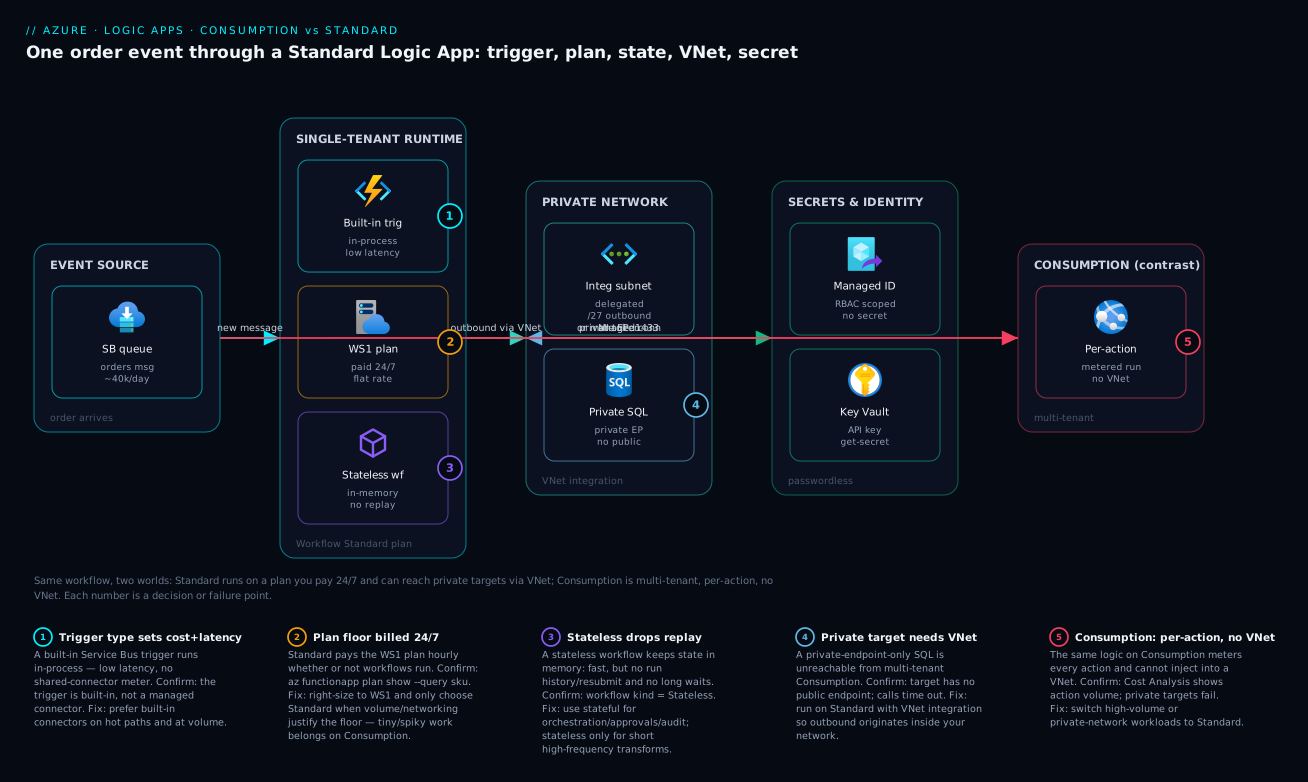
Picture one business event — a new order message lands on a Service Bus queue — and follow it through a Standard Logic App, the model that shows every moving part this guide cares about. A built-in Service Bus trigger inside the single-tenant runtime picks up the order in-process — no shared-connector hop, low latency. The workflow runs on a Workflow Standard plan (WS1) and is authored stateless because each order transform is short and high-volume; its state lives only in memory while a separate storage account holds platform state. To reach private systems it uses VNet integration through a delegated subnet, so outbound calls originate inside your network — it writes to a private-endpoint-only Azure SQL database over the backbone and pulls a credential from Key Vault via the app’s managed identity, no secrets in the workflow. Numbered badges mark where beginners get bitten: the trigger type that sets latency and cost, the plan floor you pay 24/7, the stateful/stateless choice, the VNet path private targets require, and the secret-resolution step.
Contrast Consumption, which would run the same logic in the multi-tenant fabric with a managed Service Bus connector (metered per message), no VNet path to that private SQL, and always-stateful history — one workflow, two very different hosting and networking realities.
Real-world scenario
Northwind Retail, a mid-sized e-commerce company, runs two integrations that ended up on opposite sides of this decision — and one that started on the wrong side.
The first is an order-fulfilment pipeline. Every order drops a message on a Service Bus queue; a workflow validates it, writes it to the warehouse system’s Azure SQL database (locked behind a private endpoint — no public access), posts a Teams notification, and calls a third-party shipping API. Volume is steady at roughly 40,000 orders a day, ~7 actions each. Two facts decided the model instantly. First, the SQL database is private-only — Consumption could not reach it without an awkward extra hop, so Standard was mandatory on networking grounds alone. Second, at ~280,000 action executions a day, the per-action Consumption bill would have dwarfed a flat WS1 plan. They built it on Standard with VNet integration to reach the private SQL, a built-in Service Bus trigger for low latency, and a managed identity pulling the shipping key from Key Vault. The order-write workflow is stateful (resubmit and audit on every order); the lightweight “format and post to Teams” step is a separate stateless workflow.
The second is an invoice-approval flow for finance. A manager submits an expense, the workflow emails an approval request, waits up to three days, then routes the result. It runs maybe 200 times a day and spends most of its life waiting. Consumption was the obvious fit: zero cost while idle, tiny volume, the connectors it needs (Office 365, Approvals) are managed anyway, and the long wait is naturally stateful. An always-on Standard plan would charge 24/7 for a workflow that does almost nothing.
The mistake was the catalogue-sync job, built on Consumption because “Consumption is the default.” It polls a supplier feed every 15 seconds and, on each change, loops over up to 2,000 product rows, calling a managed connector per row. The polls billed around the clock; the per-row loop multiplied actions into the millions per month. The first invoice was the wake-up call. The fix: move to Standard (the flat plan absorbs the volume), make the per-row transform stateless, and replace managed-connector-per-row with a built-in SQL bulk path. The bill dropped by more than half and latency improved. The lesson the team wrote on the wall: choose the model by volume and networking, not by which button is in front of you.
Advantages and disadvantages
Neither model is “better” — each wins a different workload. The trade-off in two columns:
| Consumption | Standard | |
|---|---|---|
| Advantages | Zero cost at rest; pure pay-per-use; instant to start; auto-scales invisibly; no plan to manage; ideal for spiky/low/unpredictable volume | Flat predictable cost; VNet integration + private endpoints; many workflows per app; stateless option (low latency); large built-in connector set; local dev; cheaper at high volume |
| Disadvantages | No VNet injection; per-action cost balloons at high volume; always stateful (no stateless option); fewer built-in connectors; one workflow per resource | Pay for the plan 24/7 even when idle; more to provision/operate; storage account to manage; overkill for tiny/spiky workloads |
When each matters: Consumption shines for the long tail of small, event-driven or scheduled glue — the approval flow, the nightly report, the occasional webhook — where the bill tracks usage and rounds to near-zero. Standard shines the moment any of three things is true: high or steady volume (the flat plan beats per-action), a private-network target (VNet is non-negotiable), or a need for many workflows together / stateless speed / local development. Heuristic: start on Consumption for genuinely small, public, spiky work; reach for Standard the instant volume, networking, or consolidation enters the picture.
Hands-on lab
Create one Logic App in each model, confirm the structural difference, and tear down. This stays cheap: Consumption costs ~nothing for a few runs, and you delete the Standard plan right after. Run everything in Cloud Shell.
1. Set up variables and a resource group.
RG=rg-logicapps-lab
LOC=eastus
az group create --name $RG --location $LOC
2. Create a Consumption Logic App with a recurrence-triggered workflow. The definition fires on a schedule and does nothing else — enough to prove the resource type. Save it as consumption-def.json, then create the app.
cat > consumption-def.json <<'JSON'
{
  "definition": {
    "$schema": "https://schema.management.azure.com/providers/Microsoft.Logic/schemas/2016-06-01/workflowdefinition.json#",
    "contentVersion": "1.0.0.0",
    "triggers": {
      "Recurrence": {
        "type": "Recurrence",
        "recurrence": { "frequency": "Hour", "interval": 1 }
      }
    },
    "actions": {},
    "outputs": {}
  }
}
JSON

az logic workflow create \
  --resource-group $RG \
  --location $LOC \
  --name la-consumption-lab \
  --definition @consumption-def.json
Expected: the command returns the workflow JSON with "type": "Microsoft.Logic/workflows" and a state of Enabled. This is the whole resource — one workflow, multi-tenant, billed per run.
3. Confirm it exists and inspect its kind.
az logic workflow show --resource-group $RG --name la-consumption-lab \
  --query "{name:name, state:state, type:type}" -o table
4. Create the Standard side: a Workflow Standard plan + a Standard Logic App. Standard needs a storage account and a WS1 plan. Note the resource type differs — it is a Microsoft.Web/sites site of kind functionapp,workflowapp.
# Storage account (required for Standard run state) — name must be globally unique, lowercase
SA=salogicapps$RANDOM
az storage account create --name $SA --resource-group $RG \
  --location $LOC --sku Standard_LRS

# Workflow Standard plan (WS1) — this is the always-on cost
az functionapp plan create --resource-group $RG --name plan-logic-std \
  --location $LOC --sku WS1 --is-linux false

# Standard Logic App on that plan
az logicapp create --resource-group $RG --name la-standard-lab \
  --plan plan-logic-std --storage-account $SA
Expected: a site object whose kind includes workflowapp. You now have an app that can hold many workflows — none authored yet — on a plan you pay for hourly.
5. Compare the two resource types to see the structural difference.
az resource list --resource-group $RG \
  --query "[].{name:name, type:type, kind:kind}" -o table
la-consumption-lab shows as Microsoft.Logic/workflows, la-standard-lab as Microsoft.Web/sites (kind workflowapp) on plan-logic-std — different resource provider, plan vs no-plan, the entire architectural difference made visible.
6. (Bicep equivalent for the Consumption app) — for IaC, the minimal Consumption workflow is:
param location string = resourceGroup().location

resource consumptionWf 'Microsoft.Logic/workflows@2019-05-01' = {
  name: 'la-consumption-lab'
  location: location
  properties: {
    state: 'Enabled'
    definition: {
      '$schema': 'https://schema.management.azure.com/providers/Microsoft.Logic/schemas/2016-06-01/workflowdefinition.json#'
      contentVersion: '1.0.0.0'
      triggers: {
        Recurrence: { type: 'Recurrence', recurrence: { frequency: 'Hour', interval: 1 } }
      }
      actions: {}
    }
  }
}
7. Tear down — stop paying for the plan immediately.
az group delete --name $RG --yes --no-wait
Deleting the resource group removes the Standard plan (the only meaningful cost), the storage account, and the Consumption workflow in one shot.
Common mistakes & troubleshooting
The failures below are the ones first-timers hit. Each shows the symptom, the root cause, how to confirm it, and the fix.
| # | Symptom | Root cause | How to confirm | Fix |
|---|---|---|---|---|
| 1 | Surprise high bill on a busy workflow | Consumption per-action cost on high volume | Cost Analysis filtered to the workflow; count actions × runs | Move to Standard (flat plan); use built-in connectors |
| 2 | Workflow can’t reach a private SQL/API | Consumption has no VNet injection | Resource is private-endpoint-only; calls time out | Re-platform to Standard with VNet integration |
| 3 | Idle Standard app still costs money | Plan bills 24/7 regardless of runs | Cost shows steady hourly plan charge at zero traffic | If volume is tiny/spiky, move that workflow to Consumption |
| 4 | Lost run history / can’t resubmit on Standard | Workflow was created stateless | Workflow kind/setting shows Stateless; no run history |
Recreate as stateful (or enable history for debug only) |
| 5 | Polling trigger bills constantly | Trigger fires every few seconds, each poll metered | Run history shows frequent empty trigger evaluations | Widen the interval, or switch to a webhook/push trigger |
| 6 | Loop costs explode | An action inside a large For each runs per item |
Run shows N action executions for N items | Batch the operation; use a bulk built-in action |
| 7 | Standard deploy fails: no storage / plan | Standard requires a storage account and a WS plan | az logicapp create errors on missing dependency |
Create the storage account and WS1 plan first |
| 8 | Managed connector slow on a hot path | Out-of-process shared connector latency | Compare action duration vs a built-in equivalent | Swap to the built-in connector where one exists |
| 9 | Can’t develop/test locally on Consumption | Local dev is a Standard-only capability | No local runtime support for Consumption | Use Standard (VS Code + Logic Apps runtime) for local dev |
| 10 | Long-running approval breaks on stateless | Stateless can’t hold state for hours/days | Run drops/expires before the wait resolves | Make the waiting workflow stateful |
Two quick diagnostic commands you will reach for:
# See recent run history for a Consumption workflow (did it run? did it fail?)
az logic workflow list-runs --resource-group $RG --name la-consumption-lab \
  --query "[0:5].{status:status, start:startTime, code:code}" -o table
# Confirm a Standard app's plan SKU (am I paying for WS1/WS2/WS3?)
az functionapp plan show --resource-group $RG --name plan-logic-std \
  --query "{sku:sku.name, tier:sku.tier, capacity:sku.capacity}" -o table
Best practices
- Pick the model by volume and networking first, design second. High/steady volume or any private target decides Standard before you draw a single action.
- Prefer built-in connectors on hot paths — in-process, lower latency, no separate shared-connector hop.
- Use stateless for short high-frequency transforms, stateful for orchestration. Default to stateful; opt into stateless deliberately, only where replay and long waits aren’t needed.
- Avoid tight polling triggers — every poll is billable on Consumption; use webhooks or widen the interval. And watch loops: an action inside a
For eachmultiplies executions, so batch or bulk it. - Never put secrets in the workflow. Reference Key Vault and authenticate with a managed identity, especially on Standard.
- Consolidate on Standard. Many related workflows in one app share the plan and connections — cheaper and easier to operate than scattered Consumption apps.
- Restrict the trigger surface with IP allowlists (both models) or a private endpoint (Standard).
- Right-size the plan, then scale out on rules. Start at
WS1; move up or add instances only when metrics justify it. - Model the break-even before you commit. Estimate monthly executions and compare against the plan’s flat cost — the crossover is the decision.
- Treat Standard like the App Service it is: deploy via pipeline with slots, parameterise with Bicep, and tag both models for cost allocation.
Security notes
Integration workflows touch credentials and cross trust boundaries, so security posture matters as much as function.
- Managed identity over secrets. Give the Logic App (Standard especially) a system- or user-assigned managed identity with least-privilege RBAC on the resources it calls (SQL, Storage, Key Vault) — no connection strings or keys in the workflow. See Managed Identities Demystified: System vs User-Assigned and When to Use Each.
- Key Vault for any unavoidable secret. Where a third-party API needs a key, store it in Key Vault and resolve it at run time via the identity — see Azure Key Vault: Secrets, Keys and Certificates Done Right.
- Private networking on Standard. Use VNet integration outbound and a private endpoint inbound so neither the targets nor the trigger surface live on the public internet — possible only on Standard.
- Restrict inbound triggers. For HTTP-triggered workflows apply IP allowlists; on Standard, prefer a private endpoint so the trigger is unreachable publicly.
- Least-privilege connections. Each connector connection should authenticate as a narrowly-scoped identity, not a broad admin; review who can edit the workflow (RBAC on the resource).
- Audit and run history. Keep stateful run history where audit matters (B2B, finance) — it is your forensic trail; treat its storage account as sensitive.
Cost & sizing
The whole decision is a break-even, so make it a number. For Consumption, estimate monthly action executions = (runs/month) × (actions/run, including loop iterations and trigger polls), times the per-execution rate for your connector mix — a straight line from zero. For Standard, one WS1 instance running 24/7 plus its storage account is a fixed monthly figure regardless of execution count, until you scale out.
A worked example, in INR for intuition (use the Azure Pricing Calculator for exact, current rates):
| Workload | Runs/month | Actions/run | Monthly actions | Consumption (per-action) | Standard (WS1 flat) | Cheaper |
|---|---|---|---|---|---|---|
| Approval flow (idle-heavy) | ~6,000 | ~5 | ~30,000 | ~₹low hundreds | ~₹13,000+ plan floor | Consumption |
| Nightly report | ~30 | ~20 | ~600 | ~₹negligible | ~₹13,000+ plan floor | Consumption |
| Order pipeline (steady) | ~1.2M | ~7 | ~8.4M | ~₹tens of thousands+ | ~₹13,000+ (flat) | Standard |
| Catalogue sync (chatty) | ~50k polls + loops | ~2,000 peak | millions | ~₹very high | ~₹13,000+ (flat) | Standard |
The pattern is unmistakable: low/spiky volume → Consumption stays near-zero and wins; high/steady volume → Standard’s flat plan wins and the gap widens as executions climb. The Standard plan figure is illustrative (a WS1 order of magnitude); the point is the shape, not the exact rupee.
Sizing guidance:
| Lever | Guidance |
|---|---|
| Start SKU (Standard) | Begin at WS1; move to WS2/WS3 or add instances only when CPU/memory/throughput metrics justify it |
| Stateless vs stateful | Stateless cuts storage cost and raises per-instance throughput — use it for high-volume short workflows |
| Built-in vs managed | Built-in connectors avoid the shared-connector hop; cheaper and faster at volume |
| Consolidation | Pack related workflows into one Standard app to amortise the plan cost |
| Free experimentation | Consumption + a few runs is effectively free; great for prototyping before committing to a plan |
Interview & exam questions
1. What is the core hosting difference between Consumption and Standard? Consumption runs in Azure’s multi-tenant fabric with no compute to provision; Standard runs on the single-tenant runtime hosted on a Workflow Standard plan you provision and pay for. Every other difference follows from this.
2. How does each model bill? Consumption bills per action and per trigger execution (including empty polls), so cost scales with volume. Standard bills a flat hosted-plan rate per instance-hour plus storage, regardless of execution count — predictable but with a 24/7 floor.
3. Which model supports VNet integration and why does it matter? Only Standard: its dedicated plan workers can VNet-integrate (outbound) and take private endpoints (inbound) to reach and expose private-only resources. Multi-tenant Consumption cannot be injected into a VNet — a hard requirement that often forces the choice.
4. What is the difference between a stateful and a stateless workflow? Stateful persists every step to storage — full run history, resubmit, durable long-running behaviour — at higher latency/cost. Stateless keeps state in memory, far faster and cheaper, but no durable replay and must finish quickly. Stateless is Standard-only; Consumption is always stateful.
5. When would you deliberately choose stateless? For short, high-frequency, synchronous workflows — request/response transforms, quick validations, lightweight fan-outs — where you don’t need replay/resubmit or multi-day waits and want minimal latency and storage cost.
6. Built-in vs managed connectors — the practical difference? Built-in runs in-process (low latency, not separately metered); managed runs in Azure’s shared connector service (higher latency, metered per execution on Consumption) and covers the SaaS long tail. Prefer built-in on hot paths; Standard offers a much larger built-in set.
7. A workflow runs 5M actions/month and must hit a private database. Which model? Standard, for two independent reasons: the private database requires VNet integration (Consumption can’t), and at 5M actions/month a flat plan is far cheaper than per-action billing. Either reason alone suffices.
8. Why might a low-traffic approval workflow be cheaper on Consumption? It costs ~nothing at rest, runs few times, spends most of its life waiting (naturally stateful), and uses managed connectors anyway. A Standard plan would charge 24/7 for a workload that barely runs.
9. Name two cost traps in Consumption and their fixes.
(a) Tight polling triggers bill every poll — widen the interval or use a webhook. (b) An action inside a large For each multiplies executions — batch it or use a bulk built-in action.
10. Can you run Logic Apps locally, and how does that relate to the model? Only Standard supports local development (VS Code + the runtime + emulated storage). Consumption has no local runtime — you author and run it in Azure.
11. How does Standard relate to Azure Functions architecturally? Standard is built on the single-tenant runtime, packaged on the Azure Functions host. That is why it runs on a Workflow Standard plan, supports VNet integration, and offers local development — it inherits the Functions hosting model.
12. What single fact most often forces the model choice regardless of cost? A private-networking requirement. If a target system or the trigger surface must be private, only Standard can satisfy it — so networking, not pricing, is frequently the deciding constraint.
These map to integration topics in AZ-204 (developing solutions, including Logic Apps and Functions) and AZ-305 (designing integration and messaging architectures).
Quick check
- Which model bills per action execution, and which bills a flat hosted plan?
- You must call a database that has no public endpoint. Which model can do it natively?
- Name one thing you give up by choosing a stateless workflow.
- Which connector type runs in-process and is not separately metered?
- For a workflow that runs 50 times a day and waits hours for approval, which model is usually cheaper?
Answers
- Consumption bills per action/trigger execution; Standard bills a flat Workflow Standard plan (plus storage).
- Standard — via VNet integration / private endpoints. Consumption cannot be injected into your VNet.
- Durable replay/resubmit, full run history by default, and long-running (hours/days) support — stateless keeps state only in memory and is meant to finish fast.
- The built-in (native) connector — it runs inside the Logic Apps runtime.
- Consumption — it costs ~nothing at rest, the volume is tiny, and the long wait is naturally stateful; an always-on Standard plan would charge 24/7.
Glossary
- Logic Apps — Azure’s low-code integration platform for building workflows that connect systems via triggers, actions and connectors.
- Workflow — a trigger plus a sequence of actions the runtime executes; the unit you author in the designer.
- Action — a single step (call an API, condition, loop, transform); on Consumption, the billing unit.
- Consumption — the multi-tenant, serverless model billed per action/trigger execution, with no plan to provision.
- Standard — the single-tenant model on a Workflow Standard plan, supporting VNet integration, many workflows per app, and stateless workflows.
- Workflow Standard plan — the dedicated App Service plan SKU (
WS1/WS2/WS3) that hosts Standard Logic Apps; billed per instance-hour. - Single-tenant runtime — the Logic Apps engine (built on the Azure Functions host) that powers Standard, giving isolation, VNet support and local dev.
- Stateful workflow — persists each step to storage; full run history, resubmit, durable long-running behaviour; the only mode on Consumption.
- Stateless workflow — keeps state in memory, no persisted history by default; low latency, high throughput; Standard-only.
- Built-in (native) connector — runs in-process in the runtime; fast, not separately metered.
- Managed (shared) connector — runs in Azure’s shared connector service; covers SaaS systems; metered per execution on Consumption.
- VNet integration — placing a Standard Logic App’s outbound traffic inside your virtual network to reach private resources.
- iPaaS — integration platform-as-a-service; the category Logic Apps belongs to.
Next steps
- Pair Logic Apps with code-first compute: Azure Functions and Serverless Patterns: Event-Driven Compute.
- Understand the messaging backbone many workflows sit on: Service Bus Queues vs Topics: Choosing Point-to-Point or Publish-Subscribe Without Regret.
- Get the private-networking model that makes Standard’s VNet story click: Azure Private Endpoint vs Service Endpoint: Secure PaaS Access.
- Wire up passwordless access for your workflows: Managed Identities Demystified: System vs User-Assigned and When to Use Each.
- Store and resolve any unavoidable secrets correctly: Azure Key Vault: Secrets, Keys and Certificates Done Right.