You have a training notebook that works. It pulls a CSV from a datastore, cleans it, splits it, trains a model, evaluates it, and prints an AUC. One cell, top to bottom, and you have a .pkl and a number to paste into Slack. Then the requests start. Can you retrain on last month’s data? Swap XGBoost for LightGBM without touching the prep code? Run prep once and let three models train off the same cleaned dataset in parallel? Three weeks from now, reproduce that exact run — same data, environment, hyperparameters — to the decimal? The notebook answers “no” to all four, and slowly, because every “no” means a human re-running cells and eyeballing outputs.
An Azure Machine Learning pipeline is the cure. It is a directed graph of steps — each a self-contained unit of work (prep, train, evaluate, register) — whose edges are data dependencies: the typed inputs and outputs that tell the runtime “evaluate needs the model train produced.” Each step is backed by a component: a versioned, parameterised, reusable definition of a job (command, environment, typed inputs and outputs) that you write once and call from any pipeline. Components are the LEGO bricks; the pipeline is the instruction sheet that snaps them together. Because the graph is explicit and the inputs are typed, the runtime does things a notebook never could: skip a step whose inputs are byte-identical to a previous run (output caching), fan a step out across many compute nodes, and reconstruct any past run from the recorded inputs, code snapshot and environment.
This article takes you from “my training works in a notebook” to “my training is a registered, cached, reproducible pipeline my whole team can re-run.” You will author a component (in YAML and the Python SDK v2), wire components into a pipeline with correct data dependencies, learn exactly when the runtime reuses a cached output versus recomputes it, register components and pipelines so they are versioned and shareable, and submit repeatable runs from the az ml CLI v2, the SDK, and a CI/CD trigger. Everything is concrete: real az ml flags, real YAML schema fields, real input/output modes (ro_mount, rw_mount, download, upload), and the exact failure modes that break reuse so you do not silently retrain on stale data for a week.
What problem this solves
The monolithic training notebook is the most common way ML work gets stuck. It conflates four concerns — prep, training, evaluation, registration — into one block with no boundaries, so you cannot change one without re-running all, reuse one elsewhere, or prove what produced a model. When prep is slow (an hour of feature engineering on a few million rows) and you are sweeping hyperparameters, you pay that hour on every trial because the notebook has no concept of “this input did not change, skip it.”
What breaks without pipelines and components: reproducibility dies first. Someone trained model-v7, it went to production, and now it misbehaves — but the notebook that made it has been edited six times since, the data it read has been overwritten, and the conda environment on that compute instance has drifted. You cannot reproduce the run, so you cannot debug it. Reuse dies next: every team copies the prep code, they diverge, and a bug fixed in one is alive in five others. Scale dies: you cannot parallelise a notebook across nodes or fan out a sweep cleanly, so training that should take twenty minutes takes three hours. And collaboration dies: a data engineer owns prep and a data scientist owns the model, but the notebook welds them together so they step on each other constantly.
Who hits this: every team past the prototype stage. The first demo always works in a notebook; the pain arrives the moment that model must be retrained on a schedule, audited, handed between people, or sped up. This is the DP-100 “operationalise machine learning” competency — the difference between shipping a one-off and shipping a maintainable training system. The fix is to stop thinking in cells and start thinking in components wired by typed data dependencies.
Learning objectives
By the end of this article you can:
- Explain the Azure ML object model — component → step → pipeline → job — and how a pipeline run differs from a single command job.
- Author a component in both YAML (
az mlCLI v2) and the Python SDK v2, declaring typedinputs,outputs, anenvironment, and acommand. - Choose the right input/output mode (
ro_mount,rw_mount,download,upload,direct) and the right data type (uri_file,uri_folder,mltable) for each step. - Wire components into a pipeline so data dependencies flow correctly, and read the resulting DAG in the Studio.
- Predict exactly when the runtime reuses a cached output versus recomputes a step — and deliberately bust the cache when you must.
- Register components and pipelines as versioned assets, and consume a registered component by name and version.
- Submit repeatable runs from the CLI, the SDK, and a CI/CD pipeline, and prove reproducibility from a run’s recorded snapshot, inputs and environment.
- Diagnose the common pipeline failures: silent stale-cache reuse, input-mode mismatches, environment drift, and dependency-graph mistakes.
Prerequisites & where this fits
You should already have an Azure ML workspace and understand its backing pieces — compute targets, datastores, environments and the job lifecycle. If those are fuzzy, read Anatomy of an Azure ML Workspace: Compute Targets, Datastores, Environments, and the Job Lifecycle first; this article assumes it. Be comfortable running az in Cloud Shell, reading YAML and JSON, with the ML CLI v2 extension installed (az extension add -n ml). Python helps for the SDK sections but is not required for the CLI path.
This sits in the MLOps / operationalisation track. Upstream is the workspace anatomy (the resources pipelines run on); downstream are model deployment to managed online endpoints and the CI/CD that triggers retraining — a pipeline is the unit a CI/CD pipeline calls to retrain on a schedule or new data. It leans on environment and registry mechanics: components reference an environment (a versioned conda/Docker image, often backed by Azure Container Registry), and job secrets come from Azure Key Vault. If your team also builds generative-AI flows, the same “reusable, versioned, evaluated” discipline appears in Prompt Flow — different runtime, same instinct.
Here is the map of who owns what across a pipeline, so you know which boundary each component draws:
| Concern | The component that owns it | Typical owner | What a clean boundary buys you |
|---|---|---|---|
| Raw → clean data | prep component |
Data engineer | Prep changes do not force a retrain (cache holds) |
| Feature engineering | featurize component |
Data scientist | Reused across every model variant |
| Model training | train component |
Data scientist / ML eng | Swap algorithms without touching prep |
| Quality gate | evaluate component |
ML engineer | Same metrics across all candidates |
| Promotion | register component |
ML engineer / MLOps | One audited path to the model registry |
Core concepts
Five mental models make every later decision obvious.
A component is a function; a pipeline is the program that calls it. A component is a self-contained, versioned definition of one unit of work: a command, the environment it runs in, and its typed inputs and outputs. It knows nothing about where it runs or what comes before or after it — like a function signature. A pipeline instantiates components as steps and connects them: the output of prep becomes the input of train. Submitting a pipeline produces a pipeline job, which spawns one child job per step. The cardinal rule: components are reusable and context-free; the pipeline is where context (which data, which compute, which order) lives.
Data dependencies are the edges, and they are typed. You never say “run train after prep.” You say “train’s training_data input is prep’s clean_data output,” and the order is implied by the data wiring. The runtime builds the DAG (directed acyclic graph) from these edges and runs steps in topological order, parallelising any that do not depend on each other. Inputs and outputs are typed — uri_file, uri_folder, or mltable — and that typing lets the runtime mount the right thing at the right path and decide reuse.
Reuse (output caching) is content-addressed, not time-based. Each step’s reuse is decided by a hash of everything that defines it: the component (including its environment), the exact command, and the contents/identifiers of its inputs. If that hash matches a prior run in the same workspace, the runtime reuses the prior output — the child job shows Completed (reused) in seconds. Change the code, environment, a parameter, or an upstream output, and the hash changes, so it recomputes. This is the most valuable pipeline feature and the most common source of “why is it running the OLD data” confusion, so a full section below covers exactly what is and is not in that hash.
Reproducibility is a snapshot, not a promise. Every job snapshots the code immutably, pins the environment to a specific image version, records the exact input versions, and logs the outputs — so any past job can be read back and re-run. Reproducibility fails the moment any of those is mutable (@latest on an environment, an overwritten datastore path, an un-versioned data asset, code edited in place), so repeatability is mostly the discipline of pinning versions and never mutating inputs.
Registration turns an asset into a versioned, shareable noun. A component in a YAML file is a local file; registering it stores it in the workspace (or a shared registry) under name:version, so the team consumes azureml:prep_data:3 by reference without copying the file. Versions are immutable: prep_data:3 means that exact definition forever. This is how a component becomes a shared brick instead of a snippet in one person’s repo.
The vocabulary in one table
Pin down every moving part before the deep sections. The glossary at the end repeats these for lookup; this is the model side by side:
| Term | One-line definition | Where it lives | Why it matters |
|---|---|---|---|
| Component | Versioned definition of one unit of work | Workspace/registry asset | The reusable brick |
| Step | A component instantiated inside a pipeline | In the pipeline definition | Where a brick is placed |
| Pipeline | A DAG of steps wired by data | YAML / SDK definition | The instruction sheet |
| Pipeline job | A submitted, running pipeline | Workspace → Jobs | What you monitor |
| Child job | One step’s run inside a pipeline job | Under the pipeline job | Where reuse shows |
| Input / Output | Typed data or parameter on a component | Component definition | The edge of the DAG |
| Mode | How data is delivered (mount/download) | Per input/output | Performance + correctness |
| Data type | uri_file / uri_folder / mltable |
Per input/output | What the runtime mounts |
| Environment | Versioned conda/Docker image | Workspace/registry asset | Pinned for repeatability |
| Reuse / caching | Skip a step with identical hash | Runtime behaviour | Speed; stale-data risk |
| Registration | Store an asset under name:version | Workspace/registry | Shareable, immutable |
| Compute target | Where a step runs (cluster/serverless) | Workspace asset | Cost + scale |
Components: the reusable unit of work
Every component declares four things: a type (almost always command; parallel and pipeline types also exist), its interface (typed inputs/outputs), the environment it needs, and the command that runs. Everything else (which data, which compute) is supplied by the pipeline at runtime. A minimal prep component in CLI v2 YAML:
# prep.yml — a reusable data-prep component
$schema: https://azuremlschemas.azureedge.net/latest/commandComponent.schema.json
type: command
name: prep_data
display_name: Prepare and clean data
version: 1
inputs:
  raw_data:
    type: uri_file          # a single CSV
  test_split_ratio:
    type: number
    default: 0.2
outputs:
  clean_data:
    type: uri_folder        # writes train/ and test/ folders
environment: azureml:sklearn-1.5-prep@latest
code: ./src                 # the folder containing prep.py
command: >-
  python prep.py
  --raw_data ${{inputs.raw_data}}
  --test_split_ratio ${{inputs.test_split_ratio}}
  --clean_data ${{outputs.clean_data}}
The ${{inputs.x}} / ${{outputs.y}} placeholders are the contract: at runtime the platform substitutes a path (a mount point or download location) for inputs and a writable path for outputs, and your script reads/writes those paths. The script never hard-codes a datastore URI — that is the pipeline’s job. The same component in the Python SDK v2 is the command() factory with the identical fields:
# prep_component.py — the same component in the SDK
from azure.ai.ml import command, Input, Output

prep_data = command(
    name="prep_data", display_name="Prepare and clean data", version="1",
    inputs={"raw_data": Input(type="uri_file"),
            "test_split_ratio": Input(type="number", default=0.2)},
    outputs={"clean_data": Output(type="uri_folder")},
    environment="azureml:sklearn-1.5-prep@latest",
    code="./src",
    command="python prep.py --raw_data ${{inputs.raw_data}} "
            "--test_split_ratio ${{inputs.test_split_ratio}} "
            "--clean_data ${{outputs.clean_data}}",
)
The component interface field by field
Every field changes behaviour. Know each one, its default, and when it bites:
| Field | What it does | Default | When to set it | Gotcha |
|---|---|---|---|---|
type |
command, parallel, or pipeline |
command |
parallel for fan-out over many files |
parallel needs a different schema |
name |
The registered asset name (immutable key) | required | Always; lowercase, no spaces | Changing it makes a new component |
version |
The asset version | required | Bump on every meaningful change | Re-registering same version errors unless allowed |
display_name |
Friendly name in the Studio | name | For readability in the graph | Cosmetic only; not part of the hash |
inputs |
Typed parameters and data in | none | Every external dependency | Untyped/positional args break reuse hashing |
outputs |
Typed data out | none | Anything the next step consumes | Must be written to the given path exactly |
environment |
Pinned image the command runs in | required | Always pin to a version | @latest breaks reproducibility (see below) |
code |
Folder snapshotted and uploaded | none | The dir with your script | Whole folder is hashed — keep it lean |
command |
The shell command, with placeholders | required | Always | Unsubstituted ${{}} = wrong path |
is_deterministic |
Whether outputs are reuse-eligible | true |
Set false for non-deterministic steps |
true on a random step caches wrong data |
The is_deterministic flag deserves emphasis: it tells the runtime “given the same inputs, this component always produces the same output, so it is safe to reuse.” True for a deterministic prep step; false for one that calls a non-seeded random process, hits a live external API, or reads the wall clock — set is_deterministic: false on those, or the runtime serves a stale cached output when you wanted a fresh run.
Input and output types
The type decides what the runtime hands your script. Pick wrong and your code gets a non-existent path, or a file when it expected a folder:
| Type | What your script receives | Use it for | Notes / limit |
|---|---|---|---|
uri_file |
Path to one file | A single CSV/parquet/model file | Errors if the source is a folder |
uri_folder |
Path to a folder | A directory of files (a dataset, model dir) | Your code globs inside it |
mltable |
A materialisable tabular abstraction | Tabular data with a schema, AutoML inputs | Needs an MLTable file; loadable via mltable lib |
integer / number |
A scalar value | Hyperparameters, ratios, counts | Substituted as a string on the command line |
string |
A scalar string | Modes, names, flags | Validate allowed values in your script |
boolean |
True/False |
Feature toggles | Passed as a string; parse carefully |
enum |
One of a fixed set | Constrained choices (e.g. algorithm) | Studio renders a dropdown |
Practical rule: data flows as uri_file/uri_folder/mltable; everything tunable flows as a scalar. Use mltable when a downstream consumer (AutoML, or mltable-library code) needs schema and lazy loading; otherwise uri_folder is simpler and faster.
Input and output modes
The mode controls how the bytes are delivered to the compute node — the single biggest performance lever in a pipeline. The defaults are usually right, but the exceptions matter:
| Mode | Direction | What happens | Best for | Cost / risk |
|---|---|---|---|---|
ro_mount |
Input | Data mounted read-only via FUSE; streamed on access | Large datasets you read once/sequentially | Random access can be slow; no local copy |
download |
Input | Whole input copied to local disk first | Small data, or random/repeated access | Slow start + needs disk space for the whole set |
direct |
Input | Your code gets the URI/asset, fetches itself | mltable, custom readers |
You own the I/O; most control |
rw_mount |
Output | Output folder mounted read-write; written through | Default output; streaming writes | Many tiny writes can be slow |
upload |
Output | Write locally, uploaded at job end | Lots of small files, atomic publish | Output not visible until step completes |
eval_mount / eval_download |
Input | Evaluates a mount/download expression | Advanced templated paths | Rarely needed |
Defaults: inputs ro_mount, outputs rw_mount. Reach for download when training code does many random reads over a small dataset (mount’s per-read latency would dominate); reach for upload when a step writes thousands of tiny files you want published atomically. For large datasets you stream once, keep ro_mount — downloading a 200 GB set to a node before the job even starts is the classic “my pipeline hangs at the start” mistake.
Wiring data dependencies into a pipeline
With components defined, the pipeline places them as steps and connects their data — the connection, and only the connection, defines execution order. A four-step pipeline (prep → train → evaluate → register) in CLI v2 YAML:
# pipeline.yml — wire components into a DAG by data
$schema: https://azuremlschemas.azureedge.net/latest/pipelineJob.schema.json
type: pipeline
display_name: train-churn-model
settings:
  default_compute: azureml:cpu-cluster
inputs:
  pipeline_raw_data:
    type: uri_file
    path: azureml:churn-raw:1     # a registered, VERSIONED data asset
  pipeline_test_ratio: 0.2
jobs:
  prep:
    type: command
    component: azureml:prep_data:1
    inputs:
      raw_data: ${{parent.inputs.pipeline_raw_data}}
      test_split_ratio: ${{parent.inputs.pipeline_test_ratio}}
  train:
    type: command
    component: azureml:train_model:1
    inputs:
      training_data: ${{parent.jobs.prep.outputs.clean_data}}   # the EDGE
      learning_rate: 0.05
    outputs:
      model_output:
        mode: upload
  evaluate:
    type: command
    component: azureml:evaluate_model:1
    inputs:
      model_input: ${{parent.jobs.train.outputs.model_output}}
      test_data: ${{parent.jobs.prep.outputs.clean_data}}
  register:
    type: command
    component: azureml:register_model:1
    inputs:
      model_input: ${{parent.jobs.train.outputs.model_output}}
      eval_report: ${{parent.jobs.evaluate.outputs.report}}
Read the wiring closely. train’s training_data is ${{parent.jobs.prep.outputs.clean_data}} — that one line is the dependency that makes train wait for prep. evaluate depends on both train (the model) and prep (the test data); register waits on both train and evaluate. The runtime reads these edges, builds the DAG, and runs prep → train → evaluate → register. Add a second train step that also consumes prep.outputs.clean_data and both trains run in parallel, because neither depends on the other — you never wrote “run in parallel”; the absence of a data edge is the parallelism.
The same pipeline in the SDK v2 uses the @dsl.pipeline decorator, where the data dependency is simply a variable being passed — many teams find it more readable than the YAML:
# pipeline.py — the DAG expressed as Python data flow
@dsl.pipeline(default_compute="cpu-cluster", display_name="train-churn-model")
def churn_pipeline(pipeline_raw_data, pipeline_test_ratio=0.2):
    prep_job = prep_data(raw_data=pipeline_raw_data, test_split_ratio=pipeline_test_ratio)
    train_job = train_model(training_data=prep_job.outputs.clean_data,  # the EDGE
                            learning_rate=0.05)
    eval_job = evaluate_model(model_input=train_job.outputs.model_output,
                              test_data=prep_job.outputs.clean_data)
    register_model(model_input=train_job.outputs.model_output,
                   eval_report=eval_job.outputs.report)

pipeline_job = churn_pipeline(
    pipeline_raw_data=Input(type=AssetTypes.URI_FILE, path="azureml:churn-raw:1"))
Where compute, inputs and outputs can be set
A pipeline has three layers at which you can set things; knowing the precedence prevents “why did it run on the wrong cluster” confusion:
| Setting | Pipeline level | Step level | Component level | Who wins |
|---|---|---|---|---|
| Compute target | settings.default_compute |
jobs.<step>.compute |
(n/a) | Step overrides pipeline default |
| Input value | parent.inputs.* |
jobs.<step>.inputs.* |
inputs default |
Step value overrides component default |
| Output mode | — | jobs.<step>.outputs.<o>.mode |
outputs type |
Step setting overrides default mode |
| Environment | — | — | component.environment |
Component owns it (pin here) |
| Display name | display_name |
— | display_name |
Each labels its own object |
Two consequences. First, a CPU prep step and a GPU train step belong on different clusters — set default_compute to the cheap CPU cluster and override train’s compute to the GPU one, so you do not pay GPU rates to read a CSV. Second, pin the environment in the component, not the pipeline — the component is the reusable unit, and its environment is part of what makes it reproducible.
Output caching and reuse: exactly when a step is skipped
Bookmark this section — reuse is where pipelines feel magical and where they silently lie to you. On resubmit, the runtime computes a hash for each step and, if an identical hash exists from a prior successful run in the same workspace, marks the step Completed (reused) and serves the cached output in seconds. Get this model exactly right or you will retrain on stale data and not notice.
What is in the reuse hash
A step is reused only if all of these match a prior run byte-for-byte:
| Factor | In the hash? | Consequence if it changes |
|---|---|---|
| Component definition (name, command, interface) | Yes | New component version → recompute |
The code snapshot (every file in the folder) |
Yes | Editing any file in code → recompute |
| The environment (image + dependencies, exact version) | Yes | New env version → recompute |
| Input values (scalars: ratios, hyperparameters) | Yes | Any param change → recompute |
| Input data (the upstream output’s identity/content) | Yes | Upstream recomputed → this recomputes |
is_deterministic flag |
Yes (as a gate) | false → never reused |
| Compute target | No | Same step on a bigger cluster still reuses |
| Display name / description | No | Cosmetic; does not affect reuse |
| Wall-clock time of submission | No | That is the point — content, not time |
The counter-intuitive ones: changing the compute target does not bust the cache (re-running on a bigger cluster still reuses — surprising the first time), while editing any file in the code folder does (a stray edit to a helper forces a recompute of every step snapshotting that folder). The dangerous one: if an input is a mutable datastore path rather than a versioned asset and someone overwrites the file there, the identifier is unchanged while the bytes changed — so the runtime reuses the old output against new data. That is why you wire pipelines to versioned data assets (azureml:churn-raw:1), never to a bare, overwriteable path.
Deliberately controlling reuse
You will sometimes need to force a recompute, sometimes a reuse. The control surface:
| Goal | How | Scope |
|---|---|---|
| Force recompute of one step | Bump the component version or set is_deterministic: false |
That component |
| Force recompute of everything | Set force_rerun: true on the pipeline submission |
Whole pipeline run |
| Allow reuse across an env rebuild | Pin the env to a fixed version (do not rebuild) | That step |
| Prevent reuse of a random step | is_deterministic: false on the component |
That component |
| Guarantee fresh data each run | Use a versioned input and bump its version on new data | The data edge |
In the CLI, a one-off full rerun ignores every cache:
# Ignore reuse for this submission only — every step recomputes
az ml job create --file pipeline.yml \
  --set settings.force_rerun=true \
  --resource-group rg-ml --workspace-name mlw-prod
The rule that keeps you out of trouble: reuse is keyed on content; reproducibility requires pinned, immutable content — they are the same discipline. With every input a versioned asset and every environment a pinned version, reuse is safe and reproducibility is automatic. Introduce a mutable input or a @latest environment and reuse becomes a liability while reproducibility becomes impossible.
Registering components and pipelines as versioned assets
A component in a YAML file is a local artefact. To make it a shareable, immutable brick, register it into the workspace (or a cross-workspace registry) under name:version. Any pipeline then consumes it by reference (azureml:prep_data:1) without copying the file, and the version guarantees that exact definition.
# Register a component into the workspace
az ml component create --file prep.yml \
  --resource-group rg-ml --workspace-name mlw-prod
# → registers prep_data:1 ; consume it later as azureml:prep_data:1

# List versions of a component
az ml component list --name prep_data \
  --resource-group rg-ml --workspace-name mlw-prod -o table

# Show a specific version
az ml component show --name prep_data --version 1 \
  --resource-group rg-ml --workspace-name mlw-prod
Versioning rules to internalise:
| Action | Result | Recommendation |
|---|---|---|
Register name:1 first time |
Creates the immutable asset | Fine |
Re-register name:1 with different content |
Error (or overwrite if forced) — breaks immutability | Never; bump the version |
Register name:2 |
New immutable version alongside 1 |
Standard flow on every change |
Reference azureml:name@latest |
Resolves to the highest version now | Avoid in prod pipelines — non-reproducible |
Reference azureml:name:2 |
Pins that exact version | Always, for repeatable runs |
The @latest trap: a pipeline referencing azureml:train_model@latest silently starts using a new component the moment someone registers a higher version, so two “identical” runs a week apart can behave differently. Pin the version in anything you need to reproduce or audit.
For sharing across workspaces (dev → test → prod), register components and environments into a registry rather than one workspace, then reference them as azureml://registries/<registry>/components/<name>/versions/<v> — the cross-workspace shelf for your bricks, versus a workspace as one team’s bench.
| Scope | Reference form | Use when |
|---|---|---|
| Workspace asset | azureml:name:version |
Team works in one workspace |
| Registry asset | azureml://registries/<reg>/components/<name>/versions/<v> |
Promote bricks across dev/test/prod workspaces |
| Anonymous (inline) | Defined inline in the pipeline | One-off; not shareable or reusable |
You can also register the whole pipeline as a pipeline-type component so a parent pipeline calls it as one step — useful when “train-and-evaluate” is itself a reusable sub-graph you embed in a larger flow.
Architecture at a glance
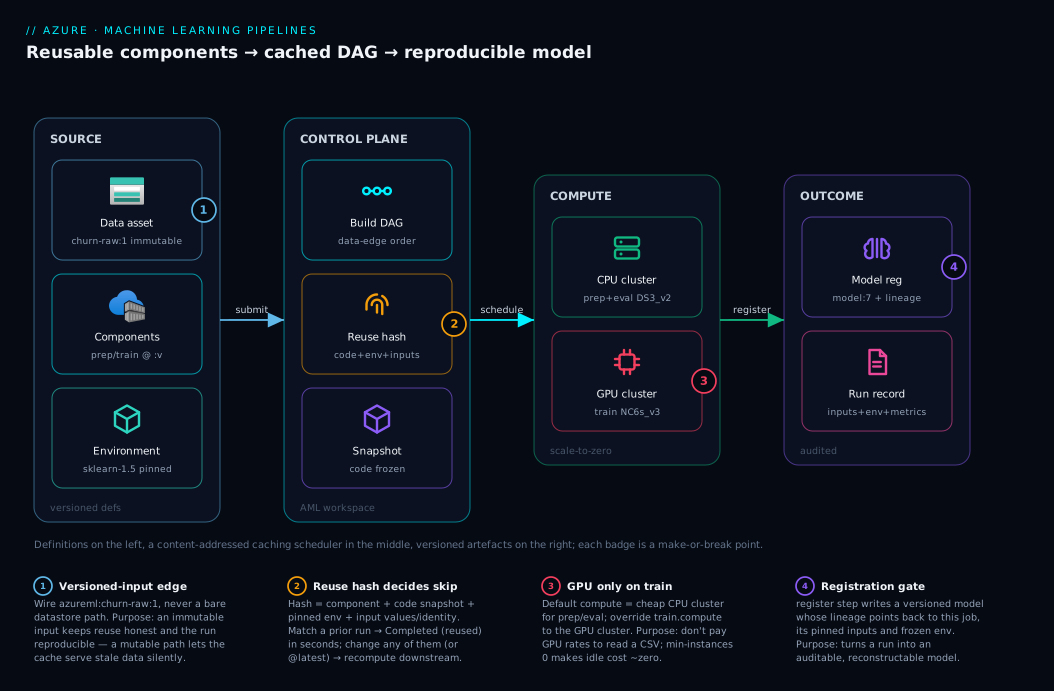
Trace the system left to right. On the far left is your source: a versioned data asset (churn-raw:1) backed by a Blob datastore, plus the component and environment definitions you registered. On submit, the control plane — the Azure ML workspace — snapshots your code immutably, resolves every azureml:name:version reference, builds the DAG from the data edges, and computes each step’s reuse hash. It schedules child jobs onto your compute: the CPU cluster runs prep and evaluate, the GPU cluster runs train, and any step whose hash matches a prior run is short-circuited to reused without touching a node. As each step runs, its typed inputs are mounted (ro_mount) or downloaded and its outputs written back (rw_mount/upload) to the datastore, becoming the next step’s input.
On the right is the outcome plane: the trained model lands in the model registry as a versioned asset, the evaluation report and metrics land in the run record, and the whole pipeline job — snapshot, pinned environment, exact input versions, per-step lineage — is preserved so any run is reconstructable. The numbered badges mark the make-or-break points: the versioned-input edge (1) that keeps data honest, the reuse hash (2) that decides skip-versus-recompute, the CPU/GPU compute split (3) that controls cost, and the registration gate (4) that turns a run into an auditable model. Read it as “definitions on the left, a caching scheduler in the middle, versioned artefacts on the right.”
Real-world scenario
Northwind Retail runs a daily churn-prediction model. Their data scientist, Priya, built it as one notebook: pull yesterday’s customer table from a datastore, engineer forty features (a forty-minute pandas job on six million rows), train an XGBoost model, evaluate, and save the .pkl. It worked, and for a quarter it was retrained by Priya running the notebook each morning. Then three things happened at once. The business asked to A/B test XGBoost against LightGBM, which meant running the forty-minute prep twice a day. Audit asked which exact data produced last month’s model-2026-05-14, and Priya could not say because the datastore path had been overwritten daily. And a new hire, Sam, was told to “own retraining,” inherited the notebook, and immediately broke it by editing the prep cell while Priya was mid-experiment.
The team moved to a pipeline. They cut the notebook into four components — prep_features, train_model (parameterised by an algorithm enum: xgboost | lightgbm), evaluate_model, register_model — each with a pinned environment and typed inputs/outputs, registered at :1. They switched the daily input from the overwriteable datastore path to a versioned data asset: each morning a small ingestion step registers churn-raw:<date> as a new immutable version. The pipeline wires train’s data to prep’s output, and a second train step with algorithm=lightgbm consumes the same prep_features.outputs.clean_data. With no data edge between the two trains, they run in parallel — and because both consume one prep output, prep runs once, not twice. The forty-minute prep that ran per-model now runs per-pipeline.
The reuse payoff was immediate. When Sam tweaked only a training hyperparameter and resubmitted, prep showed Completed (reused) in four seconds — its component, code, environment and input were byte-identical, so the runtime served the cached clean_data and only the two trains and the evals recomputed. A pipeline that took fifty minutes the first time took twelve on the next iteration. The audit question became trivial too: model-2026-05-14 is a registered model whose lineage points to the pipeline job, whose inputs name churn-raw:2026-05-14 exactly, whose environment is pinned to churn-train-env:7, and whose code snapshot is frozen — Priya reconstructed the run in one command. The one scare came two weeks in: someone registered train_model:2 with a bug and a pipeline referencing @latest picked it up, shipping a worse model. They pinned every pipeline to explicit versions and added a CI check that fails any pipeline YAML containing @latest. Net result: prep cost dropped ~50% (run once not twice), iteration time dropped ~75% on cache hits, and every production model became reproducible from its run record.
Advantages and disadvantages
| Advantages | Disadvantages |
|---|---|
| Reuse skips unchanged steps — huge iteration speedups | Caching can silently serve stale data if you wire mutable inputs |
| Components are reusable across pipelines and teams | More upfront structure than a single notebook |
| Typed data dependencies make the DAG explicit and parallel | Learning the YAML/SDK schema has a curve |
| Every run is reproducible from its snapshot + pinned env | Requires version discipline (@latest quietly breaks it) |
| Per-step compute lets you split CPU prep from GPU train | More moving parts to monitor (one job per step) |
| Registration versions and shares bricks; auditable lineage | Registry/workspace promotion adds process |
| Steps fan out in parallel with no extra code | Debugging a step means drilling into its child job |
| CI/CD can trigger the exact same pipeline on a schedule | Over-decomposition (too many tiny steps) adds overhead |
When does each side matter? The advantages dominate the moment a model must be retrained, audited, sped up, or handed between people — every model past the demo. The disadvantages dominate only at the start: for a one-off analysis no one will re-run, a notebook is genuinely faster, and forcing structure on a throwaway is premature. The dividing line is “will this run more than once, or be questioned later?” If yes — pipeline. The most painful disadvantage in practice is not the structure cost but stale-cache reuse, which is entirely preventable by the one rule of wiring only versioned, immutable inputs.
Hands-on lab
The centrepiece: build a real four-step pipeline (prep → train → evaluate → register), run it in the portal and az ml CLI v2, provision the infrastructure in Bicep, validate reuse, and tear it down. It is free-tier-friendly with a small CPU cluster that scales to zero.
Prerequisites for the lab
| Requirement | How to get it | Check |
|---|---|---|
| Azure subscription | Free account works | az account show |
| ML CLI v2 extension | az extension add -n ml |
az ml -h |
| An Azure ML workspace | Portal or az ml workspace create |
az ml workspace show |
| A CPU compute cluster (min 0 nodes) | Step 2 below | scales to 0 when idle = ~no idle cost |
| Logged in to the right subscription | az login / az account set |
az account show -o table |
Step 1 — Set context and variables
Open Cloud Shell (Bash) and set names you will reuse — pinning them to variables keeps every later command copy-pasteable.
RG=rg-ml-lab
WS=mlw-lab-$RANDOM
LOC=eastus
az group create -n $RG -l $LOC
az configure --defaults group=$RG workspace=$WS location=$LOC
Create the workspace if you do not already have one:
az ml workspace create --name $WS --resource-group $RG --location $LOC
Expected output: a JSON block with "provisioning_state": "Succeeded" and the workspace’s id. This takes 2–4 minutes and also provisions the backing storage account, Key Vault, Application Insights and container registry.
Step 2 — Create a compute cluster that scales to zero
A cluster with min-instances 0 costs nothing when idle and spins up only while a step runs. This is the key to a cheap lab.
az ml compute create --name cpu-cluster --type AmlCompute \
  --size Standard_DS3_v2 --min-instances 0 --max-instances 2 \
  --idle-time-before-scale-down 120
Expected output: JSON showing "provisioning_state": "Succeeded", "min_instances": 0. Validate:
az ml compute show --name cpu-cluster --query "{state:provisioning_state, min:min_instances, max:max_instances}" -o table
Portal equivalent: ML Studio → Compute → Compute clusters → + New → choose Standard_DS3_v2, set Minimum nodes = 0, Maximum nodes = 2, Idle seconds = 120 → Create.
Step 3 — Lay down the project files
Create a folder structure: one source dir per component plus the YAMLs. The scripts are intentionally tiny — the point is the pipeline mechanics, not the ML.
mkdir -p mlpipe/prep mlpipe/train mlpipe/eval mlpipe/reg && cd mlpipe
Create prep/prep.py (reads a CSV, splits, writes train/test):
# prep/prep.py
import argparse, os, pandas as pd
from sklearn.model_selection import train_test_split

p = argparse.ArgumentParser()
p.add_argument("--raw_data"); p.add_argument("--test_split_ratio", type=float, default=0.2)
p.add_argument("--clean_data")
a = p.parse_args()

df = pd.read_csv(a.raw_data)
train, test = train_test_split(df, test_size=a.test_split_ratio, random_state=42)
os.makedirs(a.clean_data, exist_ok=True)
train.to_csv(os.path.join(a.clean_data, "train.csv"), index=False)
test.to_csv(os.path.join(a.clean_data, "test.csv"), index=False)
print(f"Wrote {len(train)} train / {len(test)} test rows to {a.clean_data}")
Create train/train.py on the same pattern — it reads train.csv from --training_data, fits a LogisticRegression, and joblib.dumps model.pkl into --model_output:
# train/train.py (core lines)
df = pd.read_csv(os.path.join(args.training_data, "train.csv"))
model = LogisticRegression(max_iter=200).fit(df.iloc[:, :-1], df.iloc[:, -1])
os.makedirs(args.model_output, exist_ok=True)
joblib.dump(model, os.path.join(args.model_output, "model.pkl"))
Create eval/evaluate.py and reg/register.py similarly (evaluate scores test.csv and writes a report.json; register writes a small marker). Then define the four component YAMLs (prep.yml as shown earlier, plus train.yml, evaluate.yml, register.yml following the same pattern), referencing a curated environment so you do not have to build one:
# Use a curated env so the lab needs no custom image build
environment: azureml://registries/azureml/environments/sklearn-1.5/labels/latest
Note: in production you would pin
.../versions/<n>notlabels/latest; the lab uses the curated label for convenience.
Step 4 — Register the components
Register all four so the pipeline can reference them by name:
for c in prep train evaluate register; do
  az ml component create --file ${c}.yml
done
az ml component list -o table
Expected output: four rows — prep_data, train_model, evaluate_model, register_model, each at version 1.
Step 5 — Register a versioned data asset
This discipline makes runs reproducible — register the raw CSV as an immutable versioned asset rather than wiring a bare path:
az ml data create --name churn-raw --version 1 --type uri_file \
  --path ./data/churn.csv
Expected output: JSON with "name": "churn-raw", "version": "1". The pipeline will reference azureml:churn-raw:1, so even if you overwrite the local file later, version 1 is frozen.
Step 6 — Submit the pipeline (CLI)
With pipeline.yml as shown earlier, submit it and stream the run:
az ml job create --file pipeline.yml --web
# --web opens the run in the Studio; omit it on headless shells
Expected output: a JSON job record with a name (a GUID-like run id) and "status": "Running". Capture the name to track it:
RUN=$(az ml job create --file pipeline.yml --query name -o tsv)
az ml job show --name $RUN --query "{status:status, type:type}" -o table
Validate the DAG and per-step status:
az ml job list --parent-job-name $RUN -o table
# Lists the four child jobs (prep, train, evaluate, register) and their status
Expected: four child jobs, executing in dependency order — prep completes before train and evaluate start; register last.
Portal equivalent: ML Studio → Jobs → open the pipeline run → you see the graph with four boxes wired prep → train → evaluate → register. Click any box to see its inputs, outputs, logs, and the environment it used.
Step 7 — Prove reuse (the payoff)
Resubmit the identical pipeline. Because nothing changed, every step should be reused:
RUN2=$(az ml job create --file pipeline.yml --query name -o tsv)
az ml job list --parent-job-name $RUN2 -o table
Expected output: child jobs marked Completed (reused) in seconds — no compute node spins up. Now change one thing — the learning rate — and resubmit:
az ml job create --file pipeline.yml --set jobs.train.inputs.learning_rate=0.1
Expected output: prep is reused (its inputs are unchanged), but train, evaluate, and register recompute (train’s parameter changed, cascading downstream). This is the cache working exactly as designed — and the single most important behaviour to internalise.
Step 8 — Inspect reproducibility
Open the first run’s record and confirm everything needed to reconstruct it is there:
az ml job show --name $RUN \
  --query "{inputs:inputs, status:status, compute:compute}" -o json
Expected: the inputs show azureml:churn-raw:1 (pinned), the child jobs reference pinned component versions, and the snapshot/environment are frozen. This is your audit trail.
Step 9 — Bicep version (infrastructure as code)
You provision the infrastructure (workspace + compute) in Bicep, then submit jobs with the CLI/SDK — jobs, components and pipeline runs are control-plane operations, not ARM resources, so they are not expressible in Bicep. The compute cluster, which is the part that costs money and that you want declarative, is the key piece:
// mlpipe.bicep — the scale-to-zero CPU cluster on an existing workspace
resource cluster 'Microsoft.MachineLearningServices/workspaces/computes@2024-04-01' = {
  name: '${workspaceName}/cpu-cluster'
  location: location
  properties: {
    computeType: 'AmlCompute'
    properties: {
      vmSize: 'Standard_DS3_v2'
      scaleSettings: {
        minNodeCount: 0            // scale to zero → ~no idle cost
        maxNodeCount: 2
        nodeIdleTimeBeforeScaleDown: 'PT120S'
      }
    }
  }
}
The workspace itself (Microsoft.MachineLearningServices/workspaces) provisions alongside its storage account and Key Vault; create it once with az ml workspace create or a workspace Bicep module, then deploy this cluster against it and run the same az ml component create / az ml job create steps:
az deployment group create --resource-group $RG --template-file mlpipe.bicep
Expected output: "provisioningState": "Succeeded" with the workspace and compute as outputs.
Step 10 — Teardown
Delete everything to stop all charges. The scale-to-zero cluster already costs ~nil while idle, but remove the group to be clean:
az group delete --name $RG --yes --no-wait
Validate: az group show -n $RG eventually returns “ResourceGroupNotFound”; --no-wait returns immediately and deletion completes in the background.
| Lab step | Command | Expected signal |
|---|---|---|
| 2 Cluster | az ml compute create … --min-instances 0 |
Succeeded, min_instances: 0 |
| 4 Components | az ml component create ×4 |
4 components at v1 |
| 5 Data asset | az ml data create … --version 1 |
churn-raw:1 |
| 6 Submit | az ml job create --file pipeline.yml |
4 child jobs, in order |
| 7 Reuse | resubmit identical | Completed (reused) in seconds |
| 7 Cache-bust | --set …learning_rate=0.1 |
prep reused, rest recompute |
| 10 Teardown | az group delete --yes |
ResourceGroupNotFound |
Common mistakes & troubleshooting
The failure modes below cost teams days. Each gives a symptom, root cause, the exact way to confirm, and the fix.
| # | Symptom | Root cause | Confirm (exact path / command) | Fix |
|---|---|---|---|---|
| 1 | Pipeline “retrains” on old data despite new input | Wired to a mutable datastore path, not a versioned asset; reuse served stale output | Studio → child job → Inputs shows a bare path, not name:version |
Wire azureml:data:<v>; bump the version on new data |
| 2 | A step you expected to skip recomputes every time | A stray file in the code folder changed, or env is @latest |
Compare snapshots; check environment for @latest |
Pin env to :<v>; keep code lean; isolate scripts |
| 3 | ${{inputs.x}} appears literally in logs |
Placeholder not substituted (typo in name, wrong scope) | Child job → Outputs+logs shows the literal ${{...}} |
Match the placeholder to a declared input exactly |
| 4 | Step fails: “path does not exist” | uri_file declared but a folder supplied (or vice-versa) |
Child job error; check input type vs the asset |
Match type to the data shape; folder→uri_folder |
| 5 | Pipeline hangs at the start of a big-data step | download mode on a huge input copies it all first |
Step stuck “Preparing”; node disk fills | Switch input to ro_mount; reserve download for small data |
| 6 | Two “identical” runs give different models | An env or component referenced by @latest; a non-seeded random step |
Diff the two runs’ pinned versions in the run record | Pin all versions; seed RNGs; is_deterministic:false if truly random |
| 7 | register ran but on the wrong (cached) model |
An upstream step was reused when it should have recomputed | Lineage shows register’s model input from a reused train | Bump train’s version or force_rerun=true; verify lineage |
| 8 | “Component not found: azureml:prep_data:1” | Component never registered, or wrong workspace/version | az ml component show --name prep_data --version 1 errors |
Register it; check az configure --defaults workspace |
| 9 | Step runs but writes nothing downstream sees | Script wrote to a path other than ${{outputs.x}} |
Output folder empty in the datastore | Write to the exact --clean_data path passed in |
| 10 | GPU bill on a CPU job (or OOM on a tiny cluster) | Wrong compute for the step; default applied everywhere |
Child job → Compute shows the wrong cluster | Set per-step compute; CPU prep, GPU train |
| 11 | Pipeline validation error before it even runs | YAML schema mistake (wrong $schema, bad indentation) |
az ml job validate --file pipeline.yml reports the line |
Fix against the schema; validate before submit |
| 12 | Curated environment “not found” | Wrong registry path or label for the curated env | az ml environment list --registry-name azureml |
Use the exact azureml://registries/azureml/environments/... path |
Three habits that resolve most of these fast:
| Habit | Command / path | What it tells you |
|---|---|---|
| Validate before submit | az ml job validate --file pipeline.yml |
Catches schema/wiring errors offline |
| Read the child job, not the parent | Studio → pipeline run → click the failing box | The real error, logs, env and inputs are here |
| Check the lineage on a model | Studio → Models → the model → “Job” link | Proves which run + which inputs produced it |
The most damaging mistake is #1 — stale-cache reuse against a mutable input — because it fails silently: the pipeline goes green, ships a model, and weeks later you discover it trained on last month’s data. The structural cure is the rule repeated throughout this article: every data input is a versioned, immutable asset.
Best practices
- Decompose by ownership boundary, not line count. A component should be a unit one person owns with a meaningful reuse boundary (prep, train, evaluate, register). Do not shred a pipeline into twenty trivial steps — each has scheduling overhead.
- Pin every version — components, environments, data. Never reference
@latestin a pipeline you need to reproduce; add a CI check that fails any pipeline YAML containing@latest. - Wire only versioned, immutable data assets as inputs — this makes reuse safe and runs reproducible at once.
- Keep the
codefolder minimal per component — only the script and its direct helpers. The whole folder is hashed and snapshotted; junk busts the cache and bloats the snapshot. - Set
is_deterministic: falseon any non-deterministic step (live API calls, non-seeded randomness, wall-clock reads) so the runtime never serves a stale cached output. - Split compute by step: cheap CPU cluster as default, GPU cluster only on train; use
min-instances 0so idle cost is near zero. - Choose input modes deliberately:
ro_mountfor large streamed data,downloadfor small/random-access data,uploadfor many-small-files outputs. - Register into a registry, not just a workspace, once more than one workspace (dev/test/prod) consumes a component — that is the promotion path.
- Validate offline with
az ml job validatebefore every submit; it catches schema and wiring errors without burning compute. - Make the pipeline the CI/CD unit: a scheduled or event-triggered CI/CD pipeline submits the exact same definition, so retraining is one reproducible artefact, not a human re-running cells.
- Separate data liveness from the model: a small ingestion step that registers
raw:<date>as a new version each run gives both fresh data and a frozen audit point. - Read the child job for errors, never just the parent status — the real exception, logs, environment and inputs live there.
Security notes
Pipelines run code against your data, so the security surface is real — mostly identity and isolation:
| Concern | Risk if ignored | Control |
|---|---|---|
| Compute identity | Steps use an over-permissioned identity to read data/secrets | Assign a user-assigned managed identity to the compute with least-privilege RBAC |
| Secrets in steps | Credentials hard-coded in scripts or passed as plain inputs | Pull from Key Vault at runtime via the workspace-linked vault; never as a string input |
| Datastore access | A step reads/writes data it should not | Scope datastore credentials and RBAC to exactly the containers the step needs |
| Network isolation | Compute reaches the public internet / data is exposed | Use a managed VNet workspace; put storage/registry behind private endpoints |
| Snapshot leakage | Secrets baked into the code snapshot are stored immutably |
Keep secrets out of code; the snapshot is frozen and visible to run viewers |
| Environment supply chain | A poisoned base image runs in your pipeline | Pin environments to immutable versions from a trusted registry; scan images |
| Registry access | Anyone can overwrite a shared component | RBAC on the registry; immutable versions prevent silent tampering |
Two rules carry most of the weight. First, use a managed identity with least privilege for the compute — it should read exactly the datastores it needs and nothing else, with secrets pulled from Key Vault at runtime, never embedded in the snapshotted code. Second, never put a secret in an input value or a script — the code snapshot is immutable and visible to anyone who can view the run, so a secret in it is leaked forever.
Cost & sizing
A pipeline’s bill is almost entirely compute time on the clusters, plus negligible storage for snapshots and artefacts; the control plane (workspace, scheduling, model registry, lineage) is free. The levers that move the number:
| Cost driver | What it costs | How to right-size |
|---|---|---|
| Compute cluster (CPU) | VM-hours while a step runs | Small SKU; min-instances 0 so idle = ₹0 |
| Compute cluster (GPU) | Much higher VM-hours on train | GPU only on train; scale to zero; spot if interruptible |
| Number of steps × duration | Each step is VM-time | Reuse skips unchanged steps — the biggest saver |
| Input mode | download of huge data wastes node-minutes preparing |
ro_mount large data; don’t copy 200 GB to a node |
| Parallel fan-out | More nodes for the parallel window | Cap max-instances; right-size the window |
| Storage (snapshots/outputs) | Pennies | Keep code lean; clean old outputs |
| Application Insights | Per-GB ingestion of logs | Sample verbose logs; not pipeline-specific |
Rough figures (East US, indicative; verify against the pricing calculator): a Standard_DS3_v2 (4 vCPU) CPU node runs around $0.27/hour (~₹23/hour); a single-GPU Standard_NC6s_v3 roughly $3/hour (~₹250/hour) — which is exactly why GPU stays on the train step alone and scales to zero between runs. The decisive saving is reuse: in the Northwind case, cache hits turned a 50-minute pipeline into a 12-minute one, and running prep once instead of per-model halved the most expensive step. Set every cluster to min-instances 0 with a short idle-scale-down (120 s) so you pay only for the seconds a step computes. There is no Azure ML “free tier” for compute, but a free account’s credits comfortably cover this lab, and a scale-to-zero cluster left provisioned between sessions costs nothing while idle.
Interview & exam questions
Q1. What is the difference between a component and a pipeline in Azure ML? A component is a versioned, reusable definition of one unit of work — a command, its environment, and its typed inputs/outputs — and it is context-free. A pipeline instantiates components as steps and wires them together with data dependencies, supplying the context (which data, which compute, what order). Component = function; pipeline = the program that calls it.
Q2. How does the runtime decide the execution order of steps?
From the data dependencies, not an explicit order. If train’s input is prep’s output, train waits for prep. The runtime builds a DAG from these edges and runs steps in topological order, parallelising any with no dependency between them. You never declare “run in parallel” — the absence of a data edge is the parallelism.
Q3. Exactly what determines whether a step is reused from cache?
A content hash of the component definition (command + interface), the code snapshot, the exact environment version, all input scalar values, and the identity/content of input data — plus the is_deterministic gate. Compute target and display name are not in the hash. If the hash matches a prior successful run in the same workspace, the step is reused.
Q4. Why can a pipeline silently train on stale data, and how do you prevent it? If an input is wired to a mutable datastore path, someone can overwrite the bytes while the path identifier stays the same, so the reuse hash is unchanged and the runtime serves the old cached output against new data. Prevent it by wiring only versioned, immutable data assets and bumping the version when data changes.
Q5. When would you choose download over ro_mount for an input?
Choose download when the dataset is small or your code does many random/repeated reads — copying it local once beats paying mount latency per read. Keep ro_mount (the default) for large datasets you stream once; downloading hundreds of GB to a node before the job starts is a classic hang.
Q6. What does is_deterministic: false do and when do you set it?
It marks a component as never reuse-eligible, so the runtime always recomputes it. Set it on steps that are not pure functions of their inputs: non-seeded randomness, live external API calls, or anything reading the wall clock — otherwise the cache could serve a stale output when you needed a fresh computation.
Q7. How do you make a pipeline run reproducible?
Pin everything mutable: reference components and environments by explicit :version (never @latest), wire versioned immutable data assets, and rely on the immutable code snapshot. Given a past job, you can then read its recorded inputs, pinned environment and frozen snapshot and re-run it bit-for-bit.
Q8. What is the difference between registering a component in a workspace versus a registry?
A workspace registration makes the component available to that one workspace (one team’s bench). A registry registration makes it available across workspaces (a shared shelf), referenced as azureml://registries/<reg>/components/<name>/versions/<v> — the path for promoting bricks from dev to test to prod.
Q9. Why split compute targets across steps?
Cost and fit. Data prep is CPU-bound and cheap; training may need a GPU. Setting the pipeline default_compute to a CPU cluster and overriding only the train step’s compute to a GPU cluster means you do not pay GPU rates to read a CSV. Clusters at min-instances 0 add zero idle cost.
Q10. How would a CI/CD system retrain a model reproducibly?
By submitting the exact same registered pipeline definition (pinned component and environment versions) on a schedule or on a new-data event, with the data input pointing at a freshly registered data-asset version. The pipeline is a single reproducible artefact; CI/CD just triggers az ml job create against it.
Q11. A step shows ${{inputs.model_path}} literally in its logs. What happened?
The placeholder was not substituted — almost always a name mismatch (the command references an input that is not declared with that exact name) or a scope error. Fix by aligning the placeholder to a declared input name precisely; validate with az ml job validate before submitting.
Q12. Which certification covers this, and at what level? This is core DP-100 (Azure Data Scientist Associate) material — the “operationalise machine learning” and “manage and reuse assets” competencies. The component/pipeline authoring, reuse, registration and reproducibility concepts map directly to its objectives, and the CLI v2 / SDK v2 are the exam-current tooling.
Quick check
- You change only a training hyperparameter and resubmit. Which steps recompute and which are reused?
- Your pipeline appears to train on last month’s data even though you uploaded new data this morning. What is the most likely cause and the fix?
- You want a CPU step and a GPU step in the same pipeline. Where do you set each compute target?
- What three things must be pinned for a run to be reproducible?
- Name the default input mode and the situation where you would override it to
download.
Answers
- The downstream cascade recomputes —
train, thenevaluate, thenregister— because train’s input value changed, which changes its hash and every dependent step’s input.prepis reused, since its component, code, environment and input are unchanged. - You wired the input to a mutable datastore path instead of a versioned data asset, so the reuse hash did not change when the bytes did and the runtime served the cached output. Fix: register the new data as a new versioned data asset and wire
azureml:data:<v>. - Set the pipeline’s
settings.default_computeto the CPU cluster, then override the GPU step’sjobs.<step>.computeto the GPU cluster. Step-level compute beats the pipeline default. - The component/pipeline versions (referenced by
:version, not@latest), the environment version, and the input data version — plus the immutablecodesnapshot, which the platform pins automatically. - The default is
ro_mount(read-only FUSE mount, streamed on access). Override todownloadwhen the dataset is small or your code does many random/repeated reads, so the one-time local copy beats per-read mount latency.
Glossary
| Term | Definition |
|---|---|
| Component | A versioned, reusable definition of one unit of work: a command, its environment, and its typed inputs/outputs. |
| Step | A component instantiated inside a pipeline; one node of the DAG. |
| Pipeline | A definition that wires components into a DAG via their data dependencies. |
| Pipeline job | A submitted, running instance of a pipeline; it spawns one child job per step. |
| Child job | The run of one step inside a pipeline job; where reuse status and per-step logs live. |
| Data dependency | A typed edge where one step’s input is another step’s output; it implies execution order. |
| DAG | Directed acyclic graph — the dependency graph the runtime builds from the data edges. |
| Input / Output | Typed parameters or data on a component; the connection points of the DAG. |
| Mode | How data is delivered to/from a node: ro_mount, download, direct, rw_mount, upload. |
| Data type | The shape of a data asset: uri_file, uri_folder, or mltable. |
| Environment | A versioned conda/Docker image a component runs in; pinned for reproducibility. |
| Reuse / output caching | Skipping a step whose content hash matches a prior successful run. |
is_deterministic |
Component flag gating reuse eligibility; set false for non-deterministic steps. |
| Registration | Storing an asset under an immutable name:version in a workspace or registry. |
| Registry | A cross-workspace store for shared, promotable assets (components, environments, models). |
| Compute target | Where a step runs — an Aml compute cluster, serverless, or attached compute. |
| Snapshot | The immutable copy of the submitted code folder recorded with each job. |
| Model registry | The versioned store of trained models, with lineage back to the producing run. |
Next steps
- Anatomy of an Azure ML Workspace: Compute Targets, Datastores, Environments, and the Job Lifecycle — the resources every pipeline step runs on; read this first if any of the backing pieces felt fuzzy.
- CI/CD Pipeline Explained — wire your registered pipeline into automated, scheduled retraining as a single reproducible artefact.
- Azure Container Registry: Secure Supply Chain, Private ACR, Tasks, Zone Redundancy — where the environments your components pin are built and stored.
- Azure Key Vault: Secrets, Keys and Certificates — the right way to feed credentials to a pipeline step instead of baking them into the snapshot.
- Prompt Flow: Build, Evaluate and Deploy Flows — the same “reusable, versioned, evaluated” discipline applied to generative-AI workflows.