You deployed a virtual machine, installed a web server, opened a browser to its public IP — and nothing. The page never loads. You SSH in fine, the service is listening, the OS firewall is off, and the app works. The thing silently dropping your traffic is almost always a Network Security Group (NSG): Azure’s built-in, stateful packet filter that sits in front of your VMs and subnets and decides, per packet, whether to allow or deny it. It is the single most common reason a beginner’s traffic “just disappears,” and the reason is never random — an NSG is a strictly ordered list of rules, evaluated by priority number, and the first rule that matches wins.
This article is the mental model that makes that ordering obvious instead of mysterious. An NSG is a numbered allow/deny list with two halves — the inbound rules and the outbound rules — each evaluated top-down by priority (lowest number first). On top of the rules you write, Azure injects a hidden set of default rules that already allow traffic inside your virtual network and from the load balancer, and deny everything else from the internet. Most “why is my traffic blocked?” moments come from not knowing those defaults exist. We will make every one visible.
By the end you will read any NSG like a sentence: how a packet flows through the priority list, where your custom rules sit relative to the defaults, why DenyAllInBound at priority 65500 quietly stops your web page, how service tags like Internet and AzureLoadBalancer save you from hard-coding IP ranges, how augmented rules let one rule cover many ports and CIDRs, and which az command tells the truth when a rule misbehaves.
What problem this solves
Every workload needs a network boundary. You want your web tier reachable on port 443 from the internet but your database reachable only from the web tier — never the public internet. Without a filtering layer, every VM is fully exposed to whatever its public IP allows, and any compromised machine can talk to every other freely. That flat, open network is how a single breached web server becomes a whole-environment incident: the attacker moves laterally, east-west, from the box they cracked to the database, the domain controller, everything.
An NSG is the cheap, native control that stops this. It is free (you pay only for the resources it protects), stateful (allow the inbound request and the response returns automatically — no matching outbound rule), and attaches in two places: a subnet (protecting every resource in it) or a network interface (NIC, protecting one VM). It gives you exactly the boundary you wanted: “443 from the internet to the web subnet, 1433 from the web subnet to the data subnet, nothing else.”
What breaks without this knowledge is symmetric. Beginners who don’t know the defaults deny inbound internet traffic spend hours debugging an app that was never reachable — OS, app and wiring all fine; an invisible rule at priority 65500 dropped the SYN. And beginners who “just make it work” with an allow-all rule (* source, * port, allow) tear a hole through the boundary, exposing RDP/SSH and databases to the whole internet — which scanners find within minutes. The skill is the middle path: write the minimum rules, at the right priorities, and confirm with one command.
Learning objectives
By the end of this article you can:
- Explain what an NSG is, that it is stateful, and the difference between attaching it to a subnet versus a NIC.
- Trace how a packet is evaluated against the priority-ordered rule list and state the rule that “first match wins.”
- Name and reproduce all six default rules (three inbound, three outbound) and explain what each allows or denies.
- Read every field of a security rule — priority, direction, access, protocol, source/destination, port ranges — and know the legal values and limits of each.
- Use service tags (
Internet,VirtualNetwork,AzureLoadBalancer,Storage,Sql, and regional variants) instead of hard-coded IP ranges. - Use augmented security rules to collapse many ports/CIDRs/ASGs into one rule, and use Application Security Groups to name groups of VMs by role.
- Predict the effective security rules on a NIC when both a subnet NSG and a NIC NSG apply, and confirm them with
az network nic list-effective-nsg. - Pick the right tool for the job — NSG vs Azure Firewall vs Application Gateway WAF — and avoid the classic allow-all-RDP mistake.
Prerequisites & where this fits
You should already know what a virtual network (VNet) and a subnet are — a private IP space (a CIDR like 10.0.0.0/16) carved into smaller ranges (10.0.1.0/24). If those are new, start with Azure Virtual Network & Subnets: NSGs, Address Space, Peering. You should be able to run az in Cloud Shell, read JSON, and know basic TCP: ports, the SYN handshake, and that HTTP is 80, HTTPS 443, RDP 3389, SSH 22, SQL 1433.
This sits at the very front of the Networking & Security track — NSGs are the first network control most people meet, and almost every other Azure networking topic assumes you can reason about them. The table below shows where an NSG sits relative to the other filtering layers:
| Layer | What it filters | When you reach for it | Covered in |
|---|---|---|---|
| NSG | L3/L4: IP, port, protocol, service tag | Every VNet workload; the default boundary | This article |
| Application Security Group | Names groups of NICs by role | When IPs churn and you want role-based rules | This article |
| Azure Firewall | Centralised L3–L7, FQDN, threat intel | Hub-spoke, many subscriptions, egress control | (separate, advanced) |
| Application Gateway WAF | L7 HTTP: OWASP rules, TLS, routing | Public web apps needing app-layer protection | Application Gateway with WAF & end-to-end TLS |
| Private Endpoint | Removes public exposure of a PaaS service | Locking down Storage/SQL/Key Vault to the VNet | Private Endpoint vs Service Endpoint |
The key idea: an NSG is the baseline. The other layers are additive, for when you outgrow simple IP/port filtering. You almost never replace an NSG — you add to it.
Core concepts
Five mental models make every NSG decision obvious.
An NSG is an ordered allow/deny list, not a single switch. It holds a set of security rules, each with a priority from 100 to 4096, split into two independent lists by direction: inbound (arriving) and outbound (leaving). Within each direction, Azure evaluates rules in ascending priority — 100 before 200 before 300 — and the first rule that matches wins. Once one matches, evaluation stops. A lower number means higher precedence. This single fact explains almost every surprise: a rule isn’t “broken,” it’s shadowed by a lower-number rule that matched first.
NSGs are stateful, so you write only one side. Allow an inbound TCP connection on 443 and the return traffic is permitted back out automatically — you do not add an outbound rule for the response. You write rules for the initiating direction only, which is why a working web server needs one inbound rule (allow 443) and zero matching outbound rules.
There are always six rules you didn’t write. Every NSG ships with default rules at priorities 65000–65500 — very low precedence, so your custom rules (100–4096) always sit above and can override them. The inbound trio: AllowVnetInBound (anything inside the VNet gets in), AllowAzureLoadBalancerInBound (the LB health probe gets in), and DenyAllInBound (everything else is dropped). The outbound mirror allows VNet and internet egress, then denies the rest. DenyAllInBound is the rule blocking your web page until you add an allow above it.
Source and destination can be IPs, CIDRs, service tags, or ASGs. A rule’s source and destination each accept an IP, a CIDR, * (any), a service tag (a Microsoft-managed, auto-updated label — Internet, VirtualNetwork, AzureLoadBalancer, Storage, Sql, regional forms like Storage.WestEurope), or an Application Security Group (a name for a set of VM NICs by role). A tag means you never hard-code or maintain Microsoft’s IP ranges.
Effective rules are the merge of subnet NSG and NIC NSG. A packet to a VM can be filtered twice — by the NSG on its subnet and the one on its NIC — and both must allow to pass (an intersection, not a union). Inbound, the subnet NSG runs first, then the NIC; outbound, NIC first, then subnet. If either denies, the packet dies. The combined result is the effective security rules, which one command computes for you.
The vocabulary in one table
Before the deep sections, pin down every moving part. The glossary repeats these for lookup; this table is the mental model side by side:
| Concept | One-line definition | Where it lives | Why it matters |
|---|---|---|---|
| NSG | Ordered allow/deny list for L3/L4 traffic | Subnet and/or NIC | The boundary itself |
| Security rule | One allow/deny entry with a priority | Inside an NSG | What you actually write |
| Priority | 100–4096; lower = evaluated first | Per rule | First match wins |
| Direction | Inbound or Outbound (two separate lists) | Per rule | Which way traffic flows |
| Access | Allow or Deny | Per rule | The verdict |
| Default rules | Six pre-set rules at priority 65000–65500 | Every NSG | The hidden allow/deny baseline |
| Service tag | Managed label for a set of Microsoft IPs | Source/destination field | No hard-coded IP ranges |
| Augmented rule | One rule with multiple ports/CIDRs/ASGs | Per rule (Standard tier) | Fewer rules, same coverage |
| ASG | Named group of NIC by role | Referenced in rules | Role-based, IP-free rules |
| Effective rules | Merged subnet + NIC NSG result | Computed per NIC | The truth a packet actually sees |
How a packet is evaluated: the priority list
This is the whole engine, and it is simpler than it looks. When a packet arrives, Azure builds the relevant rule list (inbound or outbound), sorts it by priority ascending, and walks it from the top, asking of each rule: does this packet match the rule’s direction, protocol, source, source port, destination, and destination port? The first match decides Allow or Deny, and evaluation stops.
Two consequences trip up every beginner. First, a Deny at priority 200 beats an Allow at 300, because 200 is evaluated first — for an allow to take effect it must sit below any deny that would also match. Second, your custom rules always beat the defaults, because 100–4096 is always lower than 65000–65500; you routinely override DenyAllInBound with an allow at, say, priority 300.
Here is the field-by-field anatomy of a single rule — every field, its legal values, and the gotcha:
| Field | Legal values | Default / note | Gotcha |
|---|---|---|---|
| Name | 1–80 chars, letters/digits/_/-/. |
Must be unique within the NSG | Rename forces a delete+recreate |
| Priority | 100–4096 (custom); 65000–65500 (default) | Unique per direction | Two rules can’t share a priority in one direction |
| Direction | Inbound or Outbound |
— | Inbound and outbound are separate lists |
| Access | Allow or Deny |
— | First match wins, full stop |
| Protocol | Tcp, Udp, Icmp, Esp, Ah, * |
* = any |
* also matches ICMP — be deliberate |
| Source | IP, CIDR, *, service tag, ASG |
— | Service tag ≠ IP; can’t mix tag + IP in one field |
| Source port range | 0–65535, *, ranges, lists |
Usually * |
This is the client’s ephemeral port — almost always * |
| Destination | IP, CIDR, *, service tag, ASG |
— | This is the listening side |
| Destination port range | 0–65535, *, ranges, lists |
— | The port your service listens on (e.g. 443) |
The mistake hiding in that table is source port: new users set destination port 443 (correct) but also set source port 443 (wrong). The client connects from a random high ephemeral port, so the rule never matches and traffic is denied. Source port should almost always be *.
A worked example of shadowing — read it top to bottom the way Azure does:
| Priority | Direction | Access | Source | Dest port | Outcome for a 443 packet from the internet |
|---|---|---|---|---|---|
| 100 | Inbound | Deny | Internet |
* |
Matches first → DENIED. Rule 300 never runs. |
| 300 | Inbound | Allow | Internet |
443 |
Would allow 443, but it’s shadowed by rule 100 |
| 65500 | Inbound | Deny | * |
* |
DenyAllInBound default — never reached here |
Swap the priorities (allow 443 at 100, deny-all at 300) and the packet is allowed. Priority ordering is the entire mechanism. When a rule “doesn’t work,” your first move is always: list rules sorted by priority and find the lower-number rule that matched first.
The six default rules, decoded
Every NSG — even an empty one — already contains these six rules. They are read-only but you can override any of them with a custom rule at a lower priority. Knowing them by heart removes most NSG confusion. Here are all six, exactly as Azure defines them:
| Priority | Name | Direction | Access | Source | Destination | Ports | What it does |
|---|---|---|---|---|---|---|---|
| 65000 | AllowVnetInBound | Inbound | Allow | VirtualNetwork |
VirtualNetwork |
Any | Any resource in the VNet can reach this one |
| 65001 | AllowAzureLoadBalancerInBound | Inbound | Allow | AzureLoadBalancer |
* |
Any | The Azure LB health probe can reach the resource |
| 65500 | DenyAllInBound | Inbound | Deny | * |
* |
Any | Everything else inbound is dropped |
| 65000 | AllowVnetOutBound | Outbound | Allow | VirtualNetwork |
VirtualNetwork |
Any | This resource can reach anything in the VNet |
| 65001 | AllowInternetOutBound | Outbound | Allow | * |
Internet |
Any | This resource can reach the public internet |
| 65500 | DenyAllOutBound | Outbound | Deny | * |
* |
Any | Everything else outbound is dropped |
Read the inbound trio as a story: “Anyone inside my VNet, come in. The load balancer’s health probe, come in. Everyone else — the entire internet included — stop.” That last line is why a fresh VM with a public IP is unreachable on its app port until you add an allow. The platform ships closed to the internet, open inside the VNet.
The outbound trio is the opposite posture: “Reach anything in the VNet. Reach the internet. Nothing else.” So by default your VM can call out (pull packages, reach APIs, send telemetry). Locking egress down — overriding AllowInternetOutBound with denies — is a deliberate, advanced step and a common compliance requirement, not the default.
Three reading notes that save the most time:
| Distinction | The trap | How to tell them apart |
|---|---|---|
| Inbound default deny vs your missing allow | “Azure is blocking me!” — no, you never allowed it | If no custom inbound allow matches, DenyAllInBound (65500) is the rule; add an allow above it |
| VNet traffic is allowed by default | You add an allow-VNet rule that does nothing new | AllowVnetInBound (65000) already permits it; you only need a rule to deny internal traffic |
| Outbound is open by default | “Why can my VM reach the internet?” | AllowInternetOutBound (65001) permits it; to block egress you must override it |
Service tags: stop hard-coding IP ranges
A service tag is a Microsoft-managed label that expands to a set of IP prefixes for a specific Azure service, kept current automatically. You use it in a rule’s source or destination instead of IP ranges you’d otherwise find, paste, and maintain forever. It is one of the highest-leverage beginner habits: rules become readable and self-maintaining.
Two rules of thumb. Prefer a tag over a CIDR whenever one exists — Storage.WestEurope stays correct; a pasted CIDR rots. And regional tags are tighter than global — Sql.WestEurope allows only that region’s SQL IPs, shrinking your blast radius versus the global Sql. The trade-off is portability: a regional tag breaks if you redeploy elsewhere, so match the scope to how stable your topology is.
The tags you will actually use, and when:
| Service tag | Expands to | Typical use | Direction |
|---|---|---|---|
Internet |
All public IPs outside Azure/your VNet | Allow public web traffic in, or deny egress out | Both |
VirtualNetwork |
Your VNet space + peered + on-prem (VPN/ER) | “Internal only” rules | Both |
AzureLoadBalancer |
The Azure infrastructure LB / health probe | Allow LB probes (already a default) | Inbound |
Storage / Storage.WestEurope |
Azure Storage IPs (optionally one region) | Allow VM → Blob/File egress | Outbound |
Sql / Sql.WestEurope |
Azure SQL / Synapse IPs | Allow VM → Azure SQL egress | Outbound |
AzureCloud / AzureCloud.WestEurope |
All Azure datacenter public IPs | Broad Azure egress when locking down internet | Outbound |
AzureKeyVault |
Azure Key Vault IPs | Allow egress to Key Vault | Outbound |
AzureMonitor |
Log/metrics ingestion endpoints | Allow agent telemetry egress | Outbound |
A common pattern — allow web VMs to reach Azure Storage in one region, nothing else:
az network nsg rule create \
  --resource-group rg-net-prod --nsg-name nsg-web \
  --name Allow-Storage-WestEurope-Out --priority 200 \
  --direction Outbound --access Allow --protocol Tcp \
  --source-address-prefixes VirtualNetwork \
  --destination-address-prefixes Storage.WestEurope \
  --destination-port-ranges 443
resource allowStorageOut 'Microsoft.Network/networkSecurityGroups/securityRules@2023-11-01' = {
  parent: nsgWeb
  name: 'Allow-Storage-WestEurope-Out'
  properties: {
    priority: 200
    direction: 'Outbound'
    access: 'Allow'
    protocol: 'Tcp'
    sourceAddressPrefix: 'VirtualNetwork'
    destinationAddressPrefix: 'Storage.WestEurope'   // service tag, auto-updated
    sourcePortRange: '*'
    destinationPortRange: '443'
  }
}
Augmented rules and Application Security Groups
In the Standard NSG tier (the default), a single rule can carry multiple ports, address prefixes, and Application Security Groups in one entry — an augmented security rule. Instead of three rules for ports 80, 443 and 8443, you write one rule with all three; instead of five rules for five CIDRs, one rule lists all five. This keeps your rule count low and intent readable without changing how evaluation works.
The notation, side by side:
| Without augmentation | With augmentation (one rule) | Saving |
|---|---|---|
| 3 rules: port 80, 443, 8443 | 1 rule: --destination-port-ranges 80 443 8443 |
3 → 1 |
| 4 rules: 4 source CIDRs | 1 rule: 4 prefixes in --source-address-prefixes |
4 → 1 |
| 6 rules: 2 ASGs × 3 ports | 1 rule: 2 source ASGs + 3 ports | 6 → 1 |
An Application Security Group (ASG) is the other half of clean rules: a named, empty container you create once (asg-web, asg-data) and assign to a VM’s NIC. In rules you reference the ASG name as source or destination instead of an IP. The payoff — when you add or remove VMs you change membership, not rules, because they target the role not the address. “Allow asg-web → asg-data on 1433” stays correct no matter how many VMs you scale to.
You assign the ASG by attaching it to the NIC’s IP configuration — once a VM is in asg-web, the rule above automatically applies to it.
ASGs versus raw CIDRs:
| Approach | Rule reads as | When VMs change | Best for |
|---|---|---|---|
| Hard-coded IP/CIDR | 10.0.1.0/24 → 10.0.2.10:1433 |
You must edit rules | Tiny, static setups |
| ASG | asg-web → asg-data:1433 |
You edit ASG membership, not rules | Anything that scales or churns |
Creating an ASG and a tier-to-tier rule with it:
# Create ASGs (do this once)
az network asg create -g rg-net-prod -n asg-web
az network asg create -g rg-net-prod -n asg-data

# One augmented rule: web tier → data tier, SQL only
az network nsg rule create \
  --resource-group rg-net-prod --nsg-name nsg-data \
  --name Allow-Web-To-Data-SQL --priority 300 \
  --direction Inbound --access Allow --protocol Tcp \
  --source-asgs asg-web --destination-asgs asg-data \
  --destination-port-ranges 1433
resource allowWebToData 'Microsoft.Network/networkSecurityGroups/securityRules@2023-11-01' = {
  parent: nsgData
  name: 'Allow-Web-To-Data-SQL'
  properties: {
    priority: 300
    direction: 'Inbound'
    access: 'Allow'
    protocol: 'Tcp'
    sourceApplicationSecurityGroups: [ { id: asgWeb.id } ]
    destinationApplicationSecurityGroups: [ { id: asgData.id } ]
    sourcePortRange: '*'
    destinationPortRange: '1433'
  }
}
Subnet NSG vs NIC NSG: where to attach
An NSG attaches to a subnet, a NIC, or both — the choice is blast radius versus granularity. A subnet NSG protects every resource in the subnet with one ruleset (the recommended default for tier-based designs); a NIC NSG protects one VM, for the rare case where a single machine needs a rule its subnet-mates shouldn’t have.
| Attachment | Scope | Pros | Cons | Use when |
|---|---|---|---|---|
| Subnet NSG | All NICs in the subnet | One ruleset per tier; easy to audit; survives VM churn | Less granular | The standard choice — group VMs into role subnets |
| NIC NSG | One VM’s NIC | Per-VM exception | Easy to forget; rules sprawl; hard to audit | A single VM genuinely needs a unique rule |
| Both | Intersection of the two | Defence in depth | Confusing — two lists to reason about | Strict environments wanting layered control |
When both apply, the verdicts intersect: traffic must pass both NSGs. The order differs by direction — inbound, subnet first then NIC; outbound, NIC first then subnet. If you remember nothing else: both must allow, or the packet dies — outermost boundary first on the way in, closest-to-VM first on the way out.
| Direction | First evaluated | Then | Verdict |
|---|---|---|---|
| Inbound | Subnet NSG | NIC NSG | Allowed only if both allow |
| Outbound | NIC NSG | Subnet NSG | Allowed only if both allow |
This is where people lose hours: an allow on the NIC NSG does nothing if the subnet NSG denies first. When two NSGs are in play, never reason in your head — compute the effective rules (the command below) and read the merged result.
Architecture at a glance
The diagram traces a single HTTPS request from an internet user to a web VM, then a follow-on SQL connection from that web VM to a database VM — through the NSG layers at each hop. Read it left to right. The internet client sends HTTPS (443) toward the web subnet, which carries nsg-web: its rule list is walked by priority, and Allow-HTTPS-In at 300 matches the 443 packet first and admits it, above the silent DenyAllInBound default at 65500. Because the NSG is stateful, the HTML response flows back on the same connection — no outbound rule needed.
The second flow is the east-west one beginners forget to lock down. The web VM opens a SQL connection (1433) toward the data subnet (nsg-data), where Allow-Web-To-Data-SQL matches only traffic sourced from the asg-web Application Security Group — so the web tier gets through, but anything else (including the internet, which the data subnet never exposes) hits DenyAllInBound and dies. Admin access (3389/22) reaches the web VM only via Azure Bastion, never the public internet. The numbered badges mark where a beginner’s traffic actually gets dropped — the missing inbound allow, the shadowed-priority or wrong-source-port rule, an over-broad allow exposing the data tier, and a left-open public RDP/SSH port — and the legend turns each into a symptom to confirm and fix.
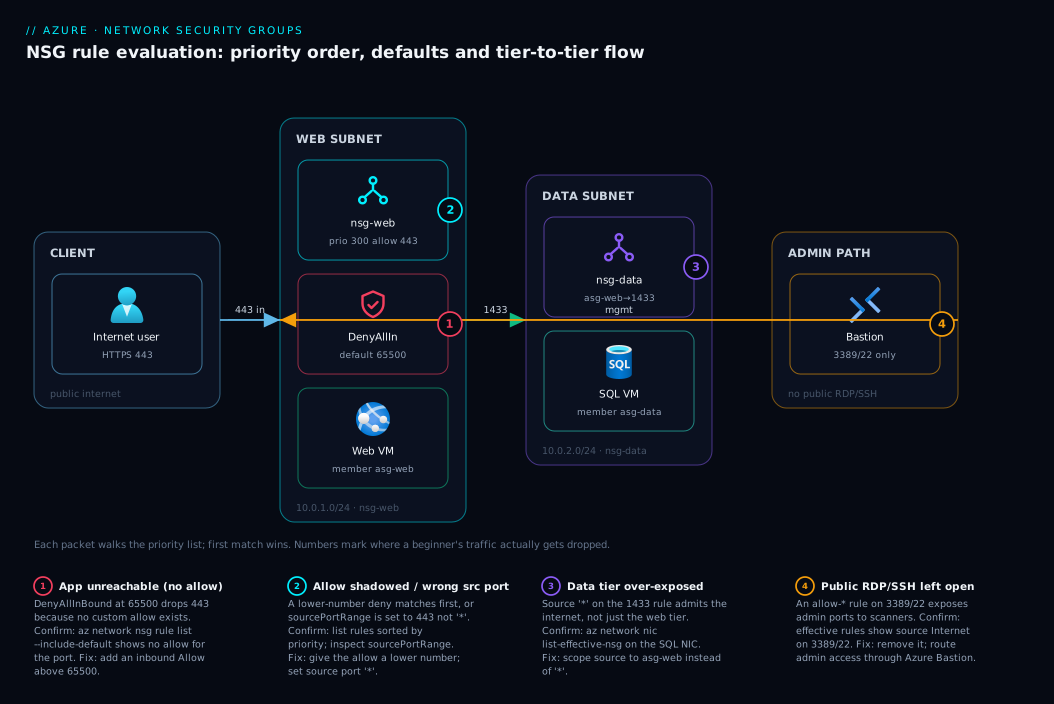
The shape to carry away: public traffic enters the edge subnet on exactly one port, internal traffic moves between tiers scoped by role, and every “everything else” is caught by the default deny — a well-formed NSG design in one picture.
Real-world scenario
ContosoCart, a small online retailer, ran a classic three-tier app — a public web tier, an internal API tier, and a SQL database, each in its own subnet inside one VNet in West Europe. Four engineers, none a network specialist. The web tier worked. Trouble started the morning a security scan from their cloud insurer flagged port 3389 (RDP) open to the internet on two database VMs, and — worse — port 1433 open to 0.0.0.0/0 on the data subnet.
How it got there is the story of every beginner NSG. Months earlier, an engineer debugging a deployment needed to RDP into a data VM and added a quick rule: source *, port 3389, Allow, priority 100. “I’ll remove it after.” They didn’t. Later, when the API tier couldn’t reach SQL, a different engineer — not knowing ASGs or the VirtualNetwork tag — “fixed” it with the bluntest rule possible: source *, port 1433, Allow, priority 200. SQL worked again. Nobody noticed * meant the entire internet, because internally everything kept working — the over-broad rule allowed the legitimate API traffic too. The hole was invisible precisely because it broke nothing.
The remediation took a half-day and is the template for getting NSGs right. They ran az network nic list-effective-nsg on the database NICs to see the merged ruleset, which exposed both dangerous rules in seconds. They deleted the RDP rule and moved admin access to Azure Bastion, so the only path to 3389 was the managed bastion subnet. They replaced allow-*-1433 with an ASG-scoped rule: created asg-api and asg-data, assigned the NICs, and wrote Allow-Api-To-Data-SQL (source asg-api, destination asg-data, port 1433, priority 300) — now SQL was reachable only from the API tier. Finally they added an explicit Deny-Internet-Inbound at priority 4000 as a self-documenting statement of intent.
The lessons map exactly to this article. The over-broad rule is the real danger, not the missing one — a missing allow fails loudly and gets fixed; an over-broad allow fails silently and gets exploited. Use ASGs and tags so “internal only” is one readable rule, not a * that quietly includes the planet. And list-effective-nsg is the monthly audit — seconds to see the truth no mental model reliably holds.
Advantages and disadvantages
NSGs are the right baseline for almost every VNet workload, but they are an L3/L4 control, and knowing their ceiling tells you when to add another layer.
| Advantages | Disadvantages / limits |
|---|---|
| Free — no charge for the NSG itself | L3/L4 only — no FQDN, URL, or HTTP-aware filtering |
| Stateful — write one direction, returns are automatic | No centralised management across many VNets (that’s Azure Firewall) |
| Service tags auto-track Microsoft IP ranges | No threat intelligence / IDPS |
| ASGs give role-based, IP-free rules | No deep logging by default — needs NSG flow logs enabled |
| Attaches at subnet or NIC, layered | Priority/shadowing mistakes are easy and silent |
| 1000 rules per NSG (default) — ample headroom | A rule limit you can hit with sprawling per-IP rules |
The advantages dominate for the common case — protecting tiers of VMs by IP, port and role, where 90% of filtering should live. The disadvantages matter when you need application-layer protection (an exposed web app wants an Application Gateway with WAF for OWASP rules NSGs cannot express), centralised egress control with FQDN rules across a hub-spoke (Azure Firewall), or removing public exposure of a PaaS service entirely (a Private Endpoint). NSGs do not compete with these — they sit underneath them.
Hands-on lab
This lab creates a VNet and a web subnet with an NSG, and proves the priority mechanic end to end — the moment the default blocks your traffic and the moment your allow rule fixes it. It uses free resources and tears down at the end. Run it in Cloud Shell. (NSGs themselves are free; this lab incurs no charge.)
1. Set variables and create a resource group.
RG=rg-nsg-lab
LOC=westeurope
az group create -n $RG -l $LOC
2. Create a VNet and a web subnet.
az network vnet create -g $RG -n vnet-lab \
  --address-prefix 10.0.0.0/16 \
  --subnet-name snet-web --subnet-prefix 10.0.1.0/24
3. Create an NSG and inspect its default rules — the key learning moment: empty of your rules, but already six defaults.
az network nsg create -g $RG -n nsg-web

az network nsg rule list -g $RG --nsg-name nsg-web \
  --include-default -o table \
  --query "[].{name:name, prio:priority, dir:direction, access:access, src:sourceAddressPrefix, dport:destinationPortRange}"
Expected output: AllowVnetInBound (65000), AllowAzureLoadBalancerInBound (65001), DenyAllInBound (65500) and the three outbound defaults. No rule allows internet traffic in — that’s the point.
4. Attach the NSG to the subnet.
az network vnet subnet update -g $RG --vnet-name vnet-lab \
  -n snet-web --network-security-group nsg-web
5. Add an allow rule for HTTPS at priority 300 (above the default deny at 65500).
az network nsg rule create -g $RG --nsg-name nsg-web \
  --name Allow-HTTPS-In --priority 300 \
  --direction Inbound --access Allow --protocol Tcp \
  --source-address-prefixes Internet \
  --destination-address-prefixes '*' \
  --destination-port-ranges 443
6. Demonstrate shadowing. Add a deny at a lower number and watch it win. Then list rules sorted by priority to see why.
az network nsg rule create -g $RG --nsg-name nsg-web \
  --name Deny-All-Internet-In --priority 100 \
  --direction Inbound --access Deny --protocol '*' \
  --source-address-prefixes Internet \
  --destination-address-prefixes '*' --destination-port-ranges '*'

az network nsg rule list -g $RG --nsg-name nsg-web -o table \
  --query "sort_by([?direction=='Inbound'], &priority)[].{prio:priority, name:name, access:access, dport:destinationPortRange}"
The deny at 100 now sits above the allow at 300 — your 443 traffic is blocked. The shadowing trap, reproduced on purpose.
7. Fix it. The cleanest fix is to delete the broad deny — the default at 65500 already denies the rest, so the allow at 300 is all you need:
az network nsg rule delete -g $RG --nsg-name nsg-web --name Deny-All-Internet-In
Now Allow-HTTPS-In (300) is the only custom inbound rule, sitting above the default deny — the well-formed state.
8. Bicep equivalent of the whole NSG, for repeatable deployments (see Deploy your first Bicep file from scratch):
resource nsgWeb 'Microsoft.Network/networkSecurityGroups@2023-11-01' = {
  name: 'nsg-web'
  location: location
  properties: {
    securityRules: [
      {
        name: 'Allow-HTTPS-In'
        properties: {
          priority: 300
          direction: 'Inbound'
          access: 'Allow'
          protocol: 'Tcp'
          sourceAddressPrefix: 'Internet'
          destinationAddressPrefix: '*'
          sourcePortRange: '*'
          destinationPortRange: '443'
        }
      }
    ]
  }
}
9. Teardown — delete the whole resource group so you pay nothing further.
az group delete -n $RG --yes --no-wait
Common mistakes & troubleshooting
These are the failure modes that actually cost beginners time. Each is symptom → root cause → how to confirm → fix.
| # | Symptom | Root cause | How to confirm | Fix |
|---|---|---|---|---|
| 1 | App unreachable from internet; SSH/RDP works | No inbound allow; DenyAllInBound (65500) drops it |
az network nsg rule list --include-default shows no custom allow for your port |
Add an allow rule for the port above 65500 |
| 2 | Allow rule exists but traffic still blocked | A lower-priority deny shadows it (first match wins) | List rules sorted by priority; find the lower number that matches | Give the allow a lower number than the deny |
| 3 | Rule never matches at all | Source port set to the app port instead of * |
Inspect the rule’s sourcePortRange |
Set source port to *; only destination port is the listener |
| 4 | NIC allow rule does nothing | Subnet NSG denies first (both must allow) | az network nic list-effective-nsg shows the merged result |
Allow on the subnet NSG too, or move the rule there |
| 5 | “Internal only” rule accidentally allows internet | Source set to * instead of VirtualNetwork/ASG |
Read the rule’s source field | Change source to VirtualNetwork or the right ASG |
| 6 | Service-tag rule “stopped working” after redeploy | Used a regional tag (Sql.WestEurope) but moved region |
Compare rule’s tag region to the workload’s region | Use the matching regional tag or the global one |
| 7 | LB-backed app health probe fails | Custom deny shadowed AllowAzureLoadBalancerInBound |
Check for a low-priority deny over AzureLoadBalancer |
Allow AzureLoadBalancer source above the deny |
| 8 | Two rules, “can’t save” / priority error | Two rules share a priority in one direction | API/portal error names the clash | Priorities must be unique per direction; renumber |
| 9 | VM can’t reach Storage/SQL after egress lockdown | You denied internet out but forgot the service tag allow | list-effective-nsg shows no allow to Storage/Sql |
Add an outbound allow to the right service tag |
| 10 | Can’t tell why a packet was dropped | Too many overlapping rules to reason about by eye | Enable NSG flow logs + Traffic Analytics, or use Connection Troubleshoot | Read the flow log / use the effective-rules command |
The single most useful command — the one that ends the argument about what a NIC actually permits — is:
az network nic list-effective-nsg \
  --name <nic-name> --resource-group <rg> -o json
It computes the merged subnet + NIC rules (defaults included) and shows each verdict. When two NSGs make behaviour non-obvious, this is the truth. To trace which hop dropped a packet end to end, see Troubleshooting VNet connectivity: NSGs, UDRs, effective routes & Network Watcher.
Best practices
- Default-deny is your friend — never break it broadly. Add specific allows; never add a
*-source,*-port allow to “make it work.” That single rule is the most common security incident. - Prefer subnet NSGs over NIC NSGs. Group VMs into role subnets and protect each subnet with one ruleset. Use NIC NSGs only for genuine per-VM exceptions.
- Use service tags, not hard-coded IP ranges.
Internet,VirtualNetwork,Storage.<region>,Sql.<region>are self-maintaining; pasted CIDRs rot. - Use ASGs for tier-to-tier rules. “Allow
asg-web→asg-data:1433” survives scaling; per-IP rules don’t. - Leave generous gaps between priorities. Number rules 100, 200, 300 — not 100, 101, 102 — so you can insert a rule later without renumbering everything.
- Never expose RDP/SSH to the internet. Use Azure Bastion or a jump host; the only inbound 3389/22 should come from a management subnet.
- Add an explicit deny as documentation. A
Deny-Internet-Inboundat a high custom priority restates intent for the next engineer, even though the default already denies. - Collapse with augmented rules. Multiple ports/CIDRs/ASGs in one rule keep the list short and readable — and under the 1000-rule limit.
- Enable NSG flow logs (with Traffic Analytics) before you need them. Without logs you cannot answer “what was dropped, and why” after the fact.
- Audit effective rules monthly with
list-effective-nsgon key NICs. Mental models drift; the merged truth does not. - One NSG per role, reused across subnets of the same tier — consistency beats per-subnet snowflakes.
- Codify NSGs in Bicep/Terraform. Click-ops rules drift and get forgotten; an IaC ruleset is reviewable and reproducible.
Security notes
Apply security thinking to the NSG itself. Least privilege means each rule allows the narrowest source, destination and port that works — a single port, a specific ASG or VirtualNetwork, never * where a tag will do. The biggest real-world NSG risk is not a missing rule but an over-permissive one: the allow-all that quietly admits the internet. Audit for * sources on allow rules regularly.
Management plane: NSGs do not filter the Azure control plane (portal/API) — that is governed by Entra ID and RBAC. Restrict who can edit NSGs: the Network Contributor role can change rules, and one wrong edit can open or close your whole environment. Treat rules as code — review changes, prefer PR-gated IaC over portal edits.
Defence in depth: an NSG is L3/L4 only. It won’t stop an OWASP attack on an exposed web app (that needs the Application Gateway WAF), won’t give FQDN egress filtering or threat intel (Azure Firewall), and won’t encrypt traffic or remove public PaaS endpoints (use TLS and Private Endpoints). The right posture layers NSG + WAF/Firewall + Private Endpoints + identity, each doing its own job.
Logging: enable NSG flow logs to storage and, ideally, Traffic Analytics. Without them you have no forensic record of allowed/denied flows — and “we don’t know what talked to what” is a finding in every audit.
Cost & sizing
The cost story is short: the NSG and its rules are free. You can create thousands of rules across hundreds of NSGs and pay nothing for the filtering. What costs money is the observability you bolt on and the adjacent services you add.
| Item | Cost driver | Rough figure | Notes |
|---|---|---|---|
| NSG + rules | None | Free | No charge per NSG or per rule |
| NSG flow logs | Storage written + (optional) Traffic Analytics ingestion | Storage is cheap; Traffic Analytics bills on GB ingested into Log Analytics | Logs are not free to retain/analyse |
| Azure Bastion (to avoid public RDP/SSH) | Per-hour + outbound data | ~₹6,000–14,000+/mo (Basic/Standard) | Replaces the risky public 3389/22 rule |
| Azure Firewall (if you outgrow NSGs) | Per-hour + per-GB processed | Tens of thousands ₹/mo | Centralised egress/FQDN — a real step up |
| Application Gateway WAF (public web apps) | Per-hour + capacity units | Thousands ₹/mo | App-layer protection NSGs can’t do |
Sizing is about rules, not throughput — an NSG adds no measurable latency and has no SKU to scale. The default limit is 1000 rules per NSG (raisable via support). If you’re approaching it, you’re writing per-IP rules an ASG or service tag would collapse to a handful — refactor sprawling rules into augmented, tag- and ASG-based ones. There is no free-tier limit: NSGs are included with every VNet at no cost.
Interview & exam questions
These map to AZ-104 (Azure Administrator) and AZ-700 (Network Engineer), where NSGs are core.
1. In what order are NSG rules evaluated, and what happens on a match? By priority ascending (lowest first), separately for inbound and outbound. The first rule that matches direction, protocol, source and ports decides Allow or Deny, and evaluation stops — later rules aren’t consulted.
2. Name the three default inbound rules and their effect.
AllowVnetInBound (65000) allows the VirtualNetwork tag; AllowAzureLoadBalancerInBound (65001) allows the LB probe; DenyAllInBound (65500) denies everything else. Read-only but overridable by lower-priority custom rules.
3. What does “stateful” mean for an NSG? Allow a connection inbound and its return traffic is allowed back automatically (and vice versa) — only the initiating direction needs a rule.
4. A VM has both a subnet NSG and a NIC NSG. How is inbound traffic evaluated? Subnet NSG first, then NIC NSG; both must allow to reach the VM. Outbound reverses the order. The merged result is the effective security rules.
5. Why use a service tag instead of an IP range?
It’s Microsoft-managed and auto-updated, so you never maintain changing ranges, and it makes rules readable. Regional variants (Sql.WestEurope) tighten scope to one region.
6. What is an Application Security Group and why is it better than CIDRs?
A named group of VM NICs by role, referenced in rules instead of IPs — when VMs change you update membership, not rules. “Allow asg-web → asg-data:1433” stays correct at any scale.
7. Your allow rule for port 443 exists but traffic is still blocked. Most likely cause?
A lower-priority deny shadows it, or the source port was set to 443 instead of * so it never matches the client’s ephemeral port. List rules by priority and inspect sourcePortRange.
8. What does an augmented security rule let you do, and on which tier? On the Standard tier, one rule can specify multiple ports, prefixes and ASGs at once — collapsing many rules into one without changing evaluation.
9. Can an NSG block traffic between two VMs in the same VNet?
Yes, but you must explicitly deny it — AllowVnetInBound permits all intra-VNet traffic, so isolation needs a custom deny (or ASG scoping) below priority 65000.
10. Which command shows the actual rules a NIC enforces, including merged NSGs?
az network nic list-effective-nsg — it computes the effective security rules (defaults included), confirming exactly why a packet was allowed or denied.
11. Does an NSG protect against application-layer (OWASP) attacks? No — NSGs filter L3/L4 only. App-layer protection needs an Application Gateway WAF; FQDN egress and threat intel need Azure Firewall.
12. What’s the priority range for custom rules, and why leave gaps? 100–4096 (defaults are 65000–65500). Leave gaps (100, 200, 300) so you can insert a rule later without renumbering.
Quick check
- A fresh VM with a public IP is unreachable on port 8080, but you can SSH in. Which exact rule is dropping the traffic, and what’s the fix?
- You have an Allow for port 443 at priority 300 and a Deny for the internet at priority 200. Does 443 traffic pass? Why?
- True or false: to let your web VM serve responses to clients, you need both an inbound allow on 443 and an outbound allow for the response.
- You want SQL (1433) reachable only from your API tier, never the internet. What’s the clean, scale-proof way to write that rule?
- Two NSGs apply to a VM (one on the subnet, one on the NIC). The NIC NSG allows port 22 but you still can’t SSH. What do you check, and with which command?
Answers
- The
DenyAllInBounddefault rule at priority 65500 is dropping it — there is no custom inbound allow for 8080. Fix: add an inbound Allow rule for TCP 8080 at any custom priority (100–4096), which sits above the default deny. - No, 443 is blocked. Priority 200 is evaluated before 300, and the Deny matches the internet 443 packet first — first match wins, so the Allow at 300 is never reached. Lower the allow’s number below 200 (or raise the deny’s).
- False. NSGs are stateful — the inbound allow on 443 automatically permits the response back out. You write only the initiating direction; no outbound rule is needed for the reply.
- Create an ASG for each tier (
asg-api,asg-data), assign the NICs, and write one rule: sourceasg-api, destinationasg-data, port1433, Allow. It targets roles not IPs, so it survives scaling and never exposes 1433 to the internet. - Both NSGs must allow — the subnet NSG is evaluated first on inbound and is probably denying 22. Run
az network nic list-effective-nsgto see the merged result; add the SSH allow to the subnet NSG (or move SSH access to Azure Bastion).
Glossary
- Network Security Group (NSG) — a stateful, ordered allow/deny list filtering L3/L4 traffic; attaches to a subnet and/or a NIC.
- Security rule — one entry in an NSG: a priority, direction, access (allow/deny), protocol, source, destination, and port ranges.
- Priority — a number from 100–4096 (custom) or 65000–65500 (default); lower numbers are evaluated first, and the first match wins.
- Direction —
Inbound(arriving) orOutbound(leaving); each is an independent, separately-evaluated rule list. - Access — the verdict a matching rule produces:
AlloworDeny. - Stateful — once a connection is allowed in one direction, its return traffic is permitted automatically without a second rule.
- Default rules — the six read-only rules (65000–65500) present in every NSG: allow VNet, allow load balancer, deny all (inbound); allow VNet, allow internet, deny all (outbound).
DenyAllInBound— the default rule at priority 65500 that drops all inbound traffic not matched by a higher-precedence allow; the usual cause of “my app is unreachable.”- Service tag — a Microsoft-managed, auto-updated label for a set of service IP ranges (
Internet,VirtualNetwork,AzureLoadBalancer,Storage,Sql,AzureCloud, regional variants) used in source/destination fields. - Augmented security rule — a single Standard-tier rule that specifies multiple ports, address prefixes, or ASGs at once.
- Application Security Group (ASG) — a named group of VM NICs by role, referenced in rules instead of IPs so rules survive VM churn.
- Effective security rules — the merged result of the subnet NSG and NIC NSG (defaults included) that actually applies to a NIC; shown by
az network nic list-effective-nsg. - Shadowing — when a lower-priority rule matches a packet first, making a higher-priority (higher-number) rule that would also match never run.
- Source port range — the port the client connects from (usually ephemeral); should almost always be
*, not the service port. - NSG flow logs — diagnostic logs of allowed/denied flows written to storage, optionally analysed by Traffic Analytics; required for forensics.
Next steps
- Solidify the foundation underneath NSGs with Azure Virtual Network & Subnets: NSGs, Address Space, Peering.
- When traffic still won’t flow and you need to trace the whole path, work Troubleshooting VNet connectivity: NSGs, UDRs, effective routes & Network Watcher.
- Add application-layer protection in front of public web apps with Application Gateway with WAF & end-to-end TLS.
- Remove public exposure of PaaS services entirely with Private Endpoint vs Service Endpoint.
- Make every NSG reproducible by codifying it — start with Deploy your first Bicep file from scratch.