Quick take: Azure Policy is your automated cloud referee. It evaluates every resource against rules you author once and assign high in the hierarchy — and it can prevent a bad deployment before it exists, audit drift you already have, modify a request in flight, or deploy the missing piece. The art is not writing JSON; it is choosing the right effect, assigning at the right scope, wiring the right identity, and reading compliance without chasing a number that hasn’t refreshed yet.
A security audit lands on your desk. It found public IPs on virtual machines, storage accounts with public network access, unencrypted managed disks, resources in non-approved regions, and a thousand resource groups with no CostCenter tag. Your team fixes them by hand over a weekend — and the next Monday the report is dirty again, because nothing stopped the next engineer from doing exactly the same thing. Manual review is a treadmill: at any real scale you cannot click through every resource, in every subscription, every week, forever. Azure Policy is how you get off the treadmill. It is the Azure-native governance engine that evaluates each resource against rules you define, and — depending on the effect you choose — denies the noncompliant deployment outright, flags it for a report, rewrites the request to add the missing setting, or fires a remediation that deploys what was absent. You author the rule once, assign it at a management group, and it governs every subscription beneath it.
This is the practitioner’s playbook for running Policy at scale, not a tour of the portal. We go effect by effect (deny, audit, append, modify, deployIfNotExists, auditIfNotExists, disabled, and deny-by-default via denyAction), because choosing the wrong one is the single most common mistake — people set audit and wonder why nothing got fixed, or set a broad deny and break every pipeline in the tenant at 2pm on a Friday. We cover the assignment and inheritance model (definitions live high, assignments inherit down the management-group → subscription → resource-group tree), the managed identity and RBAC wiring that deployIfNotExists and modify silently need (forget it and remediation is a no-op that fails Forbidden), the compliance evaluation lifecycle (on-change, plus a roughly 24-hour full scan — so the dashboard lags, and chasing a stale number wastes an afternoon), and the difference between an exclusion (notScopes, scope-level) and an exemption (a tracked, expiring waiver with a reason). Every operation gets both an az CLI snippet and Bicep/JSON, and because this is a reference you will return to mid-incident, the effects, the limits, the SDK errors and the playbook are all laid out as scannable tables.
By the end you will stop firefighting compliance and start preventing it. When the audit comes you will show a green dashboard you can explain — every red exception is a tracked exemption with an owner and an expiry, every deny has been through an audit phase, every deployIfNotExists has an identity with least-privilege roles, and every assignment sits at the highest scope that makes sense. Good governance is not about saying no. It is about making the right choice the only easy choice, automatically, at the scale of a whole tenant.
What problem this solves
Cloud at scale fails open by default. Anyone with Contributor on a subscription can create a storage account with public access, spin a VM in a region your data-residency rules forbid, deploy an un-tagged resource group that no cost report can attribute, or open an NSG to 0.0.0.0/0 on port 22. None of that is a bug in their permissions — Contributor is supposed to let them deploy. The gap is that “what you are allowed to do” (RBAC) and “what you are allowed to deploy like this” (governance) are different questions, and RBAC answers only the first. Azure Policy answers the second: it constrains the shape of what gets deployed, regardless of who is deploying it.
What breaks without it is a slow, expensive grind. A regulated company fails an audit because a forgotten dev subscription has unencrypted disks. A finance team cannot do showback because 40% of resources have no cost tags. A platform team spends every sprint chasing drift tickets — “someone enabled public access on the prod storage account again” — that a single deny policy would have made impossible. And the manual remediation that does happen is itself a risk: an engineer hand-editing a thousand resources at 1am makes mistakes a deployIfNotExists would not. The cost is real money (a misconfigured public endpoint is a breach waiting to happen), real audit findings, and real engineering hours burned on work a rule should do for free.
Who hits this: every organisation past the “one subscription, five people” stage. It bites hardest on regulated workloads (where “we’ll fix it later” is an audit finding), multi-subscription landing zones (where you cannot manually govern 50 subscriptions), cost-conscious teams (untagged resources are invisible spend), and anyone running a platform that hands subscriptions to other teams. The fix is almost never “review harder.” It is to encode the rule as policy, assign it high, and let the engine enforce it on every deployment, forever, including the ones that happen while you sleep.
To frame the whole field before the deep dive, here is every governance question Policy answers, the effect that answers it, and where it bites if you get it wrong:
| Governance question | The policy mechanism | The effect to reach for | If you get it wrong |
|---|---|---|---|
| “Stop this bad thing from ever being deployed” | Prevention at the ARM PUT | deny (or denyAction on delete) |
Too broad → blocks legitimate pipelines |
| “Tell me what’s already wrong” | Detection / reporting | audit / auditIfNotExists |
People expect it to fix; it only flags |
| “Force a required setting onto every deploy” | Mutation of the request | modify / append |
Needs identity (modify); silent no-op without |
| “Deploy the missing piece automatically” | Remediation of drift | deployIfNotExists (DINE) |
Needs MI + RBAC; fails Forbidden silently |
| “Govern every subscription at once” | Assignment at a management group | Any effect, assigned high | Assigned too low → siblings ungoverned |
| “Wave a rule for one team, on the record” | A tracked, expiring waiver | exemption (not exclusion) |
Untracked notScopes → a permanent hole |
| “Prove compliance to an auditor” | The compliance store + scans | (reporting, all effects) | Reading a stale number (24h scan lag) |
Learning objectives
By the end of this article you can:
- Name every Azure Policy effect —
deny,audit,append,modify,deployIfNotExists,auditIfNotExists,disabled,manual, anddenyAction— and pick the right one for a given governance goal, explaining what each does at deploy time vs. on existing resources. - Distinguish a policy definition, an initiative (policy set), and an assignment, and explain how assignment inherits down the management-group → subscription → resource-group hierarchy.
- Wire the managed identity and RBAC that
deployIfNotExistsandmodifyrequire, and explain why remediation is a silent no-op without them. - Read the compliance evaluation lifecycle — on-resource-change, on-assignment-change, and the ~24-hour full scan — and force a scan with
az policy state trigger-scaninstead of chasing a stale dashboard. - Choose between an exclusion (
notScopes) and an exemption (waiver with category, expiry and reason), and explain why exemptions are the auditable choice. - Roll out a
denypolicy safely through enforcement mode and an audit-first phase so you never break a tenant’s pipelines on day one. - Author a custom policy definition with
field/value/count/anyOflogic, parameters, andaliases, and know when a built-in already exists so you don’t reinvent it. - Run a symptom → root cause → confirm → fix playbook for the failures that actually happen:
RequestDisallowedByPolicy, DINE no-ops, missing-alias custom policies, stale compliance, and over-broad scope.
Prerequisites & where this fits
You should already understand the Azure resource hierarchy: a tenant root management group at the top, management groups nesting beneath it, subscriptions inside those, resource groups inside subscriptions, and resources inside groups. (If that tree is fuzzy, read Azure Resource Hierarchy Explained: Subscriptions, Resource Groups and Resources first — it is the substrate this whole article assigns policy onto.) You should know RBAC basics (role assignments, scopes, Contributor vs Owner), be comfortable running az in Cloud Shell, and read JSON output. Familiarity with ARM/Bicep deployments helps, because policy intercepts the Resource Manager request that a Bicep deploy produces.
This sits in the Governance & Landing Zones track. It is the enforcement layer underneath an Azure Enterprise-Scale Landing Zone: Foundation for Large Organizations — the landing-zone management-group tree is where these assignments live, and the landing-zone “policy-driven governance” principle is this article in practice. It pairs with Azure FinOps and Cost Management: Controlling Cloud Spend at Scale, because tag-enforcement policies are what make cost allocation possible, and with Azure Key Vault: Secrets, Keys and Certificates Done Right and Azure Monitor and Application Insights: Full-Stack Observability, since deployIfNotExists policies are the canonical way to force diagnostic settings and Defender onto every resource. RBAC is the complement: policy governs the shape of resources, RBAC governs who can act.
A quick map of who owns what during a governance rollout, so you know who to call when a policy bites:
| Layer | What lives here | Who usually owns it | What Policy does here |
|---|---|---|---|
| Tenant root MG | Top-of-tree assignments | Platform / cloud CoE | Tenant-wide baselines (locations, tags) |
| Platform MGs (Identity, Connectivity, Management) | Shared-service guardrails | Platform team | Hub/networking and logging policies |
| Landing-zone MGs (Corp, Online) | Workload guardrails | Platform + app teams | Deny public access, require encryption |
| Subscription | The blast-radius unit | App / workload team | Inherited policy + sub-specific assignments |
| Resource group | The deploy unit | App / workload team | Finest assignment scope; exclusions |
| Resource | The thing evaluated | App / workload team | The target of deny/audit/modify/DINE |
Core concepts
Six mental models make every later decision obvious.
Policy governs shape; RBAC governs access. RBAC answers “may this principal perform this action on this scope?” Policy answers “is this resource allowed to look like this, no matter who deployed it?” They are independent and complementary. A user with Owner can still be denied by a policy; a user with read-only access never triggers a deny because they never deploy. When something is blocked, the first fork is: was it RBAC (AuthorizationFailed) or Policy (RequestDisallowedByPolicy)? Different error, different owner, different fix.
Definition → initiative → assignment is the whole object model. A policy definition is a single rule in JSON: an if condition (over resource fields) and a then effect. An initiative (a.k.a. policy set definition) is a bundle of definitions you manage and assign as one unit — e.g. a 200-rule regulatory baseline. An assignment attaches a definition or initiative to a scope (management group, subscription, or resource group), supplies parameters (e.g. the list of allowed locations), and sets options like enforcement mode and exclusions. The definition is the rule; the assignment is the rule applied here, with these parameters.
Assignment inherits down the hierarchy. Assign at a management group and every child management group, subscription, resource group and resource beneath it is in scope — one assignment can govern a thousand subscriptions. This is the entire reason Policy scales. Definitions themselves are stored at a scope too (you can only assign a definition at or below where it is defined), but it is the assignment’s scope that determines what gets evaluated. Assign high to govern broadly; assign low only for genuinely local rules.
The effect decides what happens at the ARM request. When a resource is created or updated, the Resource Manager PUT is evaluated against every in-scope assignment. deny rejects the request before the resource exists (cheapest, strongest — nothing bad is ever created). audit lets it through and records non-compliance. append/modify rewrite the request (add a tag, set a property). deployIfNotExists (DINE) lets the resource through, then deploys a related resource (a diagnostic setting, a Defender plan) if it is missing. auditIfNotExists (AINE) checks for a related resource and flags if absent. “Prevent” (deny) vs “report” (audit) vs “fix” (modify/DINE) is the choice that defines your governance posture.
Existing resources are a separate problem from new ones. deny only affects new or updated resources — it never touches what already exists. To fix what is already there you either (a) let audit report it and remediate manually, or (b) use deployIfNotExists/modify plus a remediation task that re-evaluates existing resources and brings them into line. A deny assignment makes a clean future; remediation cleans the dirty past. Most real governance needs both, and forgetting that “deny doesn’t fix existing” is a classic surprise.
Compliance is eventually consistent. The compliance state you see is computed by evaluation triggered on resource change, on assignment change, and by a periodic full scan roughly every 24 hours. So right after you assign a policy, the dashboard may show “0 / 0” or stale numbers for a while — not because the policy isn’t working, but because evaluation hasn’t run. Force it with az policy state trigger-scan when you need a fresh answer. Chasing a number that hasn’t refreshed is the most common time-waster in this whole topic.
The vocabulary in one table
Before the deep sections, pin down every moving part. The glossary at the end repeats these for lookup; this table is the mental model side by side:
| Concept | One-line definition | Where it lives | Why it matters |
|---|---|---|---|
| Policy definition | One rule: if condition → then effect |
A scope (MG/sub) | The atom of governance |
| Initiative (policy set) | A bundle of definitions assigned as one | A scope | Manage 200 rules as one unit |
| Assignment | A definition/initiative applied to a scope, with params | A scope | The rule in force here |
| Scope | MG, subscription, or resource group | The hierarchy | Determines what’s evaluated |
| Effect | What happens: deny/audit/modify/DINE/… | In the definition | Prevent vs report vs fix |
| Parameter | A value supplied at assignment (e.g. allowed regions) | The assignment | One definition, many uses |
| Alias | A path to a resource property Policy can read | In the definition | What you can write rules against |
| Compliance state | Compliant / Non-compliant / Exempt / N/A | The compliance store | The audit answer |
| Remediation task | Re-evaluates existing resources for modify/DINE | Per assignment | Fixes the dirty past |
| Managed identity | Identity the assignment uses to deploy/modify | On the assignment | DINE/modify need it or no-op |
Exclusion (notScopes) |
A scope carved out of an assignment | On the assignment | Quiet, untracked carve-out |
| Exemption | A tracked, expiring waiver with a reason | On a resource/scope | The auditable carve-out |
| Enforcement mode | Default (effects fire) vs DoNotEnforce (evaluate only) |
On the assignment | Safe rollout switch |
The effects reference — every effect, end to end
The effect is the most important choice you make. Pick audit when you mean deny and nothing gets prevented; pick deny when you mean audit and you break a pipeline. Here is the complete set, what each does at deploy time, whether it touches existing resources, and whether it needs an identity:
| Effect | What it does | At deploy (new/updated) | Existing resources | Needs managed identity? | Order in pipeline |
|---|---|---|---|---|---|
deny |
Reject non-compliant requests | Blocks the PUT (request fails) | Not touched (prevent only) | No | Evaluated last (after append/modify) |
audit |
Flag non-compliant, allow it | Allowed; marked non-compliant | Marked non-compliant on scan | No | Reporting only |
append |
Add fields to the request | Adds the property/tag if missing | Not retroactive (remediate via modify) | No | Before deny |
modify |
Add/update/remove properties or tags | Patches the request | Yes, via remediation task | Yes (role to write the property) | Before deny |
deployIfNotExists (DINE) |
Deploy a related resource if absent | Resource allowed, then template deployed | Yes, via remediation task | Yes (roles to deploy the template) | After the resource is created |
auditIfNotExists (AINE) |
Audit if a related resource is absent | Allowed; flagged if related missing | Flagged on scan | No | Reporting only |
denyAction |
Block specific actions (e.g. delete) | Blocks the action (e.g. DELETE) |
Protects existing from the action | No | Action-level |
disabled |
Turn a definition off without unassigning | No effect (evaluation skipped) | N/A | No | Used to toggle off |
manual |
Track an attestation you set by hand | No automatic check; you attest | You set the state manually | No | For non-technical controls |
The evaluation order matters when several effects target the same request — mutating effects run before deny so the request is shaped, then judged:
| Evaluation stage | Effects that run here | Why this order |
|---|---|---|
| 1. Disabled check | disabled |
A disabled definition is skipped entirely |
| 2. Append / modify | append, modify |
Rewrite the request before it’s judged |
| 3. Deny | deny, denyAction |
Judge the (now-mutated) request; block if non-compliant |
| 4. Audit | audit |
Record compliance on the allowed request |
| 5. Post-provision | deployIfNotExists, auditIfNotExists |
Run after the resource exists, against related resources |
Three reading rules that save the most time:
| Distinction | The trap | How to choose correctly |
|---|---|---|
deny vs audit |
Setting audit and expecting prevention |
deny to stop, audit to measure — almost always roll out as audit first, then flip to deny |
modify vs deployIfNotExists |
Using DINE to set a property on the same resource | modify changes a property on the resource itself (tags, TLS version); DINE deploys a separate related resource (diag setting, Defender) |
append vs modify |
Using append to change an existing value |
append only adds a missing field; modify can add, replace, or remove — and is the one you remediate with |
And the choice as a decision table — match the goal to the effect:
| If your goal is… | Reach for… | Because… |
|---|---|---|
| Block storage with public access at create time | deny |
Nothing bad is ever created; strongest posture |
| Know how many VMs lack encryption today | audit |
Reports without breaking anything |
Force a CostCenter tag inherited from the RG |
modify (add tag) |
Rewrites the request; remediable for existing |
| Ensure every resource sends logs to Log Analytics | deployIfNotExists |
Deploys the missing diagnostic setting |
| Confirm a Defender plan exists on each sub | auditIfNotExists |
Flags subs missing the related config |
| Stop anyone deleting a locked key vault | denyAction (on delete) |
Blocks the destructive action specifically |
| Track a manual SOC-2 control with no API | manual |
You attest; Policy records the state |
| Temporarily disable a noisy rule | disabled or DoNotEnforce mode |
Keeps the assignment, suppresses the effect |
deny — prevention at the request
deny is the strongest, cheapest effect: the noncompliant resource is never created, so there is nothing to remediate and no window of exposure. The deploy fails with RequestDisallowedByPolicy and the response names the offending policyDefinitionId. Use it for hard rules: allowed locations, allowed SKUs, mandatory encryption, no public network access. The danger is breadth — a deny assigned at the tenant root with a too-narrow allowed-locations list will fail every deployment in the tenant the moment it goes into Default mode.
# Assign the built-in "Allowed locations" policy (deny) at a management group, parameterised
az policy assignment create \
  --name "allowed-locations" \
  --display-name "Allow only India regions" \
  --policy "e56962a6-4747-49cd-b67b-bf8b01975c4c" \
  --scope "/providers/Microsoft.Management/managementGroups/corp" \
  --params '{ "listOfAllowedLocations": { "value": ["centralindia","southindia"] } }'
resource allowedLocations 'Microsoft.Authorization/policyAssignments@2024-04-01' = {
  name: 'allowed-locations'
  properties: {
    displayName: 'Allow only India regions'
    policyDefinitionId: tenantResourceId('Microsoft.Authorization/policyDefinitions', 'e56962a6-4747-49cd-b67b-bf8b01975c4c')
    enforcementMode: 'Default'   // 'DoNotEnforce' to evaluate without blocking
    parameters: {
      listOfAllowedLocations: { value: [ 'centralindia', 'southindia' ] }
    }
  }
}
The built-in deny policies you reach for most, and what each blocks:
| Built-in (deny) | Blocks | Common parameter | Gotcha |
|---|---|---|---|
| Allowed locations | Resources outside the region list | listOfAllowedLocations |
global resources (e.g. some networking) need global allowed |
| Allowed locations for resource groups | RGs outside the list | listOfAllowedLocations |
Separate from the resource-level policy — assign both |
| Allowed virtual machine SKUs | VM sizes off the list | listOfAllowedSKUs |
Long list; maintain as a parameter |
| Storage accounts should disable public network access | Public-network storage | (effect param) | Breaks legit public storage — exempt deliberately |
| Storage account public access should be disallowed (blob anon) | Anonymous blob access | (effect param) | Different from network access; both matter |
| Not allowed resource types | Whole resource types | listOfResourceTypesNotAllowed |
Strong; great for blocking classic/legacy types |
| Allowed resource types | Everything except a list | listOfResourceTypesAllowed |
Inverse; very restrictive, use narrowly |
audit / auditIfNotExists — measure before you prevent
audit allows the deployment but records the resource as non-compliant so it shows up in the dashboard and in az policy state list. auditIfNotExists is the “related-resource” variant: it checks whether a related resource exists (e.g. a diagnostic setting on a VM, a Defender plan on a subscription) and flags non-compliance if it is absent. Audit is your reconnaissance phase — assign the rule as audit, look at the real-world blast radius, then decide whether to flip it to deny.
# What's non-compliant for an assignment, grouped by resource
az policy state list \
  --filter "PolicyAssignmentName eq 'require-disk-encryption'" \
  --query "[?complianceState=='NonCompliant'].{res:resourceId, state:complianceState}" -o table
auditIfNotExists and deployIfNotExists share the same “look for a related resource” engine — the only difference is the verb (report vs deploy). The fields that define what “related” means:
existenceCondition field |
What it checks | Example | Used by |
|---|---|---|---|
type (in details) |
The related resource type to look for | Microsoft.Insights/diagnosticSettings |
AINE + DINE |
existenceCondition |
The condition the related resource must meet | logs[*].enabled == true |
AINE + DINE |
resourceGroupName |
Where to look (defaults to the target’s RG) | a hub RG for shared resources | DINE mostly |
evaluationDelay |
Wait before evaluating (let deploys settle) | AfterProvisioning |
DINE |
roleDefinitionIds |
Roles the assignment MI needs | Monitoring Contributor | modify + DINE |
append and modify — rewrite the request
append adds fields to a request that is missing them — e.g. add a default tag, set an allowedHeaders value. It only adds; it never overwrites an existing value. modify is the powerful one: it can add, replace, or remove tags and certain properties, and crucially it is remediable — a remediation task can apply the modification to existing resources. modify needs a managed identity with a role that can write the property (e.g. tag contributor). The canonical use is tag governance: inherit a CostCenter tag from the resource group onto every resource so cost allocation actually works.
# Built-in: "Inherit a tag from the resource group if missing" (modify) — assign with identity
az policy assignment create \
  --name "inherit-costcenter" \
  --policy "cd3aa116-8754-49c9-a813-ad46512ece54" \
  --scope "/subscriptions/$SUB_ID" \
  --params '{ "tagName": { "value": "CostCenter" } }' \
  --mi-system-assigned --location centralindia \
  --role "Contributor"
resource inheritTag 'Microsoft.Authorization/policyAssignments@2024-04-01' = {
  name: 'inherit-costcenter'
  location: 'centralindia'                 // required when there's an identity
  identity: { type: 'SystemAssigned' }     // modify needs an MI
  properties: {
    policyDefinitionId: tenantResourceId('Microsoft.Authorization/policyDefinitions', 'cd3aa116-8754-49c9-a813-ad46512ece54')
    parameters: { tagName: { value: 'CostCenter' } }
  }
}
// Then grant the assignment's MI a role to write tags (e.g. Tag Contributor) at the scope.
The modify operations and when each applies:
modify operation |
What it does | Typical use | Note |
|---|---|---|---|
addOrReplace |
Add the property, or replace its value | Force minimumTlsVersion = TLS1_2 |
Overwrites — the strong form |
add |
Add only if absent | Add a tag if not present | Won’t clobber an existing value |
remove |
Delete a property/tag | Strip a forbidden tag | Useful for cleanup policies |
| (tag inherit) | Copy a tag from RG/subscription | CostCenter, Environment |
The classic cost-governance pattern |
append vs modify at a glance — pick by whether you must change a value and whether you need to fix existing:
| Need | append |
modify |
|---|---|---|
| Add a missing field on new deploys | Yes | Yes |
| Replace/remove an existing value | No (add only) | Yes |
| Remediate existing resources | No | Yes (remediation task) |
| Requires a managed identity | No | Yes |
| Can set tags | Yes (add) | Yes (add/replace/remove) |
deployIfNotExists (DINE) — remediate the missing piece
DINE is how you make “every resource must have X” true rather than merely audited. It lets the resource through, then checks for a related resource (a diagnostic setting, a Defender plan, a backup config) and, if absent, deploys an ARM template to create it. This is the engine behind landing-zone “auto-everything”: auto-enable diagnostic logging, auto-deploy Microsoft Defender for Cloud plans, auto-associate a route table or NSG. DINE needs a managed identity with the roles listed in the definition’s roleDefinitionIds — without it, the deploy is a silent no-op and the remediation task fails Forbidden.
# Create the remediation task to bring EXISTING resources into line (DINE/modify)
az policy remediation create \
  --name "remediate-diag-settings" \
  --policy-assignment "send-vm-logs-to-law" \
  --resource-group "rg-prod" \
  --resource-discovery-mode ReEvaluateCompliance
resource dineDiag 'Microsoft.Authorization/policyAssignments@2024-04-01' = {
  name: 'send-vm-logs-to-law'
  location: 'centralindia'
  identity: { type: 'SystemAssigned' }   // DINE mandates an identity
  properties: {
    policyDefinitionId: tenantResourceId('Microsoft.Authorization/policyDefinitions', '<diag-settings-DINE-id>')
    parameters: {
      logAnalytics: { value: lawResourceId }
    }
  }
}
// Grant the MI the roleDefinitionIds the policy declares (e.g. Log Analytics Contributor +
// Monitoring Contributor) at the assignment scope, or remediation fails Forbidden.
The DINE remediation flow, step by step and where each step fails:
| Step | What happens | Fails if… | Confirm |
|---|---|---|---|
| 1. Assign DINE with identity | MI created/attached to the assignment | identity omitted |
az policy assignment show --query identity |
2. Grant MI the roleDefinitionIds |
MI can deploy the template | Role not granted at scope | az role assignment list --assignee <principalId> |
| 3. New resource deployed | Existence condition evaluated | (delay) evaluationDelay not elapsed |
Compliance shows after settle |
| 4. Related resource missing | DINE deploys the template | Template params wrong | Deployment error in remediation detail |
| 5. Remediation task (existing) | Re-evaluates and deploys for old resources | Step 2 missing → Forbidden |
az policy remediation show --query 'deploymentStatus' |
Common DINE/modify built-ins and the role each managed identity needs:
| DINE/modify built-in | Deploys / sets | Role the MI needs | Scope to assign |
|---|---|---|---|
| Configure diagnostic settings to Log Analytics | Diagnostic setting per resource | Log Analytics Contributor, Monitoring Contributor | MG or subscription |
| Deploy Microsoft Defender for Cloud plans | Defender pricing tier on the sub | Security Admin / Owner | Subscription |
| Configure backup on VMs | Recovery Services vault protection | Backup Contributor, VM Contributor | MG or subscription |
| Inherit a tag from the resource group | Tag on the resource | Tag Contributor (or Contributor) | Subscription / RG |
| Configure subnets to use an NSG | NSG association on subnets | Network Contributor | MG or subscription |
Enforce TLS 1.2 on storage (modify) |
minimumTlsVersion property |
Storage Account Contributor | MG or subscription |
Assignment, scope and inheritance
Where you assign matters as much as what you assign. Assign too high and a niche rule blocks unrelated teams; assign too low and the sibling subscriptions you forgot stay ungoverned. The model: a definition is stored at a scope (you can only assign it at or below that scope), but the assignment’s scope is what determines evaluation, and it inherits downward to everything beneath.
The three assignable scopes, and what each is good for:
| Scope | Governs | Best for | Watch-out |
|---|---|---|---|
| Management group | Every child MG, sub, RG, resource | Tenant/landing-zone baselines (locations, tags, encryption) | Broad blast radius; test in audit/DoNotEnforce first |
| Subscription | Every RG and resource in the sub | Sub-specific rules; a workload’s own guardrails | Doesn’t cover sibling subs — assign at MG for that |
| Resource group | Every resource in the RG | Genuinely local rules; pilots | Easy to forget; many RGs = many assignments |
Inheritance and exclusion behaviour you must internalise:
| Behaviour | Rule | Consequence |
|---|---|---|
| Downward inheritance | Assignment applies to the scope and all descendants | One MG assignment governs all child subs |
| No upward effect | A sub-level assignment never affects the parent MG | Assign high to go broad |
notScopes exclusion |
A child scope listed in notScopes is carved out |
Quiet hole — untracked, easy to forget |
| Cumulative effects | All in-scope assignments apply together | deny from any one assignment blocks the deploy |
| Most-restrictive wins for deny | Any matching deny blocks, regardless of other audits |
You cannot “allow over” a deny with another policy |
| Definition location | You can only assign at/below where the definition lives | Store shared defs high (intermediate root MG) |
Initiatives — manage many rules as one
An initiative (policy set) groups definitions so you assign, parameterise and report on them as a unit. Regulatory baselines (e.g. CIS, ISO 27001, the Microsoft Cloud Security Benchmark) ship as large built-in initiatives. Assign the initiative once at a management group and you get one compliance roll-up across all its member policies. Initiatives also let you share a parameter (e.g. one allowed-locations list flowing to every member policy that needs it).
# Assign a built-in initiative (e.g. the security benchmark) at a management group
az policy assignment create \
  --name "mcsb" \
  --policy-set-definition "1f3afdf9-d0c9-4c3d-847f-89da613e70a8" \
  --scope "/providers/Microsoft.Management/managementGroups/tenant-root"
Definition vs initiative vs assignment — the object model in one grid:
| Aspect | Policy definition | Initiative (set) | Assignment |
|---|---|---|---|
| What it is | One rule (if/then) |
A bundle of definitions | A rule/initiative applied to a scope |
| Holds parameters? | Declares them | Maps + can share them | Supplies their values |
| Has an effect? | Yes (then.effect) |
Per member definition | Inherits members’ effects |
| Assignable? | Yes | Yes | (it is the assignment) |
| Reports compliance? | Per policy | Rolled up across members | Per assignment |
| Typical count at scale | Hundreds | Tens | Tens–hundreds |
Enforcement mode and exemptions — rolling out safely
Two safety valves separate a careful rollout from an outage. Enforcement mode is per-assignment: Default means effects fire (a deny blocks); DoNotEnforce means the assignment evaluates and reports but does not enforce — so you can see exactly what a deny would block before it blocks anything. Exemptions are the auditable carve-out: a tracked waiver on a specific scope/resource, with a category (Waiver or Mitigated), an optional expiry, and a reason — unlike a notScopes exclusion, an exemption shows up in compliance as Exempt and expires.
# Evaluate a deny WITHOUT enforcing it (see the blast radius first)
az policy assignment create --name "deny-public-ip" \
  --policy "<no-public-ip-def>" --scope "/subscriptions/$SUB_ID" \
  --enforcement-mode DoNotEnforce

# Grant a tracked, expiring exemption for one resource group
az policy exemption create \
  --name "legacy-app-waiver" \
  --policy-assignment "/subscriptions/$SUB_ID/providers/Microsoft.Authorization/policyAssignments/deny-public-ip" \
  --exemption-category Waiver \
  --scope "/subscriptions/$SUB_ID/resourceGroups/rg-legacy" \
  --expires-on "2026-12-31T00:00:00Z" \
  --description "Legacy app needs a public IP until migration (JIRA-1421)"
Exclusion vs exemption — the distinction auditors care about:
| Aspect | Exclusion (notScopes) |
Exemption |
|---|---|---|
| What it is | A scope removed from the assignment | A tracked waiver for a scope/resource |
| Shows in compliance? | No (just not evaluated) | Yes — as Exempt |
| Has an expiry? | No | Yes (optional expiresOn) |
| Has a reason/category? | No | Yes (Waiver/Mitigated + description) |
| Auditable? | Poorly (a silent hole) | Yes — designed for it |
| Use when… | Carving out a whole environment by design | Granting a temporary, justified pass |
Enforcement-mode and rollout phases — the safe path from idea to enforced:
| Phase | Setting | What you learn / get | Move on when |
|---|---|---|---|
| 1. Audit | Effect audit (or initiative default) |
Real count of non-compliant resources | You understand the blast radius |
| 2. DoNotEnforce | deny def, enforcementMode=DoNotEnforce |
What a deny would block, with no breakage | No surprising would-be denials remain |
| 3. Remediate | Remediation tasks for modify/DINE | Existing drift cleaned up | Compliance trending green |
| 4. Enforce | enforcementMode=Default |
The deny now prevents at create | Steady-state; review exemptions |
Authoring custom policies
Built-in policies are organised into categories — browse these first, because the rule you want almost certainly already exists. The categories you reach for most:
| Built-in category | Covers | Example built-in | Typical effect |
|---|---|---|---|
| General | Allowed locations/types, audit basics | Allowed locations | deny |
| Tags | Require/inherit/append tags | Inherit a tag from the resource group | modify |
| Storage | Public access, TLS, encryption | Storage accounts should disable public network access | deny |
| Compute | VM SKUs, disk encryption, extensions | Allowed virtual machine SKUs | deny |
| Network | NSGs, public IPs, private endpoints | Subnets should be associated with an NSG | deployIfNotExists |
| Monitoring | Diagnostic settings, agents | Configure diagnostic settings to a Log Analytics workspace | deployIfNotExists |
| Security Center | Defender plans, secure-config | Configure Microsoft Defender for Cloud plans | deployIfNotExists |
| Key Vault | Vault firewall, purge protection, cert/key rules | Key vaults should have purge protection enabled | audit / deny |
| Regulatory Compliance | CIS, ISO, MCSB initiatives | Microsoft Cloud Security Benchmark | (initiative) |
| Kubernetes | In-cluster Gatekeeper/OPA rules | Kubernetes clusters should not allow privileged containers | audit / deny |
Always check first (az policy definition list --query "[?policyType=='BuiltIn']"). When you do write custom, a definition is JSON with parameters, a policyRule (if condition + then effect), and it reads resource properties through aliases. The if block supports field, logical operators (allOf, anyOf, not), and count for array properties.
{
  "properties": {
    "displayName": "Deny storage accounts without HTTPS-only",
    "mode": "Indexed",
    "parameters": {
      "effect": { "type": "String", "allowedValues": ["Deny","Audit","Disabled"], "defaultValue": "Deny" }
    },
    "policyRule": {
      "if": {
        "allOf": [
          { "field": "type", "equals": "Microsoft.Storage/storageAccounts" },
          { "field": "Microsoft.Storage/storageAccounts/supportsHttpsTrafficOnly", "notEquals": true }
        ]
      },
      "then": { "effect": "[parameters('effect')]" }
    }
  }
}
# Create the custom definition at a management group, then assign it
az policy definition create \
  --name "deny-storage-http" \
  --rules @rule.json \
  --management-group "corp" \
  --mode Indexed
The condition operators you actually use, and what each is for:
| Operator | Meaning | Example use |
|---|---|---|
equals / notEquals |
Exact match | field type equals Microsoft.Storage/... |
in / notIn |
Value in a (parameter) list | location in allowed list |
like / notLike |
Wildcard match | name like 'prod-*' |
match / matchInsensitively |
Pattern (# digit, ? letter) |
enforce a naming pattern |
contains / containsKey |
Substring / tag-key presence | tags containsKey 'CostCenter' |
exists |
Field present (true/false) | a property must be set |
allOf / anyOf / not |
Boolean composition | combine several conditions |
count |
Count array elements meeting a condition | “all NSG rules where…” |
mode controls what a definition evaluates — get this wrong and your rule silently never matches:
mode |
Evaluates | Use for |
|---|---|---|
Indexed |
Resources that support tags and location | Most resource policies (the common default) |
All |
Every resource + resource groups + subscriptions | RG/sub-level rules (e.g. RG must have a tag) |
Microsoft.Kubernetes.Data |
AKS in-cluster objects (via add-on) | Gatekeeper/OPA policies on Kubernetes |
Microsoft.KeyVault.Data |
Objects inside Key Vault (certs/keys/secrets) | Key Vault data-plane governance |
Microsoft.Network.Data |
Azure Virtual Network Manager rules | Network-manager security admin rules |
Aliases are the crux of custom authoring: a policy can only test a property that has an alias. If the property you want isn’t aliased, no rule can read it — a frequent dead end. Find them with the CLI before you write the if:
# List aliases for a resource type so you know what you can write rules against
az provider show --namespace Microsoft.Storage \
  --query "resourceTypes[?resourceType=='storageAccounts'].aliases[].name" -o tsv | grep -i tls
Custom-authoring pitfalls and how each manifests:
| Pitfall | Symptom | Fix |
|---|---|---|
| Property has no alias | Rule never matches; resource stays compliant | Check az provider show ... aliases; use the aliased path or pick another property |
Wrong mode (Indexed for an RG rule) |
RG-level rule never evaluates | Use mode: All for RG/subscription rules |
| Effect hard-coded, not parameterised | Can’t switch audit↔deny without editing the def | Parameterise effect with allowedValues |
count misused on a non-array |
Evaluation error / no match | Use count only over array aliases ([*]) |
| Custom dup of a built-in | Maintenance burden, drift from MS updates | Search built-ins first; only author the genuine gap |
Compliance evaluation and reporting
The compliance store answers the audit question — but it is eventually consistent, and not understanding the timing wastes more time than any other single thing in this topic. Evaluation is triggered three ways, and the on-demand scan is your friend when you need a fresh answer now.
What triggers an evaluation, and how fast:
| Trigger | When it fires | Latency | Note |
|---|---|---|---|
| Resource change | A resource is created/updated | Minutes | The deploy itself is evaluated synchronously for deny/modify |
| Assignment change | You create/update/delete an assignment | ~30 min for full effect | New assignment’s compliance appears after a scan |
| Periodic full scan | Background, roughly every 24 h | Up to ~24 h | Why the dashboard lags |
| On-demand scan | You run trigger-scan |
Minutes (async) | Force it instead of waiting |
# Force an on-demand compliance scan for a subscription (async; returns when done)
az policy state trigger-scan --resource-group "rg-prod"

# Read the summarised compliance for an assignment
az policy state summarize \
  --filter "PolicyAssignmentName eq 'require-disk-encryption'" \
  --query "value[0].results" -o json
The compliance states a resource can be in, and what each means:
| State | Meaning | Counts against you? | Typical cause |
|---|---|---|---|
Compliant |
Meets every in-scope policy | No | Correctly configured |
NonCompliant |
Violates ≥1 audit/deny-evaluated policy | Yes | Drift, or a new audit rule |
Exempt |
Covered by an exemption | No (tracked) | A justified, expiring waiver |
Conflicting |
Conflicting effects across assignments | Investigate | Two policies fighting over a property |
NotStarted |
Evaluation hasn’t run yet | N/A | Just-assigned; pre-scan |
Unknown (manual) |
manual effect, not yet attested |
N/A | Awaiting an attestation |
Why your number looks wrong — the reading traps:
| You see… | It’s probably… | What to do |
|---|---|---|
| “0 of 0” right after assigning | Evaluation hasn’t run (NotStarted) | az policy state trigger-scan, wait minutes |
| Non-compliant but you “fixed it” | Last scan predates your fix | Trigger a scan; re-read |
| A resource missing from the report | Wrong scope, or mode excludes it |
Verify assignment scope and definition mode |
| Count differs portal vs CLI | Different time windows / filters | Align the --filter and timestamp |
| Suddenly all non-compliant | A new initiative member rule landed | Check recent assignment/initiative updates |
The az policy commands you actually live in, grouped by what you’re doing:
| Task | Command | Note |
|---|---|---|
| List built-in definitions | az policy definition list --query "[?policyType=='BuiltIn']" |
Search before authoring custom |
| Create a custom definition | az policy definition create --rules @rule.json --mode Indexed |
Add --management-group to store it high |
| Assign a policy/initiative | az policy assignment create --policy <id> --scope <scope> |
--policy-set-definition for initiatives |
| Assign with identity (modify/DINE) | az policy assignment create ... --mi-system-assigned --location <r> |
Then grant the declared roles |
| See non-compliant resources | az policy state list --filter "PolicyAssignmentName eq '<n>'" |
Filter by assignment/resource |
| Summarise compliance | az policy state summarize --filter ... |
Roll-up counts for an auditor |
| Force an evaluation | az policy state trigger-scan --resource-group <rg> |
Beat the ~24h scan lag |
| Remediate existing drift | az policy remediation create --policy-assignment <n> -g <rg> |
For modify/DINE only |
| Grant an exemption | az policy exemption create --exemption-category Waiver --expires-on <t> |
Tracked, expiring waiver |
| List exemptions | az policy exemption list --scope <scope> |
Review near-expiry ones monthly |
Architecture at a glance
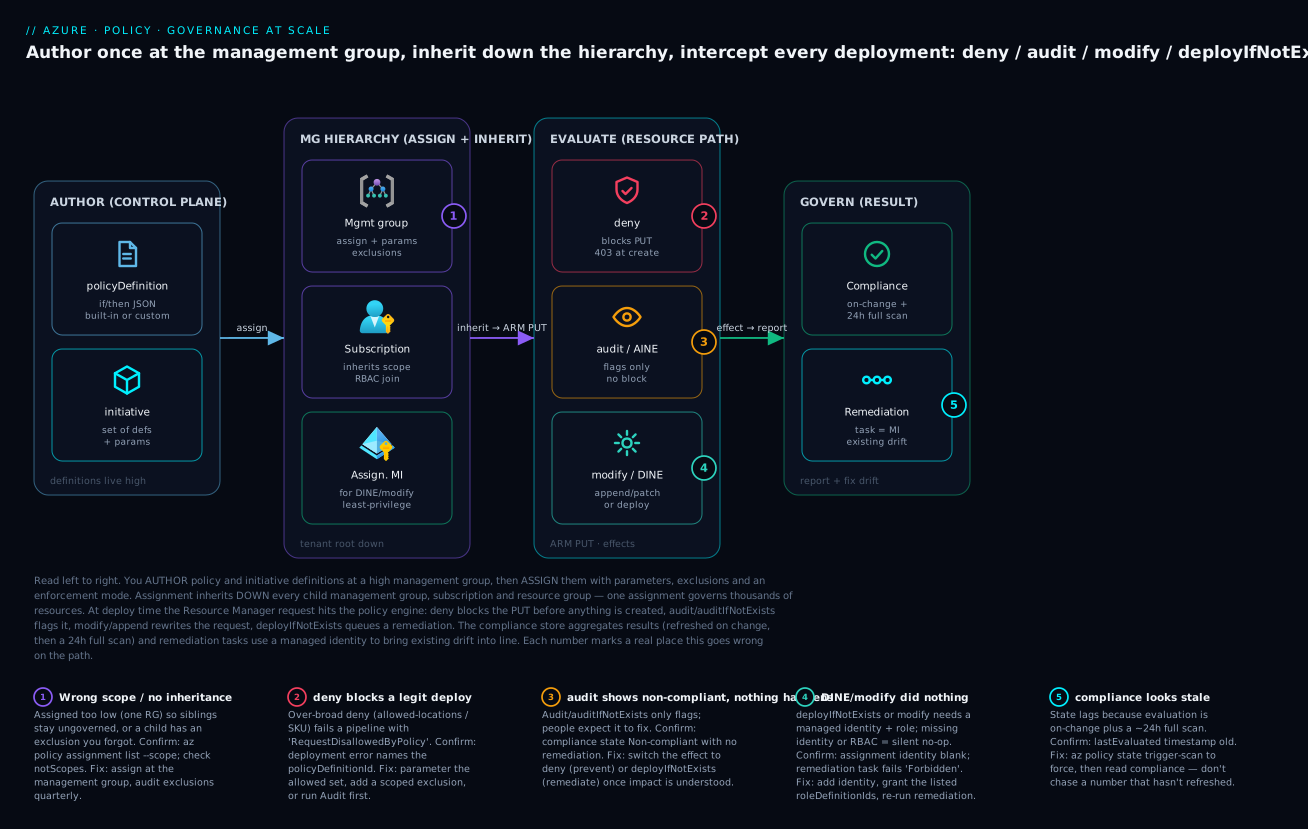
The diagram traces governance the way it actually flows, left to right, and marks the five places it goes wrong. On the left is the control plane where you author: a policyDefinition (the if/then JSON rule) and an initiative that bundles many definitions. Authoring is harmless — nothing is enforced yet. The second zone is the management-group hierarchy, where you assign: you attach the definition or initiative to a management group with parameters and exclusions, and that assignment inherits down through every child subscription and resource group — one assignment, thousands of resources. The assignment also carries the managed identity that deployIfNotExists and modify need to act.
The third zone is the evaluation path, where the rubber meets the Resource Manager PUT: a deny blocks the request before anything is created (a 403 at create time), an audit/auditIfNotExists flags it without blocking, and modify/deployIfNotExists either rewrites the request or deploys the missing related resource. The fourth zone is the result: the compliance store aggregates state (refreshed on change, then a roughly 24-hour full scan), and remediation tasks use the assignment’s identity to drag existing drift back into line. The five numbered badges sit on the real failure points — wrong scope or a forgotten exclusion (1), a deny that blocks a legitimate deploy (2), an audit that only flags when people expected a fix (3), a DINE/modify that no-ops because its identity lacks RBAC (4), and a compliance number that looks stale because the 24-hour scan hasn’t run (5). Read the badge, run the named confirm command, apply the fix — that is the whole operating loop.
Real-world scenario
Medindi Health is a fictional but realistic Indian health-tech company running a regulated workload across 38 subscriptions under an enterprise-scale landing zone in Central India and South India. The platform team is six engineers; the compliance team needs to pass a payer audit in eight weeks. The starting state was ugly: a quarterly scan found 410 storage accounts with public network access enabled, 1,200 resources with no CostCenter tag, 60 VMs with unencrypted OS disks, diagnostic logging configured on barely a third of resources, and a handful of resources quietly running in non-approved regions because a contractor had deployed to eastus to “test something.” Manual remediation had been attempted twice and failed — every fix decayed within a fortnight.
The platform lead’s first instinct was the right idea and the wrong execution: she drafted a deny initiative — allowed-locations, no-public-storage, require-encryption — and very nearly assigned it at the tenant root in Default mode on a Friday afternoon. A senior architect stopped the rollout with one question: “Do you know what that denies today?” They didn’t. So they ran the entire initiative as audit first at the landing-zone management group, forced a scan with az policy state trigger-scan, and read the real blast radius. The audit revealed the surprise: a billing-integration subscription legitimately needed public storage for a partner SFTP drop, and two subscriptions ran workloads in eastus by design for a US-hosted dependency. A blind deny at root would have broken both and triggered a Sev-1.
With the blast radius known, the rollout went in phases. Phase 1 (week 1–2): the whole initiative as audit, plus DoNotEnforce on the deny components, to confirm exactly what would block. Phase 2 (week 2–3): modify to inherit CostCenter from each resource group (managed identity granted Tag Contributor), and deployIfNotExists to push diagnostic settings to Log Analytics (identity granted Log Analytics Contributor + Monitoring Contributor) — followed by remediation tasks that cleaned the 1,200 untagged resources and the under-logged two-thirds in place, no hand-editing. The DINE remediation initially failed Forbidden on one subscription; the cause was a missing role assignment for the assignment’s identity, fixed in one az role assignment create. Phase 3 (week 4): for the two legitimate exceptions, they wrote exemptions — Waiver category, a JIRA reference, and a 90-day expiry — rather than silent notScopes exclusions, so the auditor could see why each hole existed and that it was time-boxed. Phase 4 (week 5): flipped the deny components to Default. From that moment, a new public-access storage account simply could not be created.
The result eight weeks later: the compliance dashboard read 97% compliant, and every remaining red item was a tracked, expiring exemption with an owner — exactly what an auditor wants to see. The payer audit passed with zero governance findings. Cost allocation, previously impossible, now covered 98% of spend because the tag-inheritance modify had backfilled CostCenter everywhere. The lesson the team wrote on the wall: “audit before deny, remediate before you enforce, and a hole you can’t explain is worse than the violation it hides.” The whole rollout, as the order-of-operations table that was the lesson:
| Phase | Action | Effect / mode | Outcome | What would have gone wrong otherwise |
|---|---|---|---|---|
| 0 | Draft deny initiative | (about to enforce at root) | — | Friday Sev-1 from blind deny |
| 1 | Run initiative as audit at LZ MG | audit + DoNotEnforce |
Real blast radius known | Two legit workloads would’ve broken |
| 2a | Inherit CostCenter tag | modify + remediation |
1,200 resources tagged in place | Cost allocation stays impossible |
| 2b | Push diagnostic settings | deployIfNotExists + remediation |
Logging on ~all resources | Audit finding on observability |
| 2c | Fix DINE Forbidden |
grant MI the role | Remediation succeeds | Silent no-op, drift persists |
| 3 | Exempt the 2 legit exceptions | exemption (Waiver, 90d) |
Auditable, time-boxed holes | Permanent untracked notScopes |
| 4 | Flip deny to enforce | enforcementMode=Default |
New violations impossible | — |
Advantages and disadvantages
Policy-driven governance is the only thing that scales to a multi-subscription estate — but it has sharp edges that bite teams who assign first and think later. Weigh it honestly:
| Advantages (why this model wins) | Disadvantages (why it bites) |
|---|---|
Prevention over detection — deny stops misconfiguration before the resource exists; nothing bad is ever created |
A too-broad deny blocks legitimate work tenant-wide the instant it goes to Default mode |
| One assignment governs thousands of resources via management-group inheritance | Inheritance cuts both ways — assign at the wrong scope and you over-reach or under-cover silently |
| Auditable by design — compliance state + exemptions feed straight into governance reviews | Compliance is eventually consistent (24h scan); the dashboard lags reality and people chase stale numbers |
Remediation (modify/DINE) fixes existing drift automatically, not in a backlog |
DINE/modify silently no-op without the right managed identity + RBAC — failures are quiet (Forbidden) |
| Built-ins cover most needs — regulatory initiatives ship ready to assign | Custom policy JSON gets intricate; missing aliases can make a desired rule impossible to write |
| Effects are granular — prevent, report, mutate, or deploy as the situation needs | Choosing the wrong effect (audit when you meant deny) means nothing actually gets prevented |
| Exemptions give a tracked, expiring escape hatch with a reason | notScopes exclusions create silent, permanent holes that auditors hate |
| Decouples governance (shape) from RBAC (access) — clean separation of concerns | Two systems to reason about; “blocked” could be RBAC or Policy, and the errors differ |
The model is right for any estate past a single team: regulated workloads, landing zones, cost governance, and anywhere “review harder” has already failed. It is over-engineering for a single throwaway sandbox subscription, where a couple of audit policies suffice. The disadvantages are all manageable — audit-first rollouts tame the deny risk, remediation identities are a one-time wiring job, and trigger-scan defeats the lag — but only if you know they exist, which is the entire point of this article.
Hands-on lab
Create a custom deny policy, watch it block a non-compliant deployment, then add a tag-inheritance modify with a remediation task — all free (Policy itself has no charge; we deploy a storage account briefly and delete it). Run in Cloud Shell (Bash). You need permission to create policy definitions/assignments at a subscription (Resource Policy Contributor or Owner).
Step 1 — Variables and a sandbox resource group.
SUB_ID=$(az account show --query id -o tsv)
RG=rg-policy-lab
LOC=centralindia
az group create -n $RG -l $LOC -o table
Step 2 — Author a custom deny policy (storage must require HTTPS-only).
cat > rule.json <<'JSON'
{
  "if": {
    "allOf": [
      { "field": "type", "equals": "Microsoft.Storage/storageAccounts" },
      { "field": "Microsoft.Storage/storageAccounts/supportsHttpsTrafficOnly", "notEquals": true }
    ]
  },
  "then": { "effect": "deny" }
}
JSON

az policy definition create --name "lab-deny-storage-http" \
  --display-name "Lab: deny storage without HTTPS-only" \
  --rules @rule.json --mode Indexed -o table
Expected: a definition row with policyType: Custom.
Step 3 — Assign it to the sandbox resource group.
az policy assignment create --name "lab-deny-storage-http" \
  --policy "lab-deny-storage-http" \
  --scope "/subscriptions/$SUB_ID/resourceGroups/$RG" -o table
Step 4 — Try to deploy a non-compliant storage account and watch it fail.
# httpsTrafficOnly=false → should be DENIED by the policy
az storage account create -n stlab$RANDOM -g $RG -l $LOC \
  --sku Standard_LRS --https-only false 2>&1 | tail -5
# Expect: "RequestDisallowedByPolicy" naming lab-deny-storage-http
The deployment fails with RequestDisallowedByPolicy — the resource is never created. That is deny doing its job at the request.
Step 5 — Deploy a compliant storage account (HTTPS-only) and watch it succeed.
SA=stlab$RANDOM
az storage account create -n $SA -g $RG -l $LOC \
  --sku Standard_LRS --https-only true -o table
# Succeeds — it satisfies the policy.
Step 6 — Add a tag-inheritance modify and remediate the existing account.
# Tag the resource group so there's something to inherit
az group update -n $RG --set tags.CostCenter=CC-1001 -o none

# Assign the built-in "Inherit a tag from the resource group if missing" (modify) WITH an identity
az policy assignment create --name "lab-inherit-tag" \
  --policy "cd3aa116-8754-49c9-a813-ad46512ece54" \
  --scope "/subscriptions/$SUB_ID/resourceGroups/$RG" \
  --params '{ "tagName": { "value": "CostCenter" } }' \
  --mi-system-assigned --location $LOC --role "Contributor" --identity-scope "/subscriptions/$SUB_ID/resourceGroups/$RG" -o table

# Force a scan, then remediate the EXISTING (untagged) storage account
az policy state trigger-scan --resource-group $RG
az policy remediation create --name "lab-remediate-tag" \
  --policy-assignment "lab-inherit-tag" --resource-group $RG -o table
After remediation, the storage account inherits CostCenter=CC-1001. Verify:
az storage account show -n $SA -g $RG --query "tags" -o json
# Expect: { "CostCenter": "CC-1001" }
Validation checklist. You authored a custom deny, proved it blocks the bad deploy and allows the good one (the RequestDisallowedByPolicy line is the whole point), then used modify + a remediation task to fix an existing resource in place. The steps mapped to what each proves:
| Step | What you did | What it proves | Real-world analogue |
|---|---|---|---|
| 2 | Author custom deny JSON | A rule is just if/then over fields |
Encoding a hard guardrail |
| 4 | Deploy non-compliant SA | deny blocks at the request (RequestDisallowedByPolicy) |
The 2pm pipeline failure |
| 5 | Deploy compliant SA | The policy allows correct config | Normal deploys are unaffected |
| 6 | modify + remediation | Existing drift is fixed in place, not by hand | Backfilling tags across a tenant |
Cleanup (no lingering cost).
az policy assignment delete --name "lab-deny-storage-http" --scope "/subscriptions/$SUB_ID/resourceGroups/$RG"
az policy assignment delete --name "lab-inherit-tag" --scope "/subscriptions/$SUB_ID/resourceGroups/$RG"
az policy definition delete --name "lab-deny-storage-http"
az group delete -n $RG --yes --no-wait
Cost note. Azure Policy has no charge — you pay only for resources it deploys/remediates. The lone storage account in this lab costs a few paise for the minutes it exists; deleting the resource group stops everything.
Common mistakes & troubleshooting
This is the playbook you bookmark — first as a scannable table to read mid-incident, then the same entries with full confirm-command detail underneath.
| # | Symptom | Root cause | Confirm (exact cmd / portal path) | Fix |
|---|---|---|---|---|
| 1 | A deploy fails with RequestDisallowedByPolicy |
A deny policy matched the request |
Read the error — it names the policyDefinitionId and assignment |
Parameterise the allowed set, add an exemption, or run DoNotEnforce while triaging |
| 2 | Assigned audit, expected it to fix things |
audit/AINE only flags; it never changes a resource |
az policy state list shows NonCompliant, no remediation |
Switch to deny (prevent) or deployIfNotExists/modify (fix) |
| 3 | DINE/modify “ran” but nothing changed; remediation Forbidden |
Assignment has no managed identity, or the MI lacks the roleDefinitionIds |
az policy assignment show --query identity; az role assignment list --assignee <principalId> |
Add --mi-system-assigned; grant the declared roles at the scope; re-run remediation |
| 4 | Compliance dashboard looks wrong/stale | Eventually consistent — last full scan predates your change | Check lastEvaluated; compare to your change time |
az policy state trigger-scan, then re-read |
| 5 | A sibling subscription stays ungoverned | Assignment made at one subscription/RG, not the parent MG | az policy assignment list --scope <MG> shows nothing |
Re-assign at the management group to inherit down |
| 6 | Custom policy never matches; resource stays compliant | The property has no alias, or wrong mode (Indexed for an RG rule) |
az provider show ... aliases; check definition mode |
Use the aliased path / mode: All; or pick an aliased property |
| 7 | A whole environment is silently uncovered | A notScopes exclusion you forgot |
az policy assignment show --query notScopes |
Remove the exclusion, or convert to a tracked exemption with expiry |
| 8 | A legit pipeline breaks the moment deny goes live | Deny flipped to Default without an audit phase |
Deployment errors spike; error names the def | Roll back to DoNotEnforce/audit, fix params/exemptions, re-enforce |
| 9 | Two policies fight; resource shows Conflicting |
Conflicting effects (e.g. one modify adds, another removes the same tag) | Compliance state Conflicting; review both assignments |
Reconcile the rules; keep one source of truth per property |
| 10 | Tag-inherit modify did nothing on a child resource |
Modify isn’t retroactive without a remediation task; or MI lacks tag-write role | Resource missing the tag after scan; az policy remediation list |
Run a remediation task; grant the MI Tag Contributor/Contributor |
| 11 | deny blocks a resource you thought was exempt |
Exemption scoped wrong, or expired | az policy exemption show --query "{scope:scope,expires:expiresOn}" |
Re-scope the exemption / extend the expiry |
| 12 | New initiative suddenly shows everything non-compliant | A member policy with a strict effect landed on existing drift | Diff the initiative’s member definitions / recent updates | Expected — remediate, or set the member effect to audit first |
The expanded form, with the full reasoning for the entries that bite hardest:
1. A deployment fails with RequestDisallowedByPolicy.
Root cause: A deny assignment matched the request — over-broad allowed-locations, an allowed-SKU list missing the size, or a no-public-access rule on a resource that legitimately needs it.
Confirm: The error body names the policyDefinitionId, the policyAssignmentId, and often the failing field. In the portal, Policy → Compliance → (the assignment) → Deny events, or the deployment’s error detail.
Fix: If the resource is legitimate, parameterise the allowed set (add the region/SKU), or grant a scoped exemption. If you’re mid-rollout, drop the assignment to enforcementMode=DoNotEnforce while you triage so deploys aren’t blocked.
2. You assigned audit and expected it to fix things.
Root cause: audit and auditIfNotExists are report-only — they mark non-compliance and never modify a resource.
Confirm: az policy state list --filter "PolicyAssignmentName eq '<name>'" shows NonCompliant with no associated change.
Fix: Decide your posture: deny to prevent future violations, or modify/deployIfNotExists (plus a remediation task) to fix existing ones. audit is a measurement phase, not an end state.
3. A deployIfNotExists/modify policy “ran” but nothing changed; remediation fails Forbidden.
Root cause: The assignment has no managed identity, or the identity lacks the roles the definition declares in roleDefinitionIds. DINE/modify deploy/patch as that identity; with no rights, it’s a silent no-op.
Confirm: az policy assignment show -n <name> --scope <scope> --query identity (is it null?); az role assignment list --assignee <principalId> --scope <scope> (are the declared roles present?). The remediation detail shows Forbidden.
Fix: Re-create the assignment with --mi-system-assigned --location <region>; grant the identity each roleDefinitionId at the assignment scope (az role assignment create); re-run az policy remediation create.
4. The compliance dashboard looks wrong or stale.
Root cause: Compliance is eventually consistent — evaluation runs on change and via a background full scan roughly every 24 hours, so a number can predate your fix or a new assignment.
Confirm: Check the assignment’s last evaluation time; compare to when you made the change.
Fix: az policy state trigger-scan --resource-group <rg> (or at subscription scope) forces an on-demand scan; re-read after it completes. Don’t make decisions off a number you haven’t refreshed.
5. A sibling subscription stays ungoverned.
Root cause: The assignment was made at one subscription or resource group, which never affects siblings or the parent — inheritance is downward only.
Confirm: az policy assignment list --scope "/providers/Microsoft.Management/managementGroups/<mg>" returns nothing for the rule.
Fix: Assign at the management group that is the common ancestor of all the subscriptions you mean to govern; it inherits down to all of them.
6. A custom policy never matches; the resource stays compliant no matter what.
Root cause: The property you’re testing has no alias (Policy can only read aliased properties), or the definition mode is wrong (Indexed won’t evaluate resource-group- or subscription-level rules).
Confirm: az provider show --namespace <ns> --query "resourceTypes[?resourceType=='<type>'].aliases[].name" — is your path there? Check the definition’s mode.
Fix: Use the exact aliased path; for RG/subscription rules set mode: All; if no alias exists, the rule isn’t expressible — pick an aliased property or a different control.
7. A whole environment is silently uncovered by a policy you thought was tenant-wide.
Root cause: A notScopes exclusion on the assignment carves that scope out, quietly and without expiry.
Confirm: az policy assignment show -n <name> --scope <scope> --query notScopes.
Fix: Remove the exclusion if it was a mistake; if the carve-out is justified, replace it with a tracked exemption (category + reason + expiry) so it shows as Exempt and is reviewed.
8. A legitimate pipeline breaks the instant a deny goes live.
Root cause: A deny was flipped to Default enforcement without an audit / DoNotEnforce phase, so its first encounter with reality is a production block.
Confirm: Deployment failures spike right after the assignment change; the error names the definition.
Fix: Roll the assignment back to DoNotEnforce (or audit), measure the real blast radius, parameterise/exempt the legitimate cases, then re-enforce. This is exactly the phased rollout the scenario above followed.
9. Two policies fight and a resource shows Conflicting.
Root cause: Conflicting effects across assignments — e.g. one modify adds a tag another modify removes, or two policies set the same property to different values.
Confirm: Compliance state Conflicting; inspect both assignments’ definitions and parameters.
Fix: Establish a single source of truth per property; reconcile or remove the duplicate. Don’t run two modify policies that touch the same field in opposite directions.
10. A tag-inheritance modify didn’t tag an existing child resource.
Root cause: modify rewrites new requests; existing resources need a remediation task. And the assignment’s identity may lack tag-write rights.
Confirm: The resource is still untagged after a scan; az policy remediation list --resource-group <rg> shows none for it.
Fix: Run az policy remediation create for the assignment; ensure the MI has Tag Contributor (or Contributor) at the scope.
11. A deny blocks a resource you thought was exempt.
Root cause: The exemption is scoped wrong (it covers a sibling RG, not this one) or has expired.
Confirm: az policy exemption show -n <name> --scope <scope> --query "{scope:scope,expires:expiresOn,cat:exemptionCategory}".
Fix: Re-scope the exemption to the exact resource/RG, or extend expiresOn. Exemptions are deliberately time-boxed — an expiry firing is the system working.
12. A newly assigned initiative suddenly reports everything non-compliant.
Root cause: A member policy with a strict effect just evaluated against existing drift — the resources were always non-compliant; now something is measuring them.
Confirm: Diff the initiative’s member definitions; check what changed in the latest version.
Fix: This is expected, not a bug. Remediate the drift, or set the noisy member effect to audit first and tighten later. A spike in non-compliance after assignment is reconnaissance, not failure.
Best practices
auditbeforedeny, always. Roll every preventive rule out asaudit(orDoNotEnforce) first, read the real blast radius with a forced scan, then flip todeny. A blind deny at the tenant root is how you cause a Sev-1.- Assign at the highest scope that makes sense. Tenant/landing-zone baselines belong at a management group so one assignment governs every subscription; only assign at a subscription/RG for genuinely local rules.
- Prefer built-ins; only author the genuine gap. Microsoft maintains the built-ins (including regulatory initiatives) and updates them — search first (
policyType == 'BuiltIn') and write custom JSON only for what truly doesn’t exist. - Group related rules into initiatives. Manage and report on a baseline as one unit, share parameters, and give yourself a single compliance roll-up instead of dozens of scattered assignments.
- Wire the managed identity and RBAC for every
modify/DINE assignment. Grant exactly theroleDefinitionIdsthe definition declares, at the assignment scope — least privilege, and remediation actually works instead of failingForbidden. - Remediate the past, prevent the future.
denymakes a clean future but never touches existing resources; pair it withmodify/DINE remediation tasks to clean the drift you already have. - Use exemptions, not silent
notScopes. Every carve-out should be a tracked exemption with a category, a reason (a ticket ID), and an expiry — so the hole is visible, justified, and reviewed off the calendar. - Parameterise effects and allowed-lists. A definition whose
effectis a parameter (Audit/Deny/Disabled) lets you switch posture without editing JSON; allowed-locations/SKUs as parameters let one definition serve many scopes. - Force a scan before you trust a number. Compliance lags by up to ~24h; run
az policy state trigger-scanand read after it completes before making decisions or reporting to an auditor. - Manage policy as code. Author definitions, initiatives and assignments in Bicep/Terraform, reviewed in PRs and deployed through a pipeline — governance config is too important to click together by hand, and a diff is your audit trail.
- Review exemptions and compliance on a cadence. A weekly compliance review and a monthly exemption sweep (catch the ones about to expire, kill the ones no longer needed) keep the dashboard honest.
- Separate Policy from RBAC in your mental model and your runbooks. “Blocked” is either
AuthorizationFailed(RBAC) orRequestDisallowedByPolicy(Policy) — knowing which from the error string saves the first ten minutes of every incident.
The governance cadence worth committing to — what to review, how often, and why:
| Cadence | Review | Why it’s leading |
|---|---|---|
| Weekly | New non-compliant resources by assignment | Catch drift and new rules’ blast radius early |
| Weekly | Remediation tasks (failed / pending) | A Forbidden remediation is silent otherwise |
| Monthly | Exemptions nearing expiry | Holes re-open on expiry; renew or close deliberately |
| Monthly | Custom definitions vs new built-ins | Retire custom dups Microsoft now ships |
| Quarterly | Assignment scopes and notScopes |
Find over-reach and silent exclusions |
| Per release | Policy-as-code diff in PR | The change is reviewed and recorded |
Security notes
- Least privilege for remediation identities. A
modify/DINE assignment’s managed identity should hold only theroleDefinitionIdsthe definition declares (e.g.Tag Contributor,Log Analytics Contributor) at only the assignment scope — neverOwner, never tenant-wide. The identity can deploy/patch resources, so it is a privileged principal; scope it tightly. - Policy is a security control, not just hygiene. Deny-public-access, require-encryption, allowed-locations, and “no NSG open to
0.0.0.0/0” are preventive security controls — treat their assignments with the same change rigor as firewall rules. Use them to enforce the Azure Key Vault: Secrets, Keys and Certificates Done Right baseline (vault firewall on, purge protection on) across every subscription. - Protect the destructive path with
denyAction. UsedenyActiononDELETEfor resources that must not be casually removed (locked key vaults, log-archive storage) — a complement to resource locks, enforceable from a management group. - Don’t let exemptions become a backdoor. An exemption is a security exception — require an owner, a ticket, and an expiry, and review them. A stale
Mitigatedexemption on a public-storage rule is an open door someone forgot. - Audit the audit. The compliance store is your evidence to a regulator. Pipe Policy compliance and exemption changes into your log archive (via diagnostic settings / Activity Log) so there is an immutable record of who waived what, when, and why.
- Mind the tenant-root blast radius. Assignments at the tenant root management group affect everything, including platform subscriptions and break-glass paths — test such assignments in
DoNotEnforceand exclude break-glass scopes deliberately (as tracked exemptions). - Policy complements, never replaces, RBAC and network controls. It governs the shape of resources; it does not authenticate, authorise actions, or filter packets. Layer it with RBAC (who) and network security (what reaches what), e.g. alongside Azure Virtual Network, Subnets and NSGs: Networking Fundamentals.
The security-relevant policy controls and what each one buys you:
| Control | Policy mechanism | Secures against | Effect to use |
|---|---|---|---|
| No public storage | Built-in deny (network + anon access) | Data exfiltration via public endpoints | deny |
| Encryption everywhere | Require encryption (disks/storage) | Data-at-rest exposure | deny / audit then remediate |
| Region residency | Allowed locations | Data leaving an approved geography | deny |
| Mandatory logging | Diagnostic settings to Log Analytics | Blind spots during incident response | deployIfNotExists |
| TLS floor | Enforce minimumTlsVersion = TLS1_2 |
Downgrade / cleartext transport | modify |
| Protect critical resources | Block delete on locked resources | Accidental/malicious deletion | denyAction |
| Least-priv remediation | Scoped MI with declared roles only | Over-privileged automation identity | (assignment identity wiring) |
The RBAC roles for operating Policy, and the roles remediation identities commonly need — grant the narrowest that fits:
| Role | Lets the principal… | Give to |
|---|---|---|
| Resource Policy Contributor | Create/edit definitions, initiatives, assignments, exemptions | Platform/governance engineers |
| Policy Insights Data Writer | Trigger scans, write attestations | Automation that forces evaluation |
| Reader | View compliance and definitions | Auditors, app teams (read-only) |
| Tag Contributor | Write tags (no other changes) | The MI of a tag-inheritance modify |
| Log Analytics Contributor + Monitoring Contributor | Create diagnostic settings | The MI of a diagnostic-settings DINE |
| Network Contributor | Associate NSGs/route tables | The MI of a network DINE |
| Security Admin | Set Defender plans | The MI of a Defender-plan DINE |
Cost & sizing
- Azure Policy itself is free. There is no per-evaluation, per-assignment, or per-definition charge. What you pay for is what Policy deploys or remediates: a
deployIfNotExiststhat pushes diagnostic settings means Log Analytics ingestion (per-GB), a Defender-plan DINE means Microsoft Defender for Cloud charges per resource type, and a backup DINE means Recovery Services storage. Budget the downstream of remediation, not the policy. - Remediation has a real, intended cost — and it’s usually worth it. Auto-enabling diagnostic logging across a tenant can move your Log Analytics bill meaningfully; that is the cost of observability you needed anyway. The lever is scope and retention: enable logging where it matters, set sane retention, and sample high-volume sources.
- Governance saves money more than it costs. Tag-inheritance
modifyis what makes Azure FinOps and Cost Management: Controlling Cloud Spend at Scale possible — un-allocatable spend is the single biggest FinOps blocker, and aCostCenter-inheritance policy fixes it across the estate for free. Allowed-SKU and not-allowed-type denies stop expensive mistakes (someone deploying a giant VM or a costly legacy service) before they bill. - The hidden cost is engineering time on a bad rollout. A blind
denythat breaks pipelines costs a Sev-1’s worth of engineer-hours and lost deploys. The audit-first, phased rollout is free and prevents that — the cheapest “feature” in this article.
A rough cost picture for governance on a mid-size estate (a few dozen subscriptions):
| Cost driver | What you pay for | Rough INR / month | What it buys | Watch-out |
|---|---|---|---|---|
| Azure Policy engine | Nothing — evaluation is free | ₹0 | All evaluation, assignment, compliance | — |
| Diagnostic-settings DINE | Log Analytics ingestion (per GB) | ~₹8,000–60,000+ | Tenant-wide logging for IR | Scope + retention + sampling drive it |
| Defender-plan DINE | Defender for Cloud per resource | ~₹10,000–50,000+ | Threat protection across subs | Enable per-plan deliberately |
| Backup DINE | Recovery Services storage | Workload-dependent | Auto-protected VMs | GRS vs LRS changes the bill |
| Tag-inherit modify | Nothing (saves on FinOps) | ₹0 (net negative) | Cost allocation becomes possible | One-time remediation effort |
| Engineering time (good rollout) | Audit-first phasing | Hours, not a Sev-1 | No broken pipelines | Skipping it is the expensive path |
Interview & exam questions
1. What is the difference between a policy definition, an initiative, and an assignment? A definition is a single rule (if condition → then effect) in JSON. An initiative (policy set) bundles many definitions to manage, assign, parameterise and report on as one unit (e.g. a regulatory baseline). An assignment attaches a definition or initiative to a scope (MG/sub/RG) with parameter values and options like enforcement mode. The definition is the rule; the assignment is the rule in force here, with these parameters.
2. Name the Azure Policy effects and when you’d use each. deny (block non-compliant deploys at the request), audit (allow but flag), append/modify (rewrite the request — add/replace fields/tags), deployIfNotExists (deploy a missing related resource), auditIfNotExists (flag if a related resource is absent), denyAction (block specific actions like delete), disabled (turn off), and manual (attest a non-technical control). Prevent → deny; report → audit; mutate → modify; remediate → deployIfNotExists.
3. Why does a deployIfNotExists policy sometimes do nothing, and how do you fix it? DINE deploys its template as the assignment’s managed identity. If the assignment has no identity, or the identity lacks the roles declared in roleDefinitionIds, the deployment is a silent no-op and remediation fails Forbidden. Fix by creating the assignment with a managed identity (--mi-system-assigned) and granting it exactly those roles at the assignment scope, then re-running the remediation task.
4. How does policy assignment scope and inheritance work? An assignment applies to its scope and every descendant (management group → subscription → resource group → resource), inheriting downward only — a subscription-level assignment never affects a sibling or the parent. Assign at a management group to govern many subscriptions at once. You can only assign a definition at or below the scope where it is defined.
5. You assigned an audit policy and expected it to fix resources. What happened? Nothing was fixed — audit (and auditIfNotExists) are report-only; they mark resources non-compliant but never change them. To prevent future violations use deny; to fix existing ones use modify/deployIfNotExists plus a remediation task. Audit is a measurement phase.
6. Difference between an exclusion and an exemption? An exclusion (notScopes) removes a scope from the assignment — it is simply not evaluated, with no record or expiry (a silent hole). An exemption is a tracked waiver on a scope/resource with a category (Waiver/Mitigated), an optional expiry, and a reason; it shows in compliance as Exempt. Use exemptions for justified, time-boxed passes — they’re the auditable choice.
7. How do you safely roll out a strict deny policy across a tenant? Phase it: assign as audit (or enforcementMode=DoNotEnforce) first, force a scan, and read the real blast radius; parameterise allowed-lists and add exemptions for legitimate exceptions; remediate existing drift; then flip to enforcementMode=Default. Never assign a broad deny at the tenant root in enforce mode on day one — it can break every pipeline.
8. Why does the compliance dashboard sometimes show stale or wrong numbers? Compliance is eventually consistent — evaluation runs on resource change, on assignment change, and via a background full scan roughly every 24 hours. So a number can predate your fix or a just-made assignment. Force a fresh result with az policy state trigger-scan and read after it completes; don’t decide off an un-refreshed number.
9. What is an alias in a custom policy and why does it matter? An alias is a path that exposes a resource property for Policy to evaluate. A rule can only test properties that have aliases — if the property you want isn’t aliased, the rule is not expressible. Discover them with az provider show --namespace <ns> --query "...aliases". A missing alias is a common reason a custom policy “never matches.”
10. How does Azure Policy relate to RBAC? They’re complementary and independent: RBAC governs who can perform which actions on which scope; Policy governs the allowed shape of resources, regardless of who deploys them. A user with Owner can still be denied by policy; a blocked deploy is either AuthorizationFailed (RBAC) or RequestDisallowedByPolicy (Policy). You need both.
11. What does mode control in a definition, and when do you use All vs Indexed? mode decides what the definition evaluates. Indexed (the common default) evaluates resources that support tags and location — most resource policies. All additionally evaluates resource groups and subscriptions, so use it for RG-/subscription-level rules (e.g. “every resource group must have a CostCenter tag”). There are also data-plane modes for Kubernetes, Key Vault, and network manager.
12. A finance team can’t allocate 40% of cloud spend. Which policy mechanism helps, and how? A modify policy that inherits a tag (e.g. CostCenter) from the resource group onto every resource — assigned with a managed identity that has tag-write rights — plus a remediation task to backfill existing resources. After remediation, nearly all resources carry the cost tag and showback/chargeback works. A deny-require-tag policy then keeps new resources compliant.
These map to AZ-104 (Administrator) — implement and manage Azure governance: policies, initiatives, RBAC, management groups — and AZ-305 (Solutions Architect) — design governance and identity, landing-zone guardrails — and AZ-500 (Security Engineer) — Policy as a preventive security control, regulatory compliance, Defender for Cloud integration. A compact cert-mapping for revision:
| Question theme | Primary cert | Exam objective area |
|---|---|---|
| Definition / initiative / assignment model | AZ-104 | Implement and manage governance |
| Effects (deny/audit/modify/DINE) | AZ-104 / AZ-305 | Governance design & implementation |
| Scope, management groups, inheritance | AZ-305 | Design governance; landing zones |
| DINE identity + RBAC wiring | AZ-104 / AZ-500 | Remediation; secure automation |
| Exemptions, enforcement mode, safe rollout | AZ-305 | Governance operations |
| Policy as a security control + compliance | AZ-500 | Regulatory compliance; Defender |
Quick check
- You assign an
auditpolicy for “VMs must have encryption” and a week later the report still shows non-compliant VMs — and nothing has been fixed. Why, and what do you change to actually fix them? - A
deployIfNotExistspolicy for diagnostic settings shows resources as non-compliant and the remediation task failsForbidden. Name the two-part root cause and the fix. - True or false: assigning a policy at a subscription governs that subscription’s sibling subscriptions too.
- You need to wave a
deny-public-storage rule for one legacy resource group, and you want the auditor to see why and for it to expire automatically. Exclusion or exemption — and which field gives the expiry? - Right after creating an assignment the compliance dashboard shows “0 of 0” / stale numbers. What’s happening and what one command gives you a fresh answer?
Answers
auditis report-only — it flags non-compliance but never changes a resource, so the VMs stay as they are. To fix them, switch to amodify/deployIfNotExistseffect (with a managed identity and a remediation task) to remediate existing VMs, and/ordenyto prevent new unencrypted ones. Audit measures; it doesn’t remediate.- (a) The assignment has no managed identity, or (b) the identity lacks the roles declared in
roleDefinitionIds— DINE deploys as that identity, so without rights it no-ops/Forbidden. Fix: create the assignment with--mi-system-assigned, grant the declared roles at the assignment scope, then re-runaz policy remediation create. - False. Inheritance is downward only — a subscription-level assignment covers that subscription’s resource groups and resources but never its siblings or the parent. To govern multiple subscriptions, assign at the management group that is their common ancestor.
- An exemption (not an exclusion) — it shows in compliance as
Exempt, carries a category (Waiver/Mitigated) and a reason, and expires via theexpiresOnfield. AnotScopesexclusion would be a silent, permanent hole the auditor can’t see. - Compliance is eventually consistent — evaluation hasn’t run yet (the full scan is ~every 24h), so the number is
NotStarted/stale, not a broken policy. Runaz policy state trigger-scanto force an on-demand scan, then re-read after it completes.
Glossary
- Policy definition — a single governance rule in JSON: an
ifcondition over resource fields and atheneffect. The atom of Azure Policy. - Initiative (policy set definition) — a bundle of policy definitions managed, assigned, parameterised and reported on as one unit (e.g. a regulatory baseline).
- Assignment — a definition or initiative attached to a scope with parameter values and options (enforcement mode, exclusions); the rule in force here.
- Scope — the management group, subscription, or resource group an assignment targets; evaluation inherits downward to all descendants.
- Effect — what a policy does:
deny,audit,append,modify,deployIfNotExists,auditIfNotExists,denyAction,disabled, ormanual. - deny — rejects a non-compliant Resource Manager request before the resource is created; the deploy fails with
RequestDisallowedByPolicy. - audit / auditIfNotExists — report-only effects: mark a resource (or a missing related resource) non-compliant without changing anything.
- append / modify — effects that rewrite the request:
appendonly adds missing fields;modifycan add, replace or remove (and is remediable for existing resources). - deployIfNotExists (DINE) — lets the resource through, then deploys a related resource (e.g. a diagnostic setting) if it is absent; needs a managed identity with declared roles.
- denyAction — blocks a specific action (e.g.
DELETE) rather than a property state; protects existing resources from destructive operations. - Managed identity (on an assignment) — the identity
modify/DINE assignments use to patch/deploy resources; without the right RBAC, remediation is a silent no-op (Forbidden). - roleDefinitionIds — the roles a
modify/DINE definition declares that its assignment’s identity must hold for remediation to work. - Remediation task — re-evaluates existing resources for a
modify/DINE assignment and applies the change to bring drift into compliance. - Compliance state —
Compliant,NonCompliant,Exempt,Conflicting,NotStarted, orUnknown; the audit answer, refreshed on change and by a ~24h full scan. - Exclusion (
notScopes) — a scope removed from an assignment; not evaluated, untracked, and without expiry (a silent hole). - Exemption — a tracked waiver for a scope/resource with a category (
Waiver/Mitigated), reason, and optionalexpiresOn; shows in compliance asExempt. - Enforcement mode — per-assignment:
Default(effects fire) orDoNotEnforce(evaluate and report without enforcing) — the safe-rollout switch. - Alias — a path exposing a resource property so a policy can read it; a property without an alias cannot be tested by a rule.
- mode — what a definition evaluates:
Indexed(taggable resources),All(plus RGs/subscriptions), or a data-plane mode (Kubernetes, Key Vault, network manager). - trigger-scan —
az policy state trigger-scan; forces an on-demand compliance evaluation instead of waiting for the periodic full scan.
Next steps
You can now author, assign, scope, remediate and report Azure Policy across a tenant. Build outward:
- Next: Azure Enterprise-Scale Landing Zone: Foundation for Large Organizations — the management-group tree these assignments live in, and where policy-driven governance becomes a platform.
- Related: Azure Resource Hierarchy Explained: Subscriptions, Resource Groups and Resources — the scopes you assign policy onto, from tenant root to resource.
- Related: Azure FinOps and Cost Management: Controlling Cloud Spend at Scale — tag-enforcement policies are what make cost allocation and showback possible.
- Related: Azure Monitor and Application Insights: Full-Stack Observability —
deployIfNotExistsis how you force diagnostic settings onto every resource for it. - Related: Azure Key Vault: Secrets, Keys and Certificates Done Right — enforce vault baselines (firewall, purge protection) as policy across every subscription.