The invoice line that makes people angry is the dev database that costs the same at 3 a.m. on a Sunday as it does at noon on a Tuesday. Nobody queried it all weekend, yet a provisioned General Purpose database with 4 vCores billed every one of those idle hours at the full hourly rate. Azure SQL Database serverless exists to delete that line. It is not a different database engine and not a different product — it is a compute tier of the vCore model where, instead of renting a fixed number of cores around the clock, you give Azure a range (a minimum and a maximum vCore count), it scales the active compute up and down inside that range by the second based on real demand, bills you per second for the vCores actually in use, and — when the database sits idle long enough — pauses compute entirely, after which you pay only for storage until the next connection wakes it.
That sentence hides three distinct mechanisms, and the whole article is about telling them apart, because each has its own knobs, its own failure mode, and its own place in the bill. Per-second autoscaling continuously right-sizes the running compute between min_capacity and max_capacity so a quiet database drifts to a cheap floor and a busy one bursts to the ceiling — no manual scale operation, no restart. Auto-pause is the harder, more consequential feature: after a configurable idle delay with no sessions and no activity, serverless stops billing for compute altogether — the database is “paused,” storage persists, and the first connection afterward pays a resume latency (a cold start, typically tens of seconds) while compute is brought back online. The third thing to internalise is the billing unit: you are billed for the maximum of vCores used and a memory-derived minimum, per second, plus storage and backups billed separately and always — serverless never makes storage free.
By the end you will hold a crisp mental model of all three, read the serverless billing meter the way you read a taxi meter, size min_capacity/max_capacity and the auto_pause_delay for a real workload, and — the decision that actually matters — know precisely when serverless is cheaper than a same-size provisioned database and when its cold starts and per-second premium make provisioned the right call. We stay concrete: real SKUs (GP_S_Gen5_2, GP_S_Gen5_8), the real auto-pause floor (1 hour minimum), the real memory math, and both az CLI and Bicep for every setting. You do not need to be a DBA — if you understand “this database has busy hours and idle hours,” you can decide whether serverless saves you money.
What problem this solves
Provisioned compute bills for capacity you reserved, not capacity you used. That is fine for a database busy most of the day — you want the cores waiting. It is wasteful, sometimes absurdly so, for the large class of databases whose load is spiky, intermittent, or unpredictable: a dev or test database touched a few hours a day; an internal line-of-business app used 9-to-5 on weekdays; a new product whose traffic you can’t forecast; a fleet of small per-tenant databases that are individually almost always idle. For all of these, a fixed provisioned SKU means paying 168 hours a week for maybe 30 hours of real work.
Two failure modes follow from forcing those workloads onto provisioned compute. The first is chronic over-pay: the database sits at 5–10% average CPU but you bill the full vCore rate continuously, because the provisioned model has no concept of “give the cores back when idle.” The second is the manual-scaling treadmill: teams script scale-up before business hours and scale-down after — and now they own brittle automation, scale operations that cause brief disconnects, and the inevitable night the scale-down job fails and they pay Premium rates till someone notices. Serverless folds both problems into the platform: scaling is continuous, per-second, and automatic, and the idle case collapses to near-zero compute cost without any cron job of your own.
Who hits this: anyone running non-production databases (the most common, most obvious win), teams launching apps with unknown traffic, SaaS builders with many small tenant databases, and anyone whose finance team circled a SQL line and asked why an idle database costs money overnight. The catch — and why this needs a real article, not a checkbox — is that serverless is not unconditionally cheaper: its per-vCore-second rate carries a premium, auto-pause inflicts a cold start some workloads cannot tolerate, and a database busy 24/7 costs more on serverless than on the equivalent provisioned SKU. Choosing it blind, in either direction, is how you keep over-paying or trade money for latency you didn’t budget for.
To frame the whole decision before the deep dive, here are the three workload shapes, what each costs you on the wrong model, and where serverless lands:
| Workload shape | On provisioned compute | On serverless | Verdict |
|---|---|---|---|
| Busy ~24/7 (steady high CPU) | Right-sized; you use what you rent | Per-second premium with no idle to claw back; usually more expensive | Stay provisioned |
| Business-hours only (idle nights/weekends) | Pay 168 h/week for ~40 h of work | Scales down off-hours; may auto-pause weekends | Serverless wins |
| Spiky / unpredictable (bursts then quiet) | Either over-provisioned for the burst or throttled in it | Bursts to max, drifts to min, no manual scaling |
Serverless wins |
| Dev / test (touched a few hours a day) | Pays full rate around the clock | Auto-pauses when idle → storage-only cost | Serverless wins big |
| Many tiny tenants (each mostly idle) | N provisioned SKUs each billing idle | Each auto-pauses independently | Serverless wins (or elastic pool) |
Learning objectives
By the end of this article you can:
- Explain the three serverless mechanisms — per-second autoscaling, auto-pause/resume, and per-second billing of max(vCores, memory-floor) — and how each shows up in the bill, without conflating them.
- Size
min_capacityandmax_capacityfor a real workload, and predict the memory and max-connections you get at each, since both scale with the vCore count. - Set and reason about
auto_pause_delay— the trade between idle savings and cold-start exposure — and know the real floor (1 hour) and the “never pause” sentinel value. - Calculate, on the back of an envelope, whether serverless is cheaper than the equivalent provisioned SKU for a given duty cycle, and find the break-even point.
- Diagnose the classic serverless surprises: a database that never pauses (a lingering session or monitoring query holds it open), a resume cold start that times out a connection, and a bill that is higher than expected because the floor or the memory minimum kept compute warm.
- Provision a serverless database end-to-end with
azCLI and Bicep, change min/max and pause delay live, and watch it pause and resume. - Decide between serverless, provisioned, and an elastic pool for a fleet, and explain why Hyperscale’s serverless option differs from General Purpose serverless.
Prerequisites & where this fits
You should understand the Azure SQL Database basics: that it is a PaaS relational database where Microsoft runs the engine, patching, backups and HA, and you rent capacity; that the vCore model lets you choose CPU cores and storage independently (versus the bundled DTU model); and that a single database lives in a logical SQL server that holds the admin login and firewall. If those are fuzzy, read Azure SQL Database Purchasing Models: DTU vs vCore and How to Pick Without Overpaying first — serverless is a compute tier inside the vCore world that article maps, and this one assumes it. To stand up and connect to a database at all, Azure SQL Database: Create, Connect & Configure the Firewall is the on-ramp.
This sits in the Data track, specifically the cost-and-compute corner of it. Serverless is a compute decision, orthogonal to the service tier (General Purpose, Hyperscale) and to storage redundancy. The mental model here pairs with cost governance — once a database can pause and per-second-bill, you watch it differently — so Azure Cost Management: Budgets & Alerts in the First 30 Days is the right companion for seeing the savings land. Operationally, a paused-then-resuming database changes how connection errors look, which connects to Troubleshooting Azure SQL: Connectivity, Timeouts, Throttling & Blocking — the resume cold start is a legitimate, expected transient your app must retry through.
A quick map of which layer owns which serverless decision, so the right person tunes the right knob:
| Layer | What lives here | Who owns it | Serverless decision it drives |
|---|---|---|---|
| Workload / app | Connection pooling, retry logic, traffic shape | App / dev team | Whether auto-pause is tolerable; min_capacity floor |
| Database compute | min/max_capacity, auto_pause_delay |
DBA / platform | The three core knobs; cost vs cold start |
| Service tier | General Purpose vs Hyperscale serverless | Architect | Which serverless flavour and its limits |
| Cost / FinOps | Budgets, billing review, duty-cycle analysis | FinOps | Serverless vs provisioned break-even |
| Monitoring | app_cpu_billed, pause/resume metrics |
Platform / SRE | Confirming pauses happen; catching “never pauses” |
Core concepts
Five mental models make every later decision obvious.
Serverless is a compute tier, not a separate database. The same General Purpose (and now Hyperscale) engine you’d get provisioned, with the same storage, the same backups, the same connection string — but the compute underneath is elastic. In the vCore model you choose a service tier (General Purpose, Business Critical, Hyperscale) and then a compute tier (provisioned or serverless). Provisioned pins a fixed vCore count; serverless gives a min/max range it moves within. Everything else about the database is unchanged. The SKU name encodes it: GP_Gen5_4 is provisioned General Purpose, 4 vCores; GP_S_Gen5_4 is the serverless one — the _S_ is the entire difference at the naming level.
You buy a range, and the platform rides it per second. Instead of “4 vCores, always,” you declare min_capacity = 0.5 and max_capacity = 4. The active compute auto-scales continuously between those bounds tracking actual CPU and memory demand — up when work arrives, down when it subsides — with no restart and no manual scale operation. Crucially, several resources scale with the current vCore count, not with the max: memory is roughly 3 GB per vCore, and the max worker/connection count scales too. So at the floor you have a small, cheap, low-memory database, and as it scales toward max it gets more memory and more connection capacity. The min isn’t just a price floor — it’s a capability floor.
Auto-pause is the idle endgame, and the cold start is its price. When the database has had no sessions and no activity for the configured auto_pause_delay, serverless pauses: it tears down the compute, you stop paying for any vCores, and you pay only for storage and backups. The database is not deleted — it’s parked. The next login (or any connection attempt) triggers a resume: compute is reprovisioned and the database comes back online, but that first connection waits out a resume latency — typically on the order of tens of seconds for General Purpose — and may fail with a connection error if your client’s timeout is shorter than the resume. Auto-pause is what makes serverless dramatically cheaper for intermittent workloads; the cold start is exactly why it’s wrong for anything that needs to answer instantly at any moment.
The billing meter measures the max of CPU and memory, per second. This is the subtle part of the bill. While running, serverless bills, each second, for vCores = max(CPU vCores used, memory used ÷ 3 GB) — never below min_capacity. Two consequences. First, a memory-hungry but CPU-light workload bills on its memory footprint even if CPU is near zero, because cached memory is reclaimed only gradually after activity stops. Second, the min_capacity you set is a continuous floor: while the database is active (not paused), you pay for at least min vCores every second regardless of how little it does. Idle-but-not-yet-paused time still costs min. Only the paused state drops compute billing to zero.
Storage is never free, and that’s the whole subtlety of “serverless saves money.” Pausing compute does not pause storage. You always pay for allocated data storage (per GB/month) and backup storage (PITR + any LTR), whether the database is busy, idle, or paused. So serverless never reaches zero cost — it reaches storage-only cost. For a tiny dev database that’s a rounding error; for a multi-terabyte one it dominates the bill, which is why serverless suits small intermittent databases best. Since storage is identical on both compute models, it cancels out of any savings comparison — the entire decision is about the compute term.
The vocabulary in one table
Before the deep sections, pin down every moving part. The glossary repeats these for lookup; this table is the mental model side by side:
| Concept | One-line definition | Where it lives | Why it matters |
|---|---|---|---|
| Compute tier | Provisioned (fixed) vs serverless (range) | vCore model choice | Serverless lives here, not in the service tier |
min_capacity |
The vCore floor while active | Database compute config | Continuous floor; also a memory/connection floor |
max_capacity |
The vCore ceiling for bursts | Database compute config | Caps burst cost and peak performance |
| Auto-scaling | Per-second move between min and max | Platform behaviour | Right-sizes without restart or manual op |
auto_pause_delay |
Idle minutes before compute pauses | Database compute config | Trades idle savings vs cold-start exposure |
| Auto-pause | Compute torn down; storage-only billing | Platform state | The big idle saving; not deletion |
| Resume / cold start | First-connection wait to bring compute back | Platform behaviour | Tens of seconds; must be retried through |
| Per-second billing | Bill on max(CPU, mem÷3GB) each second |
Billing meter | The unit; explains “surprise” bills |
GP_S_Gen5_n |
Serverless General Purpose SKU, n = max vCores | SKU name | The _S_ marks serverless |
| Storage (always billed) | Data + backup GB, regardless of pause | Always | Serverless floors at storage-only, not zero |
The three mechanisms, one at a time
Serverless is easy to misread because three independent features fire on the same database. Conflate them and the bill looks random. Separate them and it becomes predictable. Here is the clean split — what triggers each, what it does to the bill, and the knob that controls it:
| Mechanism | Trigger | Effect on compute bill | Knob | Common misread |
|---|---|---|---|---|
| Per-second autoscaling | CPU/memory demand changes | Bills max(CPU, mem÷3GB) between min and max |
min_capacity, max_capacity |
“It’s fixed at max” — no, it rides demand |
| Min-capacity floor | Database is active (not paused) | Never bills below min per second |
min_capacity |
“Idle is free” — no, idle-active costs min |
| Auto-pause | No sessions + no activity for the delay | Drops to zero compute (storage only) | auto_pause_delay |
“Pause is instant” — there’s a resume cold start |
Read the three rows as a timeline of one quiet evening. At 17:00 traffic tapers and autoscaling rides compute down toward min. By 17:30 the app is closed but a dashboard still polls every minute — the database stays active at the min floor, billing min vCores per second, never pausing because that poll keeps resetting the idle timer. Kill the poll and, after auto_pause_delay of true silence, it pauses — compute billing stops entirely. At 08:55 the first user connects, eats a ~30-second resume, and autoscaling spins compute back up. Every line of the bill is explained by which of those three states the database was in, second by second.
Per-second autoscaling: the min/max range
What min and max actually buy
max_capacity is the most vCores the database can use during a burst — your performance ceiling and your cost ceiling in one number. min_capacity is the floor it can scale down to while active — your cost floor and, just as importantly, your capability floor, because memory and max connections scale with the current vCore count. The legal range and the granularity differ by hardware generation; on Gen5 the per-database vCore choices are the familiar steps, and min_capacity can go as low as a fraction of a vCore.
| Property | Rule (Gen5, General Purpose serverless) | Why it matters |
|---|---|---|
max_capacity values |
Same vCore steps as provisioned (e.g. 1, 2, 4, 6, 8, 10, 12, 14, 16, 18, 20, 24, 32, 40) | Sets peak performance and peak cost |
min_capacity minimum |
A fraction of a vCore (e.g. 0.5 for small max) |
The lower it goes, the cheaper the active floor |
min ≤ max |
Always; min cannot exceed max |
Obvious but a common Bicep validation error |
| Memory per vCore | ~3 GB per vCore at the current scale | Min sets your minimum cache; max sets your peak cache |
| Max connections | Scales with current vCore count | Low min = fewer connections when scaled down |
| Scaling latency | Continuous, no restart | You don’t schedule it; the platform does it |
The non-obvious trap lives in the memory and connection rows. Set min_capacity = 0.5 to chase the cheapest floor and, when quiet, the database has roughly 1.5 GB of memory and a small connection cap. A connection storm or a query needing a big buffer arrives, and the database must first scale up (fast but not instantaneous) before it can serve — a momentary stumble at the floor you would not see on a higher min. So min_capacity is a three-way trade: lower is cheaper, but also less memory and fewer connections at rest.
Setting the range
With az, the serverless-specific flags are --compute-model Serverless, --capacity (which sets max_capacity), and --min-capacity:
# Create a serverless General Purpose DB: max 4 vCores, min 0.5, Gen5
az sql db create \
  --name sqldb-orders \
  --server sql-shop-prod \
  --resource-group rg-shop-prod \
  --edition GeneralPurpose \
  --family Gen5 \
  --compute-model Serverless \
  --capacity 4 \
  --min-capacity 0.5 \
  --auto-pause-delay 60
In Bicep the same choice is expressed through the sku (where capacity is the max vCores) plus minCapacity and autoPauseDelay on the database properties:
resource db 'Microsoft.Sql/servers/databases@2023-08-01-preview' = {
  parent: sqlServer
  name: 'sqldb-orders'
  location: location
  sku: {
    name: 'GP_S_Gen5_4'   // GP = General Purpose, S = Serverless, Gen5, 4 = MAX vCores
    tier: 'GeneralPurpose'
    family: 'Gen5'
    capacity: 4            // max vCores
  }
  properties: {
    minCapacity: json('0.5')      // the active floor (decimal — wrap with json())
    autoPauseDelay: 60            // minutes of idle before pause; -1 = never pause
    maxSizeBytes: 34359738368     // 32 GB data storage
  }
}
Changing the range later is an online operation — no recreate:
# Widen the burst ceiling to 8 and raise the floor to 1 vCore, live
az sql db update \
  --name sqldb-orders --server sql-shop-prod --resource-group rg-shop-prod \
  --capacity 8 --min-capacity 1
How to pick min and max
Pick max_capacity from your peak — the busiest minute, sized like a provisioned SKU. Pick min_capacity from your floor tolerance: how cheap you want the active-idle state versus how much memory/connection headroom you want at rest. The ratio between them is the elasticity you’re buying.
| Goal | min_capacity |
max_capacity |
Rationale |
|---|---|---|---|
| Cheapest dev/test | 0.5 | 1–2 | Tiny floor; pauses most of the day anyway |
| Business-hours app | 1 | 4–8 | Comfortable floor during hours; bursts for spikes |
| Spiky API, latency-sensitive | 2 | 8–16 | Higher floor avoids stumble; wide burst for spikes |
| Unpredictable new product | 1 | 8 | Moderate floor; generous ceiling while you learn the shape |
| Memory-heavy reporting | 4 | 16 | Floor sized for working-set cache, not just CPU |
A useful rule: if you find yourself wanting min and max very close together (say min=6, max=8), the workload is steady, not spiky — you’re barely using the elasticity, and a provisioned SKU at ~7 vCores is probably cheaper because it avoids the per-second premium. Serverless pays off when max is several times min and the database spends real time near the floor or paused.
Auto-pause and the resume cold start
What pause is, precisely
Auto-pause fires when the database has had zero user sessions and no compute activity for the full auto_pause_delay. The platform stops the compute, you cease paying for vCores, and the only running cost is storage + backups. The database stays fully intact — schema, data, settings — it simply isn’t running compute. This is what turns “an idle database costs the same as a busy one” into “an idle database costs cents.”
Several things must all be true for a pause to happen; if any one is false the timer resets and the database stays active (billing min):
| Condition for auto-pause | What violates it (and keeps the DB awake) |
|---|---|
| No open user sessions | A connection-pool keeping a session open; an idle SSMS window |
| No queries / compute activity | A monitoring/health query on a schedule; a polling dashboard |
| Geo-replication compatible | Active geo-replication / failover groups block auto-pause on the primary path |
| Delay elapsed with continuous idle | Any activity inside the window restarts the clock |
This list is the single biggest source of “why does my serverless database never pause?” tickets. The database is doing exactly what it should; something is talking to it every few minutes. Find that something (it is almost always a connection pool with a keep-alive, a monitoring agent, or a synthetic health check) and the pauses start happening.
The resume cold start
When a paused database receives any connection attempt, it resumes: the platform reprovisions compute and brings the database online, and the triggering connection waits for it. For General Purpose serverless this is typically tens of seconds — fast but not instant. During the resume the connection can time out and fail if your client’s connect timeout is shorter than the resume, and then a retry succeeds because by then the database is up. This is the defining serverless behaviour your application must be built for.
| Resume property | Behaviour | Implication for your app |
|---|---|---|
| Trigger | Any login / connection attempt to a paused DB | You cannot “connect without waking it” |
| Latency (General Purpose) | Tens of seconds, typically | First call after idle is slow — expected |
| What the client sees | A pending connection; may exceed a short timeout | Set a generous connect timeout; add retry |
| Error if timeout too short | Connection-level transient error | Retry with backoff — the second attempt lands |
| Concurrent triggers | First connection drives the resume; others wait too | A burst arriving on a paused DB all wait once |
| Billing during resume | Compute billing starts as it resumes | You pay from the moment it comes back up |
The correct posture is to treat the resume like any other transient SQL connection error: a generous connect timeout plus retry-with-backoff — the same discipline you already need for failovers and throttling (see Troubleshooting Azure SQL: Connectivity, Timeouts, Throttling & Blocking). Most modern data stacks already retry transient SQL errors, so the resume is handled by infrastructure you have. The danger is the naive client with a 5-second connect timeout and no retry: it reliably fails the first morning connection and reliably succeeds on refresh — a “flaky database” report that is really a missing retry.
Choosing the auto-pause delay
auto_pause_delay is in minutes, with a real minimum of 60 (one hour). You cannot pause more aggressively than after an hour of idle — and there are good reasons not to want to. There is also a sentinel value, -1, meaning “never auto-pause”: the database stays serverless (still per-second autoscaling between min and max) but never tears compute down. Use -1 when you want elastic scaling and per-second billing but the cold start is unacceptable.
auto_pause_delay |
Behaviour | Use when |
|---|---|---|
60 (the minimum) |
Pause after 1 h of idle | Maximise idle savings; cold start is fine |
120–360 |
Pause after 2–6 h | Bridge short lunch/meeting gaps without re-paying resume |
720–1440 |
Pause after 12–24 h | Pause only overnight/weekends; avoid intra-day cold starts |
-1 |
Never pause | Need elastic billing but no cold starts (latency-sensitive) |
The trade is pure: a shorter delay captures more idle as savings but means more frequent resumes (more cold starts for users); a longer delay means fewer cold starts but you keep paying min through long idle stretches before the pause fires. For a 9-to-5 app, 60–120 minutes pauses cleanly each evening and over weekends while rarely surprising a daytime user; for a dev database, 60; for anything customer-facing where a 30-second first request is unacceptable, -1.
Change it live, no recreate:
# Make the DB pause after 2 hours of idle
az sql db update --name sqldb-orders --server sql-shop-prod --resource-group rg-shop-prod \
  --auto-pause-delay 120

# Or: keep serverless billing but NEVER pause (no cold starts)
az sql db update --name sqldb-orders --server sql-shop-prod --resource-group rg-shop-prod \
  --auto-pause-delay -1
properties: {
  minCapacity: json('1')
  autoPauseDelay: 120   // minutes; 60 is the floor, -1 disables pause entirely
}
The serverless billing meter
This is where money is made or lost. Each second the database is active, you are billed for a number of vCores equal to:
billed vCores (this second) = max( CPU vCores used , memory used ÷ 3 GB ) , clamped to be at least
min_capacityand at mostmax_capacity
— multiplied by the per-vCore-second serverless rate, plus the (always-on) storage and backup charges. When the database is paused, the compute term is zero and you pay only storage + backups. Three properties of this meter explain almost every “surprise” bill:
| Billing property | What it means | The surprise it causes |
|---|---|---|
| Bills the max of CPU and memory | A memory-heavy, CPU-idle workload still bills on memory | “CPU was 2% but I was billed for 3 vCores” → memory held it up |
| Memory is reclaimed gradually after activity | Cache doesn’t drop to zero the instant queries stop | Bill stays elevated for a while after a burst ends |
min_capacity is a continuous floor while active |
Idle-but-not-paused still bills min per second |
“It was idle all afternoon and still cost money” → it wasn’t paused, just at the floor |
| Paused = zero compute only | The only state with no compute charge | If it never pauses, you never see the big saving |
| Storage + backup billed always | Independent of compute state | Even a paused DB has a (small) bill |
The memory rows are the most counter-intuitive. SQL Server caches aggressively; after a big query, memory stays populated for performance, and because serverless bills on max(CPU, memory÷3GB), billed vCores can stay high after CPU has gone quiet, declining only as the cache is reclaimed. This is by design — reclaiming instantly would gut performance — but it means the meter trails activity rather than tracking it instantaneously. The practical effect: bursty CPU with a large working set bills closer to its memory footprint than CPU alone suggests.
You can watch the actual billed compute with the app_cpu_billed metric (and see CPU and memory percentages of the current limit), which is how you verify your assumptions against reality:
# How many vCore-seconds are actually being billed (the truth for the meter)
DBID=$(az sql db show -n sqldb-orders -s sql-shop-prod -g rg-shop-prod --query id -o tsv)
az monitor metrics list --resource "$DBID" \
  --metric app_cpu_billed --interval PT1M --aggregation Total -o table

# CPU and memory as % of the CURRENT (scaled) vCore limit
az monitor metrics list --resource "$DBID" \
  --metric cpu_percent memory_usage_percent --interval PT1M --aggregation Average -o table
A worked billing example
Take a business-hours app on GP_S_Gen5_8 with min_capacity = 1, auto_pause_delay = 60. A representative weekday:
| Period | State | Billed vCores | Why |
|---|---|---|---|
| 09:00–12:00 (busy) | Active, scaling | ~3–6 (varies by load) | Rides demand between min 1 and max 8 |
| 12:00–13:00 (lunch dip) | Active at floor | 1 (the min) |
Quiet but sessions open → floor, not paused |
| 13:00–18:00 (busy) | Active, scaling | ~3–6 | Back to riding demand |
| 18:00–19:00 (winding down) | Active, draining | 1, trailing higher briefly | Cache reclaim keeps it >1 for a bit |
| 19:00–20:00 (idle, delay running) | Active at floor | 1 | Idle but inside the 60-min delay → still billing min |
| 20:00–08:59 next day | Paused | 0 | Idle past the delay → compute torn down |
Across the night and weekend the compute bill is genuinely zero — only storage ticks. The provisioned GP_Gen5_8 equivalent bills 8 vCores every one of those 168 hours regardless. The serverless win here is not the daytime (a slight per-second premium) — it’s the ~13 nightly hours plus the whole weekend at zero compute.
Serverless vs provisioned: the break-even
The economic case reduces to one comparison: the per-second premium serverless charges while active, weighed against the idle hours it bills at the floor or at zero. Serverless wins when there is enough paused time to more than offset the premium during active time.
| Factor | Pushes toward serverless | Pushes toward provisioned |
|---|---|---|
| Duty cycle (active fraction of the week) | Low (e.g. <25–30%) | High (busy most hours) |
| Idle pattern | Long, clean idle blocks (nights/weekends) | Always something running |
| Per-vCore rate | — | Lower per-vCore-second; you use the cores |
| Cold-start tolerance | Tolerant (dev, internal, retried clients) | Intolerant (must answer instantly always) |
| Traffic predictability | Unpredictable / spiky | Steady and known |
| Memory working set | Small (floor stays cheap) | Large (would pin billed vCores high anyway) |
The rule of thumb: serverless is cheaper than the equivalent provisioned SKU when the database is active less than roughly a quarter to a third of the time — because the active per-second rate is higher, idle savings have to make up the gap. Above ~30% active the provisioned SKU usually wins. The break-even is approximate — it shifts with the min/max range and the memory profile — but the shape is reliable: serverless is a bet that the database is idle a lot.
A concrete comparison for the same workload at a few duty cycles (illustrative — always price your exact region/SKU first):
| Duty cycle (active hours/week) | Serverless outcome | Provisioned outcome | Likely cheaper |
|---|---|---|---|
| ~10% (4 h/day, weekdays, dev) | Mostly paused → tiny compute bill | Full vCore rate 168 h/week | Serverless, by a lot |
| ~25% (business hours, some weekend) | Pauses nights/weekends | Full rate continuously | Serverless |
| ~40% (busy weekdays, idle weekends) | Premium on most weekday hours | Full rate, no premium | Provisioned (usually) |
| ~80% (busy almost always) | Premium on nearly all hours, little idle | Right-sized, no premium | Provisioned, clearly |
When you genuinely don’t know the duty cycle (a new product), serverless is the safer first bet: if traffic turns out low you saved a fortune; if it turns out high and steady you switch the compute tier to provisioned online with one command. That asymmetry — cheap to start serverless and convert up, painful to over-provision and discover waste later — is why “start serverless when unsure” is sound default advice.
# Convert serverless → provisioned online (when the workload proves steady/busy)
az sql db update --name sqldb-orders --server sql-shop-prod --resource-group rg-shop-prod \
  --compute-model Provisioned --capacity 6 --edition GeneralPurpose --family Gen5
Architecture at a glance
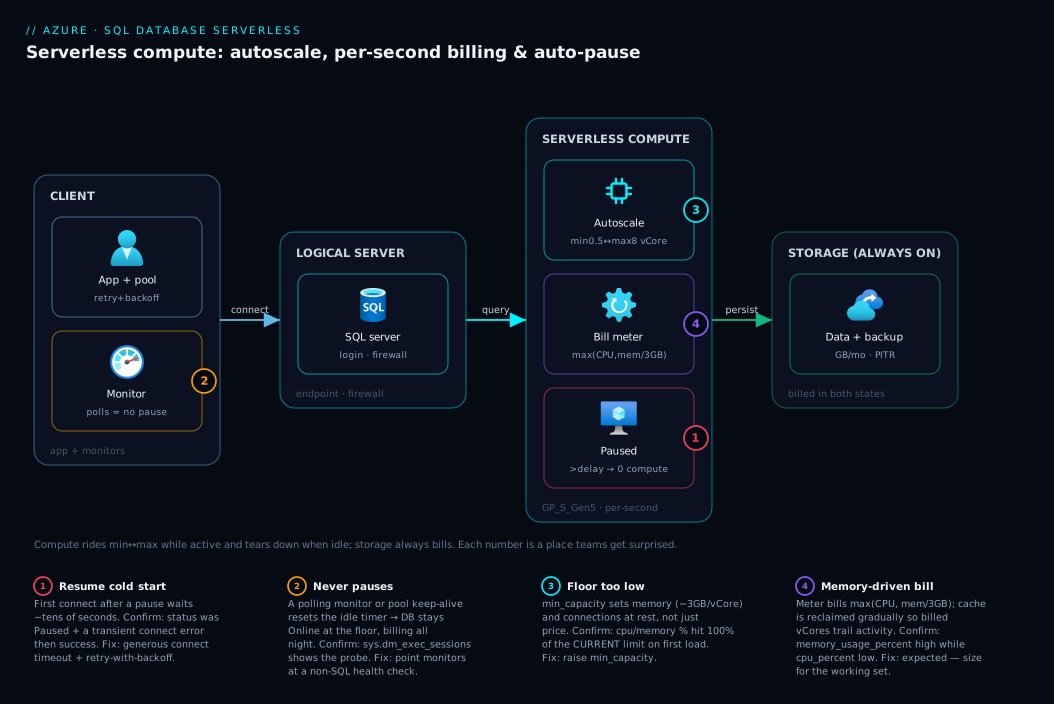
Follow a request through a serverless database across its lifecycle, left to right, and the three mechanisms fall into place. A client (app, pool, or monitoring probe) connects through the logical SQL server — the endpoint holding the firewall and admin login, itself a control-plane front to the database. That database runs on the serverless compute tier, in one of two macro-states at any instant. When active, an autoscaling control loop watches CPU and memory and rides the running vCores between min_capacity and max_capacity per second, billing max(CPU, memory÷3GB) clamped to the floor through the billing meter. When idle past auto_pause_delay, it transitions to paused: compute is torn down, the compute charge drops to zero, and only the storage layer (data + backups) keeps billing — that layer is always attached and billed in both states. The decisive hop is the resume: a connection to a paused database triggers compute reprovisioning, and that first connection pays the cold-start latency before any query runs.
The diagram below lays this out as four zones — client, logical server, the serverless compute control loop with its two states and the billing meter, and the always-on storage — with numbered badges on the four places teams get surprised: the resume cold start that times out a short-timeout client, the “never pauses” trap where a polling probe holds the database active, the min-capacity floor that bills even when idle-active, and the memory-reclaim tail that keeps billed vCores high after a burst. Read the badges as the diagnostic map: each is a symptom, where on the path it bites, and the fix.
Real-world scenario
Northwind Outfitters, a mid-sized retailer, ran a fleet of internal databases on Azure SQL: an inventory-admin app used 8-to-6 on weekdays, a finance reporting database hit hard at month-end and quiet otherwise, and eleven small per-region dashboard databases that were each touched a few times an hour during business hours. All were provisioned GP_Gen5_4, chosen years earlier by copying a template. The monthly SQL compute bill had crept past what the platform team could defend, and a FinOps review flagged it: average CPU across the fleet was under 9%, yet every database billed four vCores around the clock, all 720 hours a month.
The platform lead, Asha, started with the safest win: the eleven dashboard databases, each idle the vast majority of the time. She converted them to GP_S_Gen5_4 with min_capacity = 0.5, auto_pause_delay = 60. The first surprise arrived within a day — none of them paused. The dashboards used a connection pool with a keep-alive that pinged every two minutes, resetting the idle timer forever; the databases dutifully stayed active at the 0.5-vCore floor, billing all night for nothing. The fix was on the app side: she set the pool to fully close idle connections after a few minutes of no real queries. That evening ten of eleven paused; the eleventh had an uptime monitor hitting it, which she pointed at a lightweight ping endpoint instead of a SQL query. Compute on those databases collapsed to near-zero outside business hours.
The inventory-admin app was a clean business-hours fit: GP_S_Gen5_8, min_capacity = 1, auto_pause_delay = 120. It scaled to 5–6 vCores during the mid-morning stock reconciliation, sat at the 1-vCore floor during lunch, and paused cleanly each evening and across weekends. The one operational change was confirming the data layer’s retry policy already caught transient SQL connection errors — so the Monday-morning resume (a one-time ~25-second first request) was absorbed silently: the framework retried the timed-out connect and the second attempt landed on a now-warm database.
The finance reporting database was the interesting judgment call. Most of the month it was nearly idle — a perfect serverless candidate — but at month-end it ran heavy aggregate queries with a large working set for two solid days. Asha sized it GP_S_Gen5_16 with min_capacity = 2 (a floor chosen for memory, not CPU, so the cache had room) and auto_pause_delay = 360. During the crunch it rode up near 16 vCores and the billing meter tracked memory, not CPU — billed vCores stayed high even when CPU dipped, exactly as expected, because the working set held memory. For two days a month it cost real money; the other twenty-eight it mostly paused. Netted out, that database alone dropped ~60% versus its old GP_Gen5_4 (which had also been too small for month-end, throttling the reports — so serverless made it both cheaper and faster at peak).
One database Asha deliberately left provisioned: the order-processing database, busy steadily from early morning to late evening every day, weekends included. The duty cycle was ~75% active — well above the break-even — so serverless would have cost more, paying the per-second premium on nearly every hour with almost no idle to recover. The runbook lesson: serverless is a bet on idle; do not bet it on a database that is never idle. Across the fleet the change cut SQL compute spend by roughly half — the entire saving from converting genuinely-intermittent databases plus the one app-side fix that let auto-pause actually fire.
Advantages and disadvantages
| Advantages | Disadvantages |
|---|---|
| Per-second billing — pay for compute actually used, not reserved | Per-vCore-second rate carries a premium over provisioned |
| Auto-pause drops idle compute to zero (storage-only cost) | Resume cold start (tens of seconds) on the first connection after a pause |
| Autoscaling right-sizes continuously — no manual scale ops or cron | Memory reclaim is gradual, so billed vCores trail activity |
| No restart to scale within the range | Auto-pause needs true idle — easy to accidentally hold open |
| Ideal for dev/test, intermittent, and unpredictable workloads | Worse than provisioned for steady 24/7 workloads |
| Convert to/from provisioned online — cheap to start serverless | min_capacity floor still bills while active-idle (not free) |
| Memory and connections scale with vCores — burst gets more of both | Low min means low memory/connections at rest — can stumble |
| Single SKU change, no data migration, to switch compute tiers | Geo-replication/failover groups constrain auto-pause behaviour |
When each side matters: the advantages dominate for any database idle a meaningful fraction of the time whose users tolerate an occasional slow first request — dev/test is the textbook case, internal business-hours apps the next. The disadvantages dominate for production databases that must answer instantly at any moment (the cold start is disqualifying) or that are busy most of the time (the premium with no idle to recover makes provisioned cheaper). The floor and memory-reclaim items aren’t deal-breakers — just bill behaviour to understand; the cold start and the 24/7 cost-inversion are the two that actually decide the model.
Hands-on lab
This walk-through provisions a serverless database, watches it pause and resume, changes the knobs live, and tears it down. It uses a tiny max_capacity to keep cost minimal — assume small charges unless you’re inside the free serverless allotment. Run it in Cloud Shell.
Step 1 — Variables and a resource group.
RG=rg-serverless-lab
LOC=eastus
SRV=sql-serverless-lab-$RANDOM   # server names are globally unique
DB=sqldb-lab
ADMIN=sqladminuser
PW='S3rverl3ss!Lab_2026'         # use a strong unique password

az group create --name $RG --location $LOC -o table
Step 2 — Create the logical SQL server.
az sql server create \
  --name $SRV --resource-group $RG --location $LOC \
  --admin-user $ADMIN --admin-password "$PW" -o table

# Allow your client IP through the server firewall (lab only)
MYIP=$(curl -s https://api.ipify.org)
az sql server firewall-rule create --resource-group $RG --server $SRV \
  --name allow-my-ip --start-ip-address $MYIP --end-ip-address $MYIP
Step 3 — Create the serverless database with the minimum pause delay. (60 minutes is the floor — even the minimum is an hour, so plan to come back to observe a pause.)
az sql db create \
  --name $DB --server $SRV --resource-group $RG \
  --edition GeneralPurpose --family Gen5 \
  --compute-model Serverless \
  --capacity 2 --min-capacity 0.5 \
  --auto-pause-delay 60 \
  -o table
Step 4 — Confirm the serverless settings landed.
az sql db show --name $DB --server $SRV --resource-group $RG \
  --query "{name:name, sku:currentSku.name, minCap:minCapacity, maxCap:currentSku.capacity, pauseDelay:autoPauseDelay, status:status}" \
  -o jsonc
# Expect: sku GP_S_Gen5_2, minCap 0.5, maxCap 2, pauseDelay 60, status Online
Step 5 — Watch the billed-compute metric. Generate a little load (connect and run a query with any client), then read the meter:
DBID=$(az sql db show -n $DB -s $SRV -g $RG --query id -o tsv)
az monitor metrics list --resource "$DBID" \
  --metric app_cpu_billed cpu_percent memory_usage_percent \
  --interval PT1M --aggregation Total Average -o table
Step 6 — Force the auto-pause delay to “never,” then back. This is the live-change you’ll use most:
# Disable auto-pause (elastic billing, no cold start)
az sql db update -n $DB -s $SRV -g $RG --auto-pause-delay -1
az sql db show -n $DB -s $SRV -g $RG --query autoPauseDelay -o tsv   # -> -1

# Re-enable pause after 60 min idle
az sql db update -n $DB -s $SRV -g $RG --auto-pause-delay 60
Step 7 — Observe a pause and a resume. Disconnect all clients and wait out the 60-minute idle window (go do something else). On return, check status — it should read Paused:
az sql db show -n $DB -s $SRV -g $RG --query "{name:name, status:status}" -o table
# status: Paused  → compute torn down, storage-only billing
Now connect again (any query): the first connection eats the resume — time it — then re-check status (Online). That latency is the cold start your application must retry through.
Step 8 — Resize the range live to feel the online scale change:
az sql db update -n $DB -s $SRV -g $RG --capacity 4 --min-capacity 1
az sql db show -n $DB -s $SRV -g $RG \
  --query "{maxCap:currentSku.capacity, minCap:minCapacity}" -o table   # 4 / 1, no recreate
Step 9 — Teardown (delete the whole resource group so nothing lingers and bills):
az group delete --name $RG --yes --no-wait
Expected outcomes: the database created as GP_S_Gen5_2; app_cpu_billed moved with load and floored near min; you toggled auto_pause_delay to -1 and back; status went Online → Paused → Online across an idle hour and a resume; and you changed min/max with no recreate. Those are the three mechanisms, observed.
Common mistakes & troubleshooting
Serverless has a small set of very common, very confusing failure modes. Each is the platform working as designed against an assumption that doesn’t hold. Symptom → root cause → how to confirm → fix:
| # | Symptom | Root cause | Confirm (command / portal) | Fix |
|---|---|---|---|---|
| 1 | “It never pauses” — compute bills all night | A session/query keeps resetting the idle timer | status stays Online overnight; check active connections via sys.dm_exec_sessions |
Close idle pool connections; point monitors at a non-SQL health check |
| 2 | First morning connection fails, retry works | Resume cold start exceeded a short client connect timeout | App logs show a connection-level transient then success; status was Paused |
Raise connect timeout; add retry-with-backoff for transient SQL errors |
| 3 | Bill higher than expected on an “idle” DB | It was active at the min floor, not paused — min bills continuously |
app_cpu_billed floors at min×seconds, never drops to 0 |
Confirm it actually pauses (fix #1); or lower min_capacity |
| 4 | Billed vCores stay high after CPU drops | Memory reclaim is gradual; meter bills max(CPU, mem÷3GB) |
memory_usage_percent high while cpu_percent low |
Expected — size for working set; nothing to “fix” |
| 5 | Database stumbles/throttles at the floor | min_capacity too low → little memory/few connections at rest |
cpu_percent/memory_usage_percent spike to 100% of current limit on first load |
Raise min_capacity; the floor is also a capability floor |
| 6 | Serverless costs more than the old provisioned SKU | Duty cycle too high — busy most hours, paying the premium | Active-hours fraction >~30%; few/no pauses in metrics | Convert to provisioned (--compute-model Provisioned) |
| 7 | Auto-pause “disabled itself” | Active geo-replication / failover group constrains pause | Check for geo-replication links / failover group membership | Accept it, or rethink HA topology for that DB |
| 8 | Bicep deploy fails on minCapacity |
Decimal passed as a number, not via json() |
ARM validation error on the property type | Wrap with json('0.5') in Bicep |
| 9 | “Always On”-style monitoring keeps it awake | A synthetic transaction / APM SQL probe runs on a schedule | Probe interval < auto_pause_delay; visible in query store |
Move the probe to a TCP/port check, not a query |
| 10 | App slow only after deploys/quiet weekends | Cold start after a long idle (deploy = nobody connects) | Correlate slow first request with prior Paused status |
Pre-warm with a startup ping, or set auto_pause_delay -1 |
The two behind most real tickets are #1 (never pauses) and #2 (cold-start connection failure) — mirror images of one misunderstanding: #1 is “I expected savings but something kept the database awake,” #2 is “it did pause and my app wasn’t ready for the resume.” Get connection-pool hygiene and retry policy right and both disappear. The quick way to find what’s holding a database open:
-- Run against the DB: who/what is connected right now (resets the pause timer)?
SELECT session_id, login_name, host_name, program_name, status, last_request_end_time
FROM sys.dm_exec_sessions
WHERE is_user_process = 1
ORDER BY last_request_end_time DESC;
A program_name of a monitoring agent or an APM tool here is your culprit nine times out of ten.
Best practices
- Default non-production databases to serverless. Dev, test, staging, demo, and CI databases are intermittent by nature and the savings are the largest and lowest-risk you’ll find. Make
GP_S_Gen5_*the template, not provisioned. - Size
min_capacityfor memory and connections, not just price. The floor is a capability floor; set it high enough that the database doesn’t stumble when load first arrives at rest. For anything beyond pure dev,min = 1is a safer floor than0.5. - Size
max_capacityfrom peak, exactly like a provisioned SKU. Don’t shortchange the burst — the whole point is to have headroom you only pay for when you use it. - Match
auto_pause_delayto the idle pattern. ~60 min for dev; 60–120 for business-hours apps; longer to avoid intra-day cold starts;-1when cold starts are unacceptable. - Build retry-with-backoff for transient connection errors into every client. The resume cold start is a transient; modern data stacks retry these by default — confirm yours does. This single discipline neutralises the cold start.
- Audit what holds the database open before blaming serverless. Connection-pool keep-alives and SQL-query health probes are the #1 reason auto-pause never fires. Point monitors at lightweight non-SQL checks.
- Verify pauses actually happen. Check the
statusandapp_cpu_billedmetric after deploying serverless — if it’s neverPaused, you’re paying the floor 24/7 and getting none of the win. - Use
-1(never pause) deliberately, not by accident. It’s the right call for latency-sensitive elastic workloads, but it forfeits the biggest saving — choose it knowingly. - Re-evaluate the duty cycle quarterly. Workloads drift; a serverless database that grew into steady 24/7 use should convert to provisioned, and a provisioned one that went quiet should convert back. Both are one online command.
- Don’t put a strict-SLA, instant-response production OLTP database on auto-pause. A 24/7 transactional system that must answer in milliseconds at any moment is a provisioned (often Business Critical) workload — the cold start is disqualifying there.
- Keep the storage size honest. Serverless never makes storage free; right-size
maxSizeBytesand prune backups/LTR, because on a paused database storage is the bill.
Security notes
Serverless is a compute feature and changes none of Azure SQL’s security surface — but a few of its behaviours intersect with security operations worth flagging.
- Auto-pause and security scanners fight. A vulnerability assessment, compliance scanner, or scheduled monitoring job that connects periodically will resume a paused database and reset its idle timer — sometimes defeating auto-pause on databases you expected to stay parked. Schedule such scans into a known window rather than letting them poll, so they don’t silently hold the database active (and billing) around the clock.
- The resume is a legitimate transient, not an attack. A burst of connection-timeout errors on the first access after idle can look alarming in availability dashboards. Document the resume so it isn’t misclassified as an outage or a failed-auth pattern — the login did succeed, it just waited for compute.
- Identity, encryption, and network controls are unchanged. Use Microsoft Entra authentication over SQL logins, enforce TLS, and prefer a Private Endpoint so traffic stays off the public internet — none of which serverless alters. See Azure Private Endpoint vs Service Endpoint; a private-endpoint connection resuming a paused database behaves identically to a public one. Transparent Data Encryption is on by default and unaffected by pausing.
- Auditing survives pauses. SQL auditing and threat-detection settings persist across pause/resume — you don’t lose the audit trail because compute slept. Confirm audit destinations (Log Analytics / Storage) are configured so a resumed database keeps writing where you expect.
Cost & sizing
What drives the serverless bill, in order of impact: (1) the vCore-seconds billed while active — max(CPU, memory÷3GB) clamped to [min, max], every second the database isn’t paused, at the serverless per-vCore-second rate; (2) storage (allocated data GB/month) and backup storage (PITR + LTR), billed always, including while paused; (3) nothing else of consequence for the database itself. The single biggest lever is how much of the week the database is paused — that’s the only state with zero compute cost.
| Cost driver | What controls it | How to reduce | Note |
|---|---|---|---|
| Active vCore-seconds | Duty cycle, min, load, memory footprint |
Lower min; let it pause more (shorter delay); right-size max |
The dominant variable cost |
The min floor while active |
min_capacity × active seconds |
Lower min; reduce active-idle time (pause sooner) |
Billed even when idle-active |
| Memory-driven billing | Working-set size of queries | Tune queries to need less cache | Meter bills max(CPU, mem÷3GB) |
| Data storage | maxSizeBytes, actual data |
Right-size; archive cold data | Always billed, even paused |
| Backup storage | PITR retention + LTR policies | Trim retention/LTR to need | Always billed, even paused |
| Cold-start “cost” | auto_pause_delay vs traffic gaps |
Longer delay / -1 to reduce resumes |
Latency, not a line item |
Rough figures (always confirm for your region/SKU; INR≈USD×84): a small serverless database paused most of the week (a dev box, GP_S_Gen5_2, min 0.5) can run to a few hundred rupees a month — overwhelmingly storage, because compute is near-zero. The same workload on provisioned GP_Gen5_2 bills 2 vCores for all 720 hours and lands several times higher. Two facts worth knowing: eligible subscriptions get a free monthly serverless allotment on a small General Purpose database (enough to run a real dev database at no cost within the cap), and you can start serverless and convert to provisioned online the moment a workload proves steady — so the cost-optimal default for any uncertain workload is serverless.
For the governance side of watching these savings actually land — budgets, alerts, and tagging the serverless databases so you can see them as a group — see Azure Cost Management: Budgets & Alerts in the First 30 Days.
Interview & exam questions
Q1. What is Azure SQL Database serverless, in one sentence? A compute tier of the vCore model that auto-scales the active vCores per second between a configured min and max, bills per second for the compute actually used, and auto-pauses compute (to storage-only cost) when the database is idle past a delay — resuming on the next connection after a cold start.
Q2. Name the three independent mechanisms and the knob for each.
Per-second autoscaling (min_capacity/max_capacity), the min-capacity active floor (min_capacity), and auto-pause (auto_pause_delay). They fire on the same database but are distinct; conflating them is what makes a serverless bill look random.
Q3. Does auto-pause make the database free while paused? No. Compute billing drops to zero, but storage and backup are always billed. Serverless floors at storage-only cost, not zero — which is why it suits small intermittent databases best (where storage is a rounding error).
Q4. What is the resume cold start, and how should an application handle it? When a paused database receives a connection, the platform reprovisions compute and the first connection waits out a resume latency (tens of seconds for General Purpose). Handle it like any transient SQL error: a generous connect timeout plus retry-with-backoff — the retry lands on a now-warm database.
Q5. How are billed vCores computed each second?
max(CPU vCores used, memory used ÷ 3 GB), clamped to be at least min_capacity and at most max_capacity. A memory-heavy, CPU-light workload bills on memory; because memory is reclaimed gradually, billed vCores trail activity after a burst.
Q6. When is serverless more expensive than provisioned? When the database is active most of the time (a high duty cycle, roughly above 25–30%). The per-vCore-second serverless rate is a premium; with little idle to claw back, a steady 24/7 database costs more on serverless than on the equivalent provisioned SKU.
Q7. Why might a serverless database “never pause”?
Auto-pause requires zero sessions and activity for the whole delay. A connection-pool keep-alive, a monitoring agent, or a scheduled SQL health probe resets the idle timer every few minutes, so the database stays active at the min floor and never tears compute down.
Q8. What does min_capacity affect besides cost?
Memory and max connections scale with the current vCore count (~3 GB/vCore), so min_capacity is also the floor for memory and connections at rest. Too low a min means little cache and few connections when scaled down, which can cause a stumble when load first arrives.
Q9. What is auto_pause_delay = -1?
The sentinel that disables auto-pause: the database stays serverless (still per-second autoscaling and billing) but never pauses, so there is no cold start. Use it for latency-sensitive elastic workloads that can’t tolerate a resume but still benefit from elastic billing.
Q10. How do you move between serverless and provisioned?
A single online az sql db update --compute-model Serverless|Provisioned (with the appropriate capacity), no data migration and no recreate. This asymmetry — cheap to start serverless and convert up — is why serverless is the safe default for uncertain workloads.
Q11. What’s the minimum auto-pause delay, and the units?
auto_pause_delay is in minutes with a minimum of 60 (one hour). You cannot pause more aggressively than after an hour of continuous idle.
Q12. For a fleet of many small, mostly-idle tenant databases, what are the two cost options? Per-database serverless (each pauses independently when its tenant is quiet) or an elastic pool (shared capacity across tenants with complementary peaks). Serverless wins on independent idle; a pool wins when tenant peaks are staggered and aggregate to steady use.
These map to DP-300 (Administering Microsoft Azure SQL Solutions) for the compute/cost and HA topics, and to the cost-optimisation pillar of the Azure Well-Architected Framework.
Quick check
- Which database state is the only one where you pay nothing for compute?
- You set
min_capacity = 0.5to save money, but the bill is higher than expected and the database showsOnlineall night. What’s happening and what’s the first thing to check? - A serverless database’s CPU is at 3% but you’re billed for 4 vCores. Why?
- Your app reliably fails its first connection each morning, then works on retry. What is the cause and the fix?
- A database is busy ~80% of the week. Serverless or provisioned, and why?
Answers
- Paused. Only a paused database drops the compute term to zero (you still pay storage + backups). An idle-but-active database bills the
min_capacityfloor every second. - It’s active at the
minfloor, not paused — something is holding it open and resetting the idle timer. First check active sessions (sys.dm_exec_sessions) for a connection-pool keep-alive, monitoring agent, or scheduled SQL probe, then stop that from polling. - The meter bills
max(CPU, memory ÷ 3 GB), so a large working set in memory is driving the billed vCores even though CPU is low — and memory is reclaimed gradually after a burst, so it trails activity. Expected behaviour, not a bug. - The database auto-paused and the morning connection hit the resume cold start, which exceeded a short client connect timeout. Fix: raise the connect timeout and add retry-with-backoff for transient SQL connection errors — the retry lands on the now-warm database.
- Provisioned. At ~80% active duty cycle there’s almost no idle to claw back, and serverless’s per-vCore-second premium would make it more expensive than the equivalent provisioned SKU. Serverless is a bet on idle.
Glossary
- Serverless (compute tier) — A vCore compute tier that auto-scales vCores per second between a min and max, bills per second for compute used, and auto-pauses when idle. Not a separate database or engine.
- Provisioned (compute tier) — The fixed-vCore alternative: you rent a set number of cores continuously regardless of use.
min_capacity— The vCore floor the database scales down to while active; also the floor for memory and max connections at rest. Billed continuously while not paused.max_capacity— The vCore ceiling for bursts; sets peak performance and peak cost. Encoded ascapacityin the SKU.auto_pause_delay— Minutes of continuous idle before compute pauses. Minimum 60;-1disables auto-pause.- Auto-pause — Tearing down compute after the idle delay so only storage/backups bill. The database is parked, not deleted.
- Resume / cold start — Reprovisioning compute when a paused database is connected to; the triggering connection waits out a latency of tens of seconds.
- Per-second billing — Billing the database each second for
max(CPU vCores, memory ÷ 3 GB), clamped to[min, max], at the serverless per-vCore-second rate. GP_S_Gen5_n— SKU name for serverless General Purpose, Gen5 hardware,n= max vCores. The_S_distinguishes it from provisionedGP_Gen5_n.- Duty cycle — The fraction of the week the database is active (not paused); the primary driver of whether serverless beats provisioned.
- Memory reclaim — The gradual release of cached memory after activity stops, which keeps billed vCores elevated for a time after a burst.
- Elastic pool — A shared-capacity construct for many databases with complementary peaks; an alternative to per-database serverless for fleets.
- Logical SQL server — The addressable endpoint holding the admin login and firewall; a control-plane front to one or more databases.
app_cpu_billed— The metric exposing actual billed compute (vCore-seconds), the ground truth for the serverless meter.
Next steps
- Solidify the model serverless lives inside with Azure SQL Database Purchasing Models: DTU vs vCore and How to Pick Without Overpaying.
- If you haven’t stood one up yet, run Azure SQL Database: Create, Connect & Configure the Firewall.
- Make the resume cold start a non-event by mastering transient-error handling in Troubleshooting Azure SQL: Connectivity, Timeouts, Throttling & Blocking.
- Watch the savings land with budgets and alerts via Azure Cost Management: Budgets & Alerts in the First 30 Days.
- Isolate the database off the public internet using Azure Private Endpoint vs Service Endpoint.