Before you create a single thing in Azure, it is worth answering a more basic question: what is “the cloud”, really, and why has almost every organisation on earth moved computing there? This is Part 0 of the Azure Zero-to-Hero course — the lesson before the lessons. It assumes you have never rented a server in your life, and it builds, from the ground up, the handful of ideas the rest of the course (and the whole cloud industry) rests on.
We stay deliberately cloud-agnostic here — everything below is equally true of Amazon Web Services and Google Cloud — but because this is an Azure course, each concept is anchored with a concrete Azure example. By the end you will understand what cloud computing is, how it differs from running your own servers, the three service models (IaaS, PaaS, SaaS), the four deployment models, the money story (CapEx vs OpEx and consumption pricing), the resilience vocabulary (elasticity, scalability, HA, DR), and — most importantly — the shared-responsibility model, the single most misunderstood idea in cloud security. Everything here maps directly to the AZ-900: Azure Fundamentals certification.
Learning objectives
By the end of this lesson you can:
- Explain in plain English what cloud computing is and list its defining characteristics.
- Contrast running servers on-premises with consuming them from the cloud, and say why each matters.
- Tell the difference between IaaS, PaaS, and SaaS, place real Azure services into each, and read a responsibility-split table.
- Describe the four deployment models — public, private, hybrid, and multi-cloud — and when each is chosen.
- Explain CapEx vs OpEx, consumption-based pricing, and the total cost of ownership argument for the cloud.
- Define scalability, elasticity, agility, high availability, and disaster recovery and tell them apart.
- Apply the shared-responsibility model correctly: state exactly who owns what as you move from on-prem to IaaS to PaaS to SaaS.
Prerequisites & where this fits
You need only basic IT literacy — you know what a computer, a file, a network, and a web browser are. No prior cloud experience is assumed, and every term is defined the first time it appears. No Azure account is required; this is conceptual groundwork, so the “lab” is a thinking exercise rather than a console session. This is Lesson 0 (Part 0) of Module 1 — Foundations: the bedrock the very next lesson — What Is Azure? — and everything after it quietly assume.
What is cloud computing?
“The cloud” sounds mystical, but it describes something down-to-earth: renting computing over the internet instead of owning it. A cloud provider like Microsoft, Amazon, or Google runs gigantic buildings full of servers, storage, and networking (data centres) and lets you rent slices of that capacity on demand. You ask for a server, a database, or a terabyte of storage; it appears in minutes; you pay only for what you use; and you give it back when finished.
That is genuinely all it is. What changed the industry is who does the hard parts. In the old world you bought, powered, cabled, and patched the hardware, replaced failed disks, and planned capacity years ahead. In the cloud, the provider does that heavy, undifferentiated work and you focus on what is actually yours — your application and your data.
The US National Institute of Standards and Technology (NIST) defines cloud computing by five essential characteristics — worth knowing because exams lean on them and because they explain why cloud feels different:
| Characteristic | What it means in plain English | Everyday cloud example |
|---|---|---|
| On-demand self-service | You provision resources yourself, instantly, without filing a ticket or talking to a human. | Click “Create VM” and a server is yours in minutes. |
| Broad network access | Resources are reached over the network from anywhere, on any device. | Manage Azure from a browser, a phone, or a CLI. |
| Resource pooling | The provider serves many customers from a shared pool of hardware (multi-tenancy), assigning capacity dynamically. | Your VM and a stranger’s VM may run on the same physical host, safely isolated. |
| Rapid elasticity | Capacity scales out and back in quickly — sometimes automatically — to match demand. | Auto-scale from 2 to 20 servers for a sale, then back to 2. |
| Measured service | Usage is metered, and you are billed precisely for what you consume. | Pay per second of compute, per GB stored, per million requests. |
If you ever need a one-sentence answer in an interview: cloud computing is the on-demand, self-service delivery of metered, elastically scalable computing resources over a network from a shared pool. Every word in that sentence is one of the characteristics above.
On-premises versus cloud
On-premises (“on-prem”) means you own and operate the data centre — or at least the servers in it. Cloud means the provider owns the infrastructure and you consume it as a service. The contrast touches almost every part of how IT is funded and run:
| Dimension | On-premises | Cloud |
|---|---|---|
| Up-front cost | High — buy servers, storage, networking, licences before you serve a single user. | Near zero — rent capacity and start immediately. |
| Time to provision | Weeks to months (procure → ship → rack → cable → install). | Minutes (self-service). |
| Capacity planning | Guess years ahead; over-buy for peak and waste it, or under-buy and fall over. | Scale to actual demand; pay for what you use. |
| Who maintains hardware | You — power, cooling, failed-disk swaps, refresh cycles. | The provider. |
| Who maintains software | You patch everything, top to bottom. | Shared — depends on the service model (see below). |
| Resilience | You build (and pay for) redundancy, backup sites, generators. | Built-in options: zones, regions, managed backup. |
| Cost model | CapEx — a big capital purchase, depreciated over years. | OpEx — an operating expense you pay as you go. |
| Scaling down | Hard — you already bought the hardware; it just sits idle. | Easy — turn it off and stop paying. |
Neither is universally “better”. On-prem can make sense for strict data-residency rules, very steady load you have already paid for, ultra-low-latency needs next to physical equipment, or large sunk investments you must amortise. But for the vast majority of new workloads, the cloud’s speed, elasticity, and lack of up-front cost win — which is why the industry shifted so decisively. In practice many organisations run both, which is the hybrid model we meet shortly.
The three service models: IaaS, PaaS, SaaS
The most important framework in this lesson is the three service models, which answer one question: how much of the technology stack does the provider manage, and how much do you keep? A kitchen analogy makes it stick: on-premises is cooking at home from scratch (total control, total effort); IaaS is renting a fully equipped kitchen (you still bring ingredients and cook); PaaS is a meal-kit (prepped ingredients; you just assemble and heat); SaaS is eating at a restaurant (you only choose and eat).
Translated to technology, the stack runs bottom to top: physical hardware → networking → storage → virtualisation → operating system → runtime → application → data. The service model decides where the “provider manages / you manage” line sits:
- IaaS gives you raw, virtualised infrastructure — VMs, virtual networks, virtual disks. The provider runs the hardware and virtualisation; you install and patch the OS and runtime, run your application, and own your data. It is the most flexible model and closest to traditional servers, so it is the usual first step for “lift-and-shift” migrations. Azure example: Azure Virtual Machines.
- PaaS gives you a managed platform to run code on — you deploy your application; the provider handles the OS, patching, runtime, scaling, and infrastructure. Less control, far less operational toil. Azure example: Azure App Service, Azure SQL Database.
- SaaS gives you a finished application you simply use — the provider runs everything; you bring only your configuration and data. Azure example: Microsoft 365 (Outlook, Teams, SharePoint).
A crisp mnemonic: IaaS = manage the OS and up; PaaS = manage the app and up; SaaS = manage nothing but your data and settings. The trade-off is always the same axis — control versus effort.
A fourth model dominates modern Azure: serverless (FaaS, Functions as a Service). Think of it as PaaS taken to its end — you supply only code, the platform runs it on demand, scales it automatically including to zero, and bills you per execution rather than per reserved hour. Azure example: Azure Functions, Azure Container Apps. For exams it sits within PaaS; in practice people name it separately because the pay-per-execution, scale-to-zero behaviour feels different.
A useful instinct from day one: prefer the highest-level (most managed) option that still meets your requirements. Every layer you hand to the provider is one you no longer patch, scale, secure, or get paged about at 3 a.m.
The responsibility split, model by model
Here is the same idea as a table — the classic “who manages what” grid that appears on every cloud-fundamentals exam. The line between You and Provider climbs higher as you move left to right from on-prem to SaaS.
| Layer of the stack | On-premises | IaaS | PaaS | SaaS |
|---|---|---|---|---|
| Data | You | You | You | You |
| Application | You | You | You | Provider |
| Runtime / middleware | You | You | Provider | Provider |
| Operating system | You | You | Provider | Provider |
| Virtualisation | You | Provider | Provider | Provider |
| Physical servers | You | Provider | Provider | Provider |
| Storage | You | Provider | Provider | Provider |
| Networking (physical) | You | Provider | Provider | Provider |
Notice the two constants. Your data is yours in every model — the provider never owns the content you put in. And the physical layers (servers, storage, network backbone, the building) belong to the provider in every cloud model. Everything between slides. That sliding middle is the subject of the shared-responsibility model below — but first, two more frameworks: where the cloud lives, and how it is paid for.
Deployment models: public, private, hybrid, multi-cloud
Service models describe how much is managed; deployment models describe where the cloud lives and who can use it. There are four to know:
| Deployment model | What it is | When it’s chosen | Azure example |
|---|---|---|---|
| Public cloud | Infrastructure owned and run by a provider, shared across many customers (multi-tenant), consumed over the internet. | The default for most new workloads — maximum agility, no hardware to own. | Standard Azure (any region you provision into). |
| Private cloud | Cloud-style infrastructure dedicated to a single organisation, on-prem or hosted, run for one tenant. | Strict regulatory, sovereignty, or control requirements; legacy systems that can’t move. | Azure Stack HCI / Azure Local running Azure services in your own data centre. |
| Hybrid cloud | A deliberate combination of public and private, connected so workloads and data can span both. | Keep sensitive systems on-prem while bursting or modernising in the public cloud; gradual migration. | On-prem servers joined to Azure via Azure Arc and a VPN/ExpressRoute link. |
| Multi-cloud | Using more than one public-cloud provider (e.g. Azure and AWS) together. | Avoiding vendor lock-in, using each provider’s best service, or meeting customer/regulatory demands. | Workloads split across Azure and AWS, managed centrally with Azure Arc. |
The dominant enterprise pattern today is hybrid, often with multi-cloud elements: nobody migrates a twenty-year-old estate overnight, so most real architectures are a spectrum, not a binary. Azure Arc exists precisely to project Azure’s management, governance, and security model over servers, Kubernetes clusters, and even other clouds through one control plane. For AZ-900, be able to define each model and give the public/private trade-off (agility and cost versus control and isolation).
The money story: CapEx, OpEx, and consumption pricing
A large part of the cloud’s appeal is financial, so the language matters. Two terms come from accounting:
- CapEx (capital expenditure) is money spent up front on assets you own for years — servers, storage arrays, networking gear, fitting out a data centre — a large purchase you then depreciate over its life. This is the traditional on-premises model.
- OpEx (operational expenditure) is money spent on ongoing services you consume — electricity, salaries, and, crucially, renting cloud resources. It is a continuous, variable cost with no asset on the balance sheet. This is the cloud model.
The shift from CapEx to OpEx matters because it removes the up-front barrier and the guessing. With CapEx you predict demand years ahead and pay for peak capacity that sits idle most of the time. With OpEx you pay for exactly what you use and can stop anytime: a start-up launches a global service for the price of a coffee; an enterprise runs a weekend experiment and deletes it on Monday for a few pounds.
The mechanism underneath OpEx is consumption-based pricing (pay-as-you-go): you are metered per unit of actual use — per second/hour of a VM, per GB stored per month, per million requests, per GB transferred. There is no charge for capacity you do not consume. This is the financial expression of measured service and elasticity.
Two refinements complete the picture. For steady, predictable workloads, commitment discounts apply — Azure’s Reservations and Savings Plans trade a one- or three-year commitment for a large discount, and the Azure Hybrid Benefit reuses existing Windows/SQL licences (optimisation topics for later). And the honest on-prem-versus-cloud comparison is not sticker price but total cost of ownership (TCO) — once you add power, cooling, floor space, hardware refresh, and staff, OpEx very often wins for variable or growing workloads. The beginner habit that follows is simple and repeated throughout the course: anything you create costs money until you delete it — which is why every lab ends with a cleanup step.
The resilience vocabulary: scalability, elasticity, agility, HA & DR
Cloud marketing throws around a cluster of similar-sounding words. Pulling them apart now saves confusion for the rest of your career, and interviewers love to check that you can.
- Scalability is the ability to handle more load by adding capacity, in two flavours. Vertical scaling (scale up/down) makes a single resource bigger or smaller — more CPU/RAM on one VM. Horizontal scaling (scale out/in) adds or removes copies — 2 web servers to 10. Horizontal is generally preferred: no hard ceiling, and it tolerates any single copy failing. Azure: resize a VM (vertical) or add instances to a Scale Set (horizontal).
- Elasticity is scalability that happens automatically and quickly with real-time demand — scaling out for a spike and back in afterwards without a human. Scalability is the capability; elasticity is doing it dynamically on its own. Azure: autoscale rules that add instances when CPU passes a threshold.
- Agility is the speed of provisioning and change. Because the cloud is self-service and instant, you can spin up an environment, try an idea, and tear it down in minutes.
- High availability (HA) is designing so the service stays up despite component failures, by removing single points of failure and spreading redundant copies across independent fault boundaries — in Azure, across availability zones (physically separate data centres within one region). HA is measured as an SLA percentage (e.g. 99.9% vs 99.99%), where each extra “nine” means dramatically less allowed downtime.
- Disaster recovery (DR) is the capability to recover after a large-scale failure — an entire region going down — by failing over to a copy in a different location; in Azure this leans on region pairs. Its two measures are RPO (Recovery Point Objective — how much data, in time, you can lose) and RTO (Recovery Time Objective — how fast you must be back).
The distinction examiners probe most is HA versus DR: high availability keeps you running through small, local failures (a server or a building); disaster recovery brings you back after a large, regional one. HA is about staying up; DR is about coming back.
The shared-responsibility model in depth
We now reach the most consequential idea in the lesson — the one that, misunderstood, causes the majority of real-world cloud security incidents.
Moving to the cloud does not hand all security to the provider. Security is shared, and the split depends on the service model — a single dividing line that moves up and down the stack:
- The provider is always responsible for security of the cloud — the physical data centres, host hardware, hypervisor, and network backbone. You never patch a hypervisor or guard a building door.
- You are always responsible for security in the cloud — and three things are yours in every model without exception: your data, your identities and access (who can sign in and what they may do), and the configuration of whatever you deploy.
- The middle layers — OS, network controls, application code — shift between you and the provider from IaaS to PaaS to SaaS.
Here is the full split as a responsibility ladder. Reading left to right, responsibilities migrate from You to Provider — but the top rows never move.
| Responsibility | On-premises | IaaS | PaaS | SaaS |
|---|---|---|---|---|
| Data governance & classification | You | You | You | You |
| Identities & access management | You | You | You | You (shared) |
| Endpoint / client devices | You | You | You | You |
| Account & access configuration | You | You | You | You |
| Application code & logic | You | You | You (shared) | Provider |
| Network controls (firewalls, segmentation) | You | You | Shared | Provider |
| Operating system & patching | You | You | Provider | Provider |
| Virtualisation / hypervisor | You | Provider | Provider | Provider |
| Physical hosts, network, data centre | You | Provider | Provider | Provider |
Walking the columns makes the model click:
- IaaS (Azure VM). Microsoft secures the building, hardware, and hypervisor. You harden the guest OS, apply patches, configure network rules (NSGs, firewalls), secure your application, manage access, and protect your data. The most work — an unpatched, internet-exposed VM is your exposure, not Microsoft’s.
- PaaS (Azure App Service / SQL Database). Microsoft additionally takes over the OS, its patching, and much of the runtime. You still own your application code and its vulnerabilities, your access control, network configuration where exposed, and your data. A much smaller surface, but not zero.
- SaaS (Microsoft 365). Microsoft runs the entire stack. You are left with identity and access, device/endpoint security, your in-app configuration, and — always — your data. People assume “it’s SaaS, so Microsoft handles security” and then suffer a breach from a phished credential or an over-shared file — both on the customer’s side.
The single most important takeaway: identity and data are always yours to protect, no matter the service model. The headline cloud incidents are almost never “Microsoft’s data centre failed” — they are a phished password, an over-permissive role, a storage container left open to the internet, or a misconfigured sharing setting, all firmly on the customer’s side of the line. That is why later lessons devote so much depth to identity, RBAC, and secure configuration: they are the parts the cloud can never do for you.
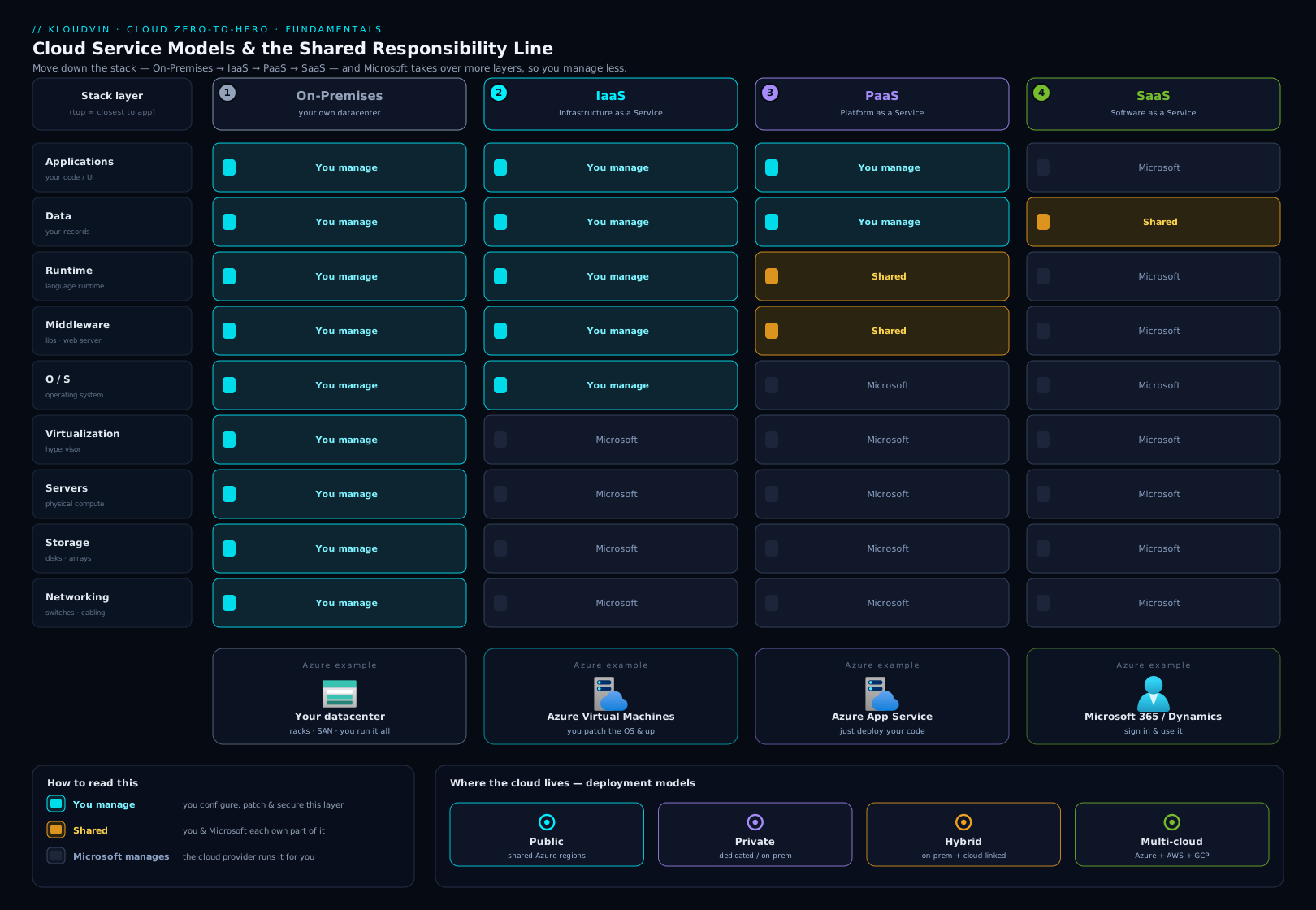
The diagram above brings the two big frameworks together. Read it left to right across on-premises → IaaS → PaaS → SaaS and watch the line between what you manage and what the provider manages climb the stack with each step — while the top band (your data and identity) stays firmly on your side. This one picture is, in effect, the whole lesson.
Hands-on lab: classify the services
This lesson is pure foundations, so the “lab” is a classification exercise — the exact skill an exam (and a real architecture review) tests. No Azure account is needed.
Step 1 — Sort by service model. For each item, decide IaaS, PaaS, or SaaS and say why in one phrase (what do you manage versus the provider?):
- An Azure Virtual Machine running your custom application.
- Azure App Service hosting a web app from your code.
- Microsoft 365 (Outlook and Teams) for your company.
- Azure SQL Database (the fully managed database, not a database you install on a VM).
- Azure Functions running a snippet of code on each HTTP request.
Step 2 — Identify the deployment model. For each scenario, name the deployment model (public / private / hybrid / multi-cloud):
- A start-up runs everything in standard Azure regions.
- A bank keeps its core ledger on dedicated hardware in its own data centre, run cloud-style for one tenant.
- A retailer keeps customer records on-prem but bursts its website into Azure at peak season, the two connected by a private link.
- A media company runs some workloads in Azure and others in AWS, managed together.
Step 3 — Draw the responsibility line. For an Azure VM (IaaS), list three things you secure and three things Microsoft secures. Then do the same for Microsoft 365 (SaaS) and notice how much shorter your list is.
Validation. Check against the Answers under Quick check below — Step 1 maps to IaaS/PaaS/SaaS/PaaS/PaaS, and the reasoning is what matters.
Cost note: This lab costs nothing — there is no resource to create. The next lesson is where you open Azure for real and spin up (then delete) your first resource group.
Common mistakes & troubleshooting
These are the conceptual traps that trip up beginners (and cost marks on the exam) — “troubleshooting” here means fixing the mental model.
| Misconception / mistake | Why it’s wrong | Correct understanding |
|---|---|---|
| “Moving to SaaS means I don’t have to think about security.” | Identity, data, devices, and configuration stay yours in SaaS. | You still own access management, data, and in-app settings — the most-breached layer. |
| Confusing scalability with elasticity. | They are related but distinct. | Scalability is the ability to grow; elasticity is doing it automatically, on demand. |
| Confusing high availability with disaster recovery. | They solve different failures. | HA keeps you running through local failures; DR recovers you after a regional disaster. |
| Thinking vertical and horizontal scaling are the same. | One resizes a single resource; the other adds copies. | Vertical = bigger box (scale up); horizontal = more boxes (scale out). |
| Calling everything in Azure “the cloud” as if it’s one model. | Azure spans IaaS, PaaS, and SaaS simultaneously. | Identify the service model of each specific service to know who manages what. |
| Assuming the cloud is always cheaper than on-prem. | For very steady, fully-utilised load, owned hardware can win. | Compare total cost of ownership; cloud wins most for variable/growing workloads. |
| Believing the provider backs up your data automatically by default. | In IaaS especially, backup is largely your responsibility. | Configure backup/DR deliberately; “shared responsibility” includes data protection. |
| Treating hybrid and multi-cloud as synonyms. | Hybrid mixes public + private; multi-cloud uses multiple public providers. | Hybrid = public and private; multi-cloud = Azure and AWS (etc.). |
Best practices
- Default to the most managed model that fits. Reach for SaaS, then PaaS, and only drop to IaaS when you genuinely need that low-level control. Less to manage means less to break and less to secure.
- Learn the shared-responsibility line for every service you adopt. Before using a service, ask: what does the provider secure, and what do I? Most incidents come from a gap on the customer side that nobody owned.
- Design for failure from the start. Assume components will fail; use redundancy and availability zones for HA, and plan DR (with explicit RPO/RTO targets) for the regional case.
- Match the pricing model to the workload. Pay-as-you-go for spiky or experimental work; commitment discounts (Reservations/Savings Plans) for steady, predictable baseload.
- Treat cost as a first-class design concern. Because everything is metered, architecture is a cost decision — and delete what you are not using, every time.
- Prefer horizontal scaling for stateless workloads; it has no hard ceiling and survives the loss of any single instance.
Security notes
- Identity is the new perimeter. In the cloud the network edge dissolves; who can sign in and what they can do is the primary control. Enable multi-factor authentication (MFA) on every account before anything else.
- Your data is always your responsibility. Classify it, encrypt it, control access to it, and back it up — the provider secures the infrastructure, never the content.
- Apply least privilege. Grant the narrowest access at the narrowest scope that does the job; over-permissive roles are a leading cause of cloud breaches.
- Configuration is a security surface. A storage container left public or an over-broad sharing setting is a self-inflicted breach — review defaults deliberately. And remember shared responsibility is not shared blame: a misconfiguration on your side is yours to own and fix.
Interview & exam questions
- “What is cloud computing in one sentence?” The on-demand, self-service delivery of metered, elastically scalable computing resources over a network from a shared, multi-tenant pool — paid for by consumption.
- “Explain IaaS, PaaS, and SaaS with an example of each.” IaaS rents raw infrastructure and you manage the OS up (Azure VMs); PaaS provides a managed platform and you manage just the app and data (Azure App Service); SaaS is a finished application you only use and configure (Microsoft 365). The trade-off is control versus operational effort.
- “Under the shared-responsibility model, what are you always responsible for?” Your data, your identities and access, your endpoints/devices, and your configuration — in every service model, including SaaS. The provider always owns the physical layer; the OS/network/app layers shift with the model.
- “How does shared responsibility change from IaaS to SaaS?” As you move IaaS → PaaS → SaaS the provider takes on more (first the OS and patching, then the runtime, then the whole application) and you take on less — but data, identity, and configuration remain yours throughout.
- “Scalability versus elasticity?” Scalability is the ability to add capacity (vertical = a bigger resource; horizontal = more copies); elasticity is scaling automatically and quickly with live demand, including back in. Horizontal scaling is usually preferred — no hard ceiling, and it tolerates single-instance failure.
- “High availability versus disaster recovery?” HA keeps the service running through local failures by removing single points of failure (e.g. across availability zones); DR recovers after a large/regional failure, typically by failing over to another region — measured by RPO and RTO.
- “CapEx versus OpEx, and why does the cloud shift the balance?” CapEx is up-front capital on owned assets (on-prem hardware); OpEx is ongoing operational spend (renting cloud capacity). The cloud turns big up-front CapEx into pay-as-you-go OpEx, removing the up-front barrier and the need to guess capacity years ahead.
- “Define the four deployment models.” Public (shared, provider-run, multi-tenant), private (dedicated to one organisation), hybrid (a deliberate mix of public and private, connected), and multi-cloud (more than one public provider together).
- “What are the five characteristics of cloud computing?” On-demand self-service, broad network access, resource pooling (multi-tenancy), rapid elasticity, and measured service.
- “Where does serverless fit?” It’s an extreme of PaaS (FaaS): you provide only code, the platform runs and scales it automatically — including to zero — and bills per execution. Azure Functions is the canonical example.
Quick check
- List the five essential characteristics of cloud computing.
- Classify each as IaaS, PaaS, or SaaS: (a) Azure Virtual Machine, (b) Azure App Service, © Microsoft 365, (d) Azure SQL Database, (e) Azure Functions.
- Name three things you are responsible for under the shared-responsibility model regardless of the service model.
- What is the difference between high availability and disaster recovery?
- Explain CapEx versus OpEx and say which the cloud’s consumption pricing represents.
Answers
- On-demand self-service, broad network access, resource pooling (multi-tenancy), rapid elasticity, and measured service.
- (a) IaaS — you manage the OS and up; (b) PaaS — managed platform, you bring the app; © SaaS — a finished application; (d) PaaS — a fully managed database service; (e) PaaS (specifically serverless/FaaS) — you supply only code.
- Any three of: your data, your identities and access, your endpoints/devices, and your configuration. (Data and identity are the two most important.)
- High availability keeps a service running through local component failures (e.g. a server or data-centre building) using redundancy within a region; disaster recovery is the ability to recover after a large-scale/regional failure, usually by failing over to another region — measured by RPO and RTO.
- CapEx is up-front capital expenditure on owned assets (buying servers); OpEx is ongoing operational expenditure on consumed services (renting capacity). The cloud’s pay-as-you-go consumption pricing is OpEx.
Exercise
Pick a real digital service you use every day — for example your email, a music-streaming app, online banking, or a photo-backup app. Then:
- Decide which service model (IaaS/PaaS/SaaS) the end user is consuming, and justify it in a sentence.
- Sketch the shared-responsibility split for it: list two things the provider secures and two things you (the user or your organisation) must secure.
- Name one way the provider likely achieves high availability and one way it might handle disaster recovery.
- Decide whether its pricing looks like consumption-based pay-as-you-go, a flat subscription, or something else — and say why that model suits the service.
Writing out these four points for a service you already know turns the abstract frameworks into something concrete — exactly the reasoning a cloud architect applies to every new system.
Certification mapping
This lesson maps almost entirely to the Describe cloud concepts domain of AZ-900: Microsoft Azure Fundamentals (its largest-weighted domain):
- Define cloud computing and its benefits — high availability, scalability, elasticity, agility, disaster recovery.
- Describe the consumption-based model — CapEx vs OpEx and pay-as-you-go pricing.
- Describe cloud service types — IaaS, PaaS, SaaS with use cases, and the shared-responsibility model and how it shifts across them.
- Describe cloud deployment models — public, private, and hybrid (multi-cloud as context).
It is also foundational for AZ-104 and AZ-305, which assume fluency in these models and in the shared-responsibility line as the starting point for every design decision.
Glossary
- Cloud computing — renting metered, elastically scalable computing on demand over a network from a provider’s shared pool.
- On-premises — IT infrastructure you own and operate yourself, typically in your own data centre.
- IaaS / PaaS / SaaS — service models, most to least self-managed: rent infrastructure / a managed platform / a finished application.
- Serverless (FaaS) — an extreme of PaaS: you supply only code; the platform runs and scales it (including to zero) and bills per execution.
- Public / private / hybrid / multi-cloud — deployment models: shared provider-run / single-organisation dedicated / a mix of both / more than one public provider.
- CapEx / OpEx — up-front capital spend on owned assets / ongoing operational spend on consumed services.
- Consumption-based pricing (pay-as-you-go) — billing per unit of actual usage, with no charge for unused capacity.
- Total cost of ownership (TCO) — a solution’s full cost including hardware, power, cooling, space, and staff.
- Scalability / elasticity — the ability to add capacity (vertically or horizontally) / doing so automatically and quickly with demand.
- High availability (HA) / disaster recovery (DR) — staying up through local failures (SLA %) / recovering after a regional failure (RPO/RTO).
- RPO / RTO — Recovery Point Objective (data, in time, you can lose) / Recovery Time Objective (how fast you must be back).
- Shared-responsibility model — the division of security duties between provider and customer, shifting with the service model; data and identity are always the customer’s.
- Multi-tenancy — many customers sharing pooled infrastructure, kept logically isolated.
Next steps
You now hold the conceptual map of the cloud — the service models, the deployment models, the money story, the resilience vocabulary, and the all-important responsibility line. Next, we leave generic theory behind and meet the platform itself: what Azure actually is, how it organises everything you create, and where your resources physically live.
Related reading to reinforce the foundations:
- Working with Azure: Portal, CLI, PowerShell & Cloud Shell — the four ways to actually drive the platform once you understand the concepts.
- Azure Entra ID Fundamentals: Tenants, Users, Groups & RBAC — identity, the part of shared responsibility that is always yours.