A platform team running 14 Kubernetes clusters — prod and non-prod across three regions and two clouds — has hit the wall that every growing fleet hits: every team kubectl applys into its own namespaces by hand, nobody can say with confidence what is actually deployed where, and a config drift on one prod cluster took four hours to find because the “source of truth” was three engineers’ laptops. The mandate from the head of platform is blunt: one declarative control plane, Git as the only source of truth, SSO so nobody shares a kubeconfig, and a way to roll the same workload onto a new cluster without writing it 14 times. This guide builds exactly that — a single hub Argo CD that manages the whole fleet over GitOps, federates login through your corporate IdP, scopes every team to its own projects with RBAC, and uses ApplicationSets to fan one template across every registered cluster. Everything here is real commands you can run today.
Prerequisites
- A hub cluster to host Argo CD (a small dedicated cluster or a hardened namespace on an existing one) plus one or more workload clusters to manage. All on Kubernetes 1.27+.
kubectl(matching your clusters),helm3.14+, and the Argo CD CLI (argocd) 2.11+ installed locally.- Cluster-admin on the hub during install; on workload clusters, enough rights to create a service account and ClusterRoleBinding.
- A Git repository (GitHub or GitLab) for your app manifests, and a second repo or folder for the Argo CD configuration itself (the “app-of-apps” / bootstrap repo).
- An OIDC IdP: an Okta OIDC app or a Microsoft Entra ID app registration, with the ability to create group claims. Okta or Entra ID is your workforce identity provider — it issues the tokens that gate who can log into the UI and what they can touch.
- HashiCorp Vault reachable from the hub (for the OIDC client secret and repo credentials), or at minimum a sealed-secrets / external-secrets path so no plaintext secret lands in Git.
- DNS for the Argo CD server (e.g.
argocd.kloudvin.io) and a TLS cert (cert-manager or your edge — Akamai terminates TLS and fronts the UI with WAF/bot protection at the perimeter in our setup).
Target topology
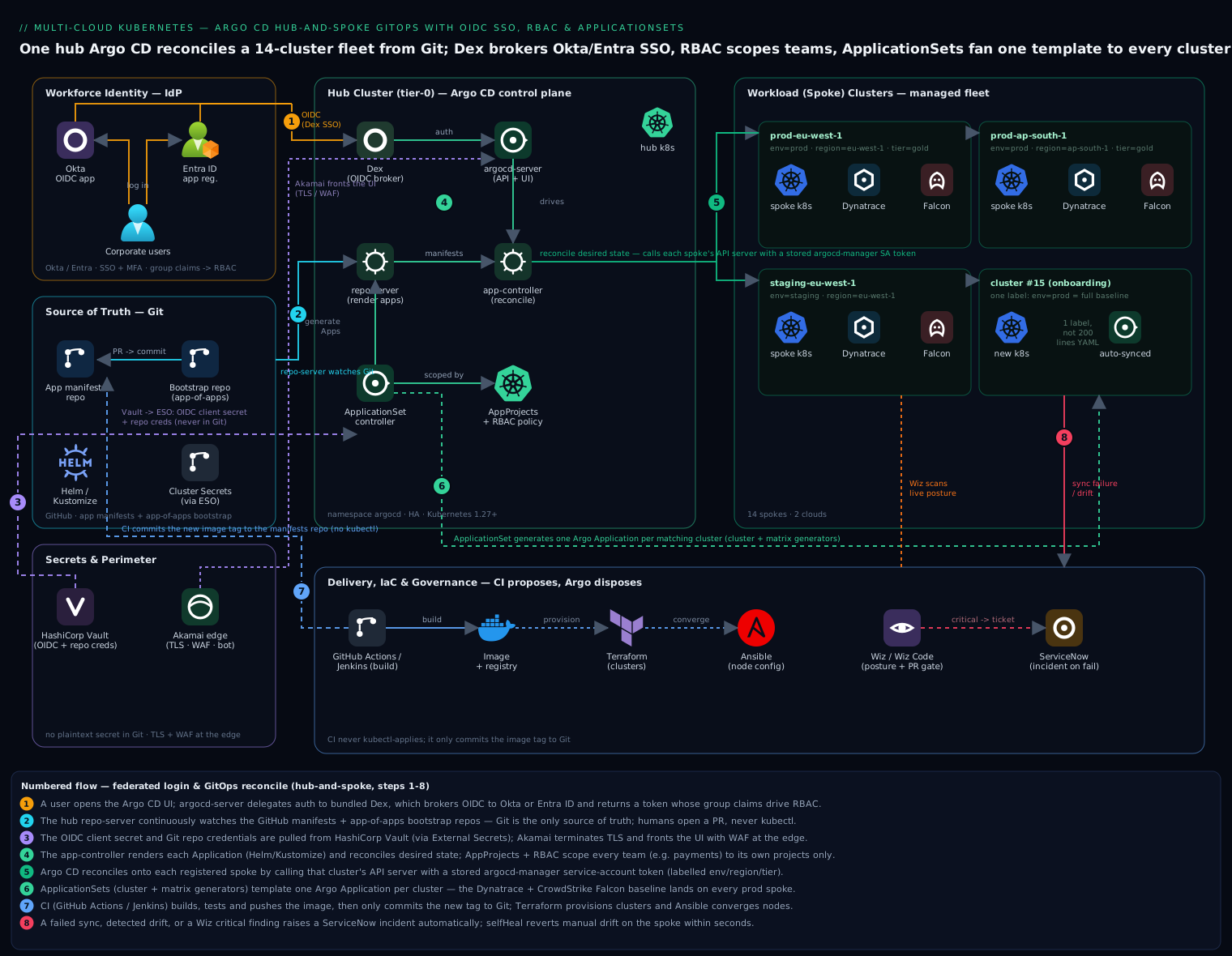
The model is a hub-and-spoke. One Argo CD install on the hub cluster holds all configuration, talks to your Git repos, and reconciles desired state onto every registered spoke (workload) cluster by calling each spoke’s Kubernetes API with a stored service-account credential. Humans never kubectl into a spoke for app changes — they open a pull request, Argo CD detects the new Git commit, and syncs. Login is federated: the argocd-server delegates authentication to bundled Dex, which brokers OIDC to Okta or Entra ID; the returned token’s group claims drive Argo CD RBAC, so the payments team only sees and syncs payments projects. ApplicationSets sit on the hub and generate one Argo CD Application per cluster (or per cluster × per app) from a single template, so onboarding cluster #15 is one label, not 200 lines of YAML.
1. Install Argo CD on the hub cluster
Install via the official Helm chart so configuration is declarative and upgradeable. Create the namespace and a values file first.
kubectl create namespace argocd

helm repo add argo https://argoproj.github.io/argo-helm
helm repo update
A minimal but production-shaped values.yaml — HA redis, the server behind your ingress, and insecure mode off because TLS terminates upstream at Akamai/ingress:
# argocd-values.yaml
global:
  domain: argocd.kloudvin.io

configs:
  params:
    server.insecure: false        # keep TLS; terminate at ingress/Akamai
  cm:
    # OIDC + RBAC config is added in steps 2 and 4
    admin.enabled: "true"         # we disable this in step 4 after SSO works

redis-ha:
  enabled: true                   # HA for a fleet control plane
controller:
  replicas: 1                     # one app-controller; shard later if needed
server:
  replicas: 2
  autoscaling:
    enabled: true
    minReplicas: 2
repoServer:
  replicas: 2
applicationSet:
  replicas: 2                     # the ApplicationSet controller (step 5)
dex:
  enabled: true                   # bundled Dex for OIDC brokering (step 2)
Install it:
helm install argocd argo/argo-cd \
  --namespace argocd \
  --version 7.7.0 \
  -f argocd-values.yaml

kubectl -n argocd rollout status deploy/argocd-server --timeout=180s
Grab the bootstrap admin password (we retire this account in step 4) and log in once to confirm the install:
ARGO_PWD=$(kubectl -n argocd get secret argocd-initial-admin-secret \
  -o jsonpath='{.data.password}' | base64 -d)

argocd login argocd.kloudvin.io --username admin --password "$ARGO_PWD" --grpc-web
argocd version --short
2. Wire OIDC SSO through Dex to Okta or Entra ID
Argo CD ships Dex as an identity broker. You point Dex at your corporate IdP over OIDC; Dex handles the dance and hands Argo CD a token whose groups claim you will use for RBAC. First, create the app on the IdP side.
Okta — create an OIDC Web app, set the sign-in redirect URI to https://argocd.kloudvin.io/api/dex/callback, and add a groups claim (filter: matches regex .*) to the ID token. Note the client ID and client secret.
Entra ID — register an application, add a Web redirect URI of https://argocd.kloudvin.io/api/dex/callback, create a client secret, and under Token configuration add the groups optional claim so the token carries the user’s group object IDs.
Never put the client secret in values.yaml. Pull it from HashiCorp Vault — which stores and leases the OIDC client secret and Git repo credentials so nothing sensitive lives in the chart or Git. Create the Kubernetes secret Argo CD’s Dex reads, sourcing the value from Vault:
# value fetched from Vault at deploy time, never echoed into shell history in CI
OIDC_SECRET=$(vault kv get -field=dex_client_secret secret/argocd/oidc)

kubectl -n argocd create secret generic argocd-dex-oidc \
  --from-literal=dex.okta.clientSecret="$OIDC_SECRET"
Now add the Dex connector to the argocd-cm ConfigMap. For Okta (Entra notes follow):
# add under configs.cm in argocd-values.yaml, then helm upgrade
url: https://argocd.kloudvin.io
dex.config: |
  connectors:
    - type: oidc
      id: okta
      name: Okta
      config:
        issuer: https://kloudvin.okta.com
        clientID: 0oa1exampleClientId
        clientSecret: $argocd-dex-oidc:dex.okta.clientSecret   # ref to the secret above
        insecureEnableGroups: true
        scopes: ["openid", "profile", "email", "groups"]
For Entra ID, the connector instead uses the Microsoft issuer and the app registration’s IDs:
    - type: oidc
      id: entra
      name: Entra ID
      config:
        issuer: https://login.microsoftonline.com/<TENANT_ID>/v2.0
        clientID: <APP_CLIENT_ID>
        clientSecret: $argocd-dex-oidc:dex.okta.clientSecret
        scopes: ["openid", "profile", "email"]
        getUserInfo: true
Apply with helm upgrade argocd argo/argo-cd -n argocd -f argocd-values.yaml, then restart Dex and the server so they reload:
kubectl -n argocd rollout restart deploy/argocd-dex-server deploy/argocd-server
Browse to https://argocd.kloudvin.io and you should now see a “LOG IN VIA OKTA” (or Entra) button. Log in with a corporate account; you are authenticated but not yet authorized — that is step 4.
3. Register workload (spoke) clusters
The hub reconciles onto each spoke by calling that spoke’s API server with a stored credential. The CLI automates the whole handshake — it creates an argocd-manager ServiceAccount and a ClusterRole on the spoke, then stores the resulting bearer token as a cluster Secret on the hub.
Make sure your local kubeconfig has a context per spoke, then register each:
kubectl config get-contexts        # confirm you have spoke contexts

# Register two spokes. The context name is what your kubeconfig calls them.
argocd cluster add prod-eu-west-1   --name prod-eu-west-1   --grpc-web
argocd cluster add prod-ap-south-1  --name prod-ap-south-1  --grpc-web
argocd cluster add staging-eu-west-1 --name staging-eu-west-1 --grpc-web
For production, label clusters at registration so ApplicationSets can target them by selector rather than by name. Re-run cluster add with labels, or patch the stored secret:
argocd cluster add prod-eu-west-1 --name prod-eu-west-1 \
  --label env=prod --label region=eu-west-1 --label tier=gold --grpc-web
Verify the fleet is connected (the hub’s own cluster shows as https://kubernetes.default.svc):
argocd cluster list
# SERVER                          NAME               VERSION  STATUS      MESSAGE
# https://10.0.4.10               prod-eu-west-1     1.29     Successful
# https://10.2.4.10               prod-ap-south-1    1.29     Successful
# https://kubernetes.default.svc  in-cluster         1.29     Successful
In a GitOps-pure setup you would instead commit each cluster Secret (with the credential sourced from Vault via the External Secrets Operator) to the bootstrap repo so cluster registration itself is declarative — but argocd cluster add is the fastest correct path to get running.
4. Define Projects and lock down RBAC
This is the step that turns a shared toy into a multi-tenant platform. AppProjects are the security boundary: each project restricts which Git repos, which destination clusters/namespaces, and which resource kinds its apps may use. RBAC then maps IdP groups to what they can do within those projects.
Create an AppProject per team. The payments team may deploy only from its repo, only to its namespaces, only on prod and staging:
# projects/payments.yaml
apiVersion: argoproj.io/v1alpha1
kind: AppProject
metadata:
  name: payments
  namespace: argocd
spec:
  description: Payments squad workloads
  sourceRepos:
    - https://github.com/kloudvin/payments-manifests.git
  destinations:
    - server: '*'
      namespace: 'payments-*'        # only payments-* namespaces, on any cluster
  clusterResourceWhitelist:
    - group: ''
      kind: Namespace
  namespaceResourceBlacklist:
    - group: ''
      kind: ResourceQuota            # platform team owns quotas, not the squad
  roles:
    - name: deployer
      description: CI identity that can sync payments apps
      policies:
        - p, proj:payments:deployer, applications, sync, payments/*, allow
Now the RBAC policy that maps your IdP groups to roles. Argo CD’s built-in roles are role:admin and role:readonly; you define the rest. Map the Okta/Entra group (by group name for Okta, or group object ID for Entra) to a role. Add this to argocd-rbac-cm:
# add under configs.rbac in argocd-values.yaml
configs:
  rbac:
    policy.default: role:readonly          # everyone logged in can view; nothing more
    scopes: '[groups]'
    policy.csv: |
      # Platform admins: full control
      g, kloudvin-platform-admins, role:admin

      # Payments squad: full control of ONLY the payments project
      p, role:payments-admin, applications, *, payments/*, allow
      p, role:payments-admin, logs, get, payments/*, allow
      p, role:payments-admin, exec, create, payments/*, deny
      g, kloudvin-payments-team, role:payments-admin

      # SRE: sync any app fleet-wide, but cannot delete or edit project config
      p, role:sre, applications, sync, */*, allow
      p, role:sre, applications, get, */*, allow
      p, role:sre, applications, delete, */*, deny
      g, kloudvin-sre, role:sre
The mental model: g, <group>, <role> grants a group a role; p, <role>, <resource>, <action>, <object>, allow|deny is a permission line where object is project/app. deny always wins over allow, which is how you carve exec/delete out of an otherwise-powerful role. Apply with helm upgrade.
With SSO and RBAC proven, retire the local admin account so the only way in is your IdP:
# in argocd-values.yaml
configs:
  cm:
    admin.enabled: "false"
helm upgrade once more. From now on, access is corporate identity only — auditable, MFA-backed, and revoked the moment HR offboards someone.
5. Fan out workloads with ApplicationSets
An ApplicationSet is a controller-driven template that generates Argo CD Applications. Instead of writing one Application per cluster, you write one template and a generator that supplies the parameters. This is how “deploy the monitoring agent to every prod cluster” becomes one object.
Cluster generator — generate one Application per registered cluster matching a label selector. Here we roll a fleet-wide observability and security baseline (the Dynatrace OneAgent for distributed tracing and the CrowdStrike Falcon sensor for runtime threat detection) onto every prod cluster:
# applicationsets/platform-baseline.yaml
apiVersion: argoproj.io/v1alpha1
kind: ApplicationSet
metadata:
  name: platform-baseline
  namespace: argocd
spec:
  goTemplate: true
  generators:
    - clusters:
        selector:
          matchLabels:
            env: prod              # only clusters labelled env=prod (step 3)
  template:
    metadata:
      name: 'baseline-{{.name}}'   # baseline-prod-eu-west-1, baseline-prod-ap-south-1, ...
    spec:
      project: platform
      source:
        repoURL: https://github.com/kloudvin/platform-baseline.git
        targetRevision: main
        path: 'overlays/{{.metadata.labels.region}}'   # per-region kustomize overlay
      destination:
        server: '{{.server}}'
        namespace: platform-system
      syncPolicy:
        automated:
          prune: true
          selfHeal: true           # revert manual drift automatically
        syncOptions:
          - CreateNamespace=true
Apply it and watch one Application appear per matching cluster:
kubectl apply -f applicationsets/platform-baseline.yaml
argocd appset list
argocd app list -l argocd.argoproj.io/application-set-name=platform-baseline
Matrix generator for the harder case — every app × every cluster. Combine a Git directory generator (each folder under apps/ is a microservice) with the cluster generator so each service lands on each prod cluster:
  generators:
    - matrix:
        generators:
          - git:
              repoURL: https://github.com/kloudvin/payments-manifests.git
              revision: main
              directories:
                - path: apps/*
          - clusters:
              selector:
                matchLabels:
                  env: prod
This is the real payoff: onboarding cluster #15 is argocd cluster add ... --label env=prod, and within a sync window every baseline component and every targeted app reconciles onto it untouched by human hands. The app-of-apps bootstrap pattern ties it together — a single root Application points at the projects/ and applicationsets/ folders in your config repo, so the entire control plane is itself GitOps-managed and reproducible from an empty cluster.
6. Connect the delivery and IaC tooling
GitOps changes how CI/CD draws its boundary. Jenkins or GitHub Actions builds and tests the image, pushes it to the registry, and then its only job is to commit the new image tag to the manifests repo — it does not kubectl apply. Argo CD owns the cluster. A typical GitHub Actions tail:
# .github/workflows/release.yml (final step only)
      - name: Bump image tag in GitOps repo
        run: |
          yq -i '.image.tag = "${{ github.sha }}"' \
            apps/checkout/values.yaml
          git commit -am "checkout: ${{ github.sha }}"
          git push
The clusters themselves are provisioned with Terraform (VPCs, node pools, the hub install) and node-level config converged with Ansible (kernel params, the CrowdStrike Falcon sensor DaemonSet prerequisites on virtual appliances that bridge legacy network segments into the mesh). Security and compliance hook in around the flow: Wiz (with Wiz Code) scans the manifests repo and the running clusters for misconfigurations, exposed secrets, and toxic IAM combinations — failing a PR check in Wiz Code before a bad manifest is ever committed, and continuously flagging posture drift in the live fleet. A failed sync or a Wiz critical finding raises a ServiceNow incident automatically, so the platform team gets a ticket with a change record rather than a buried log line. Where the org runs internal training, Moodle hosts the team’s GitOps runbook and the onboarding course every new squad completes before they get a project.
Validation
Prove the whole chain end to end before you hand it over:
# 1. SSO works and RBAC is scoped: log in as a payments-team user, confirm
#    they see ONLY payments apps and cannot sync the platform project.
argocd login argocd.kloudvin.io --sso --grpc-web
argocd app list                      # should list only payments/* for that user

# 2. Fleet is healthy and synced
argocd app list -o wide              # all rows Healthy / Synced
argocd cluster list                  # every spoke Successful

# 3. ApplicationSet fan-out is correct
argocd app list -l argocd.argoproj.io/application-set-name=platform-baseline
# one app per prod cluster, all Synced

# 4. Self-heal actually heals: introduce drift on a spoke, watch it revert
kubectl --context prod-eu-west-1 -n platform-system \
  scale deploy/oneagent --replicas=0
sleep 30
argocd app get baseline-prod-eu-west-1 | grep -i 'sync status'   # back to Synced
A green argocd app get showing Sync Status: Synced and Health Status: Healthy after you deliberately broke a spoke is the single best proof the control loop is real.
Rollback and teardown
Argo CD makes rollback first-class because every sync maps to a Git revision. To roll an app back, roll Git back (revert the commit) or pin the app to a prior history ID:
argocd app history payments/checkout
argocd app rollback payments/checkout <HISTORY_ID>
To disable auto-sync during an incident so you can stabilize by hand:
argocd app set baseline-prod-eu-west-1 --sync-policy none
Full teardown — remove generated apps first (the ApplicationSet owns them), then spokes, then the hub:
kubectl delete -f applicationsets/platform-baseline.yaml   # removes generated apps
argocd cluster rm prod-eu-west-1
argocd cluster rm prod-ap-south-1
helm uninstall argocd -n argocd
kubectl delete namespace argocd
Deleting the ApplicationSet cascades to its generated Applications; deleting an Application by default prunes the workloads it created on the spoke, so order matters — pull the generators before the clusters.
Common pitfalls
insecureEnableGroupsconfusion. Without thegroupsscope and a working groups claim from Okta/Entra, every user falls through topolicy.default. If logins succeed but RBAC seems ignored, decode the JWT and confirm agroupsarray is present — fix the IdP claim, not the RBAC CSV.- Entra groups are GUIDs, not names. Your RBAC
g,lines for Entra must use the group object ID, not the display name. Mixing the two silently denies everyone. - Cluster Secret credential expiry. The
argocd-managertoken stored atcluster addcan be revoked or rotated out from under you on the spoke; a spoke flipping toFailedwith a 401 means re-runcluster addor refresh the token. selfHealfighting a human. OnceselfHeal: trueis on, manualkubectl editon a managed resource is reverted within seconds — by design. Teams new to GitOps file “Argo keeps undoing my change” tickets; the answer is “commit it to Git.”- Forgetting
CreateNamespace=true. A first sync to a fresh namespace fails on “namespace not found” unless that sync option (or a Namespace in the project’sclusterResourceWhitelist) is set. - One app-controller for a huge fleet. A single controller replica reconciling 14 clusters eventually lags; shard the controller (
controller.replicaswith sharding env) before the queue backs up, not after.
Security notes
Treat the hub as a tier-0 asset — it holds credentials to every cluster it manages, so a hub compromise is a fleet compromise. Keep all secrets out of Git: the OIDC client secret and repo credentials live in HashiCorp Vault, injected via the External Secrets Operator, never in the Helm values or a committed manifest. Disable the local admin account once SSO works so every action is tied to a corporate identity with MFA. Scope every team with an AppProject allow-list — repos, destinations, and resource kinds — and prefer deny lines in RBAC for exec and delete so even powerful roles cannot shell into a pod or nuke an app. Wiz Code gates the manifests repo and Wiz watches the live posture; CrowdStrike Falcon covers node runtime; and the bundled Dex plus Akamai’s WAF at the edge keep the auth surface and the public surface tight. Pin the chart and image versions explicitly — a floating latest is a supply-chain hole.
Cost notes
The control plane itself is cheap — the hub is a handful of pods (server, repo-server, app-controller, applicationset-controller, redis-ha, Dex), comfortably a few vCPU and a few GB of RAM, so a small node pool hosts it. The real savings are operational: ApplicationSets collapse N per-cluster manifests into one template, so the human cost of running 14 clusters approaches the cost of running one. selfHeal and Git-as-truth eliminate the multi-hour drift hunts that started this project. Watch two things: the repo-server can get CPU-hungry rendering many Helm/Kustomize apps on every refresh — raise its --repo-server-timeout and replica count rather than over-provisioning the whole cluster — and tighten the app refresh interval (default 180s) on a large fleet so you are not paying for constant Git polling you do not need. Run the hub on spot/preemptible-backed nodes for non-prod and on-demand for the prod hub, and the entire fleet-wide GitOps control plane lands well inside a modest monthly budget.