A 600-engineer fintech has outgrown its single GitLab Omnibus box. It runs on one large VM, the Postgres data directory is 400 GB and growing, CI artifacts have filled the disk twice this quarter, and the last upgrade meant a two-hour maintenance window because everything — web, Sidekiq, Gitaly, Postgres, Redis, the registry — lives on one host that cannot be scaled or patched without taking the whole platform down. The mandate from the VP of Engineering is blunt: “I want GitLab to be a platform service, not a pet. It should survive a node dying, scale Runners for the Monday-morning pipeline storm, and let us patch app pods without a maintenance window.” This guide is the concrete path to that: GitLab self-managed on Kubernetes via the official Helm chart, with stateful services externalized — managed PostgreSQL, managed Redis, and S3-compatible object storage for everything large — so the in-cluster footprint is stateless, horizontally scalable, and upgradeable in place.
The architectural rule that makes this work, and the one teams get wrong: GitLab on Kubernetes is only operable when the data lives outside the cluster. The chart will happily run a bundled Postgres, Redis, and MinIO so a demo comes up in ten minutes — but those bundled components are explicitly not for production. You externalize Postgres and Redis to managed services with backups and failover, you push every large blob (LFS, artifacts, uploads, the container registry, packages, Terraform state, backups) to object storage, and what remains in-cluster — Webservice (Puma), Sidekiq, Gitaly, Toolbox, Registry, Shell — becomes the part you can scale and upgrade freely. Gitaly is the one deliberate exception: it is stateful by design and stays on a PersistentVolume, because Git repositories are not object-storage-shaped.
Prerequisites
- A Kubernetes cluster, 1.28+, with at least 3 worker nodes (start around 8 vCPU / 32 GB each) and a working
LoadBalanceringress path. Examples below assume AWS EKS, but the chart is cloud-agnostic — substitute GKE/AKS and the equivalent managed data services. kubectl,helm3.14+, and the cloud CLI authenticated against the cluster.- External PostgreSQL 14+ (e.g. Amazon RDS / Aurora PostgreSQL) reachable from the cluster, plus an empty
gitlabhq_productiondatabase and a role. - External Redis 6+ (e.g. Amazon ElastiCache) reachable from the cluster.
- An S3 bucket set (or any S3-compatible store) and an IAM principal scoped to them.
- A registered DNS domain you control and a TLS strategy (cert-manager + Let’s Encrypt, or bring-your-own certs).
- A HashiCorp Vault instance (the platform’s secret store) and an identity provider — Microsoft Entra ID or Okta — for human SSO.
Target topology
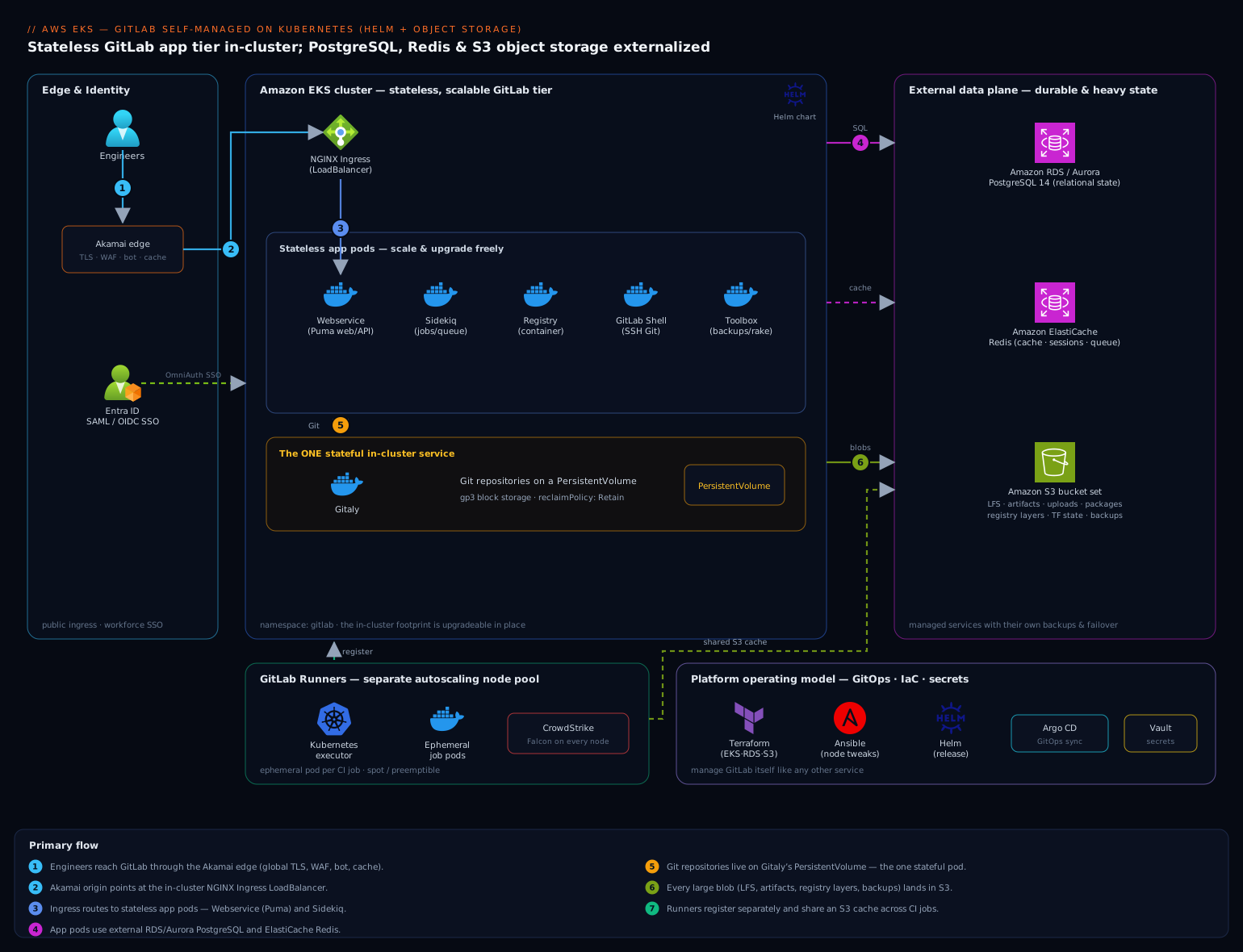
The cluster holds the stateless and scalable GitLab tier: Webservice (the Puma web/API workers behind the GitLab UI and the Git HTTPS API), Sidekiq (background jobs — repository housekeeping, CI bookkeeping, email, webhooks), the container Registry, GitLab Shell (SSH Git access), Toolbox (backups and rake tasks), and the NGINX Ingress that fronts them. The one stateful in-cluster service is Gitaly, which owns the Git repositories on a PersistentVolume.
Everything durable and heavy lives outside the cluster: PostgreSQL (Aurora) holds the relational state, Redis (ElastiCache) handles caching, sessions, and the Sidekiq queue, and a set of S3 buckets absorbs LFS objects, CI artifacts, uploads, packages, the registry’s image layers, Terraform state, and backups. GitLab Runners register against this control plane and run as ephemeral pods (or on a separate node pool) so the Monday pipeline storm scales independently of the GitLab app itself. Identity flows from Entra ID (federated via SAML/OIDC) for SSO; secrets are injected from HashiCorp Vault; Akamai fronts the public ingress for global TLS, caching, and WAF/bot protection.
1. Provision the external data plane
Create the managed PostgreSQL and Redis instances first — the chart needs to point at them on day one, and standing them up after the fact means a migration. With Terraform (the platform team manages all cloud infra as code; Ansible handles the few host-level Runner customizations later):
resource "aws_rds_cluster" "gitlab" {
  cluster_identifier     = "gitlab-prod"
  engine                 = "aurora-postgresql"
  engine_version         = "14.12"
  database_name          = "gitlabhq_production"
  master_username        = "gitlab"
  manage_master_user_password = true            # secret lands in AWS Secrets Manager
  backup_retention_period = 14
  storage_encrypted      = true
  vpc_security_group_ids = [aws_security_group.gitlab_db.id]
}

resource "aws_elasticache_replication_group" "gitlab" {
  replication_group_id       = "gitlab-prod"
  engine                     = "redis"
  engine_version             = "6.2"
  node_type                  = "cache.r6g.large"
  num_cache_clusters         = 2                # primary + replica for failover
  automatic_failover_enabled = true
  at_rest_encryption_enabled = true
  transit_encryption_enabled = true
}
GitLab requires the pg_trgm and btree_gist extensions. Connect to the new database and enable them:
psql "host=gitlab-prod.cluster-xxxx.ap-south-1.rds.amazonaws.com \
      user=gitlab dbname=gitlabhq_production sslmode=require" <<'SQL'
CREATE EXTENSION IF NOT EXISTS pg_trgm;
CREATE EXTENSION IF NOT EXISTS btree_gist;
SQL
2. Create the object-storage buckets and access policy
GitLab uses distinct buckets per data type — keep them separate so lifecycle rules, sizing, and access can differ. Create the full set:
for b in artifacts lfs uploads packages registry mr-diffs \
         terraform-state ci-secure-files dependency-proxy backups tmp; do
  aws s3api create-bucket --bucket "kloudvin-gitlab-${b}" \
    --region ap-south-1 \
    --create-bucket-configuration LocationConstraint=ap-south-1
  aws s3api put-bucket-encryption --bucket "kloudvin-gitlab-${b}" \
    --server-side-encryption-configuration \
    '{"Rules":[{"ApplyServerSideEncryptionByDefault":{"SSEAlgorithm":"aws:kms"}}]}'
done
Prefer IRSA (IAM Roles for Service Accounts) over static keys so pods assume a role with no long-lived credentials on disk. Create an IAM policy scoped to exactly these buckets (s3:GetObject, PutObject, DeleteObject, ListBucket on arn:aws:s3:::kloudvin-gitlab-*) and bind it to a service-account role you will reference in the Helm values.
If you must use static keys instead, store the S3 connection as a Rails-format secret that the chart reads (never inline it in values):
cat > /tmp/s3-connection.yaml <<'YAML'
provider: AWS
region: ap-south-1
use_iam_profile: true
YAML
kubectl create secret generic gitlab-object-storage \
  --namespace gitlab --from-file=connection=/tmp/s3-connection.yaml
rm -f /tmp/s3-connection.yaml
3. Pre-create secrets in the namespace (sourced from Vault)
Do not let Helm auto-generate secrets you need to control — the database password, the Redis password, the registry storage credentials, and the SSO certificate all originate in HashiCorp Vault and are synced into the namespace by the Vault Secrets Operator (or vault-agent injector). That keeps the source of truth in Vault, gives you rotation and lease auditing, and means nothing sensitive sits in your Git-tracked values file.
kubectl create namespace gitlab

# Postgres password (pulled from Vault, here shown via a synced env var)
kubectl create secret generic gitlab-postgres \
  --namespace gitlab --from-literal=password="${PG_PASSWORD}"

# Redis password
kubectl create secret generic gitlab-redis \
  --namespace gitlab --from-literal=password="${REDIS_PASSWORD}"

# Initial root password for the GitLab UI
kubectl create secret generic gitlab-root-password \
  --namespace gitlab --from-literal=password="$(openssl rand -base64 24)"
A VaultStaticSecret makes the Vault → Kubernetes sync declarative so these never drift from the source of truth:
apiVersion: secrets.hashicorp.com/v1beta1
kind: VaultStaticSecret
metadata:
  name: gitlab-postgres
  namespace: gitlab
spec:
  mount: kv
  type: kv-v2
  path: platform/gitlab/postgres
  destination:
    name: gitlab-postgres
    create: true
  refreshAfter: 1h
4. Author the Helm values
This is the heart of the deployment. The values file disables every bundled stateful component and points GitLab at the external services. Save as values-prod.yaml:
global:
  hosts:
    domain: kloudvin.com
    https: true
    gitlab:   { name: gitlab.kloudvin.com }
    registry: { name: registry.kloudvin.com }

  edition: ce                      # or 'ee' with a license for SAML/Geo

  # --- External PostgreSQL: disable the bundled chart ---
  psql:
    host: gitlab-prod.cluster-xxxx.ap-south-1.rds.amazonaws.com
    port: 5432
    database: gitlabhq_production
    username: gitlab
    password:
      secret: gitlab-postgres
      key: password

  # --- External Redis ---
  redis:
    host: gitlab-prod.xxxx.cache.amazonaws.com
    port: 6379
    auth:
      enabled: true
      secret: gitlab-redis
      key: password

  # --- Object storage for every large blob ---
  appConfig:
    object_store:
      enabled: true
      connection:
        secret: gitlab-object-storage
        key: connection
    lfs:        { bucket: kloudvin-gitlab-lfs }
    artifacts:  { bucket: kloudvin-gitlab-artifacts }
    uploads:    { bucket: kloudvin-gitlab-uploads }
    packages:   { bucket: kloudvin-gitlab-packages }
    externalDiffs: { bucket: kloudvin-gitlab-mr-diffs }
    terraformState: { bucket: kloudvin-gitlab-terraform-state }
    ciSecureFiles:  { bucket: kloudvin-gitlab-ci-secure-files }
    backups:    { bucket: kloudvin-gitlab-backups, tmpBucket: kloudvin-gitlab-tmp }

  ingress:
    configureCertmanager: false    # using a pre-issued wildcard cert
    class: nginx
  serviceAccount:
    enabled: true
    annotations:
      eks.amazonaws.com/role-arn: arn:aws:iam::123456789012:role/gitlab-s3

# Turn OFF the bundled stateful charts — this is the whole point
postgresql:   { install: false }
redis:        { install: false }
minio:        { install: false }
gitlab-runner:{ install: false }  # Runners installed separately (step 8)

certmanager: { install: false }

# The registry must also use object storage, configured separately
registry:
  storage:
    secret: gitlab-registry-storage
    key: config
    extraKey: s3

# In-cluster stateless tiers: size and scale them
gitlab:
  webservice:
    minReplicas: 3
    maxReplicas: 10
    resources: { requests: { cpu: "1", memory: 2.5Gi } }
  sidekiq:
    minReplicas: 2
    maxReplicas: 8
  gitaly:
    persistence:
      size: 200Gi
      storageClass: gp3        # the ONE stateful in-cluster service
Two things worth calling out. The registry needs its own S3 config as a Rails/registry-format secret (gitlab-registry-storage) — it does not read global.appConfig.object_store. And Gitaly keeps a PersistentVolume: Git repos are not object-storage-shaped, so this is the deliberate stateful exception. Use a fast block class (gp3/pd-ssd) and size for repo growth plus housekeeping headroom.
5. Configure TLS and the ingress
Create the wildcard TLS secret the ingress will serve, then ensure the chart references it:
kubectl create secret tls gitlab-wildcard-tls \
  --namespace gitlab \
  --cert=/tmp/kloudvin-wildcard.crt \
  --key=/tmp/kloudvin-wildcard.key
Add to values-prod.yaml so both hosts use it:
global:
  ingress:
    tls:
      secretName: gitlab-wildcard-tls
In production, terminate public TLS at Akamai at the edge (global anycast, caching of static assets, and WAF/bot mitigation in front of the GitLab login and Git endpoints), with Akamai’s origin pointed at the NGINX ingress LoadBalancer. Internal cluster traffic still runs TLS end-to-end.
6. Add the Helm repo and install
helm repo add gitlab https://charts.gitlab.io/
helm repo update

# Always pin the chart version; map it to the GitLab version you want
helm search repo gitlab/gitlab --versions | head

helm upgrade --install gitlab gitlab/gitlab \
  --namespace gitlab \
  --version 8.2.3 \
  --values values-prod.yaml \
  --set global.initialRootPassword.secret=gitlab-root-password \
  --timeout 900s
The migrations Job runs the Rails schema migrations against your external Postgres before the app pods become ready — watch it first:
kubectl -n gitlab get jobs -w
kubectl -n gitlab logs -f job/gitlab-migrations-1
7. Wire SSO through Entra ID
Engineers should not have GitLab-local passwords. Federate authentication to Microsoft Entra ID (or Okta if that is your workforce IdP) using OmniAuth. Register an Entra app, then provide the provider block as a secret the chart mounts (keeping the client secret in Vault, synced as gitlab-sso):
# providers.yaml synced from Vault into secret gitlab-sso
- { name: azure_activedirectory_v2,
    label: "Entra ID",
    args: {
      client_id: "<app-client-id>",
      client_secret: "<from-vault>",
      tenant_id: "<tenant-id>" } }
# add to values-prod.yaml
global:
  appConfig:
    omniauth:
      enabled: true
      allowSingleSignOn: ["azure_activedirectory_v2"]
      blockAutoCreatedUsers: false
      providers:
        - secret: gitlab-sso
          key: provider
Re-run the same helm upgrade --install to apply. Now group membership in Entra ID governs who can log in, and offboarding a leaver in the IdP removes their GitLab access.
8. Deploy GitLab Runners
Runners are installed and scaled separately from the GitLab app so CI load never starves the control plane. Grab the runner registration token from the GitLab UI (Admin → CI/CD → Runners → create instance runner), store it in Vault, then install the runner chart pointed at your GitLab URL:
kubectl create namespace gitlab-runner
kubectl -n gitlab-runner create secret generic runner-token \
  --from-literal=runner-registration-token="" \
  --from-literal=runner-token="${RUNNER_AUTH_TOKEN}"

helm upgrade --install runner gitlab/gitlab-runner \
  --namespace gitlab-runner --version 0.66.0 \
  --set gitlabUrl=https://gitlab.kloudvin.com \
  --set runners.secret=runner-token \
  --set runners.config="
    [[runners]]
      [runners.kubernetes]
        namespace = \"gitlab-runner\"
        image = \"alpine:3.20\"
        cpu_request = \"500m\"
        memory_request = \"1Gi\"
      [runners.cache]
        Type = \"s3\"
        Shared = true
        [runners.cache.s3]
          BucketName = \"kloudvin-gitlab-tmp\"
          BucketLocation = \"ap-south-1\"
  "
The Kubernetes executor spawns an ephemeral pod per CI job and tears it down after, and a shared S3 cache means dependency caches survive across jobs and nodes. Run Runners on a dedicated, autoscaling node pool so the Monday-morning pipeline storm scales horizontally without touching the GitLab pods. CrowdStrike Falcon sensors run on every node — including the Runner pool — for runtime threat detection on the build workloads, which are the highest-risk surface (they execute arbitrary repo code) and feed detections to the SOC.
Validation
Verify each layer in order — pods, then external connectivity, then object storage, then a real Git+CI round trip.
# 1. All app pods Running/Ready, no CrashLoopBackOff
kubectl -n gitlab get pods

# 2. GitLab's own readiness probe (external DB + Redis must be green)
kubectl -n gitlab exec deploy/gitlab-webservice-default -c webservice -- \
  curl -sf http://localhost:8080/-/readiness?all=1 | jq .

# 3. Confirm Rails sees external Postgres and Redis, not bundled
kubectl -n gitlab exec deploy/gitlab-toolbox -- gitlab-rails runner \
  'puts ActiveRecord::Base.connection_db_config.host; puts Gitlab::Redis::Cache.url'

# 4. Object storage write path: push an LFS object or upload a CI artifact,
#    then confirm it landed in S3 (not on a PVC)
aws s3 ls s3://kloudvin-gitlab-artifacts/ --recursive | head
Then do the human-facing smoke test: log in via the Entra ID SSO button, create a project, git push over both HTTPS and SSH (exercises Shell + Gitaly), push a container image to registry.kloudvin.com (exercises the registry’s S3 backend), and run a one-line .gitlab-ci.yml to confirm a Runner pod spawns, executes, and uploads its artifact to S3. Point Dynatrace (or Datadog) at the namespace via its Kubernetes operator to confirm the golden signals — Puma request latency, Sidekiq queue depth and job latency, Gitaly RPC latency, and pod saturation — are flowing before you cut traffic over.
Rollback and teardown
Helm makes app-tier rollback a one-liner; the data is safe regardless because it lives in external services with their own backups.
# Roll back the GitLab release to the previous revision
helm -n gitlab history gitlab
helm -n gitlab rollback gitlab 1

# Full teardown of the in-cluster footprint (data survives in RDS/ElastiCache/S3)
helm -n gitlab uninstall gitlab
helm -n gitlab-runner uninstall runner
kubectl delete namespace gitlab gitlab-runner
Because Postgres, Redis, and every blob are external, uninstalling the chart destroys only the stateless tier — point a fresh install at the same RDS endpoint and S3 buckets and GitLab comes back with all its data. The one thing that does not survive a namespace delete is the Gitaly PersistentVolume: set its reclaimPolicy: Retain and take a tested backup with the Toolbox backup-utility (which streams the repo tar to the backups bucket) before any destructive action. Restore is the inverse: backup-utility --restore from the S3 backup into a fresh Gitaly PVC.
Common pitfalls
- Leaving the bundled Postgres/Redis/MinIO on. The defaults run them for a demo; in production they have no HA, no backups, and a PVC you cannot scale. Explicitly set
postgresql.install,redis.install, andminio.installtofalse. This is the single most common mistake. - Forgetting the registry’s separate S3 config. The container registry does not read
global.appConfig.object_store— it needs its own storage secret. Miss this and image layers silently land on a PVC that fills up. - Missing Postgres extensions. Without
pg_trgmandbtree_gistthemigrationsJob fails partway and leaves a half-migrated schema. Enable them before the first install. - Putting Gitaly on object storage. Git repositories need a real filesystem; Gitaly stays on a fast block-storage PVC. Do not try to “externalize” it to S3.
- Sidekiq starvation under load. A single Sidekiq queue backs up during big imports or housekeeping. Split into queue-group deployments and set
maxReplicasso background work scales with CI volume. - Self-signed or wrong-SAN TLS on the registry host. Docker pushes fail cryptically; ensure the wildcard cert covers both
gitlab.andregistry.SANs.
Security notes
Authentication is Entra ID-only via OmniAuth, so access follows IdP group membership and a leaver loses GitLab the moment they are offboarded. Every secret — DB and Redis passwords, the SSO client secret, registry storage creds, runner tokens — originates in HashiCorp Vault and is synced in by the Vault Secrets Operator with rotation and lease auditing, never committed to the values file. Pods reach S3 through IRSA with a role scoped to exactly the GitLab buckets, so there are no long-lived keys on disk. Wiz runs continuous CSPM across the cluster, the RDS instance, and the S3 buckets, alerting the moment a bucket drifts to public, encryption is disabled, or an over-broad IAM policy appears; Wiz Code scans the GitLab repositories and pipeline definitions for hardcoded secrets and vulnerable dependencies as code is pushed, shifting that check left into the merge request. CrowdStrike Falcon provides runtime protection on every node, with the Runner pool — which executes untrusted repository code — as the priority surface. Edge ingress sits behind Akamai for WAF and bot mitigation. A security finding from Wiz or a Falcon detection auto-raises a ServiceNow incident, and corpus/infra changes flow through a ServiceNow change gate so there is a documented approval, not just a helm upgrade.
Cost notes
The big levers are object storage lifecycle and Runner scheduling. Apply S3 lifecycle rules to expire old CI artifacts and transition cold LFS objects to infrequent-access tiers — artifact buckets balloon fastest and most of it is never read after a few days. Run Runners on spot/preemptible nodes with the Kubernetes executor’s ephemeral pods, so you pay for CI capacity only during the pipeline storm and the node pool scales to near-zero overnight. Size Aurora and ElastiCache to steady-state with autoscaling read replicas rather than provisioning for peak. Track all of it in Dynatrace (or Datadog) with cost dashboards per namespace so the platform team can chargeback CI spend to each product group. The net of externalizing state is not just operability — a stateless app tier on spot-friendly nodes with tiered object storage is materially cheaper than one oversized always-on Omnibus VM, while finally being something you can patch without a maintenance window.
CI/CD and IaC integration
Although this is GitLab itself, the platform that runs it is managed like any other service. Terraform provisions the cluster, RDS, ElastiCache, S3, and IAM; Ansible handles the few host-level tweaks on the Runner node pool. The Helm release is promoted through a pipeline — and here the team’s existing tooling matters: Argo CD watches the values-prod.yaml in Git and reconciles the GitLab release declaratively (GitOps), so the live state always matches the repo, while Jenkins or GitHub Actions runs the pre-deploy checks (helm lint, a dry-run --show-only, and a smoke test against a staging GitLab) as a required gate before Argo CD syncs to production. The same GitLab instance, once live, becomes the SCM and CI engine for the rest of the organization — including downstream platforms like the company’s Moodle LMS and a fleet of network virtual appliances whose configs are version-controlled and deployed straight from these pipelines. That is the payoff: GitLab stops being a pet on one VM and becomes the platform service the VP asked for — survives a node loss, scales Runners on demand, and upgrades with a single pinned helm upgrade instead of a maintenance window.