A mid-size insurer has just failed an audit finding on privileged access: thirty-odd engineers and three managed-service vendors reach production Linux and Windows hosts through a flat VPN, with shared bastion.pem keys passed around in chat and a domain-admin RDP account whose password last rotated when the bastion was built. The auditor’s note is blunt — there is no per-user attribution on a host, no just-in-time grant, and the standing network path means a single phished laptop owns the whole estate. The mandate from the CISO is to retire the VPN-plus-jumpbox model and put a brokered, identity-gated access layer in front of every SSH and RDP target, self-hosted because the regulated workloads cannot egress to a SaaS control plane. This guide stands up exactly that with HashiCorp Boundary: a controller cluster, a tier of session workers reachable from the private subnets, Okta-federated-to-Entra SSO at the front, and HashiCorp Vault brokering short-lived credentials so the engineer who connects never sees a password or a private key.
Boundary’s model is worth one sentence before the commands. A user authenticates to the controller (the control plane — API, auth, policy, session orchestration), the controller authorizes them against a target, and then a worker (the data plane) proxies the actual TCP session to the private host. The user’s client only ever talks to the worker; the worker only ever talks to the host. There is no standing network route from the laptop to the target, and no credential ever lands on the laptop. That single architectural fact — the human’s device never routes to the host and never holds the secret — is what turns “flat VPN with shared keys” into “identity-based, just-in-time, per-session, fully-logged access”, and everything below is the machinery that makes it true.
By the end you will have built the whole thing with your hands: the Postgres database and KMS keys, an HA controller cluster, PKI workers enrolled into private zones, Okta→Entra OIDC with group claims mapped to roles, a Vault credential store that signs 5-minute SSH certificates and issues short-TTL AD accounts for RDP, targets against static and dynamic (AWS/Azure) host catalogs, session recording for the crown-jewel hosts, and end-to-end proof that a direct ssh to the target fails while boundary connect ssh succeeds with a Vault-signed cert and full attribution. You will also be able to defend, with numbers, why Boundary beats a bastion and a VPN for this job — and where it does not.
What problem this solves
Privileged remote access is the softest part of most estates, and everyone who has run an on-call rotation knows the shape of the pain. A VPN gives an authenticated laptop a standing Layer-3 route into a subnet full of hosts; from that point, “who can reach what” is enforced by firewall rules and host logins, not identity. A jumpbox (bastion) narrows the ingress to one hop, but the bastion itself becomes a shared, long-lived, high-value box: everyone SSHes into it with a personal or (worse) shared account, then hops onward, and the credential to hop onward — a private key, a domain-admin password — sits on the bastion or in someone’s ~/.ssh. Neither model gives you the four things auditors and incident responders actually want: per-user attribution on the destination host, just-in-time authorization (access granted at connect time, not standing), ephemeral credentials the human never sees, and a central, replayable record of every session.
What breaks without this: an offboarded contractor’s key still works because it was copied to three bastions; a phished laptop with an active VPN session can port-scan and pivot across the whole production subnet; a compromised shared RDP account can’t be tied to a person, so the forensic timeline is guesswork; and rotating the one bastion.pem means coordinating thirty engineers, so it never happens. The blast radius of a single credential is the entire network segment it can reach, and the credential is effectively immortal.
Who hits this: any organization with more than a handful of engineers, hosts in private subnets, third-party vendors needing scoped access, or a compliance regime (PCI-DSS 8.x, SOC 2 CC6, HIPAA §164.312, ISO 27001 A.9) that demands attributed, least-privilege, time-bound privileged access with an audit trail. It bites hardest on regulated workloads that cannot use a SaaS PAM (the reason for self-hosting), Windows estates where the only “shared admin” habit is a domain-admin RDP account, and multi-cloud or hybrid fleets where the host inventory changes hourly and no static jumpbox topology keeps up. Boundary’s answer is to make the identity the perimeter and the session the unit of access — so access is granted per person, per target, per session, with a credential that expires in minutes and a record you can replay.
To frame the whole field before the deep dive, here is the shape of the problem, the legacy answer, its failure mode, and what Boundary substitutes:
| Access requirement | VPN + shared keys does… | Bastion / jumpbox does… | Boundary does… |
|---|---|---|---|
| Per-user attribution on the host | Nothing (shared account/key) | Weak (personal login on bastion, shared onward) | Strong — session tied to federated identity end to end |
| Just-in-time authorization | Standing route, always on | Standing SSH access to the bastion | Grant checked at connect; no standing route at all |
| Ephemeral credentials | No — long-lived .pem/passwords |
No — key/password lives on the box | Yes — Vault signs a 5-min cert / issues a short-TTL account per session |
| Central session record | No | Per-host, scattered, no replay | Yes — BSR captures a replayable, tamper-evident recording |
| Network blast radius of one credential | Whole subnet | Whole reachable onward network | One authorized target, for one session |
| Offboarding | Manual key revocation across boxes | Manual, error-prone | Directory-driven — remove the group, access is gone |
Learning objectives
By the end of this article you can:
- Explain Boundary’s control-plane / data-plane split — controllers vs workers — and why the human’s device never routes to the target or holds a credential.
- Model access with scopes (global → org → project), host catalogs / host sets / hosts, targets, and credential stores / credential libraries, and say exactly what each object owns.
- Distinguish brokered from injected credentials, know which target types support which, and wire Vault to sign short-lived SSH certificates and issue short-TTL AD/
kvcredentials for RDP. - Stand up an HA controller cluster on Postgres + KMS, enroll PKI (controller-led) workers into private network zones, and route each target to the right worker with worker filters.
- Reach targets that no single worker can see using multi-hop workers (an upstream worker in the DMZ, a downstream worker deep in a private VLAN).
- Federate workforce identity with OIDC (Okta → Entra ID), map group claims to managed groups, and grant access with Boundary’s RBAC grant strings at the right scope.
- Populate targets automatically from dynamic host catalogs (AWS
describe-instancesby tag, Azure by resource group/tag) so the inventory tracks the cloud, not a spreadsheet. - Enable session recording (BSR) to object storage for high-sensitivity targets, and reason about its storage, KMS and compliance implications.
- Decide Boundary vs bastion vs VPN for a given workload with concrete criteria, and size and cost a self-hosted deployment for a few hundred engineers.
Prerequisites & where this fits
You should be comfortable on the Linux command line, with systemd units, TLS/PKI basics (CAs, certificates, SANs), and TCP fundamentals (ports, listeners, NAT). You should know what SSH certificate authentication is (an SSH CA signs a short-lived user certificate; hosts trust the CA via TrustedUserCAKeys) at least conceptually — the lab builds it. Familiarity with HashiCorp Vault (secrets engines, policies, tokens, leases) and Terraform (providers, resources, state) is assumed; you do not need to be an expert, but you will read and run both. Cloud IAM literacy helps for the dynamic-host-catalog section (an AWS role with ec2:DescribeInstances, or an Azure managed identity with Reader).
This sits in the Zero Trust / Privileged Access track. It is the network-and-session layer that complements the identity work in Deploy Okta as a SAML/OIDC Identity Provider for Kubernetes kubectl OIDC Login and Set Up Keycloak with Identity Brokering, OIDC Clients, and Group-to-Role Mapping — Boundary consumes exactly the kind of OIDC token those produce. It pairs tightly with HashiCorp Vault as Central Secrets Broker for Multi-Cloud Workloads and Vault PKI as Enterprise Private CA for Service mTLS, because Vault is what makes Boundary’s credentials ephemeral. It is a sibling to Set Up Teleport for Certificate-Based SSH, Kubernetes, and Database Access with RBAC (the closest competitor — a comparison table appears below), and it slots into the broader picture drawn in Building Enterprise PAM: Credential Vaulting, Session Brokering, and Automatic Rotation and Zero Trust Network Access for Remote Workforce on Azure.
A quick map of who owns which layer, so you pull in the right people when you build this:
| Layer | What lives here | Who usually owns it | What they must provide |
|---|---|---|---|
| Database / KMS | Postgres for state; KMS keys for wrapping | Platform / DBA | A reachable Postgres 13+; three KMS keys |
| Controllers | API, auth, policy, session orchestration | Platform / SRE | 3 small VMs, an internal LB, DNS |
| Workers | Session proxy into each network zone | Network + Platform | A VM with a path to each target subnet |
| Identity (OIDC) | Auth method, group→role mapping | IdP / IAM team | An Entra app registration + groups claim |
| Credentials (Vault) | SSH CA, AD/kv secrets, policies |
Secrets / Platform | A Vault path + a periodic token for Boundary |
| Targets / hosts | The Linux/Windows hosts and their inventory | App / infra owners | Host IPs or cloud tags; TrustedUserCAKeys on hosts |
| Storage (recording) | Object store for BSR + a BSR KMS key | Platform / Compliance | An S3/Azure bucket + a dedicated KMS key |
Core concepts
Boundary has a small object model, and once it clicks, every CLI command and Terraform block reads itself. Six mental models carry the whole system.
Control plane vs data plane — the load-bearing split. The controller is the brain: it exposes the API and UI, holds state in Postgres, runs auth-method federation, evaluates RBAC grants, and orchestrates sessions (decides you may connect, mints a one-time session credential, tells your client which worker to dial). It never carries session bytes. The worker is the muscle: it registers upstream to the controllers, and when a session is authorized it opens the TCP connection to the target and proxies bytes between your client and the host. Your laptop connects to a worker; the worker connects to the host; the controller only brokered the handshake. This means controllers can live in a management subnet with no route to any target, and only workers — the smaller, more disposable, more heavily monitored tier — ever touch production hosts.
Scopes are the tenancy and policy boundary. There are exactly three scope levels: global (the root — auth methods, the initial admin, org management), org (a business unit or team — its own auth methods, roles, and users/groups), and project (where the resources live — host catalogs, targets, credential stores). A grant made at a scope applies down its subtree unless narrowed. You will typically make one org per team or environment and one project per application or blast-radius boundary, then scope targets and grants inside the project. Getting the scope hierarchy right up front is the single biggest determinant of whether RBAC stays sane at 500 engineers.
Host catalogs, host sets, and hosts describe what exists; targets describe what you connect to. A host is one address. A host set is a named group of hosts (often “all hosts matching a tag”). A host catalog is the source of those hosts — static (you type the addresses) or dynamic/plugin (Boundary asks AWS/Azure and populates hosts automatically). A target is the connectable thing: it references either an explicit address or one or more host sets, plus a default port, plus the worker filter (which worker proxies it) and the credential sources (which secret to broker/inject). The clean separation is: catalogs answer “which machines are out there?”; targets answer “what is a person allowed to open, on which port, through which worker, with which credential?”
Credential stores and libraries make the secret ephemeral. A credential store is a connection to a secret source — a Vault store (points at a Vault address + a periodic token) or a static store (Boundary holds the secret itself; avoid for privileged access). A credential library is a recipe against that store: “call ssh-client-signer/sign/boundary and return a signed certificate”, or “read ad/creds/rdp-admin and return username+password”. At connect time Boundary invokes the library, gets a fresh short-lived credential, and hands it to the session. The human never sees it; the lease expires in minutes.
Brokered vs injected is the two ways a credential reaches the session. Brokered: Boundary fetches the credential and returns it to your client, which uses it to authenticate (e.g. the boundary connect ssh helper writes the signed cert to a temp file and passes it to ssh). Injected: Boundary/the worker performs the authentication inside the session so the credential never leaves the worker — the SSH target type does this for you. Injected is strictly stronger (the secret never touches the client) but is supported only by specific target/credential combinations; brokered is broadly available. A whole section below draws the matrix.
Workers are the only thing with target reachability — and multi-hop extends that reach. Place a worker in each network zone that holds targets, and tag it (zone, region) so targets can filter to it. If a zone has no healthy worker, its targets are simply unreachable — the safe failure direction. When a target sits somewhere no worker can be reached directly from the controllers (a deep private VLAN, an isolated OT network), you chain workers: an ingress/upstream worker the controller can reach, and an egress/downstream worker near the target that only dials out to the upstream. The session hops worker→worker→host, and no inbound path to the isolated network is ever opened.
The vocabulary in one table
Before the deep sections, pin down every moving part. The glossary at the end repeats these for lookup; this table is the model side by side:
| Term | One-line definition | Where it lives | Why it matters |
|---|---|---|---|
| Controller | Control plane — API, auth, policy, session orchestration | Management subnet | Never carries session bytes; the brain |
| Worker | Data plane — proxies the TCP session to the target | In/near each target subnet | The only thing that touches a host |
| Scope (global/org/project) | Tenancy + policy boundary | The hierarchy | Where auth, roles, and resources hang |
| Host / host set / host catalog | An address / a group / the source of hosts | Inside a project | Answers “what machines exist?” |
| Target | A connectable resource (address+port+worker+creds) | Inside a project | Answers “what may I open?” |
| Credential store | Connection to a secret source (Vault/static) | Inside a project | Where credentials come from |
| Credential library | Recipe that returns a fresh credential | Inside a store | Makes the secret ephemeral |
| Brokered credential | Returned to the client to authenticate | Session start | Broadly supported |
| Injected credential | Applied inside the session; never leaves the worker | Session (SSH) | Strongest — secret never on the client |
| Auth method | How a user proves identity (OIDC/password/LDAP) | Org/global scope | The front door; OIDC for workforce |
| Managed group | Principals defined by an IdP claim filter | On an OIDC auth method | Directory-driven membership |
| Role / grant | RBAC — grant strings bound to principals | At a scope | What a principal may do |
| Worker filter | Boolean expr selecting a worker by tag | On a target | Routes the session to the right zone |
| Session | One authorized connection, time-bounded | Runtime | The unit of access and audit |
| BSR | Boundary Session Recording | On a worker → object store | Replayable audit of a session |
The Boundary object model, end to end
Everything you create in Boundary nests inside a scope, and every access decision is “does principal P have a grant to do action A on resource R in scope S?” Understanding the object graph is the difference between a deployment that scales to hundreds of targets and one that becomes an unmaintainable pile of ad-hoc grants. Here is the full inventory of first-class resources, what scope they live in, and what they reference:
| Resource | Scope it lives in | References | Created by |
|---|---|---|---|
| Org scope | global | — | admin |
| Project scope | org | — | admin |
| Auth method (OIDC/password/LDAP) | global or org | IdP config | admin |
| Account | an auth method | a subject/login | user or admin |
| User | org or global | accounts | admin (or auto on OIDC) |
| Managed group | OIDC auth method | a claim filter | admin |
| Group | org or global | users | admin |
| Role | any scope | principals + grants | admin |
| Host catalog (static/plugin) | project | cloud creds (plugin) | admin |
| Host set | host catalog | hosts / filter | admin |
| Host | host catalog | an address | admin/plugin |
| Target (tcp/ssh) | project | host sets or address, worker filter, cred sources | admin |
| Credential store (vault/static) | project | Vault addr+token / static | admin |
| Credential library | credential store | a Vault path / recipe | admin |
| Storage bucket (BSR) | global or org | object store + KMS | admin |
| Session | project (runtime) | target + user + worker | runtime |
Scopes and how to lay them out
The scope hierarchy is your blast-radius map. A grant at global can touch everything; a grant at a project touches only that project’s resources. The common mistake is a flat design — one org, one project, everything in it — which forces you to express least privilege entirely through per-target grants and quickly becomes unreadable. Model instead along the lines your access actually differs.
| Design choice | Layout | Pros | Cons | Use when |
|---|---|---|---|---|
| Flat (one org/project) | All targets in one project | Simple to start | RBAC becomes per-target sprawl; no blast-radius line | Tiny estate, one team |
| Per-environment orgs | prod, staging, dev orgs |
Clean prod/nonprod split; different auth methods | More scaffolding | Environments differ in policy |
| Per-team orgs, per-app projects | payments org → checkout, ledger projects |
Least privilege maps to teams/apps naturally | Most objects to manage | Many teams, many apps (the default at scale) |
| Per-tenant orgs (MSP) | One org per customer | Hard tenancy isolation | Duplication across tenants | Managed-service / multi-tenant |
A grant made in the payments org’s checkout project stays there; an admin role at the payments org can manage both checkout and ledger but cannot see ledger in another org. Scope your OIDC auth method at the org (so payments engineers authenticate against the right managed groups) and scope your targets and credential stores inside the project (so the connect grant is naturally narrow).
Host catalogs: static vs dynamic
A static host catalog is you typing IP addresses; it is fine for a stable, small set of hosts (a handful of jump targets, a database node). A plugin (dynamic) host catalog asks a cloud provider for hosts matching a filter and keeps the host set in sync as instances come and go — indispensable for autoscaling fleets where a spreadsheet of IPs is stale before you save it.
| Aspect | Static host catalog | Dynamic (AWS plugin) | Dynamic (Azure plugin) |
|---|---|---|---|
| Source of hosts | You enter addresses | ec2:DescribeInstances by tag/filter |
Resource Graph by RG/tag |
| Stays in sync | No — manual | Yes — periodic refresh | Yes — periodic refresh |
| Credentials needed | None | AWS access key or assumed role | Azure client/secret or managed identity |
| Address used | The one you typed | Private/public IP per config | Private/public IP per config |
| Best for | Stable, few hosts | Autoscaling EC2 fleets | Azure VM scale sets / tagged VMs |
| Refresh interval | n/a | Configurable (plugin sync) | Configurable (plugin sync) |
The dynamic catalog does not change the target model — targets still reference host sets — it just means the host set is populated by “every EC2 instance tagged Role=app in ap-south-1” rather than by hand. When you scale the ASG to 12 instances, the host set has 12 hosts, and the target reaches all of them, with no human touching Boundary.
Targets: the connectable unit
A target is where port, worker routing, and credentials come together. The two types you use for this job are tcp (a generic proxied TCP connection — used for RDP, databases, anything) and ssh (a first-class SSH target that supports injected credentials and session recording). Both carry a default port, an address or host sets, an egress worker filter, and credential sources.
| Target attribute | What it does | Applies to | Notes |
|---|---|---|---|
type |
tcp or ssh |
both | ssh enables credential injection + recording |
default_port |
Port on the host (22, 3389, 5432) | both | Client can override within -default-client-port |
address or host sets |
The destination(s) | both | Use host sets for dynamic catalogs |
egress_worker_filter |
Boolean expr selecting the egress worker | both | Must match a worker with a path to the host |
ingress_worker_filter |
Selects the ingress (upstream) worker | both | Used for multi-hop |
brokered_credential_source |
Credential library returned to the client | both | The .pem/password the client uses |
injected_application_credential_source |
Credential applied inside the session | ssh only |
Secret never leaves the worker |
session_max_seconds |
Hard cap on session length | both | JIT — bound every session |
session_connection_limit |
Max connections per session | both | -1 = unlimited; set a sane cap |
enable_session_recording / storage_bucket_id |
Record the session (BSR) | ssh (and tcp for some) |
Needs a storage bucket |
Brokered vs injected credentials (Vault integration)
This distinction is the heart of “the human never sees the secret”, so it deserves its own section. Both modes get a fresh, short-lived credential from Vault per session; they differ in where the credential is used.
- Brokered: Boundary fetches the credential from the credential library and returns it to your Boundary client at session start. The client uses it — for SSH, the
boundary connect sshhelper writes the signed certificate to a temp file and invokesssh -iwith it; for RDP, it hands the username/password to your RDP client. The secret is on your machine, but only for the life of the session and only in memory/temp, never typed by you, never reused. - Injected: Boundary/the worker authenticates on your behalf inside the session. For an
sshtarget with an injected SSH-certificate credential, the worker itself performs the SSH authentication using the Vault-signed cert; your client speaks a plain proxied stream and the certificate never reaches your machine at all. This is the strongest posture and is what you want for the crown jewels.
Which mode is available depends on the target type and the credential type. Injection is a newer, more constrained feature; brokering is the broad fallback.
| Credential type | Brokered? | Injected? | Target types | Vault engine that produces it |
|---|---|---|---|---|
| SSH certificate (signed) | Yes | Yes (ssh target) |
ssh, tcp |
ssh secrets engine (CA sign) |
| Username + password | Yes | Yes (ssh target) |
ssh, tcp |
kv, database, AD/LDAP |
| SSH private key | Yes | Yes (ssh target) |
ssh, tcp |
kv (static key) — avoid; prefer certs |
| Username + key pair | Yes | Yes (ssh target) |
ssh |
kv |
| Generic secret (JSON) | Yes | No | tcp |
kv, any Vault path |
The rule of thumb: for Linux SSH, use an ssh target with an injected Vault-signed certificate — the certificate never touches the client, and you get session recording for free. For Windows RDP, use a tcp target on 3389 with a brokered short-TTL AD account — RDP can’t consume an injected SSH cert, so you broker a username/password that Vault’s AD engine issues and auto-expires. Never store a standing private key or a domain-admin password in Boundary’s static store for privileged access; the whole point is that Vault mints the secret on demand and it dies in minutes.
The Vault side has three moving parts you configure once: the SSH CA secrets engine (signs user certificates), an AD/kv engine (issues RDP accounts), and a policy + periodic token that Boundary’s credential store uses. Here is what each Vault object contributes:
| Vault object | Purpose for Boundary | Key settings | Failure if wrong |
|---|---|---|---|
ssh secrets engine (CA) |
Sign short-lived SSH user certs | key_type=ca, allow_user_certificates=true, ttl (e.g. 5m) |
Hosts reject certs / connect fails |
SSH role boundary |
The signing recipe | allowed_users, default_extensions (permit-pty), ttl |
Wrong user/extensions → login denied |
AD/LDAP or kv engine |
Issue/hold RDP account creds | rotation, ttl |
Expired/absent creds → RDP auth fails |
Vault policy boundary-ssh |
Least-privilege for the store token | sign/read on the exact paths |
Store can’t fetch → all connects fail |
| Periodic token | The credential store’s Vault auth | -period=20m so it auto-renews |
Non-periodic expires mid-incident |
The token must be periodic (-period), not merely long-TTL: a periodic token renews indefinitely while Boundary keeps renewing it, and dies automatically if Boundary stops. A fixed long-TTL token expires at a wall-clock moment — and if that lands mid-incident, every brokered connect fails at once with no warning. It is one of the most common Boundary outages, and entirely self-inflicted.
Workers in private networks and multi-hop
Workers are the reachability story. The controller does not need — and should not have — a route to any target; the worker does. Place one worker per network zone (a subnet, a VLAN, a cloud VPC, an on-prem site) and tag it so targets can select it. A target’s egress_worker_filter is a boolean expression over worker tags; Boundary picks a healthy worker matching it to proxy the session.
| Worker registration mode | How trust is established | Pre-shared secret? | Best for |
|---|---|---|---|
| PKI / controller-led | Worker generates a key; you approve its auth request on the controller | No | The default — no static token to leak |
| PKI / worker-led | Worker presents a token you feed at registration | The auth token (one-time) | Automation where you script approval |
| KMS (legacy) | Shared KMS key wraps worker-auth | The KMS key | Older deployments; prefer PKI |
Use controller-led PKI unless you have a reason not to: the worker generates its own keypair, emits an authorization request, and you approve it on the controller — nothing static is pre-shared. Tag every worker at least by zone and region, because those tags are the only handle a target has to route to it:
| Worker tag | Example values | Used by | Why |
|---|---|---|---|
zone |
app-private, dmz, ot-vlan |
target egress/ingress filters | Route sessions to the network segment |
region |
ap-south-1, westeurope |
filters, latency routing | Keep the proxy near the host |
type |
egress, ingress |
multi-hop filters | Distinguish upstream vs downstream |
env |
prod, nonprod |
filters, policy | Prevent cross-env routing |
Multi-hop: reaching networks no worker can enter
Sometimes a target lives where the controller genuinely cannot reach any worker — a deep private VLAN, an OT/industrial segment, or a customer network reachable only by an outbound tunnel. Multi-hop workers solve this: you deploy an ingress worker the controller can reach (in a DMZ), and an egress worker near the target that only dials outbound to the ingress worker (never accepts inbound). The controller talks to the ingress worker; the ingress worker relays to the egress worker; the egress worker opens the target connection. No inbound path into the isolated network is ever created — the isolated side only ever makes outbound connections.
| Multi-hop element | Where it sits | Connects to | Filter role |
|---|---|---|---|
| Ingress worker | DMZ / management-reachable | Upstream: controllers; downstream: accepts egress worker | ingress_worker_filter selects it |
| Egress worker | Inside the isolated network | Only dials out to the ingress worker | egress_worker_filter selects it |
| Session path | — | client → ingress → egress → target | Both filters set on the target |
You express this on the target with both ingress_worker_filter (pick the DMZ worker) and egress_worker_filter (pick the deep worker). The session then hops: client → ingress worker → egress worker → host. Because the egress worker initiates the tunnel outward, the isolated network’s firewall needs only an outbound allow to the ingress worker — no inbound rule, which is exactly what a segmented/air-gapped-ish network demands.
OIDC auth and RBAC grants
Engineers authenticate with their corporate identity, never a Boundary-local password. Boundary supports password, LDAP, and OIDC auth methods; for a workforce you use OIDC. In this deployment Okta is the workforce IdP and it federates to Microsoft Entra ID, and Boundary trusts the Entra-issued OIDC token (a subtle but critical point — you point issuer at Entra, not Okta). The OIDC flow maps a directory group claim to a Boundary managed group, and a role binds that managed group to grants.
The OIDC auth method
An OIDC auth method needs the issuer, client credentials, the signing algorithm, the API URL prefix (for the callback), and the claims scopes (you must request groups or membership claims are absent). After creation you change its state to active-public and mark it primary so users can log in.
| OIDC parameter | What it is | Example / value | Gotcha |
|---|---|---|---|
issuer |
The OIDC issuer URL | https://login.microsoftonline.com/<tenant>/v2.0 |
Point at Entra, not Okta, in this topology |
client_id / client_secret |
The app registration creds | from Entra | Secret from Vault, never the repo |
signing_algorithm |
Token signature alg | RS256 |
Must match the IdP |
api_url_prefix |
Base URL Boundary advertises | https://boundary.kloudvin.com |
Wrong prefix → callback fails |
claims_scopes |
Extra scopes requested | groups |
Omit and every managed group is empty |
account_claim_maps |
Map token claims → account fields | oid=sub, email=email |
Aligns identity to a stable claim |
| state | Lifecycle | active-public + -primary |
Inactive method can’t be used |
Managed groups map claims to principals
A managed group is a set of principals defined by a filter over the OIDC token, not a hand-maintained list. Membership is evaluated at login from the token, so it always reflects the directory. The filter is a boolean expression over the token’s claims — typically checking group membership.
| Managed-group filter | Matches when… | Source of truth |
|---|---|---|
"prod-ssh-admins" in "/token/groups" |
The token’s groups claim contains that value |
The directory (Okta→Entra) |
"/userinfo/email" matches ".*@kloudvin[.]com" |
Email domain matches | The IdP |
"/token/groups" contains "win-rdp-ops" |
RDP ops group present | The directory |
Because membership is directory-driven, offboarding is automatic: remove the person from the Entra group (or their Okta account), and at their next login the claim is gone, the managed group no longer contains them, and their roles evaporate — no Boundary change required.
RBAC grants — the grant string grammar
Boundary authorization is expressed as grant strings attached to roles, and roles are bound to principals (users, groups, or managed groups) at a scope. The grant string names which resources (ids / type), which actions, and optionally which output fields. Least privilege for a connecting engineer is a very small set of grants.
| Grant string component | Meaning | Example |
|---|---|---|
ids= |
Specific resource IDs, or * |
ids=ttcp_1234 or ids=* |
type= |
Resource type this grant covers | type=target, type=session |
actions= |
Allowed actions | actions=authorize-session, read:self, cancel:self |
output_fields= |
Which fields to return | output_fields=id,name,scope |
The canonical connect-only role — everything an engineer needs to use Boundary and nothing more — grants authorize-session on targets and read:self/cancel:self on their own sessions:
| Principal role | Grant strings | What it allows | What it does NOT allow |
|---|---|---|---|
| Connect-only (engineers) | ids=*;type=target;actions=authorize-session + ids=*;type=session;actions=read:self,cancel:self |
Open sessions to permitted targets; see/cancel own sessions | Create/modify targets, see others’ sessions, admin |
| Target reader | ids=*;type=target;actions=list,read |
Discover what exists | Connect |
| Project admin | ids=*;type=*;actions=* (at project scope) |
Manage the project’s resources | Anything in other projects |
| Session auditor | ids=*;type=session;actions=list,read |
See all sessions (for IR) | Connect or modify |
| Recording viewer | grants on storage-bucket/recording |
Replay BSR recordings | Connect |
Keep the connect grant broad on type but narrow by scope — an engineer with connect-only in the checkout project can reach only checkout’s targets, because the grant lives in that scope. That is how you get “these people, these targets, nothing else” without enumerating every target ID.
Dynamic host catalogs (AWS / Azure)
For fleets that change, wire a plugin host catalog to the cloud so the host set tracks reality. Boundary ships host-catalog plugins for AWS and Azure. You give the catalog cloud credentials (scoped read-only), and a host set with a filter; Boundary periodically queries the provider and refreshes the hosts.
| Provider | Plugin needs | Filter mechanism | Address selection | IAM/role required |
|---|---|---|---|---|
| AWS | Access key or assumed role + region | filters on tags/attributes (EC2 DescribeInstances) |
private_ip / public_ip per config |
ec2:DescribeInstances (read-only) |
| Azure | Client ID/secret or managed identity + subscription | Resource Graph filter (RG, tags) | private/public IP | Reader on the subscription/RG |
The value is operational: define a host set as “EC2 instances tagged Role=app-db in ap-south-1”, attach it to a target, and the target automatically reaches every current member. Scale the ASG, replace instances, roll the fleet — Boundary’s host set follows, and no one edits a target. The AWS credential should be a read-only role assumed via short-lived STS where possible (never a long-lived key), and the filter should be tag-based so intent is legible.
Session recording (BSR)
For the highest-sensitivity targets — the ones where compliance wants a replayable record of exactly what an operator did — enable Boundary Session Recording (BSR). The worker records the session (keystrokes and output for SSH; the channel for others), encrypts it, and writes it to an object-storage storage bucket you configure. Recordings are tamper-evident (checksummed) and can be replayed in the UI/CLI for audit or incident response.
| BSR element | What it is | Configuration | Consideration |
|---|---|---|---|
| Storage bucket | Object store for recordings (S3/Azure) | Bucket + credentials + a BSR KMS key | Immutable/object-lock the bucket for tamper resistance |
| Recording enablement | Per target (ssh and eligible tcp) |
enable_session_recording=true + storage_bucket_id |
Only records eligible target types |
| KMS key | Encrypts recordings at rest | A dedicated KMS key for BSR | Separate from root/recovery/worker-auth |
| Worker role | The worker performs the recording | Worker needs the storage creds | Adds CPU/disk on the worker |
| Retention | How long recordings live | Bucket lifecycle policy | Balance compliance vs storage cost |
| Replay | View a recording | UI / boundary sessions recording commands |
Gate with a recording-viewer role |
BSR has real costs: CPU and local disk on the worker (it buffers and encrypts the stream), object-storage volume (a long interactive session is many megabytes; a screen-recording-equivalent for graphical sessions is far larger), and KMS operations. Enable it selectively — the crown-jewel database and domain-controller targets, not every dev box. Point BSR at an object-locked / immutable bucket so a compromised operator cannot delete their own recording, and give the BSR bucket its own KMS key, distinct from the cluster’s root/recovery/worker-auth keys.
Boundary vs bastion vs VPN vs Teleport
You are replacing a VPN-plus-bastion, so be able to defend the choice. The comparison is not “Boundary is always better” — it is “for identity-based, just-in-time, ephemeral-credential, audited access to a changing fleet of hosts, Boundary’s model fits, and here is exactly where.”
| Criterion | VPN | Bastion / jumpbox | HashiCorp Boundary | Teleport |
|---|---|---|---|---|
| Network exposure | Standing L3 route to a subnet | One SSH hop, then onward routing | No standing route; per-session proxy | No standing route; per-session proxy |
| Attribution on the host | None (shared) | Weak (shared onward creds) | Strong (federated identity end to end) | Strong |
| Credentials | Long-lived keys/passwords | Key/password on the box | Ephemeral, Vault-brokered/injected | Ephemeral certs (built-in CA) |
| Just-in-time | No | No | Yes (grant at connect) | Yes |
| Session recording | No | Per-host, scattered | BSR (built-in, replayable) | Built-in, replayable |
| Protocol scope | Any IP traffic | SSH-centric | SSH, RDP, DB, generic TCP | SSH, K8s, DB, web, RDP |
| Credential engine | External | External | Vault (bring your own) | Built-in CA (own it) |
| Self-host / air-gap | Yes | Yes | Yes (this guide) | Yes |
| Best fit | Site-to-site, broad network access | Simple, small, static | Zero Trust access to a changing fleet w/ Vault | All-in-one access plane, cert-native |
The decision as a rule table:
| If you need… | Choose | Why |
|---|---|---|
| Site-to-site connectivity for whole networks | VPN | Boundary is per-target access, not network transport |
| The simplest possible one-hop for a tiny static estate | Bastion | Lower moving parts; accept the shared-credential risk |
| Identity-based JIT access to SSH/RDP with Vault credentials, self-hosted | Boundary | Clean control/data-plane split; Vault brokers ephemeral creds |
| An all-in-one access plane (SSH+K8s+DB+web) with a built-in CA | Teleport | Owns identity + certs end to end; fewer external pieces |
| To keep credentials in an existing Vault and separate identity/creds/proxy | Boundary | Boundary proxies; Vault owns secrets; IdP owns identity |
Boundary and Teleport overlap heavily; the deciding factor is usually credential ownership (Boundary leans on your existing Vault; Teleport ships its own CA) and protocol breadth (Teleport natively fronts Kubernetes and web apps; Boundary is TCP-generic with first-class SSH). If you already run Vault as your secrets broker, Boundary composes cleanly; if you want one product to own identity, certificates, and access across many protocols, weigh Teleport. See Set Up Teleport for Certificate-Based SSH, Kubernetes, and Database Access with RBAC for the other side of this decision.
Architecture at a glance
The deployment splits cleanly into a control plane and a data plane, and keeping them separate in your head is the whole point of Boundary. Read the diagram left to right as a session actually flows. An engineer’s client authenticates through Akamai (TLS/WAF at the edge) to the controllers (3 nodes, management subnet, internal LB on :9200 API and :9201 cluster) — the controllers own the API, the Postgres database, OIDC federation, and session authorization, and they never carry session bytes. The controller checks the engineer’s grant, mints a one-time session credential, and tells the client which worker to dial. The workers (2+ nodes, in or peered to the private subnets that hold the hosts, tagged by zone) are the only thing that touches a target: the client connects to the worker on :9202, and the worker proxies the TCP session to the private Linux (:22) or Windows (:3389) host. Alongside, Vault signs the SSH certificate or issues the RDP account per session (brokered/injected, never seen by the human), and Okta → Entra ID federates the identity whose group claim mapped to the connecting role.
Follow the two non-obvious paths in the picture. First, there is no arrow from the engineer’s subnet straight to a host — the only path into a target subnet is through a worker during an authorized session, which is the whole security claim. Second, the credential arrow runs Vault → worker (injection) or Vault → client (brokering), never a standing key on the laptop. Auxiliary tooling operates around the cluster: CrowdStrike Falcon sensors on every controller and worker for runtime threat detection; Wiz (with Wiz Code scanning the Terraform in the pipeline) continuously asserting no path re-opens a direct route to a host; Dynatrace ingesting controller/worker health and session metrics; ServiceNow holding the change record and JIT approvals; and GitHub Actions + Terraform applying the estate as code while Ansible bakes the node images.
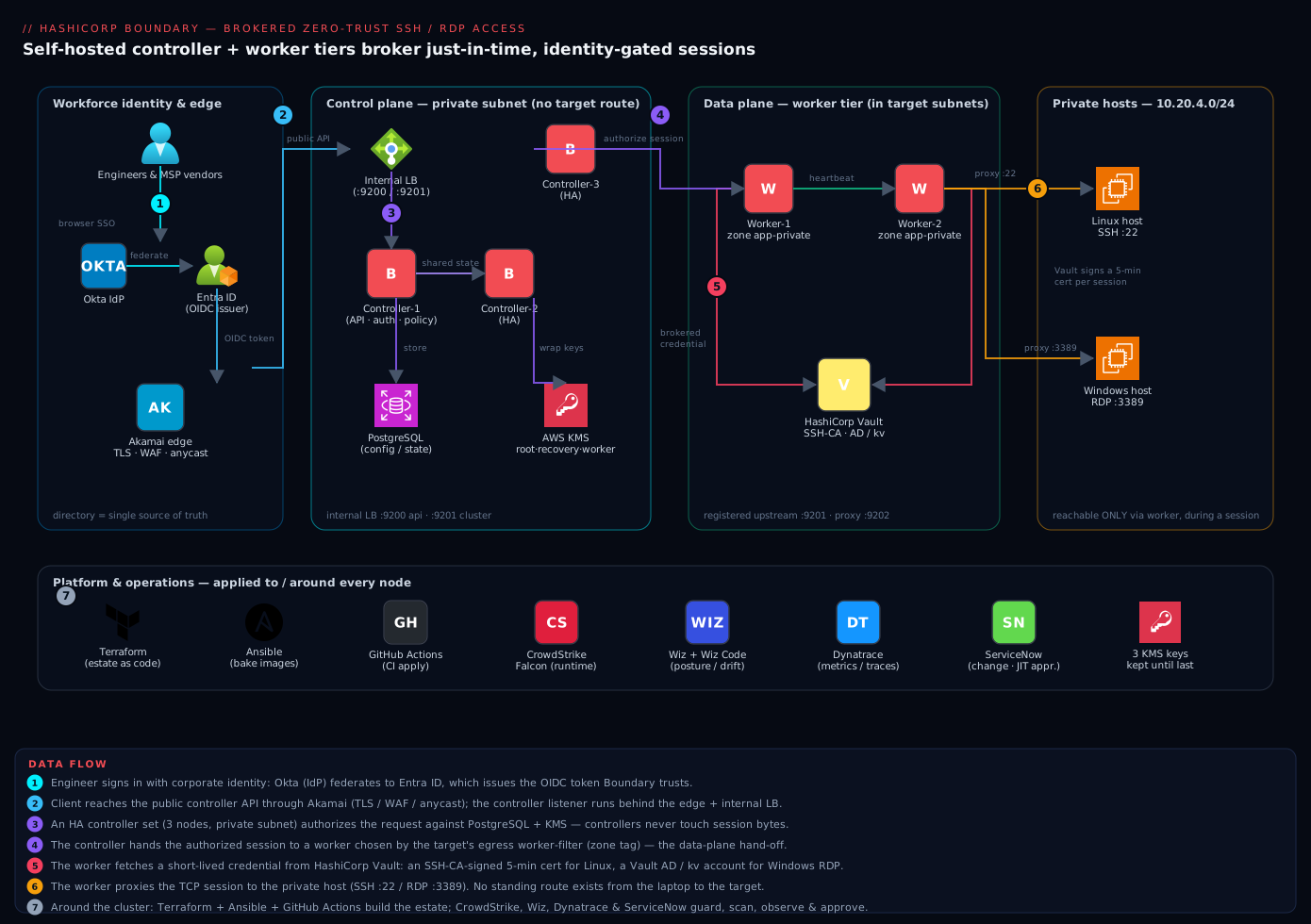
Real-world scenario
Meridian Assurance, a mid-size insurer, runs about 140 Linux hosts and 60 Windows hosts across two AWS regions (ap-south-1, ap-southeast-1) and one on-prem datacenter holding a legacy policy-admin system on an isolated VLAN. Roughly 45 engineers plus three managed-service vendors need privileged access. The pre-Boundary state was the one the auditor flagged: a Cisco AnyConnect VPN dropping laptops into a 10.20.0.0/16 “prod” supernet, a pair of bastions with a shared ops.pem key that had been in the same S3 bucket for two years, and a MERIDIAN\svc-rdp-admin domain account whose password was in a shared vault everyone could read. The SOC 2 auditor’s exact finding: “Privileged access is not uniquely attributable, is not time-bound, and standing network connectivity permits lateral movement.”
The platform team (four engineers) scoped the rebuild over six weeks. Week one: Terraform for the Postgres (RDS db.t4g.medium), three KMS keys, three t3.small controllers behind an internal NLB, and two t3.small workers per region tagged zone=app-private. Week two: boundary database init, HA controllers, and PKI worker enrollment — a direct ssh 10.20.4.11 from an engineer laptop now failed (no route), while boundary connect ssh succeeded. Week three: Okta→Entra OIDC, with three managed groups (prod-ssh-admins, win-rdp-ops, vendor-scoped) driven entirely by Entra group membership. Week four: Vault SSH CA signing 5-minute certs (pushed as TrustedUserCAKeys to every Linux host via Ansible) and a Vault AD engine issuing 30-minute svc-rdp-* accounts for RDP, replacing the standing domain account. Week five: dynamic host catalogs — the 140 Linux hosts populated from EC2 tags, so autoscaling no longer stranded targets — and BSR enabled on the 6 domain controllers and 4 database hosts, written to an object-locked S3 bucket with its own KMS key. Week six: the isolated on-prem VLAN reached via multi-hop — an ingress worker in the DMZ, an egress worker inside the VLAN that only dialed outbound, so the legacy system got attributed, recorded access with zero new inbound firewall rules.
The one incident during rollout was instructive. In week four, every brokered RDP connect suddenly failed at 14:20 with a Vault permission error. The cause: the credential store’s Vault token had been created with a fixed 24-hour TTL during testing, not -period, and it expired exactly 24 hours after creation — mid-afternoon. The fix was a one-liner (recreate with -period=20m), but it cost 25 minutes of “no one can RDP” and became the team’s canonical example of why store tokens must be periodic. Post-cutover numbers: every session is attributed to a named engineer and centrally cancellable; SSH credentials live 5 minutes, RDP accounts 30; the VPN concentrators (₹ tens of thousands/month) were retired; and when a vendor engagement ended, offboarding was removing one Entra group membership. The auditor closed the finding. The line on the whiteboard: “There is no path to a host except through a worker during an authorized session — prove it, and you’ve passed.”
Advantages and disadvantages
Boundary’s control/data-plane split buys a great deal, but it is a system with more parts than a bastion. Weigh it honestly:
| Advantages | Disadvantages |
|---|---|
| No standing network path — the human’s device never routes to the host | More moving parts than a bastion (controllers, workers, DB, KMS, Vault, IdP) |
| Per-session, per-user attribution end to end (audit + IR gold) | You must run and patch the cluster; a bastion is one box |
| Credentials are ephemeral and Vault-brokered/injected — human never sees them | Requires a working Vault + OIDC IdP to be fully valuable |
| Clean scope/RBAC model maps least privilege to teams/apps | Grant-string grammar and scopes have a learning curve |
| Dynamic host catalogs track a changing cloud fleet automatically | Dynamic catalogs need cloud read creds and correct filters |
| Multi-hop reaches isolated networks with no inbound firewall rule | Multi-hop adds latency and two workers to operate |
| Session recording (BSR) gives replayable, tamper-evident audit | BSR costs worker CPU/disk and object-storage volume |
| Self-hostable / air-gappable — no SaaS control-plane egress | Self-hosting means you own HA, backups, and upgrades |
| Terraform-native provider — whole estate as code | Bootstrap (init, first admin, KMS) is order-sensitive |
The model is right when you have many engineers, hosts in private subnets, a compliance mandate, and an existing Vault — it turns privileged access from a standing liability into a per-session grant. It is over-engineered for a two-person shop with three static hosts (a well-managed bastion with SSH-cert auth may suffice) and it is incomplete without Vault and an IdP (you can run brokered static credentials, but then you have thrown away half the value). The disadvantages are all operational, not fundamental — but they are real, and pretending a Boundary cluster is “set and forget” is how you end up with an unpatched controller and an expired store token.
Hands-on lab
This lab stands up a minimal but real Boundary deployment and proves the full path: SSO login → authorize session → brokered/injected credential → connect, with a direct connection failing. It is written to run on a small set of VMs (or one host running several roles for learning). Where a piece requires Vault or an IdP you don’t have handy, the step notes the shortcut. Everything is torn down at the end.
What you’ll build: one controller (Postgres + KMS or dev shortcut), one PKI worker, an OIDC (or password) auth method, a Vault SSH-CA credential store, an SSH target with an injected cert, an RDP (tcp) target with a brokered account, and the grants tying it together — then connect and validate.
Step 0 — Prerequisites check
boundary version          # expect 0.16+ (Enterprise/HCP-compatible for BSR/injection)
terraform version         # expect 1.6+
vault version             # for the credential-broker steps
psql --version            # Postgres client, to verify the DB
# You need: a Postgres 13+ reachable as user 'boundary'; KMS keys (AWS/Azure/GCP)
# or, for a pure learning run, use `boundary dev` (in-memory) and skip DB/KMS.
Expected: version strings for each. If you only want to learn the object model without a real DB/KMS, boundary dev gives you an in-memory controller+worker with a known admin login (admin/password) and preloaded scopes — use it for steps 4–8 and skip 1–3.
Step 1 — Provision the database and KMS keys (Terraform)
Boundary needs Postgres and KMS keys before the first controller boots. Provision with Terraform so Wiz Code can scan the plan.
# kms.tf — three purposes; NEVER share one key across roles
resource "aws_kms_key" "boundary_root"     { description = "boundary-root" }
resource "aws_kms_key" "boundary_recovery" { description = "boundary-recovery" }
resource "aws_kms_key" "boundary_worker"   { description = "boundary-worker-auth" }

resource "aws_kms_alias" "root"     { name = "alias/boundary-root"     target_key_id = aws_kms_key.boundary_root.id }
resource "aws_kms_alias" "recovery" { name = "alias/boundary-recovery" target_key_id = aws_kms_key.boundary_recovery.id }
resource "aws_kms_alias" "worker"   { name = "alias/boundary-worker"   target_key_id = aws_kms_key.boundary_worker.id }
-- Create the database and a least-privilege role
CREATE DATABASE boundary;
CREATE ROLE boundary WITH LOGIN PASSWORD 'set-via-vault-not-here';
GRANT ALL PRIVILEGES ON DATABASE boundary TO boundary;
Expected: three KMS aliases and a boundary database. Validate: psql "postgres://boundary:...@db:5432/boundary" -c '\l' lists the DB.
Step 2 — Initialize the controller and run the migration
Write the controller config; the kms stanzas point at the aliases from step 1.
# /etc/boundary/controller.hcl
disable_mlock = true

controller {
  name        = "boundary-controller-1"
  description = "KloudVin Boundary controller"
  database { url = "env://BOUNDARY_PG_URL" }   # postgres://boundary:...@db:5432/boundary
}

listener "tcp" { purpose = "api"     address = "0.0.0.0:9200"  tls_disable = true }  # TLS terminated at edge/LB
listener "tcp" { purpose = "cluster" address = "0.0.0.0:9201" }
listener "tcp" { purpose = "ops"     address = "0.0.0.0:9203" }                      # health/metrics

kms "awskms" { purpose = "root"        key_id = "alias/boundary-root" }
kms "awskms" { purpose = "recovery"    key_id = "alias/boundary-recovery" }
kms "awskms" { purpose = "worker-auth" key_id = "alias/boundary-worker" }
Run the one-time schema init on exactly one node, then start the service everywhere.
export BOUNDARY_PG_URL="postgres://boundary:$(vault kv get -field=password secret/boundary/db)@db.internal:5432/boundary?sslmode=verify-full"

# First node ONLY — creates schema + bootstrap org/auth/role. CAPTURE the output.
boundary database init -config /etc/boundary/controller.hcl

# All controller nodes
systemctl enable --now boundary-controller
Expected: database init prints a generated auth method ID, an initial admin login name + password, and a generated org/project scope. Store these in Vault immediately, never in the repo. Bring up controllers 2 and 3 with the same config (changing only controller.name) — they share the DB and KMS and form an HA set behind the internal LB. Validate: boundary scopes list -scope-id global -recursive returns the bootstrapped scopes.
Step 3 — Enroll a PKI worker
Workers live in the target subnets and register upstream. Use controller-led (PKI) registration.
# /etc/boundary/worker.hcl
disable_mlock = true

listener "tcp" { purpose = "proxy" address = "0.0.0.0:9202" }

worker {
  public_addr       = "worker-1.private.kloudvin.internal:9202"  # what clients are told to dial
  initial_upstreams = ["controller-lb.internal:9201"]
  tags { region = ["ap-south-1"], zone = ["app-private"], type = ["egress"] }
}

kms "awskms" { purpose = "worker-auth" key_id = "alias/boundary-worker" }
systemctl enable --now boundary-worker
journalctl -u boundary-worker | grep -m1 "Worker Auth Registration Request"
# copy the token string, then on an admin client:
boundary workers create worker-led \
  -worker-generated-auth-token "<token-from-log>" \
  -name "worker-app-private-1" -description "ap-south-1 / app-private / egress"

boundary workers list   # confirm active=true
Expected: the worker shows active=true. Validate: boundary workers read -id <worker_id> shows the tags you set (zone=app-private).
Step 4 — Create the OIDC auth method (or password for the lab)
Register Boundary as an app in Entra (redirect URI https://boundary.kloudvin.com/v1/auth-methods/oidc:authenticate:callback), then create the method.
boundary auth-methods create oidc \
  -issuer "https://login.microsoftonline.com/<tenant-id>/v2.0" \
  -client-id "<entra-app-client-id>" \
  -client-secret "$(vault kv get -field=secret secret/boundary/oidc)" \
  -signing-algorithm "RS256" \
  -api-url-prefix "https://boundary.kloudvin.com" \
  -claims-scopes "groups" \
  -name "entra-sso" -description "Okta->Entra workforce SSO"

boundary auth-methods change-state oidc -id <amoidc_id> -state "active-public" -primary

# Map an Entra group claim to a managed group (directory-driven membership)
boundary managed-groups create oidc -auth-method-id <amoidc_id> \
  -filter '"prod-ssh-admins" in "/token/groups"' -name "prod-ssh-admins"
Lab shortcut (no IdP): use the bootstrapped password auth method from step 2 and create a user/account instead — the target/credential/grant steps are identical. Expected: the OIDC method is active-public and primary. Validate: boundary auth-methods read -id <amoidc_id> shows state and the groups scope.
Step 5 — Wire the Vault SSH-CA credential store and library
On Vault, enable the SSH CA and a signing role.
vault secrets enable -path=ssh-client-signer ssh
vault write ssh-client-signer/config/ca generate_signing_key=true
vault write ssh-client-signer/roles/boundary - <<EOF
{ "key_type":"ca","algorithm_signer":"rsa-sha2-256","allow_user_certificates":true,
  "allowed_users":"ec2-user","default_extensions":{"permit-pty":""},"ttl":"5m" }
EOF

# Push the CA public key to each Linux host as TrustedUserCAKeys (via Ansible), so hosts
# trust Vault-signed certs and NOTHING else:
vault read -field=public_key ssh-client-signer/config/ca   # -> /etc/ssh/trusted-user-ca.pem on hosts
Then wire Boundary to that path with a periodic token.
boundary credential-stores create vault \
  -scope-id <project_id> \
  -vault-address "https://vault.kloudvin.internal:8200" \
  -vault-token "$(vault token create -policy=boundary-ssh -period=20m -field=token)" \
  -name "vault-ssh-ca"

boundary credential-libraries create vault-ssh-certificate \
  -credential-store-id <cs_id> \
  -vault-path "ssh-client-signer/sign/boundary" \
  -username "ec2-user" -key-type "ecdsa" -key-bits 256 \
  -name "linux-ssh-cert"
Expected: a credential store and a vault-ssh-certificate library. Validate: boundary credential-stores read -id <cs_id> shows the Vault address; the token is periodic (critical — see the pitfalls table).
Step 6 — Define targets and attach credentials
Create an SSH target with an injected cert (secret never touches the client), scoped to the right worker zone.
boundary targets create ssh \
  -scope-id <project_id> -name "prod-db-linux" \
  -default-port 22 -address "10.20.4.11" \
  -egress-worker-filter '"app-private" in "/tags/zone"' \
  -session-max-seconds 3600

# INJECT the Vault-signed cert (never returned to the client)
boundary targets add-credential-sources -id <tssh_id> \
  -injected-application-credential-source <linux-ssh-cred-lib-id>
For Windows RDP, use a tcp target on 3389 with a brokered short-TTL AD account (RDP can’t consume an injected SSH cert).
boundary targets create tcp \
  -scope-id <project_id> -name "prod-win-rdp" \
  -default-port 3389 -address "10.20.4.40" \
  -egress-worker-filter '"app-private" in "/tags/zone"' \
  -session-max-seconds 3600

boundary targets add-credential-sources -id <ttcp_id> \
  -brokered-credential-source <vault-ad-cred-lib-id>
Expected: two targets, each with the right credential source and worker filter. Validate: boundary targets read -id <tssh_id> shows the injected source and egress filter.
Step 7 — Grant access with a role
Bind the managed group (or lab user) to a connect-only role in the project scope.
boundary roles create -scope-id <project_id> -name "prod-ssh-admins-connect"
boundary roles add-principals -id <role_id> -principal <managed_group_id>   # or -principal <user_id>
boundary roles add-grant-strings -id <role_id> \
  -grant "ids=*;type=target;actions=authorize-session" \
  -grant "ids=*;type=session;actions=read:self,cancel:self"
Expected: a role with two grant strings and the principal bound. Validate: boundary roles read -id <role_id> lists both grants and the principal.
Step 8 — Connect and validate the controls
Prove the full path from the engineer side.
# 1. SSO login (opens browser to Okta -> Entra); or `boundary authenticate password`
boundary authenticate oidc -auth-method-id <amoidc_id>

# 2. See what this identity may reach
boundary targets list -scope-id <project_id>

# 3. Brokered/injected SSH — no key on disk; Vault signs a 5-min cert
boundary connect ssh -target-id <tssh_id>
#   you land on 10.20.4.11 as ec2-user; `last` on the host shows your identity

# 4. RDP — Boundary opens a local proxy port; point mstsc/Remmina at it
boundary connect rdp -target-id <ttcp_id>
Now confirm the controls actually hold — this is the audit evidence:
# Active sessions are centrally visible and cancellable
boundary sessions list -scope-id <project_id> -recursive

# The direct path MUST fail — there is no route from the laptop to the host:
ssh ec2-user@10.20.4.11    # expect: connection timeout / no route (this is success)
Expected results, tabulated so you know a green run:
| Check | Command | Expected result |
|---|---|---|
| SSO succeeds | boundary authenticate oidc ... |
Browser flow completes; token stored |
| Only permitted targets listed | boundary targets list |
Just the targets your role allows |
| Brokered SSH connects | boundary connect ssh -target-id ... |
Shell on the host; no key on disk |
| Attribution on host | last / w on the host |
Your session tied to the connecting user |
| RDP proxy opens | boundary connect rdp -target-id ... |
Local port to point mstsc/Remmina at |
| Session visible centrally | boundary sessions list -recursive |
Your session listed, cancellable |
| Direct path fails | ssh ec2-user@10.20.4.11 |
Timeout / no route — the point |
Step 9 — Teardown
Tear down in reverse dependency order so you never strand a live session.
# 1. Drain: cancel any live sessions
for s in $(boundary sessions list -scope-id <project_id> -recursive -format json | jq -r '.items[].id'); do
  boundary sessions cancel -id "$s"; done

# 2. Remove access, then targets
boundary roles delete   -id <role_id>
boundary targets delete -id <tssh_id>
boundary targets delete -id <ttcp_id>

# 3. Deregister workers, stop services
boundary workers delete -id <worker_id>
systemctl disable --now boundary-worker boundary-controller

# 4. Revoke the store's Vault token so no orphaned lease can sign a cert
vault token revoke <store_token_accessor>

# 5. Durable teardown of the IaC-managed estate
terraform destroy   # removes controllers, workers, LB, DB
# Keep KMS keys until LAST; schedule their deletion separately (destroying root/recovery
# before the DB is gone leaves an UNRECOVERABLE cluster).
Expected: sessions cancelled, resources removed, services stopped, Vault token revoked, infrastructure destroyed. Validate: boundary targets list errors (controller gone) and ssh to the host still fails (no route ever existed).
Common mistakes & troubleshooting
The failures below are the ones that actually bite in production. Match your symptom, confirm with the exact command, then apply the fix.
| # | Symptom | Root cause | Confirm (exact command / check) | Fix |
|---|---|---|---|---|
| 1 | Every brokered connect fails at once, Vault permission error | Store token was fixed-TTL and expired | vault token lookup <accessor> shows expired / no period |
Recreate store token with -period=20m; update the store |
| 2 | Session hangs at “authorized” then times out | No worker matches the egress_worker_filter, or the worker has no route to the host |
boundary workers list; compare worker tags to the target filter; from the worker, nc -vz <host> <port> |
Fix the filter to match a live worker’s tags; ensure worker→host reachability |
| 3 | SSH connects but login is denied | Host doesn’t trust the Vault CA, or the cert’s allowed_users/extensions are wrong |
On host: grep TrustedUserCAKeys /etc/ssh/sshd_config; vault read ssh-client-signer/roles/boundary |
Push the CA pubkey to TrustedUserCAKeys; fix allowed_users/permit-pty |
| 4 | OIDC login works but user has no access | groups claim missing, so managed groups are empty |
Decode the token / check Entra app “groups” claim; boundary managed-groups read -id <mg> |
Add groups to claims-scopes and to the Entra app’s token config |
| 5 | Worker won’t register | Clock skew, wrong initial_upstreams, or KMS worker-auth mismatch |
journalctl -u boundary-worker; check upstream host:9201 reachability; verify KMS alias |
Fix NTP, upstream address, and the shared worker-auth KMS key |
| 6 | Controllers up but API returns errors | KMS root/recovery key unreachable or wrong; DB unreachable | journalctl -u boundary-controller; test KMS decrypt; psql $BOUNDARY_PG_URL -c 'select 1' |
Fix KMS IAM/alias; fix DB URL/SSL/network |
| 7 | Direct ssh to a host succeeds (it shouldn’t) |
A standing route still exists (VPN not retired, SG too open) | From the laptop, ssh <host> connects; check route/SG |
Remove the standing route/SG rule; Wiz should flag it |
| 8 | RDP brokered creds don’t work | AD/kv engine issued an account the host doesn’t accept, or TTL too short |
vault read ad/creds/rdp-admin; check the account on the DC |
Fix the AD engine role/rotation; lengthen TTL sensibly |
| 9 | Multi-hop target unreachable | Only one worker filter set, or egress worker can’t dial the ingress worker | boundary targets read for both filters; from egress worker, nc -vz <ingress> 9202 |
Set both ingress_worker_filter and egress_worker_filter; allow egress→ingress outbound |
| 10 | Dynamic host catalog is empty | Bad cloud creds, wrong filter, or no matching instances | boundary host-sets read; check the tag filter vs actual instance tags |
Fix cloud read creds/filter; confirm instances carry the tag |
| 11 | Session recording produces nothing | Bucket creds wrong, target type ineligible, or BSR not enabled | boundary targets read (enable_session_recording); check bucket creds/KMS |
Enable BSR on an eligible ssh target; fix bucket + BSR KMS key |
| 12 | database init run twice / on two nodes |
Init is one-time; a second run errors or confuses state | Check which node ran it; DB already has schema | Run init on exactly ONE node; others only systemctl start |
| 13 | Plaintext :9200 exposed to the internet |
tls_disable=true used without an edge/LB in front |
curl http://<controller>:9200 returns from outside |
Only tls_disable behind trusted edge/LB; block :9200 at the SG |
| 14 | Sessions can’t be cancelled by an admin | Grant scoped to read:self/cancel:self only |
boundary roles read; admin lacks type=session;actions=list,read,cancel |
Add a session-auditor/admin role with the broader session grant |
Two reading notes that save the most time:
| Distinction | The trap | How to tell them apart |
|---|---|---|
| Worker-has-no-path vs filter-mismatch | Both look like “hang at connect” | If boundary workers list shows a matching-tag worker but nc from it to the host fails, it’s reachability; if no worker matches the filter, it’s the filter |
| Brokered vs injected not applying | “Credential didn’t work” is ambiguous | Injected only works on ssh targets with the right cred type; on a tcp target the same source must be brokered — boundary targets read shows which source list it’s in |
Best practices
- Keep the three KMS purposes separate. Distinct
root,recovery, andworker-authkeys. Reusing one couples blast radius and makes recovery-key rotation impossible — Boundary starts, but you’ve thrown away the isolation the design exists for. - Controllers never route to targets; only workers do. If a controller can reach a host, you’ve re-created the flat network the project was meant to kill. Put controllers in a management subnet with no target route.
- Make store tokens periodic. Always create the credential store’s Vault token with
-periodso it auto-renews and dies if Boundary stops renewing it. A fixed-TTL token expires mid-incident and every brokered connect fails at once. - Prefer injected over brokered where the target type allows it. Injected credentials never reach the client — use
sshtargets with injected certs for Linux; reserve brokered for RDP/DB where injection isn’t available. - Tag every worker and filter every target. Tag by
zone/region/env; setegress_worker_filteron every target explicitly. An unfiltered target may pick a worker with no path and hang. - Trust the Entra token, not Okta’s, in a federated chain — and verify the
groupsclaim. Pointissuerat the token issuer Boundary actually trusts; a missinggroupsscope silently strips everyone’s managed-group roles. - Model scopes along your blast-radius lines. Per-team orgs, per-app projects; scope connect grants to the project so “these people, these targets” needs no per-target ID enumeration.
- Bound every session. Set
session_max_secondsand a sanesession_connection_limiton targets — JIT means time-bound, not “until they log off next Tuesday”. - Sign, don’t store, SSH credentials. Use Vault’s SSH CA to sign 5-minute certs and
TrustedUserCAKeyson hosts — never a static key in a static credential store. - Object-lock the BSR bucket and give it its own KMS key. So a compromised operator can’t delete their own recording, and recording encryption is isolated from the cluster keys.
- Deploy the estate as code and scan it. Terraform + a pipeline gate (Wiz Code) so drift that re-opens a direct host path is caught before apply.
- Run ≥2 controllers and ≥1 worker per zone. Controllers HA behind an internal LB; a zone with no healthy worker is unreachable — the safe failure direction, but plan for it.
Security notes
The whole point is Zero Trust for privileged access: no standing network path, identity-based authorization on every session, and credentials that are brokered/injected, short-lived, and never seen by the human. Concretely: keep the three KMS purposes separated; scope Boundary roles to the minimum grant (authorize-session, read:self, cancel:self) rather than admin; and source group membership from Okta → Entra so an offboarded user loses access the moment the directory does — no Boundary change required.
The worker is the one component with target reachability, so it is the one to watch hardest: run CrowdStrike Falcon on every worker (and controller) for runtime compromise detection, and treat workers as the most disposable, most-monitored tier. Wiz + Wiz Code continuously assert that neither the running posture nor the Terraform re-opens a direct route from the engineer subnet to a target — the single most valuable invariant to alarm on. Enable session recording (BSR) for the highest-sensitivity targets (domain controllers, database hosts) so there is a replayable, tamper-evident record; write it to an object-locked bucket with a dedicated KMS key. Every session is centrally logged and cancellable, which is exactly what incident response needs: when a laptop is suspected compromised, you cancel that identity’s sessions and remove its group — access is gone in seconds, and nothing durable (no key, no password) was ever on the device to leak.
A few sharp edges: run the controller API listener with tls_disable=true only behind a trusted edge/LB (Akamai) — never expose plaintext :9200 directly. Recovery-KMS access is effectively god-mode (it bypasses normal auth for disaster recovery), so guard that key like a break-glass credential. And revoke the credential-store’s Vault token on teardown so no orphaned lease can sign a certificate after the cluster is gone.
Cost & sizing
Self-hosting Boundary’s community/enterprise binary means you pay for compute + database + storage, not a per-seat SaaS fee — the economics favor larger fleets. Controllers are control-plane only and stay small; workers scale with session concurrency and per-zone reachability, not user count; the database is modest.
| Component | Sizing driver | Rough spec for ~few hundred engineers | Rough monthly (INR) |
|---|---|---|---|
| Controllers (×3, HA) | API/policy load (light) | t3.small/B2s each |
₹9,000–15,000 |
| Workers (×2 per zone) | Session concurrency + zones | t3.small each, scale by load |
₹6,000–12,000 per zone |
| Postgres (managed) | State size (small) | db.t4g.medium / equivalent |
₹6,000–10,000 |
| Internal load balancer | Controller fronting | 1 internal NLB/ILB | ₹1,500–3,000 |
| KMS keys (×3 + BSR) | Key-op volume | 4 keys | ₹300–800 |
| BSR object storage | Recorded session volume | Bucket + object lock | Per-GB; enable selectively |
| Vault | Credential brokering | Shared existing cluster | Shared cost |
The real saving is indirect and larger than the run cost: retiring always-on VPN concentrators (often ₹ tens of thousands/month plus per-user licensing) and shared jumpboxes, and replacing a standing privileged-access exposure with a just-in-time one, removes both licence cost and the far-more-expensive risk the auditor flagged. Right-size controllers (they don’t carry session bytes), scale workers by actual session load piped to Dynatrace rather than a guess, and enable BSR selectively — the crown-jewel targets, not every dev box — because recording storage is the one cost that grows with usage. For a Meridian-sized estate (200 hosts, 45 engineers, 3 zones) the all-in run cost lands well under the retired VPN/PAM spend, and the JIT/attribution posture is the actual deliverable.
Interview & exam questions
Q1. Explain Boundary’s control-plane vs data-plane split and why it matters. Controllers are the control plane — API, auth, policy, and session orchestration — and never carry session bytes. Workers are the data plane and are the only component that opens a TCP connection to a target. This lets controllers live with no route to any host, so only the smaller, heavily-monitored worker tier ever touches production, and the human’s client only ever talks to a worker.
Q2. What is the difference between brokered and injected credentials? Both get a fresh short-lived credential from (typically) Vault per session. Brokered returns the credential to the client, which uses it to authenticate. Injected has the worker authenticate inside the session so the credential never leaves the worker/reaches the client — supported on ssh targets with compatible credential types, and strictly stronger.
Q3. Walk the object model from scope to session. A scope (global→org→project) holds resources. A host catalog (static or dynamic) yields hosts grouped into host sets. A target references host sets (or an address) plus a worker filter and credential sources. Credential stores/libraries produce the ephemeral secret. Auth methods (OIDC) authenticate users into managed groups; roles bind principals to grants. A session is one authorized, time-bounded connection.
Q4. How do you reach a host in an isolated network no worker can enter? Multi-hop: an ingress worker the controller can reach (DMZ) plus an egress worker inside the isolated network that only dials outbound to the ingress worker. Set both ingress_worker_filter and egress_worker_filter on the target. No inbound firewall rule into the isolated network is needed.
Q5. Why must the credential store’s Vault token be periodic? A periodic token (-period) renews indefinitely while Boundary renews it and dies when Boundary stops. A fixed-TTL token expires at a wall-clock moment; if that lands mid-incident, every brokered connect fails at once. Periodic tokens fail safe.
Q6. How is a 502-style “session hangs at connect” diagnosed? Two causes: no worker matches the target’s egress_worker_filter, or a matching worker has no network path to the host. Confirm by comparing worker tags to the filter (boundary workers list) and testing reachability from the worker (nc -vz host port).
Q7. How does offboarding work, and why is it fast? Managed-group membership is derived from the OIDC groups claim at login, not a Boundary-local list. Remove the user from the directory group (Entra) and at next login the claim is absent, the managed group no longer contains them, and their roles evaporate — no Boundary change.
Q8. Boundary vs a bastion — the one-line security argument. A bastion is a standing, shared, high-value hop whose onward credentials live on the box; a single credential’s blast radius is the whole reachable network. Boundary has no standing route, per-session per-user attribution, and ephemeral credentials the human never sees — one credential’s blast radius is one target for one session.
Q9. What does a dynamic host catalog buy you over static? It queries the cloud (ec2:DescribeInstances by tag, Azure Resource Graph) and keeps the host set in sync as instances come and go, so autoscaling never strands a target and no one edits Boundary when the fleet changes.
Q10. Boundary vs Teleport — the deciding factors. Both do identity-based, JIT, recorded access with no standing route. Choose Boundary when you want to keep credentials in an existing Vault and separate identity/creds/proxy; choose Teleport for an all-in-one plane with a built-in CA and native fronting of Kubernetes/web across many protocols.
Q11. Where does tls_disable=true on the controller API belong, and where is it dangerous? Only behind a trusted edge/LB (Akamai) that terminates TLS — the LB→controller hop is on a trusted network. Exposing plaintext :9200 directly to clients or the internet is a credential-leak; block it at the security group.
Q12. What are the three KMS purposes and why not share a key? root (wraps the DEK for stored secrets), recovery (break-glass auth bypass), and worker-auth (PKI worker trust). Sharing one key couples their blast radius and makes rotating the recovery key impossible — you lose the isolation the design provides.
Quick check
- Which Boundary component is the only one that opens a TCP connection to a target host?
- You have an
sshtarget and want the credential to never reach the engineer’s laptop — brokered or injected? - A session hangs at “authorized”. Name the two most likely causes and the one command to distinguish them.
- Where do you point the OIDC
issuerwhen Okta federates to Entra and Boundary trusts the Entra token? - Why must the credential store’s Vault token be created with
-periodrather than a fixed TTL?
Answers
- The worker (data plane). Controllers orchestrate but never carry session bytes.
- Injected — the worker authenticates inside the session, so the credential never leaves the worker/reaches the client. (Requires an
sshtarget with a compatible credential type.) - Either no worker matches the target’s
egress_worker_filter, or a matching worker has no route to the host. Distinguish by runningnc -vz <host> <port>from the worker: if it fails, it’s reachability; if no worker matches the filter at all, it’s the filter. - At Entra’s v2.0 issuer (
https://login.microsoftonline.com/<tenant>/v2.0) — Boundary trusts the token issuer, which is Entra here, not Okta. - A periodic token renews indefinitely while Boundary renews it and dies when Boundary stops; a fixed-TTL token expires at a wall-clock moment and, if that lands mid-incident, breaks every brokered connect at once. Periodic fails safe.
Glossary
- Controller — Boundary’s control plane: API, auth, policy, and session orchestration. Never carries session bytes.
- Worker — Boundary’s data plane: proxies the authorized TCP session to the target. The only component that touches a host.
- Scope — The tenancy/policy boundary:
global→org→project. Resources and grants hang off scopes. - Host catalog / host set / host — The source of hosts (static or dynamic), a named group of them, and a single address. Answers “what machines exist?”.
- Target — A connectable resource: address/host-sets + port + worker filter + credential sources. Answers “what may I open?”.
- Credential store — A connection to a secret source (Vault or static) within a project.
- Credential library — A recipe against a store that returns a fresh, short-lived credential per session.
- Brokered credential — Returned to the client to authenticate; broadly supported.
- Injected credential — Applied inside the session by the worker; never reaches the client. Strongest posture (
sshtargets). - Auth method — How a user authenticates: OIDC (workforce), LDAP, or password.
- Managed group — Principals defined by a filter over the OIDC token’s claims — directory-driven membership.
- Role / grant string — RBAC: grant strings (
ids,type,actions) bound to principals at a scope. - Worker filter — A boolean expression over worker tags on a target, selecting which worker proxies the session.
- Multi-hop — Chaining an ingress (DMZ) and egress (isolated-network) worker to reach hosts with no inbound path.
- Session — One authorized, time-bounded connection — the unit of access and audit.
- BSR (Boundary Session Recording) — A worker-captured, encrypted, tamper-evident recording of a session, stored in object storage.
- KMS purposes (root/recovery/worker-auth) — The three distinct keys Boundary wraps secrets, break-glass auth, and worker PKI trust with.
Next steps
- Pair Boundary with its secrets engine: HashiCorp Vault as Central Secrets Broker for Multi-Cloud Workloads and Vault PKI as Enterprise Private CA for Service mTLS.
- Compare the closest alternative access plane: Set Up Teleport for Certificate-Based SSH, Kubernetes, and Database Access with RBAC.
- Wire the identity front door: Deploy Okta as a SAML/OIDC Identity Provider for Kubernetes kubectl OIDC Login and Set Up Keycloak with Identity Brokering, OIDC Clients, and Group-to-Role Mapping.
- See the broader PAM and ZTNA picture: Building Enterprise PAM: Credential Vaulting, Session Brokering, and Automatic Rotation and Zero Trust Network Access for Remote Workforce on Azure.