A mid-size SaaS company runs eleven customer-facing apps, an internal Moodle learning portal, and a fleet of admin tools, and every one of them bolted on its own login. After an outage where a single self-hosted Keycloak VM fell over during a database failover and locked 30,000 users out of all of them for forty minutes, the platform team got a clear mandate: stand up one identity provider that is genuinely highly available, survives a node loss without dropping sessions, and stops storing its own database on the same box it runs on. This guide walks through exactly that build — Keycloak on Kubernetes in HA, managed by the Keycloak Operator, backed by an external PostgreSQL you do not babysit, with Infinispan replicating session state across pods so a pod restart never logs anyone out. Everything here is real: real kubectl, real CRDs, real flags, real expected output.
Keycloak is the open-source identity and access management server that CNCF graduated in 2025 — an OpenID Connect provider, SAML 2.0 IdP, OAuth 2.0 authorization server, user store, and identity broker in one binary. The hard part is never “run one pod.” The hard part is the three properties an enterprise IdP must have simultaneously: it must be stateful where it counts (realms, users, clients, and offline tokens are durable data that cannot be lost), stateless where it scales (any pod must be able to serve any request), and session-coherent across pods (a login in flight on pod A must complete on pod B if A dies mid-handshake). Keycloak achieves this by splitting its state into two stores — durable data in an external relational database, and hot session state in a replicated in-memory cache — and the entire design of this deployment is about wiring those two stores correctly on Kubernetes.
We target Keycloak 26.x (the operator and server share a version line) on any conformant Kubernetes 1.28+ cluster — EKS, AKS, GKE, or on-prem. The external database is a managed PostgreSQL 16 (Amazon RDS, Azure Database for PostgreSQL Flexible Server, or Cloud SQL); running Postgres outside the cluster is the whole point, so the IdP and its data fail independently. By the end you will have a three-pod Keycloak cluster spread across availability zones, a verified JGroups cluster view, a session-survival test that kills a pod and proves no logout, a declarative realm with upstream Entra ID and Okta brokering, working backups and an upgrade runbook — and a troubleshooting playbook for the three failure classes that actually bite in production: cache split-brain, database exhaustion, and hostname/proxy misconfiguration.
What problem this solves
A single-instance identity provider is the most dangerous single point of failure in a platform, because everything funnels through it. When the IdP is down, no one can log into anything — not the customer apps, not the admin tools, not the on-call dashboards the team needs to fix the very outage they are in. The pain is multiplicative: an IdP outage is simultaneously an outage of every downstream system, and it locks out the people trying to respond.
What breaks without a proper HA design is subtle and worse than total downtime. Run two Keycloak pods without a shared distributed cache and you get silent authentication failures: a user’s browser starts the OIDC authorization-code flow on pod A (which writes the authentication session to its local cache), the load balancer routes the callback to pod B (which has never heard of that session), and the login fails with an opaque “you took too long to log in” or “cookie not found” error — intermittently, for a random fraction of users, impossible to reproduce on demand. Run Keycloak with its database inside the cluster on a PersistentVolume and a node failure that takes the database pod can corrupt it or strand the volume in the wrong zone. Skip connection-pool sizing and three pods under load open more connections than the managed Postgres max_connections allows, and pods fail readiness in a cascade. Misconfigure the hostname behind a reverse proxy and every redirect URL Keycloak generates points to localhost:8443, breaking every OIDC client at once.
Who hits this: any platform team consolidating authentication onto a self-hosted IdP. It bites hardest on teams who treat Keycloak as “just another stateless web app” — it is not. It is a stateful, cluster-aware, cache-coherent system whose two storage tiers (durable DB, replicated cache) each have to be deployed and tuned correctly, and whose front-end URL contract (hostname, proxy headers, TLS) is unforgiving. This guide is the production-real build that gets all of it right.
To frame the whole field before the deep dive, here is every concern this deployment has to solve, what fails if you get it wrong, and where it is addressed in this article:
| Concern | What it owns | What breaks if wrong | Where it lives in this build |
|---|---|---|---|
| Operator + CRDs | Declarative lifecycle of the Keycloak deployment | Hand-rolled StatefulSet drifts; no reconciliation | Keycloak / KeycloakRealmImport CRs |
| External database | Durable state (realms, users, clients, offline tokens) | Data loss on node failure; coupled failure | Managed PostgreSQL 16, out of cluster |
| Connection pooling | Bounded DB connections under load | too many connections; readiness cascade |
db-pool-* options + Postgres max_connections |
| Hostname / proxy | The public URL Keycloak advertises | Broken redirects; clients reject issuer | hostname + proxy-headers |
| TLS | Encryption to and within the cluster | Plaintext credentials; MITM | cert-manager Certificate + tlsSecret |
| Infinispan cache | Hot session state, replicated across pods | Silent login failures; logout on pod loss | Distributed caches, owners=2 |
| JGroups discovery | Pods find each other to form a cluster | Split-brain; isolated single-pod caches | KUBE_PING (cache-stack: kubernetes) |
| Realm import | Declarative realms, clients, IdP brokers | Click-ops drift; unrepeatable environments | KeycloakRealmImport CR |
| Scaling & probes | Right pod count; correct health gating | Over/under-provisioned; flapping readiness | instances, /health/* probes |
| Backups | Recoverable IdP state | Unrecoverable realm/user loss | pg_dump / managed snapshots |
| Upgrades | Safe version bumps with schema migration | Failed migration; downgrade impossible | rolling upgrade + DB backup gate |
| Observability | Metrics, tracing, alerting on the IdP | Blind to login latency / failures | /metrics, Prometheus, tracing |
Learning objectives
By the end of this article you can:
- Install the Keycloak Operator and its two CRDs (
Keycloak,KeycloakRealmImport) pinned to a version line, and explain what the operator reconciles versus what you declare. - Author a production
Keycloakcustom resource that runs three replicas across availability zones, points at an external managed PostgreSQL, mounts the database CA for verified TLS, and sets resource requests/limits correctly. - Size and configure database connection pooling (
db-pool-initial-size,db-pool-min-size,db-pool-max-size) against the managed Postgresmax_connections, and decide when to put PgBouncer in front. - Configure the hostname, TLS, and ingress correctly behind a reverse proxy so redirects, the issuer URL, and the admin console all work — and avoid the number-one Keycloak-on-Kubernetes failure.
- Stand up the Infinispan distributed cache with JGroups
KUBE_PINGdiscovery so session state replicates across pods, and prove with a kill-a-pod test that no user is logged out. - Bootstrap a realm, downstream OIDC clients, and upstream Entra ID / Okta identity-provider brokers declaratively with
KeycloakRealmImport. - Operate the cluster: scale it, configure liveness/readiness/startup probes, take and restore backups, perform a rolling version upgrade with the schema-migration gate, and wire observability.
- Diagnose the three production failure classes — cache split-brain, database connection exhaustion, and hostname/proxy misconfiguration — with the exact command that confirms each and the precise fix.
Prerequisites & where this fits
You should already understand the moving parts this build assumes. On Kubernetes: that a StatefulSet gives pods stable identities and ordered rollout, what a Service, ConfigMap, Secret, Certificate (cert-manager), and Ingress are, and how to read kubectl get/describe/logs. On Keycloak: the difference between a realm (an isolated tenant with its own users, clients, and config), a client (an app that delegates auth to Keycloak), and identity brokering (Keycloak federating up to another IdP). On PostgreSQL: that a managed instance has a finite max_connections, that TLS verification needs the server CA, and roughly how connection pooling works. On OIDC/OAuth: the authorization-code flow, the issuer and the .well-known/openid-configuration discovery document, and why redirect URIs must match.
You will need:
| Prerequisite | Why | How to verify |
|---|---|---|
| Kubernetes 1.28+, 3 worker nodes across distinct AZs | Pod anti-affinity needs ≥3 zones for true HA | kubectl get nodes -L topology.kubernetes.io/zone |
kubectl and helm v3 configured against the cluster |
Apply manifests; install cert-manager/ingress | kubectl version; helm version |
Managed PostgreSQL 16 with a keycloak DB + login role |
Durable state lives outside the cluster | psql -h <host> -U <user> -d keycloak -c '\conninfo' |
| Network path open from cluster to Postgres (SG/NSG/peering) | Pods must reach the DB on 5432 | kubectl run pgtest --rm -it --image=postgres:16 -- psql ... |
| cert-manager installed | Issues the server TLS certificate | kubectl get pods -n cert-manager |
| An ingress controller (NGINX) or Gateway API impl | Terminates/forwards public traffic | kubectl get pods -n ingress-nginx |
| HashiCorp Vault reachable (or External Secrets) | Issues DB + admin secrets, never in YAML | vault status |
A DNS name you control (we use id.example.com) |
Keycloak’s hostname contract is strict | dig id.example.com |
| Cluster-admin (to install CRDs) | CRDs are cluster-scoped | kubectl auth can-i create crd |
Where this fits: this is the platform-tier identity deployment — the foundation other teams build on. It sits downstream of the cluster build itself and the database provisioning, and upstream of every app that authenticates. It pairs tightly with the brokering and federation work in Set up Keycloak identity brokering with OIDC group and role mapping, and the same external-database-and-cache discipline shows up when you operate Postgres itself in Configure PostgreSQL PITR with pgBackRest and S3. If you also expose kubectl access through an IdP, Deploy Okta SAML/OIDC on Kubernetes for kubectl OIDC login is the adjacent pattern, and the secrets plumbing builds on Set up External Secrets Operator with Vault and AWS Secrets on Kubernetes.
Core concepts
Six mental models make every later decision obvious.
Keycloak has two state tiers, and they are deployed differently. The first tier is durable, relational state — realms, users, clients, roles, groups, credentials, and offline sessions (refresh tokens that survive a server restart). This lives in the external PostgreSQL and is the source of truth; lose it and you lose your identity configuration permanently. The second tier is hot, in-memory session state — online user sessions, the short-lived authentication sessions that track an in-progress login, the authorization-code-to-token exchanges, and login-failure counters for brute-force detection. This lives in the Infinispan cache embedded in each Keycloak pod, replicated across the cluster. The entire HA design is: make the durable tier a managed external service that fails independently, and make the hot tier replicate across pods so any pod can serve any session.
The operator reconciles; you declare. You do not write a StatefulSet, a Service, a cache config, and a set of environment variables by hand. You write one Keycloak custom resource describing the desired state — instances, image, database, hostname, TLS, cache — and the Keycloak Operator turns it into the StatefulSet, the Services, and the server configuration, then keeps the cluster reconciled to the CR. A second CRD, KeycloakRealmImport, declares a realm to import on startup. This is the GitOps contract: the CRs are version-controlled, and the operator is the controller that makes the cluster match them.
Clustering is a discovery problem solved by JGroups. For sessions to replicate, the Keycloak pods must form a single Infinispan cluster, and to do that each pod must discover its peers. Infinispan uses JGroups as its group-communication layer, and JGroups needs a discovery protocol to find other members. On Kubernetes the right protocol is KUBE_PING (often abbreviated as the kubernetes cache stack): each pod queries the Kubernetes API for other pods matching a label selector and forms a cluster with them. Get discovery wrong and each pod runs an isolated single-member cluster — the silent-login-failure disease. The JGroups cluster view in the logs (e.g. ISPN000094: Received new cluster view) is the single most important health signal in this whole deployment.
Distributed caches replicate; owners controls how many copies. Infinispan’s distributed-cache mode partitions entries across the cluster and keeps owners copies of each. With owners=2, every session entry exists on two pods, so losing one pod loses no sessions — the surviving owner serves the request. This is the mechanism behind “kill a pod, no logout.” Set owners=1 and you get no redundancy; set it equal to the cluster size and every pod holds everything (replicated, not distributed) — more memory, more replication traffic. For three pods, owners=2 is the standard sweet spot.
The hostname contract is explicit and unforgiving. Keycloak generates absolute URLs — the issuer in tokens, redirect URLs, the admin console’s asset URLs, OIDC discovery endpoints. It must know the public URL users actually reach, which behind an ingress/proxy is not the pod’s own address. You tell it via the hostname option, and you tell it to trust the proxy’s forwarded headers via proxy-headers. Get this wrong and tokens carry a wrong issuer (clients reject them), redirects point at the wrong host (login loops), or the admin console fails to load its JavaScript. This is the most common Keycloak-on-Kubernetes failure and it is pure configuration, not code.
Production mode is strict on purpose. Keycloak 26 runs in production mode by default in a container: HTTP is disabled unless you explicitly enable it (you front-terminate or re-encrypt TLS instead), hostname-strict is on, and the server refuses to start with an insecure or ambiguous configuration. This strictness is a feature — it stops you from accidentally shipping a plaintext or mis-hostnamed IdP — but it means every option must be set deliberately. There is no “it just works with defaults” for an internet-facing identity provider.
The vocabulary in one table
Pin down every moving part before the deep sections. The glossary at the end repeats these for lookup; this table is the mental model side by side:
| Concept | One-line definition | Where it lives | Why it matters for HA |
|---|---|---|---|
| Keycloak Operator | Controller reconciling the CRs into k8s objects | keycloak namespace deployment |
Declarative lifecycle; no hand-rolled StatefulSet |
Keycloak CR |
Desired state of the server deployment | Custom resource | The single object you edit to change the cluster |
KeycloakRealmImport CR |
A realm to import declaratively | Custom resource | Version-controlled realms; no click-ops |
| External PostgreSQL | Managed DB holding durable state | Outside the cluster | Independent failure of IdP and its data |
| Connection pool | Bounded DB connections per pod | Keycloak db-pool-* |
Prevents too many connections cascade |
| Infinispan | Embedded distributed cache | Inside each pod | Replicates hot session state |
| JGroups | Group-communication layer under Infinispan | Inside each pod | Forms the cluster; carries replication |
KUBE_PING |
JGroups discovery via the k8s API | JGroups stack kubernetes |
Pods find peers → one cluster, not N isolated |
| Distributed cache | Cache partitioned with owners copies |
Infinispan container | owners=2 → survive one pod loss |
| Cluster view | JGroups list of current members | Pod logs (ISPN000094) |
The canary that clustering actually formed |
hostname |
The public URL Keycloak advertises | Keycloak CR |
Wrong → broken redirects/issuer |
proxy-headers |
Trust X-Forwarded-* from the proxy |
Keycloak CR |
Wrong → Keycloak sees the proxy’s address |
| Realm | An isolated tenant (users, clients, config) | In the database | The unit of multi-tenancy |
| Offline session | Long-lived refresh token surviving restart | Database | Why some session state is durable, not cache |
1. The Keycloak Operator and CRDs
The operator owns the lifecycle. It watches two CRDs — Keycloak (the server deployment) and KeycloakRealmImport (declarative realm bootstrap) — and reconciles them into a StatefulSet, Services, and the server configuration. Install the CRDs and the operator into a dedicated namespace, pinned to the version line you intend to run, because the operator and the server share a version and you do not want them to drift.
kubectl create namespace keycloak

# CRDs and operator, pinned to the version line you intend to run
VERSION=26.0.5
kubectl apply -n keycloak -f \
  https://raw.githubusercontent.com/keycloak/keycloak-k8s-resources/${VERSION}/kubernetes/keycloaks.k8s.keycloak.org-v1.yml
kubectl apply -n keycloak -f \
  https://raw.githubusercontent.com/keycloak/keycloak-k8s-resources/${VERSION}/kubernetes/keycloakrealmimports.k8s.keycloak.org-v1.yml
kubectl apply -n keycloak -f \
  https://raw.githubusercontent.com/keycloak/keycloak-k8s-resources/${VERSION}/kubernetes/kubernetes.yml

kubectl rollout status deployment/keycloak-operator -n keycloak --timeout=120s
Expected output (the rollout line):
deployment "keycloak-operator" successfully rolled out
Confirm the CRDs registered:
kubectl get crd | grep keycloak.org
# keycloakrealmimports.k8s.keycloak.org   2026-06-10T...
# keycloaks.k8s.keycloak.org              2026-06-10T...
What the operator does and does not manage is worth fixing in your head, because it changes how you operate the system — you edit CRs, not the objects the operator owns:
| The operator manages (don’t edit by hand) | You manage (the inputs the operator reads) |
|---|---|
The StatefulSet and its pod template |
The Keycloak CR (instances, image, db, hostname, cache) |
| The headless + ClusterIP Services | The KeycloakRealmImport CR(s) |
| The default server configuration / env wiring | Secrets (DB creds, admin bootstrap, IdP client secrets) |
| Rolling the StatefulSet on CR changes | ConfigMaps (custom cache XML, DB CA bundle) |
| Surfacing status conditions on the CR | The Certificate (cert-manager) and Ingress |
| Default Infinispan cache wiring | Optional custom Infinispan XML (if you override defaults) |
Two install choices matter. Manifest install (above) pins an exact version and is the simplest for GitOps; the operator version is the server version line, so a bump is a deliberate, reviewed change. OLM/OperatorHub install gives automatic minor updates via a subscription — convenient, but it can move the server version out from under you, which for an IdP you want to control. The decision table:
| Install method | Version control | Auto-updates | Best for |
|---|---|---|---|
Manifest (kubectl apply pinned URL) |
Exact, in git | None (you bump) | GitOps, controlled prod upgrades |
| OLM / OperatorHub subscription | Channel-based | Yes (minor) | Clusters already standardized on OLM |
| Helm (community charts, non-operator) | Chart version | Chart-driven | Teams not using the operator (out of scope here) |
2. Provisioning database and admin credentials from Vault
Do not put passwords in manifests. Have Vault mint them and land them as Kubernetes Secrets. If you run the Vault Secrets Operator or External Secrets Operator, this is fully declarative and the secrets sync from Vault into the namespace automatically; the imperative path below makes the contract explicit so you can see exactly what Keycloak consumes. The DB role is created on the managed PostgreSQL out of band, or — better — via Vault’s database secrets engine for short-lived dynamic credentials that Vault rotates.
# Pull a dynamic DB credential lease from Vault's database secrets engine
DB_CREDS=$(vault read -format=json database/creds/keycloak-role)
DB_USER=$(echo "$DB_CREDS" | jq -r .data.username)
DB_PASS=$(echo "$DB_CREDS" | jq -r .data.password)

kubectl create secret generic keycloak-db \
  -n keycloak \
  --from-literal=username="$DB_USER" \
  --from-literal=password="$DB_PASS"

# Bootstrap admin (rotate/disable after first login; see Security notes)
ADMIN_PASS=$(vault kv get -field=password secret/keycloak/bootstrap-admin)
kubectl create secret generic keycloak-initial-admin \
  -n keycloak \
  --from-literal=username=tmpadmin \
  --from-literal=password="$ADMIN_PASS"
Stage the database TLS CA so Keycloak verifies the Postgres certificate rather than trusting it blindly. Without this, you either turn TLS verification off (insecure) or the connection fails when you ask for verify-full:
kubectl create configmap db-ca -n keycloak \
  --from-file=root.crt=./rds-combined-ca-bundle.pem
The secrets and config objects this deployment consumes, what each holds, and how it is referenced, so you can audit the whole secret surface at a glance:
| Object | Kind | Holds | Referenced by | Source |
|---|---|---|---|---|
keycloak-db |
Secret | DB username + password |
Keycloak CR db.usernameSecret/passwordSecret |
Vault dynamic lease |
keycloak-initial-admin |
Secret | Bootstrap admin username/password |
Operator (first-login admin) | Vault KV |
db-ca |
ConfigMap | Postgres CA root.crt |
Mounted for sslmode=verify-full |
Managed DB provider |
keycloak-tls |
Secret (TLS) | Server cert + key | Keycloak CR tlsSecret + Ingress |
cert-manager |
keycloak-cache |
ConfigMap | Custom Infinispan XML | Keycloak CR cache.configMapFile |
Authored (Step 4) |
entra-okta-secrets |
Secret | Upstream IdP client secrets | Realm import (via External Secrets) | Vault KV |
The dynamic-credentials path is worth understanding, because it changes your rotation story. With Vault’s database secrets engine, each Keycloak pod’s credential is a short-lived lease Vault issues against a role; Vault rotates the underlying password on a TTL and the External Secrets/Vault operator re-syncs the Kubernetes Secret, and the operator rolls the pods to pick it up. Static credentials are simpler but mean a manual rotation runbook. The trade-off:
| Credential model | Rotation | Blast radius if leaked | Setup effort |
|---|---|---|---|
| Static role (created out of band) | Manual runbook | Until you rotate | Low |
| Vault dynamic lease | Automatic on TTL | Bounded to lease TTL | Medium (DB secrets engine) |
| Vault static-role rotation | Automatic, fixed schedule | Until next rotation | Medium |
3. The server TLS certificate
cert-manager issues the certificate the pods present. Reference your real ClusterIssuer — ACME/Let’s Encrypt for public DNS, or your internal CA for private deployments. The certificate’s dnsNames must include the public hostname Keycloak advertises, or TLS validation fails at the edge.
# keycloak-tls.yaml
apiVersion: cert-manager.io/v1
kind: Certificate
metadata:
  name: keycloak-tls
  namespace: keycloak
spec:
  secretName: keycloak-tls
  duration: 2160h      # 90d
  renewBefore: 360h    # 15d
  dnsNames:
    - id.example.com
  issuerRef:
    name: letsencrypt-prod
    kind: ClusterIssuer
kubectl apply -f keycloak-tls.yaml
kubectl get certificate -n keycloak keycloak-tls -w   # wait for READY=True
Expected:
NAME           READY   SECRET         AGE
keycloak-tls   True    keycloak-tls   42s
Where TLS is terminated is an architecture decision with three viable patterns. Edge termination (proxy/CDN terminates, plaintext to pods) is simplest but exposes plaintext inside the cluster. Re-encryption (proxy terminates public TLS, opens a fresh TLS connection to the pods) keeps traffic encrypted end to end and is the production default. Passthrough (proxy forwards raw TLS to the pods, which terminate) gives the pods full control but complicates the proxy. The matrix:
| TLS pattern | Public TLS terminated at | Pod-facing traffic | Pros | Cons |
|---|---|---|---|---|
| Edge termination | Proxy / CDN / LB | Plaintext (HTTP) | Simplest; offloads CPU from pods | Plaintext in-cluster; set proxy-headers + httpEnabled carefully |
| Re-encryption | Proxy, then re-TLS to pods | HTTPS (8443) | End-to-end encryption; production default | Two cert chains to manage |
| TLS passthrough | The Keycloak pod | HTTPS (8443) | Pod owns TLS; SNI routing | Proxy can’t inspect/route on L7 |
This build uses re-encryption: the ingress presents the public cert and opens an HTTPS backend connection to the operator-managed Service on 8443, where the pods terminate with keycloak-tls.
4. The HA Keycloak custom resource
This is the core object. It declares three replicas, points at the external database, enables the Infinispan cache stack for clustering, mounts the DB CA, and sets the hostname. The operator turns it into a StatefulSet, Services, and the cache configuration.
# keycloak.yaml
apiVersion: k8s.keycloak.org/v2alpha1
kind: Keycloak
metadata:
  name: keycloak
  namespace: keycloak
spec:
  instances: 3
  image: quay.io/keycloak/keycloak:26.0.5

  db:
    vendor: postgres
    host: pg-keycloak.abc123.ap-south-1.rds.amazonaws.com
    port: 5432
    database: keycloak
    usernameSecret:
      name: keycloak-db
      key: username
    passwordSecret:
      name: keycloak-db
      key: password
    # Connection pool sized for 3 pods against the managed Postgres max_connections
    poolInitialSize: 5
    poolMinSize: 5
    poolMaxSize: 20

  hostname:
    hostname: https://id.example.com

  http:
    httpEnabled: false
  tlsSecret: keycloak-tls

  # Distributed session cache across pods -> no logout on pod loss
  cache:
    configMapFile:
      name: keycloak-cache
      key: cache-ispn-kubeping.xml

  resources:
    requests: { cpu: "1",   memory: 1500Mi }
    limits:   { cpu: "2",   memory: 2Gi }

  additionalOptions:
    - name: db-driver
      value: org.postgresql.Driver
    - name: cache-stack
      value: kubernetes            # JGroups KUBE_PING discovery
    - name: proxy-headers
      value: xforwarded            # behind ingress/Akamai
    - name: hostname-strict
      value: "true"
    - name: health-enabled
      value: "true"
    - name: metrics-enabled
      value: "true"

  # Spread pods across zones; one extra layer beyond default anti-affinity
  unsupported:
    podTemplate:
      spec:
        topologySpreadConstraints:
          - maxSkew: 1
            topologyKey: topology.kubernetes.io/zone
            whenUnsatisfiable: DoNotSchedule
            labelSelector:
              matchLabels:
                app: keycloak
Every field in this CR earns its place. The reference table — what each does, the default, and when you change it — so you can reason about the object rather than copy it blindly:
| CR field | What it controls | Default / typical | When to change | Gotcha |
|---|---|---|---|---|
instances |
Pod replica count | 1 (set 3 for HA) | Scale on login throughput, not for HA alone | <3 zones → spread constraint can’t be met |
image |
Server image + version | Operator’s matching tag | Pin for reproducibility; bump on upgrade | Must match operator version line |
db.vendor |
Database type | none (required) | postgres here |
mariadb/mysql/mssql/oracle also valid |
db.host/port/database |
External DB endpoint | none | Per environment | Network path must be open from cluster |
db.usernameSecret/passwordSecret |
DB creds from a Secret | none | Always (never inline) | Secret must pre-exist in namespace |
db.poolMaxSize |
Max DB connections per pod | 100 (server default) | Size to max_connections ÷ pods |
3 pods × 100 = 300 can exhaust a small DB |
hostname.hostname |
Public URL advertised | none in prod mode | Always set to the real public URL | Mismatch → broken redirects/issuer |
http.httpEnabled |
Plaintext HTTP listener | false | Only with edge TLS + trusted proxy | Leaving true exposes plaintext |
tlsSecret |
Server cert/key Secret | none | When pods terminate TLS (re-encrypt/passthrough) | Must contain tls.crt/tls.key |
cache.configMapFile |
Custom Infinispan XML | operator default (kubernetes stack) | To tune owners, caches, JGroups |
Wrong XML → no cluster |
additionalOptions[cache-stack] |
JGroups discovery stack | kubernetes (operator sets) |
Rarely; tcp/udp for non-k8s |
local = no clustering |
additionalOptions[proxy-headers] |
Which forwarded headers to trust | none | Always behind a proxy (xforwarded) |
Omitting → Keycloak sees proxy IP |
additionalOptions[hostname-strict] |
Enforce the configured hostname | true | Keep true in prod | false weakens URL safety |
resources |
CPU/memory requests + limits | none | Tune to measured load | Too-low memory → cache OOM under load |
unsupported.podTemplate |
Escape hatch for raw pod spec | none | Topology spread, extra volumes, sidecars | “unsupported” = not API-stable |
The connection-pool sizing deserves its own reasoning because it is the quietest production killer. Each pod opens its own pool; with three pods at poolMaxSize: 20 you can open 60 connections to Postgres, plus whatever else (migrations, monitoring) touches the DB. The managed instance’s max_connections must comfortably exceed that. The sizing math:
| Quantity | Value in this build | Formula |
|---|---|---|
| Pods | 3 | instances |
| Max pool per pod | 20 | poolMaxSize |
| Peak Keycloak connections | 60 | pods × poolMaxSize |
| Reserve (superuser, monitoring, migrations) | ~15 | provider default reserve |
Required max_connections (with headroom) |
≥ 100 | peak + reserve + 25% headroom |
Postgres default max_connections |
100 (often raised by SKU) | provider-dependent |
The custom Infinispan configuration enabling Kubernetes peer discovery and distributed sessions/authenticationSessions caches — the operator ships a working default for the kubernetes stack, but you override it here to make owners and the cache set explicit and reviewable:
kubectl create configmap keycloak-cache -n keycloak \
  --from-file=cache-ispn-kubeping.xml=./cache-ispn-kubeping.xml
<!-- cache-ispn-kubeping.xml (the distributed caches + KUBE_PING discovery) -->
<infinispan
    xmlns="urn:infinispan:config:15.0"
    xmlns:server="urn:infinispan:server:15.0">
  <jgroups>
    <stack name="kubernetes" extends="udp">
      <TCP bind_addr="match-interface:eth0" bind_port="7800"/>
      <org.jgroups.protocols.kubernetes.KUBE_PING
          namespace="keycloak"
          labels="app=keycloak"
          stack.combine="REPLACE" stack.position="MPING"/>
    </stack>
  </jgroups>
  <cache-container name="keycloak">
    <transport stack="kubernetes"/>
    <distributed-cache name="sessions"                owners="2"/>
    <distributed-cache name="authenticationSessions"  owners="2"/>
    <distributed-cache name="offlineSessions"         owners="2"/>
    <distributed-cache name="clientSessions"          owners="2"/>
    <distributed-cache name="offlineClientSessions"   owners="2"/>
    <distributed-cache name="loginFailures"           owners="2"/>
    <distributed-cache name="actionTokens"            owners="2"/>
  </cache-container>
</infinispan>
The Keycloak caches and what each holds — knowing which are distributed (replicated across pods) versus local (per-pod) tells you exactly what survives a pod loss and what does not:
| Cache | Holds | Mode | Survives pod loss? | Why |
|---|---|---|---|---|
sessions |
Online user sessions | Distributed (owners=2) |
Yes | Core HA: no logout on pod loss |
authenticationSessions |
In-progress login state | Distributed (owners=2) |
Yes | Prevents mid-login failures across pods |
clientSessions |
Per-client session links | Distributed (owners=2) |
Yes | Tied to user sessions |
offlineSessions |
Offline (long-lived) sessions | Distributed (owners=2) |
Yes (also in DB) | Persisted; cache is a fast path |
offlineClientSessions |
Offline per-client links | Distributed (owners=2) |
Yes | As above |
loginFailures |
Brute-force failure counters | Distributed (owners=2) |
Yes | Lockout must be cluster-wide |
actionTokens |
One-time action tokens (reset, verify) | Distributed (owners=2) |
Yes | Token must validate on any pod |
realms |
Realm metadata | Local (per-pod) | N/A (sourced from DB) | Read cache; rebuilt from DB |
users |
User metadata | Local (per-pod) | N/A (sourced from DB) | Read cache; rebuilt from DB |
keys |
Realm signing keys | Local (per-pod) | N/A (sourced from DB) | Read cache; rebuilt from DB |
owners="2" keeps two copies of every session entry, so losing one pod never loses a session. Apply the CR and watch the operator build the StatefulSet:
kubectl apply -f keycloak.yaml
kubectl get keycloak keycloak -n keycloak -o jsonpath='{.status.conditions}' | jq
kubectl rollout status statefulset/keycloak -n keycloak --timeout=300s
kubectl get pods -n keycloak -l app=keycloak -o wide   # 3 pods, distinct zones/nodes
Expected status.conditions once healthy:
[
  { "type": "Ready", "status": "True" },
  { "type": "HasErrors", "status": "False" },
  { "type": "RollingUpdate", "status": "False" }
]
5. Hostname, proxy headers, and the strict URL contract
This is where most Keycloak-on-Kubernetes deployments fail, so it gets its own section. Keycloak generates absolute URLs and must know the public one. Three settings interlock: hostname (the public base URL), proxy-headers (which X-Forwarded-* headers to trust), and hostname-strict (whether to enforce the configured hostname rather than infer it from the request). Behind an ingress, the pod’s own view of the request is the proxy’s address and scheme, not the user’s — so without proxy-headers, Keycloak builds redirect URLs from the proxy’s internal address and everything breaks.
The hostname-related options, what each does, and the failure if it is wrong — this table is the antidote to a multi-hour debugging session:
| Option | What it sets | Correct value here | Symptom if wrong |
|---|---|---|---|
hostname |
Public base URL Keycloak advertises | https://id.example.com |
Redirects/issuer point at pod or localhost |
hostname-strict |
Enforce configured hostname vs infer from request | true |
Host-header spoofing; ambiguous URLs |
proxy-headers |
Trust Forwarded or X-Forwarded-* |
xforwarded (NGINX/most) |
Keycloak sees proxy IP/scheme, builds wrong URLs |
hostname-admin |
Separate admin-console hostname (optional) | unset (same host) | Admin console on wrong URL if split |
http-enabled |
Plaintext listener | false |
Plaintext exposure if true |
hostname-backchannel-dynamic |
Allow dynamic backchannel URLs | false (default) |
Internal/external URL confusion |
Two proxy-headers values exist, and picking the wrong one is itself a bug. xforwarded trusts the de-facto X-Forwarded-For/X-Forwarded-Proto/X-Forwarded-Host headers that NGINX, ALB, and most proxies send. forwarded trusts the standardized RFC 7239 Forwarded header, which fewer proxies emit. Match it to what your proxy actually sends:
proxy-headers value |
Trusts | Use with | Note |
|---|---|---|---|
xforwarded |
X-Forwarded-For/Proto/Host |
NGINX Ingress, AWS ALB, Akamai, most CDNs | The common choice |
forwarded |
RFC 7239 Forwarded |
Proxies that emit the standardized header | Less common; verify your proxy sends it |
| (unset) | Nothing (trusts the direct connection) | Only when no proxy is in front | Behind a proxy this is the bug |
A critical security note that this contract enforces: only enable proxy-headers when a trusted proxy is actually in front of every pod. If a pod is directly reachable and trusts X-Forwarded-*, an attacker can spoof the client IP (defeating brute-force protection) and the host (enabling phishing redirects). The ingress and network policy must guarantee no traffic reaches the pods except through the proxy. With hostname-strict: true and proxy-headers set, and the pods reachable only via the ingress, the contract is safe and correct.
6. Exposing it through the ingress
Front the operator-managed Service (keycloak-service:8443) with your ingress. Use backend re-encryption so traffic stays TLS end to end; the public edge (CDN/WAF such as Akamai) terminates the public TLS and forwards to this origin. The proxy-buffer-size bump matters — OIDC and SAML carry large headers (tokens, SAML assertions), and the default buffer can truncate them, producing intermittent 502/400 on otherwise-valid logins.
# keycloak-ingress.yaml
apiVersion: networking.k8s.io/v1
kind: Ingress
metadata:
  name: keycloak
  namespace: keycloak
  annotations:
    nginx.ingress.kubernetes.io/backend-protocol: "HTTPS"
    nginx.ingress.kubernetes.io/proxy-buffer-size: "16k"   # large OIDC/SAML headers
    nginx.ingress.kubernetes.io/proxy-body-size: "8m"
spec:
  ingressClassName: nginx
  tls:
    - hosts: [ id.example.com ]
      secretName: keycloak-tls
  rules:
    - host: id.example.com
      http:
        paths:
          - path: /
            pathType: Prefix
            backend:
              service:
                name: keycloak-service
                port: { number: 8443 }
kubectl apply -f keycloak-ingress.yaml
kubectl get ingress -n keycloak keycloak
The ingress annotations that matter for Keycloak specifically, and what each prevents:
| Annotation | Value | Prevents |
|---|---|---|
backend-protocol |
HTTPS |
Plaintext to pods (enables re-encryption) |
proxy-buffer-size |
16k |
Truncated large OIDC/SAML headers → 502/400 |
proxy-body-size |
8m |
Rejected large SAML POST bindings |
ssl-redirect |
true (default) |
Plaintext access slipping through |
affinity |
(leave off) | Session stickiness — unnecessary with Infinispan, and masks cache misconfig |
Notably, you do not need session affinity (sticky sessions) at the ingress. The whole point of the distributed Infinispan cache is that any pod can serve any session, so the load balancer can spread requests freely. If you find yourself adding stickiness to “fix” intermittent login failures, you are masking a cache-clustering bug (Step 4) rather than fixing it — that is the diagnostic tell.
7. Bootstrapping a realm and brokering upstream IdPs
Use KeycloakRealmImport so the realm, the downstream app clients, and the Entra ID / Okta identity-provider brokers are version-controlled, not hand-clicked. Keycloak federates up to corporate SSO (so employees keep their existing identity) and issues tokens down to the eleven apps and Moodle. The import runs as a Kubernetes Job the operator manages; it is idempotent in the sense that re-importing updates the realm to match the declared spec.
# realm-import.yaml
apiVersion: k8s.keycloak.org/v2alpha1
kind: KeycloakRealmImport
metadata:
  name: corp-realm-import
  namespace: keycloak
spec:
  keycloakCRName: keycloak
  realm:
    realm: corp
    enabled: true
    sslRequired: external
    loginWithEmailAllowed: true
    bruteForceProtected: true
    identityProviders:
      - alias: entra-id
        providerId: oidc          # Entra ID as upstream workforce IdP
        enabled: true
        config:
          clientId: "<entra-app-id>"
          clientSecret: "<from-vault>"
          authorizationUrl: "https://login.microsoftonline.com/<tenant>/oauth2/v2.0/authorize"
          tokenUrl: "https://login.microsoftonline.com/<tenant>/oauth2/v2.0/token"
          defaultScope: "openid profile email"
      - alias: okta
        providerId: oidc          # Okta as second workforce IdP
        enabled: true
        config:
          clientId: "<okta-client-id>"
          clientSecret: "<from-vault>"
          authorizationUrl: "https://example.okta.com/oauth2/v1/authorize"
          tokenUrl: "https://example.okta.com/oauth2/v1/token"
          defaultScope: "openid profile email"
    clients:
      - clientId: moodle
        protocol: openid-connect
        redirectUris: [ "https://learn.example.com/*" ]
        publicClient: false
        standardFlowEnabled: true
kubectl apply -f realm-import.yaml
kubectl get keycloakrealmimport corp-realm-import -n keycloak \
  -o jsonpath='{.status.conditions}' | jq
Expected once the import Job completes:
[
  { "type": "Done",    "status": "True"  },
  { "type": "Started", "status": "False" },
  { "type": "HasErrors", "status": "False" }
]
The clientSecret values shown should be sourced from Vault (via the Vault/External Secrets operator) rather than committed — the placeholders are deliberate. Realm import has real boundaries worth knowing before you lean on it for everything:
| What realm import handles well | What it does NOT fully manage |
|---|---|
| Realm settings, login/security flags | Per-user data at scale (use user federation/SPI, not a giant import file) |
| Clients (redirect URIs, flows, scopes) | Runtime-mutated config drift (operator updates to the spec, not from it) |
| Identity-provider brokers (OIDC/SAML) | Secrets inline (reference Vault-synced Secrets instead) |
| Roles, groups, client scopes | Custom themes/providers (build into the image) |
| Authentication flow definitions | Stateful migrations of existing realm data |
The brokering direction is the architectural payoff and is worth restating: Keycloak is the broker in the middle. Employees hit a downstream app, the app redirects to Keycloak, Keycloak offers “Sign in with Entra ID” / “Sign in with Okta,” the user authenticates at their corporate IdP, Keycloak receives the upstream token, maps it to a local user, and issues its own OIDC/SAML token to the downstream app. The downstream apps integrate with one IdP (Keycloak) and never know or care that the real authentication happened at Entra or Okta. The full brokering and claim-mapping detail is its own topic in Set up Keycloak identity brokering with OIDC group and role mapping.
8. Health probes and what each one gates
The operator wires Keycloak’s health endpoints into Kubernetes probes, but you must understand what each endpoint reports so you can reason about rollout, readiness, and restart behavior. Keycloak (with health-enabled: true) exposes its health on the management port 9000, separate from the application port, so probes don’t interfere with user traffic. The endpoints:
| Endpoint | Reports | Used as | Behavior on failure |
|---|---|---|---|
/health/started |
Server finished startup | startup probe | Delays liveness/readiness until app is up (slow first boot, migrations) |
/health/live |
Process is alive and not deadlocked | liveness probe | Kubernetes restarts the pod |
/health/ready |
Ready to serve requests (DB reachable, caches joined) | readiness probe | Pod removed from Service endpoints (no traffic) |
The distinction between liveness and readiness is the one that saves you from self-inflicted outages. A pod that is alive but temporarily not ready (the database blipped, the cache is rejoining after a peer left) should be taken out of rotation, not killed — killing it makes recovery slower and can cascade. Keycloak’s split endpoints encode this: live stays green through transient dependency issues that flip ready to red. The startup probe matters specifically because the first boot of a fresh database runs the schema migration, which can take tens of seconds, and you do not want liveness killing the pod mid-migration. The probe-tuning reference:
| Probe | Recommended initialDelay / period | Failure threshold | Why |
|---|---|---|---|
| Startup | period 5s, failure 60 (≈5 min budget) | High | Cover first-boot DB migration on a fresh schema |
| Liveness | period 10s, failure 3 | Low-moderate | Restart only on genuine hangs, not blips |
| Readiness | period 10s, failure 3 | Moderate | Pull from rotation on DB/cache trouble, recover fast |
9. Scaling, anti-affinity, and what “HA” actually requires
Three things make this deployment highly available, and they are independent — you need all three. Replica count ≥ 2 so a pod loss leaves capacity (we run 3). Spread across availability zones so a zonal outage doesn’t take every pod (the topologySpreadConstraints enforce this). Distributed cache with owners ≥ 2 so the lost pod’s sessions survive on another pod. Miss any one and you have a different, weaker property:
| You have | But missing | Result |
|---|---|---|
3 replicas + cache owners=2 |
Zone spread | A zonal outage can still kill all 3 → total downtime |
| 3 replicas + zone spread | Distributed cache (owners=1 or local) |
Pod loss → sessions on that pod are gone (logout) |
Zone spread + cache owners=2 |
Multiple replicas (1 pod) | No HA at all; single pod is the SPOF |
| All three | — | True HA: survives pod loss and zonal loss with no logout |
A subtle but important point on scaling for availability versus throughput. With Infinispan replication, going from 3 to 5 pods does not make you “more available” in a way that matters — three pods across three zones already survives any single pod or zone loss. Adding pods buys throughput (more logins per second) and slightly more cache headroom, at the cost of more JGroups replication traffic and more DB connections. Scale on measured login rate, not on a vague “more is safer” instinct. Scaling is a one-field edit:
# Scale by editing the CR (GitOps: change the field in git and let Argo sync)
kubectl patch keycloak keycloak -n keycloak --type merge -p '{"spec":{"instances":5}}'
kubectl rollout status statefulset/keycloak -n keycloak --timeout=300s
The trade-offs of pod count, so you scale deliberately:
| Pods | Survives | Throughput | JGroups replication cost | DB connections (pool 20) |
|---|---|---|---|---|
| 1 | Nothing (SPOF) | Lowest | None | 20 |
| 2 | One pod loss (if owners=2) |
Low | Minimal | 40 |
| 3 | One pod OR one zone loss | Good | Moderate | 60 |
| 5 | Two pod losses | High | Higher (more peers) | 100 |
| 8+ | Many losses | Very high | High (consider cache tuning) | 160+ (mind max_connections) |
10. Backups and restore
Because all durable state is in PostgreSQL, backing up Keycloak is backing up the database — there is no pod-local state to capture. Two layers protect you: the managed provider’s automated snapshots/PITR, and an explicit logical dump before any risky operation (an upgrade, a bulk realm change). Never perform a major version bump without a fresh pg_dump you have tested restoring, because a failed schema migration is not reversible in place.
# Logical backup before any major change (run from a host with psql/pg_dump and DB access)
pg_dump -h pg-keycloak.abc123.ap-south-1.rds.amazonaws.com -U keycloak \
  -d keycloak -F c -f keycloak-$(date +%Y%m%d-%H%M).dump

# Restore into a fresh database (e.g. to validate the dump or recover)
createdb -h <host> -U keycloak keycloak_restore
pg_restore -h <host> -U keycloak -d keycloak_restore --clean --if-exists \
  keycloak-20260610-1430.dump
The backup strategy as a matrix — what each method protects against, its RPO/RTO character, and when you reach for it:
| Method | Protects against | RPO | RTO | When to use |
|---|---|---|---|---|
| Managed automated snapshots | Instance failure, accidental drop | Hours (snapshot interval) | Minutes (restore instance) | Baseline; always on |
| Managed PITR (binlog/WAL) | Point-in-time recovery to any second | Seconds | Minutes–hours | Recover to just before a bad change |
pg_dump (logical) |
Logical corruption; cross-version restore | Manual (on demand) | Minutes (restore) | Pre-upgrade gate; portable export |
Realm export (kc.sh export) |
Config-only portability | N/A (point-in-time) | Fast (re-import) | Move realms between environments |
GitOps CRs (KeycloakRealmImport) |
Config drift / rebuild realm shape | N/A | Fast (re-apply) | Rebuild realm structure (not user data) |
A crucial distinction the table encodes: CRs and realm exports back up configuration, not user data. Your KeycloakRealmImport recreates the realm’s shape — clients, IdP brokers, roles, flows — but not the users who self-registered or the offline tokens they hold. For a true restore you need the database backup. Treat the database as the system of record and the CRs as the declarative scaffolding.
11. Version upgrades
Keycloak upgrades are rolling, but the gate is the database schema migration that the new version runs on first boot. The operator handles the rolling pod replacement when you change the image (and matching operator version), but you own the safety procedure around it. The non-negotiable rule: take and test a pg_dump first, because the migration is forward-only — you cannot point an older Keycloak at a database migrated by a newer one.
The upgrade runbook as ordered steps, with what to check at each:
| # | Step | Command / check | Stop if |
|---|---|---|---|
| 1 | Read the release notes for breaking changes | Keycloak upgrade guide for the target version | A breaking change affects your realms/SPIs |
| 2 | Take a logical backup | pg_dump ... -F c -f pre-upgrade.dump |
Backup fails |
| 3 | Test-restore the backup elsewhere | pg_restore into a scratch DB |
Restore fails (your backup is no good) |
| 4 | Bump the operator (if version line changes) | Re-apply pinned operator manifests | Operator rollout fails |
| 5 | Change image in the Keycloak CR |
kubectl apply -f keycloak.yaml |
— |
| 6 | Watch the first pod run the migration | kubectl logs keycloak-0 -c keycloak | grep -i migrat |
Migration errors in logs |
| 7 | Confirm rollout and cluster reform | kubectl rollout status ...; check JGroups view |
Pods crashloop or view doesn’t form |
| 8 | Smoke-test login + discovery | curl .../.well-known/openid-configuration |
Issuer wrong or login fails |
# The actual version bump (after backup + release-note review)
kubectl patch keycloak keycloak -n keycloak --type merge \
  -p '{"spec":{"image":"quay.io/keycloak/keycloak:26.1.0"}}'

# Watch the schema migration on the first pod
kubectl logs -n keycloak keycloak-0 -c keycloak -f | grep -i "migrat\|update\|liquibase"
kubectl rollout status statefulset/keycloak -n keycloak --timeout=600s
Two upgrade properties to internalize. First, skip-version upgrades are risky — Keycloak supports rolling upgrades within a version line and across one major step, but jumping several majors at once compounds migration risk; step through. Second, the operator version must lead or match the server image; an old operator may not understand a new CR field or a new server’s expectations. Treat operator-and-server as a versioned pair you bump together.
12. Observability
An identity provider you cannot see is an outage waiting to surprise you. With metrics-enabled: true, Keycloak exposes Prometheus metrics on the management port (/metrics), and with the relevant options it emits OpenTelemetry traces for login latency. Scrape it, alert on it, and trace the slow logins. The signals that actually predict trouble:
| Signal | Source | Alert threshold (starting point) | What it predicts |
|---|---|---|---|
| Login error rate | /metrics (failed logins) |
> 2% sustained 5 min | Broken broker, hostname issue, or attack |
| Login latency p95 | traces / metrics | > your SLO (e.g. 800 ms) | DB slowness, cache rebalancing, GC pressure |
| DB connections in use | Postgres pg_stat_activity |
> 80% of max_connections |
Approaching pool exhaustion |
| JGroups cluster size | logs / JMX | < expected replica count | A pod fell out of the cluster (split risk) |
| JVM heap / GC pause | JVM metrics | Heap > 85%, long GC | Cache memory pressure → OOM risk |
| Pod restart count | kube-state-metrics |
> 0 unexpected | Crashloop, OOMKill, failed probe |
| Cert expiry | cert-manager metrics | < 14 days | TLS outage looming |
# Quick metrics check from inside a pod (management port 9000)
kubectl exec -n keycloak keycloak-0 -c keycloak -- \
  curl -sk https://localhost:9000/metrics | grep -E "keycloak_logins|vendor_statistics_cluster_size"
The cluster-size metric is the one to watch most closely: it should equal your replica count at all times. A drop means a pod left the JGroups cluster — the earliest warning of the split-brain failure class, often visible in metrics before any user notices a login failure. Wire it into the same observability stack your other platform services use; the Grafana-as-code Terraform pattern fits cleanly for the dashboards and alerts.
13. CI/CD, IaC, and security integration
The cluster, the managed PostgreSQL, and the network are Terraform; node OS hardening and the Postgres parameter group are Ansible. The Keycloak CR, realm import, and ingress YAML deploy through Argo CD (GitOps — Argo watches the repo and reconciles the cluster to it), with the manifests built and validated in GitHub Actions (lint, kubeconform, and a dry-run apply) before Argo syncs; on-prem clusters use Jenkins for the same gates. Wiz (with Wiz Code scanning the IaC in the pull request) runs CSPM over the cluster and the database to flag a publicly exposed Postgres or an over-broad security group; CrowdStrike Falcon sensors on the node pool give runtime threat detection feeding the SOC. Datadog (or Dynatrace) scrapes Keycloak’s /metrics endpoint and traces login latency, with ServiceNow receiving an auto-raised change request before a new realm or upstream IdP goes live and an incident ticket on any health-probe breach.
# Argo CD application pointing at the GitOps repo path
argocd app create keycloak \
  --repo https://git.example.com/platform/keycloak-gitops.git \
  --path manifests/keycloak --dest-namespace keycloak \
  --dest-server https://kubernetes.default.svc --sync-policy automated
Where each tool sits in the lifecycle, so the toolchain is a pipeline rather than a pile:
| Stage | Tool | What it does |
|---|---|---|
| Provision cluster/DB/network | Terraform | Cluster, managed Postgres, SGs, DNS |
| Node hardening / DB params | Ansible | OS baseline, Postgres parameter group |
| PR validation | GitHub Actions / Jenkins | Lint, kubeconform, dry-run apply |
| IaC + container scanning | Wiz Code | Catch public DB / open SG / bad image in PR |
| Deploy / reconcile | Argo CD | GitOps sync of CRs, realm import, ingress |
| Runtime CSPM | Wiz | Drift detection on cluster + DB exposure |
| Runtime threat detection | CrowdStrike Falcon | Node-pool EDR feeding the SOC |
| Metrics + tracing | Datadog / Dynatrace | Scrape /metrics, trace login latency |
| Change + incident | ServiceNow | Change request on new realm/IdP; incident on probe breach |
The GitOps property is the operational win: the Keycloak CR is the unit of change and the unit of rollback. A bad config is reverted by reverting the git commit; Argo reconciles the cluster back. The realm shape, the hostname, the pool size, the image — all of it is declarative, reviewed, and version-controlled. The supply-chain hardening around this (signed images, scanned IaC) is the same discipline as in Integrate Wiz Code with GitHub Actions for IaC and container gates.
Architecture at a glance
Read the diagram left to right as the request actually flows. At the public edge, a CDN/WAF (Akamai) terminates public TLS, scrubs credential-stuffing and bot traffic, and forwards to the cluster’s ingress, which re-encrypts to the operator-managed Keycloak Service on 8443. Behind the Service sit three Keycloak pods — a StatefulSet the operator manages, spread across three availability zones by the topology-spread constraint. The pods are stateless on disk: every durable artifact (realms, users, clients, offline sessions) lives in the external managed PostgreSQL reached over TLS on 5432, and every hot artifact (online sessions, in-progress logins, login-failure counters) lives in the Infinispan distributed cache that all three pods share over JGroups, discovering one another through the Kubernetes API via KUBE_PING. The owners=2 setting keeps two replicas of each session entry, so a user whose request was being served by a pod that just died is re-served by another pod that already holds their session — no re-login.
Trace the two failure-survival paths the diagram encodes. Pod loss: kill keycloak-0 and its sessions still exist on the pod holding the second owners copy; the JGroups view shrinks to two members, rebalances, and traffic continues. Zonal loss: a whole zone goes dark and at most one of three pods is affected; the other two zones keep serving, and the database — being a separate managed service with its own multi-AZ failover — fails independently of the IdP. Above the data plane, Keycloak is the broker: it federates up to Microsoft Entra ID and Okta for workforce SSO and issues its own OIDC/SAML tokens down to the eleven apps and Moodle. The whole architecture is two storage tiers (durable DB, replicated cache) wired so that no single pod, and no single zone, is a point of failure.
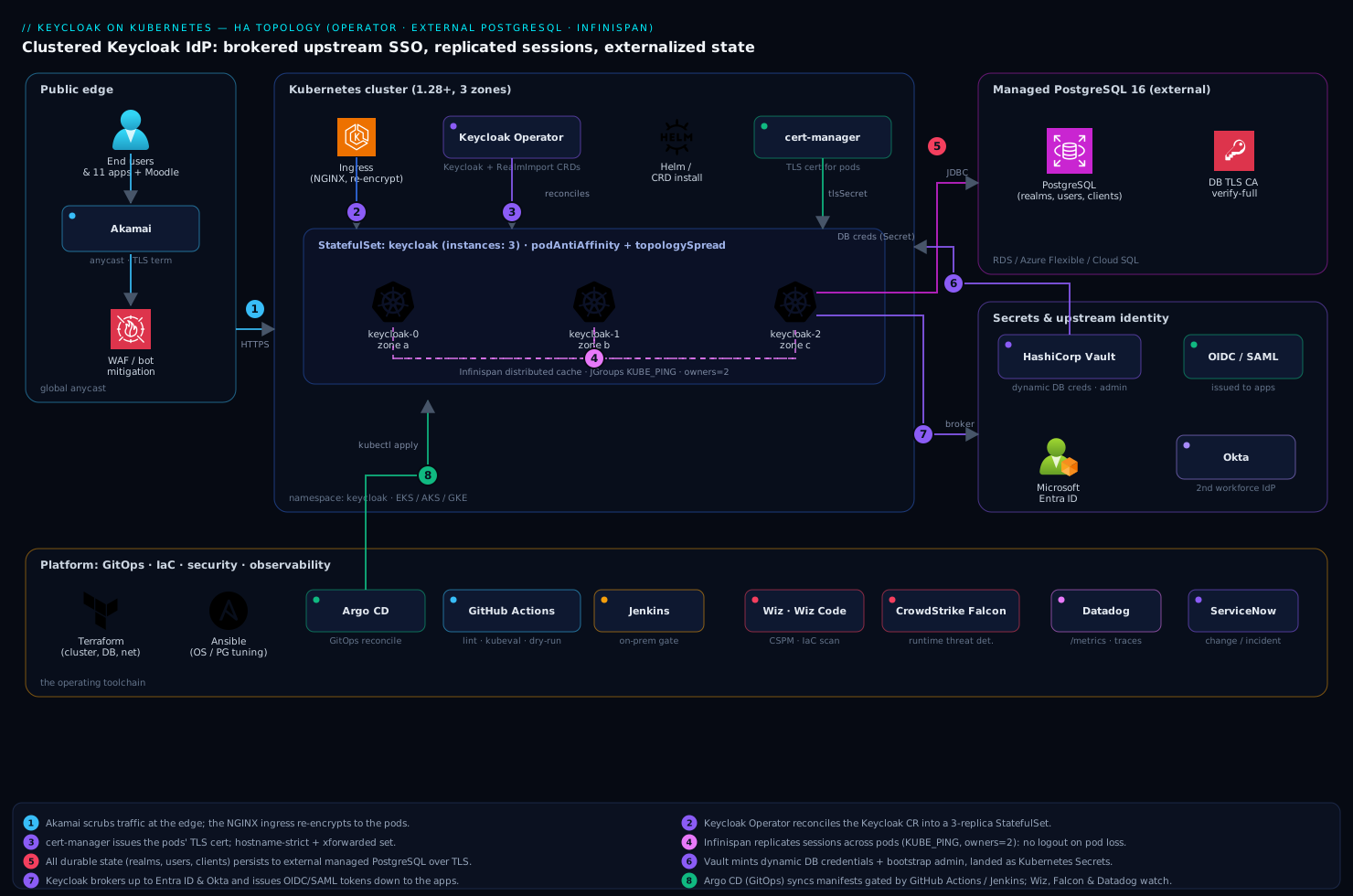
Real-world scenario
Northwind Learning is a SaaS company with eleven customer-facing apps, an internal Moodle portal, and a clutch of admin tools — about 30,000 monthly active users, peaking at ~450 logins/minute at 9am when the workforce starts its day. They ran a single self-hosted Keycloak VM with a PostgreSQL on the same box. The platform team is five engineers; the IdP had been “fine” for two years, which is exactly why no one had hardened it.
The incident that forced the rebuild: the database underwent an unplanned restart during a storage maintenance window, the single Keycloak VM’s connection pool went stale, and Keycloak crashed trying to reconnect. Because the database and Keycloak were on the same VM, the restart took both. For forty minutes, no one could log into anything — not the customer apps, not Moodle, and critically not the team’s own dashboards. 30,000 users were locked out simultaneously. The post-incident review produced a one-line mandate: the IdP must survive a node loss and a database failover without dropping sessions, and its database must not share fate with it.
The team built exactly this deployment. They provisioned a managed PostgreSQL 16 Flexible Server with zone-redundant HA (its own failover, independent of the cluster), a three-node AKS cluster across three zones, and deployed Keycloak via the operator with the Keycloak CR shown above — three pods, owners=2 distributed cache, KUBE_PING discovery, hostname https://id.northwind.example, re-encryption ingress. They sized the connection pool at poolMaxSize: 20 against the database’s max_connections of 200 (60 peak Keycloak connections, comfortable headroom). Realms, the eleven app clients, and the Entra ID broker came in via KeycloakRealmImport under Argo CD.
The first validation was the one that mattered: they logged in, captured the session cookie, ran kubectl delete pod keycloak-0, and re-hit the site — still logged in, served by keycloak-1, which held the second copy of the session. The JGroups view in the logs showed the cluster shrink from three to two members and rebalance in under two seconds. They repeated it for a simulated zonal outage by cordoning a zone’s node — two pods kept serving, login latency p95 ticked from 240ms to 310ms during rebalancing, then settled.
Two months later the real test came: the managed database performed an automatic failover during a planned maintenance event. The Keycloak pods’ connection pools saw the brief blip, readiness flipped red for ~8 seconds on all three pods (so the ingress held requests rather than erroring), the pools reconnected to the failed-over database, readiness went green, and not a single user was logged out — the sessions were in the Infinispan cache the whole time, untouched by the database event. Total user-visible impact: a few seconds of slightly delayed logins. The forty-minute outage that started the project would now be a non-event. The lesson on the wall: “Stateful where it counts, stateless where it scales, session-coherent across pods — and the database is a separate service, not a roommate.”
The before/after, because the contrast is the whole argument:
| Dimension | Before (single VM) | After (operator + external DB + Infinispan) |
|---|---|---|
| Replicas | 1 | 3 across 3 zones |
| Database | On the same VM | Managed PostgreSQL 16, zone-redundant HA |
| Failure coupling | DB restart kills IdP | DB and IdP fail independently |
| Pod loss impact | Total outage + logout | No outage, no logout (owners=2) |
| DB failover impact | IdP crash (40 min) | ~8s readiness blip, zero logouts |
| Config management | Click-ops in admin console | KeycloakRealmImport under Argo CD |
| Worst incident | 40-min lockout of 30,000 users | A few seconds of delayed logins |
Advantages and disadvantages
The operator-plus-external-database-plus-distributed-cache model is the right one for an enterprise IdP, but it is genuinely more complex than a single pod, and the complexity is the cost of the properties it buys. Weigh it honestly:
| Advantages (why this model is worth it) | Disadvantages (why it costs you) |
|---|---|
Survives pod loss and zonal loss with no logout (owners=2 + zone spread) |
Three storage/discovery subsystems to get right (DB, cache, JGroups) instead of one process |
| Database fails independently of the IdP — no shared fate | An external managed database is a separate (billed, operated) dependency |
| Operator gives a declarative, reconciled lifecycle — no hand-rolled StatefulSet drift | Operator + server are a versioned pair you must bump together carefully |
Realms/clients/brokers are version-controlled (KeycloakRealmImport) |
Realm import manages config, not user data — restore still needs the DB |
| Scales horizontally for login throughput | Scaling adds JGroups replication traffic and DB connections — must size the pool |
| Hostname/TLS/proxy contract, once correct, is stable and explicit | That contract is unforgiving — the #1 source of “it worked locally” failures |
| Infinispan replication means no sticky sessions needed at the LB | Cache misconfiguration fails silently (intermittent logins), hard to spot without the JGroups view |
Standard observability surface (/metrics, traces) |
You must actually wire and watch it — cluster-size drift is the early warning you’ll otherwise miss |
The model is right for any organization consolidating authentication onto a self-hosted IdP that must not be a single point of failure — which is most organizations past a handful of apps. It is overkill for a hobby project or a single internal tool with five users and no uptime requirement; there a single pod with an external (but modest) database is fine. The disadvantages are all manageable — but only if you know they exist, which is the entire point of the deep sections above. The two that bite hardest in practice are the silent cache-clustering failure (mitigated by always checking the JGroups view) and the hostname/proxy contract (mitigated by the Step 5 table); get those two right and the rest is mechanical.
Hands-on lab
This lab stands up the full HA deployment end to end on a real cluster, proves session survival by killing a pod mid-session, then tears it down cleanly — leaving the external database untouched, which is the whole point of externalizing it. Budget ~45 minutes. You need a Kubernetes 1.28+ cluster with ≥3 nodes across zones, cert-manager and NGINX ingress installed, and a reachable managed PostgreSQL 16 with a keycloak database and role. Where a managed Postgres isn’t available for a throwaway lab, Step 2 shows an in-cluster Postgres for the lab only (never for production — it defeats the external-DB property).
Step 1 — Namespace, variables, and operator.
export NS=keycloak
export VERSION=26.0.5
export KC_HOST=id.lab.example.com
kubectl create namespace $NS

kubectl apply -n $NS -f \
  https://raw.githubusercontent.com/keycloak/keycloak-k8s-resources/${VERSION}/kubernetes/keycloaks.k8s.keycloak.org-v1.yml
kubectl apply -n $NS -f \
  https://raw.githubusercontent.com/keycloak/keycloak-k8s-resources/${VERSION}/kubernetes/keycloakrealmimports.k8s.keycloak.org-v1.yml
kubectl apply -n $NS -f \
  https://raw.githubusercontent.com/keycloak/keycloak-k8s-resources/${VERSION}/kubernetes/kubernetes.yml

kubectl rollout status deployment/keycloak-operator -n $NS --timeout=120s
Expected: deployment "keycloak-operator" successfully rolled out. Verify the CRDs:
kubectl get crd | grep keycloak.org
# keycloaks.k8s.keycloak.org and keycloakrealmimports.k8s.keycloak.org listed
Step 2 — Database and TLS prerequisites. With a managed Postgres, create the secret pointing at it. For a lab-only in-cluster Postgres (NOT production), a minimal Deployment works; the point is the external contract, which a managed DB satisfies. Then create the credential secret and the server TLS:
# Credential secret consumed by the Keycloak CR (managed DB shown)
kubectl create secret generic keycloak-db -n $NS \
  --from-literal=username=keycloak \
  --from-literal=password='<your-db-password>'

# Self-signed issuer + cert for the lab (use a real ClusterIssuer in prod)
cat <<'EOF' | kubectl apply -n $NS -f -
apiVersion: cert-manager.io/v1
kind: Issuer
metadata: { name: lab-selfsigned }
spec: { selfSigned: {} }
EOF

cat <<EOF | kubectl apply -n $NS -f -
apiVersion: cert-manager.io/v1
kind: Certificate
metadata: { name: keycloak-tls }
spec:
  secretName: keycloak-tls
  dnsNames: [ "$KC_HOST" ]
  issuerRef: { name: lab-selfsigned, kind: Issuer }
EOF

kubectl get certificate -n $NS keycloak-tls -w   # wait READY=True, Ctrl-C
Expected: keycloak-tls True keycloak-tls.
Step 3 — Apply the HA Keycloak CR. Point db.host at your database. This uses the operator’s built-in kubernetes cache stack (no custom XML needed for the lab; production Step 4 overrides it for explicit owners):
cat <<EOF | kubectl apply -n $NS -f -
apiVersion: k8s.keycloak.org/v2alpha1
kind: Keycloak
metadata: { name: keycloak }
spec:
  instances: 3
  db:
    vendor: postgres
    host: <your-db-host>
    port: 5432
    database: keycloak
    usernameSecret: { name: keycloak-db, key: username }
    passwordSecret: { name: keycloak-db, key: password }
    poolMaxSize: 20
  hostname:
    hostname: https://$KC_HOST
  http:
    httpEnabled: false
  tlsSecret: keycloak-tls
  additionalOptions:
    - { name: cache-stack,      value: kubernetes }
    - { name: proxy-headers,    value: xforwarded }
    - { name: health-enabled,   value: "true" }
    - { name: metrics-enabled,  value: "true" }
EOF

kubectl rollout status statefulset/keycloak -n $NS --timeout=300s
kubectl get pods -n $NS -l app=keycloak -o wide
Expected: three keycloak-0/1/2 pods Running, ideally on different nodes/zones.
Step 4 — Prove the cluster formed (the critical check). The JGroups cluster view must list all three members. This is the single most important validation in the whole lab:
kubectl logs -n $NS keycloak-0 -c keycloak | grep -i "ISPN000094\|received new\|view"
# Expect a line like: ISPN000094: Received new cluster view ... [keycloak-0|2] (3) {keycloak-0, keycloak-1, keycloak-2}
If you see (1) (one member) instead of (3), clustering failed — jump to the troubleshooting playbook (cache split-brain). Confirm health on every pod:
for p in $(kubectl get pods -n $NS -l app=keycloak -o name); do
  echo -n "$p ready: "
  kubectl exec -n $NS $p -c keycloak -- \
    curl -sk https://localhost:9000/health/ready | jq -r .status
done   # expect "UP" x3
Step 5 — Expose via ingress and confirm discovery.
cat <<EOF | kubectl apply -n $NS -f -
apiVersion: networking.k8s.io/v1
kind: Ingress
metadata:
  name: keycloak
  annotations:
    nginx.ingress.kubernetes.io/backend-protocol: "HTTPS"
    nginx.ingress.kubernetes.io/proxy-buffer-size: "16k"
spec:
  ingressClassName: nginx
  tls: [ { hosts: [ "$KC_HOST" ], secretName: keycloak-tls } ]
  rules:
    - host: $KC_HOST
      http:
        paths:
          - { path: /, pathType: Prefix, backend: { service: { name: keycloak-service, port: { number: 8443 } } } }
EOF

# Point KC_HOST at the ingress IP (add to /etc/hosts for the lab), then:
curl -sk https://$KC_HOST/realms/master/.well-known/openid-configuration | jq .issuer
# Expect: "https://id.lab.example.com/realms/master"
The issuer matching your hostname proves the hostname/proxy contract is correct — if it shows the pod address or localhost, revisit hostname and proxy-headers.
Step 6 — The session-survival test (the payoff). Log in to the admin console, then kill the pod and prove you stay logged in:
# 1. Get the bootstrap admin password the operator generated
kubectl get secret keycloak-initial-admin -n $NS \
  -o jsonpath='{.data.password}' | base64 -d; echo

# 2. In a browser, log in at https://$KC_HOST/admin (user: temp-admin or 'admin')
#    Keep the tab open and logged in.

# 3. Identify which pod is serving and delete it
kubectl delete pod keycloak-0 -n $NS

# 4. Reload the admin console tab. You remain logged in — another pod
#    (keycloak-1 or -2) held the second owners copy of your session.

# 5. Watch the cluster view shrink then reform as the pod restarts
kubectl logs -n $NS keycloak-1 -c keycloak | grep -i "ISPN000094" | tail -3
# Expect a view dropping to (2) then returning to (3) as keycloak-0 rejoins
Staying logged in through the pod deletion is the proof that Infinispan replication works and the deployment is genuinely HA. The validation summary — what each step proved:
| Step | What you did | What it proves |
|---|---|---|
| 3 | Applied the 3-replica CR with external DB | Operator builds the HA StatefulSet from one object |
| 4 | Checked the JGroups view shows (3) | The pods formed one cluster — not 3 isolated caches |
| 4 | /health/ready = UP on all 3 |
DB reachable, caches joined, ready to serve |
| 5 | issuer matches the public hostname |
Hostname/proxy contract is correct |
| 6 | Killed a pod, stayed logged in | owners=2 replication = no logout on pod loss (true HA) |
Step 7 — Teardown (database untouched).
kubectl delete keycloakrealmimport --all -n $NS --ignore-not-found
kubectl delete keycloak keycloak -n $NS            # removes StatefulSet, Services
kubectl delete ingress keycloak -n $NS
kubectl delete certificate keycloak-tls -n $NS
kubectl delete secret keycloak-db keycloak-tls -n $NS
kubectl delete -n $NS -f \
  https://raw.githubusercontent.com/keycloak/keycloak-k8s-resources/${VERSION}/kubernetes/kubernetes.yml
kubectl delete namespace $NS
# The external PostgreSQL and its data are deliberately NOT deleted —
# recreate the CR and you land back exactly where you were.
Because all durable state is in PostgreSQL, deleting every pod and recreating the CR lands you back exactly where you were — the realm, users, and clients are intact. That property — that the compute is disposable and the data persists externally — is the entire reason for this architecture. Take a pg_dump before any real teardown regardless.
Common mistakes & troubleshooting
This is the playbook — the three failure classes that actually bite (cache split-brain, database, hostname/proxy) plus the operational traps around them. First a scannable table, then the full confirm-and-fix detail for the ones that hurt most.
| # | Symptom | Root cause | Confirm (exact command) | Fix |
|---|---|---|---|---|
| 1 | Intermittent “cookie not found” / “you took too long to log in” for a random fraction of logins | Cache split-brain — pods in isolated single-member clusters | kubectl logs keycloak-0 -c keycloak | grep ISPN000094 shows (1) not (3) |
Fix KUBE_PING discovery: cache-stack: kubernetes, RBAC for pod list, correct labels |
| 2 | Logins fail entirely; pods Running but /health/ready = DOWN |
Database unreachable (network path, credentials, TLS) | kubectl exec keycloak-0 -c keycloak -- curl -sk https://localhost:9000/health/ready = DOWN; pod logs show JDBC error |
Open SG/NSG to 5432; fix creds secret; mount DB CA |
| 3 | Every redirect/issuer points at localhost:8443 or the pod IP; OIDC clients reject the issuer |
Hostname/proxy misconfiguration | curl -sk https://$HOST/realms/<r>/.well-known/openid-configuration | jq .issuer ≠ public URL |
Set hostname, proxy-headers: xforwarded, hostname-strict: true |
| 4 | Pods crashloop; logs show FATAL: too many connections |
DB connection-pool exhaustion (pods × pool > max_connections) |
Postgres SELECT count(*) FROM pg_stat_activity; near max_connections |
Lower poolMaxSize; raise DB max_connections; add PgBouncer |
| 5 | Sessions lost when a pod is deleted (user logged out) | owners=1 or local cache (no replication) |
Custom cache XML shows owners="1" or cache-stack: local |
Set owners="2" distributed caches; cache-stack: kubernetes |
| 6 | One pod never joins the cluster; view stuck at (2) of 3 |
Pod can’t bind JGroups port 7800 / network policy blocks it | kubectl logs <pod> -c keycloak | grep -i jgroups; check NetworkPolicy |
Allow intra-namespace 7800/tcp; fix bind interface |
| 7 | KUBE_PING fails: logs show Forbidden listing pods |
ServiceAccount lacks get/list on pods |
kubectl auth can-i list pods --as=system:serviceaccount:keycloak:keycloak -n keycloak = no |
Grant the SA pod get/list (operator usually does; custom SA breaks it) |
| 8 | Admin console loads blank / JS 404s behind the proxy | Proxy buffer too small or wrong forwarded headers | Browser devtools show truncated responses; proxy-buffer-size default |
Bump proxy-buffer-size: 16k; set proxy-headers correctly |
| 9 | First boot hangs/crashes; liveness kills the pod | Schema migration on fresh DB exceeds liveness budget | kubectl logs keycloak-0 -c keycloak | grep -i liquibase; pod restarts mid-migration |
Raise startup-probe budget; let migration finish before liveness |
| 10 | Login latency spikes, then settles, every time a pod restarts | Infinispan rebalancing after view change (expected, but tune) | Correlate ISPN000094 view changes with latency in metrics |
Normal; reduce by stable pods, adequate memory, fewer needless restarts |
| 11 | TLS connection to Postgres fails with cert-verify error | DB CA not mounted but sslmode=verify-full requested |
Pod logs: unable to find valid certification path |
Mount db-ca ConfigMap as root.crt; or fix sslmode |
| 12 | All three pods land in one zone; a zonal outage takes the IdP | Missing topologySpreadConstraints |
kubectl get pods -o wide shows same zone |
Add the zone spread constraint (Step 4 CR) |
The expanded detail for the three core failure classes:
1 / 5 / 6 / 7 — Cache split-brain (the silent killer). This is the failure that looks like a flaky application and is actually a clustering misconfiguration. When pods don’t discover each other, each runs an isolated Infinispan cluster with its own local copy of the auth-session cache. A login that starts on pod A writes its authentication session locally; the OIDC callback lands on pod B, which has never seen that session, and the login fails — for a random fraction of users (those whose two requests hit different pods), with an opaque error, impossible to reproduce on demand.
Confirm: the JGroups view is the truth. kubectl logs -n keycloak keycloak-0 -c keycloak | grep ISPN000094 must show (3) and all three member names. (1) means this pod is alone. Also check the SA can list pods (item 7) and the JGroups port isn’t blocked (item 6).
Fix: ensure cache-stack: kubernetes (or the custom XML’s KUBE_PING stack), the discovery labels match the pods’ labels (app=keycloak), the ServiceAccount has get/list on pods in the namespace, and no NetworkPolicy blocks intra-namespace 7800/tcp. The operator wires the RBAC and labels by default, so this usually breaks when someone introduces a restrictive NetworkPolicy, a custom ServiceAccount, or a hand-edited cache XML.
# The three checks that localize a split-brain
kubectl logs -n keycloak keycloak-0 -c keycloak | grep ISPN000094 | tail -1
kubectl auth can-i list pods --as=system:serviceaccount:keycloak:keycloak -n keycloak
kubectl get networkpolicy -n keycloak   # any policy blocking 7800/tcp intra-namespace?
2 / 4 / 11 — Database failures. Two distinct database problems present similarly (logins fail, readiness red) but have opposite fixes. Unreachable (item 2): the pod can’t open any connection — wrong host, blocked security group, bad credentials, or a TLS-verify failure (item 11) because the CA isn’t mounted. Exhausted (item 4): connections open fine until the pool count across all pods exceeds the database’s max_connections, then new connections get FATAL: too many connections and pods crashloop under load.
Confirm: for reachability, exec into a pod and check /health/ready and read the JDBC error in the logs; for exhaustion, query the database directly: SELECT count(*), state FROM pg_stat_activity GROUP BY state; and compare to SHOW max_connections;.
Fix: reachability → open the network path to 5432, correct the keycloak-db secret, mount the db-ca ConfigMap for verified TLS. Exhaustion → lower poolMaxSize so pods × poolMaxSize plus reserve fits under max_connections, raise max_connections on the managed instance if the SKU allows, or front the database with PgBouncer in transaction-pooling mode so many Keycloak connections multiplex onto few backend connections. The same connection-pool dynamics, from the database’s side, are dissected in Troubleshooting Azure Database MySQL/Postgres connection-pool exhaustion.
3 / 8 — Hostname and proxy misconfiguration. The most common Keycloak-on-Kubernetes failure, and pure configuration. Behind an ingress, the pod sees the proxy’s address and scheme, not the user’s. Without proxy-headers, Keycloak builds every absolute URL from that internal view — so the issuer in tokens, redirect URLs, and the admin console’s asset URLs point at the wrong host (often localhost:8443 or a pod IP). OIDC clients then reject the token because its issuer doesn’t match what they expect, and the admin console fails to load its JavaScript.
Confirm: curl -sk https://$HOST/realms/<realm>/.well-known/openid-configuration | jq .issuer — it must equal your public URL. If it shows anything else, the contract is broken. For the blank admin console (item 8), browser devtools show truncated or 404’d asset responses.
Fix: set hostname: https://id.example.com to the real public URL, proxy-headers: xforwarded (or forwarded if your proxy emits RFC 7239), hostname-strict: true, and bump the ingress proxy-buffer-size to 16k for the large headers. Verify the ingress actually forwards X-Forwarded-Proto: https — if it strips it, Keycloak thinks the request was plaintext and builds http:// URLs.
Best practices
- Always check the JGroups cluster view after any change.
grep ISPN000094showing your full replica count is the single most important health signal. A view smaller than your replica count is the earliest sign of the silent login-failure disease. - Externalize the database, always. The IdP and its data must fail independently. Use a managed PostgreSQL with its own multi-AZ failover; never put the database on a PersistentVolume in the same cluster for production.
- Set
owners=2(or higher) on the session caches. This is what makes a pod loss survivable without logout.owners=1gives you no redundancy and silently loses sessions on any pod restart. - Spread pods across availability zones.
topologySpreadConstraintsontopology.kubernetes.io/zoneso a single zonal outage can’t take every pod. Three replicas in one zone is not HA. - Get the hostname/proxy contract right and test it with the discovery document.
hostname,proxy-headers,hostname-strict, and the ingress buffer size — verify.well-known/openid-configurationshows the correctissuerbefore declaring victory. - Size the connection pool against
max_connections.pods × poolMaxSizeplus reserve must fit comfortably under the database’s limit, or pods crashloop under load. Add PgBouncer for high pod counts. - Pin the operator and server to the same version line, and bump them together. They are a versioned pair; an old operator may not understand a new server’s CR.
- Take and test a
pg_dumpbefore every upgrade. Schema migrations are forward-only; a tested restore is your only rollback for a failed migration. - Manage realms, clients, and brokers as
KeycloakRealmImportunder GitOps. Config drift from click-ops is unrecoverable and unauditable; declared realms are version-controlled and reviewable. - Do not add sticky sessions at the load balancer. Infinispan replication means any pod serves any session; reaching for stickiness usually masks a cache-clustering bug rather than fixing it.
- Disable the bootstrap admin after creating a real federated admin account. The temporary admin is a foothold; remove it once a proper administrative login (ideally via Entra ID) exists.
- Wire and watch the cluster-size metric. It should always equal your replica count; a drop is the earliest warning of split-brain, usually visible in metrics before any user notices.
- Keep
httpEnabled: falseand TLS end to end. No plaintext listener, re-encryption or passthrough to the pods, andproxy-headersonly when a trusted proxy is guaranteed in front of every pod.
Security notes
An internet-facing identity provider is the highest-value target in the platform, so harden it accordingly:
- Disable the bootstrap admin immediately after creating a real administrative account, ideally one federated through Entra ID so admin access itself goes through corporate SSO and MFA. Leaving
tmpadmin/the generated admin live is the classic Keycloak foothold. - No plaintext, ever. Keep
httpEnabled: falseandsslRequired: external(orall) so no plaintext listener exists and tokens never cross the wire unencrypted. Enforce a minimum TLS version at the edge. - Secrets from Vault, never in git. DB credentials, upstream IdP client secrets, and the bootstrap password are all issued by HashiCorp Vault and synced via the Vault/External Secrets operator. Prefer dynamic database credentials (short-lived leases Vault rotates) over static passwords.
- Trust forwarded headers only behind a guaranteed proxy.
proxy-headersmakes Keycloak trustX-Forwarded-*; if a pod is directly reachable, an attacker can spoof the client IP (defeating brute-force lockout) and the host (enabling phishing redirects). A NetworkPolicy must guarantee pods receive traffic only from the ingress. - Enable brute-force protection (
bruteForceProtected: true) so the cluster-wideloginFailurescache locks out credential-stuffing — and put a WAF/bot manager (Akamai) at the edge to scrub the bulk of that traffic before it reaches the cluster. - Lock down the database. The managed PostgreSQL should be reachable only from the cluster’s subnet (private endpoint / peering, never a public IP), with TLS verification on (
sslmode=verify-full+ mounted CA) so the connection can’t be MITM’d. Wiz Code gates the IaC PR to catch a publicly exposed Postgres or open security group before merge; Wiz CSPM verifies it stays private at runtime. - Scan and pin the image. Pull Keycloak from a trusted registry by digest, scan it, and run CrowdStrike Falcon on the node pool for runtime compromise.
- Least-privilege the ServiceAccount. The pods’ SA needs only
get/liston pods (forKUBE_PING) — nothing more. Don’t grant broad cluster permissions to make discovery “just work.”
The security controls and what each defends against:
| Control | Mechanism | Defends against |
|---|---|---|
| Federated admin + disabled bootstrap | Entra ID broker; remove temp admin | Standing admin foothold |
| TLS end to end | httpEnabled: false, re-encrypt/passthrough |
Credential/token interception |
| Vault dynamic DB creds | Database secrets engine | Long-lived leaked credentials |
| Proxy-only ingress + NetworkPolicy | Network isolation of pods | Header spoofing (IP/host) |
| Brute-force + WAF | bruteForceProtected, edge bot mgmt |
Credential stuffing |
| Private DB + verified TLS | Private endpoint, verify-full + CA |
DB exposure / MITM |
| Image scan + digest pin | Registry + scanner | Tampered/vulnerable images |
| Least-privilege SA | get/list pods only |
Lateral movement via the IdP SA |
Cost & sizing
The dominant cost is the managed PostgreSQL, not the pods. Size the database for the connection load and uptime requirement, and use a single zone-redundant instance rather than over-provisioning read replicas Keycloak does not use for its primary path. The three Keycloak pods are modest (1 vCPU / 1.5 GiB requested each). Resist scaling pod count for availability you already get from Infinispan replication and zone spread — scale on actual login throughput, validated in metrics.
What drives the bill and how to right-size each line:
| Cost driver | What you pay for | Rough INR / month | Right-sizing lever |
|---|---|---|---|
| Managed PostgreSQL (zone-redundant HA) | The external durable store + failover | ~₹18,000–35,000 | Match SKU to connection load + IOPS; HA tier only where uptime demands |
| 3× Keycloak pods (1 vCPU / 1.5 GiB) | Compute on the existing cluster | (cluster cost; ~3 small pods) | Scale on login rate, not for HA; right-size requests/limits |
| Ingress / load balancer | Public entry + TLS | ~₹2,000–4,000 | Shared with other services on the cluster |
| Edge CDN/WAF (Akamai) | TLS termination, bot/WAF scrubbing | Plan-dependent | Shared platform contract; absorbs attack traffic |
| Observability (metrics + traces) | Per-host / per-GB ingestion | ~₹1,000–3,000 | Sample high-cardinality traces; alert on the few signals that predict outages |
| Backups (snapshots / PITR) | Storage of DB backups | ~₹500–2,000 | Retention tuned to RPO; logical dumps on demand for upgrades |
Two sizing notes that save money. First, the database is the line item that buys the independent-failure property the whole project exists for — externalizing it means paying for it independently, but that is the point; do not “save money” by collapsing it back into the cluster. Second, pod count is a throughput dial, not an availability dial — three pods across three zones is already HA, so adding pods to “be safer” just burns cluster capacity and DB connections. The cheapest correct configuration is three small pods plus a right-sized managed database, then scale the pods only when measured login throughput demands it. Reserve or commit-discount both the database and the node pool, and let ServiceNow change records tie each scale-up to an approved capacity request so growth stays accountable.
Interview & exam questions
1. Why does Keycloak need both an external database and a distributed cache — why not just one store? They hold different state with different requirements. The database holds durable state (realms, users, clients, offline tokens) that must survive everything and be the source of truth. The distributed cache (Infinispan) holds hot, transient session state (online sessions, in-progress logins) that must be shared across pods at memory speed for HA. Putting hot session state only in the database would be too slow and chatty; putting durable state only in the cache would lose it on a full cluster restart. The split is deliberate.
2. A user gets an intermittent “cookie not found” error during login, for a random fraction of attempts. What’s the most likely cause? Cache split-brain — the Keycloak pods are not in one Infinispan cluster, so each holds an isolated copy of the authentication-session cache. A login that starts on pod A and whose callback lands on pod B fails because B never saw the session. Confirm with the JGroups view (grep ISPN000094) showing (1) instead of the full replica count; fix the KUBE_PING discovery (cache stack, RBAC, labels, port).
3. What does owners=2 on an Infinispan distributed cache buy you, and what’s the trade-off? It keeps two copies of every cache entry on different pods, so losing one pod loses no sessions — the surviving owner serves the request. The trade-off is more memory (two copies) and more replication traffic than owners=1. For three pods it’s the standard choice: redundancy with one pod to spare, without the full memory cost of replicating everything to every pod.
4. How does JGroups KUBE_PING discover peers, and what permission does it require? Each pod queries the Kubernetes API for other pods matching a label selector (e.g. app=keycloak) in the namespace, and forms a JGroups cluster with them. It requires the pods’ ServiceAccount to have get/list on pods in the namespace. The operator grants this by default; a restrictive custom ServiceAccount or PodSecurity policy silently breaks discovery, leaving isolated single-member clusters.
5. You’re behind an NGINX ingress and every token’s issuer shows https://localhost:8443. What’s wrong and how do you fix it? The hostname/proxy contract is misconfigured. The pod sees the proxy’s internal address, not the user’s, and without trusting forwarded headers it builds URLs from that. Set hostname to the real public URL, proxy-headers: xforwarded so Keycloak trusts X-Forwarded-Proto/Host, and hostname-strict: true. Verify by checking .well-known/openid-configuration shows the correct issuer.
6. Three Keycloak pods at poolMaxSize: 20 connect to a managed Postgres with max_connections=100. Is this safe? It’s borderline. Peak Keycloak connections are 3 × 20 = 60, plus the provider’s reserve (~15) and any migration/monitoring connections. That fits under 100 but leaves little headroom for a scale-up to more pods or a connection spike. Either keep pods at 3 and the pool at 20, raise max_connections, or add PgBouncer so many Keycloak connections multiplex onto fewer backend ones.
7. Why must you take a database backup before a Keycloak version upgrade? The new version runs a schema migration on first boot that is forward-only — you cannot point an older Keycloak at a database migrated by a newer one. If the migration fails or the upgrade goes badly, your only rollback is restoring the pre-upgrade database from a backup. A tested pg_dump (or PITR point) is therefore the gate for any major version bump.
8. What’s the difference between Keycloak’s /health/live and /health/ready, and why does it matter on Kubernetes? /health/live reports the process is alive and not deadlocked (drives the liveness probe → restart on failure); /health/ready reports the pod can actually serve (DB reachable, caches joined) and drives the readiness probe → removal from the Service on failure. The distinction prevents self-inflicted outages: a pod temporarily not-ready (DB blip, cache rejoining) should be pulled from rotation, not killed — killing it slows recovery.
9. Do you need sticky sessions (session affinity) at the load balancer for HA Keycloak? Why or why not? No. The Infinispan distributed cache means any pod can serve any session, so the load balancer can spread requests freely. Adding stickiness is unnecessary and is a common anti-pattern: teams add it to “fix” intermittent login failures, which masks an underlying cache-clustering bug instead of fixing it. The correct fix is to make the cache cluster form properly.
10. A managed database failover happens. Why might HA Keycloak survive it with zero logouts? Online session state lives in the Infinispan cache, not the database, so it’s untouched by a database event. During the failover the pools briefly can’t reach the DB, readiness flips red (so the ingress holds requests rather than erroring), the pools reconnect to the failed-over instance, and readiness returns green. The sessions were in memory the whole time, so users aren’t logged out — they see at most a few seconds of delayed logins.
11. What state would you lose if you ran HA Keycloak with owners=1 and deleted a pod? Every session entry whose single copy lived on the deleted pod — those users are logged out and any in-progress logins on that pod fail. owners=1 means one copy per entry with no redundancy, so a pod loss takes that pod’s share of the sessions with it. This is why owners=2 (or higher) is required for the “no logout on pod loss” property.
12. Why deploy Keycloak with the operator instead of a hand-written StatefulSet? The operator gives a declarative, reconciled lifecycle: you describe desired state in a Keycloak CR (instances, image, db, hostname, cache) and the operator builds and continuously reconciles the StatefulSet, Services, and configuration to match — handling rolling updates, default cache/JGroups wiring, and status reporting. A hand-rolled StatefulSet drifts, lacks that reconciliation, and forces you to re-derive the cache and discovery configuration the operator already gets right.
These map most directly to the CKA/CKAD (StatefulSets, probes, Services, RBAC, NetworkPolicy) and to vendor identity/IAM material; the brokering and OIDC depth aligns with general OAuth/OIDC and identity-platform knowledge. A compact mapping:
| Question theme | Aligns with |
|---|---|
| StatefulSets, probes, RBAC, NetworkPolicy | CKA / CKAD |
| OIDC issuer, discovery, brokering | OAuth 2.0 / OIDC fundamentals |
| Distributed cache, JGroups, HA design | Distributed-systems / platform engineering |
| External DB, pooling, failover | Database operations / SRE |
| Secrets, least privilege, TLS | Security / identity-platform |
Quick check
- You change the cache config and want to confirm the three pods actually formed one cluster. What exact log line do you grep for, and what must it show?
- True or false: scaling from 3 to 6 Keycloak pods makes the deployment “more highly available.”
- An OIDC client rejects Keycloak’s tokens because the
issueris wrong. Name the two CR options most likely misconfigured. - Your pods crashloop with
FATAL: too many connections. What’s the relationship you violated, and two ways to fix it? - Why can a managed database failover happen with zero user logouts on this deployment?
Answers
- Grep for
ISPN000094(the JGroups “Received new cluster view” line); it must show your full replica count —(3)with all three member names.(1)means the pod is in an isolated single-member cluster (split-brain). - False. Three pods across three zones is already HA (survives any single pod or zone loss with
owners=2). Going to six adds throughput and a little cache headroom, plus more JGroups traffic and DB connections — it does not meaningfully increase availability. Scale on login rate, not for HA. hostname(must be the real public URL) andproxy-headers(must bexforwarded/forwardedso Keycloak trusts the proxy’s forwarded scheme/host). Withhostname-strict: trueand these set, theissuerresolves correctly; confirm via.well-known/openid-configuration.- You violated
pods × poolMaxSize(plus reserve) ≤ databasemax_connections. Fix by loweringpoolMaxSize(or pod count) so the total fits, raisingmax_connectionson the managed instance, or adding PgBouncer in transaction-pooling mode to multiplex many Keycloak connections onto few backend ones. - Online session state lives in the Infinispan cache, not the database, so a DB event doesn’t touch it. During failover readiness flips red (the ingress holds requests), the pools reconnect to the failed-over instance, and readiness returns green — sessions were in memory throughout, so no one is logged out.
Glossary
- Keycloak — open-source identity and access management server (OIDC provider, SAML IdP, OAuth authorization server, user store, identity broker); CNCF graduated.
- Keycloak Operator — the Kubernetes controller that reconciles the
KeycloakandKeycloakRealmImportCRs into StatefulSets, Services, and server configuration. KeycloakCR — the custom resource describing the desired server deployment (instances, image, database, hostname, TLS, cache); the single object you edit to change the cluster.KeycloakRealmImportCR — the custom resource that imports a realm (and its clients, IdP brokers, roles) declaratively on startup.- Realm — an isolated tenant in Keycloak with its own users, clients, roles, and configuration; the unit of multi-tenancy.
- Client — an application that delegates authentication to Keycloak via OIDC or SAML.
- Identity brokering — Keycloak federating up to another IdP (Entra ID, Okta): it authenticates the user at the upstream IdP and issues its own token downstream.
- External PostgreSQL — the managed relational database outside the cluster that holds Keycloak’s durable state, so the IdP and its data fail independently.
- Durable state — realms, users, clients, roles, and offline sessions; lives in the database and is the source of truth.
- Infinispan — the distributed in-memory data grid embedded in each Keycloak pod that holds hot session state replicated across the cluster.
- JGroups — the group-communication library under Infinispan that forms the cluster and carries replication traffic between pods.
KUBE_PING— the JGroups discovery protocol for Kubernetes; each pod finds peers by querying the Kubernetes API for pods matching a label selector (thekubernetescache stack).- Distributed cache — an Infinispan cache that partitions entries across the cluster, keeping
ownerscopies of each. owners— the number of copies Infinispan keeps of each cache entry;owners=2lets the cluster survive one pod loss without losing sessions.- Cluster view — the JGroups list of current cluster members, logged as
ISPN000094; the canary that clustering actually formed. - Split-brain — the failure where pods don’t discover each other and run isolated single-member clusters, causing intermittent silent login failures.
hostname— the Keycloak option setting the public base URL the server advertises in tokens, redirects, and discovery documents.proxy-headers— the Keycloak option telling it which forwarded headers (xforwardedor RFC 7239forwarded) to trust from a reverse proxy.hostname-strict— the Keycloak option that enforces the configured hostname rather than inferring it from the request.- Authentication session — short-lived state tracking an in-progress login; must be shared across pods (distributed cache) or split-brain breaks logins.
- Offline session — a long-lived refresh-token session that survives a server restart; persisted in the database (and cached for speed).
- Connection pool — the bounded set of database connections each pod maintains (
poolInitialSize/poolMinSize/poolMaxSize); must fit under the database’smax_connections. - PgBouncer — a lightweight PostgreSQL connection pooler placed in front of the database to multiplex many client connections onto few backend ones.
Next steps
You can now stand up, operate, and troubleshoot an HA Keycloak on Kubernetes. Build outward:
- Next: Set up Keycloak identity brokering with OIDC group and role mapping — go deep on the upstream federation, claim mapping, and group/role propagation this build sketched in the realm import.
- Related: Deploy Okta SAML/OIDC on Kubernetes for kubectl OIDC login — the adjacent pattern of fronting cluster access itself with an IdP.
- Related: Set up External Secrets Operator with Vault and AWS Secrets on Kubernetes — make the DB and IdP secrets fully declarative and auto-rotating.
- Related: Configure PostgreSQL PITR with pgBackRest and S3 — the backup/restore depth for the external database that is now your system of record.
- Related: Deploy Argo CD with SSO, RBAC, ApplicationSets and multicluster — the GitOps engine that reconciles the Keycloak CRs and realm imports across clusters.