Quick take: CI/CD is the assembly line of software. Every commit is built, tested and deployed automatically. Done well, it turns risky releases into routine, frequent events.
A small product team released code once a month. Each release required a manual checklist, a war room and several rollbacks. After moving to a CI/CD pipeline, they released multiple times a day with confidence. The same checks happened automatically, and rollbacks took one click.
The problem it solves
Manual releases are slow, error-prone and stressful. CI/CD solves this by automating the path from code commit to production, catching issues early and making deployment repeatable.
Core concepts
| Concept | What it means |
|---|---|
| Continuous Integration | Merging code frequently and running automated tests on every change. |
| Continuous Delivery | Automatically preparing releases so they can be deployed at any time. |
| Continuous Deployment | Automatically deploying every passing change to production. |
| Pipeline | The sequence of stages code moves through. |
| Artifact | The deployable output of the build stage. |
| Stage | A phase of the pipeline, such as build, test or deploy. |
Architecture
How it works
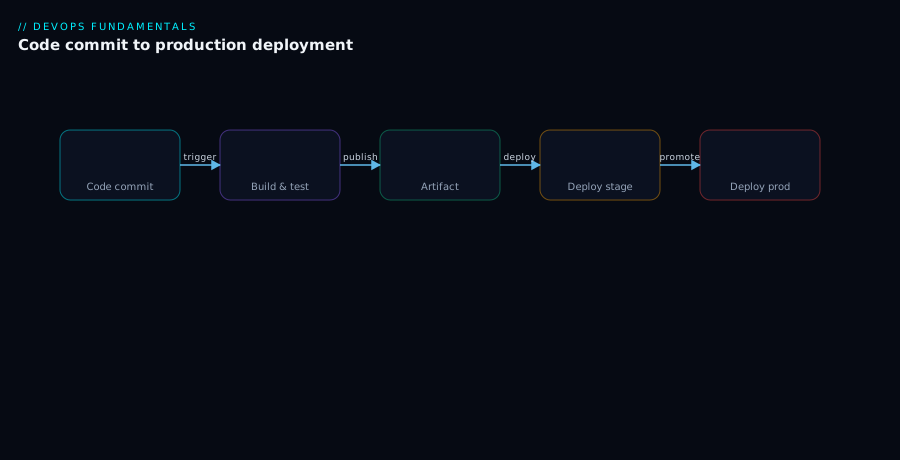
A developer pushes code. The pipeline triggers, runs unit tests, builds an artifact, deploys to a staging environment, runs integration tests and finally promotes to production if everything passes.
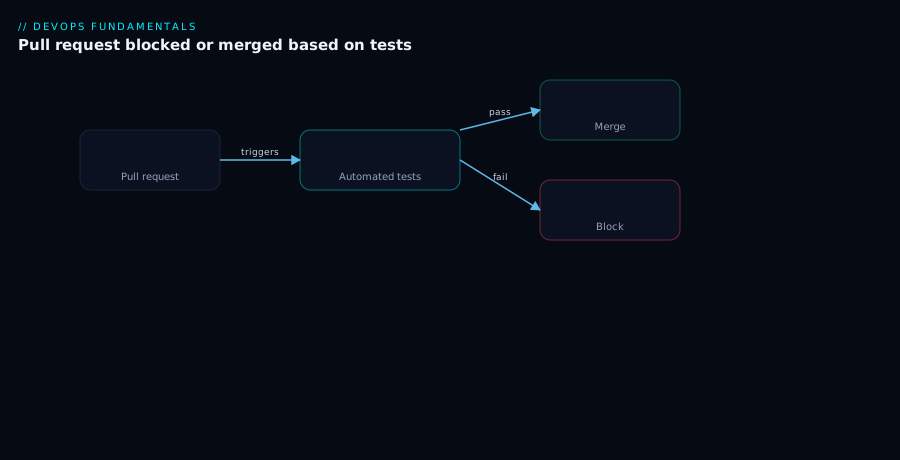
Pull requests are the first gate. If tests fail, the merge is blocked. This keeps broken code out of the main branch.
Real-world scenario
The product team’s pipeline:
- Developer opens a pull request.
- Automated linting and unit tests run.
- On merge, the pipeline builds a Docker image.
- The image is scanned for vulnerabilities.
- The image deploys to staging and runs smoke tests.
- A manual approval gate allows production promotion.
- Production deployment uses a canary strategy.
Releases became predictable and less stressful.
Advantages
- Faster feedback for developers.
- Lower risk through smaller, more frequent changes.
- Repeatable deployments with no manual steps.
- Higher quality because tests run on every change.
Disadvantages
- Up-front investment to build and maintain pipelines.
- Flaky tests can slow the team down.
- Tooling complexity grows with pipelines.
- False confidence if coverage is poor.
When to use it (and when not)
Use CI/CD for any team that ships code more than occasionally. Start simple and add stages as quality improves.
Avoid over-engineering pipelines for throwaway prototypes. Do not automate deployments without tests.
Best practices
- Keep pipelines fast; slow pipelines discourage frequent commits.
- Run the fastest tests first and slower tests later.
- Treat pipeline definitions as code and version them.
- Use immutable artifacts and promote the same artifact across environments.
- Make failures visible and fix flaky tests immediately.
A good CI/CD pipeline is not just automation — it is a safety net for the whole team.