Your tenant has 40,000 users across twelve countries, and the helpdesk in Bangalore needs to reset passwords for the India business unit. The only built-in way to grant that, before you reach for Administrative Units, is to make them a User Administrator — which lets them reset passwords for everyone, including the CFO in London and the service accounts that run your pipelines. So either you over-grant (and fail your next access review), or you build a brittle relay where tier-1 staff file tickets and a central team clicks the buttons. Both are the wrong shape. The right shape is a scope: a container that holds the India users, onto which you assign the User Administrator role bounded to that container only. That container is an Administrative Unit (AU) — Entra ID’s mechanism for slicing one tenant into delegated administrative boundaries without splitting it into multiple tenants.
This article is the mental model and the design playbook for AUs. An Administrative Unit is a container inside a single Entra ID tenant that holds users, groups, and devices, and exists for one purpose: to be the scope of a scoped role assignment. You assign a directory role (Helpdesk Administrator, User Administrator, Groups Administrator, and a specific supported set) to a principal at the AU, and that principal’s powers apply only to the members of that AU — not the rest of the directory. Membership can be static (you add members by hand or by API) or dynamic (a rule like user.country -eq "IN" keeps the AU populated automatically). A hardened variant, the restricted management AU, flips the model: even tenant-level admins lose write access to its members unless they hold a role scoped to that AU — how you protect break-glass accounts and executives from the very admins who run the tenant.
By the end you will know when an AU is the right tool versus when a dynamic group or full role separation fits better; how AU-scoped roles compose with tenant-wide roles and with Azure resource RBAC (different planes that never overlap); which roles are assignable at AU scope and which are not; and how to build the whole thing — static and dynamic AUs, scoped assignments, restricted management, PIM-eligible scoped roles — with az, Microsoft Graph, and Bicep, against the real limits and the failure modes that bite on day one.
What problem this solves
In a small tenant, delegation is easy: three admins, tenant-wide roles are fine. The problem is scale plus autonomy. Once an organisation has distinct business units, regions, or subsidiaries — each wanting to run its own helpdesk and not be able to touch anyone else’s users — the flat directory-role model breaks. Entra’s built-in roles are tenant-wide by default: a Helpdesk Administrator can reset any non-admin user’s password anywhere in the directory. There is no built-in “Helpdesk Administrator for the Sales department” without a scope to bind it to.
What breaks without AUs is one of two failure modes, both common. The first is over-privilege: you grant tenant-wide roles to regional staff because it’s the only thing that works, and now your audit shows 200 people who can reset the CEO’s password. The second is the central bottleneck: you refuse to over-grant, so every routine task — a password reset, a group change, a display-name fix — flows to a small central identity team, which becomes a ticket queue and burns out. Neither is acceptable in a regulated org, and an access reviewer will flag both.
Who hits this: any tenant past a few thousand users with more than one operational team; multinationals where admin authority must follow geography; conglomerates whose subsidiaries demand operational independence inside one tenant; universities delegating per-faculty. AUs are the native answer to “let this team administer these identities and no others.” They are not a billing, network, or data-isolation boundary — but for administrative delegation inside one tenant, they are the purpose-built primitive.
To frame the whole field before the deep dive, here is the spectrum of delegation tools and where each one actually fits:
| Need | Right tool | Why not the others |
|---|---|---|
| Scope a directory role (password reset, user mgmt) to a subset of users | Administrative Unit | A security group can’t scope a role; AUs are the only in-tenant role scope below tenant |
| Grant app access / be a member-of for authorization | Security or M365 group | Groups gate app access, not admin authority over other identities |
| Auto-populate membership by attribute | Dynamic group or dynamic AU | Same rule engine; group = app access, AU = admin scope |
| Protect a few accounts from all other admins | Restricted management AU | A normal AU still lets tenant admins write; restricted blocks them |
| Time-bound, approval-gated elevation | PIM (scoped to an AU or tenant) | AUs scope what; PIM controls when/how you hold the role |
| True data + tenant isolation | Separate tenant | AUs share one directory; they isolate admin, not data |
Learning objectives
By the end of this article you can:
- Explain what an Administrative Unit is, what object types it can contain, and the single job it exists to do — being the scope of a delegated role assignment.
- Decide correctly between a static AU, a dynamic AU, a plain security group, a dynamic group, and full tenant-role separation for a given delegation requirement.
- Name which built-in directory roles are assignable at AU scope and which are tenant-only, and predict what a given scoped role can and cannot do.
- Reason about how AU-scoped roles compose with tenant-wide Entra roles and with Azure resource RBAC — three independent planes that never inherit from each other.
- Design and build static and dynamic AUs, assign scoped roles, and wire them to PIM for eligible (just-in-time) delegated administration.
- Apply restricted management AUs to protect sensitive accounts (break-glass, executives, service identities) from tenant-wide admins.
- Avoid the day-one traps: dynamic-rule attribute drift, the device-management gaps, nested-group blindness, licence requirements, and the hard object/AU limits.
Prerequisites & where this fits
You should understand Entra ID RBAC and the app-registration vs enterprise-app distinction, and how directory roles differ from Azure resource roles — the latter covered in Azure RBAC fundamentals: roles, scope, assignments. You should know what a security group is and how dynamic membership rules are authored, which the Entra ID dynamic groups membership-rules cookbook covers end to end — the AU dynamic-rule syntax is the same engine. Comfort with az in Cloud Shell and basic Microsoft Graph calls helps, since some operations here are Graph-only.
This sits in the Identity governance track, below tenant-wide role design and above day-to-day user operations. AUs are the scoping primitive; they pair with PIM for time-bound elevation (see Privileged Identity Management: PIM and PAM architecture), with access reviews to recertify who holds scoped roles, and with entitlement management when delegated access should be requestable via an access package. AUs are the boundary; those three control who gets in, for how long, and whether it’s still justified.
A quick map of which plane owns what, so you stop conflating them:
| Plane | Governs | Scope objects | Role examples | Where AUs live |
|---|---|---|---|---|
| Entra ID directory roles | Identity objects (users, groups, devices, apps) | Tenant, Administrative Unit | Helpdesk Admin, User Admin, Groups Admin | The AU is a scope here |
| Azure resource RBAC | Azure resources (VMs, storage, RGs) | Mgmt group, subscription, RG, resource | Owner, Contributor, Reader | AUs do not apply here |
| App / group membership | Access into applications | The group itself | App roles, group claims | Orthogonal to AUs |
| PIM | When a role is held | Wraps a role at any scope | Eligible vs active assignment | Can wrap an AU-scoped role |
Core concepts
Five mental models make every later decision obvious.
An AU is a scope, not a security boundary by itself. The single reason an AU exists is to be the target scope of a role assignment. On its own it does nothing — it holds members and waits to be assigned a role. The power comes from the pair (role, AU): “Helpdesk Administrator at AU India.” That principal can reset passwords for users in India and nowhere else. This is the inverse of how people first imagine it: they think the AU “restricts” users; it doesn’t — it restricts admins to a subset of users.
Membership defines the blast radius; the rule defines who maintains it. An AU’s members are the exact set a scoped admin can touch. A static AU has members you add explicitly; a dynamic AU has a membership rule — the same expression language as dynamic groups, e.g. (user.department -eq "Sales") — that Entra continuously evaluates, adding and removing members as attributes change. Static gives exact, auditable control with zero attribute dependency; dynamic gives self-maintaining scope at the cost of total reliance on attribute hygiene. You cannot mix: an AU is either static or dynamic, never both, and you cannot convert one to the other in place.
Scoped roles are real directory roles, just bounded. When you assign Helpdesk Administrator at an AU, the principal genuinely holds that role — the same permission set — but every permission is filtered to “only objects that are members of this AU.” Not every role can be scoped this way: Entra publishes a specific list of AU-assignable roles (covered below), centred on user, group, device, password, and license administration. Tenant-impacting roles like Global Administrator, Privileged Role Administrator, and Application Administrator are not AU-scopable, because their power is inherently tenant-wide.
Restricted management inverts the default trust. A normal AU is a positive scope: it grants a delegated admin power over its members while tenant-wide admins retain their usual reach. A restricted management AU is a negative fence: its members can be modified only by principals holding a role scoped to that AU — explicitly excluding tenant-wide role holders like User Administrator and most paths that would otherwise reach them. This protects break-glass accounts and VIPs from the helpdesk and from a compromised tenant-admin credential. Global Administrator keeps a narrow set of capabilities by design, so you are never fully locked out — but the everyday admin roles are fenced off.
AUs are an Entra (identity) construct only. They scope identity administration and have nothing to do with Azure resource RBAC: an AU-scoped Groups Administrator cannot touch a resource group, and a subscription Owner gets no authority over directory objects from that role. The two RBAC systems are separate planes that don’t inherit from each other in either direction.
The vocabulary in one table
Before the deep sections, pin down every moving part. The glossary repeats these for lookup; this table is the mental model side by side:
| Concept | One-line definition | Where it lives | Why it matters for delegation |
|---|---|---|---|
| Administrative Unit (AU) | A container of users/groups/devices used as a role scope | Entra directory | The only sub-tenant scope for directory roles |
| Member | A user, group, or device inside an AU | On the AU | Defines the exact blast radius of a scoped admin |
| Static AU | Members added explicitly | On the AU | Exact, auditable, attribute-independent |
| Dynamic AU | Members set by a rule (e.g. user.country -eq "IN") |
On the AU | Self-maintaining; depends on attribute hygiene |
| Scoped role assignment | A directory role assigned at an AU | Role assignment | The (role, AU) pair that actually grants power |
| AU-assignable role | A built-in role that can be scoped to an AU | Entra role catalog | Not all roles qualify; tenant roles don’t |
| Restricted management AU | An AU whose members only its scoped admins can write | On the AU | Fences VIPs/break-glass from tenant admins |
| Tenant-wide role | A role at directory scope (everyone) | Role assignment | What AUs let you avoid over-granting |
| PIM eligibility | Just-in-time activation of a (possibly scoped) role | PIM | Adds time-bound + approval to scoped admin |
| Membership type | Assigned (static) vs Dynamic |
AU property | Fixed at creation; not convertible in place |
Static vs dynamic membership: choosing the population model
The first real design decision is how an AU gets its members. The two models are not interchangeable, and picking wrong is the most common source of “the helpdesk can’t see the user they should” tickets.
A static (Assigned) AU holds exactly the members you place in it — a user, group, or device added by object ID via the portal, az, Graph, or a provisioning script. Nothing happens automatically: a new joiner does not appear in the India AU until something adds them, usually a lifecycle workflow / joiner-mover-leaver automation or HR-driven provisioning. Static AUs are exact, fully auditable (“who added this member, when”), and immune to attribute drift — but they need a maintenance process, or they silently rot.
A dynamic AU is defined by a membership rule using the same syntax as dynamic groups — e.g. (user.country -eq "IN"). Entra evaluates it continuously: set a user’s country to IN and they join automatically; change it and they leave. This self-maintains and scales to tens of thousands of users with zero per-user effort — but it is only as correct as your directory attributes. A new hire whose department is blank for a week is invisible to the Sales helpdesk for that week. There is no manual override: you cannot pin an extra member into a dynamic AU, because the rule is the single source of truth.
The decision at a glance:
| Dimension | Static (Assigned) AU | Dynamic AU |
|---|---|---|
| How members are set | Explicit add/remove (you, API, script) | Membership rule, auto-evaluated |
| Object types supported | Users, groups, devices | Users or devices (one type per rule) |
| Reacts to attribute changes | No — manual maintenance | Yes — continuously reconciled |
| Manual override possible | Yes (it’s all manual) | No — rule is the only truth |
| Audit clarity | High (“who added X”) | Rule-based (“why X qualified”) |
| Best for | Curated, slow-changing sets; mixed object types | Large, attribute-defined populations |
| Failure mode | Membership rots if no process maintains it | Blank/wrong attribute → wrong scope |
| Licence | Free for static | Entra ID P1 per affected member |
The object-type constraint is the most-missed line in that table. A dynamic rule targets one object type — a user rule builds an AU of users, a device rule an AU of devices. You cannot pull both users and devices into one dynamic AU, and dynamic AUs don’t contain groups the way a static AU can. If your scope is “all Sales users and their groups,” keep the AU static, or run a dynamic user AU and manage groups separately.
The licence line matters too. Static AUs are free. Dynamic AU membership — like dynamic groups — requires Entra ID P1 per member user. Budget P1 across the populations you scope dynamically.
Here is the most common pattern, a dynamic AU keyed on country, built three ways. First, az:
# Create a DYNAMIC administrative unit scoped to India by user.country
az rest --method POST \
  --url "https://graph.microsoft.com/v1.0/directory/administrativeUnits" \
  --headers "Content-Type=application/json" \
  --body '{
    "displayName": "India Business Unit",
    "description": "All users with country = IN; scope for the India helpdesk",
    "membershipType": "Dynamic",
    "membershipRule": "(user.country -eq \"IN\")",
    "membershipRuleProcessingState": "On"
  }'
The az rest call wraps the raw Microsoft Graph POST /directory/administrativeUnits endpoint, so the same body works if you script against Graph directly. And as Bicep, so the AU is part of your declarative identity baseline (the resource type lives under Microsoft.Graph via the Graph Bicep extension):
// Requires the Microsoft Graph Bicep extension (extension microsoftGraph)
extension microsoftGraph

resource indiaAu 'Microsoft.Graph/administrativeUnits@v1.0' = {
  displayName: 'India Business Unit'
  description: 'All users with country = IN; scope for the India helpdesk'
  membershipType: 'Dynamic'
  membershipRule: '(user.country -eq "IN")'
  membershipRuleProcessingState: 'On'
  uniqueName: 'india-business-unit'
}
A static AU is the same shape with membershipType of Assigned and no rule; you then add members explicitly (shown in the lab). The rule grammar — operators, supported properties, -match regex, -in/-notIn, nested parentheses — is identical to dynamic groups, so the dynamic groups cookbook doubles as your AU-rule reference. The patterns you’ll reach for most when scoping AUs by org shape:
| Scope intent | Rule expression | Notes |
|---|---|---|
| One country | (user.country -eq "IN") |
The classic regional helpdesk scope |
| One department | (user.department -eq "Sales") |
Per-BU delegation |
| Department and enabled | (user.department -eq "Sales") and (user.accountEnabled -eq true) |
Excludes disabled leavers from scope |
| Multiple sites | (user.physicalDeliveryOfficeName -in ["Pune","Mumbai"]) |
-in for a set of values |
| Company code (custom attr) | (user.extensionAttribute1 -eq "ACME-IN") |
Drive scope off a synced custom attribute |
| Pattern match | (user.userPrincipalName -match "@in\\..*") |
-match regex on UPN suffix |
Which roles can be scoped to an AU (and which cannot)
A scoped role assignment is only meaningful if the role is on Entra’s AU-assignable list. Assigning a non-scopable role at an AU is not allowed by the API, and assuming a role is scopable when it isn’t is a frequent design mistake — people plan to scope “Application Administrator to the Sales AU” and discover it can’t be done, because app management isn’t a per-user-subset concept.
The roles that are assignable at AU scope cluster around managing users, groups, devices, passwords, and licences for the AU’s members. The catalog can grow over time; the stable core is below, with what each lets a scoped admin do to AU members:
| AU-assignable role | What a scoped holder can do to AU members | Common use |
|---|---|---|
| Helpdesk Administrator | Reset passwords, manage some user properties (for non-admin members) | Tier-1 regional helpdesk |
| User Administrator | Create/manage/delete users, reset passwords, manage member users | Regional user lifecycle |
| Password Administrator | Reset passwords for non-admin members only | Narrow password-reset desk |
| Authentication Administrator | Manage auth methods, force re-register MFA for non-admin members | MFA/auth support desk |
| Groups Administrator | Create and manage groups that are members of the AU | Delegated group management |
| License Administrator | Assign/remove licences for member users | Per-BU licence ops |
| Privileged Authentication Administrator | Manage auth methods incl. for admin members (powerful) | Tightly held, rarely AU-scoped |
| Printer / Device-related (where applicable) | Manage device objects that are AU members | Per-site device admin |
Contrast that with the roles you cannot scope to an AU — and why, because the why is the principle:
| Tenant-only role (not AU-assignable) | Why it can’t be scoped |
|---|---|
| Global Administrator | Power is the whole tenant by definition |
| Privileged Role Administrator | Grants/changes role assignments tenant-wide |
| Application Administrator | App registrations/enterprise apps are tenant objects, not per-user |
| Conditional Access Administrator | CA policies are tenant-scoped controls |
| Security Administrator | Security posture is tenant-wide |
| Exchange / Teams / SharePoint Admin | Workload roles managed in those admin centers, not AU-scoped |
A second subtlety trips people: even an AU-scoped User Administrator cannot manage other administrators who are members of the AU. Built-in protection means most user-management roles operate only on non-administrator members — a scoped Helpdesk or User Administrator cannot reset the password of someone holding a privileged role, even if they’re in the AU. This is deliberate (it prevents privilege escalation through a delegated desk) and is why the table keeps repeating “non-admin members.” Managing admin members is Privileged Authentication Administrator territory — a role you scope very sparingly.
Assigning a scoped role with az looks like this — note you reference the AU as the directory scope of the role assignment via Graph’s roleManagement endpoint:
# Assign Helpdesk Administrator (roleDefinitionId is the well-known template GUID)
# scoped to the India AU, to a principal (e.g. the India helpdesk group's object id)
AU_ID=$(az rest --method GET \
  --url "https://graph.microsoft.com/v1.0/directory/administrativeUnits?\$filter=displayName eq 'India Business Unit'" \
  --query "value[0].id" -o tsv)

az rest --method POST \
  --url "https://graph.microsoft.com/v1.0/roleManagement/directory/roleAssignments" \
  --headers "Content-Type=application/json" \
  --body "{
    \"roleDefinitionId\": \"729827e3-9c14-49f7-bb1b-9608f156bbb8\",
    \"principalId\": \"<helpdesk-group-object-id>\",
    \"directoryScopeId\": \"/administrativeUnits/$AU_ID\"
  }"
The directoryScopeId of /administrativeUnits/<id> bounds the assignment to the AU; a tenant-wide assignment uses /. The role definition ID 729827e3-9c14-49f7-bb1b-9608f156bbb8 is the well-known, stable template ID for Helpdesk Administrator (these GUIDs are constant across all tenants). The equivalent Bicep:
extension microsoftGraph

// roleDefinitionId here is the Helpdesk Administrator template GUID
resource scopedHelpdesk 'Microsoft.Graph/roleManagement/directory/roleAssignments@v1.0' = {
  roleDefinitionId: '729827e3-9c14-49f7-bb1b-9608f156bbb8'
  principalId: helpdeskGroupObjectId
  directoryScopeId: '/administrativeUnits/${indiaAu.id}'
}
Assigning the role to a group rather than a user is the pattern you want at scale: make a role-assignable group “IN-Helpdesk”, assign the scoped role to it once, and manage people via group membership. That keeps the assignment stable and the membership churny — the right split.
How AU-scoped roles compose with tenant roles and Azure RBAC
The single biggest conceptual error is imagining these scopes inherit from one another. They do not. The composition rules below prevent both “why can they do more than I scoped?” and “why can’t they do what I granted?”.
Tenant-wide roles still apply over AU members. Assigning Helpdesk Administrator at the India AU does not remove anyone’s tenant-wide Helpdesk Administrator. A person who holds the role at the tenant can still reset passwords for India users — the AU scope is additive, granting the India desk power over India users while existing tenant admins keep their reach. AUs do not fence out tenant admins; that is the job of the restricted management variant covered next. So if your goal is “nobody outside the India team can touch India users,” a normal AU is necessary but not sufficient — you also need restricted management, or you must not hand out the tenant-wide role at all.
Scopes are a union, evaluated per object. A principal’s effective power over a given user is the union of every assignment whose scope contains that user. If Aisha holds User Administrator at both the India and APAC AUs, and a user is in both, she manages them via either path; if she holds it only at India and the user is in APAC only, she has nothing over them. Entra asks “is this target within any scope where you hold a sufficient role?” — there is no subtraction, only union.
Entra roles and Azure RBAC never cross. An AU-scoped Groups Administrator has zero authority over Azure resources; a subscription Owner has zero authority over directory objects from that role. (The famous “access management for Azure resources” toggle a Global Admin can flip is an Azure-RBAC escalation, not AU inheritance.) Keep the planes separate.
The composition rules as a quick reference:
| Question | Answer | Consequence |
|---|---|---|
| Does an AU-scoped role replace a tenant-wide one? | No — additive | Tenant admins still reach AU members |
| If two AUs both contain a user, who manages them? | Anyone scoped on either AU | Overlap = union, never intersection |
| Can a scoped Entra role touch Azure resources? | No | Different plane; design RBAC separately |
| Can a scoped admin manage admin members of the AU? | No (built-in protection) | Use Priv. Auth Admin, sparingly |
| Does a restricted-management AU block tenant admins? | Yes (the point of it) | Only AU-scoped principals can write |
| Can you scope Global Admin to an AU? | No | Tenant roles aren’t AU-assignable |
| Does a nested group inside an AU expand transitively? | No — only the direct group object is “in” the AU | Members of that group are not AU members |
That last row deserves emphasis because it surprises everyone. When you add a group to an AU, the group object is a member — its individual user members are not transitively members of the AU. A scoped User Administrator can manage the group, but cannot reset passwords for the users inside it unless those users are themselves direct members of the AU. Membership does not flow through nesting. If a desk must manage users, put the users in the AU (directly or via a dynamic user rule) — not just a group that contains them.
Restricted management AUs: fencing off VIPs and break-glass
A normal AU answers “let this team manage these users.” It does not answer “stop everyone else from managing these users.” For sensitive populations — break-glass accounts, C-suite users, the service identities behind your most critical pipelines — you often want the opposite of delegation: a fence even tenant-wide admins cannot reach over, so a compromised User Administrator credential or a well-meaning helpdesk mistake cannot reset a protected account’s MFA or password.
That is a restricted management administrative unit. Mark an AU restricted (isMemberManagementRestricted: true), and its members become writable only by principals holding a supported role scoped to that specific AU. Tenant-wide role holders — User Administrator, Helpdesk Administrator, even most paths a Global Administrator would normally use — lose write access to those members for restricted operations. The protection is member-level: it governs who can modify the member objects, not the AU container itself.
The mechanics and boundaries to know before you put break-glass accounts behind one:
| Property | Behaviour | Why it matters |
|---|---|---|
| What it restricts | Write/manage on member objects | Read is generally still broad; this fences changes |
| Who can still manage members | Only principals with a role scoped to this AU | The whole point — tenant admins are fenced out |
| Membership type | Static (Assigned) only | Dynamic + restricted is not supported |
| Global Administrator | Retains a narrow, deliberate set of capabilities | You are never permanently locked out |
| Effect on the container | You can still manage the AU object itself with tenant role | Restriction is about members, not the AU record |
| Typical members | Break-glass accounts, executives, critical service identities | Highest-value, lowest-churn objects |
| Licence | Entra ID P1 | Restricted management is a P1 capability |
Because a restricted AU must be static, you curate its membership deliberately — appropriate for a tiny, high-value set. You then assign the managing role (often Privileged Authentication Administrator, so a security team can recover these accounts) scoped to that AU only, and ideally make it PIM-eligible so even that access is time-bound and approval-gated.
Create a restricted management AU and add the break-glass accounts:
# 1) Restricted-management AU (must be static)
az rest --method POST \
  --url "https://graph.microsoft.com/v1.0/directory/administrativeUnits" \
  --headers "Content-Type=application/json" \
  --body '{
    "displayName": "Protected - Break Glass",
    "description": "Emergency access accounts; only the scoped security team may modify members",
    "isMemberManagementRestricted": true,
    "membershipType": "Assigned"
  }'

# 2) Add a break-glass user as a member (by object id)
AU_ID=$(az rest --method GET \
  --url "https://graph.microsoft.com/v1.0/directory/administrativeUnits?\$filter=displayName eq 'Protected - Break Glass'" \
  --query "value[0].id" -o tsv)

az rest --method POST \
  --url "https://graph.microsoft.com/v1.0/directory/administrativeUnits/$AU_ID/members/\$ref" \
  --headers "Content-Type=application/json" \
  --body '{ "@odata.id": "https://graph.microsoft.com/v1.0/users/<breakglass-user-object-id>" }'
The Bicep equivalent for the container (members are typically curated out-of-band so they aren’t accidentally torn down by a redeploy):
extension microsoftGraph

resource protectedAu 'Microsoft.Graph/administrativeUnits@v1.0' = {
  displayName: 'Protected - Break Glass'
  description: 'Emergency access accounts; only the scoped security team may modify members'
  isMemberManagementRestricted: true
  membershipType: 'Assigned'
  uniqueName: 'protected-break-glass'
}
This pairs with the rest of your emergency-access design — see Entra break-glass emergency access: monitoring and governance for the alerting and exclusion patterns. The AU fences who can change the accounts; that article covers watching them.
PIM-eligible scoped roles: just-in-time delegated admin
A standing scoped role beats a standing tenant-wide role — but the best version is eligible, not active: the admin holds nothing until they activate, just-in-time, with optional approval and a time limit. This is PIM applied at AU scope, the production-grade pattern for anything beyond a tier-1 password desk.
The combination is “what × when”: the AU scopes what the role can touch (only its members), and PIM controls when and how the principal holds it (activate for N hours, justify, maybe get approved, auto-expire). A regional User Administrator who is eligible at the India AU sits at zero privilege day to day; when onboarding a batch of users they activate for four hours, the action is logged, and the role drops automatically. Your access reviews then recertify eligibility, not standing access.
How the two layers divide the work:
| Concern | Owned by the AU (scope) | Owned by PIM (time/approval) |
|---|---|---|
| Which objects can be touched | Yes — the AU’s members | No |
| Whether the role is held right now | No | Yes — eligible vs active |
| Activation duration / max | No | Yes (e.g. 1–8 h) |
| Approval before activation | No | Yes (optional approvers) |
| MFA / justification on activate | No | Yes |
| Standing privilege when idle | Without PIM: full; with PIM: none | Yes — none until activated |
Making an AU-scoped role eligible via PIM (Graph roleEligibilityScheduleRequests), with the AU as the directory scope:
# Create an ELIGIBLE (PIM) scoped assignment: User Administrator, eligible at the India AU
az rest --method POST \
  --url "https://graph.microsoft.com/v1.0/roleManagement/directory/roleEligibilityScheduleRequests" \
  --headers "Content-Type=application/json" \
  --body "{
    \"action\": \"adminAssign\",
    \"roleDefinitionId\": \"fe930be7-5e62-47db-91af-98c3a49a38b1\",
    \"principalId\": \"<in-user-admins-group-object-id>\",
    \"directoryScopeId\": \"/administrativeUnits/$AU_ID\",
    \"scheduleInfo\": {
      \"startDateTime\": \"2026-06-24T00:00:00Z\",
      \"expiration\": { \"type\": \"noExpiration\" }
    },
    \"justification\": \"Eligible scoped User Admin for the India helpdesk team\"
  }"
Here fe930be7-5e62-47db-91af-98c3a49a38b1 is the User Administrator template GUID; directoryScopeId pins it to the AU. The eligibility never expires, but each activation is time-bound by the PIM policy on the role. Standing vs eligible at a glance:
| Pattern | Standing privilege | When to use |
|---|---|---|
| Active scoped assignment | Full, always | Tier-1 helpdesk doing constant password resets |
| Eligible (PIM) scoped assignment | None until activated | User/Groups/License admins; anything elevated |
| Eligible + approval | None; activation needs approver | Privileged Authentication Admin on a restricted AU |
| Eligible + access review | None; eligibility recertified | All scoped admin in regulated orgs |
For the full PIM mechanics — activation policies, approvers, alerts, the PAM model — see Privileged Identity Management: PIM and PAM architecture. The AU is simply the scope you attach those controls to.
Architecture at a glance
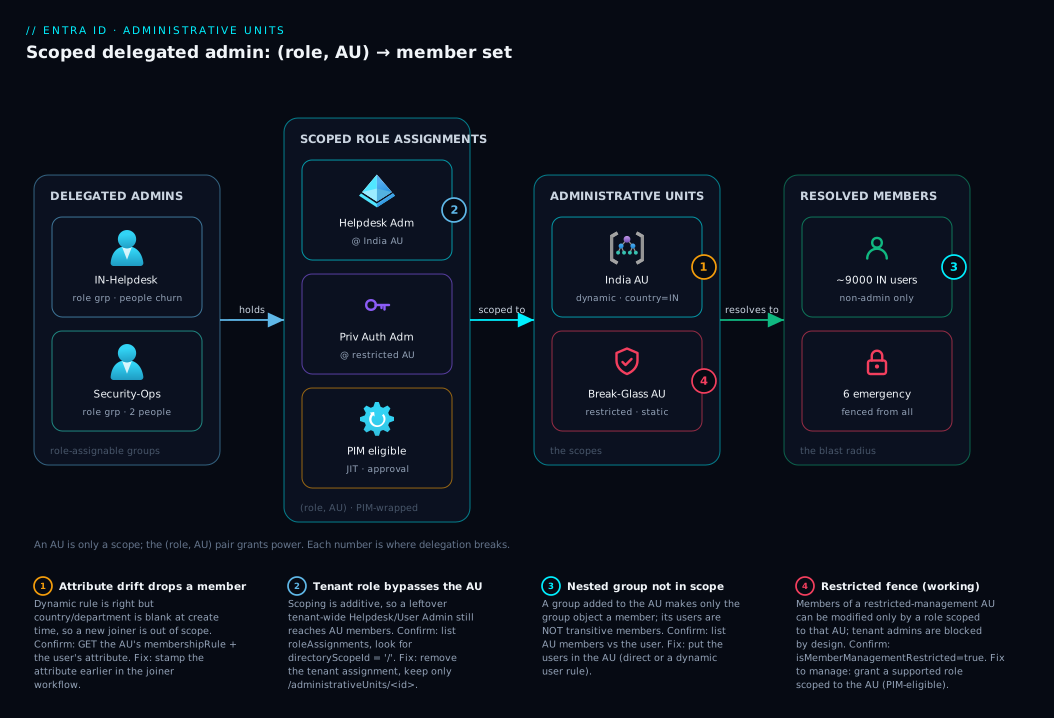
Read the diagram left to right as the chain a request travels when a delegated admin acts. On the far left sit the delegated admins — the regional helpdesk and a security team — represented not by individuals but by role-assignable groups (IN-Helpdesk, Security-Ops), so people churn through group membership while the role assignments stay stable. Their authority is granted by scoped role assignments in the middle zone, where each (role, AU) pair is the actual unit of power: Helpdesk Administrator bound to the India AU, Privileged Authentication Administrator bound to the restricted Break-Glass AU. PIM optionally wraps these so the group holds them eligibly rather than actively.
Those assignments point at the Administrative Units zone — the scopes. The India AU is dynamic (user.country -eq "IN"); the Break-Glass AU is restricted and static, curated by hand. Each resolves to a concrete member set on the right: the India AU expands to ~9,000 India users, the restricted AU to a handful of emergency accounts. The numbered badges mark where this breaks in practice — a blank attribute that silently drops a user out of a dynamic AU (1), a tenant-wide role that bypasses a non-restricted AU’s intended fence (2), nested-group blindness where users inside an AU-member group aren’t themselves in scope (3), and the protected boundary where tenant admins are correctly blocked from the restricted AU’s members (4). Trace any failed delegation by walking these zones in order: who is asking, what (role, AU) they hold, what the rule resolves to, and whether the target is actually a direct member.
Real-world scenario
Meridian Logistics runs a single Entra ID tenant for 28,000 employees across India, the UK, and Singapore. Historically all password resets and user edits flowed through a six-person central identity team in London. As headcount grew, that team became a bottleneck — a routine password reset for a Pune warehouse worker took four hours to clear the queue. The “fix” someone had shipped two years earlier was worse than the problem: they had granted tenant-wide Helpdesk Administrator to 34 regional support staff, so any of them could reset the CEO’s password. The annual access review flagged it red, and the CISO gave the identity lead eight weeks to fix it without losing regional autonomy.
The redesign was AU-centred. They created three dynamic AUs keyed on user.country — IN, GB, SG — each self-maintaining as HR provisioning set the country attribute. For each region they made a role-assignable group (IN-Helpdesk, etc.) and assigned Helpdesk Administrator scoped to the matching AU — to the group, not individuals. The 34 people moved off their tenant-wide roles into the regional group; from that moment a Pune agent could reset Pune passwords and only Pune passwords. For heavier user-lifecycle work they assigned User Administrator scoped to each AU but made it PIM-eligible with four-hour activation and a justification prompt, so even lifecycle admins held nothing standing.
Two things went wrong in week one, both instructive. First, a cohort of new India hires were invisible to the IN-Helpdesk for days — their country attribute was blank because the HR connector populated it on a nightly delta that lagged account creation. The rule was correct; the attribute wasn’t there yet. The fix: move country-stamping earlier in the joiner workflow so the attribute exists at account-creation time. Second, the team added the “All-India-Distribution” group to the IN AU expecting the helpdesk to reset passwords for everyone in it — and it didn’t work, because group membership doesn’t make a group’s users members of the AU. The users were already scoped via the dynamic country -eq "IN" rule; the group was only ever needed for group management, not user password resets.
Finally, they fenced the dangerous accounts. Six break-glass accounts and twelve C-suite users went into a restricted management AU, static and hand-curated, with Privileged Authentication Administrator scoped to it, granted PIM-eligibly to a two-person security team with approval required. Now even a compromised regional Helpdesk Administrator — or the central team — cannot touch those accounts, and the next access review was clean. The London queue dropped 70%, regional desks were faster, and the blast radius of any single delegated credential shrank from “the whole company” to “one country’s non-admin users.”
Advantages and disadvantages
AUs are the right tool for a specific job, and a poor fit outside it. The explicit trade-off:
| Advantages | Disadvantages |
|---|---|
| Native, in-tenant scope for directory roles — no second tenant needed | Only scopes a specific list of roles; many roles can’t be AU-scoped |
| Cuts blast radius: regional desk → regional users only | Doesn’t fence tenant admins unless you use restricted management |
| Dynamic AUs self-maintain at scale (no per-user effort) | Dynamic membership = total dependence on attribute hygiene (P1 cost) |
| Restricted management protects VIPs/break-glass from all other admins | Restricted AUs must be static; more curation effort |
| Composes cleanly with PIM (eligible, time-bound scoped roles) | Group nesting does not flow membership — easy to misdesign |
| Auditable: scope and assignment are explicit directory objects | Not a billing, network, or data-isolation boundary |
| Free for static AUs; broadly available | Hard limits (AUs/tenant, AU memberships per object) to design around |
When the advantages dominate: multi-region or multi-BU orgs that need operational autonomy inside one tenant, where the populations are cleanly defined by an attribute (country, department, company code) and the delegated work is user/group/device/password/licence management. When the disadvantages dominate: when you actually need data isolation or separate billing (use separate tenants); when the role you want to delegate isn’t AU-assignable (rethink the delegation, or use a workload-specific admin center); or when your directory attributes are too dirty to trust a dynamic rule and you lack the process to maintain a static AU.
Hands-on lab
This builds a working delegated-admin scope end to end with az (Graph under the hood), then tears it down. Free for the static parts; the dynamic AU step needs Entra ID P1. You need AU and role-assignment management rights (Privileged Role Administrator or Global Administrator) in a non-production tenant.
Step 1 — Confirm your context and pick test users. Identify two test users and their object IDs:
az rest --method GET \
  --url "https://graph.microsoft.com/v1.0/users?\$select=id,displayName,userPrincipalName,country&\$top=5" \
  --query "value[].{name:displayName, upn:userPrincipalName, country:country, id:id}" -o table
Step 2 — Create a STATIC AU. Start static so there’s no licence dependency:
AU_ID=$(az rest --method POST \
  --url "https://graph.microsoft.com/v1.0/directory/administrativeUnits" \
  --headers "Content-Type=application/json" \
  --body '{ "displayName": "Lab-IN-BU", "description": "Lab AU", "membershipType": "Assigned" }' \
  --query id -o tsv)
echo "Created AU: $AU_ID"
Expected: a GUID printed. The AU now exists with zero members.
Step 3 — Add a user as a member. Use one test user’s object ID:
az rest --method POST \
  --url "https://graph.microsoft.com/v1.0/directory/administrativeUnits/$AU_ID/members/\$ref" \
  --headers "Content-Type=application/json" \
  --body '{ "@odata.id": "https://graph.microsoft.com/v1.0/users/<test-user-1-object-id>" }'

# Verify membership
az rest --method GET \
  --url "https://graph.microsoft.com/v1.0/directory/administrativeUnits/$AU_ID/members" \
  --query "value[].{type:'@odata.type', id:id}" -o table
Expected: the member list shows your one user.
Step 4 — Create a role-assignable group and assign a scoped role. This is the production pattern (role on the group, people in the group):
# A role-assignable security group to hold the helpdesk people
GROUP_ID=$(az rest --method POST \
  --url "https://graph.microsoft.com/v1.0/groups" \
  --headers "Content-Type=application/json" \
  --body '{
    "displayName": "Lab-IN-Helpdesk",
    "mailEnabled": false, "mailNickname": "lab-in-helpdesk",
    "securityEnabled": true, "isAssignableToRole": true
  }' --query id -o tsv)

# Assign Helpdesk Administrator SCOPED to the AU, to that group
az rest --method POST \
  --url "https://graph.microsoft.com/v1.0/roleManagement/directory/roleAssignments" \
  --headers "Content-Type=application/json" \
  --body "{
    \"roleDefinitionId\": \"729827e3-9c14-49f7-bb1b-9608f156bbb8\",
    \"principalId\": \"$GROUP_ID\",
    \"directoryScopeId\": \"/administrativeUnits/$AU_ID\"
  }"
Expected: a role assignment object returns with directoryScopeId of /administrativeUnits/<AU_ID>. Anyone you now add to Lab-IN-Helpdesk can reset passwords for the AU’s member users — and no one else’s.
Step 5 — Prove the scope (the satisfying part). Add a test user to the helpdesk group, sign in as them (incognito), and confirm in the portal that they can reset the password of the AU member but not a non-member. The negative result — “you don’t have permission” on a non-member — is the whole point of the exercise.
Step 6 — (Optional, needs P1) Try a dynamic AU. Create a second AU with a rule and watch it self-populate:
DYN_AU_ID=$(az rest --method POST \
  --url "https://graph.microsoft.com/v1.0/directory/administrativeUnits" \
  --headers "Content-Type=application/json" \
  --body '{
    "displayName": "Lab-Dynamic-IN", "membershipType": "Dynamic",
    "membershipRule": "(user.country -eq \"IN\")", "membershipRuleProcessingState": "On"
  }' --query id -o tsv)
# Set a test user country=IN, then re-check members after evaluation
az rest --method PATCH --url "https://graph.microsoft.com/v1.0/users/<test-user-1-object-id>" \
  --headers "Content-Type=application/json" --body '{ "country": "IN" }'
Expected: after the rule evaluates (allow a short delay), the user appears in Lab-Dynamic-IN automatically.
Step 7 — Teardown. Remove the role assignment, the group, and both AUs so you leave no privileged residue:
# Delete role assignment(s) for the group, then the group and AUs
RA_ID=$(az rest --method GET \
  --url "https://graph.microsoft.com/v1.0/roleManagement/directory/roleAssignments?\$filter=principalId eq '$GROUP_ID'" \
  --query "value[0].id" -o tsv)
az rest --method DELETE --url "https://graph.microsoft.com/v1.0/roleManagement/directory/roleAssignments/$RA_ID"
az rest --method DELETE --url "https://graph.microsoft.com/v1.0/groups/$GROUP_ID"
az rest --method DELETE --url "https://graph.microsoft.com/v1.0/directory/administrativeUnits/$AU_ID"
az rest --method DELETE --url "https://graph.microsoft.com/v1.0/directory/administrativeUnits/$DYN_AU_ID"
Always run teardown in a shared tenant — a leftover scoped role assignment is exactly the privileged residue an access review exists to catch.
Common mistakes & troubleshooting
The failure modes below are the ones that generate real tickets. For each: the symptom, the root cause, how to confirm it, and the fix.
| # | Symptom | Root cause | Confirm with | Fix |
|---|---|---|---|---|
| 1 | Helpdesk “can’t see / can’t reset” a user who should be in scope | User isn’t actually a member of the AU (attribute not set / static add missed) | List AU members; check the user’s country/department |
Set the attribute (dynamic) or add the member (static) |
| 2 | New joiners invisible to the regional desk for days | Dynamic rule is right, but the source attribute lags account creation | Compare account-create time vs attribute-populate time | Stamp the attribute earlier in the joiner workflow |
| 3 | Scoped admin can reset everyone’s password | They still hold the tenant-wide role too | List the principal’s role assignments and their directoryScopeId |
Remove the tenant-scoped assignment; keep only the AU one |
| 4 | Scoped User Admin can’t reset a specific member’s password | That member is an administrator; scoped roles skip admin members | Check whether the target holds any directory role | Use Priv. Auth Admin (sparingly) or accept the protection |
| 5 | Adding a group to the AU didn’t give the desk power over its users | Group nesting doesn’t make the group’s users AU members | Confirm the users aren’t direct AU members | Put the users in the AU (direct or dynamic rule) |
| 6 | “Can’t add members” to an AU | It’s a dynamic AU — no manual adds allowed | Check membershipType on the AU |
Use a static AU, or fix the rule to include them |
| 7 | Tenant admin can’t modify a protected account | The account is in a restricted management AU | Check isMemberManagementRestricted on the AU |
Grant a supported role scoped to that AU |
| 8 | Dynamic AU membership “stuck”/not updating | membershipRuleProcessingState is Paused, or rule syntax error |
GET the AU; inspect processing state + rule | Set state On; fix the rule expression |
| 9 | Scoped role assignment “succeeds” but grants nothing | Role isn’t actually AU-assignable, or wrong directoryScopeId |
Re-check the role is on the AU-assignable list | Pick an AU-assignable role; fix the scope path |
| 10 | Can’t make the role eligible in PIM at AU scope | Role/scope combination not supported, or PIM not licensed | Confirm P2 for PIM; verify role supports eligibility | License PIM (P2); use a supported role |
| 11 | Dynamic AU created but no one is a member | Rule references an attribute nobody has populated | Query users matching the rule attribute | Populate the attribute, or correct the rule |
| 12 | Removed a user from the org but they linger in scope | Static AU never had the member removed | List members; cross-check against active users | Add a leaver step that removes static AU members |
Two confirmation commands worth memorising. To see what a principal can do and where, list their role assignments with scope:
az rest --method GET \
  --url "https://graph.microsoft.com/v1.0/roleManagement/directory/roleAssignments?\$filter=principalId eq '<principal-object-id>'&\$expand=roleDefinition" \
  --query "value[].{role:roleDefinition.displayName, scope:directoryScopeId}" -o table
A scope of / is tenant-wide (the thing you’re usually trying to remove); /administrativeUnits/<id> is correctly bounded. To inspect a dynamic AU that “isn’t updating”, check its rule and processing state:
az rest --method GET \
  --url "https://graph.microsoft.com/v1.0/directory/administrativeUnits/$AU_ID" \
  --query "{type:membershipType, rule:membershipRule, state:membershipRuleProcessingState}" -o json
If state is Paused, members won’t reconcile until you set it back to On.
Best practices
- Assign scoped roles to role-assignable groups, never to individuals. Assign the
(role, AU)once to a<Region>-Helpdeskgroup and manage people by group membership — the assignment stays stable, the churn lives in the group. - Prefer dynamic AUs keyed on a clean, HR-owned attribute (country, department, company code) so scope self-maintains — but only if that attribute is reliably populated at account-creation time. Stamp it as early as possible; most “can’t see the new hire” tickets are attribute-timing, not AU misconfiguration.
- Make anything beyond tier-1 password resets PIM-eligible — User, Groups, License, and especially Privileged Authentication Administrator should activate on demand with justification, not standing.
- Use restricted management AUs for break-glass and VIP accounts — static, hand-curated, scoped security team, approval-gated. Never leave these reachable by tenant-wide helpdesk roles.
- Never rely on group nesting for user scope. If a desk must manage users, the users must be direct AU members; a group inside an AU only delegates management of that group.
- Don’t scope a role that isn’t AU-assignable and expect it to bound — confirm against the AU-assignable list before designing around it.
- Recertify standing scoped assignments quarterly with access reviews on the role-assignable groups and on PIM eligibility, so privileged residue gets caught.
- Add a leaver step that strips static AU membership and helpdesk-group membership, or scope rots and over-grants accumulate.
- Encode scope intent in names (
AU-IN-Users,RM-AU-BreakGlass) and declare which roles are scoped where in your IaC baseline (Bicep/Graph), so the boundary is readable and the model reproducible — not tribal knowledge.
Security notes
AUs are a least-privilege control, so the security posture is mostly about not undermining the scope you built. The cardinal rule: a scoped role only reduces blast radius if no one also holds the tenant-wide equivalent. Migrating a team to AU-scoped Helpdesk Administrator achieves nothing if the old tenant-wide grant is left in place — remove the broad grant in the same change, and verify every principal’s scope is /administrativeUnits/<id>, not /.
Protect the highest-value identities with restricted management AUs, not just normal ones. A normal AU still leaves break-glass accounts reachable by every tenant-wide User/Helpdesk Administrator, and so by any one compromised credential; the restricted variant shrinks that to a named, scoped, ideally PIM-and-approval-gated security team. Combine it with the alerting in your break-glass monitoring design so any use of those accounts is seen, not just fenced.
Treat the delegated admins as a privileged population: enforce phishing-resistant MFA via Conditional Access baseline policies, make their elevated scoped roles PIM-eligible with justification, and recertify both group membership and eligibility on a schedule. Mind the device gap: AU-scoped device management is narrower than user management — don’t assume “scoped to the AU” gives the same depth over devices as over users. And remember AUs are an administrative boundary, not a data one: they decide who can administer an identity, not who can read its data via Graph or an app; for true data isolation you need separate tenants.
The hardening controls that turn a scope into a defensible boundary, and what each one prevents:
| Control | What it stops | How to verify |
|---|---|---|
| Remove the tenant-wide equivalent role | Scoped admins silently keeping full reach | List assignments; no directoryScopeId of / remains |
| Restricted management AU for VIP/break-glass | Any tenant admin (or stolen credential) touching them | isMemberManagementRestricted: true on the AU |
| PIM-eligible + approval on elevated scoped roles | Standing privilege when idle | Role shows eligible (not active) in PIM |
| Phishing-resistant MFA on delegated admins | Credential phishing of a delegated desk | Conditional Access policy targets the admin groups |
| Access reviews on the role-assignable groups | Stale membership / privileged residue | Recurring review configured on each <Region>-Helpdesk |
| Leaver step removes static AU + group membership | Departed staff retaining scope | Leaver workflow strips group + AU membership |
Cost & sizing
AUs themselves are inexpensive; the cost lives in the licences certain features require. The licence picture:
| Capability | Licence required | Notes |
|---|---|---|
| Static (Assigned) AUs + scoped roles | Free (Entra ID Free) | Core delegation works with no premium licence |
| Dynamic AU membership | Entra ID P1 per member | Same as dynamic groups; budget P1 across scoped users |
| Restricted management AU | Entra ID P1 | Required to fence members from tenant admins |
| PIM-eligible scoped roles | Entra ID P2 | Time-bound activation/approval needs P2 |
| Access reviews on scoped admins | Entra ID P2 (Governance) | Recertify group membership / eligibility |
So a purely static delegation model costs nothing extra. Self-maintaining (dynamic) AUs need P1 on member users; just-in-time activation and recertification need P2 (via Entra ID Governance or a Microsoft Entra Suite licence). In INR terms P1 is a few hundred rupees per user per month and P2 noticeably more — so size by how many users are scoped dynamically and how many admins need PIM, not by AU count (which is effectively free).
Design within the real limits — these are the numbers that shape a large-tenant design:
| Limit | Approximate value | Design implication |
|---|---|---|
| Administrative units per tenant | Up to ~100 thousand (high; not the binding limit) | You’ll never hit this; design by org shape, not count |
| AU memberships per object (an object in N AUs) | Bounded (an object can belong to a limited number of AUs) | Don’t sprawl one user across dozens of overlapping AUs |
| Dynamic membership rule | One object type per rule (user or device) |
Can’t mix users+devices in one dynamic AU |
| Restricted management membership | Static only | Curate the protected set by hand |
| Scoped role-assignment scope path | /administrativeUnits/<id> |
One AU per assignment; union across assignments for breadth |
The practical sizing heuristic: model AUs on your org’s administrative shape, not its org-chart depth. Most large tenants need a handful to a few dozen AUs (one per country, region, or major BU), each keyed on one clean attribute, plus one or two restricted AUs — not hundreds of finely-sliced units. Wanting hundreds of AUs usually signals the delegation should be expressed by dynamic rules over fewer AUs, or that you actually need separate tenants.
Interview & exam questions
These map to SC-300 (Identity and Access Administrator) and the identity-governance portions of SC-100.
1. What is an Administrative Unit and what single job does it do?
An AU is a container of users, groups, and devices inside one Entra tenant that exists to be the scope of a delegated directory-role assignment. Assigning a role “at” an AU bounds that role’s powers to the AU’s members only. On its own an AU grants nothing — the (role, AU) pair is what delegates power.
2. Static vs dynamic AU — when do you choose each? Static AUs have members you add explicitly: exact, auditable, attribute-independent, but they need a maintenance process. Dynamic AUs are populated by a rule (same syntax as dynamic groups) and self-maintain, but depend entirely on attribute hygiene and require P1. Choose static for small curated/mixed-type sets, dynamic for large attribute-defined populations.
3. Which roles can be assigned at AU scope, and which cannot? AU-assignable roles centre on managing users, groups, devices, passwords, and licences — Helpdesk, User, Password, Authentication, Groups, and License Administrator, among others. Tenant-impacting roles — Global Administrator, Privileged Role Administrator, Application/Conditional Access/Security Administrator — cannot be AU-scoped because their power is inherently tenant-wide.
4. Does an AU-scoped role remove tenant-wide reach? How do you actually fence users off? No — AU scoping is additive; tenant-wide role holders still reach AU members. To fence members off from all other admins you use a restricted management AU, where only principals with a role scoped to that AU can modify members.
5. What is a restricted management AU and what must be true about its membership? It’s an AU whose member objects can be modified only by principals holding a supported role scoped to that AU — fencing out tenant-wide admins (Global Admin keeps a narrow set of capabilities by design). Its membership must be static; dynamic + restricted is unsupported. It’s the mechanism to protect break-glass and VIP accounts.
6. If you add a group to an AU, can a scoped User Administrator reset passwords for the group’s members? No. Adding a group makes the group object an AU member; the group’s individual users are not transitively AU members. The scoped admin can manage the group but not those users unless the users are themselves direct AU members. AU membership does not flow through nesting.
7. How do AU-scoped Entra roles relate to Azure resource RBAC? They’re separate planes that never inherit. An AU-scoped directory role has no authority over Azure resources, and an Azure resource role grants no authority over directory objects. Design identity delegation (AUs) and resource RBAC independently.
8. A scoped User Administrator can’t reset one member’s password. Why might that be expected? Because that member is themselves an administrator. Built-in protection means most scoped user-management roles operate only on non-admin members, preventing privilege escalation through a delegated desk. Managing admin members requires Privileged Authentication Administrator, used sparingly.
9. How do AUs and PIM combine, and what does each control? The AU controls what (which objects the role can touch); PIM controls when/how (eligible vs active, activation duration, approval, MFA, justification). A PIM-eligible scoped role means the admin holds nothing standing and activates just-in-time, bounded to the AU’s members.
10. What licences do the various AU features require? Static AUs and scoped roles are free. Dynamic AU membership requires P1 (per member), as does restricted management. PIM-eligible scoped roles and access reviews require P2. Size cost by how many users are scoped dynamically and how many admins need PIM, not by AU count.
11. A new hire is invisible to the regional helpdesk despite a correct dynamic rule. What’s the likely cause?
The keying attribute (e.g. country) wasn’t populated at account-creation time — an HR connector lag, not an AU error. The rule is correct; the data is late. Fix by stamping the attribute earlier in the joiner workflow.
12. When should you NOT use an AU? When you need data isolation or separate billing (use separate tenants), or when the role you want to delegate isn’t AU-assignable. AUs are an administrative boundary inside one tenant, not a data, network, or billing boundary.
Quick check
- True or false: an Administrative Unit, with no role assigned to it, already restricts which users the helpdesk can manage.
- You need the Sales desk to manage users in Sales. You add the “All-Sales” group to a Sales AU. Will the desk be able to reset those users’ passwords? Why or why not?
- Which membership type must a restricted management AU use, and why does that constraint exist?
- A regional admin can reset passwords for the entire tenant despite holding only an AU-scoped Helpdesk Administrator role. What’s the most likely cause, and how do you confirm it?
- Name the two layers in a “PIM-eligible scoped role” and state exactly what each one controls.
Answers
- False. An AU does nothing on its own — it only restricts admins once a role is assigned at it. The
(role, AU)pair is what scopes power; an inert AU restricts no one. - No. Adding the group makes the group object an AU member, but the group’s users are not transitively AU members. The desk can manage the group, not reset its users’ passwords. To delegate user management, the users must be direct AU members (e.g. via a dynamic
department -eq "Sales"rule). - Static (Assigned) only. Dynamic + restricted management is unsupported, so the protected set must be curated by hand — appropriate for a small, high-value population like break-glass accounts.
- They almost certainly also hold the tenant-wide Helpdesk Administrator assignment, which AU scoping does not remove. Confirm by listing their role assignments and inspecting
directoryScopeId— a value of/is tenant-wide; remove it and keep only/administrativeUnits/<id>. - The AU controls what (which objects the role can act on — the AU’s members). PIM controls when/how (eligible vs active, activation duration, approval, MFA, justification). Together: nothing standing, activated just-in-time, bounded to the AU.
Glossary
- Administrative Unit (AU): A container of users, groups, and devices in one Entra tenant used as the scope of a delegated directory-role assignment.
- Member: A user, group, or device that belongs to an AU; the set a scoped admin can act on.
- Static (Assigned) AU: An AU whose members are added explicitly and maintained manually or by automation.
- Dynamic AU: An AU whose members are determined by a membership rule, continuously evaluated (one object type per rule); requires P1.
- Membership rule: A dynamic-membership expression (same syntax as dynamic groups), e.g.
(user.country -eq "IN"). - Scoped role assignment: A directory role assigned at an AU (
directoryScopeIdof/administrativeUnits/<id>), bounding the role to that AU’s members. - AU-assignable role: A built-in directory role that may be scoped to an AU (user/group/device/password/licence management roles); excludes tenant-wide roles.
- Restricted management AU: An AU whose member objects can be modified only by principals with a role scoped to that AU, fencing out tenant-wide admins.
- Tenant-wide (directory-scope) role: A role assigned at scope
/affecting all directory objects — what AUs let you avoid over-granting. - Role-assignable group: A security group (
isAssignableToRole: true) that can be the principal of a role assignment; the recommended target for scoped roles. - Directory scope ID: The
directoryScopeIdon a role assignment;/= tenant,/administrativeUnits/<id>= a specific AU. - PIM eligibility: A just-in-time assignment where a principal can activate a (possibly AU-scoped) role on demand rather than holding it standing; requires P2.
- Privileged Authentication Administrator: The role able to manage auth methods including for admin members; used (sparingly) when a desk must manage admin members.
- Non-admin member: An AU member who holds no directory role; the only members most scoped user-management roles may act on.
- Membership rule processing state: Whether a dynamic AU’s rule is actively evaluated (
On) orPaused.
Next steps
- Entra ID dynamic groups: membership-rules cookbook — the rule syntax that also drives dynamic AUs, end to end.
- Privileged Identity Management: PIM and PAM architecture — make your scoped roles eligible, time-bound, and approval-gated.
- Entra access reviews: program design and recertification automation — recertify who holds scoped roles before an auditor does.
- Entra break-glass emergency access: monitoring and governance — pair restricted management AUs with alerting on protected accounts.
- Azure RBAC fundamentals: roles, scope, assignments — the other plane, so you never confuse identity delegation with resource RBAC.