Someone on your team can’t restart a VM. Someone else just deleted a resource group they should never have been able to touch. A third person has Owner on the whole subscription because two years ago it was “just easier.” Every one of these is the same problem wearing a different mask: Azure role-based access control (RBAC) — the system that decides who can do what, to which resources — is mis-modelled. Not broken, not buggy. Mis-modelled, because the person who set it up reasoned about “permissions” as a flat list of yes/no toggles instead of the three-part machine RBAC actually is.
That machine has exactly three moving parts, and once you see them you stop guessing. A role definition is a named bundle of allowed operations (Actions, DataActions, and their NotActions/NotDataActions subtractions). A scope is where that bundle applies — a management group, subscription, resource group, or single resource — and it inherits downward. A role assignment binds them: this security principal gets this role definition at this scope. Access = the union of every assignment that touches the resource you’re reaching. That’s the whole model; everything else — Owner vs Contributor, custom roles, deny assignments, “why isn’t my assignment working” — is a consequence of those three nouns and one verb (union).
This guide builds that model and makes it real. You will create a custom role, assign built-in and custom roles at every scope level, and prove the inheritance and union rules by watching access change — in the portal, the az CLI, and as Bicep, end to end, with expected output at each step and a clean teardown. By the end, the three masks above resolve to the same root cause, and you can fix each in under a minute. If you have ever stared at the Access control (IAM) blade wondering why someone who “has the role” still gets a 403, this is the article that ends that.
What problem this solves
In a real Azure tenant, access is the highest-stakes configuration you own. Too tight and engineers file tickets to restart their own dev VMs, ship slows, and people hoard broad roles to dodge the friction. Too loose and one compromised credential — or one fat-fingered az group delete — takes out production. The primitives are simple; the combinations hurt: a Contributor at subscription scope silently overrides the careful Reader you set at a resource group, a typo’d Action wildcard grants far more than intended, and a Blob Data Reader assignment doesn’t help because the caller needed the control-plane role, not the data-plane one.
What breaks without a clear model: people conflate management-plane permissions (manage the resource — create, delete, configure, via Azure Resource Manager) with data-plane permissions (read/write the data inside the resource — blobs, secrets, queue messages). Owner on a storage account lets you delete it and rotate its keys, but historically did not let you read a blob without a data role — a distinction that has produced more confused 403s than any other single thing in Azure. People also forget that RBAC is additive and union-based with no explicit deny in a normal assignment — you cannot “subtract” access with a more-restrictive role — and that scope inherits: an Owner at the management group is an Owner of every subscription, resource group and resource underneath, until someone removes it.
Who hits this: every team past the first month on Azure, hardest at the boundary between “we’re five people and everyone’s an Owner” and “we’re an org with auditors, separation of duties, and a least-privilege mandate.” The fix is never “give them Owner” and never “file a ticket every time” — it is “assign the narrowest role that does the job, at the narrowest scope that covers the need.”
Before the deep dive, here is the field in one table — the three nouns, what each one is, and the single most common mistake people make with it:
| RBAC primitive | What it is | Lives at | Most common mistake |
|---|---|---|---|
| Role definition | A named set of allowed operations (Actions/DataActions minus NotActions) |
Tenant (built-in) or a subscription/MG (custom) | Using a wildcard Action that grants more than intended |
| Scope | Where a role applies; inherits downward | MG → Subscription → Resource group → Resource | Assigning at subscription when a resource group would do |
| Role assignment | Principal + role + scope, bound together | Any scope | Forgetting it’s additive — a broad one overrides a narrow one |
| Security principal | The who: user, group, service principal, or managed identity | Entra ID | Assigning to a user instead of a group (unmanageable at scale) |
| Deny assignment | An explicit “deny”, created by Azure (e.g. Blueprints/managed apps) — you don’t author these directly | Any scope | Assuming you can hand-author one (you cannot, in normal RBAC) |
Learning objectives
By the end of this article you can:
- Explain the three-part RBAC model — role definition + scope + assignment — and state precisely how Azure evaluates an access request as the union of all matching assignments.
- Distinguish management-plane (
Actions) from data-plane (DataActions) permissions and pick the correct built-in role for each — e.g. Owner vs Storage Blob Data Owner. - Compare the core built-in roles (Owner, Contributor, Reader, User Access Administrator, Role Based Access Control Administrator) and choose the least-privileged one for a given task.
- Assign roles at all four scope levels (management group, subscription, resource group, resource) in the portal, with
az role assignment create, and in Bicep — and predict the inherited effect. - Author a custom role with the right
Actions/NotActions/AssignableScopes, deploy it, and assign it — knowing when a built-in role would have been better. - Diagnose why an assignment “isn’t working”: wrong scope, control-vs-data plane mismatch, propagation delay, group-membership lag, a deny assignment, or ABAC conditions.
- Apply least-privilege patterns — group-based assignments, PIM-eligible roles, and scoping discipline — and map the whole topic to AZ-104 and AZ-500 exam objectives.
Prerequisites & where this fits
You should already know what an Azure subscription, resource group and resource are, and that they nest — if not, read Azure Resource Hierarchy Explained: Subscriptions, Resource Groups and Resources first, because RBAC scope is that hierarchy. You should be able to run az in Cloud Shell, read JSON output, and have at least User Access Administrator or Owner on a subscription or resource group you can experiment in (you cannot grant access you don’t yourself have the right to grant). Basic familiarity with Microsoft Entra ID (formerly Azure AD) — users, groups, service principals — helps, because RBAC grants are to Entra principals.
This sits at the centre of the Identity & Governance track. RBAC is the access layer that everything else assumes: Management Groups 101: Designing a Hierarchy That Scopes Policy and RBAC is the scope you assign above subscriptions; Azure Policy Effects Decoded: Deny vs Audit vs Modify vs DeployIfNotExists governs what configuration is allowed (a different axis from who can act); and Managed Identities Demystified: System vs User-Assigned and When to Use Each gives non-human workloads the very principals you assign RBAC roles to. Two cousins worth flagging up front, because conflating them with RBAC is itself a common mistake:
| Sounds like RBAC, but isn’t | What it actually does | The axis it controls | Where it overlaps RBAC |
|---|---|---|---|
| Azure Policy | Allows/denies/audits resource configuration (e.g. “no public IPs”) | What may be deployed | Both can use deny-style effects, but on different things |
| Conditional Access | Gates sign-in (MFA, device, location) | How you authenticate | Runs before RBAC; RBAC runs after you’re authenticated |
| Key Vault access policies | Legacy data-plane permissions for one vault | Data inside that vault | Superseded by RBAC data roles — see the Key Vault article |
| Management group / RG locks | Block delete/modify regardless of role | Mutability of resources | A CanNotDelete lock stops even an Owner |
| Entra roles (e.g. Global Admin) | Manage the directory (users, groups, apps) | The tenant itself | Distinct from Azure RBAC; a Global Admin is not an Azure Owner by default |
That last row catches senior people: Entra directory roles (Global Administrator) and Azure RBAC roles (Owner) are separate systems — a Global Admin has no access to Azure resources until they elevate access at the tenant root or get an Azure role assignment.
Core concepts
Five mental models make every later step obvious.
A role definition is a permission bundle, not a permission. A role like Contributor is a named JSON document of operation strings. Its fields: Actions (control-plane ops it grants), NotActions (ops subtracted from those — Contributor has Microsoft.Authorization/*/Write here, which is exactly why a Contributor cannot grant access), DataActions (data-plane ops), NotDataActions (subtractions from those), and AssignableScopes (where a custom definition may be assigned). Effective permission = (Actions − NotActions) for control plane, (DataActions − NotDataActions) for data plane. NotActions is a subtraction from the same role, not a deny — another assignment can still grant what one role’s NotActions removed.
Scope is the hierarchy, and it inherits downward. Four levels nest strictly: management group → subscription → resource group → resource. An assignment applies to its level and everything beneath it — Reader at a resource group reads every resource in it; Owner at a management group owns every sub, RG and resource under it. There is no upward inheritance and no per-grant scope exclusion: you cannot say “Owner on the subscription except this one RG” with a single grant — you assign at the narrower scope instead.
A role assignment is a three-tuple, and access is their union. An assignment binds a security principal (who), a role definition (what), and a scope (where). Effective access to any resource is the union of every assignment whose scope covers it. RBAC is additive — there is no author-able deny. A user with Reader at the subscription and Contributor at one RG is a Contributor there and a Reader everywhere else; grants add, never subtract. This single rule explains most “why does this person have more access than I gave them” surprises: someone made a broader assignment at a higher scope.
Control plane and data plane are different doors. Azure Resource Manager governs the management plane — create, delete, configure, and read resource metadata (Actions). The data plane is the data inside the resource — blobs, Key Vault secrets, Service Bus messages (DataActions). A control-plane role like Owner or Contributor does not grant data-plane access for data services: reading a blob needs Storage Blob Data Reader, reading a secret needs Key Vault Secrets User. The separation is deliberate (an admin who manages a storage account shouldn’t automatically read customer data) and is the single most common source of unexpected 403s.
The principal is one of four kinds, and you almost always assign to a group. A principal is a user, a group (assign here for anything beyond a one-off), a service principal (an app/automation identity in Entra), or a managed identity (an Azure-managed SP for a workload). Every assignment targets one by its object ID (a GUID). Assigning to individual users is the road to an unauditable mess; assign to groups and manage membership — that single discipline is what makes RBAC survive an org of 500 engineers.
The vocabulary in one table
Pin down every moving part before the deep sections. The glossary at the end repeats these for lookup; this is the model side by side:
| Term | One-line definition | Where it lives | Why it matters |
|---|---|---|---|
| Role definition | Named bundle of allowed operations | Built-in (tenant) or custom (MG/sub) | The what of an assignment |
| Actions | Control-plane ops the role grants | Inside the role definition | Manage/configure/delete the resource |
| NotActions | Ops subtracted from this role’s Actions | Inside the role definition | A subtraction, not a deny |
| DataActions | Data-plane ops the role grants | Inside the role definition | Read/write data inside the resource |
| AssignableScopes | Where a (custom) role may be assigned | Inside the role definition | Limits a custom role to your sub/MG |
| Scope | Where an assignment applies; inherits down | MG / Sub / RG / Resource | The where of an assignment |
| Role assignment | Principal + role + scope | Any scope | The grant itself |
| Security principal | The who being granted | Entra ID | User / group / SP / managed identity |
| Built-in role | A Microsoft-authored role definition | Tenant | ~150+ ready-made roles |
| Custom role | A role definition you author | A subscription or MG | When no built-in fits |
| Deny assignment | Azure-created explicit deny | Any scope | Overrides allow; you don’t author it |
| PIM | Privileged Identity Management — eligible/just-in-time roles | Entra ID P2 | Time-bound, approved elevation |
| ABAC | Attribute-based conditions on an assignment | On the assignment | Narrow a role by tag/attribute |
Built-in roles: the ones you actually use
Azure ships 150+ built-in roles, but four general-purpose ones plus two access-management ones cover the overwhelming majority of real assignments. Know these cold; reach for a service-specific role (like Storage Blob Data Reader) when you need data-plane access. Here are the general-purpose control-plane roles and exactly what separates them:
| Role | Control-plane access | Can grant access to others? | Data-plane access | Use it for |
|---|---|---|---|---|
| Owner | Full — manage everything | Yes (Microsoft.Authorization/*) |
No (still needs data roles) | Account/sub owners; keep this list tiny |
| Contributor | Full — manage everything | No (NotActions blocks Authorization/*/Write) |
No | Engineers who build/operate but shouldn’t grant access |
| Reader | Read-only on everything | No | No | Auditors, dashboards, on-call read access |
| User Access Administrator | Read everything + manage access | Yes (assignments only) | No | Delegating access management without resource control |
| Role Based Access Control Administrator | Manage access, but cannot grant Owner/UAA beyond constraints | Yes (constrained) | No | Newer, safer alternative to UAA for delegating RBAC |
The crucial distinctions: Contributor can do everything except give other people access — its NotActions strip Microsoft.Authorization/*/Write and */Delete, so it builds, breaks and operates resources but cannot escalate to Owner. Owner is Contributor plus access management — why you treat it like root. User Access Administrator is the surgical “manage who has access, but not the resources” role for a security team. Role Based Access Control Administrator is its narrower cousin: it manages assignments but is itself constrained (limitable to specific roles), closing the long-standing gap where a UAA holder could simply assign themselves Owner.
Beyond the big six, the data-plane roles are where the “my assignment isn’t working” confusion concentrates. A representative sample, with the control-plane role people wrongly reach for instead:
| Service | Data-plane role (what you need) | What it grants | Wrong choice people make |
|---|---|---|---|
| Storage (blobs) | Storage Blob Data Reader / Contributor / Owner | Read / read-write / full on blob data | Contributor on the account (no blob read) |
| Key Vault (RBAC mode) | Key Vault Secrets User | Read secret values | Contributor on the vault (no secret read) |
| Key Vault (RBAC mode) | Key Vault Administrator | Full data-plane on keys/secrets/certs | Owner on the vault (manages, can’t read secrets) |
| Service Bus | Azure Service Bus Data Sender / Receiver | Send / receive messages | Contributor (manages namespace, can’t send) |
| Cosmos DB (SQL API) | Cosmos DB Built-in Data Contributor | Read-write items (data plane) | Contributor (manages account, no item access) |
| Azure SQL | (uses its own DB-level auth, not RBAC data roles) | — | Expecting an RBAC role to grant table access |
Two reading notes that save hours:
| Distinction | The trap | How to remember it |
|---|---|---|
| Control plane vs data plane | Owner/Contributor manage the resource but can’t read its data | “Manage the box” ≠ “read what’s in the box” |
* Actions vs specific Actions |
A wildcard role grants future operations too | Owner’s * means everything, including new services |
| UAA vs RBAC Administrator | UAA can self-escalate to Owner; RBAC Admin can be constrained | Prefer RBAC Administrator for delegating grants |
Anatomy of a role definition
Every role — built-in or custom — is the same JSON shape. Understanding it is what lets you read a built-in role to see exactly what it grants, and author a custom one safely. Here is the canonical structure, using a trimmed real example:
{
  "Name": "Virtual Machine Operator",
  "Description": "Start, stop, restart and read VMs — but not create, delete or resize them.",
  "Actions": [
    "Microsoft.Compute/virtualMachines/read",
    "Microsoft.Compute/virtualMachines/start/action",
    "Microsoft.Compute/virtualMachines/restart/action",
    "Microsoft.Compute/virtualMachines/powerOff/action",
    "Microsoft.Compute/virtualMachines/instanceView/read",
    "Microsoft.Resources/subscriptions/resourceGroups/read"
  ],
  "NotActions": [],
  "DataActions": [],
  "NotDataActions": [],
  "AssignableScopes": [
    "/subscriptions/00000000-0000-0000-0000-000000000000"
  ]
}
Read it field by field, because each one has a gotcha:
| Field | What it means | Gotcha / rule |
|---|---|---|
Name / roleName |
Display name | Must be unique within the tenant for custom roles |
Description |
Human description | Shows in the portal; write it for the next engineer |
Actions |
Control-plane ops granted | Strings are Provider/resourceType/operation; * is a wildcard |
NotActions |
Ops subtracted from Actions |
A subtraction from this role, not a global deny |
DataActions |
Data-plane ops granted | Only meaningful for data services; absent = no data access |
NotDataActions |
Ops subtracted from DataActions |
Same subtraction semantics, data plane |
AssignableScopes |
Scopes where this role can be assigned | Custom roles only; built-ins are implicitly all scopes |
The operation string grammar is how you reason about least privilege. A string is {Provider}/{resourceType}/{operation} — e.g. Microsoft.Storage/storageAccounts/listkeys/action (control-plane) versus Microsoft.Storage/storageAccounts/blobServices/containers/blobs/read (a DataAction). Suffixes carry meaning:
| Operation suffix | Means | Example |
|---|---|---|
/read |
Read/list this resource type | Microsoft.Compute/virtualMachines/read |
/write |
Create or update | Microsoft.Compute/virtualMachines/write |
/delete |
Delete | Microsoft.Storage/storageAccounts/delete |
/action |
A specific verb/operation | .../virtualMachines/restart/action |
* (wildcard) |
All operations at that level | Microsoft.Compute/* = everything in Compute |
The wildcard is the foot-gun: Microsoft.Storage/* in Actions grants every current and future Storage control-plane operation — so an operation Azure adds next year is auto-granted. For least privilege, enumerate specific operations; for a deliberately broad management role, the wildcard is fine. Discover the exact strings a provider exposes with:
# List every operation a resource provider exposes (the building blocks of a role)
az provider operation show --namespace Microsoft.Compute \
  --query "resourceTypes[?name=='virtualMachines'].operations[].{op:name, display:displayName}" -o table
Scope and inheritance: where access actually lands
Scope is the second noun, and it is where most over-grants come from. The four levels, top to bottom, with the format of the scope string you’ll feed to az and Bicep:
| Scope level | Scope string format | What an assignment here covers | Typical use |
|---|---|---|---|
| Management group | /providers/Microsoft.Management/managementGroups/<mgId> |
Every subscription/RG/resource under the MG | Org-wide platform/security roles |
| Subscription | /subscriptions/<subId> |
Every RG and resource in the subscription | Sub owners, broad operator roles |
| Resource group | /subscriptions/<subId>/resourceGroups/<rg> |
Every resource in that RG | The default, right-sized scope for a team/app |
| Resource | /subscriptions/<subId>/resourceGroups/<rg>/providers/<rp>/<type>/<name> |
Just that one resource | Surgical, single-resource grants |
The inheritance rule is absolute and one-directional: an assignment flows down, never up. Concretely:
| You assign… | At this scope | The principal can act on… | But NOT on… |
|---|---|---|---|
| Reader | Subscription | Every RG and resource in the sub | Other subscriptions, the MG |
| Contributor | Resource group rg-app |
Every resource in rg-app |
Resources in other RGs |
| Owner | Management group mg-prod |
Every sub/RG/resource under mg-prod |
Subs outside mg-prod |
| Storage Blob Data Reader | One storage account | Blob data in that account | Other storage accounts |
Two consequences trip people up. First, there is no “deny here” within a grant — assign Owner at the subscription and you cannot “remove” one RG by adding a Reader there (the Owner still applies); to genuinely restrict, assign at the narrower scope to begin with. Second, higher-scope assignments are easy to forget: when someone “has more access than expected,” walk up the tree — az role assignment list --scope <resource> --include-inherited shows every inherited parent-scope grant, which is where the surprise almost always lives.
# Show ALL assignments affecting a resource group, including inherited from sub/MG
az role assignment list \
  --resource-group rg-app-prod \
  --include-inherited \
  --query "[].{principal:principalName, role:roleDefinitionName, scope:scope}" -o table
For the deeper hierarchy mechanics — how management groups nest and why you scope org-wide roles there — see Management Groups 101: Designing a Hierarchy That Scopes Policy and RBAC.
Custom roles: when no built-in fits
Reach for a custom role only when no built-in (or combination) does the job — each one is more to maintain and audit. The legitimate cases: you need fewer permissions than the smallest built-in (e.g. “restart VMs only”), a precise cross-service bundle, or to enforce assignability within specific scopes via AssignableScopes. The decision in one table:
| Situation | Use a built-in role? | Use a custom role? | Why |
|---|---|---|---|
| “Read everything” | Reader | No | Built-in exists and is perfect |
| “Manage VMs fully” | Virtual Machine Contributor | No | Built-in service role exists |
| “Restart VMs, nothing else” | No built-in is this narrow | Yes | Least privilege below any built-in |
| “Read blobs in one account” | Storage Blob Data Reader | No | Data role exists |
| “Manage tags but not resources” | Tag Contributor | No | Built-in exists |
| “Bespoke cross-service operator” | Usually no single fit | Yes | Combine specific Actions you enumerate |
Custom-role limits and rules you must respect:
| Rule / limit | Value | Consequence if ignored |
|---|---|---|
| Custom roles per tenant | 5,000 (Azure cloud) | Hard cap; design for reuse, not per-team copies |
| Where it’s stored | A subscription or management group | Defined once, assignable across listed scopes |
AssignableScopes required |
At least one scope | The role can only be assigned within these |
Wildcard in DataActions |
Restricted | * in DataActions is intentionally limited for safety |
| Editing a built-in role | Not allowed | Clone it to a custom role and edit the copy |
| Who can create one | Owner or User Access Administrator / RBAC Admin at the scope | Insufficient rights → AuthorizationFailed |
A practical authoring tip: don’t write a custom role from a blank page — clone the nearest built-in and trim it. Export a built-in role’s JSON, save it as your starting point, strip the Actions you don’t want, set AssignableScopes, and create:
# Export the built-in "Virtual Machine Contributor" as a JSON starting point
az role definition list --name "Virtual Machine Contributor" \
  --query "[0].{Actions:permissions[0].actions, NotActions:permissions[0].notActions}" -o json
Architecture at a glance
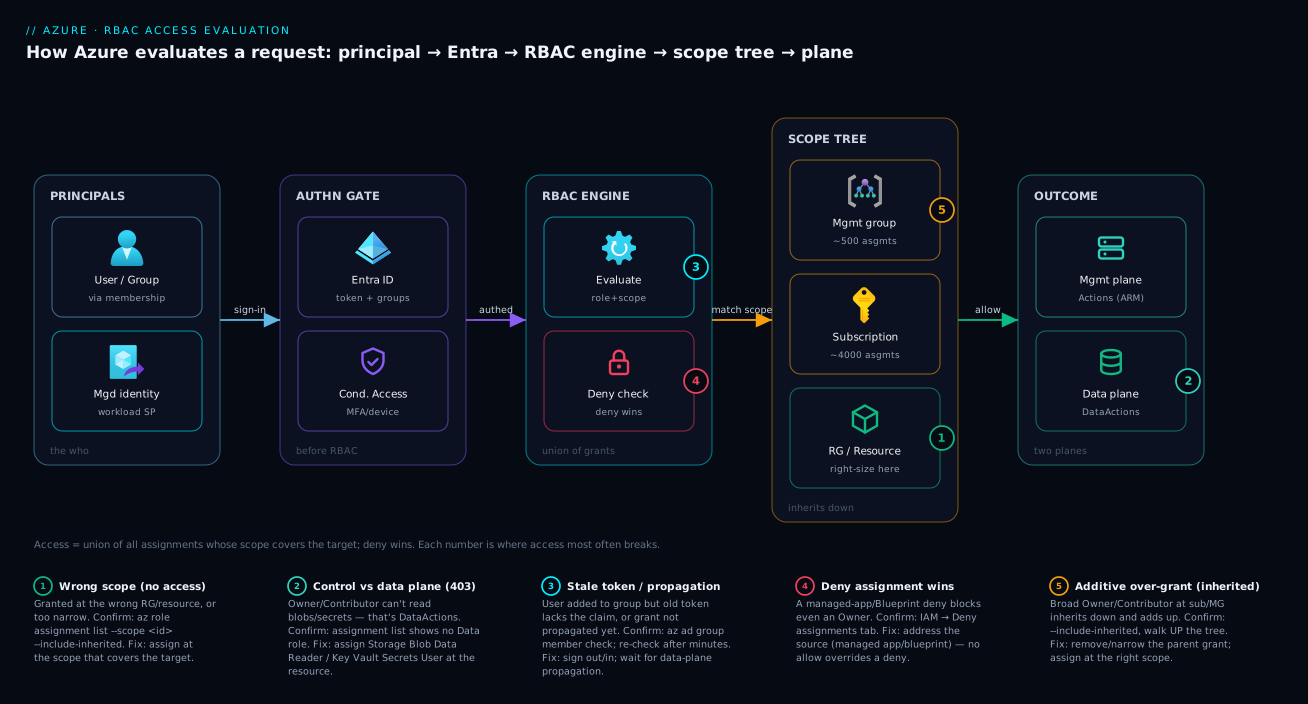
Walk the access decision left to right and the whole model clicks. A principal — a user (often via group membership), a service principal, or a workload’s managed identity — issues a request to Azure Resource Manager or a data endpoint. Microsoft Entra ID authenticates it, optionally gated by Conditional Access (MFA, device, location) — before RBAC and on a separate axis. The caller then reaches the RBAC evaluation engine: it gathers every role assignment whose scope covers the target — walking the tree from management group down through subscription and resource group to the resource — and takes their union. If any deny assignment matches, deny wins regardless of allows. Otherwise, if the union includes the requested operation, ARM permits it and the action hits the target resource (control plane) or its data endpoint (data plane, governed by DataActions).
The diagram below shows that path end to end, and its five numbered badges mark the places an access request most commonly goes wrong — wrong scope, control-vs-data-plane mismatch, propagation/token lag, a deny assignment, and an additive over-grant from a parent scope — with the legend mapping each to its symptom, confirm step, and fix.
Real-world scenario
Northwind Logistics (a fictional but representative mid-size shipper) moved to Azure with the classic anti-pattern: one production subscription and eleven people with Owner, because the founders each added engineers as Owner “to unblock them.” Pursuing SOC 2, the auditor’s first finding was blunt: no least privilege, no separation of duties, Owner sprawl with no justification. Three weeks to remediate without breaking daily work.
The platform lead, Asha, started by seeing the truth. az role assignment list --all --include-inherited --query "[?roleDefinitionName=='Owner']" returned the eleven Owners plus — the real shock — an Owner at the management group nobody remembered, inherited down to three subscriptions, silently granting two contractors Owner on production. Lesson one: always walk up the scope tree; the worst over-grants hide at parent scopes.
She then modelled what people actually did. The four backend engineers built and operated app resources — Contributor at the two app resource groups, not Owner on the subscription. The two SREs needed read-everywhere plus restart rights — Reader at the subscription plus a small custom “VM Operator” role (start/stop/restart only) at the compute RG. The data team needed blobs in the analytics account — Storage Blob Data Reader on that one account, which (lesson two) none had, because they’d relied on Owner to read data, not realising Owner doesn’t grant blob reads. Access management went to a two-person security group with User Access Administrator, later swapped for Role Based Access Control Administrator so they couldn’t self-escalate to Owner.
Everything was assigned to Entra groups, never individuals (grp-backend-eng, grp-sre, grp-data, grp-access-admins); membership became the only daily-managed thing, and the assignments went into Bicep, reviewed in PRs. The two genuine subscription Owners were moved to PIM-eligible — activating Owner for eight hours with justification, Reader the rest of the time.
The numbers: Owners dropped from eleven (plus two hidden) to two eligible, in nine working days, because the model was simple once the inherited grant was found. The finding closed. Six months later a contractor’s laptop was phished — and because that contractor was a Contributor on one resource group, not an Owner on the subscription, the blast radius was one app’s resources, not the whole production estate. The least-privilege model paid for itself in a single incident.
Advantages and disadvantages
RBAC done well is one of the highest-leverage controls in Azure, but it has real friction. The honest trade-off:
| Advantages | Disadvantages |
|---|---|
| Fine-grained, least-privilege access by operation | Granularity adds modelling effort up front |
| Scope inheritance scales one grant across many resources | Inheritance also makes over-grants easy to forget |
| Built-in roles cover most needs with zero authoring | Built-ins can be coarser than you want (forces custom roles) |
| Group-based assignments scale to thousands of people | Easy to mis-target individuals and create audit sprawl |
| Native to ARM — works across portal, CLI, IaC | Control-vs-data-plane split confuses newcomers (surprise 403s) |
| Additive/union model is simple to reason about | No author-able explicit deny for “everything except X” |
| Integrates with PIM for just-in-time elevation | PIM/ABAC require higher Entra licences (P2) |
| Auditable via assignment lists and activity logs | Propagation/membership lag makes “is it applied yet?” fuzzy |
When each side matters: granularity and inheritance dominate at scale — a landing zone with org-wide platform roles at the management group and right-sized team roles at resource groups depends on them. The disadvantages bite hardest early, when a small team feels the modelling overhead and reaches for Owner to skip it — the exact decision that becomes the audit finding later. The control-vs-data-plane split is a one-time learning cost. The lack of an author-able deny is rarely a real limitation — it pushes you toward the correct pattern (assign at the narrower scope) rather than the fragile one (broad grant minus exceptions).
Hands-on lab
This is the centrepiece. You will build the entire RBAC model end to end — create a group, assign a built-in role at resource-group scope, author and assign a custom role, prove inheritance and the additive union rule by observing access, and tear it all down. Everything is free-tier-friendly: RBAC assignments themselves cost nothing, and the only resource we create is a single empty storage account (delete it at the end; a few minutes of an empty account is well under ₹1). Do the lab in both the portal and az CLI, then review the Bicep equivalent. Run the CLI parts in Cloud Shell (Bash).
Prerequisites: you need Owner or User Access Administrator (or Role Based Access Administrator) on a subscription or resource group you can experiment in — you cannot create assignments you lack the right to create. You also need permission to create an Entra group (or an existing test group’s object ID). If you can only operate within one resource group, scope everything to it.
Part A — Portal: assign a built-in role at resource-group scope
Step 1 — Create a resource group to scope into. Portal → Resource groups → Create → name rg-rbac-lab, region Central India (or your nearest), Review + create → Create.
Expected: the resource group appears in the list within a few seconds.
Step 2 — Create a test Entra group. Portal → Microsoft Entra ID → Groups → New group → Group type Security, Group name grp-rbac-lab-readers, Create. (If you lack group-create rights, ask an admin or reuse an existing test group and note its name.)
Expected: the group is listed under Groups. This is the principal you’ll grant a role to — a group, not a person, by design.
Step 3 — Assign Reader at the resource-group scope. Open rg-rbac-lab → Access control (IAM) → + Add → Add role assignment. On the Role tab choose Reader. On the Members tab: Assign access to = User, group, or service principal, + Select members, pick grp-rbac-lab-readers. Review + assign.
Expected: a green “Added role assignment” notification. On the IAM blade’s Role assignments tab, grp-rbac-lab-readers now shows as Reader with Scope = This resource.
Step 4 — Read the assignment back and confirm inheritance display. Still on Access control (IAM) → Role assignments, note the Scope column. Now switch the filter Scope = All scopes (or use the Check access tab): assignments inherited from the subscription or management group appear with a scope of (Inherited). This is the single most useful habit in RBAC — seeing what’s inherited versus assigned here.
Expected: your new Reader shows scope rg-rbac-lab; any subscription-level Owner/Contributor you have shows as inherited. You’ve just visually confirmed the inheritance rule.
Part B — az CLI: variables, IDs, and a built-in assignment
Step 5 — Set variables and capture IDs. In Cloud Shell:
RG=rg-rbac-lab
LOC=centralindia
SUB_ID=$(az account show --query id -o tsv)
GROUP_ID=$(az ad group show --group "grp-rbac-lab-readers" --query id -o tsv)
echo "Subscription: $SUB_ID"
echo "Group object ID: $GROUP_ID"
Expected: a subscription GUID and the group’s object ID print. The object ID (not the display name) is what assignments target under the hood.
Step 6 — Create a storage account to use as a fine-grained scope and a data-plane target.
SA=strbaclab$RANDOM           # must be globally unique, lowercase, 3-24 chars
az storage account create -n $SA -g $RG -l $LOC --sku Standard_LRS -o table
SA_ID=$(az storage account show -n $SA -g $RG --query id -o tsv)
echo "Storage account scope: $SA_ID"
Expected: a storage account row with sku.name = Standard_LRS. SA_ID is now a resource-level scope string.
Step 7 — Assign a built-in role at resource-group scope via CLI (mirrors Part A).
az role assignment create \
  --assignee-object-id $GROUP_ID \
  --assignee-principal-type Group \
  --role "Reader" \
  --scope "/subscriptions/$SUB_ID/resourceGroups/$RG" -o table
Expected: a JSON/table row with roleDefinitionName = Reader, principalId = <GROUP_ID>, scope = .../resourceGroups/rg-rbac-lab. (Using --assignee-object-id + --assignee-principal-type avoids a Graph lookup and the occasional PrincipalNotFound race for freshly created principals.)
Step 8 — List assignments to prove the grant landed and inspect inheritance.
# Assignments AT this resource group plus everything inherited from sub/MG
az role assignment list \
  --scope "/subscriptions/$SUB_ID/resourceGroups/$RG" \
  --include-inherited \
  --query "[].{principal:principalName, role:roleDefinitionName, scope:scope}" -o table
Expected: your Reader for the group at the RG scope, plus any inherited Owner/Contributor from the subscription shown with the subscription scope. This is the CLI version of Step 4 — and the command you’ll run in every real “why does this person have access” investigation.
Part C — Author and assign a custom role
Step 9 — Write the custom role definition JSON. This role grants only the ability to start, stop, restart and read VMs — narrower than any built-in. Create the file in Cloud Shell:
cat > vm-operator-role.json <<EOF
{
  "Name": "VM Operator (Lab)",
  "Description": "Start, stop, restart and read virtual machines only. No create/delete/resize.",
  "Actions": [
    "Microsoft.Compute/virtualMachines/read",
    "Microsoft.Compute/virtualMachines/start/action",
    "Microsoft.Compute/virtualMachines/restart/action",
    "Microsoft.Compute/virtualMachines/powerOff/action",
    "Microsoft.Compute/virtualMachines/instanceView/read",
    "Microsoft.Resources/subscriptions/resourceGroups/read"
  ],
  "NotActions": [],
  "DataActions": [],
  "NotDataActions": [],
  "AssignableScopes": [
    "/subscriptions/$SUB_ID"
  ]
}
EOF
Note: AssignableScopes is set to your subscription, so this custom role can only ever be assigned within it — a guardrail built into the role itself.
Step 10 — Create the custom role.
az role definition create --role-definition vm-operator-role.json -o table
Expected: a row showing roleName = VM Operator (Lab) and a generated name GUID (the role definition ID). Custom-role creation can take a few seconds to a minute to propagate before it’s assignable.
Step 11 — Verify the custom role exists and read its permissions back.
az role definition list --custom-role-only true \
  --query "[?roleName=='VM Operator (Lab)'].{name:roleName, actions:permissions[0].actions, scopes:assignableScopes}" -o json
Expected: your six Actions and the subscription in assignableScopes. You’ve just proven the role definition is exactly what you wrote — no more, no less.
Step 12 — Assign the custom role at resource-group scope.
az role assignment create \
  --assignee-object-id $GROUP_ID \
  --assignee-principal-type Group \
  --role "VM Operator (Lab)" \
  --scope "/subscriptions/$SUB_ID/resourceGroups/$RG" -o table
Expected: a row with roleDefinitionName = VM Operator (Lab). The group is now Reader + VM Operator in rg-rbac-lab — your live demonstration of the additive union: effective access is the combination of both roles, not one overriding the other.
Part D — Prove control-plane vs data-plane (the 403 lesson)
Step 13 — Confirm the group has NO blob data access despite resource-group access. The group is Reader on the RG and VM Operator — neither is a data role. List the account’s assignments and note the absence of any data role:
# Reader grants metadata read on the storage account (control plane) — NOT blob data
az role assignment list --scope "$SA_ID" --include-inherited \
  --query "[].{principal:principalName, role:roleDefinitionName}" -o table
Expected: the inherited Reader appears, but Reader’s Actions do not include .../blobServices/containers/blobs/read (a DataAction), so a member calling the blob endpoint gets 403 AuthorizationPermissionMismatch — the most common real-world RBAC surprise, reproduced.
Step 14 — Grant the missing data-plane role at the storage-account scope.
az role assignment create \
  --assignee-object-id $GROUP_ID \
  --assignee-principal-type Group \
  --role "Storage Blob Data Reader" \
  --scope "$SA_ID" -o table
Expected: a row with roleDefinitionName = Storage Blob Data Reader, scoped to the storage account only. Now members can read blob data in this one account — control plane and data plane granted by two different roles, exactly as designed. (Data-plane assignments can take a few minutes to propagate to the data endpoint.)
Step 15 — Validate the full picture.
# Every assignment for the group, across all scopes, in one view
az role assignment list --all --assignee $GROUP_ID \
  --query "[].{role:roleDefinitionName, scope:scope}" -o table
Expected: three rows — Reader (RG), VM Operator (Lab) (RG), Storage Blob Data Reader (storage account). You can read the entire access model of the group from this one output: what it can do (read RG, operate VMs, read blobs in one account) and where.
Part E — The Bicep equivalent
For production you wouldn’t click or run ad-hoc CLI — you’d commit the assignments and the custom role as Bicep, reviewed in a PR. Role assignments are the Microsoft.Authorization/roleAssignments resource; the name must be a deterministic GUID (use guid() so re-deploys are idempotent), and roleDefinitionId is the full resource ID of the role.
// rbac.bicep — assign Reader to a group at the resource group's scope
@description('Object ID of the Entra group to grant access to')
param principalId string

// Built-in role definition IDs are well-known GUIDs (Reader shown here)
var readerRoleId = 'acdd72a7-3385-48ef-bd42-f606fba81ae7'

resource readerAssignment 'Microsoft.Authorization/roleAssignments@2022-04-01' = {
  // Deterministic name → idempotent re-deploys (no duplicate-assignment errors)
  name: guid(resourceGroup().id, principalId, readerRoleId)
  properties: {
    roleDefinitionId: subscriptionResourceId('Microsoft.Authorization/roleDefinitions', readerRoleId)
    principalId: principalId
    principalType: 'Group'   // set this so deploys don't fail on principal-propagation races
  }
}
A custom role definition in Bicep (deployed at subscription scope, targetScope = 'subscription'):
targetScope = 'subscription'

resource vmOperator 'Microsoft.Authorization/roleDefinitions@2022-04-01' = {
  name: guid('vm-operator-lab', subscription().id)  // deterministic role ID
  properties: {
    roleName: 'VM Operator (Lab)'
    description: 'Start, stop, restart and read VMs only.'
    type: 'CustomRole'
    permissions: [
      {
        actions: [
          'Microsoft.Compute/virtualMachines/read'
          'Microsoft.Compute/virtualMachines/start/action'
          'Microsoft.Compute/virtualMachines/restart/action'
          'Microsoft.Compute/virtualMachines/powerOff/action'
          'Microsoft.Compute/virtualMachines/instanceView/read'
        ]
        notActions: []
        dataActions: []
        notDataActions: []
      }
    ]
    assignableScopes: [
      subscription().id
    ]
  }
}
Deploy and validate:
# What-if first (preflight: see exactly what will change before it changes)
az deployment group what-if -g $RG -f rbac.bicep --parameters principalId=$GROUP_ID
# Then deploy
az deployment group create -g $RG -f rbac.bicep --parameters principalId=$GROUP_ID -o table
Expected: what-if shows the role assignment being created (or no change if it already exists — proof of idempotency from the deterministic guid() name). For deeper Bicep patterns see Deploy Your First Bicep File From Scratch and the preflight workflow in Bicep what-if: Preflight Validation as a CI Gate.
Validation checklist and teardown
You assigned a built-in role at RG scope (portal + CLI), authored and assigned a custom role, reproduced the control-vs-data-plane 403 and fixed it with the right data role, and saw the additive union of three roles on one group — then expressed it as idempotent Bicep. What each part proved:
| Part | What you did | What it proves |
|---|---|---|
| A | Reader to a group at RG scope (portal) | The three-tuple: principal + role + scope |
| A/B | View inherited assignments | Inheritance is real and visible — always check it |
| C | Custom “VM Operator” role + assign | Least privilege below any built-in; AssignableScopes guardrail |
| C | Reader + VM Operator on one group | Access is the additive union, not override |
| D | Reader present, blob read still 403 | Control plane ≠ data plane (the classic surprise) |
| D | Storage Blob Data Reader on the account | Data access needs a data role at the data scope |
| E | Bicep with guid() names + what-if |
Assignments as idempotent, reviewable code |
Teardown (assignments and custom roles cost nothing, but clean up the storage account and the artifacts):
# Remove the assignments (optional — deleting the RG removes RG-scoped ones automatically)
az role assignment delete --assignee $GROUP_ID --role "Storage Blob Data Reader" --scope "$SA_ID"
az role assignment delete --assignee $GROUP_ID --role "VM Operator (Lab)" --scope "/subscriptions/$SUB_ID/resourceGroups/$RG"
az role assignment delete --assignee $GROUP_ID --role "Reader" --scope "/subscriptions/$SUB_ID/resourceGroups/$RG"

# Delete the custom role definition (must remove all its assignments first)
az role definition delete --name "VM Operator (Lab)"

# Delete the resource group (removes the storage account and any RG-scoped assignments)
az group delete -n $RG --yes --no-wait

# Optionally delete the test group in the portal: Entra ID → Groups → grp-rbac-lab-readers → Delete
Cost note: the only billable artifact was an empty Standard_LRS storage account — effectively free for the minutes it existed. RBAC role definitions and assignments carry no charge at all.
Common mistakes & troubleshooting
The differentiator. Every entry is a real failure mode: symptom → root cause → how to confirm (exact command/portal path) → fix. Scan the table at 02:14, read the detail when you need it.
| # | Symptom | Root cause | Confirm (exact cmd / portal path) | Fix |
|---|---|---|---|---|
| 1 | 403 reading blobs/secrets though user “has Contributor” | Control-plane role, no data-plane role | az role assignment list --scope <resource> --include-inherited shows no Data role |
Assign Storage Blob Data Reader / Key Vault Secrets User at the resource |
| 2 | User has far more access than you granted | A broader assignment at a parent scope (sub/MG) | az role assignment list --scope <resource> --include-inherited |
Remove/narrow the parent-scope grant; assign at the right scope |
| 3 | New assignment “isn’t working” yet | Propagation delay (seconds–minutes; data plane longer) | Re-check after a few minutes; portal IAM shows it present | Wait; for data plane allow several minutes |
| 4 | User in the right group still denied | Group-membership / token lag — old token lacks the group | az ad group member check; have them sign out/in |
Re-issue token (sign out/in); confirm membership |
| 5 | Owner blocked from deleting a resource | A resource lock (CanNotDelete/ReadOnly), not RBAC |
az lock list --resource-group <rg> -o table |
Remove the lock (if appropriate) before the operation |
| 6 | Assignment blocked despite Owner | A deny assignment (Blueprints/managed app) overrides allow | Portal IAM → Deny assignments tab | Address the source (managed app/blueprint); deny wins |
| 7 | AuthorizationFailed creating an assignment |
You lack Microsoft.Authorization/roleAssignments/write |
You’re Contributor (NotActions blocks it), not Owner/UAA | Get Owner/User Access Administrator/RBAC Admin at the scope |
| 8 | Custom role won’t assign at a scope | Scope not in the role’s AssignableScopes |
az role definition list --name "<role>" --query "[0].assignableScopes" |
Add the scope to AssignableScopes and update the role |
| 9 | PrincipalNotFound on assignment create |
Principal just created; Graph hasn’t propagated | Retry; pass --assignee-object-id + --assignee-principal-type |
Use object ID + principal type to skip the lookup race |
| 10 | Bicep deploy: RoleAssignmentExists / conflict |
Non-deterministic assignment name re-deployed |
Assignment name isn’t a stable guid() |
Use guid(scope, principalId, roleId) for idempotency |
| 11 | Access works but condition seems ignored | An ABAC condition narrows or the role lacks it | Portal IAM → assignment → Condition; --condition in CLI |
Add/adjust the condition; verify attribute (e.g. tag) matches |
| 12 | Global Admin can’t see/manage Azure resources | Entra role ≠ Azure RBAC role | They have no Owner/Reader assignment | Elevate access (tenant root) or grant an Azure role |
The expanded reasoning for the four that bite hardest:
1. 403 on data though the user “has Contributor.” Contributor/Owner are control-plane roles; reading a blob, secret, or queue message needs a data-plane role (DataActions). Confirm: az role assignment list --scope <resourceId> --include-inherited lists only Reader/Contributor/Owner, no Storage Blob Data * / Key Vault Secrets *; the error string is typically 403 AuthorizationPermissionMismatch. Fix: assign the correct data role at the resource (or RG) scope — e.g. az role assignment create --role "Storage Blob Data Reader" --scope <saId>. This is the most frequent RBAC support call in existence.
2. Someone has more access than you gave them. An assignment at a parent scope (subscription or management group) inherits down and adds to whatever you set lower. Confirm: --include-inherited on the resource and walk up — the offending Owner/Contributor almost always sits at the subscription or an MG. Fix: remove or narrow the broad parent grant; re-grant at the correct narrower scope. Never try to “subtract” with a more-restrictive role lower down — RBAC is additive, so that does nothing.
6. Even Owner is denied — a deny assignment. A deny assignment (created by Azure Blueprints or a managed application’s deny settings) explicitly blocks operations, and deny always wins over allow. Confirm: Portal → resource → Access control (IAM) → Deny assignments tab lists it (you cannot create these yourself in normal RBAC). Fix: address the source — adjust the managed app’s deny settings or the blueprint assignment; you can’t override a deny with a bigger allow role.
7. AuthorizationFailed when creating an assignment. You’re trying to grant access without Microsoft.Authorization/roleAssignments/write — Contributor’s NotActions strip exactly this, which is why a Contributor cannot escalate. Confirm: you hold Contributor (not Owner/UAA/RBAC Admin) at the scope. Fix: get Owner, User Access Administrator, or Role Based Access Control Administrator at that scope; you can only grant access you’re authorised to grant.
Best practices
- Assign to groups, never individuals. Create role-specific Entra groups (
grp-app-contributors,grp-sre-readers) and grant those the roles; manage people via membership. This is the single biggest factor in whether RBAC stays auditable at scale. - Right-size the scope before the role. Default to the resource group — the narrowest scope that covers a team’s app. Reach up to the subscription only for genuinely sub-wide needs, and to the management group only for org-wide platform/security roles.
- Prefer the narrowest built-in role that does the job. Reader over Contributor, Contributor over Owner, a service role (Virtual Machine Contributor) over a general one. Owner is root — keep that list to a handful of named people.
- Separate “manage access” from “manage resources.” Use User Access Administrator or, better, Role Based Access Control Administrator to delegate grant-making without resource control — and prefer RBAC Administrator because it can be constrained against self-escalation.
- Remember control plane ≠ data plane. For storage, Key Vault, Service Bus, Cosmos and friends, assign the explicit data-plane role; don’t assume Owner/Contributor reads the data.
- Make Owner (and other privileged roles) PIM-eligible. With Entra ID P2, standing Owner becomes eligible — activated just-in-time with justification and a time limit — shrinking the always-on privileged surface.
- Author assignments and custom roles as code. Put
roleAssignmentsandroleDefinitionsin Bicep/Terraform with deterministicguid()names, reviewed in PRs — so access changes are diffable, approved, and idempotent. - Audit inherited assignments regularly.
az role assignment list --all --include-inherited(and the Access reviews feature) surface the parent-scope grants that quietly accumulate. The worst over-grants are always inherited and forgotten. - Use custom roles sparingly and clone-then-trim. Only when no built-in fits; start from the nearest built-in’s JSON, remove what you don’t need, constrain
AssignableScopes, and avoid wildcardActionsunless breadth is the explicit intent. - Set
principalTypein IaC (Group/ServicePrincipal/User) on assignments so deployments don’t fail on principal-propagation races, and review/remove stale assignments at offboarding via the joiner/mover/leaver process.
Security notes
- Least privilege is the whole point. Every standing Owner is a phishing target whose blast radius is your entire estate. Grant the minimum role at the minimum scope, and make privileged roles just-in-time via PIM.
- Lock down access-management rights. The ability to create role assignments is an escalation path: a User Access Administrator can grant themselves Owner. Prefer Role Based Access Control Administrator (constrainable) and keep grant-makers to a small, audited security group.
- Keep Entra roles and Azure RBAC roles separate in your head and your design. A Global Administrator can elevate access to gain User Access Administrator at the tenant root — a powerful, audited action. Monitor for it; it should be rare and deliberate.
- Use deny assignments where the platform offers them. Managed applications and (legacy) Blueprints can create deny assignments to protect platform-managed resources from tenant Owners — useful for guardrails you cannot achieve with additive allows.
- Tighten with ABAC conditions where it fits. Attribute-based access control lets you narrow a data role with a condition (e.g. blob access only where a tag matches), reducing the grant without authoring a custom role.
- Audit continuously. Stream Azure Activity Log role-assignment events to a Log Analytics workspace and alert on
Microsoft.Authorization/roleAssignments/writeat high scopes; run periodic Access reviews so dormant grants expire. - Treat managed identities as first-class principals. A workload’s managed identity gets RBAC roles like any other principal — scope them tightly (a function that reads one queue gets Data Receiver on that queue, not Contributor on the namespace). See Managed Identities Demystified: System vs User-Assigned and When to Use Each.
The security-relevant RBAC controls and what each one buys you:
| Control | Mechanism | Protects against |
|---|---|---|
| Least-privilege role choice | Narrowest built-in / custom role | Over-broad blast radius on credential compromise |
| Narrow scope | RG/resource instead of sub/MG | One incident reaching the whole estate |
| PIM eligible roles | Just-in-time activation (Entra P2) | Standing privileged access being abused |
| RBAC Administrator over UAA | Constrained grant-making | Self-escalation to Owner |
| Activity Log + alerts | Monitor roleAssignments/write |
Silent privilege grants going unnoticed |
| Access reviews | Periodic recertification | Stale/forgotten assignments accumulating |
| ABAC conditions | Attribute-scoped grants | Data access wider than necessary |
Cost & sizing
RBAC has no direct cost: role definitions and assignments are free, at any scope and volume up to the documented limits. Nothing to “size” in the billing sense — the considerations are indirect:
- Entra ID licence tier governs advanced features, not RBAC itself. Core RBAC works on any tenant; PIM and some Access reviews need Entra ID P2 (a per-user/month add-on) — budget P2 only for the privileged population, not everyone.
- Assignment limits, not money, are the constraint — design against the caps below. Group-based assignments keep you far under them: one assignment to a group of 500 is a single assignment, whereas 500 individual ones burn 500 of your budget and are unauditable.
- The real cost is operational and incident cost — untangling over-grants, audit remediation, and the blast radius of a compromised over-privileged credential. Least privilege is a cost control even though the feature is free.
The limits to design against, with the mitigation:
| Limit | Value (Azure cloud) | Mitigation |
|---|---|---|
| Role assignments per subscription | ~4,000 | Assign to groups, not individuals |
| Role assignments per management group | ~500 | Scope org-wide roles at MG sparingly |
| Custom roles per tenant | 5,000 | Reuse roles across scopes; don’t copy per team |
| Assignments using a single condition (ABAC) | (counts toward the per-sub limit) | Use conditions to reduce assignment count |
| PIM / advanced Access reviews | Requires Entra ID P2 | License only privileged populations |
Interview & exam questions
1. Explain the three components that make up Azure RBAC access. A role definition (a named set of Actions/DataActions minus NotActions/NotDataActions), a scope (management group, subscription, resource group, or resource — inheriting downward), and a role assignment that binds a security principal to that role at that scope. Effective access is the union of all assignments whose scope covers the target resource.
2. A user has Contributor on a storage account but gets 403 reading a blob. Why? Contributor is a control-plane role (Actions); reading blob data needs a data-plane role (DataActions) such as Storage Blob Data Reader. The two planes are separate by design, so managing the account doesn’t grant reading its data. Assign the data role at the account (or RG) scope.
3. Difference between Owner, Contributor and User Access Administrator? Owner has full control including granting access (Microsoft.Authorization/*). Contributor can do everything except grant access — its NotActions block Authorization/*/Write/Delete. User Access Administrator reads everything and manages access but not the resources. For delegating grants, prefer the constrainable Role Based Access Control Administrator.
4. How does scope inheritance work, and how would you grant Owner on a subscription “except one resource group”? An assignment applies to its scope and everything beneath it; no upward inheritance, no per-grant exclusion. You cannot “subtract” an RG from a subscription-level Owner with another assignment (RBAC is additive). Instead, assign the broad role only where you mean it (Owner at each other RG), or use platform-created deny assignments for true exclusions.
5. When should you create a custom role instead of using a built-in? Only when no built-in (or combination) fits — most often when you need fewer permissions than the smallest built-in (e.g. “restart VMs only”), a precise cross-service bundle, or to constrain assignability via AssignableScopes. Clone the nearest built-in and trim it; every custom role is added maintenance and audit surface.
6. What does NotActions do — is it a deny? No. NotActions subtracts operations from the same role’s Actions (effective permission = Actions − NotActions). It is not a global deny — another assignment can still grant what one role’s NotActions removed. True denies come only from Azure-created deny assignments.
7. An assignment looks correct in the portal but the user is still denied. Give three possible causes. (a) Propagation delay — control plane seconds–minutes, data plane longer; (b) a stale token predating the membership/assignment (fix: sign out/in); © a deny assignment or resource lock overriding the allow. Less commonly, an ABAC condition the request doesn’t satisfy.
8. How do you find why a principal has more access than expected? az role assignment list --scope <resource> --include-inherited and walk up the scope tree — the over-grant is almost always an inherited Owner/Contributor at the subscription or a management group. The additive union means a broad parent assignment silently augments everything below.
9. Why assign roles to groups instead of users? Auditability and scale: one assignment covers everyone in the group, membership rides your joiner/mover/leaver process, and you stay well under the ~4,000-assignments-per-subscription limit. Individual assignments become unauditable sprawl past a handful of people.
10. What’s the difference between an Entra ID directory role and an Azure RBAC role? Entra (directory) roles (Global Administrator, User Administrator) manage the directory — users, groups, apps. Azure RBAC roles (Owner, Contributor) manage Azure resources. Separate systems: a Global Admin has no access to Azure resources until they elevate access at the tenant root or receive an Azure role assignment.
11. What is PIM and how does it change RBAC posture? Privileged Identity Management (Entra ID P2) makes privileged roles eligible rather than permanently active — a user activates the role just-in-time with justification, optional approval, and a time limit, then drops back. It shrinks the standing privileged surface so a compromised admin account isn’t continuously Owner.
12. In Bicep, why must a role assignment’s name be a deterministic GUID? The assignment resource’s name is its identity; a stable guid(scope, principalId, roleId) makes re-deploys idempotent (no RoleAssignmentExists conflicts) and maps the same logical assignment to the same resource every time. A random name creates duplicates or fails on re-apply.
These map to AZ-104 (Azure Administrator) — manage Azure identities and governance: built-in roles, custom roles, scope, and assignments — and AZ-500 (Security Engineer) — manage identity and access: least privilege, PIM, separation of duties. The IaC angle touches AZ-400. A compact cert mapping:
| Question theme | Primary cert | Objective area |
|---|---|---|
| Role/scope/assignment model; built-in vs custom | AZ-104 | Manage identities and governance |
| Control vs data plane; data roles | AZ-104 / AZ-500 | Manage access to Azure resources |
| Least privilege, PIM, separation of duties | AZ-500 | Manage identity and access |
| Deny assignments, locks, additive union | AZ-104 | Governance guardrails |
| RBAC as Bicep (idempotent assignments) | AZ-400 | Infrastructure as code |
Quick check
- Name the three things that together make up a role assignment, and state how Azure combines multiple assignments into effective access.
- A user is Contributor on a Key Vault but gets 403 reading a secret. What’s wrong and what role fixes it?
- True or false: assigning Reader to a resource group “cancels out” a subscription-level Contributor for that group’s resources.
- You created a custom role but it won’t assign at a particular resource group. What’s the most likely cause?
- A user was just added to the correct group but is still denied. What’s the quickest thing to try?
Answers
- A security principal (who), a role definition (what), and a scope (where). Azure combines all assignments covering a resource as their union — access is additive, with no author-able deny (only Azure-created deny assignments override).
- Contributor is a control-plane role; reading a secret needs a data-plane role. In a Key Vault using the RBAC permission model, assign Key Vault Secrets User (or Key Vault Administrator for full data-plane) at the vault scope.
- False. RBAC is additive — the Contributor still applies (the union of Contributor + Reader is Contributor). To restrict, you must not assign the broad role at the higher scope in the first place.
- The resource group’s scope (or a parent of it) is not in the custom role’s
AssignableScopes. Add it withaz role definition update. A custom role can only be assigned within its declared assignable scopes. - Have them sign out and back in (or refresh their token). Their current access token was issued before the group membership and doesn’t carry the new group claim; a fresh token resolves it.
Glossary
- RBAC (role-based access control) — Azure’s system for granting access to resources via roles, scopes and assignments.
- Role definition — a named set of permitted operations:
Actions/DataActions(control- and data-plane ops granted) minusNotActions/NotDataActions(subtractions, not denies), plusAssignableScopesfor custom roles. - Scope — where an assignment applies: management group, subscription, resource group, or resource; inherits downward only.
- Role assignment — the binding of a security principal to a role definition at a scope.
- Security principal — the who of an assignment: a user, group, service principal, or managed identity, identified by object ID.
- Built-in role — a Microsoft-authored role definition (150+) available tenant-wide, e.g. Owner, Contributor, Reader.
- Custom role — a role definition you author when no built-in fits; stored in a subscription or management group.
- Owner / Contributor / Reader — the core general roles: full control incl. granting access / full control except granting access / read-only.
- User Access Administrator — manages access (assignments) but not resources; can self-escalate, so often superseded by RBAC Administrator.
- Role Based Access Control Administrator — a newer, constrainable role for delegating assignment management without self-escalation to Owner.
- Control plane vs data plane — managing a resource (via ARM) versus reading/writing the data inside it (via its data endpoint); governed by
ActionsvsDataActions. - Deny assignment — an Azure-created explicit deny (e.g. from managed apps/Blueprints) that overrides allows; you don’t author these in normal RBAC.
- PIM (Privileged Identity Management) — Entra ID P2 feature making privileged roles eligible/just-in-time rather than permanently active.
- ABAC — attribute-based access control; conditions on an assignment that narrow a role by attribute (e.g. a tag).
- Object ID / principal ID — the GUID identifying an Entra principal; the actual target of every assignment.
Next steps
You can now model, assign and troubleshoot RBAC across every scope. Build outward:
- Next: Management Groups 101: Designing a Hierarchy That Scopes Policy and RBAC — the scope you assign org-wide platform and security roles at, above subscriptions.
- Related: Azure Resource Hierarchy Explained: Subscriptions, Resource Groups and Resources — the scope tree RBAC inherits along, in depth.
- Related: Azure Policy Effects Decoded: Deny vs Audit vs Modify vs DeployIfNotExists — governs what may be deployed, the complementary axis to who can act.
- Related: Managed Identities Demystified: System vs User-Assigned and When to Use Each — give workloads the principals you assign RBAC roles to.
- Related: Key Vault RBAC vs Access Policies: Choosing and Migrating the Permission Model — the data-plane RBAC model for secrets, keys and certificates.
- Related: Azure Resource Locks: Prevent Accidental Deletes and Changes in Production — the guardrail that overrides even an Owner.