Almost nothing in Kubernetes is wired together by name. A Service does not know the names of the Pods it sends traffic to; a Deployment does not own its Pods by listing their identities; a NetworkPolicy does not enumerate the workloads it protects. Instead, Kubernetes is held together by labels — small key/value tags you stick on objects — and label selectors — queries that say “everything carrying these tags”. This loose, query-based coupling is what lets you scale a Deployment from three Pods to thirty without touching the Service in front of it, roll out a new version by swapping which Pods match a selector, and apply policy to a category of workloads rather than a hand-maintained list. Understanding labels and selectors is therefore not optional trivia: it is the single mental model that explains how Services, controllers, scheduling and policy all find each other.
This lesson takes that model apart completely. We cover the exact syntax rules for labels (what characters are legal, how prefixes work, the standard app.kubernetes.io/* set everyone should adopt), both flavours of label selector (the simple equality-based form and the richer set-based form, plus matchLabels vs matchExpressions as they appear in YAML), and then we walk through every place a selector wires two objects together — Services to Pods, ReplicaSets/Deployments to Pods, nodeSelector and node/pod affinity, NetworkPolicy, and PodDisruptionBudget. We then draw the sharp line between labels and annotations (the other kind of metadata, the non-identifying kind that nothing selects on), and finish with field selectors — a separate, server-side filtering mechanism that queries object fields such as status.phase and spec.nodeName rather than labels. Everything runs on a free local cluster (kind or minikube), and every concept comes with the exact kubectl you would type. By the end you will be able to read any selector in any manifest and say precisely which objects it matches and why.
Learning objectives
By the end of this lesson you will be able to:
- State the syntax rules for label keys (optional DNS-subdomain prefix + name) and values, and apply the recommended
app.kubernetes.io/*common label set. - Write both equality-based (
=,==,!=) and set-based (in,notin,exists/!) label selectors on the command line and in YAML. - Distinguish
matchLabelsfrommatchExpressionsand know that together they AND, and that an empty selector matches everything while a null selector matches nothing. - Explain exactly how a selector wires Services→Pods, Deployments/ReplicaSets→Pods (and why that selector is immutable), NetworkPolicy
podSelector/namespaceSelector,nodeSelector, node and pod (anti-)affinity, and PodDisruptionBudget. - Choose annotations vs labels correctly, knowing annotations are non-identifying, are never selected on, and have a much larger size budget.
- Use field selectors (
--field-selector) to filter by object fields server-side, and know which fields are selectable per resource and how field selectors differ from label selectors. - Fluently use
kubectl get -l,kubectl label, andkubectl annotate(including--overwrite, removal withkey-,--show-labels, and-L).
Prerequisites & where this fits
You should already know what a Pod, Deployment, and Service are at a basic level (covered in Pods, Deployments & Services) and have kubectl talking to a cluster. Any free local cluster works — kind, minikube, or k3d. This lesson sits early in the Fundamentals module of the Kubernetes Zero-to-Hero course: it is the connective tissue you need before the Services, Deployments, scheduling, and NetworkPolicy lessons, because every one of those objects is defined in terms of selectors. Examples target Kubernetes v1.30+, where set-based selectors and field selectors behave as described.
Core concept: identifying vs non-identifying metadata
Every Kubernetes object carries a metadata block, and inside it live two maps that look almost identical but do completely different jobs:
Labels (metadata.labels) |
Annotations (metadata.annotations) |
|
|---|---|---|
| Purpose | Identifying metadata — used to select and group | Non-identifying metadata — arbitrary notes for humans and tools |
| Queried by selectors? | Yes — this is their whole reason to exist | No — nothing selects on annotations |
| Used by controllers to find objects? | Yes (Services, ReplicaSets, etc.) | No (but tools read specific keys) |
| Value constraints | Short, strict syntax (≤63 chars, limited charset) | Free-form, large (total ≤256 KB) |
| Typical content | app=nginx, env=prod, tier=frontend |
change-cause, last-applied-config, ingress hints, checksums |
| Indexed for fast lookup? | Yes (label index) | No |
The rule of thumb that almost never fails: if something needs to find this object, use a label; if something just needs to read a note about this object, use an annotation. A version you route traffic to is a label; a git commit SHA you display in a dashboard is an annotation. Both are metadata; only one is queryable.
A third, separate mechanism — field selectors — is easy to confuse with label selectors but is unrelated: field selectors filter on the object’s real fields (like status.phase or spec.nodeName), not on the labels map. We treat them at the end, deliberately, so you keep them mentally distinct.
Labels: syntax rules in full
A label is a key: value pair. Both halves have strict, enforced syntax — the API server rejects anything that violates it, so it is worth learning exactly.
The key has two parts: an optional prefix and a required name, written prefix/name.
- Name (the part after the
/, or the whole key if there is no prefix): must be ≤63 characters, begin and end with an alphanumeric character ([a-z0-9A-Z]), and may contain dashes-, underscores_, and dots.in between. Soapp,app.kubernetes.io/name’snamesegment,tier,release-channelare all valid. - Prefix (the optional part before the
/): must be a DNS subdomain — a series of DNS labels separated by dots, ≤253 characters total — followed by a/. Example:app.kubernetes.io,example.com,cloud.google.com. The prefix namespaces the label so different tools do not collide.
The value must be ≤63 characters, and if non-empty must begin and end with an alphanumeric, with dashes/underscores/dots allowed between. A value may be the empty string (""), which is meaningful — an existence check (exists) treats a key with an empty value as present.
Two reserved prefixes carry special meaning and you should not invent labels under them: kubernetes.io/ and k8s.io/ are reserved for core Kubernetes components (for example nodes auto-carry kubernetes.io/hostname, kubernetes.io/arch, kubernetes.io/os, and the well-known topology labels topology.kubernetes.io/zone and topology.kubernetes.io/region).
Here is the rule set as a quick table:
| Element | Max length | Allowed characters | Must start/end with |
|---|---|---|---|
Key name (after /) |
63 | alphanumeric, -, _, . |
alphanumeric |
Key prefix (before /) |
253 (DNS subdomain) | lowercase alphanumeric, -, . |
alphanumeric |
| Value | 63 (empty allowed) | alphanumeric, -, _, . |
alphanumeric (if non-empty) |
A few worked examples of invalid labels, because the error messages are common:
Environment/Prod=true— invalid: a prefix must be a lowercase DNS subdomain;Environmenthas a capital and is being read as a prefix because of the/.app=My App— invalid: the value contains a space.verylong...=xwhere the key name exceeds 63 chars — invalid: name too long.
The recommended common labels: app.kubernetes.io/*
Kubernetes does not require any particular labels, but it publishes a recommended set under the app.kubernetes.io/ prefix so that tools (dashboards, Helm, kubectl, operators) can understand applications they did not create. Adopt these as a baseline on every workload:
| Label | Meaning | Example |
|---|---|---|
app.kubernetes.io/name |
The name of the application | mysql |
app.kubernetes.io/instance |
A unique name for this deployment of the app | mysql-prod |
app.kubernetes.io/version |
The application version (often a SemVer or image tag) | 8.0.36 |
app.kubernetes.io/component |
The role this piece plays within the app | database, cache, web |
app.kubernetes.io/part-of |
The higher-level application this belongs to | wordpress |
app.kubernetes.io/managed-by |
The tool managing the object | helm, kustomize, argocd |
name is what the software is; instance is which install of it this is (so two MySQLs in one namespace can be told apart). Helm sets several of these automatically. The benefit is interoperability — kubectl get pods -l app.kubernetes.io/part-of=wordpress works the same way for anyone’s WordPress.
Note: many older charts and examples use a bare
app: <name>label instead. That still works perfectly as a selector; theapp.kubernetes.io/*set is simply the standardised convention. You will see both in the wild, and you can carry both during a migration.
Setting and reading labels with kubectl
Labels are usually written declaratively in metadata.labels, but kubectl label is invaluable for ad-hoc work:
# Add (or change) a label on a live object
kubectl label pod my-pod tier=frontend

# Overwrite an existing label (without --overwrite this errors if the key exists)
kubectl label pod my-pod tier=backend --overwrite

# Remove a label (note the trailing minus)
kubectl label pod my-pod tier-

# Label many objects at once by selector
kubectl label pods -l app=nginx environment=staging

# Label everything of a kind
kubectl label nodes --all gpu=false
To see labels:
kubectl get pods --show-labels          # append a LABELS column with everything
kubectl get pods -L tier -L environment # add named columns for specific keys
--show-labels dumps the full map; -L <key> (capital L) promotes specific label keys to their own columns, which is far more readable when you only care about one or two.
Label selectors: querying by label
A label selector is a query over the labels map. Kubernetes supports two syntaxes, and both ultimately answer the same question — which objects carry the labels I asked for?
Equality-based selectors
Equality-based selectors match on exact values (or inequality). The operators are:
| Operator | Meaning | Example |
|---|---|---|
= or == |
key exists and value equals | environment=production |
!= |
key exists with a different value, or (per kubectl semantics) is absent | tier!=frontend |
Multiple equality requirements are comma-separated and AND together:
kubectl get pods -l 'environment=production,tier=frontend'
That returns Pods that are both environment=production and tier=frontend. There is no OR in a single selector — comma is always AND. (If you genuinely need OR, you use a set-based in with multiple values, below.)
Set-based selectors
Set-based selectors are richer: they match against sets of values and can test for the mere presence or absence of a key. The operators:
| Operator | Meaning | Example |
|---|---|---|
in |
key’s value is one of the listed set | environment in (production, staging) |
notin |
key’s value is not in the set, or the key is absent | tier notin (frontend, backend) |
<key> (exists) |
the key is present (any value, including empty) | partition |
!<key> (not exists) |
the key is absent | !partition |
On the command line, set-based requirements are also comma-separated and AND together, and you can freely mix them with equality terms:
# value is in a set
kubectl get pods -l 'environment in (production, staging)'

# key must exist at all
kubectl get pods -l 'partition'

# key must NOT exist
kubectl get pods -l '!partition'

# mix: exists + in + equality, all ANDed
kubectl get pods -l 'partition, environment in (prod,staging), tier=frontend'
in (a, b) is the idiomatic way to express OR over values of one key. Note the subtle but important point about absence: tier!=frontend and tier notin (frontend) both match objects that lack the tier key entirely, not just those with a different value — a frequent source of “why did that get matched?” surprises.
The two syntaxes are not interchangeable everywhere
Crucially, not every API object accepts both syntaxes. The split is historical:
- Newer objects — Deployment, ReplicaSet, StatefulSet, DaemonSet, Job, NetworkPolicy, PodDisruptionBudget, and the
affinityrules — use the structuredLabelSelectorform (thematchLabels/matchExpressionsYAML, below), which supports both equality and set-based logic. - Older objects — notably Service and ReplicationController — only accept a simple equality-based map (
spec.selectoris a plainkey: valuemap). They cannot expressin/notin/exists.
So a Service selector is always a flat AND of equalities; a Deployment selector can be far richer. We will see both in the wiring section.
matchLabels vs matchExpressions in YAML
When an object uses the structured LabelSelector (Deployments, NetworkPolicy, affinity, PDBs, and so on), the selector has two optional fields:
selector:
  matchLabels:
    app: web
    tier: frontend
  matchExpressions:
    - key: environment
      operator: In
      values: ["production", "staging"]
    - key: track
      operator: NotIn
      values: ["canary"]
    - key: partition
      operator: Exists
    - key: deprecated
      operator: DoesNotExist
matchLabelsis a map of{key: value}pairs. Each pair is an equality requirement, and all pairs AND together.matchLabels: {app: web}is exactly equivalent to amatchExpressionsentry withoperator: In, values: [web].matchExpressionsis a list of requirements, each with akey, anoperator, and (forIn/NotIn) avalueslist. The operators are the capitalised structured forms:In,NotIn,Exists,DoesNotExist. ForExistsandDoesNotExistyou must omitvalues; forIn/NotInyou must provide a non-emptyvalueslist.
The combination rule is simple and worth committing to memory:
Every requirement across both
matchLabelsandmatchExpressionsmust be satisfied — they are ANDed together. There is no way to OR two requirements exceptInover the values of a single key.
Two edge cases that trip people up:
- An empty
LabelSelector(selector: {}— both maps empty/absent) matches every object in scope. This is how a NetworkPolicypodSelector: {}means “all Pods in this namespace”. - A null/absent
LabelSelector(where the API allows the whole field to be omitted) typically matches nothing. The distinction between empty (match all) and null (match none) is real and occasionally bites — for example in NetworkPolicy peers.
How selectors wire objects together
This is the heart of the lesson. Each of the following objects uses a selector to find other objects at runtime. Same idea everywhere, different field names and slightly different rules.
Services → Pods (endpoints)
A Service’s spec.selector is a plain equality map. The control plane continuously evaluates it and writes the matching Pods’ IP:port pairs into an EndpointSlice (the modern replacement for the older Endpoints object). kube-proxy then programs those endpoints into the dataplane, so traffic to the Service load-balances across exactly the Pods that match right now.
apiVersion: v1
kind: Service
metadata:
  name: web
spec:
  selector:                 # equality-only map; ANDed
    app.kubernetes.io/name: web
    app.kubernetes.io/component: frontend
  ports:
    - port: 80
      targetPort: 8080
Key facts:
- Only ready matching Pods receive traffic by default; a matching Pod that fails its readiness probe is held out of the rotation (its address sits in
notReadyAddresses). - The selector is mutable on a Service — you can change which Pods a Service points at by editing it, which is the mechanism behind some manual blue/green flips.
- A Service with no
selectordoes not auto-populate endpoints; you manage the EndpointSlice yourself (used to point a Service at an external IP or a database outside the cluster). - Because Service selectors are equality-only, you cannot say “version in (v1, v2)” on a Service — you would instead give both Pod sets a shared label like
app=weband select on that.
For the full Services treatment see Services, networking, endpoints & DNS.
Deployments / ReplicaSets → Pods
A ReplicaSet (and the Deployment that manages it) owns Pods via spec.selector (a structured LabelSelector) and stamps new Pods using spec.template.metadata.labels. Two rules make this safe:
- The template’s labels must match the selector. If
spec.selector.matchLabelsasks forapp=webbut the Pod template does not carryapp=web, the API server rejects the object — the controller would create Pods it then could not recognise as its own. - The selector is immutable after creation on Deployments, ReplicaSets, StatefulSets, and DaemonSets. You cannot edit it in place; you must delete and recreate the object. This is deliberate: changing the selector would orphan the existing Pods (they would no longer match) and the controller would spin up a whole new set, causing a silent double-deploy.
apiVersion: apps/v1
kind: Deployment
metadata:
  name: web
spec:
  replicas: 3
  selector:
    matchLabels:
      app.kubernetes.io/name: web      # immutable; must match template below
  template:
    metadata:
      labels:
        app.kubernetes.io/name: web    # the Pods this Deployment will own
        app.kubernetes.io/version: "1.4.0"
    spec:
      containers:
        - name: web
          image: nginx:1.27
How ownership actually works: a ReplicaSet adopts any Pod that (a) matches its selector and (b) has no controlling ownerReference. This is why a stray hand-made Pod that happens to match a ReplicaSet’s selector can get adopted (and counted, and possibly deleted to satisfy replicas) — a classic gotcha. The Deployment additionally adds a pod-template-hash label to each ReplicaSet and its Pods so that the old and new ReplicaSets during a rollout select disjoint Pod sets. See Deployments, ReplicaSets, rollouts & rollback.
nodeSelector: Pods → Nodes (simplest form)
spec.nodeSelector on a Pod is the most basic node-targeting mechanism: a plain equality map matched against node labels. A Pod is only schedulable onto nodes that carry all the listed labels.
spec:
  nodeSelector:
    disktype: ssd
    topology.kubernetes.io/zone: eu-west-1a
It is equality-only and a hard requirement — if no node matches, the Pod stays Pending. For anything richer (preferences, set logic, “spread”, “avoid”), you use affinity.
Node affinity / anti-affinity: Pods → Nodes (rich form)
Node affinity is nodeSelector with the full structured selector plus soft preferences. It lives under spec.affinity.nodeAffinity and has two modes:
| Field | Hardness | Behaviour |
|---|---|---|
requiredDuringSchedulingIgnoredDuringExecution |
Hard | Must be satisfied or the Pod won’t schedule (like nodeSelector, but with matchExpressions/operators incl. Gt/Lt) |
preferredDuringSchedulingIgnoredDuringExecution |
Soft | Scheduler prefers matching nodes, weighted 1–100, but will schedule elsewhere if needed |
spec:
  affinity:
    nodeAffinity:
      requiredDuringSchedulingIgnoredDuringExecution:
        nodeSelectorTerms:                # terms are ORed
          - matchExpressions:             # expressions within a term are ANDed
              - key: topology.kubernetes.io/zone
                operator: In
                values: ["eu-west-1a", "eu-west-1b"]
      preferredDuringSchedulingIgnoredDuringExecution:
        - weight: 50
          preference:
            matchExpressions:
              - key: disktype
                operator: In
                values: ["ssd"]
Note the OR/AND structure unique to node affinity: multiple nodeSelectorTerms are ORed, while matchExpressions within a single term are ANDed. IgnoredDuringExecution means the rule is only checked at scheduling time — relabelling a node later will not evict an already-running Pod.
Pod affinity / anti-affinity: Pods → Pods (via topology)
Pod (anti-)affinity places Pods relative to other Pods, using a labelSelector to identify those other Pods and a topologyKey to define the domain (“same node”, “same zone”). This is what powers “spread my replicas across zones” (anti-affinity) and “co-locate the cache with the web Pod” (affinity).
spec:
  affinity:
    podAntiAffinity:
      requiredDuringSchedulingIgnoredDuringExecution:
        - labelSelector:
            matchLabels:
              app.kubernetes.io/name: web   # avoid other 'web' Pods...
          topologyKey: kubernetes.io/hostname   # ...on the same node
Here the labelSelector selects Pods, and topologyKey names a node label whose value defines the topology domain. The optional namespaceSelector/namespaces fields control which namespaces’ Pods are considered. The deep treatment, including topology spread constraints, lives in Scheduling: affinity, topology spread, priority & preemption.
NetworkPolicy: selecting subjects and peers
NetworkPolicy uses label selectors in three distinct places, and getting them straight is the key to reading any policy:
| Field | What it selects | Scope |
|---|---|---|
spec.podSelector |
The Pods this policy applies to (the subjects) | Always within the policy’s own namespace |
podSelector inside an ingress/egress from/to peer |
The peer Pods allowed to talk | The peer’s namespace (default: same namespace) |
namespaceSelector inside a peer |
The namespaces whose Pods are peers | Cluster-wide (matches namespace labels) |
apiVersion: networking.k8s.io/v1
kind: NetworkPolicy
metadata:
  name: allow-frontend
  namespace: shop
spec:
  podSelector:                      # this policy governs 'api' Pods in 'shop'
    matchLabels:
      app.kubernetes.io/name: api
  policyTypes: ["Ingress"]
  ingress:
    - from:
        - namespaceSelector:        # from any namespace labelled team=web
            matchLabels:
              team: web
          podSelector:              # AND only its 'frontend' Pods
            matchLabels:
              app.kubernetes.io/component: frontend
The two subtleties that cause the most confusion:
podSelector: {}(empty) selects all Pods in the namespace — the standard way to write a default-deny policy (spec.podSelector: {}withpolicyTypes: ["Ingress"]and noingressrules denies all inbound to every Pod).- Inside a single peer list item,
namespaceSelectorANDpodSelectorare combined (namespace and pod must match). But two separate list items underfromare ORed. Indentation literally changes the meaning. The companion lesson Network Policies with Cilium & L7 goes deeper.
PodDisruptionBudget: selecting the protected set
A PodDisruptionBudget (PDB) protects a set of Pods from voluntary disruptions (node drains, cluster upgrades) by guaranteeing a minimum availability. It selects its protected Pods with a structured LabelSelector:
apiVersion: policy/v1
kind: PodDisruptionBudget
metadata:
  name: web-pdb
spec:
  minAvailable: 2          # or maxUnavailable: 1
  selector:
    matchLabels:
      app.kubernetes.io/name: web
The eviction API (used by kubectl drain) consults every PDB whose selector matches the Pod being evicted and refuses the eviction if it would breach the budget. The gotcha: a PDB whose selector matches no Pods, or overlapping PDBs that both match a Pod, lead to confusing drains — keep one PDB per logical workload and make sure its selector actually matches the running Pods.
The pattern, summarised
| Object | Selector field | Selector type | Selects | Mutable? |
|---|---|---|---|---|
| Service | spec.selector |
Equality map | Pods (→ endpoints) | Yes |
| ReplicaSet / Deployment / StatefulSet / DaemonSet | spec.selector |
LabelSelector |
Pods (ownership) | No (immutable) |
| Job | spec.selector (usually auto) |
LabelSelector |
Pods | No |
nodeSelector |
spec.nodeSelector |
Equality map | Nodes | Per-Pod (immutable post-create) |
| Node affinity | spec.affinity.nodeAffinity |
LabelSelector + weights |
Nodes | No |
| Pod (anti-)affinity | spec.affinity.pod(Anti)Affinity |
LabelSelector + topologyKey |
Pods | No |
| NetworkPolicy | podSelector, namespaceSelector |
LabelSelector |
Pods / Namespaces | Yes |
| PodDisruptionBudget | spec.selector |
LabelSelector |
Pods | No |
Notice the recurring theme: controllers and the dataplane re-evaluate selectors continuously. Add a label to a Pod and it can join a Service, a NetworkPolicy’s protected set, or be adopted by a ReplicaSet — without you touching those objects. This dynamism is the power and the danger of label-based wiring.
Annotations: the non-identifying metadata
Annotations live in metadata.annotations and look syntactically like labels (the key follows the same prefix/name rules as label keys), but they are a fundamentally different tool:
- Nothing selects on annotations. There is no annotation selector. They are not indexed.
- Values are free-form and large. Unlike a label value’s 63-char limit, an annotation value can hold structured blobs — JSON, YAML, certificates — subject to the overall limit that all annotations on one object together must be ≤256 KiB.
- Their job is to attach information for humans and tooling to read: configuration that does not fit a label, hints to controllers, audit notes, build provenance.
Use an annotation when the data is descriptive rather than selectable. Common, real-world annotations you will meet:
| Annotation | Set by | Purpose |
|---|---|---|
kubernetes.io/change-cause |
kubectl ... --record / you |
Text shown in kubectl rollout history for each revision |
kubectl.kubernetes.io/last-applied-configuration |
kubectl apply |
Snapshot of the last applied manifest, used for 3-way merge |
deployment.kubernetes.io/revision |
Deployment controller | The revision number of a ReplicaSet |
kubectl.kubernetes.io/default-container |
you | Which container kubectl logs/exec defaults to |
nginx.ingress.kubernetes.io/rewrite-target (and many *.ingress.*) |
you | Per-Ingress controller behaviour (rewrites, TLS, timeouts) |
service.beta.kubernetes.io/aws-load-balancer-* (and cloud equivalents) |
you | Cloud LoadBalancer configuration |
kubectl.kubernetes.io/restartedAt |
kubectl rollout restart |
Timestamp injected into the Pod template to force a rollout |
That last one is a neat illustration of the labels/annotations divide: kubectl rollout restart works by writing a changing annotation into the Pod template. Because the template changed, the Deployment rolls; because it is an annotation (not a label), it does not alter what any selector matches. A label could not be used here without risking the selector.
Managing annotations mirrors labels:
kubectl annotate pod my-pod owner="payments-team"
kubectl annotate pod my-pod owner="platform-team" --overwrite
kubectl annotate pod my-pod owner-                 # remove
kubectl annotate deploy/web kubernetes.io/change-cause="bump to nginx:1.27"
There is no --show-annotations; to view them, use kubectl get pod my-pod -o jsonpath='{.metadata.annotations}' or kubectl describe.
Field selectors: filtering by object fields
Field selectors are the other server-side filter, and they are not labels. A field selector filters the list returned by the API server according to the value of a field of the resource — typically a status or spec field — rather than the labels map. You pass them with --field-selector.
# Pods that are actually running
kubectl get pods --field-selector status.phase=Running

# Pods NOT running (negation works)
kubectl get pods --field-selector status.phase!=Running

# Pods on a specific node (great for "what's on this node?")
kubectl get pods --all-namespaces --field-selector spec.nodeName=node-3

# Combine terms (comma = AND); combine with a label selector too
kubectl get pods \
  --field-selector status.phase=Running,spec.nodeName=node-3 \
  -l app.kubernetes.io/name=web

# Everything EXCEPT a namespace — handy in scripts
kubectl get pods --all-namespaces --field-selector metadata.namespace!=kube-system

# Non-namespaced example: filter events by the object they reference
kubectl get events --field-selector involvedObject.kind=Pod,type=Warning
Critically, which fields are selectable is fixed per resource type by the API server — you cannot field-select on arbitrary fields the way you can label-select on arbitrary labels. The supported set is small and resource-specific. The most useful, by resource:
| Resource | Commonly supported field selectors |
|---|---|
| Pod | metadata.name, metadata.namespace, status.phase, status.podIP, status.nominatedNodeName, spec.nodeName, spec.restartPolicy, spec.schedulerName, spec.serviceAccountName |
| Node | metadata.name, spec.unschedulable |
| Event | involvedObject.kind/name/namespace/uid, reason, reportingComponent, source, type, metadata.namespace |
| Service | metadata.name, metadata.namespace, spec.clusterIP, spec.type |
| Secret / ConfigMap | metadata.name, metadata.namespace, plus Secret supports type |
| ReplicaSet / Deployment / Job / etc. | metadata.name, metadata.namespace, status.successful (Job) — mostly the universal name/namespace pair |
| Almost every resource | metadata.name, metadata.namespace (these two are universal) |
Operators are limited compared with label selectors: field selectors support =/== and != only (no set-based in/notin, no existence checks), and multiple terms AND with commas. Using an unsupported field returns a clear field label not supported error — that error is itself how you discover what is and isn’t selectable.
Field selectors vs label selectors at a glance
Label selector (-l) |
Field selector (--field-selector) |
|
|---|---|---|
| Operates on | metadata.labels (arbitrary, user-defined) |
Specific object fields (status.phase, spec.nodeName, …) |
| Extensible? | Yes — any label you invent | No — only the server-allowlisted fields per resource |
| Operators | =, !=, in, notin, exists, ! |
=, != only |
| Combination | comma = AND | comma = AND |
| Used by controllers to wire objects? | Yes | No — purely a client/list-time filter |
| Typical use | “all Pods of app X” | “all Pods on node Y”, “Running Pods”, “Warning events” |
You can and often will combine them: -l to pick the application, --field-selector to narrow by runtime state.
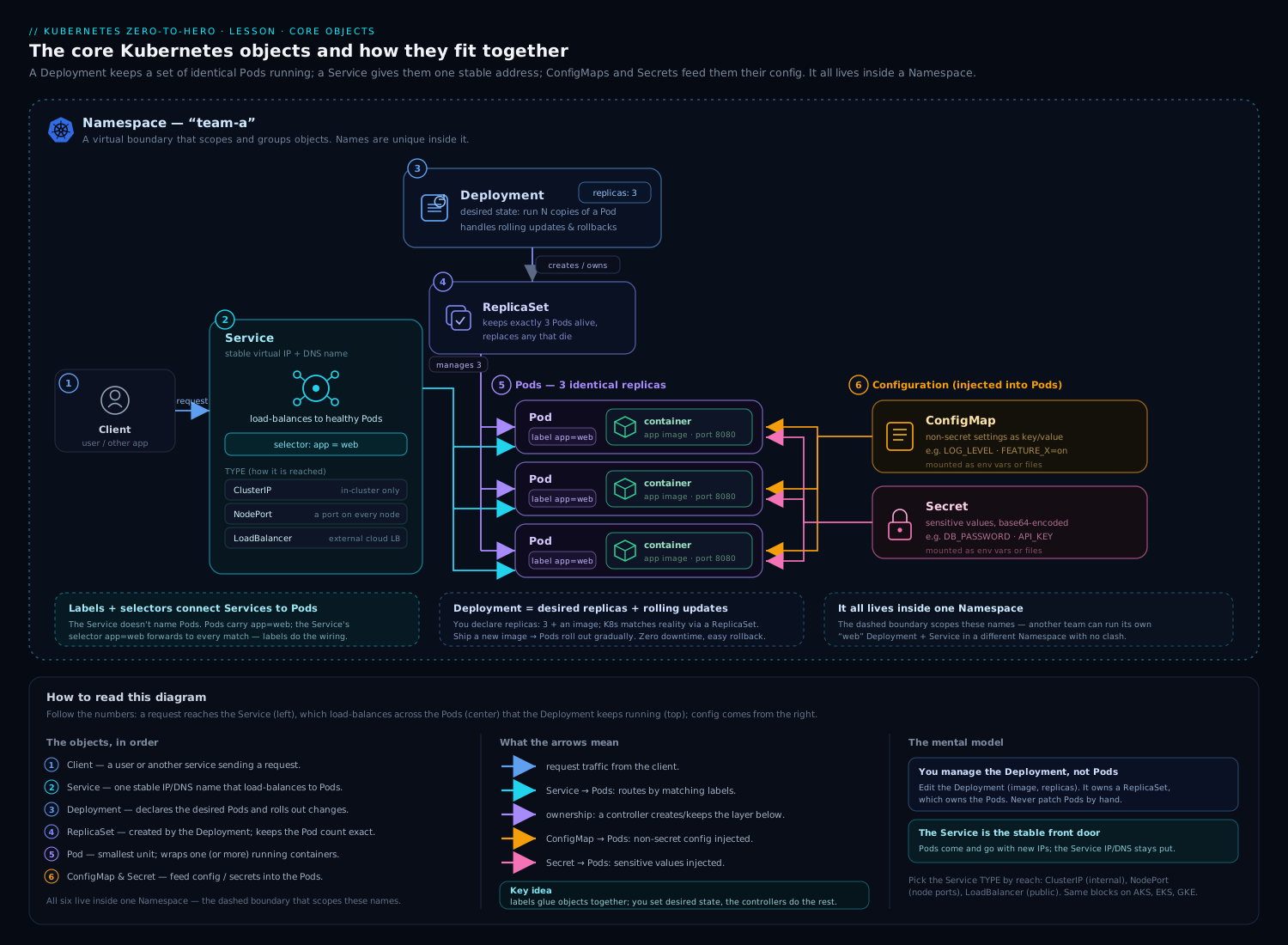
The diagram above shows the core objects — Pods, ReplicaSets/Deployments, Services and the rest — and the way they connect: every one of those connections is, under the hood, a label selector resolving “which objects match these tags right now”, which is exactly the machinery this lesson has been pulling apart.
Hands-on lab
We will create a tiny multi-version app, see selectors wire a Service to Pods, watch what set-based selectors do, prove the Deployment-selector immutability rule, and use field selectors. Everything is free and local.
1. Start a cluster
kind create cluster --name labels-lab
# or: minikube start -p labels-lab
kubectl get nodes
2. Create two versioned Deployments sharing one app label
cat <<'EOF' | kubectl apply -f -
apiVersion: apps/v1
kind: Deployment
metadata:
  name: web-v1
spec:
  replicas: 2
  selector:
    matchLabels:
      app.kubernetes.io/name: web
      app.kubernetes.io/version: "1"
  template:
    metadata:
      labels:
        app.kubernetes.io/name: web
        app.kubernetes.io/version: "1"
        track: stable
    spec:
      containers:
        - name: web
          image: registry.k8s.io/echoserver:1.10
          ports: [{containerPort: 8080}]
---
apiVersion: apps/v1
kind: Deployment
metadata:
  name: web-v2
spec:
  replicas: 1
  selector:
    matchLabels:
      app.kubernetes.io/name: web
      app.kubernetes.io/version: "2"
  template:
    metadata:
      labels:
        app.kubernetes.io/name: web
        app.kubernetes.io/version: "2"
        track: canary
    spec:
      containers:
        - name: web
          image: registry.k8s.io/echoserver:1.10
          ports: [{containerPort: 8080}]
EOF
3. Explore equality and set-based selectors
# Everything in the app (both versions) — shared label
kubectl get pods -l app.kubernetes.io/name=web --show-labels

# Only v1 (equality, ANDed)
kubectl get pods -l 'app.kubernetes.io/name=web,app.kubernetes.io/version=1'

# v1 OR v2 via set-based 'in' (here, trivially all)
kubectl get pods -l 'app.kubernetes.io/version in (1,2)'

# Only Pods that have a 'track' label at all (exists)
kubectl get pods -l 'track'

# Only Pods that are NOT canary (note: also matches Pods with no 'track')
kubectl get pods -l 'track!=canary'

# Promote labels to columns
kubectl get pods -L app.kubernetes.io/version -L track
You should see 3 Pods total under the shared app.kubernetes.io/name=web label (2 from v1, 1 from v2), and the filters narrow as described.
4. A Service that spans both versions
cat <<'EOF' | kubectl apply -f -
apiVersion: v1
kind: Service
metadata:
  name: web
spec:
  selector:
    app.kubernetes.io/name: web    # equality only — spans v1 AND v2
  ports:
    - port: 80
      targetPort: 8080
EOF

kubectl get endpointslices -l kubernetes.io/service-name=web
The EndpointSlice should list 3 ready endpoints — the Service load-balances across both versions because they share app.kubernetes.io/name=web. This is the canonical pattern: a stable Service over a shared label, with version labels used for finer-grained selection elsewhere.
5. Prove the Deployment selector is immutable
kubectl patch deployment web-v1 --type merge \
  -p '{"spec":{"selector":{"matchLabels":{"app.kubernetes.io/name":"web2"}}}}'
Expected: the API server rejects the patch with a message that spec.selector is immutable / field is immutable. This is the safety rule from earlier — selectors cannot be edited in place on Deployments.
6. Field selectors
# Running Pods only (a field, not a label)
kubectl get pods --field-selector status.phase=Running

# Which node each Pod landed on, then filter to one node
kubectl get pods -o wide
NODE=$(kubectl get pods -o jsonpath='{.items[0].spec.nodeName}')
kubectl get pods --field-selector spec.nodeName="$NODE"

# Combine field + label selectors
kubectl get pods --field-selector status.phase=Running -l track=canary

# Trigger the 'unsupported field' error to see the allowlist in action
kubectl get pods --field-selector spec.restartPolicy=Always   # supported
kubectl get pods --field-selector spec.nodeNameXYZ=foo        # error: not supported
7. Annotations vs labels in practice
# Annotate (descriptive note) vs label (selectable tag)
kubectl annotate deployment web-v1 kubernetes.io/change-cause="initial echoserver"
kubectl label deployment web-v1 owner=platform     # this you COULD select on

# A rollout-restart writes a changing ANNOTATION into the template
kubectl rollout restart deployment web-v1
kubectl get deploy web-v1 -o jsonpath='{.spec.template.metadata.annotations}'
# -> shows kubectl.kubernetes.io/restartedAt — note: an annotation, so selectors are untouched
Validation
kubectl get endpointslices -l kubernetes.io/service-name=webshows 3 endpoints (Service spans both versions).- The selector patch in step 5 is rejected as immutable.
--field-selector spec.nodeNameXYZ=fooreturns a “not supported” error, whilestatus.phase=Runningworks — proving field selectors are allowlisted.
Cleanup
kubectl delete deployment web-v1 web-v2
kubectl delete service web
kind delete cluster --name labels-lab     # or: minikube delete -p labels-lab
Cost note
Everything here runs on a local kind/minikube cluster on your laptop — zero cloud cost. The echoserver image is small and the workloads are trivial.
Common mistakes & troubleshooting
| Symptom | Likely cause | Fix |
|---|---|---|
| Service has no endpoints; traffic 503s | Service selector does not match any Pod’s labels (typo, wrong key, or Pods not ready) |
Compare kubectl get svc web -o jsonpath='{.spec.selector}' with kubectl get pods --show-labels; fix the labels or selector; check readiness |
selector does not match template labels on apply |
Deployment spec.selector.matchLabels not a subset of spec.template.metadata.labels |
Make the template carry every label the selector requires |
| Cannot change a Deployment’s selector | spec.selector is immutable |
Delete and recreate the Deployment (plan for a brief replacement) |
| A hand-made Pod got deleted/adopted unexpectedly | Its labels matched a ReplicaSet’s selector and it had no controller owner | Use distinct labels for ad-hoc Pods; never reuse a controller’s selector labels |
tier!=frontend matched Pods with no tier label |
!= / notin also match objects where the key is absent |
Add an exists term: -l 'tier,tier!=frontend' to require the key |
field label not supported error |
The field is not in the API server’s allowlist for that resource | Use a supported field (see the table) or filter client-side with -o jsonpath/grep |
| NetworkPolicy allows too much / too little | namespaceSelector and podSelector placed in separate from items (ORed) vs one item (ANDed) |
Put both in the same list item to AND them; separate items to OR |
error: 'tier' already has a value on kubectl label |
Setting an existing key without --overwrite |
Add --overwrite |
| Annotation rejected: too long | Total annotations exceed 256 KiB | Move bulky data into a ConfigMap/Secret and reference it |
Best practices
- Adopt the
app.kubernetes.io/*common labels on every workload from day one. They cost nothing and unlock interoperability with Helm, dashboards, andkubectlgrouping. - Keep selector labels stable and minimal. Put identity (name, instance, component) in selector labels and put changeable facts (a build SHA, a deploy timestamp) in annotations or non-selector labels, so you never need to touch an immutable selector.
- Never overload one label key with two meanings.
env=prodshould mean exactly one thing cluster-wide. - Make ad-hoc Pods un-adoptable by giving them labels no controller selects on — avoids accidental adoption/deletion.
- Prefer
matchExpressionswithInover manymatchLabelswhen you need OR semantics over one key. - Use field selectors for runtime triage (“what’s on this node?”, “what’s not Running?”) and label selectors for application grouping; combine them.
- Standardise a label taxonomy (and document it) — at minimum app name, component, environment, and team/owner — so dashboards, cost allocation, and policies all key off the same set.
- Validate selector/template alignment in CI (e.g. with
kubeconform/admission policy) to catch the “selector does not match template” class before it reaches the cluster.
Security notes
- Labels are an authorisation surface. RBAC controls who can change labels; anyone who can edit a Pod’s labels can change which Services route to it, which NetworkPolicies apply to it, and whether a ReplicaSet adopts it. Treat
patch/updateon Pods and workloads as a sensitive verb. - NetworkPolicy decisions hinge on labels. A mislabeled namespace (or the ability to add a namespace label) can punch a hole through a
namespaceSelector. Lock down who can label namespaces, and prefer policies that match on stable, controller-managed labels. - Selectors are not a security boundary by themselves — they are a matching mechanism. A NetworkPolicy enforces; a Service selector merely routes. Do not rely on “nothing selects this Pod” as isolation; use NetworkPolicy and namespaces for that.
- Annotations can leak data. Because annotations hold free-form blobs, do not stash secrets in them — they are world-readable to anyone with
geton the object and show up inkubectl describeand audit logs. Put secrets in Secret objects (see ConfigMaps & Secrets). - The
last-applied-configurationannotation mirrors your whole manifest; if a manifest contained inline sensitive data, that data is now also in an annotation. Keep secrets out of manifests entirely.
Interview & exam questions
-
What is the difference between a label and an annotation, and when would you use each? Labels are identifying metadata used by selectors to find and group objects; they are short and strictly formatted. Annotations are non-identifying, free-form, larger metadata for humans and tools that nothing selects on. Use a label when something must find the object; an annotation when it just needs a note about it.
-
Explain equality-based vs set-based selectors and which objects support each. Equality-based uses
=/==/!=(ANDed by commas). Set-based addsin,notin,exists/!. Older objects (Service, ReplicationController) take only an equality map; newer objects (Deployment, ReplicaSet, NetworkPolicy, PDB, affinity) take the structuredLabelSelectorsupporting both. -
What is the relationship between
matchLabelsandmatchExpressions? Both live in a structuredLabelSelector.matchLabelsis a map of equality requirements;matchExpressionsis a list of{key, operator, values}usingIn/NotIn/Exists/DoesNotExist. All requirements across both are ANDed.matchLabels: {a: b}equals amatchExpressionsIn [b]. -
Why is a Deployment’s
spec.selectorimmutable, and what must be true about it relative to the Pod template? It is immutable because changing it would orphan the existing Pods (they would stop matching) and spawn a fresh set, causing a silent double-deploy. The template’s labels must be a superset of the selector, or the API rejects the object. -
A Service has no endpoints. How do you debug it? Compare the Service’s
spec.selectorwith the Pods’ actual labels (--show-labels); confirm the Pods exist and are Ready (unready Pods are excluded). Check you are in the right namespace. Remember a selector-less Service requires manually managed EndpointSlices. -
What is the difference between a label selector and a field selector? A label selector queries the arbitrary
metadata.labelsmap (with set logic). A field selector queries specific, server-allowlisted object fields (status.phase,spec.nodeName), supports only=/!=, and is a client list-time filter — controllers do not wire objects with field selectors. -
How do you find every Pod scheduled on a particular node, including across all namespaces?
kubectl get pods --all-namespaces --field-selector spec.nodeName=<node>.spec.nodeNameis one of the supported Pod field selectors. -
Why might
kubectl get pods -l tier!=frontendreturn Pods you didn’t expect?!=(andnotin) match objects where the key is absent, not only those with a different value. To require the key, add an existence term:-l 'tier,tier!=frontend'. -
What does an empty selector (
{}) mean, and where does that matter? An emptyLabelSelectormatches everything in scope. It is the idiom for “all Pods” — e.g. a NetworkPolicypodSelector: {}applies to every Pod in the namespace (the basis of default-deny). A null selector, by contrast, typically matches nothing. -
How does
kubectl rollout restartforce a restart without changing what selectors match? It writes a changing annotation (kubectl.kubernetes.io/restartedAt) into the Pod template. The template change triggers a rollout; because it is an annotation rather than a label, no selector’s result changes. -
In a NetworkPolicy, what is the difference between putting
namespaceSelectorandpodSelectorin onefromitem vs two? In one item they are ANDed (the peer must be in that namespace and match the pod labels). In two separate items underfromthey are ORed. Indentation changes the policy’s meaning. -
What is the recommended set of common labels and why use them? The
app.kubernetes.io/*set:name,instance,version,component,part-of,managed-by. They give tools a shared vocabulary to understand applications they did not create, enabling consistent grouping, dashboards, and cost allocation.
Quick check
- Which selector syntax can a Service use — equality-based, set-based, or both?
- True or false: annotations can be used in a label selector.
- Write a
matchExpressionsentry meaning “theenvironmentkey is present with valueprodorstaging”. - What does
kubectl get pods --field-selector status.phase!=Runningreturn? - You add the label
app.kubernetes.io/name=webto a stray standalone Pod while a ReplicaSet selects on that label. What can happen?
Answers
- Equality-based only. Service
spec.selectoris a plain map; it cannot expressin/notin/exists. - False. Nothing selects on annotations; they are non-identifying. Only labels are selectable.
- {key: environment, operator: In, values: ["prod", "staging"]}.- All Pods whose
status.phaseis notRunning(Pending, Succeeded, Failed, Unknown) — a field selector with!=. - The ReplicaSet may adopt the Pod (it matches the selector and has no controlling owner), count it toward
replicas, and potentially delete it to satisfy the desired count. Give ad-hoc Pods labels no controller selects on.
Exercise
On a fresh kind/minikube cluster:
- Deploy two Deployments,
cacheandweb, each with the fullapp.kubernetes.io/*label set (name,instance,component,part-of=shop,managed-by=manual,version). - Create one Service that targets only the
webcomponent (notcache) using an equality selector, and verify its EndpointSlice contains only the web Pods. - Write a
nodeSelectorand an equivalentrequiredDuringSchedulingIgnoredDuringExecutionnode-affinity rule that both target nodes labelleddisktype=ssd; label a node and confirm both schedule. - Add pod anti-affinity so the two
webreplicas avoid sharing a node (topologyKey: kubernetes.io/hostname) and confirm they land on different nodes (or one stays Pending on a single-node cluster — explain why). - Use a single command combining a label selector and a field selector to list only the Running Pods of
part-of=shop. - Attempt to edit the
webDeployment’sspec.selector; capture the error and explain it. - Add a
kubernetes.io/change-causeannotation and confirm it appears inkubectl rollout historywhile not affecting any selector.
Write down, for each step, which metadata mechanism (label, annotation, field) did the work and why.
Certification mapping
- CKAD — Application Design and Build and Application Deployment: labels/selectors are foundational to Deployments, Services, and rollouts; expect to label objects, fix selector/template mismatches, and use
kubectl get -landkubectl label/annotateunder time pressure. - CKA — Workloads & Scheduling and Services & Networking:
nodeSelector/affinity, NetworkPolicypodSelector/namespaceSelector, PDB selectors, and field selectors (--field-selector spec.nodeName=...to inspect node workloads) all appear; speed with-l,-L, and--field-selectorsaves real minutes. - KCNA — conceptual: know labels vs annotations and that selectors are how objects find each other.
Glossary
- Label — an identifying
key/valuepair inmetadata.labels, used by selectors; keys allow an optional DNS-subdomain prefix; values ≤63 chars. - Annotation — a non-identifying
key/valuepair inmetadata.annotations; free-form, large (≤256 KiB total), never selected on. - Label selector — a query over labels; equality-based (
=,!=) or set-based (in,notin,exists,!). LabelSelector— the structured API form (matchLabels+matchExpressions) used by modern objects; all requirements AND.matchLabels/matchExpressions— the two fields of aLabelSelector; a map of equalities, and a list of{key, operator, values}set-based requirements.- Equality-based selector — matches exact values with
=/==/!=. - Set-based selector — matches against value sets with
In/NotInand existence withExists/DoesNotExist. - Field selector — a server-side filter over allowlisted object fields (e.g.
status.phase,spec.nodeName); supports=/!=only; passed via--field-selector. - EndpointSlice — the object listing the IP:port endpoints a Service’s selector currently resolves to.
pod-template-hash— a label the Deployment controller adds so old and new ReplicaSets select disjoint Pod sets during a rollout.topologyKey— a node-label key used by pod (anti-)affinity to define the topology domain (“same node”, “same zone”).- Common labels (
app.kubernetes.io/*) — the recommended standard label set (name,instance,version,component,part-of,managed-by).
Next steps
- Continue to The Kubernetes Downward API: Exposing Pod & Container Metadata — how a Pod reads its own labels, annotations, and fields from inside the container.
- Deepen the wiring you saw here: Services, networking, endpoints & DNS, Deployments, ReplicaSets, rollouts & rollback, and Scheduling: affinity, topology spread, priority & preemption.
- Apply selectors to policy and tenancy: Network Policies with Cilium & L7 and Namespaces, ResourceQuotas & LimitRanges.