A running container is, by design, ignorant of the cluster around it. The process inside sees its own filesystem, its own PID 1, and whatever environment variables you handed it — but it has no idea what its Pod is called, which namespace it lives in, what node it landed on, what its Pod IP is, or how much memory it has been promised. For a great many applications that ignorance is a problem. A log shipper wants to tag every line with the Pod name and namespace so you can find it in Loki. A JVM wants to size its heap to the memory limit it was actually given, not the node’s total RAM. A leader-election library wants a stable, unique identity. A metrics exporter wants to know the node name for topology-aware dashboards. None of that information lives in the image, and most of it is not known until the Pod is scheduled.
The Downward API is Kubernetes’ answer. It is the mechanism by which a Pod’s own metadata and a container’s own resource settings are made available to the workload running inside, without that workload ever talking to the Kubernetes API server. The name is the whole idea: information flows down from the Pod object into the container, as opposed to the container reaching up and out to the API. That distinction matters more than it first appears — because the Downward API needs no ServiceAccount token, no RBAC, no network call, and no client library, it works in the most locked-down, no-egress, zero-permission Pod you can build. It is the one source of self-knowledge a container always has.
This lesson covers the Downward API exhaustively. We will define what it is and why it exists, walk both delivery mechanisms — environment variables (using fieldRef and resourceFieldRef) and the downwardAPI projected volume — in full, lay out the complete field matrix showing precisely which fields are available through env vars, which are available only through volume files, and which are available through both, dig into the resource divisor that turns a memory limit into a number your runtime can use, and finish with concrete use cases and the gotchas that catch people in production. Everything is current to Kubernetes v1.30+ and uses real kubectl and YAML you can run on a free local cluster.
Learning objectives
By the end of this lesson you can:
- Explain what the Downward API is, why it exists, and why it needs no API access, token or RBAC.
- Inject Pod metadata and container resource values as environment variables with
fieldRefandresourceFieldRef, and explain why env-var values are frozen at start. - Mount the same information as files via a
downwardAPIvolume, includingmetadata.labelsandmetadata.annotations, which cannot be exposed as environment variables. - Recite the complete field matrix — every supported field and whether it works through env, through volume, or both.
- Use the resource
divisorto size a JVM heap, GOMAXPROCS or a worker count from a container’s requests and limits, and explain the rounding rule. - Predict exactly when volume files auto-update and when env vars do not, and design around it.
- Avoid the common gotchas: missing-field validation, the resource-defaulting rule,
subPathkilling updates, and confusing the Downward API with the Kubernetes API.
Prerequisites & where this fits
You need a terminal, a free local cluster (kind, minikube or k3d — the What Is Kubernetes? lesson installs one), and a working understanding of the Pod — specifically how a container’s environment and filesystem/volumes work, and what resource requests and limits are. All of that is covered in Kubernetes Pods, In Depth. Because the Downward API exposes a Pod’s labels and annotations, it helps to have met those first — see Kubernetes Labels, Selectors, Annotations & Field Selectors, In Depth. The volume mechanics here are the same projection machinery used by ConfigMaps and Secrets, so Kubernetes ConfigMaps & Secrets, In Depth is a useful companion — in fact a downwardAPI source can sit inside a projected volume right next to a ConfigMap and a Secret. This is an Intermediate Fundamentals lesson of the Kubernetes Zero-to-Hero course; the next lesson is Kubernetes Pod Autoscaling, In Depth, which builds on the resource concepts you reinforce here.
Core concepts: down, not up
Kubernetes gives a workload two fundamentally different ways to learn about itself and its surroundings:
- The Kubernetes API (the “upward” path). The container uses its mounted ServiceAccount token to call the API server (
https://kubernetes.default.svc) and ask questions: “describe my own Pod”, “list the Pods in my namespace”, “watch this ConfigMap”. This is powerful and dynamic, but it requires a token, the right RBAC permissions, network reachability to the API server, and usually a client library. It is the right tool when an app genuinely needs to observe the cluster (an operator, a controller, a service-discovery sidecar). - The Downward API (the “downward” path). Kubernetes takes fields that are already on the Pod object — its name, namespace, labels, the resource numbers it was scheduled with — and pushes them into the container as environment variables or files at start-up (and, for some volume files, keeps them fresh). No token, no RBAC, no network, no library. It is the right tool when an app only needs to know about itself.
Jargon check. “Downward” refers to direction in the object hierarchy: the Pod (and the kubelet that runs it) hands data down into the container. It has nothing to do with the cluster being “below” anything. Contrast it with the API server, which sits “up and out” on the network.
Two more framing ideas before the mechanics:
- It is self-referential by definition. The Downward API can only expose facts about the Pod the container is in and the container itself. You cannot read another Pod’s name, your node’s labels, a sibling Pod’s IP, or any cluster-wide object with it. The moment you need someone else’s data, you are back on the API path.
- Scope is split between Pod-level and container-level fields. Some fields describe the whole Pod (its name, namespace, UID, IP, node, service account, labels, annotations). Others are container-specific (the CPU/memory requests and limits of one named container, plus the ephemeral-storage limit). This split is the single biggest source of confusion, because the two categories are exposed through different sub-fields (
fieldReffor Pod-level,resourceFieldReffor container-level) and have different rules — we untangle them next.
The two delivery mechanisms
There are exactly two ways to consume the Downward API, and the choice between them is the most important decision in this lesson:
| Mechanism | YAML shape | Best for | Updates after start? |
|---|---|---|---|
| Environment variables | env[].valueFrom.fieldRef / env[].valueFrom.resourceFieldRef |
Single scalar values an app reads from the environment (a POD_NAME, a MEMORY_LIMIT) |
No — frozen at container start |
downwardAPI volume |
volumes[].downwardAPI.items[] mounted via volumeMounts |
Sets of values, labels/annotations, anything that must change without a restart | Yes for labels & annotations (and resourceFieldRef files) |
Keep that last column in mind throughout: env vars never update; certain volume files do. Everything else follows from it.
Mechanism 1 — environment variables
You add an entry to a container’s env list whose value comes from valueFrom, using one of two sub-fields. Use fieldRef for Pod-level metadata and resourceFieldRef for container-level resources:
apiVersion: v1
kind: Pod
metadata:
  name: downward-env
  labels:
    app: demo
spec:
  containers:
    - name: app
      image: busybox:1.36
      command: ["sh", "-c", "env | sort | grep -E 'MY_|CPU|MEM'; sleep 3600"]
      resources:
        requests: { cpu: "250m", memory: "64Mi" }
        limits:   { cpu: "500m", memory: "128Mi" }
      env:
        # ---- Pod-level metadata via fieldRef ----
        - name: MY_POD_NAME
          valueFrom:
            fieldRef:
              fieldPath: metadata.name
        - name: MY_POD_NAMESPACE
          valueFrom:
            fieldRef:
              fieldPath: metadata.namespace
        - name: MY_POD_UID
          valueFrom:
            fieldRef:
              fieldPath: metadata.uid
        - name: MY_POD_IP
          valueFrom:
            fieldRef:
              fieldPath: status.podIP
        - name: MY_HOST_IP
          valueFrom:
            fieldRef:
              fieldPath: status.hostIP
        - name: MY_NODE_NAME
          valueFrom:
            fieldRef:
              fieldPath: spec.nodeName
        - name: MY_SERVICE_ACCOUNT
          valueFrom:
            fieldRef:
              fieldPath: spec.serviceAccountName
        # ---- a single label/annotation key is allowed via env ----
        - name: MY_APP_LABEL
          valueFrom:
            fieldRef:
              fieldPath: metadata.labels['app']
        # ---- container-level resources via resourceFieldRef ----
        - name: CPU_REQUEST
          valueFrom:
            resourceFieldRef:
              containerName: app          # which container's resources
              resource: requests.cpu
              divisor: "1m"               # report in millicores
        - name: MEM_LIMIT
          valueFrom:
            resourceFieldRef:
              containerName: app
              resource: limits.memory
              divisor: "1Mi"              # report in MiB
Three things to internalise about the env path:
fieldRefis for Pod-level fields;resourceFieldRefis for container resources. They are sibling fields undervalueFromand you pick exactly one per entry. UsingfieldRefwith aresources.*path, orresourceFieldRefformetadata.name, is a validation error.- The value is captured once, at container creation, and never changes. If you
kubectl labelorkubectl annotatethe Pod afterwards, an env-injected label does not update — the process would have to restart to see a new value. This is identical to how ConfigMap/Secret env injection behaves, and for the same reason: a process’s environment is fixed atexectime on Linux. - You can reference whole label/annotation maps only by a single key.
metadata.labels['app']works as an env var; the entiremetadata.labelsmap does not (there is no sensible single string for “all labels” in an env var). The full map is a volume-only capability — see below.
Mechanism 2 — the downwardAPI volume
A downwardAPI volume turns each selected field into a file. You declare it under volumes and mount it with volumeMounts, exactly like a ConfigMap volume:
apiVersion: v1
kind: Pod
metadata:
  name: downward-vol
  labels:
    app: demo
    tier: backend
  annotations:
    build: "2026.06.15"
spec:
  containers:
    - name: app
      image: busybox:1.36
      command: ["sh", "-c", "ls -l /etc/podinfo; echo '---'; cat /etc/podinfo/labels; sleep 3600"]
      resources:
        requests: { memory: "64Mi" }
        limits:   { memory: "128Mi" }
      volumeMounts:
        - name: podinfo
          mountPath: /etc/podinfo
          readOnly: true
  volumes:
    - name: podinfo
      downwardAPI:
        defaultMode: 0644
        items:
          - path: "pod_name"                 # → /etc/podinfo/pod_name
            fieldRef:
              fieldPath: metadata.name
          - path: "namespace"
            fieldRef:
              fieldPath: metadata.namespace
          - path: "labels"                   # WHOLE label map, one key=value per line
            fieldRef:
              fieldPath: metadata.labels
          - path: "annotations"              # WHOLE annotation map
            fieldRef:
              fieldPath: metadata.annotations
          - path: "cpu_limit"
            resourceFieldRef:
              containerName: app
              resource: limits.cpu
              divisor: "1m"
          - path: "mem_limit_bytes"
            resourceFieldRef:
              containerName: app
              resource: limits.memory
              # no divisor → bytes
The volume path unlocks two things the env path cannot do:
- Whole
metadata.labelsandmetadata.annotationsmaps. Each is written as a file containing onekey="value"pair per line (values are quoted and escaped). This is the only way to get the complete set of labels or annotations into a container. - Auto-updating files. When you change the Pod’s labels or annotations, the kubelet rewrites the corresponding files. The container sees the new content without restarting. (Note the structural rule: in a volume, a Pod-level field like
metadata.labelsusesfieldRef, and a container resource usesresourceFieldRefwith acontainerName— the same two sub-fields as the env path, just nested underitems[]instead ofvalueFrom.)
Jargon check. A
downwardAPIvolume is not a disk. Like ConfigMap and Secret volumes it is backed by tmpfs (memory). The “files” are symlinks into a hidden..datadirectory that the kubelet swaps atomically on update — which is exactly why asubPathmount of one of these files is frozen (more on that under gotchas).
The volume fields, exhaustively:
| Field | What it does | Values / default | Gotcha |
|---|---|---|---|
items[].path |
Filename, relative to mountPath |
Required; may contain subdirs (pod/labels) |
Must be a relative path; no leading / and no ... |
items[].fieldRef.fieldPath |
The Pod-level field to expose | One of the supported metadata/spec/status paths | Cannot be a status.podIP-style field that’s empty at mount time without care; see gotchas. |
items[].resourceFieldRef |
A container resource value | {containerName, resource, divisor} |
containerName is required here (env can omit it for the current container; volumes cannot). |
items[].mode |
Per-file permission bits | Octal, e.g. 0600 |
Overrides defaultMode for that one file. |
defaultMode |
Permission bits for all files | Octal; default 0644 | Quote octal values — unquoted 0644 is parsed oddly in YAML. |
The complete field matrix
This is the reference you came for. The Downward API supports a fixed set of fields, and — critically — not every field is available through both mechanisms. The rule of thumb is: simple scalars work via env and volume; whole maps (labels/annotations) work via volume only. Here is the full list for Kubernetes v1.30+.
Pod-level fields (fieldRef)
fieldPath |
What it is | Env var? | Volume file? |
|---|---|---|---|
metadata.name |
The Pod’s name | ✅ | ✅ |
metadata.namespace |
The Pod’s namespace | ✅ | ✅ |
metadata.uid |
The Pod’s UID (cluster-unique) | ✅ | ✅ |
metadata.labels['<key>'] |
One label value, by key | ✅ | ✅ |
metadata.annotations['<key>'] |
One annotation value, by key | ✅ | ✅ |
metadata.labels |
The whole label map (one k="v" per line) |
❌ | ✅ |
metadata.annotations |
The whole annotation map | ❌ | ✅ |
spec.nodeName |
Name of the node the Pod is on | ✅ | ✅ |
spec.serviceAccountName |
The Pod’s ServiceAccount | ✅ | ✅ |
status.hostIP |
The node’s IP address | ✅ | ✅ |
status.hostIPs |
All node IPs (dual-stack) | ✅ | ✅ |
status.podIP |
The Pod’s primary IP | ✅ | ✅ |
status.podIPs |
All Pod IPs (dual-stack) | ✅ | ✅ |
The two whole-map rows are the headline:
metadata.labelsandmetadata.annotations(without a['key']) are the only fields you cannot get as an environment variable. If your app needs all of its labels, you must use a volume.
Container-level resource fields (resourceFieldRef)
These require a containerName (which container’s resources you mean) and accept an optional divisor:
resource |
What it is | Env var? | Volume file? |
|---|---|---|---|
requests.cpu |
The container’s CPU request | ✅ | ✅ |
limits.cpu |
The container’s CPU limit | ✅ | ✅ |
requests.memory |
The container’s memory request | ✅ | ✅ |
limits.memory |
The container’s memory limit | ✅ | ✅ |
requests.ephemeral-storage |
The container’s ephemeral-storage request | ✅ | ✅ |
limits.ephemeral-storage |
The container’s ephemeral-storage limit | ✅ | ✅ |
requests.hugepages-<size> |
Hugepages request (e.g. hugepages-2Mi) |
✅ | ✅ |
limits.hugepages-<size> |
Hugepages limit | ✅ | ✅ |
All resource fields work through both mechanisms. There is no resourceFieldRef for the whole resources block — you expose one quantity at a time.
The crucial defaulting rule for resources
There is a subtle, high-stakes behaviour: if you reference a resource that is not explicitly set on the container, the Downward API defaults it to the node’s allocatable capacity for that resource. Concretely — if a container sets a memory limit but no memory request, and you ask for requests.memory, you get the limit (Kubernetes already defaults request=limit when only the limit is set). But if a container sets neither request nor limit for, say, CPU, and you ask for limits.cpu, the Downward API returns the node’s allocatable CPU — not zero, not an error. A JVM that sizes its thread pool from limits.cpu on a container with no CPU limit will therefore size itself to the whole node, which on a 64-core box is a catastrophe. The fix is simple and is also just good hygiene: always set explicit requests and limits on any container that reads its own resources.
The resource divisor: turning quantities into usable numbers
CPU and memory are Kubernetes quantities — 500m, 128Mi, 2Gi. Your runtime usually wants a plain integer in a unit it understands. The divisor controls the unit and the output is ceil(quantity / divisor) — always rounded up to the next integer.
resource |
divisor |
Output for a limits.memory of 128Mi |
Output for a limits.cpu of 500m |
|---|---|---|---|
| memory | (omitted) → 1 |
134217728 (bytes) |
— |
| memory | 1Mi |
128 |
— |
| memory | 1Gi |
1 (⌈128Mi/1Gi⌉ rounds up) |
— |
| cpu | (omitted) → 1 |
— | 1 (⌈0.5⌉ rounds up to 1 core) |
| cpu | 1m |
— | 500 (millicores) |
The defaults and rules:
- Memory divisor defaults to
1→ bytes. A128Milimit with no divisor yields134217728. Use1Mifor mebibytes or1Gifor gibibytes. - CPU divisor defaults to
1→ whole cores, rounded up. A500m(half-core) limit with no divisor yields1, not0— because of the ceiling. To get millicores, setdivisor: "1m"→500. To get a fractional-aware whole-core count for, say,GOMAXPROCS, the ceiling is usually what you want. - The output is always an integer string. There are no decimals; everything rounds up. This is why
divisorexists — picking the right unit means you never have to parseKi/Mi/Gisuffixes in your app.
This is the feature that makes the Downward API genuinely load-bearing in production, because container runtimes do not automatically respect cgroup limits unless told. The canonical recipes:
- JVM heap from the memory limit. Older JVMs ignored cgroup limits and sized the heap to host RAM, causing OOM-kills. The robust pattern is to expose
limits.memorywithdivisor: "1Mi"intoMAX_MEM_MBand start with-Xmx$((MAX_MEM_MB * 75 / 100))m(leaving headroom for non-heap memory). Modern JDKs honour-XX:MaxRAMPercentage, but the Downward-API value remains useful for explicit, auditable sizing and for non-JVM runtimes. GOMAXPROCSfrom the CPU limit. A Go binary defaultsGOMAXPROCSto the node’s core count, so a 500m-limited Pod on a 64-core node spins up 64 OS threads and thrashes. Exposelimits.cpu(default divisor → whole cores, rounded up) intoGOMAXPROCS. (Theautomaxprocslibrary reads the cgroup directly and is the more common modern fix, but the Downward API needs no library.)- Worker/thread-pool counts. Anything that should scale with the CPU or memory you were actually granted — Gunicorn workers, a connection-pool size, Node’s
UV_THREADPOOL_SIZE— can be derived from a Downward-API value at start-up.
Embedding the Downward API in a projected volume
A downwardAPI source can also live inside a projected volume alongside ConfigMap, Secret and ServiceAccount-token sources, so all of a container’s mounted metadata lands in one directory:
volumes:
  - name: all-config
    projected:
      sources:
        - downwardAPI:
            items:
              - path: "pod/labels"
                fieldRef:
                  fieldPath: metadata.labels
        - configMap:
            name: app-config
        - secret:
            name: db-creds
The semantics are identical to a standalone downwardAPI volume; this is purely about layout (and a projected ServiceAccount token gets you a short-lived, audience-bound token in the same mount). The mechanics of projected volumes are covered in ConfigMaps & Secrets, In Depth.
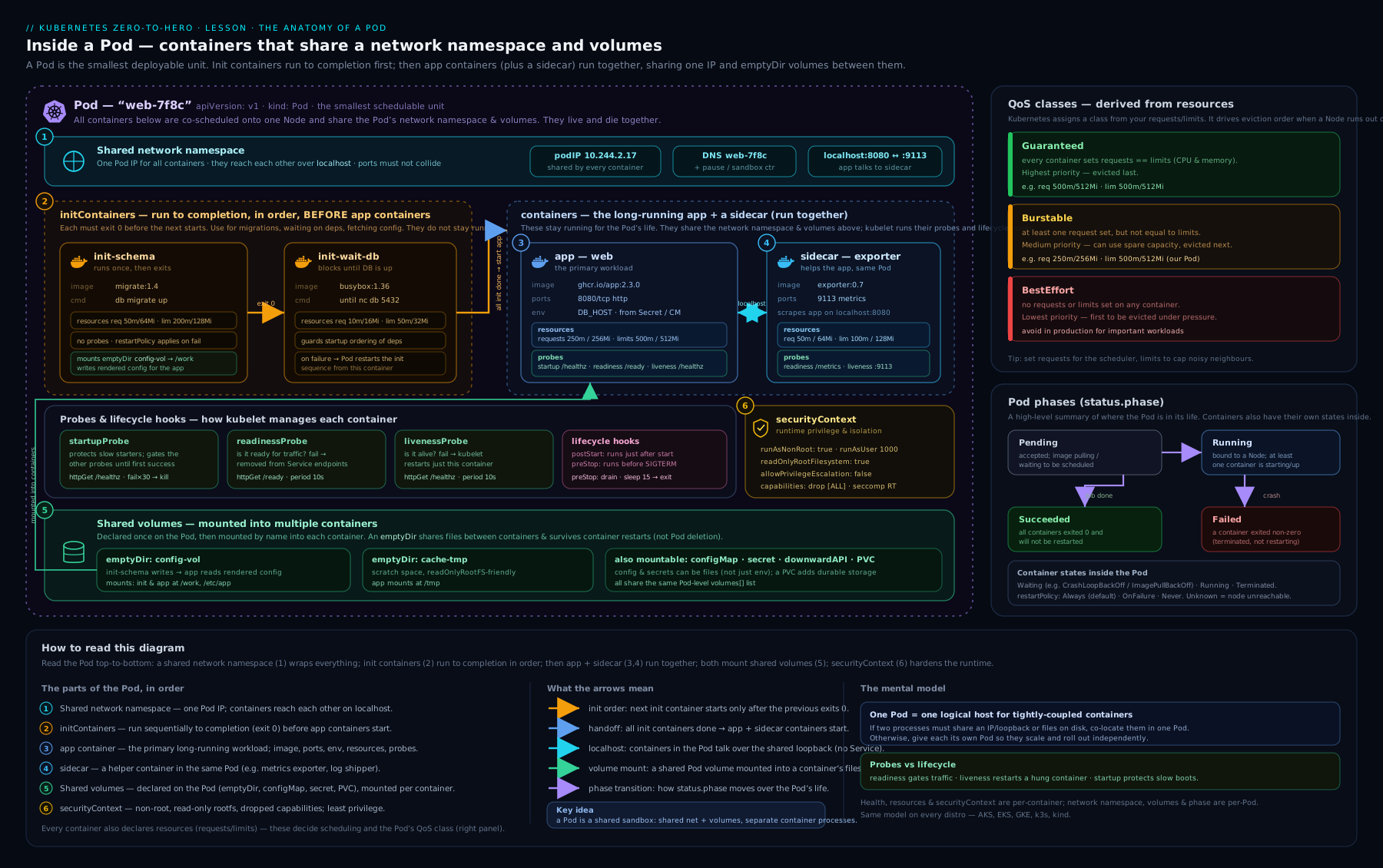
As the diagram shows, every container in a Pod shares one IP and the Pod’s volumes — and it is precisely those Pod-level facts (the shared IP, the name, the node it was scheduled onto) plus each container’s own resource settings that the Downward API hands down into the processes inside.
Use cases: when you actually reach for it
| Use case | What you expose | Why the Downward API (not the API server) |
|---|---|---|
| Logging / tracing context | metadata.name, metadata.namespace, metadata.uid, spec.nodeName |
A log shipper (Fluent Bit, Vector) tags every line with Pod/namespace; no token or RBAC needed in the sidecar. |
| Runtime sizing | limits.memory (JVM -Xmx), limits.cpu (GOMAXPROCS, worker counts) |
The app must size to its own cgroup limit, known only at schedule time; needs no network. |
| Self-identity for clustering | metadata.name, status.podIP |
Leader election, gossip membership, Raft node IDs — each replica needs a stable, unique self-identity. |
| Topology / locality awareness | spec.nodeName, status.hostIP |
A cache or DB client routes to a node-local peer or reports which node a metric came from. |
| Application configuration | metadata.labels / metadata.annotations (whole map, volume only) |
App behaviour driven by its own labels (e.g. tenant, region) without baking config per replica. |
| Network self-awareness | status.podIP, status.podIPs, status.hostIP |
An app that must bind to or advertise its own IP (some legacy or peer-to-peer software) reads it directly. |
The unifying thread: every one of these is a question about myself, answerable with zero permissions. The instant the question becomes “what else is in my namespace?”, you have left the Downward API and need the Kubernetes API with a token and RBAC — see RBAC & ServiceAccounts Fundamentals.
Limits, gotchas & sharp edges
| Gotcha | What happens | The fix |
|---|---|---|
| Env vars never update | After a Pod is labelled/annotated, env-injected values stay at their start-up value forever. | If you need live updates, use a volume (labels/annotations auto-refresh) and have the app re-read the file. |
subPath freezes volume files |
Mounting a single Downward-API file with subPath resolves it once; it never updates again. |
Mount the whole downwardAPI volume at a directory (no subPath) when you need updates. |
| Whole maps are volume-only | Trying to put metadata.labels (no ['key']) into an env var is a validation error. |
Use a volume file for whole maps; use metadata.labels['key'] for a single env value. |
| Resource defaulting to node capacity | Referencing an unset limits.cpu/limits.memory returns the node’s allocatable, not 0. |
Always set explicit requests/limits on containers that read their own resources. |
status.podIP not ready at start |
The Pod IP may not be assigned the instant the first container’s env is built; an env status.podIP is captured then. |
Read podIP from a volume file (refreshed once assigned), or have the app read it after start; the IP is reliably present for a running Pod. |
| Only a fixed field set is allowed | You cannot expose arbitrary fields — e.g. spec.priorityClassName, status.startTime, or another container’s resources. |
Use the supported list above; for anything else, read the Pod object via the API. |
| CPU rounds up to whole cores by default | A 500m limit with no divisor yields 1, not 0 — surprising if you expected truncation. |
Set divisor: "1m" for millicores; rely on the ceiling only when whole-cores-rounded-up is what you want. |
| It’s not the Kubernetes API | People expect to read node labels, other Pods, or cluster objects. The Downward API exposes only this Pod/container. | For anything beyond self, use the API server with a ServiceAccount token and RBAC. |
A few additional rules worth stating plainly:
containerNameis mandatory in a volumeresourceFieldRef. In an envresourceFieldRefyou may omit it to mean “this container”, but a volume item must name the container explicitly.- Hugepages resources (
requests.hugepages-2Mi, etc.) are exposable like CPU/memory but only meaningful if hugepages are configured on the node. - The Downward API is read-only. A container cannot write back to change its own labels — files are projected one-way. To mutate the Pod object, use the API.
Hands-on lab
We will create one Pod that exposes metadata both ways, prove env vars are frozen while volume files update, and watch the resource divisor in action. Use a free local cluster.
1. Spin up a cluster (skip if you have one)
kind create cluster --name downward-lab
kubectl cluster-info --context kind-downward-lab
2. Apply a Pod that uses env and volume together
cat <<'EOF' | kubectl apply -f -
apiVersion: v1
kind: Pod
metadata:
  name: downward-demo
  labels:
    app: demo
    tier: backend
  annotations:
    build: "2026.06.15"
spec:
  containers:
    - name: app
      image: busybox:1.36
      command:
        - sh
        - -c
        - |
          echo "=== ENV (frozen at start) ==="
          env | sort | grep -E 'POD_|NODE_|MEM_|CPU_'
          echo "=== VOLUME files (live) ==="
          sleep 3600
      resources:
        requests: { cpu: "250m", memory: "64Mi" }
        limits:   { cpu: "500m", memory: "128Mi" }
      env:
        - name: POD_NAME
          valueFrom: { fieldRef: { fieldPath: metadata.name } }
        - name: POD_NAMESPACE
          valueFrom: { fieldRef: { fieldPath: metadata.namespace } }
        - name: NODE_NAME
          valueFrom: { fieldRef: { fieldPath: spec.nodeName } }
        - name: APP_LABEL
          valueFrom: { fieldRef: { fieldPath: "metadata.labels['app']" } }
        - name: MEM_LIMIT_MI
          valueFrom:
            resourceFieldRef: { containerName: app, resource: limits.memory, divisor: "1Mi" }
        - name: CPU_LIMIT_MILLI
          valueFrom:
            resourceFieldRef: { containerName: app, resource: limits.cpu, divisor: "1m" }
        - name: CPU_LIMIT_CORES
          valueFrom:
            resourceFieldRef: { containerName: app, resource: limits.cpu }   # no divisor → ceil to cores
      volumeMounts:
        - name: podinfo
          mountPath: /etc/podinfo
          readOnly: true
  volumes:
    - name: podinfo
      downwardAPI:
        defaultMode: 0644
        items:
          - path: "labels"
            fieldRef: { fieldPath: metadata.labels }
          - path: "annotations"
            fieldRef: { fieldPath: metadata.annotations }
          - path: "mem_limit_bytes"
            resourceFieldRef: { containerName: app, resource: limits.memory }
EOF
3. Inspect the environment variables
kubectl exec downward-demo -- env | sort | grep -E 'POD_|NODE_|MEM_|CPU_'
Expected (node name and namespace will vary):
APP_LABEL=demo
CPU_LIMIT_CORES=1          # 500m → ceil → 1 core
CPU_LIMIT_MILLI=500        # divisor 1m → millicores
MEM_LIMIT_MI=128           # divisor 1Mi → MiB
NODE_NAME=downward-lab-control-plane
POD_NAME=downward-demo
POD_NAMESPACE=default
Note CPU_LIMIT_CORES=1: the half-core limit rounded up. That is the ceiling rule in action.
4. Inspect the volume files
kubectl exec downward-demo -- sh -c 'echo "--- labels ---"; cat /etc/podinfo/labels; echo; echo "--- annotations ---"; cat /etc/podinfo/annotations; echo; echo "--- mem_limit_bytes ---"; cat /etc/podinfo/mem_limit_bytes; echo'
Expected:
--- labels ---
app="demo"
tier="backend"
--- annotations ---
build="2026.06.15"
kubectl.kubernetes.io/last-applied-configuration="..."
...
--- mem_limit_bytes ---
134217728
Two takeaways: the whole label map is in one file (impossible via env), and mem_limit_bytes is 128Mi expressed in bytes because we omitted the divisor.
5. Prove the volume auto-updates and the env does not
Add a label, then re-read both:
kubectl label pod downward-demo region=ap-south-1 --overwrite

# Volume file picks up the new label (may take up to ~60s for the kubelet sync):
kubectl exec downward-demo -- cat /etc/podinfo/labels

# But the env var for the 'app' label is unchanged — and there is simply
# no env var for 'region' because env is frozen at start:
kubectl exec downward-demo -- env | grep -E 'APP_LABEL|REGION'
After the kubelet’s sync period the labels file shows region="ap-south-1"; the environment shows only the original APP_LABEL=demo and no REGION. This is the single most important behavioural difference in the lesson, demonstrated end to end.
6. (Optional) See the node-capacity defaulting trap
cat <<'EOF' | kubectl apply -f -
apiVersion: v1
kind: Pod
metadata: { name: downward-nolimit }
spec:
  containers:
    - name: app
      image: busybox:1.36
      command: ["sh","-c","echo CPU_LIMIT=$CPU_LIMIT; sleep 300"]
      # NOTE: no resources set at all
      env:
        - name: CPU_LIMIT
          valueFrom:
            resourceFieldRef: { containerName: app, resource: limits.cpu }
EOF
kubectl logs downward-nolimit
With no CPU limit set, CPU_LIMIT is not 0 — it is the node’s allocatable core count. This is exactly the trap that makes a GOMAXPROCS-from-limit pattern blow up if you forget to set limits.
Validation
You have succeeded when: (a) the env vars show the divisor-converted values with CPU_LIMIT_CORES=1; (b) /etc/podinfo/labels contains both labels as k="v" lines; © after kubectl label, the volume file reflects the new label while the env does not; and (d) the no-limit Pod reports a non-zero CPU_LIMIT equal to node capacity.
Cleanup
kubectl delete pod downward-demo downward-nolimit --ignore-not-found
kind delete cluster --name downward-lab
Cost note
Entirely free — kind runs in local Docker and the Downward API adds no chargeable resources.
Common mistakes & troubleshooting
| Symptom | Likely cause | Fix |
|---|---|---|
field label not supported / Pod rejected on apply |
Referenced a field outside the supported set, or used the whole metadata.labels map as an env var |
Use only the matrix fields; whole maps must be volume files. |
| Resource env var is huge / equals node size | Referenced an unset limits.cpu/limits.memory; it defaulted to node allocatable |
Set explicit requests/limits on the container. |
| Label/annotation env var never changes | Env vars are frozen at start by design | Use a volume file and re-read it; or restart the Pod to re-capture. |
Volume file doesn’t update after subPath mount |
subPath resolves the file once |
Mount the whole downwardAPI volume at a directory without subPath. |
containerName required error on a volume item |
A volume resourceFieldRef must name the container |
Add containerName: <name> to the item. |
CPU_LIMIT_CORES is 1 for a 500m limit and you expected 0 |
CPU divisor defaults to 1 core and the result is ceiled |
Set divisor: "1m" for millicores, or accept the ceiling. |
podIP env var is empty |
The IP wasn’t assigned when the container’s env was built | Read status.podIP from a volume file, or read it in the app after start. |
| File permissions wrong / unreadable | defaultMode/mode set too restrictively, or octal unquoted |
Quote octal ("0644"); set a mode the process UID can read. |
Best practices
- Choose the mechanism by the update requirement. Static, single scalars an app reads once → env vars. Whole maps, or anything that must change without a restart → volume files.
- Always set explicit requests and limits on any container that reads its own resources, to avoid the node-capacity defaulting trap.
- Pick the divisor to match your runtime’s unit —
1Mifor a JVM-Xmx,1mfor millicore math, default (whole cores, ceiled) forGOMAXPROCS/worker counts. - Mount Downward-API volumes
readOnly: trueand at a dedicated directory; neversubPathif you need live updates. - Prefer the Downward API over an API call whenever the data is about the Pod itself — it removes a token, an RBAC binding, a network dependency and a client library from your blast radius.
- Standardise the env-var names across your fleet (
POD_NAME,POD_NAMESPACE,NODE_NAME,POD_IP) so dashboards, log pipelines and libraries can rely on them. - Combine sources in a
projectedvolume so a container’s metadata, config and secrets land in one tidy mount.
Security notes
- The Downward API exposes only the Pod’s own benign metadata — name, namespace, node, IP, its own resource numbers. It carries no credentials and grants no cluster access, which is precisely why it is safe to use in zero-trust, no-egress Pods.
- Annotations can leak. If you stuff sensitive data into an annotation (don’t — it isn’t a Secret), the whole-
metadata.annotationsvolume file will expose it to every container that mounts it. Keep secrets in Secrets; see ConfigMaps & Secrets, In Depth. - It reduces your token footprint. Reaching for the Downward API instead of calling the API server means one fewer Pod that needs a ServiceAccount token and a
get podsRBAC grant — a real least-privilege win across a fleet. - Mount read-only and scope file modes to the running UID; there is no reason for a Downward-API file to be writable or world-readable beyond what the process needs.
- It does not bypass Pod Security Standards or
securityContext— it is orthogonal to them and adds no privilege.
Interview & exam questions
- What is the Downward API and why does it exist? A mechanism to expose a Pod’s own metadata and a container’s own resource settings to the workload inside, as env vars or files — so an app can know things (its name, namespace, node, IP, limits) that aren’t in its image and aren’t known until schedule time, without calling the API server.
- Name the two delivery mechanisms and the key difference. Environment variables (
fieldRef/resourceFieldRef) and adownwardAPIvolume. Env vars are frozen at container start; volume files for labels/annotations auto-update without a restart. - Which fields can you get only via a volume, not an env var? The whole
metadata.labelsandmetadata.annotationsmaps. A single key (metadata.labels['app']) works as an env var; the full map does not. fieldRefvsresourceFieldRef— when each?fieldReffor Pod-level metadata (name, namespace, uid, labels, annotations, nodeName, serviceAccountName, podIP, hostIP).resourceFieldReffor container-level resources (cpu/memory/ephemeral-storage/hugepages requests and limits), with acontainerNameand optionaldivisor.- What does the
divisordo, and what’s the rounding rule? It sets the output unit; the result isceil(quantity / divisor). So500mCPU with no divisor →1core (rounded up); with1m→500. Memory with no divisor → bytes. - How would you size a JVM heap or
GOMAXPROCSfrom the Downward API? Exposelimits.memorywithdivisor: "1Mi"and compute-Xmx(e.g. 75% of it); exposelimits.cpu(default divisor → whole cores, ceiled) intoGOMAXPROCS. Crucially, set explicit limits or you’ll get node capacity. - What happens if you reference a resource limit the container didn’t set? The Downward API returns the node’s allocatable for that resource — not zero — which can make a JVM/Go process size itself to the whole node. Always set explicit requests/limits.
- Why doesn’t an env-injected label update when you relabel the Pod? A Linux process’s environment is fixed at
exectime; env injection captures the value once. Only volume files (labels/annotations) are rewritten by the kubelet. - Why does
subPathbreak Downward-API volume updates? AsubPathmount resolves the file once at mount time and is not part of the atomic..datasymlink swap, so it never refreshes. Mount the whole volume at a directory instead. - Downward API vs the Kubernetes API — when do you cross the line? Use the Downward API for facts about this Pod/container. The moment you need other Pods, node labels, or any cluster object, you need the API server with a ServiceAccount token and RBAC.
- Does the Downward API require a token or RBAC? No — it needs no ServiceAccount token, no RBAC, and no network call, which is what makes it usable in fully locked-down Pods.
- How are whole-map label/annotation files formatted? One
key="value"per line, with values quoted/escaped — written to a tmpfs-backed file the kubelet keeps in sync.
Quick check
- True or false: you can expose the entire
metadata.labelsmap as an environment variable. - A container has
limits.cpu: 2. You expose it with nodivisor. What value does the env var hold? - Which sub-field do you use to expose
limits.memory—fieldReforresourceFieldRef? - You relabel a Pod. Which updates without a restart — an env-injected label, a volume label file, or both?
- A container sets no memory limit and you expose
limits.memory. What do you get?
Answers
- False. Only a single key (
metadata.labels['key']) works as an env var; the whole map is volume-only. 2.ceil(2 / 1) = 2whole cores.resourceFieldRef— it’s a container-level resource, not Pod metadata.- The volume label file (the env var is frozen at start).
- The node’s allocatable memory — the defaulting rule — which is why you should always set explicit limits.
Exercise
Build a Pod named metadata-aware with a single container (busybox:1.36) and these requirements:
- Set
requestsofcpu: 100m, memory: 32Miandlimitsofcpu: 1, memory: 256Mi. - Via env vars, expose:
POD_NAME(metadata.name),NODE_NAME(spec.nodeName),MEM_LIMIT_MB(limits.memory, divisor1Mi), andCPU_LIMIT(limits.cpu, divisor1m). - Via a
downwardAPIvolume mounted at/podinfo, expose the wholemetadata.labelsmap (filelabels) and the wholemetadata.annotationsmap (fileannotations). - Give the Pod two labels (
app=metadata-aware,env=dev) and one annotation (owner=you). - Apply it, then prove with
kubectl exec:MEM_LIMIT_MB=256,CPU_LIMIT=1000, and that/podinfo/labelscontains both labels. kubectl annotatea new annotation and show that/podinfo/annotationseventually reflects it while no new env var appears.- Clean up.
This exercises both mechanisms, the divisor, the whole-map volume capability, and the env-vs-volume update distinction — the four things this lesson is about.
Certification mapping
- CKAD (Certified Kubernetes Application Developer) — the Downward API sits squarely in the Application Design and Build and Application Environment, Configuration and Security domains. Expect a task to inject Pod metadata and/or container resource values into a container via env vars and a
downwardAPIvolume, often combined with ConfigMaps/Secrets. KnowfieldRefvsresourceFieldRef, thedivisor, and that whole label/annotation maps are volume-only — these are exactly the details the exam probes. - CKA — less central, but the resource-defaulting behaviour and the env-vs-volume update model can appear in troubleshooting-flavoured questions.
Glossary
- Downward API — the mechanism that exposes a Pod’s own metadata and a container’s own resource settings to the container, as env vars or files, without calling the API server.
fieldRef— thevalueFrom(or volumeitems[]) sub-field that selects a Pod-level field byfieldPath(e.g.metadata.name,status.podIP).resourceFieldRef— the sub-field that selects a container-level resource (requests.*/limits.*), taking acontainerNameand optionaldivisor.divisor— the unit you want the resource quantity reported in; output isceil(quantity / divisor).downwardAPIvolume — a tmpfs-backed volume that projects selected fields as files; labels/annotations in it auto-update.- Quantity — Kubernetes’ resource value type with suffixes like
m(milli),Mi,Gi. - Allocatable — the node capacity reservable for Pods; the value the Downward API returns when you reference an unset resource.
- tmpfs — an in-memory filesystem; Downward-API, ConfigMap and Secret volumes are backed by it, never the node disk.
Next steps
- Reinforce the resource concepts and then take the algorithmic view of scaling in Kubernetes Pod Autoscaling, In Depth: the HPA Algorithm, Metrics & VPA.
- Revisit how the volume machinery you used here also delivers configuration and secrets in Kubernetes ConfigMaps & Secrets, In Depth.
- Solidify the labels and annotations the Downward API exposes in Kubernetes Labels, Selectors, Annotations & Field Selectors, In Depth.
- See every field that surrounds the ones exposed here in Kubernetes Pods, In Depth.