Open the Regulatory compliance dashboard in Microsoft Defender for Cloud on any new subscription and one standard is already there, assigned by default, scoring you whether you asked for it or not: the Microsoft Cloud Security Benchmark (MCSB). It is Microsoft’s own opinionated answer to the question every cloud team eventually asks — “what does ‘secure’ actually mean for this Azure service, concretely, as a checklist I can verify?” The MCSB is a free, Microsoft-authored set of security best practices, organised into control domains, telling you what to configure across identity, network, data, logging and more. Crucially it does two things a home-grown checklist can’t: it maps every control to the major external standards (CIS, NIST SP 800-53, PCI DSS), and it ships service baselines — per-service guidance that translates an abstract control like “encrypt data at rest” into the exact setting on a real service.
If you have ever stared at a compliance spreadsheet wondering how “NIST AC-2” relates to anything you can click in the portal, the MCSB is the missing translation layer. It is the default initiative behind your Secure Score and the reason a recommendation like “SQL servers should have auditing enabled” exists at all — that is a control from the MCSB’s Logging and Threat Detection domain, enforced by an Azure Policy definition, evaluated against your resources. Understanding the MCSB means understanding the spine that connects portal recommendations, Azure Policy, Secure Score and external audit frameworks into one system.
This article is the conceptual map. We define the framework plainly, walk every one of its twelve control domains with a one-line mental model and a concrete Azure example, explain how control IDs and cross-mappings work, and show how baselines turn domains into per-service settings. By the end you will read the compliance dashboard fluently and understand how the MCSB, Azure Policy and Secure Score are wired together. This is a Basic-level explainer — concepts first, with the az, Bicep and decision tables to put it to work — not an exhaustive control-by-control audit manual.
What problem this solves
“Secure the cloud” is not actionable. A real team needs to know: which settings, on which services, verified how, mapped to which audit requirement, owned by whom. Without a framework, every team reinvents this — one squad hand-writes a checklist, another copies a blog post, a third trusts the defaults — and none of it lines up with the SOC 2 or PCI evidence the auditor demands six months later. The result is drift: dozens of subtly different “secure” definitions and a scramble when a customer’s security questionnaire arrives.
The MCSB solves three pains at once. First, what to configure: it enumerates the controls that matter on Azure, distilled from Microsoft’s own engineering and incident experience, so you are not guessing which knobs are load-bearing. Second, how it maps: every control cross-references CIS Controls, NIST SP 800-53 and PCI DSS, so one configuration can satisfy multiple audits. Third, how to verify: it is wired into Azure Policy and Defender for Cloud, so compliance is measured continuously against live resources rather than asserted once in a document that goes stale the day after the audit.
Who hits this without it: any organisation moving to Azure that needs a defensible posture — start-ups facing their first enterprise customer’s security review, regulated teams (finance, healthcare) needing PCI/HIPAA evidence, platform teams setting a tenant-wide baseline. It bites hardest when an audit lands and there is no single source of truth for “are we configured securely, and where’s the proof?” The MCSB gives you that for free, already running, already scored.
Learning objectives
By the end of this article you can:
- Define the Microsoft Cloud Security Benchmark plainly and explain how it differs from a generic checklist, from Azure Policy, and from Secure Score.
- Name all twelve MCSB control domains and state, in one line, the class of risk each one owns.
- Read an MCSB control ID (like
NS-2,DP-4,LT-3) and locate the control, its guidance, and its cross-mappings. - Explain how the MCSB maps to CIS, NIST SP 800-53 and PCI DSS, and use those mappings to answer an auditor’s framework-specific question.
- Describe what a service baseline is and how it turns an abstract domain control into a concrete per-service setting.
- Trace the wiring from an MCSB control → an Azure Policy definition → a Defender for Cloud recommendation → your Secure Score.
- Decide when the MCSB is sufficient on its own and when to layer additional standards (CIS, PCI DSS, ISO 27001) on top in the compliance dashboard.
- Find and assign the MCSB initiative, read the regulatory-compliance dashboard, and avoid the common misreadings that waste a security review.
Prerequisites & where this fits
You should already know the Azure resource hierarchy — that management groups contain subscriptions, which contain resource groups and resources — because that hierarchy is exactly where the benchmark gets assigned and scoped. Helpful background: what Azure Policy does (evaluates resources against rules, reports compliant/non-compliant), and that Microsoft Defender for Cloud is Azure’s cloud security posture management (CSPM) and workload-protection service. Be comfortable running az in Cloud Shell. No prior compliance or audit experience is assumed — that is the gap this article fills.
This sits at the foundation of the security and governance track — the conceptual layer above the mechanics. It pairs directly with Azure Policy and Governance at Scale (the engine that turns MCSB controls into evaluated rules), Policy Definitions vs Initiatives (the MCSB ships as one large initiative), and Management Groups 101 (where you assign it for tenant-wide coverage). It is upstream of Secure Score Won’t Budge, and complements The Azure Shared Responsibility Model by Service Tier — the MCSB tells you what to do with your half of that shared responsibility.
A quick map of how the benchmark relates to the things people confuse it with:
| Thing | What it is | Relationship to the MCSB |
|---|---|---|
| MCSB | Microsoft’s set of security controls + mappings + baselines | The framework itself — the “what” |
| Azure Policy | Engine that evaluates resources against rules | The mechanism that enforces/measures many MCSB controls |
| Defender for Cloud | CSPM + workload protection service | Where the MCSB is assigned, displayed and scored |
| Secure Score | A percentage of recommendations satisfied | The score produced largely by the MCSB initiative |
| Regulatory compliance dashboard | The compliance view in Defender for Cloud | Where MCSB (and CIS/PCI/etc.) pass/fail status is shown |
| CIS / NIST / PCI DSS | External, industry/regulatory standards | The MCSB maps to them so one config satisfies many |
Core concepts
Five mental models make every later section obvious.
The MCSB is a framework, not a feature. It does not “do” anything by itself — it is a structured set of best practices Microsoft has wired into tooling. It is the specification; Azure Policy and Defender for Cloud are the implementation that checks whether your environment meets it. When someone says “we’re MCSB-compliant,” they mean their resources pass the policy checks that represent the benchmark’s controls.
A control domain is a bucket of related risk. The MCSB groups its controls into twelve domains, each owning one class of concern — network, identity, data protection, logging, and so on. The actual requirements live in the individual controls inside each domain. Knowing the domains lets you file any portal recommendation (“ah, that’s a Logging and Threat Detection control”) and reason about coverage gaps (“we have nothing addressing Incident Response”).
A control has an ID, guidance, and mappings. Each control carries a stable ID with a two-letter domain prefix and a number — NS-2, IM-1, DP-4, LT-3. It states a security objective, provides Azure-specific guidance, and lists cross-mappings to the external frameworks it satisfies. The ID is the lingua franca: how you refer to a control in a design doc, a policy exemption, or a conversation with an auditor.
A baseline applies the domains to one service. The twelve domains are abstract on purpose — they apply to everything. A service baseline (Microsoft publishes these for services like Azure SQL, Storage, AKS, Key Vault) answers the domains for that specific service: for Storage, what does “encrypt at rest” concretely mean, which setting, on by default? This is where the framework becomes a to-do list you can execute on a real resource.
Mapping is the whole point of cross-references. Because every control maps to CIS, NIST SP 800-53 and PCI DSS, a single act of configuration — say, enabling diagnostic logging — can simultaneously satisfy an MCSB logging control, a CIS safeguard, a NIST AU-family requirement, and a PCI DSS logging requirement. You configure once; you produce evidence against many frameworks. That is why you can adopt the MCSB as your baseline and still answer a PCI auditor confidently.
The vocabulary in one table
Pin down every moving part before the deep sections; the glossary repeats these for lookup.
| Term | One-line definition | Why it matters |
|---|---|---|
| MCSB | Microsoft’s security best-practice framework | The default standard scored in Defender for Cloud |
| Control domain | A bucket of related controls (12 total) | How you file any recommendation by risk type |
| Control | A single security requirement with an ID | The atomic unit you configure and verify |
| Control ID | Domain prefix + number (e.g. NS-2) |
The reference used in docs, audits, exemptions |
| Cross-mapping | Links a control to CIS/NIST/PCI | Lets one config satisfy many frameworks |
| Service baseline | Per-service application of the domains | Turns abstract controls into concrete settings |
| Azure Policy initiative | A grouped set of policy definitions | How the MCSB is packaged and assigned |
| Compliance control | A control shown in the compliance dashboard | The pass/fail line you and auditors read |
| Secure Score | % of recommendations satisfied | The headline number the MCSB drives |
The twelve control domains
The heart of the framework is its twelve control domains, each with a two-letter prefix used in every control ID inside it. Learn these buckets and you can file any Azure recommendation, reason about gaps, and navigate the benchmark without a search box. Here is the complete set, the risk each owns, and one concrete example control.
| Prefix | Domain | The class of risk it owns | Concrete Azure example control |
|---|---|---|---|
| NS | Network Security | Segmenting and protecting network traffic | Restrict inbound/outbound with NSGs; private endpoints over public access |
| IM | Identity Management | Who can authenticate and how | Use Microsoft Entra ID as the central identity system; enforce MFA |
| PA | Privileged Access | Limiting and governing high-power access | Use PIM for just-in-time admin; limit standing Owner/Contributor |
| DP | Data Protection | Confidentiality and integrity of data | Encrypt data at rest and in transit; classify sensitive data |
| AM | Asset Management | Knowing and controlling what exists | Inventory resources; restrict unapproved services with policy |
| LT | Logging and Threat Detection | Visibility and detection | Enable diagnostic logs; enable Defender plans for threat detection |
| IR | Incident Response | Reacting to security events | Have a process; wire alerts to an action group/SIEM |
| PV | Posture and Vulnerability Management | Hardening and patching | Remediate Defender recommendations; scan for vulnerabilities |
| ES | Endpoint Security | Protecting compute endpoints | Use EDR/anti-malware on VMs and servers |
| BR | Backup and Recovery | Surviving loss or ransomware | Configure backups; protect/immutabilise recovery data |
| DS | DevOps Security | Security across the SDLC and pipelines | Secure pipelines; scan IaC and code; protect secrets |
| GS | Governance and Strategy | The program that ties it together | Define a security strategy, roles, and continuous assurance |
Three notes on using this table. First, the prefix is the ID prefix — NS-2 lives in Network Security, DP-4 in Data Protection. Second, the number is an index, not a priority; all twelve domains matter, and gaps in the “boring” ones (Backup, Incident Response, Governance) are exactly where real breaches hurt most. Third, two domains are meta: GS (Governance and Strategy) is about running the security program itself, and DS (DevOps Security) spans your pipelines rather than a single runtime resource — both easy to forget because they are not one setting on one service.
How the domains differ from a generic checklist
A blog-post hardening checklist gives you settings; the domains give you coverage. Thinking in twelve buckets lets you ask “do we have anything under Incident Response? Under DevOps Security?” and discover a whole missing category — not just a missing setting. A list of forty Storage settings tells you nothing about ransomware backup recovery. The domain model forces breadth before depth.
| Approach | What it gives you | What it misses | Best for |
|---|---|---|---|
| Ad-hoc checklist | A list of specific settings | Whole risk categories; mappings; scoring | A quick one-service hardening pass |
| MCSB domains | Coverage across 12 risk classes | Per-service specifics (that’s the baseline’s job) | Knowing what to address and where gaps are |
| Service baseline | Concrete settings for one service | Cross-service strategy | Hardening a specific service end-to-end |
| External standard (PCI/ISO) | An auditor’s required controls | Azure-specific “how” | Meeting a regulatory mandate |
In one line: the domains are the map, the baselines are the directions, the external standards are the destination an auditor cares about — and the MCSB’s mappings connect all three.
Control IDs and how to read them
Every requirement in the benchmark is a control with a stable ID. The format is <DOMAIN-PREFIX>-<NUMBER> — NS-2, IM-6, DP-4, LT-3, PA-1. The number is a sequential index within the domain, not a priority: NS-1 is not “more important” than NS-6, just earlier in the list.
Each control bundles four things you will reference repeatedly:
| Part of a control | What it contains | Example (illustrative) |
|---|---|---|
| ID | Domain prefix + number | DP-4 |
| Title / objective | The security goal in one line | “Enable data at rest encryption by default” |
| Azure guidance | How to achieve it on Azure, with the services involved | “Most Azure services encrypt at rest by default with platform-managed keys; use customer-managed keys where required” |
| Cross-mappings | The external framework controls it satisfies | CIS, NIST SP 800-53, PCI DSS references |
A worked example of how an ID flows all the way to something you can click: control LT-3 (Enable logging for security investigation) says “collect logs from your resources.” Its Azure guidance points at diagnostic settings and Azure Monitor. It is represented by Azure Policy definitions like “Diagnostic settings should be enabled,” which Defender for Cloud surfaces as a recommendation (“Resource logs should be enabled”), which — if unmet — costs Secure Score points and shows non-compliant in the compliance dashboard under Logging and Threat Detection. One ID → one objective → one policy → one recommendation → one score impact, all linked.
Cite the ID in a design doc so reviewers and auditors know exactly which requirement you mean; record deliberate exceptions against it so the decision is traceable. The ID is the durable handle — titles and tooling change, the ID stays.
How the MCSB maps to CIS, NIST and PCI DSS
This is what makes the MCSB worth adopting over a home-grown checklist: every control cross-maps to the major external frameworks, and Microsoft maintains the mappings so you do not have to. The payoff: when an auditor asks for evidence against their framework, you do not re-architect anything — you look up which MCSB control maps to their requirement and point at the configuration (and the Defender for Cloud assessment) you already have.
The frameworks the MCSB maps to:
| Framework | What it is | Who demands it | How the MCSB helps |
|---|---|---|---|
| CIS Controls | Center for Internet Security’s prioritised safeguards | Security teams wanting a vendor-neutral baseline | MCSB controls cite the CIS safeguards they cover |
| NIST SP 800-53 | US federal control catalogue (broad, detailed) | US government, FedRAMP, many enterprises | MCSB controls cite the NIST control families they satisfy |
| PCI DSS | Payment Card Industry Data Security Standard | Anyone handling cardholder data | MCSB controls cite the PCI requirements they address |
Why one config satisfies many: these frameworks overlap heavily because they describe the same security hygiene from different vantage points. “Log security-relevant events,” “encrypt cardholder data,” “enforce MFA for administrators” appear — in different words — in all of them. The MCSB sits in the middle as a Rosetta Stone: implement the control once on Azure, and its mapping table tells you which CIS safeguard, which NIST control, and which PCI requirement you just satisfied.
A concrete illustration of one configuration satisfying several frameworks at once (exact identifiers depend on the framework version Microsoft maps to — confirm the current mapping in the docs rather than memorising numbers):
| You configure (MCSB) | Satisfies (conceptually) | Evidence you can show |
|---|---|---|
Diagnostic logging enabled (LT-3) |
A CIS logging safeguard, a NIST AU-family control, a PCI logging requirement | The diagnostic setting + the Defender for Cloud assessment passing |
MFA for privileged users (IM / PA) |
A CIS access safeguard, a NIST AC/IA control, a PCI strong-auth requirement | The Conditional Access policy + a passing assessment |
Encrypt data at rest (DP-4) |
A CIS data safeguard, a NIST SC control, a PCI stored-data requirement | The encryption setting (e.g. TDE/CMK) + assessment |
One discipline matters: mappings are version-specific and Microsoft updates them. The MCSB versions (it succeeded the older Azure Security Benchmark) and its mappings track specific releases of CIS, NIST and PCI DSS. Never hard-code a mapping number from memory — read it from the live control. This is also why, with a hard regulatory obligation, you layer the actual external standard as a separate compliance standard: the mapping is your guide, but the auditor scores you against their controls.
Baselines: from domain to per-service settings
A control like “encrypt data at rest” is true for everything and specific to nothing. The bridge from the abstract domain to a real setting is the security baseline — Microsoft’s per-service application of the benchmark. For major services (Azure SQL, Storage, Key Vault, AKS, App Service, Virtual Machines, and more) Microsoft publishes a baseline that walks the relevant domains and answers them for that service, with the exact feature, the default, and whose responsibility it is.
Conceptually a baseline answers four questions per applicable control:
| Baseline answers… | Example for “encrypt at rest” on Storage | Example for “private access” on SQL |
|---|---|---|
| Is it applicable to this service? | Yes | Yes |
| What feature provides it? | Storage Service Encryption (platform or customer-managed keys) | Private Endpoint / firewall rules |
| What’s the default? | On by default with platform-managed keys | Public access often on by default — must restrict |
| Whose responsibility? | You choose CMK vs platform key; Microsoft runs the encryption | You configure the network restriction |
This is where the framework becomes a checklist you can execute. The domain says “protect data”; the Storage baseline says “encryption at rest is on by default with Microsoft-managed keys — if you need key control, configure customer-managed keys in Key Vault.” You do not have to invent the mapping from principle to setting; the baseline did it.
The relationship in one line: domains → controls → baselines → settings. Domains organise the risk, controls state the requirement, baselines localise it to a service, settings are what you toggle. And because each baseline control still carries the original control ID and its cross-mappings, the setting you change is traceable all the way back up to the CIS/NIST/PCI requirement it satisfies.
A useful way to choose your starting point when you sit down to harden something:
| You are… | Start with | Because |
|---|---|---|
| Hardening one specific service | That service’s security baseline | It lists the concrete settings and defaults |
| Setting a tenant-wide posture | The MCSB initiative in Defender for Cloud | It scores every service against the domains automatically |
| Answering a regulatory audit | The external standard (PCI/ISO) added to the dashboard, guided by MCSB mappings | The auditor scores you on their controls, not Microsoft’s |
| Learning what “secure” means here | The twelve domains | Breadth first, then drill into baselines |
Architecture at a glance
Trace a single requirement from the abstract benchmark to a number on your dashboard and the system clicks. The flow is left to right. It begins in the framework: the MCSB defines a control — say LT-3 — in the Logging and Threat Detection domain, carrying cross-mappings to CIS, NIST and PCI DSS. Microsoft packages the benchmark as a large Azure Policy initiative, which you assign at a scope — ideally a management group so it cascades to every subscription beneath it. Once assigned, the policy engine continuously evaluates live resources, checking each Storage account, SQL server and VM against the definitions and recording compliant or non-compliant.
The results flow into Microsoft Defender for Cloud, where humans read them, surfacing two ways: as recommendations (“Resource logs should be enabled”) that drive your Secure Score, and as pass/fail compliance controls in the regulatory compliance dashboard, filed under the MCSB domain — and, thanks to the cross-mappings, simultaneously visible under any external standard (CIS, PCI DSS) you have enabled. The numbered badges below mark where teams most often misread this pipeline: assigning at the wrong scope, confusing the MCSB with Secure Score, forgetting that compliant-by-policy still needs a Defender plan for true threat detection, and mistaking the mapping for the actual audited standard.
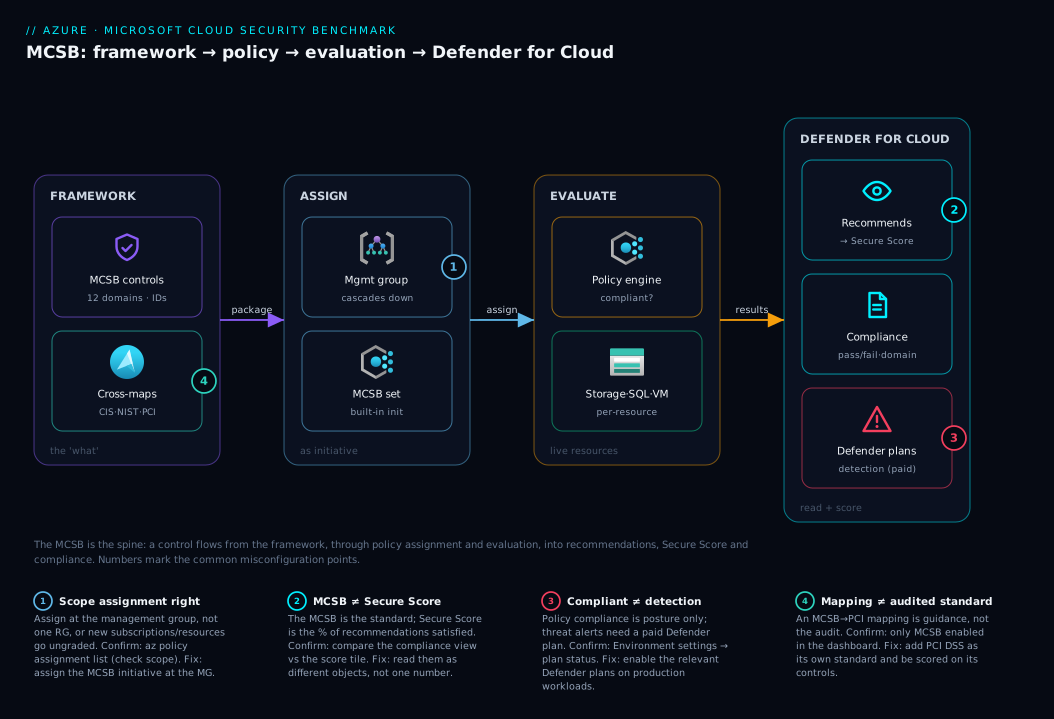
The single most important thing the diagram conveys: the MCSB is the spine, not a destination. It flows — from a control definition, through policy assignment and evaluation, into the recommendations and compliance status you read every day. Every portal recommendation you have dismissed has this lineage behind it.
Real-world scenario
Meridian Pay is a fictional but realistic fintech in Bengaluru building a card-payment platform on Azure. Pre-revenue but about to sign their first large merchant, whose procurement team has sent a 200-line security questionnaire asking pointedly, “are you working toward PCI DSS?” The team is four engineers, no security hire, six-week deadline. Instead of panicking, they reach for the MCSB.
Week one — establish the baseline. They open Defender for Cloud and find the MCSB already assigned, scoring a dismal 38%. They treat that not as failure but as a free gap analysis: the dashboard, organised by the twelve domains, shows exactly where they are exposed. Network Security flags Storage and SQL open to public access; Logging and Threat Detection flags missing diagnostic settings and disabled Defender plans; Privileged Access flags three engineers holding standing Owner; Data Protection is mostly green because Azure encrypts at rest by default. They now have a prioritised, domain-organised to-do list they did not have to write.
Weeks two to four — remediate by domain. They work the domains in risk order. For NS, private endpoints on Storage and SQL with public access disabled. For LT, diagnostic settings to a Log Analytics workspace plus the relevant Defender plans (the crucial detail: policy compliance alone does not buy threat detection — that needs the paid plan). For PA, standing Owner removed in favour of just-in-time elevation. They lean on the service baselines for the exact settings rather than guessing. Each fix bumps Secure Score and flips a compliance control green — visible daily progress.
Week five — translate to PCI. They add the PCI DSS standard to the dashboard alongside the MCSB. Because their work maps across frameworks, a large fraction of PCI controls light up green immediately — the diagnostic logging from LT-3 satisfies PCI’s logging requirements, the network restrictions satisfy its segmentation requirements, the MFA satisfies its strong-authentication requirement. They are not done (some PCI controls are process and documentation), but they answer the questionnaire with assessment evidence, citing control IDs and mappings, instead of promises.
The outcome. Secure Score climbs from 38% to the mid-70s in four weeks; the merchant’s review passes on continuous, demonstrable compliance rather than a one-time spreadsheet. The lesson: the MCSB was not extra work bolted onto the deadline — it was the workplan, already running, already scored, already mapped to the standard the customer cared about. Cost to adopt: zero rupees. Cost to ignore: the deal.
Advantages and disadvantages
The honest two-column view before the prose:
| Advantages | Disadvantages / limits |
|---|---|
| Free, Microsoft-authored, assigned by default | Azure-centric — thinner for multi-cloud/on-prem nuance |
| Maps to CIS, NIST, PCI — one config, many frameworks | Mappings are guidance, not a substitute for the audited standard |
| Wired into Policy + Defender for Cloud — continuously scored | Not every control is auto-evaluable; some are manual/attestation |
| Organised by 12 domains — easy gap analysis | Breadth can feel overwhelming at first; needs prioritisation |
| Versioned and maintained by Microsoft | Mappings shift between versions — must read live, not from memory |
| Per-service baselines give concrete settings | Baselines are guidance docs — you still implement and verify |
| Drives Secure Score — a single posture metric | Secure Score weighting ≠ your org’s risk priorities exactly |
Where each matters: the free + default + mapped trio is decisive for teams with no compliance budget — a credible, audit-aligned baseline for the cost of reading a dashboard. Continuous scoring beats a spreadsheet: drift shows up immediately, not at audit time. The biggest limit is that a mapping is not the audited standard — to pass PCI DSS you add it as its own standard and are scored on its controls. And because some controls are process or attestation (incident-response plans, governance strategy), the dashboard always has a residue of manual controls you confirm by hand — expected, not a defect.
Hands-on lab
A free, read-mostly walk-through to see the benchmark end to end via the Azure CLI and portal. Nothing here requires enabling paid Defender plans.
1. Confirm the MCSB is assigned (it is, by default). In Cloud Shell, list policy assignments and look for the benchmark initiative:
# List policy assignments at the current subscription; the MCSB shows as a built-in initiative
az policy assignment list \
  --query "[?contains(displayName,'Microsoft cloud security benchmark') || contains(displayName,'Azure Security Benchmark')].{name:displayName, scope:scope}" \
  -o table
If onboarded to Defender for Cloud, you will see the assignment. (Older tenants may still show the legacy “Azure Security Benchmark” name — same lineage.)
2. Find the benchmark initiative definition. The MCSB is a built-in policy set definition. List built-in initiatives and filter:
az policy set-definition list \
  --query "[?policyType=='BuiltIn' && contains(displayName,'security benchmark')].{name:displayName, id:name}" \
  -o table
This grouped set of policy definitions is the benchmark, as Azure evaluates it.
3. Read the compliance dashboard. Navigate to Defender for Cloud → Regulatory compliance. The Microsoft cloud security benchmark standard shows pass/fail controls grouped by domain. Expand one — say Logging and threat detection — to see individual controls with the resources passing or failing. This is the framework made visible.
4. Trace one control to its recommendation. Click a failing control. It expands to the underlying assessments/recommendations (e.g. “Resource logs should be enabled”) — the live link from MCSB control → policy definition → Defender recommendation, listing the real unhealthy resources.
5. See the cross-mapping. Within a control’s detail, Microsoft shows the framework references it maps to. Confirm one control cites multiple external frameworks — the Rosetta-Stone property in action.
6. (Optional) Add a second standard to compare. In Regulatory compliance, use Manage compliance standards to add another built-in standard (e.g. a CIS Azure benchmark) at subscription scope:
// Illustrative: assigning a built-in compliance standard initiative at subscription scope.
// 'definitionId' is the built-in policy set definition ID for the standard you choose.
targetScope = 'subscription'

resource standardAssignment 'Microsoft.Authorization/policyAssignments@2024-04-01' = {
  name: 'cis-azure-baseline'
  properties: {
    displayName: 'CIS Microsoft Azure Foundations Benchmark'
    policyDefinitionId: subscriptionResourceId(
      'Microsoft.Authorization/policySetDefinitions',
      '<built-in-CIS-set-definition-name>'
    )
    enforcementMode: 'DoNotEnforce' // audit/report only — does not block resource creation
  }
}
With two standards enabled, the same resource health now scores against both — the clearest demonstration of one configuration satisfying many frameworks.
7. Teardown. Nothing here created billable resources. Remove the extra standard if you no longer want it:
az policy assignment delete --name cis-azure-baseline
Leave the MCSB assignment in place — it is the default posture baseline and costs nothing to keep evaluating.
Common mistakes & troubleshooting
Six failure modes that waste a security review, each with how it shows up, how to confirm, and the fix.
| # | Symptom | Root cause | Confirm | Fix |
|---|---|---|---|---|
| 1 | Score stuck despite “fixing” things | Recommendations remediated on resources but assignment is at the wrong scope (one RG, not the MG) | Check assignment scope in az policy assignment list |
Assign the benchmark at the management group so it covers all subscriptions |
| 2 | “We’re MCSB-compliant” but no threat alerts | Policy compliance ≠ Defender plans; detection needs the paid plan | Defender for Cloud → Environment settings → plan status | Enable the relevant Defender plans for real threat detection |
| 3 | A control shows “Not applicable” / manual and won’t go green | Some controls are attestation/process, not auto-evaluable | Read the control type in the dashboard | Provide manual attestation / accept it as a process control |
| 4 | PCI auditor rejects “but the MCSB maps to it” | The MCSB mapping is guidance, not the audited standard | You only have MCSB enabled, not PCI DSS | Add PCI DSS as its own standard; be scored on its controls |
| 5 | Score dropped overnight with no change by us | Microsoft updated the benchmark/added controls, or a new resource appeared non-compliant | Compare assessment dates; check new resources | Remediate the new/added controls; expect score to move with versions |
| 6 | Compliance shows green but a known-bad resource exists | An exemption or exclusion is hiding it, or it’s out of the assignment scope | Check policy exemptions and assignment scope | Remove the stale exemption; widen scope to include the resource |
The two misreadings that cause the most wasted hours:
| Misreading | The trap | The truth |
|---|---|---|
| “MCSB = Secure Score” | Treating them as the same number | The MCSB is the framework/standard; Secure Score is a percentage of recommendations satisfied. The initiative drives much of the score, but they are different objects. |
| “Compliant = Secure” | A green dashboard means no risk | Compliant means policy checks pass within scope. Detection (Defender plans), process controls, and anything outside scope are separate. Necessary, not sufficient. |
When a recommendation refuses to turn green after you fixed the resource, the usual culprits are evaluation lag (policy and Defender re-evaluate on a cycle — give it time), the wrong scope, or a lingering exemption. For deeper diagnosis see Secure Score Won’t Budge.
Best practices
- Assign at the management-group level, not per subscription, so every current and future subscription inherits the baseline automatically. See Management Groups 101.
- Read the dashboard by domain, not as a flat recommendation list — domain-by-domain reveals whole missing categories (Backup, Incident Response) a list hides.
- Use service baselines for the “how.” When hardening a service, open its Microsoft security baseline for the exact settings and defaults rather than guessing.
- Enable the Defender plans you need. Compliance is posture; Defender plans add threat detection. Compliance without detection is half the picture.
- Layer the real audited standard when you have a mandate. Add PCI DSS / ISO 27001 / CIS as its own standard and be scored on its controls — the mapping accelerates this, it does not replace it.
- Record exceptions against the control ID (with a scoped policy exemption) so each accepted risk is traceable and time-bound.
- Track Secure Score as a trend, not a target. Investigate which controls move it; the weighting won’t perfectly match your risk.
- Re-baseline after version updates. Expect score changes when Microsoft updates the MCSB, and re-confirm high-value mappings from the live docs.
- Automate remediation where safe. Many MCSB-aligned policies support
DeployIfNotExists/Modify; see Azure Policy Effects Decoded before enabling enforcement. - Don’t confuse compliant with secure — combine the dashboard with detection, response readiness, and the process controls it can’t evaluate.
Security notes
The MCSB is itself a security tool, so these notes are about wielding it safely and not over-trusting it.
- Least privilege first. The Privileged Access (PA) and Identity Management (IM) domains are the highest-leverage — standing Owner/Contributor is the most common finding and the one most worth fixing. Pair the benchmark with just-in-time elevation and safe Conditional Access rollout.
- Detection requires the paid plans. The Logging and Threat Detection (LT) posture controls (diagnostic settings) are free to satisfy, but actual threat alerts come from Defender plans — budget for them on production-data workloads.
- Data Protection defaults are good but not complete. Azure encrypts at rest by default with platform-managed keys (satisfying the basic DP control), but for key custody the baseline points to customer-managed keys in Azure Key Vault. Default-on is a floor, not a ceiling.
- Scope and exemptions are an attack surface for false assurance. A control can show green simply because the bad resource is outside scope or hidden by an exemption. Audit exemptions periodically and confirm the assignment scope covers everything.
- The compliance dashboard is sensitive — a map of where you are weak. Treat access to it as privileged.
- Mapping evidence must be current. Hand an auditor a mapping from the live control, not a cached note — versions drift and a stale mapping is a credibility risk.
Cost & sizing
The framework itself is free — the MCSB, its assignment, Azure Policy evaluation, and the compliance dashboard for the MCSB standard cost nothing. What costs money are the capabilities some controls recommend and the telemetry they generate.
| Item | Cost model | Rough INR / month (indicative) | Notes |
|---|---|---|---|
| MCSB framework + assignment | Free | ₹0 | Assigned by default; policy evaluation is free |
| Regulatory compliance (MCSB standard) | Free with the default standard | ₹0 | Additional standards may require Defender CSPM |
| Defender CSPM (advanced posture) | Per resource/month | Varies by resource count | Unlocks advanced posture features, attack paths |
| Defender plans (servers, SQL, Storage, etc.) | Per resource / per unit | Hundreds to thousands per workload | The detection half; priced per protected resource |
| Log Analytics ingestion (for LT controls) | Per GB ingested | ₹1,000s on chatty workloads | Diagnostic logs land here; use tables/retention wisely |
| Backup / recovery (BR controls) | Per protected instance + storage | Per workload | Backup vault storage and instance protection |
How to think about sizing: the posture/compliance layer is free, so adopt it everywhere. The decisions that cost money are which workloads get Defender plans (protect production and sensitive-data workloads; dev/test can wait) and how much you log (the LT domain pushes diagnostic logging into Log Analytics — control the bill with sensible retention). For a small team the framework is free and the acted-on recommendations (Defender plans on a couple of production services, a Log Analytics workspace, backups) are the real line items — a fraction of the cost of failing a security review. For logging cost mechanics see Azure Monitor and Application Insights.
Interview & exam questions
1. What is the Microsoft Cloud Security Benchmark, in one sentence? Microsoft’s free framework of cloud security best practices — organised into control domains, cross-mapped to CIS/NIST/PCI DSS, with per-service baselines — wired into Azure Policy and Defender for Cloud so your posture is continuously evaluated and scored.
2. How does the MCSB differ from Azure Policy and Secure Score? The MCSB is the framework (the “what”); Azure Policy is the engine evaluating resources against rules that represent many MCSB controls; Secure Score is the resulting percentage of recommendations satisfied. A specification, an engine, and a metric.
3. Name several MCSB control domains and what each owns. Network Security (NS — traffic segmentation), Identity Management (IM — authentication), Privileged Access (PA — high-power access), Data Protection (DP — data confidentiality), Logging and Threat Detection (LT — visibility/detection), Governance and Strategy (GS — the security program). Twelve in total.
4. How do you read a control ID like DP-4? The prefix is the domain (DP = Data Protection); the number is its index (not a priority). It resolves to a control with an objective, Azure guidance, and cross-mappings.
5. Why is the cross-mapping valuable? Because every control maps to CIS, NIST SP 800-53 and PCI DSS, one Azure configuration can satisfy multiple frameworks. When an auditor wants evidence against their standard, you look up the mapping and point at the config (and assessment) you already have — no re-architecture.
6. What is a service baseline and why need it if you have the domains? The domains are abstract (“encrypt at rest”); a baseline applies them to a specific service (Storage: “encrypted at rest by default with platform keys; use customer-managed keys for key custody”), giving the concrete feature, default and responsibility. It turns principle into a togglable setting.
7. Where is the MCSB displayed and scored? In Defender for Cloud — as recommendations (driving Secure Score) and pass/fail controls in the regulatory compliance dashboard, grouped by domain. It is assigned as a built-in Azure Policy initiative by default.
8. A team says “we’re 100% MCSB-compliant, so we’re secure.” What’s wrong? Compliant means policy checks pass within the assignment scope — it excludes threat detection (Defender plans), process/attestation controls, and resources outside scope. Necessary, not sufficient.
9. You must pass PCI DSS. Is MCSB-compliant enough? No — the MCSB maps to PCI DSS and accelerates the work, but you are audited against PCI’s own controls. Add PCI DSS as its own standard and be scored on its requirements; the mapping is a guide, not a substitute.
10. At what scope should you assign the MCSB, and why? At the management group, so every current and future subscription inherits the same baseline automatically — rather than per subscription, which risks drift and gaps as new subscriptions appear.
11. Secure Score dropped overnight with no change from your team. Likely cause? Microsoft updated the benchmark, or a new resource is non-compliant within scope. The score tracks the live benchmark version and live resources. Confirm via assessment dates and recent resources.
12. Which MCSB controls can’t be auto-evaluated? Process and attestation controls — incident-response plans, governance strategy, some Backup/Recovery and DevOps-Security practices — that are not a single setting. They appear as manual controls you confirm by attestation.
These map to SC-100 (Microsoft Cybersecurity Architect) — design a security posture and governance strategy — and AZ-500 (Azure Security Engineer) — manage security posture with Defender for Cloud, implement Azure Policy, and read the regulatory compliance dashboard. The governance-at-scale angle also touches AZ-104. A compact cert mapping:
| Question theme | Primary cert | Objective area |
|---|---|---|
| What the MCSB is; domains; mappings | SC-100 | Design a security posture & governance strategy |
| Defender for Cloud, Secure Score, compliance dashboard | AZ-500 | Manage security posture & implement threat protection |
| Azure Policy initiatives, assignment, scope | AZ-500 / AZ-104 | Implement & manage governance |
| Baselines, per-service hardening | AZ-500 | Secure compute, storage, data, and networks |
Quick check
- In one sentence, what is the difference between the MCSB and Secure Score?
- You see a control ID
LT-3. Which domain is it in, and what class of risk does that domain own? - True or false: being 100% compliant on the MCSB means your environment has no security risk.
- An auditor needs PCI DSS evidence. Is it enough to show them your MCSB compliance, and what should you do?
- What is a service baseline, and how does it relate to a control domain?
Answers
- The MCSB is the framework/standard; Secure Score is the percentage of recommendations satisfied. The initiative drives much of the score, but one is a specification and the other a metric.
LT-3is in Logging and Threat Detection — the domain owning visibility and detection.LT-3specifically is about enabling logging for security investigation.- False. Compliant means policy checks pass within scope; it excludes threat detection (Defender plans), process controls, and anything outside scope. Necessary, not sufficient.
- Not by itself. The MCSB maps to PCI DSS but you are audited against PCI’s own controls — add PCI DSS as its own standard, use the mappings to accelerate, and present assessment evidence against PCI’s requirements.
- A service baseline answers an abstract domain control (“encrypt at rest”) with the concrete feature, default and responsibility for a specific service (e.g. Storage with platform vs customer-managed keys). Domains organise risk; baselines localise it to settings.
Glossary
- Microsoft Cloud Security Benchmark (MCSB) — Microsoft’s free framework of cloud security best practices, organised into control domains, cross-mapped to external standards, with per-service baselines; the default standard scored in Defender for Cloud.
- Azure Security Benchmark (ASB) — the MCSB’s predecessor; older tenants may still show this name for the same lineage.
- Control domain — one of the twelve buckets of related controls (NS, IM, PA, DP, AM, LT, IR, PV, ES, BR, DS, GS), each owning a class of risk.
- Control — a single security requirement within a domain, with an ID, an objective, Azure guidance, and cross-mappings.
- Control ID — the stable reference for a control: a two-letter domain prefix plus a number (e.g.
NS-2,DP-4). - Cross-mapping — the links from an MCSB control to the external frameworks (CIS, NIST SP 800-53, PCI DSS) it satisfies.
- Security baseline — Microsoft’s per-service application of the benchmark, giving concrete settings, defaults, and responsibilities for a specific Azure service.
- Azure Policy — the engine that evaluates resources against rules and reports compliant/non-compliant; the mechanism that enforces or measures many MCSB controls.
- Policy initiative (set definition) — a grouped set of policy definitions; the MCSB is packaged and assigned as a built-in initiative.
- Microsoft Defender for Cloud — Azure’s cloud security posture management and workload-protection service, where the MCSB is assigned, displayed and scored.
- Secure Score — the percentage of security recommendations satisfied, driven largely by the MCSB initiative.
- Regulatory compliance dashboard — the view in Defender for Cloud showing pass/fail status against the MCSB and any added standards, grouped by control/domain.
- Defender plan — a paid Defender for Cloud plan (e.g. for Servers, SQL, Storage) that adds threat detection on top of posture compliance.
- Exemption — a scoped, documented exclusion of a resource from a policy/control evaluation; an audit and false-assurance risk if left stale.
- CIS / NIST SP 800-53 / PCI DSS — the major external frameworks the MCSB maps to (industry safeguards, a US federal control catalogue, and the payment-card standard).
Next steps
You now understand the MCSB as the spine connecting controls, policy, scoring and external audits. Build outward:
- Next: Azure Policy and Governance at Scale — the enforcement engine that turns MCSB controls into continuously evaluated rules.
- Related: Policy Definitions vs Initiatives — why the MCSB ships as one large initiative and how to bundle your own controls.
- Related: Azure Policy Effects Decoded — Deny vs Audit vs Modify vs DeployIfNotExists, before you turn enforcement on.
- Related: Secure Score Won’t Budge — diagnose a stuck score and assessment drift on the metric the MCSB produces.
- Related: The Azure Shared Responsibility Model by Service Tier — the MCSB governs your half of this shared responsibility.
- Related: Zero Trust Architecture Blueprint — the identity/network/data strategy the MCSB’s domains operationalise.