A fintech with 140 AWS accounts under a single AWS Organization just failed a customer security questionnaire on one line: “Do you have continuous, agentless posture management across all cloud accounts?” The honest answer was no — three accounts had Wiz, the rest were a spreadsheet and good intentions. The CISO’s mandate is blunt: every account onboarded to Wiz CSPM by quarter-end, new accounts auto-enrolled the day they are created, zero per-account click-ops, and the noise tuned so the on-call engineer trusts the queue. This guide is the runbook to do exactly that — onboard the whole Organization through the Wiz AWS connector with a single organization-wide CloudFormation StackSet, then tune risk rules and Security Graph policies so the findings are signal, not a wall of red.
Cloud Security Posture Management (CSPM) is the practice of continuously evaluating your cloud control-plane configuration against a policy baseline — public S3 buckets, over-permissive security groups, unencrypted volumes, root accounts without MFA — and surfacing the drift. Wiz is a CSPM (and CNAPP: Cloud-Native Application Protection Platform) that does this agentlessly: it assumes a read-mostly IAM role in each account, reads the AWS APIs to build an inventory, and snapshots your EBS volumes out-of-band to scan the disk contents for vulnerabilities, malware, and secrets — no sensors to install on your workloads. Everything it discovers lands in the Wiz Security Graph, a graph database of every resource (as nodes) and every relationship (as edges), where the real value lives: not “this security group is open” but “this internet-exposed EC2 instance has an IAM role that can read an S3 bucket holding PII” — a toxic combination, the attack path an adversary would actually walk.
By the end of this runbook you will have one connector scanning the entire Organization agentlessly, every account (including day-N accounts) enrolled automatically via a StackSet with auto-deployment, the CIS AWS Foundations and PCI DSS frameworks reporting compliance, the handful of attack-path policies that matter for your estate firing as CRITICAL Issues, CIEM and secrets findings prioritised, and high-severity Issues flowing into Jira and ServiceNow — defined in Terraform and CloudFormation, applied from CI, reversible with one terraform destroy. We keep humans out of the long-lived-AWS-key business entirely: Wiz assumes a role guarded by an external ID, no access keys anywhere.
What problem this solves
Point-in-time audits do not survive contact with a real cloud estate. An auditor’s snapshot says you were compliant last Tuesday; by Wednesday an engineer opened a security group 0.0.0.0/0 to debug a webhook and forgot to close it. Across 140 accounts and thousands of resources changing daily, the only defensible answer to “is our posture good right now” is continuous, automated evaluation — which is what CSPM is. Without it you audit by spreadsheet: someone checks a sample of accounts quarterly, misses the other 137, and discovers the public bucket when a researcher emails you.
The multi-account dimension makes it worse. Each AWS account is an isolated blast radius on purpose, but that isolation means posture tooling has to be deployed and maintained in every one of them. The naive approach — click through the Wiz onboarding wizard 140 times, create an IAM role by hand in each account, and repeat for every new account — does not scale, drifts immediately, and silently misses accounts. New accounts have no coverage until someone remembers to onboard them, which is exactly when a fresh, unhardened account is most exposed. The org-wide connector plus a StackSet with auto-deployment solves this structurally: the IAM role lands in every account through Organizations, and any account created tomorrow gets it automatically.
The second half of the problem is noise. A CSPM pointed at a large brownfield estate surfaces tens of thousands of findings on day one — every un-encrypted dev volume, every over-broad sandbox role, every bucket without access logging. If the team drowns in this, they mute the queue within a week and you are back to auditing by vibes. It bites hardest on regulated workloads (a PCI or SOC 2 obligation to demonstrate continuous monitoring), fast-growing estates (accounts created weekly by automation), and security teams too small to babysit thousands of findings — which is nearly all of them. The fix is not more people; it is the Security Graph, which collapses ten thousand isolated config flags into the ten attack paths that are actually reachable and actually dangerous.
To frame the whole rollout before the deep dive, here is every phase, what it delivers, and the single thing most likely to go wrong in it:
| Phase | What it delivers | Primary tool | Biggest risk |
|---|---|---|---|
| 0. Bootstrap | StackSet trusted access + delegated admin | AWS Organizations API | Trusted access not enabled → StackSet fails org-wide |
| 1. Connector create | Wiz connector + external ID + principal | Wiz console / API | Reusing external ID across tenants (confused deputy) |
| 2. Role rollout | WizAccess-Role in every account |
CloudFormation StackSet + Terraform | Targeting individual accounts vs the root OU |
| 3. Org registration | Wiz enumerates + scans all accounts | Wiz GraphQL API | Management account role missing → no enumeration |
| 4. Agentless scanning | Disk scans (vulns, secrets, malware) | Wiz outpost / EBS snapshots | KMS key policy blocks encrypted-volume scan |
| 5. SSO + secrets | SAML login, Vault-leased automation creds | Okta/Entra + Vault | Local Wiz passwords never deprovisioned |
| 6. Tuning | Projects, frameworks, attack-path policies | Wiz Cloud Config + Graph | Muting rules org-wide instead of scoping |
| 7. Remediation wiring | Jira/ServiceNow tickets, auto-remediation | Wiz Integrations | Tickets not re-resolving → drift between systems |
| 8. Shift-left | Wiz Code IaC gates on PRs | Wiz CLI in CI | Runtime and IaC findings not correlated |
Learning objectives
By the end of this article you can:
- Explain how Wiz’s agentless model works — the assumed role, the external-ID guard, control-plane reads, and out-of-band EBS-snapshot disk scanning — and why it needs no workload sensors for posture.
- Enable CloudFormation StackSet service-managed (org-wide) permissions and deploy an IAM role to every account, including future accounts, with auto-deployment.
- Author the
WizAccess-Roletrust policy correctly, pinning both the Wiz principal account and your tenant’s external ID, and grant a least-privilege scanning policy. - Register an AWS Organization connector in Wiz via the console or the GraphQL API and confirm full account coverage.
- Read the Wiz Security Graph and write graph queries that express toxic combinations / attack paths, then promote them to
CRITICALpolicies scoped to the right team. - Map accounts and OUs to Wiz Projects for business context, tune Cloud Configuration Rules against CIS AWS Foundations and PCI DSS, and use time-boxed exceptions instead of disabling rules.
- Prioritise CIEM (identity) and secrets findings, and wire high-severity Issues into Jira and ServiceNow with two-way status sync.
- Run a phased rollout (pilot OU → non-prod → prod), validate it end-to-end with a deliberately-broken test resource, and tear the whole thing down cleanly.
Prerequisites & where this fits
You should already understand the AWS multi-account model — an AWS Organization, Organizational Units (OUs), the management account, and service control policies — at the level of the AWS Organizations and IAM Foundations: Accounts, OUs and Roles deep-dive. You should be comfortable with IAM roles and trust policies (the sts:AssumeRole handshake, the ExternalId condition), with CloudFormation at least conceptually, and with Terraform ≥ 1.6 and the AWS provider ≥ 5.x run from CI. Familiarity with CloudFormation StackSets helps; if you have used them via AWS Control Tower Guardrails: Building a Secure Multi-Account Foundation, you already know service-managed StackSets, because Control Tower deploys its guardrails the same way.
Concretely, you need:
| Prerequisite | Minimum | Why |
|---|---|---|
| AWS Organization | all features enabled |
Service-managed StackSets require it |
| Management account access | AdministratorAccess (bootstrap only) |
Enable trusted access, register the connector |
| StackSet permission model | Service-managed | Auto-deploy to OUs and future accounts |
| Wiz tenant | Active, with your region (e.g. us17, eu1) |
The connector, graph, and API all live per-region |
| Wiz role | Global Admin or connector-admin |
Create connectors and service accounts |
| Terraform | >= 1.6, AWS provider >= 5.x |
Declarative StackSet + role |
| CI runner | GitHub Actions (OIDC) or Jenkins | Apply Terraform without laptop keys |
| IdP | Okta or Microsoft Entra ID | SAML SSO into Wiz |
| Secrets store | HashiCorp Vault (or AWS Secrets Manager) | Lease Wiz automation credentials |
| ITSM (optional) | Jira and/or ServiceNow | Turn Issues into tickets |
Where this fits: this is the posture layer of a cloud security program. It sits alongside — not instead of — the guardrail layer (AWS Control Tower Guardrails, which prevents some misconfigurations with SCPs) and the audit layer (AWS CloudTrail and Config: Audit and Compliance at Scale, which records what happened). Wiz reads the same control plane those tools govern, adds the disk-level and identity view they lack, and correlates it all in a graph. It pairs with Integrate Wiz Code into GitHub Actions for IaC and Container Scanning Gates for the shift-left half, and complements a workload-runtime tool like the one in Configure CrowdStrike Falcon Cloud Security CSPM and ECR Registry Assessment for AWS.
Core concepts
Six mental models make every later step obvious.
Agentless means “assume a role and read,” not “install a sensor.” Traditional posture tools ran an agent on every workload. Wiz’s connector instead assumes an IAM role (WizAccess-Role) in each account and calls the AWS control-plane APIs — ec2:Describe*, s3:GetBucketPolicy, iam:List* — to build an inventory of how everything is configured. For workload contents (OS packages, vulnerabilities, secrets on disk, malware), it does out-of-band disk scanning: it snapshots your EBS volumes, reads the snapshot from a scanner it operates, and never touches the running instance — no CPU stolen, no kernel module to break on a distro upgrade. The trade-off: agentless is a periodic view (scans run on a schedule, not in-line), so pair it with runtime tooling for live threat detection.
The external ID defeats the confused-deputy problem. Wiz assumes your role from a Wiz-owned AWS account. If the trust policy only checked “is the caller Wiz’s account,” any other Wiz customer could trick Wiz into assuming your role (Wiz is the “confused deputy”). The external ID — a secret string unique to your tenant that Wiz must present in sts:ExternalId — closes this: access is granted only when the caller is Wiz’s account and presents your external ID. It is the single most security-critical value in the rollout; pin it exactly and never reuse another tenant’s.
A StackSet is how one definition reaches every account. A CloudFormation StackSet deploys the same template to many accounts and regions from one place. With service-managed permissions, it deploys to Organizational Units (not individual accounts) and, with auto-deployment enabled, automatically creates the stack in any account added later to a targeted OU — and removes it when an account leaves. Target the root OU and you cover the entire Organization, today and tomorrow — one StackSet, not 140 manual role creations.
The Security Graph turns points into paths. Every resource Wiz discovers is a node; every relationship is an edge — an instance HAS a role, a role CAN_ACCESS a bucket, a bucket HAS sensitive data, a security group EXPOSES an instance to the internet. A traditional CSPM finding is a point (“SG is open”); a graph query is a path (“open SG → exposed instance → admin role → PII bucket”). The path is the risk; the isolated point usually is not. Wiz calls a dangerous path a toxic combination, and promoting a graph query to a policy makes any matching path open an Issue.
A Rule is a control; an Issue is a risk. Precision on Wiz’s nouns saves confusion. A Cloud Configuration Rule is a single check (“EBS volumes must be encrypted”), usually mapped to a framework control; a Control can be a graph query defining a risk condition. When a rule matches a resource, Wiz opens an Issue — the thing a human triages and remediates — with the matching resources as evidence. A Framework (CIS, PCI, NIST) bundles rules mapped to its controls, giving a compliance report (percentage passing) on top of the Issues.
Projects give risk business context. A Wiz Project groups cloud resources (by account, OU, or tag) into a business unit — payments-prod, data-platform, sandbox. Projects scope severity (a public bucket in payments-prod outranks the identical one in sandbox) and scope access (via SSO group mapping, the data-platform team sees only their Project). Without them, every finding has the same weight and every user sees everything — which is how the queue becomes noise.
Pin the vocabulary side by side before the deep sections:
| Term | One-line definition | Where it lives | Why it matters here |
|---|---|---|---|
| Connector | The link between Wiz and one cloud org/account | Wiz Settings → Cloud Accounts | One org connector covers all accounts |
WizAccess-Role |
The IAM role Wiz assumes in each account | Every member account (via StackSet) | The read-mostly access; guarded by external ID |
| External ID | Per-tenant secret in the trust condition | Role trust policy + Wiz tenant | Defeats the confused-deputy attack |
| StackSet | One template → many accounts | Management/delegated-admin account | Reaches every account, incl. future ones |
| Outpost / scanner | Wiz-operated compute that reads disk snapshots | Wiz-side (SaaS) or your VPC (self-hosted) | Enables agentless workload scanning |
| Security Graph | Graph DB of resources (nodes) + relations (edges) | Wiz backend | Where attack paths are evaluated |
| Toxic combination | A dangerous multi-hop path | A graph query result | The real risk, vs isolated flags |
| Cloud Config Rule | A single posture check | Wiz rules catalog | Maps to CIS/PCI controls |
| Issue | A triageable, prioritised risk instance | Wiz Issues queue | What a human actually works |
| Project | A business-unit grouping of resources | Wiz Projects | Weights severity + scopes access |
| CIEM | Cloud Infrastructure Entitlement Mgmt | Wiz identity module | Finds excessive/unused permissions |
The agentless AWS connector, end to end
The connector is the whole rollout in one object: the trust relationship, the read access, and the scanning permissions.
The three jobs the connector’s role performs
Once registered, Wiz uses the connector’s role to do three distinct things, each needing different permissions:
| Job | AWS APIs used | IAM source | Cadence | Failure if missing |
|---|---|---|---|---|
| Account enumeration | organizations:List*, Describe* |
SecurityAudit (mgmt account only) |
On connect + periodic | Wiz can’t discover member accounts |
| Control-plane inventory | ec2/s3/iam/rds/eks:Describe*,List*,Get* |
SecurityAudit (every account) |
Scheduled scan (default hours) | Resources invisible; “partial access” |
| Agentless disk scan | ec2:CreateSnapshot,ModifySnapshotAttribute,kms:* (scoped) |
Inline WizDiskScanning policy |
Scheduled disk scan | Vulns/secrets/malware unseen |
The read access is deliberately read-mostly. The AWS-managed SecurityAudit policy grants broad Describe/List/Get across services and no mutation. The only write permissions Wiz needs are the narrow snapshot operations agentless disk scanning requires — create, tag, share to the scanner, delete — plus KMS permissions to read snapshots of encrypted volumes. Nothing in the role can change your workloads, delete data, or modify security groups; if your threat model demands it, tighten the snapshot Resource from * to specific volume ARNs, at the cost of more maintenance.
The two disk-scanning architectures
Agentless workload scanning has two deployment shapes, and choosing wrong is a common early mistake:
| Mode | Where the scanner runs | Data movement | Best for | Trade-off |
|---|---|---|---|---|
| SaaS-side (default) | In Wiz’s own AWS account | Wiz reads a shared snapshot cross-account | Fastest setup; most estates | Snapshot metadata leaves your account boundary (encrypted) |
| Self-hosted outpost | In your VPC (a Wiz-managed appliance) | Snapshot stays in your account/region | Strict data-residency / regulated data | You run and patch the outpost compute |
In the default SaaS mode, Wiz’s scan account is granted (via ec2:ModifySnapshotAttribute) permission to read a snapshot Wiz created of your volume, reads it in Wiz’s account, and deletes it after analysis. In outpost mode, you deploy a Wiz compute appliance into a subnet in your VPC, and the snapshot is analysed in-region, in-account — nothing crosses the boundary. Regulated estates (PCI cardholder data, healthcare) usually mandate the outpost; most others take the default. Either way, only the contents Wiz extracts (the vulnerability inventory, the found secrets) land in the graph — never a copy of your data.
The confused-deputy guard, concretely
The trust policy is where a rollout most often quietly breaks. The correct policy grants sts:AssumeRole only when both conditions hold: the principal is Wiz’s account, and the caller presents your external ID. Here is the failure matrix — memorise it, because “partial access” in the Wiz console almost always maps to one of these:
| Symptom in Wiz | Trust-policy defect | AWS error Wiz sees | Fix |
|---|---|---|---|
| Account “partial access” / not scanning | External ID missing or wrong | AccessDenied on AssumeRole |
Pin sts:ExternalId to the tenant’s exact value |
| All accounts fail after re-onboarding | Reused another tenant’s external ID | AccessDenied |
Read your tenant’s external ID (step 1) |
| Works in some accounts, not others | Role name differs per account | Role not found | Use one identical RoleName everywhere |
| No member accounts discovered | Mgmt-account role lacks organizations:* |
AccessDenied on ListAccounts |
Ensure SecurityAudit role in mgmt account |
| Connector connects, no disk data | Principal correct but no scan policy | Snapshot APIs denied | Add the inline WizDiskScanning statement |
Bootstrap: enable StackSet trusted access
A single connector for the whole Organization depends on the role landing in every account. Service-managed StackSets deploy into OUs and auto-deploy to accounts created later. Enable it once from the management account (or a delegated administrator you designate for StackSets).
# Run as the AWS Organization management account.
aws organizations enable-all-features 2>/dev/null || true   # idempotent if already on

# Let CloudFormation StackSets deploy across the Organization
aws organizations enable-aws-service-access \
  --service-principal member.org.stacksets.cloudformation.amazonaws.com

# Verify trusted access is registered
aws organizations list-aws-service-access-for-organization \
  --query "EnabledServicePrincipals[?ServicePrincipal=='member.org.stacksets.cloudformation.amazonaws.com']"
Grab the Organization root ID and the OUs — you will target the root to mean “all accounts,” but you will stage the rollout OU by OU:
aws organizations list-roots --query "Roots[0].Id" --output text          # e.g. r-ab12
aws organizations list-organizational-units-for-parent --parent-id r-ab12 \
  --query "OrganizationalUnits[].[Id,Name]" --output table
The permission-model decision is worth getting right the first time:
| Permission model | How roles are created | Targets | Auto-deploy to new accounts | Use when |
|---|---|---|---|---|
| Self-managed | You pre-create AdministrationRole/ExecutionRole in every account |
Individual account IDs | No | Not an Organization; legacy setups |
| Service-managed | CloudFormation uses Organizations-provisioned roles | OU IDs (incl. root) | Yes (opt-in) | Any AWS Organization — this rollout |
Choose service-managed. Self-managed forces you to bootstrap two roles per account by hand — the exact toil the org-wide connector exists to avoid.
Step-by-step: create the connector and capture the external ID
In Wiz you create the connector first, so it hands you the two values the IAM trust policy must pin. Do it in the console (Settings → Cloud Accounts → Add Account → AWS → AWS Organization) or via the Wiz API. The API path is what you automate.
# Authenticate to the Wiz API with a service account (clientId/clientSecret from Vault).
export WIZ_CLIENT_ID="$(vault kv get -field=clientId secret/wiz/connector-sa)"
export WIZ_CLIENT_SECRET="$(vault kv get -field=clientSecret secret/wiz/connector-sa)"
export WIZ_REGION="us17"   # your tenant's region

WIZ_TOKEN=$(curl -s -X POST https://auth.app.wiz.io/oauth/token \
  -H "Content-Type: application/x-www-form-urlencoded" \
  -d "grant_type=client_credentials&audience=wiz-api" \
  -d "client_id=${WIZ_CLIENT_ID}&client_secret=${WIZ_CLIENT_SECRET}" \
  | jq -r '.access_token')

# Read back the values Wiz expects in the role trust policy for your tenant.
# (These are stable per-tenant; the console shows them on the AWS connector screen.)
curl -s -X POST "https://api.${WIZ_REGION}.app.wiz.io/graphql" \
  -H "Authorization: Bearer ${WIZ_TOKEN}" -H "Content-Type: application/json" \
  -d '{"query":"query { cloudOrganizationProviders(first:1) { nodes { externalId } } }"}' \
  | jq .
Record two outputs for the next step:
WIZ_PRINCIPAL_ACCOUNT— the AWS account ID Wiz assumes from (shown on the connector screen; differs by Wiz region).WIZ_EXTERNAL_ID— your tenant’s external ID (e.g.wiz_abc123...). Store it in Vault, not in version control.
If you prefer a fully declarative setup, the official
wizsecTerraform modules wrap connector creation — but reading the external ID once and pinning it is the part you must not skip.
The two values, where they come from, and what breaks if you get them wrong:
| Value | Source | Scope | If wrong |
|---|---|---|---|
WIZ_PRINCIPAL_ACCOUNT |
Connector screen (per Wiz region) | Same for all your accounts | AccessDenied — trust points at the wrong AWS account |
WIZ_EXTERNAL_ID |
Per-tenant, read once | Unique to your tenant | AccessDenied — confused-deputy guard rejects |
WIZ_REGION |
Your tenant URL | Per tenant | API calls hit the wrong regional endpoint |
Step-by-step: deploy the WizAccess role org-wide (Terraform)
This is the heart of the rollout. One IAM role, one trust policy pinned to Wiz’s principal + your external ID, deployed org-wide with auto-deployment so day-N accounts self-enroll. The role is read-mostly for posture plus the specific permissions agentless scanning needs (creating/sharing EBS snapshots in-account, KMS describe for encrypted volumes).
# providers: aws (management or delegated-admin account)
variable "wiz_principal_account" { type = string }   # from the connector step
variable "wiz_external_id"       { type = string }   # from the connector step (via Vault, not VCS)
variable "target_ou_ids"         { type = list(string) } # start with a PILOT OU, widen to root

resource "aws_cloudformation_stack_set" "wiz_access" {
  name             = "wiz-access-role"
  permission_model = "SERVICE_MANAGED"
  capabilities     = ["CAPABILITY_NAMED_IAM"]

  auto_deployment {
    enabled                          = true   # new accounts get the role automatically
    retain_stacks_on_account_removal = false  # leaving the org sheds the role too
  }

  parameters = {
    WizPrincipalAccount = var.wiz_principal_account
    WizExternalId       = var.wiz_external_id
  }

  template_body = file("${path.module}/wiz-access-role.yaml")
}

resource "aws_cloudformation_stack_set_instance" "wiz_access_org" {
  stack_set_name = aws_cloudformation_stack_set.wiz_access.name

  deployment_targets {
    organizational_unit_ids = var.target_ou_ids   # PILOT first; then [root] = all accounts
  }

  region = "us-east-1"   # IAM is global; pick one home region for the stack instance

  operation_preferences {
    failure_tolerance_percentage = 10
    max_concurrent_percentage    = 25   # stagger across many accounts
    region_concurrency_type      = "PARALLEL"
  }
}
The CloudFormation template the StackSet deploys (wiz-access-role.yaml). Note the trust policy pins both the Wiz principal and the external ID, and grants a least-privilege scanning policy. SecurityAudit reads the control plane; the inline WizDiskScanning statement is what agentless volume scanning needs:
AWSTemplateFormatVersion: "2010-09-09"
Description: Wiz CSPM cross-account access role (org-wide StackSet)
Parameters:
  WizPrincipalAccount: { Type: String }
  WizExternalId:       { Type: String, NoEcho: true }
Resources:
  WizAccessRole:
    Type: AWS::IAM::Role
    Properties:
      RoleName: WizAccess-Role          # identical name in every account
      AssumeRolePolicyDocument:
        Version: "2012-10-17"
        Statement:
          - Effect: Allow
            Principal: { AWS: !Sub "arn:aws:iam::${WizPrincipalAccount}:root" }
            Action: "sts:AssumeRole"
            Condition:
              StringEquals: { "sts:ExternalId": !Ref WizExternalId }
      ManagedPolicyArns:
        - arn:aws:iam::aws:policy/SecurityAudit
      Policies:
        - PolicyName: WizDiskScanning
          PolicyDocument:
            Version: "2012-10-17"
            Statement:
              - Effect: Allow
                Action:
                  - ec2:CreateSnapshot
                  - ec2:CreateSnapshots
                  - ec2:CreateTags
                  - ec2:DescribeSnapshots
                  - ec2:ModifySnapshotAttribute   # share snapshot to the Wiz scan account
                  - ec2:DeleteSnapshot
                  - kms:DescribeKey
                  - kms:ReEncryptFrom
                Resource: "*"
Apply through CI, never from a laptop:
terraform init && terraform plan -out=wiz.plan && terraform apply wiz.plan
# Watch the StackSet roll out across accounts
aws cloudformation list-stack-instances \
  --stack-set-name wiz-access-role \
  --query "Summaries[].[Account,Region,Status]" --output table
The role’s permission set, statement by statement — so you can defend every line to a reviewer:
| Permission | Source | Purpose | Mutation? | Tighten to |
|---|---|---|---|---|
SecurityAudit (managed) |
AWS-managed policy | Read control-plane config across services | No | Cannot; use as-is |
ec2:CreateSnapshot(s) |
Inline | Snapshot a volume for disk scan | Yes (creates) | Volume ARNs by tag |
ec2:CreateTags |
Inline | Tag the scan snapshot | Yes (tags) | ec2:CreateAction condition |
ec2:DescribeSnapshots |
Inline | Track scan snapshots | No | — |
ec2:ModifySnapshotAttribute |
Inline | Share snapshot to Wiz scan account | Yes (shares) | Condition on Wiz account ID |
ec2:DeleteSnapshot |
Inline | Clean up after scan | Yes (deletes) | Snapshots tagged by Wiz |
kms:DescribeKey |
Inline | Read CMK metadata for encrypted volumes | No | Specific CMK ARNs |
kms:ReEncryptFrom |
Inline | Decrypt-for-scan of encrypted volumes | No (crypto op) | Specific CMK ARNs |
The StackSet operation preferences control blast radius and speed — the difference between a smooth rollout and a mass failure:
| Preference | Value here | Effect | If set wrong |
|---|---|---|---|
failure_tolerance_percentage |
10 | Stop if >10% of accounts fail | Too high → mass failure ignored; too low → one flake halts all |
max_concurrent_percentage |
25 | Deploy to 25% of accounts at once | Too high → API throttling; too low → slow rollout |
region_concurrency_type |
PARALLEL | Regions deploy simultaneously | SEQUENTIAL is slower but gentler on quotas |
retain_stacks_on_account_removal |
false | Account leaving org sheds the role | true → orphaned trust to Wiz lingers |
Step-by-step: register the Organization in Wiz
Now point the connector at the role you just spread across the Organization. Wiz needs the role ARN pattern (the same WizAccess-Role in every account) and the management account ID so it can enumerate members via the Organizations API. In the console this is one screen; via API it is a mutation:
curl -s -X POST "https://api.${WIZ_REGION}.app.wiz.io/graphql" \
  -H "Authorization: Bearer ${WIZ_TOKEN}" -H "Content-Type: application/json" \
  -d @- <<'JSON'
{ "query": "mutation CreateAwsOrg($input: CreateCloudOrganizationProviderInput!) { createCloudOrganizationProvider(input:$input){ cloudOrganizationProvider{ id } } }",
  "variables": { "input": {
      "cloudProvider": "AWS",
      "externalId": "REPLACE_WIZ_EXTERNAL_ID",
      "organizationId": "REPLACE_AWS_ORG_MGMT_ACCOUNT_ID",
      "roleArnTemplate": "arn:aws:iam::{accountId}:role/WizAccess-Role"
  } } }
JSON
Give Wiz the management account’s read access to AWS Organizations as well: the same WizAccess-Role in the management account inherits SecurityAudit, which covers organizations:List*/Describe*. Within minutes Wiz begins enumerating accounts and assuming the role in each. Confirm coverage in the console (Settings → Cloud Accounts) — the account count should match aws organizations list-accounts | jq '[.Accounts[] | select(.Status=="ACTIVE")] | length'.
Each account then shows a state: Connected (full read + scan — proceed to tuning), Pending (discovered, first scan not finished — wait for the scan window), Partial access (role assumable but a permission is missing — compare against the permission table), Error/disconnected (cannot assume the role — check the trust policy and StackSet status), or Excluded (intentionally out of scope). The failure states map one-to-one to the troubleshooting playbook near the end.
The Security Graph and toxic combinations
A fresh connector will light up thousands of findings; untuned, the queue gets muted within a week. The graph is how you make it trustworthy.
From findings to paths
Wiz ingests every discovered resource as a node and every relationship as an edge, and the power is querying paths. A single open security group is rarely an incident; an open security group that exposes an instance whose role can read a bucket of PII is the incident. You express that as a graph query and promote it to a policy. Here is the canonical toxic combination — internet-exposed compute that can reach sensitive data:
# Wiz Security Graph: internet-exposed compute that can reach sensitive data
MATCH (vm:VirtualMachine)-[:HAS]->(role:AccessRole)-[:CAN_ACCESS]->(b:Bucket)
WHERE vm.exposure = "PUBLIC"
  AND b.hasSensitiveData = true
RETURN vm, role, b
Promote that query to a policy so any matching path opens an Issue at CRITICAL. The value is not the syntax — it is choosing the handful of paths that matter for your estate and ignoring the ten thousand isolated flags. The edges you build them from are the vocabulary above: EXPOSES/exposure=PUBLIC (internet-reachable, the entry point), HAS (compute→identity), CAN_ACCESS (identity→data), hasSensitiveData/hasSecrets (the prize), CONTAINS→vuln (exploitability), and TRUSTS (cross-account, lateral movement). Build these, and map each to an owner Project so the Issue routes to the right team:
| Attack path (toxic combination) | The chain | Why it is critical | Owner project |
|---|---|---|---|
| Exposed compute → admin-equivalent IAM | Public VM HAS role with *:* |
Internet-to-full-control in one hop | Platform / prod |
| Exposed compute → PII bucket | Public VM → role → sensitive-data bucket | Data exfil path | Data platform |
| Unencrypted volume holding secrets | Volume hasSecrets and not encrypted |
Secrets recoverable from a snapshot | Owning team |
Cross-account *:* assumable role |
Role trusts external principal, admin perms | Lateral movement across accounts | Security |
| Public EKS pod, privileged SA | Internet-reachable pod → cluster-admin SA | Cluster takeover | Platform / k8s |
| Public bucket + no access logging | Bucket public and logging off | Silent data exposure | Owning team |
| Exposed DB with default creds | RDS/EC2 DB public + weak/known creds | Direct data compromise | Data platform |
Cloud Configuration Rules and compliance frameworks
Alongside the graph, Wiz ships hundreds of Cloud Configuration Rules mapped to frameworks. This is the classic CSPM surface — and the noisiest, so tune it deliberately.
Frameworks: CIS, PCI, and the compliance report
A Framework bundles rules mapped to a standard’s controls and reports a compliance percentage. Enable the ones your obligations require:
| Framework | What it covers | Typical driver | Notable AWS controls |
|---|---|---|---|
| CIS AWS Foundations | Baseline AWS hardening | Everyone; the default floor | Root MFA, CloudTrail on, no 0.0.0.0/0 SSH |
| PCI DSS | Cardholder-data protection | Payment workloads | Encryption at rest/in transit, network segmentation, logging |
| NIST 800-53 | US federal control catalog | Gov / regulated | Broad; access control, audit, config mgmt |
| SOC 2 | Trust-services criteria | SaaS selling to enterprises | Change mgmt, monitoring, access reviews |
| HIPAA | Health data | Healthcare | Encryption, access control, audit trails |
| Wiz default / built-in | Wiz’s own best-practice set | Baseline risk view | Attack-path-aware, beyond pure compliance |
The compliance report answers the auditor’s question directly: “CIS AWS Foundations: 87% passing, here are the 41 failing controls and the resources behind each.” That is the artifact that turns “we monitor continuously” from a claim into evidence.
Tuning rules without going blind — use exceptions, not the off switch
The cardinal sin is disabling a noisy rule org-wide, because it hides the finding in payments-prod too. Instead, re-scope with a time-boxed, justified exception:
| Tuning lever | What it does | Auditability | When to use |
|---|---|---|---|
| Disable rule (global) | Turns the check off everywhere | Poor — silently gone | Almost never |
| Resource exception | Excludes specific resources, with expiry + reason | Good — logged, time-boxed | Known-accepted design on named resources |
| Project-scoped severity | Weights the same rule by environment | Good | Sandbox vs prod differentiation |
| Rule parameter tune | Adjust a threshold (e.g. key-age days) | Good | The check is right but the bar is wrong |
| Ignore/snooze an Issue | Silences one Issue instance temporarily | Medium | Triage backlog control |
A good exception names specific resources (not “all buckets”), carries a justification, and expires (so it is revisited, not forgotten) — the difference between risk acceptance (defensible) and risk hiding (a finding waiting to bite).
Prioritisation: why the queue is trustworthy
Wiz prioritises Issues by combining rule severity, the Project’s business weight, and — crucially — graph context: is this resource actually internet-exposed, does it hold sensitive data (PII/PCI), does it sit on a toxic-combination attack path, and did a runtime tool flag it too? A public bucket that is empty and in sandbox is low; a public bucket with PII in payments-prod reachable from the internet is critical. That graph-and-business context, not the raw count of failing checks, is what makes the queue trustworthy.
CIEM: identity and effective permissions
CIEM (Cloud Infrastructure Entitlement Management) is the identity side of posture: not “is this security group open” but “who can do what, and is that far more than they need.” At 140 accounts, IAM sprawl is the quiet catastrophe — roles with *:*, unused permissions accumulated over years, cross-account trusts nobody remembers granting. Wiz computes effective permissions (the real access after policies, boundaries, and SCPs) and finds the excess.
The CIEM findings that matter most, in priority order:
| CIEM finding | The risk | Why it is dangerous | Remediation |
|---|---|---|---|
| Admin-equivalent role reachable from internet | Full control, exposed | One compromise → total account takeover | Scope the policy; put the resource behind private access |
| Unused high-privilege permissions | Standing access never exercised | Blast radius with no benefit | Right-size to actually-used actions |
Cross-account AssumeRole to external principal |
Lateral movement / third-party trust | Vendor or attacker pivot | Verify the trust; add external-ID/condition |
Wildcard (*:*) IAM policies |
Unbounded permissions | Nothing is denied | Replace with least-privilege |
| Access keys older than N days / unused | Long-lived credential exposure | Leaked keys stay valid | Rotate; prefer roles |
| Human users with programmatic keys | Console + API on one identity | Harder to reason about; key leak | Move to SSO + roles |
| Root account usage / no MFA | The break-glass identity misused | Root bypasses most controls | Lock root; MFA; alert on use |
CIEM’s leverage is least privilege by evidence: Wiz shows a role granted 200 actions but observed using 12, so you can safely cut the other 188 — the discipline the AWS Organizations and IAM Foundations baseline asks for, made measurable. If you federate AWS access via Set Up Okta SCIM Provisioning to Entra ID and AWS IAM Identity Center, CIEM validates that the resulting permission sets are not over-broad.
Secrets scanning and data classification
Agentless disk scanning does more than find CVEs. As it reads the volume snapshot, it looks for secrets (hardcoded credentials, private keys, cloud keys, tokens) and classifies sensitive data (PII, PCI, secrets in object storage). This is where posture meets data security — and where the graph gets its hasSecrets and hasSensitiveData edges that power the toxic-combination policies above.
| Finding class | What Wiz detects | Where | Why it is high-value |
|---|---|---|---|
| Secrets on disk | AWS keys, private keys, DB creds, tokens in files | EBS-volume snapshot scan | A key on a public host is an immediate path |
| Secrets in code/IaC | Committed credentials (via Wiz Code) | Repos / pipelines | Cheapest place to catch a leak |
| Sensitive data (PII) | Names, emails, national IDs in storage | S3, volumes, DBs | Drives the payments-prod severity weighting |
| Cardholder data (PCI) | PANs and related | Storage / volumes | Directly relevant to PCI scope |
| Exposed secrets | A found secret on an internet-reachable resource | Graph correlation | The toxic combination itself |
Findings here should route to the same remediation flow as your pipeline-side scanning (Remediate Secret Sprawl with Pipeline Scanning and GitHub Secret Protection) — and the automation credentials Wiz itself uses must never be the thing it finds, which is why the connector service account lives in Vault, leased short-lived, as covered next.
SSO and secretless automation
Before engineers touch the findings, federate access, and get the automation credentials out of the repo.
SAML SSO into Wiz
In Wiz, Settings → Identity Providers → SAML, upload the IdP metadata from Okta (or Entra ID), and map IdP groups to Wiz roles: sec-eng → Global Admin (everything, including connectors), team leads → Project Admin (their Project only), dev-<name> → Project Reader (read their Project), and grc-audit → Auditor (read all, no changes). Automation uses a non-human service account with API scopes only, leased from Vault (below). Access to the posture data then follows your existing joiner/mover/leaver and conditional-access controls — there is no separate Wiz password to deprovision.
Secretless automation with Vault
The Wiz service account used by CI (the connector and API steps) should never have its secret in the repo. Store it in HashiCorp Vault and have the pipeline fetch it at run time:
# In GitHub Actions / Jenkins, authenticated to Vault via OIDC/JWT:
export WIZ_CLIENT_ID=$(vault kv get -field=clientId  secret/wiz/connector-sa)
export WIZ_CLIENT_SECRET=$(vault kv get -field=clientSecret secret/wiz/connector-sa)
# secrets exist only in the job's memory; nothing is written to disk or VCS
This is the same pattern the rest of your platform should use for third-party API credentials (the operator in Set Up External Secrets Operator to Sync Vault and AWS Secrets into Kubernetes treats the Wiz service account as just another Vault secret). For the CI-to-cloud leg, prefer OIDC federation over any static key at all, per Workload Identity Federation for Secretless CI/CD.
Remediation workflows and integrations
Tuned Issues are only useful if they reach an owner and get fixed. Three remediation modes, from most-human to least:
| Mode | How it works | Best for | Risk |
|---|---|---|---|
| Ticket (Jira/ServiceNow) | Issue → ticket for a human to fix | Most findings; change-controlled envs | Slower; depends on human follow-through |
| Guided remediation | Wiz shows the exact fix (CLI/console steps) | Any Issue; speeds the human | Still manual |
| Automated remediation | Wiz (or a webhook → Lambda) applies the fix | Well-understood, low-risk fixes | Automation acting on prod — gate carefully |
Jira and ServiceNow: two-way ticketing
In Wiz, Settings → Integrations, add the Jira and/or ServiceNow integration and create an Automation Rule that opens a ticket for any Issue at HIGH/CRITICAL, stamped with the Project, the graph path, and the remediation steps. Configure it to re-resolve the ticket when Wiz marks the Issue resolved, so the two systems stay in sync rather than drifting into a graveyard of stale tickets:
| Automation-rule setting | Recommended | Why |
|---|---|---|
| Trigger severity | HIGH and CRITICAL only |
Don’t ticket the long tail; work it in Wiz |
| Trigger scope | Per-Project (route to owning team) | Tickets land with the people who can fix |
| Ticket fields | Project, path, evidence, remediation | The assignee needs context, not just “fix this” |
| Deduplication | One ticket per Issue | Avoid ticket storms on re-scan |
| Resolve behavior | Auto-resolve when Issue resolves | Keeps ITSM truthful |
| Re-open behavior | Re-open if the Issue recurs | Catches regressions |
For change-controlled production, the ServiceNow flow should create a change request (not just an incident) so the fix goes through your normal approval gate — the same Change API pattern as Automate ServiceNow Change Requests from a CI/CD Pipeline via the Change API.
The SOC correlation loop
For security operations, stream the Wiz Issue webhook into your SIEM/observability so posture risk sits alongside runtime telemetry, and correlate with a runtime tool. A Wiz “public host with admin role” plus a runtime detection of “process injection on that host” is a page-now event, where either alone might wait for business hours. This is the CSPM-plus-runtime story: Wiz tells you the misconfiguration is reachable, the runtime tool tells you it is being exploited.
IaC-to-cloud correlation and shift-left
The cheapest place to fix a misconfiguration is the pull request that introduced it, not the runtime Issue three weeks later. Wiz Code scans your Terraform/CloudFormation on the PR and — the powerful part — correlates the IaC resource back to the deployed cloud resource, so a runtime Issue points at the exact line of Terraform that created it, and the commit and author.
Add Wiz Code to the same pipeline that applies the Terraform:
# .github/workflows/wiz-code.yml — runs on every PR touching infra/
- name: Wiz Code IaC scan
  run: |
    wizcli auth --id "$WIZ_CLIENT_ID" --secret "$WIZ_CLIENT_SECRET"
    wizcli iac scan --path ./infra --policy "Default IaC policy" \
      --tag "repo=$GITHUB_REPOSITORY" --tag "pr=$PR_NUMBER"
The correlation buys you three things a runtime-only view cannot:
| Correlation capability | What it means | Value |
|---|---|---|
| Runtime → IaC line | An Issue points at the Terraform that caused it | Fix at the source, not by hand in the console |
| PR gate | The bad config is blocked before merge | Never becomes a runtime finding at all |
| Attribution | The commit and author are known | Faster ownership; no “whose bucket is this?” |
| Drift detection | Cloud state diverges from IaC | Catch console hotfixes that IaC will overwrite |
| Guardrail proof | The same rule runs in CI and at runtime | One policy, enforced twice |
This is the full loop with Integrate Wiz Code into GitHub Actions for IaC and Container Scanning Gates: CSPM watches what is running, Wiz Code watches what is about to run, and correlation ties a runtime Issue back to the PR that fixes it permanently.
Architecture at a glance
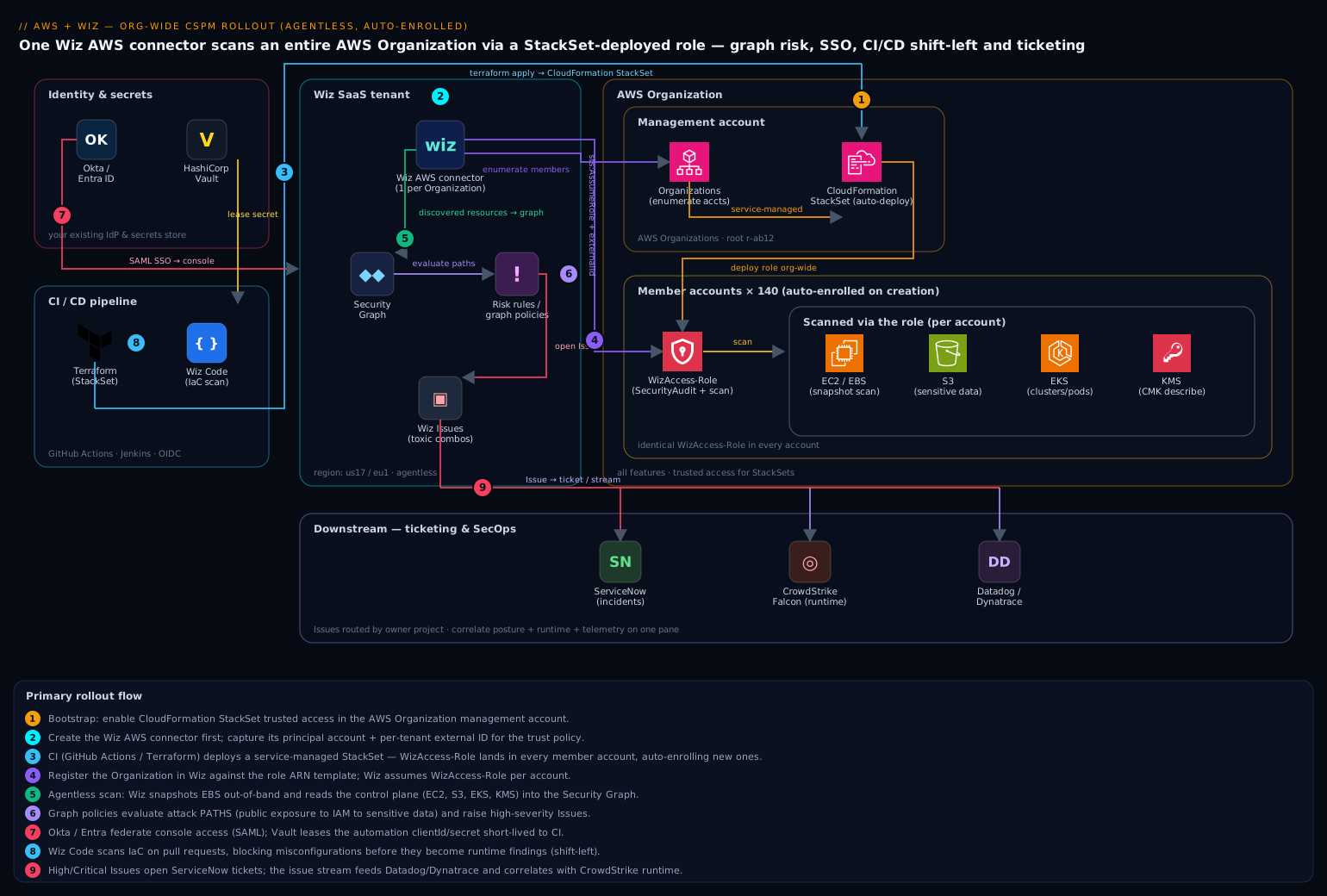
The diagram shows the end state as it actually operates. Read it from the centre out. At the core is one Wiz AWS connector registered against the Organization; it assumes a single IAM role — WizAccess-Role — that exists in every member account, provisioned by a CloudFormation StackSet with auto-deployment so new accounts get the role automatically. Wiz uses that role two ways: it reads the AWS control plane (describe/list across every account) to build the inventory, and it runs agentless workload scanning by snapshotting EBS volumes in your account and analysing them out-of-band. Everything it discovers — accounts, VPCs, security groups, IAM roles, S3 buckets, EKS clusters, secrets, exposed data — lands as nodes and edges in the Wiz Security Graph, where risk rules and graph policies evaluate paths, not points.
Around that core, follow the supporting flows. Okta / Entra ID federates engineers into the Wiz console via SAML, so access follows your existing SSO and conditional-access posture (no local Wiz passwords). HashiCorp Vault holds the Wiz service-account clientId/clientSecret used by automation, leased short-lived rather than baked into CI. GitHub Actions / Jenkins apply the Terraform and run Wiz Code (IaC scanning) on pull requests, so a misconfiguration is caught before it becomes a runtime finding — and correlated back to the Terraform line that caused it. High-severity Issues flow into Jira and ServiceNow as tickets or change requests, which auto-resolve when Wiz resolves the Issue. Optionally a runtime tool shares signals so a posture risk and an active detection correlate into a single page-now event. The whole thing is one connector plus one StackSet — which is exactly why it is reversible with one terraform destroy.
Real-world scenario
Meridian Pay is a fintech running 140 AWS accounts under one Organization: a payments-prod OU (PCI-scoped, 12 accounts), a data-platform OU (28 accounts), a large engineering OU (60 accounts of team sandboxes), and the usual shared-services and security OUs. The security team is five people. Before this project, three accounts had Wiz — onboarded by hand, months apart — and the other 137 were tracked in a wiki page that was last accurate at some point in the previous year. The trigger was a failed enterprise-customer security questionnaire: one line, “continuous agentless posture across all accounts,” and one honest “no.”
The CISO gave a quarter and three hard constraints: every account onboarded, new accounts auto-enrolled (the platform team was creating two to three a week via automation), and zero per-account click-ops. The team ran the rollout in four waves. Wave 1 (week 1): bootstrap StackSet trusted access, create the connector, capture the external ID into Vault, and deploy WizAccess-Role to a pilot — the security OU only, four accounts — to prove the trust policy and the disk-scanning permissions before touching prod. Wave 2 (weeks 2–3): widen the StackSet target to the engineering OU (60 sandbox accounts) — high account count, low blast radius, the perfect stress test for the StackSet operation preferences (max_concurrent_percentage=25 kept them under EC2 API throttling). Wave 3 (weeks 4–5): data-platform, then the crown jewels, payments-prod — where they switched agentless scanning to a self-hosted outpost so PCI cardholder-data volumes were scanned in-region, in-account. Wave 4 (weeks 6–8): target the root OU to sweep in everything remaining and lock in auto-deployment for future accounts, then tune.
The tuning wave was where the project was won or lost. Day one across 140 accounts produced ~19,000 findings — the wall of red that gets a queue muted. The team did three things in order. They mapped OUs to Projects (payments-prod highest, engineering sandboxes lowest), which re-sorted the queue so the 40-odd genuinely-critical items floated to the top. They wrote seven attack-path policies — the toxic combinations from the table above — and found only 11 resources across the whole estate sat on a real internet-to-sensitive-data path. And they attacked config-rule noise with time-boxed exceptions, not the off switch: a documented, expiring exception for the analytics team’s sandbox buckets, intentionally public-read for a data-sharing pilot, scoped to those exact buckets in that Project.
The payoff was measurable. The CIEM pass found a role in a rarely-touched shared-services account that was *:* and assumable cross-account from a former-vendor account whose contract had ended eight months earlier — a standing lateral-movement path nobody knew existed, cut the same afternoon. Secrets scanning surfaced an AWS access key hardcoded on a bastion host that was, per the graph, internet-reachable — a live toxic combination, rotated within the hour. By quarter-end the connector showed 140/140 Connected, CIS AWS Foundations reported 91% passing, high-severity Issues flowed into ServiceNow as change requests, and — the proof that mattered — a deliberately-created public S3 bucket in a sandbox appeared as an Issue and a ticket within the scan window. The next questionnaire’s answer was “yes, here is the compliance report.” Total AWS-side cost: a few hundred rupees a month in snapshots, immaterial next to the deal the “yes” unblocked.
The waves as a table, because the order — pilot, low-blast-radius, prod, sweep — is the lesson:
| Wave | Target | Accounts | Goal | Key decision |
|---|---|---|---|---|
| 1 | security OU (pilot) |
4 | Prove trust policy + disk scanning | Validate before prod |
| 2 | engineering OU |
60 | Stress-test StackSet at scale | Tune max_concurrent to dodge throttling |
| 3 | data-platform + payments-prod |
40 | Onboard regulated data | Outpost for PCI in-region scanning |
| 4 | Root OU | remaining + future | Full coverage + auto-deploy | Lock in day-N enrollment, then tune |
Advantages and disadvantages
The agentless-org-connector model is the right default for multi-account AWS posture, but weigh it honestly:
| Advantages | Disadvantages |
|---|---|
| One connector, whole org — StackSet auto-deployment enrolls day-N accounts with zero click-ops | Depends on AWS Organizations + service-managed StackSets; not for account collections outside an Org |
| Agentless — no sensors to install, break, or steal workload CPU | Scans are periodic, not in-line; not a substitute for runtime threat detection |
| Security Graph collapses 10,000 flags into the handful of reachable attack paths | Graph value depends on your tuning; untuned it is still a wall of red |
| Read-mostly role — only mutation is scoped snapshot ops; no ability to change workloads | Disk scanning needs CreateSnapshot/ModifySnapshotAttribute + KMS — a non-zero permission you must justify |
| CIEM + secrets + data classification in one tool — identity, secrets, and posture correlate | Effective-permissions and data-classification depth varies; validate against your edge cases |
| Shift-left correlation — a runtime Issue points at the Terraform line and author | Requires wiring Wiz Code into CI and adopting the workflow |
Reversible — one terraform destroy removes the role from every account |
Deleting the connector stops scanning immediately (no soft window) |
| Compliance reports (CIS/PCI) are audit-ready evidence, continuously | Framework “percent passing” can create false comfort if exceptions are abused |
The model fits nearly every organisation past a handful of AWS accounts, especially regulated and fast-growing estates. It bites when teams treat the graph as a checkbox (onboard, never tune → muted queue), forget the KMS key policies (encrypted volumes silently unscanned → false confidence), or use exceptions to hide risk rather than accept it with a documented, expiring justification. Every disadvantage is manageable — the point of the tuning and validation sections.
Hands-on lab
This lab onboards a single AWS account (or a tiny throwaway Organization) to Wiz, deploys the WizAccess-Role, deliberately creates a public S3 bucket, and watches it flow to an Issue — the whole loop, at minimal cost. Where you have a real Organization, the StackSet path from step 5 replaces the single-account role. Run from AWS CloudShell (or a CI runner) with the AWS CLI v2 and jq. You need a Wiz tenant.
Step 1 — Set variables.
export WIZ_REGION="us17"                       # your tenant's region
export AWS_ACCOUNT_ID=$(aws sts get-caller-identity --query Account --output text)
export LAB_BUCKET="wiz-lab-public-$AWS_ACCOUNT_ID-$RANDOM"   # globally unique
echo "Account: $AWS_ACCOUNT_ID  Bucket: $LAB_BUCKET"
Step 2 — Authenticate to the Wiz API and read your external ID + principal. (Console equivalent: Settings → Cloud Accounts → Add Account → AWS → single account.)
export WIZ_CLIENT_ID="$(vault kv get -field=clientId secret/wiz/connector-sa)"
export WIZ_CLIENT_SECRET="$(vault kv get -field=clientSecret secret/wiz/connector-sa)"

WIZ_TOKEN=$(curl -s -X POST https://auth.app.wiz.io/oauth/token \
  -H "Content-Type: application/x-www-form-urlencoded" \
  -d "grant_type=client_credentials&audience=wiz-api" \
  -d "client_id=${WIZ_CLIENT_ID}&client_secret=${WIZ_CLIENT_SECRET}" | jq -r '.access_token')

# The connector screen shows these; note them from the console for the trust policy.
echo "Record WIZ_PRINCIPAL_ACCOUNT and WIZ_EXTERNAL_ID from the Wiz connector screen."
export WIZ_PRINCIPAL_ACCOUNT="REPLACE_FROM_CONSOLE"
export WIZ_EXTERNAL_ID="REPLACE_FROM_CONSOLE"
Expected: a non-empty WIZ_TOKEN; the console shows a Wiz AWS account ID and an external ID like wiz_....
Step 3 — Create the WizAccess role in this one account (single-account path).
cat > trust.json <<EOF
{ "Version": "2012-10-17", "Statement": [{
  "Effect": "Allow",
  "Principal": { "AWS": "arn:aws:iam::${WIZ_PRINCIPAL_ACCOUNT}:root" },
  "Action": "sts:AssumeRole",
  "Condition": { "StringEquals": { "sts:ExternalId": "${WIZ_EXTERNAL_ID}" } }
}] }
EOF

aws iam create-role --role-name WizAccess-Role \
  --assume-role-policy-document file://trust.json \
  --query "Role.Arn" --output text

aws iam attach-role-policy --role-name WizAccess-Role \
  --policy-arn arn:aws:iam::aws:policy/SecurityAudit
Expected: the role ARN prints, e.g. arn:aws:iam::123456789012:role/WizAccess-Role.
Step 4 — Register the account in Wiz against the role.
curl -s -X POST "https://api.${WIZ_REGION}.app.wiz.io/graphql" \
  -H "Authorization: Bearer ${WIZ_TOKEN}" -H "Content-Type: application/json" \
  -d @- <<JSON | jq '.data // .errors'
{ "query": "mutation Create(\$input: CreateCloudAccountProviderInput!){ createCloudAccountProvider(input:\$input){ cloudAccountProvider{ id } } }",
  "variables": { "input": {
    "cloudProvider": "AWS",
    "externalId": "${WIZ_EXTERNAL_ID}",
    "accountId": "${AWS_ACCOUNT_ID}",
    "roleArn": "arn:aws:iam::${AWS_ACCOUNT_ID}:role/WizAccess-Role"
  } } }
JSON
Expected: a provider id back (or a clear error). In the console, Settings → Cloud Accounts shows the account moving to Pending then Connected.
Step 5 — (Org path, optional) apply the StackSet with Terraform. If you have a real Organization, skip step 3 and instead apply the Terraform from earlier, targeting a pilot OU:
terraform init
terraform apply -var="wiz_principal_account=$WIZ_PRINCIPAL_ACCOUNT" \
  -var="wiz_external_id=$WIZ_EXTERNAL_ID" \
  -var='target_ou_ids=["ou-ab12-pilot01"]'   # your pilot OU, NOT root, first
aws cloudformation list-stack-instances --stack-set-name wiz-access-role \
  --query "Summaries[].[Account,Status]" --output table
Expected: stack instances reach CURRENT across the pilot OU’s accounts.
Step 6 — Break something on purpose: a public S3 bucket.
aws s3api create-bucket --bucket "$LAB_BUCKET" \
  --create-bucket-configuration LocationConstraint=ap-south-1 2>/dev/null \
  || aws s3api create-bucket --bucket "$LAB_BUCKET"   # us-east-1 needs no constraint

# Deliberately disable the public-access block so the bucket can be made public (LAB ONLY)
aws s3api put-public-access-block --bucket "$LAB_BUCKET" \
  --public-access-block-configuration \
  BlockPublicAcls=false,IgnorePublicAcls=false,BlockPublicPolicy=false,RestrictPublicBuckets=false

aws s3api put-bucket-policy --bucket "$LAB_BUCKET" --policy "$(cat <<POL
{ "Version":"2012-10-17","Statement":[{
  "Sid":"PublicRead","Effect":"Allow","Principal":"*",
  "Action":"s3:GetObject","Resource":"arn:aws:s3:::${LAB_BUCKET}/*" }]}
POL
)"
echo "Public bucket created: $LAB_BUCKET  — this is the thing Wiz should flag."
Step 7 — Confirm the finding in Wiz. Wait for the scan window (or trigger an on-demand scan from the console), then query for the Issue:
curl -s -X POST "https://api.${WIZ_REGION}.app.wiz.io/graphql" \
  -H "Authorization: Bearer ${WIZ_TOKEN}" -H "Content-Type: application/json" \
  -d @- <<'JSON' | jq '.data.issues.nodes[] | {name: .name, severity: .severity, entity: .entitySnapshot.name}'
{ "query": "query { issues(first: 20, filterBy: { severity: [HIGH, CRITICAL] }) { nodes { name severity entitySnapshot { name type } } } }" }
JSON
Expected: an Issue referencing your wiz-lab-public-* bucket — “publicly accessible S3 bucket” (or similar) — at HIGH/CRITICAL. In the console, filter the Security Graph by your account and see the bucket node flagged as publicly exposed.
Validation checklist. You proved the whole pipeline: the role is assumable (Wiz reached Connected), the inventory populated (the bucket appeared as a node), the config rule fired (the public bucket became an Issue), and — if you wired ServiceNow/Jira — the Issue became a ticket. That last loop, break something on purpose and watch it flow to a ticket, is the real proof the rollout works. What each step proved:
| Step | What you did | What it proves |
|---|---|---|
| 3 / 5 | Create WizAccess-Role (single or StackSet) |
The trust policy + external ID are correct (assumable) |
| 4 | Register the account/org | Wiz can enumerate and read the control plane |
| 6 | Create a public bucket | A real, detectable misconfiguration exists |
| 7 | Query the Issue | The rule fired and prioritised it correctly |
Teardown (avoid lingering charges and, more importantly, the public bucket).
# 1) Delete the public bucket FIRST (never leave a public bucket lying around)
aws s3 rb "s3://$LAB_BUCKET" --force

# 2) Remove the role (single-account path)
aws iam detach-role-policy --role-name WizAccess-Role \
  --policy-arn arn:aws:iam::aws:policy/SecurityAudit
aws iam delete-role --role-name WizAccess-Role

# 3) Org path: destroy the StackSet + instances
terraform destroy -var="wiz_principal_account=$WIZ_PRINCIPAL_ACCOUNT" \
  -var="wiz_external_id=$WIZ_EXTERNAL_ID" -var='target_ou_ids=["ou-ab12-pilot01"]'

# 4) Remove the connector in Wiz (console: Settings -> Cloud Accounts -> Remove),
#    or via API deleteCloudAccountProvider / deleteCloudOrganizationProvider
Cost note. The AWS side of this lab is effectively free — an IAM role costs nothing, and an empty S3 bucket for an hour is a rounding error. The only AWS charge in a real rollout is the short-lived EBS snapshots for disk scanning (pennies, auto-deleted). The dominant cost is the Wiz license itself, which a lab tenant covers.
Common mistakes & troubleshooting
The failure modes that eat the most time, first as a scannable table, then the highest-impact ones expanded.
| # | Symptom | Root cause | Confirm (exact cmd / console path) | Fix |
|---|---|---|---|---|
| 1 | Account shows “partial access” / not scanning | External-ID mismatch in the trust policy | Console → Cloud Accounts → account → error; check role trust sts:ExternalId |
Pin sts:ExternalId to the tenant’s exact value from the connector screen |
| 2 | Wiz discovers no member accounts | Mgmt-account role missing organizations:* |
aws iam get-role --role-name WizAccess-Role in mgmt account; check SecurityAudit attached |
Deploy WizAccess-Role (with SecurityAudit) in the management account too |
| 3 | New accounts never get onboarded | Auto-deployment off, or targeting account IDs not OUs | aws cloudformation describe-stack-set --stack-set-name wiz-access-role --query "StackSet.AutoDeployment" |
auto_deployment.enabled=true; target OU IDs (root for all) |
| 4 | Some accounts skipped by the StackSet | Accounts not under any targeted OU | aws organizations list-accounts-for-parent --parent-id <ou> |
Move accounts into a targeted OU, or target the root OU |
| 5 | Connected, but no vuln/secret data | Disk-scanning permissions absent | Console shows control-plane data but no workload findings | Add the inline WizDiskScanning statement to the role |
| 6 | Encrypted volumes silently unscanned | CMK key policy denies the Wiz scan principal | aws kms get-key-policy --key-id <id> --policy-name default — Wiz principal absent |
Add the Wiz scan principal to the CMK key policy (not just the IAM role) |
| 7 | StackSet operation fails on many accounts | failure_tolerance too low, or API throttling |
aws cloudformation list-stack-set-operations --stack-set-name wiz-access-role |
Lower max_concurrent_percentage; retry; raise tolerance modestly |
| 8 | 19,000 findings; team mutes the queue | No Projects/tuning; every finding same weight | Issues queue unsorted by environment | Map OUs→Projects; write attack-path policies; scope severity |
| 9 | A rule disabled in prod by accident | Rule turned off globally to reduce noise | Rule shows disabled tenant-wide | Re-enable; use resource exceptions (expiring, justified) instead |
| 10 | Tickets pile up, never close | Automation rule has no resolve behavior | ServiceNow/Jira full of stale Wiz tickets | Enable auto-resolve-on-Issue-resolve in the automation rule |
| 11 | Confused-deputy exposure (audit finding) | External ID reused / blank | Trust policy Condition empty or shared value |
Use your tenant’s unique external ID; never reuse |
| 12 | Account leaves org but Wiz still trusts it | retain_stacks_on_account_removal=true |
Role still present in the departed account | Set it false; delete the orphaned role |
| 13 | CI apply denied creating the role | Named-IAM capability not passed | terraform apply error: Requires capabilities: [CAPABILITY_NAMED_IAM] |
Add capabilities = ["CAPABILITY_NAMED_IAM"] to the StackSet |
| 14 | Service account secret in the repo | Wiz clientSecret committed |
git log -p / secret scanner finds it |
Move to Vault; rotate the leaked secret immediately |
2. Wiz discovers no member accounts. Root cause: member-account roles give Wiz per-account access but not the Organizations enumeration it needs — that requires the role in the management account, and service-managed StackSets do not deploy there by default. Confirm: aws iam get-role --role-name WizAccess-Role fails in the management account. Fix: add WizAccess-Role (with SecurityAudit, which covers organizations:List*/Describe*) to the management account explicitly.
6. KMS-encrypted volumes silently unscanned. Root cause: agentless scanning needs kms:DescribeKey/ReEncryptFrom on the CMKs — and the CMK key policy must grant the Wiz scan principal, which the IAM role alone does not satisfy. Without it, encrypted volumes are skipped and you get false confidence. Confirm: the account is Connected and unencrypted volumes are scanned, but encrypted ones show no disk findings; aws kms get-key-policy shows the Wiz principal absent. Fix: add Wiz’s scan principal to the key policy of every CMK protecting scannable volumes.
8. Nineteen thousand findings, queue muted. Root cause: onboarding a large brownfield estate with no Projects or tuning gives every finding equal weight, so the team drowns and mutes. Fix: map OUs to Projects (weight prod over sandbox), write the handful of attack-path policies that matter, and use time-boxed exceptions for accepted designs. Spend tuning time on the 5–10 paths, not on chasing every CIS control to green.
Best practices
- Target the root OU for coverage, but roll out by OU. Deploy through OUs (never individual account IDs) with
auto_deployment.enabled=true, so day-N accounts self-enroll — but stage the rollout pilot → non-prod → prod, and only widen the StackSet target to root once you have proven the trust policy and scanning. - Pin the external ID from the console, store it in Vault. It is the single most security-critical value. Never reuse another tenant’s, never blank it, never hand-type it. A mismatch is a silent
AccessDenied; a reused value is a confused-deputy exposure. - Put
WizAccess-Rolein the management account too. Member roles give per-account read; only the management-account role gives the Organizations enumeration Wiz needs to discover members. Service-managed StackSets skip the management account — add it explicitly. - Grant the Wiz scan principal in CMK key policies. Encrypted-volume scanning needs a key-policy grant, not just IAM. Skip it and encrypted volumes go unscanned while the console looks green — false confidence is worse than a visible gap.
- Keep the role read-mostly, and tighten
Resourceif your bar demands it. The only mutations are the scoped snapshot ops. For high-assurance estates, conditionec2:ModifySnapshotAttributeon the Wiz account and scope snapshot actions to tagged volumes. - Map OUs/accounts to Projects before you tune anything. Business context is what makes the queue trustworthy — a public bucket in
payments-prodmust outrank the same insandbox. Projects also scope who sees what via SSO group mapping. - Invest in attack-path policies, not rule-chasing. The graph is the product. Author the 5–10 toxic combinations you actually fear and make them
CRITICAL; do not burn the team’s time driving every CIS control to green. - Use time-boxed, justified exceptions — never the global off switch. An exception names specific resources, carries a reason, and expires. Disabling a rule org-wide hides it in prod too. That is the line between risk acceptance and risk hiding.
- Federate access via SAML; leave no local Wiz passwords. Map IdP groups to Wiz roles so joiner/mover/leaver and conditional access govern the console. Deprovisioning in the IdP must remove Wiz access.
- Lease automation credentials from Vault; never commit them. The Wiz service-account secret lives in Vault, leased short-lived in CI. Prefer OIDC federation for the CI-to-cloud leg so there is no static AWS key at all.
- Wire two-way ticketing with auto-resolve. High/critical Issues become Jira/ServiceNow tickets (change requests for prod), stamped with the graph path, that re-resolve when Wiz resolves the Issue — so ITSM stays truthful.
- Shift left with Wiz Code and use the correlation. Scan IaC on PRs so misconfigs are blocked before they deploy, and use runtime→IaC correlation so a runtime Issue points at the Terraform line and author.
- Validate end-to-end by breaking something on purpose. A deliberately-public sandbox bucket that flows to an Issue and a ticket is the only proof the whole pipeline works. Re-run it after major changes.
Security notes
- No long-lived AWS keys, anywhere. Wiz assumes a role guarded by an external ID; there are no access keys to leak. The CI service account’s Wiz secret is leased from Vault, not committed. Console access is Okta/Entra SAML only, so deprovisioning a leaving engineer in the IdP removes their Wiz access too.
- The external ID is the confused-deputy guard — treat it as a secret. It is what stops another Wiz customer from tricking Wiz into assuming your role. Store it in Vault, pin it exactly, and audit that every account’s trust policy carries your unique value.
- The role is read-mostly by design. The only mutating permissions are the snapshot create/share/delete that agentless scanning requires, scoped by the inline policy. Review it against your threat model; tighten
Resourcefrom*to volume/CMK ARNs, and add aStringEqualscondition bindingec2:ModifySnapshotAttributeto the Wiz scan account, if compliance demands it. - Data-residency: use the outpost for regulated data. In default SaaS mode, encrypted snapshot metadata is read in Wiz’s account; for PCI cardholder data or health records, deploy the self-hosted outpost so the snapshot is analysed in-region, in-account, and nothing crosses the boundary.
- Least privilege for humans via Projects + SSO. Map IdP groups to Wiz roles and scope developers to their own Project; only security engineering gets
Global Admin. Auditors get read-only across everything. - Protect the automation identity from being its own finding. The connector service account must live in Vault; if Wiz’s secrets scanner ever finds its own credential on a host, that is a rotate-now event.
- Pair posture with runtime. Wiz tells you a misconfiguration is reachable; a runtime tool tells you it is being exploited. Correlating the two turns two silos into a single page-now signal — see Configure CrowdStrike Falcon Cloud Security CSPM and ECR Registry Assessment for AWS.
Cost & sizing
Wiz CSPM is licensed per billable cloud resource / workload, so the dominant cost lever is what you scan, not how often. The AWS-side charges are almost negligible; the Wiz license dominates. The bill drivers:
| Cost driver | What you pay for | Rough magnitude | How to control it |
|---|---|---|---|
| Wiz license | Per billable resource/workload | The dominant line item | Decommission idle/forgotten resources onboarding surfaces |
| EBS snapshots (disk scan) | Short-lived snapshots Wiz creates + deletes | Pennies/account; auto-cleaned | Keep default retention (deleted after analysis) |
| Cross-account data (SaaS scan) | Minor egress reading shared snapshots | Small | Use outpost only where residency requires (it costs more) |
| Self-hosted outpost | EC2 compute you run for in-region scanning | Per-instance hourly | Only for regulated OUs; right-size the appliance |
| Wiz Code in CI | Included in most licenses; CI minutes | Cheapest spend of all | It prevents downstream Issues/tickets entirely |
| KMS operations | ReEncryptFrom/DescribeKey for encrypted scans |
Fractions of a paisa | Not a real cost lever |
Right-sizing guidance: onboarding 140 accounts surfaces idle and forgotten resources — decommissioning those trims both the bill and the attack surface, so the first tuning pass often pays for itself. Map sandbox/ephemeral accounts to a lower-frequency scan schedule and reserve continuous scanning for production Projects. Putting Wiz Code in CI is the cheapest spend of all: a misconfiguration fixed on a PR never becomes a runtime Issue, a ticket, and an on-call interruption — the whole cost of the incident, avoided at the source. For Meridian Pay the entire AWS-side cost of scanning 140 accounts was a few hundred rupees a month in snapshots; the Wiz license was the real number, and the deal the “yes” unblocked dwarfed it.
Interview & exam questions
1. Why does the WizAccess-Role trust policy need an external ID, and what attack does it prevent? Wiz assumes your role from a Wiz-owned AWS account. Without an external ID, any other Wiz customer could trick Wiz (the “confused deputy”) into assuming your role. The external ID — a per-tenant secret Wiz must present in sts:ExternalId — ensures the role is assumable only by Wiz and only for your tenant. It is the single most security-critical value in the rollout.
2. Why deploy the role via a service-managed CloudFormation StackSet instead of creating it per-account? Service-managed StackSets deploy to OUs and, with auto-deployment, create the role automatically in any account added later — so a 140-account org and every future account are covered by one definition, with zero per-account click-ops. Manual per-account creation does not scale and silently misses new accounts, which are the most exposed.
3. What is “agentless” scanning, and what are its two halves? Agentless means Wiz assumes an IAM role and reads AWS APIs rather than installing a sensor on workloads. The two halves are control-plane reads (Describe/List/Get for the config inventory) and out-of-band disk scanning (snapshotting EBS volumes and analysing the snapshot for vulns/secrets/malware, never touching the running instance). The trade-off is that scans are periodic, not in-line — pair with runtime tooling.
4. Distinguish a toxic combination from an ordinary CSPM finding. An ordinary finding is a point (“this security group is open”). A toxic combination is a path through the Security Graph (“internet-exposed instance → its IAM role → a bucket holding PII”) — a reachable attack chain. The path is the real risk; isolated points usually are not. Wiz promotes a graph query of such a path to a policy that opens a CRITICAL Issue.
5. Why put the role in the management account, not just member accounts? Member-account roles give per-account read access but not the Organizations enumeration Wiz needs to discover which accounts exist. That requires organizations:List*/Describe*, which SecurityAudit grants only where the role runs. Service-managed StackSets don’t deploy to the management account by default, so you must add WizAccess-Role there explicitly.
6. What breaks agentless scanning of KMS-encrypted volumes, and how do you fix it? The role’s kms:DescribeKey/ReEncryptFrom permissions are necessary but not sufficient — the CMK key policy must also grant the Wiz scan principal. Without the key-policy grant, encrypted volumes are silently skipped (false confidence). Fix by adding the Wiz scan principal to each relevant CMK’s key policy.
7. How do you keep a fresh connector’s queue from being muted on day one? Three levers in order: map OUs/accounts to Projects so severity is weighted by environment; write the handful of attack-path policies that matter and make them critical; and tune noisy config rules with time-boxed, justified exceptions scoped to specific resources — never the global off switch. This turns 19,000 flat findings into a short, trustworthy critical list.
8. What is CIEM and what is its highest-value finding in a large org? CIEM (Cloud Infrastructure Entitlement Management) computes effective permissions — the real, resolved access after policies, boundaries, and SCPs — and finds excess. The highest-value finding is usually an admin-equivalent role reachable from the internet or a cross-account *:* role trusting an external/stale principal — a standing lateral-movement path. Its leverage is least-privilege by evidence: cut the permissions a role has never used.
9. Why use an exception instead of disabling a noisy rule? Disabling a rule org-wide hides it in production too. An exception names specific resources, carries a justification, and expires — so it is auditable, time-boxed, and revisited. That is the difference between risk acceptance (defensible to an auditor) and risk hiding (a finding waiting to bite).
10. What does IaC-to-cloud correlation with Wiz Code buy you over runtime-only CSPM? It ties a runtime Issue back to the Terraform line, commit, and author that created the resource, so you fix it at the source and know who owns it. It also gates PRs, blocking the misconfiguration before it ever deploys — the cheapest place to fix it. One policy is then enforced twice: in CI and at runtime.
11. Choose between SaaS-side scanning and a self-hosted outpost. Default SaaS-side scanning is fastest to set up and fits most estates; the snapshot is read in Wiz’s account (encrypted). A self-hosted outpost runs the scanner in your VPC so the snapshot is analysed in-region, in-account — required for strict data-residency (PCI cardholder data, health records), at the cost of running and patching the appliance.
12. Describe the end-to-end validation that proves the rollout works. Deploy the role, register the org, then break something on purpose — create a public S3 bucket in a sandbox — and confirm it flows: it appears as a node in the Security Graph, a config rule fires it as an Issue at high/critical, and (if wired) it becomes a ServiceNow/Jira ticket that auto-resolves when you fix it. “Terraform applied” is not proof; the ticket is.
These map to cloud-security and architecture certifications broadly — AWS Certified Security – Specialty (multi-account security, IAM trust policies, KMS, Organizations), and vendor-neutral CNAPP/CSPM concepts. A compact mapping:
| Question theme | Cert relevance | Objective area |
|---|---|---|
| Cross-account roles, external ID, trust policies | AWS Security Specialty | Identity & access management |
| Organizations, SCPs, StackSets, multi-account | AWS Security Specialty | Infrastructure security; governance |
| KMS key policies for encrypted-volume scanning | AWS Security Specialty | Data protection |
| CSPM, attack paths, CIEM, secrets | CNAPP/CSPM (vendor-neutral) | Cloud posture & entitlement mgmt |
| Compliance frameworks (CIS/PCI) | GRC / auditor tracks | Continuous compliance evidence |
Quick check
- Your trust policy points at the correct Wiz principal account but the account still shows “partial access” and does not scan. What is the single most likely cause, and where do you fix it?
- You enabled the StackSet and targeted your production account IDs, but new accounts created next week are not onboarded. What did you do wrong?
- True or false: adding
kms:DescribeKey/ReEncryptFromto the WizAccess-Role is sufficient to scan KMS-encrypted EBS volumes. - A fresh connector surfaces 19,000 findings. Name the first three tuning moves, in order.
- What is the difference between a toxic combination and an ordinary CSPM config finding, and how do you turn one into an Issue?
Answers
- The external ID does not match your tenant’s exact value, so Wiz gets
AccessDeniedonAssumeRole. Fix it in the role’s trust-policyCondition(sts:ExternalId), pinning the exact value from the connector screen — stored in Vault, not hand-typed. - You targeted individual account IDs instead of an OU (and/or left auto-deployment off). Service-managed StackSets auto-deploy to accounts only when you target OUs with
auto_deployment.enabled=true; target the root OU to cover everything, present and future. - False. The IAM permissions are necessary but not sufficient — the CMK key policy must also grant the Wiz scan principal. Without that key-policy grant, encrypted volumes are silently skipped.
- (a) Map OUs/accounts to Projects so severity is weighted by environment; (b) write the handful of attack-path (toxic-combination) policies that matter and make them critical; © tune noisy config rules with time-boxed, justified exceptions scoped to specific resources — not the global off switch.
- An ordinary finding is a point (“this SG is open”); a toxic combination is a path through the Security Graph (“exposed instance → its role → a PII bucket”) — a reachable attack chain. You express it as a graph query and promote the query to a policy, so any matching path opens a
CRITICALIssue.
Glossary
- CSPM (Cloud Security Posture Management) — continuous evaluation of cloud control-plane configuration against a policy baseline, surfacing misconfiguration drift.
- CNAPP (Cloud-Native Application Protection Platform) — the broader category (CSPM + workload + CIEM + more) Wiz belongs to.
- Agentless scanning — assessing resources by assuming an IAM role and reading APIs (control plane) plus snapshotting disks out-of-band, with no workload sensor.
- Wiz connector — the object linking Wiz to one cloud org/account; one org connector covers every member account.
WizAccess-Role— the read-mostly IAM role Wiz assumes in each account; carriesSecurityAuditplus the inline disk-scanning policy.- External ID — a per-tenant secret string Wiz must present in
sts:ExternalId; defeats the confused-deputy attack. - Confused deputy — an attack where a trusted third party (Wiz) is tricked into acting on an attacker’s behalf; blocked by the external ID.
- CloudFormation StackSet — one template deployed to many accounts/regions; service-managed targets OUs and auto-deploys to new accounts.
- Auto-deployment — the StackSet feature that creates the stack in accounts added later to a targeted OU (and removes it when they leave).
- Security Graph — Wiz’s graph database of resources (nodes) and relationships (edges), where attack paths are evaluated.
- Toxic combination / attack path — a dangerous multi-hop path through the graph (e.g. exposed compute → admin role → PII bucket); the real risk.
- Cloud Configuration Rule — a single posture check, usually mapped to a framework control (CIS/PCI/NIST).
- Framework — a bundle of rules mapped to a standard’s controls (CIS AWS Foundations, PCI DSS), reporting a compliance percentage.
- Issue — a triageable, prioritised instance of a risk that a human works; carries the matching resources as evidence.
- Project — a business-unit grouping of resources that weights severity and scopes access.
- CIEM (Cloud Infrastructure Entitlement Management) — the identity module computing effective permissions and finding excessive/unused access.
- Effective permissions — the real, resolved access after policies, permission boundaries, and SCPs are combined.
- Outpost (self-hosted scanner) — a Wiz compute appliance you run in your VPC so disk snapshots are analysed in-region, in-account (data residency).
- Wiz Code — Wiz’s shift-left IaC/container scanner that gates PRs and correlates runtime Issues back to the Terraform line and author.
- Exception — a time-boxed, justified exclusion of specific resources from a rule; the auditable alternative to disabling the rule.
Next steps
You can now onboard an entire AWS Organization to Wiz CSPM, tune it to signal, and wire it into your ITSM and CI. Build outward:
- Foundation: AWS Organizations and IAM Foundations: Accounts, OUs and Roles — the account/OU/role model everything here rides on, and where CIEM’s least-privilege findings land.
- Prevent, not just detect: AWS Control Tower Guardrails: Building a Secure Multi-Account Foundation — SCP-based guardrails that stop some misconfigurations before Wiz ever sees them.
- Audit trail: AWS CloudTrail and Config: Audit and Compliance at Scale — the record of what happened that complements Wiz’s what is.
- Shift left: Integrate Wiz Code into GitHub Actions for IaC and Container Scanning Gates — block misconfigurations on the PR and correlate runtime Issues to the Terraform line.
- Runtime pairing: Configure CrowdStrike Falcon Cloud Security CSPM and ECR Registry Assessment for AWS — the runtime half that tells you a reachable misconfiguration is being exploited.
- Ticketing: Automate ServiceNow Change Requests from a CI/CD Pipeline via the Change API — the change-controlled path for remediating high-severity Issues in production.