A payments platform team ships a checkout service forty times a week, and every deploy is a held breath. Last quarter a “trivial” config change doubled p99 latency at the database tier; it was live for eleven minutes before a human noticed the Slack noise, and those eleven minutes cost real transactions. The mandate from the SRE lead afterward was blunt: “No new version takes 100% of traffic until the data says it’s at least as good as the old one — and a human staring at a Datadog dashboard at 2 a.m. is not a control.” That is exactly what an automated canary buys you. This guide wires Argo Rollouts to query Datadog during a canary, so the rollout controller — not a tired engineer — decides on hard SLO numbers whether to step traffic up, hold, or roll back. By the end you will have a Rollout that shifts traffic 10% → 25% → 50% → 100%, runs a Datadog AnalysisRun at every step, and aborts automatically the moment error rate or latency crosses a threshold.
This is an Advanced, hands-on walkthrough. It assumes you already run Kubernetes and want the canary to be a genuine quality gate, not a timer.
Prerequisites
- A Kubernetes cluster (1.27+) you can deploy to, with
kubectlcontext set and cluster-admin for the install. - Helm 3 and the Argo Rollouts kubectl plugin (
kubectl argo rollouts) installed locally. - A service mesh or ingress that Argo Rollouts can program for traffic splitting. This guide uses Istio; the same pattern works with NGINX, SMI, or Gateway API with minor changes to the
trafficRoutingblock. - A Datadog account with the metrics from your service already flowing (APM or custom), plus a Datadog API key and Application key.
- Argo CD (or another GitOps controller) managing the namespace, so every manifest here lives in Git and is reconciled — not
kubectl apply-ed by hand into production. - HashiCorp Vault reachable from the cluster for secret injection (we will not bake the Datadog keys into a YAML file).
- SSO via Okta federated to Microsoft Entra ID for the Argo Rollouts dashboard and Argo CD UI, so access is identity-gated and audited.
Target topology
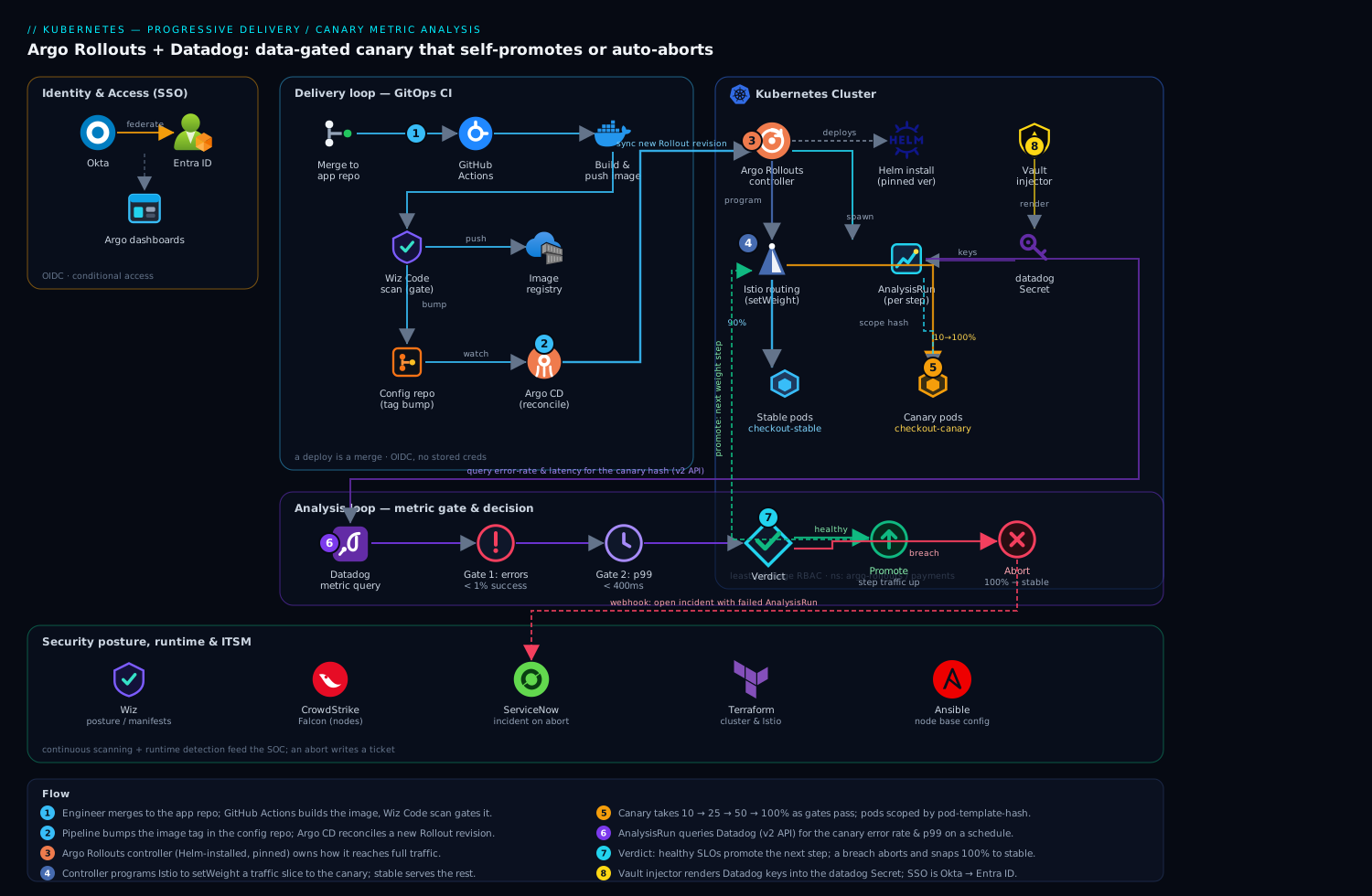
The control flow has two loops that share the cluster but run on different clocks. The delivery loop is GitOps: an engineer merges to the app repo, GitHub Actions builds and pushes the image and bumps the tag in the config repo, and Argo CD reconciles that change into a new Rollout revision. The analysis loop is the canary: the Argo Rollouts controller programs Istio to send a slice of traffic to the canary pods, then spawns an AnalysisRun that queries Datadog on a schedule. Datadog returns the live error rate and latency for the canary’s pods; the controller compares them to your successCondition, and either advances to the next traffic step or aborts and shifts 100% back to stable. Secrets for the Datadog provider come from HashiCorp Vault via the agent injector; humans reach the dashboards through Okta → Entra SSO. Wiz scans the manifests and the running workloads for posture drift, CrowdStrike Falcon watches the nodes at runtime, and an aborted rollout opens a ServiceNow incident automatically so there is a ticket, not just a log line.
Keeping the two loops distinct in your head matters: Argo CD owns what is deployed; Argo Rollouts owns how it reaches full traffic.
1. Install Argo Rollouts and the kubectl plugin
Install the controller into its own namespace. Pin a version — never track stable into production, so behavior does not drift under you.
kubectl create namespace argo-rollouts

helm repo add argo https://argoproj.github.io/argo-helm
helm repo update

helm upgrade --install argo-rollouts argo/argo-rollouts \
  --namespace argo-rollouts \
  --version 2.37.7 \
  --set dashboard.enabled=true \
  --set controller.metrics.enabled=true \
  --wait
Install the kubectl plugin locally (macOS shown; use the linux-amd64 asset on Linux):
curl -sSL -o kubectl-argo-rollouts \
  https://github.com/argoproj/argo-rollouts/releases/download/v1.7.2/kubectl-argo-rollouts-darwin-amd64
chmod +x kubectl-argo-rollouts
sudo mv kubectl-argo-rollouts /usr/local/bin/

kubectl argo rollouts version
Confirm the controller is healthy before going further:
kubectl -n argo-rollouts rollout status deployment/argo-rollouts
kubectl -n argo-rollouts get pods
The dashboard is for humans only and must not be a back door. Front it with the Argo CD/Rollouts UI behind your ingress and require Okta → Entra SSO: advisors and engineers authenticate once with corporate Okta credentials and conditional-access policies, Okta federates to Entra over OIDC, and only members of the platform group reach the dashboard. Do not expose the dashboard Service publicly.
2. Provide Datadog credentials via Vault (not a committed Secret)
The Datadog provider needs two values: apiKey and appKey. These never belong in Git. Store them in HashiCorp Vault and let the Vault Agent injector render them into the pod, or sync them into a Kubernetes Secret with the Vault Secrets Operator. Write the keys to Vault once:
vault kv put secret/argo-rollouts/datadog \
  api-key="$DD_API_KEY" \
  app-key="$DD_APP_KEY"
Argo Rollouts reads the Datadog provider config from a Secret named datadog in the argo-rollouts namespace, with keys address, apiKey, and appKey. Materialize that Secret from Vault rather than writing the literals. With the Vault Secrets Operator, the manifest references the Vault path and the operator keeps the Secret in sync:
apiVersion: secrets.hashicorp.com/v1beta1
kind: VaultStaticSecret
metadata:
  name: datadog
  namespace: argo-rollouts
spec:
  type: kv-v2
  mount: secret
  path: argo-rollouts/datadog
  refreshAfter: 1h
  destination:
    name: datadog          # the Secret Argo Rollouts looks for
    create: true
    transformation:
      templates:
        address: { text: "https://api.datadoghq.eu" }   # use api.datadoghq.com for US1
        apiKey:  { text: '{{ .Secrets.api-key }}' }
        appKey:  { text: '{{ .Secrets.app-key }}' }
Set address to the API host for your Datadog site — https://api.datadoghq.com (US1), https://api.datadoghq.eu (EU), https://api.us5.datadoghq.com, etc. Getting the site wrong is the single most common reason the provider returns 403.
Grant the Datadog Application key the timeseries_query scope and nothing else — least privilege, so a leaked key cannot mutate monitors or dashboards.
3. Tag your service so the canary is queryable in Datadog
The whole mechanism depends on Datadog being able to answer “how is the canary doing, separately from stable?” That requires a label Datadog can group by. Argo Rollouts injects the pod-template-hash, but the cleanest approach is a dedicated tag. Add a rollouts-pod-template-hash-aware tag through the Datadog Agent’s Kubernetes integration, or simpler: emit a version tag from your app’s APM tracer and ensure the canary and stable ReplicaSets carry distinct values.
In practice, scope every Datadog query in the AnalysisTemplate by the canary’s pod-template-hash, which Argo Rollouts passes in as an argument. Confirm the tag exists by running the query you intend to use, in the Datadog Metrics Explorer, against a live canary hash first — if it returns no series there, it will return no series to the controller and your analysis will fail “inconclusive.”
# sanity-check the query that the AnalysisTemplate will run, using the Datadog API
curl -s -G "https://api.datadoghq.eu/api/v1/query" \
  -H "DD-API-KEY: ${DD_API_KEY}" \
  -H "DD-APPLICATION-KEY: ${DD_APP_KEY}" \
  --data-urlencode "from=$(($(date +%s) - 300))" \
  --data-urlencode "to=$(date +%s)" \
  --data-urlencode 'query=sum:trace.http.request.errors{service:checkout,version:canary}.as_count()' \
  | python3 -m json.tool | head -40
If that returns data points, the controller will too.
4. Author the Datadog AnalysisTemplate
This is the heart of the setup. The AnalysisTemplate defines the metrics, the queries, the pass/fail logic, and the failure tolerance. Use the Datadog v2 query API (apiVersion: v2) — it supports formulas and is the current path.
apiVersion: argoproj.io/v1alpha1
kind: AnalysisTemplate
metadata:
  name: checkout-canary-datadog
  namespace: payments
spec:
  args:
    - name: service-name
    - name: canary-hash          # passed in by the Rollout
  metrics:
    # --- Gate 1: error rate must stay under 1% ---
    - name: error-rate
      initialDelay: 60s          # let the canary warm up before judging it
      interval: 60s              # re-query every minute
      count: 5                   # take 5 measurements per step
      successCondition: result < 0.01
      failureCondition: result >= 0.05
      failureLimit: 2            # tolerate 2 bad reads (noise) before aborting
      provider:
        datadog:
          apiVersion: v2
          interval: 5m
          formula: "errors / hits"
          queries:
            errors: |
              sum:trace.http.request.errors{service:{{args.service-name}},
              kube_pod_label_rollouts_pod_template_hash:{{args.canary-hash}}}.as_count()
            hits: |
              sum:trace.http.request.hits{service:{{args.service-name}},
              kube_pod_label_rollouts_pod_template_hash:{{args.canary-hash}}}.as_count()
    # --- Gate 2: p99 latency must stay under 400ms ---
    - name: p99-latency
      initialDelay: 60s
      interval: 60s
      count: 5
      successCondition: result < 400
      failureCondition: result >= 600
      failureLimit: 2
      provider:
        datadog:
          apiVersion: v2
          interval: 5m
          query: |
            p99:trace.http.request{service:{{args.service-name}},
            kube_pod_label_rollouts_pod_template_hash:{{args.canary-hash}}}
Three numbers are doing real work here and you must set them deliberately:
successConditionis the SLO. If the measured value satisfies it, the measurement isSuccessful. Set it to the same threshold your alerting uses, so the canary gate and your pager agree.failureLimitis your noise budget. A single scrape can flap.failureLimit: 2means “abort only after the 3rd failing measurement,” which keeps a one-off blip from killing a good deploy. Set it to0only if your metric is rock-steady.failureConditionis the hard floor that aborts immediately regardless of the success math — use it for “this is unambiguously broken” levels (5% errors, 600ms p99).
The gap between successCondition and failureCondition is the “inconclusive” band. A measurement in that band counts against neither; the run keeps sampling. That band is a feature — it stops a metric hovering near the line from instantly aborting on a single read.
5. Define the Rollout with the canary strategy and analysis steps
Now reference that template from a Rollout. The steps interleave setWeight (traffic shifts) with pause (bake time) and analysis (the Datadog gate). Inline analysis on a step runs for the duration of that step; a top-level analysis runs for the whole rollout in the background and aborts at any point. Use both — background analysis as a continuous guard, step analysis as the promotion gate.
apiVersion: argoproj.io/v1alpha1
kind: Rollout
metadata:
  name: checkout
  namespace: payments
spec:
  replicas: 8
  revisionHistoryLimit: 3
  selector:
    matchLabels: { app: checkout }
  template:
    metadata:
      labels: { app: checkout }
    spec:
      containers:
        - name: checkout
          image: registry.internal/payments/checkout:1.0.0
          ports: [{ containerPort: 8080 }]
          resources:
            requests: { cpu: "250m", memory: "256Mi" }
            limits:   { cpu: "500m", memory: "512Mi" }
  strategy:
    canary:
      canaryService: checkout-canary
      stableService: checkout-stable
      trafficRouting:
        istio:
          virtualService:
            name: checkout-vsvc
            routes: [primary]
      # background guard: runs the whole time the canary is live
      analysis:
        templates:
          - templateName: checkout-canary-datadog
        args:
          - name: service-name
            value: checkout
          - name: canary-hash
            valueFrom:
              fieldRef:
                fieldPath: metadata.labels['rollouts-pod-template-hash']
      steps:
        - setWeight: 10
        - pause: { duration: 2m }      # absorb DNS/warmup before judging
        - analysis:                    # promotion gate at 10%
            templates:
              - templateName: checkout-canary-datadog
            args:
              - name: service-name
                value: checkout
              - name: canary-hash
                valueFrom:
                  fieldRef:
                    fieldPath: metadata.labels['rollouts-pod-template-hash']
        - setWeight: 25
        - pause: { duration: 5m }
        - setWeight: 50
        - pause: { duration: 5m }
        - setWeight: 100
The companion Service and Istio VirtualService wiring (the controller rewrites the route weights at each step):
apiVersion: v1
kind: Service
metadata: { name: checkout-stable, namespace: payments }
spec:
  selector: { app: checkout }
  ports: [{ port: 80, targetPort: 8080 }]
---
apiVersion: v1
kind: Service
metadata: { name: checkout-canary, namespace: payments }
spec:
  selector: { app: checkout }
  ports: [{ port: 80, targetPort: 8080 }]
---
apiVersion: networking.istio.io/v1beta1
kind: VirtualService
metadata: { name: checkout-vsvc, namespace: payments }
spec:
  hosts: [checkout]
  http:
    - name: primary
      route:
        - destination: { host: checkout-stable }
          weight: 100
        - destination: { host: checkout-canary }
          weight: 0
Commit all of this to the config repo that Argo CD watches. Do not kubectl apply it by hand — let Argo CD reconcile, so the live state always matches Git and a rollback is a git revert.
6. Wire the GitOps trigger so a deploy is a merge
A deploy should be a commit, full stop. The GitHub Actions pipeline builds the image, runs Wiz Code to scan the IaC and image for misconfigurations and CVEs before anything ships, and then bumps the image tag in the config repo:
# .github/workflows/release.yml (excerpt)
jobs:
  build-and-promote:
    runs-on: ubuntu-latest
    permissions: { id-token: write, contents: read }   # OIDC, no stored creds
    steps:
      - uses: actions/checkout@v4
      - name: Build & push image
        run: |
          docker build -t registry.internal/payments/checkout:${GITHUB_SHA::8} .
          docker push registry.internal/payments/checkout:${GITHUB_SHA::8}
      - name: Wiz Code IaC + image scan (gate)
        run: wizcli iac scan --path ./deploy && wizcli docker scan \
             --image registry.internal/payments/checkout:${GITHUB_SHA::8}
      - name: Bump tag in config repo
        run: |
          yq -i '.spec.template.spec.containers[0].image =
            "registry.internal/payments/checkout:${GITHUB_SHA::8}"' \
            config-repo/payments/checkout-rollout.yaml
          git -C config-repo commit -am "checkout ${GITHUB_SHA::8}" && git -C config-repo push
When that commit lands, Argo CD detects the drift, syncs the new image into the Rollout, and Argo Rollouts begins the canary automatically — no human in the hot path. Terraform provisions the cluster, the Istio install, the Argo CD/Rollouts namespaces, and the Vault auth backend; Ansible handles any node-level base configuration for the worker pool. Keep that infra in its own repo with the same review-and-merge discipline.
7. Watch a rollout and let the gate decide
Trigger a release (merge a tag bump) and watch the controller drive it:
kubectl argo rollouts get rollout checkout -n payments --watch
You will see it set weight to 10, pause, then spawn an AnalysisRun. Inspect the live analysis:
kubectl argo rollouts get rollout checkout -n payments
kubectl -n payments get analysisrun
kubectl -n payments describe analysisrun <name>   # shows each Datadog measurement + verdict
A healthy run shows Phase: Successful per metric and the rollout advances on its own to 25%, 50%, 100%. A breach shows Phase: Failed, the rollout flips to Degraded, and traffic snaps back to stable — with no command from you. To promote or abort manually if you ever need to override:
kubectl argo rollouts promote checkout -n payments      # skip current pause, continue
kubectl argo rollouts abort   checkout -n payments      # stop and roll back to stable
kubectl argo rollouts promote checkout -n payments --full   # skip all remaining steps
Validation
Prove the gate works before you trust it with a real release. Two tests:
1. Happy path — confirm auto-promotion. Deploy a known-good image and watch the rollout climb to 100% with every AnalysisRun Successful:
kubectl argo rollouts get rollout checkout -n payments --watch
# expect: SetWeight 10 → Successful analysis → 25 → 50 → 100, Healthy
2. Failure path — confirm auto-abort. This is the test that actually matters. Deploy an image that deliberately returns 500s on a fraction of requests (a feature-flagged error injector or a broken build), and watch the canary die at the first gate:
kubectl argo rollouts get rollout checkout -n payments --watch
# expect: SetWeight 10 → analysis measurements cross failureLimit → Degraded
kubectl -n payments describe analysisrun <name>   # error-rate metric: Failed
Cross-check in Datadog’s Metrics Explorer that the error-rate series for the canary hash actually spiked — your eyes on Datadog and the controller’s verdict must agree. If the rollout promoted a broken canary, your query is wrong (likely the tag/hash grouping); fix it and re-test until the abort is reliable. A canary gate you have not seen abort is not a control.
Rollback and teardown
Roll back a bad release in production: abort the in-flight rollout (traffic returns to stable immediately), then revert the image bump in Git so Argo CD reconciles to the previous good revision:
kubectl argo rollouts abort checkout -n payments
kubectl argo rollouts undo  checkout -n payments        # roll back to previous ReplicaSet
# durable fix — make Git the source of truth again:
git -C config-repo revert <bad-tag-bump-sha> && git -C config-repo push
abort is the fast stop; the git revert is what keeps Argo CD from re-applying the bad image on its next sync.
Tear down the whole setup (lab or decommission):
kubectl delete rollout checkout -n payments
kubectl delete analysistemplate checkout-canary-datadog -n payments
kubectl delete svc checkout-stable checkout-canary -n payments
kubectl delete virtualservice checkout-vsvc -n payments

helm uninstall argo-rollouts -n argo-rollouts
kubectl delete namespace argo-rollouts
Remove the VaultStaticSecret and revoke the Datadog Application key in the Datadog UI so the credential cannot be reused.
Common pitfalls
- Wrong Datadog site.
addressmust match your org’s region (datadoghq.comvsdatadoghq.euvsus5). A mismatch returns403/404and the analysis fails “Error,” not “Failed” — a different symptom that sends people debugging the wrong thing. - Query returns no series. If the canary tag/pod-template-hash grouping is wrong, Datadog returns empty and the metric is
Inconclusiveforever, stalling the rollout at a pause. Always validate the exact query in Metrics Explorer against a live canary hash first (Step 3). failureLimit: 0on a noisy metric. A single flaky scrape aborts a perfectly good deploy and erodes trust in the gate. Give noisy SLOs a noise budget of 1–2.- Judging the canary too early. Without
initialDelay/pause, you measure during pod warmup and JIT, see a latency spike that is not real, and abort. Bake 1–2 minutes before the first measurement. - Forgetting the
count/intervalmath.count: 5atinterval: 60smeans the step analysis takes ~5 minutes minimum. If yourpauseis shorter than the analysis, the step ends before the verdict — make pauses ≥ analysis duration, or rely on the background analysis to guard the gap. - Hand-applying manifests. If you
kubectl applyover what Argo CD manages, the next sync reverts you and the two fight. Always go through Git.
Security notes
The Datadog apiKey/appKey are the crown jewels here — keep them in HashiCorp Vault, inject at runtime, and scope the Application key to timeseries_query only so a leak cannot mutate monitors. Gate the Argo Rollouts and Argo CD dashboards behind Okta → Entra SSO with conditional access; never expose the dashboard Service to the internet. Run Wiz (and Wiz Code in CI) for continuous posture scanning of the manifests and live workloads — it flags an over-permissioned ServiceAccount or a Secret drifting into Git before it bites. Put CrowdStrike Falcon sensors on the worker nodes for runtime threat detection feeding your SOC, since the canary pods run real production traffic. Enforce least-privilege RBAC: the Rollouts controller needs only its own CRDs plus the ability to program Istio routes in the app namespace — nothing cluster-wide it does not use.
Cost notes
This pattern is cheap to run and pays for itself the first time it stops a bad deploy. The Argo Rollouts controller is a single lightweight deployment (a few hundred millicores). The real cost lever is Datadog API usage: each AnalysisRun issues queries on a schedule, so a tight interval across many services multiplies indexed-query volume — set interval no finer than your SLO actually needs (60s is plenty for most), and reuse one AnalysisTemplate across services via args rather than authoring bespoke queries per app. Canary pods add a small, transient capacity overhead (you briefly run stable + canary side by side); right-size with requests/limits and keep revisionHistoryLimit low (3) so old ReplicaSets are reaped. The offsetting saving is enormous: an automated abort caps a bad release at a single-digit-percent traffic slice for a few minutes, versus a full-fleet outage measured in lost transactions — the eleven-minute incident that started this guide is exactly the cost it removes.
When a rollout aborts, fire a webhook from the Argo Rollouts notification engine into ServiceNow so an incident is opened automatically with the failed AnalysisRun attached — the on-call gets a ticket with the evidence, not a 2 a.m. guessing game, and the post-incident record writes itself. That closing loop — Git triggers the deploy, Datadog judges it, the controller decides, and ServiceNow records the verdict — is the whole point: progressive delivery where the data, not a tired human, holds the gate.