Most security reviews I get pulled into are a spreadsheet copied from a vendor PDF, run once at go-live, and never reopened. The Well-Architected Framework — Microsoft’s Azure Well-Architected Framework (WAF) and Amazon’s AWS Well-Architected Framework (WA) — offers a better contract: a security pillar that starts from how an attacker actually moves through a workload, then forces you to trace every design principle down to a control you can write in IaC and a signal you can alert on. This deep dive walks both lenses in parallel, because the principles are identical even when the service names differ, and most real estates today span both clouds.
The security pillar is not a product and not a checklist you satisfy once. It is a set of design principles plus a repeatable review method: you decompose the workload against those principles, surface risks as tradeoffs (usually against cost, operational excellence, or performance), and record decisions you can defend to an auditor and revisit when the threat model shifts. Azure expresses this as the WAF security pillar with design principles, checklists, recommendation guides, and the automated Well-Architected Review in the portal / Advisor. AWS expresses it as the WA security pillar with design principles, the Well-Architected Tool question sets, and the deep-dive Security Pillar whitepaper. Same spine, two vocabularies.
By the end you will be able to run a security design review across either cloud without hand-waving: name the design principles from memory, map each to identity, network, data, detection, infrastructure, and supply-chain controls with real config, articulate the design-review questions and the pillar tradeoffs they trigger, and produce a control matrix and checklist an assessor will accept. We treat the pillar as an operating model — assume breach, least privilege, defense in depth, automate everything, protect data end to end — and turn each abstraction into az, aws, and Terraform you can ship.
What problem this solves
The abstraction the cloud sells you — “we handle security” — is half true in a way that burns teams. The provider secures the substrate; you own identity, data, network configuration, and workload code, and the boundary moves with every service model. Nearly every breach I have reviewed lived on the customer side of a line the team assumed the provider covered: a storage bucket left public, an over-permissioned CI role, a database reachable from the internet, a secret in a Git history. The Well-Architected security pillar exists to make that boundary explicit and to give you a defensible method for filling your side of it.
What breaks without it: security becomes a point-in-time gate that a project passes and forgets. Controls are applied inconsistently across workloads, nobody can answer “what happens if this identity is compromised,” and the first real incident finds that logs were never centralized, the response runbook was never rehearsed, and the blast radius was never bounded. Teams over-invest in the visible controls (a WAF, a firewall) and under-invest in the ones that actually stop lateral movement (least-privilege identity, network segmentation, key custody). A design review that produces a slide deck instead of Terraform and alerts has changed nothing.
Who hits this: every team shipping to Azure or AWS, but hardest on those running regulated or multi-tenant workloads, those spanning both clouds (where “we do it this way in Azure” doesn’t translate), and platform teams who must set guardrails that dozens of app teams inherit. The pillar’s payoff is a workload where identity is the perimeter, the network shrinks blast radius, data is protected proportional to its classification, detection is instrumented and rehearsed, and every control is code that a pipeline enforces and an auditor can inspect.
Here is the whole pillar in one frame — the design principles, what each demands in practice, and the primary control plane on each cloud:
| Design principle | What it demands | Azure control plane | AWS control plane | Primary tradeoff |
|---|---|---|---|---|
| Strong identity foundation | Authenticate/authorize on identity, not network location | Entra ID, Conditional Access, PIM, RBAC | IAM, IAM Identity Center, SCPs, IAM roles | Operational friction (MFA, JIT) |
| Least privilege | Minimum grant, tight scope, expiry | RBAC + PIM + custom roles | IAM policies + permission boundaries | Speed of access vs safety |
| Defense in depth (all layers) | No single failure is fatal | NSG, Azure Firewall, WAF, Private Endpoint | SG, NACL, Network Firewall, WAF, PrivateLink | Cost + latency of layers |
| Protect data (transit + rest) | Classify first, then encrypt to tier | Storage/SQL encryption, Key Vault, HSM | S3/EBS/RDS encryption, KMS, CloudHSM | Cost + key-management ops |
| Keep people away from data | Automate access to data; remove standing human access | Managed identity, JIT, PIM | IAM roles, no long-lived keys | Break-glass complexity |
| Detect + respond (assume breach) | Instrument, alert, rehearse | Defender for Cloud, Sentinel, Monitor | GuardDuty, Security Hub, CloudTrail | Ingestion cost, alert fatigue |
| Automate (security as code) | Controls, remediation, evidence as code | Azure Policy, Bicep/Terraform, DevOps | AWS Config, SCPs, CloudFormation/Terraform | Upfront engineering cost |
| Prepare for events | Runbooks, forensics readiness, game days | Sentinel playbooks, snapshots | Incident response runbooks, Detective | Time investment, drills |
Learning objectives
By the end of this article you can:
- Recite the Azure WAF and AWS WA security-pillar design principles and map each to concrete identity, network, data, detection, infrastructure, and supply-chain controls on both clouds.
- Draw the shared responsibility boundary for IaaS/PaaS/SaaS and name which concerns never leave the customer’s side.
- Treat identity as the perimeter: kill standing privilege with PIM / short-lived roles, enforce phishing-resistant MFA via Conditional Access / IAM policy conditions, and give workloads managed identities / IAM roles instead of secrets.
- Design network segmentation and defense in depth: NSG/Security-Group default-deny, Azure Firewall / AWS Network Firewall egress inspection, Private Endpoint / PrivateLink, and WAF+DDoS at the edge.
- Make the data-protection decisions: classification, encryption at rest and in transit, and the platform-key vs customer-managed-key vs HSM key-custody tradeoff on Key Vault / KMS / CloudHSM.
- Build detection and incident response: centralize logs, write detections as queries, wire automated remediation, and rehearse a runbook.
- Embed security in the SDLC and supply chain: secret scanning, IaC static analysis, dependency/CVE gates, image signing, and management-group / SCP guardrails.
- Run a security design review: ask the pillar’s review questions, reason about the tradeoffs against the other four pillars, and produce a control matrix and checklist.
Prerequisites & where this fits
You should be comfortable with cloud fundamentals on at least one of Azure or AWS: what a subscription/account, resource group, VNet/VPC, and IAM/RBAC role are; how to run az, aws, and terraform; and how to read JSON/HCL. Familiarity with HTTP, TLS, and basic threat-modeling vocabulary (trust boundary, attack path) helps. You do not need to be a security specialist — this article is written for the architect who owns the design and must defend it.
This is the security pillar of a five-pillar framework, and it does not stand alone. It trades against the other four constantly, so read it alongside the Well-Architected Reliability Pillar Deep Dive, the Well-Architected Operational Excellence Pillar Deep Dive, and the Well-Architected Performance Efficiency Pillar Deep Dive. For the mechanics behind individual controls, it draws on Threat Modeling with STRIDE, Data-Flow Diagrams & Attack Trees, the Zero Trust Architecture Blueprint: Identity, Network & Data, and cloud-specific deep dives linked throughout. The Azure-native expression of this pillar lives in Azure Well-Architected Framework: Security Pillar; the AWS-native one in AWS Well-Architected: Security Pillar.
Where it fits in the review flow: you scope a workload, run the pillar’s questions, capture risks and their tradeoffs, and turn the accepted decisions into IaC and alerts. The two clouds’ tooling maps cleanly:
| Review artifact | Azure WAF | AWS WA | Output you keep |
|---|---|---|---|
| Design principles | WAF Security pillar principles | WA Security pillar principles | The lens you review against |
| Question set | WAF Security checklist | WA Tool Security questions | Answered questions + notes |
| Automated review | Well-Architected Review (portal) + Advisor | Well-Architected Tool + Trusted Advisor | Scored report, HRIs |
| Recommendation library | Security recommendation guides | Security Pillar whitepaper + best practices | Prioritized backlog |
| Posture scoring | Microsoft Defender for Cloud Secure Score | AWS Security Hub security score | A trend line over time |
| Control enforcement | Azure Policy / initiatives | AWS Config rules / SCPs | Guardrails as code |
Core concepts
Six mental models make every control below obvious. Pin them before the deep sections.
Security is a pillar, not a phase. The Well-Architected security pillar is a lens you apply continuously, not a gate you pass. Its output is a set of decisions — each with a rationale and an accepted tradeoff — recorded so they can be defended and revisited. A review that ends in a document nobody enforces has produced nothing; a review that ends in Terraform, policy, and alerts has changed the system.
Identity is the perimeter. The network used to be the boundary; now the boundary is “who are you and are you allowed.” Every request should be authenticated and authorized on identity, evaluated against context (device, location, risk), and granted the minimum privilege for the minimum time. The classic breach chain — phished credential → over-permissioned identity → data — is broken at the identity layer far more cheaply than anywhere downstream.
Defense in depth means no single failure is fatal. You apply controls at every layer — edge (WAF/DDoS), network (segmentation), host, application, identity, and data — so that breaking one gets an attacker nowhere near the crown jewels. The network is not obsolete under zero trust; it is a layer that shrinks blast radius and buys detection time, sitting behind identity, not instead of it.
Classify before you protect. You cannot apply the right protection until you know the sensitivity. Classify data — public, internal, confidential, restricted — then let the tier drive the encryption and, crucially, the key custody decision: who can destroy access to this data? Over-protecting public data wastes money and operational pain; under-protecting restricted data is the breach.
Assume breach. Design as if an attacker is already inside. That single assumption reorders your investments toward detection, blast-radius containment, least privilege, and rehearsed response — and away from the fantasy of a perfect perimeter. “How fast do we see it and how much of the response runs without a human” becomes the operative question.
Automate everything: controls, remediation, evidence. Controls applied by hand drift, apply inconsistently, and produce no audit trail. Controls as code (IaC + policy) apply uniformly, are reviewed in pull requests, and are themselves the evidence. Remediation as code (deployIfNotExists / auto-remediation) closes the gap between detection and fix. This is where the pillar stops being aspirational.
The vocabulary in one table
Before the deep sections, the moving parts side by side. The glossary repeats these for lookup:
| Concept | One-line definition | Azure term | AWS term |
|---|---|---|---|
| Directory / identity provider | The authority for who exists | Microsoft Entra ID | IAM + IAM Identity Center |
| Workload identity | An app’s own identity, no secret | Managed identity | IAM role (for service/instance) |
| Just-in-time admin | Elevate on demand, expire | Privileged Identity Management (PIM) | IAM Identity Center + session policies |
| Policy-based access gate | Conditional allow on context | Conditional Access | IAM policy conditions / SCP |
| Preventive guardrail | Deny a class of action org-wide | Azure Policy (Deny) at MG | Service Control Policy (SCP) |
| Private service reach | PaaS off the public internet | Private Endpoint | PrivateLink / VPC endpoint |
| Managed key store | Where keys/secrets live | Key Vault / Managed HSM | KMS / CloudHSM |
| Customer-managed key | You hold the encryption key | CMK (in Key Vault) | Customer-managed KMS key |
| Posture management | Continuous config assessment | Defender for Cloud (CSPM) | Security Hub + Config |
| Threat detection | Behavioral alerts on activity | Defender plans + Sentinel | GuardDuty |
| Central audit log | Immutable control-plane trail | Activity Log → Log Analytics | CloudTrail |
| SIEM | Correlate, detect, respond | Microsoft Sentinel | Security Lake + partner/OpenSearch |
The design principles, made concrete
Both frameworks publish a short list of security design principles. They read as platitudes until you attach a control, a config line, and a tradeoff to each. This section does exactly that — it is the pillar’s spine, and every later section elaborates one row.
Azure WAF vs AWS WA security principles, aligned
The two lists use different words for the same ideas. Aligning them means one review method covers both clouds:
| Azure WAF security principle | Closest AWS WA principle | Shared intent |
|---|---|---|
| Plan your security readiness | Implement a strong identity foundation | Establish the identity + governance baseline first |
| Design to protect confidentiality | Protect data in transit and at rest | Classify, encrypt, restrict who can read |
| Design to protect integrity | Maintain traceability | Tamper-evidence, signed artifacts, audit trails |
| Design to protect availability | Prepare for security events | Resist DoS; assume breach; rehearse response |
| Sustain and evolve your security posture | Apply security at all layers | Continuous improvement + defense in depth |
| — | Automate security best practices | Security as code (both endorse it) |
| — | Keep people away from data | Least standing human access to data |
The practical reading: plan readiness = identity + governance baseline; protect the CIA triad as three explicit design goals; apply controls at every layer; automate; and keep humans out of the data path. Whichever cloud, the review walks these.
Principle-to-control map
The single most useful artifact from a review is a table that turns each principle into a specific control on each cloud. Keep this open during design:
| Principle | Identity control | Network control | Data control | Detection control |
|---|---|---|---|---|
| Strong identity foundation | Entra ID / IAM SSO, MFA, PIM / IAM roles | — | — | Sign-in + IAM auth logs |
| Least privilege | Scoped RBAC / IAM, no wildcards | Segment by role | Data-plane RBAC on stores | Alert on privilege grants |
| Defense in depth | Layered auth (network + identity) | NSG/SG deny, Firewall, WAF, PE/PrivateLink | Encryption + access RBAC | Multi-layer telemetry |
| Protect confidentiality | Access reviews | Private connectivity | CMK/HSM, TLS 1.2+ | DLP / anomalous access alerts |
| Protect integrity | Signed commits, MFA on changes | mTLS | Immutable storage, checksums | Change/audit correlation |
| Protect availability | Block credential-stuffing (CA/WAF) | DDoS plan, rate limits | Backups (immutable) | DoS + backup-integrity alerts |
| Automate | JIT via policy | Policy-enforced segmentation | Policy-enforced encryption | Auto-remediation playbooks |
| Prepare for events | Break-glass accounts | Isolation runbooks | Snapshot/forensic copies | SIEM incidents + game days |
The tradeoffs each principle triggers
No security control is free; the pillar’s honesty is that it names the cost. A review that pretends otherwise loses credibility with the app teams who feel the friction:
| Security decision | Trades against | The tension | How to resolve it |
|---|---|---|---|
| Phishing-resistant MFA + JIT admin | Operational excellence | Slower access, more steps | Break-glass accounts; FIDO2 to cut friction |
| Private Endpoints / PrivateLink everywhere | Cost + operational excellence | Per-endpoint cost, DNS complexity | Reserve for sensitive data planes; automate DNS |
| Customer-managed keys (CMK/HSM) | Reliability + cost | Key outage = data outage; HSM cost | Purge protection, key HA, tested rotation |
| Deep packet inspection (firewall) | Performance efficiency + cost | Added latency + hourly cost | Inspect egress + N-S; skip low-risk E-W |
| Full-fidelity logging to SIEM | Cost | Ingestion bill scales with traffic | Tier logs, sample, retain hot vs archive |
| Deny-by-default policy on brownfield | Operational excellence | Can break existing resources | Audit first, then enforce; exemptions |
| Immutable/WORM backups | Cost | Storage you cannot delete early | Scope to restricted data + retention law |
Identity: the primary perimeter
Identity is where defense in depth starts because it holds the cheapest, highest-leverage controls. Three moves, in order, on both clouds.
Kill standing privilege
Human administrative access should be just-in-time and approved, not a permanent role assignment sitting idle waiting to be phished. On Azure, that is Privileged Identity Management (PIM): assign roles as eligible, so elevation requires explicit activation, MFA, a justification, and optionally approval.
# Azure: make an ELIGIBLE (not active) role assignment; activation is governed by PIM policy
# (MFA + approval + time-bound) so the role is dormant until explicitly elevated.
az role assignment create \
  --assignee "$PRINCIPAL_ID" \
  --role "Contributor" \
  --scope "/subscriptions/$SUB_ID/resourceGroups/rg-prod-app" \
  --assignee-principal-type User
# Then configure the PIM role setting in Entra: eligible assignment, max 8h activation,
# require MFA + justification + approver group.
On AWS, the equivalent is IAM Identity Center with short-lived permission sets (session-scoped credentials, no long-lived keys) plus optional approval workflows, and no IAM users with attached admin policies:
# AWS: users assume a permission set for a bounded session; credentials are short-lived and
# vended by Identity Center. No standing IAM user with AdministratorAccess exists.
aws sso-admin create-account-assignment \
  --instance-arn "$SSO_INSTANCE_ARN" \
  --target-id "$ACCOUNT_ID" --target-type AWS_ACCOUNT \
  --permission-set-arn "$PERMSET_ARN" \
  --principal-type GROUP --principal-id "$GROUP_ID"
# Session duration on the permission set caps how long the elevated creds live.
The two models, side by side:
| Aspect | Azure PIM | AWS IAM Identity Center |
|---|---|---|
| Standing state | Eligible (dormant) role | No standing user creds; assume on demand |
| Elevation trigger | Activate (MFA + justification) | Assume permission set (SSO login) |
| Time bound | Activation max duration (e.g. 8h) | Session duration on permission set |
| Approval | Optional approver per role | Optional (via workflow / ticketing) |
| Audit | Activation history in Entra | CloudTrail AssumeRole events |
| Break-glass | Excluded emergency accounts | Dedicated root/emergency role |
Enforce phishing-resistant MFA on context
Require strong authentication for privileged access and evaluate it against context. On Azure, Conditional Access is the enforcement plane; scope policies to role templates, not named users (people change, roles do not):
{
  "displayName": "Require phishing-resistant MFA for admins",
  "state": "enabled",
  "conditions": {
    "users": { "includeRoles": ["62e90394-69f5-4237-9190-012177145e10"] },
    "applications": { "includeApplications": ["All"] }
  },
  "grantControls": {
    "operator": "OR",
    "authenticationStrength": { "id": "00000000-0000-0000-0000-000000000004" }
  }
}
The role GUID
62e90394-...is the built-in Global Administrator template ID; it is stable across every tenant.authenticationStrengthid...0004is the built-in phishing-resistant MFA strength. Also create a policy that blocks legacy authentication — it bypasses MFA entirely and is the single most common gap.
On AWS you achieve the analog with IAM policy conditions (deny actions unless MFA is present) and, for the console/SSO, mandatory MFA in Identity Center. A representative “deny if not MFA-authenticated” boundary:
{
  "Sid": "DenyAllExceptListedIfNoMFA",
  "Effect": "Deny",
  "NotAction": ["iam:CreateVirtualMFADevice", "iam:EnableMFADevice", "sts:GetSessionToken"],
  "Resource": "*",
  "Condition": { "BoolIfExists": { "aws:MultiFactorAuthPresent": "false" } }
}
Give workloads identities, not secrets
Application code should never hold a connection string or long-lived key. On Azure, use a managed identity and grant it a tightly scoped RBAC role:
# Azure: system-assigned identity, scoped to READ SECRETS from ONE Key Vault.
az webapp identity assign --name app-prod --resource-group rg-prod-app
PRINCIPAL=$(az webapp identity show -n app-prod -g rg-prod-app --query principalId -o tsv)
az role assignment create \
  --assignee-object-id "$PRINCIPAL" --assignee-principal-type ServicePrincipal \
  --role "Key Vault Secrets User" \
  --scope "/subscriptions/$SUB_ID/resourceGroups/rg-prod-app/providers/Microsoft.KeyVault/vaults/kv-prod-app"
On AWS, the equivalent is an IAM role attached to the compute (an EC2 instance profile, an ECS task role, a Lambda execution role, or an EKS IRSA / Pod Identity), scoped to exactly the resources it needs:
# AWS: an ECS task role that can read ONE secret and nothing else.
resource "aws_iam_role" "task" {
  name               = "app-prod-task"
  assume_role_policy = data.aws_iam_policy_document.ecs_assume.json
}
resource "aws_iam_role_policy" "read_one_secret" {
  role   = aws_iam_role.task.id
  policy = jsonencode({
    Version = "2012-10-17",
    Statement = [{
      Effect   = "Allow",
      Action   = ["secretsmanager:GetSecretValue"],
      Resource = aws_secretsmanager_secret.db.arn   # one secret, not "*"
    }]
  })
}
The habit that closes the most attack paths: narrowest role, narrowest scope, no wildcards. Key Vault Secrets User on one vault — not Contributor on the resource group; GetSecretValue on one ARN — not secretsmanager:* on *. For CI/CD, go one step further and eliminate the stored cloud credential entirely with OIDC federation (see Workload Identity Federation for Secretless CI/CD). The identity anti-patterns to hunt and kill:
| Anti-pattern | Why it is dangerous | Azure fix | AWS fix |
|---|---|---|---|
| Standing Owner/Admin on humans | Phish → instant domain compromise | PIM eligible + MFA | Identity Center session + MFA |
Wildcard role (* action/scope) |
One identity can do anything | Custom role, least action | Scoped policy, no * |
| Secret in app config / code | Leaks via logs, Git, memory dumps | Managed identity + Key Vault ref | IAM role + Secrets Manager |
| Long-lived IAM user access keys | Never rotated, hard to trace | (n/a) | Identity Center / IRSA / OIDC |
| Shared service account | No attribution, no MFA | Per-workload managed identity | Per-workload IAM role |
| Legacy auth allowed | Bypasses MFA entirely | CA block-legacy-auth policy | Disable basic auth paths |
| Over-broad Key Vault access policy | One reader reads every secret | RBAC vault + per-secret scope | KMS key policy + grants |
Network segmentation and defense in depth
Even with identity as the primary perimeter, the network is a control layer you do not skip — it shrinks blast radius and buys detection time. The goal: nothing in the data tier is reachable from the internet, and lateral movement inside the network is denied by default.
Take data services off the public internet
PaaS data services default to public endpoints. Close them with Private Endpoints (Azure) / PrivateLink or VPC endpoints (AWS) and explicitly disable public access:
# Azure: storage with NO public endpoint, reachable only via Private Endpoint, TLS 1.2 min.
resource "azurerm_storage_account" "data" {
  name                          = "stproddata01"
  resource_group_name           = azurerm_resource_group.app.name
  location                      = azurerm_resource_group.app.location
  account_tier                  = "Standard"
  account_replication_type      = "ZRS"
  public_network_access_enabled = false          # no public endpoint
  min_tls_version               = "TLS1_2"
}

resource "azurerm_private_endpoint" "blob" {
  name                = "pe-stproddata01-blob"
  resource_group_name = azurerm_resource_group.app.name
  location            = azurerm_resource_group.app.location
  subnet_id           = azurerm_subnet.private_endpoints.id
  private_service_connection {
    name                           = "psc-blob"
    private_connection_resource_id = azurerm_storage_account.data.id
    subresource_names              = ["blob"]
    is_manual_connection           = false
  }
}
On AWS, the analog is a gateway or interface VPC endpoint plus a bucket policy that denies any access not arriving through it:
# AWS: deny all S3 access that does NOT come through the designated VPC endpoint.
data "aws_iam_policy_document" "bucket" {
  statement {
    effect    = "Deny"
    actions   = ["s3:*"]
    resources = [aws_s3_bucket.data.arn, "${aws_s3_bucket.data.arn}/*"]
    principals { type = "*" identifiers = ["*"] }
    condition {
      test     = "StringNotEquals"
      variable = "aws:sourceVpce"
      values   = [aws_vpc_endpoint.s3.id]
    }
  }
}
The private-connectivity primitives compared:
| Capability | Azure | AWS | Effect |
|---|---|---|---|
| PaaS via private IP | Private Endpoint | Interface VPC endpoint (PrivateLink) | Service reachable on VNet/VPC, no public route |
| Object storage private route | Private Endpoint (blob) | Gateway VPC endpoint (S3/DynamoDB) | Traffic stays on backbone |
| Disable public plane | public_network_access_enabled=false |
Bucket/resource policy + block public access | No internet reachability |
| Cross-network exposure | Private Link Service | PrivateLink (NLB-fronted) | Expose your own service privately |
| Name resolution | Private DNS zones | Route 53 private hosted zones | Private IP for the service FQDN |
Micro-segment with default-deny
The most common mistake is allowing the whole address space east-west. Deny it, then allow only the specific tier-to-tier flow. On Azure, that is NSG rules; the deny rule at a high priority number is the backstop:
# Azure: app subnet may reach data subnet ONLY on 1433; all other east-west inbound denied.
az network nsg rule create -g rg-prod-app --nsg-name nsg-data \
  --name allow-app-to-sql --priority 100 --direction Inbound --access Allow \
  --protocol Tcp --source-address-prefixes 10.20.1.0/24 \
  --destination-port-ranges 1433 --destination-address-prefixes 10.20.2.0/24

az network nsg rule create -g rg-prod-app --nsg-name nsg-data \
  --name deny-vnet-inbound --priority 4000 --direction Inbound --access Deny \
  --protocol "*" --source-address-prefixes VirtualNetwork \
  --destination-port-ranges "*" --destination-address-prefixes "*"
On AWS the layered equivalent is Security Groups (stateful, instance-level, allow-only) plus NACLs (stateless, subnet-level, allow+deny) — the deep mechanics are in AWS Security Groups & NACLs Deep Dive. A security group that lets the app tier reach the DB tier and nothing else:
# AWS: DB security group accepts 5432 ONLY from the app tier's security group.
resource "aws_security_group_rule" "db_from_app" {
  type                     = "ingress"
  from_port                = 5432
  to_port                  = 5432
  protocol                 = "tcp"
  security_group_id        = aws_security_group.db.id
  source_security_group_id = aws_security_group.app.id   # reference, not a CIDR
}
The segmentation primitives are close but not identical — knowing the differences prevents porting a rule incorrectly:
| Primitive | Azure NSG | AWS Security Group | AWS NACL |
|---|---|---|---|
| Scope | Subnet or NIC | Instance/ENI | Subnet |
| State | Stateful | Stateful | Stateless (both directions) |
| Rules | Allow + Deny, priority | Allow only | Allow + Deny, numbered |
| Default | Deny inbound, allow outbound | Deny inbound, allow outbound | Allow all (default NACL) |
| Source can be | CIDR, tag, ASG | CIDR or another SG | CIDR only |
| Best for | Broad subnet posture | App-to-app allow-listing | Coarse subnet deny backstop |
Layer the edge and inspect egress
Put a WAF at the edge in Prevention/Block mode (Azure Front Door or Application Gateway WAF; AWS WAF on CloudFront/ALB) and enable a DDoS protection plan on internet-facing entry points (Azure DDoS Network/IP Protection; AWS Shield Advanced). Beyond ingress, control egress: an Azure Firewall or AWS Network Firewall with FQDN allow-listing stops a compromised workload from exfiltrating to an attacker’s server. The full layered picture — an attacker must defeat every layer, and each layer generates telemetry:
| Layer | Azure control | AWS control | What it stops |
|---|---|---|---|
| Volumetric DDoS | DDoS Network/IP Protection | Shield Advanced | L3/L4 floods |
| L7 application attacks | Front Door / App Gateway WAF | AWS WAF (CloudFront/ALB) | SQLi, XSS, bots, rate abuse |
| Ingress segmentation | NSG allow-list | Security Group allow-list | Unexpected inbound |
| Subnet backstop | NSG deny rule | NACL deny | Coarse E-W denial |
| Egress inspection | Azure Firewall (FQDN/app rules) | Network Firewall (Suricata) | Exfiltration, C2, malware pull |
| Private data reach | Private Endpoint + DNS | PrivateLink + private DNS | Public exposure of data plane |
| Admin access | Bastion (no public RDP/SSH) | SSM Session Manager | Exposed management ports |
Layering matters because it decouples failures: breaking the WAF gets an attacker to a subnet that denies east-west; landing in the app subnet finds a data tier reachable only via private endpoint over TLS with data-plane RBAC still to defeat. For remote administration, never expose RDP/SSH — use Azure Bastion or AWS SSM Session Manager so management ports have no public listener at all.
Data protection: classification, encryption, key custody
You cannot apply the right protection until you know the sensitivity. Classify first — public, internal, confidential, restricted — then let the tier drive the encryption and key-custody decision.
Encryption at rest and in transit
Encryption at rest and TLS in transit are table stakes and largely on by default on both clouds (Azure Storage/SQL Service-Managed Keys; AWS S3/EBS/RDS with default encryption). The work is (a) enforcing a minimum TLS version, (b) ensuring nothing was created unencrypted, and © choosing key custody. The mechanisms compared:
| Data-at-rest target | Azure default | AWS default | Enforce with |
|---|---|---|---|
| Object storage | Storage SSE (platform key) | S3 SSE-S3 / SSE-KMS | Policy: require encryption + CMK |
| Block storage | Managed-disk SSE | EBS default encryption | Policy: deny unencrypted volumes |
| Managed SQL | TDE on by default | RDS storage encryption | Policy: require TDE/encryption |
| Backups / snapshots | Encrypted with source | Encrypted with source key | Ensure key + immutability |
| In transit | TLS; enforce 1.2+ | TLS; enforce 1.2+ | Min-TLS setting; deny plaintext |
The key-custody decision
The real decision is who can destroy access to the data. This is the pillar’s “protect confidentiality” principle turned into a concrete tradeoff against reliability and cost:
| Model | Who holds the key | Azure | AWS | Use when |
|---|---|---|---|---|
| Platform-managed | Provider | Service-managed key | SSE-S3 / aws/service KMS key | Internal/confidential, low custody need |
| Customer-managed (CMK) | You, in a managed vault | CMK in Key Vault | Customer-managed KMS key | Restricted data, key-control mandate |
| HSM-backed | You, FIPS 140-2 L3 | Managed HSM | CloudHSM / KMS custom key store | Highest assurance, crypto-erase guarantee |
| Bring-your-own-key | You import material | BYOK to Key Vault/HSM | Import key material to KMS | Regulatory external-generation rule |
For restricted data, wire CMK with an enforced rotation policy and — non-negotiably — protect the key store from accidental destruction. On Azure:
# Azure: create a CMK with an enforced rotation policy.
az keyvault key create --vault-name kv-prod-app --name cmk-storage \
  --protection software --kty RSA --size 3072
az keyvault key rotation-policy update --vault-name kv-prod-app --name cmk-storage \
  --value '{"lifetimeActions":[{"trigger":{"timeAfterCreate":"P350D"},
            "action":{"type":"Rotate"}}],"attributes":{"expiryTime":"P365D"}}'
On AWS, KMS gives you managed annual rotation and key policies that constrain who can use versus administer the key:
# AWS: a customer-managed KMS key with automatic annual rotation and a scoped policy.
resource "aws_kms_key" "data" {
  description             = "CMK for restricted data"
  enable_key_rotation     = true          # annual rotation of backing material
  deletion_window_in_days = 30            # window to cancel an accidental delete
  policy                  = data.aws_iam_policy_document.kms.json
}
The kill switch is a loaded gun. CMK/HSM gives you crypto-shred: revoke or destroy the key and the ciphertext is unrecoverable even though it still sits in storage. Powerful — and a self-inflicted denial-of-service waiting to happen. On Azure,
--enable-purge-protection trueand soft-delete on the vault are mandatory for production CMK. On AWS, a key deletion window (7–30 days) is your grace period; treat KMS key availability as a reliability dependency of every dataset it protects, and replicate keys for multi-region data.
The custody deep dives are worth reading in full: Azure Encryption at Rest with CMK & Double Encryption and AWS KMS Encryption Deep Dive: Keys, Policies, Envelope, Rotation.
Secrets are data too
Application secrets follow the same discipline as data: store in a managed vault, reference (never copy) from the app, rotate on a schedule, and prefer a workload identity over any secret at all. On Azure that is Azure Key Vault: Secrets, Keys & Certificates with managed-identity references; on AWS it is Secrets Manager / Parameter Store with an IAM role. The secret-handling rules and their cross-cloud form:
| Rule | Azure implementation | AWS implementation |
|---|---|---|
| Never store secrets in code/config | Key Vault reference in app setting | Secrets Manager ARN via SDK/role |
| Prefer no secret at all | Managed identity to Azure services | IAM role to AWS services |
| Rotate automatically | Key Vault rotation + event | Secrets Manager rotation Lambda |
| Restrict who can read | RBAC Secrets User per vault |
GetSecretValue on one ARN |
| Detect leaked secrets | Pipeline secret scanning | Pipeline secret scanning |
| Encrypt the store | Key Vault (HSM-backed option) | KMS-encrypted secret |
Detection and incident response: assume breach
Assume breach. The question is not whether something gets through but how fast you see it and how much of the response runs without a human. Centralize telemetry, write detections as queries, and codify the response.
Centralize the telemetry
Ship control-plane, data-plane, identity, and network logs into one place. On Azure that is a Log Analytics workspace (via diagnostic settings) feeding Microsoft Sentinel; on AWS it is CloudTrail + service logs feeding Security Lake / a SIEM, with GuardDuty and Security Hub providing managed detections and posture. The telemetry sources you must not skip:
| Telemetry | Azure source | AWS source | Detects |
|---|---|---|---|
| Control-plane audit | Activity Log → Log Analytics | CloudTrail (management events) | Risky config changes, role grants |
| Identity sign-ins | Entra sign-in / audit logs | CloudTrail + IAM Access Analyzer | Impossible travel, MFA bypass |
| Threat detection (behavioral) | Defender for Cloud plans | GuardDuty | Crypto-mining, recon, exfiltration |
| Posture / misconfig | Defender CSPM (Secure Score) | Security Hub + Config | Public buckets, open ports |
| Data-plane access | Storage/SQL diagnostic logs | S3 access + data events | Anomalous data reads |
| Network flow | NSG flow / VNet flow logs | VPC Flow Logs | Lateral movement, beaconing |
| DNS | Azure DNS / Firewall logs | Route 53 Resolver query logs | C2 domains, exfil over DNS |
Detections as queries
Promote the high-signal patterns to analytics rules that create incidents. A detection I keep in every Azure environment — a risky sign-in immediately followed by a privileged role grant, because that pattern is the attack path:
// Azure Sentinel: risky sign-in followed by a privileged role assignment within 30 min
let risky = SigninLogs
  | where RiskLevelDuringSignIn in ("high","medium")
  | project riskUser = UserPrincipalName, riskTime = TimeGenerated, IPAddress;
AuditLogs
  | where OperationName has "Add member to role"
  | extend actor = tostring(InitiatedBy.user.userPrincipalName)
  | join kind=inner risky on $left.actor == $right.riskUser
  | where TimeGenerated between (riskTime .. (riskTime + 30m))
  | project TimeGenerated, actor, OperationName, IPAddress, TargetResources
The AWS analog watches CloudTrail for the same shape — a session from an unusual context calling AttachRolePolicy/PutRolePolicy or creating access keys. For the hunting discipline behind these queries, see KQL Threat Hunting: MITRE ATT&CK, UEBA & Notebooks.
Automated remediation for the unambiguous cases
Wire auto-remediation for findings with no judgment call — a publicly exposed storage bucket, a disabled encryption setting, a security group opened to 0.0.0.0/0 on 22. On Azure, Azure Policy with Deny or deployIfNotExists:
# Azure: enforce that storage restricts network access (run Audit first, then Deny).
az policy assignment create \
  --name "restrict-storage-network" \
  --policy "4fa4b6c0-31ca-4c0d-b10d-24b96f62a751" \
  --scope "/subscriptions/$SUB_ID" \
  --params '{"effect":{"value":"Audit"}}'   # flip to Deny after sizing the blast radius
Built-in policy
4fa4b6c0-...is “Storage accounts should restrict network access.” Run it asAuditfor a sprint to size the blast radius, then flip toDeny. Shipping straight toDenyon a brownfield estate is how you take down production on a Friday. On AWS the equivalent is an AWS Config rule with an SSM auto-remediation, or an SCP that denies the misconfiguration outright.
The runbook automation cannot replace
Then write the runbook for what automation cannot decide: who declares the incident, how you preserve forensic snapshots, the comms tree, containment vs eradication, the rollback. A playbook nobody has rehearsed is a document, not a control — run a game day against it quarterly. The incident lifecycle and the tooling on each cloud:
| IR phase | Human decision | Azure tooling | AWS tooling |
|---|---|---|---|
| Detect | Triage severity | Sentinel incident | GuardDuty finding → Security Hub |
| Contain | Isolate blast radius | Disable identity, NSG isolate, playbook | Revoke session, quarantine SG, SSM |
| Preserve evidence | Snapshot before change | Disk snapshot, log export | EBS snapshot, CloudTrail Lake |
| Investigate | Scope the intrusion | Sentinel hunting, notebooks | Detective, Athena on logs |
| Eradicate | Remove persistence | Rotate secrets, redeploy clean | Rotate keys, redeploy from pipeline |
| Recover | Validate + reopen | Restore from immutable backup | Restore from immutable backup |
| Learn | Blameless postmortem | Update rules + policy | Update rules + Config |
For the full method, see Security Incident Response: Runbooks, Tabletops & Cloud Forensics.
Infrastructure protection and posture management
Infrastructure protection is the “apply security at all layers” principle applied to the compute and platform layer: harden hosts, patch continuously, reduce the attack surface, and measure posture over time so drift is visible.
Harden and patch
The controls that matter at the infrastructure layer, and where each lives:
| Control | Azure | AWS | Why |
|---|---|---|---|
| No public management ports | Bastion; NSG deny 22/3389 | SSM Session Manager; SG deny | Removes the most-scanned attack surface |
| Continuous patching | Azure Update Manager | Systems Manager Patch Manager | Closes known-CVE windows |
| Hardened images | Trusted Launch, secure baselines | Golden AMIs, Image Builder | Ship a known-good baseline |
| Endpoint/workload protection | Defender for Servers | GuardDuty + Inspector | Runtime + vuln detection |
| Vulnerability assessment | Defender vuln scanning | Amazon Inspector | Find unpatched packages |
| Config baseline | Machine Configuration | SSM State Manager | Enforce OS-level settings |
| Secrets not on the host | Managed identity | IAM role | No creds to steal from a host |
Posture as a scored trend
Both clouds give you a security score that trends your posture: Microsoft Defender for Cloud Secure Score and AWS Security Hub (with foundational standards like CIS and AWS FSBP). Treat the score as a backlog generator, not a vanity metric — each finding is a specific, prioritized fix. The posture toolchain:
| Function | Azure | AWS |
|---|---|---|
| Posture score | Defender for Cloud Secure Score | Security Hub score |
| Compliance standards | Regulatory compliance dashboard (CIS, PCI, ISO) | Security Hub standards (CIS, FSBP, PCI) |
| Config assessment | Defender CSPM | AWS Config (conformance packs) |
| Attack-path analysis | Defender CSPM attack paths | (partner / Security Hub insights) |
| Recommendations | Advisor + Defender recommendations | Trusted Advisor + Security Hub |
The pillar’s job is to make sure the score trends up and the top findings are on someone’s board. The platform-team baseline for Azure is Azure Landing Zone: Security; for AWS, AWS Control Tower Multi-Account Landing Zone.
Secure SDLC and software supply chain
Controls applied after deploy are remediation; controls applied in the pipeline are prevention. Shift every check left so insecure config and leaked secrets never reach an environment, and secure the supply chain so what you ship is what you built.
Gate the pipeline
A minimal but real gate set in CI — secret scanning, IaC static analysis, and dependency CVE checks — that fails the build on a finding:
# CI (GitHub Actions / Azure DevOps): hard gates before any deploy stage.
steps:
  - name: Secret scan
    run: gitleaks detect --source . --redact --exit-code 1

  - name: IaC static analysis
    run: |
      checkov -d ./infra --quiet --compact \
        --framework terraform \
        --soft-fail-on LOW        # fail build on MEDIUM/HIGH misconfig

  - name: Dependency + image CVEs
    run: trivy fs --severity HIGH,CRITICAL --exit-code 1 .
Secure the artifact and its provenance
Beyond the gate, the supply chain itself must be trustworthy: pin and scan base images, generate an SBOM, sign artifacts, and admit only signed images at deploy. The supply-chain controls and their cross-cloud form:
| Control | Purpose | Azure / tooling | AWS / tooling |
|---|---|---|---|
| Secret scanning | No credentials in Git | GitHub secret scanning, gitleaks | Same tooling |
| IaC static analysis | No misconfig in Terraform/Bicep | Checkov, tfsec, PSRule | Checkov, tfsec |
| Dependency/CVE scan | No known-vulnerable packages | Trivy, Dependabot | Trivy, Dependabot |
| Image scanning | No vulnerable base image | Defender for Containers, ACR scan | Inspector, ECR scan |
| SBOM | Know what you ship | Syft / build attestation | Syft / build attestation |
| Artifact signing | Prove provenance | Notation / cosign | cosign / Signer |
| Admission control | Reject unsigned/unscanned | Gatekeeper / ratify on AKS | OPA/Kyverno, ECR policies |
| Provenance (SLSA) | Tamper-evident build chain | Signed build attestations | Signed build attestations |
For the depth on consuming a trustworthy supply chain, see Software Supply Chain: SBOM, VEX & Admission Verification and the pipeline pattern in Secure CI/CD Supply Chain: Jenkins, Vault & Wiz.
Governance: guardrails, not gates
Pipeline gates catch what flows through the pipeline. Governance guardrails catch what does not — the resource someone clicks up in the portal, the account a team spins outside your templates. The pillar’s “automate” and “sustain your posture” principles demand both: preventive guardrails at the org boundary, plus detective guardrails that flag drift.
Preventive vs detective guardrails
On Azure, Azure Policy at the management-group scope enforces rules on every resource regardless of how it was created; on AWS, Service Control Policies (SCPs) at the Organization/OU level set the outer boundary, with AWS Config as the detective layer. The two models:
| Guardrail type | Azure | AWS | Example |
|---|---|---|---|
| Preventive (block) | Azure Policy Deny at MG |
SCP Deny at OU |
Deny creating public storage / disabling encryption |
| Preventive (auto-fix) | Policy deployIfNotExists |
Config + SSM remediation | Auto-enable diagnostic settings |
| Detective (flag) | Policy Audit |
AWS Config rule | Report non-compliant resources |
| Boundary on permissions | (via RBAC/PIM) | SCP + permission boundaries | Cap what even admins can do |
| Region/service restriction | Policy allowed-locations | SCP region deny | Confine data to approved regions |
The critical property of both: they apply at the control plane, so a resource created outside your pipeline still cannot violate the rule. Defense in depth applies to your governance, not just your runtime — pipeline catches it pre-merge, policy/SCP catches it at creation. For the effect model, see Azure Policy Effects Explained: Deny, Audit, Modify, deployIfNotExists.
The governance operating model
Governance is not a one-time policy push; it is an operating model with roles and a feedback loop:
| Governance element | What it does | Azure | AWS |
|---|---|---|---|
| Org hierarchy | Scope for inherited policy | Management groups | Organizations / OUs |
| Landing zone | Pre-secured account/subscription baseline | Azure Landing Zones (CAF) | Control Tower |
| Policy as code | Guardrails reviewed in PRs | Bicep/Terraform + Policy | Terraform/CFN + SCP/Config |
| Central identity | One directory, federated | Entra ID | IAM Identity Center |
| Central logging | Immutable, cross-account/sub | Log Analytics + Sentinel | CloudTrail org trail + Security Lake |
| Posture review | Recurring score + top risks | Defender Secure Score | Security Hub score |
| Exceptions | Documented, time-bound waivers | Policy exemptions | SCP conditions / documented waivers |
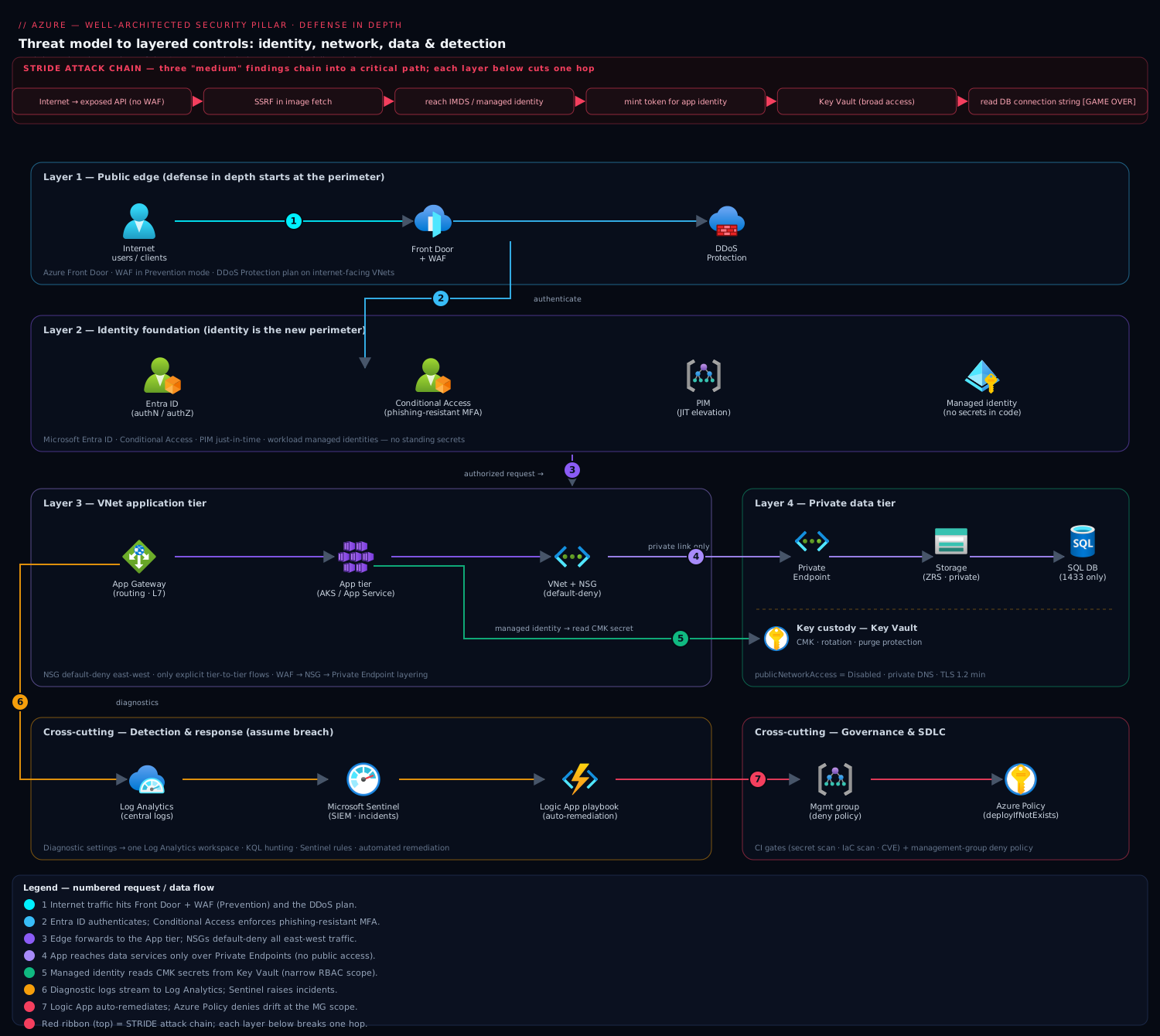
Architecture at a glance
Read the reference architecture as concentric defense-in-depth: an attacker at the internet must defeat every layer, and every layer emits telemetry to a central detection plane while a governance plane enforces the whole thing as code.
Start at the public edge: internet traffic hits Front Door + WAF in Prevention mode with a DDoS plan on the internet-facing VNet — this handles the availability/DoS and L7-attack design goals before anything reaches your network. Behind it sits the identity foundation — Entra ID with Conditional Access, PIM for just-in-time admin, and managed identity for workloads — because every request is authorized on identity, not network position. Inside the network, the application tier lives in a VNet subnet governed by an NSG default-deny posture, permitted to reach only the next tier on the exact port. The data tier is fully private: Private Endpoints with public access disabled, data encrypted with Key Vault CMK, TLS 1.2 enforced, and data-plane RBAC still required even after the network is defeated. Cutting across all of it, a detection plane — Log Analytics, Sentinel analytics rules, and automated remediation — ingests control-plane, identity, network, and data telemetry and turns high-signal patterns into incidents and sub-minute containment. Governing everything, a policy plane (Azure Policy / SCP at the org scope) enforces the rules at the control plane so nothing drifts back. The AWS lens maps one-for-one: CloudFront+WAF+Shield at the edge, IAM/Identity Center as the foundation, Security Groups+Network Firewall for segmentation, PrivateLink+KMS for the private data tier, GuardDuty+Security Hub+CloudTrail for detection, and SCPs+Config for governance.
Real-world scenario
A platform team I worked with — call them Meridian Health — ran a regulated multi-tenant SaaS on AKS with a parallel analytics footprint on AWS. Their constraint was hard and auditor-driven: a compliance mandate required that no human could read tenant data at rest, they had to prove it to an assessor, and yet engineers still needed break-glass access to the cluster during incidents. The naive read — lock everyone out — was incompatible with operating the system at 2 a.m. during an outage. Their initial WAF/WA review scored badly on exactly the “keep people away from data” and “least privilege” principles, and the finding was flagged as a high-risk issue (HRI).
The resolution separated cluster access from data access using two different key custodies. Tenant data used CMK in a Managed HSM to which no human principal held unwrapKey rights — only the application’s managed identity held that permission. Engineers kept break-glass to the AKS control plane through PIM (eligible, MFA, approver-gated, 4-hour max), but that path could reach pods, not plaintext: the data stayed encrypted under a key humans literally could not use. Break-glass activation also fired a Sentinel analytics rule, so every human elevation generated an audited incident with a justification attached.
# Only the workload identity can unwrap; the break-glass admin group gets NO crypto role.
az keyvault role assignment create --hsm-name mhsm-prod \
  --role "Managed HSM Crypto User" \
  --assignee-object-id "$APP_IDENTITY_OID" \
  --scope "/keys/cmk-tenant-data"
# The engineer break-glass group is intentionally granted no crypto role on this key.
On the AWS analytics side they mirrored the pattern with a customer-managed KMS key whose key policy granted kms:Decrypt only to the analytics job’s IAM role, denied it to every human principal via an explicit Deny on the human SSO role ARNs, and logged every Decrypt to CloudTrail. The data lake buckets denied any access not arriving through the VPC endpoint, and GuardDuty watched for anomalous S3 access patterns.
The outcome the auditor accepted: the question “show me a human who can decrypt tenant data” returned nobody on both clouds, while on-call retained the access to run the platform. Cost impact was modest and defensible — Managed HSM plus a handful of KMS keys, a few private endpoints, and Sentinel/GuardDuty ingestion — roughly ₹85,000–1,10,000/month across both footprints, dominated by the HSM and log ingestion, which the mandate fully justified. The HRI closed, both posture scores trended up, and the review became a quarterly ritual rather than a go-live gate. That is the security pillar working as designed: least privilege and assume breach turned into a key-custody boundary and an audited break-glass path, not a slide.
Advantages and disadvantages
The security pillar is not free, and pretending otherwise is how you lose the room. The honest ledger:
| Advantages | Disadvantages |
|---|---|
| Breaks attack chains at the cheapest layer (identity) before they reach data | Friction: MFA, JIT, and approvals slow down access |
| Bounds blast radius so one compromise is not total | Layered controls add latency and hourly/ingestion cost |
| Controls are code — uniform, reviewed, auditable, and self-documenting | Upfront engineering investment before any feature ships |
| Assume-breach posture means incidents are seen fast and contained | CMK/HSM makes key availability a reliability dependency of data |
| A defensible answer for auditors and regulators, trended over time | Deny-by-default on brownfield can break existing workloads |
| Same method spans Azure and AWS, so multi-cloud stays coherent | Alert fatigue and log-ingestion bills if detection is untuned |
When each side matters: the advantages dominate for anything holding regulated, personal, or financial data, or any internet-facing multi-tenant system — there the cost of a breach dwarfs the friction and spend. The disadvantages bite hardest on early-stage internal tools where the data is low-sensitivity and velocity is everything; there you still do the cheap, high-leverage controls (identity, no public data, centralized logs) and defer the expensive ones (HSM, deep packet inspection, full-fidelity SIEM) until the data classification justifies them. The pillar’s discipline is matching control cost to data sensitivity — which is why classification comes first.
Hands-on lab
Run a mini security design review against a two-tier workload and prove three controls on Azure, all free-tier-friendly. You will confirm no standing privilege, prove a data service is private, and prove a CMK vault cannot be silently destroyed. Run in Cloud Shell (Bash). (The AWS analog commands are noted for reference; do the Azure path to keep it free-tier.)
Step 1 — Variables and resource group.
RG=rg-secpillar-lab
LOC=centralindia
SUB_ID=$(az account show --query id -o tsv)
az group create -n $RG -l $LOC -o table
Step 2 — Prove there are no standing privileged assignments at subscription scope. This is the first review question in code:
az role assignment list --all --scope "/subscriptions/$SUB_ID" \
  --query "[?roleDefinitionName=='Owner' || roleDefinitionName=='Contributor'].{principal:principalName, role:roleDefinitionName, scope:scope}" \
  -o table
# Review finding: any human Owner/Contributor here should be PIM-eligible, not permanent.
Step 3 — Create a storage account with public access disabled and TLS 1.2 (private-by-default).
ST=stseclab$RANDOM
az storage account create -n $ST -g $RG -l $LOC \
  --sku Standard_LRS --min-tls-version TLS1_2 --public-network-access Disabled -o table
Step 4 — Prove the public endpoint is actually closed. Do not trust the intent; verify:
az storage account show -n $ST -g $RG \
  --query "{public:publicNetworkAccess, tls:minimumTlsVersion}" -o table
# Expect: public=Disabled, tls=TLS1_2
Step 5 — Create a Key Vault with soft-delete and purge protection (no silent kill switch).
KV=kvseclab$RANDOM
az keyvault create -n $KV -g $RG -l $LOC \
  --enable-purge-protection true --retention-days 7 -o table
Step 6 — Prove purge protection is on. This is the control that stops a CMK kill switch from becoming your own outage:
az keyvault show -n $KV \
  --query "{purge:properties.enablePurgeProtection, softDelete:properties.enableSoftDelete}" -o table
# Expect: purge=true, softDelete=true
Step 7 — Turn on a detective governance guardrail (Audit mode). Assign the “storage restricts network access” policy in Audit so drift is flagged without breaking anything:
az policy assignment create \
  --name seclab-restrict-storage \
  --policy "4fa4b6c0-31ca-4c0d-b10d-24b96f62a751" \
  --scope "/subscriptions/$SUB_ID/resourceGroups/$RG" \
  --params '{"effect":{"value":"Audit"}}' -o table
Validation checklist. You ran three review questions as code and got defensible answers: no un-governed standing admin at the scope, a data service with its public endpoint provably closed and TLS floored at 1.2, and a key store that cannot be silently purged — plus a detective guardrail watching for drift. What each step proved:
| Step | Control proven | Principle it maps to | Real-world analogue |
|---|---|---|---|
| 2 | No standing privilege | Least privilege | The first thing an assessor asks |
| 3–4 | Data service private + TLS 1.2 | Protect confidentiality / defense in depth | Closing the public-storage attack path |
| 5–6 | Key store cannot be purged | Prepare for events / reliability | Preventing self-inflicted crypto-shred |
| 7 | Detective guardrail active | Automate / sustain posture | Catching drift created outside the pipeline |
AWS analog (reference). The mirror is: aws iam list-policies + Access Analyzer for standing privilege; aws s3api put-public-access-block + a deny-non-VPCE bucket policy for private data; a customer-managed KMS key with a 30-day deletion window for the kill-switch grace period; and an AWS Config rule (s3-bucket-public-read-prohibited) as the detective guardrail.
Cleanup.
az group delete -n $RG --yes --no-wait
# Purge-protected vaults are recoverable but not permanently deletable until retention lapses — expected.
Cost note. LRS storage and a standard Key Vault are a few rupees; an hour of this lab is well under ₹20. The purge-protected vault lingers in soft-deleted state until the 7-day retention lapses — that is the control working, not a leak.
Common mistakes & troubleshooting
The failure modes I see most in real security reviews — symptom, root cause, how to confirm, and the fix. Bookmark the table; read the prose once.
| # | Symptom | Root cause | Confirm (exact cmd / portal path) | Fix |
|---|---|---|---|---|
| 1 | “We’re zero trust” but a phished admin owns the tenant | Standing Owner/Global Admin, no JIT | az role assignment list --all --query "[?roleDefinitionName=='Owner']"; Entra → PIM |
Make roles PIM-eligible; MFA + approval on activation |
| 2 | MFA “enforced” yet attackers still get in | Legacy auth not blocked (bypasses MFA) | Entra sign-in logs filtered to legacy clients | Conditional Access policy to block legacy auth |
| 3 | Storage/DB breach from the internet | Public endpoint left enabled | az storage account show --query publicNetworkAccess = Enabled |
Set --public-network-access Disabled + Private Endpoint |
| 4 | Attacker moved laterally across the whole VNet/VPC | East-west allowed by default | Review NSG/SG rules for VirtualNetwork/0.0.0.0/0 allow |
Default-deny E-W; allow only tier-to-tier flows |
| 5 | Secret found in a Git history / logs | Secret in code/config, not a vault | gitleaks detect; grep app settings for keys |
Managed identity / Key Vault reference; rotate the leaked secret |
| 6 | CI role can do anything in the account | Wildcard IAM/RBAC on the pipeline identity | aws iam get-role-policy; az role assignment list --assignee |
Scope to least action + resource; OIDC federation |
| 7 | CMK deleted → data permanently unreadable | No purge protection / short deletion window | az keyvault show --query properties.enablePurgeProtection = null/false |
Enable purge protection + soft-delete; KMS deletion window |
| 8 | Incident, but no logs to investigate with | Diagnostic settings / CloudTrail never enabled | az monitor diagnostic-settings list --resource $ID; check CloudTrail trails |
Enable org-wide logging to central workspace before you need it |
| 9 | Alerts fire but nobody acts / drowning in noise | No triage, no automated containment, low signal-to-noise | Sentinel incident queue depth; GuardDuty finding volume | Tune rules to high-signal; auto-remediate unambiguous cases |
| 10 | Runbook exists but response was chaotic | Never rehearsed; roles undefined | Ask “when did you last run a game day?” | Quarterly tabletop/game day; define declare/comms/rollback owners |
| 11 | Portal-created resource violates the standard | Guardrail only in pipeline, not at control plane | Resource exists non-compliant despite CI checks | Azure Policy Deny at MG / SCP at OU |
| 12 | Deny policy took down production on a Friday | Shipped Deny on brownfield without auditing first |
Policy compliance shows mass non-compliance post-enforce | Audit first, remediate, then flip to Deny; use exemptions |
| 13 | Score stuck / posture not improving | Nobody owns Secure Score / Security Hub backlog | Defender Secure Score trend flat; Security Hub findings growing | Assign an owner; treat top findings as a sprint backlog |
| 14 | Health/monitoring endpoint leaks internals | Detection endpoint exposes topology/versions | Hit the endpoint; inspect the response body | Return status only; no hostnames, versions, or dependency maps |
The three that cause the most damage, expanded:
3. Public data-plane exposure. The most common serious finding, and the one an attacker’s scanner finds in minutes. It is not just storage — managed SQL, Cosmos/DynamoDB, Redis, and search all default to public endpoints. Confirm with publicNetworkAccess/public-access-block per service; fix by disabling public access and reaching the service via Private Endpoint / PrivateLink with private DNS. This is the single control that closes the classic “public bucket → dump everything” incident.
7. CMK availability as a reliability landmine. Customer-managed keys give you crypto-shred as a kill switch — and a way to lose your own data forever. On Azure, a production CMK vault without enablePurgeProtection can be soft-deleted and then purged, and the data it protected becomes unrecoverable. On AWS, scheduling a KMS key deletion with a short window (or an accidental disable) breaks every dataset using it. Confirm purge protection / deletion window; treat key availability as a hard reliability dependency, replicate keys for multi-region data, and never let a human hold the only path to unwrapKey/Decrypt for restricted data without a tested recovery.
11–12. Governance that only lives in the pipeline. A pipeline gate is necessary but not sufficient: it catches nothing created outside the pipeline. The portal, a rogue script, or a new account will happily create a public bucket the pipeline never saw. Preventive guardrails at the org boundary (Azure Policy Deny at management group, SCP Deny at OU) enforce at the control plane so it cannot happen regardless of origin — but ship them via Audit first on a brownfield estate, remediate the surfaced violations, and only then flip to Deny, or you convert a governance win into a Friday-night outage.
Best practices
- Classify data first, then match control cost to sensitivity. Every downstream decision — encryption, key custody, network isolation, logging fidelity — flows from the classification. Do the cheap high-leverage controls everywhere; reserve HSM, deep inspection, and full-fidelity SIEM for restricted data.
- Make identity the perimeter. No standing privileged access (PIM-eligible / short-lived roles), phishing-resistant MFA on context via Conditional Access / IAM conditions, legacy auth blocked, and workloads on managed identities / IAM roles — never secrets.
- Narrowest role, narrowest scope, zero wildcards.
Secrets Useron one vault,GetSecretValueon one ARN. Wildcard actions or subscription/account-wide data roles are findings, not shortcuts. - Take data planes off the internet. Private Endpoint / PrivateLink with public access disabled and TLS 1.2 minimum on every sensitive data service, with private DNS to match.
- Default-deny east-west. Segment by role; allow only explicit tier-to-tier flows. WAF in Prevention and a DDoS plan on internet-facing entry points; egress inspection for exfiltration.
- Own your keys deliberately. CMK/HSM for restricted data with enforced rotation, soft-delete/purge protection (Azure) or a sane deletion window (AWS), and key HA treated as a reliability dependency.
- Centralize telemetry before you need it. Control-plane, identity, network, and data logs into one workspace/lake; high-signal patterns promoted to analytics rules that create incidents.
- Automate remediation for the unambiguous, runbook the judgment calls. Auto-fix public buckets and disabled encryption; write and rehearse the runbook for containment, forensics, comms, and rollback.
- Gate the pipeline and secure the supply chain. Secret scanning, IaC static analysis, and CVE gates that fail the build; sign artifacts and admit only signed, scanned images.
- Enforce guardrails at the control plane. Azure Policy
Denyat management group / SCPDenyat OU so the portal and rogue scripts cannot violate the standard — audit first on brownfield. - Trend your posture and own the backlog. Secure Score / Security Hub score with a named owner; top findings become a sprint, not a slide.
- Run the pillar as a recurring review, not a go-live gate. Re-run the questions when the threat model shifts, record decisions and their tradeoffs, and game-day the response quarterly.
Security notes
The pillar is the security notes, but a few controls guard the security machinery itself:
- Protect the audit trail. Central logs are an attacker’s first target — an intruder who can delete CloudTrail or the Log Analytics workspace erases their tracks. Make the trail immutable and cross-account/subscription: an AWS Organization trail with S3 Object Lock and a separate log-archive account; a Log Analytics workspace in a locked-down subscription with delete-protection and RBAC that no workload identity holds.
- Break-glass accounts, excluded and monitored. Keep two emergency accounts excluded from Conditional Access / SSO dependencies so a misconfigured policy or IdP outage cannot lock you out — but alert on every use, store the credentials offline, and review them after any incident.
- Least privilege on the security tooling itself. The identity that runs auto-remediation, the SIEM’s data connectors, and the posture scanner all need scoped, audited access — not Owner. A compromised remediation identity is a control that now works for the attacker.
- Don’t leak internals through detection endpoints. Health, metrics, and status endpoints return status, never topology, versions, or dependency hostnames — those are reconnaissance gifts.
- Guard the key vault as the crown jewel. Vault/KMS access is the master control over all encrypted data; put it behind RBAC (not sprawling access policies), enable firewall + trusted-services, log every key operation, and separate use (
unwrapKey/Decrypt) from administer so no single role does both. - TLS everywhere, always. Enforce HTTPS-only and a minimum TLS version; a security review is no excuse to disable TLS “temporarily.” Prefer mTLS for service-to-service on integrity-critical paths.
Cost & sizing
The security bill has a few big drivers, and the pillar’s discipline is spending on them in proportion to data sensitivity — not uniformly.
- Log ingestion dominates variable cost. Sentinel / Log Analytics and AWS SIEM/Security Lake bill per GB ingested and retained. Full-fidelity logging of a high-traffic estate can run tens of thousands of rupees a month. Tier it: hot retention for active detection, cheap archive for compliance; sample verbose sources; and never log secrets. Budget roughly ₹8,000–40,000/month for a mid-size estate depending on traffic and retention.
- Key custody is a step function. Platform-managed keys are free. Customer-managed keys in Key Vault / KMS are a few rupees per key per month plus per-operation charges — negligible. Managed HSM / CloudHSM is the jump: a dedicated HSM runs on the order of ₹1,00,000+/month, so reserve it for data with an explicit FIPS 140-2 L3 or crypto-erase mandate.
- Private connectivity has a per-endpoint cost. Private Endpoints / interface VPC endpoints bill hourly plus per-GB — small individually, but they add up across dozens of services. Reserve private endpoints for sensitive data planes; a shared/hub pattern amortizes them.
- Defender / GuardDuty / Security Hub plans are per-resource or per-event and cheap relative to a breach — enable them on production; they are the detection you cannot retrofit mid-incident.
- Deep packet inspection (Azure Firewall / Network Firewall) carries an hourly + per-GB-processed charge and adds latency; scope it to egress and north-south, skip low-risk east-west.
A rough monthly picture for a mid-size regulated workload on one cloud: Defender/GuardDuty + Security Hub (~₹5,000–15,000), Sentinel/SIEM ingestion (~₹8,000–30,000), a handful of CMK keys (~₹500), 10–20 private endpoints (~₹5,000–10,000), and a firewall for egress (~₹15,000–30,000) — call it ₹35,000–90,000/month, with Managed HSM adding ₹1,00,000+ only if the mandate requires it. The cost drivers and what each buys:
| Cost driver | What you pay for | Rough INR / month | What it fixes | Watch-out |
|---|---|---|---|---|
| SIEM ingestion | Per-GB logs + retention | ₹8,000–40,000 | Detection + investigation + audit | Scales with traffic; tier + sample |
| Threat detection plans | Defender / GuardDuty | ₹5,000–15,000 | Behavioral alerts you can’t retrofit | Per-resource; enable on prod |
| Posture standards | Security Hub / Defender CSPM | included / per-resource | Continuous misconfig scoring | Needs an owner to action |
| Customer-managed keys | KMS / Key Vault keys + ops | ~₹500–2,000 | Crypto-shred + key control | Key availability = data availability |
| Managed HSM | Dedicated FIPS L3 HSM | ₹1,00,000+ | Highest-assurance custody | Only if mandate requires it |
| Private endpoints | Per-endpoint hourly + GB | ₹5,000–10,000 | Data off the public internet | Amortize via hub pattern |
| Egress firewall | Hourly + per-GB processed | ₹15,000–30,000 | Exfiltration / C2 blocking | Adds latency; scope to N-S/egress |
Interview & exam questions
1. What are the design principles of the Well-Architected security pillar, and do Azure and AWS agree? Both frameworks converge on: a strong identity foundation, least privilege, defense in depth (security at all layers), protecting data in transit and at rest, keeping people away from data, detecting and responding (assume breach), automating security, and preparing for events. Azure frames some as protecting the CIA triad (confidentiality/integrity/availability) as explicit design goals; the intent is identical.
2. Why is “identity is the perimeter” the starting point, and what three moves implement it? Because the cheapest, highest-leverage place to break an attack chain is before it reaches the network or data. The three moves: kill standing privilege (PIM-eligible / short-lived roles), enforce phishing-resistant MFA on context (Conditional Access / IAM conditions, block legacy auth), and give workloads managed identities / IAM roles instead of secrets — narrowest role, narrowest scope.
3. Explain the key-custody decision and its tradeoff. Platform-managed keys mean the provider holds them (fine for internal data); customer-managed keys (CMK) mean you hold them in Key Vault / KMS (needed for restricted data or a key-control mandate); HSM-backed keys give FIPS 140-2 L3 assurance and crypto-erase. The tradeoff is against reliability and cost: CMK/HSM makes key availability a hard dependency of the data, so purge protection / deletion windows and key HA are mandatory, and HSM is expensive.
4. What does “defense in depth” mean if identity is already the perimeter — isn’t the network obsolete? No — the network is a layer, not the perimeter. Defense in depth means no single failure is fatal: edge WAF/DDoS, then network segmentation (default-deny), then private data endpoints, then data-plane RBAC, then encryption. Breaking one layer gets an attacker to the next, and each layer shrinks blast radius and generates detection telemetry.
5. How do you keep governance from being bypassed by someone clicking in the portal? Enforce guardrails at the control plane, not just the pipeline: Azure Policy Deny at the management-group scope, or an SCP Deny at the AWS Organization/OU level. These apply to every resource regardless of how it was created. Ship them via Audit first on brownfield estates, remediate, then flip to Deny to avoid breaking existing workloads.
6. What is the “assume breach” posture and how does it change your design? You design as if an attacker is already inside, which reorders investment toward detection, least privilege, blast-radius containment, and rehearsed response — and away from a perfect perimeter. Concretely: centralize logs before you need them, wire automated containment for unambiguous signals, bound what any one identity can reach, and game-day the runbook.
7. Map the pillar’s tradeoffs against the other four Well-Architected pillars. Phishing-resistant MFA + JIT trades against operational excellence (friction); private endpoints and full-fidelity logging trade against cost; CMK/HSM trades against reliability (key availability) and cost; deep packet inspection trades against performance efficiency (latency) and cost; deny-by-default on brownfield trades against operational excellence (can break things). The pillar’s honesty is naming these and resolving them (break-glass, tiered logs, key HA, audit-first).
8. How do you protect a data service so an internet scanner can’t reach it, on Azure and AWS? Disable public network access and reach the service privately: Azure Private Endpoint with public_network_access_enabled=false and private DNS; AWS interface/gateway VPC endpoint plus a resource policy that denies any access not arriving through the endpoint (aws:sourceVpce), with S3 public-access-block on. Enforce TLS 1.2 minimum and keep data-plane RBAC in place regardless.
9. What belongs in a CI security gate versus an org-level guardrail, and why both? The CI gate (secret scanning, IaC static analysis, CVE checks) fails the build pre-merge — but only catches what flows through the pipeline. The org guardrail (Policy/SCP at the boundary) enforces at the control plane and catches everything, including portal-created and out-of-band resources. You need both: defense in depth applied to governance itself.
10. Your review finds a workload where a human can decrypt restricted data. How do you close it while keeping break-glass for operations? Separate cluster/control-plane access from data access using key custody: grant unwrapKey/Decrypt only to the workload’s managed identity / IAM role, explicitly deny it to human principal ARNs, and keep human break-glass to the control plane (PIM / Identity Center) — which can reach compute but not plaintext. Fire an alert on every break-glass elevation for an audited trail.
11. How do you keep the audit trail trustworthy during an incident? Make central logging immutable and out of the workload’s blast radius: an AWS Organization CloudTrail to an S3 bucket with Object Lock in a separate log-archive account; a Log Analytics workspace in a locked subscription with delete-protection and RBAC no workload identity holds. An attacker who can delete your logs has erased the investigation.
12. Which certs and frameworks does this map to? The pillar underpins AZ-500 (Azure Security Engineer) and SC-100 (Cybersecurity Architect) on the Azure side, and AWS Certified Security – Specialty and the Solutions Architect Professional on the AWS side. The design-principles-and-review framing maps directly to the Azure Well-Architected and AWS Well-Architected assessments, and the controls align to CIS Benchmarks, NIST, and the cloud CIS Foundations standards.
A compact cert mapping for revision:
| Question theme | Azure cert | AWS cert |
|---|---|---|
| Design principles + review method | SC-100 | SA Professional / Security Specialty |
| Identity, PIM, Conditional Access | SC-300 / AZ-500 | Security Specialty (IAM) |
| Network segmentation + private access | AZ-500 / AZ-700 | Security / Advanced Networking |
| Data protection + key custody | AZ-500 | Security Specialty (KMS) |
| Detection + incident response | SC-200 / AZ-500 | Security Specialty (GuardDuty) |
| Governance + policy as code | AZ-500 / SC-100 | Security / SA Professional |
Quick check
- Name any four design principles of the Well-Architected security pillar, and give one concrete control for each.
- “Identity is the perimeter” — what three moves implement it, and what does each stop?
- You must protect restricted data with customer-managed keys. What is the one reliability control you must enable, and why?
- A resource created in the portal violates your encryption standard even though CI passed. Why did CI miss it, and what enforces the rule regardless of origin?
- Your security review must prove no human can read tenant data at rest, but engineers need break-glass to the cluster. How do you satisfy both?
Answers
- Any four of: strong identity foundation (Entra/IAM SSO + MFA + PIM/roles), least privilege (scoped RBAC/IAM, no wildcards), defense in depth (NSG/SG default-deny + WAF + private endpoints + encryption), protect data (classification + CMK/HSM + TLS 1.2), assume breach / detect + respond (centralized logs + Sentinel/GuardDuty + rehearsed runbook), automate (Azure Policy / SCP + IaC), prepare for events (break-glass + game days).
- Kill standing privilege (PIM-eligible / short-lived roles — stops a phished credential from being instant admin), phishing-resistant MFA on context + block legacy auth (Conditional Access / IAM conditions — stops credential replay and MFA bypass), and managed identities / IAM roles for workloads (stops secrets in code/config from leaking). Narrowest role, narrowest scope throughout.
- Purge protection / a sane key-deletion window (soft-delete + purge protection on Azure Key Vault; a 7–30 day deletion window on KMS). Because CMK gives you crypto-shred — destroy the key and the data is unrecoverable — an accidental key delete becomes a permanent data-loss incident, so key availability is a hard reliability dependency of the data.
- CI only inspects what flows through the pipeline; a portal-created (or out-of-band) resource never hit the gate. Enforce the rule at the control plane with an Azure Policy
Denyat management-group scope (or an SCPDenyat the AWS OU), which applies to every resource regardless of how it was created. Audit-first on brownfield, then flip to Deny. - Separate data access from control-plane access via key custody: grant
unwrapKey/Decryptonly to the workload’s managed identity / IAM role, explicitly deny it to every human principal, and keep human break-glass to the cluster control plane through PIM / Identity Center — that path reaches compute but not plaintext. Alert on every break-glass elevation for an audited trail.
Glossary
- Well-Architected Framework (WAF / WA) — Microsoft’s and Amazon’s structured guidance across five pillars (security, reliability, cost, performance, operational excellence); the security pillar is a design lens plus a review method.
- Design principle — a foundational rule of the pillar (e.g. least privilege, assume breach) that each concrete control traces back to.
- Shared responsibility model — the division of security duties between provider (substrate) and customer (identity, data, config, code); the line moves with IaaS/PaaS/SaaS.
- Identity as the perimeter — authorizing every request on identity + context rather than network location; the zero-trust core.
- PIM (Privileged Identity Management) — Azure feature that makes admin roles eligible (dormant) until activated with MFA/approval; the JIT-admin control.
- Conditional Access — Azure policy engine that grants/blocks access based on user, app, device, location, and risk; where phishing-resistant MFA and legacy-auth blocking are enforced.
- Managed identity / IAM role — a workload’s own cloud identity, used instead of a stored secret; scoped to least privilege.
- Least privilege — granting the minimum permission, at the narrowest scope, for the shortest time; no wildcard actions or scopes.
- Defense in depth — layered controls (edge, network, host, app, identity, data) so no single failure is fatal.
- Private Endpoint / PrivateLink — a private IP for a PaaS service so it is reachable on the VNet/VPC and not the public internet.
- Default-deny — a network posture that blocks all traffic unless explicitly allowed; applied east-west to stop lateral movement.
- Key custody — who holds the encryption key: platform-managed, customer-managed (CMK), or HSM-backed; determines who can crypto-shred the data.
- CMK (customer-managed key) — an encryption key you control in Key Vault / KMS; enables crypto-erase and key-control mandates, at the cost of making key availability a reliability dependency.
- Managed HSM / CloudHSM — a dedicated FIPS 140-2 Level 3 hardware key store for highest-assurance custody.
- Crypto-shred — rendering data unrecoverable by destroying its encryption key rather than the ciphertext.
- Assume breach — designing as if an attacker is already inside, prioritizing detection, containment, and rehearsed response.
- SIEM (Security Information and Event Management) — the central correlation/detection/response system (Microsoft Sentinel; Security Lake + tooling on AWS).
- Auto-remediation — code that fixes an unambiguous finding automatically (Azure Policy
deployIfNotExists; AWS Config + SSM). - Guardrail — a preventive (Deny) or detective (Audit) control at the org boundary (Azure Policy at management group; SCP at OU) that enforces at the control plane.
- Secure Score / Security Hub score — a trended posture metric summarizing config compliance; a backlog generator, not a vanity number.
- HRI (high-risk issue) — a Well-Architected Review finding flagged as high risk that should be prioritized for remediation.
Next steps
You can now run a security design review across Azure and AWS and turn every principle into code. Build outward:
- Next: Azure Well-Architected Framework: Security Pillar and AWS Well-Architected: Security Pillar — the cloud-native expressions of everything above, with each vendor’s exact question set.
- Related: Threat Modeling with STRIDE, Data-Flow Diagrams & Attack Trees — the method that feeds the review by enumerating the attack paths the controls must break.
- Related: Zero Trust Architecture Blueprint: Identity, Network & Data — the identity-as-perimeter model in full, and Zero Trust with Conditional Access & PIM for the Azure enforcement.
- Related: AWS KMS Encryption Deep Dive and Azure Encryption at Rest with CMK & Double Encryption — the key-custody mechanics behind the data-protection decisions.
- Related: Security Incident Response: Runbooks, Tabletops & Cloud Forensics — turn the assume-breach posture into a rehearsed response.
- Related: Software Supply Chain: SBOM, VEX & Admission Verification and Workload Identity Federation for Secretless CI/CD — secure what you ship and how you ship it.
- Related: the other pillars — Reliability, Operational Excellence, and Performance Efficiency — because security is a tradeoff against each and the review weighs all five together.