In a nutshell
Cloud migration is the work of moving an organization’s existing servers and applications out of its own data center and onto a cloud provider — here, Google Cloud. This lesson is the enterprise version of that job: not moving one server, but moving a portfolio of tens, hundreds, or thousands of them, on a deadline, without breaking the business or weakening the security posture.
Think of it like relocating a working factory to a new building while it keeps shipping orders every single day. You do not just hire trucks and start carrying machines. First you survey what is actually on the floor — which machines, how much power each really draws, which ones feed which production line. Then you decide, per machine, what to do: some move as-is, some get upgraded in transit, some are so old you replace them with a rented service, and a few you simply scrap. You move in waves — one production line at a time — you test each line in the new building before you switch it on for real, and you keep the old line powered and ready until the new one is proven, so you can fall back if a wave goes wrong. That is exactly this architecture: assess → plan → migrate → optimize, one wave at a time.
The two workhorses you will meet are Migrate to Virtual Machines (moves a server as-is — “lift and shift”) and Migrate to Containers (repackages the application off its old server so it can run modern on GKE). Behind them sits Migration Center, the tool that surveys the estate and tells you, with real data, what each server should become and what it will cost. The whole thing lands inside a landing zone — a pre-built, governed Google Cloud foundation — so nothing arrives with a public IP, weak identity, or ungoverned networking.
If you take one idea away: measure first, land governed, and choose a path per application — not one path for the whole estate.
Level: Advanced · Time: ~45 min
Before this lesson, be comfortable with: the Google Cloud resource hierarchy (organization → folders → projects), Shared VPC and basic VPC networking, IAM roles and service accounts, and what a landing zone is (this architecture lands into one). A grasp of VPC Service Controls helps for the regulated-data parts.
After this lesson you will be able to:
- Explain the assess → plan → migrate → optimize journey and where each Google Cloud tool plugs in.
- Map any workload to one of the 6 R’s (rehost, replatform, refactor, repurchase, retire, retain) and pick the right GCP service for it.
- Describe how Migration Center, Migrate to Virtual Machines, Migrate to Containers, and Database Migration Service fit into one wave engine.
- Plan a wave from a dependency graph, run a test-clone → cutover → rollback sequence, and know the rollback trigger.
- Right-size targets from real utilization and defend the TCO / FinOps case.
- Choose the right data-plane tool — Storage Transfer Service, Transfer Appliance, DMS, or BigQuery Migration Service — for moving bytes, not just VMs.
Every data-center exit dies the same two deaths. The first is starting to move before anyone has measured what is actually there — so the team discovers, in production cutover week, that the “stateless web tier” shares an NFS mount with three other apps and a forgotten Oracle box nobody has the password for. The second is treating the cloud as a colo with someone else’s hypervisor — lifting 400 VMs unchanged into a single flat VPC with public IPs and Owner everywhere, then spending the next two years and the entire savings case un-doing it. A real migration architecture refuses both. It begins with machine-level evidence of the estate, lands every workload inside a governed foundation that already exists, and then routes each application down one of two engineered paths — rehost for the ones that should move as-is, replatform to containers for the ones worth modernizing in flight — with a repeatable wave engine, a tested cutover, and a rollback that actually works. This article builds that end to end with Migration Center, Migrate to Virtual Machines (M4VM), and Migrate to Containers (M2C), sitting on top of a Google Cloud landing zone.
This is the deployable reference, not a slide about the “6 Rs.” It follows the shape of the major architecture centers — the scenario, the end-to-end data and control path, a component-by-component breakdown, the concrete services and IaC wiring, the enterprise concerns, a named worked example with real numbers, and an honest section on when not to do it this way. The landing zone itself (organization hierarchy, Shared VPC, VPC Service Controls, Security Command Center) is a prerequisite here, not the subject; I reference it where the migration plugs in and spend the depth on the migration machine.
The business scenario
The trigger is almost never “we want to be cloud-native.” It is a date and a number. A data-center lease ends in 18 months and renewal is a seven-figure capital commitment. A VMware renewal quote arrived and the licensing math changed overnight. A hardware refresh cycle is due and finance would rather not buy another rack. Whatever the spark, three companies feel the same forces, and the dial settings are all that differ.
- Mid-market manufacturer (≈300 staff, ~120 VMs). One on-prem VMware cluster runs everything: a couple of line-of-business .NET apps on Windows, a Java order system on Linux, a SQL Server, a file server, and a long tail of “do not touch, nobody knows what it does” machines. They have no cloud presence, a lease that ends in a year, and a two-person infra team that cannot also become Kubernetes experts overnight. They need most of this to move as-is, fast and safely, and a handful of apps to get modernized later.
- Mid-market SaaS / fintech (≈900 staff, ~450 VMs). A mix of VMware and bare metal across two sites. Their core product is a Linux/Java estate that is already twelve-factor-ish — stateless app tiers, externalized config, a managed-ready database — but it is running on hand-built VMs with Puppet drift. They want the lift-and-shift VMs gone within a year and the core product containerized onto GKE in the same program, not as a separate two-year project nobody funds.
- Large enterprise (10,000+ staff, 3,000+ VMs across regions). Multiple data centers, multiple hypervisors, AIX and Solaris in the corners, strict data-residency (EU/US/India), federated identity, and a board mandate that the migration must not weaken the security posture — no public IPs, no
Owner, regulated data provably contained. They will run a multi-year, multi-wave program and need the moves to be industrialized: assessed, grouped, scheduled, governed, and reported on, with thousands of machines flowing through the same pipeline.
All three share four root problems. No ground truth — the CMDB is stale, dependencies are tribal knowledge, and right-sizing is a guess, so every estimate is fiction. A binary false choice — the org is told it must pick “lift-and-shift everything” (cheap, fast, but you carry your technical debt forward) or “rewrite cloud-native” (great end state, but slow and expensive and it stalls the data-center exit). An ungoverned destination — if VMs land wherever, with public IPs and flat networking, the migration creates the mess the next project has to clean up. And no repeatable mechanics — moving five VMs by hand is fine; moving five hundred by hand is how you miss a cutover window and a dependency at the same time.
The design goal is precise: measure first, land governed, and offer two engineered paths, not one. Every server is assessed with machine-level data before a decision is made. Every workload lands inside the existing landing zone — the right project, the Shared VPC subnet, no public IP, least-privilege IAM — by construction. Apps that should move as-is take the Migrate to VMs rehost path; apps worth modernizing in flight take the Migrate to Containers replatform path onto GKE. And the whole thing runs as a wave engine: assess → group → plan → replicate → test-clone → cutover → validate → decommission, repeated until the source is empty.
The 6 R’s — the full decision menu
The scenario ends on a promise: offer two engineered paths, not one. Those two paths — rehost and replatform — are two entries on a longer, industry-standard menu called the 6 R’s. Every application in the portfolio gets assigned exactly one of them, and the assignment comes from the assessment data, not from a preference. The reason the architecture builds pipelines for only two of the six is that only two involve moving bytes at scale; the other four are decisions, not machinery.
| The R | What it means | Choose it when… | GCP tooling / target | In the running example |
|---|---|---|---|---|
| Rehost (“lift & shift”) | Move the server as-is, no code change. | The app works, nobody will modernize it soon, it doesn’t need to scale. | Migrate to Virtual Machines → Compute Engine (right-sized). | 60 Windows .NET LOB / back-office VMs. |
| Replatform (“lift & reshape”) | Small, high-leverage change in flight — containerize, or move state to managed. | The app is close to cloud-ready and will benefit (elasticity, patching). | Migrate to Containers → GKE; Database Migration Service → Cloud SQL. | The stateless Java warehouse tier → GKE; the SQL Server / PostgreSQL DBs → Cloud SQL. |
| Refactor / Re-architect | Significant redesign toward cloud-native. | The app is strategic and its current shape blocks the goals — worth the spend. | Rebuild on Cloud Run / GKE / serverless; usually after the exit, not during. | None during the exit (deliberately deferred). |
| Repurchase (“drop & shop”) | Retire the app and adopt a SaaS/product that does the job. | A commercial product covers the need better than maintaining your own. | Google Workspace, Marketplace SaaS, or third-party SaaS. | The commodity apps a SaaS replaces (e.g. self-built email). |
| Retire | Switch it off; it isn’t needed. | Assessment shows it’s idle, duplicated, or superseded. | Nothing — decommission at source. | ~140 idle/duplicate machines; the Solaris EOL app. |
| Retain (“revisit”) | Keep it where it is, for now. | Compliance, latency, licensing, or “not ready” makes moving wrong today. | Stay on-prem; bridge via Interconnect / HA VPN, GDC/Anthos. | Anything that can’t leave yet (none blocking the exit here). |
Two practical notes. First, the split is per application, from data — a single program routinely runs all six at once, which is exactly why the assessment (not a workshop whiteboard) drives it. Second, retire is the highest-ROI R: every machine you switch off is one you never assess, move, test, or pay for. In the example below, deciding to retire ~140 machines removed more work than any pipeline optimization could. The cheapest migration is the one you delete.
Architecture overview
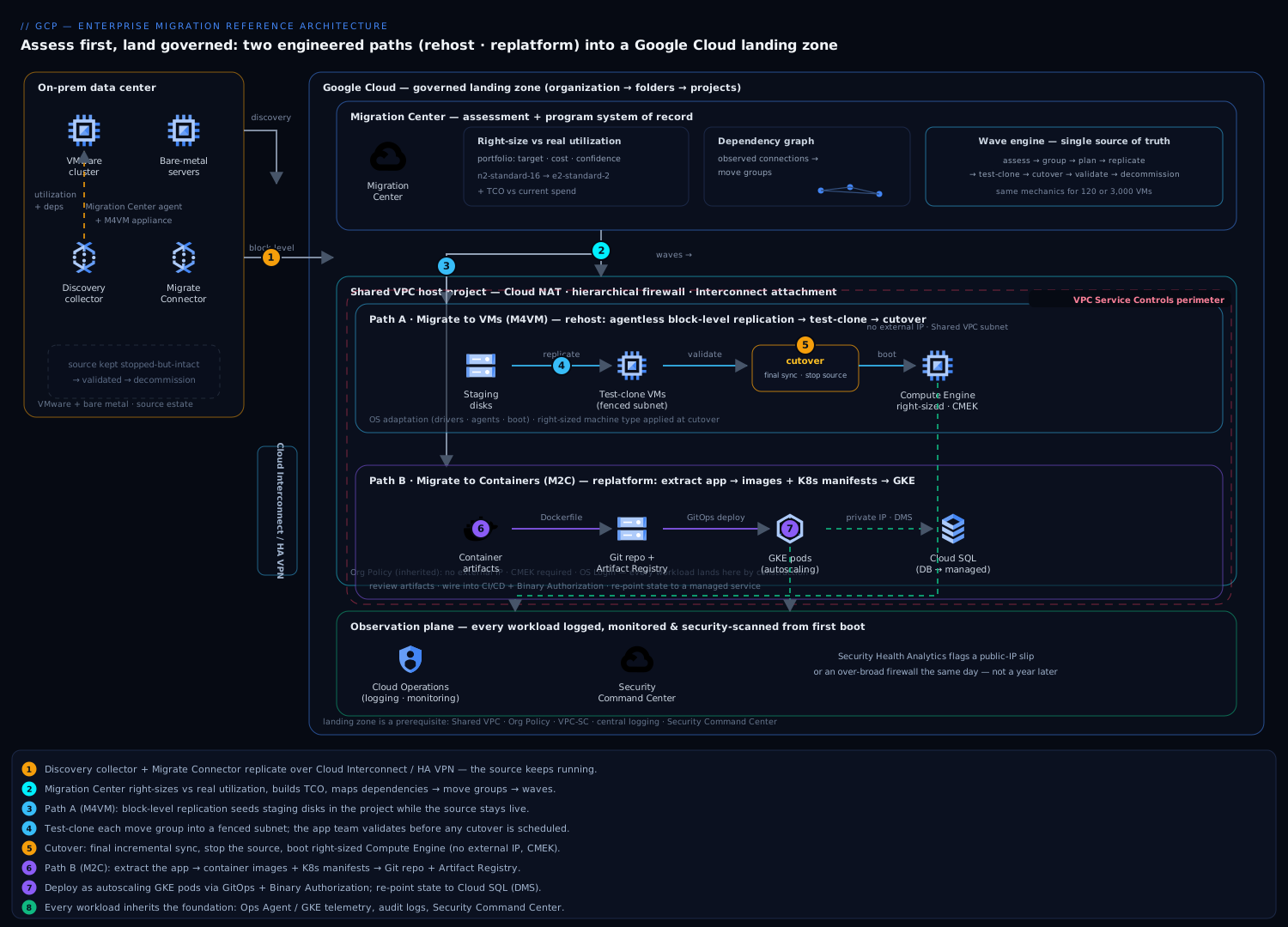
The migration is organized on two axes: a decision axis — assessment data flowing into a portfolio of grouped, wave-sequenced applications — crossed with a movement axis — two parallel migration pipelines (rehost and replatform) that both terminate inside the landing zone. Evidence flows in, decisions flow down into waves, and bytes flow through one of two engineered paths into a destination that is already governed. Get the assessment honest and the landing zone real, and the rest is throughput.
The assessment path — earning the right to move. Before any data moves, Migration Center builds ground truth. You feed it the estate three ways, often all three: a discovery client (a lightweight collector) installed against vCenter or running agentlessly that streams per-VM utilization (CPU, memory, disk IOPS, network) over weeks, not a single-day snapshot; guest-level collection for deeper OS/software inventory; and bulk file/RVTools or CSV import for environments where you cannot install anything. Migration Center then does three things you cannot eyeball: it right-sizes each machine against real utilization (the 32-vCPU box that idles at 3 vCPUs becomes an e2-standard-4, not an n2-standard-32), it builds a total cost of ownership comparison against your current spend, and — critically — it discovers dependencies from observed network connections so the “stateless web tier” reveals the database, the NFS mount, and the license server it actually talks to. The output is not a number; it is a portfolio: every server tagged with a right-sized target, a cost, a confidence, and a dependency graph. That graph is what lets you draw move groups — sets of machines that must move together because they talk to each other — and sequence them into waves.
The destination — a foundation that already exists. Nothing lands in a vacuum. The landing zone is assumed in place: an organization → folders → projects hierarchy, a Shared VPC per environment owned by the network team, VPC Service Controls perimeters around regulated data, Cloud Interconnect or HA VPN back to the data center, and Organization Policy constraints that forbid external IPs and enforce CMEK. Migrated workloads are consumers of this: a rehosted VM draws its IP from a host-project subnet, has no public IP (the policy refuses one), and egresses through Cloud NAT; a containerized workload lands on a GKE cluster in a service project attached to the same Shared VPC. The migration does not get to invent networking or identity — it inherits them. (If the foundation does not exist yet, that is a separate prerequisite project; see the landing-zone reference.)
Path A — rehost with Migrate to Virtual Machines. For workloads moving as-is, M4VM runs an agentless, block-level replication from the source hypervisor into Google Cloud. You deploy a Migrate Connector appliance next to vCenter; it continuously replicates each source VM’s disks into managed staging in your project over the Interconnect/VPN — while the source keeps running. Initial replication seeds the full disk; after that, only changed blocks ship, so the delta to “ready to cut over” stays small. When a wave is ready, you first launch test clones: isolated copies of the target VMs booted in a fenced subnet so the app team can validate the application on Compute Engine before touching production — login works, the database connects, the batch job runs. When validation passes, cutover is a short, scheduled event: a final incremental sync, the source is stopped, and the target Compute Engine instances boot from the replicated disks with the right machine type, the right subnet, no public IP, and disk CMEK. M4VM handles the OS adaptation (drivers, agents, boot config) so the booted VM is a working Google Cloud instance, not a raw disk image.
Path B — replatform with Migrate to Containers. For workloads worth modernizing in flight, M2C does something M4VM does not: it extracts the application from the VM and produces container artifacts — a Dockerfile/image plus Kubernetes manifests (Deployment, Service, ConfigMap, persistent-volume claims, and the discovered runtime config) — that you deploy to GKE. It works best on the right candidates: Linux web/app servers (Tomcat, JBoss, Apache, IIS-on-Windows in some cases) where the app is the unit of value and the VM is just packaging. The generated artifacts are a starting point you own, not a black box: they land in your Git repo, get reviewed, get wired into your existing CI/CD and Artifact Registry, and deploy through the same GitOps pipeline as your cloud-native services. The result is the application running as pods on GKE — stateless, horizontally scalable, patched by replacing images — while the heavy stateful pieces it depended on (a database) are pointed at a managed service (Cloud SQL) rather than carried along.
The control and observation plane, over everything. Migration Center remains the system of record for the whole program: which servers are assessed, grouped, in-flight, cut over, and decommissioned, with the running TCO. Every migrated workload immediately inherits the foundation’s observability — Cloud Logging/Monitoring from the first boot, audit logs to the central sink, findings into Security Command Center — so a freshly cut-over VM is governed and observed on day one, not retrofitted later.
The diagram in words. On the left, an on-prem boundary: a VMware cluster and some bare metal, with two appliances sitting beside it — a Migration Center discovery collector (dotted lines reaching every VM, labeled “utilization + dependencies”) and a Migrate Connector (a thick pipe labeled “block-level replication”). Both pipes cross a single labeled link — Cloud Interconnect / HA VPN — into the Google Cloud boundary. Inside the boundary, top-center, a Migration Center box holding a portfolio table and a dependency graph, with arrows fanning down into waves. From the waves, the flow splits into two lanes. The upper lane (Migrate to VMs) shows staging disks → test-clone VMs in a fenced subnet → a “cutover” gate → Compute Engine instances sitting in a Shared-VPC subnet (each drawn with “no public IP” and a small CMEK lock). The lower lane (Migrate to Containers) shows a VM icon transforming into a container-artifacts bundle → a Git repo → Artifact Registry → pods on a GKE cluster in the same Shared VPC, with a dotted line from the pods to a Cloud SQL instance (“DB → managed”). Wrapping both lanes: the Shared VPC host project (Cloud NAT, firewall, the Interconnect attachment), a VPC Service Controls perimeter dotted around the projects holding regulated data, and a thin telemetry layer feeding Cloud Operations and Security Command Center. A faint “source” box on the left fades out, labeled “decommission,” to close the loop.
Component breakdown
Each component earns its place by removing a specific failure mode rather than adding a feature.
| Component | Role in this architecture | Key configuration choices |
|---|---|---|
| Migration Center | The assessment and program system-of-record: discovers the estate, right-sizes against real utilization, builds TCO, maps dependencies, and tracks every server through its lifecycle. | Run the discovery client / collector against vCenter for weeks (peak + steady-state), not a one-day snapshot. Layer in guest-level collection for software inventory; bulk-import the long tail via CSV/RVTools. Use dependency maps to draw move groups; export the right-sized targets to feed M4VM. Treat its portfolio as the single source of truth for wave status. |
| Migrate to Virtual Machines (M4VM) | The rehost pipeline: agentless block-level replication of source VMs into Compute Engine with OS adaptation, test clones, and a short cutover. | Deploy the Migrate Connector near the source hypervisor; replicate over Interconnect/VPN, not the public internet. Always test-clone into a fenced subnet before cutover. Apply the Migration Center right-sized machine type at cutover (don’t lift the over-provisioned size). Target subnet in the Shared VPC, no external IP, boot disk CMEK. Schedule cutover in a maintenance window; keep the source stopped-but-intact for rollback. |
| Migrate to Containers (M2C) | The replatform pipeline: extracts the application from a VM and emits container images + Kubernetes manifests for GKE, decoupling app from machine. | Use only on good candidates (Linux web/app tiers; stateless or externalizable state). Review the generated Dockerfile/manifests as a starting point — wire them into your repo, CI, and Artifact Registry, don’t deploy blind. Re-point persistent state to a managed service (Cloud SQL/Memorystore) rather than carrying volumes. Deploy via your existing GitOps/Binary Authorization path so migrated workloads obey the same supply-chain rules. |
| Landing zone (prerequisite) | The governed destination: resource hierarchy, Shared VPC, Org Policy guardrails, VPC-SC perimeters, central logging, SCC. Migrations land into it. | Must exist before bulk waves. Workloads are service-project consumers of the Shared VPC (compute.networkUser). Org Policy: no external IP, disable SA key creation, CMEK required, OS Login on. Regulated apps land inside a VPC-SC perimeter. |
| Hybrid connectivity | The replication and steady-state data path between data center and Google Cloud. | Dedicated/Partner Interconnect for large estates (predictable bandwidth for replication seed + steady traffic); HA VPN for smaller ones or as backup. Size for the initial seed (terabytes of disk) and the cutover delta, then steady app traffic. Terminate in the host project. |
| Compute Engine | The destination for rehosted VMs: managed IaaS with right-sized machine families, CMEK disks, and managed-instance-group options post-migration. | Land on E2/N2/N2D/C3 families matched to the assessed profile. Enable OS Login, Shielded VM, Ops Agent. Post-cutover, consider committed-use discounts once the steady size is known, and regional MIGs for the tiers that should become horizontally scalable. |
| GKE | The destination for replatformed (containerized) workloads. | Autopilot (or standard) cluster in a service project on the Shared VPC. Migrated pods deploy through the same Artifact Registry + CI/CD + Binary Authorization path as native services. Right-size pod requests from the assessment data. |
| Cloud SQL / managed data services | The destination for stateful pieces that should not be carried as VM disks. | Migrate databases with Database Migration Service (continuous, minimal-downtime) rather than lifting the DB VM. Private IP only, inside the perimeter. Frees the app tier to be stateless and elastic. |
| Cloud Operations + Security Command Center | The observation plane: every migrated workload is logged, monitored, and security-scanned from first boot. | Ops Agent on Compute Engine; native telemetry on GKE. Audit logs to the central sink. SCC Security Health Analytics catches a misconfigured migrated VM (public IP slip, open firewall) immediately. |
Three of these choices deserve emphasis, because they are where migration programs most often go wrong.
Assess for weeks, decide from data, and right-size down. The single biggest waste in cloud migration is lifting the allocated size instead of the used size. On-prem VMs are over-provisioned by habit — someone asked for 16 vCPU “to be safe” and it idles at two. If you replicate that allocation into Compute Engine, you pay for the habit forever. Migration Center’s multi-week utilization data exists precisely so the target is an e2-standard-2, not an n2-standard-16. Decide machine types from the 95th-percentile utilization, not the spec sheet — and revisit again after a month of real cloud data with committed-use discounts. This is where the savings case is won or lost, and it is won at assessment, before a single byte moves.
Test-clone is not optional; it is the whole safety model. The difference between M4VM and “copy a disk image and pray” is the test clone: a fully booted copy of the target VM, in an isolated network, that the application team validates before the production cutover. This is what catches the hard-coded IP, the license bound to a MAC address, the agent that phones a server that no longer exists. Skipping the test clone to “save time” is how you turn a 30-minute cutover window into a four-hour rollback at 2 a.m. Budget a test-clone validation pass for every move group, owned by the app team, with a sign-off before cutover is scheduled.
Two paths, chosen per app, not per program. The architecture’s core idea is refusing the binary. You do not pick “rehost everything” or “rewrite everything” for the whole estate — you pick per application, from the assessment. The over-provisioned Windows LOB app nobody will touch again: rehost with M4VM and move on. The stateless Java product tier that is one Dockerfile away from cloud-native: replatform with M2C onto GKE in the same wave. The Oracle on AIX that is genuinely going away: don’t migrate it at all — retire or replace it. Mixing the paths within one program, governed by one assessment and one wave engine, is what lets you exit the data center on time and not carry every piece of debt forward.
Implementation guidance
Concrete service mapping. The program uses Migration Center for discovery, assessment (right-sizing + TCO), dependency mapping, and lifecycle tracking; Migrate to Virtual Machines (with one or more Migrate Connector appliances) for the rehost pipeline into Compute Engine; Migrate to Containers for the replatform pipeline into GKE (artifacts flowing through Artifact Registry and your CI/CD); Database Migration Service for stateful databases moving to Cloud SQL; Cloud Interconnect / HA VPN for the data path; and the existing Shared VPC, Organization Policy, VPC Service Controls, Cloud Operations, and Security Command Center for the governed destination. Migration Center’s groups become your waves.
IaC and the boundary of automation. A migration has two halves with very different automation models, and conflating them is a classic mistake. The destination is declarative IaC; the movement is imperative orchestration. Build the landing-zone scaffolding each wave lands into with Terraform — the service project, its attachment to the Shared VPC (google_compute_shared_vpc_service_project), the subnet grants, firewall rules, the Compute Engine targets’ boot config, the GKE cluster, the Cloud SQL instance, IAM bindings, and budgets. That is the part you want reproducible, reviewable, and identical across waves; a wave is “stamp this Terraform with these parameters.” The replication and cutover themselves — connector setup, replication scheduling, test-clone launch, cutover trigger — are driven through the M4VM/M2C control plane and gcloud (gcloud migration vms ...), because they are stateful, long-running operations against a live source, not declarative resources. The clean seam: Terraform builds the empty, governed shell; the migration tooling fills it; and once a VM is cut over, you can import it into Terraform state so the running estate is managed declaratively going forward.
A representative wave-shell skeleton (illustrative):
# Per-wave service project, attached to the env Shared VPC, no external IPs
module "wave_project" {
  source          = "terraform-google-modules/project-factory/google"
  name            = "wave-07-orders-prod"
  folder_id       = var.production_folder_id
  billing_account = var.billing_account
  shared_vpc      = var.prod_host_project          # consume, don't own
  shared_vpc_subnets = [var.orders_subnet_self_link]
  activate_apis   = ["compute.googleapis.com", "vmmigration.googleapis.com",
                     "container.googleapis.com", "sqladmin.googleapis.com"]
}

# Org Policy is inherited from the folder — external IPs are already denied,
# SA-key creation disabled, CMEK required. The wave cannot loosen them.
Networking wiring. Replication must not traverse the public internet at any meaningful scale — point the Migrate Connector at Google Cloud over the Interconnect/VPN, and size that link for the initial seed (full disks, terabytes) plus the cutover delta, separate from steady-state app traffic. Migrated VMs land in Shared VPC subnets in the host project; they get no external IP (Org Policy enforces it) and egress through Cloud NAT; access to Google APIs goes via Private Google Access / Private Service Connect. Test clones launch into a fenced/isolated subnet with firewall rules that prevent them from talking to production (so a validation clone cannot accidentally write to the live database). For replatformed workloads, the GKE cluster is VPC-native on a Shared VPC subnet, and its pods reach Cloud SQL over private IP.
Identity wiring. The migration’s own identity is a least-privilege service account for the M4VM/M2C control plane and the Terraform pipeline — not a human’s Owner. On the destination, migrated VMs use OS Login (SSH governed by IAM, no shared keys) and run with a dedicated, minimal service account, never the default Compute Engine SA with Editor. Replatformed pods use Workload Identity so they reach Cloud SQL and Secret Manager with short-lived tokens and no static keys. The principle is that the migration must land into least privilege, not promise to tighten it later — because “later” never comes.
Enterprise considerations
Security and Zero Trust. The non-negotiable rule of a secure migration is that it must not lower the bar. Because workloads land inside the existing foundation, they inherit it: Org Policy denies external IPs and SA-key creation by construction, disks are CMEK, SSH is OS Login, and regulated apps land inside a VPC Service Controls perimeter so even a correctly-authorized token can’t exfiltrate their data across a project boundary. East-west is governed by hierarchical firewall policies in the host project, not per-VM rules a migration script forgot. The replatform path goes further: containerized workloads deploy through the same Artifact Registry + Binary Authorization supply chain as native services, so a migrated app cannot run an unsigned image. And Security Command Center is watching from first boot — if a migrated VM slips out with a public IP or an over-broad firewall rule, Security Health Analytics flags it the same day rather than a year later in a pen test. Zero Trust here means the migrated estate is identity-and-policy governed on day one, not “we’ll secure it in phase 2.”
Cost optimization (FinOps). The savings case lives and dies at three moments. At assessment, right-size down from real utilization — this is the largest lever and it is pulled before anything moves. At cutover, land on the assessed machine type, not the on-prem allocation. At steady state (after ~30 days of real cloud telemetry), apply committed-use discounts for the predictable baseline, switch dev/test tiers to stop-on-schedule, and move the heaviest stateful pieces to managed services (a Cloud SQL with right-sized tiers beats a perpetually-on DB VM). Track it all against the Migration Center TCO baseline so “we saved money” is a measured claim, not a hope, and tag every wave project so the budget alert is per-application. The classic anti-pattern is celebrating the data-center exit while the cloud bill quietly equals the old run-rate because everything was lifted at full allocation — the assessment discipline is the cure.
Scalability. Two kinds. The program scales through the wave engine: assessment, grouping, the Terraform shell, and the M4VM/M2C pipelines are the same for wave 7 and wave 70, so a 3,000-VM enterprise runs the same mechanics as a 120-VM manufacturer, just more iterations with more parallel connectors. The workloads scale only if you let them: a rehosted VM is exactly as elastic as it was on-prem (i.e., not), which is fine for the apps that don’t need to be — but the replatformed path is where elasticity is gained, turning a fixed app tier into horizontally-scaling pods. Choosing M2C for the tiers that will actually benefit from scaling, and M4VM for the ones that won’t, is how the architecture buys elasticity where it pays and skips the cost where it doesn’t.
Reliability and DR (RTO/RPO). During the migration, the safety model is the test clone plus a reversible cutover: the source stays stopped-but-intact through a stabilization window, so rollback is “restart the source” — a real RTO measured in minutes, not a heroic rebuild. For steady-state DR after migration, the rehosted estate inherits the foundation’s regional design: spread Compute Engine across zones in a regional MIG, snapshot disks on a schedule (RPO = snapshot interval), and for tier-1 apps, replicate to a second region. Databases that moved to Cloud SQL get its HA (regional) and cross-region replicas, turning RPO/RTO from “whatever the old tape backup gave us” into a configured SLA. The migration is also the cheapest moment to fix a workload’s DR posture — you are rebuilding its runtime anyway.
Observability. Every migrated workload is observable from first boot: the Ops Agent on Compute Engine ships metrics and logs; GKE is natively instrumented; audit logs flow to the central sink; and the four golden signals are available without a separate monitoring project. Crucially, Migration Center is the program-level observability — the dashboard that answers “how many servers assessed / grouped / replicating / cut over / decommissioned, and what’s the TCO” — which is the view executives actually ask for. The two together mean you can see both the program (are we on track to exit the data center) and the workloads (is the migrated order system healthy) in one place each.
Governance. The wave engine is the governance model. Because every wave lands through Terraform into a folder that already carries Org Policy, governance is inherited, not re-litigated per app: naming, network, identity, CMEK, and perimeter membership are properties of where the workload lands, which a wave cannot change. Migration Center provides the audit trail of decisions (assessed → grouped → path chosen → cut over → decommissioned). And the source-decommission step is a governed gate, not an afterthought — a server isn’t “done” until it is validated in the cloud and retired at the source, which is what actually ends the lease and the run-rate.
Reference enterprise example
MeridianWeave Logistics runs freight-brokerage and warehouse-management software for North American shippers. They have two data centers (primary in Dallas, DR in Columbus), ~520 VMs across VMware, and a hard deadline: the Dallas lease ends in 14 months and renewal would cost $1.4M/year plus a hardware refresh. The estate is mixed: ~60 Windows .NET LOB and back-office apps, a stateless Java warehouse-management tier (their crown jewel, ~40 VMs across web/app), a SQL Server cluster and a couple of PostgreSQL databases, a tail of ~180 “unknown” machines, and a handful of legacy boxes on an old Solaris pair.
Assessment (weeks 1-8). They stand up the existing landing zone first (org hierarchy, three Shared VPCs, VPC-SC around the data projects, Dedicated Interconnect to Dallas). In parallel, they deploy a Migration Center discovery collector against vCenter and let it run for six weeks. The data is sobering and clarifying: average VM CPU utilization is 8%; the “180 unknown” machines turn out to be 90 genuinely-idle dev/test boxes (kill them), 50 duplicates of a retired app (kill them), and 40 that map — via the dependency graph — into the warehouse-management cluster nobody had documented. Right-sizing against real utilization collapses the compute footprint by ~55%: the 32-vCPU app servers become e2-standard-4s. Migration Center’s TCO projects steady-state Google Cloud spend at ~$31k/month versus the ~$118k/month all-in cost of the Dallas DC — but only if they land right-sized, not lifted.
Path decisions, from the data. They refuse the binary. The 60 Windows LOB apps and back-office VMs: rehost with M4VM — nobody will modernize them and they don’t need to scale. The stateless Java warehouse-management tier (now 40 VMs): replatform with M2C onto GKE Autopilot, because it is already twelve-factor-ish and will benefit from elastic scaling during peak shipping seasons. The SQL Server and PostgreSQL databases: migrate to Cloud SQL via Database Migration Service (continuous replication, minimal-downtime cutover), not as VM disks. The Solaris pair: it runs an EOL app being replaced by SaaS in Q3 — retire, don’t migrate. The ~140 idle/duplicate machines: decommissioned at the source, zero migration effort.
Waves and movement (months 3-13). Migration Center’s dependency graph yields nine move groups, sequenced into seven waves, lowest-risk first. Each wave is a Terraform-stamped service project on the production Shared VPC (no external IPs, CMEK, OS Login — all inherited). For the rehost waves, M4VM replicates disks over the Interconnect for days while the source runs; the app team test-clones each group into a fenced subnet and signs off; cutover is a scheduled 45-minute window with the source left stopped-but-intact for a one-week rollback buffer. The Java tier’s M2C path runs alongside: M2C emits Dockerfiles and manifests, the platform team reviews and wires them into the existing Artifact Registry + Cloud Build + Config Sync pipeline (so the migrated app obeys Binary Authorization like everything else), re-points it at the new Cloud SQL instance, and deploys to GKE — the tier comes up as autoscaling pods. Databases cut over via DMS with <10 minutes of write-downtime each.
Outcome. Dallas is emptied in 11 months, three months ahead of the lease deadline; Columbus DR is collapsed into a second Google Cloud region. Right-sizing holds: steady-state spend lands at ~$33k/month (close to the modeled $31k), against $118k on-prem — a ~72% run-rate reduction, before committed-use discounts, which they apply after month one to shave another ~18% off the baseline compute. The warehouse-management tier, now on GKE, auto-scales through the holiday freight peak that used to require pre-provisioning a rack — and during the November surge it scales to 3.4× baseline and back down, paying only for the peak hours. Crucially, the migration didn’t create a mess: every workload landed governed, no VM has a public IP, the regulated shipping data sits inside a VPC-SC perimeter, and Security Command Center showed zero new high-severity misconfigurations across the whole estate. The two-person-team fear never materialized, because the rehosted VMs are just VMs and only the one tier they chose to modernize required new skills.
When to use it
This two-path, assessment-first architecture is the right call when you have a portfolio to move (dozens to thousands of VMs), a deadline or cost trigger (a lease, a refresh, a licensing change), and a mix of workloads — some worth modernizing, most not. It is purpose-built for the data-center exit that must happen on time without either carrying all your debt forward or stalling on a full rewrite. The wave engine is what makes it scale from a 120-VM mid-market move to a 3,000-VM enterprise program without changing shape.
It is overkill for a handful of machines. If you have five VMs and a clear picture of all of them, you do not need a formal Migration Center assessment campaign and a wave engine — you assess them in an afternoon and use M4VM directly. The full apparatus pays off at portfolio scale, where the assessment data and the repeatable mechanics save you from the dependency you’d otherwise miss.
Anti-patterns this design exists to prevent. Moving before measuring — skipping the multi-week assessment and discovering dependencies in cutover week. Lifting the allocation — replicating over-provisioned on-prem sizes into Compute Engine and erasing the savings case. Skipping the test clone — turning a clean cutover into a 2 a.m. rollback. Landing ungoverned — VMs with public IPs in a flat VPC, creating the mess the next project must clean. The false binary — being told to choose rehost-everything or rewrite-everything for the whole estate instead of per app. Carrying state as disks — lifting database VMs instead of moving to a managed service, so you never get the reliability or cost benefit.
Alternatives and trade-offs. If the goal is genuinely “modernize everything” and there is no deadline pressure, a re-architect / refactor program (build cloud-native, strangle the monolith) yields a better end state — but it is slower and more expensive, and it is the wrong tool for a hard data-center exit; use it after the migration, on the apps that warrant it, not as the migration. If you only need DR or burst capacity and intend to keep the data center, hybrid extension (Interconnect + a thin cloud footprint, or Google Distributed Cloud / Anthos on-prem) beats a full migration. If the application portfolio is mostly commercial SaaS-replaceable (email, CRM, the EOL Solaris app in the example), the cheapest “migration” is retire-and-replace — don’t move what you can delete. And for the database tier specifically, Database Migration Service to a managed engine almost always beats lifting the DB VM with M4VM — reach for M4VM on databases only when a managed engine genuinely can’t host them. The architecture’s discipline is choosing the right path per workload from real data — and the single most valuable thing it produces is not the moved VMs, but the assessment that tells you which workloads to move, which to modernize, and which to simply switch off.
Going deeper
How Migration Center builds ground truth (and why “weeks” is not padding)
Migration Center (the current unified assessment product, successor to the StratoZone and older Migrate-for-Compute-Engine assessment tooling) collects the estate three ways, and the choice matters:
- Agentless / collector-based discovery against vCenter — a lightweight virtual appliance polls the vSphere API for inventory and per-VM performance counters. No agent inside each guest; low friction; ideal for VMware estates.
- Guest-level collection — a script or agent inside the OS pulls deeper software inventory (installed packages, running services, open ports) the hypervisor can’t see. Use it where the application inventory matters (license reconciliation, dependency precision).
- Bulk import — CSV, an RVTools export, or Cloud Discovery data — for the long tail you can’t or won’t instrument.
The reason the discovery window is weeks, not a snapshot, is statistical: right-sizing is only as honest as the utilization percentile it is built on. A one-day capture misses month-end batch, the quarterly report run, the seasonal peak. Migration Center sizes against a high percentile (typically P95) of multi-week utilization, so the target absorbs the real peak without paying for the idle 92% of the time. That is why the manufacturer’s 32-vCPU box that idles at 8% becomes an e2-standard-4 and not an n2-standard-32: the P95, not the allocation, sets the size.
Dependency mapping is inferred from observed network connections (source IP:port ↔ destination IP:port, over the collection window), which is what turns “we think these 12 servers are the order system” into a graph you can trust. Those edges become move groups — the unit that must move together — and groups become waves. The TCO model layers Google Cloud list/committed pricing over the right-sized targets and compares to a supplied on-prem cost baseline; treat its output as a defensible model, not a quote, and re-baseline against real billing after the first month.
Inside Migrate to Virtual Machines: block replication, cutover, adaptation
M4VM (formerly Migrate for Compute Engine / M4CE, originally Velostrata — you will still see all three names in older docs) does agentless, block-level replication. A Migrate Connector appliance next to the source hypervisor uses VMware Changed Block Tracking (CBT) to ship an initial full copy of each disk into managed staging storage in your project, then only the changed blocks thereafter. Because the source keeps running the whole time, “ready to cut over” is a state you reach and hold — the delta stays small as long as replication keeps up.
Cutover is the short, scheduled event: a final incremental sync, stop the source, then boot Compute Engine instances from the replicated disks. The step that makes the booted disk a working GCP VM rather than a raw image is OS adaptation — M4VM injects the virtio/GCE guest drivers, the guest agent, and boot/network config so the instance comes up on Google Cloud hardware. Windows and Linux both work; Windows brings licensing nuances (below) and Linux is generally the smoother path.
Test clones are the safety model: clone-jobs boot an isolated copy from the current replication state into a fenced subnet, so the app team validates on real Compute Engine before cutover. The gcloud surface (GA, under gcloud migration vms) mirrors the lifecycle:
# List what a source is replicating (representative)
gcloud migration vms migrating-vms list \
  --source=SOURCE_NAME --location=us-central1

# Launch a test clone into the fenced subnet (representative)
gcloud migration vms clone-jobs create clone-orders-w7 \
  --source=SOURCE_NAME --migrating-vm=orders-app-01 \
  --location=us-central1

# Cut over once the clone is signed off (representative)
gcloud migration vms cutover-jobs create cutover-orders-w7 \
  --source=SOURCE_NAME --migrating-vm=orders-app-01 \
  --location=us-central1
Scale is bounded: there is a documented cap on concurrent active replications per source and per connector (check the current VM Migration quotas — it is why large estates deploy multiple connectors and stagger waves rather than firing 500 replications at once), and the network seed (full disks, terabytes) is usually the real pacing constraint, not the API.
Inside Migrate to Containers: fit first, then artifacts
M2C (formerly Migrate for Anthos and GKE) is driven by migctl against a processing cluster and starts with a fit assessment — not every VM is a container candidate. It shines on Linux web/app tiers (Tomcat, JBoss, Apache; some Windows/IIS) where the application is the value and the OS is packaging; it is wrong for kernel-module-heavy, tightly-coupled, or heavily-stateful boxes. What it emits — Dockerfile, image, and Kubernetes manifests (Deployment, Service, ConfigMap, PVCs) plus discovered runtime config — is a reviewable starting point you own, wired into your Git repo, Artifact Registry, CI/CD, and Binary Authorization. Persistent state is deliberately not carried as volumes where avoidable; you re-point it at a managed service (Cloud SQL, Memorystore, Filestore).
Moving the data plane, not just the VMs
Compute is only half a migration. The bytes — object stores, file shares, databases, data warehouses — need their own tools, and picking the wrong one wrecks the timeline:
| Tool | Moves | Online / offline | Reach for it when… |
|---|---|---|---|
| Storage Transfer Service | Object/file data → Cloud Storage (from S3, Azure Blob, HTTP, on-prem POSIX/HDFS) | Online, incremental | You have bandwidth and want scheduled, resumable, verified copies/syncs. |
| Transfer Appliance | Bulk object/file data, offline | Offline (ship a physical box, e.g. TA40 ≈ 40 TB / TA300 ≈ 300 TB) | The data is too big for the link in the time you have (see the seed math below). |
| Database Migration Service (DMS) | Live databases → Cloud SQL / AlloyDB | Online, CDC (minimal-downtime) | Moving MySQL/PostgreSQL/SQL Server (homogeneous) or Oracle→PostgreSQL/AlloyDB (heterogeneous; check GA/preview). |
| BigQuery Migration Service | Data-warehouse SQL + schema (Teradata, Redshift, Snowflake, Hive…) → BigQuery | Assessment + SQL translation (batch & interactive); data moved via BigQuery Data Transfer Service connectors | You’re migrating an EDW, not just VMs — translate the SQL dialect and move the tables. |
The seed-time math is the decision that most often surprises teams. Bandwidth, not willingness, sets the floor: 200 TB over a 1 Gbps link is ~18–19 days at theoretical line rate and closer to ~28+ days at realistic goodput — and it saturates a link the business still needs. If the deadline is three weeks, no online tool can win; you ship a Transfer Appliance. Do this arithmetic before you promise a date.
Cutover and rollback mechanics — the part that happens at 2 a.m.
A wave cutover is a runbook, not a button. The shape:
- Freeze & final sync — quiesce writes on the source; let replication drain the last delta.
- Stop the source — but leave it intact and powered-down, not deleted. This is the rollback asset.
- Boot targets — Compute Engine from replicated disks (right-sized type, Shared VPC subnet, no external IP, CMEK); pods for the M2C tier; DMS promote for databases.
- Switch traffic — flip DNS / load-balancer backends to the cloud targets. Keep TTLs low before the window so the switch is fast.
- Validate — the app team runs the same checks they ran on the test clone, now on production data.
- Stabilization buffer — hold the source stopped-but-intact for a defined window (a week is common). Rollback = restart the source and flip DNS back — an RTO in minutes.
- Decommission — only after the buffer expires and validation holds: retire the source, reclaim licenses, end the lease line.
The point of no return is not the cutover — it is the decommission. Everything before step 7 is reversible; that is the entire reason the source is stopped rather than deleted. Define the rollback trigger explicitly and in advance (“if login, order-submit, or the nightly batch fails validation within N hours, we roll back”) so the 2 a.m. decision is a checklist, not a judgment call under pressure. Rollback stops being cheap the moment the cloud target has accepted writes you cannot replay backwards — which is why databases cut over via DMS (with its own reverse-replication story) and not by “just also restart the old DB.”
Cost and risk under the hood
- Licensing. Windows Server and SQL Server can move under license-included (pay Google) or BYOL on sole-tenant nodes (bring your own, run on physically-isolated hosts to satisfy per-core licensing). Sole-tenant nodes cost more per hour but can be far cheaper once existing licenses are amortized — model both.
- Egress during the seed. Replication into Google Cloud is ingress (free), but any reverse or cross-cloud traffic and the steady-state egress after cutover are billable — size the Interconnect for the seed and the ongoing pattern.
- Discount timing. Compute Engine gives sustained-use discounts automatically, but the big lever is committed-use discounts (CUDs) — apply them after ~30 days of real steady-state data, once the right-sized baseline is proven, not on day one against a guess.
- The risk ledger. The dominant risks are a missed dependency (mitigated by multi-week discovery + test clones), a blown cutover window (mitigated by rehearsed runbooks + the rollback buffer), and cost drift from lifting the allocation (mitigated by right-sizing down at assessment). Each maps to a specific control already in the architecture.
Quotas, IAM, and the limits that bite at scale
Give the migration its own least-privilege identity — a service account with roles/vmmigration.admin (or narrower) for the M4VM control plane and the Terraform pipeline’s own SA for the shell, never a human Owner. At enterprise scale the constraints that actually pace you are concurrent-replication caps per source/connector, regional Compute Engine capacity for the target machine families (request quota increases ahead of the big waves), and API rate limits on the migration and compute surfaces. Plan connector count and wave parallelism around these, not around wishful throughput. For DR posture after landing, the rehosted estate inherits the foundation’s regional design; see the DR & resilience reference for turning snapshots and regional MIGs into a configured RTO/RPO.
Practice challenges
Work these top to bottom — they escalate from “enable the APIs” to “write the cutover runbook.” Commands are real and schema-correct; sample output is representative (no live project is attached to this lesson).
Challenge 1 — Turn on the migration machinery (beginner)
Enable, in one command, the APIs a migration wave project needs: VM migration, Migration Center, Database Migration Service, plus Compute, GKE, and Cloud SQL.
<details> <summary>Solution</summary>
gcloud services enable \
  vmmigration.googleapis.com \
  migrationcenter.googleapis.com \
  datamigration.googleapis.com \
  compute.googleapis.com \
  container.googleapis.com \
  sqladmin.googleapis.com \
  --project=PROJECT_ID
Why: each pipeline is gated behind its API — vmmigration (M4VM), migrationcenter (assessment), datamigration (DMS). Enabling them per-project keeps the wave self-contained and auditable.
</details>
Challenge 2 — Right-size from data, not habit (beginner)
An on-prem VM is allocated 32 vCPU / 128 GB RAM, but Migration Center reports P95 CPU ≈ 12% and P95 memory ≈ 22 GB. What Compute Engine machine type do you target, and what do you refuse to do?
<details> <summary>Solution</summary>
Target roughly an e2-standard-8 (8 vCPU / 32 GB) — comfortably above the P95 of ~4 used vCPUs and ~22 GB, with headroom. You refuse to lift the 32-vCPU allocation; that is the single biggest source of migration cost waste.
Why: you size to the observed peak (P95), not the spec sheet — and you re-check after 30 days of real cloud data before locking in a committed-use discount. </details>
Challenge 3 — Assign the 6 R’s (intermediate)
Assign each to one R: (a) a Windows LOB app nobody will touch; (b) a stateless Java tier that needs holiday-peak elasticity; © 60 idle dev boxes; (d) a self-built email server; (e) an Oracle app on AIX being replaced by SaaS next quarter.
<details> <summary>Solution</summary>
(a) Rehost (M4VM → Compute Engine). (b) Replatform (M2C → GKE). © Retire (decommission at source). (d) Repurchase (move to Google Workspace / SaaS). (e) Retire — it’s going away, so don’t migrate it; if it had to keep running on-prem a while longer it would be Retain.
Why: the path is chosen per app from the assessment; retiring © and (e) removes more work than any pipeline tuning. </details>
Challenge 4 — Drive a test clone before cutover (intermediate)
Using the VM Migration CLI, list the VMs a source is replicating, then launch a test clone of orders-app-01 into the fenced subnet — without touching production.
<details> <summary>Solution</summary>
gcloud migration vms migrating-vms list \
  --source=SOURCE_NAME --location=us-central1

gcloud migration vms clone-jobs create clone-orders-w7 \
  --source=SOURCE_NAME --migrating-vm=orders-app-01 \
  --location=us-central1
Why: the clone boots the target from current replication state in an isolated network, so the app team validates on real Compute Engine before the production cutover — catching the hard-coded IP or MAC-bound license safely. </details>
Challenge 5 — Pick the data-plane tool (advanced)
Choose the right tool for each: (a) 200 TB of object data to Cloud Storage, deadline 3 weeks, over a shared 1 Gbps link; (b) a live MySQL DB with a <10-min downtime budget; © an ongoing S3 → GCS sync; (d) a Teradata data warehouse.
<details> <summary>Solution</summary>
(a) Transfer Appliance — 200 TB over 1 Gbps is ~18–19 days at line rate and ~28+ days realistically, past the deadline and it starves the business link; ship a box. (b) Database Migration Service (continuous CDC, minimal-downtime cutover). © Storage Transfer Service (scheduled, incremental, verified). (d) BigQuery Migration Service for SQL/schema translation, with BigQuery Data Transfer Service connectors to move the tables into BigQuery.
Why: bandwidth sets the floor — do the seed-time arithmetic before promising an online copy, and match each kind of data (objects / live DB / warehouse) to its purpose-built tool. </details>
Challenge 6 — Write the cutover + rollback contract (advanced)
For a rehost wave, write the ordered cutover steps, name the point of no return, and state a concrete rollback trigger.
<details> <summary>Solution</summary>
Steps: (1) freeze source writes + final incremental sync; (2) stop the source, leaving it intact; (3) boot right-sized Compute Engine (Shared VPC subnet, no external IP, CMEK); (4) flip DNS/LB to the targets (low TTL pre-set); (5) app-team validation on production; (6) hold the source stopped-but-intact for a 1-week stabilization buffer; (7) decommission.
Point of no return: step 7 (decommission) — not cutover. Everything before it is reversible because the source is stopped, not deleted.
Rollback trigger (example): “If login, order-submit, or the nightly batch fails validation within 4 hours of cutover, restart the source and revert DNS.”
Why: a pre-agreed trigger turns a 2 a.m. panic into a checklist, and keeping the source intact makes rollback an RTO of minutes. </details>
Common beginner mistakes
- “Migration means copying VMs.” The copying is the easy 20%. The value is the assessment — right-sizing, dependencies, the per-app decision. Skip it and you carry your technical debt (and over-provisioning) straight into a bill. Right model: it’s a portfolio program that happens to move some bytes, not a byte-moving exercise.
- “Lift-and-shift means keep the same machine size.” Rehost means no code change, not no resize. On-prem VMs are over-provisioned by habit; replicating the allocation erases the savings case. Right model: rehost the workload, right-size the machine — target the P95, not the spec.
- “We’ll secure it in phase 2.” “Later” never comes, and a migrated estate with public IPs and
Owneris the mess the next project inherits. Right model: land into the governed landing zone so no-public-IP, CMEK, OS Login, and perimeter membership are inherited by construction on day one. - “It’s rehost or rewrite — pick one for the whole estate.” That false binary is exactly what the 6 R’s dissolve. Right model: choose a path per application, from the data — rehost the boring, replatform the worthy, retire the dead.
- “The test clone is optional if we’re in a hurry.” The clone is the whole safety model; skipping it is how a 30-minute cutover becomes a 4-hour 2 a.m. rollback. Right model: every move group gets a test-clone validation and an app-team sign-off before cutover is scheduled.
- “Migrate the database VM along with the app.” Carrying a DB as VM disks means you never gain managed HA, backups, or right-sized cost. Right model: move databases with DMS to Cloud SQL/AlloyDB, and let the app tier go stateless.
- “Migration Center’s TCO is the bill.” It’s a model built on assumptions, not an invoice. Right model: treat it as a defensible baseline, then re-baseline against real billing after month one and apply CUDs against proven steady state.
- “One big cutover on a weekend.” Big-bang is how you miss a dependency and a window simultaneously. Right model: waves — lowest-risk first, each rehearsed, each independently rollback-able.
Glossary
- Migration Center — Google Cloud’s assessment and program system-of-record: discovers the estate, right-sizes against real utilization, builds TCO, maps dependencies, tracks each server’s lifecycle. (Successor to StratoZone / the older Migrate-for-Compute-Engine assessment.)
- Migrate to Virtual Machines (M4VM) — the rehost pipeline: agentless, block-level replication of source VMs into Compute Engine, with OS adaptation, test clones, and a short cutover. (Formerly Migrate for Compute Engine / M4CE; originally Velostrata.)
- Migrate to Containers (M2C) — the replatform pipeline: extracts the application from a VM and emits container images + Kubernetes manifests for GKE. (Formerly Migrate for Anthos and GKE; driven by
migctl.) - Database Migration Service (DMS) — continuous, minimal-downtime database migration (via CDC) into Cloud SQL / AlloyDB; homogeneous (MySQL, PostgreSQL, SQL Server) and some heterogeneous (Oracle→PostgreSQL) paths.
- Storage Transfer Service — online, incremental movement of object/file data into Cloud Storage from S3, Azure Blob, HTTP, or on-prem POSIX/HDFS.
- Transfer Appliance — an offline, physically-shipped storage box (e.g. TA40 ≈ 40 TB, TA300 ≈ 300 TB) for datasets too large to move over the network in the available time.
- BigQuery Migration Service — data-warehouse migration: assessment plus batch/interactive SQL translation (Teradata, Redshift, Snowflake, Hive, …) into BigQuery; data moved via BigQuery Data Transfer Service connectors.
- The 6 R’s — the decision menu for each app: Rehost (as-is), Replatform (small reshape), Refactor (redesign cloud-native), Repurchase (buy SaaS instead), Retire (switch off), Retain (keep on-prem for now).
- Landing zone — the pre-built, governed Google Cloud foundation (org hierarchy, Shared VPC, Org Policy, VPC-SC, central logging, SCC) that migrated workloads land into. A prerequisite, not part of the migration.
- Shared VPC — a network owned by a host project and consumed by service projects, so migrated workloads draw IPs and firewall policy from a central network they don’t own.
- VPC Service Controls (VPC-SC) — a service perimeter around projects holding regulated data that blocks data exfiltration across the boundary even with valid credentials.
- Move group — a set of machines that must migrate together because the dependency graph shows they talk to each other. Move groups become waves.
- Wave — one scheduled batch of move groups, migrated together, lowest-risk first; the unit the whole program iterates on.
- Migrate Connector — the appliance deployed next to the source hypervisor that performs block-level replication into Google Cloud over Interconnect/VPN.
- Changed Block Tracking (CBT) — the VMware mechanism M4VM uses to ship only changed disk blocks after the initial full seed, keeping the cutover delta small.
- Test clone — a fully-booted copy of a target VM in an isolated (fenced) subnet, used to validate the app on Compute Engine before the production cutover.
- Cutover — the short, scheduled switch from source to target: final sync, stop source, boot targets, flip traffic.
- Rollback — reverting a cutover by restarting the stopped-but-intact source and reverting traffic; cheap only while the source hasn’t been decommissioned.
- Right-sizing — choosing the target machine size from observed (P95) utilization rather than the on-prem allocation — the largest cost lever, pulled at assessment.
- TCO (Total Cost of Ownership) — the modeled cloud vs. on-prem cost comparison Migration Center produces; a baseline to validate against real billing, not a quote.
- CMEK (Customer-Managed Encryption Keys) — disk/data encryption with keys you control in Cloud KMS; enforced on migrated disks by Org Policy.
- OS Login — SSH access to VMs governed by IAM (no shared keys), enforced on the migrated estate.
- Cloud NAT — managed egress for VMs that have no external IP, so migrated workloads reach the internet outbound without being reachable inbound.
- Cloud Interconnect / HA VPN — the private data path between the data center and Google Cloud used for the replication seed, the cutover delta, and steady-state traffic.
- Compute Engine — Google Cloud’s VMs; the destination for rehosted workloads (E2/N2/N2D/C3 families, Shielded VM, Ops Agent).
- GKE — Google Kubernetes Engine; the destination for replatformed (containerized) workloads, ideally Autopilot on a Shared VPC.
- Cloud SQL / AlloyDB — managed relational databases; the destination for stateful DBs moved via DMS instead of lifted as VM disks.
- Sole-tenant node — a physically-isolated Compute Engine host that lets you BYOL Windows/SQL Server under per-core licensing.
- Committed-Use Discount (CUD) — a 1- or 3-year spend/resource commitment that discounts steady-state compute; applied after the right-sized baseline is proven.
- Managed Instance Group (MIG) — a group of identical VMs with autohealing and (regional) multi-zone spread; how a rehosted tier gains HA/elasticity post-migration.
- Workload Identity — the mechanism by which GKE pods authenticate to Google APIs with short-lived tokens and no static keys.
- Binary Authorization — a deploy-time gate that blocks unsigned/unattested container images, applied to migrated M2C workloads like native ones.
- Artifact Registry — the managed registry that stores the container images M2C produces, feeding the GKE deploy pipeline.
- Security Command Center (SCC) — the security posture/findings plane; its Security Health Analytics flags a migrated VM that slips out with a public IP or open firewall.
- RTO / RPO — Recovery Time / Recovery Point Objective; the migration’s rollback gives a minutes-scale RTO, and post-migration managed services turn RPO/RTO into configured SLAs.