In a nutshell
Level: Intermediate, with a beginner on-ramp · Time: ~24 min
A Helm chart is a parameterised, versioned package of Kubernetes manifests. Think of it the way you think of an app installer — a .deb on Ubuntu, an .msi on Windows, a Homebrew formula on a Mac. Instead of handing twenty teams a folder of raw YAML and a wiki page that says “edit these seven fields for your environment,” you hand them one package: they set a couple of options (their hostname, their replica count), run one command, and your whole application lands in their cluster as a single, tracked unit they can upgrade or roll back.
This lesson is about authoring that package well — so it holds up when other people, not just you, install it. Anyone can run helm create and get a chart in five seconds. The gap between that scaffold and a chart you can trust in production is the difference between a flat-pack box with a clear instruction sheet and a pile of parts with no labels. The four things that close the gap: shared templates so you don’t copy the same YAML into every chart, input validation so a bad value fails instantly with a clear message instead of producing a broken Deployment, deterministic dependencies so CI and production build byte-identical charts, and a test pipeline that catches breakage before it reaches a cluster.
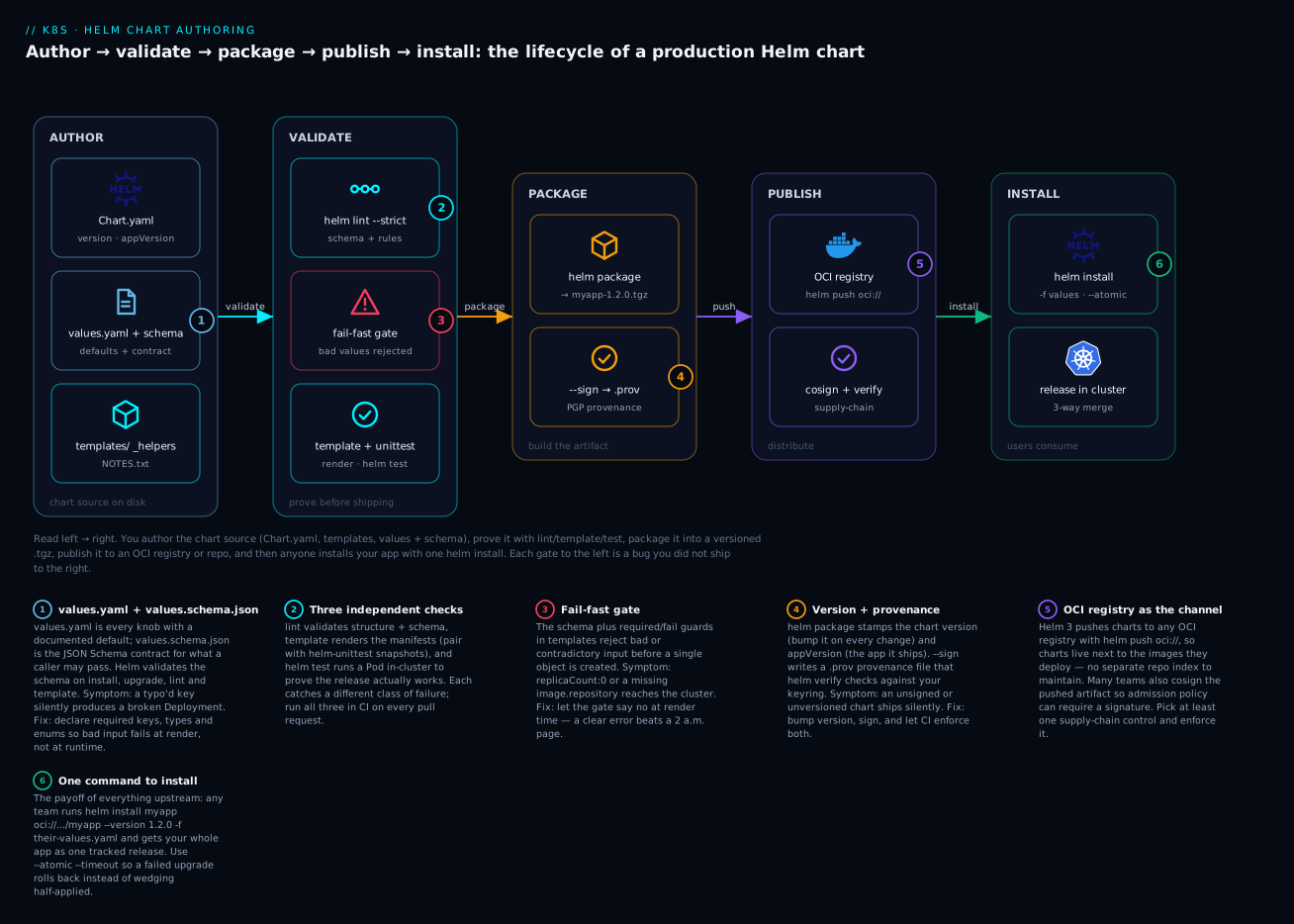
Read the diagram left to right: (1) you author values.yaml (every knob, documented) alongside values.schema.json (the contract for what callers may pass), (2) three independent checks — helm lint, helm template + unit snapshots, and helm test — each catch a different class of bug, (3) a fail-fast gate rejects bad input at render time rather than at 2 a.m., (4) helm package stamps a version and (optionally) a .prov provenance signature, (5) you push the chart to an OCI registry so it lives next to your images, and (6) any team installs your whole app with a single helm install.
Prerequisites and what you will be able to do
Know this first: what a chart, a release, values.yaml and the templating engine are — if you have never installed a chart or written a template, do Helm Fundamentals: charts, templates, values, releases first; this lesson picks up where it leaves off. You should also be comfortable with core Kubernetes objects (Deployment, Service, ConfigMap) and driving a cluster with kubectl. You do not need a running cluster to follow the reasoning here — every command and manifest is real and current for Helm 3.x, and outputs are labelled representative. A companion cheat-sheet is the Docker / kubectl / Helm command reference.
After this lesson you will be able to:
- Lay out a chart so intent is obvious and overrides are predictable, and read every key in
Chart.yaml(including theversionvsappVersiontrap). - Eliminate duplication with named templates in
_helpers.tpland promote shared logic into a reusable library chart. - Write a
values.schema.jsonthat rejects bad input at render time, and enforce cross-field rules templates cannot express in schema. - Add three layers of testing —
helm lint, unit snapshots, and a nativehelm testsmoke pod — and wire them into CI withchart-testing. - Manage dependencies deterministically with
Chart.lock, and package, sign, and publish charts to an OCI registry. - Debug a misbehaving template with
--debug,--dry-run, and--show-only, and upgrade safely withhelm diffand--atomic.
helm create gets you a chart in five seconds and a maintenance liability in five weeks. This guide walks through the practices that separate a throwaway scaffold from a chart you can hand to twenty teams: shared template libraries, fail-fast input validation, deterministic dependency handling, and a CI pipeline that catches breakage before it reaches a cluster.
1. A chart layout that scales
The default scaffold is fine for one service. Once you have a platform, structure the chart so that intent is obvious and overrides are predictable.
myapp/
  Chart.yaml
  values.yaml            # documented defaults, every key present
  values.schema.json     # contract for what callers may pass
  templates/
    _helpers.tpl         # named templates (fullname, labels, selectors)
    deployment.yaml
    service.yaml
    serviceaccount.yaml
    NOTES.txt
  charts/                # vendored dependencies (helm dependency build)
  ci/                    # values files used only by chart-testing
    default-values.yaml
    ha-values.yaml
Two rules carry most of the weight. First, every value your templates read must appear in values.yaml with a sane default and a comment — even if the default is {} or "". An undocumented value is a bug waiting for a 2 a.m. page. Second, keep templates/ free of business logic that belongs in helpers; a template should read like a manifest, not a program.
Use
helm createonce to remember the layout, then delete the generated boilerplate. The scaffoldedvalues.yamlships opinions (a specific autoscaling block, a sample ingress) you almost certainly do not want as your defaults.
The anatomy of Chart.yaml
Chart.yaml is the package manifest — the equivalent of package.json or a .deb control file. Helm refuses to work with a chart that lacks it. Every field earns its place:
| Key | What it is | Why it matters |
|---|---|---|
apiVersion |
Chart schema version | v2 for Helm 3 charts (supports dependencies and type inline). v1 is legacy Helm 2. |
name |
The chart’s name | Becomes the default fullname prefix and the directory name. Lowercase, DNS-safe. |
version |
The chart package version (SemVer) | Bump this on every change to the chart. Repositories and CI use it to decide “is this new?” A chart whose contents changed but whose version did not is invisible to helm upgrade and to chart-testing. |
appVersion |
The version of the application the chart deploys | Purely informational; surfaced in the app.kubernetes.io/version label. Quote it ("1.16.0") so YAML does not read 1.10 as the float 1.1. |
type |
application (default) or library |
library charts render nothing on their own — they only export named templates for other charts to include. |
dependencies |
Subcharts this chart pulls in | Name, version range, repository, and optional condition/tags. Resolved into charts/ and pinned in Chart.lock. |
kubeVersion |
A SemVer range of supported cluster versions | Helm refuses to install on an out-of-range cluster — a cheap guardrail against “works on my 1.29, breaks on their 1.25.” |
The single most common confusion here is version vs appVersion, and it is worth over-learning: version describes the packaging (the chart), appVersion describes the payload (your app). You can ship three chart versions — 1.2.0, 1.2.1, 1.3.0 — that all deploy appVersion: "2.4.0" of your service, because you changed the chart (a new label, a fixed probe) without changing the app. And you must bump version even when only appVersion changed, or nobody downstream sees the update.
NOTES.txt: the message users see after install
templates/NOTES.txt is a template like any other, but Helm treats it specially: it renders it and prints the result after a successful install or upgrade. It never becomes a Kubernetes object — it is purely the human-facing “what now?” note. A good NOTES.txt tells the operator how to reach the thing they just installed:
{{/* templates/NOTES.txt */}}
Thanks for installing {{ .Chart.Name }} (chart {{ .Chart.Version }}, app {{ .Chart.AppVersion }}).

Your release is named {{ .Release.Name }} in namespace {{ .Release.Namespace }}.

To reach the service from inside the cluster:
  http://{{ include "myapp.fullname" . }}.{{ .Release.Namespace }}.svc:{{ .Values.service.port }}

{{- if .Values.ingress.enabled }}
It is exposed at:
{{- range .Values.ingress.hosts }}
  https://{{ .host }}
{{- end }}
{{- end }}
Because it is a template, you can make it conditional — show ingress URLs only when ingress is enabled, print a warning when the user left an insecure default in place. Since NOTES.txt is rendered on every upgrade, it is also a fine place to surface deprecation warnings.
2. DRY templating with named templates and library charts
Named templates (defined with define in _helpers.tpl) are your first lever against duplication. The canonical pair is a name helper and a labels helper:
{{/* templates/_helpers.tpl */}}
{{- define "myapp.fullname" -}}
{{- $name := default .Chart.Name .Values.nameOverride -}}
{{- if .Values.fullnameOverride -}}
{{- .Values.fullnameOverride | trunc 63 | trimSuffix "-" -}}
{{- else -}}
{{- printf "%s-%s" .Release.Name $name | trunc 63 | trimSuffix "-" -}}
{{- end -}}
{{- end -}}

{{- define "myapp.labels" -}}
helm.sh/chart: {{ printf "%s-%s" .Chart.Name .Chart.Version | replace "+" "_" | trunc 63 | trimSuffix "-" }}
app.kubernetes.io/name: {{ include "myapp.name" . }}
app.kubernetes.io/instance: {{ .Release.Name }}
{{- if .Chart.AppVersion }}
app.kubernetes.io/version: {{ .Chart.AppVersion | quote }}
{{- end }}
app.kubernetes.io/managed-by: {{ .Release.Service }}
{{- end -}}
The trunc 63 is not cosmetic: Kubernetes label values and many resource names are capped at 63 characters, and a long release name will otherwise produce an invalid object that the API server rejects.
When the same helpers need to be shared across many charts, promote them into a library chart. A library chart sets type: library in Chart.yaml, ships only templates/ with define blocks (no rendered manifests), and is consumed as a dependency. The key behavioral difference: Helm does not render a library chart’s templates directly, so it never emits objects on its own — it only exposes named templates.
# common/Chart.yaml
apiVersion: v2
name: common
type: library
version: 1.4.0
# myapp/Chart.yaml
dependencies:
  - name: common
    version: "1.4.0"
    repository: "oci://ghcr.io/myorg/charts"
A widely used pattern is to have the library define a full resource (say, a Deployment) wrapped in tpl, and let each application chart pass overrides. Even at a smaller scale, centralizing just your labels, selectorLabels, and image-reference helpers in a library chart eliminates the most common source of drift across a fleet.
Reading a named template: include, indent, and nindent
If you are new to templating, three functions carry most of the confusion, and they are all about whitespace — which matters enormously because the rendered output is YAML, where indentation is structure.
include "name" .runs a named template and returns its text. Prefer it over the built-intemplateaction, becausetemplateis a statement that prints directly and cannot be piped, whereasincludeis a function whose output you can pass through filters. That difference is the whole reasonincludeexists.indent Nshifts every line of a string right byNspaces.nindent Ndoes the same but also prepends a newline first — “newline + indent.” You use it when you are dropping a multi-line block under a key that is on its own line.
The idiom you will write constantly is: put the key, then nindent the included block beneath it.
metadata:
  labels:
    {{- include "myapp.labels" . | nindent 4 }}
spec:
  template:
    spec:
      containers:
        - name: {{ .Chart.Name }}
          resources:
            {{- toYaml .Values.resources | nindent 12 }}
toYaml turns a values sub-tree (like .Values.resources) into YAML text; nindent 12 then places it at the correct depth. Get the number wrong and you get either a YAML parse error or — worse — a silently mis-nested field. The {{- trims the preceding whitespace/newline so the nindent’s own leading newline is the only one, keeping the output clean. When a rendered manifest looks structurally wrong, an off-by-one nindent is the first thing to check.
3. Validate inputs with values.schema.json
A values.schema.json file at the chart root is validated by Helm automatically on install, upgrade, lint, and template. It is plain JSON Schema (Draft 7 era), and it is the single highest-leverage reliability improvement you can make to a chart: bad config fails at render time with a clear message instead of producing a broken Deployment.
{
  "$schema": "https://json-schema.org/draft-07/schema#",
  "type": "object",
  "required": ["image", "replicaCount"],
  "properties": {
    "replicaCount": {
      "type": "integer",
      "minimum": 1
    },
    "image": {
      "type": "object",
      "required": ["repository"],
      "properties": {
        "repository": { "type": "string", "minLength": 1 },
        "tag": { "type": "string" },
        "pullPolicy": {
          "type": "string",
          "enum": ["Always", "IfNotPresent", "Never"]
        }
      },
      "additionalProperties": false
    },
    "service": {
      "type": "object",
      "properties": {
        "type": {
          "type": "string",
          "enum": ["ClusterIP", "NodePort", "LoadBalancer"]
        },
        "port": { "type": "integer", "minimum": 1, "maximum": 65535 }
      }
    }
  }
}
Two things worth internalizing. JSON Schema validates structure and types, not cross-field business rules — it cannot express “if autoscaling.enabled then replicaCount is ignored.” For those, fail explicitly inside templates with required and fail:
{{- if and .Values.ingress.enabled (not .Values.ingress.className) }}
{{- fail "ingress.enabled=true requires ingress.className" }}
{{- end }}
{{- $repo := required "image.repository is required" .Values.image.repository }}
Also note that additionalProperties: false is strict — it will reject a typo’d key like imagePullPolcy, which is exactly what you want, but it means a caller cannot smuggle in extra keys. Apply it deliberately at the leaf objects you fully control, and be more permissive at the top level if your chart intentionally accepts pass-through blocks.
What a schema failure actually looks like
The payoff is the error message. Pass a value the schema forbids and Helm stops before rendering, naming the exact path and rule that failed (output representative):
$ helm template myapp ./myapp --set replicaCount=0
Error: values don't meet the specifications of the schema(s) in the following chart(s):
myapp:
- replicaCount: Must be greater than or equal to 1
Compare that to the alternative without a schema: replicaCount: 0 renders happily, Kubernetes accepts a Deployment with zero replicas, and you discover the outage when nobody is paged because there are no Pods to page about. The schema turns a silent production incident into a one-line failure at author time. That is why the schema is the first thing to add to any chart you intend to share.
4. Dependencies, subcharts, and global values
Declare dependencies in Chart.yaml and lock them. helm dependency update resolves versions and writes Chart.lock; commit that lock file so CI and production resolve byte-identical charts.
helm dependency update ./myapp     # resolves + writes Chart.lock + populates charts/
helm dependency build ./myapp      # rebuilds charts/ from an existing Chart.lock
Use condition and tags to make optional dependencies toggleable without editing Chart.yaml:
dependencies:
  - name: postgresql
    version: "15.5.x"
    repository: "oci://registry-1.docker.io/bitnamicharts"
    condition: postgresql.enabled
The subtlety that bites people is the global scope. Values under .Values.global are visible to the parent chart and every subchart, which makes globals perfect for cross-cutting settings (image registry mirror, image pull secrets, environment name) and dangerous for anything else. A parent can also override a subchart’s values by nesting them under the subchart’s name:
# parent values.yaml
global:
  imageRegistry: registry.internal.example.com
postgresql:            # overrides into the postgresql subchart
  primary:
    persistence:
      size: 50Gi
Resist the urge to push everything into global “just in case.” Globals are an implicit API across all subcharts; once a subchart starts reading one, removing it is a breaking change you cannot see from the parent.
5. Hooks, ordering, and when not to use them
Helm hooks let you run resources at lifecycle points (pre-install, post-install, pre-upgrade, post-delete, and so on), ordered within a phase by helm.sh/hook-weight (lower runs first). The classic use is a schema migration Job before an upgrade.
apiVersion: batch/v1
kind: Job
metadata:
  name: {{ include "myapp.fullname" . }}-migrate
  annotations:
    "helm.sh/hook": pre-upgrade,pre-install
    "helm.sh/hook-weight": "-5"
    "helm.sh/hook-delete-policy": before-hook-creation,hook-succeeded
spec:
  template:
    spec:
      restartPolicy: Never
      containers:
        - name: migrate
          image: "{{ .Values.image.repository }}:{{ .Values.image.tag | default .Chart.AppVersion }}"
          command: ["/app/migrate", "up"]
The critical caveat: hook resources are not tracked as part of the release. Helm creates them out-of-band and does not manage their lifecycle the way it does normal manifests, which is why you set an explicit hook-delete-policy. A failed hook also does not auto-rollback unless you pass --atomic. Reach for hooks when you genuinely need lifecycle ordering — migrations, one-shot setup — and avoid them for anything that should be a first-class, reconciled part of the release. If a Job needs to keep existing, model it as a normal resource, not a hook.
6. Testing: lint, unit tests, and chart-testing
Layer three independent checks; each catches a different class of failure.
helm lint validates chart structure, runs schema validation, and surfaces obvious template errors. Pass --strict to turn warnings into failures in CI:
helm lint ./myapp --strict --values ./myapp/ci/ha-values.yaml
Unit snapshots with the helm-unittest plugin assert that specific rendered output matches expectations, so a careless template edit that shifts a label or drops a probe fails loudly. Tests live in tests/ and run against the rendered templates:
# myapp/tests/deployment_test.yaml
suite: deployment
templates:
  - deployment.yaml
tests:
  - it: sets the replica count from values
    set:
      replicaCount: 3
    asserts:
      - equal:
          path: spec.replicas
          value: 3
  - it: renders a probe on the main container
    asserts:
      - isNotNull:
          path: spec.template.spec.containers[0].livenessProbe
helm plugin install https://github.com/helm-unittest/helm-unittest
helm unittest ./myapp
chart-testing (the ct tool) is what ties it together in CI: it lints changed charts, validates that the chart version was bumped, and can install each changed chart into an ephemeral cluster (kind works well) to confirm it actually deploys. The ci/*-values.yaml files give ct multiple realistic configurations to exercise.
ct lint --target-branch main --chart-dirs charts
ct install --target-branch main --chart-dirs charts
A minimal GitHub Actions job wiring this up against a kind cluster:
name: chart-ci
on: pull_request
jobs:
  test:
    runs-on: ubuntu-latest
    steps:
      - uses: actions/checkout@v4
        with:
          fetch-depth: 0          # ct needs history to diff against the base
      - uses: azure/setup-helm@v4
      - uses: helm/chart-testing-action@v2
      - name: Lint changed charts
        run: ct lint --target-branch ${{ github.event.repository.default_branch }}
      - uses: helm/kind-action@v1
      - name: Install changed charts
        run: ct install --target-branch ${{ github.event.repository.default_branch }}
7. Packaging and distribution via OCI
Helm 3 treats OCI registries as a first-class distribution channel, so you can store charts next to your images. Package, push, and pull use the registry directly — no separate chart repo index to maintain.
helm package ./myapp                       # produces myapp-1.2.0.tgz
helm push myapp-1.2.0.tgz oci://ghcr.io/myorg/charts
helm pull oci://ghcr.io/myorg/charts/myapp --version 1.2.0
helm install myapp oci://ghcr.io/myorg/charts/myapp --version 1.2.0
For supply-chain integrity, Helm supports provenance files. helm package --sign produces a .prov file alongside the .tgz, and helm verify (or helm install --verify) checks the signature against your keyring.
helm package ./myapp --sign --key 'platform-team' --keyring ~/.gnupg/secring.gpg
helm verify myapp-1.2.0.tgz                 # validates the .prov signature
Many teams now also sign the pushed OCI artifact with cosign in addition to Helm’s PGP provenance. The two are complementary: PGP provenance proves the chart contents, cosign attaches a signature to the registry artifact and integrates with admission policy. Pick at least one and enforce it.
8. Upgrade safety: diff, atomic, and CRDs
Before any production upgrade, render the change, not just the new state. The helm diff plugin shows exactly what will mutate:
helm plugin install https://github.com/databus23/helm-diff
helm diff upgrade myapp oci://ghcr.io/myorg/charts/myapp --version 1.2.0 -f prod-values.yaml
Run upgrades with --atomic --timeout. With --atomic, a failed upgrade automatically rolls back to the prior revision instead of leaving the release wedged half-applied:
helm upgrade myapp oci://ghcr.io/myorg/charts/myapp \
  --version 1.2.0 -f prod-values.yaml \
  --atomic --timeout 5m
CRDs are the sharpest edge in Helm. Files in a chart’s special crds/ directory are installed before the rest of the chart, but Helm never upgrades or deletes them — this is deliberate, to avoid destroying custom resources cluster-wide. The practical consequence: shipping a new CRD version inside crds/ will not update an existing CRD. Manage CRD lifecycle explicitly, typically by applying CRD updates with kubectl apply as a separate, deliberate step outside the normal chart upgrade.
Enterprise scenario
A platform team running ~40 service charts off a shared common library shipped a “harmless” fix: renaming the selector helper from common.selectorLabels to common.matchLabels and bumping the library to 2.0.0. Lint passed, unit snapshots passed, ct install into kind passed — every check was green. The first production helm upgrade failed with Deployment.apps "checkout" is invalid: spec.selector: field is immutable. The new helper emitted a different spec.selector.matchLabels, and Kubernetes forbids mutating a Deployment’s selector after creation. Their CI only ever ran ct install on a clean cluster, so it never exercised the upgrade path where the immutability rule lives.
The fix had two parts. First, they froze selector labels as a contract: the library’s common.selectorLabels became append-only, asserted by a unit test that fails if the rendered key set changes.
# common/tests/selector_test.yaml
- it: selector labels are frozen (immutable contract)
  template: deployment.yaml
  asserts:
    - equal:
        path: spec.selector.matchLabels
        value:
          app.kubernetes.io/name: checkout
          app.kubernetes.io/instance: RELEASE-NAME
Second, they added an upgrade gate to ct so CI installs the chart, then upgrades over it before tearing down:
# ct.yaml
upgrade: true
ct install --upgrade deploys the chart’s previous released version first, then upgrades to the PR’s version, catching exactly the immutable-field class of break that a from-scratch install hides. The lesson: green local renders prove a chart installs; only an upgrade-over-previous test proves it upgrades.
Going deeper
The core sections take you to a chart you can ship. This section is the advanced layer: the native test hook most people skip, the debugging workflow that turns “the manifest is wrong somehow” into a two-command diagnosis, and the mechanics of how a library chart actually emits a resource on another chart’s behalf.
Native helm test: a smoke test that ships inside the chart
helm-unittest (from §6) proves your templates render the way you expect — it never touches a cluster. ct install proves the chart deploys. Neither proves the deployed release actually works. That last question — “is the thing I just installed answering requests?” — is what the native helm test command is for, and it is genuinely different from the other two.
A test is just a Pod (or Job) template annotated with helm.sh/hook: test. It lives in templates/tests/, ships inside the chart, and Helm ignores it during a normal install — it only runs when someone explicitly calls helm test <release>. The Pod runs, and Helm reports success if it exits 0, failure otherwise.
# myapp/templates/tests/connection_test.yaml
apiVersion: v1
kind: Pod
metadata:
  name: "{{ include "myapp.fullname" . }}-test-connection"
  labels:
    {{- include "myapp.labels" . | nindent 4 }}
  annotations:
    "helm.sh/hook": test
    "helm.sh/hook-delete-policy": before-hook-creation,hook-succeeded
spec:
  restartPolicy: Never
  containers:
    - name: wget
      image: busybox:1.36
      command: ["wget"]
      args:
        - "--spider"                 # HEAD-style check, no body download
        - "--timeout=5"
        - "http://{{ include "myapp.fullname" . }}:{{ .Values.service.port }}/healthz"
$ helm test myapp
NAME: myapp
LAST DEPLOYED: ...
STATUS: deployed
TEST SUITE:     myapp-test-connection
Last Started:   ...
Last Completed: ...
Phase:          Succeeded
The hook-delete-policy: before-hook-creation,hook-succeeded keeps things tidy: the pod is removed on success, and a stale one from a prior run is deleted before a new run starts. When a test fails, drop the delete policy (or use hook-failed only) and add --logs so helm test myapp --logs streams the failing pod’s output. Because the test travels with the chart, anyone who installs your chart — including a GitOps controller or a CI job — can run the exact same smoke test you wrote, against their own release, with no extra tooling. That portability is the point: it is a health check that is part of the package, not part of your local scripts.
Template debugging: --debug, --dry-run, and --show-only
When a rendered manifest is wrong and you cannot see why, four commands cover almost every case:
# 1. Render everything to stdout WITHOUT touching a cluster; show errors verbosely.
helm template myapp ./myapp --debug -f prod-values.yaml

# 2. Isolate one template so you are not scrolling past 500 lines of other output.
helm template myapp ./myapp --show-only templates/deployment.yaml

# 3. Ask the API server "would this apply?" AND print the computed values it used.
helm install myapp ./myapp --dry-run=server --debug -f prod-values.yaml

# 4. For a release that is ALREADY installed, see exactly what Helm stored.
helm get manifest myapp          # the rendered objects of the live release
helm get values  myapp -a        # every computed value, defaults included
The distinction that saves the most time: helm template runs the engine locally and is perfect for “what does my template produce,” while --dry-run=server sends the result to the API server so admission controllers and server-side validation get a vote — the difference between “my YAML is well-formed” and “the cluster will accept it.” When even --debug will not render because the template errors out before producing output, insert a deliberate probe: {{ fail (printf "%#v" .Values.image) }} prints the exact structure Helm sees for that value and stops, which instantly answers “is this field a map or a string?” — the root cause of a large share of templating bugs.
Library charts, mechanically: emitting a full resource
§2 said a library chart can define a whole resource that application charts reuse. Here is how that actually works, because it is less obvious than a labels helper. The library defines a template that renders an entire manifest using the caller’s context (.), so it reads the caller’s .Values and .Release:
{{/* common/templates/_deployment.tpl */}}
{{- define "common.deployment" -}}
apiVersion: apps/v1
kind: Deployment
metadata:
  name: {{ include "common.fullname" . }}
  labels:
    {{- include "common.labels" . | nindent 4 }}
spec:
  replicas: {{ .Values.replicaCount }}
  selector:
    matchLabels:
      {{- include "common.selectorLabels" . | nindent 6 }}
  template:
    metadata:
      labels:
        {{- include "common.selectorLabels" . | nindent 8 }}
    spec:
      containers:
        - name: {{ .Chart.Name }}
          image: "{{ .Values.image.repository }}:{{ .Values.image.tag | default .Chart.AppVersion }}"
{{- end -}}
The application chart’s templates/deployment.yaml then shrinks to a single line:
{{ include "common.deployment" . }}
Every service chart that includes common.deployment gets an identical, correct Deployment skeleton; fixing a labeling bug or adding a security context is one release of common, not forty pull requests. When a chart needs to override part of the library’s output, the established pattern (popularised by Bitnami’s common chart) is to render the library block, render the app’s overrides, and deep-merge them with a helper such as common.tplvalues.merge before emitting — so the library owns the skeleton and the app owns the deltas. Start with the plain include above; reach for the merge pattern only when a chart genuinely needs to diverge from the shared shape.
From provenance to admission: closing the supply-chain loop
§7 covered producing signatures. The advanced move is enforcing them. A .prov file or a cosign signature is only worth the effort if something refuses to run an unsigned chart or image. In practice that means: sign in CI right after helm package (never on a laptop), store the public key where your admission controller can read it, and add a policy — Kyverno or Sigstore’s policy-controller — that rejects images whose signature does not verify. The chain is only as strong as its weakest unenforced link; a signature nobody checks is documentation, not security. Treat “CI signs, admission verifies” as one atomic capability, not two optional ones.
Practice challenges
Work these in order — they escalate from a one-line schema edit to a full package-sign-publish flow. Try each before opening the solution; every command is real Helm 3.x.
Challenge 1 (beginner): make a bad value fail loudly. Your chart has service.port but nothing stops a caller passing service.port: 70000, which is not a valid TCP port. Add the schema rule that rejects it, and give the command that proves it fails.
<details> <summary>Solution</summary>
In values.schema.json, constrain the port to the valid range:
"port": { "type": "integer", "minimum": 1, "maximum": 65535 }
Prove it (output representative):
$ helm template myapp ./myapp --set service.port=70000
Error: values don't meet the specifications of the schema(s) in the following chart(s):
myapp:
- service.port: Must be less than or equal to 65535
Helm validates the schema on template, lint, install, and upgrade, so the bad value can never reach a cluster.
</details>
Challenge 2 (beginner): fix a broken indentation. A teammate wrote resources: {{ .Values.resources }} and the rendered Deployment has resources: map[limits:...] — Go’s map printout, not YAML. Rewrite the line correctly.
<details> <summary>Solution</summary>
          resources:
            {{- toYaml .Values.resources | nindent 12 }}
{{ .Values.resources }} stringifies the Go map; toYaml renders it as real YAML and nindent 12 places it at the right depth (12 spaces = under containers[0].resources). The {{- trims the preceding newline so nindent’s own newline is the only one.
</details>
Challenge 3 (intermediate): stop hardcoding the namespace. A chart’s service.yaml has namespace: platform hardcoded in metadata. Explain why that is a bug and give the fix.
<details> <summary>Solution</summary>
Remove the line entirely. Helm installs every object into the release namespace chosen at install time (helm install ... -n <ns>), so a hardcoded namespace: either fights that choice or silently plants the object in the wrong namespace — breaking any team that installs into their own. If a template genuinely needs to reference the namespace (say, in a URL), use {{ .Release.Namespace }}, never a literal. The right mental model: a chart is a template installed into a namespace, so it should not name one.
</details>
Challenge 4 (intermediate): add a native smoke test. Add a helm test that verifies the Service answers on /healthz, and give the two commands to run it and read its logs on failure.
<details> <summary>Solution</summary>
Create templates/tests/connection_test.yaml with a Pod annotated helm.sh/hook: test that wget --spiders http://{{ include "myapp.fullname" . }}:{{ .Values.service.port }}/healthz (see the full manifest in Going deeper). Then:
helm test myapp            # runs the test pod, reports Succeeded/Failed
helm test myapp --logs     # streams the pod's output when it fails
Set helm.sh/hook-delete-policy: before-hook-creation,hook-succeeded so failed pods stick around for inspection while successful ones are cleaned up.
</details>
Challenge 5 (advanced): catch the immutable-selector break in CI. Referencing the enterprise scenario, name the one CI setting that would have caught the frozen-selector failure, and the one test that makes the contract explicit.
<details> <summary>Solution</summary>
The CI setting is upgrade: true in ct.yaml (equivalently ct install --upgrade), which installs the previously released chart version and then upgrades to the PR’s version — exercising the upgrade path where spec.selector immutability is enforced. The explicit contract is a helm-unittest assertion that pins spec.selector.matchLabels to a fixed key set, so any change to the selector helper fails the unit test before CI even reaches the cluster. Together: the unit test catches it in milliseconds, the upgrade gate catches it as a backstop.
</details>
Challenge 6 (advanced): package, sign, and publish to OCI. Give the full command sequence to build a signed 1.3.0 chart and push it to oci://ghcr.io/myorg/charts, then the command a consumer runs to install it with signature verification.
<details> <summary>Solution</summary>
# Author side: bump version to 1.3.0 in Chart.yaml, then:
helm package ./myapp --sign --key 'platform-team' --keyring ~/.gnupg/secring.gpg
helm push myapp-1.3.0.tgz oci://ghcr.io/myorg/charts     # pushes the .tgz (and .prov)

# Consumer side:
helm install myapp oci://ghcr.io/myorg/charts/myapp --version 1.3.0 --verify \
  --keyring ~/.gnupg/pubring.gpg -f their-values.yaml
--sign writes myapp-1.3.0.prov next to the tarball; helm push uploads both; --verify on install checks the provenance signature against the consumer’s keyring and refuses to install if it does not match. In real CI you would also cosign sign the pushed OCI artifact and have admission verify it.
</details>
Common beginner mistakes
These are misconceptions, not typos — each is a wrong mental model that produces charts which look fine and fail later.
-
Hardcoding what should be a value. Writing
replicas: 3orimage: myapp:1.4.0directly in a template defeats the entire purpose of a chart. Why it’s wrong: the reason a chart exists is that different environments need different values; anything that varies across dev/staging/prod must come from.Values, or you are shipping a folder of YAML with extra syntax. Right model: if you can imagine two installs wanting different values for it, template it and give it a documented default invalues.yaml. -
Shipping a chart with no
values.schema.json. Why it’s wrong: without a schema, a typo’d or out-of-range value renders a broken-but-valid object, and Kubernetes accepts it — you find out at runtime, in production, with no error at author time. Right model: the schema is the chart’s front door; declare required keys, types, and enums so bad input is rejected athelm template, the cheapest possible moment. -
Confusing
versionwithappVersion. Why it’s wrong:versionis the chart version andappVersionis the app version, and beginners bump the wrong one — bumpingappVersionalone leavesversionunchanged, sochart-testingsees “no change,” repos never offer the update, andhelm upgrademay treat it as a no-op. Right model: bumpversionon every change to the chart, whether or not the app changed; treatappVersionas a label describing the payload. -
Getting
nindentwrong (or reaching forindent). Why it’s wrong: the rendered output is YAML, where indentation is structure; an off-by-onenindent, or usingindentwhere the block starts on its own line, produces either a parse error or a silently mis-nested field. Right model: the idiom is key on one line,{{- include ... | nindent N }}beneath it, whereNis the child depth in spaces; when a manifest renders structurally wrong, suspect the indent count first. -
Hardcoding the namespace in templates. Why it’s wrong: Helm installs objects into the release namespace chosen at install time; a literal
namespace: fooin a template overrides that and breaks anyone installing elsewhere. Right model: never name a namespace in a chart — let-ndecide, and use{{ .Release.Namespace }}when you must reference it.
Glossary
- Chart — a parameterised, versioned package of Kubernetes manifests, the unit Helm installs. Analogous to a
.debor an app installer. - Release — one installation of a chart into a cluster, with a name and a revision history you can upgrade or roll back.
values.yaml— the chart’s documented default configuration; every key a template reads should appear here with a sane default.values.schema.json— a JSON Schema (Draft 7) contract Helm validates on install/upgrade/lint/template, rejecting bad input at render time._helpers.tpl— the conventional file for named templates (defineblocks) shared across a chart’s manifests.- Named template — a reusable snippet defined with
{{ define "name" }}...{{ end }}and invoked withinclude. includevstemplate— both run a named template;includeis a function whose output you can pipe (tonindent,toYaml),templateis a statement you cannot. Preferinclude.nindent N/indent N— indentation helpers;nindentprepends a newline then indents byNspaces,indentonly indents. Critical because YAML structure is whitespace.toYaml— renders a values sub-tree as YAML text, almost always piped intonindent.- Library chart — a chart with
type: librarythat renders no objects itself and only exports named templates for other charts toinclude. - Subchart / dependency — a chart pulled in via
Chart.yamldependencies, resolved intocharts/and pinned inChart.lock. Chart.lock— the pinned, hashed resolution of dependencies; commit it so every build resolves byte-identical charts.versionvsappVersion—versionis the chart package’s SemVer (bump on every chart change);appVersionis the deployed application’s version (informational, surfaced as a label).- Global values — values under
.Values.global, visible to the parent chart and every subchart; an implicit cross-chart API, so use sparingly. - Hook — a resource annotated
helm.sh/hookthat runs at a lifecycle point (e.g.pre-upgrade); not tracked as part of the release, so it needs an explicithook-delete-policy. helm test— runs Pods annotatedhelm.sh/hook: testagainst a live release to prove it actually works; ships inside the chart.helm-unittest— a plugin that asserts rendered-template output (snapshots) without a cluster.chart-testing(ct) — CI tool that lints changed charts, enforces a version bump, and installs (and optionally upgrades) each into an ephemeral cluster.- Provenance (
.prov) — a PGP-signed file produced byhelm package --signand checked byhelm verify/--verify. - OCI registry — a container registry (e.g. GHCR, Docker Hub) used as a first-class Helm chart channel via
helm push/helm pull oci://.... --atomic— upgrade flag that auto-rolls-back to the previous revision if the upgrade fails, instead of leaving it half-applied.--dry-run=server— renders and sends manifests to the API server for validation (including admission) without installing; stronger than the default client dry run.- CRD (
crds/) — CustomResourceDefinitions installed before the rest of the chart and never upgraded or deleted by Helm; manage their lifecycle manually.
Verify
Run these against a chart before you trust it:
# 1. Schema + lint pass cleanly, strictly
helm lint ./myapp --strict

# 2. Templates render with defaults AND with a real prod values file
helm template myapp ./myapp -f prod-values.yaml > /tmp/rendered.yaml
test -s /tmp/rendered.yaml && echo "rendered OK"

# 3. Bad input is rejected by the schema (expect a non-zero exit)
helm template myapp ./myapp --set replicaCount=0 ; echo "exit=$?"

# 4. Unit snapshots pass
helm unittest ./myapp

# 5. The rendered output is valid against the live API (dry run)
helm install myapp ./myapp --dry-run=server -f prod-values.yaml
--dry-run=server is meaningfully stronger than the default client dry run: it sends the manifests to the API server for validation (including admission), catching errors a purely local render misses.
Checklist
Pitfalls
- Treating
globalas a convenience. Every global is an implicit contract with every subchart; add them sparingly and document them. - Forgetting hooks are untracked. Without a
hook-delete-policyyou accumulate orphaned Jobs; without--atomica failed hook leaves the release inconsistent. - Assuming
crds/upgrades CRDs. It does not. Plan CRD versioning as a first-class, manual operation. additionalProperties: falseeverywhere. Strictness is great at leaves you own and painful on blocks meant to pass through to a subchart — apply it with intent.- Skipping the server dry run. A chart that renders locally can still be rejected by admission controllers;
--dry-run=serveris your last cheap gate before a real install.
Next step: pull your label, selector, and image helpers into a type: library chart, version it, and publish it to your OCI registry. Once every service chart depends on the same library, fixing a labeling bug is one release instead of twenty pull requests. To see how these charts flow through GitOps and progressive delivery, continue with Argo CD: app-of-apps & progressive delivery; for the umbrella-chart and rollback angle, see Helm umbrella charts, library charts, hooks & rollback strategy.