In a nutshell
Think of an umbrella chart as ordering a combo meal. Instead of ordering a burger, fries, and a drink separately — three trips to the counter, three receipts — you order the combo once: one bill, one tray, and one “send it all back” if anything is wrong. The burger, fries, and drink are subcharts; the combo you order is the umbrella chart that bundles them into a single release. A library chart is the laminated recipe card the kitchen shares across every meal — how to salt the fries, how to plate the burger — it cooks nothing by itself, it just makes every dish come out consistent. Hooks are the timed steps around the meal: fire up the grill before cooking (pre-install), wipe the station after (post-install). And because every order is logged on the ticket rail, if the combo comes out wrong you can roll back to exactly the last order that was right.
In Kubernetes terms:
- Umbrella (parent) chart — one chart whose
Chart.yamllists other charts asdependencies, so a singlehelm installdeploys all of them together as one named release. - Subchart — a chart pulled in by a parent. It receives only the values the parent hands it and can never see its siblings.
- Library chart (
type: library) — a chart that ships only reusable template helpers and renders no resources of its own. - Hook — a resource (usually a
Job) annotated to run at a lifecycle moment — before or after install, upgrade, delete, or rollback — instead of living in the steady-state release. - Rollback — restoring a previous release revision from the history Helm keeps inside the cluster.
If you can already install a single chart and edit its values.yaml, you have everything you need to start here. The rest of this lesson is about doing that at scale — many charts, one atomic release, ordered side effects, and an undo button you can trust at 2 a.m.
Level: Intermediate → Advanced · Time: ~30 min read · Hands-on: ~half a day with a local kind cluster and Helm 3.x
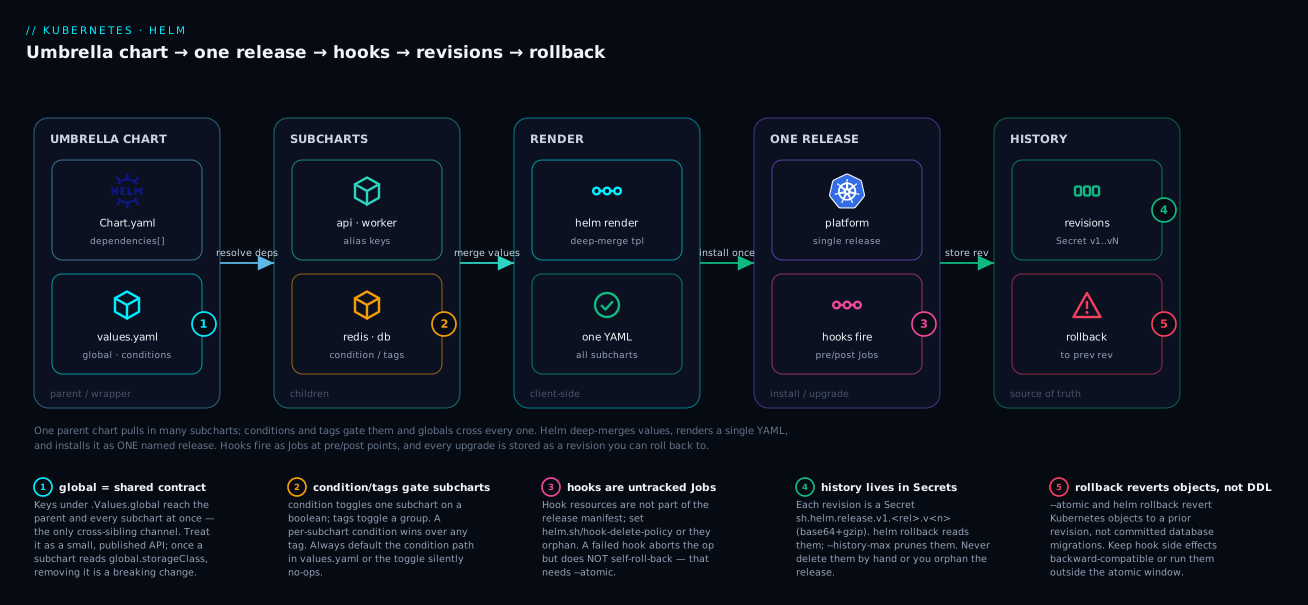
Read the diagram left to right and it is the whole lesson in one picture. The umbrella chart (blue) resolves its dependencies into subcharts (teal), where global values reach every child at once (badge 1) and condition/tags decide which children are even included (badge 2). Helm renders everything client-side into a single YAML document, then installs it as one release (purple) — during which hooks fire as Jobs at pre/post points (badge 3). Every install or upgrade is appended to the release history (green) as a per-revision Secret (badge 4), which is exactly what helm rollback reads to return you to a previous revision (badge 5). Keep this shape in your head; every section below is one box in it.
Prerequisites and what you’ll be able to do
Know this first. You should be comfortable installing a single chart, editing a values.yaml, and reading helm template output — the ground covered in Helm fundamentals: charts, templates, values, releases. This lesson is the advanced companion to chart authoring (Authoring production Helm charts: library charts & tests), so it assumes you already write _helpers.tpl, ship a values.schema.json, and lint in CI. Because rollbacks lean on how Deployments roll, a quick refresher on Deployments, ReplicaSets, rollouts & rollback makes Section 6 click.
After this lesson you can:
- Compose several charts into one umbrella release and toggle subcharts on or off with
conditionandtags. - Scope values correctly — by subchart key, through
global, and viaimport-values— and explain why siblings can never see each other. - Factor shared labels, security context, and image logic into a
type: librarychart that renders nothing on its own. - Sequence one-shot side effects (schema migrations, cache warms) with hook events,
hook-weight, andhook-delete-policy. - Run upgrades that either fully succeed or fully revert (
--atomic --wait --timeout), and roll back to any prior revision from the in-cluster history. - Avoid the classic traps: the immutable-Job clash, the
--reuse-valuesfootgun, unbounded release history, and treating--atomicas a database undo.
A single-service Helm chart is a solved problem. The pain begins when one helm upgrade has to roll out an API, a worker, a cache, a database migration, and a couple of Bitnami subcharts as one atomic unit — and roll all of it back cleanly when the migration fails at 2 a.m. This article is about that situation: composing many charts into one release, scoping values so subcharts get exactly what they need and nothing they shouldn’t, sequencing side effects with hooks, and making upgrades that either fully succeed or leave no trace.
This is the advanced companion to chart authoring. It assumes you already write _helpers.tpl, ship a values.schema.json, and lint in CI. Here we deal with the release as a whole.
1. Umbrella chart anatomy: dependencies, aliases, conditions, tags
An umbrella (parent/wrapper) chart’s job is to pull other charts together. It ships almost no templates of its own — its value is in Chart.yaml. The dependency block is where composition happens, and four fields carry the weight: alias, condition, tags, and import-values.
# platform/Chart.yaml
apiVersion: v2
name: platform
version: 2.4.0
dependencies:
  - name: api
    version: "1.8.0"
    repository: "oci://ghcr.io/acme/charts"
  - name: worker
    version: "1.8.0"
    repository: "oci://ghcr.io/acme/charts"
  - name: redis
    version: "20.1.x"
    repository: "oci://registry-1.docker.io/bitnamicharts"
    condition: redis.enabled
    tags:
      - cache
  - name: postgresql
    version: "16.2.x"
    repository: "oci://registry-1.docker.io/bitnamicharts"
    alias: primarydb            # mount this dependency under a custom key
    condition: primarydb.enabled
    tags:
      - database
alias is the one people miss. Without it, a subchart’s values live under its chart name (postgresql:). With alias: primarydb, the same chart reads its overrides from .Values.primarydb, and you can declare the same chart twice under different aliases to run two PostgreSQL instances in one release. condition toggles a subchart on a boolean value and silently does nothing if the path is absent — which is why you always default it in values.yaml. tags toggle groups of subcharts at once (tags: { cache: true, database: true } in the parent values).
The precedence rule is worth memorizing: a per-subchart condition overrides any tags setting. If redis.enabled is explicitly set, it wins regardless of the cache tag. Tags are for coarse “turn off all the stateful stuff in preview environments” switches; conditions are for fine control of a single component.
The dependency block fields, at a glance:
| Field | What it does | Reads from | Typical use |
|---|---|---|---|
name + version + repository |
Identifies and pins the subchart to pull | Chart.yaml |
Every dependency |
alias |
Mounts the subchart under a custom values key; lets you declare the same chart twice | .Values.<alias> |
Two Postgres instances; renaming a noisy default key |
condition |
Includes/excludes this one subchart on a boolean value path | .Values.<path> (e.g. redis.enabled) |
Fine control of a single component |
tags |
Includes/excludes a group of subcharts sharing a tag | .Values.tags.<tag> |
Coarse “turn off all stateful stuff in preview” |
import-values |
Pulls a value the subchart exports up into the parent’s values | child exports.* → parent path |
Surfacing a computed host/name without duplication |
Resolve and lock before you ever install:
helm dependency update ./platform   # resolves versions, writes Chart.lock, fills charts/
helm dependency build  ./platform   # rebuilds charts/ from an existing Chart.lock
Commit Chart.lock. CI and production must resolve byte-identical subcharts, and ~/x version ranges in Chart.yaml will otherwise drift between a Friday test and a Monday deploy.
2. Passing and scoping values into subcharts
Helm has exactly three ways for a parent to influence a subchart, and conflating them is the single largest source of “why did that value not take” tickets.
Override by subchart key. Anything nested under the subchart’s name (or alias) in the parent’s values is passed straight down, deep-merged over the subchart’s own values.yaml:
# platform/values.yaml
primarydb:                 # the alias from Chart.yaml
  auth:
    database: orders
  primary:
    persistence:
      size: 100Gi
The global namespace. Keys under .Values.global are visible to the parent and every subchart simultaneously. This is the only channel that crosses sibling boundaries, which makes it right for genuinely cross-cutting settings and wrong for almost everything else:
# platform/values.yaml
global:
  imageRegistry: registry.internal.acme.com
  imagePullSecrets:
    - name: acme-pull
  storageClass: gp3
A global is an implicit API shared by all subcharts. The day one subchart starts reading global.storageClass, removing it becomes a breaking change you cannot see from the umbrella. Treat the global block as a published contract: small, documented, and changed deliberately.
import-values for explicit propagation. When a subchart computes a value (a derived host, a generated name) that the parent needs, the subchart exports a block and the parent imports it without hard-coding the path:
# platform/Chart.yaml dependency entry; child block lives at the subchart's exports.connection
  - name: redis
    version: "20.1.x"
    repository: "oci://registry-1.docker.io/bitnamicharts"
    import-values:
      - child: exports.connection   # long form for nested keys
        parent: cache.connection
After import the parent reads .Values.cache.connection.host, instead of duplicating the hostname across two values files and watching them drift. The short string form (import-values: ["data"]) works only when the child block is literally named exports.data; for anything nested, use the explicit child/parent mapping.
A subchart can never reach up into its parent or sideways into a sibling — there is no such scope. If two subcharts must agree on a value, the parent sets it in both (or one exports and the other imports through the parent). Designing as if siblings can see each other is the most common Helm scoping mistake.
The three value channels, side by side:
| Channel | Direction | Who sees it | When to use |
|---|---|---|---|
Subchart key (primarydb: / alias) |
Parent → one named subchart | Only that subchart | The default; almost all overrides |
global: |
Parent → parent and every subchart | All subcharts at once | Genuinely cross-cutting (registry, pull secret, storageClass) |
import-values |
One subchart → parent | The parent (and whatever it re-passes) | A value a subchart computes that the parent needs |
There is deliberately no “sibling → sibling” row: that scope does not exist.
3. Library charts: shared helpers without rendered resources
When five service charts all need the same labels, the same security context, or the same probe defaults, copy-paste rots fast. A library chart is the fix: a chart that ships only named templates and renders nothing on its own.
# common/Chart.yaml
apiVersion: v2
name: common
type: library          # the critical line: Helm will not render this chart's templates
version: 3.1.0
The type: library declaration changes behavior: Helm skips the chart during rendering, so it never emits a Deployment or Service by itself — it only exposes define blocks for other charts to include. Put reusable logic in templates/_*.tpl:
{{/* common/templates/_pod.tpl */}}
{{- define "common.securityContext" -}}
runAsNonRoot: true
runAsUser: 10001
seccompProfile:
  type: RuntimeDefault
{{- end -}}

{{- define "common.image" -}}
{{- $reg := .Values.global.imageRegistry | default .Values.image.registry -}}
{{- printf "%s/%s:%s" $reg .Values.image.repository (.Values.image.tag | default .Chart.AppVersion) -}}
{{- end -}}
Declare common as a dependency in the app chart, then call its templates. The second argument to include is the context (.), which is how the helper sees the consuming chart’s values, not the library’s:
# api/templates/deployment.yaml
spec:
  template:
    spec:
      securityContext:
        {{- include "common.securityContext" . | nindent 8 }}
      containers:
        - name: api
          image: {{ include "common.image" . }}
A common advanced pattern has the library define an entire resource and lets each app chart pass overrides through a tpl-evaluated values block — Bitnami’s common chart works this way. That adds indirection; start by centralizing just labels, selector labels, image references, and security context, where fleet-wide drift actually hurts.
4. Pre-install, post-upgrade, and delete hooks with weights and policies
Hooks let you run resources at lifecycle points instead of as part of the steady-state release. The full set you will actually use: pre-install, post-install, pre-upgrade, post-upgrade, pre-delete, post-delete, pre-rollback, post-rollback. Within a single phase, helm.sh/hook-weight orders them — lower runs first, and weights are strings sorted as integers.
apiVersion: batch/v1
kind: Job
metadata:
  name: {{ include "common.fullname" . }}-warm-cache
  annotations:
    "helm.sh/hook": post-install,post-upgrade
    "helm.sh/hook-weight": "5"
    "helm.sh/hook-delete-policy": before-hook-creation,hook-succeeded
spec:
  template:
    spec:
      restartPolicy: Never
      containers:
        - name: warm
          image: {{ include "common.image" . }}
          command: ["/app/warm-cache"]
Three facts about hooks separate people who trust them from people who get paged:
- Hook resources are not tracked as part of the release. Helm creates them out of band, they do not appear in the rendered release manifest, and
helm uninstallwill not necessarily clean them up. That is why you must set ahook-delete-policy. - The delete policies are
before-hook-creation(delete a prior hook of the same name first),hook-succeeded(delete after success), andhook-failed(delete after failure).before-hook-creation,hook-succeededis the sane default for Jobs: a clean slate each run, tidy-up on success, and a retained object on failure so you can read its logs. - A failed hook aborts the operation but does not roll back on its own — you need
--atomic(Section 6) for that.
If a resource should keep existing and be reconciled (a ServiceAccount, a ConfigMap), it is not a hook — model it as a normal template. Reserve hooks for genuine one-shot, ordered side effects.
Every hook event Helm fires, and when:
| Event | Fires… | Common job |
|---|---|---|
pre-install |
before any chart resources are created on install | create a namespace secret, pre-seed data |
post-install |
after all resources are created and (with --wait) ready |
smoke test, warm cache, register externally |
pre-upgrade |
before the upgrade’s resources are applied | schema migration, backup |
post-upgrade |
after the upgrade’s resources are applied/ready | cache warm, reindex, notify |
pre-delete |
before any resources are deleted on uninstall | drain, deregister, final backup |
post-delete |
after all resources are deleted | clean up external cloud resources |
pre-rollback |
before a rollback’s resources are applied | reverse-migration guard, snapshot |
post-rollback |
after a rollback’s resources are applied | re-warm, notify, verify |
test |
only on helm test |
integration probe against the live release |
(crd-install from Helm 2 is gone — in Helm 3 CRDs live in the chart’s crds/ directory and install once, before anything else, and are never templated or upgraded.)
And the three deletion policies that decide a hook resource’s fate:
hook-delete-policy |
Effect |
|---|---|
before-hook-creation |
delete a prior hook of the same name before creating the new one (the default when you set none) |
hook-succeeded |
delete the hook resource after it completes successfully |
hook-failed |
delete the hook resource after it fails |
5. Running database migrations safely as a hook Job
The canonical hook is a schema migration that must run before new pods that expect the new schema. Get three things right and it is reliable; get any wrong and it is a recurring outage.
# platform/charts/api/templates/migrate-job.yaml
apiVersion: batch/v1
kind: Job
metadata:
  name: {{ include "common.fullname" . }}-migrate-{{ .Release.Revision }}
  annotations:
    "helm.sh/hook": pre-install,pre-upgrade
    "helm.sh/hook-weight": "-10"          # run before everything else in the phase
    "helm.sh/hook-delete-policy": before-hook-creation
spec:
  backoffLimit: 3                          # retry transient failures
  activeDeadlineSeconds: 600               # but give up after 10 minutes
  ttlSecondsAfterFinished: 3600            # GC the Job object an hour later
  template:
    spec:
      restartPolicy: Never
      containers:
        - name: migrate
          image: {{ include "common.image" . }}
          command: ["/app/migrate", "up"]
The non-negotiables:
- Idempotency. The hook can re-run (a retried
helm upgrade, abackoffLimitretry), so the migration tool must track applied versions and no-op on already-applied changes. Every real framework (Flyway, golang-migrate, Alembic, Rails) does this; if yours does not, you are building an outage. hook-weight: -10guarantees the migration finishes before the Deployment rolls. Negative weights are valid and idiomatic for “run first.”- Naming with
.Release.Revisionplusbefore-hook-creationavoids the immutable-Job trap: a Job’sspec.templateis immutable, so reusing a fixed name across upgrades fails withfield is immutable. Embedding the revision yields a fresh name each time. backoffLimitandactiveDeadlineSecondsbound the blast radius: retry a flaky blip, but do not let a genuinely broken migration hold the release hostage forever.
Expand-then-contract is what makes migration hooks safe under rolling updates. Ship additive changes (a new nullable column) in release N, deploy code that writes both old and new, then drop the old column in N+2. A migration backward-compatible with the currently running pods can run as a
pre-upgradehook with zero coordination; one that is not needs a maintenance window no matter how you sequence it.
6. Atomic upgrades, --wait, and automatic rollback
By default helm upgrade returns as soon as the objects are submitted, not when they are healthy, and a partial failure leaves the release in a half-applied, failed state. For production releases, never run a bare helm upgrade.
helm upgrade platform oci://ghcr.io/acme/charts/platform \
  --version 2.4.0 \
  -f prod-values.yaml \
  --install \
  --atomic \
  --timeout 8m \
  --cleanup-on-fail
What each flag buys you:
--wait(implied by--atomic) blocks until Pods, PVCs, Deployments, and StatefulSets reach ready — or the--timeoutexpires. This turns “submitted” into “actually rolled out,” and lets a failed hook or an unready Pod count as a failed upgrade.--atomicrolls the release back to the previous revision if the upgrade fails or times out. The release ends fully on the new version or fully on the old one — never wedged in between.--timeout 8mbounds the wait. Size it above your slowest legitimate rollout (image pulls, migration hook, readiness ramp) so you do not trip rollback on a merely slow deploy.--cleanup-on-faildeletes resources newly created during a failed upgrade, so a rolled-back release does not leak orphaned objects.
--atomic carries a cost: a failure takes the full timeout before giving up, and the rollback itself runs pre-rollback/post-rollback hooks — budget for both in your pipeline’s own timeout. Add --wait-for-jobs when hook Jobs must complete to gate readiness.
7. Release history, the storage backend, and pruning
Every helm upgrade writes a new revision. That history is what rollback reads, and left unbounded it becomes its own problem.
helm history platform                     # list every revision, status, and chart version
helm get values  platform --revision 6    # exactly what was applied at revision 6
helm get manifest platform --revision 6   # the rendered objects at that revision
helm rollback platform 6 --wait --timeout 5m
A rollback is itself a new revision (rolling back from 8 to 6 creates revision 9 with the contents of 6), so the audit trail stays append-only.
Two operational settings matter at scale. First, the storage backend. Since Helm 3 the default driver is secret — release state lives in a Secret in the release namespace, base64+gzip encoded, not the older configmap. Confirm it, and inspect the raw objects when debugging:
helm env | grep HELM_DRIVER          # expect HELM_DRIVER="secret" (the v3 default)
kubectl get secret -n prod -l owner=helm,name=platform
# sh.helm.release.v1.platform.v8  helm.sh/release.v1  1
Second, prune history with --history-max on every upgrade — large releases plus deep history can bump the per-object size limit and clutter the namespace. The default of 10 is reasonable, but explicit is better than implicit when an SRE is reasoning about what can be rolled back to:
helm upgrade platform ... --history-max 10 # keep only the last 10 revisions
8. Diffing releases with helm-diff and gating changes in CI
The most dangerous helm upgrade is the one where nobody saw the change — only the desired end state. The helm-diff plugin renders the delta between what is live and what you are about to apply, so a reviewer approves a diff, not a leap of faith.
helm plugin install https://github.com/databus23/helm-diff

helm diff upgrade platform oci://ghcr.io/acme/charts/platform \
  --version 2.4.0 \
  -f prod-values.yaml \
  --context 3
This surfaces exactly which objects mutate, which fields change, and — critically — whether you are about to touch an immutable field (a Deployment selector, a Service clusterIP, a StatefulSet volumeClaimTemplates) that Kubernetes will reject at apply time. Catching that in a diff is a one-line review comment; catching it mid-upgrade is an incident.
Gate it in CI so no production change merges without a rendered, reviewed diff:
# .github/workflows/helm-diff.yml
name: helm-diff
on: pull_request
jobs:
  diff:
    runs-on: ubuntu-latest
    steps:
      - uses: actions/checkout@v4
      - uses: azure/setup-helm@v4
      - name: Install helm-diff
        run: helm plugin install https://github.com/databus23/helm-diff
      - name: Render diff against the live release
        run: |
          helm diff upgrade platform oci://ghcr.io/acme/charts/platform \
            --version "${CHART_VERSION}" \
            -f environments/prod/values.yaml \
            --detailed-exitcode | tee diff.txt
        env:
          CHART_VERSION: ${{ github.event.pull_request.head.sha }}
      - name: Comment diff on PR
        run: gh pr comment "${{ github.event.number }}" --body-file diff.txt
        env:
          GH_TOKEN: ${{ secrets.GITHUB_TOKEN }}
--detailed-exitcode returns 2 when there is a drift to apply, 0 when there is none — useful to fail or skip downstream steps deterministically. (This job needs cluster credentials to read live state; in a GitOps setup you would instead let Argo CD or Flux render the diff against the cluster it manages.)
Enterprise scenario
A platform team ran a 9-subchart umbrella across staging and three regional production clusters. Each release bundled an API, two workers, a pre-upgrade Flyway migration hook, and Bitnami PostgreSQL and Redis subcharts, deployed with --atomic --timeout 5m.
A release adding a non-trivial index migration failed in production only. The migration took ~6 minutes against the production data volume; staging’s tiny dataset finished in 20 seconds. At the 5-minute timeout, --atomic declared failure and rolled back. But the hook had already committed the index — Postgres does not unapply committed DDL because Helm rolled back the application. The rollback redeployed the previous app revision against a schema now ahead of it, and because the old Job name was fixed (no revision suffix), the retried upgrade also hit Job ... field is immutable. Three failure states stacked up.
The constraint was real: long migrations and a hard atomic timeout are in direct tension, and DDL is not transactional with Helm’s rollback. The fix had three parts.
First, they decoupled migration timing from the app timeout and made the Job name unique per revision:
metadata:
  name: api-migrate-{{ .Release.Revision }}        # unique name, no immutable-Job clash
spec:
  activeDeadlineSeconds: 1800                       # migrations may take up to 30m
Second, they adopted expand-then-contract so every migration was backward-compatible with the running pods — an additive column lands safely while old code runs, so rollback never hits an incompatible schema. Destructive changes were split into a separate, later release.
Third, for genuinely long online migrations they moved the operation out of the synchronous hook and ran it as a standalone, monitored Job before the upgrade, so a slow index build could never trip the app rollback timer:
kubectl apply -f migrate-job.yaml
kubectl wait --for=condition=complete job/api-migrate-2025q4 --timeout=45m
helm upgrade platform ... --atomic --timeout 8m     # app rollout only, schema already ahead
The lesson, written into their runbook: --atomic rolls back Kubernetes objects, not database state. Any irreversible hook side effect must be backward-compatible (so rollback is safe) or pulled out of the atomic window (so a timeout cannot leave it half-done).
Going deeper
This section is for the reader who already ships umbrella releases and wants the internals — the parts that decide whether an incident is a shrug or an all-nighter.
How values actually merge (the precedence ladder)
When Helm builds the values a subchart sees, it deep-merges four layers, lowest to highest priority:
- The subchart’s own
values.yaml(its built-in defaults). - The parent’s overrides under the subchart’s key/alias (
primarydb:…). - The parent’s
global:block, injected into every subchart as.Values.global. - Command-line values from
-ffiles and--set, applied last and winning ties.
Two consequences trip people up. First, global is injected into each subchart’s .Values.global, so a subchart references .Values.global.imageRegistry — not .Values.parent.global.…. Second, the merge is a deep merge for maps but a wholesale replace for lists: an extraEnv: list in a values file (or --set extraEnv[0]=…) replaces the chart’s list rather than appending to it. When a value “won’t take,” helm get values <rel> --all shows the fully-merged result Helm actually used — start debugging there, not in the templates.
import-values, exported the right way
import-values is the only clean way to lift a value a subchart computes up to the parent. The subchart publishes a block (by convention under exports.), and the parent maps it in:
# redis subchart values.yaml
exports:
  connection:
    port: 6379
# parent Chart.yaml dependency entry
  - name: redis
    version: "20.1.x"
    repository: "oci://registry-1.docker.io/bitnamicharts"
    import-values:
      - child: exports.connection
        parent: cache.connection
Now the parent reads .Values.cache.connection.port with no hard-coded duplicate to drift. The short string form (import-values: ["data"]) is sugar that works only when the child block is literally named exports.data; for anything nested, use the explicit child/parent mapping shown above.
Hooks vs. sync-waves: the same idea in two tools
Helm’s hook-weight orders resources within one lifecycle phase during a helm operation. GitOps engines solve the identical “do these in order” problem with sync waves — Argo CD’s argocd.argoproj.io/sync-wave annotation (lower runs first, negatives allowed, exactly like hook-weight), and Argo CD even reads Helm’s helm.sh/hook: pre-upgrade and runs it as a PreSync hook. The practical takeaway: if a controller (Argo CD, Flux) drives your releases, prefer its native ordering for what it manages, because --atomic and Helm’s client-side hook lifecycle don’t work the same way once a reconciler owns the apply. Design ordering once, in the tool that actually presses “apply.”
What --wait and --atomic really poll
--wait (implied by --atomic) blocks until every Deployment, StatefulSet, DaemonSet, ReplicaSet, PVC, Service, and — with --wait-for-jobs — hook Job reports ready, where ready means the controller’s desired replica count is available, not merely that the object exists. --timeout bounds that poll; if it expires, the operation is declared failed. --atomic then triggers an automatic helm rollback to the prior revision — which itself runs pre-rollback/post-rollback hooks and takes its own time. Budget your pipeline timeout for upgrade time + rollback time, and size --timeout above your slowest legitimate rollout (image pulls on cold nodes, a migration hook, readiness ramp) so a merely slow deploy doesn’t trip a rollback.
The 3-way strategic merge, and drift
Helm 3 upgrades with a three-way strategic merge patch, reconciling three inputs: the old manifest (what the last revision applied), the live cluster state (what is actually there now), and the new manifest (what you are applying). This is why a hand-edited field on a Helm-managed object — someone kubectl edits a replica count — is detected and corrected on the next helm upgrade, where Helm 2’s two-way merge would have silently ignored the live drift. The catch: this reconciliation happens only at upgrade time, not continuously. Helm is not a controller; between upgrades, drift persists. If you need continuous reconciliation, that is a job for Argo CD or Flux, not Helm alone.
The --reset-values / --reuse-values footgun
The single most surprising helm upgrade behavior is how it chooses the base values to merge your new ones onto:
--reset-values— throw away the live release’s values, start from the chart’svalues.yaml, then apply your-f/--set.--reuse-values— start from the last release’s computed values, then merge your-f/--seton top.- Default (neither flag) — reuse the previous values only if you pass no
-f/--setat all; the moment you pass any override, Helm rebuilds from chart defaults plus only what you passed, silently dropping earlier overrides you didn’t repeat.
That default is how a one-line helm upgrade … --set image.tag=v2 quietly reverts ten other settings from three upgrades ago. Helm 3.14 added --reset-then-reuse-values (chart defaults → last release’s values → your CLI overrides) to give the “sensible” merge people always assumed the default was. The bullet-proof habit, and what every GitOps setup does implicitly: pass the complete desired -f values.yaml on every single upgrade so the base never matters.
Where release history actually lives
Since Helm 3 the default storage driver is secret: each revision is a Secret named sh.helm.release.v1.<release>.v<revision>, type helm.sh/release.v1, whose release key holds the rendered release as base64-encoded gzip of JSON. That encoding matters at scale — a large umbrella’s manifest plus deep history can approach the ~1 MiB per-object ceiling etcd enforces on Secrets, at which point an upgrade fails to store its own history. Three levers:
--history-max(default 10) prunes old revisions on every upgrade — set it explicitly.- Alternative drivers exist:
configmap(the Helm 2 default, same 1 MiB ceiling) andsql(a PostgreSQL backend for very large or HA control planes), selected with theHELM_DRIVERenvironment variable. - Never hand-delete these Secrets; deleting
…v<n>orphans that revision and can leavehelm historyand the cluster disagreeing about what is deployed.
Practice challenges
Work these against a local kind (or minikube/k3d) cluster with Helm 3.x. Each solution is one collapsible click away — try it first, then check.
1. (Beginner) Toggle a subchart off. Given an umbrella that pulls in redis with condition: redis.enabled, render the chart with Redis disabled and prove no Redis objects appear.
<details> <summary>Solution</summary>
helm template platform ./platform --set redis.enabled=false \
  | grep -c "app.kubernetes.io/name: redis"
# expect: 0
Why: condition reads a boolean value path; setting it false excludes the whole subchart from rendering. If the count isn’t 0, the condition path in Chart.yaml doesn’t match the value key you set.
</details>
2. (Beginner → Intermediate) Prove a global crosses into a subchart. Set global.imageRegistry on the parent and show a subchart’s rendered image uses it.
<details> <summary>Solution</summary>
helm template platform ./platform \
  --set global.imageRegistry=registry.internal.acme.com \
  | grep "image:"
# every subchart that honors global.imageRegistry now prefixes it
Why: global is injected into every subchart’s .Values.global; a subchart’s image helper reads .Values.global.imageRegistry first. Subcharts that ignore global won’t change — that’s a subchart-authoring gap, not a Helm bug.
</details>
3. (Intermediate) Write a safe migration hook. Author a pre-upgrade Job that runs first in its phase, gets a fresh name each revision, and cleans up correctly.
<details> <summary>Solution</summary>
metadata:
  name: {{ include "common.fullname" . }}-migrate-{{ .Release.Revision }}
  annotations:
    "helm.sh/hook": pre-install,pre-upgrade
    "helm.sh/hook-weight": "-10"
    "helm.sh/hook-delete-policy": before-hook-creation
Why: -10 runs before the Deployment rolls; the .Release.Revision suffix dodges the immutable-spec.template clash a fixed Job name causes; before-hook-creation clears the prior attempt without deleting a failed one you may need to inspect.
</details>
4. (Intermediate → Advanced) Watch --atomic self-revert. Deploy a good release, then upgrade with a deliberately broken image plus --atomic, and confirm the release lands back on the previous revision.
<details> <summary>Solution</summary>
helm upgrade platform ./platform --atomic --timeout 90s \
  --set api.image.tag=does-not-exist
# Error: UPGRADE FAILED: … ; the release is rolled back automatically
helm history platform | tail -3
# note the newest revision with a "rolled back to <good rev>" description
Why: --atomic implies --wait; the never-ready Pod (bad image) fails within the timeout, and Helm rolls back to the last good revision. A bare helm upgrade would have left the release wedged in failed.
</details>
5. (Advanced) Surface a computed value with import-values. Make a subchart export a value and read it from the parent without hard-coding it.
<details> <summary>Solution</summary>
In the subchart’s values.yaml:
exports:
  connection:
    port: 6379
In the parent’s Chart.yaml dependency entry:
    import-values:
      - child: exports.connection
        parent: cache.connection
Verify with helm template platform ./platform | grep 6379, or helm get values platform --all after install. Why: the parent now reads .Values.cache.connection.port from a single source of truth — no duplicated port to drift.
</details>
6. (Advanced) Reproduce and fix the --reuse-values footgun. Set an override in one upgrade, then run a second upgrade that passes only an unrelated --set, and show the first override vanish. Then fix it.
<details> <summary>Solution</summary>
helm upgrade platform ./platform --install --set api.replicaCount=5
helm upgrade platform ./platform --set api.image.tag=v2   # no -f, no replicaCount
helm get values platform --all | grep replicaCount        # back to the chart default!
# fix, either:
helm upgrade platform ./platform -f prod-values.yaml --set api.image.tag=v2
# or (Helm 3.14+):
helm upgrade platform ./platform --reset-then-reuse-values --set api.image.tag=v2
Why: the default upgrade rebuilds values from chart defaults + only the flags on this command, dropping the earlier replicaCount. Passing the full -f every time — or --reset-then-reuse-values — makes the base deterministic.
</details>
Common beginner mistakes
These are misconceptions, not symptoms — the wrong mental model that produces a whole class of bugs. Fix the model and the bugs stop.
- “Subcharts inherit all of the parent’s values.” They don’t. A subchart sees its own key (or alias) plus
global, and nothing else — never a sibling’s values, never arbitrary parent keys. Right model: values flow down by name; if two subcharts need the same value, the parent sets it in both. - “
helm rollbackwill undo my database migration.” It won’t. Rollback and--atomicrevert Kubernetes objects to a prior revision; they do not un-run a committed schema change. Right model: make every migration backward-compatible (expand-then-contract) or run it outside the atomic window, so rolling the app back is always safe. - “This ConfigMap/ServiceAccount should be a hook so it exists first.” Hooks are for one-shot, ordered side effects, and hook resources are untracked — Helm won’t reconcile or reliably clean them. A resource that must persist and be updated belongs in
templates/as a normal resource. Right model: a hook is a task that runs and finishes; a template is a thing that must keep existing. - “
helm upgradekeeps the values I set last time.” Only if you pass no overrides at all. Pass a single--setand the default merge silently resets everything else to chart defaults. Right model: pass the full-f values.yamlon every upgrade (or use--reset-then-reuse-values); never rely on the implicit base. - “A floating version like
20.1.xinChart.yamlis fine.” It resolves to different bytes on different days. Right model: runhelm dependency update, commitChart.lock, and let CI and prod resolve byte-identical subcharts. - “Deleting the release Secret is a clean way to reset.” It orphans the release — the objects stay, but Helm loses its record and
helm history/helm rollbackbreak. Right model: usehelm uninstallto remove, and--history-maxto prune old revisions.
Verify
Run these before you trust an umbrella release:
# 1. Dependencies resolve to the locked versions, no surprises
helm dependency build ./platform && helm dependency list ./platform

# 2. The whole umbrella renders with a real prod values file
helm template platform ./platform -f prod-values.yaml > /tmp/all.yaml
test -s /tmp/all.yaml && echo "rendered OK"

# 3. A disabled subchart actually disappears (expect no postgresql objects)
helm template platform ./platform --set primarydb.enabled=false | grep -c "kind: StatefulSet"

# 4. The change set is what you expect, against the live release
helm diff upgrade platform ./platform -f prod-values.yaml

# 5. Server-side validation, including admission, before a real apply
helm install platform ./platform --dry-run=server -f prod-values.yaml

# 6. After deploy: history is bounded and the latest revision is deployed
helm history platform | tail -5
--dry-run=server is meaningfully stronger than the default client dry run: it sends manifests to the API server for admission and schema validation, catching breaks a local render misses.
Checklist
Pitfalls
- Assuming subcharts can see each other. Siblings share nothing but
global. If two need a value, the parent sets it in both — design accordingly. --atomicas a safety blanket for migrations. It rolls back objects, not committed DDL. A long or destructive migration inside the atomic window is a trap.- Fixed Job names for migration hooks. A Job’s
spec.templateis immutable; reuse a name across upgrades and you getfield is immutable. Suffix with the revision. - Forgetting hooks are untracked. No
hook-delete-policymeans orphaned Jobs pile up;helm uninstallwill not reliably clean them for you. - Unbounded release history. Deep history plus a large umbrella can bump the storage-object size limit and clutter the namespace. Pin
--history-max.
Glossary
- Umbrella (parent) chart — a chart whose main job is to list other charts as
dependenciesand deploy them together as one release; it usually ships few or no templates of its own. - Subchart — a chart pulled in by a parent. It receives values under its own name/alias plus
global, and cannot see sibling subcharts. - Dependency — an entry in the parent’s
Chart.yaml(name,version,repository) naming a subchart to fetch and bundle. alias— a custom values key a dependency is mounted under; also lets the same chart be declared more than once (e.g. two databases).condition— a boolean value path that includes or excludes a single subchart; wins over anytagssetting.tags— a label shared by several dependencies so a single value toggles the whole group on or off.globalvalues — keys under.Values.global, injected into the parent and every subchart at once; the only cross-sibling channel.import-values— a mapping that lifts a value a subchart exports into the parent’s values, avoiding duplicated, drift-prone copies.- Library chart — a chart with
type: librarythat ships only named template helpers (defineblocks) and renders no resources itself. include/define— the template pair for reuse:definenames a helper in a library or_*.tpl;include "name" .calls it, passing context so it reads the consuming chart’s values.- Hook — a resource annotated with
helm.sh/hookto run at a lifecycle moment (install/upgrade/delete/rollback, pre or post) instead of as part of the steady-state release. hook-weight— a stringified integer ordering hooks within one phase; lower runs first, negatives allowed.hook-delete-policy— when Helm deletes a hook resource:before-hook-creation(the default),hook-succeeded,hook-failed.- Release — a named, deployed instance of a chart in a cluster; an umbrella install is one release covering all its subcharts.
- Revision — an immutable snapshot of a release, incremented on every install/upgrade/rollback and stored in-cluster.
- Rollback — restoring a previous revision’s manifest with
helm rollback; itself creates a new revision, keeping history append-only. --atomic— an upgrade flag that auto-rolls-back the release if the upgrade fails or times out, so it ends fully new or fully old.--wait/--wait-for-jobs— block until resources (and, with the latter, hook Jobs) report ready before declaring success.- Three-way strategic merge — Helm 3’s upgrade patch reconciling the old manifest, live cluster state, and new manifest — so it detects drift, but only at upgrade time.
- Storage driver — where Helm keeps release history:
secret(default),configmap, orsql; set viaHELM_DRIVER. Chart.lock— the file pinning resolved subchart versions; commit it so every environment builds byte-identical dependencies.- Expand-then-contract — a migration pattern (add the new, migrate, then remove the old across releases) that keeps each step backward-compatible with the running pods.
Next step: take the umbrella you already run, move its shared labels and security context into a versioned library chart, and add a helm diff gate to the pipeline. The diff alone will pay for itself the first time it flags an immutable-field change before it reaches a cluster.