In a nutshell
Kustomize is template-free customization for Kubernetes YAML. You keep one set of real, working manifests — the base — and then, for each environment, a small overlay that says only what is different: more replicas in prod, a different namespace in dev, a pinned image digest for the release. There are no {{ }} placeholders and no separate rendering language wedged in the middle; every file is valid YAML you could kubectl apply on its own.
The mental model that makes it click: think of the base as a master recipe and each overlay as a sticky note clipped to it — “double the servings,” “leave out the nuts,” “use the good olive oil for guests.” You never rewrite the recipe; you stack small notes on top and read the combined result at serving time. kustomize build is that serving moment: it reads recipe-plus-notes and produces the final dish. Because the notes are small and separate, the difference between your dev and prod deployments is a short, reviewable diff instead of two 400-line files someone has to compare by eye.
That is the whole value proposition: small, honest diffs between environments, no templating language to learn, and it already ships inside kubectl (kubectl apply -k). If you can write a Deployment, you already know most of Kustomize — the rest is just learning which knob to reach for: a patch, a transformer, a generator, or a component.
Level: Intermediate · Time: ~26 min read · You’ll be able to: structure a base plus dev/staging/prod overlays; choose strategic-merge vs JSON 6902 patches per change; generate hashed ConfigMaps/Secrets that force safe rollouts; factor opt-in features into components; and render then validate everything with kustomize build before it reaches a cluster. If Deployments, Services, and ConfigMaps and Secrets plus kubectl apply are familiar, you are ready.
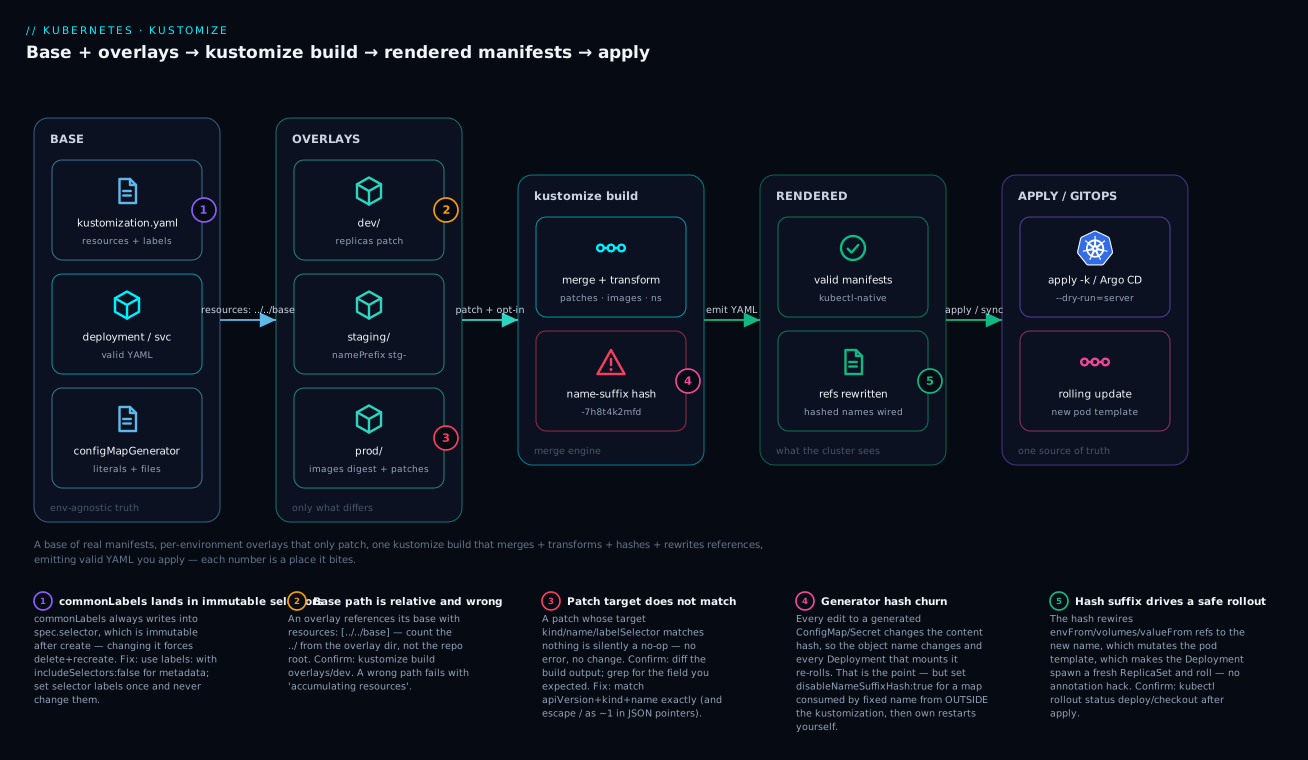
Walkthrough: the base holds real, environment-agnostic manifests plus generators; each overlay adds only its differences (dev bumps replicas, staging adds a namePrefix, prod pins an image digest and layers patches); a single kustomize build merges them, runs the transformers, hashes the generated ConfigMap/Secret and rewrites every reference to the hashed name, then emits plain valid YAML; that output is exactly what kubectl apply -k or Argo CD sends to the cluster. The five numbered markers are the places it most often bites — three of them (commonLabels landing in selectors, a patch that matches nothing, generator hash churn) map one-to-one to the Common beginner mistakes near the end of this lesson.
Helm templates YAML by stringifying it; Kustomize never does. It reads valid Kubernetes manifests, applies declarative transformations, and emits valid manifests. That difference matters: your base files always parse, kubectl understands them natively, and there is no Go templating language wedged between you and the API server. This article walks through structuring real multi-environment manifests with bases and overlays, choosing between strategic-merge and JSON 6902 patches, factoring opt-in features into Components, generating hashed ConfigMaps and Secrets that force safe rollouts, and wiring the whole thing into Argo CD.
Everything here assumes the modern Kustomize bundled with kubectl (v5.x of the standalone binary, kustomize.config.k8s.io/v1beta1 for kustomization.yaml and the stable Component kind). Avoid the deprecated bases, patchesStrategicMerge, and vars fields - all three are still parsed but emit warnings and vars is on its way out.
1. Why Kustomize: patch, don’t template
Two philosophies dominate Kubernetes configuration. Templating engines treat manifests as text and interpolate variables; Kustomize treats manifests as structured data and overlays patches. The practical consequences:
- Your base is real YAML. You can
kubectl apply -f base/deployment.yamldirectly during development. There is no{{ .Values.foo }}that only resolves at render time. - Diffs are semantic. A patch says “set
spec.replicasto 5 on this Deployment,” not “replace lines 23-24.” Refactoring whitespace in the base never breaks an overlay. - It ships with kubectl.
kubectl apply -k,kubectl kustomize, andkustomize buildall consume the samekustomization.yaml. No extra controller, no Tiller history.
The cost is that Kustomize is deliberately not a programming language. There are no loops, no conditionals, no arithmetic. If you need to render twenty near-identical objects from a list, Kustomize will frustrate you and Helm (or cdk8s) is the better tool. Where Kustomize wins is the common enterprise case: one application, a handful of environments, and a need to keep the diff between prod and dev small, reviewable, and obviously correct.
2. Structuring bases and per-environment overlays
A base holds the environment-agnostic truth. Overlays hold only what differs. The directory layout that has held up across many teams:
app/
  base/
    kustomization.yaml
    deployment.yaml
    service.yaml
    configmap.yaml
  overlays/
    dev/
      kustomization.yaml
      replicas-patch.yaml
    staging/
      kustomization.yaml
    prod/
      kustomization.yaml
      replicas-patch.yaml
      resources-patch.yaml
The base kustomization.yaml simply enumerates resources and any labels that apply everywhere:
# base/kustomization.yaml
apiVersion: kustomize.config.k8s.io/v1beta1
kind: Kustomization

resources:
  - deployment.yaml
  - service.yaml
  - configmap.yaml

labels:
  - pairs:
      app.kubernetes.io/name: checkout
      app.kubernetes.io/part-of: storefront
    includeSelectors: false
Use the
labelstransformer rather than the oldercommonLabels.commonLabelsalways writes into selectors, which is dangerous: a Deployment’sspec.selectoris immutable after creation, so changing a common label that lands in a selector forces you to delete and recreate the workload.labelswithincludeSelectors: falseadds metadata labels without touching selectors. Reserve selector labels for a small, stable set you set once.
Each overlay references the base by relative path and layers its differences:
# overlays/prod/kustomization.yaml
apiVersion: kustomize.config.k8s.io/v1beta1
kind: Kustomization

namespace: storefront-prod

resources:
  - ../../base

patches:
  - path: replicas-patch.yaml
  - path: resources-patch.yaml

images:
  - name: registry.internal/checkout
    newTag: "1.42.0"
Note resources: [../../base] - the modern field for referencing another kustomization is resources, not the deprecated bases. Promotion between environments becomes a one-line change to newTag, which is exactly the small reviewable diff you want flowing through pull requests.
One rule that trips up beginners: every path is relative to the kustomization.yaml that contains it, not to the repo root. From overlays/prod/kustomization.yaml, the base is two directories up and then into base - hence ../../base. Miscount the ../ and the build fails with an accumulating resources ... no such file or directory error rather than doing something subtly wrong, which is at least a fast failure.
3. Strategic merge patches vs JSON 6902 patches
Kustomize supports two patch dialects under the single patches field, and choosing the right one per change keeps overlays readable.
A strategic merge patch is a partial manifest. You write just enough of the object to identify it (apiVersion, kind, name) plus the fields you want to change, and Kustomize merges it into the matching resource using the same merge semantics kubectl apply uses:
# overlays/prod/resources-patch.yaml
apiVersion: apps/v1
kind: Deployment
metadata:
  name: checkout
spec:
  template:
    spec:
      containers:
        - name: checkout
          resources:
            requests:
              cpu: "500m"
              memory: 512Mi
            limits:
              memory: 1Gi
Strategic merge understands Kubernetes list semantics: because containers has a merge key of name, the container named checkout is matched and patched in place rather than replaced. This is why strategic merge is the default choice for the 80% case - it reads like the resource it modifies.
A JSON 6902 patch is an explicit list of operations (add, remove, replace, move, copy, test) against JSON paths. It shines where strategic merge is awkward: deleting a single field, surgically editing one element of a plain list, or modifying a CRD that has no registered strategic-merge metadata.
# overlays/prod/kustomization.yaml (excerpt)
patches:
  - target:
      kind: Deployment
      name: checkout
    patch: |-
      - op: add
        path: /spec/template/spec/topologySpreadConstraints
        value:
          - maxSkew: 1
            topologyKey: topology.kubernetes.io/zone
            whenUnsatisfiable: DoNotSchedule
            labelSelector:
              matchLabels:
                app.kubernetes.io/name: checkout
      - op: remove
        path: /spec/template/spec/containers/0/livenessProbe
The target selector lets one JSON 6902 patch hit many objects at once - by kind, name, namespace, labelSelector, or annotationSelector. That is impossible with a strategic merge patch, which can only target the single object it names.
| Concern | Strategic merge | JSON 6902 |
|---|---|---|
| Readability | High (looks like the resource) | Lower (op/path/value) |
| Deleting a field | Awkward (null directives) |
Trivial (op: remove) |
| Editing one list element | Needs merge key | Precise by index |
| Targeting many objects | No (one named object) | Yes (label/kind selector) |
| Works on arbitrary CRDs | Sometimes (needs schema) | Always (pure JSON path) |
A useful rule: reach for strategic merge first; switch to JSON 6902 the moment you need to delete something, touch an indexed list element, or fan a change across multiple resources.
4. Reusable Components for opt-in features
Overlays are linear - each one extends a base. But cross-cutting features (sidecar injection, a PodDisruptionBudget, mTLS annotations) are orthogonal: you want them in some environments regardless of which base. That is what Component is for. A Component is a kustomization with kind: Component that can add resources and patches, and is pulled in by an overlay rather than building on top of one.
# components/pdb/kustomization.yaml
apiVersion: kustomize.config.k8s.io/v1alpha1
kind: Component

resources:
  - pdb.yaml

patches:
  - target:
      kind: Deployment
      name: checkout
    patch: |-
      - op: add
        path: /spec/template/metadata/annotations/prometheus.io~1scrape
        value: "true"
# components/pdb/pdb.yaml
apiVersion: policy/v1
kind: PodDisruptionBudget
metadata:
  name: checkout
spec:
  minAvailable: 2
  selector:
    matchLabels:
      app.kubernetes.io/name: checkout
An overlay opts in with the components field. Because components apply in order, after the resources are loaded, staging and prod can share the same component without copy-paste:
# overlays/prod/kustomization.yaml (excerpt)
components:
  - ../../components/pdb
  - ../../components/otel-sidecar
The Component kind is stable in practice but still carries the v1alpha1 group version - that is the correct, current value and not a sign of instability. Note the ~1 in the JSON pointer above: it is the RFC 6901 escape for a literal /, required because prometheus.io/scrape contains a slash. Forgetting that escape is one of the most common JSON 6902 mistakes.
The mental distinction worth internalizing: an overlay answers “which environment am I?” (dev, staging, prod - you pick exactly one), while a component answers “which optional capability do I want?” (a PDB, a sidecar, mTLS - you opt into any subset). Overlays are a single inheritance chain; components are a mix-in list. When you catch yourself copying the same patch into both staging and prod, that duplication is the signal to lift it into a component.
5. configMapGenerator and secretGenerator with content hashes
Hard-coding a ConfigMap and then editing it is a rollout footgun: the Deployment’s pod template never changes, so pods keep running with stale config until something happens to restart them. Generators fix this. configMapGenerator and secretGenerator build the object and append a hash of its contents to the name, so any change to the data produces a new object name, which changes the pod template, which triggers a rolling update automatically.
# base/kustomization.yaml (excerpt)
configMapGenerator:
  - name: checkout-config
    literals:
      - LOG_LEVEL=info
    files:
      - app.properties=config/app.properties

secretGenerator:
  - name: checkout-secrets
    type: Opaque
    envs:
      - secrets/checkout.env

generatorOptions:
  disableNameSuffixHash: false
  labels:
    app.kubernetes.io/managed-by: kustomize
Build this and the generated name looks like checkout-config-7h8t4k2mfd. Crucially, Kustomize rewrites every reference to checkout-config (in envFrom, volumes, valueFrom) to the hashed name in the same build. You reference the logical name in your Deployment; Kustomize wires up the hashed name. This is the single most valuable Kustomize feature and the one templating engines cannot replicate without extra tooling.
Concretely, the base above renders like this - note that the Deployment already points at the hashed name without you writing it:
# representative output of `kustomize build base` (trimmed)
apiVersion: v1
kind: ConfigMap
metadata:
  name: checkout-config-7h8t4k2mfd      # logical name + content hash
  labels:
    app.kubernetes.io/managed-by: kustomize
data:
  LOG_LEVEL: info
  app.properties: |
    server.port=8080
---
apiVersion: apps/v1
kind: Deployment
metadata:
  name: checkout
spec:
  template:
    spec:
      containers:
        - name: checkout
          envFrom:
            - configMapRef:
                name: checkout-config-7h8t4k2mfd   # rewritten for you
You wrote checkout-config in the Deployment; the build wrote checkout-config-7h8t4k2mfd into both objects. Change one literal and both names change together in the next build - that lockstep is exactly what makes the rollout automatic and, just as important, atomic: config and the pods that read it are never briefly out of sync.
An overlay can patch a generator’s contents using behavior: merge (or replace), keyed by the logical name:
# overlays/prod/kustomization.yaml (excerpt)
configMapGenerator:
  - name: checkout-config
    behavior: merge
    literals:
      - LOG_LEVEL=warn
      - FEATURE_FAST_CHECKOUT=true
behavior: merge adds or overrides keys on top of the base generator; behavior: replace discards the base entirely. Set disableNameSuffixHash: true only for objects that genuinely must have a fixed name (for example a ConfigMap consumed by name from outside this kustomization) - and accept that you then own restarts manually.
For real secrets, do not commit plaintext .env files. The generator pattern composes cleanly with the Kustomize KSOPS plugin or with External Secrets Operator, where the generator references an already-decrypted file produced earlier in the pipeline.
6. Cross-cutting transformers: namePrefix, images, replacements
Beyond patches, Kustomize ships built-in transformers that rewrite fields across every resource in the build.
namePrefix/nameSuffixprepend or append to every resource name and fix up references (Service names in Ingress backends, ConfigMap names in volumes). Use these to namespace objects per environment when you cannot use distinct Kubernetes namespaces.namespacesetsmetadata.namespaceon every namespaced object at once.imagesoverrides imagename,newName,newTag, ordigestwithout patching each container by hand. Preferdigestin production for immutability.replicasoverrides the replica count of a named workload without writing a patch file at all - the cleanest way to say “prod runs 5, dev runs 1,” a per-environment difference that would otherwise be a one-field strategic-merge patch in every overlay.
# overlays/staging/kustomization.yaml
apiVersion: kustomize.config.k8s.io/v1beta1
kind: Kustomization

namePrefix: stg-
namespace: storefront-staging

resources:
  - ../../base

images:
  - name: registry.internal/checkout
    newName: registry.internal/checkout
    digest: sha256:6c3e... # pinned by CI on promotion
The replicas transformer matches by workload name and sets spec.replicas:
# overlays/prod/kustomization.yaml (excerpt)
replicas:
  - name: checkout
    count: 5
One interaction to keep in mind: if a HorizontalPodAutoscaler owns the replica count, let the HPA win. Set replicas only where there is no autoscaler on that workload, or every reconcile becomes a tug-of-war between your declared count and the controller’s desired count - see Deployments, ReplicaSets, rollouts & rollback for how the replica field drives the rollout.
7. Variable substitution with replacements
Older Kustomize had vars for copying a value from one object into another (for example, putting a generated Service name into a container env var). vars is deprecated and the documentation steers everyone to replacements, which is strictly more capable: it copies a value from a source field on one object to one or more target field paths on other objects.
# overlays/prod/kustomization.yaml (excerpt)
replacements:
  - source:
      kind: ConfigMap
      name: checkout-config
      fieldPath: metadata.name        # the hashed name
    targets:
      - select:
          kind: Deployment
          name: checkout
        fieldPaths:
          - spec.template.spec.containers.[name=checkout].env.[name=CONFIG_REF].value
The [name=checkout] syntax selects a list element by a field value, so you target the right container and env entry without relying on array indices. Because replacements runs after generators, the fieldPath: metadata.name source resolves to the hashed ConfigMap name - giving you the post-hash value that vars could never reliably reach. If you still have vars in a repo, migrating to replacements is the single highest-value cleanup you can make.
8. Integrating with Argo CD
Argo CD has first-class Kustomize support: point an Application at the overlay directory and Argo runs kustomize build for you, then syncs the output. No render step, no committed rendered manifests.
apiVersion: argoproj.io/v1alpha1
kind: Application
metadata:
  name: checkout-prod
  namespace: argocd
spec:
  project: storefront
  source:
    repoURL: https://git.internal/storefront/deploy.git
    targetRevision: main
    path: app/overlays/prod
  destination:
    server: https://kubernetes.default.svc
    namespace: storefront-prod
  syncPolicy:
    automated:
      prune: true
      selfHeal: true
Argo CD detects a Kustomize app by the presence of kustomization.yaml at path. You can override images directly from the Application spec under source.kustomize.images, which is how many teams wire their image promotion: a CI job patches the Argo CD Application (or a values file an ApplicationSet reads) rather than committing into the overlay. Either pattern works; pick one and be consistent so the source of truth for the running tag is never ambiguous. This is the same GitOps loop covered in Argo CD: app-of-apps & progressive delivery, just with Kustomize as the manifest source instead of Helm.
If your generators need a plugin (KSOPS, for example), the repo-server must run with --enable-helm/--enable-alpha-plugins style configuration and the plugin binary present. Stock generators (configMapGenerator, secretGenerator) need no special flags.
Verify
Never trust an overlay you have not built. The whole point of Kustomize is that build produces exactly what the cluster will see, so render and inspect it.
# Render the full prod overlay to stdout (kubectl-native, no extra binary).
kubectl kustomize app/overlays/prod

# Identical output via the standalone binary, which tracks newer features first.
kustomize build app/overlays/prod

# Server-side dry run: validate against the live API without applying.
kubectl apply -k app/overlays/prod --dry-run=server

# Confirm the generated names carry a content hash.
kustomize build app/overlays/prod | grep -E 'name: checkout-(config|secrets)-'

# Diff two environments to prove the overlay delta is small and intentional.
diff <(kustomize build app/overlays/staging) <(kustomize build app/overlays/prod)
For CI, fail the build on schema violations by piping into a validator:
kustomize build app/overlays/prod | kubeconform -strict -summary -
A green kubeconform plus a human-reviewed diff between overlays is the gate that catches the overwhelming majority of Kustomize mistakes before they reach a cluster.
Going deeper
The sections above cover the working vocabulary. This part is for when you need to understand why a build behaves as it does, extend Kustomize past the built-ins, and reason about it running in CI and Argo CD at scale.
How the generator hash actually drives a rollout
The hash suffix is not cosmetic - it is the entire rollout mechanism, and it is worth knowing the exact chain. When a generator emits checkout-config, Kustomize computes a hash over the object’s content (its data/binaryData, type, and relevant metadata), encodes it, and appends it: checkout-config-7h8t4k2mfd. Then a separate name-reference transformer walks the build looking for every field that is known to reference a ConfigMap or Secret - envFrom[].configMapRef.name, env[].valueFrom.secretKeyRef.name, volumes[].configMap.name, volumes[].projected.sources[], and more - and rewrites each to the hashed name.
The consequence flows automatically: because a volumes or envFrom entry inside spec.template now names a different object, the bytes of the Deployment’s pod template differ from what is running. The Deployment controller compares pod-template hashes, sees a change, creates a new ReplicaSet, and performs a normal rolling update - the same mechanism as bumping an image tag. No kubectl rollout restart, no configmap-checksum annotation with a timestamp, no restart controller. Confirm it with kubectl rollout status deploy/checkout right after apply.
One caveat that bites in production: Kustomize does not garbage-collect the old, now-unreferenced ConfigMap. Over months of config edits you accumulate orphaned checkout-config-* objects. Argo CD with prune: true removes them because they leave the desired state; with plain kubectl apply -k you need --prune with a label selector, or a periodic sweep. Left unmanaged, they are harmless but messy and can confuse audits.
Patch targets: hitting many objects at once
A patches[].target block is an AND of selectors: group, version, kind, name (a regex), namespace, labelSelector, and annotationSelector. Because name is a regex, name: ".*" combined with kind: Deployment fans one patch across every Deployment in the build - the idiomatic way to enforce, say, a securityContext or a revisionHistoryLimit fleet-wide from a single overlay.
# overlays/prod/kustomization.yaml (excerpt) — one patch, every storefront Deployment
patches:
  - target:
      group: apps
      version: v1
      kind: Deployment
      labelSelector: app.kubernetes.io/part-of=storefront
    patch: |-
      - op: replace
        path: /spec/revisionHistoryLimit
        value: 3
    options:
      allowNameChange: false
The options block matters when a patch changes an object’s identity: allowNameChange: true and allowKindChange: true tell Kustomize to accept a patch that rewrites metadata.name or kind (it refuses by default, on the assumption you made a mistake). You need these deliberately - for example when a patch renames a resource so a later transformer can pick it up.
replacements over vars, and why vars is going away
Section 7 introduced replacements; here is the why behind the deprecation. vars could only read from a small allow-list of fields, and it resolved at a fixed, early point in the pipeline - crucially before some transformers ran. That meant a var pointing at a generated ConfigMap’s name could capture the pre-hash name and silently miss the suffix, producing a Deployment that referenced an object that did not exist. replacements runs late, can read any fieldPath, and can write to many targets including specific list elements via the [name=...] selector. It is strictly more capable and has no such ordering trap. vars is deprecated and slated for removal, so treat any vars: you inherit as tech debt: the migration is mechanical (one replacements entry per var) and removes a whole class of “why is this referencing a name with no hash” bugs.
Remote bases and the krusty engine
resources and components entries do not have to be local paths - they can be Git URLs. Under the hood Kustomize’s build engine (the Go package is sigs.k8s.io/kustomize/api/krusty) uses HashiCorp go-getter to fetch them, so the same URL grammar applies:
# Pull a shared base straight from Git — ALWAYS pin ?ref=
apiVersion: kustomize.config.k8s.io/v1beta1
kind: Kustomization
resources:
  - github.com/stefanprodan/podinfo//kustomize?ref=6.5.4
  - ../../base
The // separates the repo from the sub-path, and ?ref= pins a tag, branch, or commit SHA. Always pin ?ref= to an immutable tag or commit. An unpinned remote base re-resolves to whatever HEAD is at build time, so your “unchanged” overlay can render differently tomorrow - a reproducibility hole and a genuine supply-chain risk, since whoever controls that upstream branch controls what you deploy. Treat a remote base exactly like a code dependency: pin it, review upgrades, and for anything security-sensitive vendor or mirror it into a repo you control.
CRD-aware strategic merge: openapi and configurations
Strategic merge needs a schema to know a list’s merge key - that is how it knows to match containers by name instead of replacing the whole list. Built-in Kubernetes types ship that schema inside Kustomize; your Custom Resources do not. So a strategic-merge patch against a CRD’s list field may replace the list instead of merging into it, which is a nasty surprise. Two fixes:
# Teach Kustomize your CRD's schema so strategic merge knows the merge keys
apiVersion: kustomize.config.k8s.io/v1beta1
kind: Kustomization
openapi:
  path: crd-openapi.json     # exported CRD OpenAPI v3 schema
resources:
  - myresource.yaml
The alternative is a configurations: file that declares merge keys and name-reference fields explicitly. Either way, the pragmatic escape hatch is JSON 6902: because it operates on pure JSON paths it needs no schema at all, so for one-off CRD edits it is usually less effort than wiring up an OpenAPI document.
Inflating Helm charts inside Kustomize (--enable-helm)
Kustomize can consume a Helm chart, run helm template on it, and then patch and transform the rendered output like any other resource - the sanctioned way to take a third-party chart and still apply your namespaces, labels, and patches:
apiVersion: kustomize.config.k8s.io/v1beta1
kind: Kustomization
helmCharts:
  - name: podinfo
    repo: https://stefanprodan.github.io/podinfo
    version: 6.5.4
    releaseName: podinfo
    namespace: demo
    valuesInline:
      replicaCount: 2
      ui:
        color: "#34577c"
This requires the flag: kustomize build --enable-helm (and helm on PATH). Caveats: it shells out to Helm, so it is slower and non-hermetic; the chart version must be pinned; and if you run this through Argo CD, the repo-server needs --enable-helm turned on in its config. It is powerful glue, but reach for it only when you genuinely need to layer your own edits onto someone else’s chart - not as a default.
Kustomize vs Helm: an honest comparison, and combining them
They solve overlapping problems from opposite ends, and the honest answer is “use the one that fits the job - and sometimes both.”
| Concern | Kustomize | Helm |
|---|---|---|
| Rendering model | Data overlay on real YAML | Go text/template over strings |
| Base validity | Always valid, kubectl apply-able |
Only valid after render |
| Logic (loops, conditionals) | None by design | Full |
| Packaging & versioning | None native | Charts, repos, semver |
| Distribution to third parties | Weak | Strong (chart registries) |
| Release history in cluster | None | Per-revision Secrets |
| Rollback | git revert + re-apply |
helm rollback |
| Ships with kubectl | Yes (-k) |
No |
| Best fit | Your own N environments | A shareable, parameterized app |
Because they overlap without being mutually exclusive, the combinations are common: helm template ./chart | kustomize build - (render the chart, then patch it), the helmCharts: inflation above (Kustomize drives Helm), or Argo CD’s built-in Kustomize-with-Helm support. A serviceable rule of thumb: Helm to distribute a parameterized package to strangers; Kustomize to manage your own organization’s small, fixed set of environments. If you are shipping a product other teams install, write a chart - see Helm fundamentals: charts, templates, values & releases. If you are running your own app across dev/staging/prod, overlays keep the diff honest.
kubectl -k vs the standalone binary: mind the version skew
The Kustomize embedded inside kubectl lags the standalone kustomize release, sometimes by several minor versions. The practical failure mode: a feature that renders cleanly under kustomize build (newer) errors under kubectl kustomize (older) with an “unknown field” or “not a valid” message - or a field the newer binary removed still works under the older embedded copy, so your manifests quietly depend on deprecated behavior. Add Argo CD’s own bundled Kustomize version to the mix and you have three engines that can disagree.
For anything beyond a trivial overlay, pin one standalone kustomize version in CI and render with it, then kubectl apply -f - the output rather than relying on whatever kubectl a given machine embeds. Check the versions in play with kustomize version and kubectl version, and match your CI’s kustomize to the version your Argo CD repo-server runs, so “it built in CI” and “it built in Argo” mean the same thing.
Enterprise scenario
A payments platform team ran a 30-service estate across dev, staging, and three regional production clusters, all on Kustomize. Their pain was image promotion: each promotion was a hand-edit to newTag in an overlay, and a tired engineer once promoted an unscanned tag straight to a prod overlay during an incident. Audit could not answer “which exact image is in eu-prod right now?” because the answer lived in whatever the last commit happened to say, sometimes a floating tag.
The constraint was hard: every production image had to be pinned by digest, set only by the CI pipeline after a passing supply-chain scan, with the running digest queryable from Git at any moment. Humans were not allowed to type tags into prod overlays.
They moved image selection out of the overlay entirely and into a per-cluster Argo CD Application, written by CI on a successful scan:
# Patched by the promotion pipeline, never by hand.
spec:
  source:
    path: app/overlays/prod
    kustomize:
      images:
        - registry.internal/checkout@sha256:6c3eb1f0a9...   # pinned digest
CI ran cosign verify against the digest, then patched the Application via argocd app set ... --kustomize-image. The overlay’s own images block was reduced to a placeholder for local builds. Result: prod was always pinned by digest, the running digest was a one-line kubectl get application away, and the human-typed-a-tag failure mode was structurally impossible. The Kustomize overlays stayed clean and identical across regions; the only per-cluster variation was the digest the pipeline injected.
Practice challenges
Work these top to bottom - each builds on the base from Section 2. If you have no cluster, every answer is verifiable with kustomize build alone (or kubectl kustomize); a cluster only matters for the apply/rollout steps. Spin up a free local one with kind if you want to watch the rollout.
1. (Beginner) Write a dev overlay. Put the app in namespace checkout-dev, run a single replica, and merge LOG_LEVEL=debug onto the base generator - without editing the base.
<details> <summary>Solution</summary>
# overlays/dev/kustomization.yaml
apiVersion: kustomize.config.k8s.io/v1beta1
kind: Kustomization
namespace: checkout-dev
resources:
  - ../../base
replicas:
  - name: checkout
    count: 1
configMapGenerator:
  - name: checkout-config
    behavior: merge
    literals:
      - LOG_LEVEL=debug
Verify with kustomize build overlays/dev. Why: replicas avoids a patch file for a one-field change, and behavior: merge overrides just LOG_LEVEL while keeping the base’s other keys.
</details>
2. (Beginner → Intermediate) Prove the hash drives the name. Show that changing a single generator literal changes the ConfigMap’s object name.
<details> <summary>Solution</summary>
kustomize build overlays/dev | grep 'name: checkout-config-'   # note the suffix
# edit LOG_LEVEL=debug -> LOG_LEVEL=trace in overlays/dev/kustomization.yaml
kustomize build overlays/dev | grep 'name: checkout-config-'   # suffix changed
Why: the suffix is a content hash. A different value means different content means a new name - which is precisely what forces the Deployment to roll. </details>
3. (Intermediate) Delete a field only in prod. Remove the container’s CPU limit (keep everything else) in the prod overlay, using the right patch dialect.
<details> <summary>Solution</summary>
# overlays/prod/kustomization.yaml (excerpt)
patches:
  - target:
      kind: Deployment
      name: checkout
    patch: |-
      - op: remove
        path: /spec/template/spec/containers/0/resources/limits/cpu
Why: deletions are JSON 6902’s home turf (op: remove); a strategic merge patch would need an awkward null directive. The 0 indexes the first container.
</details>
4. (Intermediate → Advanced) Factor a sidecar into a Component. Create a component that adds the sidecar.istio.io/inject: "true" annotation to the Deployment’s pod template, and opt staging and prod into it without copy-paste.
<details> <summary>Solution</summary>
# components/istio-inject/kustomization.yaml
apiVersion: kustomize.config.k8s.io/v1alpha1
kind: Component
patches:
  - target:
      kind: Deployment
      name: checkout
    patch: |-
      - op: add
        path: /spec/template/metadata/annotations/sidecar.istio.io~1inject
        value: "true"
# overlays/prod/kustomization.yaml AND overlays/staging/kustomization.yaml
components:
  - ../../components/istio-inject
Why: an orthogonal, opt-in capability belongs in a component, not duplicated in two overlays. Note the ~1 escaping the / in the annotation key.
</details>
5. (Advanced) Take image selection out of the overlay. Make the running prod image a digest set only by CI via the Argo CD Application, leaving the overlay’s images as a local-dev placeholder.
<details> <summary>Solution</summary>
# Argo CD Application — the promotion pipeline patches this, never a human
spec:
  source:
    path: app/overlays/prod
    kustomize:
      images:
        - registry.internal/checkout@sha256:6c3eb1f0a9...
Why: the running digest lives in one auditable place (kubectl get application), promotion is a pipeline action gated on a scan, and no one can hand-type a tag into prod. The overlay’s own images: stays a placeholder for kustomize build during local development.
</details>
Common beginner mistakes
These are misconceptions, not just symptoms - each pairs the wrong mental model with the right one.
-
“I edited the ConfigMap and nothing rolled out” — or the reverse, “every tiny edit re-rolls everything.” Both come from misreading the hash. The suffix is the feature: a data change is supposed to mint a new name and roll the Deployment. If nothing rolled, you almost certainly set
disableNameSuffixHash: true(or hand-wrote a fixed-name ConfigMap). If trivial edits roll too aggressively, that is correct behavior - reservedisableNameSuffixHash: trueonly for a map consumed by a fixed name from outside the kustomization, and then own the restart yourself. -
“My patch does nothing and there’s no error.” A patch whose
target(or strategic-mergename/kind/apiVersion) matches no object is a silent no-op - Kustomize does not warn you. The usual causes are a typo’d name, the wrongapiVersion, or a JSON pointer that forgot to escape/as~1. Right model: never assume a patch applied -diffthe build output orgrepfor the field you expected to change. -
“Changing a label recreated my whole Deployment.” You used
commonLabels, which writes intospec.selector, andspec.selectoris immutable after creation - so the apply forced a delete-and-recreate. Right model: uselabels:withincludeSelectors: falsefor metadata labels that should churn freely, and set the small set of selector labels exactly once, never changing them. -
“
kustomize buildsaysaccumulating resources ... no such file.” The base path is wrong.../../baseis counted from the overlay’s ownkustomization.yaml, not from the repo root. Right model: every path in a kustomization is relative to that file’s directory - open a terminal in the overlay directory and the../count becomes obvious. -
“It builds on my laptop but breaks in CI or Argo CD.” Version skew. Your
kubectl’s embedded Kustomize, the standalonekustomizebinary, and Argo CD’s bundled version can differ by minor releases and disagree about fields. Right model: pin onekustomizeversion, render with it everywhere, and match CI to the Argo repo-server’s version so a green build means the same thing in all three places.
Glossary
- Base — a directory of complete, valid, environment-agnostic manifests plus a
kustomization.yamlthat lists them. Applies on its own with no overlay. - Overlay — a
kustomization.yamlthat references a base viaresources:and layers per-environment differences (namespace, patches, images, replicas). You pick exactly one overlay per deploy. kustomization.yaml— the control file Kustomize reads. Declares resources, generators, transformers, patches, and components. Every path in it is relative to its own directory.- Transformer — a built-in that rewrites a field across all resources in the build:
namePrefix,nameSuffix,namespace,labels,images,replicas. - Strategic merge patch — a partial manifest merged into the matching object using Kubernetes list semantics (e.g. containers merged by
name). Reads like the resource it edits. - JSON 6902 patch — an explicit
op/path/valueoperation list (RFC 6902) against JSON paths. Best for deletions, indexed-list edits, multi-target patches, and schemaless CRDs. - Component — a
kind: Componentkustomization for an orthogonal, opt-in capability (a PDB, a sidecar) that multiple overlays pull in viacomponents:, avoiding copy-paste. - Generator —
configMapGenerator/secretGenerator: builds a ConfigMap or Secret from literals, files, or env files, and by default appends a content-hash suffix to its name. - Name-suffix hash — the
-7h8t4k2mfd-style suffix on a generated object’s name, derived from its content; changing content changes the name, which forces a rolling update. behavior— on a generator in an overlay:mergeoverrides/adds keys onto the base generator;replacediscards the base;create(default) makes a new one.- Name-reference transformer — the internal pass that rewrites references (
envFrom,volumes,valueFrom) to point at a generator’s hashed name so you never type the hash yourself. replacements— copies a value from one object’sfieldPathinto one or more target field paths on other objects; the modern, more capable successor tovars.vars— the deprecated value-substitution mechanism; resolves too early to see generated hashes. Migrate toreplacements.- Remote base — a
resources:/components:entry that is a Git URL (repo//path?ref=tag) fetched at build time. Always pin?ref=. helmCharts/--enable-helm— Kustomize’s ability to inflate a Helm chart (helm template) and then patch the output; needs the--enable-helmflag andhelmonPATH.includeSelectors— alabels:option;falseadds a label to metadata only, keeping it out of the immutablespec.selector.