In a nutshell
Backstage is an open-source developer portal — a single website where every engineer in a company finds their services, reads their docs, and kicks off routine tasks without filing a ticket. Spotify built it to tame its own microservice sprawl, open-sourced it in 2020, and donated it to the CNCF, where it is now an incubating project. Thousands of companies run it today as the front door to their internal platform.
Picture the sprawl a newcomer walks into: hundreds of services, dozens of repos, docs scattered across wikis nobody trusts, and every “who owns this?” answered in Slack. Backstage collapses that into one place. Think of it as three things fused together:
- a software catalog — a live directory of every service, API, and resource, and the team that owns each one (the phone book of your systems);
- TechDocs — technical docs written in Markdown next to the code and rendered inside the portal, so the docs move when the code moves (the docs shelf);
- scaffolder templates — a self-service “New +” button that creates a new service from a golden-path template, wired up correctly on day one (the app store).
Everything else — showing live Kubernetes status, CI/CD, security scans — is a plugin bolted onto that spine. Backstage is deliberately the portal over your platform, not the platform itself: it does not run your clusters, it gives humans one pane of glass onto them.
This particular lesson is a full production build, so it is advanced — but the mental model above is all a newcomer needs to follow along. Skim the concepts, then watch each build step turn one pillar on.
Level: Advanced · Time: ~40 min
After this you can:
- Explain the software catalog, TechDocs, and the scaffolder — Backstage’s three pillars — and what each one solves.
- Stand up a Backstage instance on Kubernetes with PostgreSQL, real SSO, and externalized secrets.
- Populate the catalog automatically from GitHub and model ownership with
catalog-info.yaml. - Wire the Kubernetes plugin to show live, multi-cluster workload status per service through a read-only ServiceAccount.
- Publish per-repo docs with TechDocs built in CI, not in the running pod.
- Reason about auth, RBAC, the permission framework, and where Backstage fits in a platform-engineering / IDP strategy.
A fintech platform team owns 180 microservices across four Kubernetes clusters, and the daily tax is real: a new engineer spends a week just learning which repo owns which service, on-call wakes up and cannot remember whether payments-ledger runs in prod-eu or prod-us, docs live in seventeen wikis that nobody updates, and every “who owns this?” question routes through a Slack channel and two senior engineers. The mandate from the head of platform is concrete: one portal where every service is catalogued with its owner, its live cluster status is one click away, and its docs are versioned next to its code. This guide builds exactly that — a production Backstage instance with the Kubernetes and TechDocs plugins — and wires it into the identity, secrets, CI/CD, security, and observability stack the team already runs, so the portal is something the security team signs and on-call actually trusts.
Prerequisites
- A Kubernetes cluster (1.27+) you can deploy to, with
kubectlcontext configured and an ingress controller (this guide assumes NGINX) plus cert-manager for TLS. - Node.js 20 LTS and Yarn 4 on your workstation; Docker or a compatible builder for the portal image.
- A PostgreSQL 14+ instance reachable from the cluster (managed RDS/Cloud SQL/Azure Database, or in-cluster for non-prod).
- An OIDC identity provider — this guide uses Okta as the workforce IdP (federated to Entra ID where Azure RBAC is also needed) for engineer SSO into the portal.
- A GitHub (or GitHub Enterprise) org for the catalog source and a CI system — GitHub Actions for build/test and Argo CD for GitOps delivery of the portal and per-cluster ServiceAccounts.
- An object store (S3/GCS/Azure Blob) for the TechDocs static-site bucket.
- A HashiCorp Vault instance for portal secrets (DB password, GitHub token, OIDC client secret).
Target topology
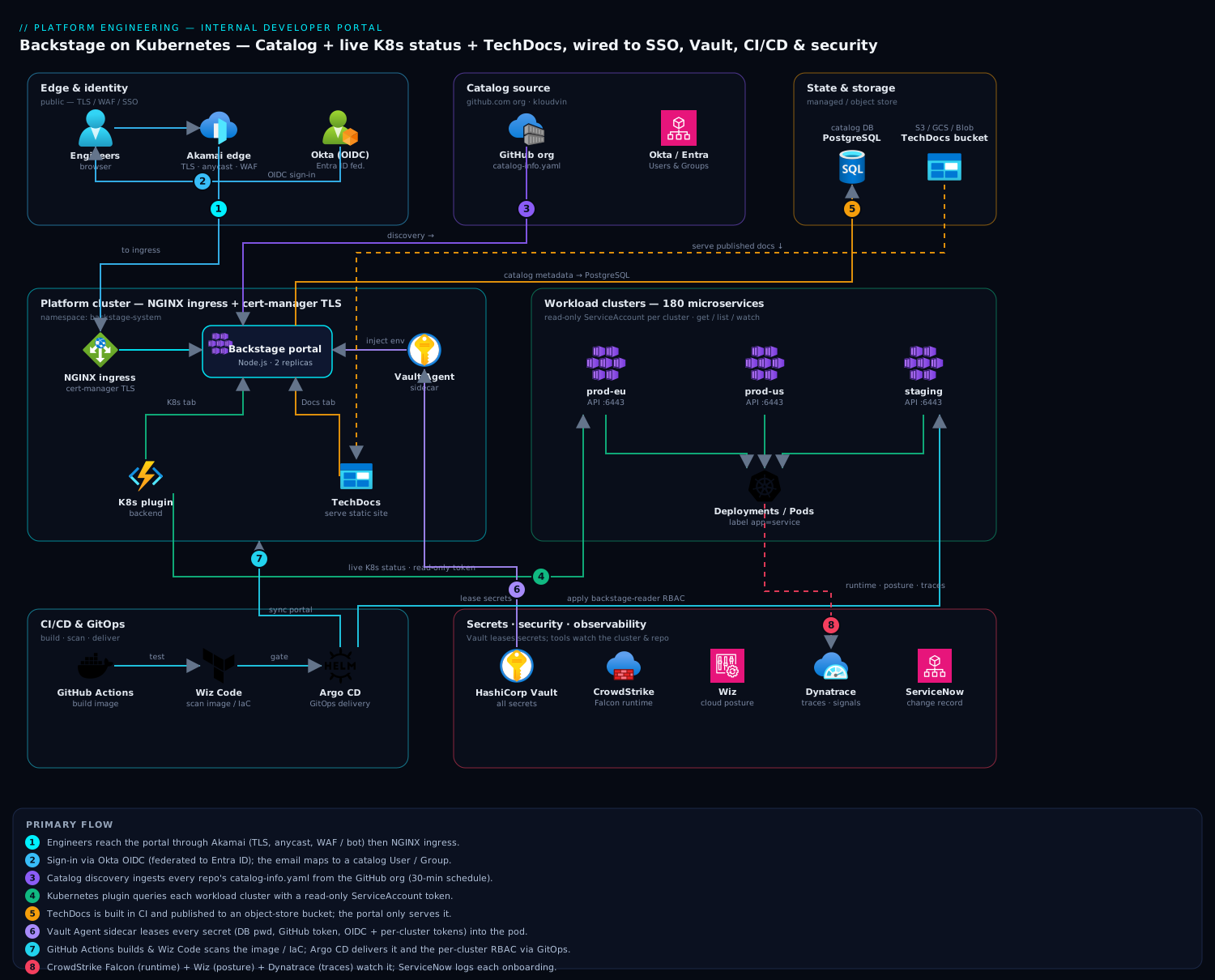
The portal is a single Node.js application (backend + bundled frontend) running on the platform cluster. Engineers reach it through Akamai at the edge for TLS termination, global anycast, and WAF/bot protection, then NGINX ingress. They authenticate via Okta (OIDC), and Backstage maps the Okta identity to a catalog User/Group so ownership and access are first-class. The catalog is populated from GitHub by discovering catalog-info.yaml files in every repo. The Kubernetes plugin in the backend talks to each of the four workload clusters through a read-only ServiceAccount token (held in Vault, injected at runtime) to render live pod, deployment, and ingress status per service. TechDocs builds each repo’s Markdown into a static site at CI time and publishes it to an object-store bucket that the portal serves. Secrets never sit in the pod spec — the Vault Agent sidecar leases them. CrowdStrike Falcon runs on the cluster nodes for runtime threat detection, Wiz (with Wiz Code) scans the cluster posture and the portal repo/IaC for misconfigurations, Dynatrace instruments the portal and clusters for tracing and golden signals, and ServiceNow receives a change ticket whenever a new component is onboarded to the catalog.
The build order below matters: stand up a bare portal first, prove auth, then add the catalog, then Kubernetes, then TechDocs. Adding plugins to a portal that is not yet authenticating is how you waste a day debugging the wrong layer.
The three pillars: catalog, docs, and golden paths
Before the build, hold the model of what Backstage actually is under the UI. Strip away the plugins and Backstage is a software catalog — a graph of entities describing your systems — plus a plugin runtime that renders views over that graph. Almost everything you do begins by getting an entity into the catalog.
The software catalog and catalog-info.yaml. Every “thing” in Backstage is an entity, declared in a small YAML file (conventionally catalog-info.yaml) that lives in the thing’s own repo. The kinds you meet first:
| Kind | What it models | Example |
|---|---|---|
Component |
A piece of software you build and run — a service, website, or library | payments-ledger |
API |
A network interface a Component exposes or consumes (OpenAPI, gRPC, GraphQL) | payments-api |
Resource |
Infrastructure a Component depends on — a database, bucket, or topic | ledger-postgres |
System |
A set of Components and Resources that work together | settlement |
Domain |
A business area that owns several Systems | payments |
Group / User |
Teams and people — the targets of owner |
payments-team |
Because ownership and grouping are entities, not free text, the portal can answer “what does the payments team own?” or “what depends on this database?” as graph queries rather than tribal knowledge. The catalog-info.yaml in Step 4 is a Component; a System that ties several together looks like this:
apiVersion: backstage.io/v1alpha1
kind: System
metadata:
  name: settlement
  description: Settlement and reconciliation platform
spec:
  owner: group:default/payments-team
  domain: payments
TechDocs = docs-as-code. TechDocs is not a wiki. Engineers write Markdown in a docs/ folder in the service repo, describe the nav in an mkdocs.yml, and TechDocs renders it as a versioned site inside the portal, on the same page as the service. Because the docs live with the code, they version, review, and ship with it — a runbook edit rides the same pull request as the fix it documents. That is the cure for the “seventeen stale wikis” problem, and it is why Step 6 matters as much as the code.
Scaffolder templates = golden paths. The scaffolder is the self-service half of Backstage, and the one this particular build does not turn on but every real platform eventually does. A software template (kind: Template) presents a form, then runs a series of actions — fetch a skeleton repo, render it with the user’s answers, push it to GitHub, register it in the catalog, open a CI pipeline. The result: an engineer clicks “Create”, answers three questions, and two minutes later has a new service that already has an owner, a catalog-info.yaml, docs, a pipeline, and guardrails — the golden path, paved. We cover its anatomy in “Going deeper”.
The Kubernetes plugin. This is the plugin the lesson features. It has two halves — a frontend tab on each entity page and a backend that holds cluster credentials and queries the API servers — and it maps a catalog Component to its live workloads by a label selector (Step 5). It is a pure read surface: it never mutates a cluster.
Plugins and the backend. Backstage ships a thin core; features arrive as plugins. Frontend plugins are React; backend plugins run in the Node backend. Modern Backstage wires the backend with the new backend system — the one-liner backend.add(import('@backstage/plugin-kubernetes-backend')) you will use in Step 5 — which replaced a verbose per-plugin wiring style and is the default create-app produces today. Grasping that a “plugin” has a frontend part, a backend part, or both explains why installs so often touch two package.json files.
1. Scaffold and run the portal locally
Create the app from the official template, then run it once locally against SQLite to confirm the toolchain works before touching the cluster.
# Scaffold (pins the current Backstage release line)
npx @backstage/create-app@latest --path kloudvin-portal
cd kloudvin-portal

# Install and run both backend + frontend
yarn install --immutable
yarn dev
yarn dev serves the frontend on http://localhost:3000 and the backend on :7007. You should see the default catalog with the example components. Stop it (Ctrl-C) once it renders — local SQLite and the guest identity provider are for the smoke test only; everything below moves to PostgreSQL and real SSO.
Pin your versions so CI is reproducible:
yarn backstage-cli versions:bump # aligns all @backstage/* packages to one release
2. Wire PostgreSQL and externalize config
Backstage reads app-config.yaml (base) and app-config.production.yaml (overlay). Move the database to PostgreSQL and pull every secret from the environment so Vault can supply it. Edit app-config.production.yaml:
app:
  baseUrl: https://portal.kloudvin.io
backend:
  baseUrl: https://portal.kloudvin.io
  listen:
    port: 7007
  database:
    client: pg
    connection:
      host: ${POSTGRES_HOST}
      port: 5432
      user: ${POSTGRES_USER}
      password: ${POSTGRES_PASSWORD}
      ssl:
        rejectUnauthorized: true
Note the ${...} indirection — Backstage substitutes environment variables at boot. Those variables are populated by the Vault Agent sidecar (Step 8), never hard-coded. Add the pg driver:
yarn --cwd packages/backend add pg
3. Configure Okta SSO (OIDC)
Replace the guest provider with real SSO. In Okta, create an OIDC web app with redirect URI https://portal.kloudvin.io/api/auth/okta/handler/frame, and capture the client ID/secret. Where the org also needs Azure RBAC, Okta is federated to Entra ID, but the portal itself trusts Okta as the OIDC issuer. Add the resolver to app-config.production.yaml:
auth:
  environment: production
  providers:
    okta:
      production:
        clientId: ${OKTA_CLIENT_ID}
        clientSecret: ${OKTA_CLIENT_SECRET}
        audience: ${OKTA_AUDIENCE}        # https://<your-org>.okta.com
        signIn:
          resolvers:
            - resolver: emailMatchingUserEntityProfileEmail
The resolver maps the authenticated Okta email to a catalog User entity, which is what makes ownership and access checks resolve to a real person. Add the sign-in page wiring in packages/app/src/App.tsx:
import { oktaAuthApiRef } from '@backstage/core-plugin-api';

const app = createApp({
  components: {
    SignInPage: props => (
      <SignInPage {...props} auto provider={{
        id: 'okta-auth-provider',
        title: 'Okta',
        message: 'Sign in with your KloudVin Okta account',
        apiRef: oktaAuthApiRef,
      }} />
    ),
  },
  // ...
});
4. Populate the service catalog from GitHub
The catalog is the spine of the portal. Use discovery so any repo containing a catalog-info.yaml is ingested automatically — no central list to maintain. Add a GitHub integration and a discovery processor to app-config.production.yaml:
integrations:
  github:
    - host: github.com
      token: ${GITHUB_TOKEN}            # read-only PAT or GitHub App, from Vault

catalog:
  providers:
    github:
      kloudvinOrg:
        organization: 'kloudvin'
        catalogPath: '/catalog-info.yaml'
        filters:
          branch: 'main'
        schedule:
          frequency: { minutes: 30 }
          timeout: { minutes: 3 }
  rules:
    - allow: [Component, System, API, Resource, Location, User, Group]
A service’s catalog-info.yaml (committed to its own repo) declares identity, owner, and — critically for Step 5 — the label that links it to its Kubernetes workloads:
apiVersion: backstage.io/v1alpha1
kind: Component
metadata:
  name: payments-ledger
  description: Double-entry ledger for settlement
  annotations:
    github.com/project-slug: kloudvin/payments-ledger
    backstage.io/kubernetes-label-selector: 'app=payments-ledger'
    backstage.io/techdocs-ref: dir:.
spec:
  type: service
  lifecycle: production
  owner: group:default/payments-team
  system: settlement
Group and user entities can be ingested from Okta/Entra via the org plugin, or committed as YAML; either way ownership resolves to a real team, which is what kills the “who owns this?” Slack thread.
5. Install and wire the Kubernetes plugin
This is the plugin that puts live cluster status next to each service. It has two halves: a backend that holds cluster credentials and queries the API servers, and a frontend tab on the entity page.
Install the packages:
yarn --cwd packages/backend add @backstage/plugin-kubernetes-backend
yarn --cwd packages/app add @backstage/plugin-kubernetes
Register the backend in packages/backend/src/index.ts:
backend.add(import('@backstage/plugin-kubernetes-backend'));
Add the entity tab in packages/app/src/components/catalog/EntityPage.tsx:
import { EntityKubernetesContent } from '@backstage/plugin-kubernetes';

// inside the service entity layout:
<EntityLayout.Route path="/kubernetes" title="Kubernetes">
  <EntityKubernetesContent refreshIntervalMs={30000} />
</EntityLayout.Route>
Now declare the four clusters in app-config.production.yaml. Use serviceAccount auth with a read-only token per cluster — Backstage must never hold write credentials:
kubernetes:
  serviceLocatorMethod:
    type: multiTenant
  clusterLocatorMethods:
    - type: config
      clusters:
        - name: prod-eu
          url: https://prod-eu.k8s.kloudvin.io:6443
          authProvider: serviceAccount
          serviceAccountToken: ${K8S_TOKEN_PROD_EU}
          caData: ${K8S_CA_PROD_EU}
          skipTLSVerify: false
        - name: prod-us
          url: https://prod-us.k8s.kloudvin.io:6443
          authProvider: serviceAccount
          serviceAccountToken: ${K8S_TOKEN_PROD_US}
          caData: ${K8S_CA_PROD_US}
        - name: staging
          url: https://staging.k8s.kloudvin.io:6443
          authProvider: serviceAccount
          serviceAccountToken: ${K8S_TOKEN_STAGING}
          caData: ${K8S_CA_STAGING}
Create the read-only ServiceAccount on each workload cluster. Apply this with Argo CD so the RBAC is GitOps-managed and identical across clusters:
# backstage-reader.yaml — applied to every workload cluster
apiVersion: v1
kind: ServiceAccount
metadata:
  name: backstage-reader
  namespace: backstage-system
---
apiVersion: rbac.authorization.k8s.io/v1
kind: ClusterRole
metadata:
  name: backstage-reader
rules:
  - apiGroups: ['']
    resources: ['pods', 'services', 'configmaps', 'limitranges']
    verbs: ['get', 'list', 'watch']
  - apiGroups: ['apps']
    resources: ['deployments', 'replicasets', 'statefulsets', 'daemonsets']
    verbs: ['get', 'list', 'watch']
  - apiGroups: ['networking.k8s.io']
    resources: ['ingresses']
    verbs: ['get', 'list', 'watch']
  - apiGroups: ['autoscaling']
    resources: ['horizontalpodautoscalers']
    verbs: ['get', 'list', 'watch']
---
apiVersion: rbac.authorization.k8s.io/v1
kind: ClusterRoleBinding
metadata:
  name: backstage-reader
subjects:
  - kind: ServiceAccount
    name: backstage-reader
    namespace: backstage-system
roleRef:
  kind: ClusterRole
  name: backstage-reader
  apiGroup: rbac.authorization.k8s.io
---
apiVersion: v1
kind: Secret
metadata:
  name: backstage-reader-token
  namespace: backstage-system
  annotations:
    kubernetes.io/service-account.name: backstage-reader
type: kubernetes.io/service-account-token
Pull each cluster’s token and CA into Vault — never into the repo:
TOKEN=$(kubectl -n backstage-system get secret backstage-reader-token \
  -o jsonpath='{.data.token}' | base64 -d)
CA=$(kubectl -n backstage-system get secret backstage-reader-token \
  -o jsonpath='{.data.ca\.crt}')   # already base64 for caData

vault kv put secret/backstage/k8s/prod-eu token="$TOKEN" ca="$CA"
The label selector you set in Step 4 (app=payments-ledger) is how the plugin maps a catalog component to its workloads. Make sure your Deployments and Pods actually carry that label, or the Kubernetes tab renders empty — the single most common “it doesn’t work” report. (Labels and selectors are worth a firm grip; see Kubernetes Labels, Selectors, Annotations & Field Selectors.) The read-only ClusterRole above is least-privilege RBAC in miniature — the full design pattern is in Kubernetes RBAC & Service Accounts.
6. Enable TechDocs with an external builder
TechDocs turns each repo’s Markdown into a versioned docs site shown inside the portal. The mistake to avoid is the default local builder, which compiles docs inside the running portal pod — slow, and it needs Python/MkDocs in your runtime image. Use the external generator: CI builds the static site and publishes it to a bucket; the portal only serves it. Configure app-config.production.yaml:
techdocs:
  builder: 'external'          # CI builds; portal never compiles at runtime
  generator:
    runIn: 'local'
  publisher:
    type: 'awsS3'              # or googleGcs / azureBlobStorage
    awsS3:
      bucketName: 'kloudvin-techdocs'
      region: 'eu-west-1'
Each repo needs an mkdocs.yml at its root and docs under docs/:
# mkdocs.yml
site_name: 'payments-ledger'
plugins:
  - techdocs-core
nav:
  - Home: index.md
  - Runbook: runbook.md
  - API: api.md
The backstage.io/techdocs-ref: dir:. annotation from Step 4 tells the portal where to find the published site for that component. Engineers now read a service’s runbook in the same tab as its live cluster status — docs versioned with code, the seventeen-wiki problem solved.
7. Build the portal image and push via CI
Build the production image. The standard backend Dockerfile bundles the compiled frontend:
yarn build:backend                          # compiles backend + bundles frontend
docker build . -f packages/backend/Dockerfile --tag kloudvin/portal:$(git rev-parse --short HEAD)
In GitHub Actions, run lint/test/build, then have Wiz Code scan the image and IaC for vulnerabilities and misconfigurations before it can be promoted — a failing scan blocks the merge:
# .github/workflows/portal.yml
name: portal
on: { push: { branches: [main] } }
jobs:
  build:
    runs-on: ubuntu-latest
    steps:
      - uses: actions/checkout@v4
      - uses: actions/setup-node@v4
        with: { node-version: '20' }
      - run: yarn install --immutable
      - run: yarn tsc && yarn lint:all && yarn test:all
      - run: yarn build:backend
      - name: Wiz Code IaC + image scan
        run: wizcli iac scan --path ./ && wizcli docker scan --image kloudvin/portal:${{ github.sha }}
      - name: Build & push
        run: |
          docker build . -f packages/backend/Dockerfile -t kloudvin/portal:${{ github.sha }}
          docker push kloudvin/portal:${{ github.sha }}
The TechDocs build also lives in CI — each service repo runs npx @techdocs/cli generate && npx @techdocs/cli publish --publisher-type awsS3 --storage-name kloudvin-techdocs --entity <ns/kind/name> so docs publish on every merge.
8. Deploy to the cluster with Vault-injected secrets
Deliver the portal with Argo CD pointing at a Helm chart or plain manifests in Git. Secrets come from Vault via the agent injector — the Deployment carries annotations, not credentials:
apiVersion: apps/v1
kind: Deployment
metadata:
  name: backstage-portal
  namespace: backstage-system
spec:
  replicas: 2
  selector: { matchLabels: { app: backstage-portal } }
  template:
    metadata:
      labels: { app: backstage-portal }
      annotations:
        vault.hashicorp.com/agent-inject: 'true'
        vault.hashicorp.com/role: 'backstage'
        vault.hashicorp.com/agent-inject-secret-env: 'secret/data/backstage/app'
        vault.hashicorp.com/agent-inject-template-env: |
          {{- with secret "secret/data/backstage/app" -}}
          export POSTGRES_PASSWORD="{{ .Data.data.pg_password }}"
          export GITHUB_TOKEN="{{ .Data.data.github_token }}"
          export OKTA_CLIENT_SECRET="{{ .Data.data.okta_secret }}"
          {{- end }}
    spec:
      serviceAccountName: backstage
      containers:
        - name: backstage
          image: kloudvin/portal:GITSHA
          args: ['node', 'packages/backend', '--config', 'app-config.yaml', '--config', 'app-config.production.yaml']
          command: ['/bin/sh', '-c', '. /vault/secrets/env && exec node packages/backend ...']
          ports: [{ containerPort: 7007 }]
Expose it behind NGINX ingress with cert-manager TLS, and point Akamai at the ingress as origin:
apiVersion: networking.k8s.io/v1
kind: Ingress
metadata:
  name: backstage-portal
  namespace: backstage-system
  annotations:
    cert-manager.io/cluster-issuer: letsencrypt-prod
    nginx.ingress.kubernetes.io/proxy-body-size: '10m'
spec:
  ingressClassName: nginx
  tls:
    - hosts: [portal.kloudvin.io]
      secretName: portal-tls
  rules:
    - host: portal.kloudvin.io
      http:
        paths:
          - path: /
            pathType: Prefix
            backend: { service: { name: backstage-portal, port: { number: 7007 } } }
When a new component is onboarded to the catalog, fire a ServiceNow change record from the onboarding pipeline so platform changes have an auditable trail, and let Dynatrace OneAgent (already on the node pool) trace the portal’s requests and surface golden signals. Vault-injected secrets like these are covered end to end in Configure Vault JWT/OIDC and Kubernetes Auth for Secretless Workload Access.
Validation
Confirm each layer end to end, in order:
# 1. Pod is healthy and serving
kubectl -n backstage-system get pods -l app=backstage-portal
kubectl -n backstage-system port-forward deploy/backstage-portal 7007:7007 &
curl -fsS http://localhost:7007/healthcheck && echo OK

# 2. Catalog discovery ingested real services (not the examples)
curl -fsS http://localhost:7007/api/catalog/entities?filter=kind=component \
  -H "Authorization: Bearer $TOKEN" | jq '.[].metadata.name' | head

# 3. Kubernetes plugin can reach a cluster
kubectl --token="$TOKEN_PROD_EU" --server=https://prod-eu.k8s.kloudvin.io:6443 \
  --certificate-authority=<(echo "$CA" | base64 -d) auth can-i list pods -A   # -> yes
Then in the browser: sign in via Okta, open payments-ledger, confirm the Kubernetes tab shows live pods/deployments from prod-eu, and the Docs tab renders the published runbook. If the Kubernetes tab is empty, the label selector and the workload labels disagree (see Step 5); if Docs 404s, the CI publish step did not run for that entity.
Rollback / teardown
Because delivery is GitOps and secrets are external, rollback is clean:
# Roll the portal back to the previous known-good image via Argo CD
argocd app rollback backstage-portal       # pick the prior revision
# or pin the manifest back and let Argo sync

# Full teardown of the portal (clusters/services untouched)
kubectl delete -f manifests/backstage-portal/        # Deployment, Service, Ingress
kubectl -n backstage-system delete secret portal-tls

# Remove the read-only reader from EACH workload cluster
kubectl delete -f backstage-reader.yaml --context prod-eu
kubectl delete -f backstage-reader.yaml --context prod-us
kubectl delete -f backstage-reader.yaml --context staging

# Revoke the Vault secrets the portal used
vault kv metadata delete secret/backstage/app
vault kv metadata delete secret/backstage/k8s/prod-eu
The PostgreSQL database and the TechDocs bucket persist; drop them explicitly only if you are decommissioning, since they hold catalog history and built docs.
Common pitfalls
- Local TechDocs builder in production. It compiles docs inside the portal pod and needs MkDocs/Python in your image — switch to the external builder (Step 6) or page load times collapse.
- Write-capable cluster credentials. The reader ServiceAccount must be
get/list/watchonly. A portal is a read surface; never give it a token that can mutate a cluster. - Label selector mismatch.
backstage.io/kubernetes-label-selectormust match labels your workloads actually carry. Empty Kubernetes tabs are almost always this. - Secrets in
app-config.yaml. Everything sensitive uses${ENV}and comes from Vault. A committed token is a leak — andgitremembers, so rotate immediately if it ever happens. - Forgetting
custom CA/caData. Self-signed or private-CA API servers fail TLS silently; supplycaDatarather than settingskipTLSVerify: true. - Catalog discovery rate limits. A 30-minute schedule across a large org can hit GitHub API limits; use a GitHub App (higher limit) rather than a PAT for big orgs.
Security notes
Identity is the gate: engineers reach the portal only through Okta SSO (federated to Entra ID where Azure RBAC is also in play), so there is no anonymous access and group claims drive what each team sees. The portal holds only read-only Kubernetes credentials, scoped by the ClusterRole above, so a compromised portal cannot change a cluster. Every secret — DB password, GitHub token, OIDC client secret, per-cluster tokens — lives in HashiCorp Vault and is leased into the pod by the Vault Agent sidecar, never written to a manifest or image. Wiz continuously scans the cluster’s posture and flags drift (a public service, an over-broad RBAC binding), while Wiz Code gates the portal repo and IaC in CI so a misconfiguration is caught before merge. CrowdStrike Falcon sensors on the node pool give runtime threat detection on the portal and its neighbors, feeding the SOC. Terminate TLS and apply WAF/bot rules at Akamai so the public edge is hardened before traffic reaches NGINX.
Cost notes
Backstage itself is open source; the spend is the infrastructure under it. The portal is light — two small replicas (≈0.5 vCPU / 1 GiB each) comfortably serve a few thousand engineers, so right-size the requests rather than over-provisioning. PostgreSQL is the one stateful dependency: a small managed instance (single-AZ for non-prod, multi-AZ for prod) is enough; the catalog is metadata, not bulk data. TechDocs storage is cheap static HTML in an object-store bucket — pennies — but watch egress if docs are heavily read; front the bucket with the CDN you already pay for. Keep the Kubernetes plugin’s refresh interval sane (30s, as configured) so you are not hammering four API servers from every open browser tab. The real return is not a line on the cloud bill — it is the week of onboarding and the nightly “where does this run?” pages you stop paying for.
Going deeper
The eight steps stand up a working portal. This section is for the reader who now owns it — the internals, the extension seams, and the failure modes that only show at scale.
The catalog processing loop: providers, processors, and relations
The catalog is not a database you write to; it is a processing loop you feed sources into. Two roles do the work. An entity provider is the source — it discovers entities and pushes their locations into the catalog on a schedule. GithubEntityProvider (the catalog.providers.github block in Step 4) is one; GithubOrgEntityProvider ingests teams and users as Group/User. A processor then runs over each entity in the loop: it fetches the location, parses the YAML, validates it against the entity schema, resolves placeholders, and emits two things — more locations to process, and relations between entities.
Those relations are the payoff. From the catalog-info.yaml fields, the loop derives a graph:
spec.owner→ownedBy/ownerOf(Component ↔ Group)spec.system→partOf/hasPart(Component ↔ System, System ↔ Domain)spec.providesApis/consumesApis→providesApi/apiProvidedBy(Component ↔ API)spec.dependsOn→dependsOn/dependencyOf(Component ↔ Resource)
The dependency graphs and “owned by” filters in the UI are queries over that graph — which is why modelling System, API, and Resource (not just Component) is what turns a flat list into a portal. One consequence to internalise: the catalog is eventually consistent. Edit a catalog-info.yaml and the change lands on the next processing pass (the 30-minute schedule in Step 4), not on save — so “I changed the owner and the portal still shows the old one” is usually just the loop not having run yet.
The TechDocs pipeline, end to end
TechDocs is four stages: generator → build → storage → serve. With builder: external, CI does the first three. techdocs-cli generate invokes MkDocs with the techdocs-core theme to turn docs/*.md into a static bundle — HTML, a techdocs_metadata.json, and a search index. techdocs-cli publish uploads that bundle to the object store under an entity-namespaced path (<namespace>/<kind>/<name>/). At read time the portal’s TechDocs backend fetches the pre-built bundle from the bucket and serves it — no MkDocs, no Python in the portal image, no build latency on the request.
Contrast builder: local, which runs generate inside the portal pod the first time a doc is opened: fine on a laptop, a latency-and-dependency trap in production. Two annotations glue it together — backstage.io/techdocs-ref tells the backend where the source is (usually dir:.), and the publisher path tells it where the built site landed. A Docs tab that 404s almost always means the publish step never ran for that entity, not that the portal is broken.
Scaffolder actions and custom golden paths
A software template is a form plus a pipeline. Here is the anatomy the build skipped:
apiVersion: scaffolder.backstage.io/v1beta3
kind: Template
metadata:
  name: golden-path-service
  title: Golden Path Microservice
  description: Create a Node service with owner, docs, CI, and a catalog entry
  tags:
    - recommended
    - node
spec:
  owner: group:default/platform-team
  type: service
  parameters:
    - title: Service details
      required:
        - name
        - owner
      properties:
        name:
          title: Name
          type: string
          description: Unique service name
        owner:
          title: Owner
          type: string
          ui:field: OwnerPicker
          ui:options:
            catalogFilter:
              kind: Group
  steps:
    - id: fetch
      name: Fetch skeleton
      action: fetch:template
      input:
        url: ./skeleton
        values:
          name: ${{ parameters.name }}
          owner: ${{ parameters.owner }}
    - id: publish
      name: Publish to GitHub
      action: publish:github
      input:
        repoUrl: github.com?owner=kloudvin&repo=${{ parameters.name }}
        defaultBranch: main
    - id: register
      name: Register in catalog
      action: catalog:register
      input:
        repoContentsUrl: ${{ steps.publish.output.repoContentsUrl }}
        catalogInfoPath: /catalog-info.yaml
  output:
    links:
      - title: Repository
        url: ${{ steps.publish.output.remoteUrl }}
      - title: Open in catalog
        icon: catalog
        entityRef: ${{ steps.register.output.entityRef }}
parameters is a JSON-schema form, enriched by field extensions like OwnerPicker (backed by real Group entities) and RepoUrlPicker. steps run built-in actions — fetch:template renders a skeleton with the user’s answers, publish:github creates the repo, catalog:register wires it into the catalog. You can register custom actions (a backend module that, say, opens a Jira ticket or provisions a database) to extend the pipeline. This is where “self-service platform” becomes real: the template encodes the golden path so every new service is born compliant — an owner, a catalog-info.yaml, docs, and a pipeline, on commit one. The guardrail rule: a template with no required owner and no downstream policy just industrialises non-compliant services. Pair it with an owner picker backed by real Groups and with admission policy (Kyverno/Gatekeeper) on the target cluster so the generated workload cannot skip the rules.
Plugin architecture and the new backend system
A Backstage plugin can have a frontend part (React — createPlugin, routable extensions, the EntityLayout.Route you added in Step 5), a backend part (Node), or both. Modern backends use the new backend system: createBackend() plus backend.add(import('...')), with @backstage/backend-defaults supplying wiring and dependency injection via service references. It replaced the old style — a hand-written PluginEnvironment and a createRouter per plugin — which was boilerplate-heavy and hard to share. The new system is the default create-app emits today, and the old one is deprecated; a lot of “this plugin’s install docs don’t match my repo” confusion is a plugin still documenting the legacy wiring.
The important extension seam for a platform team is the backend module: a package that adds to an existing plugin — a new auth provider, a custom catalog processor, an extra scaffolder action — without forking it. That is how you extend the catalog or scaffolder to fit your org and still take upstream upgrades.
Auth, identity, and the permission framework
Auth is two moves. An auth provider performs the sign-in (Okta, in Step 3). A sign-in resolver then maps that external identity to a catalog User, producing a Backstage identity carrying ownershipEntityRefs — the user plus every Group they belong to. That identity is what makes “owned by me” mean something, and it is the input to the permission framework.
Core Backstage ships the framework but no policy: by default everything is allowed. You supply a PermissionPolicy whose handle() returns a decision — ALLOW, DENY, or a conditional decision evaluated against the entity:
// packages/backend — a permission policy module (representative)
class KloudvinPolicy implements PermissionPolicy {
  async handle(request: PolicyQuery, user?: BackstageIdentityResponse): Promise<PolicyDecision> {
    if (isPermission(request.permission, catalogEntityDeletePermission)) {
      return createCatalogConditionalDecision(request.permission, {
        rule: 'IS_ENTITY_OWNER',
        resourceType: 'catalog-entity',
        params: { claims: user?.identity.ownershipEntityRefs ?? [] },
      });
    }
    return { result: AuthorizeResult.ALLOW };
  }
}
That policy says “anyone may read, but only an owner may delete.” For teams that want roles managed in a UI rather than in code, the community RBAC plugin (@backstage-community/plugin-rbac, from the Red Hat Developer Hub lineage) layers role-and-permission administration on top of the framework. The takeaway: allow-all is fine for a pilot, but the moment the scaffolder can create infrastructure, an explicit policy is not optional.
CI/CD, GitOps, and multi-cluster Kubernetes
The Kubernetes plugin fronts many clusters from one portal: serviceLocatorMethod: multiTenant fans a query across all configured clusters, and clusterLocatorMethods lists them. This build uses type: config with per-cluster serviceAccount tokens; other locators (catalog, gke) and auth providers (aws, google, azure, oidc) let the plugin borrow cloud-native identity instead of static tokens — worth it once you are past a handful of clusters.
GitOps is what keeps the moving parts honest. The reader ServiceAccount (Step 5) and the portal Deployment (Step 8) are both delivered by Argo CD or by Flux, so the reader RBAC is byte-identical across all four clusters and the portal image rolls forward and back declaratively. And the portal closes the loop on delivery itself: add the GitHub Actions, Argo CD, or Flux plugins and each entity page shows that service’s pipeline runs and sync status, so “is my change live?” is answered in the same pane as “who owns this?”.
Where Backstage sits: platform engineering and the IDP
Step back to the strategy. An Internal Developer Platform (IDP) is the whole stack a platform team runs so product teams can self-serve — clusters, pipelines, secret management, policy, observability. Backstage is the portal: the UI/UX layer over that platform, where golden paths are discovered and triggered. It is the front door, not the building. The classic error (its own entry in Common beginner mistakes) is conflating the two. Backstage does not deploy your app — Argo CD or Flux does. It does not hold your secrets — Vault does. It does not enforce policy — Kyverno or Gatekeeper does. What Backstage adds is discoverability and self-service: it makes the platform’s capabilities legible and one click away. Spotify frames the goal as golden paths; Team Topologies frames it as reducing teams’ cognitive load. The portal is where a paved path is advertised and walked.
Scaling and hosting
The backend is largely stateless, which makes PostgreSQL the state — it holds the catalog graph, TechDocs metadata, scaffolder task history, and sessions. Scale the frontend/backend horizontally, but know that the catalog processing loop and the task scheduler coordinate through the database, so extra replicas share the work rather than duplicating it; size Postgres, not just the pods. For a large org, prefer a GitHub App over a PAT for the higher rate limit, keep the Kubernetes refresh interval sane (Cost notes), and consider sharding discovery if a single org scan gets slow. Hosting is a build-vs-buy call: self-host on Kubernetes (this lesson), or adopt a managed distribution — Red Hat Developer Hub, Spotify Portal, or Roadie — if you would rather not own the upgrade treadmill, which moves fast and occasionally breaks plugins.
Practice challenges
Work these in order; each builds on the last. Solutions are collapsed — try first, then check.
1. (Beginner) Register a service by hand. Write a minimal, valid catalog-info.yaml for a service notifications-api, owned by the comms-team group, that will also work with the Kubernetes and TechDocs plugins.
<details><summary>Solution</summary>
apiVersion: backstage.io/v1alpha1
kind: Component
metadata:
  name: notifications-api
  description: Transactional notification delivery
  annotations:
    github.com/project-slug: kloudvin/notifications-api
    backstage.io/kubernetes-label-selector: 'app=notifications-api'
    backstage.io/techdocs-ref: dir:.
spec:
  type: service
  lifecycle: production
  owner: group:default/comms-team
  system: messaging
The two annotations are what light up the Kubernetes tab (label selector) and the Docs tab (techdocs-ref); without an owner that resolves to a real Group, ownership queries return nothing.
</details>
2. (Beginner→Intermediate) Model a relationship. Extend payments-ledger so the catalog shows it provides an API called payments-api. Give both entities.
<details><summary>Solution</summary>
Add to the component’s spec:
spec:
  providesApis:
    - payments-api
And declare the API entity (its own catalog-info.yaml, or the same file as a second document):
apiVersion: backstage.io/v1alpha1
kind: API
metadata:
  name: payments-api
spec:
  type: openapi
  lifecycle: production
  owner: group:default/payments-team
  system: settlement
  definition:
    $text: ./openapi.yaml
The processing loop derives a providesApi/apiProvidedBy relation, so the API appears on the component page and vice-versa. $text pulls the spec inline from the repo.
</details>
3. (Intermediate) Debug an empty Kubernetes tab. The tab renders nothing for payments-ledger. List, in order, the things to check — and name the one that is usually the culprit.
<details><summary>Solution</summary>
- Label selector vs workload labels — does
backstage.io/kubernetes-label-selector: 'app=payments-ledger'match the labels the Deployment/Pods actually carry? This is the usual culprit. - Cluster reachability / RBAC — can the reader token
list podson that cluster? (kubectl auth can-i list pods -Awith the token.) - Namespace — if the workload is in a non-default namespace and you scoped by one, add or correct
backstage.io/kubernetes-namespace.
Nine times out of ten it is #1 — the selector and the real labels disagree. </details>
4. (Intermediate) Move TechDocs off the local builder. An app-config has techdocs.builder: 'local'. Give the config change and the two CI commands that build and publish docs to the S3 bucket kloudvin-techdocs instead.
<details><summary>Solution</summary>
techdocs:
  builder: 'external'
  generator:
    runIn: 'local'
  publisher:
    type: 'awsS3'
    awsS3:
      bucketName: 'kloudvin-techdocs'
      region: 'eu-west-1'
In CI, per service repo:
npx @techdocs/cli generate --no-docker
npx @techdocs/cli publish --publisher-type awsS3 \
  --storage-name kloudvin-techdocs --entity default/component/payments-ledger
Now the portal only serves the pre-built bundle; it never runs MkDocs at request time. </details>
5. (Advanced) Write a self-service template. Sketch a scaffolder Template that takes a service name and an owner (picked from real Groups), creates a GitHub repo from a skeleton, and registers it in the catalog.
<details><summary>Solution</summary>
The golden-path-service template in “Going deeper” is the reference answer: a parameters block with an OwnerPicker filtered to kind: Group, then fetch:template → publish:github → catalog:register steps, and an output.links block so the user lands on the new repo and catalog entry. The one non-negotiable is that owner is required and comes from a real Group — that is the guardrail that keeps the golden path compliant.
</details>
6. (Advanced) Restrict a permission. By default any signed-in user can delete a catalog entity. Write the permission-policy logic that allows delete only for an entity’s owner.
<details><summary>Solution</summary>
In your PermissionPolicy.handle(), match the delete permission and return a conditional decision keyed to ownership:
if (isPermission(request.permission, catalogEntityDeletePermission)) {
  return createCatalogConditionalDecision(request.permission, {
    rule: 'IS_ENTITY_OWNER',
    resourceType: 'catalog-entity',
    params: { claims: user?.identity.ownershipEntityRefs ?? [] },
  });
}
return { result: AuthorizeResult.ALLOW };
The framework evaluates IS_ENTITY_OWNER against each entity at request time, so a user can delete only what their Groups own. Everything else stays ALLOW.
</details>
Common beginner mistakes
These are misconceptions, not error messages — the wrong mental model behind a class of problems (distinct from the symptom-level Common pitfalls above).
-
Treating
catalog-info.yamlas write-once. “I registered the service, I’m done.” The file is the living source of truth; it drifts as ownership, systems, and dependencies change. A stale owner is worse than a missing one, because on-call trusts it and pages the wrong team. Right model: thecatalog-info.yamlis code — reviewed in the same PR as the change it reflects — and a catalog lint in CI (backstage-cli’s validation) should fail the build on a broken or orphaned entity. -
Expecting the portal to build docs. “The Docs tab is empty, the portal must be broken.” With
builder: external, the portal never builds docs — it only serves what CI published. An empty or 404 Docs tab means thegenerate/publishstep did not run for that entity, not that the portal failed. Right model: docs are a CI artifact; debug the pipeline, not the pod. -
Shipping a template with no guardrails. “Self-service means everyone gets a Create button.” A scaffolder template with no required owner, no policy, and no downstream admission control just mass-produces non-compliant services faster. Right model: the golden path includes the guardrails — required fields, an owner picker backed by real Groups, and Kyverno/Gatekeeper on the target cluster — or it is a paved road off a cliff.
-
Treating Backstage as the platform. “Backstage will deploy and secure my app.” It will not. Backstage is the portal; Argo CD or Flux deploy, Vault holds secrets, Kyverno enforces policy, Dynatrace observes. Backstage makes those capabilities discoverable and self-service. Right model: portal over platform — if a capability is not already in your platform, no plugin conjures it.
-
Underestimating the plugin maintenance burden. “Plugins are free features — install them all.” Each plugin is a dependency that must track Backstage’s frequent releases; the new-backend-system migration broke many, and unmaintained community plugins rot. Right model: run the portal like a product with a version budget — few plugins, pinned, upgraded deliberately — not a bag of every demo you saw.
Glossary
- Backstage — Spotify’s open-source framework for building a developer portal; a CNCF incubating project.
- Developer portal — a single web app where engineers find services, docs, and self-service actions.
- Internal Developer Platform (IDP) — the full stack (clusters, pipelines, secrets, policy) a platform team runs so product teams self-serve. Backstage is the portal over it, not the IDP itself.
- Platform engineering — the discipline of building and running an IDP as a product for internal developers.
- Golden path — a paved, opinionated, well-supported way to build and ship a service; the scaffolder templates encode it.
- Software catalog — Backstage’s core: a graph of entities describing your systems and their owners.
- Entity — one node in the catalog (a Component, API, Resource, System, Domain, Group, or User), declared in YAML.
catalog-info.yaml— the file, committed in a repo, that declares an entity’s identity, owner, and annotations.- Component / API / Resource / System / Domain — entity kinds for, respectively, a piece of software, a network interface, an infrastructure dependency, a group of components, and a business area.
- Group / User — entity kinds for teams and people; the targets of
owner. - Annotation — a
key: valueon an entity that a plugin reads — e.g.backstage.io/kubernetes-label-selectororbackstage.io/techdocs-ref. - Entity provider — a catalog source that discovers entities and pushes their locations in on a schedule (e.g.
GithubEntityProvider). - Processor — runs in the catalog’s processing loop; parses, validates, and emits relations and further locations for each entity.
- Relation — a derived edge between entities (
ownedBy,partOf,providesApi,dependsOn) that powers the dependency and ownership views. - Discovery — auto-ingesting entities by scanning repos for
catalog-info.yaml, so there is no central list to maintain. - TechDocs — Backstage’s docs-as-code system: Markdown in the repo, rendered as a versioned site in the portal.
- docs-as-code — writing docs as Markdown that lives with, and ships with, the source code.
- MkDocs — the static-site generator TechDocs uses (with the
techdocs-coretheme) to turn Markdown into HTML. - Builder (
localvsexternal) — where TechDocs compiles: inside the portal pod (local, dev only) or in CI (external, production). - Publisher — where the built docs bundle is stored (
awsS3,googleGcs,azureBlobStorage,local). - Scaffolder — the Backstage subsystem that runs software templates to create new things.
- Software template — a
kind: Templateentity: a parameter form plus a pipeline of actions. - Action — one step in a template (
fetch:template,publish:github,catalog:register, or a custom one you register). - Plugin — a unit of Backstage functionality; can be a frontend (React) part, a backend (Node) part, or both.
- New backend system — the modern backend wiring (
createBackend()+backend.add(import(...))); the default increate-app, replacing the deprecated per-plugincreateRouterstyle. - Backend module — a package that extends an existing backend plugin (adds an auth provider, processor, or action) without forking it.
- Sign-in resolver — maps an external identity (Okta email) to a catalog
User, producing the Backstage identity. - Permission framework — Backstage core’s authorization layer; you implement a
PermissionPolicythat returns ALLOW/DENY or a conditional decision. - RBAC plugin — a community plugin (
@backstage-community/plugin-rbac) that adds role/permission administration in a UI on top of the framework. - Kubernetes plugin — the featured plugin; a frontend tab plus a backend that queries clusters read-only and maps a Component to its workloads by label selector.
clusterLocatorMethod/serviceLocatorMethod— how the Kubernetes plugin finds clusters (config,catalog,gke) and fans a query across them (multiTenant).- Label selector — the
app=<name>match that links a catalog Component to its running Pods; the most common cause of an empty Kubernetes tab. - Read-only ServiceAccount — the least-privilege cluster identity (
get/list/watchonly) the portal uses so it can never mutate a cluster.