A payments platform team runs three EKS clusters and a fleet of CI runners, and every one of them holds a long-lived Vault token baked into a Kubernetes Secret or a Jenkins credential. A Wiz Code scan of the IaC repo flags the pattern as a critical finding — a token with a year-long TTL, copied into four namespaces, that nobody has rotated since the cluster was built. The mandate from the security architecture review is blunt: no workload may hold a static Vault credential. Every pod and every pipeline must prove who it is with an identity the platform already trusts — its Kubernetes ServiceAccount or an OIDC token from the CI provider — and Vault must hand back only a short-lived, narrowly-scoped lease in return. This guide walks through configuring Vault’s Kubernetes auth method (for in-cluster pods) and its JWT/OIDC auth method (for CI runners and human operators) so that identity, not a secret, is what unlocks secrets.
The two methods solve the same problem from two angles. The Kubernetes auth method lets Vault validate a pod’s projected ServiceAccount token against the cluster’s TokenReview API (or its public JWKS), then map the namespace:serviceaccount to a Vault role and policy. The JWT/OIDC auth method lets Vault validate any OIDC-signed JWT — from GitHub Actions, from an Okta/Entra ID app, or from a cloud workload-identity provider — against the issuer’s JWKS, then bind selected claims to a role. Both end in the same place: a workload presents proof of identity, Vault returns a token leased for minutes, and there is no standing secret to steal, rotate, or leak.
In a nutshell
Think of Vault as a bank vault for your secrets — database passwords, API keys, TLS certificates — with a single guarded door instead of copies of the key taped under every doormat. The problem this lesson solves is the doormat: most teams today hand each pod and each pipeline a long-lived password to the vault itself (a static VAULT_TOKEN), baked into a Kubernetes Secret or a CI variable. Anyone who reads that one secret owns everything behind it, and nobody ever rotates it.
The fix is to stop handing out keys and start checking ID at the door. Every pod already carries a passport it didn’t have to be given — its Kubernetes ServiceAccount token, minted by the cluster and signed by the cluster. Every CI job can mint a similar passport — an OIDC token signed by GitHub or your identity provider. Vault’s job becomes: look at the passport, verify the signature against the issuer, check that this exact identity is on the guest list, and hand back a short-lived pass — good for twenty minutes, scoped to one shelf of the vault. No standing secret ever lives in the cluster, because the thing that unlocks secrets is who the workload is, not what token it holds.
Two doors lead to the same vault. The Kubernetes auth method reads the pod’s ServiceAccount passport. The JWT/OIDC auth method reads an OIDC passport from CI or a human’s SSO login. Both end identically: identity in, a leased token out, and nothing to steal because there is nothing standing to steal. That is the whole idea — the rest of this lesson is the wiring.
Level: Advanced · Time: ~31 min read · Format: conceptual walkthrough plus copy-paste Vault/Kubernetes config (no live cluster required to follow along).
How the auth flow fits together
Before the eight configuration steps, hold the shape of the whole system in your head. Every Vault login — pod or pipeline — travels the same four-stop chain:
identity token → auth method → role → policy → secret engine
- Identity token. The workload obtains a signed proof of identity it did not have to be handed as a secret. For a pod that is a projected ServiceAccount token — a JWT the kubelet mints on demand, scoped to a specific audience and a few minutes of life. For a CI job it is an OIDC token from GitHub Actions or your IdP.
- Auth method. The workload POSTs that token to a Vault auth backend —
auth/kubernetes-.../loginorauth/jwt-ci/login. The auth method’s one job is to answer “is this token genuine, and whose is it?” — by calling the cluster’s TokenReview API, or by verifying the signature against the issuer’s public JWKS. - Role. A verified identity is matched to a role, which pins which identities are allowed (
bound_service_account_names,bound_audiences,bound_claims) and what they get (token_policies,token_ttl). - Policy → secret engine. The role’s policies are the ACL: they list exact paths and capabilities (
read,list, …). The token Vault issues carries those policies, and the workload spends it against a secret engine — a KV path, a dynamic database role, a PKI issuer.
Keep the two auth methods straight; they overlap in outcome but differ in what they trust:
| Kubernetes auth method | JWT/OIDC auth method | |
|---|---|---|
| Validates | ServiceAccount token via TokenReview (or cluster JWKS) | Any OIDC JWT via the issuer’s JWKS |
| Who uses it | In-cluster pods | CI runners, human operators, cloud workload identity |
| Identity comes from | namespace:serviceaccount |
JWT claims (sub, repository, email, groups) |
| Must reach | The cluster API server (TokenReview) | The issuer’s JWKS endpoint (outbound HTTPS) |
| Binds on | bound_service_account_names / _namespaces |
bound_audiences, bound_claims, bound_subject |
| Revocation awareness | Yes — TokenReview sees a deleted SA/pod | No — signature check is offline; relies on short TTL |
And keep the secret engines straight — the issued token can spend against any path its policy allows:
| Engine | What it returns | Static or dynamic | Typical TTL |
|---|---|---|---|
KV v2 (secret/) |
A value you wrote earlier | Static | Until you rotate it |
database (database/creds/) |
A freshly-created DB user + password | Dynamic | Minutes–hours, then revoked |
PKI (pki/issue/) |
A signed X.509 cert + private key | Dynamic | Hours–days |
transit (transit/encrypt/) |
Ciphertext (key never leaves Vault) | Crypto-as-a-service | n/a |
The design goal is to keep the first box in the chain — the identity token — the only credential that ever lives in the cluster. And it is barely a credential at all: short-lived, audience-bound, and re-mintable by the platform at will.
Prerequisites
- A running Vault cluster (v1.15+) reachable from your clusters and CI, ideally on its own virtual appliances or a hardened node pool, with a storage backend and auto-unseal already configured. This guide does not cover bootstrapping or unsealing Vault.
vaultCLI v1.15+ andkubectlv1.27+ on your workstation, plus a Vault token withsudo-level policy to configure auth methods and write policies.- One or more Kubernetes clusters (EKS/AKS/GKE or vanilla) at v1.27+ with the ServiceAccount Token Volume Projection and Bound ServiceAccount Token features enabled (default on modern clusters).
- An OIDC identity provider for the JWT path: GitHub Actions OIDC (
https://token.actions.githubusercontent.com), or an Okta / Microsoft Entra ID application if you want human or pipeline logins federated through your corporate IdP. helmv3 if you intend to inject secrets via the Vault Agent Injector (covered in step 6).- Network reachability from Vault to each cluster’s API server (for the TokenReview call) and outbound from Vault to each OIDC issuer’s JWKS endpoint.
After this lesson you will be able to:
- Enable and configure the Kubernetes auth method against an external Vault, including the reviewer-ServiceAccount pattern and the audience-bound projected token it validates.
- Write a least-privilege Vault policy and bind a ServiceAccount to it through a role.
- Configure the JWT/OIDC auth method for GitHub Actions CI and for human SSO login through Okta or Entra ID.
- Inject dynamic, leased secrets into a pod with the Vault Agent Injector — and know when to reach for the CSI provider or the Vault Secrets Operator instead.
- Codify every auth backend, role, and policy in Terraform so bindings are reviewed in a pull request, not clicked into a UI.
If ServiceAccounts, RBAC, or native Secrets are hazy, review ServiceAccounts fundamentals and the ConfigMaps & Secrets deep-dive first — this lesson replaces the static-Secret pattern they cover with an identity-based one.
Target topology
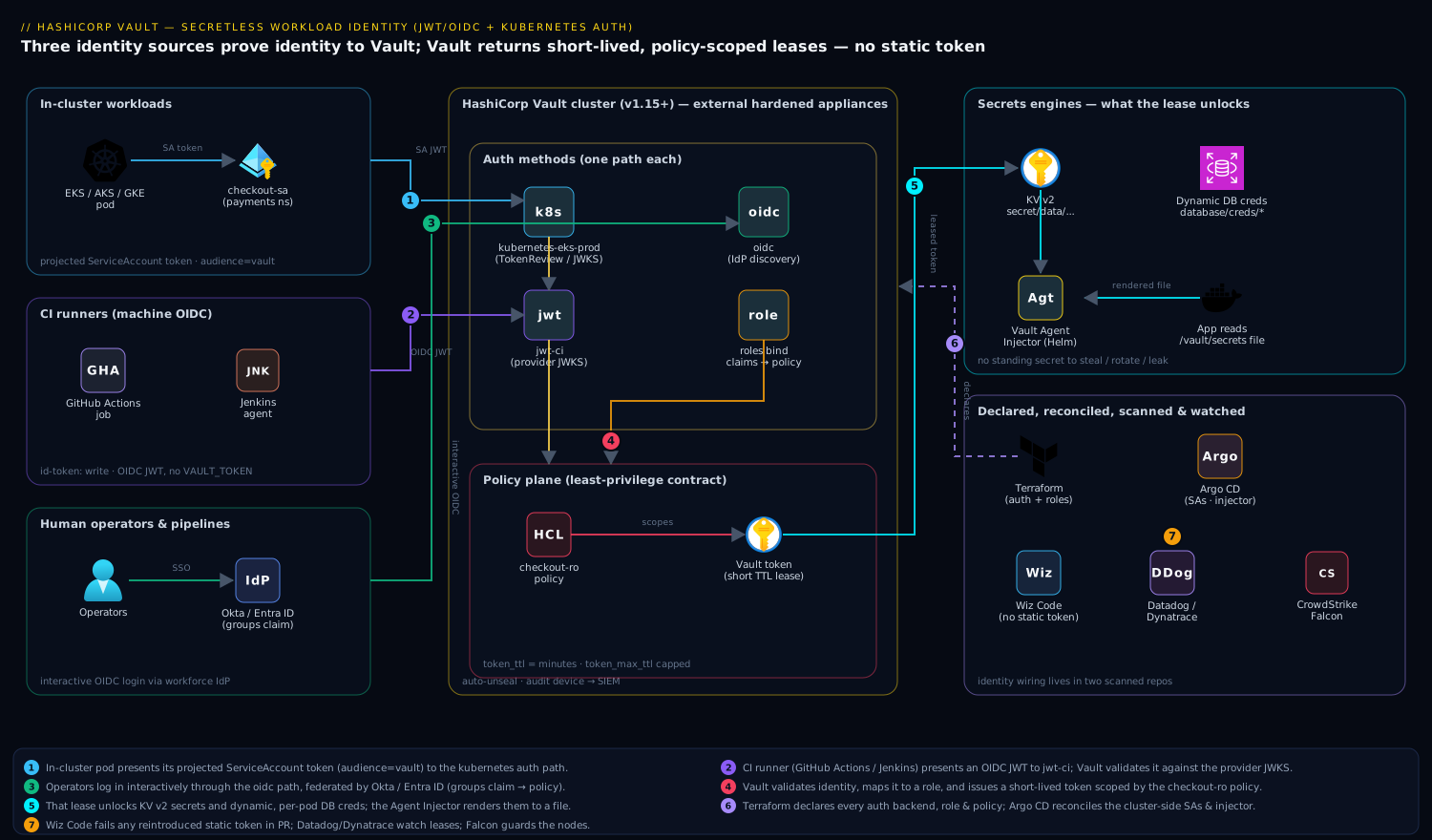
Three identity sources converge on one Vault. In-cluster pods present a projected Kubernetes ServiceAccount token; Vault’s Kubernetes auth method validates it (via TokenReview or the cluster JWKS) and maps payments/checkout-sa to a role and policy. CI runners — Jenkins agents or GitHub Actions jobs — present an OIDC JWT; Vault’s JWT auth method validates it against the provider’s JWKS and binds claims like the repository or the runner’s subject to a role. Human operators and pipelines federated through Okta or Entra ID hit Vault’s OIDC auth method for an interactive login. Every path resolves to a Vault policy that scopes access to a specific KV path or dynamic-secrets engine, and every issued token carries a short TTL. Terraform declares the auth backends, roles, and policies; Argo CD reconciles the Kubernetes-side ServiceAccounts and Agent Injector config; Wiz Code scans both repos for any reintroduced static token; Dynatrace or Datadog watches Vault audit and lease metrics; CrowdStrike Falcon guards the Vault appliance and cluster nodes; and ServiceNow holds the change record for every new role binding.
1. Enable and configure the Kubernetes auth method
Enable a dedicated auth path per cluster so you can revoke or reconfigure one cluster without touching the others. Name the path after the cluster.
# Run against your Vault, authenticated with an admin token.
vault auth enable -path=kubernetes-eks-prod-cin kubernetes
Vault now needs to know how to talk to that cluster’s TokenReview API. The modern, recommended pattern is to not give Vault a long-lived reviewer token; instead, let it use the short-lived token of the pod it is validating, and point it at the cluster’s CA and API host. Create a ServiceAccount in the cluster whose token Vault will use only when it cannot rely on the request’s own token:
# In the target cluster: a reviewer SA bound to the system:auth-delegator role.
kubectl create serviceaccount vault-token-reviewer -n vault-auth
kubectl create clusterrolebinding vault-token-reviewer \
  --clusterrole=system:auth-delegator \
  --serviceaccount=vault-auth:vault-token-reviewer

# Mint a short-lived reviewer JWT (1h) and capture the cluster CA + host.
REVIEWER_JWT=$(kubectl create token vault-token-reviewer -n vault-auth --duration=1h)
KUBE_CA=$(kubectl config view --raw --minify --flatten \
  -o jsonpath='{.clusters[].cluster.certificate-authority-data}' | base64 -d)
KUBE_HOST=$(kubectl config view --raw --minify --flatten \
  -o jsonpath='{.clusters[].cluster.server}')
Now configure the auth backend. Setting disable_local_ca_jwt=false and omitting a static token_reviewer_jwt lets Vault use the caller’s token for the review — the cleanest option when Vault runs inside the same cluster. For an external Vault (the appliance pattern here), supply the reviewer JWT and CA explicitly:
vault write auth/kubernetes-eks-prod-cin/config \
  kubernetes_host="${KUBE_HOST}" \
  kubernetes_ca_cert="${KUBE_CA}" \
  token_reviewer_jwt="${REVIEWER_JWT}" \
  disable_iss_validation=false
Because the reviewer JWT expires in an hour, do not hand-roll its rotation — let Terraform (step 8) or a small Argo CD-managed CronJob re-mint and re-write it. A token Vault can renew beats a token someone forgets.
2. Write a least-privilege Vault policy
A policy is the contract: it says exactly which paths an identity may touch and with which capabilities. Keep it narrow — one app, one path. Write the policy to a file and load it.
cat > /tmp/checkout-policy.hcl <<'EOF'
# Read-only access to the checkout service's KV v2 secrets.
path "secret/data/payments/checkout/*" {
  capabilities = ["read"]
}
# Allow the app to look up its own token (for renew loops).
path "auth/token/lookup-self" {
  capabilities = ["read"]
}
# Dynamic database creds for the checkout Postgres role.
path "database/creds/checkout-ro" {
  capabilities = ["read"]
}
EOF

vault policy write checkout-ro /tmp/checkout-policy.hcl
Note the KV v2 quirk that trips everyone: the data path is secret/data/... even though you read it from the CLI as secret/.... The policy must use the data/ segment.
3. Bind a ServiceAccount to a Vault role
The role is where identity meets policy. It says: a token from this ServiceAccount in this namespace gets this policy, leased for this long.
vault write auth/kubernetes-eks-prod-cin/role/checkout \
  bound_service_account_names=checkout-sa \
  bound_service_account_namespaces=payments \
  token_policies=checkout-ro \
  audience=vault \
  token_ttl=20m \
  token_max_ttl=1h
The audience=vault value matters: the projected token the pod presents must have been minted with that same audience, or validation fails. Bind to explicit names and namespaces — never * for both, which would let any ServiceAccount in any namespace assume the role.
On the cluster side, create the ServiceAccount and a token volume scoped to the vault audience:
# checkout-sa.yaml — applied by Argo CD into the payments namespace.
apiVersion: v1
kind: ServiceAccount
metadata:
  name: checkout-sa
  namespace: payments
---
apiVersion: apps/v1
kind: Deployment
metadata:
  name: checkout
  namespace: payments
spec:
  template:
    spec:
      serviceAccountName: checkout-sa
      containers:
        - name: checkout
          image: registry.internal/payments/checkout:1.8.2
          volumeMounts:
            - name: vault-token
              mountPath: /var/run/secrets/vault
              readOnly: true
      volumes:
        - name: vault-token
          projected:
            sources:
              - serviceAccountToken:
                  path: vault-token
                  audience: vault       # must match the role's audience
                  expirationSeconds: 600
4. Verify a pod can log in
From inside a checkout-sa pod, exchange the projected token for a Vault token. This is exactly what the Vault Agent will automate, but doing it by hand first proves the binding.
# Exec into a pod running as checkout-sa.
JWT=$(cat /var/run/secrets/vault/vault-token)

curl -s --request POST \
  --data "{\"role\":\"checkout\",\"jwt\":\"${JWT}\"}" \
  https://vault.internal:8200/v1/auth/kubernetes-eks-prod-cin/login \
  | jq '.auth.client_token, .auth.lease_duration, .auth.token_policies'
A successful response returns a client_token, a lease_duration of 1200 seconds (your 20m token_ttl), and ["checkout-ro", "default"]. The pod never held a Vault secret — it proved identity and received a lease.
5. Enable and configure the JWT/OIDC auth method for CI and humans
In-cluster pods are covered. Now the CI runners and operators. Enable a JWT auth path for machine OIDC (GitHub Actions, Jenkins with an OIDC plugin) and, separately, an OIDC path for interactive human login through Okta or Entra ID.
# Machine path: validates GitHub Actions / Jenkins OIDC JWTs against a JWKS.
vault auth enable -path=jwt-ci jwt

vault write auth/jwt-ci/config \
  oidc_discovery_url="https://token.actions.githubusercontent.com" \
  bound_issuer="https://token.actions.githubusercontent.com" \
  default_role="gha-deployer"
Bind a role to the claims your provider emits. For GitHub Actions, the sub and repository claims pin the role to a specific repo and branch so a fork or an unrelated repo cannot assume it:
vault write auth/jwt-ci/role/gha-deployer \
  role_type="jwt" \
  user_claim="repository" \
  bound_audiences="https://github.com/kloudvin" \
  bound_claims_type="glob" \
  bound_claims='{"repository":"kloudvin/payments-*","ref":"refs/heads/main"}' \
  token_policies="checkout-ro" \
  token_ttl=15m \
  token_max_ttl=30m
For interactive operators federated through Okta or Entra ID, enable a second path of type=oidc and register Vault as an OIDC application in the IdP (redirect URIs https://vault.internal:8200/ui/vault/auth/oidc/oidc/callback and http://localhost:8250/oidc/callback):
vault auth enable -path=oidc oidc

vault write auth/oidc/config \
  oidc_discovery_url="https://kloudvin.okta.com" \
  oidc_client_id="0oa<redacted>" \
  oidc_client_secret="${OKTA_VAULT_CLIENT_SECRET}" \
  default_role="operator"

# Map an Okta/Entra group claim to a Vault policy.
vault write auth/oidc/role/operator \
  user_claim="sub" \
  allowed_redirect_uris="https://vault.internal:8200/ui/vault/auth/oidc/oidc/callback,http://localhost:8250/oidc/callback" \
  bound_audiences="0oa<redacted>" \
  groups_claim="groups" \
  token_policies="checkout-ro" \
  token_ttl=1h
The OIDC client secret here is the one legitimate secret in the system — it lives only in Vault’s own config, never in a workload. Okta / Entra ID is the workforce IdP that authenticates the human and emits the groups claim Vault maps to a policy.
6. Inject secrets automatically with the Vault Agent Injector
Hand-fetching a token (step 4) proves the wiring; in production you let the Vault Agent Injector do it. Install it with Helm, pointed at your external Vault, then annotate the Deployment.
helm repo add hashicorp https://helm.releases.hashicorp.com
helm install vault hashicorp/vault \
  --namespace vault \
  --set "injector.externalVaultAddr=https://vault.internal:8200" \
  --set "server.enabled=false"
Annotations on the pod template tell the injector which role to use and which secret to render. The Agent logs in with the projected token, fetches the secret, writes it to a tmpfs file, and keeps it renewed — the app just reads a file:
# Add to the checkout Deployment's pod template metadata.
metadata:
  annotations:
    vault.hashicorp.com/agent-inject: "true"
    vault.hashicorp.com/role: "checkout"
    vault.hashicorp.com/auth-path: "auth/kubernetes-eks-prod-cin"
    vault.hashicorp.com/agent-inject-secret-db.env: "database/creds/checkout-ro"
    vault.hashicorp.com/agent-inject-template-db.env: |
      {{- with secret "database/creds/checkout-ro" -}}
      DB_USER={{ .Data.username }}
      DB_PASS={{ .Data.password }}
      {{- end -}}
The rendered file lands at /vault/secrets/db.env. Nothing is written to a Kubernetes Secret, and the database credential is a dynamic, leased one — Vault generates a unique Postgres user per pod and revokes it when the lease ends.
7. Use the JWT auth from a GitHub Actions pipeline
The CI side mirrors the pod side. The job requests a GitHub OIDC token for the vault audience, hands it to Vault, and gets back a short-lived token to read a secret — no VAULT_TOKEN stored in repo or org secrets.
# .github/workflows/deploy.yml (auth excerpt — full pipeline lives elsewhere)
permissions:
  id-token: write     # allow the job to mint an OIDC token
  contents: read
jobs:
  deploy:
    runs-on: ubuntu-latest
    steps:
      - name: Authenticate to Vault via OIDC
        uses: hashicorp/vault-action@v3
        with:
          url: https://vault.internal:8200
          path: jwt-ci
          method: jwt
          role: gha-deployer
          jwtGithubAudience: https://github.com/kloudvin
          secrets: |
            secret/data/payments/checkout/* DB_PASS | CHECKOUT_DB_PASS
Jenkins runners follow the same shape using the HashiCorp Vault plugin’s JWT credential, presenting the agent’s OIDC token to the jwt-ci path. Argo CD never logs in to fetch app secrets at all — the Agent Injector handles that at pod start — so Argo’s own credentials stay scoped to Git and the cluster API only.
8. Codify everything in Terraform
Click-ops on auth methods drifts and is unauditable. Declare the backends, roles, and policies in Terraform using the Vault provider so every binding is reviewed in a PR, scanned by Wiz Code, and tracked against a ServiceNow change record.
resource "vault_auth_backend" "k8s_eks_prod" {
  type = "kubernetes"
  path = "kubernetes-eks-prod-cin"
}

resource "vault_policy" "checkout_ro" {
  name   = "checkout-ro"
  policy = file("${path.module}/policies/checkout-ro.hcl")
}

resource "vault_kubernetes_auth_backend_role" "checkout" {
  backend                          = vault_auth_backend.k8s_eks_prod.path
  role_name                        = "checkout"
  bound_service_account_names      = ["checkout-sa"]
  bound_service_account_namespaces = ["payments"]
  token_policies                   = [vault_policy.checkout_ro.name]
  audience                         = "vault"
  token_ttl                        = 1200
  token_max_ttl                    = 3600
}

resource "vault_jwt_auth_backend" "ci" {
  path               = "jwt-ci"
  oidc_discovery_url = "https://token.actions.githubusercontent.com"
  bound_issuer       = "https://token.actions.githubusercontent.com"
}
Keep the cluster-side ServiceAccounts and Agent Injector annotations in the Git repo that Argo CD reconciles, and the Vault config in the Terraform repo. The two repos together are the whole identity wiring — and both are scanned, so a reintroduced static token surfaces in a PR check, not a quarterly audit. Use Ansible only for the Vault appliance OS hardening and the audit-log shipping config, keeping configuration management off the policy plane.
Validation
Confirm each path independently before you trust it.
# 1. Kubernetes path: list configured roles and inspect the binding.
vault list auth/kubernetes-eks-prod-cin/role
vault read  auth/kubernetes-eks-prod-cin/role/checkout

# 2. End-to-end pod login (from a checkout-sa pod, as in step 4) returns a token.

# 3. JWT path: verify the JWKS is reachable and the role's bound claims.
vault read auth/jwt-ci/config
vault read auth/jwt-ci/role/gha-deployer

# 4. Confirm a wrong identity is REJECTED — the critical negative test.
#    A token from default:default must fail against the checkout role.
vault write auth/kubernetes-eks-prod-cin/login role=checkout jwt="$WRONG_SA_JWT"
# Expected: "permission denied" — proof the binding is tight, not open.

# 5. Audit the lease: tokens must be short-lived.
vault token lookup <client_token> | grep -E 'ttl|policies'
Pipe Vault’s audit device to Datadog or Dynatrace and assert two things in a dashboard: that the count of auth/*/login successes tracks your deploy rate, and that no issued token has a TTL above its role’s token_max_ttl. A token that lives too long is the regression this whole project exists to prevent.
Rollback / teardown
Every change is reversible. To retire a single role without disturbing others:
vault delete auth/kubernetes-eks-prod-cin/role/checkout
vault policy delete checkout-ro
To disable an entire auth method (this revokes all tokens issued through it — coordinate the window):
vault auth disable jwt-ci
vault auth disable kubernetes-eks-prod-cin
On the cluster, remove the reviewer binding and ServiceAccounts:
kubectl delete clusterrolebinding vault-token-reviewer
kubectl delete serviceaccount vault-token-reviewer -n vault-auth
kubectl delete serviceaccount checkout-sa -n payments
If you manage this in Terraform, terraform destroy -target=vault_kubernetes_auth_backend_role.checkout is the auditable path; raise the corresponding ServiceNow change so the revocation is recorded. Because nothing static was ever distributed, teardown leaves no orphaned credential to hunt down — the absence of standing secrets is itself the cleanup.
Going deeper
The eight steps ship a working system. This section is for the reader who has to defend the design in an architecture review, scale it to a hundred teams, and operate Vault itself.
Bound-audience projected tokens, and why the JWT method can replace the Kubernetes method
The token in step 3’s manifest is not the legacy, never-expiring ServiceAccount Secret of Kubernetes past. It is a projected token minted through the TokenRequest API: the kubelet asks the API server for a fresh JWT scoped to audience: vault, valid for expirationSeconds, and re-mints it before expiry. The audience is the pivotal field. A token minted for vault is rejected everywhere else, so even if it leaks it cannot be replayed against the API server or another service. Vault’s role enforces the match — its audience=vault must equal the projected token’s audience, or validation fails with invalid audience.
That same projected token unlocks a cleaner design. Modern kube-apiservers publish an OIDC discovery document and a JWKS for the tokens they sign, at /.well-known/openid-configuration and /openid/v1/jwks. That means Vault’s JWT auth method can validate a ServiceAccount token offline against the cluster’s public keys — no token_reviewer_jwt, no TokenReview API call, no network path from Vault to the API server at login time:
# Configure the JWT method to trust the cluster's OWN issuer, not GitHub's.
ISSUER=$(kubectl get --raw /.well-known/openid-configuration | jq -r .issuer)
vault auth enable -path=jwt-eks-prod jwt
vault write auth/jwt-eks-prod/config oidc_discovery_url="$ISSUER"

vault write auth/jwt-eks-prod/role/checkout \
  role_type="jwt" \
  bound_audiences="vault" \
  user_claim="sub" \
  bound_subject="system:serviceaccount:payments:checkout-sa" \
  token_policies="checkout-ro" \
  token_ttl=20m
The two ways to authenticate the same pod trade off differently:
| Kubernetes auth method | JWT method against cluster JWKS | |
|---|---|---|
| Reviewer token needed | Yes (external Vault) | No |
| Network path at login | Vault → API server TokenReview | None (offline JWKS verify; keys cached) |
| Sees SA/pod deletion immediately | Yes | No — trusts the token until it expires |
| Best when | Short-lived pods churn fast; you want revocation awareness | Vault cannot reach the API server, or you want zero moving parts |
Neither is strictly better. TokenReview catches a token whose SA or pod was just deleted; offline JWKS verification cannot, so you lean on a short token_ttl instead. Many platform teams run the Kubernetes method in-cluster (cheap TokenReview) and the JWT-against-JWKS method for clusters Vault cannot reach over the network.
Three ways to get the secret into the pod, compared
Step 6 used the Agent Injector. It is one of three supported patterns, and the right choice depends on whether you want files or native Secrets, a sidecar or an operator.
| Pattern | How it delivers | Native Secret created? |
Rotation story | Best for |
|---|---|---|---|---|
| Agent Injector (mutating webhook + sidecar) | Init + sidecar container render to an in-memory /vault/secrets/ file |
No | Sidecar re-renders on lease renewal; app re-reads the file | Apps that read a file/env; per-pod dynamic secrets |
| Secrets Store CSI provider (Secrets Store CSI Driver + Vault provider) | A CSI volume mounts secret files at pod start via a SecretProviderClass |
Optional (secretObjects sync) |
Re-mount / rotation on the driver’s poll interval | Teams already standardized on the CSI driver across clouds |
| Vault Secrets Operator (VSO) | A cluster operator reconciles CRDs into native Secret objects |
Yes — that is the point | Operator rotates the Secret and can trigger a Deployment rollout | GitOps shops that want secrets as regular Secrets, no sidecar |
A VSO VaultDynamicSecret is declarative — no annotation on the pod, and it can restart the Deployment when the credential rotates:
apiVersion: secrets.hashicorp.com/v1beta1
kind: VaultDynamicSecret
metadata:
  name: checkout-db
  namespace: payments
spec:
  mount: database
  path: creds/checkout-ro
  destination:
    create: true
    name: checkout-db          # a native Secret VSO creates and rotates
  rolloutRestartTargets:
    - kind: Deployment
      name: checkout
The trade-off is philosophical. The Injector and CSI provider keep the secret off the Kubernetes API — only in a pod’s memory — the smallest blast radius. VSO puts it into a native Secret — friendliest to existing apps and GitOps, but now etcd holds the value and RBAC on that Secret matters. Pick per workload: memory-only for the crown-jewels credential, VSO for the hundred apps that just want a Secret env var.
Dynamic secrets, leases, and revocation
The database/creds/checkout-ro path in step 6 is where secretless gets its teeth. Configure the engine once with an admin connection, then a role that describes how to mint an ephemeral user:
vault secrets enable database

vault write database/config/payments-pg \
  plugin_name="postgresql-database-plugin" \
  allowed_roles="checkout-ro" \
  connection_url="postgresql://{{username}}:{{password}}@pg.payments.svc:5432/checkout" \
  username="vault-admin" password="${PG_ADMIN_PW}"

vault write database/roles/checkout-ro \
  db_name="payments-pg" \
  creation_statements="CREATE ROLE \"{{name}}\" WITH LOGIN PASSWORD '{{password}}' VALID UNTIL '{{expiration}}'; GRANT SELECT ON ALL TABLES IN SCHEMA public TO \"{{name}}\";" \
  default_ttl="20m" max_ttl="1h"
Now every pod that reads database/creds/checkout-ro gets its own Postgres user, valid for 20 minutes. Vault tracks each as a lease. When the lease expires — or when you run vault lease revoke -prefix database/creds/checkout-ro after an incident — Vault runs the revocation statement and the user is dropped. A leaked credential is worthless in twenty minutes and killable in one command across every consumer at once. That is the property no static secret can offer, and it is why “secretless” is stronger than “rotated secrets.”
PKI and transit — two more engines the same token unlocks
Once identity-based auth is wired, other engines cost almost nothing to add.
- PKI turns Vault into a short-lived certificate authority.
vault write pki/issue/checkout common_name=checkout.payments.svc ttl=24hreturns a cert, key, and chain the pod uses for mTLS — no cert-managerSecret, no year-long certs, and rotation is just a re-issue on a schedule the app can automate. - transit is encryption as a service:
vault write transit/encrypt/checkout plaintext=$(base64 <<<"card-1234")returns ciphertext, and Vault holds the key and never returns it. The app encrypts PII without ever possessing the key material, so a compromised app leaks ciphertext, not plaintext. Key rotation and re-wrapping are Vault operations, invisible to the app.
Policy templating and entity aliases
Writing one policy per app does not scale to hundreds of teams. Templated policies parameterize the path with identity metadata:
path "secret/data/{{identity.entity.aliases.<mount_accessor>.metadata.namespace}}/*" {
  capabilities = ["read"]
}
Every login through an auth method creates (or reuses) an entity in Vault’s Identity store, with an alias linking the auth-method login name to that entity. Attach metadata (team, namespace, environment) to the entity or alias, and one templated policy serves every team — each identity reads only its own namespace’s subtree. Entities also let you merge a human’s Okta login and their CLI JWT into one identity for unified auditing and MFA.
HA, seal/unseal, and auto-unseal
Production Vault runs 3 or 5 nodes on Integrated Storage (Raft) — no external database; Raft handles replication and leader election. Vault boots sealed: its data is encrypted and the master key is not in memory. Traditionally you unseal by having k of n operators each submit a Shamir key share — safe but manual, and it blocks every restart. Auto-unseal delegates the protection of the unseal key to a cloud KMS (AWS KMS, Azure Key Vault, GCP Cloud KMS) or another Vault’s transit engine, so a rebooted node unseals itself. You keep the recovery keys (the Shamir shares’ replacement under auto-unseal) offline in a break-glass envelope. This is the “auto-unseal already configured” the Prerequisites assume.
Audit — the non-negotiable
Enable at least one audit device before you trust any of this in production:
vault audit enable file file_path=/vault/audit/audit.log
Every request and response is logged as a hashed (HMAC’d) JSON line — sensitive values are salted-hashed, not plaintext, so the log itself is not a secret store. Vault refuses to service requests if all audit devices fail to write, which is deliberate: no audit, no operation. Forward the log to your SIEM and alert on a single role’s login rate spiking — the early signal of a compromised pod replaying its token.
Practice challenges
Work these against a real Vault (a local vault server -dev is enough for challenges 1, 3, and 5; the pod challenges can be reasoned through without a cluster). Each solution says why, not just how.
Challenge 1 — Bind a new namespace’s SA to a read-only policy (beginner).
The analytics team needs read access to secret/data/analytics/* from a reporting-sa ServiceAccount in the analytics namespace, on the existing kubernetes-eks-prod-cin backend. Write the policy and the role.
<details> <summary>Show solution</summary>
vault policy write analytics-ro - <<'EOF'
path "secret/data/analytics/*" { capabilities = ["read"] }
EOF

vault write auth/kubernetes-eks-prod-cin/role/reporting \
  bound_service_account_names=reporting-sa \
  bound_service_account_namespaces=analytics \
  token_policies=analytics-ro \
  audience=vault \
  token_ttl=20m token_max_ttl=1h
Why: the role pins both name and namespace (never *), the policy uses the KV v2 data/ segment, and the TTL stays short. It is the exact shape of steps 2–3 retargeted to a new team.
</details>
Challenge 2 — Prove a wrong identity is rejected (beginner).
Reason it out without a cluster: a pod running as default:default presents its token to auth/kubernetes-eks-prod-cin/login role=reporting. What happens and why?
<details> <summary>Show solution</summary>
Vault validates the token — it is genuine — then checks the reporting role’s bindings: bound_service_account_names=reporting-sa, bound_service_account_namespaces=analytics. The presented identity is default:default, which matches neither, so Vault returns permission denied. The token is real but the identity is not on the role’s guest list. Genuine ≠ authorized — two separate gates.
</details>
Challenge 3 — Add dynamic DB creds to the policy (intermediate).
Extend analytics-ro so the reporting app can also pull a dynamic read-only Postgres credential from database/creds/analytics-ro. What one stanza do you add, and what must already exist on the database engine side?
<details> <summary>Show solution</summary>
path "database/creds/analytics-ro" { capabilities = ["read"] }
On the engine side you need a database/config/<db> connection and a database/roles/analytics-ro with creation_statements granting SELECT, plus default_ttl/max_ttl. Reading the path mints a unique user leased for default_ttl; Vault revokes it automatically on expiry. The app must re-read or renew — a cached credential outlives its lease and breaks.
</details>
Challenge 4 — Inject a secret with the Agent Injector (intermediate).
Annotate a Deployment so the injector renders secret/data/analytics/reporting (KV v2) into /vault/secrets/config using the reporting role on the kubernetes-eks-prod-cin path.
<details> <summary>Show solution</summary>
metadata:
  annotations:
    vault.hashicorp.com/agent-inject: "true"
    vault.hashicorp.com/role: "reporting"
    vault.hashicorp.com/auth-path: "auth/kubernetes-eks-prod-cin"
    vault.hashicorp.com/agent-inject-secret-config: "secret/data/analytics/reporting"
    vault.hashicorp.com/agent-inject-template-config: |
      {{- with secret "secret/data/analytics/reporting" -}}
      {{ range $k, $v := .Data.data }}{{ $k }}={{ $v }}
      {{ end }}
      {{- end -}}
Why: the pod’s serviceAccountName must be reporting-sa in analytics or the login fails against the role; agent-inject-secret-<file> names the rendered file; and the template loops .Data.data because it is KV v2 — the payload sits under .Data.data, not .Data.
</details>
Challenge 5 — Pin a GitHub Actions role to one repo and branch (advanced).
Write a jwt-ci role that only a workflow in kloudvin/analytics-etl running on refs/heads/main may assume, granting analytics-ro.
<details> <summary>Show solution</summary>
vault write auth/jwt-ci/role/etl-deployer \
  role_type=jwt user_claim=repository \
  bound_audiences="https://github.com/kloudvin" \
  bound_claims_type=glob \
  bound_claims='{"repository":"kloudvin/analytics-etl","ref":"refs/heads/main"}' \
  token_policies=analytics-ro token_ttl=15m token_max_ttl=30m
Why: pinning both repository and ref stops a fork or a PR branch from assuming the role. Loosening either to a wildcard widens the blast radius — the classic CI mistake that lets any workflow in the org mint a deployer token.
</details>
Challenge 6 — Choose an integration pattern (advanced, design). A hundred stateless apps each need one static API key as an environment variable, and your platform is fully GitOps with Argo CD. Injector, CSI, or VSO — and why?
<details> <summary>Show solution</summary>
VSO. It syncs Vault secrets into native Secret objects the apps already consume as env vars, needs no per-pod annotation or sidecar (cheaper at a hundred apps), and fits GitOps because the VaultStaticSecret CRs live in Git alongside the Deployments Argo reconciles. The trade-off — the value now sits in etcd — is acceptable for a low-sensitivity API key; reserve memory-only Injector/CSI for the crown-jewels credentials whose blast radius must stay off the API server.
</details>
Common beginner mistakes
These are conceptual traps — the mental-model errors beginners make — distinct from the operational failures in Common pitfalls below.
- “I’ll just store the Vault token in a Secret.” This recreates the exact problem the lesson exists to kill. A static
VAULT_TOKENin aSecretis a standing credential to everything that token can reach; whoever reads that one Secret owns the vault. The right model: the only credential in the cluster is the pod’s own short-lived, audience-bound identity token, and Vault issues everything else on demand. If you find yourself writing aVAULT_TOKENinto a manifest, stop — that is the anti-pattern the whole design removes. - Thinking the projected token is a secret to protect. Beginners guard the ServiceAccount token like a password. It is deliberately cheap: audience-scoped (useless anywhere but Vault), minutes-long, and re-minted automatically by the kubelet. Its safety comes from being short-lived and narrow, not from being hidden. Design around rotating identity, not around hoarding a token.
- Confusing “authenticated” with “authorized.” A genuine token proves who you are; it does not grant access. Authorization is the role (which identities are allowed) plus the policy (which paths they may touch). A perfectly valid
default:defaulttoken still getspermission deniedagainst thecheckoutrole. Two gates, not one. - Reading KV v2 without the
data/segment. The CLI’svault kv get secret/xhides a layer: the real API/policy path issecret/data/x, and the payload sits under.Data.datain templates. Beginners writesecret/xin policies and templates and get empty renders orpermission denied. KV v2 always carries thedata/(andmetadata/) segment. - Making the policy or the binding broad “just to get it working.”
capabilities = ["read","create","update","delete"]onsecret/*, orbound_service_account_namespaces=*, turns a scoped credential into a master key. Start from deny and add exactly the one path and one capability the app needs. “Broaden now, tighten later” never tightens — it ships broad. - Forgetting the injector annotation (or the SA) and blaming Vault. No
vault.hashicorp.com/agent-inject: "true"means the mutating webhook never fires, no sidecar appears, and the pod starts with an empty/vault/secrets/— the app crashes looking for its config. Equally, if the pod’sserviceAccountNameis not the one the role binds, login fails. Check the pod spec before you suspect Vault. - Treating a dynamic lease like a static secret. Reading
database/creds/...in a script and caching the result forever defeats the lease. The credential is meant to expire; your app (or the Agent/VSO) must renew or re-read. And after an incident you must revoke the lease, not just rotate a password —vault lease revoke -prefix ...kills every outstanding credential at once, which rotating a shared password cannot.
Common pitfalls
- Audience mismatch. The projected token’s
audience(step 3 manifest) must equal the role’saudience(step 3vault write). A mismatch yields a crypticinvalid audienceand is the single most common failure. - KV v2 path confusion. Policies must reference
secret/data/..., notsecret/.... The CLI hides thedata/segment; the policy does not. - Over-broad bindings.
bound_service_account_namespaces=*combined withbound_service_account_names=*turns the role into a cluster-wide skeleton key. Always pin at least the namespace. - Reviewer JWT expiry. The external-Vault
token_reviewer_jwt(step 1) expires; if you set it once by hand it silently breaks logins later. Automate its renewal. - JWKS unreachable. If Vault cannot reach the OIDC issuer’s JWKS endpoint (egress firewall, proxy), JWT login fails with a validation error. Test reachability from the Vault host, not your laptop.
bound_claimstoo loose on CI. Without pinningrepository/ref(or the equivalent on Jenkins), any repo in the org — or a PR from a fork — can assume the deployer role. Glob-bind tightly.
Security notes
This design is Zero Trust at the credential layer: no workload holds a standing secret, every token is short-lived (minutes, not months), and identity is proven against a source the platform already trusts — the cluster’s own TokenReview or the IdP’s JWKS. Keep token_ttl as low as the workload’s renew loop tolerates, and prefer dynamic secrets engines (the database/creds/... path above) so even the leased credential is unique per consumer and auto-revoked. Wiz / Wiz Code scans both the Terraform and GitOps repos for any reintroduced long-lived VAULT_TOKEN or hard-coded role, failing the PR. CrowdStrike Falcon runs on the Vault virtual appliances and the cluster nodes for runtime threat detection, feeding the SOC. Enable a Vault audit device to a write-only sink and forward it to your SIEM; a sudden spike in a single role’s logins is an early signal of a compromised pod. The OIDC client secret for the Okta/Entra path is the one true secret — store it only in Vault’s config and rotate it through the IdP on a schedule.
Cost notes
The mechanism itself is near-free: Vault’s auth methods, policies, and token issuance carry no marginal license cost on Vault Community, and the projected-token validation adds a negligible TokenReview call per login. The real savings are operational and risk-denominated — eliminating static tokens removes the rotation toil, the incident-response cost of a leaked credential, and the audit findings that Wiz would otherwise raise every quarter. Dynamic database credentials add a small amount of Postgres role churn; cap it by tuning token_ttl so you are not minting a new DB user every few seconds under load. If you run Vault Enterprise for namespaces or performance replication, that is the only line item of consequence here, and it is justified by scale and multi-team isolation, not by this auth pattern. Observability is the other cost to plan for: shipping Vault audit logs and lease metrics into Datadog or Dynatrace is what turns “we think tokens are short-lived” into a number on a dashboard the security team will actually trust.
Glossary
- Vault — HashiCorp’s secrets manager: a central, audited store that issues secrets and, crucially, identity-to-secret mappings, so workloads authenticate rather than hold static credentials.
- Auth method (auth backend) — a pluggable Vault component that verifies a form of identity (Kubernetes, JWT/OIDC, AppRole, LDAP…) and, on success, issues a Vault token. Enabled at a path like
auth/kubernetes-eks-prod-cin/. - Secret engine — a pluggable Vault component that produces secrets: KV (static), database/PKI/AWS (dynamic), transit (crypto). Mounted at a path like
secret/ordatabase/. - ServiceAccount (SA) token — a JWT the cluster mints for a pod’s ServiceAccount. A projected token is short-lived and scoped to an audience; the modern replacement for the legacy never-expiring SA
Secret. - Projected token / TokenRequest API — the Kubernetes mechanism that mints a fresh, audience-bound, time-limited SA token into a pod’s volume, re-minting it before expiry.
- Audience (
aud) — a claim naming who a token is for. Vault’s roleaudiencemust equal the projected token’saudience; a mismatch is the most common login failure. - TokenReview — the Kubernetes API that Vault’s Kubernetes auth method calls to ask the cluster “is this SA token valid, and whose is it?”
- JWKS (JSON Web Key Set) — the public keys an OIDC issuer publishes so anyone can verify its signed JWTs offline. Vault fetches the issuer’s JWKS to validate tokens without calling back to the issuer per request.
- OIDC (OpenID Connect) — an identity layer over OAuth 2.0; issuers (GitHub, Okta, Entra ID, the kube-apiserver) sign JWTs whose claims Vault can bind to a role.
- Role — the Vault object mapping a verified identity to policies and token settings:
bound_service_account_names,bound_claims,token_policies,token_ttl. - Policy — Vault’s ACL: an HCL document listing paths and
capabilities(read,list,create,update,delete,sudo). Attached to tokens via the role. - Lease — Vault’s handle on a dynamic secret’s lifetime. Every dynamic credential has a lease with a TTL; on expiry or explicit
lease revoke, Vault destroys the underlying credential. - Dynamic secret — a secret Vault creates on read (e.g. a unique Postgres user) and destroys on lease end — unique per consumer, never pre-existing, auto-revoked.
- KV v2 — the versioned key-value secret engine. API/policy paths carry a
data/(ormetadata/) segment the CLI hides; template payloads sit under.Data.data. - Vault Agent Injector — a mutating admission webhook that adds an init + sidecar container to a pod; the sidecar logs in with the SA token and renders secrets to an in-memory
/vault/secrets/file. - Secrets Store CSI provider — the Secrets Store CSI Driver plus a Vault provider that mounts Vault secrets as a CSI volume, optionally syncing to a native
Secret. - Vault Secrets Operator (VSO) — a Kubernetes operator that reconciles CRDs (
VaultStaticSecret,VaultDynamicSecret,VaultPKISecret) into nativeSecretobjects and can restart Deployments on rotation. - Entity / alias — Vault Identity constructs: an entity is a canonical identity; an alias links an auth-method login to it. Metadata on entities powers templated policies.
- Transit engine — encryption-as-a-service: Vault encrypts/decrypts with a key it never releases, so apps handle ciphertext without holding key material.
- PKI engine — Vault as a certificate authority issuing short-lived X.509 certs on demand for mTLS.
- Seal / unseal / auto-unseal — Vault boots sealed (data encrypted, master key not in memory). Unsealing reconstructs the master key from Shamir shares; auto-unseal delegates that to a cloud KMS so nodes self-unseal on restart.
- Audit device — a Vault backend that logs every request/response as HMAC-hashed JSON; Vault stops serving if it cannot write to its audit devices.