In a nutshell
Kasten K10 (by Veeam) is an enterprise data-management platform for Kubernetes — a tool whose entire job is backing up, restoring, and moving the applications running on your cluster, not just the raw disks underneath them.
Here is the difference that matters. A plain volume snapshot copies the bytes on a disk at an instant — like photographing a document while someone is still writing on it. If that someone is a database mid-transaction, the photo captures a half-written page. K10 instead understands what is running: before it snapshots a PostgreSQL volume it can tell Postgres to pause and flush to disk, take the snapshot, then let it resume — so the copy is clean and immediately usable. That is the whole idea of an application-consistent backup, and it is what separates a real backup from a hopeful one.
Three ideas carry the entire product. Policies say what to back up, how often, and how long to keep it, on a schedule — set it once and it runs forever. Profiles say where the backups go — an object-storage bucket, ideally in a separate account you cannot accidentally delete. Blueprints are the app-aware pause/resume hooks that make a snapshot consistent. Restore and migrate then come almost for free: because K10 captured the app’s Kubernetes objects and its data, it can rebuild the whole application into a new namespace, a new cluster, or a new cloud region with a single action.
If you have used Velero, K10 is the enterprise cousin — the same backup-and-restore mission, plus a dashboard, policy automation, database-aware hooks, immutability, and multi-cluster management out of the box.
Level: Advanced · Time: ~35 min
The problem this solves
A fintech runs forty production microservices on a managed Kubernetes cluster, each backed by a stateful PostgreSQL or MongoDB workload, and the platform team has been quietly relying on the cloud provider’s nightly volume snapshots as their “backup.” Then an auditor asks the question that ends that comfort: show me a restore. The volume snapshots restore the disk, but they were taken mid-write — Postgres comes back needing crash recovery, and one MongoDB replica set comes back with a corrupt WiredTiger checkpoint. Worse, the snapshots live in the same cloud account as the cluster, so a compromised credential or a fat-fingered terraform destroy takes the backups with it. The mandate lands the next morning: application-consistent backups, governed by policy, exported to immutable storage in a separate trust boundary, with a restore you can prove on demand. This guide walks through deploying Veeam Kasten K10 to deliver exactly that — namespace-scoped backup policies, app-consistent snapshots through database-aware hooks, and a worm-locked object-storage export that survives the cluster being deleted.
Kasten K10 is a Kubernetes-native data-management platform: it discovers applications by namespace and label, snapshots their persistent volumes through the CSI driver, captures the Kubernetes API resources alongside them, runs pre/post-snapshot hooks to quiesce databases, and exports the whole bundle to external object storage with optional immutability. It is built by Veeam, installs as a Helm release, and is driven entirely by Custom Resources — which is what makes it fit a GitOps and policy-as-code operating model rather than a clicked-together one.
Prerequisites
- A Kubernetes cluster, v1.27+, with a CSI driver that supports
VolumeSnapshot(EKS EBS CSI, AKS Azure Disk CSI, GKE PD CSI, or on-prem Ceph/Portworx). Runkubectl get volumesnapshotclassand confirm at least one exists. kubectland Helm 3.10+ on your workstation, with cluster-admin for the install.- The
VolumeSnapshotCRDs (snapshot.storage.k8s.io/v1) installed and the external-snapshotter controller running. Managed clusters usually ship these; bare clusters do not. - An object-storage bucket in a separate account/subscription from the cluster — Amazon S3, Azure Blob, or GCS — with Object Lock / immutability available.
- A HashiCorp Vault instance (or a cloud secrets manager) to hold the object-storage credentials and the K10 encryption passphrase, so nothing sensitive lands in a plain Kubernetes Secret.
- A wildcard or per-host TLS certificate for the K10 dashboard ingress, and an OIDC application registered in Microsoft Entra ID (or Okta) for dashboard SSO.
Concepts worth knowing first — skim these siblings if any term is unfamiliar, because K10 sits directly on top of them: Kubernetes CSI volume snapshots, cloning, and resize (the disk-snapshot mechanism K10 drives), and, if you have only ever used the open-source path, Velero with Kopia for cross-cluster restore (the OSS tool K10 extends).
After this lesson you will be able to:
- Explain why a raw volume snapshot is not a database backup, and when that distinction bites.
- Install K10 with Helm, wire its dashboard to Entra ID/Okta SSO, and reach it safely.
- Author a Policy that snapshots an application on a schedule and exports it to immutable object storage.
- Attach a Blueprint so a stateful workload’s snapshots are application-consistent, and prove it with
pg_is_in_recovery(). - Restore into a scratch namespace, and migrate an application to another cluster with transform-on-restore.
- Reason about immutability, RBAC, multi-cluster fleet management, and when to choose K10 over Velero.
Target topology
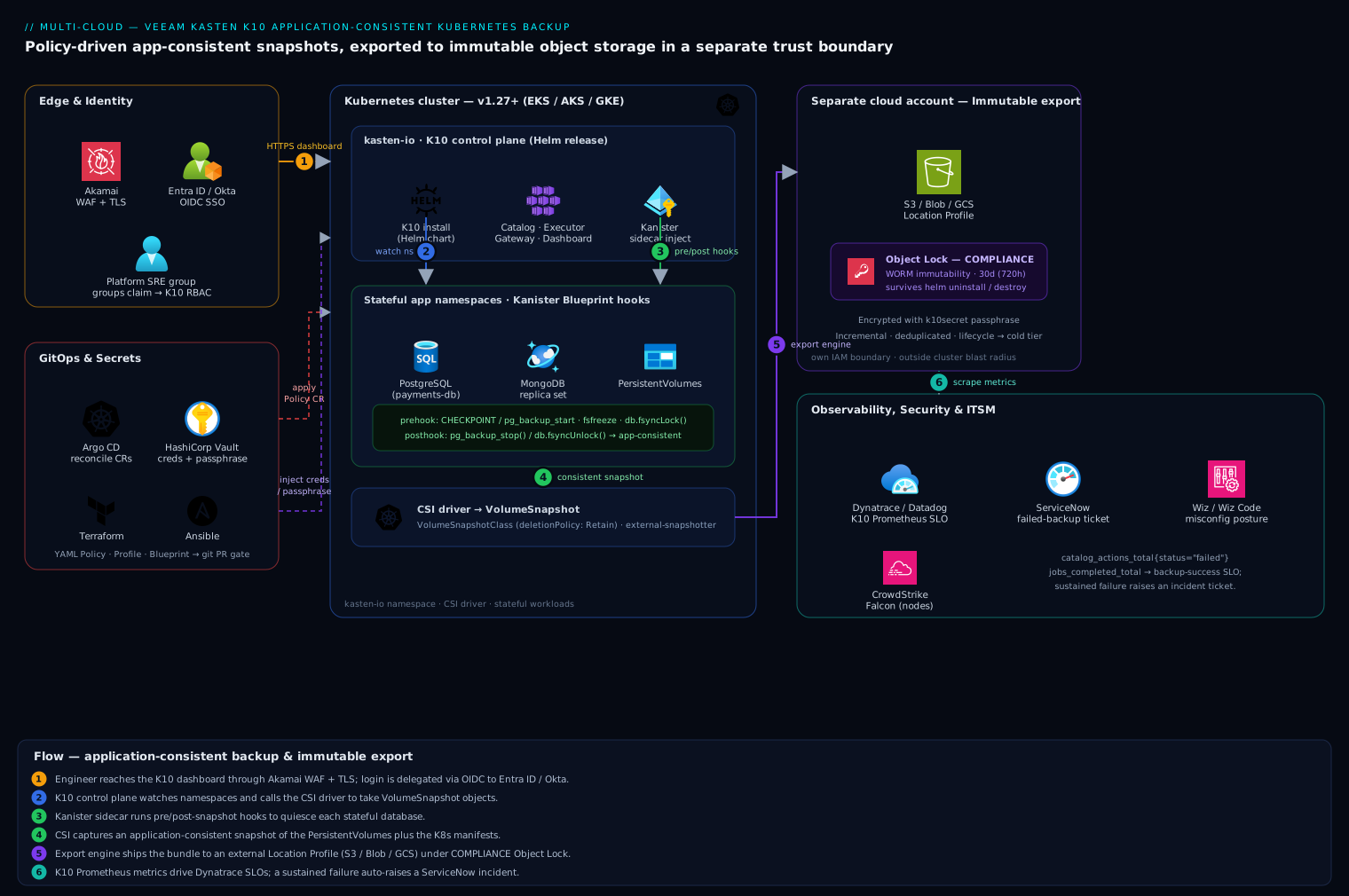
K10 installs into its own kasten-io namespace and runs a set of controllers — the catalog service, the executor, the dashboard gateway, and per-job worker pods. The flow is layered. At the edge, the K10 dashboard sits behind ingress fronted by Akamai for TLS termination and WAF, and authentication is delegated through OIDC to Entra ID or Okta so platform engineers log in with their corporate identity and group claims, never a shared local password. Inside the cluster, K10 watches namespaces, calls the CSI driver to take VolumeSnapshot objects, and runs pre/post hooks against each stateful workload (a pg_start_backup / fsfreeze style quiesce) to make the snapshot application-consistent rather than just crash-consistent. Leaving the cluster, the export engine moves snapshot data and the captured Kubernetes manifests to an external object-storage location profile — S3/Blob/GCS in a separate account — with Object Lock immutability so a ransomware actor or an errant delete cannot tamper with the restore point. Credentials for that profile and the data-encryption passphrase are injected from HashiCorp Vault. Policies are authored as YAML, committed to git, and reconciled onto the cluster by Argo CD, while Dynatrace scrapes K10’s Prometheus metrics for SLA dashboards and a failed backup auto-raises a ServiceNow incident.
The four objects you’ll build
Every knob in K10 is a Kubernetes Custom Resource, so the whole setup is really four objects layered on top of each other. Meet them once here and the rest of the guide is just filling them in:
| Object (CR kind) | Answers the question | Created in |
|---|---|---|
VolumeSnapshotClass |
How do I snapshot a disk? (which CSI driver) | Step 1 |
Profile (type Location) |
Where do exported backups live? | Step 4 |
Blueprint (Kanister) |
How do I make a database’s snapshot consistent? | Step 5 |
Policy |
What / how often / how long / export where | Step 6 |
Read top to bottom it is one sentence: snapshot this disk, quiesced this way, on this schedule, exported there. Everything else you will see — BackupAction, ExportAction, RestoreAction — is a run that K10 generates automatically when a Policy fires; you rarely hand-write those. Keep this table in mind and no CR in the walkthrough will feel like it came out of nowhere.
1. Verify the cluster can take CSI snapshots
K10’s application-consistency story rests on CSI volume snapshots. Confirm the plumbing before installing anything — a missing snapshot class is the single most common reason a first backup silently falls back to a slow, lossy generic copy.
# Snapshot CRDs must be present (v1, not the old v1beta1)
kubectl get crd volumesnapshots.snapshot.storage.k8s.io \
  volumesnapshotclasses.snapshot.storage.k8s.io \
  volumesnapshotcontents.snapshot.storage.k8s.io

# At least one VolumeSnapshotClass for your CSI driver
kubectl get volumesnapshotclass -o wide

# The driver name here must match your StorageClass provisioner
kubectl get storageclass -o custom-columns='NAME:.metadata.name,PROVISIONER:.provisioner'
K10 needs to know which VolumeSnapshotClass pairs with each CSI driver. Annotate the snapshot class so K10 auto-selects it, and ensure its deletionPolicy is Retain so deleting a K10 restore point never orphan-deletes the underlying cloud snapshot prematurely:
# csi-snapclass.yaml
apiVersion: snapshot.storage.k8s.io/v1
kind: VolumeSnapshotClass
metadata:
  name: csi-azuredisk-vsc
  annotations:
    k10.kasten.io/is-snapshot-class: "true"   # K10 picks this class
driver: disk.csi.azure.com
deletionPolicy: Retain
kubectl apply -f csi-snapclass.yaml
2. Stage credentials in Vault, not in a Secret
The object-storage credentials and the K10 cluster encryption passphrase are the two most sensitive values in this deployment. Store them in HashiCorp Vault and let the Vault Agent (or the External Secrets Operator) materialize a short-lived Kubernetes Secret, rather than committing a long-lived key into git or typing it into the dashboard.
# Write the S3 export credentials and the K10 encryption key into Vault
vault kv put secret/k10/object-store \
  aws_access_key_id="AKIAxxxxxxxx" \
  aws_secret_access_key="xxxxxxxxxxxxxxxx"

vault kv put secret/k10/encryption \
  passphrase="$(openssl rand -base64 32)"
Have External Secrets Operator project these into the kasten-io namespace as k10-object-store-creds and k10secret (the well-known Secret name K10 reads its passphrase from). Using Vault here means the export credential is rotatable and leased — the same discipline the audit asked for around the data itself.
3. Install K10 with Helm
Add the Veeam/Kasten chart repo and pre-create the namespace, then install. Pass the dashboard behind an ingress and turn on Prometheus metrics from the start.
helm repo add kasten https://charts.kasten.io/
helm repo update

kubectl create namespace kasten-io

# Optional but recommended: run the pre-flight checks
curl https://docs.kasten.io/tools/k10_primer.sh | bash
helm install k10 kasten/k10 \
  --namespace kasten-io \
  --set auth.tokenAuth.enabled=false \
  --set auth.oidcAuth.enabled=true \
  --set auth.oidcAuth.providerURL="https://login.microsoftonline.com/<tenant-id>/v2.0" \
  --set auth.oidcAuth.clientID="<entra-app-client-id>" \
  --set auth.oidcAuth.clientSecret="<from-vault>" \
  --set auth.oidcAuth.redirectURL="https://k10.kloudvin.internal/k10/" \
  --set auth.oidcAuth.usernameClaim="email" \
  --set auth.oidcAuth.groupClaim="groups" \
  --set prometheus.server.enabled=true \
  --set injectKanisterSidecar.enabled=true \
  --set global.persistence.storageClass="managed-csi"
injectKanisterSidecar.enabled=true tells K10 to auto-inject the Kanister sidecar into matching workloads — that sidecar is what runs the application-consistency hooks in step 5. The OIDC block delegates dashboard login to Entra ID; swap the providerURL and claims for Okta (https://<org>.okta.com) if that is your workforce IdP. Watch the rollout:
kubectl get pods -n kasten-io -w
# All pods Running/Completed before continuing — gateway, catalog,
# executor, jobs, dashboardbff, auth, etc.
First look at the K10 dashboard
K10 has a web dashboard, but — and this is the mental model that keeps you sane — everything the dashboard does is also a Custom Resource. That is why this guide drives it declaratively: policies belong in git, not in someone’s browser. Still, the dashboard is where you watch backups run and eyeball restore points, so reach it once now. The quickest way, no ingress required, is a port-forward to the gateway service:
kubectl --namespace kasten-io port-forward service/gateway 8080:80
# then open http://127.0.0.1:8080/k10/#/
In production you reach the same UI through the ingress and OIDC configured above, at https://k10.kloudvin.internal/k10/, logging in with your Entra ID / Okta identity. The landing page has three tiles worth knowing:
- Applications — every namespace K10 discovered, each with a compliance status. On a fresh cluster they all read “unmanaged” until a Policy selects them.
- Policies — one row per Policy, green or red by last run.
- Profiles — your export locations and their health.
Those three tiles are exactly kubectl get applications,policies,profiles -n kasten-io in visual form. Treat the dashboard as read-mostly: if you author a policy by clicking, git no longer reflects reality and Argo CD will fight you. A note on licensing so you can follow along without surprises — K10 ships a free edition for small clusters (a worker-node count limit applies) and a licensed edition for production scale; the free tier is plenty for this walkthrough.
4. Define an immutable object-storage Location Profile
A Location Profile is the K10 Custom Resource that points at external storage. This is the export target that lives outside the cluster’s blast radius. Create it pointing at the separate-account bucket, and enable Object Lock immutability so exported restore points cannot be deleted or overwritten before their retention expires — the ransomware and rogue-delete protection the mandate demanded.
First enable Object Lock on the bucket itself (must be set at creation for S3):
aws s3api create-bucket \
  --bucket kloudvin-k10-immutable-prod \
  --region ap-south-1 \
  --create-bucket-configuration LocationConstraint=ap-south-1 \
  --object-lock-enabled-for-bucket

aws s3api put-object-lock-configuration \
  --bucket kloudvin-k10-immutable-prod \
  --object-lock-configuration '{
    "ObjectLockEnabled": "Enabled",
    "Rule": { "DefaultRetention": { "Mode": "COMPLIANCE", "Days": 30 } }
  }'
Then declare the Location Profile referencing the Vault-injected credentials Secret:
# location-profile.yaml
apiVersion: config.kio.kasten.io/v1alpha1
kind: Profile
metadata:
  name: immutable-s3-prod
  namespace: kasten-io
spec:
  type: Location
  locationSpec:
    credential:
      secretType: AwsAccessKey
      secret:
        apiVersion: v1
        kind: Secret
        name: k10-object-store-creds      # projected from Vault
        namespace: kasten-io
    type: ObjectStore
    objectStore:
      objectStoreType: S3
      name: kloudvin-k10-immutable-prod
      region: ap-south-1
      protectionPeriod: 720h               # 30d immutability window (matches Object Lock)
kubectl apply -f location-profile.yaml
kubectl get profiles.config.kio.kasten.io -n kasten-io
# STATUS should read "Success"
The protectionPeriod instructs K10 to place a COMPLIANCE-mode lock on each exported object for 30 days; align it with the bucket’s DefaultRetention so the two never disagree.
5. Make snapshots application-consistent with Blueprints
A raw CSI snapshot of a running database is only crash-consistent — it captures the disk as if the machine lost power. To get application-consistent snapshots, K10 runs Kanister Blueprints: pre-snapshot hooks that quiesce the database (flush buffers, freeze the filesystem, or take a logical dump) and post-snapshot hooks that release it. Bind a Blueprint to a workload with an annotation.
For PostgreSQL, a Blueprint that issues a checkpoint and freezes writes around the snapshot:
# postgres-blueprint.yaml
apiVersion: cr.kanister.io/v1alpha1
kind: Blueprint
metadata:
  name: postgres-consistency-bp
  namespace: kasten-io
actions:
  backupPrehook:
    phases:
      - func: KubeExec
        name: quiescePostgres
        args:
          namespace: "{{ .StatefulSet.Namespace }}"
          pod: "{{ index .StatefulSet.Pods 0 }}"
          container: postgres
          command:
            - bash
            - -o
            - errexit
            - -c
            - |
              psql -U postgres -c "CHECKPOINT;"
              psql -U postgres -c "SELECT pg_backup_start('k10', true);"
  backupPosthook:
    phases:
      - func: KubeExec
        name: unquiescePostgres
        args:
          namespace: "{{ .StatefulSet.Namespace }}"
          pod: "{{ index .StatefulSet.Pods 0 }}"
          container: postgres
          command: ["bash", "-c", "psql -U postgres -c \"SELECT pg_backup_stop();\""]
kubectl apply -f postgres-blueprint.yaml

# Bind the blueprint to the workload so K10 runs the hooks at snapshot time
kubectl annotate statefulset/payments-db -n payments \
  kanister.kasten.io/blueprint=postgres-consistency-bp
K10 now executes backupPrehook immediately before the CSI snapshot and backupPosthook immediately after, so the captured volume is consistent at the database level. Repeat with a MongoDB Blueprint (db.fsyncLock() / db.fsyncUnlock()) for the replica-set workloads. For applications that prefer a logical export, a Blueprint can instead run pg_dump/mongodump and push the artifact directly to the Location Profile.
6. Author the backup Policy as code
The Policy is the K10 Custom Resource that ties it all together: what to back up (namespace/label selector), how often (schedule), how long to keep (retention), and where to export (the immutable profile). Write it as YAML, commit it to git, and let Argo CD reconcile it — so the backup posture is reviewable in a pull request and drifts back if someone edits it by hand in the dashboard.
# policy-payments.yaml
apiVersion: config.kio.kasten.io/v1alpha1
kind: Policy
metadata:
  name: payments-daily-immutable
  namespace: kasten-io
spec:
  comment: "App-consistent daily backup of payments, exported to immutable S3"
  frequency: "@daily"
  subFrequency:
    snapshots: ["0 2 * * *"]          # local snapshot at 02:00
  retention:
    daily: 14
    weekly: 6
    monthly: 12
  actions:
    - action: backup                   # CSI snapshot + Blueprint hooks
    - action: export                   # push to the Location Profile
      exportParameters:
        frequency: "@daily"
        profile:
          name: immutable-s3-prod
          namespace: kasten-io
        exportData:
          enabled: true
        migrationToken:
          name: ""
        receiveString: ""
  selector:
    matchLabels:
      app.kubernetes.io/part-of: payments
kubectl apply -f policy-payments.yaml
kubectl get policies.config.kio.kasten.io -n kasten-io
The backup action takes the local CSI snapshot (fast, for quick restores) and the export action ships an immutable copy to S3 (durable, for DR and the audit). Retention is tiered — 14 dailies, 6 weeklies, 12 monthlies — so you keep a year of recovery points without paying to store 365 of them. Commit this file to the GitOps repo; Argo CD applies it, and the same pipeline (whether GitHub Actions, Jenkins, or Argo CD itself) can run kubectl apply --dry-run=server as a policy-as-code gate before merge. Cluster and Location Profiles can be templated by Terraform/Ansible so a new cluster comes up pre-registered with K10’s storage targets.
How does K10 know which pods are “the payments application”? The selector.matchLabels is the answer: K10 groups everything carrying app.kubernetes.io/part-of: payments — Deployments, StatefulSets, Services, ConfigMaps, and the PVCs they mount — into one logical application, then snapshots and captures them together. This is why consistent labeling pays off twice: it drives your Services and now your backups. A selector-less policy scoped to a whole namespace works too, but label selectors let one policy protect an app that spans namespaces, or let two policies protect different tiers of one namespace on different schedules.
7. Run a policy and watch the RunAction
Trigger the policy immediately instead of waiting for 02:00, and watch the resulting RunAction:
# Manually fire the policy now
kubectl create -f - <<'EOF'
apiVersion: actions.kio.kasten.io/v1alpha1
kind: RunAction
metadata:
  generateName: run-payments-now-
  namespace: kasten-io
spec:
  subject:
    apiVersion: config.kio.kasten.io/v1alpha1
    kind: Policy
    name: payments-daily-immutable
    namespace: kasten-io
EOF

# Follow the resulting backup/export actions
kubectl get backupactions.actions.kio.kasten.io -n kasten-io -w
kubectl get exportactions.actions.kio.kasten.io -n kasten-io
A healthy run shows a BackupAction reaching Complete (with the Blueprint pre/post hooks visible in its events) followed by an ExportAction reaching Complete once the data lands in S3.
Validation: prove the restore
A backup you have never restored is a hypothesis, not a backup. Validate by restoring into a new namespace so production is untouched, then verify the database is consistent.
# List restore points K10 has cataloged for the payments app
kubectl get restorepointcontents.apps.kio.kasten.io -n kasten-io \
  -l k10.kasten.io/appNamespace=payments

# Restore the most recent restore point into an isolated namespace
kubectl create namespace payments-verify
kubectl create -f - <<'EOF'
apiVersion: actions.kio.kasten.io/v1alpha1
kind: RestoreAction
metadata:
  generateName: restore-verify-
  namespace: kasten-io
spec:
  subject:
    kind: RestorePointContent
    apiVersion: apps.kio.kasten.io/v1alpha1
    name: <restorepointcontent-name>
    namespace: kasten-io
  targetNamespace: payments-verify
EOF

kubectl get restoreactions.actions.kio.kasten.io -n kasten-io -w
Once the RestoreAction is Complete, confirm application-level integrity — not just that the pod is Running:
kubectl exec -n payments-verify statefulset/payments-db -- \
  psql -U postgres -c "SELECT pg_is_in_recovery();"   # expect 'f' = clean, not crash-recovering

kubectl exec -n payments-verify statefulset/payments-db -- \
  psql -U postgres -d payments -c "SELECT count(*) FROM transactions;"
pg_is_in_recovery() returning f is the proof the Blueprint did its job: the restore came up clean rather than replaying a write-ahead log from a torn snapshot. Confirm immutability held by attempting (and failing) to delete an exported object:
aws s3api delete-object --bucket kloudvin-k10-immutable-prod --key <exported-object-key>
# Expect: AccessDenied — Object Lock COMPLIANCE mode forbids deletion
Scrape K10’s metrics into Dynatrace (or Datadog) — catalog_actions_total{status="failed"} and jobs_completed_total give you a backup-success SLO, and a sustained failure triggers a ServiceNow incident through the alerting integration so on-call gets a ticket, not just a red tile.
Migrate or clone an application with export/import
Restoring into a fresh namespace on the same cluster (what the validation step just did) is cloning. Restoring onto a different cluster is migration — and it is nearly the same operation, because the exported bundle in the Location Profile contains the persistent data and the Kubernetes manifests. The destination cluster simply reads the same profile.
The mechanism is a mobility token (K10 calls it a receive string). Turn on data mobility for the export and K10 emits a token that identifies the restore points; the destination cluster uses it to import them. On the source, read the token K10 generated:
# On the SOURCE cluster — the export action publishes a receive string once
# data mobility is enabled on the policy's export parameters.
kubectl get policies.config.kio.kasten.io payments-daily-immutable \
  -n kasten-io -o jsonpath='{.spec.actions[?(@.action=="export")].exportParameters.receiveString}'
On the destination cluster, install K10, then create an import Policy pointing at the same bucket profile with that token, optionally chaining a restore action so imported restore points are laid down automatically:
# import-payments.yaml  — applied on the DESTINATION cluster
apiVersion: config.kio.kasten.io/v1alpha1
kind: Policy
metadata:
  name: payments-import
  namespace: kasten-io
spec:
  comment: "Import payments restore points from the shared profile and restore them"
  frequency: "@daily"
  actions:
    - action: import
      importParameters:
        profile:
          name: immutable-s3-prod        # same bucket, re-declared on this cluster
          namespace: kasten-io
        receiveString: "<mobility-token-from-source>"
    - action: restore
      restoreParameters:
        transformSet:
          name: remap-storageclass-and-ns   # see "Transform-on-restore" below
kubectl apply -f import-payments.yaml
kubectl get importactions.actions.kio.kasten.io -n kasten-io -w
Because the destination cluster is very likely not identical to the source — different StorageClass names, a different region, maybe a different cloud entirely — the restore action references a TransformSet that rewrites the manifests on the way in (remapping the storage class, the namespace, or the replica count). That is the difference between “restore” and “migrate,” and it is detailed next. Same-cluster clones use the targetNamespace shortcut from the validation step; cross-cluster migrations use import plus transforms.
Rollback and teardown
To remove a single policy without losing existing restore points, delete the Policy CR — exported data in immutable S3 survives by design until its lock expires:
kubectl delete policy.config.kio.kasten.io payments-daily-immutable -n kasten-io
kubectl delete namespace payments-verify     # clean up the validation namespace
To uninstall K10 entirely:
helm uninstall k10 --namespace kasten-io
kubectl delete namespace kasten-io
Note the asymmetry that protects you: helm uninstall removes the K10 controllers but cannot delete the immutable objects in S3 — Object Lock COMPLIANCE mode blocks even the root account until each object’s retention elapses. That is the whole point. To recover into a rebuilt cluster, reinstall K10, recreate the same Location Profile pointing at the existing bucket, and K10 re-imports the catalog of restore points from object storage — the cluster can be cattle while the backups are durable.
Common pitfalls
- Crash-consistent ≠ application-consistent. Without a Blueprint binding, K10 takes a perfectly valid CSI snapshot that still restores a database into recovery or, worse, corruption. The
kanister.kasten.io/blueprintannotation is not optional for stateful workloads. deletionPolicy: Deleteon the snapshot class can orphan-delete the cloud snapshot when a restore point ages out. UseRetainand let K10 manage lifecycle.- Object Lock must be enabled at bucket creation. You cannot retrofit it onto an existing S3 bucket — if the bucket predates this work, create a new one and re-point the Location Profile.
- Mismatched retention windows. If the K10
protectionPeriodexceeds the bucket’sDefaultRetention, K10 can fail to place the lock; if it is shorter, you lose immutability early. Keep the two equal. @dailyexport of every namespace at once saturates egress and snapshot quota. StaggersubFrequencycron times across policies and watch CSI snapshot rate limits on managed clusters.- Forgetting the encryption passphrase. K10 encrypts exported data with the
k10secretpassphrase. If you rotate it carelessly or lose it, older restore points become unreadable — keep it in Vault with a recovery path.
Security notes
Lock the dashboard behind OIDC (Entra ID or Okta) and map the groups claim to K10 RBAC so only the platform SRE group can author or delete policies; reviewers get read-only. Hold the export credential and encryption passphrase in HashiCorp Vault, leased and rotatable, never as a static Secret in git. Keep the immutable bucket in a separate cloud account with its own IAM boundary so a cluster-credential compromise cannot reach the backups, and front the dashboard with Akamai WAF. Feed cluster posture to Wiz / Wiz Code to catch a K10 misconfiguration — a public Location Profile bucket or an over-broad ServiceAccount — and run CrowdStrike Falcon sensors on the nodes so the K10 worker pods and any restore-time database containers are covered by runtime threat detection. COMPLIANCE-mode Object Lock means even an attacker with root cannot delete restore points within the retention window — the last line of defense against ransomware that targets backups first.
Cost notes
The dominant cost is export storage and egress, not the K10 license tier. Tiered retention (14 daily / 6 weekly / 12 monthly) keeps a year of recovery without storing 365 full copies, and K10’s incremental, deduplicated export means each daily ships only changed blocks after the first full. Set an S3 lifecycle rule to transition exported objects older than the active window to a colder class (S3 Glacier Instant Retrieval / Azure Cool) — but only past the Object Lock retention, since lifecycle cannot delete locked objects early. Local CSI snapshots accrue cloud snapshot charges, so prune the local tier aggressively (short daily retention) and lean on the cheaper immutable export for long-term recovery. Schedule heavy exports outside business hours to avoid competing with production for egress bandwidth, and meter snapshot/export volume per namespace so each product team owns its backup spend.
Going deeper
The walkthrough gets a working, audited backup posture on the board. This section is for the reader who has to defend design decisions — why application-consistency actually matters, how the data path really works, and where K10 sits relative to the open-source alternative.
Application-consistent vs crash-consistent (and where Kanister fits)
There are really three levels of snapshot fidelity, and knowing which one you have is the difference between a restore that works and one that pages you at 3 a.m.
- Crash-consistent — a raw CSI snapshot of a running volume. It is exactly what you would get if someone pulled the power cord: the on-disk bytes are internally coherent enough that a journaling filesystem can mount them, but any application buffers not yet flushed are gone, and a database comes back replaying its write-ahead log — or, if a checkpoint was mid-flight, refusing to start. Perfectly valid, occasionally lossy, sometimes fatal.
- Filesystem-consistent — a snapshot taken after an
fsfreeze(or the CSI driver’s equivalent) so the filesystem is quiesced and no partial writes straddle the snapshot boundary. Better, but the application still does not know it happened, so an in-flight transaction can still be torn. - Application-consistent — the application is told to reach a safe point first: Postgres runs a
CHECKPOINTand enters backup mode, MySQL doesFLUSH TABLES WITH READ LOCK, MongoDB runsfsyncLock(). Now the snapshot captures a state the database itself considers recoverable, with no replay needed.
| Level | How it’s taken | Restore behavior | Good enough for |
|---|---|---|---|
| Crash-consistent | Raw CSI snapshot | WAL/journal replay; may fail to start | Stateless apps, caches |
| Filesystem-consistent | fsfreeze, then snapshot |
Clean mount; app may still replay | Simple file workloads |
| Application-consistent | Quiesce the DB, then snapshot | Comes up clean, no replay | Production databases |
Kanister is the open-source framework K10 uses to reach the third level. A Blueprint is a Kanister object describing named actions (backupPrehook, backupPosthook, backup, restore, delete), each a list of phases that run functions like KubeExec (run a command in an existing container), KubeTask (spin up a throwaway pod), or ScaleWorkload. Setting injectKanisterSidecar.enabled=true injects a sidecar so the hook commands have a kanister-tools runtime available even when the application image lacks a shell. The prehook runs, the CSI snapshot fires while the database is quiesced, the posthook releases it — all recorded as phases in the BackupAction’s events, which is exactly where you go to prove the quiesce happened. One version note worth carrying: PostgreSQL 15 renamed pg_start_backup/pg_stop_backup to pg_backup_start/pg_backup_stop, which is why the Blueprint in step 5 uses the newer names — a Blueprint copied from an older guide will silently fail on PG 15+.
The policy model: frequency, retention, and snapshot-then-export
A K10 Policy is deliberately two data paths in one object, and beginners trip over treating them as the same thing:
- The backup action takes a local snapshot — a CSI
VolumeSnapshotthat stays in the same cloud account as the cluster. It is fast (seconds, copy-on-write) and gives you a low-RTO “oops, roll it back” for the common case. But it shares the cluster’s blast radius: delete the account and the snapshots go with it. - The export action copies that restore point to the Location Profile — object storage, ideally cross-account, deduplicated and encrypted. It is slow (it moves real bytes) but durable and portable: this is the copy that survives a cluster deletion and enables migration.
frequency sets the policy’s base cadence; subFrequency lets snapshots and exports run on different crons (snapshot hourly, export once a day, say). Retention follows GFS — Grandfather-Father-Son: daily: 14, weekly: 6, monthly: 12 keeps 14 recent dailies, 6 weeklies, and 12 monthlies, so you hold roughly 14 months of coverage while storing on the order of 30 restore points instead of 400. K10 promotes a daily into a weekly into a monthly as it ages, rather than keeping duplicate copies. After the first full export, each subsequent export ships only changed blocks (content-addressed and deduplicated), so a 500 GB database with 2% daily churn exports on the order of 10 GB/day, not 500. The operating rule falls out of this: short local retention, long export retention — local snapshots are pricey cloud snapshots that share your risk, while the immutable export is cheaper per GB and safer, so lean on it for the long tail.
Transform-on-restore: storage-class and namespace remapping
A restore point captured on EKS references gp3 StorageClasses, us-east-1 topology, and the source namespace. Drop it unchanged onto AKS and the PVCs bind to nothing. K10’s TransformSet rewrites the manifests as they are restored using JSON-patch operations, so one backup is portable across environments:
# transformset-remap.yaml
apiVersion: config.kio.kasten.io/v1alpha1
kind: TransformSet
metadata:
  name: remap-storageclass-and-ns
  namespace: kasten-io
spec:
  transforms:
    - subject:
        group: ""
        version: v1
        resource: persistentvolumeclaims
      name: changeStorageClass
      json:
        - op: replace
          path: /spec/storageClassName
          value: managed-csi          # gp3 (EKS) -> managed-csi (AKS)
    - subject:
        group: apps
        version: v1
        resource: deployments
      name: scaleDownOnRestore
      json:
        - op: replace
          path: /spec/replicas
          value: 1                     # bring the app up small in DR, scale out after
Common transforms: remap storageClassName for a different CSI driver, change the target namespace, scale replicas down for a warm-standby DR bring-up, strip cloud-specific annotations (an AWS load-balancer annotation means nothing on Azure), or swap an ingress host. Reference the TransformSet from a Policy’s restoreParameters.transformSet.name (as the import policy above does) or pass it to a one-off RestoreAction. This is the machinery that turns a “backup” into a “migration.”
Immutable backups and ransomware protection
Modern ransomware hunts the backups first — an encrypted production database is survivable if you can restore, and fatal if the attacker deleted the restore points too. Immutability closes that door, and Object Lock offers two modes whose difference is the point:
- GOVERNANCE — objects cannot be deleted except by identities holding a special
s3:BypassGovernanceRetentionpermission. Stops accidents and most attackers, but a sufficiently privileged credential can still override it. - COMPLIANCE — objects cannot be deleted or their retention shortened by anyone, including the AWS root account, until the clock expires. No override exists. This is genuine WORM (write-once-read-many).
K10’s protectionPeriod on the Location Profile applies the lock per exported object; the 720h (30d) COMPLIANCE window means a restore point, once written, is un-deletable for 30 days regardless of whose credential is compromised. Combine that with separate-account placement — reaching the bucket requires crossing an IAM trust boundary the cluster’s identity cannot — and you have the two independent controls a serious posture needs: even root-in-the-cluster can neither reach nor erase the backups. The trade-off is honest: you will pay to store locked objects you cannot prune early, so size protectionPeriod to your real ransomware-detection-and-response window, not to “forever.”
RBAC and multi-cluster: the K10 Multi-Cluster Manager
On a single cluster, K10 authorization rides on standard Kubernetes RBAC plus a set of K10-specific ClusterRoles it installs (k10-admin for full control, with narrower roles for read-only or config-only access). Bind the OIDC groups claim from Entra ID/Okta to those roles so the platform-SRE group can author and delete policies while everyone else gets read-only visibility — the group-to-role mapping the Security notes call for, expressed as RoleBindings against K10’s ClusterRoles.
At fleet scale you do not want to log into thirty dashboards. K10’s Multi-Cluster Manager designates one cluster as the primary and joins the others as secondaries (bootstrapped with the k10multicluster CLI). From the primary you author a policy or a profile once and distribute it to a group of clusters, get an aggregated compliance view (which clusters are green, which missed a backup last night), and centralize RBAC. It is the difference between managing backups per-cluster and managing a backup policy for the fleet — and it is one of the clearest lines between K10 and hand-rolled tooling.
The data path: CSI snapshot + Kanister, block by block
Tracing a single run end to end demystifies the whole product:
- The Policy fires (on schedule, or from a manual
RunAction) and K10 generates a BackupAction for each selected application. - If the workload carries a
kanister.kasten.io/blueprintannotation, K10 runs the Blueprint’sbackupPrehookthrough the injected sidecar — the database quiesces. - K10 asks the CSI driver for a
VolumeSnapshot. The external-snapshotter controller creates aVolumeSnapshotContent, which triggers the cloud provider to cut an actual EBS / Azure Disk / PD snapshot. (This is the same machinery covered in Kubernetes CSI volume snapshots — K10 is simply a very sophisticated consumer of it.) - The
backupPosthookruns and the database un-quiesces. K10 also captures the application’s Kubernetes resources — Deployments, Services, ConfigMaps, PVCs — into its catalog. - If the Policy has an export action, an ExportAction reads the snapshot, splits it into content-addressed, deduplicated blocks (a Kopia-style repository), encrypts them with the
k10secretpassphrase, streams only the changed blocks to the Location Profile, and stamps each object with the Object Lock retention.
The local snapshot is your fast restore; the exported bundle is your durable, portable, immutable one. Two copies, two blast radii, one policy — and every step visible as events on the corresponding action CR when you need to debug a slow or failed run.
Disaster recovery to another region or cloud
The subtle part of DR with K10 is backing up K10 itself. K10’s catalog — the index of every restore point — lives in the cluster. Lose the cluster and the data in the bucket is still there, but you need K10 to reconstruct the catalog to find it. So enable K10’s disaster-recovery policy, which backs up K10’s own configuration and catalog to the Location Profile. Recovery into a brand-new cluster then becomes: install K10, restore the K10 DR passphrase, point a profile at the existing bucket, and K10 re-imports the entire catalog of restore points — exactly the “cluster is cattle, backups are durable” property the teardown section leans on.
For cross-region or cross-cloud DR, the profile lives in (or is replicated to) the recovery region and the restore runs against a cluster there, with a TransformSet remapping storage classes and topology. Your RPO — how much data you can afford to lose — is set by the export frequency; your RTO — how fast you are back — is set by how much data must move out of object storage and how many replicas you bring up first (hence the “scale to 1 on restore, scale out after” transform). K10 makes both numbers explicit and testable rather than aspirational — pair it with an etcd snapshot backup if you also need the control-plane state, which K10 deliberately does not touch (see the beginner mistakes below).
K10 vs Velero: when to reach for which
Velero is the CNCF open-source backup tool and it is genuinely good; K10 is the commercial platform. They overlap on the core mission and diverge on nearly everything around it.
| Velero (OSS) | Kasten K10 (commercial) | |
|---|---|---|
| Cost | Free, Apache-2.0 | Free tier for small clusters; licensed per node above |
| Interface | CLI + CRs | Dashboard plus CRs and CLI |
| App-consistency | Manual pre/post exec hooks via pod annotations | Kanister Blueprint library (databases pre-built) |
| Policy engine | Schedules + TTL | Full model: GFS retention, sub-frequency, per-app |
| Immutability | Whatever you configure on the bucket | First-class protectionPeriod + Object Lock UI |
| Migration | Restore to another cluster (Kopia/Restic) | Export/import mobility + transform-on-restore |
| Multi-cluster | One install per cluster | Multi-Cluster Manager, aggregated compliance |
| RBAC | Kubernetes RBAC | K10 roles + dashboard-mapped OIDC groups |
Reach for Velero when you want a free, scriptable, GitOps-driven namespace backup and you are happy owning the app-consistency hooks yourself — the approach covered in Velero with Kopia for cross-cluster restore. Reach for K10 when you need a governed, auditable data-management platform: a dashboard a non-Kubernetes-expert auditor can read, a library of database Blueprints, compliance-mode immutability, and fleet-wide policy — and the per-node license is worth not building all of that yourself. Plenty of shops run both: Velero for stateless namespaces, K10 for the stateful, regulated ones.
Practice challenges
Work these against a scratch cluster with K10 installed. Each has a worked solution — try it before you open it.
1. (Beginner) Confirm the cluster can snapshot, and name the class K10 will use. Show that the v1 snapshot CRDs exist and identify which VolumeSnapshotClass K10 will auto-select.
<details> <summary>Solution</summary>
kubectl get crd | grep snapshot.storage.k8s.io          # expect volumesnapshots/…classes/…contents
kubectl get volumesnapshotclass \
  -o custom-columns='NAME:.metadata.name,DRIVER:.driver,K10:.metadata.annotations.k10\.kasten\.io/is-snapshot-class'
The class whose K10 column reads true is the one K10 picks. If none is annotated, K10 falls back to a slow generic copy — annotate the right one. Why: K10’s consistency path depends on real CSI snapshots, so this check is step zero.
</details>
2. (Beginner) Snapshot-only policy for the orders namespace. Write a Policy that snapshots everything in orders daily at 03:00 and keeps 7 dailies — no export yet.
<details> <summary>Solution</summary>
apiVersion: config.kio.kasten.io/v1alpha1
kind: Policy
metadata:
  name: orders-daily-snap
  namespace: kasten-io
spec:
  comment: "Local daily snapshot of the orders namespace"
  frequency: "@daily"
  subFrequency:
    snapshots: ["0 3 * * *"]
  retention:
    daily: 7
  actions:
    - action: backup
  selector:
    matchLabels:
      k10.kasten.io/appNamespace: orders
Why: one backup action = local snapshot only; retention with just daily: 7 keeps a week. Scoping by the k10.kasten.io/appNamespace label targets the whole namespace.
</details>
3. (Intermediate) Add an immutable export and run it now. Extend challenge 2 to also export to an existing Profile named immutable-s3-prod, then trigger the policy immediately.
<details> <summary>Solution</summary>
Add to spec.actions:
    - action: export
      exportParameters:
        frequency: "@daily"
        profile:
          name: immutable-s3-prod
          namespace: kasten-io
        exportData:
          enabled: true
Then fire it:
kubectl create -f - <<'EOF'
apiVersion: actions.kio.kasten.io/v1alpha1
kind: RunAction
metadata:
  generateName: run-orders-now-
  namespace: kasten-io
spec:
  subject:
    apiVersion: config.kio.kasten.io/v1alpha1
    kind: Policy
    name: orders-daily-snap
    namespace: kasten-io
EOF
kubectl get exportactions.actions.kio.kasten.io -n kasten-io -w
Why: a RunAction targeting the Policy runs it out of schedule; the ExportAction reaching Complete proves data reached S3.
</details>
4. (Intermediate) Make a MongoDB StatefulSet application-consistent. Bind a Blueprint that locks MongoDB around the snapshot, then confirm the prehook actually ran.
<details> <summary>Solution</summary>
apiVersion: cr.kanister.io/v1alpha1
kind: Blueprint
metadata:
  name: mongo-consistency-bp
  namespace: kasten-io
actions:
  backupPrehook:
    phases:
      - func: KubeExec
        name: lockMongo
        args:
          namespace: "{{ .StatefulSet.Namespace }}"
          pod: "{{ index .StatefulSet.Pods 0 }}"
          container: mongodb
          command: ["bash", "-c", "mongosh --quiet --eval 'db.fsyncLock()'"]
  backupPosthook:
    phases:
      - func: KubeExec
        name: unlockMongo
        args:
          namespace: "{{ .StatefulSet.Namespace }}"
          pod: "{{ index .StatefulSet.Pods 0 }}"
          container: mongodb
          command: ["bash", "-c", "mongosh --quiet --eval 'db.fsyncUnlock()'"]
kubectl annotate statefulset/orders-mongo -n orders \
  kanister.kasten.io/blueprint=mongo-consistency-bp
# After the next run, read the BackupAction events for the lock/unlock phases:
kubectl describe backupactions.actions.kio.kasten.io -n kasten-io | grep -A2 -i mongo
Why: db.fsyncLock() flushes and blocks writes so the snapshot is application-consistent; the phases appear as events on the BackupAction, which is your proof.
</details>
5. (Advanced) Restore with a storage-class remap. Restore the orders app into orders-dr, remapping storageClassName from gp3 to managed-csi so it lands on a different CSI driver.
<details> <summary>Solution</summary>
Create a TransformSet, then reference it from the RestoreAction:
apiVersion: config.kio.kasten.io/v1alpha1
kind: TransformSet
metadata:
  name: gp3-to-managed-csi
  namespace: kasten-io
spec:
  transforms:
    - subject: { group: "", version: v1, resource: persistentvolumeclaims }
      name: remapSC
      json:
        - op: replace
          path: /spec/storageClassName
          value: managed-csi
apiVersion: actions.kio.kasten.io/v1alpha1
kind: RestoreAction
metadata:
  generateName: restore-orders-dr-
  namespace: kasten-io
spec:
  subject:
    kind: RestorePointContent
    apiVersion: apps.kio.kasten.io/v1alpha1
    name: <restorepointcontent-name>
    namespace: kasten-io
  targetNamespace: orders-dr
  transforms:
    - name: gp3-to-managed-csi
Why: a PVC’s storageClassName is baked into the backup; a JSON-patch transform rewrites it during restore so the PVC binds on the destination’s driver. This is the core of cross-cloud migration.
</details>
6. (Advanced) Prove immutability, and explain it. Attempt to delete an exported object and show it fails; then explain in one sentence why COMPLIANCE mode blocks even the account root.
<details> <summary>Solution</summary>
aws s3api delete-object --bucket kloudvin-k10-immutable-prod --key <exported-object-key>
# -> An error occurred (AccessDenied) ... Object Lock
Why: under COMPLIANCE mode there is no BypassGovernanceRetention escape hatch — the retention is enforced by S3 itself until the clock expires, so no identity (root included) can delete or shorten it. That is precisely what defeats ransomware that deletes backups before encrypting data.
</details>
Common beginner mistakes
These are misconceptions, not symptoms — the wrong mental model that produces a green dashboard and an unrecoverable outage.
- “A volume snapshot is a database backup.” It is crash-consistent — the disk as if the power was cut. A busy Postgres or MongoDB can restore into recovery, or fail to start, or come back subtly corrupt. Right model: stateful workloads need a Blueprint that quiesces the database before the snapshot; a snapshot without a quiesce is a hope, not a backup.
- “I’ll add the Blueprint later — it works fine without one.” Nothing errors when the Blueprint is missing: the backup goes green, the export succeeds, everyone relaxes. The failure only surfaces at restore, during the incident. Right model: the
kanister.kasten.io/blueprintannotation is mandatory for every stateful app before you trust the policy. - “Set retention high to be safe.” Long local retention piles up expensive cloud snapshots in the same blast radius, and giant retention numbers mean you never actually test the old points. Right model: short local retention for fast rollback, long export retention (GFS: daily/weekly/monthly) on cheaper immutable storage for the long tail.
- “One bucket in the same account is fine.” A single location in the cluster’s own account fails the same way the cluster does — one compromised credential or one
terraform destroytakes both. Right model: export to a separate account/region with immutability; think 3-2-1 (multiple copies, multiple media/locations, one off-site and locked). - “The backup is green, so we’re covered.” A backup you have never restored is a hypothesis. Green means the write worked, not that the read will. Right model: schedule a periodic restore into a scratch namespace and check at the application layer (
pg_is_in_recovery()returnsf), not just that the pod isRunning. - “K10 backs up my whole cluster, including etcd.” K10 backs up applications — namespaced workloads, their data, and their Kubernetes objects. It does not back up the control-plane / etcd state (cluster-scoped RBAC, CRDs, the API server’s own store). Right model: pair K10 with a dedicated etcd snapshot backup so a full control-plane loss is also recoverable.
Glossary
- Application-consistent backup — a snapshot taken after the application (usually a database) has been told to reach a safe, recoverable point. Restores clean, with no replay. The gold standard for stateful workloads.
- Crash-consistent backup — a raw snapshot of a running volume, equivalent to yanking the power cord. May restore fine, may need recovery, may be corrupt.
- Filesystem-consistent — a middle tier: the filesystem is frozen (
fsfreeze) so no partial writes straddle the snapshot, but the application is unaware. - Quiesce — to briefly pause and flush an application so a snapshot captures a coherent state (Postgres
CHECKPOINT+ backup mode, MongoDBfsyncLock()). - Blueprint — a Kanister Custom Resource describing the pre/post hooks (and optionally the whole backup/restore logic) that make a workload’s snapshot consistent.
- Kanister — the open-source framework K10 uses to run application-aware data operations as ordered phases (
KubeExec,KubeTask,ScaleWorkload, …). - CSI (Container Storage Interface) — the standard by which Kubernetes drives cloud/vendor storage, including taking
VolumeSnapshots. K10 sits on top of it. - VolumeSnapshot / VolumeSnapshotClass / VolumeSnapshotContent — the Kubernetes objects for requesting a snapshot, selecting the driver that takes it, and representing the resulting cloud snapshot.
- Location Profile (
Profile, typeLocation) — the K10 CR that points at external object storage (S3/Blob/GCS) — the export target that lives outside the cluster’s blast radius. - Policy — the K10 CR that ties everything together: what to protect (selector), how often (frequency/sub-frequency), how long (retention), and where to export (profile).
- Backup vs Export — backup takes a fast local CSI snapshot in the cluster’s account; export copies that restore point to the Location Profile for durability and portability.
- RunAction / BackupAction / ExportAction / RestoreAction / ImportAction — the run CRs K10 generates when a Policy fires; their events are where you watch and debug a job.
- RestorePoint / RestorePointContent — the cataloged, restorable copy of an application at a point in time.
- Object Lock — the S3/Blob feature that makes objects immutable for a retention window. GOVERNANCE allows a privileged bypass; COMPLIANCE allows none, not even root.
- WORM (write-once-read-many) — storage that can be written and read but not altered or deleted until retention expires; COMPLIANCE-mode Object Lock is WORM.
protectionPeriod— the K10 Profile field that sets how long each exported object is locked; keep it equal to the bucket’sDefaultRetention.- Retention (GFS) — Grandfather-Father-Son: keep N dailies, M weeklies, K monthlies, promoting copies as they age instead of duplicating them.
- Mobility token / receive string — the identifier a source policy’s export publishes so a destination cluster can import the same restore points (cross-cluster migration).
- Transform-on-restore (
TransformSet) — JSON-patch rules that rewrite manifests during restore (remap storage class, namespace, replica count) so one backup is portable across clusters and clouds. - Multi-Cluster Manager — K10’s primary/secondary model for authoring policies once and distributing them fleet-wide with an aggregated compliance view.
- RPO / RTO — Recovery Point Objective (how much data you can lose, set by export frequency) and Recovery Time Objective (how fast you’re back, set by restore data volume and bring-up order).
- External Secrets Operator — the controller that projects a secret from Vault (or a cloud manager) into a short-lived Kubernetes Secret, so long-lived keys never sit in git.
- OIDC — the identity protocol K10 uses to delegate dashboard login to Entra ID / Okta, mapping the
groupsclaim to K10 RBAC roles.