In a nutshell
A Kubernetes backup tool has two very different jobs, and beginners almost always conflate them. The first job is easy: copy the objects — the YAML for your Deployments, Services, ConfigMaps, and the like — so you can recreate the shape of an application. The second job is the hard one: copy the data that lives inside a PersistentVolume — the actual files a database, a content portal, or a signing service wrote to disk. Velero does the first job for everyone by default. This lesson is about the second job, and about doing it in the one way that also lets you carry that data to a completely different cluster.
The mechanism is Kopia file-system backup (FSB). Instead of asking the cloud for a block-level disk snapshot (which is fast but stays locked to that cloud, that region, that storage type), Velero mounts each PersistentVolume, reads the files out of it, deduplicates and encrypts them, and uploads them to an ordinary S3 bucket. Because the backup is just files in a bucket — not a cloud-specific snapshot object — any cluster that has the bucket credentials and the encryption passphrase can pull those files back down and lay them onto a brand-new volume, even one backed by a different disk type or a different CSI driver entirely.
The mental model to hold onto is a portable backup drive you can plug into any machine. A cloud volume snapshot is like a factory recovery partition welded inside one specific laptop — wonderful for restoring that laptop, useless for moving your files to a new one. Kopia FSB is the external USB drive: it holds the files themselves, in a neutral format, sealed with a password only you know, so you can unplug it from the dying machine and plug it into the replacement. That “unplug here, plug in there” is exactly the cross-cluster restore this guide proves end to end on EKS.
Level: Advanced · Time: ~35 min
What you should already know — how a PersistentVolume, PersistentVolumeClaim, and StorageClass relate (see Storage: volumes, PV, PVC, StorageClass), and the difference between a block-level volume snapshot and file-level data (see CSI volume snapshots, cloning, resize, topology). Comfort with kubectl, Helm, and basic AWS IAM/S3 concepts helps. If you have only ever backed up namespaces on another cloud, the Velero on AKS namespace-backups guide is the gentler on-ramp to Velero itself.
After this lesson you’ll be able to:
- Explain in one sentence why an object-only backup can “succeed” and still lose every byte of your application’s data.
- Stand up Velero with the node-agent and the Kopia uploader so it backs up PersistentVolume files, not just manifests, to S3.
- Broker S3 access per-cluster with IRSA so neither cluster ever holds a static AWS key.
- Opt individual volumes into file-system backup (and reason about opt-in vs. opt-out).
- Restore a stateful workload into a second, different EKS cluster, remapping the StorageClass on the way in.
- Prove the restore is byte-correct with a cross-cluster checksum — the test a snapshot-only approach silently fails.
- Reason about the advanced knobs: Kopia vs. Restic vs. CSI data movement, backup/restore hooks for consistency, node-agent parallelism, and cross-region / cross-account restore.
A payments company runs its tokenization service on an EKS cluster in us-east-1, and the workload is mostly stateless — except for two stubborn StatefulSets: a self-hosted Vault-backed signing service that keeps key metadata on an EBS-backed PVC, and a Moodle-derived compliance-training portal whose course content and SCORM uploads live on an EFS volume. When the platform team has to rebuild that cluster — a Kubernetes version jump that cannot be done in place, or a region move dictated by a new data-residency clause — they need those volumes’ file contents to land intact in a brand-new cluster, not just the YAML. Volume snapshots alone do not solve this: EBS snapshots are zonal and cannot restore an EFS file tree, and the new cluster may use a different storage class entirely. The pattern that actually works is Velero with Kopia file-system backup (FSB) — it reads the files inside each PersistentVolume, deduplicates and encrypts them, and ships them to an S3 bucket that any cluster with credentials can restore from. This guide builds that pipeline end to end and proves a cross-cluster restore.
Prerequisites
- Two EKS clusters, both at Kubernetes 1.29+, named
eks-prod-use1(source) andeks-dr-use1(target). They can share a region or not; this guide keeps both inus-east-1for clarity. - The Velero CLI v1.14+ and
kubectl/eksctl/awsCLIs installed locally. - An OIDC provider associated with each cluster (
eksctl utils associate-iam-oidc-provider), so we can use IRSA (IAM Roles for Service Accounts) instead of static keys. - The EBS CSI and EFS CSI drivers installed on both clusters, with at least one
StorageClasson the target that can satisfy your PVCs. - Permission to create an S3 bucket and two IAM roles. No node instance-profile credentials are used for Velero — that is the anti-pattern this guide avoids.
- A stateful test workload on the source cluster (we use a StatefulSet with an EBS PVC) so the restore is verifiable, not theoretical.
Target topology
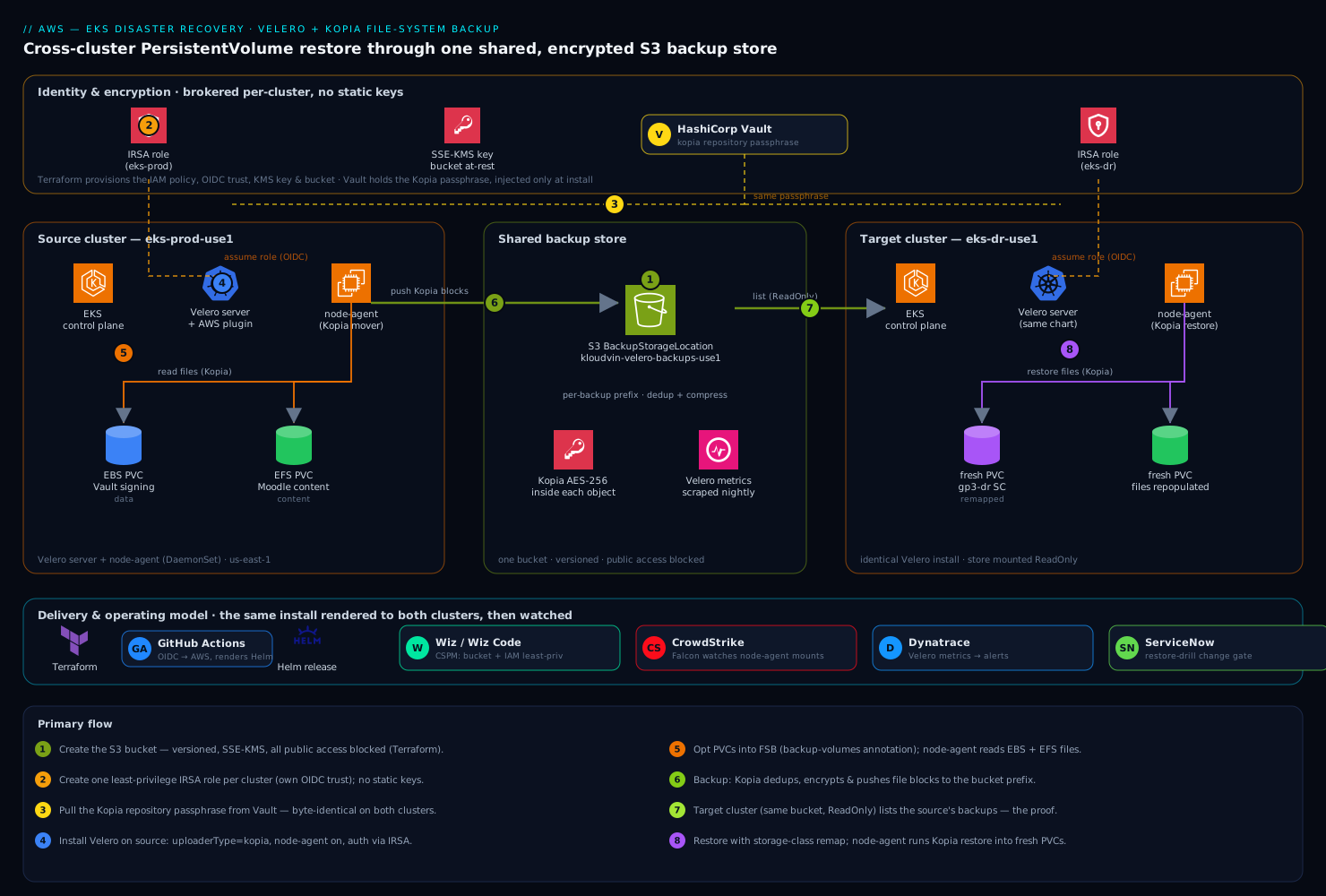
The shape is deliberately simple, and the simplicity is the point: a single S3 bucket is the shared backup store, and both clusters are clients of it. The source cluster’s Velero server, with its node-agent DaemonSet, walks each PVC’s filesystem with Kopia, deduplicates and encrypts the file blocks, and pushes them to the bucket under a per-backup prefix. The target cluster runs an identical Velero install pointed at the same bucket; because the backup is file-level and storage-agnostic, the target’s node-agent can restore those files into a freshly provisioned PVC backed by whatever StorageClass exists there — even a different CSI driver. Velero objects (Deployments, Services, ConfigMaps) are restored from the same backup’s resource manifests. Identity to the bucket is brokered per-cluster through IRSA, so neither cluster holds a long-lived AWS key, and the encryption passphrase Kopia uses to seal the repository is held outside the cluster in HashiCorp Vault rather than living forever in a Kubernetes Secret.
Around that core, the operating model is where a regulated team earns its keep. Wiz (and Wiz Code scanning the Velero schedule and IAM manifests in the repo) continuously checks that the backup bucket never drifts to public and that the IRSA policy stays least-privilege; CrowdStrike Falcon sensors on both node pools watch the node-agent’s mount-and-read behavior for anything anomalous; Dynatrace (Datadog works equally well) scrapes Velero’s Prometheus metrics so a silently failing nightly backup pages someone instead of being discovered during an incident; ServiceNow is the change gate that a real restore drill files against; and the whole install is delivered by Terraform (IAM, bucket, OIDC) plus a GitHub Actions workflow (or Argo CD app-of-apps) that renders the Velero Helm release so the two clusters are provably identical. We will call out where each one plugs in.
How the backup actually moves: node-agent, Kopia, and the BackupRepository
Before the commands, hold the moving parts in your head — this is the mental model that makes every later step obvious. Velero splits into a control plane and a data plane, and they do genuinely different work:
- The Velero server (one Deployment in the
veleronamespace) is the brain. It watches forBackupandRestoreobjects, talks to the Kubernetes API to collect resource manifests, writes them to S3, and orchestrates everything. It never touches your volume data itself. - The node-agent (a DaemonSet — one pod per node) is the muscle. It is the thing that actually reads and writes PersistentVolume files. When a backup includes a volume, the node-agent pod on the same node as your workload mounts that volume’s files and hands them to Kopia, the embedded backup engine, which deduplicates, compresses, encrypts, and uploads them. No node-agent, no file data — the backup will happily complete with only your YAML.
Kopia is the file-system-backup uploader. Historically this role was filled by Restic (you may still see the term “restic integration” in old docs); Velero made Kopia the default uploader in v1.12, and that is what configuration.uploaderType=kopia selects. Kopia gives you content-addressed deduplication and compression that Restic did not, which is why daily backups of a slowly-changing volume cost a fraction of the raw size.
Three custom resources are worth recognizing when you kubectl get around during a backup:
| Custom Resource | What it is | When it appears |
|---|---|---|
BackupRepository |
The handle to one Kopia repository (a per-namespace + storage-location + uploader combination). This is the “formatted USB drive” the files live in. | Auto-created the first time a namespace has a file-system backup; should report Ready. |
PodVolumeBackup (PVB) |
One per volume being file-backed-up in a given Backup. Its status (Completed, Bytes Done) is your proof the data actually moved. |
During a backup, one per annotated volume. |
PodVolumeRestore (PVR) |
The restore-side mirror: repopulates one volume’s files from the repository before the pod’s containers start. | During a restore. |
Finally, the opt-in / opt-out decision. Kopia FSB does not back up every volume automatically — you choose, and the default is opt-in:
| Opt-in (default) | Opt-out | |
|---|---|---|
| How volumes are selected | Pod annotation backup.velero.io/backup-volumes=<vol1>,<vol2> |
--default-volumes-to-fs-backup on the backup/schedule (or the install flag) |
| Which volumes get file data | Only the ones you name | Every eligible PVC-backed volume, minus exclusions |
| How to exclude one | n/a — not listed means skipped | Pod annotation backup.velero.io/backup-volumes-excludes=<vol> |
| Best for | A few known stateful volumes; auditable | “Back up everything” estates |
| The classic trap | Forget the annotation → data silently skipped | Backs up caches/scratch unless you exclude them |
Keep the contrast with a CSI block snapshot in mind too: a CSI VolumeSnapshot copies the disk at the block level and is fast, but it stays inside the cloud and cannot cross a storage class or driver — the exact reason we are using file-level FSB here (the CSI volume snapshots lesson covers that path). With the model in hand, the steps below are just wiring it up.
1. Create the S3 backup store and lock it down
Velero needs one bucket as its BackupStorageLocation. Create it with versioning, default encryption, and all public access blocked. In production this is a Terraform resource so Wiz Code can lint it before it ever applies; the equivalent CLI is shown for clarity.
export AWS_REGION=us-east-1
export BUCKET=kloudvin-velero-backups-use1-$(aws sts get-caller-identity --query Account --output text)

aws s3api create-bucket \
  --bucket "$BUCKET" \
  --region "$AWS_REGION"

aws s3api put-bucket-versioning \
  --bucket "$BUCKET" \
  --versioning-configuration Status=Enabled

aws s3api put-bucket-encryption \
  --bucket "$BUCKET" \
  --server-side-encryption-configuration '{
    "Rules":[{"ApplyServerSideEncryptionByDefault":{"SSEAlgorithm":"aws:kms"}}]
  }'

aws s3api put-public-access-block \
  --bucket "$BUCKET" \
  --public-access-block-configuration \
  BlockPublicAcls=true,IgnorePublicAcls=true,BlockPublicPolicy=true,RestrictPublicBuckets=true
The aws:kms default encryption is the bucket-at-rest layer; Kopia adds a second, independent encryption layer inside the objects, which is what lets you store regulated file data here without the KMS key alone being the whole trust boundary.
2. Create the IRSA role and least-privilege policy
Velero’s pods authenticate to S3 through a service account annotated with an IAM role. Write the policy to grant only the actions Velero needs on this one bucket — never s3:* on *. This JSON is the artifact Wiz flags on if it ever widens.
cat > /tmp/velero-policy.json <<EOF
{
  "Version": "2012-10-17",
  "Statement": [
    {
      "Effect": "Allow",
      "Action": ["s3:GetObject","s3:PutObject","s3:DeleteObject","s3:ListMultipartUploadParts","s3:AbortMultipartUpload"],
      "Resource": "arn:aws:s3:::${BUCKET}/*"
    },
    {
      "Effect": "Allow",
      "Action": ["s3:ListBucket","s3:GetBucketLocation"],
      "Resource": "arn:aws:s3:::${BUCKET}"
    }
  ]
}
EOF

aws iam create-policy \
  --policy-name KloudvinVeleroS3 \
  --policy-document file:///tmp/velero-policy.json
Now create one IRSA role per cluster (each cluster has its own OIDC issuer, so they cannot share a trust policy). eksctl does the trust-policy plumbing for you:
# Source cluster
eksctl create iamserviceaccount \
  --cluster eks-prod-use1 --region "$AWS_REGION" \
  --namespace velero --name velero \
  --role-name KloudvinVeleroRole-prod \
  --attach-policy-arn arn:aws:iam::$(aws sts get-caller-identity --query Account --output text):policy/KloudvinVeleroS3 \
  --role-only --approve

# Target cluster (same policy, its own role + trust)
eksctl create iamserviceaccount \
  --cluster eks-dr-use1 --region "$AWS_REGION" \
  --namespace velero --name velero \
  --role-name KloudvinVeleroRole-dr \
  --attach-policy-arn arn:aws:iam::$(aws sts get-caller-identity --query Account --output text):policy/KloudvinVeleroS3 \
  --role-only --approve
--role-only creates the role and trust relationship without creating the service account yet — the Velero Helm chart will create the SA and we annotate it with the role ARN. This keeps a single source of truth for the SA in the Helm values.
3. Pull the Kopia repository passphrase from Vault
Kopia encrypts the backup repository with a passphrase. Velero reads it from a Secret named velero-repo-credentials with key repository-password. Do not type a passphrase into a manifest you commit. Instead, fetch it from HashiCorp Vault at install time so the secret has a single authoritative home, can be rotated, and never lands in git:
export VAULT_ADDR=https://vault.internal.kloudvin.io
# Auth to Vault via the platform's OIDC/Kubernetes auth method (not shown);
# then read the passphrase that was generated once and stored here.
REPO_PW=$(vault kv get -field=kopia_passphrase secret/eks/velero)

kubectl create namespace velero --dry-run=client -o yaml | kubectl apply -f -

kubectl -n velero create secret generic velero-repo-credentials \
  --from-literal=repository-password="$REPO_PW"
Run that identical step against both clusters’ contexts. The passphrase must match on source and target — a cross-cluster restore can only open a Kopia repository sealed with the same secret. That single shared secret, held in Vault and injected at install, is the crux of why the restore works at all.
4. Install Velero with the Kopia file-system backup uploader
Install Velero on the source cluster with the AWS plugin, the node-agent enabled (it runs the Kopia data movement), and the uploader explicitly set to kopia. Pin the chart so the two clusters match — this is the Helm release GitHub Actions or Argo CD renders.
helm repo add vmware-tanzu https://vmware-tanzu.github.io/helm-charts
helm repo update

ACCOUNT=$(aws sts get-caller-identity --query Account --output text)

helm install velero vmware-tanzu/velero \
  --namespace velero \
  --version 8.1.0 \
  --set-string configuration.uploaderType=kopia \
  --set deployNodeAgent=true \
  --set "initContainers[0].name=velero-plugin-for-aws" \
  --set "initContainers[0].image=velero/velero-plugin-for-aws:v1.11.0" \
  --set "initContainers[0].volumeMounts[0].mountPath=/target" \
  --set "initContainers[0].volumeMounts[0].name=plugins" \
  --set configuration.backupStorageLocation[0].name=default \
  --set configuration.backupStorageLocation[0].provider=aws \
  --set configuration.backupStorageLocation[0].bucket="$BUCKET" \
  --set configuration.backupStorageLocation[0].config.region="$AWS_REGION" \
  --set "serviceAccount.server.annotations.eks\.amazonaws\.com/role-arn=arn:aws:iam::${ACCOUNT}:role/KloudvinVeleroRole-prod" \
  --set credentials.useSecret=false
Two flags carry the whole design: configuration.uploaderType=kopia selects Kopia (not Restic) as the FSB data mover, and credentials.useSecret=false tells Velero to authenticate via IRSA rather than a mounted static AWS key. Confirm the components came up:
kubectl -n velero get deploy velero
kubectl -n velero get daemonset node-agent          # one pod per node
kubectl -n velero get backupstoragelocation default # PHASE should be Available
If node-agent shows zero desired pods, deployNodeAgent did not take — without it there is no Kopia data movement and PVC contents will silently not be backed up.
5. Opt the PersistentVolumes into file-system backup
Velero with Kopia uses opt-in by default: a volume is only file-backed up if its pod carries the backup.velero.io/backup-volumes annotation listing the volume names. (You can flip to opt-out globally with --default-volumes-to-fs-backup, but explicit opt-in is the auditable choice and what Wiz Code can verify in the manifest.) Annotate the running pods of your stateful workload:
# The StatefulSet mounts a volume named "data" — annotate each pod.
kubectl -n payments annotate pod tokenizer-0 \
  backup.velero.io/backup-volumes=data --overwrite

# Or bake it into the pod template so it survives restarts:
kubectl -n payments patch statefulset tokenizer --type merge -p '{
  "spec":{"template":{"metadata":{"annotations":
    {"backup.velero.io/backup-volumes":"data"}}}}}'
For the EFS-backed Moodle content volume, annotate backup.velero.io/backup-volumes=content the same way. Kopia handles EBS and EFS identically — it reads files from the mount, not blocks from the disk — which is exactly why it survives a storage-class change on restore.
6. Take the first backup
Trigger an on-demand backup scoped to the namespace, then set the nightly schedule that Dynatrace will watch.
velero backup create payments-$(date +%Y%m%d-%H%M) \
  --include-namespaces payments \
  --snapshot-volumes=false \
  --default-volumes-to-fs-backup=false \
  --wait

# Nightly schedule, 30-day retention (ttl), file-level via the annotations above:
velero schedule create payments-nightly \
  --schedule="0 2 * * *" \
  --include-namespaces payments \
  --ttl 720h0m0s
--snapshot-volumes=false keeps this purely file-level (no EBS snapshot side-channel), so the only copy of the data is the storage-agnostic Kopia one in S3 — the copy a different cluster can read. Inspect the result and confirm the Kopia data movement actually ran:
velero backup describe payments-20260610-0200 --details
# Look for "Kopia Backups" / podvolumebackups with status Completed, Bytes Done > 0.
velero backup logs payments-20260610-0200 | grep -i kopia

# The BackupRepository (the Kopia repo handle for this namespace) is auto-created on the
# first FSB backup and should report status Ready:
kubectl -n velero get backuprepositories
If podvolumebackups is empty, the annotation in step 5 did not land — the resource YAML was captured but the file data was not. If backuprepositories is empty or stuck NotReady, Velero never managed to initialize the Kopia repository in the bucket (check the node-agent logs and the IRSA permissions from step 2).
7. Install Velero on the target cluster, same bucket
Switch context to eks-dr-use1 and install Velero identically, with one change: the IRSA role ARN is the target cluster’s role, and the BackupStorageLocation is set read-only so a DR cluster can never overwrite or expire the source’s backups.
kubectl config use-context arn:aws:eks:us-east-1:${ACCOUNT}:cluster/eks-dr-use1

helm install velero vmware-tanzu/velero \
  --namespace velero --version 8.1.0 \
  --set-string configuration.uploaderType=kopia \
  --set deployNodeAgent=true \
  --set "initContainers[0].name=velero-plugin-for-aws" \
  --set "initContainers[0].image=velero/velero-plugin-for-aws:v1.11.0" \
  --set "initContainers[0].volumeMounts[0].mountPath=/target" \
  --set "initContainers[0].volumeMounts[0].name=plugins" \
  --set configuration.backupStorageLocation[0].name=default \
  --set configuration.backupStorageLocation[0].provider=aws \
  --set configuration.backupStorageLocation[0].bucket="$BUCKET" \
  --set configuration.backupStorageLocation[0].accessMode=ReadOnly \
  --set configuration.backupStorageLocation[0].config.region="$AWS_REGION" \
  --set "serviceAccount.server.annotations.eks\.amazonaws\.com/role-arn=arn:aws:iam::${ACCOUNT}:role/KloudvinVeleroRole-dr" \
  --set credentials.useSecret=false
Remember step 3 must already have run here too, so velero-repo-credentials holds the same passphrase. Give Velero a minute to sync the store, then confirm the target can see the source’s backups:
velero backup get          # the source's backups appear here, read-only
velero backup-location get # default -> PHASE Available, ACCESS MODE ReadOnly
Seeing the source backups listed on the target cluster is the whole proof that the shared-store, shared-passphrase wiring is correct.
8. Restore into the target cluster with PVC remapping
Now restore the workload. The target may not have the source’s exact StorageClass, so remap it during restore. Restore into the same namespace (or a new one with --namespace-mappings).
# Map the source storage class to one that exists on the target cluster.
cat > /tmp/sc-mapping.yaml <<'EOF'
apiVersion: v1
kind: ConfigMap
metadata:
  name: change-storage-class-config
  namespace: velero
  labels:
    velero.io/plugin-config: ""
    velero.io/change-storage-class: RestoreItemAction
data:
  gp3-prod: gp3-dr      # source SC  ->  target SC
EOF
kubectl apply -f /tmp/sc-mapping.yaml

velero restore create payments-restore-1 \
  --from-backup payments-20260610-0200 \
  --include-namespaces payments \
  --existing-resource-policy=update \
  --wait
Velero recreates the Deployments/StatefulSets/Services from the backup’s manifests, provisions fresh PVCs under gp3-dr, and the node-agent runs Kopia restore to repopulate each PVC’s files from S3 before the pod is allowed to start. Watch it:
velero restore describe payments-restore-1 --details
# "Kopia Restores" / podvolumerestores should reach Completed.
kubectl -n payments get pods -w
Validation
Prove the files came back, not just the objects — this is the test a snapshot-only approach silently fails.
# 1. Restore reports success with no warnings/errors.
velero restore describe payments-restore-1 | egrep 'Phase|Warnings|Errors'

# 2. Every PVC is Bound on the target's storage class.
kubectl -n payments get pvc -o wide

# 3. The actual file contents are present inside the restored volume.
kubectl -n payments exec tokenizer-0 -- sh -c 'ls -la /var/lib/data && cat /var/lib/data/.bootstrapped 2>/dev/null'

# 4. The app reports healthy and its data checksum matches the source.
kubectl -n payments exec tokenizer-0 -- sha256sum /var/lib/data/keymeta.db
Compare that final checksum against the same file on the source cluster before the cutover. Equal checksums on a different cluster with a different storage class is the unambiguous pass. Pipe the Velero metrics (velero_backup_success_total, velero_restore_failed_total, velero_backup_last_successful_timestamp) into Dynatrace or Datadog so this becomes a standing alert — a backup that quietly stopped completing two weeks ago is the classic DR-day disaster.
Rollback / teardown
Velero restores are additive, so rolling back a botched restore is just deleting what it created plus its provisioned volumes.
# Remove the restored namespace's workload and PVCs (PVCs delete the PVs too).
kubectl delete namespace payments            # on the target cluster only
velero restore delete payments-restore-1

# Decommission the whole pipeline if you are tearing the lab down:
velero schedule delete payments-nightly
helm uninstall velero -n velero              # run on BOTH clusters
kubectl delete namespace velero              # on both

# IAM + bucket (mind that the bucket is your only copy of backups):
aws iam delete-policy --policy-arn arn:aws:iam::${ACCOUNT}:policy/KloudvinVeleroS3
aws s3 rb "s3://$BUCKET" --force
Deleting a Velero restore object does not delete the Kubernetes resources it created — you must delete those (the namespace) yourself, which is why the namespace delete comes first. File a ServiceNow change for any production teardown; a deleted backup bucket is unrecoverable.
Going deeper
The runbook above gets you a working, provable cross-cluster restore. This section is for when you have to reason about the pieces — pick the right data-movement strategy, keep a live database consistent, tune for volumes that are far bigger than a lab PVC, and stretch the restore across regions and accounts.
Three ways to move volume data, and when each wins. Kopia FSB is not the only option Velero gives you, and choosing wrong is a common source of “why is my restore slow / not portable / not consistent” pain. There are three strategies, and they trade off along different axes:
| Approach | What it copies | Portable across StorageClass / driver? | Cross-cluster? | Consistency | Speed on large data |
|---|---|---|---|---|---|
| Kopia FSB (this lesson) | The files inside the volume | Yes | Yes (shared S3 store) | Crash-consistent unless you add backup hooks | Slower — walks the whole file tree |
| Native CSI VolumeSnapshot | A block-level snapshot that stays in the cloud | No — same driver, same zone | No — zonal cloud object | Crash-consistent at the snapshot instant | Fast (copy-on-write) |
CSI Snapshot Data Movement (--snapshot-move-data) |
Snapshots first, then moves the snapshot’s blocks to S3 via Kopia | Yes — lands as objects in S3 | Yes | Crash-consistent at the snapshot instant | Fast snapshot, then a background move |
The third row is the one people miss. Velero has a built-in data mover: velero backup create ... --snapshot-move-data takes a CSI snapshot (instant, crash-consistent) and then the node-agent uses the Kopia uploader to copy that snapshot’s data into the object store, creating DataUpload (backup) and DataDownload (restore) custom resources. You get the point-in-time consistency of a snapshot and the portability of object storage. The catch on this lesson’s workload: --snapshot-move-data needs a CSI driver that supports snapshots — great for the EBS PVC, but EFS’s CSI driver has no snapshot primitive, so the EFS content volume must use plain FSB. Mixing the two in one estate is normal: FSB for file shares and snapshot-less drivers, data-movement for snapshot-capable block volumes that need a clean point-in-time.
Kopia vs. Restic — history that still shows up in your flags. Velero’s file-system backup began life as the “restic integration,” and for years --uploader-type toggled between restic and kopia. Velero switched the default to Kopia in v1.12, and Restic is now on a staged deprecation: warnings appear from v1.15, restic backups are disabled around v1.17–v1.18, and both restic backup and restore are removed by v1.19. Practically, use Kopia for anything new — it brings content-addressed deduplication and compression Restic lacked, so repeated files across daily backups are stored once. Old restic backups remain restorable regardless of your uploaderType, so a migration is low-risk; you simply set uploaderType: kopia and new backups take the Kopia path while old ones still restore.
How the node-agent actually reads your PV data (and why it is privileged). The node-agent is a DaemonSet, so there is a pod on every node. To back up a volume, the node-agent on the node where your workload runs reaches the pod’s volume through the host kubelet’s directory (under /var/lib/kubelet/pods/<pod-uid>/volumes/...), which is why the node-agent pods run with elevated host access and why CrowdStrike Falcon legitimately sees them touching every volume on the box. This is also why FSB reads from a live, running pod’s mount — the annotation names volumes on the pod, and the data is copied out from under the running workload (hence “crash-consistent, not application-consistent” until you add hooks, below). Each namespace’s files live in one BackupRepository — a Kopia repository whose passphrase is your velero-repo-credentials secret. Velero periodically runs a repository maintenance job against it to prune expired snapshots and reclaim space; if that maintenance stops running, your bucket quietly grows even as --ttl expires logical recovery points.
Backup hooks: turning crash-consistent into application-consistent. File-system backup copies whatever is on disk at read time. For a database with in-memory buffers, that on-disk state can be torn — a restore usually replays a journal to recover, but “usually” is not a DR guarantee. Backup hooks let you quiesce the app for the instant Kopia reads it. Bake pre- and post-hook annotations into the pod template; Velero runs the pre command before the volume is read and the post command after:
# Pod-template annotations: flush app buffers to disk before Kopia reads, resume after.
annotations:
  pre.hook.backup.velero.io/container: tokenizer
  pre.hook.backup.velero.io/command: '["/bin/sh","-c","sqlite3 /var/lib/data/keymeta.db \"PRAGMA wal_checkpoint(FULL);\""]'
  pre.hook.backup.velero.io/on-error: Fail
  pre.hook.backup.velero.io/timeout: 2m
  post.hook.backup.velero.io/container: tokenizer
  post.hook.backup.velero.io/command: '["/bin/sh","-c","echo backup-resumed"]'
For a real database use its own quiesce primitive (FLUSH TABLES WITH READ LOCK for MySQL, CHECKPOINT/pg_backup_start for Postgres, fsfreeze -f on the mount if the container has CAP_SYS_ADMIN). If the workload keeps its state in a proper database, the cleaner pattern is to let that database do point-in-time recovery (a Postgres operator with WAL archiving, for instance) and use Velero for the objects — Velero’s file copy is a floor, not a substitute for real DB PITR.
Restore ordering and restore hooks. On restore, Velero follows a fixed resource priority order (namespaces, then CRDs, then PVs/PVCs, then most other resources) configurable via the server’s restoreResourcePriorities; you rarely change it, but knowing it exists explains why a PVC is always restored before the pod that mounts it. The node-agent runs the PodVolumeRestore to repopulate files before the pod’s own containers start, so the app never sees an empty volume. Two hook types give you control over the app’s first moments:
# Init-container hook: hold the app back until the restored data is actually present.
# Exec hook: run a one-off integrity check once the pod is Ready.
annotations:
  init.hook.restore.velero.io/container-name: restore-gate
  init.hook.restore.velero.io/container-image: busybox:1.36
  init.hook.restore.velero.io/command: '["/bin/sh","-c","until [ -f /var/lib/data/.bootstrapped ]; do sleep 2; done"]'
  post.hook.restore.velero.io/container: tokenizer
  post.hook.restore.velero.io/command: '["/bin/sh","-c","sqlite3 /var/lib/data/keymeta.db \"PRAGMA integrity_check;\""]'
  post.hook.restore.velero.io/wait-timeout: 5m
  post.hook.restore.velero.io/exec-timeout: 2m
Uploader config and parallelism — the knob that saves your huge-volume restore. By default the node-agent runs one data-path operation per node at a time (globalConfig: 1). For a node hosting several large PVCs, or for a restore you need to finish inside an RTO, raise the concurrency with a node-agent config referenced by --node-agent-configmap:
{
  "loadConcurrency": {
    "globalConfig": 2,
    "perNodeConfig": [
      { "nodeSelector": { "matchLabels": { "workload": "backup" } }, "number": 4 }
    ]
  }
}
globalConfig applies everywhere; perNodeConfig overrides it for matching nodes (so you can push heavy parallelism onto a dedicated backup node pool and keep it low on production nodes). This concurrency governs PodVolumeBackup, PodVolumeRestore, DataUpload, and DataDownload pods alike. Concurrency multiplies CPU, memory, and network to S3 — raise it deliberately and watch the node-agent’s resource use, because an over-parallel restore can starve the very workload you are trying to bring back.
Cross-region and cross-account restore. The same-region topology in this guide is the simple case; two harder ones show up in real DR plans:
- Cross-region — a true region outage means the bucket in the failed region is also gone. Enable S3 Cross-Region Replication to a bucket in the DR region and point the DR cluster’s
BackupStorageLocationat the replica (stillReadOnly). Restores then read locally in-region; you also avoid cross-region data-transfer charges on the restore path. - Cross-account — restoring into a cluster in a different AWS account needs two authorization layers to both say yes: the DR cluster’s IRSA role (its identity policy) and a resource-based bucket policy on the source bucket that trusts that role. Plus, since the objects are SSE-KMS encrypted, the KMS key policy must grant the DR role
kms:Decrypt.
{
  "Version": "2012-10-17",
  "Statement": [
    {
      "Sid": "AllowDrClusterRoleReadOnly",
      "Effect": "Allow",
      "Principal": { "AWS": "arn:aws:iam::<DR-ACCOUNT-ID>:role/KloudvinVeleroRole-dr" },
      "Action": ["s3:GetObject", "s3:ListBucket"],
      "Resource": [
        "arn:aws:s3:::<BUCKET>",
        "arn:aws:s3:::<BUCKET>/*"
      ]
    }
  ]
}
On the restore itself, remember the two remapping tools: --namespace-mappings old:new to land the workload in a different namespace, and the change-storage-class plugin (step 8) to satisfy a target with different storage. Together they let one backup restore into almost any cluster shape.
IRSA vs. EKS Pod Identity for the S3 auth. This guide uses IRSA: an OIDC provider per cluster, a role whose trust policy names that cluster’s issuer, and the role ARN stamped onto the Velero service account. It works, but the per-cluster OIDC trust is exactly the friction that makes a two-cluster setup fiddly. EKS Pod Identity (the newer mechanism) replaces the OIDC-trust juggling with a simple association between a service account and a role via the EKS API — no eks.amazonaws.com/role-arn annotation, no per-cluster issuer in the trust policy, and the same role is trivially reusable across clusters. For a fleet that stamps out DR clusters regularly, Pod Identity is the smoother path; the IRSA to Pod Identity migration lesson walks the switch. Either way the principle is identical: no static AWS key ever lives in the cluster.
Verifying integrity — trust, but verify. The cross-cluster sha256sum in the Validation section is your gold standard: equal checksums on a different cluster with a different storage class prove the files, not just the YAML, survived. Beyond that one file, make integrity a standing practice: alert on velero_backup_last_successful_timestamp so a stalled nightly pages you within hours, watch that BackupRepository maintenance keeps succeeding (a failing maintenance job is a slow-motion bucket-cost and prune problem), and — most important — schedule a real restore drill into a throwaway target cluster on a cadence (quarterly is a sane floor), under a ServiceNow change, with a stopwatch. Your measured restore time is your real RTO; the number in the DR plan is a guess until you have restored a production-sized volume at least once.
Practice challenges
Work these in order — they escalate from a one-line annotation to a cross-account restore design. They assume the lab from steps 1–8 (secrets and account IDs are placeholders; never commit real ones). Where a challenge mutates state, run it against the DR/throwaway cluster, not production.
1. Beginner — prove the file data (not just the YAML) was backed up. You ran a backup and it shows Phase: Completed. Which single kubectl/velero check tells you the volume files actually moved, and what value must be non-zero?
<details> <summary>Solution</summary>
velero backup describe payments-20260610-0200 --details
kubectl -n velero get podvolumebackups -l velero.io/backup-name=payments-20260610-0200
Look for PodVolumeBackup objects in Completed with Bytes Done > 0. A backup can be Completed with zero PVBs — that means only manifests were saved. Bytes Done > 0 is the proof the Kopia data path ran.
</details>
2. Beginner — the backup is green but empty of data. A teammate’s backup is Completed yet kubectl -n velero get podvolumebackups returns nothing. Give the two most likely causes and the one command that distinguishes them.
<details> <summary>Solution</summary>
Either (a) the volume was never opted in — no backup.velero.io/backup-volumes annotation on the pod — or (b) the node-agent is not running, so there is no data mover at all. Distinguish with kubectl -n velero get daemonset node-agent: if DESIRED is 0 the install missed deployNodeAgent=true (cause b); if the DaemonSet is healthy, the annotation is missing (cause a). Bake the annotation into the pod template so it survives restarts.
</details>
3. Intermediate — restore where the StorageClass name differs. The target cluster has no gp3-prod StorageClass; it has gp3-dr. Restored PVCs would sit Pending forever. Write the object that fixes it without editing any backup.
<details> <summary>Solution</summary>
A change-storage-class config map in the velero namespace:
apiVersion: v1
kind: ConfigMap
metadata:
  name: change-storage-class-config
  namespace: velero
  labels:
    velero.io/plugin-config: ""
    velero.io/change-storage-class: RestoreItemAction
data:
  gp3-prod: gp3-dr
Apply it before the restore; the RestoreItemAction rewrites storageClassName on the way in. The alternative — pre-creating a gp3-prod StorageClass on the target — also works but couples the target’s config to the source’s names.
</details>
4. Intermediate — stop the DR cluster from destroying the source’s backups. Both clusters share one bucket. What one setting prevents the DR cluster’s Velero from expiring or overwriting the source’s recovery points, and what failure does it prevent?
<details> <summary>Solution</summary>
Set the DR cluster’s BackupStorageLocation to read-only: --set configuration.backupStorageLocation[0].accessMode=ReadOnly. Without it, the DR cluster runs its own backup-expiry/maintenance against the shared bucket and can delete backups the source still needs — a self-inflicted data-loss on the one copy that matters. velero backup-location get should show ACCESS MODE ReadOnly.
</details>
5. Advanced — make a live database backup application-consistent. The tokenizer writes to a file-backed DB while Kopia reads it, risking a torn copy. Add the annotations that quiesce it for the read and release it after, and name the two failure knobs you’d tune.
<details> <summary>Solution</summary>
annotations:
  pre.hook.backup.velero.io/container: tokenizer
  pre.hook.backup.velero.io/command: '["/bin/sh","-c","sqlite3 /var/lib/data/keymeta.db \"PRAGMA wal_checkpoint(FULL);\""]'
  pre.hook.backup.velero.io/on-error: Fail
  pre.hook.backup.velero.io/timeout: 2m
  post.hook.backup.velero.io/container: tokenizer
  post.hook.backup.velero.io/command: '["/bin/sh","-c","echo resumed"]'
Tune on-error (Fail aborts the backup if the quiesce fails — safest for regulated data; Continue accepts a crash-consistent copy) and timeout (cap how long the pre-hook may hold the app). For a real RDBMS, swap the pre-command for its native flush/lock primitive.
</details>
6. Advanced — design a cross-account restore. The DR cluster lives in a different AWS account from the backup bucket. List the authorization layers that must all allow the read, and the single check that proves the restored data is byte-correct on the other account’s cluster.
<details> <summary>Solution</summary>
Three grants must line up: (1) the DR cluster’s IRSA role identity policy allowing s3:GetObject/s3:ListBucket; (2) a resource-based bucket policy on the source bucket trusting that DR role ARN; (3) the KMS key policy granting the DR role kms:Decrypt for the SSE-KMS key. Set the DR BackupStorageLocation ReadOnly. The proof of correctness is unchanged from a same-account restore: sha256sum a restored file on the DR cluster and confirm it equals the source’s checksum — same bytes, different account, different StorageClass.
</details>
Common beginner mistakes
These are misconceptions, not symptom-lookup entries — each is a wrong mental model and the right one to replace it with.
- “The backup said
Completed, so my data is safe.” Velero’s default is to back up objects; file-system backup is opt-in. A green backup with noPodVolumeBackupobjects saved only your YAML — every byte in the PVC is missing. The right model: object backup and volume-data backup are two separate jobs, and thebackup.velero.io/backup-volumesannotation is the wire that joins them. VerifyBytes Done > 0, never just the phase. - “Velero snapshots my volumes.” Kopia FSB does not take a disk snapshot — it reads the files out of the mounted volume. That is not a limitation, it is the whole point: a file-level copy is neutral, so it can be restored onto a different disk type or CSI driver, which a block snapshot never could. The right model: files in a portable repository, not a cloud-locked block image.
- “The restore will just work on the new cluster.” The backup is portable; the cluster wiring around it is not. The target needs its own IRSA role, the same Kopia passphrase, and a StorageClass that exists there (or a
change-storage-classmapping). The right model: you carry the drive; you still have to plug it into a machine that has power and a matching port. - “Identity carries across clusters.” Each EKS cluster has its own OIDC issuer, so an IRSA trust policy written for the source cluster means nothing on the target — you build a separate role per cluster. The only thing that is legitimately shared is the S3 bucket and the Kopia passphrase. The right model: shared store and shared secret; separate identities.
- “It worked in the lab, so DR is done.” A 1 GiB lab PVC restores in seconds; a multi-terabyte volume with millions of small files can take hours, because FSB walks the file tree. If you never tested at production scale, your RTO is fiction. The right model: your RTO is the measured restore time of a production-sized volume, and node-agent
loadConcurrencyis the knob that moves it. - “I tested the backup.” Taking a backup tests your ability to write to S3, nothing more. DR is proven only by restoring into the actual target cluster and checking the data. The right model: a restore you have never run is a hypothesis, not a capability — rehearse it on a schedule.
Common pitfalls
- Forgetting
deployNodeAgent=true. No node-agent means no Kopia data mover; backups “succeed” with only resource manifests and zeropodvolumebackups. Always verify the DaemonSet has running pods (step 4). - Mismatched repository passphrase. If the target’s
velero-repo-credentialsdiffers from the source’s, the restore fails to open the Kopia repo with a decryption error. The Vault-sourced passphrase (step 3) must be byte-identical on both clusters. - Missing the volume annotation. Opt-in is the default; an un-annotated volume is skipped silently. Bake the annotation into the pod template, not just the live pod, or it vanishes on the next rollout.
- No matching StorageClass on the target. Restored PVCs sit
Pendingforever if theirstorageClassNamedoes not exist. Use thechange-storage-classplugin (step 8) or pre-create the class. - Writable store on the DR cluster. Without
accessMode=ReadOnly, the target’s Velero can run its own backup expiry against the shared bucket and delete the source’s recovery points. Always set the DR location read-only. - EFS access points and UIDs. EFS restores re-create files under the access point’s enforced UID/GID; if your app expects specific ownership, set the matching
fsGroup/access-point posix user or the restored files will be unreadable to the pod.
Security notes
Identity to S3 is IRSA end to end — neither cluster holds a static AWS key, and the IAM policy is scoped to exactly one bucket and the minimal action set (step 2), so a compromised node-agent cannot pivot to other storage. Data is encrypted twice and independently: SSE-KMS at the bucket and Kopia’s own AES-256 inside every object, with the Kopia passphrase held in HashiCorp Vault and injected only at install time rather than living in a committed manifest. Wiz runs continuous CSPM on the bucket and the IAM role — alerting the instant either drifts toward public exposure or wider permissions — while Wiz Code lints the Terraform and the Velero Helm values in the pull request before they merge. CrowdStrike Falcon sensors on both node pools watch the node-agent’s privileged mount-and-read behavior for anomalies, since an FSB data mover legitimately touches every volume on the host and is therefore a high-value target. Every backup and restore runs as a ServiceNow-tracked change so there is an auditable record of who restored regulated data where, and the GitHub Actions pipeline that renders both installs authenticates to AWS via OIDC, so no service-principal secret is stored in CI.
Cost notes
Kopia’s content-addressed dedup and compression mean the S3 footprint is typically a fraction of the raw PVC size — repeated files across daily backups are stored once — so the dominant spend is steady-state S3 standard storage plus a little PUT/GET on backup and restore. Tame it with an S3 lifecycle policy that transitions older backup prefixes to S3-IA or Glacier Instant Retrieval and an honest Velero --ttl (720h here) so expired recovery points are actually reclaimed rather than accumulating forever. The node-agent adds modest CPU/memory on each node only during backup and restore windows; schedule backups off-peak (the 0 2 * * * cron) so they do not contend with production traffic. Cross-AZ or cross-region data-transfer charges appear only if the bucket and clusters span regions — keeping the DR bucket in the same region as shown avoids that line item entirely until a true region-move DR event, when it is a deliberate, one-time cost. Wire the bucket size and request metrics into Dynatrace alongside the Velero metrics so storage growth is a dashboard the platform owner sees, not a month-end surprise.
Glossary
- Velero — the open-source Kubernetes backup and restore tool used throughout this lesson; it copies both objects and (with the node-agent) volume data.
- Velero server — the control-plane Deployment that watches
Backup/Restoreobjects, collects manifests, and orchestrates the data plane. It does not move volume data itself. - node-agent — the DaemonSet (one pod per node) that actually reads and writes PersistentVolume files, handing them to Kopia. Without it, no file data is backed up.
- File System Backup (FSB) — Velero’s mechanism for backing up the files inside a volume (as opposed to a block snapshot); formerly called the “restic integration.”
- Kopia — the embedded backup engine (uploader + repository) that deduplicates, compresses, and encrypts the files FSB reads. Velero’s default uploader since v1.12.
- Restic — the original FSB uploader, now deprecated in favor of Kopia; old restic backups remain restorable.
- uploaderType — the Velero setting (
configuration.uploaderType=kopia) that selects Kopia vs. Restic as the FSB data mover. - BackupRepository — the custom resource representing one Kopia repository (per namespace + storage location + uploader); the “portable drive” the files live in. Auto-created on the first FSB backup.
- PodVolumeBackup (PVB) / PodVolumeRestore (PVR) — the per-volume custom resources that track file data moving out (backup) and back in (restore).
Bytes Done > 0on a PVB is your proof the data moved. - BackupStorageLocation (BSL) — the Velero object pointing at the object store (the S3 bucket here); can be
ReadWrite(source) orReadOnly(DR). - opt-in / opt-out — whether volumes are file-backed-up only when annotated (opt-in, the default) or by default unless excluded (opt-out, via
--default-volumes-to-fs-backup). backup.velero.io/backup-volumes— the pod annotation that opts specific named volumes into file-system backup.- CSI VolumeSnapshot — a block-level, cloud-native snapshot taken through the CSI driver; fast but zonal and locked to the same driver/cloud.
- CSI Snapshot Data Movement — Velero’s
--snapshot-move-datapath: take a CSI snapshot, then move its data to object storage via Kopia, creatingDataUpload/DataDownloadresources. Portability and point-in-time consistency. - IRSA (IAM Roles for Service Accounts) — the EKS mechanism that lets a pod assume an IAM role via the cluster’s OIDC provider and a service-account annotation; no static keys.
- EKS Pod Identity — the newer alternative to IRSA that associates a service account with an IAM role through the EKS API, without per-cluster OIDC trust plumbing.
- OIDC provider — the per-cluster identity issuer that IRSA trust policies reference; each cluster has its own, which is why IRSA roles are per-cluster.
- StorageClass — the template that provisions PersistentVolumes; the source’s and target’s names may differ, hence storage-class remapping on restore.
- change-storage-class plugin — the Velero RestoreItemAction (configured via a labeled ConfigMap) that rewrites
storageClassNameduring restore so PVCs bind on the target. --namespace-mappings— the restore flag that lands a backed-up namespace under a different name on the target cluster.- backup hook / restore hook — pre/post commands Velero runs around a backup (to quiesce an app for a consistent read) or a restore (init-container gate and post-restore exec), configured via pod annotations.
- passphrase /
repository-password— the secret (held in Vault, invelero-repo-credentials) that seals the Kopia repository; must be identical on source and target for a cross-cluster restore. - TTL / retention — how long a backup is kept before Velero expires it (
--ttl 720h0m0s= 30 days here); repository maintenance reclaims the freed space. - RPO / RTO — Recovery Point Objective (how much data, in time, you can lose — set by your backup cadence) and Recovery Time Objective (how long recovery may take — set by your measured restore time).
- loadConcurrency — the node-agent setting (
globalConfig+perNodeConfig) that controls how many data-path operations run per node at once; the main knob for large-volume backup/restore speed.