In a nutshell
Velero is a save-game for your Kubernetes cluster. Think about a video game: before a hard boss you save, and if you lose you reload the save and try again instead of restarting the whole game. Velero is that save button for a cluster. On a schedule it writes a save file — a copy of a namespace’s Kubernetes objects (Deployments, Services, ConfigMaps, Secrets) and the data on its disks (PersistentVolumes) — to cheap, durable cloud object storage. When something goes wrong — a fat-fingered kubectl delete namespace, a bad deploy, a cluster you have to rebuild in another region — you reload the save and the namespace comes back the way it was.
Two things matter about that mental model. First, every save has two halves: the objects (the YAML that describes your workloads) and the volume data (the bytes on the disks). Back up only the objects and you get an empty shell — the Deployment returns but the database is blank. Velero can do both, and this lesson makes sure the volume half actually happens. Second, a save you have never loaded is not a save. The single most common backup mistake is never testing the restore, so half of this lesson is about proving the reload works before the day you need it.
Two words you will see everywhere: a Backup is one save file (an on-demand snapshot of a chosen scope), and a Schedule is an alarm clock that presses save for you on a cron rhythm (say, every night at 02:00) and throws away saves older than a chosen age so you are not paying to hoard them forever.
Level: Advanced (with a beginner on-ramp) · Time: ~40 min hands-on
What you should already know — how Pods, Deployments, and Services live inside a namespace; what PersistentVolumes, PVCs, and StorageClasses are and how a stateful pod gets a disk; and roughly how AKS Workload Identity federates a Kubernetes ServiceAccount to an Entra identity. Comfort with kubectl and the Azure CLI (az) is assumed.
After this lesson you’ll be able to:
- Stand Velero up on AKS authenticated to Azure Blob by Workload Identity, with zero storage keys living in the cluster.
- Snapshot PersistentVolumes with the Azure CSI driver and confirm, from the CLI alone, that the volume half of every backup actually happened.
- Schedule per-namespace backups with self-cleaning TTL retention, defined declaratively so they live in Git under Argo CD.
- Rehearse a full namespace restore — PV data included — and measure the RTO and RPO your DR plan promises.
- Choose correctly between CSI snapshots, the Data Mover, and file-level backup for a given workload, and make a stateful app’s backup application-consistent with pre/post hooks.
A payments platform team runs eleven product namespaces on a single AKS cluster — checkout, ledger, reconciliation, a fleet of stateful workers each backed by a Premium SSD PVC. The wake-up call arrives the usual way: a junior engineer runs helm uninstall against the wrong context and deletes the reconciliation namespace, ConfigMaps, Secrets, and three PersistentVolumeClaims with a day’s un-settled batch state. There is no backup. The cluster is the source of truth, and the source of truth is gone. The fix is not heroics — it is Velero: an open-source backup tool for Kubernetes that captures the API objects of a namespace and snapshots its persistent volumes, ships everything to durable object storage, runs on a schedule, and — the part most teams skip until it is too late — lets you rehearse the restore before you need it. This guide stands Velero up on AKS, targets Azure Blob Storage for the object backups, uses the Azure CSI driver’s volume snapshots for the disks, schedules per-namespace backups, and walks a real restore drill end to end.
Prerequisites
- An AKS cluster on Kubernetes 1.27+ with the CSI drivers enabled (
disk.csi.azure.comandsnapshot.csi.azure.com— default on AKS since 1.21, but the VolumeSnapshot CRDs and snapshot-controller must be present). kubectl(matching the cluster minor version), the Azure CLIaz2.55+,helm3.12+, and theveleroCLI v1.13+ installed locally.- Cluster-admin on the target cluster and Owner/Contributor on the resource group, or the equivalent scoped roles to create a storage account and a managed identity / role assignment.
- A subscription where you can create a Standard v2 storage account and grant
Storage Blob Data Contributor. - Workforce SSO via Entra ID (the operators who run restore drills authenticate to the cluster with
kubeloginagainst Entra; Okta federates to Entra upstream if that is your workforce IdP), so every restore is an attributable, MFA-gated action — not a shared kubeconfig.
Target topology
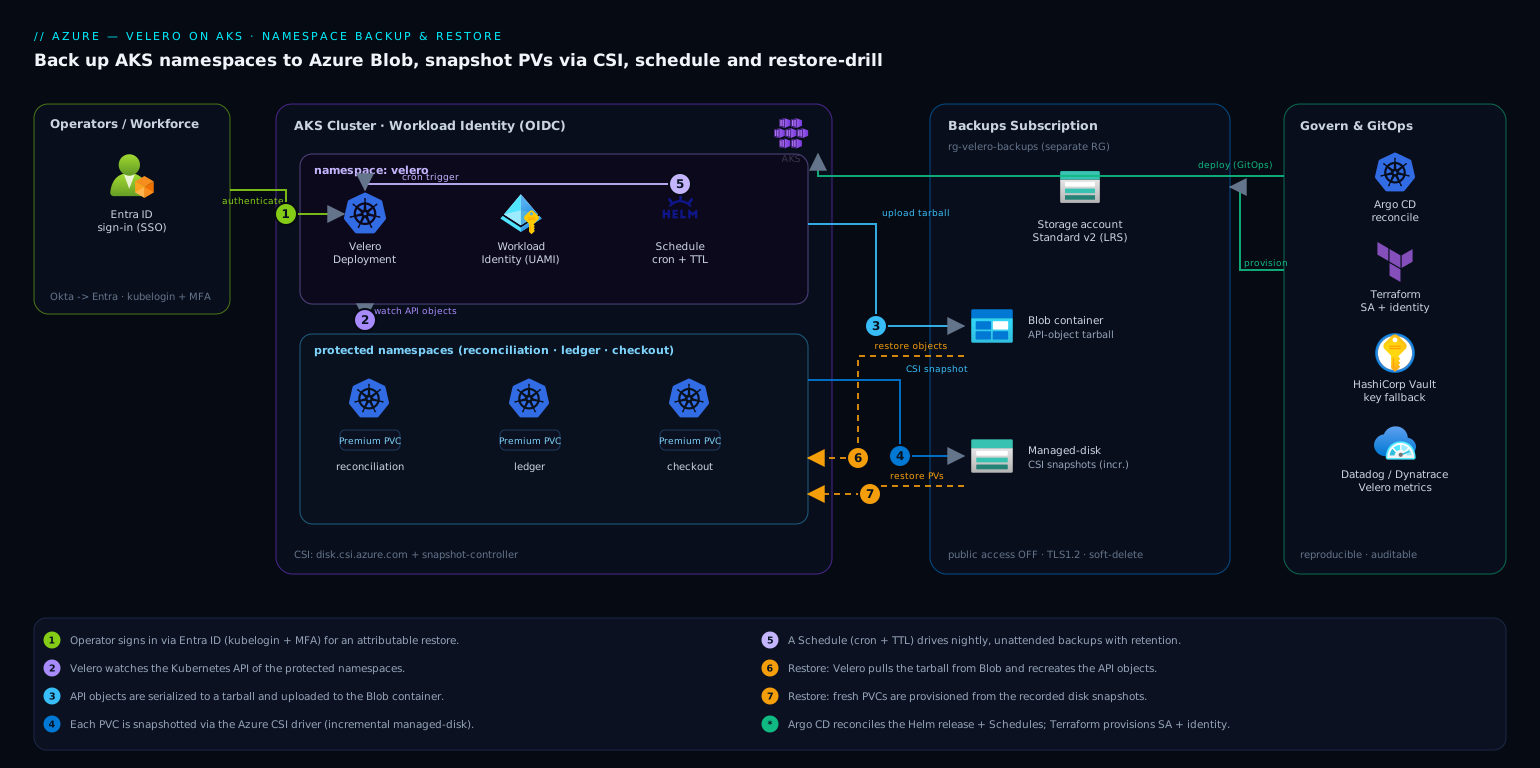
Velero runs as a single Deployment in its own velero namespace. It watches the Kubernetes API and, on a backup, does two things in parallel. First, it serializes the API objects of the targeted namespaces — Deployments, Services, ConfigMaps, Secrets, CRDs, the lot — into a tarball and uploads it to an Azure Blob container through the velero-plugin-for-microsoft-azure Object Store plugin. Second, for every PersistentVolume in scope it asks the Azure CSI driver to take a VolumeSnapshot; the snapshot lives as an incremental Azure managed-disk snapshot, and Velero records the handle in the backup metadata. A Schedule object turns this into a cron-driven, unattended job with a retention TTL. Restores reverse the flow: Velero pulls the object tarball from Blob, recreates the API objects, and provisions fresh PVCs from the recorded snapshots. The whole control loop stays inside the cluster; the only external surface is the one Blob container, reached over the storage account’s private data plane.
The blast radius is deliberately small and well-governed. HashiCorp Vault holds any residual credential the cluster cannot get from a managed identity (we use Workload Identity here, so ideally there is none — but Vault is where a fallback storage-account key would live, leased short and never written to a plain Secret). Wiz / Wiz Code continuously scans the storage account and the cluster for posture drift — a backup container drifting to public access is exactly the kind of finding it raises. CrowdStrike Falcon sensors on the node pool give runtime protection so a compromised pod cannot quietly tamper with backups. Dynatrace / Datadog scrape Velero’s Prometheus metrics so a silently failing nightly backup pages someone instead of being discovered during an incident. ServiceNow receives a change record when a restore is initiated, so a production restore is a tracked change, not a console cowboy move. And the install itself is GitOps-managed: the Velero Helm release and Schedule manifests live in Git and are reconciled by Argo CD, with the underlying storage account and identity provisioned by Terraform (or Ansible if that is your config-management standard) — so the backup system is itself reproducible and auditable.
Velero’s core objects — the mental model
Velero is a controller: it does nothing on its own until you create a custom resource that tells it to. Everything you do — take a backup, restore, schedule, point at storage — is expressed as a Kubernetes object in the velero namespace, which means it is kubectl get-able, GitOps-able, and RBAC-controllable like anything else in the cluster. Learn these six objects and the rest of the tool is detail.
| Object (CRD) | What it is | Save-game analogy |
|---|---|---|
| BackupStorageLocation (BSL) | Where the save files go — the Azure Blob container Velero writes object tarballs to. Created for you as default by velero install. |
The save folder. |
| VolumeSnapshotLocation (VSL) | Where native volume snapshots live — the Azure region/resource group for disk snapshots. | The folder for the big binary save data. |
| Backup | One save file — an on-demand capture of a scoped set of objects (+ their volume data). | A single named save slot. |
| Restore | A request to reload a Backup into the cluster. | Pressing “Load game”. |
| Schedule | A cron rule that creates Backups for you and expires old ones via TTL. | Autosave every N minutes. |
| VolumeSnapshotClass | Tells the CSI driver how to snapshot a disk (which driver, incremental, deletion policy). | The save-format settings. |
Resource filtering — what actually goes into a save. A Backup is a query plus a destination. You scope it with filters and Velero serializes exactly the objects that match:
--include-namespaces/--exclude-namespaces— the primary scope (this lesson backs up whole namespaces).--include-resources/--exclude-resources— by kind (e.g. excludeevents, which are noisy and useless in a restore).--selector app=ledger— by label, to back up one app inside a busy namespace.--include-cluster-resources— whether to also grab cluster-scoped objects (ClusterRoles, CRDs, PVs).
Everything that matches is written to the BSL as a single tar.gz of YAML — one file per object — plus a metadata manifest that records, among other things, which volume snapshots belong to this backup.
Two ways to protect volume data. Objects are the easy half — they are just YAML. The disks are the hard part, and Velero gives you two fundamentally different mechanisms:
- Volume snapshots (this lesson): Velero asks the storage layer to take a block-level snapshot of the disk. On the CSI path that is a
VolumeSnapshothandled bydisk.csi.azure.com, materialized as an incremental Azure managed-disk snapshot. Fast, storage-efficient, crash-consistent — but the snapshot lives in the cloud provider, tied to its region. - File System Backup (the restic → kopia path, covered end-to-end in the sibling lesson Velero with Kopia file-level backups and cross-cluster restore): a node-agent pod reads the files out of the mounted volume and copies them into object storage with kopia. Slower and not crash-consistent by itself, but works on any volume — even storage with no snapshot support — and lands the data in portable Blob rather than a regional disk snapshot.
A third, hybrid path — CSI Snapshot Data Movement — takes a CSI snapshot and then moves its bytes to Blob, combining the speed of the first with the portability of the second; it is covered in Going deeper below. If you want the underlying VolumeSnapshot / VolumeSnapshotContent / VolumeSnapshotClass machinery dissected on its own, see Kubernetes CSI volume snapshots, cloning, resize, and topology.
TTL is the janitor. Every Backup carries a ttl (default 30 days). A Velero controller reaps expired Backups and their volume snapshots, so retention is automatic — and, importantly, mis-setting it silently deletes recovery points. TTL is discussed in depth in Going deeper below.
1. Provision the Azure storage account and container
Velero needs a dedicated blob container for the object backups. Create a Standard v2 storage account (LRS is fine for backups within a region; use GRS if you want cross-region durability) and a single container. Keep this in its own resource group from the cluster so an accidental cluster-RG delete cannot take the backups with it.
# Variables — adjust to your environment
export AKS_RG=rg-aks-payments-prod
export AKS_NAME=aks-payments-prod
export LOCATION=centralindia
export BACKUP_RG=rg-velero-backups-prod          # separate RG on purpose
export STORAGE_ACCT=stveleropaymentsprod          # 3-24 chars, lowercase+digits
export BLOB_CONTAINER=velero

# Backups live in their own resource group
az group create --name "$BACKUP_RG" --location "$LOCATION"

az storage account create \
  --name "$STORAGE_ACCT" \
  --resource-group "$BACKUP_RG" \
  --sku Standard_LRS \
  --kind StorageV2 \
  --encryption-services blob \
  --min-tls-version TLS1_2 \
  --allow-blob-public-access false

# Container for Velero's object store
az storage container create \
  --name "$BLOB_CONTAINER" \
  --account-name "$STORAGE_ACCT" \
  --auth-mode login
--allow-blob-public-access false is non-negotiable: backups contain Secrets. This is precisely the setting Wiz will flag if it ever drifts.
2. Grant Velero access with Workload Identity (no keys)
The clean way to authenticate is Microsoft Entra Workload Identity — Velero’s pod gets an Entra token via a federated service-account credential, and we grant that identity Storage Blob Data Contributor on the storage account. No storage key sits in a Kubernetes Secret. (If your cluster predates Workload Identity, a storage-account key in a Velero Secret is the fallback — store the master copy in HashiCorp Vault and sync it, never commit it.)
# Ensure the OIDC issuer + Workload Identity are enabled on the cluster
az aks update -g "$AKS_RG" -n "$AKS_NAME" \
  --enable-oidc-issuer --enable-workload-identity

export OIDC_ISSUER=$(az aks show -g "$AKS_RG" -n "$AKS_NAME" \
  --query oidcIssuerProfile.issuerUrl -o tsv)

# A user-assigned managed identity for Velero
az identity create -g "$BACKUP_RG" -n id-velero-prod
export VELERO_CLIENT_ID=$(az identity show -g "$BACKUP_RG" -n id-velero-prod --query clientId -o tsv)
export VELERO_PRINCIPAL_ID=$(az identity show -g "$BACKUP_RG" -n id-velero-prod --query principalId -o tsv)
export STORAGE_ID=$(az storage account show -n "$STORAGE_ACCT" -g "$BACKUP_RG" --query id -o tsv)

# Velero needs to read/write blobs AND create disk snapshots
az role assignment create --assignee-object-id "$VELERO_PRINCIPAL_ID" \
  --assignee-principal-type ServicePrincipal \
  --role "Storage Blob Data Contributor" --scope "$STORAGE_ID"

# Snapshot rights on the resource group that holds the cluster's node/disk resources
export NODE_RG=$(az aks show -g "$AKS_RG" -n "$AKS_NAME" --query nodeResourceGroup -o tsv)
az role assignment create --assignee-object-id "$VELERO_PRINCIPAL_ID" \
  --assignee-principal-type ServicePrincipal \
  --role "Disk Snapshot Contributor" \
  --scope "/subscriptions/$(az account show --query id -o tsv)/resourceGroups/$NODE_RG"

# Federate the velero service account to this identity
az identity federated-credential create \
  --name fc-velero \
  --identity-name id-velero-prod \
  --resource-group "$BACKUP_RG" \
  --issuer "$OIDC_ISSUER" \
  --subject "system:serviceaccount:velero:velero" \
  --audience api://AzureADTokenExchange
3. Install the VolumeSnapshot CRDs and snapshot controller
CSI volume snapshots need the upstream VolumeSnapshot CRDs and a running snapshot-controller. AKS ships these on most channels, but verify — a missing CRD is the single most common reason PV snapshots silently no-op. Check first, install only if absent.
# Are the snapshot CRDs present?
kubectl get crd volumesnapshots.snapshot.storage.k8s.io 2>/dev/null \
  && echo "CRDs present" || echo "CRDs MISSING — install below"
If missing, apply the v8 CRDs and controller from the external-snapshotter project, then create a VolumeSnapshotClass that points at the Azure disk CSI driver and tells Velero to use it:
# velero-snapshotclass.yaml
apiVersion: snapshot.storage.k8s.io/v1
kind: VolumeSnapshotClass
metadata:
  name: velero-csi-azuredisk
  labels:
    velero.io/csi-volumesnapshot-class: "true"   # Velero auto-selects this class
driver: disk.csi.azure.com
deletionPolicy: Retain                            # keep the snapshot if the VS object is deleted
parameters:
  incremental: "true"                             # incremental managed-disk snapshots = cheaper
kubectl apply -f velero-snapshotclass.yaml
deletionPolicy: Retain matters: it decouples the lifecycle of the cloud snapshot from the Kubernetes object, so Velero’s own TTL retention drives expiry rather than a stray kubectl delete.
4. Install Velero with the Azure plugin and CSI support
Install via the Velero CLI, enabling the Azure object-store plugin and the CSI plugin, and turn on the EnableCSI feature flag. We pass useNodeAgent=false because we are using native CSI snapshots for block volumes, not filesystem-level file backups. Note --no-secret — we authenticate by Workload Identity, so there is no credentials Secret.
export SUBSCRIPTION_ID=$(az account show --query id -o tsv)

velero install \
  --provider azure \
  --plugins velero/velero-plugin-for-microsoft-azure:v1.10.0,velero/velero-plugin-for-csi:v0.7.0 \
  --bucket "$BLOB_CONTAINER" \
  --no-secret \
  --features=EnableCSI \
  --backup-location-config \
      resourceGroup=$BACKUP_RG,storageAccount=$STORAGE_ACCT,subscriptionId=$SUBSCRIPTION_ID,useAAD=true \
  --snapshot-location-config \
      apiTimeout=10m,resourceGroup=$NODE_RG,subscriptionId=$SUBSCRIPTION_ID \
  --use-volume-snapshots=true \
  --pod-labels azure.workload.identity/use=true \
  --service-account-annotations azure.workload.identity/client-id=$VELERO_CLIENT_ID
After install, label and annotate the service account so the Workload Identity webhook injects the token (the CLI flags above do this, but verify), then confirm the pod is healthy and the backup location is Available:
kubectl -n velero get deploy velero
velero backup-location get        # PHASE should read: Available
If velero backup-location get shows Unavailable, it is almost always the role assignment from Step 2 not yet propagated or useAAD=true missing — Velero cannot reach the container.
Version note (v1.14+): this lesson targets Velero v1.13 and installs the standalone
velero-plugin-for-csi:v0.7.0. From Velero 1.14 the CSI plugin is merged into Velero core — you dropvelero-plugin-for-csifrom--pluginsand keep only the Azure object-store plugin;--features=EnableCSIis still required to switch CSI on. The current stable line is v1.18. See the simplified install in Going deeper.
5. Take a first ad-hoc namespace backup
Before scheduling anything, prove a single namespace round-trips. Back up reconciliation — API objects plus its PVC snapshots — and watch it complete.
velero backup create reconciliation-manual-01 \
  --include-namespaces reconciliation \
  --snapshot-volumes \
  --wait

# Inspect what landed
velero backup describe reconciliation-manual-01 --details
velero backup logs reconciliation-manual-01 | tail -n 40
In the --details output, confirm two things: under Resource List you see the namespace’s Deployments/Secrets/ConfigMaps, and under CSI Volume Snapshots each PVC shows a snapshot with status Completed. Cross-check the snapshot exists in Azure:
az snapshot list -g "$NODE_RG" -o table --query "[].{Name:name, Size:diskSizeGb, State:provisioningState}"
6. Schedule per-namespace backups with retention
Now make it unattended. A Velero Schedule is cron plus a backup template plus a TTL. Run business-critical stateful namespaces nightly with a 30-day retention, and stateless namespaces less aggressively. Define schedules declaratively so they live in Git under Argo CD rather than as imperative CLI state.
# schedule-reconciliation.yaml
apiVersion: velero.io/v1
kind: Schedule
metadata:
  name: nightly-reconciliation
  namespace: velero
spec:
  schedule: "0 2 * * *"          # 02:00 every day (cluster timezone)
  template:
    includedNamespaces:
      - reconciliation
      - ledger
      - checkout
    snapshotVolumes: true
    storageLocation: default
    volumeSnapshotLocations:
      - default
    ttl: 720h0m0s                # 30-day retention; expired backups + snapshots auto-pruned
    includedResources:
      - "*"
    excludedResources:
      - events
      - events.events.k8s.io
kubectl apply -f schedule-reconciliation.yaml
velero schedule get
# Force one run immediately to verify the template, rather than waiting for 02:00
velero backup create --from-schedule nightly-reconciliation --wait
The ttl is what makes retention self-cleaning: Velero deletes the backup object and its associated Azure disk snapshots once the TTL elapses, so you are not hand-pruning snapshots (and not paying for years of them). Excluding events keeps backups lean and restores clean.
7. Validation — run a real restore drill
A backup you have never restored is a hypothesis, not a backup. Rehearse it. The honest drill is to delete a namespace and bring it back; do this on a non-production cluster or a dedicated drill namespace first, then schedule a quarterly drill in production with a ServiceNow change record attached.
# --- DRILL: simulate the original incident ---
kubectl delete namespace reconciliation        # the disaster, on purpose

# Restore the namespace + its PVs from the latest scheduled backup
LATEST=$(velero backup get -o name | grep nightly-reconciliation | sort | tail -n1 | cut -d/ -f2)
echo "Restoring from: $LATEST"

velero restore create reconciliation-drill-01 \
  --from-backup "$LATEST" \
  --include-namespaces reconciliation \
  --restore-volumes=true \
  --wait

# Verify the restore
velero restore describe reconciliation-drill-01 --details
kubectl -n reconciliation get pods,pvc,svc,configmap,secret
The acceptance test is concrete: every Deployment returns to its desired replica count, every PVC is Bound to a volume provisioned from the snapshot (check kubectl -n reconciliation get pvc shows the original capacity), and the application’s own health check passes. For a stateful service, exec in and confirm the data is the snapshot’s data — for a database PVC, that the last committed transaction before the backup is present:
# Example: confirm restored Postgres PVC actually carries data
POD=$(kubectl -n reconciliation get pod -l app=ledger-db -o name | head -n1)
kubectl -n reconciliation exec "$POD" -- \
  psql -U app -d ledger -c "select max(settled_at) from batch_runs;"
Record the RTO you actually measured (wall-clock from restore create to healthy) and the RPO (gap between the backup timestamp and the incident) in the drill ticket — those two numbers are what your DR plan promises, and an untested promise is the one that breaks.
8. Rollback / teardown
To remove a single bad schedule, delete the Schedule object — existing backups remain recoverable. To fully decommission Velero without orphaning cloud resources, delete in dependency order so you do not leave paid-for snapshots behind:
# Stop scheduled backups
kubectl -n velero delete schedule --all

# Optionally expire all backups (this also deletes their Azure snapshots, honoring deletionPolicy)
velero backup delete --all --confirm

# Remove Velero itself
velero uninstall              # removes the velero namespace, CRDs, and RBAC

# Tear down the cloud side (only after confirming no backups are needed)
az role assignment delete --assignee "$VELERO_PRINCIPAL_ID" --scope "$STORAGE_ID"
az identity delete -g "$BACKUP_RG" -n id-velero-prod
az storage container delete --name "$BLOB_CONTAINER" --account-name "$STORAGE_ACCT" --auth-mode login
# Leave the storage account if other backups share it; otherwise:
# az group delete --name "$BACKUP_RG" --yes
Order matters: velero backup delete --all before deleting the storage container, or the disk snapshots in $NODE_RG linger and keep billing. If you tear down the identity before expiring backups, Velero loses the rights to delete its own snapshots and you are left pruning them by hand in Azure.
Common pitfalls
- Snapshots silently skipped. The most frequent failure:
velero backup describe --detailsshows zero CSI snapshots. Cause is almost always the missing VolumeSnapshot CRDs (Step 3) or aVolumeSnapshotClassnot labeledvelero.io/csi-volumesnapshot-class: "true". Velero will happily back up the API objects and skip the data with only a log warning — always check the--detailssnapshot count, and alert on it in Dynatrace. - Backup location stuck
Unavailable. Either the role assignment from Step 2 has not propagated (give it a few minutes), oruseAAD=trueis missing from the backup-location config so Velero is reaching for a key that does not exist. - Restoring into an existing namespace. By default Velero skips resources that already exist; it will not overwrite a live, drifted object. For a true point-in-time rollback, delete the namespace first (as in the drill) or use
--existing-resource-policy=updatedeliberately and with eyes open. - Cross-region restore. Azure disk snapshots are regional. To restore into a different region you must copy snapshots across regions first, or use GRS storage and restore only the API objects while re-provisioning volumes empty. Plan this before the outage, not during.
- Cluster-version skew on restore. Restoring a backup taken on 1.27 into a 1.31 cluster can break on removed API versions (e.g. old
PodSecurityPolicy). Velero’s resource modifiers or a pre-restore manifest scrub handle it; test restores after every cluster upgrade. - Imperative drift. Schedules created with
velero schedule createon the CLI vanish from your Git source of truth. Define them as YAML under Argo CD so the backup policy itself is reviewed and reconciled.
Going deeper
What actually happens during a backup
When a Backup object appears, the Velero server runs an ordered pipeline:
- Discovery & filtering. Velero queries the API server for every resource kind, applies your include/exclude/label filters, and builds the list of objects to capture. It resolves the preferred API version for each kind so the tarball is written at a version the cluster serves.
- Backup item actions (BIAs). Plugins get a chance to transform items or pull in related ones. The CSI plugin’s BIA is what turns “this pod mounts PVC X” into “also snapshot X and record its handle.”
- Pre hooks fire (if any) — commands run inside pods to quiesce apps before their data is snapshotted (below).
- Volume data is captured — a CSI
VolumeSnapshotper in-scope PVC (or a file copy, if you use File System Backup). - Post hooks fire — un-freeze / resume the app.
- Upload. The object tarball and backup metadata are written to the BSL (Azure Blob); the volume snapshots already exist as Azure managed-disk snapshots, and their handles are in that metadata.
The object half and the volume half are independent — a backup can succeed on objects and silently skip volumes (the classic CRD-missing failure from Common pitfalls), which is exactly why velero backup describe --details reports the snapshot count as a separate line. Read it every single time.
CSI snapshots vs Data Mover vs file-level — which volume path
There are three ways Velero can protect volume data. They are not interchangeable; each has a different consistency, portability, and cost profile.
| Path | How it works | Consistency | Where the data lands | Reach for it when |
|---|---|---|---|---|
| CSI / native snapshot (this lesson) | Storage takes a block-level snapshot; Velero records the handle | Crash-consistent | Regional cloud snapshot (Azure managed disk) | Same-cluster, same-region restore; fastest RTO; the default for AKS + Premium SSD |
CSI Snapshot Data Movement (--snapshot-move-data) |
Takes a CSI snapshot, then node-agent + kopia copy its bytes to object storage and release the snapshot | Crash-consistent | Object storage (Blob) — portable | Cross-region / cross-cluster migration, or you want backups off the pricey regional disk tier |
File System Backup (restic → kopia, --default-volumes-to-fs-backup) |
node-agent reads files from the mounted volume, copies to object storage | Not crash-consistent without hooks | Object storage (Blob) — portable | Storage with no CSI snapshot support; small volumes; maximum portability |
The key insight: CSI snapshots are fast and regional; the kopia paths are portable but read at the file layer. The Data Mover is the modern middle ground — the crash-consistency of a block snapshot with the portability of object storage — and is how you run a serious cross-region DR without paying for GRS on every disk. The pure file-level path is walked end to end in Velero with Kopia file-level backups and cross-cluster restore; the CSI snapshot primitives themselves are dissected in Kubernetes CSI volume snapshots.
To move data to Blob instead of leaving regional snapshots, install the node-agent and flip one flag at backup time:
# One-time: re-install (or patch) Velero with the node-agent so the data mover can run
velero install ... --use-node-agent          # adds the node-agent DaemonSet

# Then take a portable, object-storage-resident backup
velero backup create reconciliation-portable-01 \
  --include-namespaces reconciliation \
  --snapshot-move-data \
  --wait
--snapshot-move-data tells Velero to snapshot, move the bytes to the BSL via kopia, then release the CSI snapshot — so nothing lingers on the regional disk tier and the backup can be restored into a cluster in another region.
Here is the v1.14+ install the version note referred to — CSI support is now built into Velero core, so the separate CSI plugin is gone:
# Velero 1.14+ (current line v1.18): no separate velero-plugin-for-csi
velero install \
  --provider azure \
  --plugins velero/velero-plugin-for-microsoft-azure:<version-matching-your-velero> \
  --features=EnableCSI \
  --use-node-agent \
  --bucket "$BLOB_CONTAINER" --no-secret \
  --backup-location-config resourceGroup=$BACKUP_RG,storageAccount=$STORAGE_ACCT,subscriptionId=$SUBSCRIPTION_ID,useAAD=true \
  --pod-labels azure.workload.identity/use=true \
  --service-account-annotations azure.workload.identity/client-id=$VELERO_CLIENT_ID
Backup hooks — application-consistent vs crash-consistent
A crash-consistent snapshot is like pulling the power cord: the disk is captured mid-write. Most databases recover from that (crash recovery on restart), but “most” is not “always”, and some apps need a clean quiesce. Backup hooks run a command inside the pod around the snapshot so the on-disk state is application-consistent — buffers flushed, a checkpoint taken, writes briefly frozen.
Two styles: annotate the pod, or declare hooks in the Backup/Schedule spec. Pod annotations are the most common — Velero reads them when it backs the pod up:
# Pod (or pod template) annotations: quiesce the app around the snapshot
metadata:
  annotations:
    # PRE-hook: flush dirty buffers to disk, then freeze the data filesystem
    pre.hook.backup.velero.io/container: db
    pre.hook.backup.velero.io/command: '["/bin/sh","-c","psql -U app -c CHECKPOINT && fsfreeze --freeze /var/lib/postgresql/data"]'
    pre.hook.backup.velero.io/timeout: "3m"
    pre.hook.backup.velero.io/on-error: Fail          # abort the backup rather than capture an inconsistent volume
    # POST-hook: thaw the filesystem once the snapshot has been taken
    post.hook.backup.velero.io/container: db
    post.hook.backup.velero.io/command: '["/bin/sh","-c","fsfreeze --unfreeze /var/lib/postgresql/data"]'
Two defaults worth knowing: on-error accepts Fail or Continue (default Fail — a pre-hook error aborts the backup, which is what you want), and timeout defaults to 30s. The command runs inside the container, so that container must actually ship the binary (psql, fsfreeze) and, for fsfreeze, the privileges to freeze a filesystem — on a locked-down pod a logical dump into the PV before the snapshot is often the more practical quiesce. Restores have symmetric hooks: init.hook.restore.velero.io/* runs an init container before the app starts, and post.hook.restore.velero.io/* runs after the pod is up.
Restore semantics — the part people get wrong
Restore is not a straight reverse of backup; several behaviors surprise people:
- Existing-resource policy. The default is
none: if an object already exists, Velero skips it and leaves the live version untouched — it will not overwrite drift. Pass--existing-resource-policy=updateto patch existing objects toward the backed-up state. There is no built-in “delete then recreate”, so for a true point-in-time rollback you delete the namespace first (as in the drill). - Namespace remapping.
--namespace-mappings old:newrestores a backup ofreconciliationinto, say,reconciliation-drill— the standard way to validate a restore beside the running app without touching it. - What is stripped automatically. Nodes are not restored; live-only fields (
resourceVersion,uid,status, cluster IPs) are cleared so the API server accepts the objects fresh. - PV/PVC provisioning. With snapshots, Velero creates new PVs from the recorded snapshot handles and binds fresh PVCs to them — the restored PVC shows the original capacity but a brand-new underlying disk.
A remap restore expressed declaratively:
# restore-into-drill-namespace.yaml
apiVersion: velero.io/v1
kind: Restore
metadata:
  name: reconciliation-validate
  namespace: velero
spec:
  backupName: nightly-reconciliation-20260710020012
  includedNamespaces:
    - reconciliation
  namespaceMapping:
    reconciliation: reconciliation-drill      # restore beside prod, not over it
  existingResourcePolicy: none
  restorePVs: true
Cross-cluster migration
The same machinery migrates an entire cluster. Point a second cluster’s Velero at the same BackupStorageLocation (read-only is fine) and its Backups become visible: velero backup get on cluster B lists cluster A’s saves. Restore one and the workloads land on B. Two caveats: the volume data must be portable (use --snapshot-move-data or File System Backup — regional CSI snapshots do not cross regions), and API-version skew between clusters can break objects (see Common pitfalls). This is how teams do blue/green cluster rebuilds and region migrations.
Schedules, TTL, and the retention math
A Schedule is cron + a Backup template + a TTL. Three levers:
schedule— standard cron (0 2 * * *= 02:00 daily); Velero also accepts@every 1h.ttl— how long each resulting Backup (and its snapshots) live. Retention count ≈ frequency × ttl: nightly +720h(30 days) ≈ 30 restore points on hand at any time.paused: true— stop a schedule without deleting it or its history.
TTL is double-edged: it is what stops you hoarding snapshots forever, but a too-short TTL silently deletes your only recovery point — set it below your longest acceptable detection-to-restore gap and you can lose the backup you needed. TTL counts from each backup’s creation, so shortening a Schedule’s TTL does not retroactively purge older backups faster than their own TTL. For layered retention (7 daily + 4 weekly + 12 monthly) run multiple Schedules with different crons and TTLs against the same namespaces.
Blob + Workload Identity, under the hood
useAAD=true tells the Azure plugin to authenticate to Blob with an Entra token rather than a storage key. With Workload Identity the flow is: the Velero pod carries a projected service-account token → the Azure Workload Identity webhook injects AZURE_CLIENT_ID and the token path → the plugin exchanges the SA token for an Entra access token against the federated credential → Blob authorizes via the Storage Blob Data Contributor role assignment. No secret at any hop. The federated credential’s subject (system:serviceaccount:velero:velero) must match the namespace and ServiceAccount exactly — a typo there is the usual cause of a backup-location stuck Unavailable even after the role assignment has propagated.
Testing restores — DR game days
A backup you have never restored is a hypothesis. Institutionalize the proof:
- Quarterly game day: on a schedule, restore the latest backup into a drill namespace (
--namespace-mappings) or a throwaway cluster, run the app’s smoke tests, and record measured RTO (wall-clock to healthy) and RPO (backup age vs incident). - Restore after every cluster upgrade — removed API versions are found here, not in the outage.
- Alert on backup success, not just failure — a Schedule that quietly stopped firing looks identical to “no incidents”. Scrape
velero_backup_last_successful_timestampin Dynatrace/Datadog and page if it goes stale.
What Velero does NOT back up
- etcd itself. Velero reads through the API server, not from etcd, so it captures the logical objects, not the etcd database. A corrupt-etcd / control-plane disaster is a different recovery — an etcd snapshot restore — covered in Set up etcd snapshot backup and disaster restore. On AKS the control plane (and its etcd) is managed by Azure: you cannot snapshot it and you rely on Velero for your workload namespaces plus Azure’s control-plane SLA. On a self-managed cluster you need both — Velero for workloads and etcd snapshots for control-plane state.
- In-flight state that is not on a PV — pod memory,
emptyDir, and anything an app keeps only in RAM. Snapshots capture disks, not memory. - External data planes — a managed database (Azure Database for PostgreSQL), object-storage buckets, or a load balancer’s state live outside the cluster; back those up with their own tools.
- Provider-specific bindings that do not re-resolve — a restored
Serviceof type LoadBalancer gets a new cloud IP, so DNS and anything pinned to the old IP must be reconciled after a restore.
Security notes
Backups are a copy of your most sensitive cluster state — every Secret in scope is in that tarball. Three controls keep them safe. Identity, not keys: Workload Identity (Step 2) means no storage key in a Kubernetes Secret; if a key-based fallback is ever required, its master copy lives in HashiCorp Vault with a short lease and is never committed. No public surface: allow-blob-public-access false plus a private endpoint on the storage account keeps the container off the internet, and Wiz / Wiz Code continuously verifies that posture and raises a finding the moment it drifts. Runtime integrity: CrowdStrike Falcon on the node pool protects the Velero pod from a compromised neighbor tampering with backup jobs. Operators authenticate restores through Entra ID (federated from Okta if that is your workforce IdP) with MFA, so every restore is attributable, and the backup container has soft-delete and a delete-lock so a compromised credential cannot wipe your recovery point. Restores that touch production raise a ServiceNow change record automatically, making recovery an auditable, approved action.
Cost notes
Velero itself is free and open source; the spend is Azure storage and snapshots. Three levers keep it small. Incremental snapshots (incremental: "true" in the VolumeSnapshotClass) mean each nightly snapshot stores only changed blocks, so a 256 GiB PVC with low daily churn costs a fraction of a full copy after the first one. TTL retention (Step 6) auto-prunes both backup objects and their disk snapshots at 30 days, so you never accumulate years of forgotten snapshots quietly billing — the most common backup cost surprise. And storage tier: the object tarballs are small and infrequently read, so Standard LRS is the right default; reserve GRS for namespaces whose DR plan genuinely requires cross-region durability rather than paying for geo-redundancy everywhere. Pipe Velero’s metrics to Datadog or Dynatrace to watch snapshot count and storage growth, so a runaway retention bug shows up as a cost line before it shows up on the invoice.
Common beginner mistakes
- “I have backups” — but you have never restored one. The trap: treating a green backup job as proof of recoverability. Why it’s wrong: backups fail open — objects save while volumes silently skip, a snapshot references a region you cannot reach, an API version will not re-apply. None of that shows until you restore. Right mental model: a backup is a hypothesis; the restore drill is the experiment. Schedule the drill, not just the backup.
- Backing up objects but forgetting the volume data. The trap: assuming
velero backup createcaptured everything. Why it’s wrong: without the CSI CRDs, a snapshot class labeled for Velero, or--snapshot-volumes/--snapshot-move-data, Velero happily writes the YAML and skips the disks — your restored database comes back empty. Right mental model: every backup has two halves; always read the CSI Volume Snapshots count invelero backup describe --details, and alert on zero. - Snapshotting a busy app without quiescing it. The trap: block-snapshotting a database mid-write and assuming it will be fine. Why it’s wrong: a crash-consistent snapshot can catch a half-written page; most engines recover, but some need a clean flush. Right mental model: for stateful apps add pre/post backup hooks to checkpoint/flush (or freeze) around the snapshot — consistency is your job, not the storage layer’s.
- Setting a TTL shorter than your recovery window. The trap:
ttl: 72hto “save on storage”. Why it’s wrong: TTL deletes the Backup and its snapshots; if an incident is discovered on day 4, your only recovery point already expired. Right mental model: TTL must exceed your longest realistic detection-to-restore gap; control cost with incremental snapshots and tiering, not by starving retention. - The
Unavailabletrap — wrong storage-location auth. The trap: assuming install succeeded because the pod isRunning. Why it’s wrong: if the role assignment has not propagated,useAAD=trueis missing, or the federated-credential subject does not matchsystem:serviceaccount:velero:velero, the BSL sitsUnavailableand no backup can be written. Right mental model: after install the acceptance check isvelero backup-location getreading Available — not the pod merely being up. - Restoring on top of a live namespace and expecting a rollback. The trap: running a restore into a running namespace to “revert”. Why it’s wrong: the default policy is
none— existing objects are skipped, so a drifted Deployment stays drifted and you get a confusing half-restore. Right mental model: for a true point-in-time rollback, delete first (or remap to a drill namespace); reach for--existing-resource-policy=updateonly deliberately.
Practice challenges
Work these against a non-production AKS cluster (a kind/minikube cluster is fine for the object-only ones). Each solution states the why, not just the how.
- (Beginner) Prove the two halves. Take a backup of a single namespace and determine, from the CLI alone, how many API objects and how many volume snapshots it captured.
<details> <summary>Solution</summary>
velero backup create demo-01 --include-namespaces demo --snapshot-volumes --wait
velero backup describe demo-01 --details | grep -A3 "Resource List\|CSI Volume Snapshots"
--details is the only place the volume half is visible; a healthy backup shows a non-zero CSI Volume Snapshots count, not just a Resource List. Zero snapshots on a namespace that has PVCs means the volume half silently no-op’d.
</details>
- (Beginner) Trim the backup. Create a backup that skips
events(andevents.events.k8s.io) and includes only objects labelledapp=web.
<details> <summary>Solution</summary>
velero backup create lean-01 --include-namespaces demo \
  --exclude-resources events,events.events.k8s.io \
  --selector app=web
--exclude-resources drops noisy kinds; --selector restricts the capture to matching labels across all kinds. Together they keep the tarball small and the restore clean.
</details>
- (Intermediate) Turn it into a schedule with 7-day retention. Convert challenge 1 into a nightly
Schedulethat keeps a week of restore points, then trigger one run immediately instead of waiting for the cron.
<details> <summary>Solution</summary>
# schedule-demo.yaml
apiVersion: velero.io/v1
kind: Schedule
metadata:
  name: nightly-demo
  namespace: velero
spec:
  schedule: "0 2 * * *"
  template:
    includedNamespaces: ["demo"]
    snapshotVolumes: true
    ttl: 168h0m0s        # 7 days = 7 × 24h
kubectl apply -f schedule-demo.yaml
velero backup create --from-schedule nightly-demo --wait
168h is exactly seven days; --from-schedule reuses the template so the ad-hoc run is identical to what 02:00 will produce — the correct way to validate a schedule before trusting it.
</details>
- (Advanced) Restore beside production. Restore the latest scheduled backup into a
demo-drillnamespace without touchingdemo, and confirm the restored PVC came from the snapshot.
<details> <summary>Solution</summary>
LATEST=$(velero backup get -o name | grep nightly-demo | sort | tail -n1 | cut -d/ -f2)
velero restore create demo-drill-01 --from-backup "$LATEST" \
  --namespace-mappings demo:demo-drill --restore-volumes=true --wait
kubectl -n demo-drill get pvc     # capacity matches original; new underlying disk
--namespace-mappings validates recoverability without overwriting the live namespace — the safe way to run a game day inside a shared cluster.
</details>
- (Advanced) Make a database backup application-consistent. Add hooks so a Postgres pod checkpoints/flushes before its volume is snapshotted, and the backup fails (rather than silently continuing) if the pre-hook errors.
<details> <summary>Solution</summary>
# annotate the DB pod template
metadata:
  annotations:
    pre.hook.backup.velero.io/container: postgres
    pre.hook.backup.velero.io/command: '["/bin/sh","-c","psql -U app -c CHECKPOINT"]'
    pre.hook.backup.velero.io/on-error: Fail
    pre.hook.backup.velero.io/timeout: "5m"
CHECKPOINT flushes dirty buffers to disk so the block snapshot is clean; on-error: Fail (the default, set explicitly for intent) aborts the backup rather than capturing an inconsistent volume.
</details>
- (Expert) Make the backup portable across regions. Change the demo backup so its volume data lands in Azure Blob instead of a regional disk snapshot, so it can be restored into a cluster in another region.
<details> <summary>Solution</summary>
velero install ... --use-node-agent          # one-time: adds the node-agent DaemonSet
velero backup create demo-portable --include-namespaces demo --snapshot-move-data --wait
--snapshot-move-data snapshots, then kopia moves the bytes into the BSL and releases the regional CSI snapshot — the resulting backup is region-independent and can seed a cluster anywhere with access to the bucket.
</details>
Glossary
- Velero — an open-source tool that backs up and restores Kubernetes cluster objects and PersistentVolume data to object storage; the “save-game” for a cluster.
- Backup (CRD) — one on-demand save file: a scoped capture of API objects plus (optionally) their volume data, written to the BackupStorageLocation.
- Restore (CRD) — a request to reload a Backup into a cluster; can remap namespaces and choose how to treat objects that already exist.
- Schedule (CRD) — a cron rule that creates Backups automatically and expires old ones via TTL.
- BackupStorageLocation (BSL) — where object tarballs go; here, the Azure Blob container. Must read
Availablebefore backups can be written. - VolumeSnapshotLocation (VSL) — where native volume snapshots live (the Azure region/resource group for disk snapshots).
- VolumeSnapshotClass — tells the CSI driver how to snapshot a disk (which driver, incremental, deletion policy); label it
velero.io/csi-volumesnapshot-class: "true"so Velero auto-selects it. - CSI snapshot — a block-level, crash-consistent snapshot taken through the Container Storage Interface (
disk.csi.azure.com), materialized as an incremental Azure managed-disk snapshot. Fast, but regional. - CSI Snapshot Data Movement (Data Mover) — takes a CSI snapshot, then moves its bytes to object storage via the node-agent + kopia and releases the snapshot (
--snapshot-move-data); crash-consistent and portable. - File System Backup (FSB) — the restic → kopia path: the node-agent reads files from a mounted volume and copies them to object storage. Portable and storage-agnostic, but not crash-consistent without hooks.
- node-agent — the Velero DaemonSet (formerly the restic daemonset) that performs file-level backup and data movement; required for FSB and the Data Mover.
- kopia — the default uploader that deduplicates and encrypts file data into Velero’s Unified Repository in the backup store.
- TTL (time-to-live) — how long a Backup and its snapshots live before Velero auto-deletes them; the mechanism behind self-cleaning retention (default 30 days).
- Backup hook — a command Velero runs inside a pod before (
pre) or after (post) its data is captured, used to quiesce an app for an application-consistent backup. - Application-consistent vs crash-consistent — crash-consistent = the disk snapped mid-flight (relies on the app’s crash recovery); application-consistent = the app was flushed/quiesced first via hooks.
- existing-resource-policy — restore behavior for objects that already exist:
none(skip, the default) orupdate(patch toward the backup). - Namespace mapping — restoring a backup of one namespace into a differently named one (
--namespace-mappings old:new); the safe way to validate a restore beside production. - Workload Identity — Entra federation that lets the Velero pod authenticate to Azure with a short-lived token instead of a storage key (
useAAD=true). - RTO / RPO — Recovery Time Objective (how long a restore takes to healthy) and Recovery Point Objective (how much data you can lose = gap since the last backup); the two numbers a DR plan promises.
- DR game day — a rehearsed, scheduled restore drill that proves the backups actually recover before a real incident forces the question.