In a nutshell
Imagine you are the first police officer to reach a crime scene. Your job is not to solve the case — it is to preserve the scene so that whoever solves it can trust what they find. You don’t move the body, you photograph everything before anyone walks through, you bag and label each item with who bagged it and when, and you write down every person who crossed the tape. Touch too much and the real evidence — a footprint, a fingerprint, the position of a chair — is gone forever, and nothing you find later will hold up.
Forensic shell scripting is that discipline applied to a hacked server. You are the first responder, your shell is your gloved hand, and every single command you type either photographs the scene or tramples it. The catch is that most shells default to trampling: a plain cat changes a file’s “last read” time, a reboot erases everything in memory, and the attacker’s cron job may be rotating away the one log that names them. So forensics in the shell is really four habits — capture the most fragile evidence first (the order of volatility), look without touching (read-only / least-touch), stamp every piece with a sha256 fingerprint the moment you grab it (integrity), and keep a signed who-touched-what-when log (chain of custody) — all bundled into evidence that survives an audit or a courtroom.
This is a defensive lesson: everything here is about responding to an incident and preserving what happened, never about attacking. A beginner should care because the instinct on a hacked box — “let me poke around and see what’s going on” — is exactly the instinct that destroys the case. The skills below turn that instinct into a repeatable 60-second script.
Level: Advanced · Time: ~40 min
Prerequisites. You’ll get the most from this if you’re comfortable reading the kernel through /proc, /sys & sysctl, you know why we normally reach for set -euo pipefail and ShellCheck (and, here, why we deliberately drop the -e), and you’ve met the immutability/WORM ideas from backup, restore, integrity & immutability. None are strictly required — the lesson explains each idea as it lands.
After this lesson you can:
- Capture a compromised host’s volatile state in the correct order — memory and kernel → network → processes → disk → logs — with a single triage script.
- Examine a live host or a disk image without contaminating it, using
/proc,noatime, and read-only loop mounts. - Read and reason about the three MAC timestamps (
atime/mtime/ctime), spot a timestomped file, and build an attack timeline. - Produce a
sha256manifest and a tamper-evident, GPG-signed chain-of-custody bundle that holds up under scrutiny. - Recognise when the box is lying to you (rootkit cross-views) and pivot to an out-of-band copy.
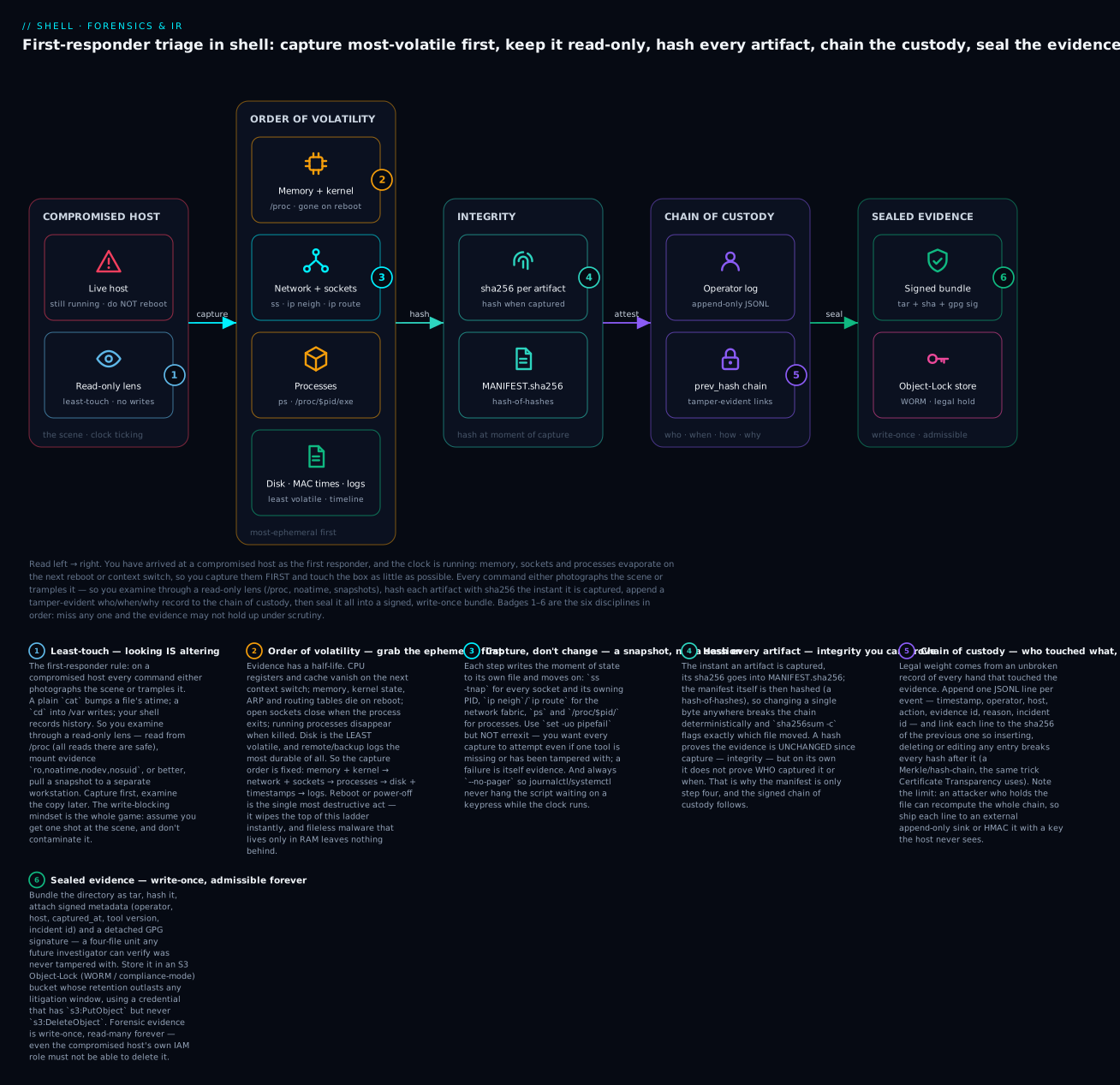
Read the diagram left → right: you arrive at the compromised host and look through a read-only lens (1), capture down the volatility ladder most-ephemeral first (2–3), fingerprint every artifact with sha256 (4), append a tamper-evident chain-of-custody record (5), and seal it all into a signed, write-once bundle (6).
The First 60 Seconds Decide The Investigation
When you SSH into a host that’s been compromised, you have a small window — minutes, not hours — before the evidence you need is gone. Either the attacker is still active and erasing logs, or the system is still running so memory state changes constantly, or the cron job that masks the indicator runs again and rotates the log. Every command you type from your investigator’s prompt either captures state or changes state. Most shells default to changing.
The discipline of forensic shell scripting:
| Pattern | What it preserves |
|---|---|
| Order of volatility | Capture most-ephemeral evidence first (memory, sockets) before disk |
| Read-only examination | Examine without writing — every write is contamination |
| Hash-and-archive | Every artifact’s sha256 is recorded the moment of capture |
| Chain of custody | Who captured it, on which host, at which time, with what tool version |
This lesson teaches each pattern with shell scripts and a lib/forensics.sh you can source. We are not building EnCase or Volatility — we’re building the first responder’s toolkit that buys you the 30 minutes of evidence the formal tools need.
Order Of Volatility (The Brian Carrier Model)
The textbook order, from most volatile to least:
- CPU registers, cache — gone the moment a process exits or context-switches.
- Routing tables, ARP cache, kernel state — flushed on reboot, or by
ip neigh flush all. - Memory (process and kernel) — gone on reboot.
- Open network connections, sockets — closed when process exits.
- Running processes — gone when killed.
- Filesystem timestamps — overwritten on next access.
- Disk content — persists, but logs may rotate.
- Backup and remote logs — most durable, but lag.
A triage script captures in this order. Capturing CPU registers from shell isn’t realistic without gdb attached pre-incident, but everything from #2 down is reachable.
The Triage Script Skeleton
#!/usr/bin/env bash
# triage.sh — runs in the first 60s of incident response.
set -uo pipefail   # NO 'errexit' — we want every step to attempt even if some fail.

readonly EVIDENCE_DIR=/var/forensics/$(hostname)-$(date +%Y%m%dT%H%M%S)
mkdir -p "$EVIDENCE_DIR"
cd "$EVIDENCE_DIR"

# 1. Network state (most volatile after registers/cache)
ss -tnap > 1-tcp-connections.txt 2>&1
ss -unap > 2-udp-connections.txt 2>&1
ip neigh > 3-arp-cache.txt 2>&1
ip route > 4-routing.txt 2>&1

# 2. Active processes
ps -eo pid,ppid,user,start_time,etime,command --sort=start_time > 5-processes.txt 2>&1
pstree -p > 6-pstree.txt 2>&1

# 3. Open files (per process)
lsof > 7-lsof.txt 2>&1

# 4. Network listeners specifically
ss -tlnp > 8-listeners.txt 2>&1

# 5. Loaded kernel modules
lsmod > 9-modules.txt 2>&1

# 6. Active sessions
who > 10-who.txt 2>&1
last -50 > 11-last.txt 2>&1
w > 12-w.txt 2>&1

# 7. Cron and systemd
ls -la /etc/cron.* /var/spool/cron > 13-cron-list.txt 2>&1
systemctl list-units --all --no-pager > 14-systemd-units.txt 2>&1
systemctl list-timers --all --no-pager > 15-systemd-timers.txt 2>&1

# 8. Recently modified files in suspect locations
find /tmp /var/tmp /dev/shm /home -type f -mtime -1 \
  -exec ls -la {} \; > 16-recent-files.txt 2>&1

# 9. Hash everything captured
sha256sum *.txt > MANIFEST.sha256
echo "host=$(hostname) captured_at=$(date -Iseconds) operator=$USER" > METADATA

echo "Triage complete. Evidence in: $EVIDENCE_DIR"
Note set -uo pipefail without errexit: if lsof fails because of permissions, we still want lsmod to run. The trade-off is verbose stderr; the gain is comprehensive capture.
The numeric prefix (1-, 2-, etc.) preserves capture order in alphabetical listings — auditors can see what was captured in what sequence.
Memory Capture Is The Hardest
Live memory capture from shell requires either:
/proc/kcore(the kernel’s view of physical memory, available with CAP_SYS_RAWIO)./proc/<pid>/memfor a specific process (with permission to ptrace).- LiME (Linux Memory Extractor) loaded as a kernel module.
# Per-process memory dump (e.g., for a suspected malicious process)
capture_process_memory() {
  local pid="$1"
  local out="proc-$pid-mem.dump"

  # Snapshot maps first
  cat "/proc/$pid/maps" > "proc-$pid-maps.txt"
  cat "/proc/$pid/status" > "proc-$pid-status.txt"
  cat "/proc/$pid/cmdline" | tr '\0' ' ' > "proc-$pid-cmdline.txt"

  # Dump memory regions
  while read -r start_end perms _; do
    [[ "$perms" =~ r ]] || continue
    local start=${start_end%-*}
    local end=${start_end#*-}
    local size=$((16#$end - 16#$start))
    dd if="/proc/$pid/mem" bs=1 skip=$((16#$start)) count="$size" 2>/dev/null \
      >> "$out" 2>/dev/null || true
  done < "/proc/$pid/maps"

  sha256sum "$out" >> MANIFEST.sha256
}
This is best-effort — many regions will fail to read (permissions, swapped-out pages). For real memory forensics, install LiME ahead of time and have it loaded; the script just runs insmod lime.ko "path=/var/forensics/mem.lime format=lime".
Network Capture — Catch The Connections While They Exist
ss -tnap (TCP, numeric, all states, with process info) is the modern replacement for netstat -tnap and runs faster.
# Snapshot every TCP connection with the process that owns it
ss -tnap | tee tcp-connections.txt | awk 'NR > 1 && /pid=/ {
  match($0, /pid=([0-9]+)/, m); pids[m[1]] = 1
} END { for (p in pids) print p }' > pids-with-network.txt
Then for each PID in that list, capture process state:
while read -r pid; do
  [[ -d "/proc/$pid" ]] || continue
  cat "/proc/$pid/cmdline" | tr '\0' ' ' > "pid-$pid-cmdline.txt"
  ls -la "/proc/$pid/exe" > "pid-$pid-exe.txt" 2>/dev/null
  cat "/proc/$pid/status" > "pid-$pid-status.txt"
done < pids-with-network.txt
This identifies “which binary is on which connection” — the canonical first question of network-driven incident response.
Timestamps & Timeline: The MAC Times That Reconstruct The Attack
Order-of-volatility item #6 was “filesystem timestamps.” They deserve their own section, because timestamps are simultaneously the richest source of “what happened when” and the easiest to accidentally destroy — or for an attacker to forge.
Every File Carries Three Clocks (Sometimes Four)
Unix stores several timestamps per inode. The three classic ones are collectively called MAC times:
| Clock | Name | Updated when… | Can touch forge it? |
Forensic value |
|---|---|---|---|---|
| atime | access time | the file’s contents are read (cat, less, executing it) |
Yes (touch -a -d) |
“when was this last used” — but noisy, and destroyed by your own cat |
| mtime | modify time | the file’s contents change (a write) | Yes (touch -m -d) |
“when was this last edited” — the dropped file, the tampered config |
| ctime | change time | the inode changes (perms, owner, links, rename — or any of the above) | No | the honest clock — updates even when someone backdates the others |
| btime/crtime | birth/create time | the file is created (ext4/xfs/btrfs, kernel 4.11+) | No | “when did this file first appear” — great, but not exposed everywhere |
The single most useful fact on this table: touch can rewrite atime and mtime to any value, but it cannot set ctime. Running touch to backdate a file is itself an inode change, so ctime jumps to “now.” That gives you a free lie-detector.
Reading Timestamps Without Destroying Them
# GNU coreutils — the four clocks, human then epoch:
stat -c 'atime=%x  mtime=%y  ctime=%z  btime=%w' -- suspect_file
stat -c 'A=%X M=%Y C=%Z B=%W' -- suspect_file     # epoch seconds, easy to sort

# No stat? ls exposes each clock (portable, POSIX):
ls -l  suspect_file    # mtime (the default)
ls -lu suspect_file    # atime  (-u)
ls -lc suspect_file    # ctime  (-c)
Portability. The
stat -cformat string is GNU (Linux). On BSD/macOS the equivalent isstat -f '%a %m %c %B'. Reading metadata withstat/lsdoes not update the file’s atime (atime tracks content reads, not inode stats) — which is exactly why forensic examination prefersstatovercat.
The Timestomp Tell
Attackers “timestomp” — backdate a dropped file so it blends into the OS install. The classic move:
touch -d '2019-01-01 00:00:00' /usr/lib/.hidden/backdoor.so # blend in with old system files
That sets atime and mtime to 2019 — but ctime becomes now (the moment the inode changed). So the detection is trivial and reliable:
# A file whose content-modify date is OLDER than its inode-change date
# has almost certainly been backdated. Flag the mismatch:
stat -c '%n  mtime=%y  ctime=%z' -- suspect_file
# mtime=2019-01-01 ...  ctime=2026-07-19 ...   <-- forged: mtime cannot honestly predate ctime
(Verified on a live box: a touch -t 201901010000 pushes mtime to Jan 2019 while ctime stays “today” — the forgery announces itself.) A whole directory of freshly-installed malware will share one recent ctime while claiming ancient mtimes — a bright red flag you can grep for.
Building A Timeline (The “Super-Timeline”)
The real power move is a timeline: pour every file’s atime, mtime and ctime into one stream of (epoch, which-clock, path) events and sort chronologically. Now you can watch the intrusion happen — the webshell appears (mtime), the /etc/passwd it read lights up (atime), the cron it installed changes (ctime), all within the same 90-second window.
# Emit one event per MAC time for a suspect tree, then sort into a timeline.
# GNU find fast path (find -printf is GNU-only):
find /var/www /tmp /etc -xdev -type f \
  -printf '%A@ a %p\n' -printf '%T@ m %p\n' -printf '%C@ c %p\n' 2>/dev/null \
  | sort -n \
  | while read -r epoch flag path; do
      printf '%s  [%s]  %s\n' "$(date -d "@$epoch" -Iseconds)" "$flag" "$path"
    done
# Portable fallback with stat (works where GNU find -printf doesn't):
gen_timeline() {
  local root="$1"
  find "$root" -xdev -type f 2>/dev/null | while IFS= read -r f; do
    stat -c '%X a %n' -- "$f"      # atime
    stat -c '%Y m %n' -- "$f"      # mtime
    stat -c '%Z c %n' -- "$f"      # ctime
  done | sort -n
}
Portability & scale.
date -d @epochis GNU; BSD/macOS usesdate -r "$epoch".-xdevkeepsfindon one filesystem (don’t walk into/proc,/sys, or network mounts). On a huge disk, walking the tree is slow and bumps atime everywhere — the professional tool, The Sleuth Kit (fls -m+mactime), reads the filesystem structure directly (bypassing the mounted view), so it is faster and touches nothing. Our shell version is the field-expedient approximation that needs no extra install.
The reason read-only discipline (next section) matters so much is now concrete: the timeline is only trustworthy if you didn’t overwrite it while capturing it. Every cat you ran while “just looking” rewrote an atime and smeared a line in this timeline.
Read-Only Examination
The cardinal rule of working on a compromised host: never write where you read. Every cd, cat, ls updates atime by default. Every find walks the tree and may touch atimes on millions of files. Forensic-grade examination requires:
- Mount the filesystem read-only on a separate machine (gold standard).
- If you must work on the live host, use
mount -o remount,ro,noatime. - Or work entirely from
/procwhere all reads are safe.
Pattern: Snapshot To A Separate Disk, Mount Read-Only
# On a forensic workstation: pull a disk image via ssh
ssh -i forensic-key root@compromised \
  "dd if=/dev/sda1 bs=4M status=progress" \
  | dd of=/forensic/sda1.img bs=4M status=progress

# Verify integrity
sha256sum /forensic/sda1.img > /forensic/sda1.img.sha256

# Mount read-only on the workstation
mkdir -p /mnt/evidence
mount -o ro,loop,noatime,nodev,nosuid /forensic/sda1.img /mnt/evidence

# Now examine without altering
ls -la /mnt/evidence/etc/passwd
The nodev,nosuid are critical: the image might contain set-uid binaries or device nodes that, on mount, would be respected by your forensic workstation’s kernel. nodev makes device nodes inert; nosuid makes set-uid bits ignored. Always mount evidence with these flags.
Pattern: Live Examination From /proc
When you can’t pull a disk image (ephemeral cloud instance, no admin access to the hypervisor), /proc is the next-safest examination surface:
# Inspect process N without affecting filesystem
pid=4321

# Binary that's actually running (even if /usr/bin/foo on disk has been replaced)
readlink "/proc/$pid/exe"

# Working directory
readlink "/proc/$pid/cwd"

# Open files
ls -la "/proc/$pid/fd/"

# Environment
tr '\0' '\n' < "/proc/$pid/environ"

# Network namespace (does it match expected?)
readlink "/proc/$pid/ns/net"

# Memory maps (look for tmpfs/anonymous mappings — common malware indicators)
cat "/proc/$pid/maps"
The trick is that even if the attacker replaced /usr/bin/sshd on disk, /proc/<pid>/exe points to the original binary that was loaded at fork-time. So you can hash the running binary and compare to the on-disk one to detect replacement:
running_hash=$(sha256sum "/proc/$pid/exe" | cut -d' ' -f1)
on_disk_hash=$(sha256sum "$(readlink "/proc/$pid/exe")" | cut -d' ' -f1)

if [[ "$running_hash" != "$on_disk_hash" ]]; then
  echo "SUSPICIOUS: running binary != on-disk binary for pid=$pid"
fi
This catches a class of trojan where the attacker replaces the binary on disk but the original is still running in memory.
Hash-And-Archive: The Manifest Discipline
Every forensic capture produces a SHA-tree manifest:
forensics_hash_all() {
  local dir="$1"
  ( cd "$dir" && find . -type f ! -name "MANIFEST*" -print0 \
      | xargs -0 sha256sum | sort -k 2 ) > "$dir/MANIFEST.sha256"
  sha256sum "$dir/MANIFEST.sha256" > "$dir/MANIFEST.sha256.sig"
}
The chain of trust:
- Each artifact has its sha256 in
MANIFEST.sha256. MANIFEST.sha256itself has its sha256 inMANIFEST.sha256.sig.MANIFEST.sha256.sigis GPG-signed by the operator (next section).
If anyone changes a single byte in any artifact, the chain breaks deterministically.
Bundle Up With Tar + Signed Metadata
forensics_bundle() {
  local dir="$1"
  local out="${dir}.tar"
  tar --create --file="$out" --directory="$(dirname "$dir")" "$(basename "$dir")"
  sha256sum "$out" > "$out.sha256"

  cat > "$out.meta" <<EOF
{
  "bundle": "$(basename "$out")",
  "sha256": "$(sha256sum "$out" | cut -d' ' -f1)",
  "operator": "$USER",
  "host": "$(hostname)",
  "captured_at": "$(date -Iseconds)",
  "tool_version": "lib/forensics.sh v1.0.0",
  "incident_id": "${INCIDENT_ID:-unknown}"
}
EOF

  # Sign everything together
  gpg --batch --yes --output "$out.sig" \
    --detach-sign --armor \
    --local-user "${FORENSIC_KEYID:-incident-response@example.com}" \
    "$out"
}
Now the bundle is portable: ship *.tar, *.tar.sha256, *.tar.meta, *.tar.sig to a forensic archive, and any future investigator can verify it wasn’t tampered with.
Storage: Append-Only Bucket With Object Lock
Backup discipline from L35 applies to forensic evidence too — even more strongly. The bucket holding evidence must have S3 Object Lock in compliance mode, with retention exceeding any anticipated litigation window (typically 7 years for most regulated industries, indefinite for criminal evidence).
The credential pushing evidence to that bucket should have s3:PutObject only, never s3:DeleteObject. Forensic evidence is write-once, read-many forever.
Chain Of Custody: Who Touched What When
Chain of custody is the formal record of who handled the evidence, when, with what tools, and for what purpose. In legal proceedings, broken chain of custody can render evidence inadmissible.
The shell version: a chain-of-custody log appended to on every evidence event:
forensics_coc_log() {
  local action="$1" evidence_id="$2" reason="$3"
  jq -nc \
    --arg ts "$(date -Iseconds)" \
    --arg op "$USER" \
    --arg host "$(hostname)" \
    --arg action "$action" \
    --arg evid "$evidence_id" \
    --arg reason "$reason" \
    --arg incident "${INCIDENT_ID:-unknown}" \
    '{ts:$ts, operator:$op, host:$host, action:$action, evidence:$evid, reason:$reason, incident:$incident}' \
    >> "/var/forensics/chain-of-custody.jsonl"
}

# Usage
forensics_coc_log "captured" "sda1.img" "compromise indicators in auth.log"
forensics_coc_log "examined" "sda1.img" "looking for setuid binaries in /tmp"
forensics_coc_log "transferred" "sda1.img" "sent to legal hold s3 bucket"
The CoC log is itself signed (every line, ideally with HMAC chain-link to the previous line, so tampering is detectable).
A simple chain-link variant:
forensics_coc_log_chained() {
  local action="$1" evidence_id="$2" reason="$3"
  local prev_hash=""
  if [[ -f /var/forensics/chain-of-custody.jsonl ]]; then
    prev_hash=$(tail -1 /var/forensics/chain-of-custody.jsonl | sha256sum | cut -d' ' -f1)
  fi

  local entry
  entry=$(jq -nc \
    --arg ts "$(date -Iseconds)" \
    --arg op "$USER" \
    --arg action "$action" \
    --arg evid "$evidence_id" \
    --arg reason "$reason" \
    --arg prev "$prev_hash" \
    '{ts:$ts, operator:$op, action:$action, evidence:$evid, reason:$reason, prev_hash:$prev}')

  echo "$entry" >> /var/forensics/chain-of-custody.jsonl
}
Each line includes the hash of the previous line. Inserting, deleting, or modifying any line breaks every subsequent hash. This is “Merkle log” style — used by Certificate Transparency, audit-grade git, etc.
The Drop-In lib/forensics.sh
# lib/forensics.sh — sourced helpers for incident-response triage.
#
# Required env (set by the calling script):
#   INCIDENT_ID — unique identifier for this incident (e.g., INC-2026-0042)
#
# Optional env:
#   FORENSICS_DIR — default /var/forensics
#   FORENSIC_KEYID — GPG key for signing
#
# Note: NO 'set -e' — we want every capture step to attempt
#       even if individual ones fail.

set -uo pipefail

: "${INCIDENT_ID:?INCIDENT_ID must be set}"
: "${FORENSICS_DIR:=/var/forensics}"
: "${FORENSIC_KEYID:=incident-response@example.com}"

readonly STAMP=$(date +%Y%m%dT%H%M%S)
readonly EVIDENCE_DIR="$FORENSICS_DIR/$INCIDENT_ID-$(hostname)-$STAMP"
mkdir -p "$EVIDENCE_DIR"

forensics_log() {
  printf '[%s] [forensics] %s\n' "$(date -Iseconds)" "$*"
}

forensics_init() {
  cd "$EVIDENCE_DIR"
  cat > METADATA <<EOF
incident_id: $INCIDENT_ID
host: $(hostname)
captured_at: $(date -Iseconds)
operator: ${SUDO_USER:-$USER}
kernel: $(uname -r)
os: $(. /etc/os-release && echo "$PRETTY_NAME")
EOF
  forensics_log "Evidence dir: $EVIDENCE_DIR"
}

# Capture network state (most volatile after kernel cache)
forensics_capture_network() {
  forensics_log "Capturing network state"
  ss -tnap > 01-tcp-connections.txt 2>&1
  ss -unap > 02-udp-connections.txt 2>&1
  ss -tlnp > 03-tcp-listeners.txt 2>&1
  ip -s neigh > 04-arp.txt 2>&1
  ip route > 05-route.txt 2>&1
  ip addr > 06-addrs.txt 2>&1
  iptables-save > 07-iptables.txt 2>&1 || true
  nft list ruleset > 08-nftables.txt 2>&1 || true
}

# Capture process state
forensics_capture_processes() {
  forensics_log "Capturing process state"
  ps -eo pid,ppid,uid,user,start_time,etime,nice,stat,command \
     --sort=start_time > 10-ps.txt 2>&1
  pstree -palu > 11-pstree.txt 2>&1
  lsof > 12-lsof.txt 2>&1
  lsof -i > 13-lsof-net.txt 2>&1
}

# Capture each suspicious process in detail
forensics_capture_pid() {
  local pid="$1"
  [[ -d "/proc/$pid" ]] || { forensics_log "PID $pid does not exist"; return 1; }

  local pdir="proc-$pid"
  mkdir -p "$pdir"

  # Static info
  cat "/proc/$pid/cmdline" | tr '\0' ' ' > "$pdir/cmdline.txt"
  cat "/proc/$pid/status" > "$pdir/status.txt"
  tr '\0' '\n' < "/proc/$pid/environ" > "$pdir/environ.txt" 2>/dev/null
  ls -la "/proc/$pid/exe" > "$pdir/exe-link.txt" 2>/dev/null

  # Hash the running binary (vs. on-disk)
  if [[ -r "/proc/$pid/exe" ]]; then
    sha256sum "/proc/$pid/exe" > "$pdir/running-binary.sha256" 2>/dev/null
    local on_disk
    on_disk=$(readlink "/proc/$pid/exe")
    if [[ -f "$on_disk" ]]; then
      sha256sum "$on_disk" > "$pdir/on-disk-binary.sha256" 2>/dev/null
    fi
  fi

  # Open file descriptors
  ls -la "/proc/$pid/fd" > "$pdir/fd.txt" 2>/dev/null

  # Memory maps
  cat "/proc/$pid/maps" > "$pdir/maps.txt" 2>/dev/null

  # Namespace links
  ls -la "/proc/$pid/ns" > "$pdir/ns.txt" 2>/dev/null

  forensics_log "Captured PID $pid"
}

# Capture sessions and login history
forensics_capture_sessions() {
  forensics_log "Capturing sessions"
  who > 20-who.txt 2>&1
  w > 21-w.txt 2>&1
  last -100 > 22-last.txt 2>&1
  lastlog > 23-lastlog.txt 2>&1
  faillock --user root > 24-faillock.txt 2>&1 || true
}

# Capture cron, systemd, persistence-relevant artifacts
forensics_capture_persistence() {
  forensics_log "Capturing persistence indicators"
  ls -la /etc/cron.* /var/spool/cron/ /etc/at.deny /etc/at.allow 2>/dev/null > 30-cron.txt
  systemctl list-units --all --no-pager > 31-systemd-units.txt 2>&1
  systemctl list-timers --all --no-pager > 32-systemd-timers.txt 2>&1
  systemctl list-unit-files --no-pager > 33-systemd-unit-files.txt 2>&1
  ls -la /etc/profile.d/ > 34-profile.txt 2>&1
  ls -la /etc/init.d/ > 35-init.txt 2>&1
}

# Capture recently modified files in suspect locations
forensics_capture_recent_files() {
  forensics_log "Capturing recently modified files"
  find /tmp /var/tmp /dev/shm /home /root /var/spool \
       -type f -mtime -1 \
       -exec ls -la {} \; 2>/dev/null > 40-recent-1day.txt
  find / -type f -newer /etc/passwd -not -path /proc/\* -not -path /sys/\* \
       -not -path /run/\* -not -path "$EVIDENCE_DIR/*" \
       2>/dev/null | head -1000 > 41-newer-than-passwd.txt
}

# Capture system configuration baseline
forensics_capture_config() {
  forensics_log "Capturing system config"
  cp /etc/passwd 50-passwd
  cp /etc/shadow 51-shadow 2>/dev/null
  cp /etc/group 52-group
  cp /etc/sudoers 53-sudoers 2>/dev/null
  cp -r /etc/sudoers.d 54-sudoers-d 2>/dev/null
  cp /etc/ssh/sshd_config 55-sshd_config 2>/dev/null
  uname -a > 56-uname.txt
  lsmod > 57-modules.txt 2>&1
  dmesg --time-format iso > 58-dmesg.txt 2>&1
}

# Capture relevant logs
forensics_capture_logs() {
  forensics_log "Capturing logs"
  cp /var/log/auth.log* 60-auth.log* 2>/dev/null || true
  cp /var/log/syslog* 61-syslog* 2>/dev/null || true
  journalctl --since '7 days ago' --no-pager > 62-journal-7d.txt 2>&1 || true
}

# Hash all captured evidence
forensics_finalize() {
  forensics_log "Building manifest"
  cd "$EVIDENCE_DIR"
  find . -type f ! -name "MANIFEST*" ! -name "METADATA" -print0 \
    | xargs -0 sha256sum | sort -k 2 > MANIFEST.sha256
  sha256sum MANIFEST.sha256 > MANIFEST.sha256.sig

  # Tar bundle
  cd "$FORENSICS_DIR"
  local bundle="$(basename "$EVIDENCE_DIR").tar"
  tar --create --file="$bundle" "$(basename "$EVIDENCE_DIR")"
  sha256sum "$bundle" > "$bundle.sha256"

  # Sign
  if command -v gpg >/dev/null; then
    gpg --batch --yes --output "$bundle.sig" \
      --detach-sign --armor \
      --local-user "$FORENSIC_KEYID" \
      "$bundle" 2>/dev/null && forensics_log "Signed: $bundle.sig"
  fi

  forensics_log "Bundle: $FORENSICS_DIR/$bundle"
  forensics_log "Counts: $(wc -l < "$EVIDENCE_DIR/MANIFEST.sha256") files captured"
}

# Append a chain-of-custody record
forensics_coc_log() {
  local action="$1" evidence="$2" reason="$3"
  local prev_hash=""
  local coc=/var/forensics/chain-of-custody.jsonl
  mkdir -p "$(dirname "$coc")"
  if [[ -f "$coc" ]]; then
    prev_hash=$(tail -1 "$coc" | sha256sum | cut -d' ' -f1)
  fi
  jq -nc \
    --arg ts "$(date -Iseconds)" \
    --arg op "${SUDO_USER:-$USER}" \
    --arg host "$(hostname)" \
    --arg action "$action" \
    --arg evid "$evidence" \
    --arg reason "$reason" \
    --arg incident "$INCIDENT_ID" \
    --arg prev "$prev_hash" \
    '{ts:$ts, operator:$op, host:$host, action:$action, evidence:$evid, reason:$reason, incident:$incident, prev_hash:$prev}' \
    >> "$coc"
}
The 60-Second Triage Wrapper
#!/usr/bin/env bash
# triage.sh — runs the entire capture in 60 seconds
set -uo pipefail

: "${INCIDENT_ID:?usage: INCIDENT_ID=INC-... triage.sh}"

source /usr/local/lib/forensics.sh

forensics_init
forensics_coc_log "started" "$EVIDENCE_DIR" "incident response triage"

# Run captures in parallel where safe (most are read-only and independent)
forensics_capture_network &
forensics_capture_processes &
forensics_capture_sessions &
wait   # ~5s

forensics_capture_persistence &
forensics_capture_recent_files &
forensics_capture_config &
wait   # ~10s

forensics_capture_logs        # ~10-30s

# Capture suspicious PIDs (passed via env)
if [[ -n "${SUSPECT_PIDS:-}" ]]; then
  for pid in $SUSPECT_PIDS; do
    forensics_capture_pid "$pid"
  done
fi

forensics_finalize
forensics_coc_log "finalized" "$EVIDENCE_DIR" "evidence bundle complete"

forensics_log "Triage complete. Bundle: $FORENSICS_DIR/$(basename "$EVIDENCE_DIR").tar"
Run with:
sudo INCIDENT_ID=INC-2026-0042 SUSPECT_PIDS="4321 5678" /usr/local/bin/triage.sh
In ~30-60 seconds you have:
- All network state at moment of capture.
- All process state with running-binary hash vs. on-disk hash.
- Suspicious PID details captured forensically.
- Recent file modifications.
- 7 days of journalctl.
- Full manifest with chain of custody.
This is the script that buys an investigator the time to set up real forensic tools.
The Five-Step IR Triage Method
When you SSH into a possibly-compromised host, the script above is step 0. The five steps that follow:
Step 1: Isolate Without Destroying Evidence
If the host is in a load balancer, remove it from rotation but do not power off. Power-off destroys everything in step 2. Reboot loses memory state.
# Mark the instance unhealthy
aws ec2 modify-instance-attribute --instance-id i-xxxxx --no-source-dest-check

# Remove from ELB (does not stop the host)
aws elbv2 deregister-targets --target-group-arn $TG --targets Id=i-xxxxx

# Apply restrictive security group (allow only investigator's IP on SSH)
aws ec2 modify-instance-attribute --instance-id i-xxxxx --groups sg-investigator-only
The host is now isolated but still running, memory intact, processes alive, network connections preserved.
Step 2: Run Triage
Run the triage script above. Get the evidence bundle out of the host (scp to a separate forensic workstation) before doing anything else:
scp i-xxxxx:/var/forensics/$INCIDENT_ID-*.tar /forensic/$INCIDENT_ID/
Step 3: Targeted Investigation
Now examine the evidence on the workstation, hypothesis-driven:
# What's listening on unusual ports?
awk '$1 == "LISTEN"' tcp-listeners.txt | grep -v -E '^(LISTEN.*\b(22|80|443|3306)\b)'

# Which processes have outbound connections to non-standard destinations?
awk '$1 == "ESTAB"' tcp-connections.txt | awk '{print $5}' | sort -u

# Any PIDs where running-hash != on-disk-hash?
for d in proc-*/; do
  rh=$(cat "$d/running-binary.sha256" 2>/dev/null | cut -d' ' -f1)
  oh=$(cat "$d/on-disk-binary.sha256" 2>/dev/null | cut -d' ' -f1)
  [[ -n "$rh" && "$rh" != "$oh" ]] && echo "DIFFER: $d"
done

# Recent logins from unusual IPs
awk '/^Accepted/' 60-auth.log* | awk '{print $11}' | sort -u
This is hand-art; the goal is “find the indicator that opens up the rest of the investigation.”
Step 4: Containment / Eradication
Once you understand the attack pattern, determine if you can:
- Patch and resume (the box is fine, the malware is gone).
- Rebuild from known-good (treat the box as compromised, reprovision from cloud-init).
- Forensic preservation only (legal hold; the box stays exactly as is, never used again).
For most cloud workloads, rebuild-from-known-good is the right answer. The triage bundle stays as evidence; the running compromised host gets terminated.
Step 5: Post-Mortem And Update
- Add an alert that would have fired earlier (e.g., “outbound connection to known-bad IP” if the indicator was that).
- Add a control to the compliance scan that would have prevented the entry vector.
- Tabletop exercise: “If this happened tomorrow, would our triage script work?”
Mounting Disk Images Read-Only For Examination
When you have a disk image (e.g., from EBS snapshot or dd), examine it on a separate workstation:
# Verify image integrity before mounting
sha256sum -c sda1.img.sha256 || { echo "FAIL: image corrupted"; exit 1; }

# Loop-mount read-only
mkdir -p /mnt/evidence
mount -o ro,loop,noatime,nodev,nosuid sda1.img /mnt/evidence

# Or use a sparse loop device for safety (writes go to overlay)
losetup --read-only -f sda1.img
# (then mount the loopN device)

# Examine
ls -la /mnt/evidence/etc/passwd
find /mnt/evidence/var/log -name "auth.log*" -exec wc -l {} \;

# Always umount before destroying the image
umount /mnt/evidence
The nodev,nosuid flags on the mount prevent device nodes and set-uid binaries in the image from being respected — protects your forensic workstation from being compromised by examining a malicious image.
For maximum safety, use a qemu-nbd read-only export so the original image is never even touched at the kernel block layer:
qemu-nbd --read-only -c /dev/nbd0 sda1.img
mount -o ro,noatime,nodev,nosuid /dev/nbd0p1 /mnt/evidence
The 8 Footguns
1. set -e In A Triage Script
set -e aborts on first failure — but in triage you want every capture step to attempt, even if some fail (lsof might not be installed; iptables might be replaced by nft). Fix: Use set -uo pipefail without errexit. Each command’s stderr goes to its own output file, so failures are evidence, not blockers.
2. Running The Script From The Host’s Filesystem
If the host is compromised, /usr/local/bin/triage.sh itself might be backdoored. Fix: Mount a read-only USB / forensic remote (NFS) with the toolkit, or copy the script via scp from the investigator’s workstation right before running.
3. Writing Evidence To The Same Filesystem You’re Examining
If you write /var/forensics/... on a compromised host, you’re modifying timestamps in /var, possibly overwriting evidence in unallocated blocks. Fix: Write to a separate mount (USB, NFS) or stream straight over SSH to the investigator’s workstation:
ssh investigator@workstation "cat > /forensic/$INCIDENT_ID-$(date +%s).tar" < <(forensics_finalize_to_stdout)
4. Forgetting --no-pager On journalctl / systemctl
Without --no-pager, those commands invoke less and the script hangs waiting for a key press. Investigators have lost minutes to this. Fix: Always --no-pager for any command that may invoke a pager.
5. Running As Non-Root For Process Memory Capture
/proc/<pid>/mem for processes you don’t own returns EACCES. Triage must run as root. Fix: Document sudo requirement; the script should error early if not root:
[[ $EUID -eq 0 ]] || { echo "must run as root"; exit 1; }
6. Skipping The On-Disk-vs-Running-Hash Comparison
You hash the binary on disk, but the attacker replaced it. The hash matches their replacement, not the original. Fix: Always hash /proc/<pid>/exe (kernel’s view of the loaded binary) AND the on-disk path. Mismatches are huge red flags.
7. Examining A Live Compromised Host With Your Personal SSH Key
If the host is compromised and the attacker is watching, your SSH session and even your authentication agent forwarding are visible to them. Fix: Use a dedicated investigator SSH keypair, never -A (agent forwarding), and rotate the key after each incident.
8. Storing Evidence In A Bucket The Compromised Host’s Role Can Delete
Same threat model as backups (L35). The host’s IAM role should never have s3:DeleteObject on the forensic bucket. Fix: Cross-account upload (host has assume-role to a separate forensics account that has write-only permission on the bucket; only a forensic-investigator role can read it).
Going Deeper
The triage script gets you the evidence. This section is for the responder who has to trust that evidence when the host itself is hostile, when there is no disk to image, and when the “filesystem” is a container namespace.
When The Box Lies: Rootkits And Cross-View Detection
On a compromised host, your tools run through the compromised kernel and libraries. A loadable-kernel-module (LKM) rootkit can hook the syscalls behind ps, ss, and ls so that its own PID, port, and files simply don’t appear. You cannot trust any single view. The defense is cross-view: ask two different layers the same question and diff the answers.
# PIDs the kernel exposes in /proc, minus PIDs that `ps` admits to.
# A non-empty result = processes hidden from userland tooling.
comm -23 \
  <(ls /proc | grep -E '^[0-9]+$' | sort) \
  <(ps -eo pid= | tr -d ' ' | sort)
# Sockets the kernel lists in raw /proc/net, vs what `ss` shows.
# (both would need decoding for detail, but a count mismatch alone is a signal)
raw=$(($(grep -c : /proc/net/tcp) - 1))   # kernel's own table (minus header)
seen=$(ss -H -tan | wc -l)                 # what ss reports
echo "raw=$raw seen=$seen"                 # a divergence => hidden sockets
The same logic underlies the /proc/<pid>/exe-vs-on-disk hash check you already met: the kernel’s handle to the loaded binary is harder to tamper with than the file on disk. When two honest layers disagree, believe the lower one — and get off the box onto an out-of-band copy.
There Is No Disk To Image: Cloud-Native Forensics
You rarely dd a physical disk anymore. In the cloud the disk is an API object, and that is a gift: you can snapshot it out-of-band, without ever logging into the guest — which means zero contamination and hardware-grade write-blocking for free.
# EBS: snapshot the volume (out-of-band; the guest never knows),
# then attach a COPY to a hardened forensic instance, read-only.
vol=$(aws ec2 describe-instances --instance-id i-xxxx \
        --query 'Reservations[].Instances[].BlockDeviceMappings[].Ebs.VolumeId' --output text)
snap=$(aws ec2 create-snapshot --volume-id "$vol" \
        --description "IR $INCIDENT_ID" --query SnapshotId --output text)
# ...create a volume from $snap in the forensics account, attach it, then:
#    mount -o ro,noatime,nodev,nosuid /dev/xvdf1 /mnt/evidence
The mindset shift: an immutable/ephemeral instance is cattle — you don’t heal it, you snapshot it (disk, and memory if the hypervisor supports a guest dump) and terminate it. The snapshot is the evidence; the running box is disposable once captured.
The “Host” Is A Namespace: Container & Kubernetes Triage
For a container, the compromised “host” is a set of namespaces on the node. Two safe moves, both from the node, both avoiding exec into a possibly-tampered container:
# 1. Read the container's root filesystem from the node, via /proc,
#    without entering it (no reliance on the container's own binaries):
pid=$(pgrep -f suspicious-container-cmd | head -1)
ls -la    /proc/$pid/root/            # the container's / as the kernel sees it
sha256sum /proc/$pid/root/usr/bin/*   # hash its binaries from the outside

# 2. Enter only the namespaces you need, with YOUR trusted tools:
nsenter -t "$pid" -n ss -tanp         # the container's network, your ss binary
Your known-good baseline is the image digest: the running layer should match the immutable image it was built from; anything extra was added at runtime. In Kubernetes, kubectl debug attaches an ephemeral container sharing the target’s namespaces so you never install tools into the workload itself.
Real Write-Blocking: Software ro Isn’t Always Read-Only
mount -o ro protects the files, but the kernel may still replay a dirty journal when it mounts an ext4/xfs image — which is a write to your evidence before you’ve read a byte. The layers, weakest to strongest:
| Technique | What it blocks | Gap |
|---|---|---|
mount -o ro |
file writes | journal replay can still write on mount |
mount -o ro,noload (ext4) |
file writes + journal replay | filesystem-specific flag |
losetup --read-only / blockdev --setro |
writes at the block-device layer | still software |
qemu-nbd --read-only |
writes to the backing image | needs qemu |
| Hardware write-blocker | everything, at the wire | costs money; the courtroom gold standard |
For a working copy you never mind losing, add nodev,nosuid (a malicious image mustn’t get its device nodes or set-uid bits honored by your workstation) — the lesson’s mount flags, now with the reason spelled out.
The Chain Is Evidence-Grade Only If The Attacker Can’t Rewrite It
The prev_hash JSONL chain is tamper-evident: edit any line and every subsequent hash breaks. But it is not tamper-proof — an attacker who owns the file can recompute the entire chain from scratch. Two upgrades close that gap:
- Key the chain. HMAC each line with a key the host never holds (kept on the investigator’s workstation), so an attacker can break the chain but cannot forge a valid new one.
- Externalise it. Stream each line the instant it’s written to an append-only sink the host can’t reach back into — a WORM bucket, a remote syslog, or a transparency log. journald’s own Forward Secure Sealing (FSS) applies the same idea to system logs: periodic seals that make after-the-fact edits detectable.
This is the difference between “we think the log is intact” and “we can prove it.”
Practice Challenges
Work these on a throwaway VM or container you own — never on production or anyone else’s host. They escalate from reading a timestamp to catching a hidden process. Each is defensive: you are the responder.
1. Read all three MAC times without touching atime (beginner)
Create a file, then report its atime, mtime and ctime — using a method that does not update the atime (so cat is banned).
<details> <summary>Solution</summary>
touch demo.txt
stat -c 'A=%x  M=%y  C=%z' -- demo.txt   # GNU; BSD/macOS: stat -f '%a %m %c'
# or, portably, three ls invocations:
ls -lu demo.txt   # atime
ls -l  demo.txt   # mtime
ls -lc demo.txt   # ctime
Why: stat/ls read the inode, which doesn’t count as a content access, so atime stays put — unlike cat, which would rewrite the very evidence you’re trying to read.
</details>
2. Snapshot listeners without a pager hang (beginner)
Capture every listening TCP socket with the owning process, to a timestamped file, in a way that can’t hang on a pager.
<details> <summary>Solution</summary>
ss -tlnp > "listeners-$(date +%Y%m%dT%H%M%S).txt" 2>&1
Why: ss -tlnp is read-only and ties each socket to its PID; redirecting to a file (not a terminal) means no pager is ever invoked, and 2>&1 keeps any permission error as evidence in the file instead of on your screen.
</details>
3. Catch a timestomp (intermediate)
Backdate a file with touch, then prove — from the timestamps alone — that it was forged.
<details> <summary>Solution</summary>
touch evil.sh
touch -d '2019-01-01 00:00:00' evil.sh          # timestomp: fake an old file
stat -c 'mtime=%y  ctime=%z' -- evil.sh
# mtime=2019-01-01 ...   ctime=<today> ...       <-- impossible honestly
Why: touch can set atime/mtime but not ctime; backdating is an inode change, so ctime snaps to now. An mtime older than its own ctime is a forgery signature.
</details>
4. Manifest and verify an evidence directory (intermediate)
Hash every artifact in a directory into a manifest, then prove that a one-byte change is detected.
<details> <summary>Solution</summary>
cd evidence/
find . -type f ! -name 'MANIFEST*' -print0 | xargs -0 sha256sum | sort -k2 > MANIFEST.sha256
sha256sum -c MANIFEST.sha256            # all OK
echo x >> some-artifact.txt             # tamper with one byte
sha256sum -c MANIFEST.sha256            # -> some-artifact.txt: FAILED, exit != 0
Why: sha256sum -c re-hashes each listed file and exits non-zero on any mismatch — the mechanical heart of integrity. -print0/-0 keeps it correct even for filenames with spaces or newlines.
</details>
5. Find a process the kernel sees but ps hides (advanced)
Without installing anything, list any PID present in /proc that ps does not report — the signature of a userland-hooking rootkit. (On a clean box the result is empty; that’s the point — you now have a check that fires only when something is wrong.)
<details> <summary>Solution</summary>
comm -23 \
  <(ls /proc | grep -E '^[0-9]+$' | sort) \
  <(ps -eo pid= | tr -d ' ' | sort)
Why: /proc is the kernel’s own list of tasks; ps is a userland program a rootkit can lie to. comm -23 prints entries in the first list (kernel truth) that are absent from the second (what ps admits) — the hidden PIDs. Believe the lower layer.
</details>
6. Prove a running binary was replaced on disk — and log the finding (advanced)
For a given PID, detect that the on-disk binary no longer matches the one actually running, then append a chain-of-custody record for the discovery.
<details> <summary>Solution</summary>
pid=1234
run=$(sha256sum "/proc/$pid/exe"              | cut -d' ' -f1)   # kernel's loaded copy
disk=$(sha256sum "$(readlink /proc/$pid/exe)" | cut -d' ' -f1)   # the path on disk
if [[ "$run" != "$disk" ]]; then
  echo "SUSPICIOUS pid=$pid running != on-disk"
  forensics_coc_log "examined" "pid-$pid" "running binary hash != on-disk hash"
fi
Why: /proc/$pid/exe is the kernel’s handle to the binary loaded at exec time; if the attacker swapped the file on disk afterwards, the hashes diverge. Logging it through forensics_coc_log stamps who found it, when, and why into the tamper-evident custody chain.
</details>
Common Beginner Mistakes
These are mindset errors — the wrong mental model, not a wrong flag (those are in “The 8 Footguns” above). Each is the instinct that feels helpful and quietly destroys the case.
-
“Let me poke around first to see what’s going on, then I’ll capture.” Looking is altering. Every
catbumps an atime, everycdinto/varwrites, your shell logs its own history, andfind /smears atimes across millions of files. Right model: capture first with the triage script, then do all your poking on the copy. The live box is the scene; you get one shot at it. -
“I’ll reboot it to get a clean look / to stop the attacker.” Reboot and power-off are the most destructive things you can do — they erase memory, kernel state, every open socket, every running process, and
/tmp, and can trigger a journal replay that writes over disk evidence. Right model: isolate the host (pull it from the load balancer, tighten its security group) but leave it running until the evidence is off it. -
“The disk is where the evidence is.” The disk is the least volatile layer — it’s the safest, not the richest. The evidence that names the attacker (the live C2 socket, the injected memory region, the process running a deleted-but-open binary) lives in RAM and dies first, and truly fileless malware never touches disk at all. Right model: capture down the volatility ladder — memory and network before disk.
-
“The file’s modified date tells me when the attacker was here.” mtime is a lie an attacker can write with one
touch. Right model: corroborate. Trust ctime over mtime, build a timeline from all three MAC times, and anchor everything against logs shipped off-host (which the attacker can’t retroactively edit). -
“I hashed everything, so the evidence is proven.” A hash proves integrity (unchanged since you hashed it), not authenticity (that you captured it untampered, at the time you claim). A hash the attacker can recompute proves nothing by itself. Right model: integrity comes from the manifest; authenticity comes from the signed, externally-anchored chain of custody layered on top.
-
“I have root on the box, so I can do real forensics right here.” If the box is owned, root runs through a kernel and libraries the attacker may control — your
ps,ss, andlscan be lying to your face. Right model: trust cross-views (/procvsps), trust the kernel’s/proc/$pid/exeover the on-disk file, and pivot to an out-of-band snapshot as fast as you can.
Glossary
- Incident response (IR) — the disciplined process of reacting to a security incident: detect, isolate, capture evidence, contain, eradicate, recover, learn.
- DFIR — Digital Forensics and Incident Response; IR plus the evidence-preservation rigor that lets findings hold up under audit or in court.
- Triage — the fast first pass that captures perishable state and decides what deserves deeper investigation; here, the 60-second capture script.
- Order of volatility — the fixed priority for capturing evidence, most-ephemeral first: registers/cache → memory/kernel → network/sockets → processes → disk/timestamps → remote logs.
- Volatile evidence — state that disappears on reboot, process exit, or the mere passage of time (memory, sockets, running processes). The opposite of persistent disk data.
- Contamination — any change you cause to the evidence while handling it (a bumped atime, a written log, a replayed journal). Forensics is the craft of minimizing it.
- Read-only / least-touch examination — looking without writing: reading from
/proc, mountingro,noatime, working on a copy — so you don’t alter what you’re measuring. - Write-blocking — preventing any write to the evidence medium, from a software
romount up to a hardware write-blocker; the courtroom-grade version of read-only. - MAC times — a file’s three classic timestamps: atime (content last read), mtime (content last modified), ctime (inode last changed). Sometimes a fourth, btime/crtime (created).
- atime / mtime / ctime — access / modify / change times. atime and mtime are forgeable with
touch; ctime is not, which makes it the honest clock. - Timestomping — anti-forensic backdating of a file’s atime/mtime (e.g.
touch -d) to make malware look like an old, trusted file. Betrayed by a ctime newer than the claimed mtime. - Timeline / super-timeline — a chronologically sorted stream of every file’s MAC-time events, letting you replay an intrusion minute by minute. Built with
find/stat, or professionally with The Sleuth Kit’smactime. - The Sleuth Kit (TSK) — the standard open-source forensics toolkit (
fls,mactime,icat) that reads filesystem structures directly — faster than a shell walk and without touching atimes. /proc— the Linux kernel exposed as files; per-process directories under/proc/<pid>/give a live, read-safe X-ray of each process./proc/<pid>/exe— a kernel symlink to the exact binary a process is running, even if the on-disk file was replaced or deleted; the trusted copy for hash comparison.- Hash / sha256 — a fixed-length fingerprint of a byte stream; identical input → identical hash, and any change flips it. Proves integrity.
- Manifest — the file (here
MANIFEST.sha256) listing every artifact’s hash, verified withsha256sum -c; the manifest is itself hashed for a chain of trust. - Chain of custody (CoC) — the formal, unbroken record of who handled each piece of evidence, when, how, and why; a broken chain can make evidence inadmissible.
- Hash chain / Merkle log — a log where each entry embeds the hash of the previous one, so any insertion, deletion, or edit breaks every hash after it (tamper-evident). Used by Certificate Transparency.
- HMAC — a keyed hash; unlike a plain hash chain, an attacker without the key cannot forge a valid entry even if they hold the file.
- Forward Secure Sealing (FSS) — journald’s periodic cryptographic sealing of logs so after-the-fact tampering becomes detectable.
- Indicator of compromise (IOC) — an observable that suggests a breach: an unexpected listening port, an outbound connection to a known-bad IP, a mismatched binary hash.
- Rootkit — malware that hides itself by tampering with the kernel or libraries so tools like
ps/ss/lsunder-report; defeated by cross-view detection. - Fileless / memory-resident malware — code that lives only in RAM and never writes to disk, so only volatile capture can see it.
- Anti-forensics — techniques attackers use to defeat investigation: timestomping, log wiping, rootkits, memory-only execution.
- Live vs dead (post-mortem) forensics — examining a running system (volatile, non-reproducible) versus a captured image offline (repeatable, safer).
- WORM / Object Lock / legal hold — write-once-read-many storage (e.g. S3 Object Lock in compliance mode) that blocks deletion or modification for a retention period; where sealed evidence lives.
- GPG detached signature — a separate signature file proving a bundle was signed by a specific key and unchanged since; adds authenticity on top of integrity.
set -uo pipefail(without-e) — the strict-mode subset for triage: catch unset variables and pipe failures, but do not abort on the first error, so every capture step still attempts.
Quick-Reference Card
ORDER OF VOLATILITY (capture in this order)
  1. Network state (ss, ip neigh, ip route)
  2. Process state (ps, pstree, lsof)
  3. Session state (who, last, w)
  4. Persistence indicators (cron, systemd, profile.d)
  5. Recent files (find -mtime -1)
  6. System config (passwd, shadow, sshd_config, dmesg)
  7. Logs (auth.log, journalctl)

READ-ONLY DISCIPLINE
  Mount images: ro,loop,noatime,nodev,nosuid
  Live host: examine via /proc, never modify
  Remount real fs: mount -o remount,ro,noatime  (if you must work in place)

TIMESTAMPS & TIMELINE
  Read without touching atime: stat -c '%x %y %z' / ls -lu / ls -lc
  Timestomp tell: mtime older than ctime  ==  backdated (touch can't set ctime)
  Timeline: find -printf '%A@|%T@|%C@' ... | sort -n   (TSK mactime for real cases)

CHAIN OF CUSTODY
  Append-only JSONL with prev_hash chain
  Each entry: ts, operator, host, action, evidence, reason
  Sign every bundle with detached GPG

EVIDENCE BUNDLE
  All captures hashed in MANIFEST.sha256
  MANIFEST.sha256 itself hashed (chain of trust)
  tar + sha256 + meta + sig as a 4-file unit
  Store in S3 Object Lock, write-once forever

SHELL SETTINGS
  set -uo pipefail   (NOT errexit — capture should be best-effort)
  Always --no-pager (journalctl, systemctl)
  Run as root (capture EUID gate)

THE TRIAGE 60s
  forensics_init
  forensics_capture_network  &
  forensics_capture_processes &
  forensics_capture_sessions &
  wait
  forensics_capture_persistence &
  forensics_capture_recent_files &
  forensics_capture_config &
  wait
  forensics_capture_logs
  forensics_finalize
What’s Next
You can now triage a compromised host, capture evidence with chain-of-custody discipline, and produce a forensic bundle that survives audit and litigation.
The capstone of the entire shell course awaits: a style guide that pulls together every pattern from L1-L41 into a review checklist, a lifecycle policy for shell scripts in production, and the sunset criteria that let you retire scripts cleanly. This is the document every team should keep on the wall — the answer to “is this script ready for production?” and “is this script still earning its keep?”
In the final lesson — The Shell-Script Style Guide Capstone: Review Checklist, Lifecycle & Sunset Criteria — we’ll consolidate the entire series into a single review checklist (boilerplate, error handling, idempotency, observability, documentation), a lifecycle policy from inception through deprecation, the metrics every script should emit, and the criteria for retiring a script (replaced by a real tool, no longer needed, owner left the team).