In a nutshell
A quick shell script is the cheapest software in the world to write and the most expensive to own. Anyone can paste twenty lines onto a server and wire it to cron in five minutes. The bill arrives three years later, when the author has left, the cron still fires at 03:00, half the time it fails silently, and nobody on the current team is willing to touch it because nobody knows what it does or what breaks if it stops.
Think of a production script the way a company thinks of a vehicle in its fleet, not a car you own personally. A fleet vehicle has a logbook (who owns it, what it’s for), a service schedule (tests, review), an MOT it has to pass (the review checklist), a warning light on the dashboard (metrics and alerts), a named driver on call (the owner team), and — eventually — a decommissioning process (sunset and retirement). A “quick script” with none of that is a car someone abandoned in the corner of the car park: it still starts, technically, but there’s no logbook, no owner, no service history, and five years on there are two hundred of them rusting in the lot and nobody dares move any of them.
Production-grade shell, then, isn’t about clever one-liners. It’s four boring, durable artifacts kept on the wall: a style guide (what “good” looks like, so a fleet of scripts reads as if one careful engineer wrote them all), a review checklist (the MOT every script passes before production), a lifecycle policy (the states a script lives through, from draft to retirement, each transition owned and tracked), and a sunset policy (explicit triggers for scrapping a script before it becomes a hazard). Get those four right and shell stops being a graveyard and becomes a surface you can trust to run unattended for years.
This is the capstone, so it links back to the whole course — but the four you lean on hardest here are defensive scripting (the strict-mode header, error handling, ShellCheck), testing with Bats, signal handling & cleanup traps, and monitoring & metrics.
Level: Capstone (all levels) · Time: ~45 min · Prerequisites: ideally the preceding 41 lessons, but you can read this cold as a checklist and follow the links back where a concept is unfamiliar.
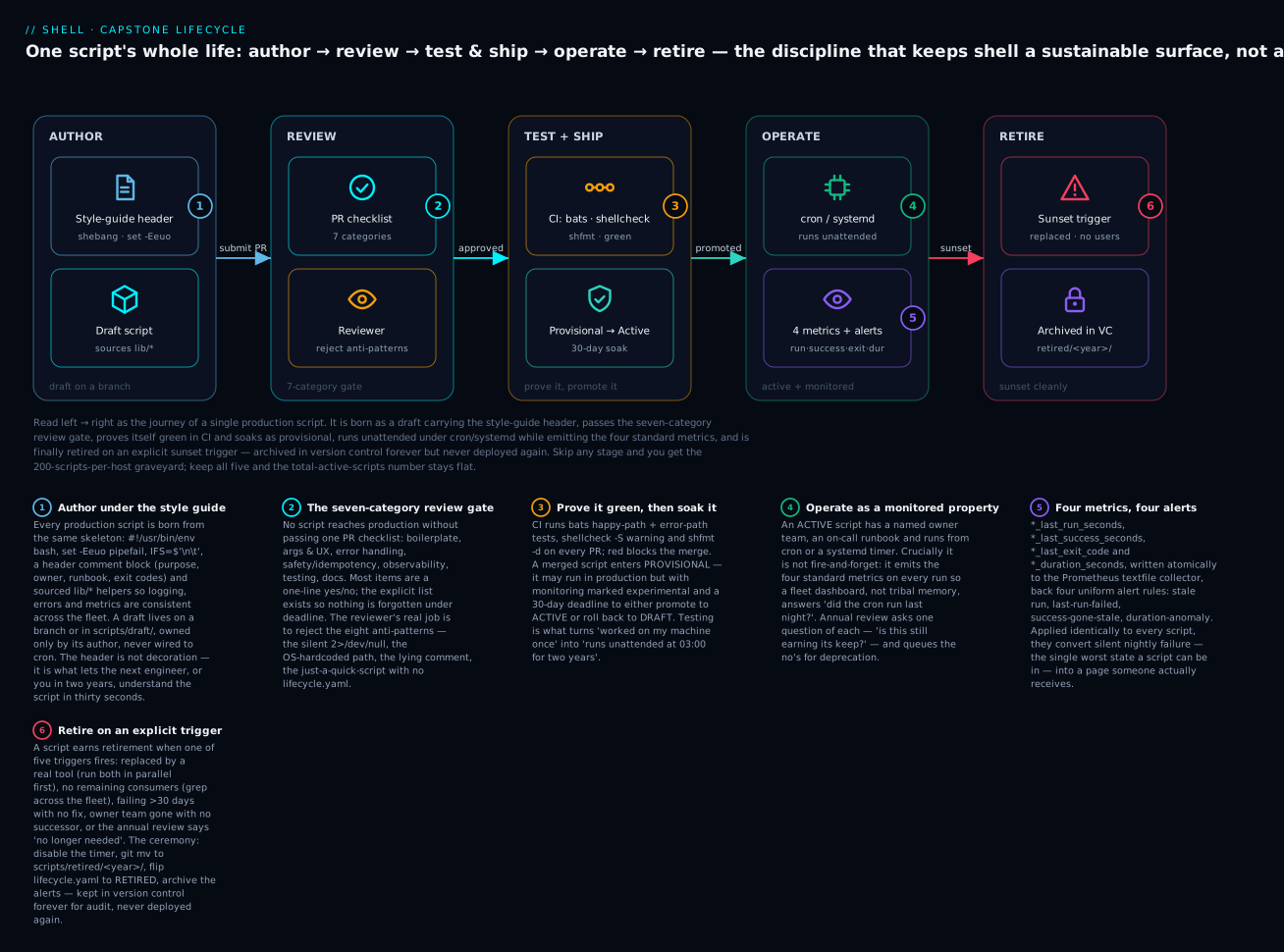
Read the diagram left → right as the journey of a single script: it is authored under the style guide, passes the seven-category review gate, is proven green in CI and soaked as provisional, runs unattended while emitting the four standard metrics, and is finally retired on an explicit trigger — archived in version control forever but never run again. Skip any one stage and you drift toward the graveyard; keep all five and the number that matters, total active scripts, stays flat instead of climbing forever.
Why This Capstone Exists
A shell script that is good enough today is the easiest piece of software to ship. A shell script that is still earning its keep three years from now, after the original author has left and the surrounding system has been refactored twice, is one of the hardest. The difference is not language quality — it’s lifecycle discipline.
This capstone consolidates the 41 preceding lessons into the four artifacts every team should keep on the wall:
- The Production Review Checklist — the questions every PR introducing or modifying a production shell script must answer.
- The Lifecycle Policy — the documented states a script lives through, from prototype to active to deprecated to retired.
- The Standard Metrics Surface — what every production shell script must emit so monitoring sees it.
- The Sunset Criteria — explicit triggers for retiring a script before it becomes a maintenance hazard.
Following these four artifacts turns “shell scripts as a graveyard of one-off tools” into “shell scripts as a sustainable engineering surface.”
The Library Family From The Series
Across L1-L41 we built a layered library of shell helpers. Each script in production should source the libraries relevant to its role:
| Library | From lesson | Purpose |
|---|---|---|
lib/log.sh |
L7 | Structured logging with levels, JSON output, log rotation |
lib/err.sh |
L8 | Error trap, stack trace, cleanup on exit |
lib/fs.sh |
L28 | Atomic file writes, temp-in-same-dir, fsync helpers |
lib/lock.sh |
L21 | flock single-instance, distributed locks via Redis |
lib/observe.sh |
L25 | Tracing helpers, structured events, span-id propagation |
lib/secrets.sh |
L24 | Vault/SSM lookup, credential masking, never-print discipline |
lib/test.sh |
L31 | Bats integration, fixture setup/teardown, assertion helpers |
lib/metrics.sh |
L34 | Prometheus textfile exporter, atomic .prom file writes |
lib/backup.sh |
L35 | sha256 manifests, GFS retention, S3 upload + verify |
lib/db.sh |
L36 | pg_dump/mysqldump pipelines, base backup, PITR drill |
lib/loganalyze.sh |
L37 | Streaming awk, mawk detection, fleet fan-out |
lib/heal.sh |
L38 | Detect-decide-act, idempotency, rate limit, circuit breaker |
lib/migrate.sh |
L39 | Resumable batch, watermark, staging cutover, sample-diff |
lib/compliance.sh |
L40 | Controls-as-tests, JSONL bundles, GPG signing, drift |
lib/forensics.sh |
L41 | Order-of-volatility capture, chain-of-custody log |
A real production deploy keeps these in /usr/local/lib/ with mode 0644, owned by root:root. Scripts source them from the canonical path. Updates ship via the same Ansible/Puppet/cloud-init that ships system config — version-controlled, reviewed, and rolled out with the same discipline as any other infrastructure code.
The Shell Style Guide
The review checklist that follows tells a reviewer what to check. This section is the other half: the house style every script is measured against — the concrete conventions that make a fleet of scripts read as if one careful engineer wrote them all, rather than forty rushed ones. The value is in having one written answer to each question, not in which answer you pick; adopt this wholesale or adapt it to your team. (KloudVin’s house style tracks Google’s Shell Style Guide closely, with the strict-mode, observability, and lifecycle additions the earlier lessons argued for.)
The one-screen header every script starts with
Everything from the defensive-scripting lesson compresses into a header that is identical across the fleet, so a reader recognises it instantly:
#!/usr/bin/env bash
#
# <name>.sh — one-line purpose.
# Owner:   team-name@example.com
# Runbook: https://runbooks.example.com/<name>
# Env:     VAR_ONE (required), VAR_TWO (default: 7)
# Exit:    0 ok · 1 generic · 2 usage · 65 bad input (sysexits)
#
set -Eeuo pipefail
shopt -s inherit_errexit nullglob 2>/dev/null || true   # bash 4.4+; harmless on 3.2
IFS=$'\n\t'

readonly SCRIPT_NAME="${0##*/}"
readonly SCRIPT_DIR="$(cd "$(dirname "${BASH_SOURCE[0]}")" && pwd)"
#!/usr/bin/env bash (not #!/bin/bash) finds bash on PATH, which matters on BSD/macOS where bash lives in /usr/local/bin or /opt/homebrew/bin. The 2>/dev/null || true on the shopt line means the same header runs unmodified on an old bash 3.2 host that lacks inherit_errexit, degrading gracefully instead of aborting.
Naming — the fleet reads like one author
Bash has no real namespacing: a for i in … inside a sourced library collides with the caller’s i. Descriptive, local-scoped names are not a style nicety, they are a correctness requirement (anti-pattern 4, below).
| Kind | Convention | Example |
|---|---|---|
| Global constants / config | UPPER_SNAKE, readonly |
readonly MAX_RETRIES=3 |
| Environment inputs | UPPER_SNAKE, defaulted |
CLEANUP_AGE_DAYS=${CLEANUP_AGE_DAYS:-7} |
| Local variables | lower_snake, always local |
local retry_count=0 |
| Functions | lower_snake, verb-first |
cleanup_dir(), assert_command() |
| Private/internal helpers | leading underscore | _log(), _on_err() |
| Scripts | kebab-case.sh |
nightly-cleanup.sh |
| Libraries | lib/<noun>.sh |
lib/metrics.sh |
Never ship a single-letter or generic global (i, tmp, data, n). Inside a library every variable is local and named for its job (local retry_count, local tmp_file). Reserve UPPER_SNAKE for things that are genuinely constant or come from the environment, and mark the truly-constant ones readonly so a later line can’t silently reassign them:
readonly MAX_RETRIES=3
MAX_RETRIES=5            # bash: MAX_RETRIES: readonly variable  → aborts, as intended
Structure — top-down, main last
Every non-trivial script follows the same top-to-bottom order, so a reader always knows where to look:
shebang
header comment block
strict-mode preamble  (set -Eeuo pipefail, IFS, shopt)
readonly SCRIPT_NAME / SCRIPT_DIR
source /usr/local/lib/*.sh          # dependencies
readonly configuration              # constants, env with defaults
function definitions                # usage(), helpers, then main()
main "$@"                           # the ONLY top-level call, at the very bottom
The single most important structural rule is that main "$@" is the last line of the file. Because bash reads and executes a script line by line (not parse-whole-then-run), a script that does work at the top level can start acting before the interpreter has read the rest of the file — and a truncated download (a dropped SSH connection mid-curl | bash, a full disk during deploy) can execute the first half of a script and never see the second. Defining everything as functions and calling main "$@" only at the end means a partially-written file simply defines some functions and exits without running anything. It is the cheapest possible guard against half-executed scripts.
Quoting — quote by default, unquote deliberately
Quote every expansion unless you have a written reason not to. This is the single highest-value habit in shell and the source of most real-world bugs (see the security lesson).
cp "$src" "$dest"                 # not  cp $src $dest      (SC2086: word-split + glob)
for f in "${files[@]}"; do …      # not  for f in $files    (SC2068 / SC2086)
result="$(some_command)"          # capture, always quoted
printf 'user=%q\n' "$untrusted"   # %q re-emits input safely as a shell token
- Use arrays for argument lists, never a space-joined string:
args=(-n "$ns" --timeout 30)thenkubectl "${args[@]}". A string of options word-splits on spaces the moment one value contains a space. - The only place to leave an expansion unquoted is where you want word-splitting, and then it carries a
# shellcheck disable=SC2086 # reasonon the line above. IFS=$'\n\t'in the header is your backstop (it drops space from the split set), not your excuse to skip quotes.
Functions — one job, local everything, return status vs. data
cleanup_dir() {
  local dir="$1"                       # every parameter is local, named
  [[ -d "$dir" ]] || return 0          # guard clause: return early, don't nest
  local count=0
  # …work…
  printf '%d\n' "$count"               # DATA goes to stdout
}                                       # STATUS goes via return / exit code
localeverything — a non-localassignment inside a function leaks into the caller.- One function, one job. If a function needs a paragraph to explain, split it.
- Data on stdout, status via the exit code. Callers do
count=$(cleanup_dir "$d")for the data andif cleanup_dir "$d"; then …for success. Never mix log chatter into stdout — logs go to stderr (>&2) socount=$(...)stays clean. - Prefer guard clauses (
… || return) over deepifnesting; a function that returns early reads top-to-bottom. - Write
foo() { … }, notfunction foo { … }— thefunctionkeyword is a non-POSIX bashism with no benefit.
Error handling — fail loud, fail once, clean up once
Straight from defensive scripting and signal handling:
- The strict-mode header does the coarse job; a
die/warn/infofamily prints labelled messages to stderr, anddiealsoexits. - An
ERRtrap reports (file, line,$BASH_COMMAND, stack); anEXITtrap cleans up (temp files, locks, children) exactly once. Don’t duplicate cleanup on every failure path — that’s what the trap is for. - Document exit codes in the header and use them consistently (
0ok,1generic,2usage, and thesysexits.hrange like65 EX_DATAERRwhere it fits).
Documentation — the header, the “why”, the CHANGELOG
- The top-of-file header block (purpose, owner, runbook, env vars, exit codes) is mandatory — it is what lets the next engineer understand the script in thirty seconds.
- Inline comments explain why, never what.
# stderr suppressed: rm warns on absent file, which is fine hereearns its place;# increment idoes not. - Non-trivial changes get a CHANGELOG entry, and if the script belongs to a runbook, the runbook links the script and vice versa.
ShellCheck- and shfmt-clean, always
Two tools, run in CI on every PR, are non-negotiable:
shellcheck -S warning script.sh        # static analysis: quoting, word-split, logic bugs
shfmt -i 2 -ci -s -d     script.sh      # formatter: 2-space indent, -d shows a diff, exit≠0 if unformatted
Green lint is a merge gate, not a nice-to-have. Suppressions are scoped as tightly as possible (one line beats one function beats one file) and always carry a # reason. A # shellcheck disable=SC2086 with no explanation is a future bug hiding behind a green check.
The style guide on one line each
| Dimension | Rule | Verified by |
|---|---|---|
| Shebang | #!/usr/bin/env bash |
reviewer / shellcheck shell=bash |
| Preamble | set -Eeuo pipefail, IFS=$'\n\t' |
reviewer / grep |
| Naming | UPPER consts, lower locals, verb-first fns |
reviewer |
| Structure | functions first, main "$@" last |
reviewer |
| Quoting | quote every expansion; arrays for arg lists | shellcheck (SC2086/2068) |
| Functions | local all; data→stdout, status→exit code |
reviewer / shellcheck |
| Errors | die/warn/info to stderr; ERR + EXIT traps |
reviewer |
| Docs | header block; comments say why; CHANGELOG | reviewer |
| Lint | shellcheck -S warning + shfmt clean |
CI |
The Production Review Checklist
Every PR that introduces or modifies a production shell script must satisfy seven categories. The checklist is intentionally numerous — most categories are one-line yes/no, and the explicit list ensures nothing is forgotten.
Category 1: Boilerplate & Shell Mode
#!/usr/bin/env bash
set -o errexit -o nounset -o pipefail
IFS=$'\n\t'

readonly SCRIPT_NAME="$(basename "$0")"
readonly SCRIPT_DIR="$(cd "$(dirname "${BASH_SOURCE[0]}")" && pwd)"

trap 'on_exit $?' EXIT
on_exit() { local rc=$1; ...; }
Category 2: Argument Handling
Category 3: Error Handling
Category 4: Idempotency & Safety
Category 5: Observability
Category 6: Testing
Category 7: Documentation
The Single-Page Reviewer’s Checklist
For pasting into a PR template:
SHELL SCRIPT REVIEW

Boilerplate
  [ ] #!/usr/bin/env bash
  [ ] set -euo pipefail (or justified)
  [ ] EXIT trap for cleanup
  [ ] readonly script-self vars

Args & UX
  [ ] --help with examples
  [ ] --dry-run if mutating
  [ ] Required args validated

Error handling
  [ ] No silent 2>/dev/null
  [ ] stderr for errors
  [ ] Documented exit codes

Safety
  [ ] Idempotent on re-run
  [ ] Atomic file writes (lib/fs.sh)
  [ ] No hardcoded secrets
  [ ] Inputs sanitized

Observability
  [ ] Structured logs
  [ ] Heartbeat metric
  [ ] Audit log if mutating

Testing
  [ ] Bats tests in tests/
  [ ] shellcheck clean
  [ ] shfmt clean
  [ ] CI green

Docs
  [ ] Header block
  [ ] Runbook updated
  [ ] CHANGELOG
The Lifecycle Policy
Every production shell script lives through five states. The transitions between states are explicit, owner-driven, and tracked.
   ┌──────────┐   review   ┌──────────┐   adoption   ┌──────────┐
   │ DRAFT    │───────────▶│ PROVISIONAL│────────────▶│ ACTIVE   │
   └──────────┘             └──────────┘              └──────────┘
                                                            │
                                                       deprecation
                                                            ▼
                                                      ┌──────────┐   sunset   ┌──────────┐
                                                      │ DEPRECATED│──────────▶│ RETIRED  │
                                                      └──────────┘             └──────────┘
State 1: DRAFT
- Lives in a feature branch or
scripts/draft/. - Author is the only owner.
- No SLA, no monitoring expected.
- Not run from cron / systemd in production.
Exit criteria: code review approval + at least one test.
State 2: PROVISIONAL
- Merged to main but in
scripts/provisional/. - Has Bats tests passing in CI.
- Has shellcheck-clean.
- May run in production but with monitoring marked as “experimental.”
- Has a deadline for promotion to ACTIVE or rollback to DRAFT (typically 30 days).
Exit criteria: 30 days of clean operation + observability metrics in place + runbook written.
State 3: ACTIVE
- The “happy” state. Script is in
scripts/active/(or wherever your prod tree puts it). - Has documented owner team and on-call runbook.
- Emits metrics; has alert rules.
- Reviewed annually for continued relevance.
- Any change goes through full PR review.
Exit criteria: someone files an issue marking it for deprecation.
State 4: DEPRECATED
- Functioning but flagged for replacement.
- Has a target retirement date.
- Has a documented replacement (a real tool, an upstream library, or “no longer needed”).
- A deprecation warning is logged on every invocation.
- New consumers are blocked at PR review.
Exit criteria: target retirement date passes AND no consumers remain.
State 5: RETIRED
- Removed from
scripts/active/, archived toscripts/retired/<year>/. - Cron / systemd entries removed.
- Monitoring rules archived.
- Final commit message records why retired and what replaced it.
- Kept in version control forever (for audit and “we used to do this” forensics) but never deployed.
The Lifecycle Tracker (METADATA file)
Every active script has a sibling <script>.lifecycle.yaml:
name: nightly-backup.sh
state: ACTIVE
owner_team: platform-storage
on_call_runbook: https://runbooks.example.com/nightly-backup
metrics_dashboard: https://grafana.example.com/d/backup
created: 2024-08-12
promoted_to_provisional: 2024-08-15
promoted_to_active: 2024-09-15
last_review: 2026-06-01
replacement_candidate: null
deprecated_after: null
retired_after: null
dependencies:
  - lib/log.sh
  - lib/backup.sh
  - lib/db.sh
notes: |
  Replaces the legacy 'backup-cron.pl' from 2018.
Annual review consists of: open every YAML, ask “is this still earning its keep?”, update last_review. Scripts where the answer is “no” get queued for deprecation.
The Owner Departure Trigger
When the owner of a script leaves the team, the script’s state transitions to:
- DEPRECATED if the script is non-critical and no other team member volunteers to own it.
- ACTIVE with new owner if a teammate explicitly accepts the runbook and on-call obligation.
This is the single biggest lever against the “scripts as graveyard” pattern. Without owner-departure triggers, every team accumulates 50+ orphan scripts within 5 years.
The Script Lifecycle, Stage by Stage
The five states above are nouns — where a script is. This section is the matching verbs — what an engineer actually does to move a script along. Author → review → test → ship → operate → retire is the day-to-day workflow; each verb produces an artifact and has a gate that must pass before the next verb begins.
| Stage (verb) | Moves toward | What you do | Artifact produced | Gate to next stage |
|---|---|---|---|---|
| Author | DRAFT | Write against the style guide; source lib/*; write the header block |
Script + first Bats test | Code review requested |
| Review | (merge) | Run the 7-category checklist; reject anti-patterns | Approved PR | All categories pass |
| Test | PROVISIONAL | Bats happy + error paths; shellcheck; shfmt; wire into CI |
Green pipeline | CI green on merge |
| Ship | PROVISIONAL → ACTIVE | Deploy via Ansible/cloud-init to the canonical path; wire cron/systemd; write lifecycle.yaml + runbook |
Running unit + tracker file | 30-day clean soak |
| Operate | ACTIVE | Emit the 4 metrics; add alert rules; annual “still earning its keep?” review | Dashboard + alerts | Someone files for deprecation |
| Retire | DEPRECATED → RETIRED | A sunset trigger fires; run the retirement ceremony | Archived script + final commit | Target date + no consumers |
Two things are worth saying plainly. First, this is a loop with an escape hatch, not a one-way street: a PROVISIONAL script that fails its 30-day soak rolls back to DRAFT, not forward to ACTIVE — the deadline forces a decision instead of letting “experimental forever” become a permanent state. Second, the “author” in stage one is very often future-you picking the script back up in eighteen months; every artifact in the table (the header, the tests, the lifecycle.yaml, the runbook) exists so that person can act without re-deriving the whole thing. The workflow is the mechanism; the lifecycle states are the audit trail it leaves behind.
Standard Metrics Every Production Script Should Emit
Every production script emits at least four metrics. With lib/metrics.sh:
# 1. Last run timestamp (success or failure)
metric_set "myapp_script_last_run_seconds" "$(date +%s)" \
  "script=\"$SCRIPT_NAME\""

# 2. Last success timestamp
trap 'on_exit $?' EXIT
on_exit() {
  local rc=$1
  if (( rc == 0 )); then
    metric_set "myapp_script_last_success_seconds" "$(date +%s)" \
      "script=\"$SCRIPT_NAME\""
  fi
  metric_set "myapp_script_last_exit_code" "$rc" \
    "script=\"$SCRIPT_NAME\""
}

# 3. Duration
SECONDS=0
# ...work happens...
metric_set "myapp_script_duration_seconds" "$SECONDS" \
  "script=\"$SCRIPT_NAME\""

# 4. Domain-specific (rows processed, bytes uploaded, etc.)
metric_set "myapp_backup_bytes_total" "$(stat -c %s /var/backups/...)" \
  "script=\"$SCRIPT_NAME\""
Standard alert rules to wire up (reuse for every production script):
groups:
- name: shell-scripts
  rules:
  # Script hasn't run in 25h (expected nightly cron)
  - alert: ScriptStaleRun
    expr: time() - myapp_script_last_run_seconds > 86400 * 1.04
    for: 10m
    annotations:
      summary: "{{ $labels.script }} hasn't run in over 25 hours"

  # Script ran but failed
  - alert: ScriptLastRunFailed
    expr: myapp_script_last_exit_code != 0
    for: 1h
    annotations:
      summary: "{{ $labels.script }} last run failed with exit code {{ $value }}"

  # Script success is stale (ran recently but kept failing)
  - alert: ScriptLastSuccessStale
    expr: time() - myapp_script_last_success_seconds > 86400 * 2
    for: 30m
    annotations:
      summary: "{{ $labels.script }} hasn't succeeded in 2+ days"

  # Script duration anomaly (took 3× the median)
  - alert: ScriptDurationAnomaly
    expr: myapp_script_duration_seconds > 3 * avg_over_time(myapp_script_duration_seconds[14d])
    for: 0m
    annotations:
      summary: "{{ $labels.script }} took {{ $value }}s, 3× normal"
These four alert rules, applied uniformly across every production script, transform “did the cron run?” from a tribal knowledge question into a monitored property.
The Sunset Criteria
A script earns retirement when at least one of these triggers fires:
Trigger 1: Replaced By A Real Tool
The script’s job is now done by:
- A purpose-built service (e.g., the bash-based backup script is replaced by Velero, Restic Server, Rclone Sync).
- An upstream provided feature (e.g., a custom S3 lifecycle script replaced by S3 lifecycle rules).
- A managed service (e.g., a cron-based DB backup replaced by RDS automated backups).
When this happens, run both in parallel for at least one full operational cycle (one week minimum, one month preferred), verify the new tool’s outputs match the old script’s, then deprecate.
Trigger 2: No Consumers
The script’s outputs (files, metrics, alerts) have no remaining consumer. Verify:
# Find anything still referencing the script
grep -r "nightly-backup.sh" /etc /opt /home /var/spool /usr/local/bin
grep -r "myapp_backup_bytes_total" /etc/prometheus  # any alerts?
git log --all --oneline -- scripts/active/nightly-backup.sh  # any recent activity?
If all three are empty, the script is unused. Deprecate immediately; retire after 30 days.
Trigger 3: Repeated Failures Without A Fix
If a script’s myapp_script_last_success_seconds has been stale for >30 days and nobody has been able (or willing) to fix it, the script is dead in fact if not in name. Deprecate it and either:
- Find an owner willing to fix it within 14 days, or
- Retire it.
The worst state is “the cron is still listed but the script silently fails every night.” The retirement is more honest.
Trigger 4: Owner Team Departure With No Successor
Already covered in lifecycle. If owner_team is empty for >30 days, the script transitions to DEPRECATED automatically. After 90 more days, it retires.
Trigger 5: Annual Review Says “No Longer Needed”
The yearly check on last_review. The owner team explicitly says “this isn’t earning its keep.” Deprecate immediately.
The Retirement Ceremony
The day a script retires:
-
Remove from cron / systemd:
sudo systemctl disable --now myapp-script.timer. -
Move the file:
git mv scripts/active/foo.sh scripts/retired/2026/foo.sh. -
Update its lifecycle.yaml:
state: RETIRED, setretired_after. -
Archive monitoring: move alert rules to
prometheus/rules/retired/. -
Final commit message:
retire: scripts/active/nightly-backup.sh Replaced by Velero (https://velero.example.com). Velero has run in parallel for 30 days and outputs match. No remaining consumers. Cron entry removed. -
Note in team weekly: “Retired script X, total active scripts now N.”
The “total active scripts now N” metric is itself worth tracking. A team where N goes up monotonically is accumulating debt; a team where N stays flat or shrinks is managing its surface.
The Anti-Patterns To Watch For (And Reject At Review)
After 41 lessons, these are the patterns that should fail review every time:
Anti-Pattern 1: The “Just A Quick Script” That Lives For 5 Years
Every script in production was once a “just a quick script.” Skip the lifecycle policy at your peril. Reject at review if a draft is being merged without lifecycle.yaml.
Anti-Pattern 2: Silent 2>/dev/null Without Justification
Suppressing stderr hides bugs. Every 2>/dev/null should have a comment: # stderr suppressed because rm prints "no such file" but we don't care.
Anti-Pattern 3: Hardcoded Paths That Break On The Other OS
/proc/sys/kernel/... works on Linux, doesn’t exist on macOS / BSD. dscl works on macOS, doesn’t exist on Linux. Either explicitly target one OS or do feature detection (command -v ... >/dev/null && ...).
Anti-Pattern 4: Globals Named i, tmp, data
Bash has no real namespacing. A for i in ... in a sourced library can collide with the caller’s i. Always use descriptive names in libraries, and local everywhere.
Anti-Pattern 5: Comments That Lie
# fast path — copies in O(1) — but the code does a recursive directory walk. Outdated comments are worse than no comments.
Anti-Pattern 6: Print-Then-Sleep
echo "Restarting..."; sleep 5; restart_thing — if restart_thing fails, the operator has been told a lie. Print after the action succeeds, not before.
Anti-Pattern 7: Magic Numbers
sleep 30 — why 30? tail -n 1000 — why 1000? Either a constant with a name (readonly RETRY_BACKOFF_SECONDS=30) or a comment.
Anti-Pattern 8: Unsourced Library Behavior Differences
Some libraries source at runtime, some at parse time. source lib/foo.sh inside a function works differently than at top level. Test both if your script does it.
Sample Production Script Skeleton
Pull together everything from L1-L41 into a template:
#!/usr/bin/env bash
#
# nightly-cleanup.sh — Remove stale temp files and rotate cleanup logs.
# Owner: platform-ops@example.com
# Runbook: https://runbooks.example.com/nightly-cleanup
# Lifecycle: see nightly-cleanup.lifecycle.yaml
#
# Env:
#   CLEANUP_DRY_RUN — if "true", logs intended actions but does not delete
#   CLEANUP_AGE_DAYS — files older than this are removed (default 7)
#
# Exit codes:
#   0  — success
#   1  — generic failure
#   2  — usage error
#   65 — input data invalid (sysexits.h EX_DATAERR)

set -o errexit -o nounset -o pipefail
IFS=$'\n\t'

readonly SCRIPT_NAME="$(basename "$0")"
readonly SCRIPT_DIR="$(cd "$(dirname "${BASH_SOURCE[0]}")" && pwd)"

source /usr/local/lib/log.sh
source /usr/local/lib/err.sh
source /usr/local/lib/fs.sh
source /usr/local/lib/lock.sh
source /usr/local/lib/metrics.sh

readonly CLEANUP_AGE_DAYS=${CLEANUP_AGE_DAYS:-7}
readonly CLEANUP_DRY_RUN=${CLEANUP_DRY_RUN:-false}
readonly CLEANUP_DIRS=(/tmp /var/tmp /var/spool/myapp/work)

usage() {
  cat <<EOF
Usage: $SCRIPT_NAME [--dry-run] [--age-days N]
Remove files older than --age-days from configured cleanup dirs.
EOF
}

main() {
  parse_args "$@"
  acquire_lock "$SCRIPT_NAME" || { log_warn "another instance running"; exit 0; }

  log_info "starting cleanup; age=${CLEANUP_AGE_DAYS}d dry_run=${CLEANUP_DRY_RUN}"
  metric_set "myapp_cleanup_last_run_seconds" "$(date +%s)" "script=\"$SCRIPT_NAME\""
  SECONDS=0

  local removed_total=0
  for dir in "${CLEANUP_DIRS[@]}"; do
    [[ -d "$dir" ]] || { log_warn "missing dir: $dir"; continue; }
    local removed
    removed=$(cleanup_dir "$dir") || removed=0
    removed_total=$((removed_total + removed))
  done

  metric_set "myapp_cleanup_files_removed_total" "$removed_total" "script=\"$SCRIPT_NAME\""
  metric_set "myapp_cleanup_duration_seconds" "$SECONDS" "script=\"$SCRIPT_NAME\""
  log_info "removed $removed_total files in ${SECONDS}s"
}

cleanup_dir() {
  local dir="$1"
  local count=0
  while IFS= read -r -d '' file; do
    if "$CLEANUP_DRY_RUN"; then
      log_debug "would remove: $file"
    else
      rm -f "$file" && count=$((count + 1))
    fi
  done < <(find "$dir" -type f -mtime "+$CLEANUP_AGE_DAYS" -print0)
  echo "$count"
}

parse_args() {
  while (( $# > 0 )); do
    case "$1" in
      --dry-run)    CLEANUP_DRY_RUN=true ;;
      --age-days)   shift; CLEANUP_AGE_DAYS="$1" ;;
      -h|--help)    usage; exit 0 ;;
      *)            usage >&2; exit 2 ;;
    esac
    shift
  done
}

on_exit() {
  local rc=$1
  metric_set "myapp_cleanup_last_exit_code" "$rc" "script=\"$SCRIPT_NAME\""
  if (( rc == 0 )); then
    metric_set "myapp_cleanup_last_success_seconds" "$(date +%s)" "script=\"$SCRIPT_NAME\""
  fi
}
trap 'on_exit $?' EXIT

main "$@"
This template hits every category of the review checklist:
- Boilerplate ✓
- Argument handling ✓
- Error handling ✓ (set -e, EXIT trap)
- Idempotency ✓ (file removal is naturally idempotent)
- Observability ✓ (4 standard metrics + structured log)
- Safety ✓ (single-instance lock, dry-run flag)
- Documentation ✓ (header block)
Combined with a Bats test file and a lifecycle.yaml, this is a script ready for ACTIVE state.
Going deeper
Everything above is the doctrine on the wall. This section is the senior-engineer fine print — the questions that come up when you try to run this discipline across a whole organisation, at fleet scale, for years.
The KPI that actually matters: total active scripts
Most teams measure their scripts by what they do. The number that predicts pain is simpler: how many active scripts exist, and is that number trending up? Each active script is a standing liability — an owner obligation, a monitoring target, a portability risk, a thing that can page you at 03:00. A team where the count climbs monotonically is accumulating debt no matter how good each individual script is; a team where it stays flat or falls is managing its surface. Track it weekly, put it on the same dashboard as the four per-script metrics, and treat “retired a script this week” as a win worth announcing. The corollary: the highest-leverage engineering act is often deleting a script (replaced by a real tool), not adding one. Optimise for a small, well-owned fleet, not for coverage.
Mechanise the checklist; reserve humans for judgment
A seven-category checklist read by a tired reviewer at 5pm is a checklist half-skipped. Split it in two. The mechanical half — shebang present, strict-mode header present, shellcheck -S warning clean, shfmt clean, a lifecycle.yaml exists next to the script, exit codes documented in the header — is a pre-commit hook plus a CI job, and it should block the merge with zero human involvement:
# CI gate: every script under scripts/active/ must have a sibling lifecycle.yaml in ACTIVE state
find scripts/active -name '*.sh' -print0 |
while IFS= read -r -d '' script; do
  meta="${script%.sh}.lifecycle.yaml"
  [[ -f "$meta" ]] || { echo "MISSING lifecycle.yaml for $script" >&2; exit 1; }
  grep -q '^state: ACTIVE$' "$meta" || { echo "$script not in ACTIVE state" >&2; exit 1; }
done
That frees the human reviewer to spend their scarce attention on the things a linter cannot see: is this genuinely idempotent, what’s the blast radius if it runs twice, is the naming honest, does the runbook actually match the behaviour, is shell even the right tool here. Mechanise the yes/no; reserve people for the judgment.
The supply chain of lib/*
Every script sources the shared libraries — which means a shared library is a privilege-escalation surface. If /usr/local/lib/log.sh is writable by a non-root user and a root cron sources it, that user owns root. So the libraries ship with mode 0644 root:root, are deployed by the same reviewed, version-controlled config-management path as any system file (never curl | sudo bash from the internet), and ideally are checksum- or signature-verified on deploy. Pin the library version a script expects; a silent breaking change in lib/metrics.sh shipped to the fleet breaks forty scripts at once. Sourcing untrusted code is exactly as dangerous as running it, because it is running it.
Bash version skew across the fleet
The style guide targets Linux + bash 4+/5 + GNU coreutils, but real fleets are heterogeneous: an old RHEL 7 box on bash 4.2, a macOS build agent on bash 3.2 with BSD userland, an Alpine container on busybox ash. Features silently differ — mapfile/readarray, associative arrays, inherit_errexit, declare -n, ${var,,} lowercasing, GNU date -d / sed -i / find -printf / grep -P. Three defences, in order of preference: pin the runtime (ship the script inside a container with a known bash), detect at runtime ((( BASH_VERSINFO[0] >= 4 )) || die "needs bash 4+", command -v gdate), or write to the lowest common denominator and let # shellcheck shell=bash / shell=sh enforce it. What you must not do is assume; the POSIX-portability lesson and packaging lesson exist precisely because “it works on my machine” is a version-skew bug waiting to page someone.
Owner departure is the dominant failure mode
Model the whole graveyard problem and one variable dominates: owner turnover. Bugs get fixed, requirements are met, but people leave — and an unowned script is a liability the instant it breaks, because there is nobody to page. This is why the lifecycle policy makes owner_team, not code quality, the field that triggers automatic deprecation. Run a periodic bus-factor audit: grep every lifecycle.yaml for an owner_team that no longer exists on the org chart, and force each orphan to either find a new owner within 30 days or enter DEPRECATED. A team that never does this audit will, empirically, accumulate dozens of orphan scripts within a few years regardless of how well-written each one was.
The meta-sunset: when shell is the wrong tool
The most advanced sunset trigger is the honest admission that the whole approach has outgrown shell. Rules of thumb from real codebases: once a script pushes past a few hundred lines, needs real data structures (nested maps, typed records) beyond bash arrays and associative arrays, does non-trivial string parsing you’d rather express as a grammar, or needs a test suite richer than Bats comfortably supports — it is telling you to move to Python or Go. Shell’s superpower is gluing processes together; the moment the bulk of the work is in-process logic rather than orchestrating other programs, you’re fighting the language. Retiring a 900-line bash monster by rewriting it in Python is a legitimate Trigger 1 (“replaced by a real tool”) — the real tool is just a better-suited language. The discipline in this capstone is what makes that migration safe: a script with tests, metrics, and a runbook can be swapped out under parallel-run validation with confidence.
Security review specifics for shell
Beyond “no hardcoded secrets,” a security-minded review of a production script checks four shell-specific hazards. Injection via unquoted expansion into eval, bash -c, or a command built by string concatenation — never build a command line from untrusted input; use arrays and "${arr[@]}". PATH hijacking — a cron script that calls tar rather than /usr/bin/tar runs whatever tar is first on a possibly-attacker-influenced PATH; set an explicit PATH at the top or call absolute paths for privileged scripts. Temp-file races — a predictable /tmp/work.$$ is a symlink-attack target; use mktemp and an EXIT-trap cleanup, per the signal-handling lesson. Secret leakage — a secret passed as a command-line argument is visible to every user via ps//proc/*/cmdline; pass secrets by env var or file, and mask them in logs. These four are the shell-specific additions to any standard security checklist.
The Capstone Quick-Reference Card
THE SEVEN-CATEGORY REVIEW
  1. Boilerplate (shebang, set -e, trap)
  2. Args & UX (--help, --dry-run, validation)
  3. Error handling (stderr, exit codes, no silent suppress)
  4. Safety (idempotent, atomic, no secrets, sanitized inputs)
  5. Observability (logs, 4 metrics, audit log)
  6. Testing (bats, shellcheck, shfmt, CI)
  7. Documentation (header, runbook, CHANGELOG)

THE FIVE STATES
  DRAFT → PROVISIONAL → ACTIVE → DEPRECATED → RETIRED
  Each transition is owner-driven and tracked in lifecycle.yaml

THE FOUR STANDARD METRICS
  myapp_*_last_run_seconds       (when did it run?)
  myapp_*_last_success_seconds   (when did it last succeed?)
  myapp_*_last_exit_code         (what was the outcome?)
  myapp_*_duration_seconds       (how long did it take?)

THE FIVE SUNSET TRIGGERS
  1. Replaced by a real tool (with parallel-run validation)
  2. No remaining consumers (grep across infra)
  3. Failing for >30 days without fix
  4. Owner team departed without successor
  5. Annual review says "no longer needed"

THE LIBRARY FAMILY
  lib/log.sh, lib/err.sh, lib/fs.sh, lib/lock.sh,
  lib/observe.sh, lib/secrets.sh, lib/test.sh,
  lib/metrics.sh, lib/backup.sh, lib/db.sh,
  lib/loganalyze.sh, lib/heal.sh, lib/migrate.sh,
  lib/compliance.sh, lib/forensics.sh

THE EIGHT ANTI-PATTERNS
  1. "Just a quick script" without lifecycle.yaml
  2. Silent 2>/dev/null without justification
  3. OS-hardcoded paths
  4. i, tmp, data globals (no namespacing)
  5. Comments that lie
  6. Print-then-sleep
  7. Magic numbers
  8. Library behavior differences from sourcing

THE NUMBER THAT MATTERS
  Total active scripts: track it weekly. Up = debt; flat = managed.
Practice challenges
These are graded from beginner to advanced, and every one is a review-and-fix — exactly what you do to a colleague’s PR. Read the snippet, decide what fails the checklist, then open the solution. Each answer names the earlier lesson that covers the underlying skill. The build host here is bash 3.2 + BSD userland, so anything needing bash 4.4+ or GNU coreutils is called out.
Challenge 1 (beginner) — give a “quick script” its style-guide header
A colleague opens a PR with this. It “works.” What does it fail in the Boilerplate and Documentation categories, and what’s the fixed version?
#!/bin/bash
rm -rf /var/tmp/cache/*
echo "cleaned"
<details> <summary>Solution</summary>
#!/usr/bin/env bash
#
# clear-cache.sh — Remove everything under the app cache dir.
# Owner: platform-ops@example.com  ·  Runbook: https://runbooks.example.com/clear-cache
# Exit: 0 ok · 1 generic · 2 usage
#
set -Eeuo pipefail
IFS=$'\n\t'
readonly CACHE_DIR="/var/tmp/cache"

[[ -d "$CACHE_DIR" ]] || { echo "cache dir missing: $CACHE_DIR" >&2; exit 1; }
find "$CACHE_DIR" -mindepth 1 -delete
echo "cleaned $CACHE_DIR" >&2
Why: #!/bin/bash becomes #!/usr/bin/env bash (portability); it gains a header block (purpose/owner/runbook/exit codes), the strict-mode preamble, and a status message on stderr. rm -rf /var/tmp/cache/* is replaced with a find … -delete guarded by an existence check — the original would blow past a typo’d path silently and, worse, the unquoted glob does nothing useful if the dir is empty and everything terrible if the variable were ever wrong. Covered in defensive scripting.
</details>
Challenge 2 (beginner) — harden a silent-failure snippet
This line appears in a backup script. It trips two checklist items (Error Handling: no silent 2>/dev/null; Safety: inputs sanitized/quoted). Fix it.
cp $SRC $DEST 2>/dev/null
<details> <summary>Solution</summary>
cp -- "$SRC" "$DEST" || die "cp failed: $SRC -> $DEST"
Why: the unquoted $SRC/$DEST word-split on spaces (ShellCheck SC2086) — a filename like my report.pdf becomes two arguments; quoting fixes it, and -- stops a filename that starts with - being read as a flag. The 2>/dev/null silently swallowed the very error that tells you the backup didn’t happen (anti-pattern 2); replacing it with || die makes the failure loud. If you genuinely must suppress a stderr, it carries a # reason comment. Covered in security & quoting and defensive scripting.
</details>
Challenge 3 (intermediate) — make a mutating script idempotent and add --dry-run
This “archive old logs” loop fails Idempotency & Safety: re-running it double-moves, and there’s no dry-run for a mutating script. Harden it.
for f in /var/log/app/*.log; do
  mv "$f" /var/log/app/archive/
done
<details> <summary>Solution</summary>
readonly DRY_RUN=${DRY_RUN:-false}
readonly ARCHIVE=/var/log/app/archive
mkdir -p "$ARCHIVE"                       # idempotent: no error if it exists

for f in /var/log/app/*.log; do
  [[ -e "$f" ]] || continue              # nullglob-safe: skip the literal glob if no matches
  dest="$ARCHIVE/$(basename "$f")"
  [[ -e "$dest" ]] && { echo "already archived: $f" >&2; continue; }   # don't re-move
  if "$DRY_RUN"; then
    echo "would move: $f -> $dest" >&2
  else
    mv -- "$f" "$dest"
  fi
done
Why: mkdir -p and the [[ -e "$dest" ]] guard make a re-run a no-op instead of an error or a double-move — the definition of idempotent. The DRY_RUN env flag lets an operator preview before mutating state, which the checklist requires of any mutating script. The [[ -e "$f" ]] || continue guards the case where the glob matches nothing (without nullglob, $f would be the literal *.log). Covered in idempotency & state.
</details>
Challenge 4 (intermediate) — instrument a bare cron job with the four metrics
This script runs from cron and “works,” but monitoring is blind to it — it fails Observability. Add the four standard metrics and the EXIT trap so a dashboard can see last-run, last-success, exit code, and duration.
#!/usr/bin/env bash
set -Eeuo pipefail
sync_data() { rsync -a /data/ backup:/data/; }
sync_data
<details> <summary>Solution</summary>
#!/usr/bin/env bash
set -Eeuo pipefail
IFS=$'\n\t'
readonly SCRIPT_NAME="${0##*/}"
source /usr/local/lib/metrics.sh          # provides metric_set (L34)

on_exit() {
  local rc=$?
  metric_set "myapp_sync_last_exit_code"  "$rc"          "script=\"$SCRIPT_NAME\""
  metric_set "myapp_sync_duration_seconds" "$SECONDS"    "script=\"$SCRIPT_NAME\""
  (( rc == 0 )) && metric_set "myapp_sync_last_success_seconds" "$(date +%s)" "script=\"$SCRIPT_NAME\""
}
trap on_exit EXIT

SECONDS=0
metric_set "myapp_sync_last_run_seconds" "$(date +%s)" "script=\"$SCRIPT_NAME\""
sync_data
Why: *_last_run_seconds is set at the start (so a script that dies mid-run still records that it ran); *_last_success_seconds, *_last_exit_code, and *_duration_seconds are set from the EXIT trap so they’re written on every exit path, success or failure. Those four feed the four uniform alert rules (stale-run, last-run-failed, success-stale, duration-anomaly), turning “did the cron fire?” into a monitored property. SECONDS is a bash builtin that counts wall-clock seconds since it was zeroed. Covered in monitoring & metrics.
</details>
Challenge 5 (advanced) — write the review verdict and the lifecycle.yaml
A PR promotes s3-nightly-sync.sh to scripts/active/. It has: a strict-mode header, Bats tests passing in CI, shellcheck-clean, a --dry-run flag. It does not have: any metric_set calls, an owner_team/runbook, or a lifecycle.yaml. Give the review verdict (which categories fail, and therefore which state it may enter) and write the tracker file it should ship with.
<details> <summary>Solution</summary>
Verdict — it may NOT go straight to ACTIVE. It passes Boilerplate, Args & UX, Testing. It fails Observability (no metrics, so alerts can’t see it) and fails Documentation/ownership (no owner team, no runbook). Per the lifecycle policy, ACTIVE requires metrics, alert rules, a named owner team, and a runbook. The correct outcome is PROVISIONAL: merge it, let it run with monitoring marked experimental, and give it 30 days to add metrics + runbook + owner before promotion — or roll it back.
name: s3-nightly-sync.sh
state: PROVISIONAL
owner_team: TODO-assign-before-active        # blocks promotion to ACTIVE
on_call_runbook: TODO-write-before-active
metrics_dashboard: null                      # add metric_set calls first (L34)
created: 2026-07-19
promoted_to_provisional: 2026-07-19
promoted_to_active: null
last_review: 2026-07-19
replacement_candidate: null
deprecated_after: null
retired_after: null
dependencies:
  - lib/log.sh
  - lib/fs.sh
notes: |
  Passes tests + shellcheck. Provisional until it emits the 4 standard
  metrics and has an owner_team + runbook (Observability + Docs gaps).
Why: the checklist is a gate, not advice — an unmonitored, unowned script that “works” is exactly the future orphan the whole capstone exists to prevent. PROVISIONAL with a 30-day deadline forces the missing pieces to be added deliberately instead of never. Covered by this lesson’s review checklist and lifecycle policy. </details>
Challenge 6 (advanced) — run the sunset decision and the retirement ceremony
legacy-report.sh has been in scripts/active/ for years. Its myapp_report_last_success_seconds has been stale for 40 days; the owning team was reorganised out of existence last month; one Prometheus alert still references its metric. Which sunset triggers fire, what do you verify before retiring, and what is the ceremony?
<details> <summary>Solution</summary>
Triggers fired — two of the five: Trigger 3 (repeated failures without a fix: success stale > 30 days) and Trigger 4 (owner team departed with no successor). Either alone justifies deprecation; both together make the decision easy.
Verify before retiring (Trigger 2 check — are there consumers?):
grep -rn "legacy-report.sh"        /etc /opt /usr/local/bin /var/spool/cron
grep -rn "myapp_report_"           /etc/prometheus            # the dangling alert
git log --all --oneline -- scripts/active/legacy-report.sh    # any recent activity?
The grep over /etc/prometheus finds the one lingering alert — that’s not a real consumer of the output, it’s a monitoring rule for a metric that’s about to stop existing, so it gets archived, not preserved.
The ceremony:
sudo systemctl disable --now legacy-report.timer            # 1. stop scheduling it
git mv scripts/active/legacy-report.sh scripts/retired/2026/ # 2. archive, keep in VC
# 3. edit legacy-report.lifecycle.yaml: state: RETIRED, retired_after: 2026-07-19
git mv prometheus/rules/legacy-report.yml prometheus/rules/retired/  # 4. archive the alert
Final commit message:
retire: scripts/active/legacy-report.sh

Success metric stale 40 days (Trigger 3); owner team disbanded (Trigger 4).
No output consumers found; the one lingering Prometheus alert is archived.
Timer disabled. Kept in VC for audit.
Then note in the team weekly: “Retired legacy-report.sh, total active scripts now N-1.”
Why: the worst state a script can be in is “cron still listed, fails silently every night” — retirement is the honest outcome, and doing it as a tracked ceremony (disable, archive, flip the tracker, archive alerts, record why) keeps the audit trail intact and the active-script count moving the right way. Covered by this lesson’s sunset criteria and retirement ceremony. </details>
Common beginner mistakes
These are misconceptions about the discipline itself, distinct from the code-level anti-patterns above (which are things you reject at review). Each is a wrong mental model plus the right one.
“The checklist and lifecycle.yaml are bureaucracy that slow me down.”
Wrong model: process is overhead that gets in the way of shipping. Right model: the ten minutes of paperwork is radically cheaper than the day you’ll spend at 03:00 debugging an unowned, unmonitored, undocumented script that broke in a way no one can diagnose. The discipline isn’t ceremony for its own sake — it’s the cheapest known way to stop shell scripts from becoming the most expensive part of your infrastructure five years out.
“Once the script is in prod and working, it’s done.”
Wrong model: ACTIVE is the finish line. Right model: ACTIVE is a state with ongoing obligations — emit metrics, keep the runbook current, pass the annual “still earning its keep?” review, hand over ownership cleanly when people leave. The only truly finished state is RETIRED. A script you stopped thinking about the day it merged is already drifting toward the graveyard.
“A script with no owner is fine as long as it still works.”
Wrong model: ownership only matters when something’s broken. Right model: an unowned script is a liability the instant it breaks, because there’s nobody to page and nobody who knows what breaks downstream if it stops. Owner-departure is the single biggest cause of the graveyard — which is why every ACTIVE script names an owner_team, and an empty one auto-triggers deprecation.
“More scripts means more automation, which is good.”
Wrong model: script count is a productivity metric to grow. Right model: the number that predicts pain is total active scripts, and you want it flat or shrinking. Every script is a standing maintenance liability, so the high-leverage move is often deleting one (its job absorbed by a real tool), not adding one. Automation is the outcome; a sprawling script fleet is the cost.
“shellcheck-clean and shfmt-clean means the script is correct.”
Wrong model: green lint equals correct. Right model: linters catch a class of bugs — quoting, word-splitting, obvious logic slips. They say nothing about whether the script is idempotent, whether its blast radius is acceptable, whether it uses the right exit codes, or whether shell was even the right tool. Green lint is necessary, not sufficient; correctness still needs tests plus human judgment.
“Deprecated means deleted.”
Wrong model: deprecating a script removes it. Right model: DEPRECATED still runs (usually logging a warning) and still has consumers you’re weaning off — it’s a signalled, dated transition, not a removal. RETIRED is the removal from active use, and even then the file stays in version control forever for audit. Skipping the deprecation window and deleting outright breaks consumers you didn’t know existed.
“If I write the script well enough, I won’t need the lifecycle policy.”
Wrong model: quality is a substitute for process. Right model: quality delays the graveyard, it doesn’t prevent it — the surrounding system gets refactored, requirements change, and the author leaves, no matter how clean the code. Lifecycle discipline is orthogonal to quality: a beautifully-written script with no owner and no monitoring is still an orphan-in-waiting.
Glossary
- Production-grade — shell held to the same engineering standard as any shipped software: version-controlled, tested, reviewed, monitored, owned, and lifecycle-managed — not a one-off dropped on a host.
- Style guide — the team’s single written answer to naming, structure, quoting, error-handling, and documentation questions, so a fleet of scripts reads as if one careful author wrote them all.
- Review checklist — the seven categories (boilerplate, args, errors, safety, observability, testing, docs) every script PR must satisfy before it can reach production.
- Boilerplate / preamble — the fixed opening lines every script shares: shebang, strict-mode flags,
IFShardening, andreadonlyself-reference vars. - Strict mode — the
set -Eeuo pipefail+IFS=$'\n\t'preamble that makes a script fail loudly and early instead of blundering past errors (see the defensive-scripting lesson). - Shebang — the
#!/usr/bin/env bashfirst line that pins which interpreter runs the script. - Idempotency — the property that running a script again with the same inputs produces the same end state and no duplicate side effects.
- Atomic write — writing to a temp file and
mv-renaming it into place, so a reader never sees a half-written file (fromlib/fs.sh). - Blast radius — how much can go wrong if the script misbehaves or runs twice; a key thing a human reviewer estimates that a linter cannot.
- Dry-run — a
--dry-run/DRY_RUNmode that logs the actions a mutating script would take without performing them. - ShellCheck — a static-analysis linter for shell that catches quoting, word-splitting, and logic bugs before runtime; run
-S warning-clean in CI. - shfmt — a formatter for shell scripts;
shfmt -i 2 -ci -s -dshows a diff and exits non-zero if a file isn’t formatted to the house style. - Bats — Bash Automated Testing System; the framework used to write happy-path and error-path tests that run in CI (the testing lesson).
- CI (continuous integration) — the automated pipeline (GitHub Actions, GitLab CI, …) that runs tests, ShellCheck, and shfmt on every PR and blocks the merge on red.
lib/*(the library family) — the shared, version-controlled helpers (log.sh,err.sh,metrics.sh, …) that scriptssourcefrom a canonical path so behaviour is consistent across the fleet.- Sourcing — running another file’s code in the current shell with
source/.; because it executes that code, a sourced library is a trust and privilege boundary. - Lifecycle — the sequence of states a script lives through — DRAFT → PROVISIONAL → ACTIVE → DEPRECATED → RETIRED — with each transition owned and tracked.
- DRAFT / PROVISIONAL / ACTIVE / DEPRECATED / RETIRED — the five lifecycle states: author-only draft; merged-but-experimental; fully monitored and owned; flagged for replacement; and archived-but-never-deployed, respectively.
lifecycle.yaml— the sibling metadata file that records a script’s state, owner, runbook, dependencies, and key dates; its absence should fail review.- Owner team — the named team accountable for a script’s runbook and on-call; an empty
owner_teamauto-triggers deprecation. - Runbook — the operational document that says what a script does, how to run it, and what to do when it pages; cross-linked with the script.
- Deprecation — the signalled, dated transition where a still-running script is flagged for replacement, warns on each invocation, and accepts no new consumers.
- Sunset / sunset criteria — the explicit triggers (replaced, no consumers, failing, unowned, or “no longer needed”) that make a script eligible for retirement.
- Parallel-run validation — running an old script and its replacement side by side for a full operational cycle and confirming their outputs match before retiring the old one.
- Retirement ceremony — the tracked steps to retire a script: disable the timer,
git mvtoscripts/retired/<year>/, flip the tracker to RETIRED, archive the alerts, and record why in the final commit. - Heartbeat metric — a periodically-written value (e.g.
*_last_run_seconds) whose staleness an alert watches, so a script that stops running is noticed. - Textfile collector — the Prometheus mechanism where a script writes a
.promfile that the node exporter scrapes; how a short-lived script publishes metrics (the metrics lesson, L34). - Alert rule — a Prometheus expression (stale-run, last-run-failed, success-stale, duration-anomaly) that pages a human when a script’s metrics indicate trouble.
- Orphan script — a still-deployed script whose owner is gone and whose purpose nobody remembers; the unit of the “graveyard.”
- Technical debt — the accumulating cost of unmanaged scripts; here, best measured by total active scripts trending upward.
- Anti-pattern — a recurring bad practice the reviewer rejects on sight (silent
2>/dev/null, OS-hardcoded paths, lying comments, magic numbers, and so on). - CHANGELOG — the running record of non-trivial changes to a script, required by the Documentation category of the review.
- sysexits — the conventional exit-code range from
sysexits.h(e.g.65 EX_DATAERRfor bad input) used to give a script’s failures documented, distinguishable meanings. - SLA (service-level agreement) — the reliability commitment a script is held to; a DRAFT has none, an ACTIVE script does.
Closing — What This Course Is Really About
If you’ve read all 42 lessons in order, you now have the equivalent of 4-5 years of senior-engineer apprenticeship in production shell scripting, distilled. But the deeper lesson isn’t any specific pattern.
The deeper lesson is shell is a serious engineering surface when treated with the same discipline as any compiled language: version-controlled, tested, monitored, reviewed, owned, lifecycle-managed, retired. Most teams treat shell as a graveyard of one-off tools because it’s easy to do that — write a script, drop it on a host, never think about it again. That’s how you end up with 200 scripts on every box, half of which fail silently every night, and nobody knows which ones still matter.
The investment in lifecycle policy, review checklist, standard metrics, and sunset criteria is not bureaucracy — it’s the cheapest way to keep shell scripts from becoming the most expensive part of your infrastructure five years out.
The series ends here. Use it. Keep the checklists on the wall. Retire scripts ruthlessly. And when in doubt, source lib/log.sh first.