In a nutshell
Imagine you could write your infrastructure the way you write an application — real classes, real if statements, real npm packages, real autocomplete, a real test runner — and then press a button that compiles it down to plain Terraform. That is exactly what CDK for Terraform (CDKTF) is. You author a TypeScript program; a step called synth turns it into the ordinary Terraform JSON that the terraform binary you already trust reads and applies. Nothing about the engine changes — the same providers, the same state files, the same plan/apply — only the authoring language does.
The mental model that unlocks everything else: CDKTF is a compiler, not a cloud tool. In the same way TypeScript compiles to JavaScript — you write the pleasant, typed version and a build step emits the runtime version the machine actually executes — CDKTF compiles your typed constructs down to a cdk.tf.json file, Terraform’s own JSON dialect, and hands that off to Terraform. Once you internalise that split the whole tool stops being mysterious: your .ts code builds a tree of objects, synth walks the tree and prints Terraform JSON, and Terraform does the rest.
Why should you care? Because HCL, Terraform’s native language, deliberately isn’t a full programming language — no real functions you can unit-test, no classes, limited loops. For a small stack that restraint is a feature. But when you’re building a platform — a library of reusable building blocks a whole company consumes — you start wishing for the things a real language gives you: composition, generics, packages, and above all tests you can run without touching a cloud account. CDKTF gives you those while keeping Terraform’s battle-tested engine underneath. The price is one extra moving part (the synth step) and a smaller community than raw HCL — a trade this lesson will help you judge honestly.
Level: Advanced · Time: ~40 min
Before this lesson, be comfortable with: the core Terraform workflow (init / plan / apply), what state and backends are for, and basic TypeScript (classes, interfaces, npm). If you’ve never met Terraform’s state model, learn that first — CDKTF assumes it.
After this lesson you’ll be able to:
- Explain the CDKTF pipeline — construct tree →
synth→cdk.tf.json→terraform apply— and why “synth deploys nothing” is the load-bearing idea. - Scaffold a typed CDKTF project, generate provider and module bindings, and build a layered L1→L3 construct library.
- Wire cross-stack references and remote backends in code instead of hand-written
terraform_remote_stateblocks. - Unit-test and snapshot-test synthesized infrastructure with Jest and
cdktf/testing— no cloud account required. - Use escape hatches (
addOverride,Fn.*) safely, and decide when CDKTF is the right call versus HCL or Pulumi.
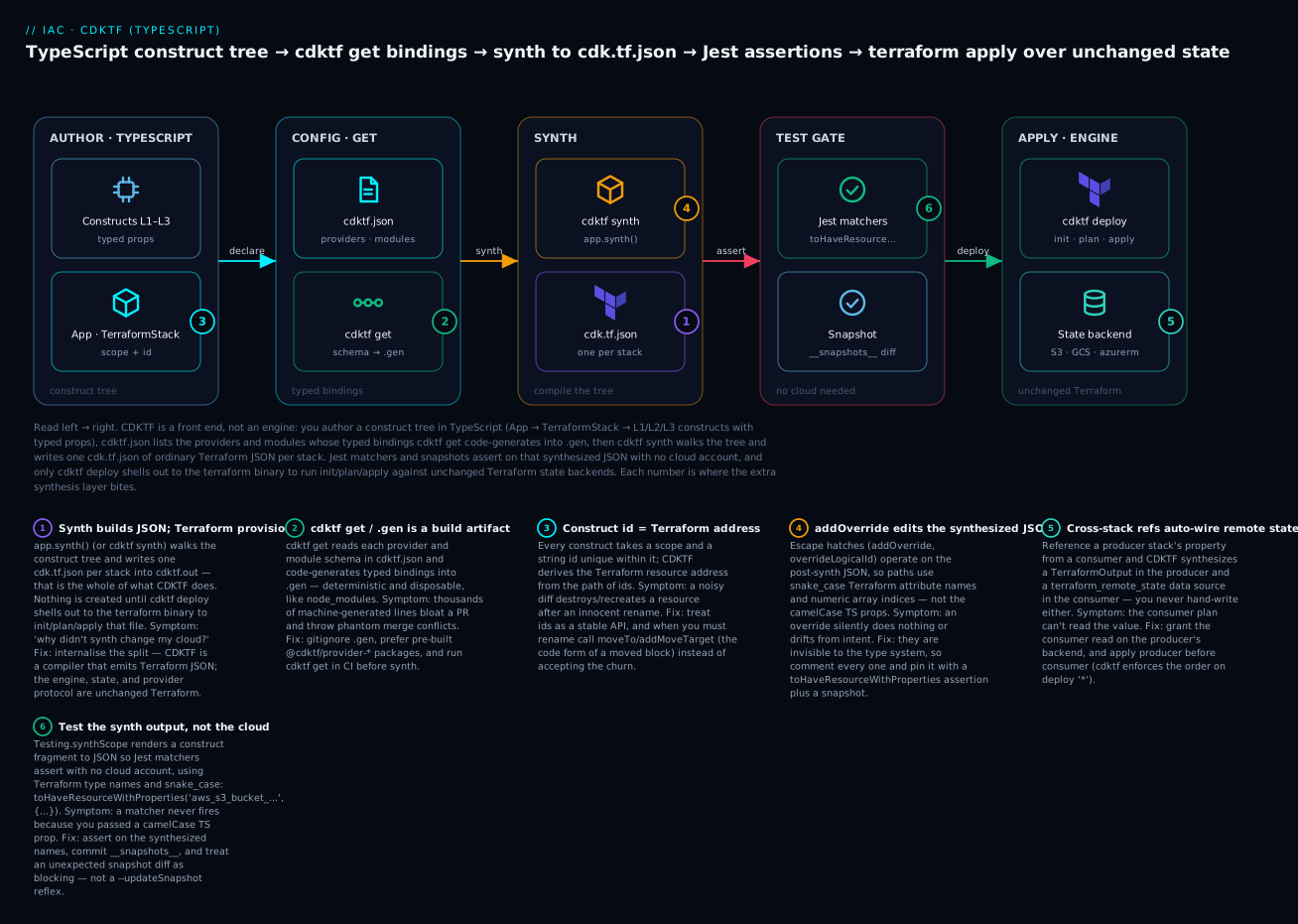
Read left to right: you author a construct tree in TypeScript, cdktf get generates typed bindings from each provider/module schema, cdktf synth compiles the tree into one cdk.tf.json of ordinary Terraform JSON per stack, Jest matchers assert on that JSON with no cloud account, and only cdktf deploy shells out to the terraform binary to run init/plan/apply against unchanged Terraform state.
CDK for Terraform (CDKTF) lets you write infrastructure as a TypeScript program that synthesizes to Terraform JSON, then hands the actual plan/apply work to the Terraform binary you already trust. You get the Terraform provider ecosystem and state model unchanged, but you author it with classes, generics, npm packages, and a real test runner instead of HCL. That is a genuinely different value proposition from raw HCL or Terragrunt: the abstractions are first-class language constructs, not string-templated modules.
This guide is the principal-engineer version. It covers how synthesis actually works, how to generate and consume provider bindings, how to build a layered construct library up to an L3 abstraction, how cross-stack references and backends work in code, the escape hatches you will need when bindings fall short, and how to test and ship the whole thing through CI. Everything targets CDKTF 0.20+ and Terraform 1.x.
1. The architecture: synth to JSON, then standard Terraform
The single most important thing to internalise is that CDKTF does not provision anything. Your program constructs an object tree rooted at an App. When you call app.synth() (or run cdktf synth), each construct emits its fragment of a Terraform configuration, and CDKTF writes one cdk.tf.json file per stack into cdktf.out/stacks/<stack-name>/. That JSON is ordinary Terraform JSON syntax — providers, resources, data sources, outputs, backend config. From there, cdktf deploy shells out to the terraform binary to run init, plan, and apply against that generated file.
| Layer | Responsibility |
|---|---|
| Your TypeScript | Build the construct tree, wire dependencies via object references |
constructs / cdktf |
Object model (Construct, App, TerraformStack, tokens) |
| Synthesis | Tree to cdk.tf.json per stack in cdktf.out |
cdktf CLI |
Orchestrates terraform init/plan/apply over the JSON |
| Terraform core + providers | The real plan/apply, state, and cloud API calls |
Two consequences follow. First, the engine is still Terraform: state files, the provider plugin protocol, moved/import semantics, and the dependency graph all behave exactly as they do in HCL. CDKTF is a front end. Second, anything HCL can express, the generated JSON can express — so when a construct cannot produce the config you need, you can always drop down to raw overrides (see step 5). You are never trapped.
Construct dependencies are implicit. When you pass bucket.arn into another resource’s props, CDKTF emits a Terraform interpolation token (${aws_s3_bucket.x.arn}) and Terraform builds the edge. You almost never write depends_on by hand; you express ordering by referencing attributes, just like in HCL but with compiler-checked property names.
2. Project scaffolding and provider bindings
Initialise a TypeScript project. The template wires up cdktf.json, main.ts, tsconfig.json, Jest, and the cdktf and constructs dependencies.
mkdir infra && cd infra
cdktf init --template=typescript --local
--local configures local state to start; we switch to a remote backend in step 4. The generated cdktf.json is the control file. Declare the providers and modules you want bindings for here:
{
  "language": "typescript",
  "app": "npx ts-node main.ts",
  "projectId": "f7c1a0e2-3b9d-4a11-9f2e-7c6b1d8e4a90",
  "terraformProviders": ["aws@~> 5.0"],
  "terraformModules": [
    { "name": "vpc", "source": "terraform-aws-modules/vpc/aws", "version": "~> 5.0" }
  ],
  "codeMakerOutput": ".gen"
}
There are two ways to get provider bindings, and the distinction matters for build speed and repo hygiene:
- Pre-built providers are published npm packages (e.g.
@cdktf/provider-aws). They are versioned, cached, and add nothing to your synth time. Prefer them for the big three clouds. - Generated bindings are produced locally from the provider schema by
cdktf get, written intocodeMakerOutput(here.gen). Use these for providers without a pre-built package, or when you pin an exact version.
Add a pre-built provider:
cdktf provider add "aws@~> 5.0"
Generate local bindings for everything listed in cdktf.json (providers and modules):
cdktf get
Gitignore the generated output (
.gen/) and treat it as a build artifact, exactly likenode_modules. Regenerating is deterministic fromcdktf.json. Checking it in bloats reviews with thousands of machine-generated lines and creates spurious merge conflicts. Runcdktf getin CI before synth.
Module bindings are the underrated feature here. cdktf get reads the module’s variables.tf and outputs.tf and emits a typed class — so a community Terraform module like terraform-aws-modules/vpc/aws becomes new Vpc(this, "vpc", { ... }) with autocomplete on every input variable and typed access to every output.
3. Layered constructs: from L1 resources to an L3 abstraction
The CDK community describes three abstraction levels, and applying that vocabulary keeps a construct library legible:
- L1 — generated resource bindings, a 1:1 mapping to Terraform resources (
S3Bucket,IamRole). Maximum control, zero opinions. - L2 — a curated wrapper around one or a few L1s with sane defaults and a tighter API (e.g. an encrypted, versioned bucket).
- L3 — a “pattern”: a whole subsystem composed from L2s, exposing only the few inputs a team actually varies.
A construct is just a class extending Construct with a typed props interface. Here is an L2 that bakes in the security baseline I never want to forget on an S3 bucket:
import { Construct } from "constructs";
import { S3Bucket } from "@cdktf/provider-aws/lib/s3-bucket";
import { S3BucketVersioningA } from "@cdktf/provider-aws/lib/s3-bucket-versioning";
import { S3BucketServerSideEncryptionConfigurationA } from "@cdktf/provider-aws/lib/s3-bucket-server-side-encryption-configuration";
import { S3BucketPublicAccessBlock } from "@cdktf/provider-aws/lib/s3-bucket-public-access-block";

export interface SecureBucketProps {
  readonly bucketName: string;
  readonly versioned?: boolean;
}

export class SecureBucket extends Construct {
  public readonly bucket: S3Bucket;

  constructor(scope: Construct, id: string, props: SecureBucketProps) {
    super(scope, id);

    this.bucket = new S3Bucket(this, "bucket", { bucket: props.bucketName });

    new S3BucketPublicAccessBlock(this, "pab", {
      bucket: this.bucket.id,
      blockPublicAcls: true,
      blockPublicPolicy: true,
      ignorePublicAcls: true,
      restrictPublicBuckets: true,
    });

    new S3BucketServerSideEncryptionConfigurationA(this, "sse", {
      bucket: this.bucket.id,
      rule: [{ applyServerSideEncryptionByDefault: { sseAlgorithm: "aws:kms" } }],
    });

    if (props.versioned ?? true) {
      new S3BucketVersioningA(this, "versioning", {
        bucket: this.bucket.id,
        versioningConfiguration: { status: "Enabled" },
      });
    }
  }
}
Note the id discipline: every construct takes a scope and a string id that is unique within that scope. CDKTF derives the Terraform resource address from the path of ids, so renaming an id renames the resource and triggers a destroy/recreate unless you add a moveTo (step 5). Treat ids as a stable API.
An L3 composes L2s into a deployable pattern. A “static site” L3 might own a bucket, an OAC-fronted CloudFront distribution, and the bucket policy, exposing only the domain name and the bucket as outputs. The discipline is to surface intent (domainName, priceClass) and hide mechanism. That is the payoff over HCL modules: an L3 is a typed class you can unit test, version on npm, and refactor with the compiler watching your back.
4. Stacks, state backends, and cross-stack references
A TerraformStack is the synthesis unit — one stack, one cdk.tf.json, one Terraform state. Split stacks along blast-radius and lifecycle boundaries (networking vs. data vs. app), not arbitrarily. Each stack configures its own backend as a construct in its constructor. The first-class backend classes (S3Backend, CloudBackend, GcsBackend, AzurermBackend) emit the terraform { backend ... } block:
import { App, TerraformStack, S3Backend, TerraformOutput } from "cdktf";
import { Construct } from "constructs";
import { AwsProvider } from "@cdktf/provider-aws/lib/provider";

class NetworkStack extends TerraformStack {
  public readonly vpcId: string;

  constructor(scope: Construct, id: string) {
    super(scope, id);

    new S3Backend(this, {
      bucket: "kv-tfstate-prod",
      key: `${id}/terraform.tfstate`,
      region: "us-east-1",
      dynamodbTable: "kv-tfstate-locks",
      encrypt: true,
    });

    new AwsProvider(this, "aws", { region: "us-east-1" });

    // ... create VPC ...
    this.vpcId = "vpc-placeholder"; // e.g. vpc.id
  }
}
Cross-stack references are the headline ergonomic win. You do not manage remote-state data sources by hand. Expose a value from the producer stack as a property, then read it in the consumer. CDKTF detects the cross-stack reference and automatically synthesizes a TerraformOutput in the producer and a terraform_remote_state data source in the consumer:
class AppStack extends TerraformStack {
  constructor(scope: Construct, id: string, network: NetworkStack) {
    super(scope, id);
    new S3Backend(this, { bucket: "kv-tfstate-prod", key: `${id}/terraform.tfstate`, region: "us-east-1" });
    new AwsProvider(this, "aws", { region: "us-east-1" });

    // Referencing another stack's property wires up remote state automatically.
    new TerraformOutput(this, "consumed_vpc", { value: network.vpcId });
  }
}

const app = new App();
const network = new NetworkStack(app, "network");
new AppStack(app, "app", network);
app.synth();
Two caveats from production. First, the consumer’s remote-state data source needs read access to the producer’s backend — same bucket/credentials, or an explicitly granted role. Second, cross-stack references force deploy ordering: you must apply network before app, and CDKTF enforces that dependency when you run cdktf deploy '*'.
5. Asset bundling, escape hatches, and overrides
Two facilities cover the gap between “what the bindings model” and “what you actually need to ship.”
Assets. TerraformAsset stages a local file or directory into cdktf.out and gives you a path and hash to feed downstream resources. For a Lambda, archive a directory and upload the zip:
import * as path from "path";
import { TerraformAsset, AssetType } from "cdktf";
import { S3Object } from "@cdktf/provider-aws/lib/s3-object";

const asset = new TerraformAsset(this, "lambda-asset", {
  path: path.resolve(__dirname, "lambda"),
  type: AssetType.ARCHIVE,
});

new S3Object(this, "lambda-archive", {
  bucket: bucket.bucket,
  key: `lambdas/${asset.fileName}`,
  source: asset.path,
  sourceHash: asset.assetHash,
});
AssetType.FILE, AssetType.DIRECTORY, and AssetType.ARCHIVE cover single files, copied trees, and zipped trees respectively. Wiring assetHash into sourceHash is what makes Terraform notice code changes and redeploy.
Escape hatches. When a generated construct cannot express something — a brand-new provider attribute, a provisioner, a nested block the binding renders awkwardly — call addOverride(path, value) on the resource. The path is dot-delimited, uses snake_case attribute names (it operates on the synthesized JSON, not the camelCase TS), and supports numeric array indices:
const bucket = new S3Bucket(this, "bucket", { bucket: "kv-legacy" });

// Force an attribute the binding does not surface yet.
bucket.addOverride("force_destroy", true);

// Inject a dynamic block over the synthesized JSON.
bucket.addOverride("dynamic.lifecycle_rule", {
  for_each: "${var.rules}",
  content: { id: "${lifecycle_rule.key}", enabled: true },
});
Resource-level escape hatches also include the refactoring helpers that mirror HCL’s moved and import blocks: moveTo(target) / addMoveTarget(name) to rename without destroy, and importFrom(id) to adopt existing infrastructure into state. Reach for overrides sparingly and comment every one — they are invisible to the type system, so they are exactly where drift between intent and output hides.
6. Unit and snapshot testing
This is the reason teams adopt CDKTF in the first place: you can assert on synthesized infrastructure with a normal test runner, no cloud account required. The typescript template ships Jest with CDKTF’s custom matchers. Register them in your Jest setup file:
// setup.js
const cdktf = require("cdktf");
cdktf.Testing.setupJest();
// jest.config.js (excerpt)
{
  "testMatch": ["**/*.test.ts"],
  "setupFilesAfterEnv": ["<rootDir>/setup.js"]
}
Testing.synthScope synthesizes a fragment of the tree so you can assert on a single construct without standing up a whole stack. The matchers operate on that synthesized JSON using Terraform resource type names and snake_case properties:
import { Testing } from "cdktf";
import { S3Bucket } from "@cdktf/provider-aws/lib/s3-bucket";
import { SecureBucket } from "../lib/secure-bucket";

describe("SecureBucket", () => {
  it("encrypts with KMS and blocks public access", () => {
    const synth = Testing.synthScope((scope) => {
      new SecureBucket(scope, "test", { bucketName: "kv-test" });
    });

    expect(synth).toHaveResource(S3Bucket);
    expect(synth).toHaveResourceWithProperties(
      "aws_s3_bucket_server_side_encryption_configuration",
      { rule: [{ apply_server_side_encryption_by_default: { sse_algorithm: "aws:kms" } }] }
    );
    expect(synth).toHaveResourceWithProperties("aws_s3_bucket_public_access_block", {
      block_public_acls: true,
      restrict_public_buckets: true,
    });
  });

  it("omits versioning when disabled", () => {
    const synth = Testing.synthScope((scope) => {
      new SecureBucket(scope, "test", { bucketName: "kv-test", versioned: false });
    });
    expect(synth).not.toHaveResource("aws_s3_bucket_versioning");
  });
});
The full matcher set: toHaveResource / toHaveResourceWithProperties, toHaveDataSource / toHaveDataSourceWithProperties, toHaveProvider / toHaveProviderWithProperties, plus the heavier toBeValidTerraform() and toPlanSuccessfully() which actually invoke Terraform (slower, integration-grade — gate them behind a separate test target).
Snapshot tests catch unintended changes to the whole generated config. Use Testing.synth(stack) for a full stack and Jest snapshots:
it("matches the approved synthesis", () => {
  const app = Testing.app();
  const stack = new NetworkStack(app, "network");
  expect(Testing.synth(stack)).toMatchSnapshot();
});
Snapshots are a tripwire: a reviewer sees the exact JSON delta a refactor produces. Commit the __snapshots__/ directory, and treat an unexpected snapshot diff in a PR as a blocking signal, not a --updateSnapshot reflex.
7. CI/CD: get, synth, diff, deploy with an approval gate
The CI shape mirrors a Terraform pipeline, with a synth step in front. The key discipline is the gate between diff and deploy: synthesize and plan automatically, but require a human to approve the apply against production.
# .github/workflows/cdktf.yml
name: cdktf
on:
  pull_request:
  push:
    branches: [main]

jobs:
  plan:
    runs-on: ubuntu-latest
    permissions:
      id-token: write   # for cloud OIDC
      contents: read
    steps:
      - uses: actions/checkout@v4
      - uses: actions/setup-node@v4
        with: { node-version: "20", cache: "npm" }
      - uses: hashicorp/setup-terraform@v3
        with: { terraform_wrapper: false }
      - run: npm ci
      - run: npx cdktf get          # regenerate bindings
      - run: npm test               # unit + snapshot tests
      - run: npx cdktf synth        # produce cdktf.out
      - run: npx cdktf diff app     # terraform plan for the 'app' stack

  deploy:
    needs: plan
    if: github.ref == 'refs/heads/main'
    runs-on: ubuntu-latest
    environment: production         # <-- required reviewers = approval gate
    permissions:
      id-token: write
      contents: read
    steps:
      - uses: actions/checkout@v4
      - uses: actions/setup-node@v4
        with: { node-version: "20", cache: "npm" }
      - uses: hashicorp/setup-terraform@v3
        with: { terraform_wrapper: false }
      - run: npm ci
      - run: npx cdktf get
      - run: npx cdktf deploy app --auto-approve
The terraform_wrapper: false line matters: the wrapper that setup-terraform installs by default intercepts stdout and confuses CDKTF’s parsing of Terraform output. The approval gate is the GitHub environment: production with required reviewers — the deploy job blocks until someone approves. --auto-approve is safe only because the human gate already happened; never put it on a job that runs unattended without that protection. Use OIDC (id-token: write) for short-lived cloud credentials rather than long-lived secrets.
8. Choosing CDKTF vs. HCL vs. Pulumi
These tools are not interchangeable, and the right answer depends on your team more than on the technology.
| Dimension | HCL (Terraform) | CDKTF | Pulumi |
|---|---|---|---|
| Authoring | Declarative DSL | TS/Python/Go/Java/C# | TS/Python/Go/Java/C#/YAML |
| Engine | Terraform core | Terraform core (via synth) | Pulumi engine over gRPC |
| State | Terraform backends | Terraform backends (unchanged) | Pulumi backends |
| Abstraction | Modules | Language classes (L1/L2/L3) | ComponentResource classes |
| Testing | terraform test, Terratest |
Jest matchers + snapshots | Native test frameworks + mocks |
| Maturity | Highest; huge ecosystem | Stable but smaller community | Mature, large ecosystem |
Choose HCL when your team is comfortable with it, your modules are not fighting the language, and you value the largest ecosystem and the simplest mental model. Most teams should stay here. Choose CDKTF when you want real programming abstractions but must keep the Terraform engine, providers, and state model — for example, an existing Terraform shop standardising on TypeScript, or a platform team building a typed L3 library on top of community modules. Choose Pulumi when you want a code-first tool end to end and are willing to adopt its engine and state model rather than Terraform’s.
The honest tradeoff for CDKTF: you gain types, tests, and composition, and you pay with an extra synthesis layer, a smaller community, and one more abstraction to debug when generated JSON surprises you. For a team already strong in TypeScript and committed to Terraform, that trade is worth it. For a team fluent in HCL with modules that work, it usually is not.
Going deeper
The eight steps above are the working shape of a CDKTF codebase. This section is the layer beneath them — the object model, the token system, the imperative-vs-declarative seam that trips everyone up once, and the engine-level differences that decide whether CDKTF or Pulumi is the honest choice.
The object model: App, Stack, and the construct tree
Three types carry the whole framework, all inherited from the same constructs library that AWS CDK uses:
Appis the root of the tree and the thing you callsynth()on. It owns zero infrastructure; it is a container for stacks.TerraformStackis the unit of synthesis and the unit of state. One stack becomes exactly onecdk.tf.jsonand one Terraform state file. Stack boundaries are your blast-radius boundaries — choose them the way you’d choose separate state files in HCL.Constructis any node in the tree: a stack, yourSecureBucket, a single L1 resource. Every construct has ascope(its parent) and anid(unique among its siblings), and the chain of ids from the stack down is what CDKTF hashes into the Terraform resource address.
import { App, TerraformStack } from "cdktf";
import { Construct } from "constructs";

class ExampleStack extends TerraformStack {
  constructor(scope: Construct, id: string) {
    super(scope, id);
    // providers, backends, and resources are added here
  }
}

const app = new App();          // the root construct
new ExampleStack(app, "dev");   // one stack === one cdk.tf.json === one state
app.synth();                    // walk the tree, write cdktf.out/stacks/dev/cdk.tf.json
Because it is a plain object tree, you can traverse and mutate it. Aspects are visitor functions that run over the tree just before synthesis — the CDKTF idiom for cross-cutting policy such as “tag every taggable resource” or “forbid unencrypted volumes”:
import { Aspects, IAspect } from "cdktf";
import { IConstruct } from "constructs";

class AddTeamTag implements IAspect {
  visit(node: IConstruct): void {
    // inspect node; if it is a taggable resource, set tags via addOverride/props
  }
}

Aspects.of(app).add(new AddTeamTag()); // runs across the whole tree at synth time
The cdktf.json control file has a few fields worth knowing beyond the ones in step 2: output (default cdktf.out) sets where synthesized JSON lands, sendCrashReports toggles telemetry, and codeMakerOutput (default .gen) is where cdktf get writes generated bindings. Bindings are produced through jsii, the same tool AWS CDK uses to expose one TypeScript API surface to Python, Go, Java, and C# — which is why CDKTF is multi-language despite the class names looking TypeScript-first.
The command surface
The CLI is a thin orchestration layer. Every command that touches the cloud ultimately shells out to the terraform binary against the synthesized JSON:
| Command | What it does | Terraform equivalent |
|---|---|---|
cdktf get |
Code-gens typed bindings from provider/module schemas into .gen |
(none — codegen) |
cdktf synth |
Writes one cdk.tf.json per stack into cdktf.out |
(none — compile) |
cdktf diff <stack> |
Plans the stack | terraform plan |
cdktf deploy <stack> |
Applies the stack | terraform init + apply |
cdktf destroy <stack> |
Tears the stack down | terraform destroy |
cdktf list |
Lists stacks and their dependency order | (graph read) |
cdktf output <stack> |
Prints stack outputs | terraform output |
cdktf convert |
Translates HCL on stdin to constructs on stdout | (none — migration aid) |
cdktf provider add |
Installs a pre-built provider npm package | (none — dependency) |
cdktf convert is the underrated migration tool: pipe an existing .tf file in and get constructs out (cat main.tf | cdktf convert), then refactor by hand. It is a starting point, not a finished translation.
Inputs and outputs: TerraformVariable, TerraformOutput, TerraformLocal
There is a decision hiding in plain sight here, and getting it wrong is a classic CDKTF mistake. A plain TypeScript constant is resolved at synth time and inlined into the JSON — it never appears as a variable. A TerraformVariable stays parametric in cdk.tf.json, so -var, TF_VAR_*, and .tfvars still work at plan time. Reach for TerraformVariable only when a value must be supplied to Terraform at apply time (e.g. a per-run image tag); otherwise a TS constant is simpler and type-checked.
import { TerraformVariable, TerraformOutput, TerraformLocal } from "cdktf";

// A Terraform input variable: stays parametric in cdk.tf.json (-var / TF_VAR_ works).
const instanceCount = new TerraformVariable(this, "instance_count", {
  type: "number",
  default: 2,
  description: "How many app nodes to run",
});
instanceCount.value;          // a token, resolved by Terraform at plan time
instanceCount.numberValue;    // typed accessor when you need number semantics

// A plain TS constant is baked at SYNTH time — it never appears as a variable.
const region = "us-east-1";

// A local is a named intermediate in the generated JSON.
const namePrefix = new TerraformLocal(this, "name_prefix", "kv-prod");

new TerraformOutput(this, "app_count", {
  value: instanceCount.value,
  description: "Resolved node count",
  sensitive: false,
});
Tokens and Fn.*: values that don’t exist yet
A resource attribute like bucket.arn doesn’t have a value while your TypeScript runs — it only exists after Terraform applies. CDKTF represents it as a token: an opaque placeholder string that synthesizes to a Terraform interpolation (${aws_s3_bucket.x.arn}). You can pass tokens around like normal values, but you cannot inspect them in Node — if (bucket.arn.startsWith("arn:")) is a bug, because at synth time bucket.arn is a placeholder, not the real ARN.
When you need to transform a token you use Fn.*, which emits a Terraform function call rather than running JavaScript:
import { Fn, Token } from "cdktf";

// Fn.* emit Terraform function calls as tokens — evaluated by Terraform, not Node.
const firstAz = Fn.element(availabilityZones.listValue, 0);
const upperName = Fn.upper(namePrefix.asString);

// For values that CARRY tokens, use Fn.jsonencode — NOT JSON.stringify, which would
// serialise the placeholder string instead of the resolved value.
const policy = Fn.jsonencode({ Version: "2012-10-17", Statement: [] });

Token.asString(firstAz); // coerce a token into a string-typed slot when a prop demands it
The rule of thumb: if a value originates from a resource attribute, a data source, or a TerraformVariable, treat it as a token and transform it with Fn.* / Token.*, never with plain JS string or math operations.
Imperative authoring, declarative result (the seam everyone hits once)
This is the single most important conceptual point in the lesson after “synth deploys nothing.” Your TypeScript control flow runs exactly once, at synth time, to build the tree. A for loop does not loop at apply time; it emits N resources into the JSON now. That is fine — and powerful — when the count is known at synth time. It breaks when the count is only known to Terraform at apply time (from a data source, say), because you cannot loop over a token in Node.
For apply-time collections, use TerraformIterator (emits for_each) or TerraformCount (emits count):
import { TerraformIterator, TerraformCount } from "cdktf";

// Synth-time loop: the list is known NOW, so a normal map builds N constructs.
for (const name of ["web", "worker", "cron"]) {
  new SecureBucket(this, name, { bucketName: `kv-${name}` });
}

// Apply-time loop: the list is a token (only Terraform knows it), so use an iterator,
// which emits `for_each` into the JSON instead of expanding in Node.
const it = TerraformIterator.fromList(subnetCidrs.listValue);
new Subnet(this, "subnet", {
  forEach: it,
  cidrBlock: Token.asString(it.value),
});

// count for a token-valued number:
const c = TerraformCount.of(instanceCount.value);
new Instance(this, "node", { count: c, /* ... */ });
Get this wrong and the symptom is a crash at synth (“cannot iterate over a token”) or, worse, a stack that hard-codes today’s value and silently ignores tomorrow’s. When in doubt: is this value known while my .ts runs, or only after Terraform plans? Known now → plain JS. Known later → iterator/count/Fn.
Escape hatches, in order of bluntness
Bindings occasionally lag the provider, or model a block awkwardly. Reach for the least blunt tool that works, and cover every override with a test — overrides are invisible to the type system, so they are exactly where intent and output drift apart:
const bucket = new S3Bucket(this, "bucket", { bucket: "kv-legacy" });

// 1. Override a scalar the binding doesn't surface (snake_case, on the synthesized JSON).
bucket.addOverride("force_destroy", true);

// 2. Override a nested/array path with numeric indices.
bucket.addOverride("lifecycle_rule.0.enabled", true);

// 3. Pin the Terraform logical id (rare; breaks id-derived addressing — use with care).
bucket.overrideLogicalId("legacy_bucket");
When even that is not enough — a provider with no binding at all, or a block you’d rather express as HCL — TerraformHclModule lets you point at a raw module source and pass variables through untyped, and a plain data/resource can be dropped in via addOverride on the stack. These are legitimate but load-bearing: comment the why, and snapshot-test the result so an upgrade that changes the generated shape fails loudly.
State is still Terraform — including refactors
Because CDKTF is a front end, everything you know about Terraform state holds. Backends are configured as constructs (S3Backend, GcsBackend, AzurermBackend, CloudBackend), the lock protocol is unchanged, and drift behaves identically. Refactoring maps directly onto Terraform’s own moved / import blocks: moveTo / addMoveTarget rename a resource without destroy/recreate, and importFrom adopts existing infrastructure into state. The one gap is removed blocks, which have no first-class helper yet — express them with a stack-level addOverride if you need them. For cross-stack wiring at scale, the same remote-state mechanics apply; CDKTF just writes the terraform_remote_state data source for you.
Testing: the pyramid, and where the cloud enters
The testing story is the reason most teams try CDKTF, so be deliberate about tiers. The first two need no cloud and run in milliseconds; only the third invokes Terraform:
| Tier | API | Runs Terraform? | Cloud creds? | Speed |
|---|---|---|---|---|
| Unit | Testing.synthScope + toHaveResourceWithProperties |
no | no | ms |
| Snapshot | Testing.synth(stack) + toMatchSnapshot |
no | no | ms |
| Integration | toBeValidTerraform() / toPlanSuccessfully() |
yes (validate / plan) |
usually | seconds+ |
import { Testing } from "cdktf";

it("produces valid, plannable Terraform", () => {
  const app = Testing.app();
  const stack = new NetworkStack(app, "network");
  expect(Testing.fullSynth(stack)).toBeValidTerraform();  // runs `terraform validate`
  // toPlanSuccessfully() additionally runs `terraform plan` — needs providers/creds,
  // so gate it behind a separate, slower test target than your unit suite.
});
Keep unit and snapshot tests on every PR (fast, deterministic, credential-free) and run the integration matchers on a separate, gated job. Testing.fullSynth (not Testing.synth) is the entry point for the heavy matchers, because it writes to disk and actually invokes the binary.
CDKTF vs. Pulumi at the engine level, and a maturity caveat
Section 8’s table compares them at a glance; here is the difference that actually matters. Pulumi runs your program during deployment. Its engine talks to language-specific resource providers over gRPC, your code executes as the deploy proceeds, and state lives in Pulumi’s backend. That makes Pulumi truly imperative end to end — you can branch on a real, resolved value mid-deploy. CDKTF runs your program only at synth, produces static Terraform JSON, and then steps aside; the apply is 100% ordinary Terraform. So CDKTF’s “imperative” is imperative authoring of a declarative artifact, whereas Pulumi is imperative through and through. If you need to keep Terraform’s engine, providers, and state — an existing Terraform shop — CDKTF fits; if you’re greenfield and want a single code-first tool, Pulumi’s model is cleaner.
The honest maturity note: CDKTF is still pre-1.0 (0.20.x at the time of writing), its community is much smaller than raw HCL’s, and HashiCorp’s investment in it has been comparatively modest. That is not a reason to avoid it, but it is a reason to pin the CLI and provider-binding versions, lean on snapshot tests as an upgrade tripwire, and confirm the generated JSON on every version bump. The engine you depend on is rock-solid Terraform; the compiler in front of it is younger — budget for that.
Verify
Confirm the toolchain end to end on a fresh checkout:
# 1. Install and regenerate bindings deterministically.
npm ci
npx cdktf get

# 2. Tests pass (unit assertions + snapshots), no cloud needed.
npm test

# 3. Synthesis produces one cdk.tf.json per stack.
npx cdktf synth
ls cdktf.out/stacks            # expect: network/  app/  ...
cat cdktf.out/stacks/network/cdk.tf.json | jq '.terraform.backend'   # backend present

# 4. The generated JSON is valid Terraform and plans cleanly.
npx cdktf diff network         # runs terraform plan; expect a clean, expected diff

# 5. List stacks and their dependency order.
npx cdktf list
If cdktf synth writes a cdk.tf.json per stack, npm test is green, and cdktf diff produces only the changes you intended, the pipeline is sound. A common failure is a noisy diff after a refactor — that is almost always a changed construct id renaming a resource; fix it with moveTo rather than accepting the destroy/recreate.
Checklist
Practice challenges
Work these in order — each builds on the last, escalating from a first synth to a production-grade refactor. Try each before opening its solution.
1. Scaffold and read the generated JSON (beginner). Initialise a TypeScript CDKTF project with local state, add the AWS pre-built provider, define one S3Bucket, and find the exact file synth produced. What is its path, and what top-level keys does it contain?
<details> <summary>Solution</summary>
mkdir infra && cd infra
cdktf init --template=typescript --local
cdktf provider add "aws@~> 5.0"
# add `new S3Bucket(this, "bucket", { bucket: "kv-demo" })` and an AwsProvider to main.ts
npx cdktf synth
cat cdktf.out/stacks/<stack-name>/cdk.tf.json | jq 'keys'
Expect keys like terraform, provider, and resource. Why: seeing the JSON firsthand makes “synth compiles to Terraform” concrete — the file is exactly what terraform apply would consume.
</details>
2. Write an L2 with a unit test (beginner–intermediate). Extend SecureBucket so it also attaches a lifecycle rule that expires noncurrent versions after 30 days. Assert the rule with toHaveResourceWithProperties.
<details> <summary>Solution</summary>
Add an S3BucketLifecycleConfiguration inside the construct, then:
it("expires noncurrent versions", () => {
  const synth = Testing.synthScope((scope) => {
    new SecureBucket(scope, "test", { bucketName: "kv-test" });
  });
  expect(synth).toHaveResourceWithProperties("aws_s3_bucket_lifecycle_configuration", {
    rule: [{ noncurrent_version_expiration: [{ noncurrent_days: 30 }] }],
  });
});
Why: the matcher asserts on the synthesized Terraform type name and snake_case props — proving your construct emits the config you intend, with no cloud account. </details>
3. Split into two stacks with a cross-stack reference (intermediate). Put a VPC in a NetworkStack and consume its vpcId from an AppStack. After synth, show where CDKTF put the output and the remote-state data source.
<details> <summary>Solution</summary>
Expose public readonly vpcId on NetworkStack, pass the instance into AppStack, and reference network.vpcId. Then:
npx cdktf synth
jq '.output'   cdktf.out/stacks/network/cdk.tf.json   # a TerraformOutput appears here
jq '.data'     cdktf.out/stacks/app/cdk.tf.json        # a terraform_remote_state appears here
Why: referencing another stack’s property auto-synthesizes the TerraformOutput in the producer and the terraform_remote_state data source in the consumer — you never hand-write either.
</details>
4. TerraformVariable + Fn, and the synth-time trap (intermediate–advanced). Add a TerraformVariable for a list of AZ names, and set a subnet’s AZ to the first element. Why can’t you write azs.listValue[0] in TypeScript?
<details> <summary>Solution</summary>
const azs = new TerraformVariable(this, "azs", { type: "list(string)" });
const firstAz = Fn.element(azs.listValue, 0);  // Terraform's element(), not JS indexing
new Subnet(this, "subnet", { availabilityZone: Token.asString(firstAz), /* ... */ });
Why: azs.listValue is a token — a placeholder Terraform resolves at plan time — so JS indexing sees a string placeholder, not a real array. Fn.element emits element(var.azs, 0) into the JSON for Terraform to evaluate.
</details>
5. Escape hatch, tested (advanced). A binding hasn’t caught up with a new bucket attribute. Use addOverride to set it, then make sure a future upgrade can’t silently change it.
<details> <summary>Solution</summary>
bucket.addOverride("object_lock_enabled", true);
// property assertion:
expect(synth).toHaveResourceWithProperties("aws_s3_bucket", { object_lock_enabled: true });
// plus a snapshot so any generated-shape change fails the PR:
expect(Testing.synth(stack)).toMatchSnapshot();
Why: overrides use snake_case on the synthesized JSON and are invisible to the type system — a property assertion pins the value and a committed snapshot turns any drift into a blocking diff. </details>
6. CI gate and a rename without churn (advanced). Write the plan job (get → test → synth → diff) and gate deploy behind a protected environment. Then a colleague renames a construct id and diff shows a destroy/recreate — fix it so state is preserved.
<details> <summary>Solution</summary>
Use the workflow from step 7 (the environment: production with required reviewers is the gate). For the rename, don’t accept the churn — move it:
// old id was "bucket"; new id is "assets". Preserve the resource:
bucket.moveTo("assets"); // emits a Terraform `moved` block; no destroy/recreate
# minimal plan job shape (see step 7 for the full file):
- run: npx cdktf get
- run: npm test
- run: npx cdktf synth
- run: npx cdktf diff app
Why: the construct id is the Terraform address, so renaming it looks like delete-plus-create; moveTo emits a moved block that tells Terraform it’s the same resource, and the human-gated environment keeps --auto-approve safe.
</details>
Common beginner mistakes
- “
cdktf synthdeployed my infrastructure.” It didn’t — synth only writes JSON. Nothing changes in your cloud untilcdktf deployrunsterraform apply. The right model: synth is a compile step; deploy is the run step. - Committing
.gen/. Generated bindings are a build artifact likenode_modules. Checking them in bloats PRs with thousands of machine-generated lines and causes phantom merge conflicts. Gitignore.gen/and runcdktf getin CI. - Editing
cdk.tf.jsonby hand. It is regenerated on every synth, so your edit vanishes. Change the TypeScript; if the binding can’t express what you need, useaddOverride— that survives synth. - Using camelCase in
addOverrideor in matchers. Overrides and test matchers operate on the synthesized JSON, which uses Terraform’s snake_case attribute names (force_destroy, notforceDestroy). camelCase there silently does nothing or never matches. - Expecting TypeScript loops to be runtime logic. A
forloop or.map()runs once at synth and expands into N resources now. For a count that only Terraform knows at apply time, you must useTerraformIterator/TerraformCount, which emitfor_each/count. - Renaming a construct
idcasually. Theidis the Terraform resource address. Rename it and Terraform sees a delete-plus-create. Treat ids as a stable API; when you must rename, callmoveTo. - Inspecting a token in Node.
if (bucket.arn.includes("prod"))is a bug — at synthbucket.arnis a placeholder, not the real ARN. Transform token-bearing values withFn.*/Token.*, never plain JS. --auto-approveon an unattended job. It is only safe because a human already approved via the protected environment. On a job with no gate, it will apply unreviewed changes to production.
Glossary
- App — the root construct of a CDKTF program; you call
.synth()on it. Owns no infrastructure, just stacks. - Construct — any node in the object tree (a stack, an L2, a single resource), always created with a
scope(parent) and anid. TerraformStack— the unit of synthesis and of state: one stack → onecdk.tf.json→ one Terraform state file.- Synth (synthesis) — the compile step. Walks the construct tree and writes Terraform JSON. Provisions nothing.
cdk.tf.json— the synthesized output: ordinary Terraform JSON syntax that theterraformbinary reads.cdktf.json— the project control file listing providers/modules, the app entrypoint, and codegen/output paths.cdktf get— code-generates typed bindings from provider and module schemas into.gen. Deterministic; gitignored.- Pre-built provider — a published npm binding package (e.g.
@cdktf/provider-aws); fast, versioned, cached. - Generated binding — a binding produced locally by
cdktf getfrom a provider/module schema (via jsii). - L1 / L2 / L3 — abstraction levels: raw resource binding (L1), curated wrapper with defaults (L2), whole-subsystem pattern (L3).
- Token — an opaque placeholder for a value known only after Terraform runs; synthesizes to a
${...}interpolation. Fn.*— CDKTF wrappers that emit Terraform function calls (e.g.element,jsonencode) for transforming tokens.TerraformVariable— an input variable that stays parametric in the JSON, driven by-var/TF_VAR_at plan time.TerraformOutput— a declared stack output; also the mechanism CDKTF auto-adds for cross-stack references.TerraformIterator/TerraformCount— emitfor_each/countfor collections whose size is known only at apply time.TerraformAsset— stages a local file/dir intocdktf.outand exposes a path + hash forsourceHashwiring.- Escape hatch — a way to edit the synthesized JSON directly (
addOverride,overrideLogicalId) when a binding falls short. moveTo/importFrom— the code equivalents of Terraform’smovedandimportblocks (rename without churn; adopt existing infra).- Cross-stack reference — reading a producer stack’s property; CDKTF auto-synthesizes the output and
terraform_remote_state. - Backend construct —
S3Backend/GcsBackend/AzurermBackend/CloudBackend, which emit Terraform’sbackendblock. Testing.synthScope— synthesizes a construct fragment so unit matchers can assert on it without a full stack.- Snapshot test — a committed record of the full synthesized JSON; an unexpected diff is a blocking review signal.
- jsii — the AWS toolchain that exposes one TypeScript API to Python/Go/Java/C#; how CDKTF bindings become multi-language.