In a nutshell
Picture the entrance to a large building. An Azure Load Balancer is the traffic cop at the gate: it glances at the address on each vehicle — source and destination IP and port — and waves it toward one of several identical doors. It never asks what’s inside the vehicle, never reads a letter, never checks credentials. It is fast precisely because it does so little: it works at layer 4 (raw TCP/UDP) and only shuffles packets by address.
An Application Gateway is the concierge at the lobby desk. It opens the request, reads it, and acts on what it says: it reads the URL so it can send /api/* to one team and /* to another; it unwraps TLS (takes your sealed HTTPS envelope and opens it with a certificate it fetched from the Key Vault safe); and it runs a WAF bouncer that turns away anything looking like an attack before it reaches the floor. All that reading costs a little latency and a lot more money — which is the whole trade-off of this lesson. It works at layer 7 (HTTP).
Both share one non-negotiable habit: a health probe. Neither will send a visitor to a door that isn’t answering. The probe is a constant knock — “still alive? still alive?” — and a backend that stops answering is quietly taken out of rotation. When people say “the load balancer is down” they almost always mean “the probe is failing and every door looks shut,” which is why a 502 in this lesson is nearly always a probe story, not a gateway story.
Level: Senior · Time: ~44 min
Prerequisites: core Terraform (HCL, providers, resources, variables, count/for_each, state and modules) from the Foundation and Intermediate tiers; an Azure subscription you can create resources in with az login working; and the Azure networking basics — VNet, subnet, NSG, public IP — from the Virtual Network, Subnets, NSG & Peering lesson.
After this lesson you can:
- Decide correctly between Load Balancer (L4, cheap, regional), Application Gateway (L7, WAF, regional) and Front Door (global) for a given workload.
- Build a Standard
azurerm_lbwith a health probe, load-balancing rule, outbound SNAT rule and inbound NAT. - Stand up an
azurerm_application_gateway(WAF_v2) with an HTTPS listener, TLS from Key Vault, path-based routing and a backend probe. - Attach an OWASP
azurerm_web_application_firewall_policyand reason clearly about Detection vs Prevention. - Diagnose a 502 methodically from
show-backend-healthinstead of guessing at the gateway.
Every public workload on Azure eventually needs something in front of it — something that owns the public IP, spreads traffic across more than one instance, notices when an instance goes bad, and (if it speaks HTTP) terminates TLS and screens hostile requests before they reach your app. Azure gives you two very different boxes for that job, and picking the wrong one is one of the most expensive architecture mistakes a team makes: the Azure Load Balancer is a layer-4 (TCP/UDP) distributor that never opens the packet, and the Application Gateway is a layer-7 (HTTP) reverse proxy that reads the URL, terminates TLS, and can run a Web Application Firewall. Clicking these together in the portal is slow, undocumented, and impossible to reproduce across environments. This lesson builds the whole tier in Terraform, the way you would run it in production.
By the end you will have stood up, from an empty directory, a real Application Gateway (WAF_v2) with an HTTPS listener, a routing rule, a health probe and an OWASP WAF policy, load-balancing across a two-VM backend pool running nginx — then curled its public IP to watch it serve, read its backend health, and torn it all down with terraform destroy. You will also build the L4 alternative — an azurerm_lb (Standard SKU) with a health probe, load-balancing rule, outbound rule and inbound NAT — and know exactly when each is the right tool. Above all you will leave able to diagnose the error that every first Application Gateway throws at you: 502 Bad Gateway, whose real cause is almost never the gateway and almost always a failing probe, a blocking NSG, a wrong backend port, or a Key Vault permission.
This is the provider-specific, hands-on layer of the course. It assumes you already know core Terraform — HCL, providers, resources, variables, state and modules from the Foundation and Intermediate tiers — and applies it to a real cloud, relentlessly, with copy-pasteable .tf files and a terraform init → plan → apply → verify → destroy you actually run.
What you’ll build
The scenario is the one you meet on day one of almost any Azure project: a web application that must be reachable on a public HTTPS endpoint, survive a single VM dying, offload TLS at the edge, route /api/* to a different backend than /*, and refuse the obvious OWASP attacks. That is an Application Gateway WAF_v2 job end to end. Behind it sits a backend pool of two Linux VMs (you would use a VM Scale Set in production; we show both) each running nginx, in their own subnet, reachable only from the gateway. The gateway lives in its own dedicated subnet — Application Gateway refuses to share — owns a Standard static public IP, terminates TLS using a certificate it reads from Key Vault through a managed identity, and only forwards a request to a backend instance that is currently passing a health probe.
Alongside it we build the layer-4 story, because half the time an L7 gateway is the wrong answer. An Azure Load Balancer (Standard SKU) is what you put in front of raw TCP or UDP — a database read-replica pool, a game server fleet, a non-HTTP protocol, or any case where you want the lowest possible latency and don’t need to read the request. We wire an azurerm_lb with a frontend IP, a backend pool, a health probe, a load-balancing rule, an outbound rule for deterministic SNAT, and an inbound NAT rule for direct SSH to one node.
Why Terraform rather than the portal, the Azure CLI, or ARM/Bicep? Because this tier is a graph of a dozen tightly-coupled resources — subnets, a public IP, an NSG, the gateway’s frontend/listener/pool/settings/probe/rule blocks, the WAF policy, the identity, the Key Vault access — and every one of them has an ID that another one references. Terraform’s dependency graph wires those references for you, plans the exact diff before touching anything, and lets you stamp the identical gateway into dev, staging and prod from one module with different variables. The portal gives you none of that; Bicep gives you the graph but not the multi-cloud state model, the plan preview, or the for_each ergonomics you already know.
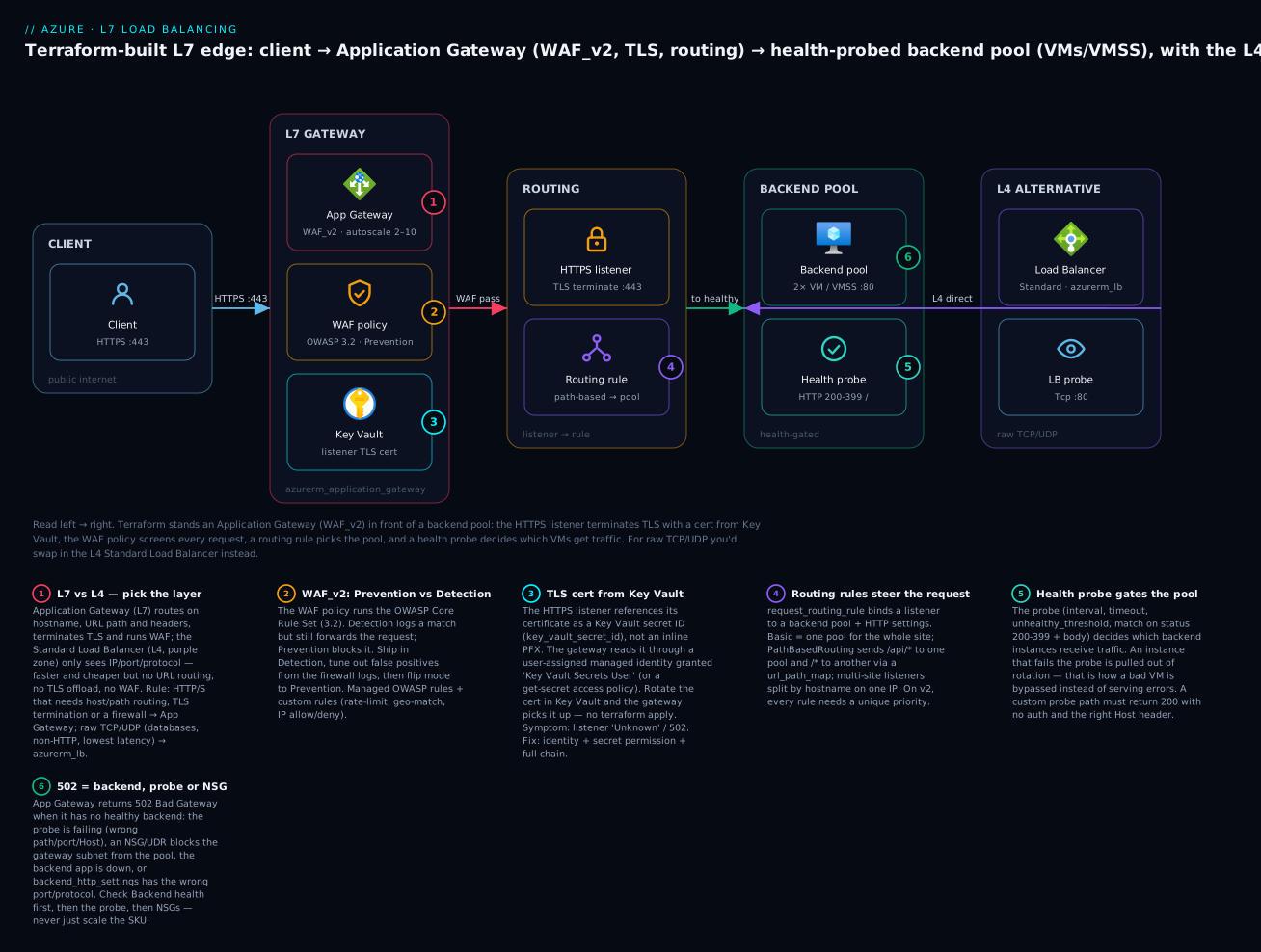
Reading that diagram left to right is reading the request path you are about to build: the client hits the gateway’s public IP on 443, the HTTPS listener terminates TLS with the Key Vault cert, the WAF policy screens the request, the routing rule selects the backend pool, and the health probe guarantees the chosen VM is alive before the gateway forwards. The purple L4 zone is the Load Balancer alternative — same backend pool, but reached on raw TCP with no TLS and no firewall.
Here is the full inventory of what a single terraform apply will create, and roughly what each part costs if you leave it running (India South, pay-as-you-go, indicative July 2026):
| Resource (Terraform) | Azure object | Role in the build | Rough cost if left up |
|---|---|---|---|
azurerm_resource_group |
Resource group | Container + lifecycle boundary | Free |
azurerm_virtual_network + 2×azurerm_subnet |
VNet, appgw subnet, backend subnet | Isolation; AppGw needs its own subnet | Free |
azurerm_public_ip (Standard, Static) |
Public IP | Gateway frontend | ~₹300/mo (~$3.60) |
azurerm_network_security_group (+ rules) |
NSG on backend subnet | Allow gateway → backend :80 | Free |
azurerm_linux_virtual_machine ×2 |
2× Standard_B1s VM + nginx |
The backend pool | ~₹1,400/mo each |
azurerm_user_assigned_identity |
Managed identity | Gateway reads Key Vault cert | Free |
azurerm_key_vault + cert |
Key Vault + self-signed cert | Listener TLS certificate | ~₹0 + tiny op cost |
azurerm_web_application_firewall_policy |
WAF policy | OWASP rules, Prevention mode | Included in WAF_v2 |
azurerm_application_gateway (WAF_v2) |
Application Gateway | The L7 edge | ~₹18,000/mo + capacity units |
That Application Gateway is the expensive line item — a WAF_v2 has a fixed hourly charge plus per–capacity-unit billing, so this is emphatically a build it, verify it, destroy it lesson, not one to leave running overnight. Every costly or destructive step below is marked ⚠️.
Where this fits: the backend pool here is deliberately thin so the lesson stays about load balancing. The compute side — cloud-init, VM sizing, and turning two VMs into a scale set — is the subject of the Azure VMs, VMSS & cloud-init lesson. If your backend is a PaaS web app rather than VMs, the App Service, Web Apps & slots lesson is the backend you would point this gateway at. And the Key Vault the listener reads its certificate from is built properly in the Key Vault, SQL Database & DNS lesson; here we create a minimal one inline.
L4 vs L7: choosing the right Azure load balancer
The single decision that governs this whole tier is which layer of the network stack you balance at. Azure Load Balancer operates at layer 4 — it forwards TCP and UDP flows by a hash of the 5-tuple (source IP, source port, destination IP, destination port, protocol) and never inspects the payload. It does not know or care whether the bytes are HTTP, TLS, Redis or a game protocol. Application Gateway operates at layer 7 — it is a full reverse proxy that terminates the TCP connection, reads the HTTP request line and headers, can decrypt TLS, and makes routing decisions on hostname, path and headers. That difference cascades into everything each one can and cannot do:
| Capability | Azure Load Balancer (L4) | Application Gateway (L7) |
|---|---|---|
| OSI layer | 4 (TCP/UDP) | 7 (HTTP/HTTPS) |
| Reads URL / host / headers | No | Yes |
| TLS termination / offload | No (passes bytes through) | Yes (listener certificate) |
| Path-based / multi-site routing | No | Yes |
| Web Application Firewall (WAF) | No | Yes (WAF_v2 tier) |
| Cookie-based session affinity | No (5-tuple/2-tuple hash only) | Yes (cookie_based_affinity) |
| Protocols | Any TCP/UDP | HTTP, HTTPS, HTTP/2, WebSocket |
| Health probe types | TCP, HTTP, HTTPS | HTTP, HTTPS (with body/status match) |
| Latency overhead | Lowest (pass-through) | Higher (proxy + inspect) |
| Rewrite headers / redirect | No | Yes (rewrite rules, redirects) |
| Typical price floor | Low (per-rule, cheap) | High (fixed hourly + capacity) |
| Terraform resource | azurerm_lb |
azurerm_application_gateway |
The rule of thumb writes itself: if the traffic is HTTP/S and you need to route on URL, terminate TLS, or run a firewall, use Application Gateway. If it is raw TCP/UDP, or you want the lowest latency and cheapest bill and don’t need to read the request, use Load Balancer. A great many designs use both: an Application Gateway for the public web tier, and internal Standard Load Balancers deep inside the VNet fronting database or cache pools.
Azure actually ships four services in this space, and choosing among them is the framing decision. The table below is the one to keep open:
| Service | Layer | Scope | Best for | WAF? | Terraform resource |
|---|---|---|---|---|---|
| Azure Load Balancer | L4 (TCP/UDP) | Regional | Raw TCP/UDP, internal tiers, lowest latency | No | azurerm_lb |
| Application Gateway | L7 (HTTP) | Regional | Web apps needing path routing, TLS, WAF, in one VNet | Yes (WAF_v2) | azurerm_application_gateway |
| Azure Front Door | L7 (HTTP) | Global | Global HTTP entry, CDN, edge WAF, multi-region failover | Yes (Premium) | azurerm_cdn_frontdoor_* |
| Traffic Manager | DNS | Global | DNS-level routing across regions/endpoints | No | azurerm_traffic_manager_profile |
Two orthogonal axes separate them. First, L4 vs L7: Load Balancer is L4; the other three make L7/DNS decisions. Second, regional vs global: Load Balancer and Application Gateway are regional — they live in one region’s VNet and give you a regional endpoint; Front Door and Traffic Manager are global — they sit at Azure’s edge and route across regions. And public vs internal cuts across both: a Load Balancer or Application Gateway can have a public frontend IP (internet-facing) or a private one (internal-only, for VNet-internal traffic), set purely by whether the frontend configuration references a public IP or a subnet + private IP.
Azure Front Door, in one paragraph, is the global alternative to Application Gateway. Where Application Gateway is a regional L7 proxy you place inside a VNet, Front Door is a global L7 service that lives at Azure’s ~200 edge POPs: it gives you anycast entry, TLS termination and caching at the edge nearest the user, a global WAF (Premium tier), and health-probe-based failover across regions. You reach for Front Door when users are global and you run more than one region and want the edge to absorb TLS and cache static assets; you reach for Application Gateway when the workload is one region and you want fine-grained routing and WAF inside your own VNet. They compose: a common enterprise pattern is Front Door (global edge + WAF) → Application Gateway (regional WAF + routing) → backend, and if you build that, you set Application Gateway’s listener to only accept traffic from Front Door. In Terraform, Front Door Standard/Premium is the azurerm_cdn_frontdoor_profile, _endpoint, _origin_group, _origin, _route and _firewall_policy family — a separate lesson’s worth of resources.
Azure Load Balancer (L4) with Terraform
Start with the L4 box, because it is simpler and it teaches the vocabulary — frontend, backend pool, probe, rule — that Application Gateway reuses at L7. The azurerm_lb resource is almost empty on its own; a working Load Balancer is five resources wired by ID.
First, the load balancer and its frontend. Always choose the Standard SKU for anything new — the Basic SKU is on a retirement path (retiring September 2025), has no SLA, no zone-redundancy, and a security model that is open by default rather than closed. Standard is secure-by-default (traffic is denied unless an NSG allows it) and zone-redundant.
resource "azurerm_public_ip" "lb" {
  name                = "pip-lb-web"
  resource_group_name = azurerm_resource_group.this.name
  location            = azurerm_resource_group.this.location
  allocation_method   = "Static"   # Standard SKU requires Static
  sku                 = "Standard"  # must match the LB SKU
  zones               = ["1", "2", "3"]
}

resource "azurerm_lb" "web" {
  name                = "lb-web"
  resource_group_name = azurerm_resource_group.this.name
  location            = azurerm_resource_group.this.location
  sku                 = "Standard"

  frontend_ip_configuration {
    name                 = "public-fe"
    public_ip_address_id = azurerm_public_ip.lb.id
  }
}
For an internal load balancer you drop the public IP and give the frontend a subnet and a private IP instead — one attribute flips public to internal:
  frontend_ip_configuration {
    name                          = "internal-fe"
    subnet_id                     = azurerm_subnet.app.id
    private_ip_address            = "10.10.1.10"
    private_ip_address_allocation = "Static"   # or "Dynamic"
  }
The azurerm_lb frontend arguments in full:
| Argument | Purpose | Public LB | Internal LB |
|---|---|---|---|
name |
Frontend config name (referenced by rules) | required | required |
public_ip_address_id |
The public IP to own | set this | omit |
subnet_id |
Subnet the private frontend lives in | omit | set this |
private_ip_address |
Fixed private IP | n/a | optional (Static) |
private_ip_address_allocation |
Static or Dynamic |
n/a | with subnet_id |
zones |
Zone-redundancy for the frontend | optional | optional |
gateway_load_balancer_frontend_ip_configuration_id |
Chain to a Gateway LB | optional | optional |
Next the backend pool — an empty container you attach compute to:
resource "azurerm_lb_backend_address_pool" "web" {
  name            = "bepool-web"
  loadbalancer_id = azurerm_lb.web.id
}
There are three ways to put instances into that pool, and picking the right one avoids a lot of pain:
| Method | Terraform resource / block | Use when |
|---|---|---|
| NIC association | azurerm_network_interface_backend_address_pool_association |
A handful of individually-managed VMs |
| IP-based membership | azurerm_lb_backend_address_pool_address |
Backends by raw IP (incl. across peered VNets) |
| VMSS attachment | load_balancer_backend_address_pool_ids in the scale set’s network_interface.ip_configuration |
Production — the scale set self-registers instances |
For a scale set, the VMSS registers its own instances into the pool — you never manage individual members. That is the production pattern and it is one line inside the scale set’s network profile:
resource "azurerm_linux_virtual_machine_scale_set" "web" {
  # ... sku, instances, os, admin, image, custom_data ...
  network_interface {
    name    = "nic"
    primary = true
    ip_configuration {
      name      = "ipcfg"
      primary   = true
      subnet_id = azurerm_subnet.app.id
      # This one line wires every instance into the LB pool:
      load_balancer_backend_address_pool_ids = [azurerm_lb_backend_address_pool.web.id]
    }
  }
}
Now the health probe. The probe is the entire reason a load balancer is useful: it is the mechanism by which a dead instance stops receiving traffic. The Load Balancer keeps polling each backend, and only instances currently passing the probe are eligible targets.
resource "azurerm_lb_probe" "web" {
  name                = "probe-http"
  loadbalancer_id     = azurerm_lb.web.id
  protocol            = "Http"   # Tcp | Http | Https
  port                = 80
  request_path        = "/health"  # required for Http/Https
  interval_in_seconds = 5
  number_of_probes    = 2          # consecutive failures before "down"
  probe_threshold     = 1          # consecutive successes to mark "up"
}
Then the load-balancing rule ties frontend, pool and probe together and defines the port mapping. This is where you also control SNAT and floating IP:
resource "azurerm_lb_rule" "web" {
  name                           = "rule-http"
  loadbalancer_id                = azurerm_lb.web.id
  protocol                       = "Tcp"
  frontend_port                  = 80
  backend_port                   = 80
  frontend_ip_configuration_name = "public-fe"
  backend_address_pool_ids       = [azurerm_lb_backend_address_pool.web.id]
  probe_id                       = azurerm_lb_probe.web.id
  idle_timeout_in_minutes        = 4
  load_distribution              = "Default"  # 5-tuple hash
  disable_outbound_snat          = true        # use an explicit outbound rule instead
  enable_tcp_reset               = true
}
The load-balancing rule arguments that matter:
| Argument | Meaning | Notes |
|---|---|---|
protocol |
Tcp, Udp, or All |
All (HA Ports) needs an internal Standard LB |
frontend_port / backend_port |
External → internal port map | Same or different |
probe_id |
Which probe gates this rule | Without it, no health gating |
load_distribution |
Default (5-tuple), SourceIP (2-tuple), SourceIPProtocol (3-tuple) |
Session persistence at L4 |
enable_floating_ip |
Direct Server Return (SQL AlwaysOn, etc.) | Backend must own the frontend IP |
disable_outbound_snat |
Turn off implicit SNAT on this rule | Pair with an explicit outbound rule |
idle_timeout_in_minutes |
4–30 min flow idle timeout | Raise for long-lived connections |
enable_tcp_reset |
Send RST on idle timeout | Cleaner client behaviour |
Two rule types round out a real Load Balancer. Outbound rules give your backends deterministic SNAT for egress — without one, Standard LB gives no outbound internet access at all (secure by default), and relying on implicit SNAT is how you hit SNAT port exhaustion under load:
resource "azurerm_lb_outbound_rule" "web" {
  name                    = "outbound-all"
  loadbalancer_id         = azurerm_lb.web.id
  protocol                = "All"
  backend_address_pool_id = azurerm_lb_backend_address_pool.web.id
  allocated_outbound_ports = 10000  # ports per instance — size for concurrency
  idle_timeout_in_minutes  = 4
  enable_tcp_reset         = true
  frontend_ip_configuration {
    name = "public-fe"
  }
}
And inbound NAT rules forward a specific frontend port to a specific backend instance — the classic “SSH to node 2 on port 50002” jump-host pattern, without giving each VM its own public IP:
resource "azurerm_lb_nat_rule" "ssh" {
  name                           = "ssh-vm0"
  resource_group_name            = azurerm_resource_group.this.name
  loadbalancer_id                = azurerm_lb.web.id
  protocol                       = "Tcp"
  frontend_port                  = 50000
  backend_port                   = 22
  frontend_ip_configuration_name = "public-fe"
}
The three rule families compared, because mixing them up is a common mistake:
| Rule type | Resource | Direction | What it does |
|---|---|---|---|
| Load-balancing | azurerm_lb_rule |
Inbound | Spread a port across the whole pool |
| Inbound NAT | azurerm_lb_nat_rule |
Inbound | Forward a port to one instance |
| Outbound | azurerm_lb_outbound_rule |
Outbound | Deterministic SNAT for egress |
Application Gateway (L7) with Terraform
Application Gateway is a single Terraform resource — azurerm_application_gateway — but it is a large one: it collapses a dozen sub-objects into repeatable inner blocks, and every block references another by name (not by Terraform ID). That name-based wiring is the thing to internalise: the routing rule names a listener and a backend pool and an HTTP settings block; the listener names a frontend IP config, a frontend port, and an SSL certificate; the HTTP settings block names a probe. Get one name wrong and apply fails with a validation error pointing at the dangling reference.
Here is every block, what it models, and how it connects:
| Block | Models | Key arguments | References |
|---|---|---|---|
sku |
Tier + capacity | name, tier, capacity |
— |
autoscale_configuration |
Elastic capacity (v2) | min_capacity, max_capacity |
replaces capacity |
gateway_ip_configuration |
Which subnet the GW lives in | name, subnet_id |
the dedicated subnet |
frontend_ip_configuration |
Public/private entry IP | name, public_ip_address_id |
a public IP |
frontend_port |
Ports it listens on | name, port |
— |
http_listener |
An entry point (proto+port+host) | name, protocol, ssl_certificate_name, host_name |
frontend IP + port + cert |
ssl_certificate |
TLS cert for HTTPS listeners | name, key_vault_secret_id |
Key Vault |
backend_address_pool |
Where to send traffic | name, ip_addresses / fqdns |
— |
backend_http_settings |
How to talk to the backend | name, port, protocol, probe_name |
a probe |
probe |
Backend health check | name, path, interval, match |
— |
request_routing_rule |
Ties it all together | name, rule_type, priority |
listener + pool + settings |
url_path_map |
Path-based routing table | path_rule { paths, ... } |
pools + settings |
identity |
Managed identity for Key Vault | type, identity_ids |
a user-assigned identity |
waf_configuration / firewall_policy_id |
Web Application Firewall | mode, rule set / policy ID | a WAF policy |
SKU tiers. Application Gateway has a legacy v1 generation (Standard, WAF) and a current v2 generation (Standard_v2, WAF_v2). Always build v2 for anything new — v1 is deprecated and cannot autoscale, is not zone-redundant, and is much slower to provision. WAF_v2 is Standard_v2 plus the Web Application Firewall:
| SKU | Generation | WAF | Autoscale | Zone-redundant | Use for |
|---|---|---|---|---|---|
Standard |
v1 (legacy) | No | No | No | Do not use (deprecated) |
WAF |
v1 (legacy) | Yes | No | No | Do not use (deprecated) |
Standard_v2 |
v2 | No | Yes | Yes | L7 routing/TLS, no firewall |
WAF_v2 |
v2 | Yes | Yes | Yes | Public web apps needing a firewall |
The skeleton of the resource, block by block. Note zones, and autoscale_configuration instead of a fixed capacity:
resource "azurerm_application_gateway" "web" {
  name                = "agw-web"
  resource_group_name = azurerm_resource_group.this.name
  location            = azurerm_resource_group.this.location
  zones               = ["1", "2", "3"]
  firewall_policy_id  = azurerm_web_application_firewall_policy.web.id

  sku {
    name = "WAF_v2"
    tier = "WAF_v2"
  }

  autoscale_configuration {
    min_capacity = 2
    max_capacity = 10
  }

  identity {
    type         = "UserAssigned"
    identity_ids = [azurerm_user_assigned_identity.agw.id]
  }

  gateway_ip_configuration {
    name      = "gw-ipcfg"
    subnet_id = azurerm_subnet.appgw.id   # dedicated subnet, nothing else in it
  }

  frontend_ip_configuration {
    name                 = "public-fe"
    public_ip_address_id = azurerm_public_ip.agw.id
  }

  frontend_port {
    name = "https"
    port = 443
  }
}
Listeners. A listener is an entry point defined by a frontend IP config, a frontend port, a protocol and (for HTTPS) a certificate. There are two flavours: a Basic listener answers everything hitting that IP+port, while a multi-site listener is scoped to one or more hostnames, letting many sites share one public IP and port. Multi-site is how you host app.example.com and api.example.com on the same gateway.
| Listener type | Scoped by | Requires | Use for |
|---|---|---|---|
| Basic | frontend IP + port only | — | Single site behind the gateway |
| Multi-site | + host_name / host_names |
SNI on HTTPS | Many hostnames, one IP/port |
  http_listener {
    name                           = "https-listener"
    frontend_ip_configuration_name = "public-fe"
    frontend_port_name             = "https"
    protocol                       = "Https"
    ssl_certificate_name           = "listener-cert"
    host_name                      = "app.kloudvin.dev"  # omit for a Basic listener
    require_sni                    = true                 # multi-site HTTPS
  }
TLS termination from Key Vault. The right way to give a listener its certificate is not to embed a PFX in Terraform — that puts a secret in state. Instead, store the certificate in Key Vault and reference it by secret ID; the gateway reads it at runtime through its managed identity. The ssl_certificate block then holds only a pointer:
  ssl_certificate {
    name                = "listener-cert"
    key_vault_secret_id = azurerm_key_vault_certificate.listener.secret_id
  }
Two cert sources, and why Key Vault wins:
| Source | HCL | Secret in state? | Rotation | Use when |
|---|---|---|---|---|
| Inline PFX | data (base64) + password |
Yes (avoid) | Re-apply Terraform | Quick demo only |
| Key Vault | key_vault_secret_id + identity |
No | Rotate in KV, no apply | Production |
For the managed identity to actually read the cert, it needs a Key Vault permission — Key Vault Secrets User under RBAC, or a certificates/secrets get access policy under the legacy model. Missing that permission is a top-three cause of a listener stuck in Unknown state and a 502.
Backend pool and HTTP settings. The pool is the set of targets (by IP or FQDN); the HTTP settings block is how the gateway talks to them — port, protocol, timeout, affinity, host header handling, and which probe to use:
  backend_address_pool {
    name         = "vm-pool"
    ip_addresses = [for vm in azurerm_linux_virtual_machine.web : vm.private_ip_address]
  }

  backend_http_settings {
    name                                = "http-settings"
    cookie_based_affinity               = "Disabled"
    port                                = 80
    protocol                            = "Http"
    request_timeout                     = 30
    pick_host_name_from_backend_address = false
    probe_name                          = "backend-probe"
  }
The backend_http_settings arguments that cause the most 502s when wrong:
| Argument | Purpose | Common 502 trap |
|---|---|---|
port / protocol |
How to reach the backend | Backend on 8080 but settings say 80 |
probe_name |
Custom probe for this settings block | Probe path 404s → all instances “unhealthy” |
pick_host_name_from_backend_address |
Send backend’s own FQDN as Host | App expects a specific Host header |
host_name |
Override the Host header sent to backend | SNI/host mismatch on HTTPS backends |
trusted_root_certificate_names |
Trust a backend’s cert (end-to-end TLS) | Self-signed backend cert not trusted |
request_timeout |
Seconds before the GW gives up | Slow backend → 502 after timeout |
cookie_based_affinity |
Sticky sessions via a cookie | — |
The health probe is, again, the resource that makes the whole thing safe. An Application Gateway probe is richer than an L4 probe: it sends an actual HTTP request to a path and can match on both status code ranges and response body text, so “the process is up but returning a 500 error page” correctly reads as unhealthy. Here is one comprehensive comparison of the two probe types — the health-probe table to keep:
| Setting | azurerm_lb_probe (L4) |
Application Gateway probe (L7) |
What it controls |
|---|---|---|---|
| Protocol | Tcp / Http / Https |
Http / Https |
Layer of the check |
| Path | request_path (Http/s) |
path |
The URL probed |
| Interval | interval_in_seconds (5–?) |
interval (seconds) |
How often to probe |
| Timeout | (derived) | timeout (seconds) |
Wait before a probe fails |
| Failure threshold | number_of_probes |
unhealthy_threshold |
Consecutive fails → “down” |
| Host header | n/a | host / pick_host_name_from_backend_http_settings |
Host sent with the probe |
| Status match | 200 only | match { status_code = [...] } |
Which codes count as healthy |
| Body match | No | match { body = "..." } |
Substring that must appear |
| Port override | via rule | port |
Probe a different port |
  probe {
    name                                      = "backend-probe"
    protocol                                  = "Http"
    path                                      = "/"
    interval                                  = 15
    timeout                                   = 15
    unhealthy_threshold                       = 3
    pick_host_name_from_backend_http_settings = true
    match {
      status_code = ["200-399"]
    }
  }
Routing rules and path-based routing. The request_routing_rule is the block that ties a listener to a backend. A Basic rule sends everything from its listener to one pool + settings. A PathBasedRouting rule delegates to a url_path_map, which sends /api/* to one pool and everything else (default_*) to another. On v2, every rule must carry a unique priority (1–20000; lower wins).
| Rule type | Sends to | Extra block | Use for |
|---|---|---|---|
Basic |
one pool + settings | — | Single-backend site |
PathBasedRouting |
pool chosen by URL path | url_path_map |
/api/* vs /* split |
  request_routing_rule {
    name                       = "route-all"
    priority                   = 100                # unique, required on v2
    rule_type                  = "Basic"
    http_listener_name         = "https-listener"
    backend_address_pool_name  = "vm-pool"
    backend_http_settings_name = "http-settings"
  }
Path-based routing splits by URL, delegating to a url_path_map:
  request_routing_rule {
    name               = "route-paths"
    priority           = 110
    rule_type          = "PathBasedRouting"
    http_listener_name = "https-listener"
    url_path_map_name  = "paths"
  }

  url_path_map {
    name                               = "paths"
    default_backend_address_pool_name  = "vm-pool"       # everything else → web pool
    default_backend_http_settings_name = "http-settings"
    path_rule {
      name                       = "api"
      paths                      = ["/api/*"]
      backend_address_pool_name  = "api-pool"            # /api/* → api pool
      backend_http_settings_name = "http-settings"
    }
  }
Autoscaling was already shown via autoscale_configuration — set a min_capacity you never want to drop below (2 for HA) and a max_capacity ceiling; the gateway sizes itself by compute-unit demand between them, and you are billed per capacity unit consumed. A fixed capacity (v2 without autoscale) is possible but rarely what you want.
WAF: OWASP rules, Prevention vs Detection
The WAF is what makes it a WAF_v2 and not just a Standard_v2. It inspects each HTTP request against the OWASP Core Rule Set — a large, managed body of signatures for SQL injection, cross-site scripting, remote-file-inclusion, protocol anomalies and the rest of the OWASP Top 10 — plus any custom rules you add. The most important operational lever is the mode, and getting it wrong in either direction hurts:
| Mode | What it does on a match | Risk | Use when |
|---|---|---|---|
| Detection | Logs the match, forwards the request | False sense of security — nothing is blocked | Onboarding: watch logs, tune false positives |
| Prevention | Blocks the request (403), logs it | False positives block real users | Steady state, after tuning |
The discipline every team learns the hard way: ship in Detection, live there long enough to see real traffic, tune out the false positives (a WAF will happily block a legitimate request whose body looks like SQL), then flip to Prevention. Flipping to Prevention on day one blocks real users; staying in Detection forever means the firewall does nothing.
There are two ways to attach a WAF, and the modern one is a separate policy resource rather than the inline waf_configuration block. The inline block still works on WAF_v2 but is effectively legacy; the standalone azurerm_web_application_firewall_policy is more capable (per-listener and per-path association, richer custom rules) and is what to use:
| Approach | HCL | Capabilities | Recommendation |
|---|---|---|---|
Inline waf_configuration {} |
block inside the gateway | Gateway-wide mode + OWASP | Legacy; avoid for new builds |
| WAF policy resource | azurerm_web_application_firewall_policy + firewall_policy_id |
+ custom rules, exclusions, per-path/per-listener attach | Use this |
The policy carries three things: policy_settings (mode, request-body checks, size limits), managed_rules (the OWASP rule set version, with per-rule overrides and exclusions), and custom_rules (your own match or rate-limit rules, evaluated by priority before the managed set):
resource "azurerm_web_application_firewall_policy" "web" {
  name                = "wafpol-web"
  resource_group_name = azurerm_resource_group.this.name
  location            = azurerm_resource_group.this.location

  policy_settings {
    enabled                     = true
    mode                        = "Prevention"   # start "Detection", flip after tuning
    request_body_check          = true
    max_request_body_size_in_kb = 128
    file_upload_limit_in_mb     = 100
  }

  managed_rules {
    managed_rule_set {
      type    = "OWASP"
      version = "3.2"
    }
  }

  custom_rules {
    name      = "rate-limit-login"
    priority  = 10
    rule_type = "RateLimitRule"
    action    = "Block"
    rate_limit_duration  = "OneMin"
    rate_limit_threshold = 100
    match_conditions {
      match_variables {
        variable_name = "RequestUri"
      }
      operator           = "Contains"
      negation_condition = false
      match_values       = ["/login"]
    }
  }
}
Managed rules versus custom rules — you almost always want both:
| Rule kind | Source | Examples | Actions |
|---|---|---|---|
| Managed (OWASP) | Microsoft-maintained CRS 3.2 | SQLi, XSS, RFI, protocol violations | Detection/Prevention, per-rule disable/override |
| Custom | You, by priority | Rate-limit /login, geo-block, IP allow/deny |
Allow, Block, Log |
Hands-on: build it with Terraform
⚠️ This provisions real, billable Azure resources — most notably a WAF_v2 Application Gateway (fixed hourly charge + capacity units) and two VMs. Follow it end to end, verify, then run the destroy step. Do not leave it up.
We now assemble everything above into one working project: an Application Gateway (WAF_v2) with an HTTPS listener whose cert comes from Key Vault, a routing rule, a health probe, and an OWASP WAF policy, load-balancing across two nginx VMs. Lay out the files:
mkdir -p agw-demo && cd agw-demo
touch versions.tf provider.tf variables.tf main.tf network.tf \
      backend.tf gateway.tf outputs.tf
1. Pin Terraform and the provider (versions.tf). Pin azurerm with ~> so a plan in CI never silently changes behaviour, and use a remote backend — for Azure that is a Storage Account blob, which locks state with a blob lease:
# versions.tf
terraform {
  required_version = ">= 1.6.0"

  required_providers {
    azurerm = {
      source  = "hashicorp/azurerm"
      version = "~> 4.0"
    }
    tls    = { source = "hashicorp/tls",    version = "~> 4.0" }
    random = { source = "hashicorp/random", version = "~> 3.6" }
  }

  # Remote state (Azure = Storage Account blob + lease lock).
  backend "azurerm" {
    resource_group_name  = "rg-tfstate"
    storage_account_name = "kvtfstate2026"
    container_name       = "tfstate"
    key                  = "agw-demo.tfstate"
  }
}
2. Configure the provider (provider.tf). features {} is mandatory. Authenticate ahead of time with az login (interactive) or a service principal / OIDC in CI — never put credentials in HCL:
# provider.tf
provider "azurerm" {
  features {}
  # Subscription comes from `az login` or ARM_SUBSCRIPTION_ID.
}

data "azurerm_client_config" "current" {}
3. Variables (variables.tf). Parameterise region, sizes, admin user and the backend count so the same code stamps any environment:
# variables.tf
variable "prefix" {
  type    = string
  default = "kv-agw"
}
variable "location" {
  type    = string
  default = "centralindia"
}
variable "vm_count" {
  type    = number
  default = 2
}
variable "vm_size" {
  type    = string
  default = "Standard_B1s"
}
variable "admin_username" {
  type    = string
  default = "azureadmin"
}

variable "admin_ssh_public_key" {
  type        = string
  description = "SSH public key for the backend VMs (ssh-keygen -t ed25519)."
}
4. Resource group + network (main.tf, network.tf). The gateway needs its own subnet; the VMs go in a second subnet. The NSG on the backend subnet must allow the gateway subnet to reach port 80, and the gateway subnet needs the v2 management ports (65200–65535) open inbound or the gateway will not provision:
# main.tf
resource "azurerm_resource_group" "this" {
  name     = "${var.prefix}-rg"
  location = var.location
  tags     = { project = "tf-course", lesson = "lb-appgw", owner = "vinod" }
}
# network.tf
resource "azurerm_virtual_network" "this" {
  name                = "${var.prefix}-vnet"
  resource_group_name = azurerm_resource_group.this.name
  location            = azurerm_resource_group.this.location
  address_space       = ["10.20.0.0/16"]
}

resource "azurerm_subnet" "appgw" {
  name                 = "snet-appgw"          # dedicated to the gateway
  resource_group_name  = azurerm_resource_group.this.name
  virtual_network_name = azurerm_virtual_network.this.name
  address_prefixes     = ["10.20.1.0/24"]
}

resource "azurerm_subnet" "backend" {
  name                 = "snet-backend"
  resource_group_name  = azurerm_resource_group.this.name
  virtual_network_name = azurerm_virtual_network.this.name
  address_prefixes     = ["10.20.2.0/24"]
}

# NSG on the backend subnet: allow the gateway subnet in on :80, deny the rest.
resource "azurerm_network_security_group" "backend" {
  name                = "${var.prefix}-backend-nsg"
  resource_group_name = azurerm_resource_group.this.name
  location            = azurerm_resource_group.this.location

  security_rule {
    name                       = "allow-appgw-http"
    priority                   = 100
    direction                  = "Inbound"
    access                     = "Allow"
    protocol                   = "Tcp"
    source_port_range          = "*"
    destination_port_range     = "80"
    source_address_prefix      = "10.20.1.0/24"   # the gateway subnet
    destination_address_prefix = "*"
  }
}

resource "azurerm_subnet_network_security_group_association" "backend" {
  subnet_id                 = azurerm_subnet.backend.id
  network_security_group_id = azurerm_network_security_group.backend.id
}

resource "azurerm_public_ip" "agw" {
  name                = "${var.prefix}-pip"
  resource_group_name = azurerm_resource_group.this.name
  location            = azurerm_resource_group.this.location
  allocation_method   = "Static"    # v2 requires Static + Standard
  sku                 = "Standard"
}
5. The backend pool: two nginx VMs (backend.tf). Each VM gets a NIC in the backend subnet and a cloud-init that installs nginx and writes a page naming the host, so we can see load balancing when we curl. Using count gives us a list we can fold straight into the gateway’s pool:
# backend.tf
locals {
  cloud_init = base64encode(<<-CLOUDINIT
    #cloud-config
    package_update: true
    packages: [nginx]
    runcmd:
      - echo "Hello from $(hostname) — backend behind Application Gateway" > /var/www/html/index.html
      - systemctl enable nginx
      - systemctl restart nginx
  CLOUDINIT
  )
}

resource "azurerm_network_interface" "vm" {
  count               = var.vm_count
  name                = "${var.prefix}-nic-${count.index}"
  resource_group_name = azurerm_resource_group.this.name
  location            = azurerm_resource_group.this.location
  ip_configuration {
    name                          = "ipcfg"
    subnet_id                     = azurerm_subnet.backend.id
    private_ip_address_allocation = "Dynamic"
  }
}

resource "azurerm_linux_virtual_machine" "web" {
  count                 = var.vm_count
  name                  = "${var.prefix}-vm-${count.index}"
  resource_group_name   = azurerm_resource_group.this.name
  location              = azurerm_resource_group.this.location
  size                  = var.vm_size
  admin_username        = var.admin_username
  network_interface_ids = [azurerm_network_interface.vm[count.index].id]
  custom_data           = local.cloud_init

  admin_ssh_key {
    username   = var.admin_username
    public_key = var.admin_ssh_public_key
  }

  os_disk {
    caching              = "ReadWrite"
    storage_account_type = "Standard_LRS"
  }

  source_image_reference {
    publisher = "Canonical"
    offer     = "ubuntu-24_04-lts"
    sku       = "server"
    version   = "latest"
  }
}
Production note: replace the two
countVMs with anazurerm_linux_virtual_machine_scale_setwhosenetwork_interface.ip_configurationsetsapplication_gateway_backend_address_pool_ids = [<pool id>]. The scale set then self-registers every instance into the gateway pool — you stop managing the pool membership by hand. The VMs & VMSS lesson builds that scale set in full.
6. Identity, Key Vault cert, WAF policy, and the gateway (gateway.tf). A user-assigned identity gets Key Vault Secrets User on a Key Vault holding a self-signed certificate; the gateway’s HTTPS listener reads that cert by secret ID:
# gateway.tf
resource "azurerm_user_assigned_identity" "agw" {
  name                = "${var.prefix}-id"
  resource_group_name = azurerm_resource_group.this.name
  location            = azurerm_resource_group.this.location
}

resource "azurerm_key_vault" "this" {
  name                     = "${var.prefix}-kv-${substr(md5(azurerm_resource_group.this.id), 0, 6)}"
  resource_group_name      = azurerm_resource_group.this.name
  location                 = azurerm_resource_group.this.location
  tenant_id                = data.azurerm_client_config.current.tenant_id
  sku_name                 = "standard"
  enable_rbac_authorization = true
}

# The person running Terraform needs to create the cert:
resource "azurerm_role_assignment" "kv_admin" {
  scope                = azurerm_key_vault.this.id
  role_definition_name = "Key Vault Administrator"
  principal_id         = data.azurerm_client_config.current.object_id
}

# The gateway's identity needs to READ the cert secret:
resource "azurerm_role_assignment" "kv_reader" {
  scope                = azurerm_key_vault.this.id
  role_definition_name = "Key Vault Secrets User"
  principal_id         = azurerm_user_assigned_identity.agw.principal_id
}

resource "azurerm_key_vault_certificate" "listener" {
  name         = "listener-cert"
  key_vault_id = azurerm_key_vault.this.id
  depends_on   = [azurerm_role_assignment.kv_admin]

  certificate_policy {
    issuer_parameters { name = "Self" }
    key_properties {
      exportable = true
      key_type   = "RSA"
      key_size   = 2048
      reuse_key  = true
    }
    secret_properties { content_type = "application/x-pkcs12" }
    x509_certificate_properties {
      subject            = "CN=app.kloudvin.dev"
      validity_in_months = 12
      key_usage          = ["digitalSignature", "keyEncipherment"]
    }
  }
}

resource "azurerm_web_application_firewall_policy" "web" {
  name                = "${var.prefix}-wafpol"
  resource_group_name = azurerm_resource_group.this.name
  location            = azurerm_resource_group.this.location

  policy_settings {
    enabled = true
    mode    = "Prevention"   # start with "Detection" in real onboarding
  }
  managed_rules {
    managed_rule_set {
      type    = "OWASP"
      version = "3.2"
    }
  }
}
Then the gateway itself, folding in the two VMs’ private IPs:
resource "azurerm_application_gateway" "web" {
  name                = "${var.prefix}-agw"
  resource_group_name = azurerm_resource_group.this.name
  location            = azurerm_resource_group.this.location
  zones               = ["1", "2", "3"]
  firewall_policy_id  = azurerm_web_application_firewall_policy.web.id

  sku {
    name = "WAF_v2"
    tier = "WAF_v2"
  }
  autoscale_configuration {
    min_capacity = 2
    max_capacity = 10
  }
  identity {
    type         = "UserAssigned"
    identity_ids = [azurerm_user_assigned_identity.agw.id]
  }

  gateway_ip_configuration {
    name      = "gw-ipcfg"
    subnet_id = azurerm_subnet.appgw.id
  }
  frontend_ip_configuration {
    name                 = "public-fe"
    public_ip_address_id = azurerm_public_ip.agw.id
  }
  frontend_port {
    name = "https"
    port = 443
  }

  ssl_certificate {
    name                = "listener-cert"
    key_vault_secret_id = azurerm_key_vault_certificate.listener.secret_id
  }
  http_listener {
    name                           = "https-listener"
    frontend_ip_configuration_name = "public-fe"
    frontend_port_name             = "https"
    protocol                       = "Https"
    ssl_certificate_name           = "listener-cert"
  }

  backend_address_pool {
    name         = "vm-pool"
    ip_addresses = [for vm in azurerm_linux_virtual_machine.web : vm.private_ip_address]
  }
  probe {
    name                                      = "backend-probe"
    protocol                                  = "Http"
    path                                      = "/"
    interval                                  = 15
    timeout                                   = 15
    unhealthy_threshold                       = 3
    pick_host_name_from_backend_http_settings = true
    match { status_code = ["200-399"] }
  }
  backend_http_settings {
    name                                = "http-settings"
    cookie_based_affinity               = "Disabled"
    port                                = 80
    protocol                            = "Http"
    request_timeout                     = 30
    pick_host_name_from_backend_address = false
    probe_name                          = "backend-probe"
  }

  request_routing_rule {
    name                       = "route-all"
    priority                   = 100
    rule_type                  = "Basic"
    http_listener_name         = "https-listener"
    backend_address_pool_name  = "vm-pool"
    backend_http_settings_name = "http-settings"
  }

  depends_on = [azurerm_role_assignment.kv_reader]
}
7. Outputs (outputs.tf). Emit the public IP so you can curl it:
# outputs.tf
output "gateway_public_ip" {
  value = azurerm_public_ip.agw.ip_address
}
output "backend_private_ips" {
  value = [for vm in azurerm_linux_virtual_machine.web : vm.private_ip_address]
}
8. Init. Downloads providers and wires the backend:
terraform init
# Initializing the backend...
# Initializing provider plugins...
# - Installing hashicorp/azurerm v4.x ...
# Terraform has been successfully initialized!
9. Plan. Pass the SSH key and read the summary line — it must create the whole graph and change nothing unexpected:
export TF_VAR_admin_ssh_public_key="$(cat ~/.ssh/id_ed25519.pub)"
terraform plan
# ...
# Plan: 18 to add, 0 to change, 0 to destroy.
# Changes to Outputs:
#   + gateway_public_ip   = (known after apply)
10. Apply. ⚠️ Billing starts here. The gateway is the slow resource — a WAF_v2 typically takes 6–8 minutes to provision, so the whole apply runs ~10–12 minutes:
terraform apply -auto-approve
# azurerm_key_vault_certificate.listener: Creation complete after 20s
# azurerm_linux_virtual_machine.web[0]: Creation complete after 45s
# azurerm_application_gateway.web: Still creating... [6m0s elapsed]
# azurerm_application_gateway.web: Creation complete after 7m10s
# Apply complete! Resources: 18 added, 0 changed, 0 destroyed.
# Outputs:
# gateway_public_ip = "20.235.xx.xx"
11. Verify — curl the public IP and read backend health. Because the cert is self-signed, curl with -k. Repeat the curl a few times and watch the hostname change as the gateway spreads requests across both VMs:
IP=$(terraform output -raw gateway_public_ip)

curl -k https://$IP/
# Hello from kv-agw-vm-0 — backend behind Application Gateway
curl -k https://$IP/
# Hello from kv-agw-vm-1 — backend behind Application Gateway   # load balanced!

# Confirm both backends are Healthy from the gateway's own point of view:
az network application-gateway show-backend-health \
  --name kv-agw-agw --resource-group kv-agw-rg \
  --query "backendAddressPools[].backendHttpSettingsCollection[].servers[].health" -o tsv
# Healthy
# Healthy
Healthy from show-backend-health is the single most useful signal on this whole stack: it is the gateway telling you the probe is passing. If instead you see Unhealthy and a 502 in the browser, jump to troubleshooting — that command’s healthProbeLog will name the exact reason.
The verification checklist:
| Step | Command | Expect |
|---|---|---|
| Public IP resolved | terraform output -raw gateway_public_ip |
An IP like 20.x.x.x |
| Endpoint serves | curl -k https://$IP/ |
The nginx “Hello from…” page |
| Load balancing works | repeat curl | Hostname alternates vm-0 / vm-1 |
| Backends healthy | az network application-gateway show-backend-health … |
Healthy for each server |
| TLS from Key Vault | curl -kv https://$IP/ 2>&1 | grep subject |
CN=app.kloudvin.dev |
12. Destroy. ⚠️ Do this — the gateway bills by the hour.
terraform destroy -auto-approve
# ... azurerm_application_gateway.web: Destruction complete after 6m2s
# Destroy complete! Resources: 18 destroyed.
Confirm the resource group is gone (az group show -n kv-agw-rg should error ResourceGroupNotFound). If a Key Vault lingers due to soft-delete, purge it with az keyvault purge --name <name> so a re-apply doesn’t collide on the name.
Variables, outputs & making it reusable
The demo hard-codes one listener, one pool and one routing rule. Real gateways host several sites with several path rules, and copy-pasting blocks is how they rot. Two Terraform patterns turn this into a reusable module: for_each over a map of sites, and dynamic blocks to generate repeated inner blocks from a variable.
Model the sites as a variable and let dynamic blocks expand them:
variable "sites" {
  description = "Map of hostname => backend FQDNs to route to."
  type = map(object({
    hostname     = string
    backend_fqdns = list(string)
  }))
  default = {
    app = { hostname = "app.kloudvin.dev", backend_fqdns = ["app-vmss.internal"] }
    api = { hostname = "api.kloudvin.dev", backend_fqdns = ["api-vmss.internal"] }
  }
}

# Inside azurerm_application_gateway:
dynamic "backend_address_pool" {
  for_each = var.sites
  content {
    name  = "${backend_address_pool.key}-pool"
    fqdns = backend_address_pool.value.backend_fqdns
  }
}
dynamic "http_listener" {
  for_each = var.sites
  content {
    name                           = "${http_listener.key}-listener"
    frontend_ip_configuration_name = "public-fe"
    frontend_port_name             = "https"
    protocol                       = "Https"
    ssl_certificate_name           = "listener-cert"
    host_name                      = http_listener.value.hostname
    require_sni                    = true
  }
}
Adding a site is then a one-line map entry, not a block copy. The variables worth exposing on such a module:
| Variable | Type | Why expose it |
|---|---|---|
location / prefix |
string | Stamp per-environment |
sku_tier |
string | Standard_v2 vs WAF_v2 per env (skip WAF in dev) |
min_capacity / max_capacity |
number | Autoscale bounds per env |
waf_mode |
string | Detection in staging, Prevention in prod |
sites |
map(object) | The routing table, data-driven |
key_vault_secret_id |
string | Point at the env’s cert |
subnet_id |
string | Bring-your-own network |
Before you write your own module, know the registry equivalents — for a standard gateway the community modules are mature and worth reading even if you fork them:
| Need | Registry module | Roll your own when |
|---|---|---|
| Application Gateway | Azure/avm-res-network-applicationgateway/azurerm (Azure Verified Module) |
Highly custom routing/WAF |
| Load Balancer | Azure/avm-res-network-loadbalancer/azurerm |
Unusual outbound/NAT topology |
| Full network | Azure/avm-res-network-virtualnetwork/azurerm |
— |
The Azure Verified Modules (AVM) program is Microsoft’s own maintained set — prefer those over abandoned third-party modules. Use a registry module when your gateway is conventional and you value the maintenance; roll your own when your routing, WAF exclusions or backend wiring are genuinely bespoke, which for gateways is common enough that many teams do end up with a thin in-house module. Either way, pin the version (version = "~> 0.x") — a floating module version is as dangerous as a floating provider.
Common mistakes and troubleshooting
The Application Gateway’s signature error is 502 Bad Gateway, and it is worth stating the core truth once: a 502 from Application Gateway almost never means the gateway is broken — it means the gateway could not get a good answer from a backend. The gateway is reporting a failure it observed downstream. So every 502 investigation starts at the same place — az network application-gateway show-backend-health — and fans out from there. This is the symptom → cause → fix table to keep open during an incident:
| Symptom | Likely cause | Fix |
|---|---|---|
502, backend health Unhealthy |
Probe path returns non-2xx (404/500) or wrong port | Point probe.path at a real 200 URL; match port/protocol in backend_http_settings |
502, health Unknown |
NSG/UDR blocks gateway subnet → backend | Allow the gateway subnet inbound on the backend port; check route tables |
| 502 intermittently under load | request_timeout too low for a slow backend |
Raise request_timeout; fix backend latency |
| Listener shows Unknown, HTTPS fails | Identity can’t read the Key Vault cert | Grant the UA identity Key Vault Secrets User; ensure identity{} is set |
apply fails: subnet in use / not empty |
Gateway subnet shares with other resources | Give the gateway its own dedicated subnet |
apply fails: rule needs priority |
v2 routing rule missing priority |
Add a unique priority to every request_routing_rule |
| Gateway won’t provision, stuck | v2 management ports 65200–65535 blocked | Allow GatewayManager inbound on the gateway subnet NSG |
| WAF returns 403 on valid requests | Prevention mode + OWASP false positive | Move to Detection, read firewall log, add rule exclusion, re-enable |
| Public IP rejected at plan/apply | v2 needs Standard + Static IP | sku = "Standard", allocation_method = "Static" |
| Backend gets wrong Host header | pick_host_name_from_backend_address / host_name misused |
Set the Host the backend app expects |
| Cert rotates but gateway serves old one | Referenced a versioned secret ID | Reference the versionless secret_id so KV rotation flows through |
| SNAT/outbound fails on the L4 LB | Standard LB is deny-by-default outbound | Add an azurerm_lb_outbound_rule (or NAT Gateway) |
Because 502 is the workhorse failure, here is the decision matrix that maps what you observe to the specific misconfiguration — walk it top to bottom:
| Backend health says | Meaning | Where the bug is |
|---|---|---|
Healthy but browser still 502 |
Backend flaked after the probe, or timeout hit | request_timeout, backend stability, app 5xx |
Unhealthy |
Probe reaches backend but gets a bad answer | Probe path/port/protocol, or app returns non-2xx |
Unknown |
Probe can’t reach the backend at all | NSG on backend subnet, UDR/route table, backend down |
| Empty / no servers | Pool has no members | ip_addresses/fqdns empty; VMSS not attached |
Beyond 502, the gnarliest real-world traps:
The dedicated-subnet rule. Application Gateway must have a subnet to itself. Putting anything else — a VM NIC, another service — in the gateway’s subnet fails the apply with a confusing “subnet is in use” error. Model it as its own azurerm_subnet and never associate other resources with it. Size it /24 to leave room for autoscale and future v2 capacity.
The management-port rule (v2). A WAF_v2/Standard_v2 gateway needs inbound access on ports 65200–65535 from the GatewayManager service tag, plus AzureLoadBalancer, or the control plane cannot manage it and provisioning hangs or the gateway shows an unhealthy control state. If you attach an NSG to the gateway subnet you must add those allow rules yourself.
The Key Vault cert chain. A listener whose cert comes from Key Vault fails silently — the listener shows Unknown and requests 502 at the TLS layer — when any of three things is wrong: the gateway’s managed identity isn’t assigned in the identity{} block, that identity lacks get on secrets (Key Vault Secrets User under RBAC), or the certificate in Key Vault is missing its intermediate chain. Reference the versionless secret ID so a rotation in Key Vault is picked up without a Terraform apply; reference a versioned ID and you pin to one cert version forever.
SKU/capacity confusion. A 502 or 503 under load can simply be an under-provisioned gateway. With autoscale_configuration, a min_capacity of 2 gives HA but a burst above your max_capacity throttles; watch the gateway’s Compute Units and Capacity Units metrics and raise the ceiling. Don’t confuse this L4/L7 capacity story with the App Service scaling story — if your backend is App Service, a 502 might originate there, and the App Service 502/503 troubleshooting playbook is the companion read.
Auth and permissions. The provider itself needs rights: az login must land on a subscription where you can create gateways, VMs and role assignments — and creating those azurerm_role_assignment resources requires Microsoft.Authorization/roleAssignments/write (i.e. Owner or User Access Administrator), which many contributors lack. A AuthorizationFailed on the role assignment, not the gateway, is the usual first wall.
Cost, cleanup & production notes
The economics are dominated by the gateway. A WAF_v2 bills a fixed gateway hour plus capacity units (a blend of compute, connections and throughput) — even idle at min_capacity = 2 it runs continuously. The L4 Load Balancer is far cheaper. Indicative India South, pay-as-you-go, July 2026:
| Resource | Rough monthly if left up | Notes |
|---|---|---|
| Application Gateway WAF_v2 | ~₹18,000 + capacity units (~$220+) | Fixed hour + CU; the big line |
| Standard Load Balancer | ~₹150 base + per-rule (~$2) | An order of magnitude cheaper |
| Standard public IP | ~₹300 (~$3.60) each | One per frontend |
2× Standard_B1s VM |
~₹2,800 (~$34) | The demo backend |
| Key Vault | ~₹0 + tiny per-operation | Certificate ops negligible |
| This demo, one week | ~₹5,000 (~$60) | Which is why you destroy it |
Cleanup is terraform destroy — but two gotchas: a soft-deleted Key Vault can block a same-name re-apply (az keyvault purge), and a public IP occasionally errors on delete if a dependency lingers (re-run destroy). Always confirm with az group show -n <rg> returning NotFound.
Production hardening, the five that matter:
- Remote, locked state. The
backend "azurerm"block (Storage Account + blob lease) shown inversions.tfis non-negotiable for a team — local state on a load-balancing tier is how two engineers clobber each other’s gateway. - Least privilege for the gateway identity. The managed identity should have exactly
Key Vault Secrets Useron exactly the one Key Vault — never a broad role. And the Terraform principal should get role-assignment rights only where it needs them. - WAF in Prevention, tuned. Ship Detection, watch the firewall log in Log Analytics, add targeted rule exclusions for legitimate false positives, then move to Prevention. A WAF in Detection forever is theatre.
- Tag and diagnostic-log everything. Tag every resource (
project,owner,env) for cost attribution, and send the gateway’sApplicationGatewayAccessLog,PerformanceLogandFirewallLogto Log Analytics — the firewall log is where you tune the WAF, and the access log is where you debug 502s post-hoc. - Watch drift. Someone will “quickly” add a listener in the portal. Run
terraform planon a schedule (or a drift-detection pipeline) so config that drifts from code is caught, not discovered during an incident.
Going deeper
The hands-on build stops at a single HTTPS listener terminating TLS to plain-HTTP backends. Production gateways reach for a handful of blocks the demo skipped — and AKS teams often don’t provision the gateway by hand at all. This is the advanced layer, built on facets the core lesson only pointed at.
End-to-end TLS (re-encryption to the backend)
TLS termination at the gateway leaves the last hop — gateway → backend VM — as plaintext HTTP inside your VNet. For regulated workloads (PCI, health data) that hop must also be encrypted; this is end-to-end TLS, where the gateway re-encrypts to an HTTPS backend after inspecting the request. You flip backend_http_settings to HTTPS and tell the gateway to trust the backend’s certificate:
  backend_http_settings {
    name                                = "https-settings"
    port                                = 443
    protocol                            = "Https"          # re-encrypt to the backend
    cookie_based_affinity               = "Disabled"
    request_timeout                     = 30
    trusted_root_certificate_names      = ["backend-root"] # trust the backend's CA
    pick_host_name_from_backend_address = true
  }

  trusted_root_certificate {
    name = "backend-root"
    data = filebase64("backend-root.cer")                  # the backend's CA / self-signed cert
  }
The gateway still terminates the client’s TLS (so the WAF can read the plaintext request), then opens a fresh TLS connection to the backend. If the backend serves a self-signed cert, its root goes in trusted_root_certificate; a public-CA backend cert whose hostname matches can skip the trust block entirely. The classic failure is a name mismatch — the gateway validates the backend cert’s host, so set pick_host_name_from_backend_address (or an explicit host_name) to match the cert’s subject, or the handshake fails and you get a 502.
Redirects, rewrites and connection draining
Three L7 features the demo skipped but production leans on:
- HTTP → HTTPS redirect. Add a port-80 listener plus a
redirect_configuration(redirect_type = "Permanent",target_listener_name= your HTTPS listener) wired through its own routing rule. This forces TLS at the edge without touching the backend — the gateway answers the 301 itself and never contacts a pool. - Header / URL rewrites. A
rewrite_rule_setmutates request or response headers (stripServer, injectX-Forwarded-Proto, add an HSTS header) or rewrites the path before it reaches the backend; a routing rule references it by name. - Connection draining. In
backend_http_settings, aconnection_drainingblock lets in-flight requests finish when an instance is deregistered (a deploy, a scale-in) instead of being cut mid-response:
  backend_http_settings {
    name = "http-settings"
    # ...port, protocol, probe_name as before...
    connection_draining {
      enabled           = true
      drain_timeout_sec = 60
    }
  }
Turn draining on for any stateful or slow backend; without it, a scale-in event returns 502s to whoever was mid-request on the removed instance.
mTLS and SSL-policy hardening
A Standard_v2/WAF_v2 gateway can require client certificates (mutual TLS): declare a trusted_client_certificate (the CA chain you’ll accept), reference it from an ssl_profile, then bind that profile to the listener with ssl_profile_name. That is how you gate a B2B API to callers holding an issued client cert. Independently, harden the server side with an ssl_policy block — policy_type = "Predefined" and policy_name = "AppGwSslPolicy20220101S" restricts you to TLS 1.2+ so the listener doesn’t inherit weak ciphers:
  ssl_policy {
    policy_type = "Predefined"
    policy_name = "AppGwSslPolicy20220101S"   # TLS 1.2+, strong ciphers only
  }
WAF internals: anomaly scoring, exclusions and rule overrides
The OWASP Core Rule Set on WAF_v2 (and the Default Rule Set on Front Door) uses anomaly scoring, not first-match blocking: each matched rule adds to a score, and the request is blocked only when the cumulative score crosses a threshold (a single “critical” rule is enough to cross it). This is why one tweak rarely fixes a false positive — you read the FirewallLog, find the rule IDs that fired, and either the request stayed under threshold or you add a targeted exclusion. Exclusions are surgical — scope them to one field, never the whole request:
  managed_rules {
    exclusion {
      match_variable          = "RequestArgNames"
      selector                = "token"        # exclude this one query arg
      selector_match_operator = "Equals"
    }
    managed_rule_set {
      type    = "OWASP"
      version = "3.2"                          # keep it pinned; a silent bump can start blocking
      rule_group_override {
        rule_group_name = "REQUEST-942-APPLICATION-ATTACK-SQLI"
        rule {
          id      = "942100"                   # disable one noisy rule, keep the group
          enabled = false
        }
      }
    }
  }
Prefer disabling a single rule ID or excluding one field over dropping a whole rule group — every disabled rule is a hole in the wall. And pin the CRS version: a floating rule set can start blocking traffic that used to pass, mid-incident, with no code change on your side.
AGIC: let AKS drive the gateway
If the backend is AKS, you rarely hand-maintain a backend_address_pool of pod IPs — pods come and go by the minute. The Application Gateway Ingress Controller (AGIC) runs inside the cluster, watches Kubernetes Ingress objects, and programs the gateway’s listeners, pools and rules to match in real time. Terraform’s job shrinks to provisioning the gateway and wiring identity; the routing is then owned by Ingress manifests. The cleanest wiring is the AKS add-on on azurerm_kubernetes_cluster:
  ingress_application_gateway {
    gateway_id = azurerm_application_gateway.web.id   # brownfield: an existing gateway
    # or: subnet_cidr = "10.20.3.0/24"                # greenfield: the add-on creates one
  }
The add-on creates a managed identity and the RBAC AGIC needs to write to the gateway; you stop managing pool membership entirely and treat the gateway as a data-plane appliance that Kubernetes configures. The trade-off: routing config now lives in two places (Terraform for the shell, Ingress for the routes), so put lifecycle { ignore_changes = [backend_address_pool, request_routing_rule, http_listener, url_path_map] } on the resource — otherwise Terraform and AGIC fight and revert each other on every apply.
Capacity, zones and the money model
A v2 gateway bills a fixed hour plus capacity units — a blend metered across compute units, persistent connections and throughput. min_capacity reserves that floor continuously (so min_capacity = 2 is two units billed 24×7, even at 3 a.m.); bursts autoscale up to max_capacity. Spreading zones = ["1","2","3"] costs nothing extra and survives a datacenter failure — always set it. The lever that actually saves money in non-prod is the SKU tier: run Standard_v2 (no WAF) in dev and WAF_v2 only where you need the firewall, driven by a sku_tier variable. The demo’s WAF-everywhere is a production choice, not a dev one.
Cheat-sheet
The dense reference for this tier — resources, the arguments you reach for most, and the verification commands:
| Resource | Purpose | Must-set arguments |
|---|---|---|
azurerm_lb |
L4 load balancer | sku = "Standard", frontend_ip_configuration |
azurerm_lb_backend_address_pool |
L4 target set | loadbalancer_id |
azurerm_lb_probe |
L4 health check | protocol, port, request_path (Http) |
azurerm_lb_rule |
L4 port mapping | frontend_port, backend_port, probe_id |
azurerm_lb_outbound_rule |
Deterministic SNAT | backend_address_pool_id, allocated_outbound_ports |
azurerm_lb_nat_rule |
Port → one instance | frontend_port, backend_port |
azurerm_application_gateway |
L7 gateway | sku (WAF_v2), the inner blocks below |
azurerm_web_application_firewall_policy |
WAF rules | policy_settings.mode, managed_rules |
| Application Gateway inner block | Sets |
|---|---|
gateway_ip_configuration |
The dedicated subnet |
frontend_ip_configuration + frontend_port |
Public IP + port |
http_listener |
Entry point (proto, cert, host) |
ssl_certificate |
key_vault_secret_id for TLS |
backend_address_pool |
ip_addresses / fqdns |
backend_http_settings |
port, protocol, probe_name |
probe |
path, interval, match.status_code |
request_routing_rule |
rule_type, priority |
url_path_map |
Path-based routing |
| Verify with | Command |
|---|---|
| Backend health | az network application-gateway show-backend-health -n <gw> -g <rg> |
| Curl the endpoint | curl -k https://$(terraform output -raw gateway_public_ip)/ |
| List rules | az network application-gateway rule list -g <rg> --gateway-name <gw> -o table |
| WAF policy | az network application-gateway waf-policy show -n <pol> -g <rg> |
| Effective NSG | az network nic list-effective-nsg … |
Interview and exam questions
1. When would you choose Azure Load Balancer over Application Gateway? For raw TCP/UDP traffic, internal tiers, or when you need the lowest latency and cheapest bill and do not need to read the HTTP request. Application Gateway is for HTTP/S that needs URL routing, TLS termination, or a WAF.
2. Why does Application Gateway need a dedicated subnet? The gateway’s instances consume the subnet exclusively for their internal management and data plane; Azure forbids other resources in it and the apply fails with a “subnet in use” error otherwise. Size it /24 for autoscale headroom.
3. A WAF_v2 gateway returns 502 for every request. Walk me through diagnosis. Run az network application-gateway show-backend-health. Unhealthy → the probe reaches the backend but gets a bad answer (wrong path/port, app returning 5xx). Unknown → the probe can’t reach the backend at all (NSG on the backend subnet, a route table, or the backend is down). Healthy but still 502 → a request timeout or the backend flaking after the probe. Fix at the layer the health state points to; never just scale the SKU.
4. What’s the difference between WAF Detection and Prevention mode? Detection logs a rule match but forwards the request; Prevention blocks it (403). Best practice: onboard in Detection, tune out false positives from the firewall log, then switch to Prevention.
5. How do you give an Application Gateway listener a TLS certificate without putting a secret in Terraform state? Store the cert in Key Vault, reference it from ssl_certificate.key_vault_secret_id, and give the gateway a user-assigned managed identity with Key Vault Secrets User. The gateway reads the cert at runtime; nothing sensitive lands in state. Use the versionless secret ID so KV rotation flows through without an apply.
6. Basic vs multi-site listener? A Basic listener answers all traffic on its frontend IP+port; a multi-site listener is scoped to one or more hostnames (via SNI on HTTPS), letting many sites share one IP and port.
7. What does disable_outbound_snat do on an azurerm_lb_rule, and why set it? It turns off the rule’s implicit outbound SNAT so you can define egress explicitly with an azurerm_lb_outbound_rule (or a NAT Gateway). Explicit outbound gives deterministic port allocation and avoids SNAT port exhaustion under load.
8. How does a VM Scale Set attach to a load balancer or Application Gateway? Inside the scale set’s network_interface.ip_configuration, set load_balancer_backend_address_pool_ids (L4) or application_gateway_backend_address_pool_ids (L7). The scale set self-registers every instance into the pool — you never manage members individually.
9. (Terraform Associate 003) The Application Gateway pool references azurerm_linux_virtual_machine.web[*].private_ip_address. What guarantees the VMs are created before the gateway? Terraform’s implicit dependency graph: because the gateway resource references the VM attributes, Terraform orders VM creation first automatically. No depends_on is needed for that edge — it’s only needed for hidden dependencies with no attribute reference (like the Key Vault role assignment here).
10. (Terraform Associate 003) You changed only min_capacity from 2 to 3. What does terraform plan show, and will it replace the gateway? An in-place update (~) to the autoscale_configuration, not a replacement — capacity is a mutable property. Plan shows 0 to add, 1 to change, 0 to destroy. (A change to something immutable, like the SKU tier v1↔v2, would force replacement.)
11. Why pin azurerm with ~> 4.0 and use a remote backend for this stack? A floating provider version means a later apply can change resource behaviour between two green runs; ~> pins the major/minor. A remote, locked backend (Storage Account + blob lease) prevents two engineers from corrupting the state of a shared load-balancing tier.
12. What’s the global alternative to Application Gateway, and when do you compose them? Azure Front Door — a global L7 edge service with anycast, edge TLS, CDN caching and a global WAF. You compose Front Door → Application Gateway when you want a global edge (caching + cross-region failover) in front of a regional gateway that does fine-grained in-VNet routing; you then lock the gateway listener to accept only Front Door traffic.
Practice challenges
Work these against the hands-on project. They escalate from a one-line change to a full refactor. Try each before opening the solution.
1. Force HTTPS (beginner). The demo only listens on 443. Add a plain-HTTP listener on port 80 that permanently redirects to the HTTPS listener, so http://$IP/ bounces to https://.
<details> <summary>Solution</summary>
Add a frontend port, a second listener, a redirect config, and a routing rule that points at it (no backend pool):
  frontend_port {
    name = "http"
    port = 80
  }

  http_listener {
    name                           = "http-listener"
    frontend_ip_configuration_name = "public-fe"
    frontend_port_name             = "http"
    protocol                       = "Http"
  }

  redirect_configuration {
    name                 = "to-https"
    redirect_type        = "Permanent"
    target_listener_name = "https-listener"
    include_path         = true
    include_query_string = true
  }

  request_routing_rule {
    name                        = "http-to-https"
    priority                    = 90
    rule_type                   = "Basic"
    http_listener_name          = "http-listener"
    redirect_configuration_name = "to-https"
  }
Why: a redirect rule sends nothing to a backend — the gateway answers the 301 itself — so it carries redirect_configuration_name instead of a pool, and a lower priority number so it’s evaluated first.
</details>
2. Prove the probe gates traffic (beginner). Without destroying anything, make one backend VM “fail” its probe and watch the gateway route around it.
<details> <summary>Solution</summary>
SSH to vm-0 (via its private IP, or an L4 inbound-NAT rule) and stop nginx, then re-check health:
sudo systemctl stop nginx          # on vm-0
az network application-gateway show-backend-health -n kv-agw-agw -g kv-agw-rg \
  --query "backendAddressPools[].backendHttpSettingsCollection[].servers[].health" -o tsv
# Healthy      <- vm-1
# Unhealthy    <- vm-0, now removed from rotation
curl -k https://$IP/   # only ever answers "Hello from kv-agw-vm-1" now
Why: the probe is the liveness gate — an Unhealthy backend is pulled from rotation within a few probe intervals, which is exactly the self-healing behaviour a load balancer exists to provide.
</details>
3. Split by path (intermediate). Route /api/* to a second backend pool while /* keeps hitting the VM pool.
<details> <summary>Solution</summary>
Replace the Basic routing rule with a PathBasedRouting rule + url_path_map, and add the api-pool:
  backend_address_pool {
    name         = "api-pool"
    ip_addresses = ["10.20.2.50"]   # your API backend(s)
  }

  request_routing_rule {
    name               = "route-paths"
    priority           = 100
    rule_type          = "PathBasedRouting"
    http_listener_name = "https-listener"
    url_path_map_name  = "paths"
  }

  url_path_map {
    name                               = "paths"
    default_backend_address_pool_name  = "vm-pool"
    default_backend_http_settings_name = "http-settings"
    path_rule {
      name                       = "api"
      paths                      = ["/api/*"]
      backend_address_pool_name  = "api-pool"
      backend_http_settings_name = "http-settings"
    }
  }
Why: a PathBasedRouting rule owns no pool directly — it delegates to a url_path_map whose default_* catches everything the explicit path_rule globs do not.
</details>
4. Make the WAF mode an environment choice (intermediate). Parameterise mode so staging runs Detection and prod runs Prevention, and add a rule that blocks more than 100 requests/min to /login.
<details> <summary>Solution</summary>
Add a validated variable, feed it in, and append a custom_rules block:
variable "waf_mode" {
  type    = string
  default = "Detection"   # override to "Prevention" in prod tfvars
  validation {
    condition     = contains(["Detection", "Prevention"], var.waf_mode)
    error_message = "waf_mode must be Detection or Prevention."
  }
}

# inside azurerm_web_application_firewall_policy:
  policy_settings {
    enabled = true
    mode    = var.waf_mode
  }

  custom_rules {
    name      = "rate-limit-login"
    priority  = 10
    rule_type = "RateLimitRule"
    action    = "Block"
    rate_limit_duration  = "OneMin"
    rate_limit_threshold = 100
    match_conditions {
      match_variables {
        variable_name = "RequestUri"
      }
      operator           = "Contains"
      negation_condition = false
      match_values       = ["/login"]
    }
  }
Why: mode is a mutable property, so flipping it is an in-place update — not a rebuild — and the validation block turns a typo into a plan-time error instead of an Azure API rejection minutes into apply.
</details>
5. Self-registering backend (advanced). Replace the two count VMs with a scale set that registers its own instances into the gateway pool.
<details> <summary>Solution</summary>
Delete the azurerm_linux_virtual_machine / azurerm_network_interface pair and the pool’s ip_addresses, and use a scale set whose NIC names the gateway pool:
resource "azurerm_linux_virtual_machine_scale_set" "web" {
  name                = "${var.prefix}-vmss"
  resource_group_name = azurerm_resource_group.this.name
  location            = azurerm_resource_group.this.location
  sku                 = var.vm_size
  instances           = var.vm_count
  admin_username      = var.admin_username
  custom_data         = local.cloud_init
  # ...admin_ssh_key, os_disk, source_image_reference as on the single VM...

  network_interface {
    name    = "nic"
    primary = true
    ip_configuration {
      name      = "ipcfg"
      primary   = true
      subnet_id = azurerm_subnet.backend.id
      application_gateway_backend_address_pool_ids = [
        one(azurerm_application_gateway.web.backend_address_pool[*].id)
      ]
    }
  }
}
The gateway’s backend_address_pool block stays but drops ip_addresses — the scale set fills it.
Why: application_gateway_backend_address_pool_ids on the scale-set NIC makes every instance self-register on scale-out and de-register on scale-in, so pool membership is never touched by hand — the production pattern.
</details>
6. Reusable multi-site module (advanced). Turn the single-site gateway into a module that stamps N sites from a map(object) variable using dynamic blocks, exposing sku_tier, waf_mode and sites.
<details> <summary>Solution</summary>
Move the resources into modules/appgw/, expose the variables, and generate the repeated blocks with dynamic (as in Variables, outputs & making it reusable):
dynamic "http_listener" {
  for_each = var.sites
  content {
    name                           = "${http_listener.key}-listener"
    frontend_ip_configuration_name = "public-fe"
    frontend_port_name             = "https"
    protocol                       = "Https"
    ssl_certificate_name           = "listener-cert"
    host_name                      = http_listener.value.hostname
    require_sni                    = true
  }
}

dynamic "backend_address_pool" {
  for_each = var.sites
  content {
    name  = "${backend_address_pool.key}-pool"
    fqdns = backend_address_pool.value.backend_fqdns
  }
}
# ...a matching dynamic request_routing_rule per site, each a unique priority...
Then call it once per environment:
module "edge" {
  source   = "./modules/appgw"
  sku_tier = "Standard_v2"   # WAF_v2 in prod
  waf_mode = "Detection"     # Prevention in prod
  sites    = var.sites
}
Why: dynamic blocks expand a data structure into repeated inner blocks, so adding a site is a one-line map entry — the difference between a module and a pile of copy-pasted gateways that rot out of sync.
</details>
Common beginner mistakes
These are conceptual traps — the mental models that send beginners down the wrong path — as opposed to the symptom-driven fixes in the troubleshooting table above.
“A load balancer is a load balancer — I’ll just pick one.” The single most expensive mistake in this lesson. Azure Load Balancer (L4) and Application Gateway (L7) are not two brands of the same thing; they work at different layers and do different jobs. Reaching for an Application Gateway to balance a Redis or SQL pool wastes ~₹18,000/mo on a proxy that can’t even read the protocol; reaching for a Load Balancer when you need URL routing or a WAF leaves you unable to do the job at all. Right model: choose the layer first — do you need to read the HTTP request? — then the service.
“The probe is an optional health-check nicety.” Beginners omit probe_id on the L4 rule, or leave the AGW probe pointed at a / that 404s. The result isn’t “no health checking” — it’s every backend marked unhealthy and a 502 wall, because a gateway will not forward to a backend that isn’t passing. Right model: the probe is the load balancer’s whole reason to exist. It must hit a URL that returns 2xx on a healthy instance, on the port the app actually listens on.
“TLS is handled — I put the PFX in Terraform.” Embedding a certificate’s base64 and password inline puts a private key in plaintext state, which then lands in your remote backend and every terraform show. Right model: the cert lives in Key Vault; the gateway references it by key_vault_secret_id and reads it at runtime through a managed identity. State holds a pointer, never the secret.
“I’ll flip the WAF straight to Prevention — safety first.” Prevention on day one blocks the first legitimate request whose body happens to look like SQL, and now it’s a production incident. Right model: ship in Detection, watch the FirewallLog, exclude the false positives, then enforce with Prevention. A firewall you had to disable in a panic protects nothing.
“The gateway can share the subnet with the VMs.” Application Gateway demands a subnet to itself; a VM NIC in that subnet fails the apply with a cryptic “subnet in use.” Right model: the gateway gets its own dedicated /24, and nothing else ever goes in it.
“A 502 means the gateway is broken.” It almost never does. A 502 is the gateway telling you it couldn’t get a good answer from a backend. Restarting or scaling the gateway is treating the wrong box. Right model: every 502 starts at az network application-gateway show-backend-health — Unhealthy is a probe/app problem, Unknown is a network/NSG problem, Healthy-but-502 is a timeout.
“Basic SKU / v1 is fine to save a bit.” The Basic Load Balancer and v1 gateways are deprecated, have no SLA or zone-redundancy, and can’t autoscale — and Basic LB is on a retirement path. Right model: always Standard LB and Standard_v2/WAF_v2. The apparent saving is a forced migration project later.
Glossary
Layer 4 (L4): the transport layer — TCP and UDP. An L4 device routes by IP address and port only, never reading the payload. Azure Load Balancer is L4.
Layer 7 (L7): the application layer — HTTP/HTTPS. An L7 device reads the request line, headers and URL, so it can route by path or host, terminate TLS, and run a WAF. Application Gateway and Front Door are L7.
Azure Load Balancer: a regional L4 distributor (azurerm_lb). Spreads TCP/UDP flows across a backend pool by a hash of the connection’s 5-tuple. Cheap, fast, protocol-agnostic.
Application Gateway: a regional L7 reverse proxy (azurerm_application_gateway). Terminates TLS, routes by URL/host, and — on the WAF_v2 tier — runs a firewall.
Azure Front Door: the global L7 service — anycast edge entry, CDN caching, and a global WAF across Azure’s edge POPs. The global counterpart to Application Gateway.
Backend pool: the set of targets (VMs, scale-set instances, IPs or FQDNs) a load balancer distributes traffic to.
Health probe: a periodic check (TCP or HTTP) that decides whether a backend is eligible for traffic. A backend failing its probe is removed from rotation.
Frontend IP configuration: the entry-point IP a load balancer owns — public (internet-facing) or private (internal: a subnet + private IP).
Listener: on Application Gateway, an entry point defined by a frontend IP, a port, a protocol and (for HTTPS) a certificate. A Basic listener answers everything; a multi-site listener is scoped to hostnames via SNI.
TLS termination: decrypting HTTPS at the edge so the proxy can read (and firewall) the request. The cert lives on the listener. End-to-end TLS re-encrypts to the backend afterward.
WAF (Web Application Firewall): the request-inspection engine on WAF_v2, matching traffic against the OWASP Core Rule Set plus any custom rules.
OWASP Core Rule Set (CRS): the managed signature set (SQLi, XSS, RFI, protocol anomalies…) the WAF evaluates, using anomaly scoring rather than first-match blocking.
Detection vs Prevention: the two WAF modes — Detection logs a match and forwards the request; Prevention blocks it (403). Onboard in Detection, tune, then enforce with Prevention.
Managed identity: an Azure-managed credential attached to a resource. The gateway uses a user-assigned identity to read its TLS cert from Key Vault with no secret in code.
SNAT (Source NAT): the address translation a Standard LB applies to backend egress. Without an explicit outbound rule, Standard LB gives no outbound internet, and implicit SNAT can exhaust ports under load.
Inbound NAT rule: forwards one frontend port to one specific backend instance (e.g. SSH to node 2 on 50002) — as opposed to a load-balancing rule that spreads a port across the whole pool.
Capacity unit (v2): the autoscaling billing unit of a v2 gateway — a blend of compute, persistent connections and throughput, billed continuously from min_capacity up to max_capacity.
AGIC (Application Gateway Ingress Controller): a controller running in AKS that programs an Application Gateway from Kubernetes Ingress objects, so pod churn updates the gateway automatically.
5-tuple: the five fields an L4 hash uses to pin a flow to a backend — source IP, source port, destination IP, destination port, protocol.
Key takeaways
- Layer first, service second. L4 (
azurerm_lb) forwards TCP/UDP and never reads the request; L7 (azurerm_application_gateway) is a reverse proxy that reads URLs, terminates TLS and runs a WAF. Pick the layer, then the service; Front Door is the global L7 option. - Always Standard / v2. Standard Load Balancer and
Standard_v2/WAF_v2gateways are the only sane choices for new builds — the Basic and v1 SKUs are deprecated, unzoned and can’t autoscale. - The probe is the point. Both load balancers exist to route around dead instances; a probe with the wrong path or port silently marks every backend unhealthy and yields a 502. Make the probe hit a real 200 URL.
- 502 = backend, probe, or NSG — not the gateway. Start every 502 at
show-backend-health;Unhealthyis a probe/app problem,Unknownis a network (NSG/route) problem,Healthy-but-502 is a timeout. - TLS from Key Vault, not from state. Reference the listener cert by
key_vault_secret_idvia a managed identity withKey Vault Secrets User; use the versionless ID so rotation needs no apply. - WAF: Detection → tune → Prevention. Ship in Detection, remove false positives from the firewall log, then enforce with Prevention. Use the standalone
azurerm_web_application_firewall_policy, not the legacy inline block. - Give the gateway its own subnet and its management ports. A dedicated
/24subnet and inboundGatewayManager65200–65535 are non-negotiable for a v2 gateway to provision. - Build it, verify it, destroy it. A WAF_v2 gateway bills by the hour even idle —
terraform destroyis part of the exercise, not an afterthought.