In a nutshell
Think of every other EKS lesson in this course as a single exam question — provision the cluster, wire the Helm provider, autoscale with Karpenter, isolate environments. This lesson is the final exam: the invigilator hands you a blank repository and says assemble all of it — network, cluster, identity, storage, ingress, autoscaling, observability, backup and CI — into one production platform a real team could run on call, and make it survive a rebuild, an upgrade and a 2 a.m. page. A capstone is not another service lesson; it is the proof that you can compose services into an estate.
The one mental model to carry the whole way through is layers, not resources. A production platform is not “a big pile of Terraform”; it is four stacked states — network → cluster → platform → apps — each owned by a team, each with its own blast radius, each applied in a fixed order. Get the layering right and thirty-odd moving parts stay maintainable while three teams change them at once; get it wrong and a routine add-on bump proposes to delete your VPC, or a helm_release refuses to plan because its provider points at a cluster that does not exist yet. Every decision below — the IRSA discipline, the fixed apply order, the Terraform/GitOps seam, the ordered upgrades, the drift checks — exists to serve that single idea.
Level: Expert · Time: ~66 min
You should already have stood up an EKS cluster with its VPC and node groups, wired the Kubernetes and Helm providers, used Karpenter for autoscaling, and driven a multi-environment estate with remote state — the Prerequisites section below names the exact companion lessons, and the Learning objectives section states the full outcomes. In short, by the end you will be able to compose, layer, size, secure and — the part the building-block lessons deliberately skipped — operate the reference platform end to end: detect drift, upgrade in order, restore a backup, and hand an SRE a runbook. This lesson is the connective tissue between the demos: the repository shape, the state boundaries, and the day-2 discipline that turns a cluster-with-Helm-on-it into a platform.
Every EKS lesson in this track taught one thing in isolation — how to provision the cluster, how to wire the Kubernetes and Helm providers, how to autoscale with Karpenter, how to isolate environments. Each was a demo you could run. This lesson is the moment they stop being demos and become a platform: one coherent, production-shaped estate where the pieces are composed in the right order, in the right state boundaries, with the security and reliability that lets an on-call engineer sleep. It is the capstone, and its real subject is not any single resource but the layering and repository structure that keeps thirty-odd moving parts maintainable when three teams are changing them at once.
There is a failure mode this lesson exists to prevent, and it is worth naming up front because you will recognise it. A team stands up EKS with the community module, feels the rush of kubectl get nodes returning, and then — in the same Terraform configuration — bolts on the Load Balancer Controller, ExternalDNS, the CSI drivers, Prometheus and Argo CD with a pile of helm_release blocks. It works on the first apply on a good day. Then the day comes when the cluster must be recreated, or the endpoint changes, or someone runs destroy, and the whole thing detonates: the Helm provider can’t reach a cluster that doesn’t exist yet, a helm_release refuses to plan because its provider configuration is “unknown”, and the state is a tangle where a routine add-on bump proposes to touch the VPC. Nothing in the HCL was wrong. What was missing was structure — separate state per layer, a deliberate apply order, IRSA instead of node permissions, and a clean seam between what Terraform owns and what GitOps owns.
You already have the parts. Here we assemble the reference production EKS platform from them and, just as importantly, lay out the live/{env}/{network,cluster,platform,apps} repository that makes it survivable. Read the prose once for the reasoning; the tables — the platform-capability catalogue, the state-layering map, the apply-order and upgrade-order tables, the per-environment sizing grid, the SRE/security-controls catalogue, and the operations troubleshooting map — are the reference you keep open while you build. By the end you will be able to stand up an EKS platform that an auditor, an SRE and a new hire can all read, that upgrades without drama, and whose blast radius is designed into the state keys.
What you’ll build
The running example is Kestrel, a mid-size SaaS company standing up its first governed production platform on EKS in ap-south-1 (Mumbai) to run a customer-facing product plus a fleet of internal services. Kestrel’s platform team owns the cluster and the add-ons; product teams own the apps that run on top. We build that split as four state layers, applied left to right, each with its own remote state:
network— a tagged multi-AZ VPC (public, private and intra subnets across three Availability Zones), NAT for egress, and the subnet tags EKS, the Load Balancer Controller and Karpenter all discover by. It changes rarely and underpins everything.cluster— the EKS control plane (private API endpoint, KMS envelope encryption for Secrets, control-plane audit logs, access entries instead ofaws-authsurgery), a small managed node group for system add-ons, plus Karpenter’s cluster-scoped IAM (node role, instance profile, interruption queue). It changes on the upgrade cadence.platform— the add-ons layer, the heart of this lesson: AWS Load Balancer Controller, ExternalDNS, metrics-server, the EBS and EFS CSI drivers, CloudWatch Observability (or kube-prometheus-stack), External Secrets Operator, Karpenter’s Helm release and NodePools, and Argo CD — every controller delivered by Helm with its own IRSA role and no permissions on the node. It changes weekly.apps— application delivery, handed to Argo CD via an app-of-apps that syncs from Git. Terraform installs Argo CD; Argo CD runs everything above it.
The architecture in words, read as a request travels it: a user hits app.kestrel.example, Route 53 resolves it — the record was created by ExternalDNS watching an Ingress — to an Application Load Balancer that the AWS Load Balancer Controller provisioned from that same Ingress. The ALB forwards to pods on Karpenter-provisioned worker nodes (mostly spot, right-sized, consolidated when idle) in the private subnets. Those pods reach AWS APIs — S3, Secrets Manager, Route 53 — not through a node role or a static key but through IRSA: each service account assumes its own narrowly-scoped IAM role via the cluster’s OIDC provider. Secrets arrive through the External Secrets Operator pulling from Secrets Manager; storage is EBS (gp3) and EFS through the CSI drivers; metrics flow to Prometheus/CloudWatch; and the whole platform is upgraded control-plane-first on a schedule and backed up by Velero. That is the shape, and it is the same shape at three nodes or three hundred.
Why Terraform for all of this rather than eksctl, a stack of kubectl apply, or clicking through the console? Because a platform’s whole value is that it is reproducible, reviewable and enforced. eksctl is excellent for a quick cluster but stops at the cluster edge and keeps no desired-state model of the add-ons or the IAM. A pile of kubectl and aws commands is a script with no notion of drift. The console produces snowflakes nobody can recreate. Terraform’s provider model lets the same tool and the same state discipline govern the AWS resources (VPC, EKS, IAM, KMS), the in-cluster resources (via the kubernetes and helm providers), and the DNS zone together — which is exactly what a platform team needs. And Terraform’s module + remote-state model is the cleanest expression of the two things a platform must have: reuse (one module, many environments) and isolation (one state per layer per environment).
Here is the leap this lesson is about — the difference between “a cluster with some Helm on it” and a platform, stated as symptoms you can recognise on your own estate:
| Dimension | A cluster with add-ons bolted on | The platform you build here |
|---|---|---|
| State | One config for cluster + all add-ons | Separate state per layer: network / cluster / platform / apps |
| Provider ordering | helm provider points at a cluster in the same apply |
Add-ons read an already-created cluster via a data source |
| Workload identity | Node role holds every permission | IRSA per controller; the node role holds almost nothing |
| Secrets | Static keys in a Kubernetes Secret | External Secrets Operator + IRSA to Secrets Manager |
| Scaling | Fixed on-demand node group | Small system NG + Karpenter spot with consolidation |
| App delivery | helm_release per app in Terraform |
Terraform installs Argo CD; Argo CD owns app sync |
| Upgrades | “bump the version and hope” | Control plane → nodes → add-ons, with skew rules |
| Blast radius | One destroy takes the estate |
One layer’s failure costs exactly that layer |
By the end you can build every row of the right-hand column with real HCL.
Learning objectives
By the end of this lesson you will be able to:
- Compose the reference EKS platform — tagged VPC → EKS (private endpoint, KMS, control-plane logs, access entries) → managed system node group + Karpenter → the platform add-ons → Argo CD — and reason about the request path and the identity path.
- Lay out the platform as separate state per layer (
network→cluster→platform→apps), wire the layers withterraform_remote_stateor Terragruntdependency, and justify the split by blast radius, the provider-ordering problem, and team ownership. - State and enforce the apply order (and its reverse, the destroy order), and the upgrade order with version-skew rules.
- Deliver every add-on via Helm with its own IRSA role — Load Balancer Controller, ExternalDNS, metrics-server, EBS/EFS CSI, observability, External Secrets Operator, Argo CD — with no node-role permissions and no static keys.
- Size the platform per environment (dev/staging/prod) — spot ratio, replicas, endpoint exposure, retention, budgets — with per-env state.
- Bake in security and SRE — private endpoints, KMS envelope + Secrets encryption, network policies, Pod Security Standards, cost via spot + consolidation + right-sizing, observability and alerts, cluster upgrades in order, Velero backup/DR, and an OIDC CI gate.
- Read a module map and make build-vs-buy calls — which
terraform-aws-modules/*and which community Helm charts to adopt, and where to own the code.
Prerequisites & where this fits
This is the EKS capstone of the Terraform Zero-to-Hero course. It assumes the EKS building blocks are already familiar and pulls them into one estate. You will get the most from it having already provisioned an EKS cluster with its VPC and node groups, wired the Kubernetes and Helm providers to deploy apps and GitOps, set up the Cluster Autoscaler and Karpenter, driven a multi-environment estate with Terragrunt and approval gates, and built the AWS 3-tier platform with reusable modules, SRE and remote state. Where those lessons each teach one plane, this one shows all of them driven by a single production EKS platform at once.
A note on versions: everything targets Terraform ≥ 1.6 (the 1.9/1.10 line current in 2026) with the aws provider ~> 5.0, the kubernetes provider ~> 2.35, the helm provider ~> 2.17, the terraform-aws-modules/eks/aws module ~> 20.0 (the v20 line uses access entries and drops aws-auth by default), and the terraform-aws-modules/vpc/aws module ~> 5.8. OpenTofu is a drop-in for the CLI throughout; the module and state model are identical. Assume you have aws credentials working (SSO or an assumed role) in an account where you can create a VPC, an EKS cluster, IAM roles and KMS keys, and that kubectl and the aws CLI (for aws eks get-token) are on your PATH.
Because this platform pins those providers and uses the S3 backend, the handful of choices that bite an upgrader or a first-timer are worth having in front of you — every one is reflected in the HCL below:
| Choice / gotcha | Why it matters | What to do |
|---|---|---|
helm provider version |
v3 (2025) changed provider config to a top-level kubernetes = {} attribute |
This lesson pins ~> 2.17 (nested kubernetes {} block); note the v3 change before bumping |
exec auth, not a static token |
aws_eks_cluster_auth bakes a short-lived token into state |
Use the provider exec block calling aws eks get-token |
EKS module ~> 20.0 |
v20 replaced aws-auth with access entries and changed inputs |
Use authentication_mode + aws_eks_access_entry; read the v20 upgrade guide |
| One state per layer | The helm provider can’t point at a cluster made in the same apply |
Split cluster and platform states; platform reads the cluster |
| IRSA over node-role perms | A permission on the node role is granted to every pod | One IRSA role per add-on; the node role stays minimal |
Here is the map of companion lessons and what each carries, so you know where to go deep on any one plane:
| You want to go deep on… | Companion lesson | What it adds beyond this capstone |
|---|---|---|
| The cluster + VPC + node groups | EKS cluster provisioning | Endpoint modes, KMS, log types, access entries, managed NG internals |
| K8s/Helm providers + GitOps | Kubernetes & Helm providers, app deployment & GitOps | Provider chaining, helm_release internals, the split-apply rule |
| Autoscaling worker nodes | Cluster Autoscaler & Karpenter | NodePools, EC2NodeClass, consolidation, spot interruption |
| Multi-env with gates | Multi-environment with Terragrunt | dependency, mocks, run-all, approval gates |
| Modules, remote state, SRE | AWS 3-tier architecture & remote state | Module contracts, terraform_remote_state, default_tags, budgets |
The reference EKS platform: the “50-demo” synthesis
The signature of this capstone is that it is a synthesis: nearly every capability you built in a standalone lesson has a home in this one platform, delivered by a specific module or Helm chart, in a specific layer. Before any HCL, here is the catalogue — the roughly three dozen platform capabilities, which prior lesson taught each, and the module or chart that delivers it. This is the table you scan to answer “where does that live?” and it is the real table of contents for the build:
| # | Capability | Layer | Taught in | Delivered by (module / chart) |
|---|---|---|---|---|
| 1 | Tagged multi-AZ VPC (public/private/intra) | network | EKS cluster provisioning | terraform-aws-modules/vpc/aws |
| 2 | Subnet discovery tags (ELB, internal-ELB, Karpenter) | network | EKS cluster provisioning | tags on the VPC subnets |
| 3 | NAT egress + private routing | network | AWS VPC lesson | vpc module (single_nat_gateway per env) |
| 4 | EKS control plane, private API endpoint | cluster | EKS cluster provisioning | terraform-aws-modules/eks/aws |
| 5 | KMS envelope encryption for Secrets | cluster | EKS cluster provisioning | eks module cluster_encryption_config |
| 6 | Control-plane audit + component logs | cluster | EKS cluster provisioning | cluster_enabled_log_types |
| 7 | Access entries (no aws-auth) |
cluster | EKS cluster provisioning | aws_eks_access_entry (+ policy assoc) |
| 8 | Managed system node group | cluster | EKS cluster provisioning | eks module eks_managed_node_groups |
| 9 | OIDC provider for IRSA | cluster | EKS cluster provisioning | eks module (oidc_provider_arn) |
| 10 | Karpenter IAM (node role, queue, controller) | cluster | Autoscaler & Karpenter | terraform-aws-modules/eks/aws//modules/karpenter |
| 11 | Karpenter Helm + NodePool/EC2NodeClass | platform | Autoscaler & Karpenter | oci://public.ecr.aws/karpenter chart |
| 12 | Cluster Autoscaler (alternative) | platform | Autoscaler & Karpenter | cluster-autoscaler chart + IRSA |
| 13 | AWS Load Balancer Controller | platform | K8s/Helm & GitOps | aws-load-balancer-controller chart + IRSA |
| 14 | ExternalDNS → Route 53 | platform | K8s/Helm & GitOps | external-dns chart + IRSA |
| 15 | metrics-server (HPA source) | platform | K8s/Helm & GitOps | metrics-server chart |
| 16 | EBS CSI driver | platform | K8s/Helm & GitOps | aws-ebs-csi-driver addon + IRSA |
| 17 | EFS CSI driver | platform | K8s/Helm & GitOps | aws-efs-csi-driver chart + IRSA |
| 18 | CoreDNS / kube-proxy / VPC CNI | cluster | EKS cluster provisioning | EKS managed add-ons (aws_eks_addon) |
| 19 | CloudWatch Observability / Container Insights | platform | CloudWatch monitoring lesson | amazon-cloudwatch-observability addon + IRSA |
| 20 | kube-prometheus-stack (metrics + alerts) | platform | K8s/Helm & GitOps | kube-prometheus-stack chart |
| 21 | External Secrets Operator | platform | Secrets-in-IaC lesson | external-secrets chart + IRSA |
| 22 | cert-manager (in-cluster TLS) | platform | K8s/Helm & GitOps | cert-manager chart |
| 23 | Argo CD (GitOps engine) | platform | K8s/Helm & GitOps | argo-cd chart |
| 24 | App-of-apps delivery | apps | K8s/Helm & GitOps | Argo CD Application (from Git) |
| 25 | Velero backup / DR | platform | this lesson | velero chart + IRSA |
| 26 | Remote state per layer (S3 + lock) | all | AWS 3-tier & remote state | backend "s3" + DynamoDB / use_lockfile |
| 27 | Cross-layer reads | all | AWS 3-tier & remote state | data "terraform_remote_state" |
| 28 | DRY multi-env wiring | all | Multi-env with Terragrunt | Terragrunt dependency blocks |
| 29 | Promotion dev→staging→prod | all | Multi-env with Terragrunt | per-env tfvars / inputs |
| 30 | default_tags on every AWS resource |
all | AWS 3-tier & remote state | provider "aws" { default_tags {} } |
| 31 | Least-privilege IRSA (no node perms) | platform | AWS IAM lesson | iam-role-for-service-accounts-eks |
| 32 | Pod Security Standards | apps | this lesson | namespace pod-security.kubernetes.io/* labels |
| 33 | Network policies | apps | this lesson | kubernetes_manifest NetworkPolicy / CNI |
| 34 | Budgets + cost alerts | all | AWS 3-tier & remote state | aws_budgets_budget |
| 35 | CI/CD OIDC pipeline gate | all | GitHub Actions OIDC lesson | GitHub OIDC role + plan-on-PR |
| 36 | Policy scanning (checkov/tfsec) | all | IaC scanning lesson | CI required status check |
| 37 | Cluster upgrades in order | cluster/platform | this lesson | cluster_version bump + node roll |
That is the “50-demo” made concrete: no capability is invented here; each is a lesson you already ran, now placed in a layer and wired to the rest. The single most important column is Layer, because the layer is the state boundary, and the state boundary is what makes the platform maintainable.
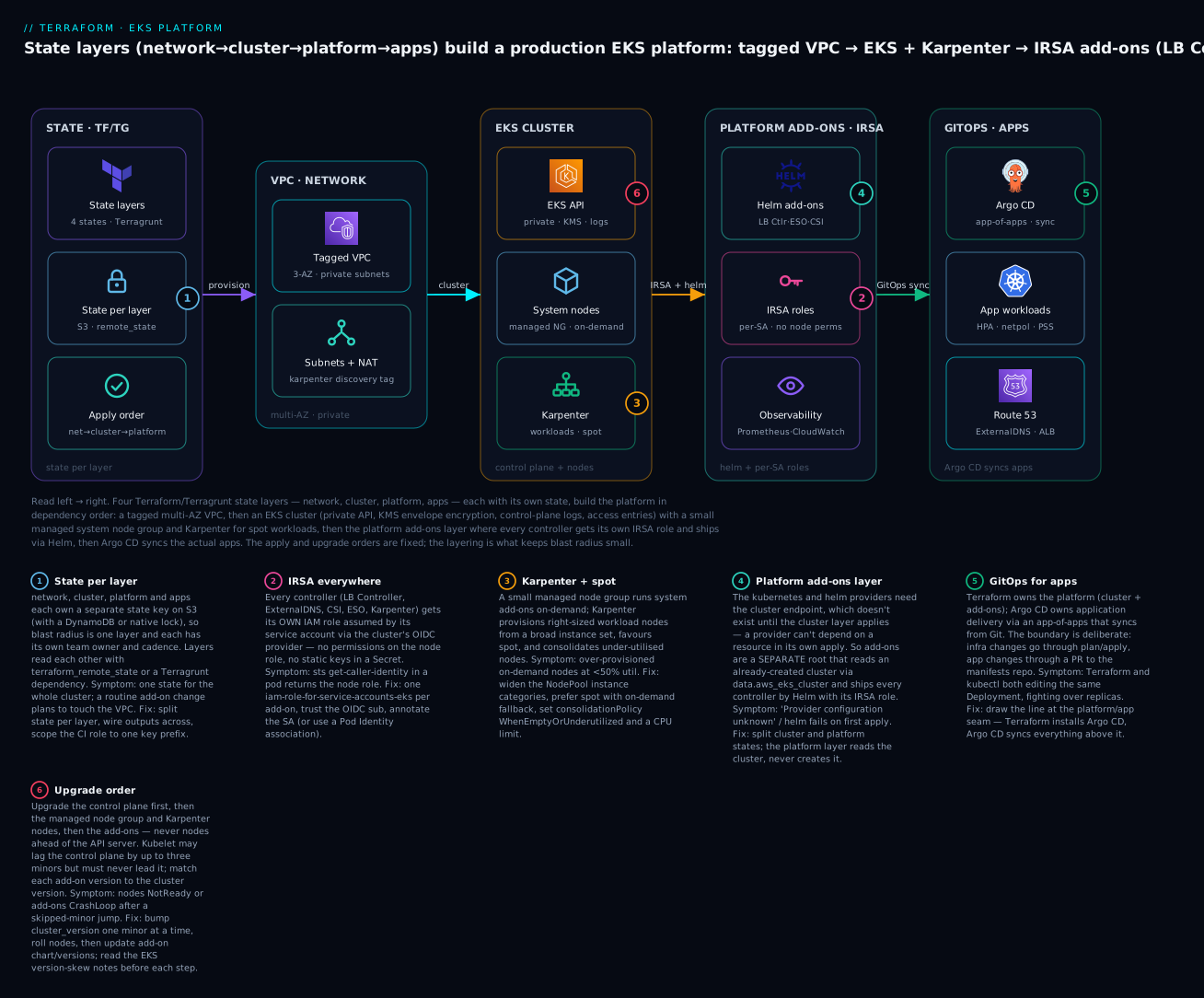
The diagram traces the whole platform left to right: the four Terraform/Terragrunt state layers on the left provision, in dependency order, the tagged VPC, the EKS cluster with its system nodes and Karpenter, the platform add-ons (every one under an IRSA role, shipped by Helm, observed by Prometheus/CloudWatch), and finally Argo CD syncing the apps with Route 53 records from ExternalDNS. The six badges are the six load-bearing decisions of the lesson: state per layer, IRSA everywhere, Karpenter + spot, the separate platform add-ons layer (the provider-ordering fix), GitOps for apps, and the fixed upgrade order.
The request path and the identity path are the two mental models to hold. The request path is how traffic reaches a pod; the identity path is how a pod reaches AWS — and the second is the one juniors skip, then spend a day debugging an AccessDenied:
| # | Request path hop | Component | Notes |
|---|---|---|---|
| 1 | User → Route 53 → ALB | ExternalDNS + LB Controller | Record and ALB both provisioned from the Ingress |
| 2 | ALB → pod | LB Controller, target-type: ip |
Registers pod IPs directly (no node-port double hop) |
| 3 | Pod → pod (east-west) | VPC CNI + NetworkPolicy | Default-deny where policy is enforced |
| 4 | Pod → AWS API | IRSA (OIDC) | SA assumes its own role; not the node role |
| 5 | Pod → Secret | External Secrets Operator | Pulls from Secrets Manager via its IRSA role |
State layering: network → cluster → platform → apps
The repository is the architecture, and on EKS the layering is not a nicety — it is forced on you by a hard technical constraint, then justified three more ways. Get the layers right and the platform is maintainable; get them wrong and you meet the detonation from the opening.
The provider-ordering problem — the reason the layers are not optional. Terraform resolves provider configuration at plan time, before most resources exist. The kubernetes and helm providers need the cluster’s API endpoint and CA to talk to it. If you configure those providers from module.eks.cluster_endpoint and create helm_release resources in the same configuration, you have asked a provider to depend on a resource being created in its own apply. On a clean first apply this is “unknown at plan time”; on a rebuild or a destroy it fails outright, because the provider can’t reach a cluster that is gone or not yet there. The robust fix is structural: the cluster layer creates the cluster and outputs its identity; the platform layer reads an already-created cluster via data "aws_eks_cluster" and only then configures the kubernetes/helm providers. A provider must point at infrastructure that already exists in another state — that single rule is why cluster and platform are separate layers.
The other three justifications reinforce it:
| Why split | The argument |
|---|---|
| Provider ordering | A kubernetes/helm provider can’t be configured from a cluster made in the same apply — the platform layer must read an existing cluster |
| Blast radius | The platform layer churns weekly; network changes quarterly. Separate state means an add-on bump can never plan a VPC change or delete the cluster |
| Team ownership | Networking owns network, the platform team owns cluster+platform, product teams own apps — separate states let each apply on its own cadence with its own CI role |
| Apply/destroy time | A tight platform state plans in seconds; folding it into the cluster state makes every add-on tweak re-evaluate the whole cluster |
Here is the canonical layout for the Kestrel platform. Read it by state boundaries, because that is what matters at 2 a.m. — every leaf under live/ is a root module with its own state key, and that key is the unit of plan, apply and blast radius:
kestrel-platform/
├── modules/                         # the library — reusable, versioned, never applied directly
│   ├── eks-platform-addons/         # composes IRSA + helm for all add-ons (the star of this lesson)
│   │   ├── main.tf                  # for_each over add-ons: irsa role + helm_release
│   │   ├── variables.tf
│   │   ├── outputs.tf
│   │   └── README.md
│   └── karpenter-nodepool/          # EC2NodeClass + NodePool manifests
│
├── live/                            # per-env ROOT configs — each LAYER has its own state key
│   ├── dev/
│   │   ├── network/                 # key: dev/network/terraform.tfstate   (vpc)
│   │   ├── cluster/                 # key: dev/cluster/terraform.tfstate    (eks + system NG + karpenter IAM)
│   │   ├── platform/                # key: dev/platform/terraform.tfstate   (IRSA + helm add-ons + argocd)
│   │   └── apps/                    # key: dev/apps/terraform.tfstate       (argocd Application → Git)
│   ├── staging/                     # identical structure, staging inputs
│   └── prod/
│       ├── network/
│       ├── cluster/
│       │   ├── versions.tf          # required_providers + backend "s3" {}
│       │   ├── main.tf              # module "eks" + module "karpenter" + access entries
│       │   ├── variables.tf
│       │   ├── outputs.tf           # cluster_name, endpoint, oidc_provider_arn, karpenter_*
│       │   ├── prod.auto.tfvars
│       │   └── backend.hcl          # key = "prod/cluster/terraform.tfstate"
│       ├── platform/
│       │   ├── versions.tf          # aws + kubernetes + helm providers
│       │   ├── main.tf              # data.terraform_remote_state.cluster → providers → add-ons
│       │   └── backend.hcl          # key = "prod/platform/terraform.tfstate"
│       └── apps/
│
├── gitops/                          # the manifests repo Argo CD syncs (apps live HERE, not in Terraform)
├── tests/                           # native terraform test (*.tftest.hcl)
├── .tflint.hcl
└── .checkov.yaml
The one rule that saves you: never terraform apply inside modules/ — modules are consumed by source, not run. And the second: apps live in gitops/, not in Terraform — Terraform installs Argo CD; Argo CD syncs the app manifests. The state-layering table is the reference:
| Layer | Owns | Reads (via remote state) | Own state key | Changes | Team |
|---|---|---|---|---|---|
network |
VPC, subnets, NAT, subnet tags | — | <env>/network/…tfstate |
Quarterly | Networking |
cluster |
EKS, system NG, KMS, OIDC, Karpenter IAM | network |
<env>/cluster/…tfstate |
On upgrades | Platform |
platform |
IRSA roles + Helm add-ons + Argo CD | cluster (+ network) |
<env>/platform/…tfstate |
Weekly | Platform |
apps |
Argo CD Application(s) → Git |
platform |
<env>/apps/…tfstate |
Daily (via Git) | Product |
Wiring the layers. The lower layer reads the upper layer’s outputs. In native Terraform that is a terraform_remote_state data source; in Terragrunt it is a first-class dependency block with mock_outputs so a plan runs before the dependency exists. The cross-layer wiring map:
| Producer layer → output | Consumer layer ← input | Why |
|---|---|---|
network.vpc_id, private_subnets |
cluster |
Cluster and node group placement |
cluster.cluster_name, cluster_endpoint, cluster_ca |
platform |
Configure the kubernetes/helm providers |
cluster.oidc_provider_arn |
platform |
Trust anchor for every IRSA role |
cluster.karpenter_queue_name, karpenter_irsa_arn, node_iam_role |
platform |
Karpenter Helm values + NodePool |
platform.argocd_server, argocd_namespace |
apps |
Where the app-of-apps registers |
The apply order is fixed — and its reverse is the destroy order. You cannot apply platform before cluster (no cluster to talk to) or cluster before network (no VPC to place it in). ⚠️ Getting the destroy order wrong is worse than getting apply wrong: destroy network before platform and you strand ENIs, load balancers and security groups that the add-ons created, and the VPC delete hangs for an hour.
| Step | Apply order (→) | Destroy order (←) | Gate |
|---|---|---|---|
| 1 | network |
apps |
PR review |
| 2 | cluster |
platform |
Platform approval |
| 3 | platform |
cluster |
Platform approval |
| 4 | apps (Argo CD takes over) |
network |
Product / manual |
In Terragrunt, terragrunt run-all apply walks this graph for you from the dependency edges; in native Terraform you apply the folders in order (a thin wrapper script, or the CI pipeline, enforces it). Either way, the order is a property of the dependency graph, not a thing you remember — which is the whole point of encoding it in state layers.
The cluster layer: VPC + EKS + system nodes + Karpenter IAM
The cluster layer reads the network layer and stands up the control plane, the small system node group, and Karpenter’s cluster-scoped IAM. It is deliberately thin on Helm — nothing in this layer uses the kubernetes or helm provider, precisely so that the cluster can always be created and destroyed cleanly.
Start with the provider and the read of the network layer:
# live/prod/cluster/versions.tf
terraform {
  required_version = ">= 1.6.0"
  required_providers {
    aws = { source = "hashicorp/aws", version = "~> 5.0" }
  }
  backend "s3" {}   # completed at init: key = prod/cluster/terraform.tfstate
}

provider "aws" {
  region = var.region
  default_tags { tags = local.common_tags }   # every AWS resource inherits these
}

data "terraform_remote_state" "network" {
  backend = "s3"
  config  = { bucket = "kestrel-tfstate-apsouth1", key = "prod/network/terraform.tfstate", region = "ap-south-1" }
}
Now the EKS cluster itself, via the community module — private endpoint, KMS envelope encryption, control-plane logs, access entries, and a small managed node group tainted for system add-ons only:
# live/prod/cluster/main.tf
locals { cluster_name = "eks-${var.workload}-${var.environment}" }   # eks-kestrel-prod

module "eks" {
  source  = "terraform-aws-modules/eks/aws"
  version = "~> 20.0"

  cluster_name    = local.cluster_name
  cluster_version = var.cluster_version                 # e.g. "1.30" — bumped on upgrades

  # Private API endpoint; public reachable only from office/CI CIDRs (tighten to false in prod-locked)
  cluster_endpoint_private_access      = true
  cluster_endpoint_public_access       = var.endpoint_public_access
  cluster_endpoint_public_access_cidrs = var.api_allowed_cidrs

  # Control-plane audit + component logs to CloudWatch
  cluster_enabled_log_types = ["api", "audit", "authenticator", "controllerManager", "scheduler"]

  # KMS envelope encryption for Kubernetes Secrets (encryption at rest, above EBS-level)
  create_kms_key            = true
  cluster_encryption_config = { resources = ["secrets"] }

  # Access entries API — no aws-auth ConfigMap surgery
  authentication_mode                      = "API_AND_CONFIG_MAP"
  enable_cluster_creator_admin_permissions = true

  # Core add-ons managed by EKS (kept in the CLUSTER layer, before any workload)
  cluster_addons = {
    coredns                = { most_recent = true }
    kube-proxy             = { most_recent = true }
    vpc-cni                = { most_recent = true }
    eks-pod-identity-agent = { most_recent = true }
  }

  vpc_id     = data.terraform_remote_state.network.outputs.vpc_id
  subnet_ids = data.terraform_remote_state.network.outputs.private_subnets

  # A SMALL managed node group for system add-ons only; workloads come from Karpenter
  eks_managed_node_groups = {
    system = {
      instance_types = var.system_instance_types      # ["m6i.large"]
      capacity_type  = "ON_DEMAND"                     # system add-ons on stable capacity
      min_size       = 2
      max_size       = 3
      desired_size   = 2
      labels = { role = "system" }
      taints = {
        addons = { key = "CriticalAddonsOnly", value = "true", effect = "NO_SCHEDULE" }
      }
    }
  }

  tags = local.common_tags
}
Two design decisions here are worth their own sentence. Why a managed system node group and Karpenter? Karpenter itself, CoreDNS and the CSI drivers need somewhere to run before Karpenter can provision anything — a chicken-and-egg. So a tiny, boring, on-demand managed group runs the system add-ons (tainted CriticalAddonsOnly so app pods don’t land on it), and Karpenter provisions everything else. Why access entries? Because the old aws-auth ConfigMap was an un-versioned, easy-to-lock-yourself-out-of blob; authentication_mode + aws_eks_access_entry makes cluster access a first-class, Terraform-managed IAM object.
An access entry granting a platform-admin SSO role cluster-admin, the modern replacement for an aws-auth line:
resource "aws_eks_access_entry" "platform_admins" {
  cluster_name  = module.eks.cluster_name
  principal_arn = var.platform_admin_role_arn      # e.g. an SSO permission-set role
  type          = "STANDARD"
}

resource "aws_eks_access_policy_association" "platform_admins" {
  cluster_name  = module.eks.cluster_name
  principal_arn = var.platform_admin_role_arn
  policy_arn    = "arn:aws:eks::aws:cluster-access-policy/AmazonEKSClusterAdminPolicy"
  access_scope { type = "cluster" }
}
Karpenter’s cluster-scoped IAM — the node role, instance profile, interruption SQS queue and controller IRSA policy — belongs in the cluster layer (it is IAM, not Helm). The community submodule builds it in one block; its outputs feed the platform layer’s Helm install:
module "karpenter" {
  source  = "terraform-aws-modules/eks/aws//modules/karpenter"
  version = "~> 20.0"

  cluster_name          = module.eks.cluster_name
  enable_v1_permissions = true
  namespace             = "kube-system"
  node_iam_role_name    = "karpenter-node-${local.cluster_name}"

  # Let the controller assume its role via Pod Identity (or set up IRSA — either works)
  create_pod_identity_association = true
  tags                            = local.common_tags
}
The cluster layer’s outputs are the contract the platform layer consumes. Emit exactly what the providers, the IRSA trust and Karpenter need:
# live/prod/cluster/outputs.tf
output "cluster_name"      { value = module.eks.cluster_name }
output "cluster_endpoint"  { value = module.eks.cluster_endpoint }
output "cluster_ca"        { value = module.eks.cluster_certificate_authority_data }
output "cluster_version"   { value = module.eks.cluster_version }
output "oidc_provider_arn" { value = module.eks.oidc_provider_arn }   # ← IRSA trust anchor
output "node_security_group_id" { value = module.eks.node_security_group_id }

output "karpenter_queue_name"   { value = module.karpenter.queue_name }
output "karpenter_node_role"    { value = module.karpenter.node_iam_role_name }
output "karpenter_irsa_arn"     { value = module.karpenter.iam_role_arn }
The EKS cluster options that matter for a production cluster, and what each buys you:
| Option | Setting | Why |
|---|---|---|
cluster_endpoint_private_access |
true |
API reachable inside the VPC; nodes never traverse the internet to the API |
cluster_endpoint_public_access |
true (locked CIDRs) or false |
Public off is strongest; if on, restrict to office/CI CIDRs |
cluster_enabled_log_types |
api,audit,authenticator,controllerManager,scheduler |
Control-plane audit trail to CloudWatch |
cluster_encryption_config |
{ resources = ["secrets"] } |
KMS envelope encryption of Kubernetes Secrets at rest |
authentication_mode |
API_AND_CONFIG_MAP |
Access entries; migrate off aws-auth without lockout |
cluster_addons |
coredns, kube-proxy, vpc-cni, pod-identity-agent | Core add-ons versioned with the cluster |
managed NG taints |
CriticalAddonsOnly=true:NoSchedule |
Reserve system nodes for add-ons; app pods go to Karpenter |
The platform add-ons layer: IRSA + Helm, the star of the show
This is the heart of the capstone. The platform layer reads the already-created cluster, configures the kubernetes and helm providers against it, and installs every add-on — each with its own IRSA role and no permission on the node. First the providers, authenticated by exec so no token is ever written to state:
# live/prod/platform/versions.tf
terraform {
  required_version = ">= 1.6.0"
  required_providers {
    aws        = { source = "hashicorp/aws",        version = "~> 5.0" }
    kubernetes = { source = "hashicorp/kubernetes", version = "~> 2.35" }
    helm       = { source = "hashicorp/helm",       version = "~> 2.17" }
  }
  backend "s3" {}   # key = prod/platform/terraform.tfstate
}

data "terraform_remote_state" "cluster" {
  backend = "s3"
  config  = { bucket = "kestrel-tfstate-apsouth1", key = "prod/cluster/terraform.tfstate", region = "ap-south-1" }
}

# Read the LIVE cluster the cluster layer created — never create it here
data "aws_eks_cluster" "this" {
  name = data.terraform_remote_state.cluster.outputs.cluster_name
}

provider "aws" { region = var.region }

provider "kubernetes" {
  host                   = data.aws_eks_cluster.this.endpoint
  cluster_ca_certificate = base64decode(data.aws_eks_cluster.this.certificate_authority[0].data)
  exec {
    api_version = "client.authentication.k8s.io/v1beta1"
    command     = "aws"
    args        = ["eks", "get-token", "--cluster-name", data.aws_eks_cluster.this.name]
  }
}

provider "helm" {
  kubernetes {
    host                   = data.aws_eks_cluster.this.endpoint
    cluster_ca_certificate = base64decode(data.aws_eks_cluster.this.certificate_authority[0].data)
    exec {
      api_version = "client.authentication.k8s.io/v1beta1"
      command     = "aws"
      args        = ["eks", "get-token", "--cluster-name", data.aws_eks_cluster.this.name]
    }
  }
}
The IRSA + Helm pattern, once. Every add-on is the same two-part shape: an IAM role scoped to exactly what that controller needs, trusted by the cluster’s OIDC provider for one namespace/service-account pair, and a helm_release that annotates its service account with the role ARN. The terraform-aws-modules/iam/aws//modules/iam-role-for-service-accounts-eks module ships the canonical policy for each well-known controller behind a boolean, so you don’t hand-write the JSON. Here is the AWS Load Balancer Controller in full:
# live/prod/platform/main.tf
locals {
  oidc_provider_arn = data.terraform_remote_state.cluster.outputs.oidc_provider_arn
  cluster_name      = data.aws_eks_cluster.this.name
}

module "irsa_lb_controller" {
  source  = "terraform-aws-modules/iam/aws//modules/iam-role-for-service-accounts-eks"
  version = "~> 5.0"

  role_name                              = "irsa-lbc-${local.cluster_name}"
  attach_load_balancer_controller_policy = true          # canonical AWS LBC policy, maintained upstream
  oidc_providers = {
    main = {
      provider_arn               = local.oidc_provider_arn
      namespace_service_accounts = ["kube-system:aws-load-balancer-controller"]
    }
  }
}

resource "helm_release" "aws_lb_controller" {
  name       = "aws-load-balancer-controller"
  repository = "https://aws.github.io/eks-charts"
  chart      = "aws-load-balancer-controller"
  version    = var.lbc_chart_version           # e.g. "1.8.1"
  namespace  = "kube-system"

  set{
    name = "clusterName"
    value = local.cluster_name
  }
  set{
    name = "serviceAccount.create"
    value = "true"
  }
  set{
    name = "serviceAccount.name"
    value = "aws-load-balancer-controller"
  }
  set {
    name  = "serviceAccount.annotations.eks\\.amazonaws\\.com/role-arn"
    value = module.irsa_lb_controller.iam_role_arn      # ← the IRSA wire-up
  }
}
ExternalDNS is the same shape, scoped to just the one hosted zone it may edit:
module "irsa_external_dns" {
  source  = "terraform-aws-modules/iam/aws//modules/iam-role-for-service-accounts-eks"
  version = "~> 5.0"

  role_name                     = "irsa-extdns-${local.cluster_name}"
  attach_external_dns_policy    = true
  external_dns_hosted_zone_arns = [var.hosted_zone_arn]     # ← least-privilege: one zone
  oidc_providers = {
    main = { provider_arn = local.oidc_provider_arn, namespace_service_accounts = ["kube-system:external-dns"] }
  }
}

resource "helm_release" "external_dns" {
  name       = "external-dns"
  repository = "https://kubernetes-sigs.github.io/external-dns/"
  chart      = "external-dns"
  version    = var.external_dns_chart_version
  namespace  = "kube-system"

  set{
    name = "provider"
    value = "aws"
  }
  set {                                                   # create AND delete records it owns
    name  = "policy"
    value = "sync"
  }
  set{
    name = "domainFilters[0]"
    value = var.public_domain
  }
  set{
    name = "serviceAccount.annotations.eks\\.amazonaws\\.com/role-arn"
    value = module.irsa_external_dns.iam_role_arn
  }
}
Eight add-ons written out longhand is eight near-identical blocks — the thing modules exist to kill. In a real library you extract the shape into a small eks-platform-addons module driven by a for_each map, so the root declares add-ons as data and the module builds the IRSA role + helm_release for each. That is the reusability payoff, and the module registry equivalent is exactly the iam-role-for-service-accounts-eks submodule you already saw. The full add-on catalogue — what each does, the chart, and the IRSA policy it needs — is the reference you build the map from:
| Add-on | Namespace / SA | Chart (repo) | IRSA policy (attach_*) |
|---|---|---|---|
| AWS Load Balancer Controller | kube-system / aws-load-balancer-controller |
aws-load-balancer-controller (eks-charts) |
load_balancer_controller |
| ExternalDNS | kube-system / external-dns |
external-dns (sigs) |
external_dns (one zone) |
| metrics-server | kube-system / metrics-server |
metrics-server (sigs) |
none (no AWS calls) |
| Karpenter | kube-system / karpenter |
karpenter (public.ecr.aws) |
from the cluster-layer karpenter module |
| EBS CSI driver | kube-system / ebs-csi-controller-sa |
aws-ebs-csi-driver (EKS addon) |
ebs_csi |
| EFS CSI driver | kube-system / efs-csi-controller-sa |
aws-efs-csi-driver (sigs) |
efs_csi |
| CloudWatch Observability | amazon-cloudwatch / cloudwatch-agent |
amazon-cloudwatch-observability (EKS addon) |
CloudWatchAgentServerPolicy |
| kube-prometheus-stack | monitoring / * |
kube-prometheus-stack (prometheus-community) |
none (Prometheus scrapes in-cluster) |
| External Secrets Operator | external-secrets / external-secrets |
external-secrets (ESO) |
external_secrets (scoped secrets) |
| cert-manager | cert-manager / cert-manager |
cert-manager (jetstack) |
cert_manager (if DNS-01) |
| Argo CD | argocd / argocd-* |
argo-cd (argoproj) |
none (syncs from Git) |
| Velero | velero / velero |
velero (vmware-tanzu) |
velero (S3 + EBS snapshot) |
The IRSA wire-up is the single most important security property of the platform, so state it as a rule: one role per controller, trusted for one service account, granting exactly that controller’s permissions. The node role, by contrast, holds almost nothing — just the managed policies EKS requires (AmazonEKSWorkerNodePolicy, AmazonEKS_CNI_Policy, ECR read). The IRSA-per-add-on catalogue:
| Controller | Assumes role for | Grants (scope) | Never on the node role |
|---|---|---|---|
| LB Controller | kube-system:aws-load-balancer-controller |
ELB create/modify, describe SG/subnets | ✅ |
| ExternalDNS | kube-system:external-dns |
Route 53 change on one zone | ✅ |
| EBS CSI | kube-system:ebs-csi-controller-sa |
Create/attach EBS volumes | ✅ |
| EFS CSI | kube-system:efs-csi-controller-sa |
Describe/mount EFS access points | ✅ |
| External Secrets | external-secrets:external-secrets |
secretsmanager:GetSecretValue on a prefix |
✅ |
| Velero | velero:velero |
S3 rw on the backup bucket + EBS snapshot | ✅ |
| Karpenter | kube-system:karpenter |
RunInstances / TerminateInstances (tag-scoped) | ✅ |
IRSA vs Pod Identity. IRSA (the OIDC-federation model) is the mature, universal path and what the iam-role-for-service-accounts-eks module builds. EKS Pod Identity (an agent add-on + an association API) is the newer, simpler model — no OIDC provider per cluster, no SA annotation, an association object instead. Use IRSA when a chart hard-codes the annotation or you need cross-account; prefer Pod Identity for new, in-account add-ons where you control the SA. Karpenter above uses Pod Identity via create_pod_identity_association; the rest use IRSA — mixing is normal, and the platform layer is where both live.
| Axis | IRSA (OIDC federation) | EKS Pod Identity |
|---|---|---|
| Trust anchor | Per-cluster OIDC provider | eks-pod-identity-agent add-on |
| Wire-up | SA annotation eks.amazonaws.com/role-arn |
aws_eks_pod_identity_association object |
| Role trust | sts:AssumeRoleWithWebIdentity on the sub |
pods.eks.amazonaws.com principal |
| Cross-account | Supported | Same-account (assoc is cluster-local) |
| Reuse across clusters | New OIDC trust per cluster | One role, associations per cluster |
| Best for | Charts that hard-code the annotation | New in-account add-ons you control |
Argo CD and the Terraform/GitOps seam. Terraform installs Argo CD as one more Helm release; from there, Argo CD owns application delivery. The boundary is deliberate and it is the answer to “why aren’t the apps in Terraform?”: infrastructure changes go through plan/apply with an IAM audit trail; application changes go through a PR to the manifests repo with Argo CD’s sync and rollback. The seam is drawn at the platform/app line so Terraform and kubectl never fight over the same Deployment’s replica count.
resource "helm_release" "argocd" {
  name             = "argocd"
  repository       = "https://argoproj.github.io/argo-helm"
  chart            = "argo-cd"
  version          = var.argocd_chart_version
  namespace        = "argocd"
  create_namespace = true
  values           = [yamlencode({ server = { ingress = { enabled = true } } })]
}

# The ONE app-of-apps that points Argo CD at the Git repo; everything else syncs from there
resource "kubernetes_manifest" "root_app" {
  manifest = {
    apiVersion = "argoproj.io/v1alpha1"
    kind       = "Application"
    metadata   = { name = "root", namespace = "argocd" }
    spec = {
      project     = "default"
      source      = { repoURL = var.gitops_repo, path = "envs/${var.environment}", targetRevision = "main" }
      destination = { server = "https://kubernetes.default.svc", namespace = "argocd" }
      syncPolicy  = { automated = { prune = true, selfHeal = true } }
    }
  }
  depends_on = [helm_release.argocd]
}
Multi-environment: dev, staging, prod
The layers are identical across environments; only the inputs differ. dev runs cheap and spot-heavy with the API endpoint open to the office CIDR; prod runs prod-sized, endpoint-locked, Multi-add-on-replica, and Velero-backed. Each environment has its own state key per layer (the <env>/ prefix), so a dev apply is physically incapable of touching prod. The per-environment sizing that carries every difference — the only thing that changes, because the module and add-on code is identical:
| Setting | Variable | dev | staging | prod |
|---|---|---|---|---|
| Kubernetes version | cluster_version |
1.30 |
1.30 |
1.30 (upgraded last) |
| API public access | endpoint_public_access |
true (office CIDR) |
true (office+CI) |
false (private only) |
| System NG size | system_instance_types / min-max |
t3.large / 1–2 |
m6i.large / 2–3 |
m6i.large / 2–4 |
| Karpenter capacity | NodePool capacity_type |
["spot"] |
["spot","on-demand"] |
["spot","on-demand"] |
| Karpenter CPU limit | NodePool limits.cpu |
50 |
200 |
1000 |
| Argo CD / ESO replicas | chart replicas |
1 |
2 |
2 (HA) |
| Prometheus retention | chart retention |
2d |
7d |
30d |
| CloudWatch log retention | log_retention_days |
7 |
30 |
90 |
| Velero backups | enable_velero |
false |
true (daily) |
true (hourly + daily) |
| Network policy enforce | enforce_netpol |
false (audit) |
true |
true |
| Monthly budget (INR) | monthly_budget |
15000 |
60000 |
180000 |
Promotion walks a change dev → staging → prod: prove the add-on chart bump or NodePool change in dev, run the same code against staging with staging inputs, then prod behind an approval. Nothing is hand-edited between environments; only the sizing variables change. This is the promotion discipline from the multi-environment Terragrunt lesson applied to a whole platform rather than a single stack:
| Stage | What runs | Gate before it | What differs |
|---|---|---|---|
| dev | plan + apply on merge |
PR review | Spot-only, endpoint open, 1 replica, no Velero |
| staging | plan + apply |
dev green + soak | Prod-like sizing, netpol enforced, Velero daily |
| prod | plan (posted) then apply |
Manual approval | Endpoint private, HA replicas, Velero hourly, real budget |
Security & SRE as code
Reliability and security are properties of the platform, guaranteed by the layers and the IRSA discipline, not bolted on after the first incident. The controls, densest part of the lesson, each a small standard pattern applied everywhere:
| Control | How it’s enforced | Standard |
|---|---|---|
| Workload identity | IRSA / Pod Identity per add-on | No node-role app perms; no static keys in Secrets |
| API exposure | Private endpoint; public locked or off | Prod endpoint private; nodes reach API in-VPC |
| Secrets at rest | KMS envelope encryption (resources=["secrets"]) |
Kubernetes Secrets encrypted above EBS level |
| Secret delivery | External Secrets Operator + IRSA | App secrets pulled from Secrets Manager, never committed |
| Encryption in transit | TLS at ALB (ACM) + cert-manager in-cluster | HTTPS to the edge; mTLS optional via mesh |
| East-west traffic | NetworkPolicy (default-deny) | Namespaces deny by default; allow-list explicitly |
| Pod hardening | Pod Security Standards restricted |
Namespace labels enforce non-root, no privilege |
| Cost | Karpenter spot + consolidation + right-size | Workloads on spot; idle nodes consolidated |
| Observability | Prometheus/CloudWatch + alerts to SNS | Golden signals + control-plane logs; alarms per env |
| Backup / DR | Velero (schedules + EBS snapshots) | Namespaced + PV backups to S3, cross-region copy |
| Change safety | Separate state per layer; CI role per key | Blast radius one layer; least-privilege deploy role |
| Supply chain | checkov/tfsec on Terraform; image scanning | Required status check; no unpinned charts |
Four of these deserve prose because they are where EKS platforms actually fail.
Pod Security Standards and network policy are namespace-level, and belong to apps, not the platform. Terraform (or Argo CD) labels each app namespace pod-security.kubernetes.io/enforce: restricted so a pod that runs as root or asks for privilege is rejected at admission; a default-deny NetworkPolicy per namespace forces east-west traffic to be allow-listed. Start in audit mode in dev (label warn/audit) and flip to enforce in staging/prod so you learn what breaks before it blocks a deploy.
Cost is a first-class control, and Karpenter is the lever. The largest EKS surprises are (1) the flat control-plane fee (~₹6,000/month per cluster, unavoidable — fold small teams into fewer clusters with namespaces, not a cluster each), (2) idle on-demand nodes, and (3) NAT and cross-AZ transfer. Karpenter attacks the second: a broad instance set, spot preferred with on-demand fallback, and consolidationPolicy: WhenEmptyOrUnderutilized so under-used nodes are drained and replaced with cheaper/smaller ones. Set a NodePool CPU limit so a runaway workload can’t provision unbounded capacity, and watch it with a budget alarm.
Upgrades are ordered, and the order is not negotiable. Upgrade the control plane first, then the managed node group and Karpenter nodes, then the add-ons — never nodes ahead of the API server. Kubelet may lag the control plane (EKS tolerates several minors behind on the extended path) but must never lead it, and you upgrade one minor at a time — no skipping. After the control plane bump, roll nodes (a new AMI/launch template triggers the managed-NG roll; Karpenter drift-replaces its nodes), then match each add-on’s chart/version to the new cluster version.
| Upgrade step | What you bump | Skew rule | Verify |
|---|---|---|---|
| 1. Control plane | cluster_version (one minor) |
Never skip a minor | aws eks describe-cluster shows new version |
| 2. Core add-ons | coredns/kube-proxy/vpc-cni versions | Match to cluster version | Add-on ACTIVE, no DEGRADED |
| 3. Managed node group | AMI / cluster_version on the NG |
Kubelet ≤ control plane, ≥ N-3 | Nodes Ready, new version |
| 4. Karpenter nodes | Karpenter drift / NodePool | Same skew as managed nodes | kubectl get nodes new kubelet |
| 5. Platform add-ons | Helm chart versions | Chart supports the new K8s API | Pods Running, CRDs intact |
Backup and DR is Velero, and it needs its own IRSA. Velero backs up namespaced objects and, via the CSI/EBS integration, the persistent volumes; schedules push to an S3 bucket (copied cross-region for DR), and its IRSA role grants S3 read/write plus EBS snapshot. Test the restore, not just the backup — a backup you have never restored is a hope, not a plan.
| DR concern | What Velero does | The wire-up |
|---|---|---|
| Cluster objects | Backs up namespaced manifests to S3 | Schedule CR (hourly + daily in prod) |
| Persistent volumes | EBS/CSI volume snapshots | VolumeSnapshotLocation + CSI plugin |
| Backup store | S3 bucket, cross-region copy for DR | BackupStorageLocation (must be Available) |
| Permissions | S3 rw + ec2:CreateSnapshot/DescribeVolumes |
Velero IRSA role (attach_velero_policy) |
| Recovery | Restore into a rebuilt cluster | velero restore create --from-backup … — rehearse it |
The CI/CD gate that ties it together is the OIDC pipeline (covered in the GitHub Actions OIDC lesson): a PR runs fmt/validate/tflint/checkov and a plan per changed layer under a read-only role assumed via GitHub OIDC (no static keys); a merge assumes a scoped deploy role — one per layer, able to touch only that layer’s state key prefix — and applies the approved plan in apply order. Reference it as the enforcement plane; the platform above is what it enforces.
Hands-on: assemble the platform
Now assemble the platform end to end — the four layers, in order, with the cross-layer reads, the IRSA add-ons and Argo CD. ⚠️ This creates real, billable AWS resources — an EKS control plane (~₹6,000/month, billed from creation), NAT gateways, EC2 worker nodes, EBS volumes and one or more ALBs. Destroy in reverse order at the end.
Step 0 — one-time state backend (bootstrap). The S3 bucket and lock table must exist before any layer can init. Create them once by hand:
aws s3api create-bucket --bucket kestrel-tfstate-apsouth1 \
  --region ap-south-1 --create-bucket-configuration LocationConstraint=ap-south-1
aws s3api put-bucket-versioning --bucket kestrel-tfstate-apsouth1 \
  --versioning-configuration Status=Enabled
aws dynamodb create-table --table-name kestrel-tf-locks \
  --attribute-definitions AttributeName=LockID,AttributeType=S \
  --key-schema AttributeName=LockID,KeyType=HASH \
  --billing-mode PAY_PER_REQUEST --region ap-south-1
Step 1 — apply network. The VPC layer stands up subnets across three AZs with the discovery tags EKS, the LB Controller and Karpenter need (kubernetes.io/role/elb on public, kubernetes.io/role/internal-elb on private, karpenter.sh/discovery = <cluster> on private):
cd live/prod/network
terraform init -backend-config=backend.hcl     # key = prod/network/terraform.tfstate
terraform apply
Step 2 — apply cluster. ⚠️ This creates the EKS control plane (billing starts now) and takes ~12–15 minutes:
cd ../cluster
terraform init -backend-config=backend.hcl     # key = prod/cluster/terraform.tfstate
terraform plan  -out=cluster.tfplan
terraform apply cluster.tfplan
aws eks update-kubeconfig --name eks-kestrel-prod --region ap-south-1   # for verification
Step 3 — apply platform. This is the layer that would have failed had you folded it into cluster: it reads the live cluster via the data source, configures the kubernetes/helm providers, and installs every add-on with its IRSA role. Representative plan output — note the IRSA modules and helm_releases, and that Terraform reads the cluster (not creates it):
cd ../platform
terraform init -backend-config=backend.hcl     # key = prod/platform/terraform.tfstate
terraform plan  -out=platform.tfplan
terraform apply platform.tfplan
data.terraform_remote_state.cluster: Reading...
data.aws_eks_cluster.this: Reading...

Terraform will perform the following actions:
  # module.irsa_lb_controller.aws_iam_role.this[0] will be created
  # module.irsa_external_dns.aws_iam_role.this[0] will be created
  # helm_release.aws_lb_controller will be created
  # helm_release.external_dns will be created
  # helm_release.metrics_server will be created
  # helm_release.karpenter will be created
  # helm_release.external_secrets will be created
  # helm_release.argocd will be created
  # kubernetes_manifest.root_app will be created

Plan: 18 to add, 0 to change, 0 to destroy.
Step 4 — verify the platform properties, not just that pods are running: that IRSA is wired (a pod assumes its role, not the node role), the LB Controller is up, and ExternalDNS owns records:
# Every controller Running, each with its IRSA-annotated service account
kubectl get pods -n kube-system | egrep 'aws-load-balancer|external-dns|karpenter|metrics-server'

# IRSA proof: the SA carries the role-arn annotation
kubectl get sa aws-load-balancer-controller -n kube-system \
  -o jsonpath='{.metadata.annotations.eks\.amazonaws\.com/role-arn}{"\n"}'

# Argo CD came up and the app-of-apps is syncing
kubectl get applications -n argocd
Step 5 — hand off to Argo CD (the apps layer). The apps layer is thin: it is the app-of-apps Application pointing at the Git repo; from there Argo CD syncs the actual workloads. You do not helm_release each app in Terraform — that is the seam.
Step 6 — destroy in reverse. ⚠️ Destroy apps → platform → cluster → network. Destroying network first strands ALBs/ENIs the add-ons created and the VPC delete hangs:
cd ../platform && terraform destroy    # removes helm releases + IRSA roles first
cd ../cluster  && terraform destroy    # then the cluster (stops the control-plane billing)
cd ../network  && terraform destroy    # finally the VPC
# only if fully finished with the backend:
aws s3 rb s3://kestrel-tfstate-apsouth1 --force
aws dynamodb delete-table --table-name kestrel-tf-locks --region ap-south-1
Variables, outputs & making it reusable: the module map
The whole lesson is about reuse, so the last mile is the module map and the build-vs-buy call. The honest answer is not “always community” — it depends on how much of the surface is commodity versus a platform opinion you must own and defend. The map Kestrel settled on, a reasonable default for a mid-size estate:
| Building block | Community option | Kestrel’s call | Why |
|---|---|---|---|
| VPC | terraform-aws-modules/vpc/aws |
Adopt | Commodity, fiddly, well-maintained |
| EKS cluster | terraform-aws-modules/eks/aws |
Adopt | Access entries, add-ons, node groups done right |
| Karpenter IAM | …/eks/aws//modules/karpenter |
Adopt | Node role + queue + controller policy in one block |
| IRSA roles | …/iam/aws//modules/iam-role-for-service-accounts-eks |
Adopt | Canonical per-controller policies behind booleans |
| Add-ons composition | your eks-platform-addons module |
Own | Encodes your add-on set, versions and IRSA wiring |
| NodePool / EC2NodeClass | your karpenter-nodepool module |
Own | Your instance families, taints, consolidation policy |
| Helm charts | upstream charts | Adopt (pin!) | Community-maintained; pin the version, promote bumps |
The decision grid, and the trap: community modules and charts change on someone else’s schedule. An unpinned source or chart version means a future init/upgrade pulls a new major and blows up an environment you didn’t touch. Always pin (~> for modules, an exact chart version), read the CHANGELOG before a bump, and upgrade dev first — the same promotion flow you use for infrastructure applies to the library and the charts.
| Question | Own it | Adopt community |
|---|---|---|
| Is the surface commodity (VPC, EKS, IRSA policy)? | No → own | Yes → adopt |
| Does it encode a platform opinion (your add-on set, NodePool shape)? | Yes → own | No → adopt |
| Who maintains hardening + upgrades? | You | Community + you (pin + review) |
| Learning value now? | High | Lower (you consume) |
The reusability payoff is that the root declares add-ons as data — a map of { name, chart, version, irsa_policy } — and the eks-platform-addons module builds the IRSA role + helm_release per entry with for_each. Adding an add-on becomes one map entry, reviewed in a PR, promoted dev → prod, never a copy-paste of forty lines.
Common mistakes and troubleshooting
Platform failures cluster around layer ordering, IRSA wiring, Karpenter discovery, upgrade skew, and the Terraform/GitOps seam. This is the operations map:
| Symptom | Likely cause | Fix |
|---|---|---|
helm_release fails: provider config unknown / no cluster |
Add-ons in the cluster’s own config, or platform applied before cluster |
Separate states; apply network→cluster→platform; platform reads the cluster |
Pod AccessDenied despite an IRSA role |
SA missing the role-arn annotation, trust sub wrong, or pod-identity-agent absent |
Check the SA annotation; the role trust must match system:serviceaccount:<ns>:<sa>; install the agent for Pod Identity |
| Ingress creates no ALB | LB Controller not running, IRSA policy missing, or subnet tags absent | Check controller logs; attach_load_balancer_controller_policy; kubernetes.io/role/elb on public subnets |
| ExternalDNS writes no records | IRSA lacks Route 53, wrong --domain-filter, or policy not sync |
Scope IRSA to the zone ARN; set domainFilters; policy=sync to allow deletes |
| Karpenter launches no nodes | Missing karpenter.sh/discovery tag on subnets/SG, or NodePool too narrow |
Tag subnets + node SG; widen the NodePool instance categories; check kubectl get nodeclaim |
Nodes NotReady after an upgrade |
Nodes upgraded ahead of the control plane, or a skipped minor | Control plane first, one minor at a time, then roll nodes |
| Add-on CrashLoops after a cluster upgrade | Chart/add-on version not matched to the new K8s version | Bump the add-on chart to the version supporting the new API |
dev plan proposes to destroy prod add-ons |
Two layers share one state key | Distinct key per env AND per layer; re-init -backend-config |
Error acquiring the state lock |
A dead run or teammate holds the DynamoDB lock | Confirm no live apply, then terraform force-unlock <ID>; never auto-retry in CI |
Terraform wants to revert a Deployment someone kubectl edit-ed |
Ownership straddles the Terraform/GitOps seam | Move app resources to Argo CD; Terraform stops at Argo CD install |
| Velero restore fails | IRSA missing S3/snapshot perms, or wrong backup location | Grant the velero policy; verify the BackupStorageLocation is Available |
| Cost creeping up | On-demand instead of spot, or no consolidation | Prefer spot in the NodePool; consolidationPolicy: WhenEmptyOrUnderutilized; set a CPU limit + budget |
Five gotchas cost real hours and deserve prose:
The provider-ordering problem is the whole reason for the cluster/platform split. If you take one thing from this lesson: a kubernetes or helm provider must be configured from a cluster that already exists in another state, read via data "aws_eks_cluster". Fold the add-ons into the cluster config and it works until the first rebuild or destroy, then fails because a provider can’t reach a cluster that isn’t there. Separate the states; the platform layer reads, never creates, the cluster.
IRSA fails silently, then loudly. The classic is a controller that seems fine until it makes its first AWS call and gets AccessDenied. Debug it in order: is the SA annotated with the role ARN? Does the role’s trust policy condition on the exact system:serviceaccount:<namespace>:<name>? For Pod Identity, is the eks-pod-identity-agent add-on installed and the association created? kubectl exec a pod and run aws sts get-caller-identity — if it returns the node role, the wire-up is wrong.
Karpenter discovery is tag-driven. Karpenter finds subnets and security groups by tag (karpenter.sh/discovery = <cluster-name>), and its EC2NodeClass references them by that tag selector. Forget the tag (it lives in the network layer) and Karpenter provisions nothing, with a quiet “no matching subnets” in its logs. Tag in the network layer, select by tag in the NodePool.
Upgrade order is not advice, it is a constraint. Kubelet must never lead the API server. Bump cluster_version one minor, let the control plane go green, upgrade the core add-ons to match, then roll the managed node group and let Karpenter drift-replace its nodes, then the platform charts. Skip a minor or upgrade nodes first and you get NotReady nodes or admission failures.
Draw the Terraform/GitOps line and defend it. The instant both Terraform and Argo CD (or a human with kubectl) manage the same object, you get an infinite reconcile loop or drift. Terraform’s job ends at installing Argo CD and the platform add-ons; everything above — the apps — is Argo CD’s. If you find Terraform planning to revert an app change, the object is on the wrong side of the seam.
Cost, cleanup & production notes
The platform bills whether or not traffic flows. The rough monthly cost if left running in ap-south-1, and the levers:
| Resource | Cost driver | Rough monthly (dev) | Notes |
|---|---|---|---|
| EKS control plane | Flat per-cluster fee | ~₹6,000 | Unavoidable per cluster; consolidate small teams into namespaces |
| NAT gateway | Hourly + per-GB | ₹3,000–4,000 each | single_nat_gateway in dev; the quiet big one |
| System node group | On-demand instance-hours | ₹2,000+ | Keep it small; it only runs add-ons |
| Karpenter workers | Spot instance-hours | Variable (spot) | Spot + consolidation is the saving |
| ALB(s) | Hourly + LCU | ₹1,500–2,500 each | Share via IngressGroup; don’t spawn one per Ingress |
| EBS volumes | gp3 GB-month | ₹10s–100s | Delete PVCs you don’t need; reclaimPolicy |
| CloudWatch logs | Ingest + storage | ₹100s | Control-plane logs + Container Insights; set retention |
| Data transfer | Cross-AZ + egress | Variable | Cross-AZ pod chatter adds up at scale |
The dominant surprises are the control-plane fee (per cluster, so prefer fewer clusters with namespaces over a cluster per team), the NAT gateway (hourly even idle — single NAT in non-prod), and on-demand nodes (which is exactly what Karpenter spot + consolidation attacks). Destroy in reverse layer order; keep the bootstrap bucket and lock table unless you are fully finished.
Five production-hardening notes to carry beyond the demo:
- State is the crown jewels — remote, locked (DynamoDB or
use_lockfileon TF 1.10+), versioned and encrypted, one key per env per layer. A CI deploy role is scoped to a single key prefix, so a leaked credential is contained to one layer. - IRSA everywhere, nothing on the node — every controller and app that touches AWS assumes its own role; the node role holds only what EKS requires. No static keys in any Secret; app secrets arrive via the External Secrets Operator.
- Private where it counts — private API endpoint in prod (public off), private subnets for nodes, KMS envelope encryption for Secrets, and default-deny NetworkPolicy with Pod Security Standards
restricted. - Upgrade in order, on a cadence — control plane → core add-ons → nodes → platform charts, one minor at a time, with the skew rule; rehearse it in dev/staging before prod, and keep Velero restores tested.
- Draw the platform/app seam — Terraform owns the cluster and add-ons; Argo CD owns the apps. The day someone
kubectl edits a Terraform-managed object is the day drift begins.
Going deeper
The body of this lesson built and secured the platform. What separates a capstone from a demo is everything after the first green apply — the day-2 concerns an on-call engineer lives with: the arithmetic that justifies the split, catching drift, promoting across environments at scale, and what “runnable on call” actually demands.
One mega-apply vs four layered states — the blast-radius arithmetic
It is tempting to read “four states” as four times the ceremony and reach for a single root module. Do the arithmetic and the trade inverts. A mega-apply of the whole Kestrel estate is ~180–220 resources in one state: every plan refreshes all of them, so a one-line ExternalDNS bump waits on a full-VPC refresh; one lock serialises the networking and platform teams behind each other; and one destroy — or one fat-fingered -target — puts the entire estate in scope. Fatally on EKS, you cannot even build it that way: the helm/kubernetes providers can’t be configured from a cluster created in the same apply (the provider-ordering problem).
Split into four states of ~40–55 resources each and every one of those costs turns into a benefit:
| Property | One mega-apply (~200 resources) | Four layered states (~50 each) |
|---|---|---|
plan scope / speed |
Refreshes the whole estate every time | Only the changed layer refreshes |
| Locking | One lock — teams serialise | One lock per layer — teams work in parallel |
| Blast radius of a bad apply/destroy | The entire estate | Exactly one layer |
| Provider ordering | Impossible (helm points at a not-yet cluster) | platform reads an existing cluster |
| CI deploy role | One role that can touch everything | One scoped role per state-key prefix |
The state math is small and legible: 4 layers × 3 environments = 12 state files, each a named blast-radius unit (<env>/<layer>/terraform.tfstate). And if you reach for terraform apply -target=... to sequence resources within one config, treat it as a smell — -target produces a partial apply that hides drift and papers over the real fix, which is to draw a state boundary where you were trying to -target.
Detecting drift across the layers
apply succeeding is a point-in-time fact; the estate drifts the moment someone clicks the console, runs a break-glass command, or another tool edits a resource. A platform you run on call needs drift surfaced on a schedule, not discovered during an incident. The native mechanism keys off the plan exit code:
plan exit code |
Meaning | CI action |
|---|---|---|
0 |
No changes — state matches reality | Pass silently |
1 |
Error (auth, backend, provider) | Alert: broken pipeline |
2 |
Drift — a diff exists | Alert: post the plan, open a ticket |
terraform plan -detailed-exitcode -lock=false returns 2 when there is a diff, which a scheduled job turns into an alert. Run it nightly against network, cluster and platform under the read-only CI role. Two nuances make this correct rather than noisy:
- Exclude the
appslayer from Terraform drift checks. Application state is reconciled by Argo CD’sselfHeal, not by Terraform — the whole point of the seam. Drift-checking apps with Terraform would fight the GitOps controller you deliberately put in charge. - Keep controller-owned fields out of Terraform. Karpenter mutates node capacity, the HPA rewrites replica counts, the LB Controller annotates Services. If Terraform owns those fields it reports perpetual false drift. Own the installation (the
helm_release, the IRSA role); let the controller own the runtime object. Where a chart insists on writing a field you must not fight,lifecycle { ignore_changes = [...] }is the escape hatch.
Beyond native plans, managed platforms (HCP Terraform, Spacelift, env0) ship scheduled drift detection, and driftctl catches resources created entirely outside Terraform. The mechanism matters less than the habit: drift is detected on a schedule, never at 2 a.m.
Promotion across environments: workspaces vs Terragrunt vs Stacks vs directories
The lesson uses a directory-per-env-per-layer layout wired with terraform_remote_state (and Terragrunt dependency for DRY). That is one of four ways to carry a change dev → staging → prod, and the choice has real isolation consequences:
| Approach | Env isolation | DRY / orchestration | Watch out for |
|---|---|---|---|
| Directory per env (this lesson) | Strong — separate backend key per env+layer | Manual (copy the tree; vars differ) | Verbose; drift between env trees if not disciplined |
CLI workspaces (terraform workspace) |
Weak — same backend/bucket, state per workspace | Code shared automatically | A mis-targeted apply crosses envs; no separate IAM boundary — avoid for prod isolation |
| Terragrunt | Strong — generates a distinct backend per unit | High — include, dependency, run-all walks the graph |
Another tool + HCL-generation to learn |
| Terraform Stacks (HCP) | Strong — deployment per env, orchestrated |
High — native components + deployments, no wrapper | Newer (GA on HCP through 2025); HCP-oriented |
The recommendation is the one the lesson already lives: separate state per environment and per layer, as directories or Terragrunt units. CLI workspaces are the trap — they share one backend and one set of credentials, so “isolation” is a naming convention a tired engineer breaks with a wrong terraform workspace select; keep them for ephemeral copies (a per-PR preview), never the prod boundary. Terraform Stacks is the native answer to the problem Terragrunt solved — it models components (layers) and deployments (environments) and orchestrates the apply order across them — worth evaluating for new estates, with the caveat that it is the newest option here.
Day-2: the on-call runbook and SLOs
“A platform a real team could run on call” is a testable claim, and the test is not “does it deploy” — it is “when it pages at 2 a.m., can an unfamiliar engineer act without you.” That needs two artifacts the demos never produce: SLOs (what “healthy” means) and runbooks (what to do when it isn’t).
Define service-level objectives for the platform itself, not just the apps on it. The load-bearing SLIs on an EKS platform:
- Control-plane API availability — the EKS API answering (target e.g. 99.9%); everything downstream depends on it.
- Ingress success rate & latency — ALB 5xx ratio and p99 to the edge; the golden signals for the request path.
- Node provisioning latency — Karpenter time-from-pending-pod-to-Ready (target e.g. p95 < 90s); slow provisioning looks like an outage to a scaling workload.
- Add-on health — CoreDNS, the LB Controller, ExternalDNS and the CSI drivers
Runningand reconciling; a wedged controller is a silent, spreading failure. - Backup freshness — the age of the last successful Velero backup; a stale backup is a DR incident waiting to be discovered.
The error budget those SLOs imply governs the upgrade cadence: spend it on planned, ordered upgrades in a window, not on unplanned drift. A compact runbook turns each alert into an action:
| Alert | First check | Likely cause | Action |
|---|---|---|---|
| Ingress 5xx spike | kubectl get ing, ALB target health |
Pods unhealthy, or LB Controller wedged | Roll the workload; check controller logs + IRSA |
Pods Pending, not scheduling |
kubectl get nodeclaim, Karpenter logs |
NodePool limit hit, or subnet/SG discovery tag missing | Raise the NodePool limit; verify karpenter.sh/discovery tags |
AccessDenied from a controller |
SA role-arn annotation + role trust |
IRSA wire-up wrong or agent absent | Fix the annotation / trust sub; reinstall pod-identity-agent |
Nodes NotReady post-upgrade |
kubectl get nodes, versions |
Kubelet led the API server, or skipped minor | Roll back node AMI; upgrade control plane first |
| Velero backup failed | velero backup describe, BSL status |
IRSA S3/snapshot perms or BackupStorageLocation down |
Restore perms; confirm the BSL is Available |
Store these runbooks in the gitops/ repo beside the manifests, version them, and link each alert rule to its runbook URL — the runbook is part of the platform, shipped and reviewed like everything else.
The production-readiness checklist
Before a platform goes on call, walk this list. It is the whole lesson compressed into pass/fail gates — if any box is unchecked, you have a demo, not a platform:
State & change
Identity & secrets
Network & workload hardening
Reliability & operations
Cost & supply chain
Common beginner mistakes
The troubleshooting table above is symptom → cause → fix. These are different: they are the misconceptions that lead capstone-scale platforms astray before a single error appears. Each is a belief that feels reasonable and is quietly wrong.
“A capstone is just the demos run back-to-back.” The instinct is that assembling the platform means concatenating the standalone lessons — cluster block, then Helm block, then Karpenter block, in one file. But each demo configured its own providers and its own state to be runnable in isolation; stacked into one config they share a single blast radius and detonate on the first rebuild, because the helm provider now points at a cluster made in the same apply. The right model: a platform is the layering and the seams between the demos, not the demos themselves. The value you add here is structure, not more resources.
“One giant state is simpler — fewer things to manage.” Fewer state files looks tidier, so beginners fold everything into one root module. In practice one state means one lock (every team serialises), full-estate refreshes on every trivial plan, and a single destroy or -target slip that takes the whole estate. The right model: a state boundary is a blast-radius, ownership and cadence boundary. More, smaller states is less operational risk, not more overhead — and on EKS it is the only shape that even builds.
“A Kubernetes Secret is secret, and a token in state is fine.” Two secrets myths in one. A Kubernetes Secret is base64 in etcd — encoding, not encryption — which is exactly why the cluster layer turns on KMS envelope encryption. And a data "aws_eks_cluster_auth" token gets baked into plaintext state and expires there. The right model: IRSA/Pod Identity + External Secrets Operator for workload credentials, exec-based provider auth so no token is ever written, and nothing sensitive in state at all.
“If apply succeeded, the platform matches Git.” Green apply feels like done. But consoles get clicked, break-glass commands run, and other controllers mutate resources — drift accrues silently and surfaces during an incident. The right model: scheduled plan -detailed-exitcode on the infra layers to catch drift on a timetable, and Argo CD selfHeal to reconcile the app layer. Detection is a habit, not a one-time check.
“Terraform should manage the apps too — one tool for everything.” Consistency is seductive, so beginners keep writing a helm_release per application next to the platform add-ons. Then Terraform and the in-cluster controllers (HPA, Argo CD) fight over the same replica count, and terraform apply turns out to be the wrong cadence for a hotfix that needs to ship in ninety seconds. The right model: draw the seam — Terraform installs Argo CD and the platform; Argo CD owns application delivery from Git, with its own sync, rollback and progressive-delivery machinery.
“Workspaces give us prod isolation.” terraform workspace new prod reads like it creates an isolated environment. It does not: CLI workspaces share one backend, one bucket, one set of credentials, so the “isolation” is a naming convention a tired engineer breaks with a single wrong workspace select, and there is no separate IAM boundary between dev and prod. The right model: a separate backend key per environment and per layer; reserve workspaces for ephemeral copies like a per-PR preview, never as the production boundary.
Practice challenges
Capstone-scale exercises: each is about extending, hardening or operating the Kestrel platform, not building a toy. Escalating from operate-what-exists to a full DR rehearsal. Try each before opening the solution.
1 — Prove the IRSA wire-up end to end (operate). The platform’s headline security property is that a controller assumes its own role, not the node role. Prove it for the Load Balancer Controller without reading any Terraform.
<details> <summary>Solution</summary>
# exec into the controller and ask AWS who the pod is
kubectl -n kube-system exec deploy/aws-load-balancer-controller -- \
  aws sts get-caller-identity
The Arn in the output must be the controller’s IRSA role (…:role/irsa-lbc-eks-kestrel-prod / an assumed-role session), not the Karpenter node role. If it returns the node role, the service account is missing its eks.amazonaws.com/role-arn annotation or the role’s trust sub is wrong.
Why: a single command proves the OIDC-federated identity path — the property the whole platform’s least-privilege posture rests on. </details>
2 — Add a new add-on in one reviewed change (extend). Add cert-manager to the platform layer the same way every other add-on is delivered: an IRSA role plus a Helm release, ideally as one entry in the add-ons for_each map.
<details> <summary>Solution</summary>
# IRSA for DNS-01 solving, scoped to the one zone
module "irsa_cert_manager" {
  source  = "terraform-aws-modules/iam/aws//modules/iam-role-for-service-accounts-eks"
  version = "~> 5.0"

  role_name                     = "irsa-certmgr-${local.cluster_name}"
  attach_cert_manager_policy    = true
  cert_manager_hosted_zone_arns = [var.hosted_zone_arn]   # least-privilege: one zone
  oidc_providers = {
    main = { provider_arn = local.oidc_provider_arn, namespace_service_accounts = ["cert-manager:cert-manager"] }
  }
}

resource "helm_release" "cert_manager" {
  name             = "cert-manager"
  repository       = "https://charts.jetstack.io"
  chart            = "cert-manager"
  version          = var.cert_manager_chart_version
  namespace        = "cert-manager"
  create_namespace = true
  set {
    name  = "crds.enabled"
    value = "true"
  }
  set {
    name  = "serviceAccount.annotations.eks\\.amazonaws\\.com/role-arn"
    value = module.irsa_cert_manager.iam_role_arn
  }
}
Why: adding a capability should be one PR-reviewed entry, not forty copy-pasted lines — that is the reusability payoff of the eks-platform-addons shape.
</details>
3 — Lock the prod API endpoint fully private (harden). Set the prod cluster endpoint to private-only and keep CI able to plan and apply. What breaks, and how do you fix it?
<details> <summary>Solution</summary>
# live/prod/cluster/prod.auto.tfvars
endpoint_public_access = false     # was true with locked CIDRs
With the public endpoint off, GitHub-hosted runners can no longer reach the API, so terraform apply on the platform/apps layers (and kubectl) fail to connect. Fix by giving CI a path inside the VPC: a self-hosted runner in a private subnet, a VPC-attached/CodeBuild runner, or an SSM port-forward/bastion the runner tunnels through. api_allowed_cidrs becomes irrelevant once public access is off.
Why: private-only is the strongest posture, but it moves the reachability problem to CI — a capstone must plan for how the platform is operated, not just how it is configured. </details>
4 — Upgrade prod one minor, in order (operate). Take prod from Kubernetes 1.30 to 1.31 across the layers. Write the ordered steps and the skew rule.
<details> <summary>Solution</summary>
1. cluster:  bump cluster_version → "1.31"; apply the cluster layer
   verify:   aws eks describe-cluster --name eks-kestrel-prod → 1.31
2. cluster:  bump the core add-ons (coredns/kube-proxy/vpc-cni) to 1.31-compatible versions
3. cluster:  roll the managed system NG (new AMI) ; let Karpenter drift-replace its nodes
   verify:   kubectl get nodes → new kubelet, all Ready
4. platform: bump each Helm chart to a version that supports the 1.31 APIs; apply
Skew rule: the control plane goes first, one minor at a time (never skip 1.30→1.32); kubelet may lag the API server but must never lead it.
Why: upgrade order is a constraint, not advice — nodes ahead of the API server come back NotReady, and a skipped minor is unsupported.
</details>
5 — Add scheduled drift detection (harden). Write a CI job that runs a daily plan per infra layer and alerts on drift, and say why one layer is excluded.
<details> <summary>Solution</summary>
name: drift-detection
on:
  schedule:
    - cron: "0 6 * * *"        # daily 06:00 UTC
permissions:
  id-token: write             # assume the read-only role via OIDC
  contents: read
jobs:
  drift:
    runs-on: ubuntu-latest
    strategy:
      matrix:
        layer: [network, cluster, platform]   # NOT apps — Argo CD self-heals that
    steps:
      - uses: actions/checkout@v4
      - uses: aws-actions/configure-aws-credentials@v4
        with:
          role-to-assume: arn:aws:iam::<ACCOUNT_ID>:role/tf-plan-readonly
          aws-region: ap-south-1
      - uses: hashicorp/setup-terraform@v3
      - name: plan
        working-directory: live/prod/${{ matrix.layer }}
        run: |
          terraform init -backend-config=backend.hcl
          terraform plan -detailed-exitcode -lock=false
-detailed-exitcode returns 2 on drift, which fails the step and raises the alert. apps is excluded because Argo CD’s selfHeal reconciles application state — Terraform must not fight the GitOps controller you put in charge of that layer.
Why: a successful apply is a point-in-time fact; drift accrues afterward and must be surfaced on a schedule, not discovered during an incident.
</details>
6 — Rehearse a Velero restore (operate / DR). A backup you have never restored is a hope. Rehearse a real restore into a rebuilt cluster.
<details> <summary>Solution</summary>
# 1. Ensure a backup exists (or take one on demand)
velero backup create rehearsal-$(date +%s) --include-namespaces app-prod --wait

# 2. Simulate loss
kubectl delete namespace app-prod

# 3. Restore from the backup
velero restore create --from-backup <backup-name> --wait

# 4. Verify objects AND persistent volumes returned
kubectl get all,pvc -n app-prod
velero restore describe <restore-name>
For a true DR drill, rebuild cluster then platform (Velero installed with its IRSA role) in a second region, confirm the BackupStorageLocation is Available, then restore. Test that PVs come back via the CSI/VolumeSnapshot integration, not just the manifests.
Why: restore is the untested half of every backup strategy — rehearsing it is the difference between a DR plan and a DR hope, and it exercises the Velero IRSA role, the BSL and the CSI snapshot path together. </details>
Cheat-sheet
The dense quick-reference for assembling an EKS platform with Terraform.
Layers & state
| Layer | Owns | Reads | State key |
|---|---|---|---|
network |
VPC, subnets, tags, NAT | — | <env>/network/… |
cluster |
EKS, system NG, KMS, OIDC, Karpenter IAM | network |
<env>/cluster/… |
platform |
IRSA + Helm add-ons + Argo CD | cluster |
<env>/platform/… |
apps |
Argo CD Application → Git |
platform |
<env>/apps/… |
Core modules & charts
| Thing | Module / chart |
|---|---|
| VPC | terraform-aws-modules/vpc/aws ~> 5.8 |
| EKS | terraform-aws-modules/eks/aws ~> 20.0 |
| Karpenter IAM | …/eks/aws//modules/karpenter ~> 20.0 |
| IRSA role | …/iam/aws//modules/iam-role-for-service-accounts-eks ~> 5.0 |
| LB Controller | chart aws-load-balancer-controller (eks-charts) |
| ExternalDNS | chart external-dns (sigs) |
| Karpenter | chart karpenter (oci://public.ecr.aws/karpenter) |
| External Secrets | chart external-secrets (ESO) |
| Argo CD | chart argo-cd (argoproj) |
| Velero | chart velero (vmware-tanzu) |
Providers on EKS
| Provider | Auth |
|---|---|
aws ~> 5.0 |
SSO / assumed role; default_tags |
kubernetes ~> 2.35 |
exec → aws eks get-token (never a static token) |
helm ~> 2.17 |
nested kubernetes {} block; v3 uses kubernetes = {} |
Commands
| Command | Use |
|---|---|
terraform init -backend-config=backend.hcl |
Bind the env/layer state key |
apply network → cluster → platform → apps |
The fixed apply order |
destroy apps → platform → cluster → network |
The reverse (destroy order) |
aws eks update-kubeconfig --name <c> |
kubeconfig for verification |
kubectl get sa <sa> -o jsonpath=…role-arn |
Prove IRSA wire-up |
kubectl get nodeclaim |
Karpenter provisioning state |
terraform force-unlock <ID> |
Release a stuck lock |
Interview and exam questions
1. Why split the EKS platform into separate cluster and platform states?
The provider-ordering problem: the kubernetes/helm providers are configured at plan time from the cluster’s endpoint, and a provider cannot depend on a resource created in its own apply. Folding add-ons into the cluster config works on a clean first apply but fails on rebuild/destroy. The platform layer reads an already-created cluster via data "aws_eks_cluster" and only then configures the providers. Blast radius, team ownership and apply time reinforce the split.
2. What is IRSA and why prefer it over node-role permissions or static keys?
IRSA (IAM Roles for Service Accounts) federates the cluster’s OIDC provider to IAM so a service account assumes its own role via sts:AssumeRoleWithWebIdentity. A permission on the node role is granted to every pod on the node; a static key in a Secret can leak and never rotates. IRSA scopes each controller to exactly its permissions, trusted for one namespace/SA, with no long-lived credential.
3. IRSA vs EKS Pod Identity — when each? IRSA is the mature, universal path (per-cluster OIDC provider + SA annotation), needed when a chart hard-codes the annotation or you go cross-account. Pod Identity is newer and simpler — an agent add-on plus an association object, no OIDC provider or annotation. Prefer Pod Identity for new in-account add-ons you control; mixing is normal.
4. State the apply order and the destroy order, and why the destroy order matters.
Apply network → cluster → platform → apps; destroy in reverse apps → platform → cluster → network. Destroy order matters because add-ons create AWS objects (ALBs, ENIs, security-group rules) inside the VPC; tearing down network first strands them and the VPC delete hangs. The order is a property of the dependency graph, not memory — Terragrunt run-all walks it.
5. Give the cluster upgrade order and the version-skew rule. Control plane first (one minor, never skip), then core add-ons to match, then the managed node group and Karpenter nodes, then the platform charts. Kubelet may lag the control plane (several minors on the extended path) but must never lead it. Match each add-on version to the new cluster version.
6. Why run a small managed node group and Karpenter?
Chicken-and-egg: Karpenter, CoreDNS and the CSI drivers need somewhere to run before Karpenter can provision. A tiny on-demand managed group (tainted CriticalAddonsOnly) runs the system add-ons; Karpenter provisions right-sized, mostly-spot workload nodes and consolidates them when idle.
7. How does the helm provider authenticate to EKS, and why not a static token?
Via an exec block that calls aws eks get-token at apply time, yielding a short-lived token. A data "aws_eks_cluster_auth" token would be baked into state and expire; exec fetches a fresh token per run and keeps nothing sensitive in state.
8. Where is the Terraform/GitOps boundary, and why draw it there?
Terraform owns the cluster and platform add-ons and installs Argo CD; Argo CD owns application delivery from Git. Drawn at the platform/app seam, it keeps infra changes on plan/apply with an IAM audit trail and app changes on PRs with Argo CD sync/rollback — and stops Terraform and kubectl fighting over the same object.
9. How does Karpenter reduce cost, and what guardrail prevents a runaway?
A broad instance set with spot preferred and on-demand fallback, plus consolidationPolicy: WhenEmptyOrUnderutilized to drain under-used nodes onto cheaper capacity. The guardrail is a NodePool CPU limit so a misbehaving workload can’t provision unbounded nodes, watched by a budget alarm.
10. What does KMS envelope encryption on EKS protect, above EBS encryption?
cluster_encryption_config { resources = ["secrets"] } encrypts Kubernetes Secrets in etcd with a KMS key (envelope encryption), so a Secret is protected at the application layer, not just by the underlying EBS volume encryption of the control-plane storage. It closes the gap where a Secret would otherwise sit in etcd in plaintext.
11. (Associate-style) A backend "s3" block sets key = "${var.env}/cluster/terraform.tfstate". What happens?
It fails at init — the backend is read before variables/locals are evaluated, so no interpolation is allowed there. Move the value to partial config: terraform init -backend-config=backend.hcl (or -backend-config="key=prod/cluster/terraform.tfstate").
12. How do the layers pass data, and how does Terragrunt improve on the native approach?
Natively, a lower layer reads an upper layer’s outputs with a data "terraform_remote_state" source keyed to the other layer’s state. Terragrunt replaces that with a first-class dependency block (with mock_outputs so a plan runs before the dependency exists) and can run-all across the dependency graph in the correct order automatically.
Glossary
- State layer — one root Terraform configuration with its own state file and its own blast radius; on this platform,
network,cluster,platformandapps. The layer is the unit ofplan,applyand ownership. - Remote state — Terraform state kept in a shared backend (here an S3 bucket) instead of on a laptop, so a team and CI share one source of truth.
terraform_remote_state— a data source that reads another layer’s outputs (e.g.platformreading theclusterlayer’s endpoint and OIDC ARN) — the native way to wire layers together.- Backend / partial config — where state lives (the
backend "s3" {}block) with the per-layerkeysupplied at init via-backend-config=backend.hcl, because the backend block cannot interpolate variables. - State lock — a mutual-exclusion held during an apply (DynamoDB, or
use_lockfileon TF ≥ 1.10) so two runs cannot corrupt one state. - Blast radius — the set of resources a single mistaken
applyordestroycan affect; layering shrinks it to one layer instead of the whole estate. - Provider-ordering problem — the reason the layers exist: the
kubernetes/helmproviders are configured at plan time and cannot be built from a cluster created in the same apply; theplatformlayer must read an already-created cluster. - IRSA (IAM Roles for Service Accounts) — federating the cluster’s OIDC provider to IAM so a service account assumes its own role via
sts:AssumeRoleWithWebIdentity, instead of every pod sharing the node role. - EKS Pod Identity — the newer alternative to IRSA: an agent add-on plus an association object, with no per-cluster OIDC provider or SA annotation.
- OIDC provider — the per-cluster identity issuer that IRSA trusts; the trust anchor every IRSA role conditions on.
- Access entry — the modern, Terraform-managed replacement for the
aws-authConfigMap, granting an IAM principal cluster access as a first-class object (aws_eks_access_entry). authentication_mode— the EKS setting (API_AND_CONFIG_MAPhere) that enables access entries while allowing migration offaws-authwithout lockout.- KMS envelope encryption — encrypting Kubernetes Secrets in etcd with a KMS key (
cluster_encryption_config), protecting them above the underlying EBS volume encryption. - Managed node group — an EKS-managed set of EC2 nodes; here a small on-demand group tainted
CriticalAddonsOnlythat runs only the system add-ons. - Karpenter — a just-in-time node provisioner that launches right-sized (mostly spot) nodes for pending pods and removes them when idle.
- NodePool / EC2NodeClass — Karpenter CRDs describing what nodes may be launched (instance families, capacity type, limits) and how (AMI, subnets/SGs by discovery tag).
- Consolidation — Karpenter’s cost lever (
consolidationPolicy: WhenEmptyOrUnderutilized): draining under-used nodes and replacing them with cheaper/smaller capacity. - App-of-apps — one Argo CD
Applicationthat points at a Git path and registers all the others, so the whole app estate syncs from a single root. - GitOps — desired application state stored in Git and continuously reconciled into the cluster by a controller (Argo CD), with sync and rollback via PRs.
- Terraform/GitOps seam — the boundary where Terraform stops (it installs Argo CD and the platform) and Argo CD starts (it owns the apps); drawn so the two never fight over one object.
- Drift — divergence between state and live infrastructure caused by console clicks, other tools or break-glass changes; surfaced by scheduled plans.
-detailed-exitcode— aterraform planflag returning0(no change),1(error) or2(drift), so CI can alert on2.- Version skew — the allowed gap between component versions; kubelet may lag the control plane but must never lead it, and you upgrade one minor at a time.
execauth — configuring a provider to callaws eks get-tokenat apply time for a short-lived token, so no credential is ever written to state.- Pod Security Standards — namespace-level admission policy (
restricted) that rejects pods running as root or requesting privilege. - NetworkPolicy — namespace-level east-west firewalling; a default-deny policy forces traffic to be allow-listed.
- External Secrets Operator (ESO) — a controller that pulls secrets from AWS Secrets Manager (via its IRSA role) into Kubernetes, so no static key is committed.
- Velero / BackupStorageLocation — the backup/DR tool for namespaced objects and PVs, writing to an S3
BackupStorageLocationthat must beAvailableto restore. - SLO / SLI / error budget — the objective (target), the measured indicator, and the allowed unreliability; the budget governs how aggressively you upgrade.
- Terragrunt
dependency/run-all— Terragrunt’s first-class cross-layer wiring (withmock_outputsso aplanruns before the dependency exists) and the command that walks the dependency graph in order. - Terraform Stacks — HCP’s native multi-component (
component) / multi-environment (deployment) orchestration, a native alternative to the directory/Terragrunt layout. - CLI workspaces — multiple state files behind one backend; convenient for ephemeral copies but weak isolation — not a substitute for a separate backend key per environment.
Key takeaways
- A platform is the layers, not the resources.
network → cluster → platform → apps, each with its own state key, is what turns “a cluster with Helm on it” into a maintainable estate — separate blast radius, separate owners, separate cadence. - The cluster/platform split is forced by the provider-ordering problem. A
kubernetes/helmprovider must read an already-created cluster via a data source; theplatformlayer reads, never creates, the cluster — which is also why it can’t detonate on rebuild or destroy. - IRSA everywhere, nothing on the node. Every controller and app assumes its own OIDC-federated role scoped to exactly its permissions; the node role holds only what EKS requires, and no static key ever lands in a Secret.
- A small managed node group plus Karpenter. System add-ons run on a tiny on-demand group; Karpenter provisions right-sized, mostly-spot workload nodes and consolidates them — the cost lever, guarded by a NodePool limit and a budget.
- Order is a constraint, not advice. Apply
network→cluster→platform→appsand destroy in reverse; upgrade control plane → add-ons → nodes → charts, one minor at a time, kubelet never ahead of the API server. - Draw the Terraform/GitOps seam. Terraform installs Argo CD and the platform; Argo CD syncs the apps. The moment both manage one object, you get drift or a reconcile loop.
- Adopt community for commodity, own your opinions, pin everything.
terraform-aws-modules/{vpc,eks,iam,karpenter}and upstream charts for the building blocks; your owneks-platform-addonsand NodePool modules for the platform’s decisions — and promote every version bump dev → staging → prod. - Security and SRE are properties of the platform — private endpoints, KMS Secrets encryption, network policy + Pod Security Standards, observability with alerts, Velero DR you have actually restored, and an OIDC CI gate scoped to one state key per layer.