You wired up an Azure AI Search indexer, pointed it at a Blob container with two thousand PDFs, ran it, and the run came back green: Status: success, 0/0 documents processed. No errors, no warnings, an empty index. Or the inverse — success with 47 warnings, 1,953 documents instead of 2,000, and nobody can tell you which 47 went missing or why. This is the most maddening failure in the whole AI Search stack, because “success” is reported by the indexer execution engine against the work it decided to do — and when the datasource, change-tracking state, document key, or a skill quietly drops a document, the engine still calls the run a success. The green tick is telling a narrower truth than you read into it.
This is the diagnostic playbook for that lie. An indexer is a pull-model pipeline — data source → change detection → document cracking → field mappings → skillset (optional) → output field mappings → index — and a document can fall out at every single hop without raising an error you’d notice. We treat “zero documents”, “fewer documents than expected”, “skillset errors”, and “a wall of warnings” not as four bugs but as four symptom classes, each with a fan-out of root causes you confirm with a specific REST call, az search command, or portal blade. By the end you will stop re-running and hoping: when the index comes back empty you will know within minutes whether the data source can even see your files, whether change tracking thinks it already processed everything, whether your document key collapsed two thousand blobs into one, or whether a skill is emitting null for every record. Every diagnosis comes with the exact path to confirm it — az search, the Search REST API (api-version=2024-07-01), or the Search management blade — and the precise fix. Read the prose once; keep the tables open when the index is empty and the demo is in an hour.
What problem this solves
The indexer abstraction is a gift: you declare a data source, an index schema, and a schedule, and AI Search crawls your content and keeps the index fresh without ingestion code. That holds until a document goes missing, then it becomes an opaque wall. The run summary shows a rolled-up count — items processed, items failed — and rolls skipped and partially-enriched documents into “success” by default. The detail you need is captured, but it lives in the per-document execution record, the per-skill warnings, and the change-tracking state; not knowing which maps to your symptom is how you burn an afternoon deleting and recreating the indexer (which “fixes” it by accident, by resetting change tracking — the wrong lesson).
What breaks without this knowledge: a developer recreates the indexer (resetting the high-water mark, so it re-reads everything once and looks fixed), bumps replicas and partitions (useless for a logic error), or files a support ticket while the production search box returns nothing. Meanwhile the actual cause — a key on a non-unique column, a SQL query filtering out all rows, dataToExtract: allMetadata cracking no content, or a custom skill returning HTTP 500 — sits there, perfectly diagnosable, ignored. It hits anyone building search or RAG (retrieval-augmented generation) on Azure, hardest on Blob indexers (the key and parsing-mode traps), SQL/Cosmos indexers with change tracking (a stale high-water mark indexes nothing on the second run), and skillsets using Azure OpenAI embedding or Document Intelligence (throttling and field-path typos warn rather than error, filling the index with null vectors). The fix is almost never “recreate it” — it’s “find the hop that dropped the document and make it tell the truth.”
To frame the field before the deep dive — every symptom class, the question it forces, and where to look first:
| Symptom class | What the engine is really saying | First question to ask | First place to look | Most common single cause |
|---|---|---|---|---|
| 0 documents, run “success” | “I found nothing new to do” | Can the data source even see the items? | Indexer execution → items read = 0 | Wrong container/path/query, or change tracking thinks it’s done |
| Fewer documents than source | “Some items collapsed or were skipped” | Are documents overwriting each other, or being skipped? | Index document count vs source count | Non-unique document key collapsing many → one |
| Run “failed” / errors | “An item raised an exception I couldn’t swallow” | Which item, which hop, which error code? | Execution detail → per-document errors | Field-mapping mismatch, unsupported content, auth failure |
| Run “success” with warnings | “I shipped the doc but a skill produced nothing” | Which skill emitted null, and why? | Execution detail → warnings | Skillset throttle (429), bad field path, oversized doc |
Learning objectives
By the end you can:
- Read an indexer’s execution history correctly — distinguishing items read, processed, failed, and warnings — so a green “success” never fools you again.
- Diagnose a zero-document run as a data-source visibility problem, a change-tracking high-water-mark problem, or a parsing-mode/
dataToExtractproblem that cracks no content. - Diagnose fewer documents than the source as a non-unique document key, a missing
base64Encode, deletion detection misfiring, or size/maxFailedItemstruncation. - Pull and read the per-document error and warning detail the summary hides — via the REST
indexers/<name>/statusendpoint,az search, and the portal — and map each error code to its hop. - Break a skillset failure by isolating the cause: an Azure OpenAI / Document Intelligence throttle (429), a wrong skill input/output path, an oversized document, or a custom Web API skill returning non-200.
- Fix field-mapping and output-field-mapping mismatches with confidence about which mapping stage failed.
- Reset and re-run an indexer deliberately (
resetvsresetdocsvsresetskills) instead of recreating it, knowing what each clears.
Prerequisites & where this fits
You should understand the AI Search basics: a search service hosts indexes (the queryable schema of fields with attributes like key, searchable, filterable), and an indexer is a crawler connecting a data source (Blob, ADLS Gen2, Azure SQL, Cosmos DB, Table Storage) to an index on a schedule, optionally running a skillset to enrich each document. If you have never built one end to end, read Your First Azure AI Search Index: Data Source, Indexer, Skillset, and Querying first. You should know how to run az in Cloud Shell, read JSON, and call a REST endpoint with an api-key header.
This sits in the Observability & Troubleshooting track for AI/ML, downstream of the index-build basics and upstream of Build RAG with Azure OpenAI On Your Data: Grounding, Citations, and Tuning Retrieval — an empty or half-populated index is the most common reason a RAG bot returns “I don’t know”, and the cause is almost always an indexer problem this playbook covers. It pairs with Azure Monitor & Application Insights for observability for alerting, and leans on Managed identity: system-assigned vs user-assigned patterns because most “can’t see the data” failures are really identity failures.
Core concepts
Five mental models make every later diagnosis obvious.
“Success” is the engine’s verdict on the work it chose, not on your intent. An indexer run reports a status (success, transientFailure, reset) and four counts: items read (pulled from the data source after change detection), items processed (made it through cracking, skills and mappings), items failed, and warnings. A run with items read = 0 is a success — the engine correctly did nothing because it saw nothing to do. A run that skips a document or whose skill emits null is still a success: by default maxFailedItems and maxFailedItemsPerBatch are 0 (any hard failure fails the run), but skips and null skill outputs are not failures. “The run succeeded” and “your documents are in the index” are two different claims; never read the first as the second.
The indexer is a pull pipeline with a hop at every stage where a document can vanish. Walk it once and you diagnose by elimination forever: data source (does the connection + container/query return rows?) → change detection (is this row new or changed since the last high-water mark?) → document cracking (extract text/metadata per parsingMode/dataToExtract) → field mappings (source columns → index fields, optionally via a mappingFunction) → skillset (run skills; outputs live in an in-memory enriched document tree) → output field mappings (enriched nodes → index fields) → the index (upsert keyed on the document key). A missing document fell out of exactly one of these.
The document key is an upsert key, and a non-unique one silently merges documents. Every index has exactly one key field (key: true, Edm.String), and the indexer upserts each document under its key. If your key mapping produces the same value for many source items — metadata_storage_name (duplicated across folders) or a non-primary SQL column — each colliding item overwrites the previous and 2,000 blobs become 1 document. No error: a duplicate-key upsert is a legal update. For Blob the safe key is metadata_storage_path run through the base64Encode function (paths contain / and :, illegal in a key unless encoded). A wrong or missing key encoding is the number-one “where did my documents go” cause.
Change tracking is stateful, and the state outlives a config change. SQL/Cosmos indexers use a high-water-mark policy (a monotonically increasing column like rowversion/_ts, or native SQL change tracking); Blob/ADLS use the blob’s LastModified. After the first full run the indexer stores a cursor and later runs only read items past it — so the second run over unchanged data reads 0 items by design, correct but indistinguishable at a glance from a broken indexer. If the high-water column isn’t actually monotonic, or you backfilled old rows, those rows sit behind the cursor and never index. The cursor is also why “recreate the indexer” appears to fix things (it resets the cursor and re-reads everything once) and why that’s the wrong fix.
A skill failure is usually a warning, not an error — so it never fails the run. Each skill takes inputs (paths into the enriched tree, like /document/content) and writes outputs (new nodes). If a skill can’t run — input path missing, value null, document too big, or an Azure OpenAI embedding call returns 429 (throttled) — AI Search records a warning and ships the document without that skill’s output. The index fills with documents whose vector or key-phrase field is null, the run is green with warnings, and RAG retrieval returns nothing. Reading the warning detail — not the success status — is the entire skill-debugging method.
Those five models — success ≠ documents present, a hop at every stage, the key is a destructive upsert, change tracking is stateful, skill failures are warnings — are the whole diagnostic frame; every section below applies one to a specific hop, and the Glossary is the term lookup.
Reading execution history correctly
Before any anatomy, read the run record the way the engine writes it — most wasted time is misreading the summary. Pull the indexer status, your single most important command:
SVC=svc-search-prod
# REST: status + last execution result (per-document detail lives here)
curl -s -H "api-key: $ADMIN_KEY" \
  "https://$SVC.search.windows.net/indexers/idx-docs/status?api-version=2024-07-01" \
  | jq '{status:.status, last:.lastResult}'
# az equivalent: az search indexer status --service-name $SVC -g rg-search-prod --name idx-docs -o json
The lastResult object is where the truth lives. Read these fields in order — the count that’s zero tells you which hop to inspect:
Field in lastResult |
What it counts | If it’s zero / non-zero it means | Inspect next |
|---|---|---|---|
status |
success / transientFailure / inProgress / reset |
success with itemsProcessed: 0 = did nothing, not “worked” |
itemsRead |
itemsProcessed |
Docs that made it fully into the index | 0 → nothing landed | itemsRead |
itemsFailed |
Docs that raised a fatal error | >0 → read errors[] for code + key |
errors |
errors[] |
Per-document error: key, message, code, name | The actual exception, per item | The hop in the message |
warnings[] |
Per-document warning (skipped/null skill) | Doc shipped but partial | The named skill |
startHighWaterMark / endHighWaterMark |
Change-detection cursor before/after | Equal across runs → nothing new seen | Data source change policy |
The single distinction that matters most: itemsRead = 0 means the data source or change tracking saw nothing (debug the left of the pipeline), whereas itemsRead > 0 with itemsProcessed = 0 means everything failed in cracking, mapping or skills (debug the right). And a skip never shows in red — a warning with reason “skipped” was read but dropped, so read the warning text. The live document count — the other half of the proof — comes from the index, not the indexer:
# The authoritative "how many documents are actually in the index right now"
curl -s -H "api-key: $ADMIN_KEY" \
  "https://$SVC.search.windows.net/indexes/idx-docs/docs/\$count?api-version=2024-07-01"
If that number is 0 (or far below source) while the run says success, you are in this article. Compare it to the source (az storage blob list ... | jq length for Blob, SELECT COUNT(*) for SQL); the gap is what you must account for.
Anatomy of the zero-document run
A green run with 0 documents means the engine had nothing to process — and “nothing” has five distinct causes, each below (the centerpiece playbook later collects all of them).
Cause 1 — The data source can’t see the items
The connection works (no auth error) but the container, folder prefix, or query points somewhere empty, so the indexer reads zero rows on its first run — a Blob query (folder prefix) typo, a wrong container name, or a SQL/Cosmos query matching no rows. Confirm: status shows itemsRead: 0 on a run that never succeeded (so it isn’t change tracking); then prove the source has data by listing it the way the indexer would:
# Blob: does the container (+ optional folder prefix) actually contain files?
az storage blob list --account-name stsearchdata --container-name docs \
  --prefix "incoming/" --auth-mode login --query "length(@)"
# Inspect what the data source is actually pointed at
curl -s -H "api-key: $ADMIN_KEY" \
  "https://$SVC.search.windows.net/datasources/ds-blob?api-version=2024-07-01" \
  | jq '{type:.type, container:.container.name, query:.container.query}'
Fix. Correct the container, folder query prefix, or SQL/Cosmos query. With a managed identity (recommended over connection-string keys), a silent zero-read is often an authorization failure that never surfaced as an error — confirm the identity’s data-plane role (see Security notes). Note the Blob query is a folder path prefix, not a filter — a common trap.
Cause 2 — Change tracking thinks it already processed everything
This is the one that fools experts. The first run indexed everything correctly; every run since reads 0 items, so you conclude the indexer broke — but change detection is doing its job: nothing changed past the stored high-water mark. Confirm by comparing the cursor before and after a run — identical start/end with itemsRead: 0 means “nothing changed since last time”:
curl -s -H "api-key: $ADMIN_KEY" \
  "https://$SVC.search.windows.net/indexers/idx-docs/status?api-version=2024-07-01" \
  | jq '.lastResult | {read:.itemsRead, start:.startHighWaterMark, end:.endHighWaterMark}'
If you expected new data and it wasn’t picked up, the high-water column is the suspect: it must be strictly increasing and touched on every write — a LastModified/rowversion some writes skip, or backfilled rows with old timestamps, sit behind the cursor forever.
Fix. To force a re-read of everything, reset the indexer (clears the high-water mark) and run it — never delete and recreate:
az search indexer reset --service-name $SVC --resource-group rg-search-prod --name idx-docs
az search indexer run   --service-name $SVC --resource-group rg-search-prod --name idx-docs
# REST: POST .../indexers/idx-docs/reset then .../run, with Content-Length: 0
For the deeper fix, make the high-water column genuinely monotonic (SQL rowversion, Cosmos _ts, native SQL change tracking); for Blob ensure writers update LastModified. The reset options compared:
| Operation | What it clears | When to use | What it does NOT do |
|---|---|---|---|
reset |
All change-tracking state (high-water mark) | Re-index everything once | Doesn’t delete index documents |
resetdocs |
Reprocess specific document keys only | Re-enrich a known set of docs | Doesn’t reset the global cursor |
resetskills |
Force re-run of specific skills (cached enrichments) | Skillset logic changed, data didn’t | Doesn’t re-read the data source |
| Delete + recreate indexer | Everything (cursor + config) | Almost never — last resort | Loses your config; masks the real cause |
Cause 3 — Cracking extracts no content
Documents are read (itemsRead > 0) but every content field is empty, so text search returns nothing. The cause is usually dataToExtract: allMetadata (metadata only) instead of contentAndMetadata, or a parsingMode that doesn’t match the file (json on plain PDFs, default on JSON-lines). Confirm by pulling one document and checking its content length:
curl -s -H "api-key: $ADMIN_KEY" \
  "https://$SVC.search.windows.net/indexes/idx-docs/docs?api-version=2024-07-01&search=*&\$top=1&\$select=content,metadata_storage_name" \
  | jq '.value[0] | {name:.metadata_storage_name, contentLen:(.content|length)}'
A contentLen of 0 with non-empty files means cracking produced nothing (cross-check jq '.parameters.configuration' on the indexer). Fix: set dataToExtract: "contentAndMetadata" and match parsingMode to the content. The parsing modes and when each applies:
parsingMode |
Use for | Produces | Common mistake |
|---|---|---|---|
default |
PDFs, Office docs, HTML, plain text | One document per file, text in content |
Used on JSON arrays → one giant blob |
text |
Plain-text files, treat whole file as text | content = raw file text |
Used on binary/Office → garbage |
delimitedText |
CSV/TSV | One document per row | Forgetting firstLineContainsHeaders |
json |
One JSON object per blob | Fields parsed from JSON | Used on a JSON array file |
jsonArray |
A blob that is a JSON array | One document per array element | Used on JSON-lines (use jsonLines) |
jsonLines |
Newline-delimited JSON objects | One document per line | Confused with jsonArray |
# Fix parsing: extract text + metadata, treat each CSV row as a doc
az search indexer update --service-name $SVC --resource-group rg-search-prod --name idx-docs \
  --set parameters.configuration.dataToExtract=contentAndMetadata \
        parameters.configuration.parsingMode=delimitedText \
        parameters.configuration.firstLineContainsHeaders=true
Causes 4–5 — A query that excludes every row, or the wrong/disabled indexer
| # | Cause | Confirm | Fix |
|---|---|---|---|
| 4 | A SQL/Cosmos query (or soft-delete filter) excluding all rows |
Pull jq '{query:.container.query, deletionPolicy:.dataDeletionDetectionPolicy}' and run the query in the DB — 0 rows there = 0 to the indexer |
Fix the query; Cosmos change tracking needs ... WHERE c._ts >= @HighWaterMark ORDER BY c._ts |
| 5 | Wrong targetIndexName (you watch index A, it fills B) or disabled: true/auto-disabled |
jq '{target:.targetIndexName, disabled:.disabled, schedule:.schedule}' settles both; never appearing in history = never ran |
Point at the right index; set disabled: false; run |
Anatomy of fewer documents than the source
The index has documents — just fewer than the source. Almost always the document key, the most under-diagnosed bug in AI Search because nothing errors. Five causes, below.
Cause 1 — A non-unique document key collapses many documents into one
The killer. Your index has 1 document, or 50, when the source has 2,000 — because the key field maps to a repeating value: metadata_storage_name (filenames repeat across folders) so every report.pdf overwrites the last, or a non-primary SQL column. Each collision is a legal upsert over the previous — no error, no warning, just a quietly tiny index.
Confirm. Compare the index’s $count to the number of distinct key values in the source — if it matches the distinct count rather than the total, the key isn’t unique — and check how the indexer populates it:
curl -s -H "api-key: $ADMIN_KEY" \
  "https://$SVC.search.windows.net/indexes/idx-docs/docs/\$count?api-version=2024-07-01"    # index count
az storage blob list --account-name stsearchdata -c docs --auth-mode login --query "length(@)" # total blobs
curl -s -H "api-key: $ADMIN_KEY" \
  "https://$SVC.search.windows.net/indexers/idx-docs?api-version=2024-07-01" | jq '.fieldMappings'
Fix. Key on a genuinely unique value. For Blob that is metadata_storage_path (the full URL, globally unique) through base64Encode, because raw paths contain characters illegal in a key:
az search indexer update --service-name $SVC --resource-group rg-search-prod --name idx-docs \
  --set fieldMappings='[{"sourceFieldName":"metadata_storage_path","targetFieldName":"id","mappingFunction":{"name":"base64Encode"}}]'
resource indexer 'Microsoft.Search/searchServices/indexers@2024-06-01-preview' = {
  parent: searchService
  name: 'idx-docs'
  properties: {
    dataSourceName: 'ds-blob'
    targetIndexName: 'idx-docs'
    fieldMappings: [
      {
        sourceFieldName: 'metadata_storage_path'
        targetFieldName: 'id'           // the index key field (Edm.String, key:true)
        mappingFunction: { name: 'base64Encode' }
      }
    ]
  }
}
The mapping functions you actually use on the key and other fields:
mappingFunction |
What it does | Use it for | Gotcha |
|---|---|---|---|
base64Encode |
URL-safe base64 of the value | Blob path → key (illegal chars) | Must match query-time decoding if you decode |
base64Decode |
Reverse of the above | Reading an encoded key back | Encoded with the same option set |
extractTokenAtPosition |
Splits and takes the Nth token | Pull an ID out of a path | Off-by-one on delimiter |
jsonArrayToStringCollection |
JSON array string → collection | A column holding ["a","b"] |
Field must be Collection(Edm.String) |
urlEncode / urlDecode |
URL (percent) encode/decode | Values used in URLs | Not interchangeable with base64 |
Causes 2–3 — Illegal-character key, or deletion detection removing live docs
| # | Cause | Confirm | Fix |
|---|---|---|---|
| 2 | Un-encoded path key (/, : are illegal) |
This one does error: itemsFailed > 0, “invalid document key” in errors[] |
Add base64Encode (a key may contain only letters, digits, _, -, =) |
| 3 | Deletion detection removing live docs (count drops, source unchanged) | jq '.dataDeletionDetectionPolicy' — wrong softDeleteMarkerValue, or Blob native soft-delete |
Fix softDeleteColumnName/softDeleteMarkerValue so only deleted rows match |
Cause 4 — maxFailedItems is swallowing failures
Someone set maxFailedItems to a large number (or -1, tolerate all) to “make the run go green”. Now failures are silently tolerated — the run is success, but itemsFailed is non-zero and those documents are missing. Confirm: a success run with itemsFailed > 0 (jq '.lastResult | {status, failed:.itemsFailed}') plus a large or -1 parameters.maxFailedItems is the tell. Fix: set maxFailedItems back to 0, re-run, read the now-visible errors[], and fix the underlying cause rather than masking it. Tolerance settings explained:
| Setting | What it controls | Default | When to raise it | Risk of raising |
|---|---|---|---|---|
maxFailedItems |
Total failures tolerated before run fails | 0 | Known bad minority you accept | Silently drops documents |
maxFailedItemsPerBatch |
Failures tolerated within one batch | 0 | Spiky bad records | Same — masks systemic errors |
batchSize |
Documents per indexing batch | source-dependent | Lower for large/heavy docs | Too high → batch-level timeouts |
failOnUnsupportedContentType |
Fail vs skip unknown file types | false (skip) | When every file must be known | true surfaces format issues |
failOnUnprocessableDocument |
Fail vs skip un-crackable docs | false (skip) | Strict pipelines | true turns skips into failures |
Cause 5 — One oversized document or a batch boundary
A few documents missing, often the largest, points at a per-document size limit (document or field over the service limit) or a timed-out batch — the error names the key (filter errors[] for too large|exceeded|quota). Fix: chunk large documents (the standard RAG pattern anyway), exclude or compress huge blobs, lower batchSize. A Free service also caps total documents/storage and silently stops ingesting when full — see Cost & sizing.
Anatomy of skillset failures and warnings
Attaching a skillset adds a new failure class — almost all of it warnings, not errors, so the run stays green while enrichment quietly produces nothing. Five causes, below.
Cause 1 — Azure OpenAI or Document Intelligence throttling (429)
The most common skillset failure at scale. An AzureOpenAIEmbedding (or Document Intelligence) skill calls a backing deployment per document; under a large run the deployment’s tokens-per-minute (TPM) quota is exceeded, the call returns 429, and AI Search warns and ships the document without the embedding. The vector field is null on half the index, the run is green, RAG retrieval returns nothing. Confirm from both sides: the indexer warning names the 429 (jq '.lastResult.warnings[] | select(.message|test("429";"i"))'), and the AOAI 429 metric corroborates:
AOAI_ID=$(az cognitiveservices account show -n aoai-prod -g rg-search-prod --query id -o tsv)
az monitor metrics list --resource "$AOAI_ID" \
  --metric "AzureOpenAIRequests" --filter "StatusCode eq '429'" \
  --interval PT1M --aggregation Total -o table
Fix. Raise the deployment’s TPM (or move embeddings to a Provisioned/higher-quota deployment), lower the indexer batchSize so fewer concurrent skill calls fire, and lean on AI Search’s built-in retry — then reset and re-run so the throttled documents get their vectors. The knobs that govern call volume:
| Knob | Where | Effect on throttling | Trade-off |
|---|---|---|---|
Indexer batchSize |
Indexer config | Fewer docs per batch → fewer concurrent AOAI calls | Slower overall throughput |
| AOAI deployment TPM | Azure OpenAI | More headroom before 429 | Higher quota cost / scarcity |
Skill degreeOfParallelism (Web API skill) |
Skillset | Caps concurrent custom-skill calls | Lower = slower, fewer 429s |
| Knowledge-store / cache | Skillset | Re-run reuses cached enrichments | Setup; storage cost |
Causes 2–4 — Bad field path, size limit, or a failing custom skill
Three warning-only failures that ship documents without enrichment — all confirmed from warnings[]:
| # | Failure | Fingerprint | Fix |
|---|---|---|---|
| 2 | Wrong skill input/output path | “Could not execute skill / input … not found”; output node always null | Point the input source at a node that exists (/document/content, /document/merged_content); set context (/document or /document/pages/*). The single most common skillset warning |
| 3 | Document over a skill’s text limit | “Truncated” warning; big docs warn, small ones pass | Add a Split (Text Split) skill ahead of the language/embedding skills, context: /document/pages/*, enrich per chunk (the same chunking RAG needs — see Build RAG with Azure OpenAI On Your Data: Grounding, Citations, and Tuning Retrieval) |
| 4 | Custom WebApiSkill returns non-200 | Warning carries the URI + HTTP status (timeout/500/bad shape/auth) | Return the {"values":[{"recordId":...,"data":{...},"errors":[],"warnings":[]}]} shape; raise the skill timeout; check auth. Reproduce with AI Search’s {"values":[{"recordId":...,"data":{...}}]} envelope |
Cause 5 — The skill runs but the value never reaches the index
Subtle and common: the skill succeeds (no warning) but the index field is still null, because you never added an output field mapping from the enriched-tree node to the index field. Skill outputs live in the transient enriched document; only outputFieldMappings persist them. Confirm by diffing the skillset’s outputs against jq '.outputFieldMappings' on the indexer — the node is produced but never mapped. Fix: add an output mapping for each enriched node you want stored:
properties: {
  // ...
  outputFieldMappings: [
    {
      sourceFieldName: '/document/pages/*/keyPhrases/*'
      targetFieldName: 'keyPhrases'   // Collection(Edm.String) in the index
    }
    {
      sourceFieldName: '/document/pages/*/vector'
      targetFieldName: 'contentVector'  // the vector field your RAG retrieval queries
    }
  ]
}
The two mapping stages, side by side — confusing them is why values “disappear”:
| Mapping stage | Maps from → to | Runs | Use it for |
|---|---|---|---|
| Field mappings | Data-source field → index field | Before the skillset | Renames, the key (base64Encode), source columns |
| Output field mappings | Enriched-tree node → index field | After the skillset | Persisting skill outputs (key phrases, vectors, OCR) |
The error and warning code reference
When errors[] or warnings[] has entries, this is the lookup table — every common indexer error/warning, what it means, how to confirm, and the fix. (These are per-document codes, not the run’s HTTP status.)
| Code / message fragment | Meaning | Likely cause | How to confirm | First fix |
|---|---|---|---|---|
| “Could not execute skill” + “input … not found” | A skill input path resolved to nothing | Wrong /document/... source path; prior skill emitted null |
warnings[] names the skill + path |
Correct the input source path / context |
| Warning citing 429 / “rate limit” | Backing AOAI/DI deployment throttled | TPM/RPM exceeded under load | AOAI 429 metric; warning text | Raise TPM; lower batchSize; reset+rerun |
| “Invalid document key” | Key value has illegal characters | Path key without base64Encode |
errors[] on the key |
Add base64Encode mapping function |
| “Document … too large” / “field … exceeds” | Doc/field over the size limit | A huge blob or oversized field | errors[] size message; check blob size |
Chunk/split; lower batchSize |
| “The data source does not exist” / 403 on source | Indexer can’t reach the data source | Wrong connection / identity lacks RBAC | Run the data-source query directly; check role |
Fix connection; grant data-plane role |
| “Unsupported content type” / skipped | A file format isn’t crackable | Binary/unknown type with failOnUnsupportedContentType:false |
warnings[] “skipped”; file extension |
Exclude type, or convert; set fail flag to surface |
| “Truncated” warning on a skill | Skill input exceeded its text limit | Document longer than the skill cap | Warning text; doc size | Add a Split skill; enrich per chunk |
| Custom skill HTTP 5xx / timeout | Web API skill endpoint errored | Function down, slow, wrong response shape | Call the endpoint with AI Search’s envelope | Fix function; raise timeout; check auth |
| “Index quota exceeded” / storage full | Index hit its tier limit | Free/Basic storage or doc cap reached | $count vs tier limit; service stats |
Scale tier; or partitions |
Run status: transientFailure |
A transient platform/network blip | Throttling, transient downstream | Re-run; check if it self-recovers | Retry; if persistent, treat as the named error |
Read both arrays every time: a warning means the document shipped but partial (a null skill output), an error means the document was not indexed. And if $count is right yet search returns nothing, that is an index-schema problem (a field that isn’t searchable/retrievable), not an indexer one.
Architecture at a glance
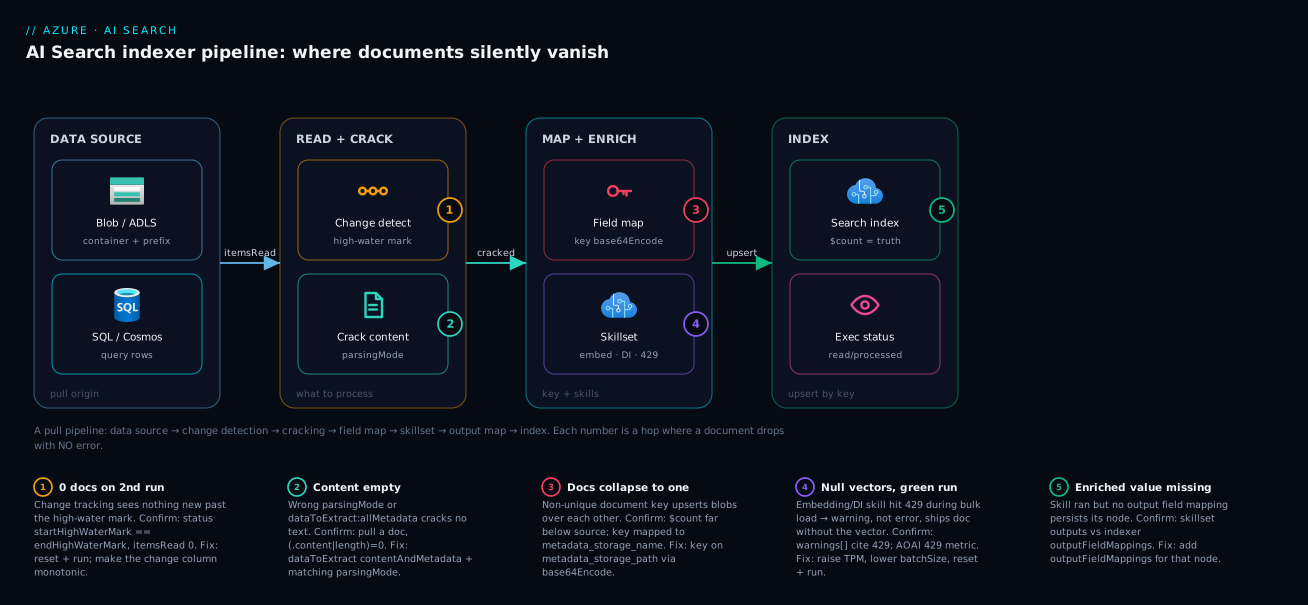
The diagram traces a document through an AI Search indexer and marks where each failure class bites. Left to right: a file or row leaves the data source, change detection decides if it’s new since the high-water mark (badge 1: unchanged → itemsRead = 0 by design), surviving items are cracked per parsingMode/dataToExtract (badge 2: wrong mode → empty content), field mappings set the document key (badge 3: a non-unique key collapses many docs into one, no error), an optional skillset enriches via Azure OpenAI embeddings / Document Intelligence (badge 4: a 429 throttle or bad field path warns and ships a null vector), and output field mappings persist enriched nodes into the index (badge 5: a forgotten mapping means the enrichment never lands).
Every path converges on the same instruments — the indexer’s execution status (itemsRead / itemsProcessed / itemsFailed / warnings[]) and the index’s live $count. That is the whole method: read where the count fell to zero, localise to the hop, read the named error or warning, fix. The first question — “did the engine read anything?” — splits the search: itemsRead = 0 is the left half (data source / change tracking); reads that never land is the right half (cracking / mappings / skills).
Real-world scenario
Finovo Lending built a “policy copilot” — a RAG chatbot over 3,100 underwriting-policy PDFs in Blob, grounded on an Azure AI Search index (vector + semantic retrieval) fronted by an Azure OpenAI GPT-4o deployment. A Standard S1 in Central India; the skillset runs a Split skill plus an AzureOpenAIEmbedding skill against text-embedding-3-large. Three engineers; search + embeddings spend about ₹22,000/month.
The incident surfaced two days after go-live: the bot, fine in the demo, started replying “I couldn’t find relevant policy” to reasonable questions in production. First reflex — the model is bad, tune the prompt. No change. Second reflex — re-run the indexer. It came back success, 0/0 documents, which “confirmed” everything was already indexed, so they went back to blaming retrieval. Three hours in, the bot returned nothing for ~40% of queries and a VP was asking why the launch looked broken.
The breakthrough was the right first question: is the data actually in the index, with vectors? $count returned 3,100, matching the source — documents weren’t missing. But a spot check showed a large fraction with a null contentVector: the documents were there, their embeddings weren’t. Back to the indexer status — the last full run (before the “0/0” reruns) showed success with 612 warnings, unread because the status was green. Filtered for 429s, they were overwhelmingly throttling: the bulk run fired far more embedding calls per minute than the text-embedding-3-large deployment’s TPM allowed, so AI Search warned per chunk and shipped each document without its vector. The “0/0” reruns then read nothing new (change tracking was satisfied) and never re-attempted the embeddings — which is why rerunning “did nothing”.
Two coupled problems: a throttle during the load, and a mental model that read “success” as “complete”. The fix, in two parts — that evening: raise the deployment TPM, lower batchSize, then reset and re-run so every document re-attempted its embedding with headroom (the run finished with 0 warnings, every contentVector populated). The following week: an Azure Monitor alert on the indexer’s warning count, and a post-index check asserting documents-with-a-non-null-vector equals the document count. The lesson on the wall: “A green indexer run is a claim about effort, not results. Read the warnings, then check the vectors.”
The timeline, because the order of moves is the lesson:
| Time | Symptom | Action taken | Effect | What it should have been |
|---|---|---|---|---|
| Day 2, 10:00 | Bot says “no policy found” for 40% | Tune the prompt | No change | Ask: is the data in the index with vectors? |
| 10:30 | Still failing | Re-run indexer | “0/0 success” → assume fine | Don’t read 0/0 as “complete” |
| 12:00 | VP escalates | Check $count |
3,100 — docs present | This narrowed it to enrichment |
| 12:20 | Vectors suspect | Spot-check documents | Many contentVector null |
The breakthrough |
| 12:40 | Root cause | Read warnings[] (612, mostly 429) |
Throttling during bulk load | Read warnings from the start |
| 18:00 | Mitigated | Raise TPM, lower batchSize, reset + run |
Clean run, vectors populated | Correct fix |
| +1 week | Hardened | Alert on warning count; assert vector coverage | Recurrence prevented | The durable fix |
Advantages and disadvantages
The pull-model indexer both causes this class of problem and makes it diagnosable. Weigh it honestly:
| Advantages (why this model helps you) | Disadvantages (why it bites) |
|---|---|
| Declarative: data source + schedule, no ingestion code to maintain | The same abstraction hides where a document fell out — you read execution detail to find the hop |
Per-document errors[] and warnings[] are captured automatically |
They’re behind a green “success” status; you must go look, you aren’t alerted by default |
| Change tracking keeps the index fresh incrementally and cheaply | A stale/misconfigured high-water mark silently indexes nothing on later runs |
| Skillsets add AI enrichment (OCR, embeddings) inline, no glue code | Skill failures are warnings, so a throttled run fills the index with null vectors and still goes green |
reset / resetdocs / resetskills give precise re-processing control |
People delete-and-recreate instead, masking the real cause and losing config |
Mapping functions (base64Encode) handle key/format conversions |
A wrong/missing key mapping collapses many documents into one with no error |
| Limits (doc count, size) are documented and enforced | On Free/Basic they silently stop ingestion when full — looks like a logic bug |
The model is right for keeping a search/RAG index continuously in sync with a source of truth without writing crawlers. It bites hardest on first builds, incremental-refresh setups, and skillset-heavy pipelines at scale — and every disadvantage is manageable, but only if you read the execution detail and the warnings.
Hands-on lab
Reproduce the document-key collapse — a run that looks like it “worked” but holds one document instead of three — then fix it, free-tier-friendly (a Free search service is enough). Run in Cloud Shell (Bash).
Step 1 — Variables and resource group.
RG=rg-search-lab
LOC=centralindia
ST=stsearchlab$RANDOM
SVC=svc-search-lab-$RANDOM   # search service name (must be globally unique)
az group create -n $RG -l $LOC -o table
Step 2 — Create a Free search service and a storage account with sample blobs. Three files with the same filename in different folders — the trap.
az search service create -n $SVC -g $RG --sku free -l $LOC -o table
az storage account create -n $ST -g $RG -l $LOC --sku Standard_LRS -o table
az storage container create --account-name $ST -n docs --auth-mode login
# Three blobs, SAME name, different folders → identical metadata_storage_name
for f in a b c; do echo "policy body $f" > /tmp/report.txt; \
  az storage blob upload --account-name $ST -c docs -n "$f/report.txt" -f /tmp/report.txt --auth-mode login --overwrite; done
Step 3 — Grab the admin key and storage connection string.
ADMIN_KEY=$(az search admin-key show --service-name $SVC -g $RG --query primaryKey -o tsv)
CONN=$(az storage account show-connection-string -n $ST -g $RG --query connectionString -o tsv)
EP="https://$SVC.search.windows.net"
Step 4 — Create the index, data source, and a BROKEN indexer keyed on the filename (reproduce the bug).
# Index: key 'id' + a content field
curl -s -X PUT -H "api-key: $ADMIN_KEY" -H "Content-Type: application/json" \
  "$EP/indexes/idx-lab?api-version=2024-07-01" -d '{
   "name":"idx-lab","fields":[
     {"name":"id","type":"Edm.String","key":true,"filterable":true},
     {"name":"content","type":"Edm.String","searchable":true},
     {"name":"name","type":"Edm.String","searchable":true}]}'

# Data source → the blob container
curl -s -X PUT -H "api-key: $ADMIN_KEY" -H "Content-Type: application/json" \
  "$EP/datasources/ds-lab?api-version=2024-07-01" -d "{
   \"name\":\"ds-lab\",\"type\":\"azureblob\",
   \"credentials\":{\"connectionString\":\"$CONN\"},
   \"container\":{\"name\":\"docs\"}}"

# BROKEN indexer: key mapped to metadata_storage_name (NOT unique across folders)
curl -s -X PUT -H "api-key: $ADMIN_KEY" -H "Content-Type: application/json" \
  "$EP/indexers/idx-lab?api-version=2024-07-01" -d '{
   "name":"idx-lab","dataSourceName":"ds-lab","targetIndexName":"idx-lab",
   "fieldMappings":[
     {"sourceFieldName":"metadata_storage_name","targetFieldName":"id"},
     {"sourceFieldName":"metadata_storage_name","targetFieldName":"name"}]}'
Step 5 — Watch it “succeed” yet index one document. Wait ~20 s, then read status and the count:
sleep 20
curl -s -H "api-key: $ADMIN_KEY" "$EP/indexers/idx-lab/status?api-version=2024-07-01" \
  | jq '.lastResult | {status, read:.itemsRead, processed:.itemsProcessed, failed:.itemsFailed}'
curl -s -H "api-key: $ADMIN_KEY" "$EP/indexes/idx-lab/docs/\$count?api-version=2024-07-01"
Expected: status success, itemsRead: 3, itemsProcessed: 3 — but the count is 1. Three blobs all keyed to report.txt upserted over each other: a green run, one document. The bug, reproduced.
Step 6 — Fix the key with base64Encode(metadata_storage_path) and re-run.
curl -s -X PUT -H "api-key: $ADMIN_KEY" -H "Content-Type: application/json" \
  "$EP/indexers/idx-lab?api-version=2024-07-01" -d '{
   "name":"idx-lab","dataSourceName":"ds-lab","targetIndexName":"idx-lab",
   "fieldMappings":[
     {"sourceFieldName":"metadata_storage_path","targetFieldName":"id","mappingFunction":{"name":"base64Encode"}},
     {"sourceFieldName":"metadata_storage_name","targetFieldName":"name"}]}'
# Reset clears change tracking so all three re-read; then run
curl -s -X POST -H "api-key: $ADMIN_KEY" -H "Content-Length: 0" "$EP/indexers/idx-lab/reset?api-version=2024-07-01"
curl -s -X POST -H "api-key: $ADMIN_KEY" -H "Content-Length: 0" "$EP/indexers/idx-lab/run?api-version=2024-07-01"
sleep 20
curl -s -H "api-key: $ADMIN_KEY" "$EP/indexes/idx-lab/docs/\$count?api-version=2024-07-01"
Expected: the count is now 3 — a unique, encoded key gave each blob its own document.
Validation checklist. You reproduced a “successful” run that indexed one document instead of three, caught it by comparing itemsProcessed (3) to $count (1), and fixed it with a unique base64Encode’d key — no code, no recreate. The steps mapped to what each proves:
| Step | What you did | What it proves | Real-world analogue |
|---|---|---|---|
| 4 | Key on metadata_storage_name |
A non-unique key is silently destructive | Most teams’ first Blob indexer |
| 5 | itemsProcessed=3 but $count=1 |
“Success” ≠ documents present | The 90-second diagnosis |
| 6 | base64Encode(metadata_storage_path) |
The unique-key fix, plus why reset is needed | The actual production fix |
Cleanup.
az group delete -n $RG --yes --no-wait
Cost note. A Free search service costs nothing; storage and a few blobs are negligible; deleting the resource group stops everything. (Free limits suit this lab, never production.)
Common mistakes & troubleshooting
This is the playbook — the part you bookmark. The scannable grid first, then full detail for the entries that bite hardest:
| # | Symptom | Root cause | Confirm (exact cmd / portal path) | Fix |
|---|---|---|---|---|
| 1 | Run “success”, 0/0 documents, first run | Data source can’t see items: wrong container/prefix/query, or identity lacks read | Status itemsRead:0; az storage blob list --prefix returns >0 but indexer reads 0; check data-source container.query |
Fix container/prefix/query; grant identity Storage Blob Data Reader |
| 2 | Run “success”, 0 documents, only on the 2nd+ run | Change tracking: nothing new past the high-water mark | Status startHighWaterMark == endHighWaterMark, itemsRead:0 |
If a true re-index is wanted, reset + run; make the high-water column monotonic |
| 3 | $count far below source, run “success”, no errors |
Non-unique document key collapsing many → one | Compare $count to distinct source keys; `jq '.fields[] |
select(.key)'; check fieldMappings` |
| 4 | itemsFailed>0, “invalid document key” |
Path key without encoding (illegal /, :) |
jq '.lastResult.errors[]' shows the key + message |
Add base64Encode mapping function on the key |
| 5 | Documents read but content empty everywhere |
Wrong parsingMode / dataToExtract: allMetadata |
Pull a doc, `(.content | length)=0; check parameters.configuration` |
| 6 | Index built, but vector field null on many docs, run green | Skillset 429 throttle on AOAI/DI embeddings during bulk load | `jq '.lastResult.warnings[] | select(.message |
| 7 | A skill’s output always null, others fine | Wrong skill input/output field path (/document/...) |
jq '.lastResult.warnings[]' “input not found”; inspect skillset inputs |
Fix the source path + context; ensure the source node exists |
| 8 | Run “success” but itemsFailed>0 and docs missing |
maxFailedItems set high/-1, swallowing failures |
Status failed>0 while status:success; check parameters.maxFailedItems |
Set maxFailedItems:0, read the now-visible errors[], fix root cause |
| 9 | SQL/Cosmos indexer reads 0, table has rows | Data-source query excludes all rows / wrong change column |
Run the data-source query in the DB; jq '.container.query' |
Fix the query; Cosmos: order by _ts for change tracking |
| 10 | Custom skill warns per doc; enrichment empty | Web API skill endpoint 5xx/timeout/bad shape | jq '.lastResult.warnings[]' names the URI + status; call endpoint with the {"values":[...]} envelope |
Fix function response shape; raise timeout; check auth |
| 11 | Skill runs (no warning) but index field still null | Missing output field mapping for the enriched node | Diff skillset outputs vs indexer outputFieldMappings |
Add outputFieldMappings for that node |
| 12 | Large docs missing; small ones fine | Per-document/field size limit or skill truncation | `jq '.lastResult.errors[] | select(.errorMessage |
| 13 | Count drops over time, source unchanged | Deletion detection removing live docs (bad marker/value) | jq '.dataDeletionDetectionPolicy' on the data source |
Fix softDeleteColumnName/softDeleteMarkerValue |
| 14 | $count is correct but search returns nothing |
Not an indexer bug — field not searchable/retrievable |
Index schema: field searchable/retrievable flags |
Mark the field searchable/retrievable; rebuild index |
| 15 | Indexer never appears in execution history | Indexer disabled:true or wrong targetIndexName |
jq '{disabled,targetIndexName,schedule}' on the indexer |
Set disabled:false; point at the right index; run |
The three “looks green but isn’t” traps — the ones that most waste an afternoon — in full:
Row 3 — fewer documents than the source, green run, no errors. A non-unique document key: each colliding item is a legal upsert over the previous, so the index count matches the number of distinct key values, not the total. Confirm with $count vs distinct source keys and jq '.fieldMappings' (key on a repeating column like metadata_storage_name). Fix by keying on a unique value — Blob metadata_storage_path via base64Encode, SQL the primary key — then reset + run.
Row 6 — index fully populated but the vector field is null on many documents, run green. A skillset throttle: the AzureOpenAIEmbedding (or Document Intelligence) skill hit 429 during the bulk load, so AI Search warned per document and shipped it without the embedding. Confirm via jq '.lastResult.warnings[] | select(.message|test("429";"i"))' and the AOAI 429 metric. Fix by raising deployment TPM, lowering batchSize, then reset + run.
Row 8 — “success” but itemsFailed is non-zero and documents are missing. maxFailedItems was raised (often -1) to force a green run, so failures are tolerated and hidden. Confirm: success with failed > 0 and a large/-1 parameters.maxFailedItems. Fix by setting it to 0, re-running, reading the now-surfaced errors[], and fixing the real cause rather than masking it.
Best practices
- Read
itemsProcessedand the index$count, never the status. “Success” means the engine finished its chosen work; only the processed count and live document count prove documents are present. Bake both into every post-deploy check. - Alert on warnings, not just failures. A green-with-warnings run is the classic silent half-failure (null vectors). Wire an Azure Monitor alert on the indexer’s warning count and treat it as a real signal.
- Always key Blob indexers on
base64Encode(metadata_storage_path). Paths are globally unique and encoding handles the illegal characters; never key onmetadata_storage_name. - Keep
maxFailedItemsat 0 in development. Let failures fail the run so you see them; only relax it once you understand and accept a known bad minority in production. - Use
reset/resetdocs/resetskills, not delete-and-recreate. Recreating masks the cause by resetting change tracking. Reset deliberately and you keep your config and your diagnosis. - Validate enrichment coverage after a load. Assert that the count of documents with a non-null vector (or key-phrase) equals the document count; a gap means a skill silently dropped output.
- Match
parsingModeanddataToExtractto the content before the first run.contentAndMetadatafor text, the right JSON/delimited mode for structured files — a wrong mode produces empty content with no error. - Make change-tracking columns strictly monotonic. SQL
rowversion, Cosmos_ts, or native SQL change tracking; never aLastModifiedthat some writes skip, or you’ll silently miss updates. - Chunk large documents with a Split skill before embedding. It stays under skill size limits and gives better RAG retrieval — the same work serves both.
- Prefer managed identity over connection-string keys for data sources. It removes secrets from the data-source definition and makes “can’t see the data” a clean RBAC question, not a key-rotation mystery.
- Treat indexer definitions as code (Bicep), reviewed. Field mappings, key encoding and parsing config are exactly the settings that, mis-set, silently lose documents — review them like schema.
Security notes
The most common “the indexer reads zero documents” cause is, at root, an authorization failure that surfaced as silence. Get identity right and a whole symptom class disappears.
- Use a managed identity for the data-source connection — reference the search service’s system-assigned (or user-assigned) identity instead of an account key, and grant it the data-plane role: Storage Blob Data Reader for Blob/ADLS, db_datareader for Azure SQL, the read role for Cosmos. A missing role makes the indexer read nothing, often without a loud 403, so verify it first. See Managed identity: system-assigned vs user-assigned patterns.
- Reach the data source privately with a shared private link (managed private endpoint) so pulls never traverse the public internet; a source firewall with no private link blocks the indexer (another silent zero-read). See Private Endpoint vs Service Endpoint: which isolation to use.
- Protect the skillset’s backing services with identity too — the AzureOpenAIEmbedding/Document Intelligence skills should auth via the search identity (granted Cognitive Services OpenAI User), not embedded keys, so a rotated key never silently breaks enrichment.
- Restrict admin keys; prefer RBAC. The admin key can rebuild and delete indexes — store it in Key Vault and prefer Entra ID roles (Search Service Contributor / Index Data Contributor). Same hygiene as Key Vault 403 Forbidden: Firewall, RBAC, Soft-Delete and Recovery.
- Index only what you should — source-side filters (
query, soft-delete) and field selection keep sensitive columns out of a queryable index; the cheapest control is not indexing the field.
Cost & sizing
The bill has two independent drivers; conflating them wastes money on the wrong one.
| Cost driver | What you pay for | Scales with | Right-sizing move |
|---|---|---|---|
| Search service tier | Replicas × partitions × SU rate | Query load (replicas) + index size (partitions) | Size partitions to index size, replicas to QPS/SLA |
| Embedding calls (skillset) | AOAI tokens for text-embedding-* |
Document volume × chunks × re-runs | Chunk sensibly; avoid needless full re-runs |
| Document Intelligence (skillset) | Pages processed | Document count × pages | Crack natively when possible; DI only when needed |
| Storage (source + knowledge store) | Blob/ADLS GB | Corpus size | Tier cold data; see access-tier guidance |
A few sizing realities that prevent the classic mistakes:
- More partitions/replicas does nothing for a zero-document or null-vector bug. Those are logic/throttle problems; scaling the search service burns money without touching the cause. Diagnose first, scale only for genuine query-load or index-size pressure.
- The expensive re-run is the embedding re-run. A full
reset+runre-embeds every document — fine when you must, but on a 3,100-doc corpus that’s thousands of embedding calls. Preferresetdocsto re-embed only the affected keys when you can identify them. - Free tier is for labs only. It caps total documents, index size and storage and stops ingesting when full — which masquerades as a logic bug. Basic gives a small production footprint; Standard S1+ is the realistic floor for RAG corpora.
- Rough figures (Central India, indicative). Free is ₹0 (lab limits); Basic is low thousands of rupees/month; Standard S1 at one replica/partition is roughly ₹20,000–25,000/month, climbing per added SU. Embedding spend is separate and volume-driven — a one-off 3,000-document load with
text-embedding-3-largeis a few hundred rupees, but repeated full re-runs multiply that.
The cheapest optimisation is not re-running unnecessarily (let change tracking work) and not over-provisioning to mask a bug. For source-storage cost, tier cold blobs per Azure Blob Access Tiers: Hot, Cool, Cold, Archive and the Cost Model.
Interview & exam questions
Q1. An indexer run shows “success” with 0 documents processed. What is your first diagnostic step, and why isn’t “success” reassuring?
Read lastResult.itemsRead and the index’s live $count. “Success” only means the engine finished the work it chose; itemsRead: 0 means the data source or change tracking saw nothing to do, which is a distinct bug from “everything failed in processing”. Status is a claim about effort, not results. (AI-102.)
Q2. A Blob indexer indexes 1 document when the container has 2,000 files. No errors. What happened and how do you fix it?
The document key is non-unique — likely mapped to metadata_storage_name, which repeats across folders — so every blob upserted over the last. Fix by keying on metadata_storage_path through the base64Encode mapping function (unique + handles illegal characters), then reset and re-run.
Q3. Why does the second run of a working SQL indexer read 0 items, and is that a bug?
It’s by design: after the first run the indexer stores a high-water mark, and later runs only read rows past it. With no changed rows, itemsRead is 0. It’s a bug only if you expected new/updated rows that didn’t advance the high-water column (non-monotonic column or backfilled old timestamps).
Q4. Your RAG index is fully populated but many documents have null vectors, and the indexer run was green. What’s the likely cause?
The embedding skill hit 429 throttling against the Azure OpenAI deployment during the bulk load; AI Search recorded a warning per throttled document and shipped it without the vector. Confirm via the indexer warnings[] (429 messages) and the AOAI 429 metric; fix by raising TPM, lowering batchSize, then reset + run.
Q5. Distinguish an indexer error from a warning. Why does it matter operationally?
An error means the document was not indexed and (with default maxFailedItems: 0) fails the run. A warning means the document was indexed but partially — a skill produced nothing. Warnings leave the run green, so a throttled or mis-mapped enrichment silently degrades the index unless you read warnings[] and alert on the warning count.
Q6. What does base64Encode do in a field mapping, and when is it mandatory?
It URL-safe-base64-encodes the source value. It’s mandatory on the key when the source value contains characters illegal in a document key (only letters, digits, _, -, = are allowed) — chiefly Blob metadata_storage_path, which contains / and :.
Q7. A skill’s output field is always null though the skill shows no warning. Where do you look?
At the indexer’s output field mappings. Skill outputs live only in the transient enriched-document tree; without an outputFieldMappings entry mapping that node to an index field, the value never persists. Diff the skillset’s outputs against the indexer’s outputFieldMappings.
Q8. Difference between reset, resetdocs, and resetskills?
reset clears all change-tracking state so the next run re-reads everything. resetdocs reprocesses a specific set of document keys. resetskills forces specific skills to re-run (bypassing cached enrichments) without re-reading the source. Use the narrowest one that fixes your case.
Q9. An indexer using a managed identity reads 0 documents on its first run, no obvious error. What do you suspect? A missing data-plane RBAC role for the search service’s identity on the source (e.g. Storage Blob Data Reader). Authorization failures here often surface as a silent zero read rather than a loud 403. Verify the role assignment on the source resource before touching the indexer config.
Q10. Documents are in the index ($count is correct) but a search query returns nothing. Indexer bug?
No — that’s an index schema issue. The field is likely not searchable (so full-text search ignores it) or not retrievable (so it isn’t returned). The indexer did its job; fix the field attributes and rebuild the index. (AI-102.)
Quick check
- An indexer run is “success” with
itemsRead: 0on the first run — which two hops are the suspects? - The index has 30 documents but the source has 4,000, no errors. What is almost certainly wrong, and what’s the Blob fix?
- Your run is green but the vector field is null on many documents. What hidden signal do you read, and what’s the usual cause?
- Which reset operation re-reads the entire data source, and which only re-runs specific skills?
- The index
$countis correct but search returns no hits. Is that an indexer problem?
Answers
- The data source (wrong container/prefix/query, or the identity lacks read) and change detection is not a suspect on a first run — so it’s the data source / connection / authorization. On a second run, change tracking would be the suspect instead.
- A non-unique document key collapsed many blobs into one document each per distinct key. Fix by keying on
metadata_storage_paththrough thebase64Encodemapping function, then reset and re-run. - Read the indexer’s
warnings[]array (the run’s green status hides them). The usual cause is 429 throttling of the Azure OpenAI/Document Intelligence skill during the bulk load, which ships documents without their enrichment. resetre-reads the entire data source (clears the high-water mark);resetskillsonly forces specific skills to re-run without re-reading the source. (resetdocsre-processes specific keys.)- No — that’s an index schema issue: the field isn’t
searchableand/orretrievable. The indexer populated the document correctly; fix the field attributes.
Glossary
- Indexer — A crawler that pulls from a data source, optionally enriches via a skillset, and upserts into an index on a schedule.
- Data source — The connection definition (type + credentials + container/query) the indexer reads from: Blob, ADLS Gen2, Azure SQL, Cosmos DB, Table Storage.
- Document key — The single
key: true,Edm.Stringfield that uniquely identifies a document; the upsert key. A non-unique key silently merges documents. - Change detection / high-water mark — The stateful policy and stored cursor that let the indexer read only items new or changed since the last run.
- Document cracking — Extracting text and metadata from a source file/row according to
parsingMode(default/text/delimitedText/json/jsonArray/jsonLines) anddataToExtract(contentAndMetadata/allMetadata/storageMetadata). - Field mapping — A rule mapping a source field to an index field, optionally through a
mappingFunction; runs before the skillset. mappingFunction— A transform applied during mapping:base64Encode/base64Decode,jsonArrayToStringCollection,urlEncode, etc.- Skillset — An ordered set of skills that enrich each document (OCR, language, embeddings); outputs live in the enriched document tree.
- Enriched document — The transient in-memory tree (
/document/...) holding skill inputs and outputs during a run. - Output field mapping — A rule mapping an enriched-tree node to an index field; runs after the skillset. Required to persist skill outputs.
maxFailedItems/maxFailedItemsPerBatch— How many document failures the run tolerates before failing (default 0); raising them hides dropped documents.- Warning vs error — A warning means the document was indexed but partially (a skill produced nothing); an error means the document was not indexed.
reset/resetdocs/resetskills— Operations clearing change-tracking state, reprocessing specific keys, or forcing specific skills to re-run, respectively.
Next steps
- Build the baseline first if you haven’t: Your First Azure AI Search Index: Data Source, Indexer, Skillset, and Querying.
- Put the populated index to work: Build RAG with Azure OpenAI On Your Data: Grounding, Citations, and Tuning Retrieval.
- Get the identity right so “can’t see the data” never happens: Managed identity: system-assigned vs user-assigned patterns.
- Reach the data source privately: Private Endpoint vs Service Endpoint: which isolation to use.
- Alert on indexer warnings and failures: Azure Monitor & Application Insights for observability.