Your chatbot is fluent, confident, and wrong. Ask it about your own refund policy and it invents one — plausible, well-written, and not what your company actually does. That is a hallucination, and it is the single reason “we plugged in GPT and shipped it” turns into a support incident. The fix is retrieval-augmented generation (RAG): before the model answers, you retrieve the most relevant passages from your documents and hand them to the model as context, with an instruction to answer only from that context and to cite which passage it used. The model stops guessing and starts quoting. On Azure, the fastest production path to this is a built-in feature called Azure OpenAI On Your Data — a managed RAG orchestrator that sits between your GPT-4o deployment and an Azure AI Search index, runs the retrieve-then-generate loop for you, and returns answers with citations attached, all from a single chat-completions call.
This is a build, not a survey. By the end you will have a working grounded chatbot: a GPT-4o deployment and a text-embedding-3-large deployment in one Azure OpenAI resource, an Azure AI Search index built from a Blob container of PDFs (chunked, vectorised, semantically rankable), and the two wired so one REST call to /chat/completions with a data_sources block returns an answer plus a citations array pointing at the exact source chunks. You will do it three ways — the Azure AI Foundry portal (“Add your data”, fastest to a working playground), the az CLI plus REST (how you script and automate it), and Bicep (how you put it in a repo) — with the expected output and a validation check at every step, all on tiers that cost a few hundred rupees for the lab.
You will also leave knowing what makes RAG good rather than merely present: how documents split into chunks and why chunk size is the highest-leverage knob you own; why hybrid + semantic retrieval beats keyword-only and pure-vector; what strictness and topNDocuments do to recall and hallucination rate; and the failure modes behind the dreaded empty citations array — the bot saying “I don’t know” when the answer is plainly in your data. The prose stays tight; every option, limit, error and tier goes in a scannable table beside the commands.
What problem this solves
A raw large language model knows only its training data, frozen at a cutoff, and has never seen your private documents — contracts, runbooks, product manuals, HR policies. Ask it about any of those and it does one of two unacceptable things: it refuses, or worse, it confabulates a fluent, specific, wrong answer you cannot ship to customers or employees. Fine-tuning is the wrong hammer — slow, expensive, it bakes facts in statically and still hallucinates at the edges. What you actually need is for the model to look things up at answer time and show its work.
RAG does exactly this. You keep your knowledge in a searchable index, and at query time retrieve the passages most relevant to the question and inject them into the prompt with a hard instruction: “Answer using only the sources below; if the answer isn’t there, say you don’t know; cite every claim.” The model becomes a reader of your text rather than an oracle reciting from memory. Update a document, re-index, and the answer changes — no retraining. Require citations and every answer is auditable.
Who hits the pain without it: anyone building a support assistant, internal knowledge bot, “chat with your docs” feature, or a copilot over a corpus. The naive approach — stuff the whole document set into the prompt — dies on the context window limit and on cost. Hand-rolling embeddings, a vector store, a retrieval loop, prompt assembly and citation parsing is a month of plumbing On Your Data gives you in an afternoon. The trade-off is less control over the orchestration internals — which is why the retrieval knobs below matter: they are the control you do get.
To frame the whole field before the build, here is the RAG pipeline as stages, what each stage owns, and the one decision that dominates it:
| Stage | What it does | Azure component | The decision that dominates it |
|---|---|---|---|
| Ingest | Crack files into text | Blob + AI Search indexer (+ Document Intelligence for scans) | Which file types; OCR or not |
| Chunk | Split text into retrievable passages | AI Search index projection / Integrated Vectorization | Chunk size + overlap |
| Embed | Turn each chunk into a vector | text-embedding-3-large deployment |
Which embedding model; dimensions |
| Retrieve | Find the top-k chunks for a question | AI Search (hybrid + semantic) | Query type; topNDocuments |
| Generate | Answer from those chunks, with citations | GPT-4o + On Your Data orchestrator | strictness; the system prompt |
Learning objectives
By the end of this article you can:
- Explain the RAG retrieve-then-generate loop and why grounding with citations eliminates most hallucinations without fine-tuning.
- Stand up the two model deployments RAG needs — a GPT-4o chat model and a
text-embedding-3-largeembedding model — in one Azure OpenAI resource. - Build an Azure AI Search index over a Blob container with chunking and vector embeddings, using Integrated Vectorization so the index does the embedding for you.
- Wire Azure OpenAI On Your Data to that index three ways — Foundry portal,
azCLI + REST, and Bicep — and get an answer with a populatedcitationsarray. - Choose the right query type (
vectorSemanticHybridvsvectorvssemanticvssimple) and justify it against recall and cost. - Tune the retrieval knobs —
strictness,topNDocuments,inScope,roleInformation— and predict their effect on recall vs hallucination. - Diagnose the empty-citations and “answer not grounded” failure modes to a specific cause and fix each one.
- Lock the data path down with managed identity instead of API keys, and size the monthly cost across embeddings, search SKU and chat tokens.
Prerequisites & where this fits
You should already be able to deploy and call an Azure OpenAI model — if not, do that first in Deploy Your First Azure OpenAI Model: Resource, Deployment, and Calling GPT-4o from REST and the SDK. You should know what a deployment is (a named instance of a model with its own quota), and the difference between Standard and Global Standard from Azure OpenAI Deployment Types Explained: Standard vs Global vs Data Zone vs Provisioned, and When Each Fits. You should understand tokens and the context window, because RAG spends your token budget on retrieved context — see Tokens, Context Windows, and Cost: How Azure OpenAI Billing Actually Works Before You Burn Your Budget. Finally, the retrieval half of this article lives in Azure AI Search; if “data source, index, indexer, skillset” are unfamiliar, build one first in Your First Azure AI Search Index: Data Source, Indexer, Skillset, and Querying in Under an Hour.
This sits in the AI/ML application track, one layer above the model and the search index, assembling them into a product feature. It assumes the resource-organisation model from Azure AI Foundry Explained: How Hubs, Projects, and Connections Organize Your Whole AI Estate, and it pairs with Managed Identities Demystified: System vs User-Assigned and When to Use Each for the keyless wiring you will use in production. You need an Azure subscription with access to Azure OpenAI, the az CLI (or Cloud Shell), and roughly an hour.
A quick map of who owns what during a RAG build, so you know which team to call when a stage misbehaves:
| Layer | What lives here | Who usually owns it | What it can break |
|---|---|---|---|
| Documents / Blob | The source corpus | Content / data team | Stale answers, missing files |
| AI Search index | Chunks, vectors, fields | Search / platform | Bad chunks → bad retrieval; empty results |
| Embedding deployment | text-embedding-3-large |
AI / platform | Vectorization fails; quota 429 |
| Chat deployment | GPT-4o | AI / app team | Token limits, refusals, cost |
| On Your Data orchestrator | The RAG loop + citations | App team | Empty citations, ungrounded answers |
| Identity / network | Managed identity, private endpoints | Security / platform | 401/403 between resources |
Core concepts
Five mental models make every later step obvious.
Grounding means the model reads, it does not recall. In a grounded answer the facts come from text placed in the prompt at request time, not from the model’s parameters. Azure OpenAI On Your Data enforces this by retrieving passages from your index and prepending them to your messages with a system instruction to answer only from them. The model’s job shifts from “know the answer” to “find and quote it in the provided sources.” When the sources lack the answer, a well-configured RAG system says so rather than inventing one — that honest “I couldn’t find it” is a feature, not a bug.
Citations are the receipt. Every grounded answer returns a citations array: each entry has the source content (chunk text), a title, a filepath/url, and a chunk_id. In the answer text the model inserts markers like [doc1], [doc2] that map to entries in that array. An empty citations array is the canonical failure signal — retrieval found nothing usable, so the answer (if any) is not grounded. Read that array as your first diagnostic.
Retrieval quality is set long before generation. The model can only quote what retrieval hands it. If the relevant passage was never chunked cleanly, never embedded, or never ranked into the top-k, the model never sees it and cannot cite it — no prompt tuning recovers a passage that retrieval dropped. That is why chunking and query type are the highest-leverage decisions in the whole pipeline, and why “the bot can’t answer X” is usually a search problem, not a model problem.
Chunks, not documents, are the unit of retrieval. A 40-page PDF is useless as a single retrieval unit — too big to embed meaningfully, too big to fit many into a prompt. So documents split into chunks (passages of, say, 512 tokens) with a small overlap so a sentence spanning a boundary isn’t lost. Each chunk is embedded into a vector and stored as its own searchable record. Retrieval ranks chunks; citations point at chunks. Chunk too large and retrieval gets imprecise and prompts expensive; too small and you sever the context a passage needs.
Hybrid + semantic beats either half alone. Keyword (BM25) search nails exact terms, product codes and acronyms but misses paraphrase. Vector search nails meaning and synonyms (“how do I get my money back” ↔ “refund policy”) but can drift on exact identifiers. Hybrid runs both and fuses the result lists. Semantic ranking (an Azure AI Search L2 re-ranker) then re-orders the fused top by deep relevance and produces the captions On Your Data uses. The strongest default — vectorSemanticHybrid — is all three together, and the one to reach for first.
The vocabulary in one table
Before the build, pin down every moving part. The glossary at the end repeats these for lookup; this table is the mental model side by side:
| Concept | One-line definition | Where it lives | Why it matters to RAG quality |
|---|---|---|---|
| Grounding | Answering only from provided sources | On Your Data system prompt | Stops hallucination |
| Citation | A reference back to the source chunk | citations array in the response |
Auditability; trust |
| Chunk | A retrievable passage of a document | AI Search index record | The unit of retrieval; size is leverage |
| Embedding | A chunk turned into a vector | text-embedding-3-large deployment |
Enables semantic match |
| Vector field | The stored embedding on a chunk | AI Search index field (Collection(Edm.Single)) |
What vector search ranks on |
| Hybrid search | Keyword + vector fused | AI Search query type | Best recall |
| Semantic ranker | L2 re-rank of top results | AI Search feature (billed) | Best precision; powers captions |
strictness |
How relevant a chunk must be to be used | On Your Data param (1–5) | Recall vs hallucination dial |
topNDocuments |
How many chunks to retrieve | On Your Data param (3–20) | Context breadth vs token cost |
inScope |
Restrict answers to retrieved data | On Your Data param (bool) | Hard guard against off-topic answers |
data_sources |
The block that turns a chat call into RAG | Chat-completions request body | The whole On Your Data wiring |
How On Your Data runs the loop
When you add a data_sources block to a chat-completions request, Azure OpenAI stops being a plain model call and becomes an orchestrator. Understanding the exact sequence tells you precisely where each failure mode bites.
The orchestrated request runs these steps, in order:
| Step | What happens | Which resource | Failure here looks like |
|---|---|---|---|
| 1 | Your messages + data_sources arrive |
Azure OpenAI endpoint | 400 if data_sources malformed |
| 2 | The user question is rewritten into search query(s) | GPT-4o (an internal call) | Poor recall if the question is vague |
| 3 | The question is embedded (if vector/hybrid) | Embedding deployment | 429 / “vectorization failed” |
| 4 | The index is queried for top-k chunks | Azure AI Search | 403 if auth wrong; empty if index empty |
| 5 | Chunks below strictness are filtered out |
Orchestrator | Empty citations if all filtered |
| 6 | Surviving chunks are injected into the prompt | Orchestrator | Truncated if too many tokens |
| 7 | GPT-4o answers from those chunks, inserts [docN] |
GPT-4o | Ungrounded answer if inScope=false |
| 8 | Answer + citations array returned |
Azure OpenAI endpoint | Your app renders the receipts |
Two consequences matter. First, step 2 means RAG quietly spends extra GPT-4o tokens rewriting the query before it answers, and latency is the sum of an embedding call, a search call and a generation call. Second, step 5 is where most “it returns nothing” bugs live: retrieval found chunks, but the strictness filter judged them insufficiently relevant and dropped them all. The fix is almost always to lower strictness or improve chunk quality — not to touch the model.
The whole orchestration is configured by one data_sources block on the chat-completions request. Here is every parameter that block carries, what it does, and its default — the reference you keep open while assembling the call:
| Parameter | What it sets | Required? | Default | Notes / valid values |
|---|---|---|---|---|
type |
The data source kind | Yes | — | azure_search for AI Search |
endpoint |
Search service URL | Yes | — | https://<svc>.search.windows.net |
index_name |
Which index to query | Yes | — | Must already exist and be populated |
authentication |
How OpenAI reaches Search | Yes | — | system_assigned_managed_identity (preferred), user_assigned_…, or api_key |
query_type |
Retrieval strategy | No | simple |
simple · semantic · vector · vector_semantic_hybrid |
embedding_dependency |
Embedding deployment for vector/hybrid | If vector/hybrid | — | deployment_name of your embedding model |
strictness |
Min relevance to use a chunk | No | 3 | Integer 1–5 |
top_n_documents |
Chunks retrieved into the prompt | No | 5 | Integer 3–20 |
in_scope |
Answer only from retrieved data | No | true | true = strict grounding; false = allow fallback |
role_information |
The grounding system persona | No | platform default | “Answer only from sources; cite; refuse if absent” |
fields_mapping |
Which index fields hold content/title/vector | If non-default schema | inferred | Point at your content, title, filepath, vector field |
Why not just stuff everything in the prompt
The obvious-but-wrong alternative to retrieval is pasting your whole corpus into the system prompt. It fails on three hard limits at once:
| Approach | Tokens per request | Cost behaviour | Hard ceiling | Verdict |
|---|---|---|---|---|
| Whole corpus in prompt | All of it, every call | Linear in corpus size, every request | Context window (e.g. 128K for GPT-4o) | Dies past a few hundred pages |
| Fine-tune on the corpus | Low | Training cost up front; re-train to update | Still hallucinates; static facts | Wrong tool for fresh facts |
| RAG (retrieve top-k) | Only the relevant chunks | Linear in topNDocuments, not corpus |
Scales to millions of chunks | The right answer |
RAG is the only one whose cost and context usage stay flat as the corpus grows from ten documents to ten million — you always retrieve the same handful of chunks.
Chunking — the highest-leverage knob
Retrieval ranks chunks, the model quotes chunks, citations point at chunks. Get chunking wrong and nothing downstream can recover. With Integrated Vectorization in Azure AI Search, the index split + embed your documents during indexing, controlled by a few parameters you set once.
The chunking parameters, what they do, and the trade-off each carries:
| Parameter | What it controls | Typical value | Too low → | Too high → |
|---|---|---|---|---|
| Chunk size (tokens) | Length of each passage | 512 | Severed context; fragments don’t make sense | Imprecise retrieval; fewer fit in prompt; higher cost |
| Chunk overlap (tokens / %) | Shared text between adjacent chunks | ~10% (e.g. 50 tokens) | Sentences split across boundary are lost | Duplicate content; index bloat |
| Embedding model | How chunks become vectors | text-embedding-3-large |
Weaker semantic match | More cost/dimensions for marginal gain |
| Dimensions | Vector length | 1536 (or 3072) | Less semantic fidelity | Larger index; slower; costlier storage |
A few hard-won rules. 512 tokens with ~10% overlap is the sane default for prose — large enough to hold a coherent thought, small enough to retrieve precisely and pack several into a prompt. Push to 1024 only when answers need longer continuous passages (legal clauses, long procedures). Below 256 you sever context and retrieval returns fragments the model can’t reason over. Overlap protects facts that straddle a boundary: with zero overlap, a sentence split across two chunks may be findable in neither.
Chunk boundaries matter as much as size — splitting blindly every 512 tokens can cut a table in half or sever a heading from its paragraph. Prefer structure-aware splitting (paragraphs, sentences, Markdown headings) so each chunk is self-contained. For scanned PDFs and images, text extraction must happen first: wire Azure AI Document Intelligence into the skillset so layout (tables, headings, reading order) survives into the chunks; raw OCR that flattens a two-column page into interleaved gibberish poisons retrieval no matter how you tune it. Document type maps to the right ingestion path:
| Source type | Extraction needed | Right tool | Gotcha |
|---|---|---|---|
| Plain text / Markdown | None | Built-in text parser | Watch encoding (UTF-8) |
| Digital PDF (text layer) | Text extraction | Built-in PDF parser | Headers/footers leak into chunks |
| Scanned PDF / image | OCR + layout | Document Intelligence skill | Two-column layout scrambles without layout model |
| Office docs (DOCX/PPTX) | Text extraction | Built-in parser | Speaker notes / comments may be missed |
| HTML | Strip markup | Built-in parser | Nav/boilerplate becomes noise chunks |
Retrieval — query types and the relevance dials
Once chunks are embedded and indexed, the orchestrator queries them. Which query type you choose, and how you set strictness and topNDocuments, decides whether the right chunk reaches the model.
Choosing the query type
The four query types On Your Data supports, and when each fits:
| Query type | How it searches | Best for | Needs vector field? | Needs semantic config? | Relative cost |
|---|---|---|---|---|---|
simple |
Keyword (BM25) only | Exact terms, codes, when no embeddings | No | No | Lowest |
semantic |
Keyword + semantic re-rank | Keyword-friendly corpus, better ordering | No | Yes | + semantic charge |
vector |
Pure vector similarity | Paraphrase-heavy, synonym-rich questions | Yes | No | + embedding calls |
vectorSemanticHybrid |
Keyword + vector + semantic re-rank | Default — most corpora | Yes | Yes | Highest, best quality |
Start with vectorSemanticHybrid. It catches exact identifiers (keyword), paraphrased intent (vector), and re-orders the fused top by deep relevance (semantic ranking), which also produces the captions On Your Data surfaces. Drop to vector only if your corpus is so paraphrase-heavy that keyword adds noise, or to semantic/simple if you can’t run the embedding deployment. Pure simple is a fallback for keyword-perfect corpora (e.g. error-code lookups) where embeddings buy little.
Strictness — the recall-vs-hallucination dial
strictness (integer 1–5, default 3) sets the minimum relevance a retrieved chunk must clear to be used as grounding. It is the most misunderstood knob in On Your Data. Higher is more strict: it discards weakly-relevant chunks, which reduces the chance of grounding on something tangential, but raises the chance of discarding everything and returning an empty answer. Lower is more permissive: it keeps marginal chunks, improving the odds of finding the answer, at the cost of occasionally grounding on a near-miss.
strictness |
Behaviour | Effect on recall | Effect on hallucination | When to use |
|---|---|---|---|---|
| 1 | Keep almost any retrieved chunk | Highest recall | Higher — may ground on tangents | Sparse corpus; “it says I don’t know but the answer exists” |
| 2 | Permissive | High | Slightly higher | Recall problems persist at 3 |
| 3 | Balanced (default) | Balanced | Balanced | Start here |
| 4 | Strict | Lower | Lower | Many false-positive groundings |
| 5 | Only highly-relevant chunks | Lowest recall | Lowest | High-precision domains; accept more “I don’t know” |
The most common production symptom — “the bot says it can’t find the answer, but I’m looking right at it in the PDF” — is most often strictness set too high (or chunk quality too low) filtering out the correct chunk in step 5. Lower strictness one notch and re-test before touching anything else.
topNDocuments — context breadth vs token cost
topNDocuments (3–20, default 5) is how many chunks survive into the prompt. More chunks raise the odds the answer is somewhere in context (recall) but spend more tokens (cost + latency) and can dilute the model’s focus with marginally-relevant text. Fewer chunks are cheaper and sharper but risk excluding the one passage that mattered.
topNDocuments |
Context provided | Token cost | Risk |
|---|---|---|---|
| 3 | Tight, focused | Lowest | May miss the answer chunk |
| 5 | Balanced (default) | Moderate | Good general default |
| 10 | Broad | Higher | Dilution; slower; pricier |
| 20 | Very broad | Highest | Often worse answers + steep token bill |
Tune the two together. If recall is poor, lower strictness first, then consider raising topNDocuments from 5 to 8–10; raising it to 20 rarely helps and reliably inflates your bill. The other guard is inScope (default true): it makes the model answer only from retrieved data and refuse otherwise — leave it on for a strict knowledge bot; turn it off only to let the model fall back on general knowledge when the index has nothing (reintroducing hallucination risk).
Architecture at a glance
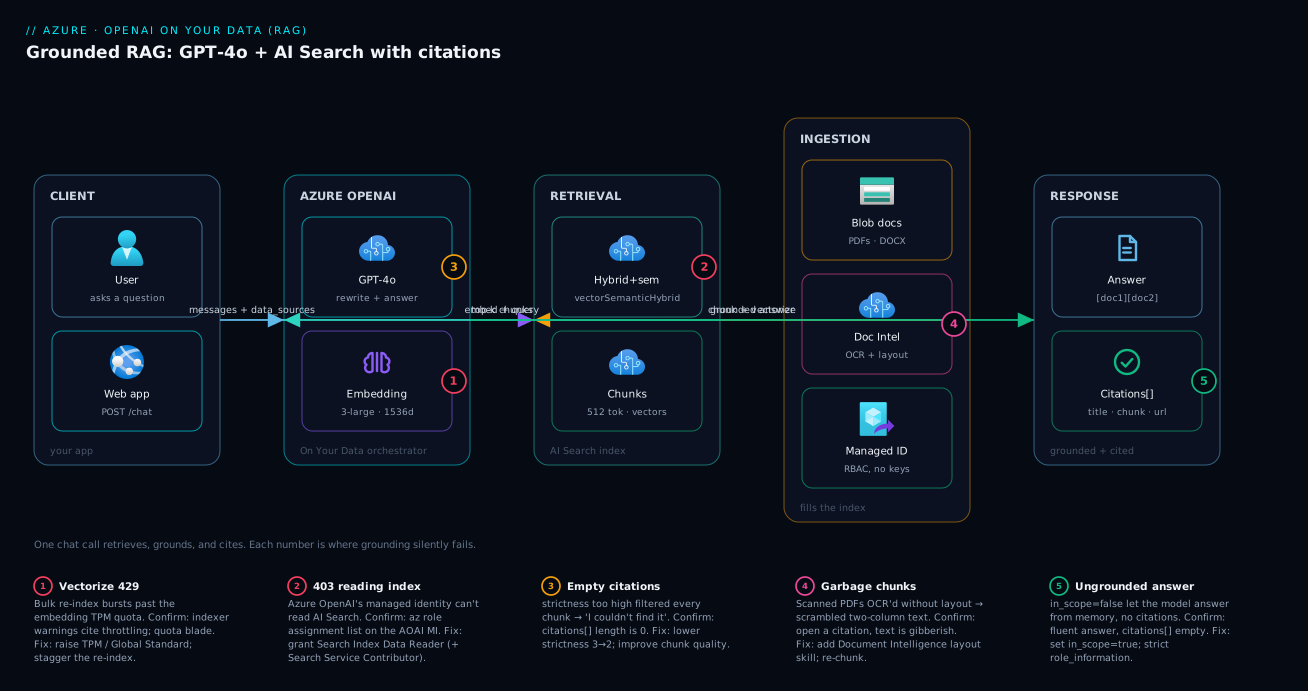
Trace a single question through the system, left to right. A user sends a chat message to your app, which calls the Azure OpenAI chat-completions endpoint with a data_sources block naming your search index. Inside the Azure OpenAI zone the orchestrator asks GPT-4o to rewrite the question into a search query, calls the embedding deployment to vectorise it, and hands that to Azure AI Search, which runs hybrid retrieval over the chunked, vectorised index and returns the top-k chunks, semantically re-ranked. The orchestrator filters those by strictness, injects the survivors into the prompt, and GPT-4o produces a grounded answer with [docN] markers. The response — answer plus citations array — flows back to the app, which renders the citations as clickable receipts.
The other half is the ingestion path that fills the index: documents land in Blob storage, an AI Search indexer crawls them (calling Document Intelligence for scans), and Integrated Vectorization chunks and vectorises every chunk into the index. Every hop between resources should authenticate with a managed identity, not keys — the badges below mark where a missing role assignment or a misconfigured retrieval knob turns a working demo into an empty-citations incident.
Real-world scenario
LumenDesk, a 60-person B2B SaaS company, runs a customer-support team drowning in repetitive tickets. Eighty percent of questions are already answered somewhere in their 1,400-page product manual, their 300 Markdown runbooks, and a folder of policy PDFs — but agents can’t find the right passage fast enough, and customers won’t read the docs. The plan: a “chat with our docs” assistant in the support portal that answers from the manuals and always links the source, so both customers and agents can self-serve with confidence.
The first attempt was a plain GPT-4o call with the manual’s table of contents pasted into the system prompt. It hallucinated cheerfully — invented config flags, cited section numbers that didn’t exist — and the support lead killed it after it told a customer to run a destructive command that was never in any doc. They rebuilt on On Your Data. They dropped the corpus (PDFs + Markdown) into a Blob container, built an AI Search index with Integrated Vectorization at 512-token chunks, 10% overlap, embedded with text-embedding-3-large, and wired a GPT-4o deployment to it with query_type = vectorSemanticHybrid. Day one, citations appeared and the hallucinated commands stopped — every answer now quoted a real chunk and linked the file.
Then the second-order problems arrived. The bot started answering “I couldn’t find that in the documentation” for questions agents knew were covered, and the citations arrays were empty. Two causes, found by reading those arrays: chunks were noisy — PDF headers and footers (“LumenDesk Confidential — Page 47 of 1402”) leaked into every chunk and diluted relevance scores below the default strictness of 3. They added a Document Intelligence layout step to strip boilerplate, re-chunked, and lowered strictness to 2 for the support index; recall jumped. Separately, a load test surfaced 429s on the embedding deployment during the nightly re-index of all 1,700 documents — the embedding TPM quota was too low for the bulk vectorization burst. They moved embeddings to a Global Standard deployment and staggered the re-index.
The outcome after six weeks: 41% of inbound tickets deflected to self-serve, every answer carrying a clickable citation an agent could verify in one click, and zero hallucination incidents because inScope stayed true and the model had no path to answer off-source. The cost was dominated not by chat tokens but by the semantic ranking charges and the Standard S1 search SKU the index size demanded — a deliberate trade for answer quality. LumenDesk’s lesson: RAG quality is a retrieval problem wearing a model costume. Every fix that mattered was in chunking, strictness and search configuration — not one was a prompt tweak.
Advantages and disadvantages
On Your Data is a managed orchestrator: you trade fine-grained control for speed-to-grounded. The explicit trade-off:
| Advantages | Disadvantages |
|---|---|
| Grounded answers with citations from a single API call | Less control over the orchestration internals than a hand-built loop |
| No retraining — update a doc, re-index, answer changes | Higher token cost + latency per call (query rewrite + embed + retrieve + generate) |
| Built-in chunking via Integrated Vectorization | Opinionated defaults you must learn to tune (strictness, query type) |
inScope gives a hard anti-hallucination guard |
Empty-citations failures need diagnosis skill to fix |
| Managed-identity wiring keeps keys out of code | Requires an AI Search service (a real monthly cost) |
| Works from REST, SDKs, and the Foundry playground | Citation rendering in your UI is still your job |
When the managed path wins: you want a grounded chatbot in production this week, your corpus is documents (not a bespoke graph), and you value citations and inScope over orchestration control. When you outgrow it: you need custom retrieval logic (multi-index routing, re-ranking with your own model, agentic multi-hop retrieval, query decomposition), at which point you graduate to a hand-built pipeline (LangChain/Semantic Kernel) over the same AI Search index. The index is the durable asset; the orchestrator is swappable.
Hands-on lab
You will build a grounded chatbot end to end: two model deployments, a vectorised AI Search index over sample PDFs, and the On Your Data wiring that returns an answer with citations. Do the portal first for a fast win, then az CLI + REST, then Bicep. Every step states the expected output and a validation check; teardown is at the end.
Lab prerequisites: an Azure subscription with Azure OpenAI access approved, the az CLI ≥ 2.60 (or Cloud Shell), curl and jq, and Owner or Contributor on a resource group. Pick a region that has both GPT-4o and text-embedding-3-large (this lab uses eastus). Costs for the lab are a few hundred rupees if you tear down within a day.
Set shared variables once:
RG=rg-rag-lab
LOC=eastus
AOAI=aoai-rag-$RANDOM          # Azure OpenAI resource (must be globally unique)
SEARCH=search-rag-$RANDOM      # AI Search service (must be globally unique)
STG=stgraglab$RANDOM           # Storage account (3-24 lowercase, unique)
az group create -n $RG -l $LOC -o table
Part A — Portal (fastest to a grounded answer)
The Foundry “Add your data” wizard provisions and wires everything for you; use it to see RAG working before you script it.
- Create the Azure OpenAI resource. In the portal, create a resource of type Azure OpenAI, in
rg-rag-lab, region East US, pricing tier Standard S0. Expected: the resource deploys in ~1 minute. Validate: its Keys and Endpoint blade shows an endpoint likehttps://aoai-rag-xxxx.openai.azure.com/. - Open Azure AI Foundry. From the resource, click Go to Azure AI Foundry portal (or browse to
ai.azure.com). This is where deployments and the chat playground live. Validate: you land in a project scoped to your resource. - Deploy the chat model. In Foundry → Deployments → Deploy model → gpt-4o (pick a current version), deployment name
gpt-4o, type Global Standard (or Standard), accept the default TPM. Expected: state becomes Succeeded. Validate: it appears in the deployments list. - Deploy the embedding model. Deploy text-embedding-3-large, deployment name
text-embedding-3-large. RAG needs this to vectorise chunks. Validate: two deployments now listed. - Create a storage account and upload docs. Create a Standard LRS storage account, add a Blob container
docs, and upload 3–5 sample PDFs (a product manual, a policy doc — any text-bearing PDFs). Validate: the blobs are visible in the container. - Open the Chat playground and Add your data. In Foundry → Chat playground → select the
gpt-4odeployment → Add your data → Add a data source → Azure Blob Storage. Choose your storage account +docscontainer. - Let it create the AI Search index. When prompted for a search resource, choose Create a new Azure AI Search resource (Basic tier is fine for the lab), and select Add vector search with the
text-embedding-3-largedeployment for embeddings. Accept the default chunk size (1024 in the wizard; you’ll tune later). Expected: the wizard runs an indexer that chunks, embeds, and indexes your PDFs — this takes a few minutes. Validate: the data source shows as connected with a green tick. - Ask a grounded question. Type a question whose answer is in your PDFs (e.g. “What is the refund window?”). Expected: the answer comes back with citation chips (1, 2, …) you can click to see the exact source passage. Validate: click a citation — it shows the chunk text and filename. This is RAG working. If the answer is “I can’t find that,” note it and read the troubleshooting section.
- Inspect the wiring. Click View code in the playground. Expected: you see a
chat.completionscall containing adata_sourcesblock of typeazure_searchwith your index name,query_type,strictnessandtop_n_documents. This is exactly what you’ll build by hand next.
Part B — az CLI + REST (scripted, the production path)
Now build the same thing reproducibly. This path assumes you completed steps 1–5 above (resource, two deployments, storage + docs container) — reuse them, or create fresh ones with the variables set earlier.
- Create the resources via CLI (if you skipped Part A):
# Azure OpenAI resource
az cognitiveservices account create -n $AOAI -g $RG -l $LOC \
  --kind OpenAI --sku S0 --custom-domain $AOAI -o table

# Deploy GPT-4o (chat) and the embedding model
az cognitiveservices account deployment create -n $AOAI -g $RG \
  --deployment-name gpt-4o \
  --model-name gpt-4o --model-version 2024-11-20 --model-format OpenAI \
  --sku-name GlobalStandard --sku-capacity 50

az cognitiveservices account deployment create -n $AOAI -g $RG \
  --deployment-name text-embedding-3-large \
  --model-name text-embedding-3-large --model-version 1 --model-format OpenAI \
  --sku-name Standard --sku-capacity 50

# Storage + container, then upload your PDFs
az storage account create -n $STG -g $RG -l $LOC --sku Standard_LRS -o table
az storage container create --account-name $STG -n docs --auth-mode login
az storage blob upload-batch --account-name $STG -d docs -s ./pdfs --auth-mode login
Expected: two deployments in Succeeded state. Validate:
az cognitiveservices account deployment list -n $AOAI -g $RG \
  --query "[].{name:name, model:properties.model.name, state:properties.provisioningState}" -o table
- Create the AI Search service:
az search service create -n $SEARCH -g $RG -l $LOC --sku basic \
  --identity-type SystemAssigned -o table
Expected: provisions in 5–10 minutes. Validate: az search service show -n $SEARCH -g $RG --query status -o tsv returns running.
- Build a vectorised index over Blob. The cleanest scripted route is the AI Search Import and vectorize data flow, which creates the data source, index (with a vector field + vectorizer pointing at your embedding deployment), skillset (split + embed), and indexer in one wizard — run it from the AI Search resource’s Overview → Import and vectorize data, pointing at the
docscontainer and thetext-embedding-3-largedeployment. For a fully scripted build, you author the four objects via the Search REST API (PUT /datasources,/indexes,/skillsets,/indexers?api-version=2024-07-01) with Integrated Vectorization; the AI Search article linked above walks that JSON in full. Validate: the index reports a non-zero document count:
SKEY=$(az search admin-key show -n $SEARCH -g $RG --query primaryKey -o tsv)
curl -s "https://$SEARCH.search.windows.net/indexes/rag-index/docs/\$count?api-version=2024-07-01" \
  -H "api-key: $SKEY"
# Expected: an integer > 0 (one record per chunk)
- Grant the cross-resource roles (managed identity, no keys). On Your Data has Azure OpenAI call AI Search, and the AI Search service call Azure OpenAI for vectorization. Wire both with RBAC:
AOAI_ID=$(az cognitiveservices account show -n $AOAI -g $RG --query identity.principalId -o tsv)
SEARCH_ID=$(az search service show -n $SEARCH -g $RG --query identity.principalId -o tsv)
AOAI_RES=$(az cognitiveservices account show -n $AOAI -g $RG --query id -o tsv)
SEARCH_RES=$(az search service show -n $SEARCH -g $RG --query id -o tsv)

# Azure OpenAI (managed identity) -> read the index
az role assignment create --assignee $AOAI_ID \
  --role "Search Index Data Reader" --scope $SEARCH_RES
az role assignment create --assignee $AOAI_ID \
  --role "Search Service Contributor" --scope $SEARCH_RES
# AI Search (managed identity) -> call the embedding deployment for vectorization
az role assignment create --assignee $SEARCH_ID \
  --role "Cognitive Services OpenAI User" --scope $AOAI_RES
Validate: az role assignment list --assignee $AOAI_ID --scope $SEARCH_RES -o table lists both roles. (If you enabled the Azure OpenAI resource’s own system identity, ensure it is On first via az cognitiveservices account identity assign.)
- Make the grounded call. This is the payload that turns a chat completion into RAG. Authenticate with your Entra token (keyless):
ENDPOINT=$(az cognitiveservices account show -n $AOAI -g $RG --query properties.endpoint -o tsv)
TOKEN=$(az account get-access-token --resource https://cognitiveservices.azure.com --query accessToken -o tsv)

curl -s "${ENDPOINT}openai/deployments/gpt-4o/chat/completions?api-version=2024-10-21" \
  -H "Authorization: Bearer $TOKEN" -H "Content-Type: application/json" \
  -d '{
    "messages": [
      {"role": "system", "content": "You answer ONLY from the provided sources and always cite them. If the answer is not in the sources, say you do not know."},
      {"role": "user", "content": "What is the refund window?"}
    ],
    "data_sources": [{
      "type": "azure_search",
      "parameters": {
        "endpoint": "https://'"$SEARCH"'.search.windows.net",
        "index_name": "rag-index",
        "authentication": { "type": "system_assigned_managed_identity" },
        "query_type": "vector_semantic_hybrid",
        "embedding_dependency": {
          "type": "deployment_name",
          "deployment_name": "text-embedding-3-large"
        },
        "in_scope": true,
        "strictness": 3,
        "top_n_documents": 5
      }
    }]
  }' | jq '{answer: .choices[0].message.content, citations: (.choices[0].message.context.citations | length)}'
Expected output: a JSON object whose answer quotes your document and whose citations count is ≥ 1. Validate: if citations is 0, retrieval returned nothing usable — go straight to the troubleshooting table. To see the actual sources:
# ... | jq '.choices[0].message.context.citations[] | {title, filepath, snippet: (.content[0:120])}'
- Tune and re-test. Re-run step 14 changing one knob at a time: set
"query_type": "simple"(watch paraphrased questions degrade),"strictness": 5(watch borderline questions go empty),"top_n_documents": 10(watch token usage rise in theusageblock). Expected: you can now predict each knob’s effect, which is the real skill this lab teaches.
Part C — Bicep (put it in a repo)
Bicep provisions the resources and identities declaratively. The grounded call itself is a runtime payload (step 14), not infrastructure — Bicep’s job is the resource, the two deployments, the search service, and the role assignments. Save as rag.bicep:
@description('Location for all resources')
param location string = resourceGroup().location
param aoaiName string
param searchName string

// --- Azure OpenAI resource with a system-assigned identity ---
resource aoai 'Microsoft.CognitiveServices/accounts@2024-10-01' = {
  name: aoaiName
  location: location
  kind: 'OpenAI'
  sku: { name: 'S0' }
  identity: { type: 'SystemAssigned' }
  properties: { customSubDomainName: aoaiName }
}

// Chat deployment (GPT-4o)
resource chat 'Microsoft.CognitiveServices/accounts/deployments@2024-10-01' = {
  parent: aoai
  name: 'gpt-4o'
  sku: { name: 'GlobalStandard', capacity: 50 }
  properties: {
    model: { format: 'OpenAI', name: 'gpt-4o', version: '2024-11-20' }
  }
}

// Embedding deployment (must come after chat — same resource serialises deployments)
resource embed 'Microsoft.CognitiveServices/accounts/deployments@2024-10-01' = {
  parent: aoai
  name: 'text-embedding-3-large'
  sku: { name: 'Standard', capacity: 50 }
  properties: {
    model: { format: 'OpenAI', name: 'text-embedding-3-large', version: '1' }
  }
  dependsOn: [ chat ]
}

// --- AI Search service with a system-assigned identity ---
resource search 'Microsoft.Search/searchServices@2024-06-01-preview' = {
  name: searchName
  location: location
  sku: { name: 'basic' }
  identity: { type: 'SystemAssigned' }
  properties: { semanticSearch: 'standard' }   // enable semantic ranking
}

// --- Cross-resource role assignments (the keyless wiring) ---
// Azure OpenAI MI -> read the search index
resource aoaiReadsIndex 'Microsoft.Authorization/roleAssignments@2022-04-01' = {
  name: guid(search.id, aoai.id, 'index-data-reader')
  scope: search
  properties: {
    // Search Index Data Reader
    roleDefinitionId: subscriptionResourceId('Microsoft.Authorization/roleDefinitions', '1407120a-92aa-4202-b7e9-c0e197c71c8f')
    principalId: aoai.identity.principalId
    principalType: 'ServicePrincipal'
  }
}

// AI Search MI -> call the embedding deployment for vectorization
resource searchCallsOpenAI 'Microsoft.Authorization/roleAssignments@2022-04-01' = {
  name: guid(aoai.id, search.id, 'openai-user')
  scope: aoai
  properties: {
    // Cognitive Services OpenAI User
    roleDefinitionId: subscriptionResourceId('Microsoft.Authorization/roleDefinitions', '5e0bd9bd-7b93-4f28-af87-19fc36ad61bd')
    principalId: search.identity.principalId
    principalType: 'ServicePrincipal'
  }
}

output endpoint string = aoai.properties.endpoint
output searchEndpoint string = 'https://${searchName}.search.windows.net'
Deploy and validate:
az deployment group create -g $RG -f rag.bicep \
  -p aoaiName=$AOAI searchName=$SEARCH -o table
# Expected: provisioningState = Succeeded; outputs show both endpoints.
Validate: re-run step 14’s curl against the Bicep-created resources (after building the index via step 12) and confirm a non-zero citations count. The index objects (data source, skillset, indexer) are typically created via the Search REST API or the import wizard rather than Bicep, since they carry connection strings and field schemas better managed outside the ARM layer.
Teardown
az group delete -n $RG --yes --no-wait
Expected: the whole resource group — Azure OpenAI, both deployments, AI Search, storage — deletes asynchronously, stopping all charges. Validate: az group exists -n $RG eventually returns false. Deleting the group is the only reliable way to ensure the semantic ranking and search SKU meters stop.
Common mistakes & troubleshooting
The differentiator. Each row is a real failure mode: symptom → root cause → how to confirm → fix. The empty-citations family is the one you will hit most.
| # | Symptom | Root cause | How to confirm | Fix |
|---|---|---|---|---|
| 1 | citations array is empty; answer is “I couldn’t find that” |
Strictness too high filtered every chunk in step 5 | Lower strictness to 2 and re-test the same question |
Lower strictness; improve chunk quality |
| 2 | Empty citations, but the index has documents | Wrong index_name, or querying a field with no content |
$count on the index > 0 but query returns nothing → check field mappings |
Verify index name + that the content field is searchable/retrievable |
| 3 | Answer is fluent but ungrounded (no citations, off-source facts) | in_scope set to false (or omitted as false) |
Inspect the data_sources params actually sent |
Set "in_scope": true |
| 4 | 403 / “Principal does not have access” from the call |
Azure OpenAI MI lacks the search reader role | az role assignment list --assignee <aoai-mi> shows no Search Index Data Reader |
Assign Search Index Data Reader + Search Service Contributor |
| 5 | Index build fails: “vectorization failed” / 403 on embed | AI Search MI can’t call the embedding deployment | Indexer execution error in AI Search portal | Assign Cognitive Services OpenAI User to the search MI |
| 6 | 429 during indexing of many docs |
Embedding deployment TPM quota exceeded by the bulk burst | Indexer warnings cite throttling; quota blade shows TPM hit | Raise embedding TPM / use Global Standard; stagger re-index |
| 7 | Paraphrased questions miss; exact-keyword ones work | query_type is simple (keyword only) |
Check the query_type in the payload |
Switch to vector_semantic_hybrid |
| 8 | Retrieval returns garbage chunks from scanned PDFs | OCR/layout not applied; two-column text scrambled | Open a citation — chunk text is interleaved gibberish | Add a Document Intelligence layout skill; re-index |
| 9 | Headers/footers pollute every answer | Boilerplate (“Page X of Y”) chunked as content | Citations show repeated page-furniture text | Strip boilerplate in the skillset; re-chunk |
| 10 | Answers cite stale content after a doc update | Indexer hasn’t re-run since the blob changed | Compare blob lastModified to indexer lastRun |
Run the indexer on a schedule or trigger on change |
| 11 | semantic / vector_semantic_hybrid errors: semantic not enabled |
Search service has semantic ranker disabled | Service shows semanticSearch: disabled |
Enable semantic search on the service (--semantic-search standard) |
| 12 | Token cost much higher than a plain chat call | RAG does query-rewrite + injects top-k chunks every call | Inspect the usage.prompt_tokens in the response |
Lower top_n_documents; smaller chunks; expected overhead |
Two reading notes that save the most time during an incident:
| Distinction | The trap | How to tell them apart |
|---|---|---|
| Retrieval failure vs generation failure | Hours blaming the model for a search bug | Empty citations = retrieval found nothing → fix search/strictness, not the prompt |
| Auth: OpenAI→Search vs Search→OpenAI | Two different role assignments, easy to swap | 403 on the chat call = OpenAI’s MI on Search; 403 during indexing = Search’s MI on OpenAI |
Best practices
- Start with
vector_semantic_hybrid,strictness: 3,top_n_documents: 5,in_scope: true— change one knob at a time and measure, never two. - Chunk at ~512 tokens with ~10% overlap for prose; only go larger when answers need long continuous passages. Treat chunk quality as your first lever, not the last.
- Strip document boilerplate (headers, footers, watermarks) before chunking — page furniture in every chunk silently degrades every relevance score.
- Keep
in_scope: truefor a knowledge bot. Turn it off only when you deliberately want general-knowledge fallback, and accept the hallucination risk you reintroduce. - Read the
citationsarray as your primary diagnostic. Empty array = retrieval problem; full array with a wrong answer = chunking/ranking problem. - Always wire resources with managed identity, never API keys in code — and remember the two role assignments point in opposite directions.
- Re-index on a schedule (or on blob change) so answers track the latest documents; a RAG bot is only as fresh as its last indexer run.
- Pin the inference API version (
2024-10-21GA) and the model version — On Your Data payload shapes have evolved across versions. - Budget for the query-rewrite tax: every grounded call spends extra GPT-4o tokens before it answers; size your TPM quota for it.
- Give the system prompt (
role_information) a strict persona: “answer only from sources, cite every claim, refuse if absent” measurably reduces off-source drift. - Test with questions you know are absent as well as present ones — a good RAG bot must say “I don’t know” for the former, and verifying that is as important as verifying correct answers.
Security notes
The data path between three resources is the attack and leakage surface; treat it like one.
- Identity, not keys. Use system-assigned managed identities on both resources plus the three RBAC roles in step 13. Keys in app settings or notebooks leak and never rotate; managed identity removes the secret entirely. See Managed Identities Demystified: System vs User-Assigned and When to Use Each.
- Least privilege on the roles. Azure OpenAI’s identity needs only Search Index Data Reader (read chunks) plus Search Service Contributor for index operations; the search identity needs only Cognitive Services OpenAI User to call the embedding deployment. Don’t hand out Owner.
- Network isolation for sensitive corpora. Put private endpoints on Azure OpenAI, AI Search and Storage and disable public network access so data never traverses the public internet — the pattern in Azure Private Endpoint vs Service Endpoint: Secure PaaS Access. Fully-private On Your Data wiring needs extra configuration (shared private links between OpenAI and Search).
- Document-level access control. On Your Data can filter results by a security field so a user retrieves only chunks they’re entitled to — without it, the bot can surface any indexed document to any user. If your corpus mixes sensitivity levels, design security trimming in from day one, not after a leak.
- Secrets in Key Vault. Any remaining secrets (a fallback API key, a storage connection string) belong in Key Vault, referenced — never inline. See Azure Key Vault: Secrets, Keys and Certificates Done Right.
- Content safety on the output. The model can echo something undesirable from a poisoned source; keep the default content filters on and treat ingested documents as untrusted input — prompt-injection text inside a PDF is a real vector.
- Audit with the citations. Log the
citationsalongside each response — it is your audit trail for “why did the bot say that,” invaluable in regulated settings.
Cost & sizing
RAG has four cost centres, and the surprise is usually that the search service and semantic ranking, not the chat tokens, dominate at small scale.
| Cost centre | What drives it | Rough figure (indicative) | How to control it |
|---|---|---|---|
| Chat tokens (GPT-4o) | Prompt (incl. injected chunks) + completion, per call | Per-1K-token rate × (top_n_documents chunks + query rewrite) |
Smaller chunks; lower top_n_documents |
| Embedding tokens | One-time per chunk at index time + per query | text-embedding-3-large per-1K rate × corpus tokens |
Embed once; cache; re-embed only changed docs |
| AI Search SKU | Tier × replicas × partitions, billed hourly | Basic ≈ low; Standard S1 for real corpora, ~₹18–20K/mo equivalent | Right-size the SKU to index size + QPS |
| Semantic ranking | Number of semantic queries | Per-1K-query charge above a free monthly allotment | Free tier covers small bots; meter at scale |
A single grounded call is a chain, not one model call, and both latency and the token bill are the sum of its parts — useful when explaining “why is RAG slower and pricier than a plain chat call”:
| Sub-operation in one grounded call | Adds latency | Adds tokens / charge | Driven by |
|---|---|---|---|
| Query rewrite (GPT-4o internal) | One short generation | Extra GPT-4o prompt + completion | Conversation length |
| Query embedding (vector/hybrid) | One embedding call | Embedding tokens (query) | Question length |
| Search retrieval | One AI Search query | Search QPS + semantic-rank charge | query_type, semantic ranker |
| Chunk injection into prompt | — | GPT-4o prompt tokens × chunks | top_n_documents, chunk size |
| Final answer generation | One generation | GPT-4o completion tokens | Answer length |
Sizing guidance. For a lab or small pilot, Basic AI Search + Standard S0 OpenAI is a few hundred rupees if torn down promptly. For a production support bot over a few thousand documents, expect Standard S1 search (the hourly SKU is your largest fixed line), text-embedding-3-large at 1536 dimensions (smaller index than 3072 for marginal quality loss), and GPT-4o on Global Standard for quota headroom. The two levers that move the bill most are top_n_documents (going 5→10 can roughly double prompt token cost) and chunk size. Free-tier reality: AI Search’s Free tier (50 MB, no semantic ranking, no SLA) is toy-only; semantic ranking includes a free monthly query allotment that covers a small bot before metering. Embedding is cheap per token, but a bulk re-index of a large corpus is a real one-time spend — and that burst trips the TPM quota (mistake #6), so stagger it.
Interview & exam questions
-
What is RAG and why does it reduce hallucination? Retrieval-augmented generation retrieves relevant passages from your own data and injects them into the prompt with an instruction to answer only from them and cite sources. The model quotes rather than recalls, so it can’t confabulate facts that aren’t in the retrieved context — and citations make every answer auditable.
-
What does Azure OpenAI On Your Data give you over a plain chat call? A managed retrieve-then-generate orchestrator: from one chat-completions call with a
data_sourcesblock, it rewrites the query, retrieves top-k chunks from AI Search, filters by strictness, grounds the model, and returns acitationsarray. You trade orchestration control for speed and built-in citations. -
Why is chunking the highest-leverage decision in RAG? Retrieval ranks chunks and citations point at chunks, so a passage that wasn’t chunked cleanly is invisible to the whole pipeline — no prompt tuning recovers it. Chunk too big and retrieval is imprecise and prompts are costly; too small and you sever context. ~512 tokens with ~10% overlap is the prose default.
-
Compare the four query types.
simpleis keyword/BM25 only (exact terms, cheapest).semanticadds an L2 semantic re-rank.vectoris pure embedding similarity (paraphrase/synonyms).vector_semantic_hybridfuses keyword + vector and semantically re-ranks — the best-quality default for most corpora. Vector and hybrid need a vector field; semantic needs a semantic configuration. -
What does
strictnessdo, and what’s the classic symptom of setting it wrong? It sets the minimum relevance a chunk must clear to be used as grounding (1–5, default 3). Too high filters out the correct chunk and the bot says “I couldn’t find it” even when the answer exists — the most common production RAG complaint. Lower it one notch first. -
What does
in_scopecontrol? Whether the model may answer only from retrieved data (true) or fall back on its own general knowledge when retrieval is empty (false). Keep ittruefor a strict knowledge bot; turning it off reintroduces hallucination risk. -
An empty
citationsarray — retrieval or generation problem? Retrieval. An empty array means nothing usable was retrieved (or everything was filtered by strictness), so any answer is ungrounded. Fix search: lower strictness, fix the index name/field mappings, improve chunk quality — don’t tune the model prompt. -
Which managed identities and roles wire On Your Data? The Azure OpenAI resource’s identity needs Search Index Data Reader (+ Search Service Contributor) on the AI Search service to read chunks; the AI Search service’s identity needs Cognitive Services OpenAI User on the Azure OpenAI resource to call the embedding deployment for vectorization. The two assignments point in opposite directions.
-
Why does a RAG call cost more than a plain chat call? It performs an internal query-rewrite (extra GPT-4o tokens), an embedding call, and a search call, then injects
top_n_documentschunks into the prompt — so prompt tokens scale with the retrieved context on every request. Loweringtop_n_documentsand chunk size are the main cost levers. -
Which embedding model, and why does dimension matter?
text-embedding-3-largeis the strong default. Dimensions trade fidelity for index size and speed: 1536 is a good balance, 3072 is marginally better but a larger, costlier, slower index. Embed once; re-embed only changed documents. -
How do you keep stale answers from a RAG bot? Re-run the AI Search indexer on a schedule or trigger it on blob change, so the index tracks the latest documents — a RAG bot is only as fresh as its last indexer run. Compare blob
lastModifiedto the indexer’slastRunwhen answers look stale. -
When do you outgrow On Your Data? When you need custom retrieval logic — multi-index routing, agentic multi-hop retrieval, query decomposition, or re-ranking with your own model. You graduate to a hand-built pipeline (Semantic Kernel / LangChain) over the same AI Search index, keeping the index investment and swapping only the orchestrator.
These map to AI-102 (Azure AI Engineer Associate), which explicitly covers building RAG solutions with Azure OpenAI and Azure AI Search, and touch AZ-204 where it overlaps with consuming Azure AI services.
Quick check
- You get an empty
citationsarray on a question whose answer is clearly in your PDFs. What is the first knob you change, and in which direction? - Which single
query_typegives you keyword + vector + semantic re-ranking, and why is it the default choice? - A 403 appears during the grounded chat call (not during indexing). Which managed identity is missing which role?
- Why does setting
top_n_documentsfrom 5 to 20 usually not improve answers but always raise the bill? - What does
in_scope: trueprevent thatin_scope: falseallows?
Answers
- Lower
strictness(e.g. 3 → 2). Too-high strictness filtering out the correct chunk is the most common cause of an empty-citations “I couldn’t find it.” Improving chunk quality is the next lever. vector_semantic_hybrid— it fuses keyword (exact terms/codes) with vector (paraphrase/synonyms) and applies semantic re-ranking for precision and captions, covering the widest range of question phrasings.- The Azure OpenAI resource’s managed identity is missing Search Index Data Reader (and typically Search Service Contributor) on the AI Search service — that’s the identity that reads the index during a grounded call.
- More chunks inject more prompt tokens on every call (linear cost) while often diluting the model’s focus with marginally-relevant text; recall rarely improves past a sensible top-k, so you pay more for equal-or-worse answers.
in_scope: trueprevents the model from answering off-source (it must use retrieved data or say it doesn’t know);in_scope: falselets it fall back on its own general knowledge, reintroducing hallucination risk.
Glossary
- RAG (retrieval-augmented generation) — Retrieve relevant passages from your data and inject them into the prompt so the model answers from them, with citations, instead of from memory.
- Grounding — Constraining the model to answer only from supplied source text; the mechanism that kills hallucination.
- Azure OpenAI On Your Data — The managed RAG orchestrator that wires a chat deployment to an AI Search index via the
data_sourcesblock and returns citations. - Citation — A reference (in the
citationsarray, marked[docN]in the text) back to the source chunk a claim came from. - Chunk — A retrievable passage of a document; the unit retrieval ranks and citations point at.
- Chunk overlap — Shared text between adjacent chunks so facts straddling a boundary aren’t lost.
- Embedding — A vector representation of a chunk (or query) that enables semantic similarity search.
- Integrated Vectorization — AI Search’s built-in split-and-embed during indexing, so the index produces vectors for you.
- Hybrid search — Running keyword (BM25) and vector search together and fusing the results for best recall.
- Semantic ranker — An Azure AI Search L2 re-ranker that re-orders top results by deep relevance and produces captions (a billed feature).
strictness— On Your Data parameter (1–5) for the minimum relevance a chunk must clear to be used; the recall-vs-hallucination dial.topNDocuments— On Your Data parameter (3–20) for how many chunks are retrieved into the prompt.inScope— On Your Data flag that restricts answers to retrieved data (anti-hallucination guard).data_sources— The chat-completions request block that turns a plain call into a grounded On Your Data call.text-embedding-3-large— The strong default Azure OpenAI embedding model used to vectorise chunks and queries.
Next steps
- Deploy and call the underlying chat model first if you haven’t: Deploy Your First Azure OpenAI Model: Resource, Deployment, and Calling GPT-4o from REST and the SDK.
- Go deeper on the retrieval half — data source, index, indexer, skillset and vectors: Your First Azure AI Search Index: Data Source, Indexer, Skillset, and Querying in Under an Hour.
- Pick the right throughput and residency for production traffic: Azure OpenAI Deployment Types Explained: Standard vs Global vs Data Zone vs Provisioned, and When Each Fits.
- Keep the RAG token bill from surprising you: Tokens, Context Windows, and Cost: How Azure OpenAI Billing Actually Works Before You Burn Your Budget.
- Lock the data path down with keyless wiring: Managed Identities Demystified: System vs User-Assigned and When to Use Each.