A pod logs dial tcp: lookup api.internal.contoso.com on 10.0.0.10:53: no such host and your service mesh falls apart. Another resolves kubernetes.default fine but times out reaching your Azure SQL private endpoint. A third was healthy yesterday and today every external call is slow by exactly five seconds. These are three faces of one subsystem: DNS resolution on Azure Kubernetes Service, the layer every pod depends on and almost nobody instruments until it breaks. In-cluster name resolution is handled by CoreDNS — a pluggable DNS server running as a Deployment in kube-system, fronted by a stable ClusterIP Service (typically 10.0.0.10). Every pod’s /etc/resolv.conf points at that ClusterIP; CoreDNS answers cluster-internal names and forwards the rest to Azure’s platform DNS at 168.63.129.16. When any link in that chain breaks, the symptom is rarely “DNS is down” — it’s a 5-second hang, an intermittent NXDOMAIN, or a private FQDN that resolves to a public IP.
This is the diagnostic playbook for that chain. We treat resolution failures as a small set of symptom classes — no such host/NXDOMAIN, slow lookups, private-endpoint FQDNs resolving wrong, and CoreDNS crash-looping or throttled — each with a fan-out of root causes you confirm with specific commands. You will learn to read the path — pod → /etc/resolv.conf → CoreDNS ClusterIP → Corefile → upstream Azure DNS (168.63.129.16) → Private DNS Zone — and localise a failure to one hop with the tools that tell the truth: kubectl exec ... nslookup, dig +search, the CoreDNS logs and Corefile, the kube-dns endpoints, and az network private-dns. Every diagnosis comes with the exact confirm command and the precise fix.
By the end you will stop guessing. When a pod can’t resolve a name you will know within ninety seconds whether you face a CoreDNS pod that’s down or throttled, an ndots:5 storm, a custom forwarder pointing at a dead server, a Private DNS Zone not linked to the cluster’s VNet (so private endpoints resolve to public IPs), or a NetworkPolicy quietly blocking UDP 53. Knowing which fast is what separates a five-minute incident from a two-hour war room.
What problem this solves
Kubernetes makes service discovery feel free: you call http://orders and it works. That magic is DNS, and when it misbehaves the abstraction becomes an opaque wall. A failing lookup never announces itself as a DNS fault — it surfaces as your application’s error (a timeout, host not found, a gRPC UNAVAILABLE, a driver that can’t reach its server), so the on-call engineer stares at application logs for an hour. The reflexes that follow — restart the app (does nothing), restart CoreDNS (sometimes clears a bad cache, the wrong lesson), scale the cluster (masks throttling for a day) — all leave the real cause untouched.
Who hits this: nearly every team running AKS. It bites hardest on private-endpoint clusters (the Private DNS Zone link is the single most common production DNS failure on AKS), custom upstream DNS (hybrid/corporate forwarders), external-API-heavy services (a CPU-throttled CoreDNS), and anyone who copied a NetworkPolicy without allowing egress to kube-dns. The fix is almost never “restart something” — it’s “find the hop in the resolution path that’s lying and make it tell the truth.”
To frame the whole field before the deep dive, here is every symptom class this article covers, the question it forces, and the one place to look first:
| Symptom class | What the pod is really seeing | First question to ask | First place to look | Most common single cause |
|---|---|---|---|---|
NXDOMAIN / no such host |
The name does not resolve to any record | Internal name or external/private FQDN? | kubectl exec ... nslookup <name> |
Wrong FQDN, missing record, or unlinked Private DNS Zone |
| Slow lookups (≈5 s hangs) | Resolution eventually works but stalls | Does it stall then succeed, or fail outright? | dig +search round-trip count |
ndots:5 search-list fan-out / UDP timeout retry |
| Private FQDN resolves to public IP | Name resolves, but to the wrong address | Is the answer a public or private IP? | nslookup <fqdn>; az network private-dns record-set |
Private DNS Zone not linked to the cluster VNet |
| Intermittent failures under load | Some lookups fail, mostly under traffic | Does it fail only under load? | CoreDNS CPU / throttling; error log lines |
CoreDNS under-provisioned / CPU-throttled |
| All resolution dead in a pod/namespace | Every lookup times out | One pod, one namespace, or the cluster? | kube-dns Service endpoints; NetworkPolicy |
CoreDNS pods down, or egress to UDP 53 blocked |
Learning objectives
By the end of this article you can:
- Trace any AKS DNS failure to a specific hop — pod
resolv.conf, thekube-dnsClusterIP, the CoreDNS Corefile, upstream Azure DNS, or a Private DNS Zone — and name the likely cause at each. - Diagnose
NXDOMAIN/no such hostas a wrong FQDN, a missing record, an unlinked Private DNS Zone, or a search-domain miss — confirming which with exactnslookup/dig/azcommands. - Explain and tame
ndots:5and the Kubernetes search list that turn one external lookup into several failed ones, and know when a trailing-dot FQDN or a tuneddnsConfigis the right fix. - Configure and debug a custom forwarder in CoreDNS (
coredns-custom) for a corporate domain or a DNS firewall — and know why a Private DNS Zone is linked, not forwarded to. - Get private-endpoint resolution right: link the right Private DNS Zone (
privatelink.*) to the cluster’s VNet so private FQDNs resolve to private IPs inside pods. - Right-size and protect CoreDNS (replicas, autoscaler, caching) so it doesn’t become the bottleneck that fails resolution under load.
- Drive the diagnostic tools fluently:
kubectl execwithnslookup/dig, CoreDNS logs, thecoredns-customConfigMap, thekube-dnsendpoints, andaz network private-dns.
Prerequisites & where this fits
You should already understand AKS basics: a cluster has a managed control plane and a data plane of node pools, reached with kubectl via az aks get-credentials. You should know what a Service, a ClusterIP, and a namespace are, and that pods get a /etc/resolv.conf injected by the kubelet. Familiarity with kubenet vs Azure CNI helps. You should be able to run az in Cloud Shell, read YAML/JSON, and read a dig answer section.
This sits in the Networking & Troubleshooting track. It assumes the fundamentals from AKS Cluster Architecture: Control Plane vs Data Plane and the routing model from AKS Networking: kubenet vs Azure CNI. It is the name-resolution sibling of Troubleshooting AKS Ingress: 502/503, TLS & Application Routing — many “ingress can’t reach the backend” incidents are really DNS. The private-endpoint half builds on Azure Private Link & Private DNS for PaaS; when the failure is below DNS (a route or NSG dropping UDP 53), cross into Troubleshooting VNet Connectivity: NSGs, UDRs & Network Watcher.
Ownership is split: the pod resolv.conf and CoreDNS Corefile are platform/app concerns, the upstream resolver and Private DNS Zone links belong to the network team, and NSG/UDR/NetworkPolicy rules that can silently drop UDP 53 sit with network/security — so an incident often needs two teams on the bridge. The next section maps these layers to a hop-by-hop diagnostic path.
Core concepts
Six mental models make every later diagnosis obvious.
DNS in AKS is a Service like any other, and it can have zero endpoints. Cluster DNS is CoreDNS (a Deployment in kube-system) behind a Service named kube-dns with a fixed ClusterIP (commonly 10.0.0.10) that every pod’s resolv.conf lists as its nameserver. If the CoreDNS pods are unschedulable, crash-looping, or the Service’s EndpointSlices are empty, the ClusterIP answers nothing and every lookup times out. “Is kube-dns backed by ready pods?” is the first question in any total-resolution outage.
The pod’s resolv.conf is generated, and ndots:5 is the load-bearing line. The kubelet injects /etc/resolv.conf based on the pod’s dnsPolicy (default ClusterFirst): a search list (prod.svc.cluster.local svc.cluster.local cluster.local), the kube-dns nameserver, and crucially options ndots:5 — if a name has fewer than 5 dots, try each search suffix first before the bare name. That makes http://orders resolve to orders.prod.svc.cluster.local (a feature) but taxes every short external name with wasted suffix attempts (detailed in the ndots section).
CoreDNS answers cluster names and forwards the rest. Its Corefile (in the coredns ConfigMap) chains plugins: kubernetes (answers *.cluster.local), cache (~30 s), and forward sending the rest to the node’s upstream — on AKS, Azure DNS at 168.63.129.16. You do not edit coredns directly (the add-on overwrites it); overrides go in a separate coredns-custom ConfigMap.
168.63.129.16 is the door to all Azure name resolution. That magic IP is Azure’s platform resolver, honouring the VNet’s DNS settings. With Azure-provided DNS (default) it resolves public names and any Private DNS Zones linked to that VNet. With custom DNS servers on the VNet, CoreDNS’s upstream is those servers instead — and they must know how to resolve Azure private zones. Where the VNet points DNS is the hinge for every private-endpoint and hybrid scenario.
A Private DNS Zone only works if it’s linked to the right VNet. A private-endpoint FQDN’s A record lives in an Azure Private DNS Zone like privatelink.database.windows.net. For a pod to get the private IP, that zone needs a virtual network link to the cluster’s VNet; without it, 168.63.129.16 returns the public IP and the pod connects wrong. This missing link is the most common AKS-to-PaaS DNS failure in production (full mechanism below).
Resolution latency is not an error, until it trips a timeout. A lookup that pays the ndots tax, retries after a dropped UDP packet, or waits on a slow upstream can take seconds; a ~5-second hang is the fingerprint of one UDP DNS timeout. It is “DNS is slow on one path,” fixed by removing round-trips or the bottleneck — not by restarting the app.
Every term above (and dnsPolicy, conntrack, the forward plugin) is defined for lookup in the Glossary at the end.
The resolution path, hop by hop
Every diagnosis is “which hop failed,” so pin the six hops down — from the pod’s getaddrinfo through resolv.conf, the kube-dns ClusterIP, the CoreDNS Corefile, and the upstream forward to 168.63.129.16, to the Private DNS Zone:
| Hop | What happens here | What can break | Fastest confirm |
|---|---|---|---|
| 1. App / libc | getaddrinfo, reads resolv.conf |
App passes a wrong/short name | kubectl exec ... cat /etc/resolv.conf |
2. search + ndots |
Suffixes appended, query order set | ndots:5 fan-out; wrong search domain |
dig +search <name> vs dig <name>. |
3. ClusterIP (kube-dns) |
UDP 53 to the DNS VIP, DNAT to a pod | Service has no ready endpoints | kubectl -n kube-system get endpointslices -l k8s-app=kube-dns |
| 4. CoreDNS plugins | kubernetes → cache → forward |
Crash-loop, throttle, bad Corefile | kubectl -n kube-system logs -l k8s-app=kube-dns |
| 5. Upstream (168.63.129.16) | Forward to Azure / custom DNS | Custom DNS unreachable/wrong | kubectl exec ... dig @168.63.129.16 <name> |
| 6. Private DNS Zone | Private A record resolved | Zone not linked; record missing | az network private-dns record-set a list |
Three distinctions that save time:
| Distinction | The trap | How to tell them apart |
|---|---|---|
| Resolution failure vs connectivity failure | “Can’t reach the DB” might resolve fine but be blocked by NSG | If nslookup returns an IP, DNS works — the problem is below it (route/NSG/firewall) |
| Internal vs external name | Same NXDOMAIN, totally different cause |
*.cluster.local failing → CoreDNS/kubernetes plugin; public/private FQDN failing → forwarder/zone |
| Public IP vs private IP in the answer | Looks “resolved” but connects to the wrong endpoint | Check the address in the answer: a public IP for a privatelink name = unlinked/missing zone |
Anatomy of NXDOMAIN and “no such host”
An NXDOMAIN (libc form: no such host) means the name resolved to no record. Five distinct causes on AKS — scan the matrix, then read the matching detail:
| # | NXDOMAIN cause | Tell-tale signal | Confirm with | Real fix |
|---|---|---|---|---|
| 1 | Wrong or short name (search-list miss) | Works with FQDN, fails bare | dig +search vs dig <fqdn>. |
Use the right FQDN or dnsConfig |
| 2 | Service/name doesn’t exist or wrong namespace | <svc>.<ns>.svc.cluster.local empty |
kubectl get svc -n <ns> |
Create/fix the Service; correct namespace |
| 3 | Private endpoint FQDN, zone not linked | Public name returns public IP or NXDOMAIN | az network private-dns link vnet list |
Link the privatelink.* zone to the VNet |
| 4 | Custom forwarder points at dead DNS | Only a specific domain fails | CoreDNS log forward errors |
Fix the forward target in coredns-custom |
| 5 | CoreDNS down / kube-dns no endpoints |
Everything fails cluster-wide | kubectl -n kube-system get pods -l k8s-app=kube-dns |
Restore CoreDNS scheduling/health |
Cause 1 — A short name and the search-list miss
An unqualified name like payments resolves via the search list to payments.<ns>.svc.cluster.local — but only if a Service by that name is on the search path. A genuinely external short name produces a burst of NXDOMAINs from the suffix attempts but the real query still succeeds, so it manifests as slow, not failed. The pure-failure case matches no Service and no external record.
Confirm. Compare a search-list query against a fully-qualified one:
# From inside a pod — applies the search list:
kubectl exec -it deploy/myapp -- nslookup payments
# Fully qualified — bypasses the search list:
kubectl exec -it deploy/myapp -- nslookup payments.prod.svc.cluster.local
If the FQDN resolves but the bare name doesn’t, it’s a search-path/namespace issue. Fix: call the Service by its correct in-namespace name, its FQDN for cross-namespace, or qualify an external short name (trailing dot / dnsConfig).
Cause 2 — The Service or name genuinely doesn’t exist (or wrong namespace)
orders.prod.svc.cluster.local returns NXDOMAIN because there’s no Service orders in prod — it’s in staging, named order-svc, or never created. The kubernetes plugin only mints records for objects that exist.
Confirm:
kubectl get svc -n prod orders
kubectl get svc --all-namespaces | grep orders   # find where it actually lives
Fix. Create or rename the Service, or use the correct namespace — the bare name only resolves within the caller’s namespace; cross-namespace calls need <svc>.<ns>.svc.cluster.local. One variant: a headless Service (clusterIP: None) with no ready pods returns NXDOMAIN for the name even though the Service exists — check kubectl get endpoints.
Causes 3, 4, 5 — covered in depth below
The remaining three each have a dedicated section, so the short version here:
- Cause 3 — unlinked Private DNS Zone. A pod resolves
mydb.database.windows.netto a public IP because the Private DNS Zone holding the private A record isn’t linked to the cluster’s VNet — DNS returns an answer, just the wrong one. Full walkthrough in the private-endpoint section. - Cause 4 — dead custom forwarder. A
forwardblock points at a decommissioned resolver, so one domain fails withSERVFAIL/timeout while cluster and public names are fine. The selective failure is the giveaway; covered in the custom-forwarders section. - Cause 5 — CoreDNS down. If the CoreDNS pods are unschedulable, crash-looping (a malformed
coredns-custom), or evicted, thekube-dnsService has no endpoints and the ClusterIP answers nothing → every lookup fails cluster-wide. Confirm withkubectl -n kube-system get endpointslices -l k8s-app=kube-dns(empty); restore the pods or revert the bad config.
Scope is itself diagnostic: one name failing points at causes 1–4; everything failing points at cause 5.
ndots, the search list, and NXDOMAIN storms
The most misunderstood DNS behaviour on Kubernetes is ndots:5 — not a bug (it makes short Service names work) but a tax on every external lookup that, at scale, becomes an “NXDOMAIN storm” pressuring CoreDNS.
What ndots:5 actually does
A pod’s /etc/resolv.conf (namespace prod):
nameserver 10.0.0.10
search prod.svc.cluster.local svc.cluster.local cluster.local
options ndots:5
The resolver counts dots: with fewer than 5, it tries each search suffix first, then the bare name. So orders (0 dots) hits orders.prod.svc.cluster.local on the first try — the intended in-cluster path. But api.github.com (3 dots, < 5) burns three guaranteed NXDOMAINs on the cluster suffixes before querying api.github.com. for real: four lookups where one would do, three wasted on CoreDNS. How many round-trips a name costs, by dot count:
| Name | Dots | Search attempts before the real query | Net DNS queries |
|---|---|---|---|
orders |
0 | hits on first suffix | 1 (best case) |
cache.redis |
1 | up to 3 suffixes then bare | up to 4 |
api.github.com |
3 | 3 suffix misses, then real | 4 |
api.github.com. (trailing dot) |
absolute | none — queried as-is | 1 |
r.region.svc.cluster.local |
4 | < 5, still suffixed first | multiple |
a.b.c.d.e.example.com |
6 | ≥ 5, queried as-is first | 1 |
Why it surfaces as a 5-second hang, not an error
Each round-trip is fast alone; the pain appears when one UDP query is dropped (a conntrack race on parallel A/AAAA lookups, or a busy CoreDNS) and the resolver waits its full UDP timeout (5 s) before retrying. More wasted queries means more chances to drop one, so external-heavy workloads hit periodic ~5-second stalls. The fix is to reduce the queries, not chase the app.
The fixes, in order of preference
The cheapest fix is a trailing-dot FQDN (api.github.com.) for known external endpoints — the resolver skips the search list entirely. For pods that are overwhelmingly external, lower ndots via a pod-level dnsConfig (which overrides the injected value):
apiVersion: v1
kind: Pod
metadata:
  name: external-heavy
spec:
  dnsConfig:
    options:
      - name: ndots
        value: "2"   # external names with >=2 dots skip the cluster search suffixes
  containers:
    - name: app
      image: myrepo/app:1.0
Trade-off: lowering ndots can break single-label in-cluster lookups (orders) — only do it for pods that talk mostly outward, and qualify internal calls. Beyond that, CoreDNS negative caching serves repeated storms from cache, not the upstream. The mitigation menu, ranked:
| Technique | What it does | Effort | Risk / trade-off | Best for |
|---|---|---|---|---|
| Trailing-dot FQDN | Skips search list for that name | Trivial (config) | Must know the name is external | Known external endpoints |
Pod dnsConfig ndots:2 |
Fewer suffix attempts for the pod | Low | Can break single-label internal names | External-heavy pods |
| Negative caching (CoreDNS) | Wasted NXDOMAINs served from cache | Low | Slightly stale negatives | High-volume repeated lookups |
dnsPolicy: Default |
Use the node’s resolver, no cluster search | Low | Loses in-cluster Service discovery | Pods that never call Services |
| Connection reuse (app) | Fewer name lookups overall | Medium | Code change | Chatty external clients |
Custom forwarders: sending domains where they belong
By default CoreDNS forwards non-cluster names to 168.63.129.16. You need a custom forwarder when a private domain is owned by a specific DNS server (corporate corp.contoso.com on your DCs) or you want explicit control over a domain’s queries. Since you must not edit the coredns ConfigMap (the add-on reverts it), the supported mechanism is the coredns-custom ConfigMap in kube-system, whose named blocks CoreDNS imports into the effective Corefile.
The coredns-custom ConfigMap
To forward a corporate domain to two domain controllers:
apiVersion: v1
kind: ConfigMap
metadata:
  name: coredns-custom
  namespace: kube-system
data:
  corp.server: |
    corp.contoso.com:53 {
      errors
      cache 30
      forward . 10.50.0.4 10.50.0.5 {
        policy sequential
      }
    }
Apply it, then reload CoreDNS (a rollout forces the import immediately):
kubectl apply -f coredns-custom.yaml
kubectl -n kube-system rollout restart deployment coredns
kubectl -n kube-system logs -l k8s-app=kube-dns --tail=50   # verify the import + health
The block’s directives are the ones you’ll reuse: <domain>:53 { } scopes a server block to a zone; forward . <ip...> sends matched names to those resolvers (with policy sequential/random controlling failover order); cache <ttl> sets positive/negative caching; and errors logs failures (add it or you fly blind). You can also override the default upstream for everything via a global forward block — but be deliberate, since getting it wrong breaks all external resolution at once.
Forwarding to an Azure Private DNS Zone — the common mistake
Engineers often try to “forward” privatelink.database.windows.net to some server — the wrong instinct. Azure Private DNS Zones are not a DNS server you forward to; they’re data attached to a VNet. Link the zone to the cluster VNet and CoreDNS’s default forward to 168.63.129.16 resolves the private record with no custom block. Reach for a custom forward only for resolvers you actually run (corporate DCs, a DNS firewall):
| You need to resolve… | Right mechanism | Custom forwarder needed? |
|---|---|---|
*.cluster.local (Services/Pods) |
CoreDNS kubernetes plugin (built-in) |
No |
| Public internet names | Default forward . 168.63.129.16 |
No |
| Azure private endpoint FQDNs | Private DNS Zone linked to the VNet | No (just the link) |
Corporate corp.contoso.com |
forward to your domain controllers |
Yes |
| Split-horizon / DNS firewall | forward to the firewall’s DNS |
Yes |
Private DNS Zones: why private endpoints resolve to the wrong IP
This ruins more AKS-to-PaaS integrations than any other failure. The mechanism is precise, and once you see it the fix is mechanical.
How private-endpoint name resolution is supposed to work
Creating a private endpoint for Azure SQL mydb does three things: a NIC with a private IP; a CNAME from mydb.database.windows.net to mydb.privatelink.database.windows.net; and (if you let Azure do it) an Azure Private DNS Zone privatelink.database.windows.net holding the A record mapping mydb to the private IP. To follow that chain a client needs the zone linked to its VNet — the AKS cluster’s VNet. With the link, 168.63.129.16 answers the privatelink name with the private IP; without it, it falls back to public DNS and returns the public IP, which the private endpoint refuses.
Each Azure service has its own canonical privatelink zone name; the wrong one means the record is never found:
| Azure service | Public suffix | Private DNS Zone name |
|---|---|---|
| Azure SQL Database | database.windows.net |
privatelink.database.windows.net |
| Blob Storage | blob.core.windows.net |
privatelink.blob.core.windows.net |
| Key Vault | vault.azure.net |
privatelink.vaultcore.azure.net |
| Cosmos DB (SQL) | documents.azure.com |
privatelink.documents.azure.com |
| Container Registry | azurecr.io |
privatelink.azurecr.io |
| Service Bus / Event Hubs | servicebus.windows.net |
privatelink.servicebus.windows.net |
Confirming the failure
The fingerprint is “resolves, but to a public IP.” Resolve from a pod, then check on the Azure side that the zone exists, holds the record, and is linked to the cluster VNet:
# From a pod: does the FQDN resolve to a PRIVATE (10.x/172.16-31/192.168) or PUBLIC IP?
kubectl exec -it deploy/myapp -- nslookup mydb.database.windows.net
# 1. Does the privatelink zone have the A record?
az network private-dns record-set a list \
  --resource-group rg-net --zone-name privatelink.database.windows.net -o table

# 2. Is that zone linked to the AKS cluster's VNet?
az network private-dns link vnet list \
  --resource-group rg-net --zone-name privatelink.database.windows.net \
  --query "[].{link:name, vnet:virtualNetwork.id, registration:registrationEnabled}" -o table
If the record-set list is empty, the endpoint never registered (or it’s in a different zone); if the vnet-link list doesn’t include the cluster’s VNet, that’s your bug.
The fix: link the zone to the cluster VNet
Create the virtual network link from the Private DNS Zone to the AKS VNet (registration disabled — pods don’t register, they only resolve):
VNET_ID=$(az network vnet show -g rg-aks -n vnet-aks --query id -o tsv)
az network private-dns link vnet create \
  --resource-group rg-net \
  --zone-name privatelink.database.windows.net \
  --name link-aks-vnet \
  --virtual-network "$VNET_ID" \
  --registration-enabled false
resource zoneLink 'Microsoft.Network/privateDnsZones/virtualNetworkLinks@2024-06-01' = {
  parent: privateDnsZone            // existing privatelink.database.windows.net zone
  name: 'link-aks-vnet'
  location: 'global'
  properties: {
    registrationEnabled: false
    virtualNetwork: { id: vnetAks.id }
  }
}
After the link, flush CoreDNS’s cache so it stops serving the stale public answer:
kubectl -n kube-system rollout restart deployment coredns
The custom-DNS-server twist
If the AKS VNet has custom DNS servers (your own VMs/firewall, not Azure DNS), linking the zone is not enough — CoreDNS forwards to those servers, which don’t see Azure Private DNS Zones. They must conditionally forward the privatelink.* domains to 168.63.129.16. This is the most common “I linked it and it still resolves public” trap, so check the VNet’s DNS setting first:
az network vnet show -g rg-aks -n vnet-aks \
  --query "dhcpOptions.dnsServers" -o tsv   # empty = Azure DNS; IPs = custom DNS
The decision matrix for private-endpoint resolution on AKS:
| VNet DNS setting | Is the zone linked? | Do custom DNS forward privatelink→168.63.129.16? | Result |
|---|---|---|---|
| Azure-provided | No | n/a | Public IP / NXDOMAIN — link the zone |
| Azure-provided | Yes | n/a | ✅ Private IP resolved |
| Custom DNS | Yes | No | Public IP — DNS server ignores the zone |
| Custom DNS | Yes | Yes (conditional forward) | ✅ Private IP resolved |
| Custom DNS | No | Yes | Depends — server may still miss the record |
CoreDNS under load: throttling, replicas, and caching
When DNS fails only under load, CoreDNS is usually the bottleneck. AKS runs 2 CoreDNS replicas by default with modest CPU limits; a burst of queries — amplified by ndots storms — pins CPU against the limit, the kernel CPU-throttles it, and UDP timeouts fire, giving intermittent failures that vanish at rest. The coredns-autoscaler scales replicas with node/core count — but on cluster size, not query rate, so a small cluster with one chatty service can still starve CoreDNS.
Confirming CoreDNS is the bottleneck
Look for CPU throttling and timeouts:
# CoreDNS CPU vs its limit (needs metrics-server)
kubectl -n kube-system top pod -l k8s-app=kube-dns

# Throttling and upstream timeouts in the logs
kubectl -n kube-system logs -l k8s-app=kube-dns --tail=200 | grep -iE "error|timeout|SERVFAIL"

# The autoscaler's current target replica count
kubectl -n kube-system get configmap coredns-autoscaler -o yaml
If CoreDNS CPU sits at its limit during the incident and recovers after, it’s throttled. (Leading signals to alert on are tabulated in Best practices.)
Fixes: scale out, cache more, store less work
Add replicas by tuning the autoscaler’s ConfigMap — it manages the replica count, so don’t set replicas on the Deployment directly (it’s reconciled back):
# coredns-autoscaler ConfigMap: more CoreDNS as the cluster grows (and a higher floor)
data:
  linear: |
    {
      "coresPerReplica": 256,
      "nodesPerReplica": 8,
      "min": 3,
      "max": 10,
      "preventSinglePointFailure": true
    }
Raise the cache TTL in coredns-custom so repeated lookups and storms hit cache, not the upstream:
data:
  cache.override: |
    cache 60 {
      success 9984 60
      denial 9984 30
    }
Cut the query volume at the source — the most effective CoreDNS “scaling” is not resolving the same wasted names ten thousand times a second. Ranked by impact: reduce ndots storms first (fewer queries hit CoreDNS at all), then raise the cache TTL, the autoscaler floor, and the per-replica CPU limit; for very large/chatty clusters, a node-local DNS cache cuts hops and conntrack pressure.
Architecture at a glance
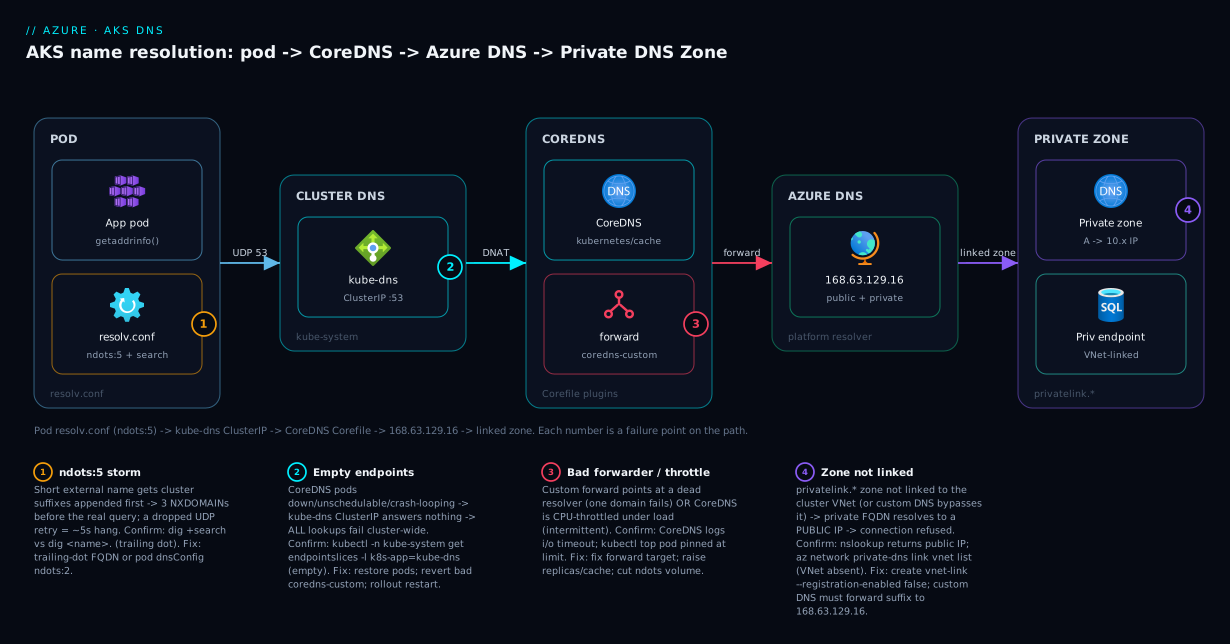
The diagram traces a name lookup left to right and maps each failure class to the hop where it bites. A pod issues getaddrinfo("mydb.database.windows.net"); its resolv.conf applies ndots:5 and fires UDP 53 at the kube-dns ClusterIP, which DNATs to a CoreDNS pod; the Corefile’s kubernetes plugin claims *.cluster.local and the forward block sends the rest to Azure DNS at 168.63.129.16 — which resolves mydb to its private IP only if privatelink.database.windows.net is linked to the cluster’s VNet.
The four numbered badges mark where each failure class bites — ndots:5 storms at resolv.conf (1), empty kube-dns endpoints (2), a bad forwarder or CPU throttling at CoreDNS (3), the unlinked Private DNS Zone returning a public IP (4) — and the legend narrates each as symptom · confirm · fix. The whole method on one page: localise the symptom to a hop, run the named check, apply the fix.
Real-world scenario
Finvel Payments runs a microservices platform on AKS: an Azure CNI cluster, 18 services, in Central India, spend about ₹2,10,000/month. The payments service talks to Azure SQL and Key Vault, both moved behind private endpoints the week before in a security review. The cluster sits on a hub-and-spoke network with a custom DNS server (a pair of domain controllers) set on every VNet — a standard enterprise pattern.
The incident began the Monday after the migration: the payments service logged dial tcp: lookup mydb.database.windows.net: connection refused — but only sometimes, and a debug-pod nslookup returned a public IP (20.x). Restarting the deployment did nothing. The database team confirmed the endpoint was healthy and az network private-dns record-set a list showed the private IP registered in privatelink.database.windows.net. So the zone had the record, yet pods resolved public — and an hour in, “DNS is fine, it’s the app” was the prevailing (wrong) theory.
The breakthrough came from asking which resolver the pod actually used. az network vnet show --query dhcpOptions.dnsServers returned the two domain-controller IPs — custom DNS, not Azure DNS. That was the whole bug: the team had correctly linked the zone, but a link only helps clients that resolve via 168.63.129.16. The pods forwarded to the DCs, which had no idea the zone existed and answered from public DNS. The “sometimes” was stale public answers cached in CoreDNS and on the DCs.
The durable fix was to make the DCs conditionally forward the privatelink suffixes to 168.63.129.16 — but that needed a networking change ticket and a day’s lead. The fast mitigation, applied that night, was a coredns-custom block forwarding exactly those Azure PaaS suffixes to 168.63.129.16 from CoreDNS, bypassing the DCs for just those domains:
data:
  azure-privatelink: |
    database.windows.net:53 {
      forward . 168.63.129.16
    }
    vaultcore.azure.net:53 {
      forward . 168.63.129.16
    }
They applied it, ran rollout restart deployment coredns to flush the stale cache, and within a minute pods resolved to the private IP; connection refused stopped. The following week the DCs got proper conditional forwarders and the override was removed. The lesson on the wall: “Linking a Private DNS Zone only helps whoever resolves through 168.63.129.16 — with custom DNS, the link is necessary but not sufficient.”
The incident as a timeline — the order of moves is the lesson:
| Time | Symptom | Action taken | Effect | What it should have been |
|---|---|---|---|---|
| 09:10 | connection refused to SQL, intermittent |
(alert fires) | — | Ask: does the name resolve, and to what IP? |
| 09:14 | Still failing | Restart payments deployment | No change | Don’t restart the app for a DNS issue |
| 09:25 | nslookup returns a public IP |
Database team checks the zone | Zone + record confirmed present | Right check, wrong conclusion drawn |
| 09:50 | “It must be the app” | Stare at app logs | Dead end | The name resolved wrong — look at DNS |
| 10:05 | Breakthrough | az network vnet show … dnsServers = custom DCs |
Root cause: custom DNS bypasses the link | This was the key check |
| 10:20 | Mitigated | coredns-custom forwards PaaS suffixes to 168.63.129.16 + rollout restart |
Private IP resolved; errors stop | Correct night-of fix |
| +1 week | Fixed | DCs conditional-forward PaaS suffixes; remove override | One source of truth | The durable fix is on the resolvers |
Advantages and disadvantages
CoreDNS-as-a-Service — DNS that is itself a Kubernetes workload, fronted by a ClusterIP and configured by ConfigMap — both causes this problem class and makes it diagnosable:
| Advantages (why this model helps you) | Disadvantages (why it bites) |
|---|---|
DNS is a normal workload: kubectl logs, kubectl top, ConfigMap config — everything is inspectable with tools you already know |
The failure surfaces as the app’s error (timeout, refused), never “DNS broke” — you must know to look |
ndots:5 + search list make in-cluster discovery effortless (http://orders just works) |
The same ndots:5 taxes every external lookup and causes NXDOMAIN storms and 5-second hangs |
Pluggable Corefile: forward, cache, rewrite per-domain — precise control via coredns-custom |
Editing the wrong ConfigMap (coredns) is silently reverted; a syntax error crash-loops all DNS |
| Azure DNS (168.63.129.16) transparently resolves public and linked private zones — no extra servers | If the VNet uses custom DNS, the zone link is necessary-but-not-sufficient — a notorious trap |
| Private DNS Zones keep PaaS traffic on the backbone and resolve to private IPs cluster-wide | A missing VNet link means private FQDNs resolve to public IPs — “resolves fine” but connects wrong |
| CoreDNS scales with the cluster via the autoscaler; caching absorbs repeat load | The autoscaler scales on node count, not query rate — a chatty service can starve a small cluster |
The model is right for standard microservice platforms wanting free, centralised, inspectable DNS. It bites hardest on private-endpoint-heavy clusters (the zone-link trap), external-API-heavy services (ndots storms), and hybrid/custom-DNS networks (the conditional-forward requirement). Every disadvantage is manageable — but only if you know it exists, which is the point of this article.
Hands-on lab
Reproduce the signature AKS DNS failures, observe them, and fix them. Use a tiny existing cluster or a 1-node cluster (a few rupees/hour, deleted at the end). Run in Cloud Shell (Bash).
Step 1 — Variables and cluster. Use an existing cluster or create a minimal one:
RG=rg-aksdns-lab
LOC=centralindia
AKS=aks-dns-lab
az group create -n $RG -l $LOC -o table
az aks create -g $RG -n $AKS --node-count 1 --network-plugin azure --generate-ssh-keys -o table
az aks get-credentials -g $RG -n $AKS --overwrite-existing
Step 2 — Inspect the resolver a pod is handed. Launch a debug pod and read its resolv.conf:
kubectl run dnsbox --image=busybox:1.36 --restart=Never -it --rm -- sh
cat /etc/resolv.conf   # expect: nameserver 10.0.0.10, search ...svc.cluster.local, options ndots:5
Step 3 — See the ndots storm. Inside the pod, compare a search-list query with a fully-qualified one:
nslookup api.github.com    # search-list query — tries cluster suffixes first
nslookup api.github.com.   # absolute (trailing dot) — one clean lookup
exit
The first makes CoreDNS field the suffix misses before the real answer; the second skips them — the storm, live.
Step 4 — Confirm the cluster DNS Service is healthy. From your shell (not the pod):
kubectl -n kube-system get pods -l k8s-app=kube-dns -o wide
kubectl -n kube-system get endpointslices -l k8s-app=kube-dns   # empty = "everything down"
Expect 2 Ready CoreDNS pods and endpointslices listing their IPs.
Step 5 — Add a custom forwarder and reload CoreDNS. Prove the coredns-custom mechanism (and the reload):
cat <<'EOF' | kubectl apply -f -
apiVersion: v1
kind: ConfigMap
metadata:
  name: coredns-custom
  namespace: kube-system
data:
  lab.override: |
    contoso-lab.example:53 {
      errors
      cache 30
      forward . 168.63.129.16
    }
EOF
kubectl -n kube-system rollout restart deployment coredns
kubectl -n kube-system logs -l k8s-app=kube-dns --tail=20   # expect a clean reload, no parse errors
A syntax mistake here crash-loops CoreDNS — that’s the lesson worth feeling once.
Step 6 — Inspect a Private DNS Zone link (read-only). If you have a private endpoint and zone in the subscription, confirm the link logic without changing anything:
az network private-dns link vnet list \
  --resource-group rg-net --zone-name privatelink.database.windows.net -o table
# An empty list (cluster VNet absent) is the unlinked-zone bug from the scenario.
Validation checklist. You saw ndots:5 in a real resolv.conf, killed a search-list storm with a trailing dot, confirmed kube-dns has Ready endpoints (the “everything down” check), applied a coredns-custom forwarder (learning the reload requirement and that a syntax error crash-loops CoreDNS), and ran the az check that exposes an unlinked Private DNS Zone.
Cleanup (avoid lingering node charges).
az group delete -n $RG --yes --no-wait
Cost note. A single-node cluster is a few rupees per hour — under ₹50 for this lab — and deleting the resource group stops everything.
Common mistakes & troubleshooting
This is the playbook — the part you bookmark. A scannable table you can read mid-incident, then extra detail on the entries that bite hardest. It spans the everyday (a short name, a missing Service) and the gnarly (custom DNS bypassing a zone link, conntrack races).
| # | Symptom | Root cause | Confirm (exact cmd / portal path) | Fix |
|---|---|---|---|---|
| 1 | Bare name fails, FQDN works | Search-list/namespace miss | nslookup payments vs nslookup payments.prod.svc.cluster.local |
Use correct in-ns name / FQDN |
| 2 | <svc>.<ns>.svc.cluster.local NXDOMAIN |
Service absent or wrong namespace | kubectl get svc -n <ns> <svc>; kubectl get svc -A | grep <svc> |
Create/rename Service; right namespace |
| 3 | Private PaaS FQDN resolves to a public IP | Private DNS Zone not linked to cluster VNet | nslookup mydb.database.windows.net (public IP); az network private-dns link vnet list (cluster VNet absent) |
az network private-dns link vnet create … --registration-enabled false |
| 4 | Linked the zone, still resolves public | VNet uses custom DNS that ignores the zone | az network vnet show --query dhcpOptions.dnsServers (IPs, not empty) |
Conditional-forward PaaS suffixes to 168.63.129.16 (DCs or coredns-custom) |
| 5 | One corporate domain fails, rest fine | Custom forward points at a dead/unreachable DNS |
kubectl -n kube-system logs -l k8s-app=kube-dns (i/o timeout to forwarder IP) |
Fix the forward target in coredns-custom |
| 6 | Every lookup times out cluster-wide | CoreDNS down / kube-dns no endpoints |
kubectl -n kube-system get endpointslices -l k8s-app=kube-dns (empty) |
Restore CoreDNS scheduling; revert bad custom config |
| 7 | DNS broke right after a Corefile edit | Edited coredns ConfigMap (reverted/crash) |
kubectl -n kube-system get cm coredns -o yaml; CoreDNS CrashLoopBackOff |
Use coredns-custom; fix the syntax; rollout restart |
| 8 | Periodic ~5-second hangs on external calls | ndots:5 fan-out + dropped UDP retry |
dig +search api.github.com (multiple NXDOMAIN); compare dig api.github.com. |
Trailing-dot FQDN; dnsConfig ndots:2; TCP/use-vc |
| 9 | Intermittent failures only under load | CoreDNS CPU-throttled / too few replicas | kubectl -n kube-system top pod -l k8s-app=kube-dns (pinned at limit) |
Raise autoscaler floor; cache TTL; cut query volume |
| 10 | New pods can’t resolve; egress-locked namespace | NetworkPolicy blocks UDP/TCP 53 to kube-dns | kubectl get networkpolicy -n <ns>; test from a pod in the ns |
Allow egress to kube-system/kube-dns on 53 UDP+TCP |
| 11 | External names fail; cluster names fine | Custom upstream DNS unreachable / wrong | kubectl exec … dig @168.63.129.16 api.github.com (works) vs default (fails) |
Fix VNet custom DNS; ensure 168.63.129.16 reachable |
| 12 | Headless Service name returns NXDOMAIN | No ready pods behind the headless Service | kubectl get endpoints <svc> -n <ns> (empty) |
Fix pod readiness/selector so endpoints populate |
| 13 | Resolution slow after scaling nodes | Per-node conntrack table full; UDP drops |
dmesg | grep nf_conntrack (“table full”); node metrics |
Raise conntrack max; reduce connection churn |
| 14 | nslookup works but app says no such host |
App caches DNS / uses musl (Alpine) quirks | Reproduce with the app’s runtime, not busybox | Set app DNS TTL; be aware of musl ndots/parallel-query behaviour |
The table above carries the confirm-and-fix for every row; here is the extra reasoning for the four that bite hardest, where knowing why matters as much as the command.
Row 3 — a private PaaS FQDN resolves to a public IP. The trap is that DNS appears to work — the unlinked zone means 168.63.129.16 falls back to public DNS and returns an address — so engineers blame the app instead of the missing vnet-link.
Row 4 — you linked the zone and it still resolves public. Custom DNS on the VNet sends CoreDNS to your servers, which don’t see the Azure Private DNS Zone — the link is necessary but not sufficient. They must conditionally forward the PaaS suffixes to 168.63.129.16 (or a coredns-custom block does it as a stopgap).
Row 7 — DNS broke immediately after a Corefile change. Editing the coredns ConfigMap directly either gets silently reverted by the add-on or crash-loops CoreDNS on a syntax error. The lesson is procedural: never touch coredns; overrides go in coredns-custom.
Row 8 — periodic ~5-second hangs on external calls. A dropped UDP packet (conntrack race on parallel A/AAAA lookups) makes the resolver wait its full 5-second timeout — so the hang is almost exactly 5 seconds, the fingerprint. ndots:5 multiplies the queries and thus the chances of a drop; the fix is removing round-trips, not chasing the app.
The error-string reference
The exact strings you’ll see, where they come from, and what they mean on AKS:
| Error string (where it appears) | Source | Means | First move |
|---|---|---|---|
lookup X on 10.0.0.10:53: no such host (app log) |
glibc via CoreDNS | NXDOMAIN — name has no record | Is it internal or a PaaS FQDN? Pick the matching playbook row |
i/o timeout / server misbehaving (app log) |
resolver | No answer in time — upstream/CoreDNS slow or unreachable | Check CoreDNS health + upstream reachability |
SERVFAIL (dig) |
CoreDNS/upstream | Upstream failed the query (often a dead forwarder) | Check forward target + CoreDNS logs |
[ERROR] plugin/errors … HINFO: read udp … i/o timeout (CoreDNS log) |
CoreDNS forward | CoreDNS couldn’t reach its upstream | Verify forwarder IP / 168.63.129.16 reachability |
Name does not resolve (busybox nslookup) |
busybox | NXDOMAIN from the search attempts | Try the FQDN with a trailing dot |
Resolves to a 20.x/40.x IP for a *.windows.net name |
public DNS fallback | Private zone not linked / custom DNS ignoring it | Link the zone; conditional-forward to 168.63.129.16 |
CrashLoopBackOff on coredns pods |
kubelet | Bad Corefile (usually a bad coredns-custom) |
kubectl logs the pod; fix/revert the custom config |
Best practices
- Never edit the
corednsConfigMap directly — the add-on reverts it or crash-loops on a syntax error. Put every customisation incoredns-customand validate before applying. - Always link the Private DNS Zone to the cluster’s VNet for every private-endpoint PaaS resource, and verify with
az network private-dns link vnet listrather than trusting the portal did it. - Know your VNet’s DNS setting. If it’s custom DNS, a zone link is necessary but not sufficient — those servers must conditionally forward the
privatelinksuffixes to 168.63.129.16. CheckdhcpOptions.dnsServersfirst in any private-endpoint incident. - Qualify external names (trailing-dot FQDNs) or set a per-pod
dnsConfig ndots:2for external-heavy workloads — kill NXDOMAIN storms at the source. - Run at least 3 CoreDNS replicas and raise the autoscaler floor on busy clusters; it scales on node count, not query rate. Cache 30–60 s, but not so long that a re-pointed endpoint takes ages to propagate.
- Allow DNS egress in NetworkPolicies — any default-deny policy must permit UDP and TCP 53 to
kube-dns, or that namespace goes dark. - Reproduce with the real runtime — a glibc debug pod can resolve a name an Alpine/musl app can’t. And flush CoreDNS after DNS-affecting changes (
rollout restart deployment coredns) so a stale public IP doesn’t outlive the fix. - Monitor CoreDNS as a tier-0 dependency (CPU vs limit, latency, cache hit ratio, errors, restarts) — when DNS degrades, everything does, so you want the leading signal, not the app-error aftermath.
- Treat
coredns-customand zone links as code (Bicep/Terraform, reviewed) — a typo’d forward or a forgotten link is a cluster-wide landmine.
Signals worth wiring before the next incident — leading, not the lagging “service down”:
| Alert on | Signal | Threshold (starting point) | Why it’s leading |
|---|---|---|---|
| CoreDNS CPU | top pod vs limit |
> 70% sustained 5 min | Predicts throttling → timeouts |
| CoreDNS errors | coredns_dns_responses_total{rcode="SERVFAIL"} |
rising trend | Upstream/forwarder trouble before users feel it |
| CoreDNS request latency | coredns_dns_request_duration_seconds p99 |
> your SLO | Cold path / overload creeping up |
| Cache hit ratio | coredns_cache_hits/misses |
dropping | Storm or cache-miss surge |
| CoreDNS pod restarts | kube_pod_container_status_restarts |
≥ 1 | Bad config / OOM crash-loop |
kube-dns endpoints |
ready endpoint count | < replicas | Heading toward total outage |
Security notes
- Least privilege on zone links. Creating vnet-links/records needs Private DNS Zone Contributor scoped to the zone — not Network Contributor on the subscription, and never Owner for the automation.
- Set
registration-enabled falseon cluster VNet links. Pods should resolve private records, not register into the zone; auto-registration pollutes it with node/pod names. - Don’t expose internal topology in DNS — cluster names, namespace structure and private IPs are sensitive; keep resolution internal and don’t forward internal zones outside your trust boundary.
- Lock down egress, but allow 53. Default-deny egress is good — just carve out UDP/TCP 53 to kube-dns and ensure a firewall isn’t silently dropping DNS (a frequent self-inflicted outage).
- Beware spoofing on custom forwarders. A forwarder sees and answers your queries — use trusted servers and validate that
privatelinkconditional forwarders go only to 168.63.129.16. - Audit
coredns-customchanges. A carelessforward/rewriteredirects a domain cluster-wide — RBAC-restrict who can editkube-systemConfigMaps and review changes in Git.
The security controls that also prevent these incidents — secure and resilient pull the same way here:
| Control | Mechanism | Secures against | Also prevents |
|---|---|---|---|
| Scoped zone RBAC | Private DNS Zone Contributor on the zone | Over-broad network rights | Accidental zone-wide changes |
registration-enabled false |
On the cluster VNet link | Zone pollution / spoofable names | Stray pod records confusing resolution |
RBAC on kube-system ConfigMaps |
Kubernetes RBAC | Unauthorised Corefile edits | A bad coredns-custom crash-looping DNS |
| Validated conditional forwarders | Forward privatelink only to 168.63.129.16 |
DNS hijack of PaaS names | Private FQDNs resolving public (and failing) |
| Egress allow-list incl. 53 | NetworkPolicy / firewall rule | Data exfiltration via open egress | Silent DNS blackout in locked namespaces |
Cost & sizing
DNS is nearly free on AKS — CoreDNS runs on existing nodes — so the “cost” is the supporting Azure resources plus the indirect cost of getting it wrong (outages, retries, wasted egress).
- Azure Private DNS Zones are billed per zone per month (a few rupees) plus per million queries — trivial, and far cheaper than operating your own resolver fleet. VNet links are free; CoreDNS compute is a small slice of node CPU you already pay for.
- NXDOMAIN storms cost money indirectly: every wasted query is CoreDNS CPU plus egress, and the long-tail latency triggers client retries that cost more. Killing
ndotsstorms cuts both. - The big “cost” is the outage. A resolution failure that downs the payments path for two hours dwarfs any DNS line item; the spend that matters is the engineering time the playbook saves.
A rough monthly picture: Private DNS Zones for the PaaS dependencies (~₹50–200 across a handful of zones plus queries), zero for VNet links, and a negligible compute delta for a larger CoreDNS. The cost drivers and what each buys you:
| Cost driver | What you pay for | Rough INR / month | What it fixes | Watch-out |
|---|---|---|---|---|
| Private DNS Zone | Per zone + per-query | ~₹15–60 per zone + queries | Private-endpoint resolution | One zone per service suffix |
| VNet link | (free) | ₹0 | Linking zones to the cluster VNet | Easy to forget — the #1 bug |
| Extra CoreDNS capacity | Node CPU/mem slice | negligible | Throttling under load | Don’t over-allocate tiny clusters |
| Node-local DNS cache | Per-node memory | small | Conntrack/latency at scale | Only when CoreDNS is the bottleneck |
| Wasted egress (storms) | Public DNS query egress | small but avoidable | (eliminated by fixing ndots) | Adds up on very chatty fleets |
Interview & exam questions
1. A pod resolves mydb.database.windows.net to a public IP even though the private endpoint and Private DNS Zone exist. What’s wrong and how do you confirm? The Private DNS Zone is not linked to the cluster’s VNet, so 168.63.129.16 has no private record and falls back to public DNS. Confirm with az network private-dns link vnet list --zone-name privatelink.database.windows.net — the cluster’s VNet won’t be in the list. Fix by creating a vnet-link (--registration-enabled false) and flushing CoreDNS.
2. You linked the zone and pods still resolve public. What did you miss? The VNet uses custom DNS servers, so CoreDNS forwards to them, not to 168.63.129.16, and they don’t see Azure Private DNS Zones. Check az network vnet show --query dhcpOptions.dnsServers. Fix by making those servers conditionally forward the privatelink suffixes to 168.63.129.16 (or, as a stopgap, a coredns-custom forward).
3. What does ndots:5 do and why does it slow external lookups? It makes the resolver try the cluster search suffixes for any name with fewer than 5 dots before querying it as-is — great for short Service names, but it turns api.github.com (3 dots) into three NXDOMAIN attempts before the real query, adding latency and, on a dropped UDP packet, a 5-second timeout. Fix with trailing-dot FQDNs or a pod dnsConfig ndots:2.
4. Where do you customise CoreDNS on AKS, and where must you not? Customise via the coredns-custom ConfigMap in kube-system. You must not edit the coredns ConfigMap directly — the managed add-on reconciles it back, and a syntax error crash-loops CoreDNS cluster-wide. After applying coredns-custom, rollout restart deployment coredns to load it.
5. Every pod in the cluster suddenly can’t resolve anything. First check? Whether the kube-dns Service has ready endpoints: kubectl -n kube-system get endpointslices -l k8s-app=kube-dns. Empty endpoints (CoreDNS pods down, unschedulable, or crash-looping on a bad coredns-custom) mean the ClusterIP answers nothing. Restore the pods or revert the bad config.
6. What is 168.63.129.16 and why does it matter for AKS DNS? It’s Azure’s platform DNS resolver, a special non-routable IP reachable from every Azure VM/node. CoreDNS forwards non-cluster names to it (when the VNet uses Azure DNS), and it resolves both public names and any Private DNS Zone linked to the VNet. It’s the hinge for private-endpoint and external resolution.
7. An app reports no such host but your debug pod’s nslookup resolves the name fine. Why? The app likely runs on musl (Alpine), whose resolver handles ndots/parallel queries differently than the glibc busybox pod, or it caches DNS with a long in-process TTL serving a stale negative. Reproduce with the app’s actual runtime.
8. How do you tell a DNS failure from a connectivity failure for “can’t reach the database”? Run nslookup/dig from the pod: if it returns an IP, DNS works and the problem is below it (route, NSG, firewall, or the endpoint’s rules); if it NXDOMAINs or times out, it’s DNS. The address (public vs private) further separates an unlinked zone from a true reachability problem.
9. DNS works at rest but fails intermittently under load. What’s the likely cause and the confirm? CoreDNS is CPU-throttled or under-replicated — query latency climbs until UDP timeouts fire, clearing when load drops. Confirm with kubectl -n kube-system top pod -l k8s-app=kube-dns (CPU pinned at the limit) and error/timeout lines in the logs. Fix by raising the autoscaler floor, caching more, and cutting query volume.
10. A NetworkPolicy was applied to a namespace and now its pods can’t resolve names. Why? A default-deny egress policy that doesn’t allow DNS — pods can’t reach the kube-dns Service on port 53. Confirm with kubectl get networkpolicy -n <ns> and a failing lookup from a pod in that namespace. Fix by adding an egress rule permitting UDP and TCP 53 to kube-system/kube-dns.
11. How do you make pods resolve a corporate domain hosted on your domain controllers, and why is it different from a private endpoint? Add a forward block for that domain to the coredns-custom ConfigMap pointing at the DCs’ IPs, then rollout restart deployment coredns; verify with dig @<dc-ip> from a pod. It’s a real custom-forwarder case — unlike Azure Private DNS Zones, which you link, not forward to.
These map to AZ-104 (Administrator) — configure and manage virtual networking, name resolution, and AKS — and AZ-700 (Network Engineer) — design and implement private access to Azure services, Private DNS Zones, and hybrid name resolution. The CoreDNS/Kubernetes specifics also appear in the CKA networking domain. A compact cert-mapping for revision:
| Question theme | Primary cert | Exam objective area |
|---|---|---|
| Private DNS Zones, vnet-links, private endpoints | AZ-700 | Design & implement private access to Azure services |
| 168.63.129.16, custom DNS, conditional forwarding | AZ-700 / AZ-104 | Name resolution for VNets & hybrid |
CoreDNS, Corefile, kube-dns Service |
CKA | Cluster networking & services/DNS |
ndots, search list, dnsConfig, dnsPolicy |
CKA | Pod DNS configuration |
| NetworkPolicy egress for DNS | CKA / AZ-500 | Network security & policies |
| AKS networking model context | AZ-104 | Manage Azure Kubernetes Service |
Quick check
- A pod resolves an Azure SQL private-endpoint FQDN to a public IP, and the Private DNS Zone exists with the right record. What is the single most likely cause, and the one
azcommand to confirm it? - Your VNet uses custom DNS servers and you’ve linked the privatelink zone, yet pods still resolve public. What additional thing must be true?
- True or false: editing the
corednsConfigMap directly is the supported way to add a custom forwarder on AKS. - An external API call from a pod periodically hangs for almost exactly 5 seconds, then succeeds. What behaviour is most likely responsible, and one fix?
- Every pod in the cluster suddenly fails all lookups. What’s the first thing you check, and the command?
Answers
- The Private DNS Zone is not linked to the cluster’s VNet, so 168.63.129.16 has no private record and returns the public IP. Confirm with
az network private-dns link vnet list --resource-group <rg> --zone-name privatelink.database.windows.net— the cluster’s VNet will be absent. Fix by creating the vnet-link with--registration-enabled false, then flushing CoreDNS. - The custom DNS servers must conditionally forward the Azure PaaS
privatelinksuffixes (e.g.database.windows.net) to 168.63.129.16. Linking a zone only helps clients that resolve through 168.63.129.16; custom DNS bypasses it unless it explicitly forwards those domains there. - False. The AKS-managed add-on reconciles
corednsback (losing your edit) and a syntax error crash-loops CoreDNS. The supported mechanism is thecoredns-customConfigMap, followed by a CoreDNS rollout restart. ndots:5forcing extra search-suffix queries, one of which has its UDP packet dropped — the resolver waits the full 5-second timeout before retrying. Fix by using a trailing-dot FQDN for the external name (skips the search list) or setting a poddnsConfigofndots:2.- Whether the
kube-dnsService has ready endpoints:kubectl -n kube-system get endpointslices -l k8s-app=kube-dns. Empty endpoints mean CoreDNS is down (unschedulable, crash-looping on a badcoredns-custom, or evicted) and the ClusterIP has nothing to answer with.
Glossary
- CoreDNS — the cluster DNS server on AKS; runs as a Deployment in
kube-systemand answers cluster-internal names while forwarding the rest upstream. kube-dnsService — the stable ClusterIP (e.g.10.0.0.10) that fronts CoreDNS; every pod’sresolv.conflists it asnameserver. Empty endpoints = total resolution outage.- Corefile — CoreDNS’s configuration (a chain of plugins:
kubernetes,cache,forward,errors), stored in thecorednsConfigMap. coredns-custom— the supported ConfigMap on AKS for adding custom server blocks/forwarders; CoreDNS imports it (thecorednsConfigMap must not be edited directly).resolv.conf— the per-pod resolver config injected by the kubelet, carryingnameserver, thesearchlist, andndots:5.ndots:5/ search list — the resolver rule that appends the clustersearchsuffixes (*.svc.cluster.local) to any name with fewer than 5 dots before trying it as-is; makes short Service names work but taxes external lookups.- 168.63.129.16 — Azure’s platform DNS resolver, reachable from every Azure node; CoreDNS’s
forwardtarget, resolving public names and any Private DNS Zone linked to the VNet. - Private DNS Zone — an Azure DNS zone (e.g.
privatelink.database.windows.net) holding the A records that map private-endpoint FQDNs to private IPs. - Virtual network link (vnet-link) — the binding that makes a Private DNS Zone resolvable from a given VNet; without it, private FQDNs resolve to public IPs.
- Private endpoint — a NIC with a private IP bringing an Azure PaaS service into your VNet; its public FQDN CNAMEs to a
privatelinkname resolved from the zone. dnsPolicy/dnsConfig— pod-spec fields controlling how the resolver is built (ClusterFirst,Default,None) and per-pod overrides (e.g. loweringndots).- conntrack — the Linux kernel connection-tracking table; when it fills, UDP DNS packets are dropped, causing intermittent ~5-second resolution stalls.
Next steps
You can now localise any AKS DNS failure to a hop and fix it. Go deeper:
- Next: Azure Private Link & Private DNS for PaaS — go deep on the Private DNS Zone and private-endpoint mechanics that drive half this playbook.
- Related: AKS Networking: kubenet vs Azure CNI — the pod-IP and routing model underneath resolution and reachability.
- Related: Troubleshooting AKS Ingress: 502/503, TLS & Application Routing — many “ingress can’t reach the backend” incidents are really DNS.
- Related: Troubleshooting VNet Connectivity: NSGs, UDRs & Network Watcher — when the failure is below DNS (a route or NSG dropping UDP 53).
- Related: AKS Cluster Architecture: Control Plane vs Data Plane — where CoreDNS and the kube-dns Service sit in the bigger picture.