The deploy went green, the pods are Running, and yet curl https://shop.contoso.com/ answers 502 Bad Gateway. Five minutes later the same URL returns 504 Gateway Time-out, and the TLS padlock that worked yesterday now throws a certificate error. Welcome to AKS ingress — the layer that takes an HTTP request from the public internet, terminates TLS, and routes it by hostname and path to the right Service, which in turn load-balances to your Pods. On Azure Kubernetes Service this layer is usually an NGINX ingress controller, and it is the single most common place a healthy-looking cluster breaks in production, because the error you see (502, 504) is emitted by the controller, not by your app. The controller is telling you “I could not get a good answer from the backend you pointed me at.” Why it could not is the entire investigation, and at least a dozen distinct root causes hide behind those three digits.
This article is the diagnostic playbook for that layer, scoped to the three things that actually page you on Azure: 502/504 from the backend (the Service has no ready endpoints, the probe is wrong, the port is mismatched, or the upstream is just slow), the Application Routing add-on (Azure’s managed NGINX — convenient, but it owns the controller config and surprises you in ways a self-installed controller does not), and Key Vault TLS (serving certificates from Azure Key Vault through the Secret Store CSI driver, which fails silently when identity, sync, or the Ingress annotation is off by a hair). For each failure you get the exact kubectl or az command to confirm it and the precise fix, with Bicep where the resource is Azure-side. Because this is a reference you reach for mid-incident, the playbook itself, the error strings, the annotations and the limits are laid out as scannable tables — read the prose once, then keep the tables open.
By the end you will stop guessing. When ingress 502s you will know within ninety seconds whether the Service has zero Endpoints, the readiness probe is failing, the servicePort points at a port the Pod never opened, the controller and your Ingress disagree on ingressClassName, the Application Routing add-on overwrote your tweak, or the Key Vault certificate never synced into a Kubernetes Secret. Knowing which is what separates a five-minute fix from a two-hour bridge call.
What problem this solves
Kubernetes hides a lot of machinery so you can kubectl apply a Deployment, a Service and an Ingress and have a public HTTPS endpoint. That abstraction is a gift until it breaks, and then it becomes an opaque wall. The bare 502 Bad Gateway page from NGINX deliberately tells the anonymous caller nothing — leaking backend detail would be a security hole. So the information you need is real and captured, but it lives across four or five surfaces: the controller’s own logs, the Ingress object’s status and events, the Service/Endpoints pair, the Pod’s readiness state, and — for TLS — a SecretProviderClass, a CSI driver Pod, and a synced Kubernetes Secret. If you do not know which surface maps to which failure, you burn an hour kubectl describe-ing the wrong object.
What breaks without this knowledge: an engineer restarts the ingress controller (which sometimes “fixes” it by accident and teaches the wrong lesson), recreates the Ingress (which re-triggers the same broken cert sync), or scales the app (which does nothing for a port mismatch). Meanwhile the actual cause — a Service whose selector matches no Pods so Endpoints is empty, a readiness probe hitting / on a Pod that only serves /healthz, a Secret that never materialised because the cluster’s managed identity lacks Key Vault Secrets User — sits there, perfectly diagnosable, ignored.
Who hits this: essentially every team running web apps or APIs on AKS behind ingress. It bites hardest on teams adopting the Application Routing add-on expecting it to behave exactly like the community ingress-nginx chart (it does not — it is reconciled and partly read-only), on anyone wiring TLS from Key Vault for the first time (the identity and sync chain has five links and any one breaks it), and on anyone who assumes a Running Pod means a ready backend (readiness, not liveness, is what ingress routes to). The fix is almost never “restart the controller” — it is “find the hop that is lying and make it tell the truth.”
To frame the field before the deep dive, here is every symptom class this article covers, the question it forces, and the first place to look.
| Symptom class | What the controller is saying | First question to ask | First place to look | Most common single cause |
|---|---|---|---|---|
| 502 Bad Gateway | “I reached an upstream but got a bad/no answer” | Does the Service have ready endpoints? | kubectl get endpoints <svc> |
Empty Endpoints (selector/readiness) |
| 504 Gateway Time-out | “The upstream took too long to answer” | Is the app slow, or is the proxy timeout too short? | Controller logs + kubectl top pod |
Upstream slower than proxy read timeout |
| 503 Service Temporarily Unavailable | “No upstream is available right now” | Are all backends unready or being rolled? | kubectl get pods -l <selector> |
Rollout with all replicas not-ready |
| App Routing add-on quirk | (config you set keeps reverting) | Did the add-on reconcile my change away? | kubectl get ingressclass; add-on config CRD |
Edited managed objects directly |
| Key Vault TLS failure | “TLS handshake fails / default cert served” | Did the certificate sync into a Secret? |
kubectl get secret <tls-secret> |
SecretProviderClass never synced |
Learning objectives
By the end of this article you can:
- Map any AKS ingress
502/503/504to a specific hop — controller,Ingressrule,Service,Endpoints, readiness probe, or Pod — and name the most likely root cause for each. - Diagnose a 502 Bad Gateway as empty
Endpoints, a port mismatch between theIngressservicePortand the container port, a failing readiness probe, or an upstream that resets the connection — and confirm which with exactkubectlcommands. - Diagnose a 504 Gateway Time-out as an upstream slower than the NGINX
proxy-read-timeout, and decide between speeding up the app and tuning the timeout annotation. - Work with the Application Routing add-on correctly: know which objects it owns and reconciles, how to customise the managed controller through the supported surface (the
NginxIngressControllerCRD), and how to attach a DNS zone and Key Vault — without fighting the reconciler. - Wire TLS from Azure Key Vault through the Secret Store CSI driver: create the
SecretProviderClass, grant the cluster identity Key Vault Secrets User, mount it so the certificate syncs to a KubernetesSecret, and reference thatSecretfrom theIngresstlsblock — and debug each of the five links when the chain breaks. - Read the canonical annotation, error-string and timeout reference tables and pick the right setting for each failure class.
- Drive the core diagnostic tools fluently:
kubectl describe ingress, controller logs,kubectl get endpoints,kubectl get events, and the CSI driver /SecretProviderClassPodStatussurface.
Prerequisites & where this fits
You should already understand AKS basics: a cluster has a managed control plane and one or more node pools; you deploy Pods (grouped by a Deployment), expose them with a Service (a stable virtual IP and DNS name that load-balances across Pods matching its label selector), and you reach kubectl against the cluster via az aks get-credentials. You should know that a Service of type ClusterIP is internal and that an Ingress object plus an ingress controller is what publishes HTTP(S) to the outside. Familiarity with HTTP status codes, TLS termination, and basic Kubernetes objects (Deployment, Service, Ingress, Secret) is assumed.
This sits in the Observability & Troubleshooting track and assumes the cluster fundamentals from AKS Cluster Architecture: Control Plane vs Data Plane Explained and the networking model choices in AKS Networking: Kubenet vs Azure CNI Models Explained, because how Pod IPs are assigned changes how the ingress controller reaches them. Identity is the other dependency: serving certificates from Key Vault relies on the cluster’s identity having access, which builds on AKS Cluster Authentication: Managed Identity vs Service Principal and the Key Vault permission model in Key Vault RBAC vs Access Policies: Which Permission Model. When the failure is image-side rather than ingress-side, AKS Pod Cannot Pull Image: ACR Authorization Failures is the companion playbook.
A quick map of who owns what during an incident, so you call the right person fast.
| Layer | What lives here | Who usually owns it | Failure classes it can cause |
|---|---|---|---|
| DNS / client | Public name, TLS trust, retries | Frontend / SRE | TLS errors if name/cert mismatch; mostly red herrings |
| Azure Load Balancer | Public IP, L4 to controller Pods | Platform / network | No connection at all if IP/probe wrong |
| Ingress controller (NGINX) | TLS termination, host/path routing | Platform / app | 502/503/504 (the codes you see) |
Ingress object + rules |
Host, path, servicePort, class |
App team | 404/502 from wrong rule or class |
Service + Endpoints |
Selector → ready Pod IPs | App team | 502 when Endpoints empty |
| Pod + readiness probe | The app, its port and health | App / dev | 502/503 when not ready or wrong port |
| Key Vault + CSI + Secret | Certificate source and sync | Platform + security | TLS handshake fail / default cert |
Core concepts
Five mental models make every later diagnosis obvious.
The status code names the controller’s complaint, not your bug. Every request flows through an ingress controller — on AKS, an NGINX reverse proxy running as Pods, fronted by an Azure Load Balancer public IP. NGINX terminates TLS, matches the request’s host and path against your Ingress rules, and proxies to the matching Service’s endpoints. A 502 Bad Gateway means NGINX selected an upstream but got a broken or no response (connection refused, reset, or no endpoints to try). A 504 Gateway Time-out means it reached an upstream but the upstream did not answer within the proxy read timeout. A 503 Service Temporarily Unavailable means no upstream was available at all. “Bad answer” (502) vs “too slow” (504) vs “nobody home” (503) is the first fork in every decision tree.
Ingress routes to ready Endpoints, not to Pods. A Service does not point at Pods directly; it points at the set of Pod IPs whose labels match its selector and that are passing their readiness probe. That set is the Endpoints object (or EndpointSlice). If the selector matches nothing, or every matching Pod is failing readiness, Endpoints is empty — and NGINX, having no upstream to proxy to, returns 502. A Pod can be Running (liveness passing) and still be excluded from Endpoints because readiness fails. This single distinction — Running is not Ready, and only Ready joins Endpoints — explains the majority of “but my pods are up!” 502s.
The port contract is explicit at two layers. Your Ingress rule names a Service and a port (service.port.number or name). The Service maps that port to a targetPort on the Pod, which must equal the container port your app actually listens on. Two mismatches bite: the Ingress servicePort not matching any port the Service exposes (NGINX cannot build an upstream), and the Service targetPort not matching the real container port (the connection is refused at the Pod). Either yields 502, and both look like the app is broken when it is the wiring.
The Application Routing add-on owns its controller. When you enable the Application Routing add-on, Azure deploys and manages an NGINX controller for you and exposes a public (or internal) ingress with a default ingressClassName of webapprouting.kubernetes.azure.com. The add-on reconciles its objects: if you edit the managed Deployment, ConfigMap or IngressClass directly, the controller’s reconciler reverts your change on its next loop. You customise it only through the supported surface — the NginxIngressController custom resource and the add-on’s DNS-zone / Key Vault attachments via az aks approuting. Treating the managed controller like a self-installed Helm release is the number-one add-on mistake.
Key Vault TLS is a five-link sync chain. Serving a certificate from Azure Key Vault does not happen by magic. The Secret Store CSI driver (plus the Azure Key Vault provider) reads a SecretProviderClass that names the vault and certificate, authenticates with the cluster’s identity (the add-on’s user-assigned identity or workload identity), and — when a Pod mounts that CSI volume — writes the certificate into a Kubernetes Secret of type kubernetes.io/tls. Your Ingress tls block then references that Secret. Break any link — wrong vault/cert name, identity without Key Vault Secrets User, the secretObjects sync block missing so no Secret is created, no Pod mounting the volume, or the Ingress pointing at the wrong secretName — and NGINX serves its default self-signed “Kubernetes Ingress Controller Fake Certificate” instead, which clients reject. The fake-certificate string is your single best tell that the chain is broken.
The vocabulary in one table
Pin down every moving part before the deep sections. The glossary repeats these for lookup; this table is the mental model side by side.
| Concept | One-line definition | Where it lives | Why it matters to 502/504/TLS |
|---|---|---|---|
| Ingress controller | NGINX reverse proxy that routes HTTP(S) | Pods + Azure LB | Emits the 502/503/504 you see |
Ingress object |
Host/path → Service routing rules | Namespace | Wrong rule/class → 404/502 |
IngressClass |
Which controller handles an Ingress |
Cluster-scoped | Mismatch → Ingress ignored, 404 |
Service |
Stable VIP load-balancing to Pods | Namespace | Wrong port/selector → 502 |
Endpoints |
Ready Pod IPs behind a Service | Namespace | Empty → 502 (no upstream) |
| Readiness probe | “Can this Pod serve yet?” check | Pod spec | Failing → excluded from Endpoints |
| App Routing add-on | Azure-managed NGINX controller | Add-on (kube-system) |
Reconciles/owns its config |
NginxIngressController |
CRD to customise the managed controller | Cluster-scoped | The supported tuning surface |
| Secret Store CSI driver | Mounts secrets/certs as volumes | DaemonSet | Bridges Key Vault → Secret |
SecretProviderClass |
Declares which vault/cert to fetch | Namespace | Misnamed → no cert synced |
TLS Secret |
kubernetes.io/tls cert + key |
Namespace | Referenced by Ingress tls |
| Fake certificate | NGINX default self-signed cert | Controller | Served when real cert missing |
The HTTP status-code and error-string reference
Before the per-symptom anatomy, here is the lookup table you scan first: every status and error string you realistically see from an AKS NGINX ingress, what it means on this platform, the likely cause, how to confirm it, and the first fix. The non-obvious ones are the NGINX upstream errors in the controller log (connect() failed, upstream prematurely closed, no live upstreams) and the difference between NGINX’s 502 and a 502 your app itself returned.
| Code / string | Meaning | Likely cause on AKS | How to confirm | First fix |
|---|---|---|---|---|
| 502 Bad Gateway | NGINX got no/broken answer from upstream | Empty Endpoints, port mismatch, conn refused/reset |
kubectl get endpoints <svc>; controller log |
Match the row in the playbook below |
| 503 Service Temporarily Unavailable | No upstream available | All Pods not-ready, mid-rollout, scaled to 0 | kubectl get pods -l <selector> |
Ensure ≥1 ready replica; fix readiness |
| 504 Gateway Time-out | Upstream too slow to answer | App slower than proxy-read-timeout (60 s) |
Controller log; kubectl top pod |
Speed app; raise timeout annotation |
| 404 Not Found (NGINX) | No Ingress rule matched host/path |
Wrong host, pathType, or ingressClassName |
kubectl describe ing <name> |
Fix host/path/class so a rule matches |
connect() failed (111: Connection refused) |
Upstream port closed | targetPort ≠ container port; app not bound |
kubectl describe svc; Pod logs |
Align targetPort to real container port |
upstream prematurely closed connection |
App reset mid-response | App crash/timeout/keepalive mismatch | Pod logs at request time | Fix app; tune keepalive/timeouts |
no live upstreams while connecting |
NGINX has zero healthy upstreams | Endpoints empty or all marked down |
kubectl get endpoints <svc> |
Make a Pod pass readiness |
SSL_ERROR / ERR_CERT_AUTHORITY_INVALID |
Client rejects served cert | Fake cert served (Key Vault sync broke) | openssl s_client shows fake CN |
Fix the CSI sync chain (below) |
default backend - 404 |
Request hit the catch-all backend | No matching Ingress/host at all |
Browser/curl to the host |
Create/fix the Ingress for that host |
413 Request Entity Too Large |
Body exceeds NGINX limit | proxy-body-size default 1m |
Controller log | Raise proxy-body-size annotation |
Two reading notes that save the most time.
| Distinction | The trap | How to tell them apart |
|---|---|---|
| NGINX 502 vs app-emitted 502 | Your app may itself return 502 (e.g. a gateway proxying further) | If the controller log shows the upstream answered 502, it is your app; if it shows connect() failed/no live upstreams, it is NGINX with no good upstream |
| Fake cert vs real cert expiry | Both look like a TLS error in the browser | openssl s_client -connect host:443 — CN Kubernetes Ingress Controller Fake Certificate means the sync broke; a real CN with a past notAfter means genuine expiry |
Anatomy of a 502 Bad Gateway
A 502 means NGINX selected an upstream and got a bad or no answer. Four distinct causes on AKS. Scan the matrix, then read the detail for whichever row matches.
| # | 502 cause | Tell-tale signal | Confirm with | Real fix | Band-aid that masks it |
|---|---|---|---|---|---|
| 1 | Empty Endpoints (selector/readiness) |
no live upstreams; Endpoints blank |
kubectl get endpoints <svc> |
Fix selector or readiness so a Pod is Ready | Restart controller (recurs) |
| 2 | Ingress servicePort mismatch |
502 only on one host/path | kubectl describe ing vs get svc |
Point servicePort at a real Service port |
None — it never works |
| 3 | Service targetPort ≠ container port |
connect() failed (111: refused) |
kubectl describe svc; Pod listen port |
Set targetPort to the real container port |
None |
| 4 | Upstream resets / crashes mid-request | upstream prematurely closed connection |
Pod logs at request time | Fix the app crash/timeout | Retry annotation only |
Cause 1 — The Service has no ready endpoints
This is the overwhelming favourite. Your Service selector does not match the Pod labels, or every matching Pod is failing its readiness probe, so the Endpoints object is empty. NGINX has no upstream, logs no live upstreams, and returns 502 — even though kubectl get pods shows Running.
Confirm. The one command that decides it:
# Empty output (no addresses) = the cause. Compare selector to pod labels.
kubectl get endpoints shop-svc -n shop
kubectl get pods -n shop --show-labels
kubectl describe svc shop-svc -n shop | grep -i selector
If Endpoints is empty but Pods are Running, check readiness explicitly — a Pod that is Running but 0/1 READY is excluded:
# READY column 0/1 with Running status = readiness failing
kubectl get pods -n shop -o wide
kubectl describe pod <pod> -n shop | sed -n '/Conditions/,/Events/p'
Fix. If the selector is wrong, align the Service selector to the Pod labels (or vice versa). If readiness is failing, fix the probe — usually it points at a path or port the app does not serve. The two halves:
# Selector mismatch: see what the Service expects vs what Pods carry, then fix one side.
kubectl get svc shop-svc -n shop -o jsonpath='{.spec.selector}'; echo
kubectl get deploy shop -n shop -o jsonpath='{.spec.template.metadata.labels}'; echo
# Readiness probe must hit a path/port the app actually serves.
readinessProbe:
  httpGet:
    path: /healthz      # NOT "/" if the app only serves /healthz
    port: 8080          # the real container port
  initialDelaySeconds: 5
  periodSeconds: 10
The Endpoints-empty causes and the one check that proves each.
Why Endpoints is empty |
What you see | Confirm with | Fix |
|---|---|---|---|
| Selector matches no Pods | Endpoints blank, Pods Running |
describe svc selector vs pod labels |
Align labels/selector |
| All Pods failing readiness | Pods 0/1 READY, Running |
describe pod Conditions: Ready=False |
Fix probe path/port |
| Pods not scheduled / pending | Pods Pending |
kubectl get pods; describe events |
Fix resources/taints/quota |
targetPort named, name absent |
Endpoints blank or wrong port |
describe svc ports vs container ports |
Match named port |
| Deployment scaled to 0 | No Pods at all | kubectl get deploy REPLICAS 0 |
Scale up |
Cause 2 — The Ingress points at a Service port that does not exist
Your Ingress rule names port.number: 80 but the Service only exposes 8080, or names a port.name the Service never defined. NGINX cannot build an upstream for a non-existent Service port and 502s on that host/path while other rules work.
Confirm. Diff the Ingress rule against the Service ports:
kubectl describe ingress shop-ing -n shop | sed -n '/Rules/,/Annotations/p'
kubectl get svc shop-svc -n shop -o jsonpath='{.spec.ports}'; echo
Fix. Make the Ingress service.port match a port the Service actually publishes:
spec:
  rules:
    - host: shop.contoso.com
      http:
        paths:
          - path: /
            pathType: Prefix
            backend:
              service:
                name: shop-svc
                port:
                  number: 80     # must be a port the Service exposes
Cause 3 — The Service targetPort does not match the container port
The Service forwards to targetPort: 8080 but the container listens on 3000 (or binds 127.0.0.1 instead of 0.0.0.0). The connection to the Pod is refused; the controller log shows connect() failed (111: Connection refused).
Confirm. Check what the Service targets versus what the Pod actually listens on:
kubectl get svc shop-svc -n shop -o jsonpath='{.spec.ports[*].targetPort}'; echo
# Exec in and confirm the listening port/interface
kubectl exec -it deploy/shop -n shop -- sh -c "ss -ltnp 2>/dev/null || netstat -ltn"
A container that binds 127.0.0.1:8080 rejects connections from the Pod network even when the port number is right — bind 0.0.0.0.
Fix. Align targetPort to the real container port (and the app to bind all interfaces):
apiVersion: v1
kind: Service
metadata: { name: shop-svc, namespace: shop }
spec:
  selector: { app: shop }
  ports:
    - name: http
      port: 80           # the Service port the Ingress references
      targetPort: 8080   # the REAL container port the app listens on
Cause 4 — The upstream resets or crashes mid-request
The Pod accepts the connection but resets it or dies before answering — an app crash on a specific request, an upstream timeout shorter than NGINX expects, or an HTTP keepalive mismatch. The log string is upstream prematurely closed connection while reading response header from upstream.
Confirm. Correlate the controller error with the Pod’s own logs at that moment:
kubectl logs -n app-routing-system deploy/nginx -c nginx --since=10m | grep -i "prematurely closed"
kubectl logs deploy/shop -n shop --since=10m | tail -50
Fix. Fix the crashing code path; do not paper over it with retries. If the app legitimately has a long-lived response, raise the proxy read timeout (next section), but a reset is a crash, not a timeout — different fix.
Anatomy of a 504 Gateway Time-out
A 504 means NGINX reached the upstream but it did not answer within the proxy read timeout. On ingress-nginx the default proxy-read-timeout and proxy-send-timeout are 60 seconds. A backend slower than that — a heavy report, a stuck downstream call, a thread-pool-starved app — gets cut and the client sees 504, while the Pod’s own logs may show the request completing a few seconds later.
Confirm. The controller log shows the timeout and which upstream; kubectl top pod shows whether the app is resource-starved (CPU pinned → slow → 504):
kubectl logs -n app-routing-system deploy/nginx -c nginx --since=10m | grep -i "timed out"
kubectl top pod -n shop          # CPU/memory pressure that slows responses
In the Pod, a request log that takes 70–120 s for an endpoint NGINX cut at 60 s confirms “slow backend, not a network drop.”
Fix. The right fix is to speed up the backend (add CPU/replicas, fix the slow query, make the work async). When the operation is legitimately long (a large upload, a long-poll), raise the per-Ingress timeout via annotation — do not globally raise it and hide every slow endpoint:
metadata:
  annotations:
    nginx.ingress.kubernetes.io/proxy-read-timeout: "180"   # seconds, default 60
    nginx.ingress.kubernetes.io/proxy-send-timeout: "180"
    nginx.ingress.kubernetes.io/proxy-body-size: "50m"       # if 413 on large uploads
The NGINX timeouts and limits that matter, their defaults, and what hitting each looks like.
| Setting (annotation) | What it bounds | Default | What hitting it looks like |
|---|---|---|---|
proxy-read-timeout |
Wait for the upstream to send a response | 60 s | 504; Pod log shows request still running |
proxy-send-timeout |
Wait while sending the request to upstream | 60 s | 504 on large/slow request bodies |
proxy-connect-timeout |
TCP connect to the upstream | 5 s | 502 fast when Pod unreachable |
proxy-body-size |
Max request body size | 1 m | 413 Request Entity Too Large |
proxy-next-upstream |
Whether/when to retry another Pod | error/timeout | Masks a single bad Pod if over-used |
keepalive (config) |
Upstream keepalive connections | varies | prematurely closed on mismatch |
A reading note: a 504 with the Pod log showing the request completed (slowly) is a timeout-tuning question; a 502 with connect() failed is a wiring question. Do not raise timeouts to fix a 502 — they are unrelated.
The Application Routing add-on: how the managed controller differs
Azure’s Application Routing add-on gives you a managed NGINX ingress controller without installing or upgrading Helm charts yourself. It is the recommended path on AKS, but it behaves differently from a self-installed ingress-nginx, and those differences cause their own incidents. The core rule: the add-on owns its objects and reconciles them. Edit a managed object directly and the reconciler reverts you.
Enable or inspect it with az aks:
# Enable on an existing cluster
az aks approuting enable -g rg-shop -n aks-shop

# What it deployed (controller Pods live in the app-routing-system namespace)
kubectl get pods -n app-routing-system
kubectl get ingressclass        # default class: webapprouting.kubernetes.azure.com
The default ingressClassName it creates is webapprouting.kubernetes.azure.com. Your Ingress must reference that class (or omit ingressClassName only if it is the default class) or the managed controller ignores it and you get a 404 / default backend.
apiVersion: networking.k8s.io/v1
kind: Ingress
metadata: { name: shop-ing, namespace: shop }
spec:
  ingressClassName: webapprouting.kubernetes.azure.com   # the add-on's class
  rules:
    - host: shop.contoso.com
      http:
        paths:
          - path: /
            pathType: Prefix
            backend: { service: { name: shop-svc, port: { number: 80 } } }
What the add-on owns versus what you own
Knowing the ownership line is the whole game with this add-on. You own your application objects; the add-on owns the controller machinery.
| Object | Owned by | Safe to edit directly? | How you change it instead |
|---|---|---|---|
Your Ingress (in your namespace) |
You | Yes | Edit freely; reference the add-on class |
Your Service / Deployment |
You | Yes | Edit freely |
IngressClass (webapprouting…) |
Add-on | No | Managed; do not delete/edit |
Controller Deployment/ConfigMap |
Add-on | No — reverted on reconcile | Use the NginxIngressController CRD |
app-routing-system namespace objects |
Add-on | No | Managed by the add-on |
| DNS zone / Key Vault attachment | Add-on config | Via az aks approuting |
az aks approuting zone/update |
Customising the managed controller the supported way
To change controller-level behaviour (internal vs public load balancer, a custom default IngressClass name, controller annotations), use the NginxIngressController custom resource, which the add-on watches. This is the supported tuning surface — changes here survive reconciliation because the reconciler reads this CRD.
# Supported customisation surface for the managed controller
apiVersion: approuting.kubernetes.azure.com/v1alpha1
kind: NginxIngressController
metadata: { name: nginx-internal }
spec:
  ingressClassName: nginx-internal
  controllerNamePrefix: nginx-internal
  loadBalancerAnnotations:
    service.beta.kubernetes.io/azure-load-balancer-internal: "true"   # internal LB
Attaching a DNS zone (so the add-on can manage records) and a Key Vault (for certs) is done through the add-on, not by hand-editing controller config:
# Attach a public DNS zone the add-on will manage records in
ZONEID=$(az network dns zone show -g rg-dns -n contoso.com --query id -o tsv)
az aks approuting zone add -g rg-shop -n aks-shop --ids $ZONEID --attach-zones

# Attach a Key Vault for certificate integration
KVID=$(az keyvault show -g rg-shop -n kv-shop --query id -o tsv)
az aks approuting update -g rg-shop -n aks-shop --enable-kv --attach-kv $KVID
The add-on quirks that page people, and how to handle each.
| Quirk | Why it happens | How to confirm | Correct handling |
|---|---|---|---|
| My ConfigMap edit reverted | Reconciler restores managed config | Re-get shows your change gone |
Use the NginxIngressController CRD |
Ingress ignored (404) |
Wrong/missing ingressClassName |
kubectl get ingressclass; compare |
Set class to webapprouting… |
| No public IP appears | LB still provisioning or quota | kubectl get svc -n app-routing-system |
Wait/quotas; check LB events |
| Cert not served from KV | Key Vault not attached or identity missing | az aks approuting state; CSI status |
Attach KV; grant Secrets User |
| Two controllers fight | Self-installed NGINX + add-on both default | Two IngressClass marked default |
Make one non-default; pick per Ingress |
| Add-on disabled removes routing | Disabling tears down the managed controller | az aks show add-on profile |
Plan migration before disabling |
TLS from Key Vault: the Secret Store CSI sync chain
Serving a real certificate from Azure Key Vault on AKS ingress runs through the Secret Store CSI driver and its Azure Key Vault provider. The chain has five links, and any broken link makes NGINX fall back to its default “Kubernetes Ingress Controller Fake Certificate,” which every browser rejects. Walk the chain in order; each link has one confirming check.
The five links, what each does, and the check that proves it.
| # | Link | What it does | Confirm with | Failure symptom |
|---|---|---|---|---|
| 1 | Cluster identity | Authenticates the driver to Key Vault | az aks show identity; role assignment |
403 / forbidden in CSI logs |
| 2 | RBAC on the vault | Grants the identity read on certs/secrets | az role assignment list |
Forbidden fetching the cert |
| 3 | SecretProviderClass |
Names vault, cert, tenant, identity | kubectl describe secretproviderclass |
No volume mounts / cert not found |
| 4 | Pod mount + secretObjects |
Mounting triggers the sync to a Secret |
kubectl get secret <tls-secret> |
TLS Secret never created |
| 5 | Ingress tls reference |
Points NGINX at the synced Secret |
kubectl describe ing |
Fake cert served |
Link 1–2 — the cluster identity and its Key Vault access
The Secret Store CSI provider authenticates to Key Vault using an identity — with the Application Routing add-on this is the add-on’s user-assigned managed identity; in a DIY setup it is workload identity federated to a service account. Either way, that identity needs read access to the vault’s certificates/secrets, which under the RBAC model is the Key Vault Secrets User role (a certificate’s private key is fetched as a secret). Under the older access-policy model it needs get on secrets and certificates.
# Find the add-on identity (objectId) and grant it read on the vault
OBJ=$(az aks show -g rg-shop -n aks-shop \
  --query "ingressProfile.webAppRouting.identity.objectId" -o tsv)
KVID=$(az keyvault show -g rg-shop -n kv-shop --query id -o tsv)
az role assignment create --assignee-object-id "$OBJ" --assignee-principal-type ServicePrincipal \
  --role "Key Vault Secrets User" --scope "$KVID"
// Grant the cluster/add-on identity read on the vault (RBAC model)
resource kvSecretsUser 'Microsoft.Authorization/roleAssignments@2022-04-01' = {
  name: guid(kv.id, addonIdentityObjectId, 'kv-secrets-user')
  scope: kv
  properties: {
    roleDefinitionId: subscriptionResourceId('Microsoft.Authorization/roleDefinitions',
      '4633458b-17de-408a-b874-0445c86b69e6') // Key Vault Secrets User
    principalId: addonIdentityObjectId
    principalType: 'ServicePrincipal'
  }
}
If this link is broken the CSI driver Pod logs a 403 Forbidden / does not have secrets get permission when it tries to fetch the cert. That is your confirmation:
kubectl logs -n kube-system -l app=secrets-store-csi-driver -c secrets-store --since=10m | grep -i forbidden
For the deeper Key Vault permission and firewall failures behind that 403, the dedicated playbook is Key Vault 403 Forbidden: Firewall, RBAC, Soft-Delete Recovery.
Link 3 — the SecretProviderClass
The SecretProviderClass is the declaration of which vault and certificate to fetch, and crucially the secretObjects block that tells the driver to also write the fetched cert into a Kubernetes Secret of type kubernetes.io/tls. Without secretObjects, the cert is mounted as a file but no TLS Secret is ever created, and your Ingress has nothing to reference. This omission is the single most common Key Vault-TLS mistake.
apiVersion: secrets-store.csi.x-k8s.io/v1
kind: SecretProviderClass
metadata: { name: shop-tls, namespace: shop }
spec:
  provider: azure
  secretObjects:                       # <-- THIS block is what creates the K8s Secret
    - secretName: shop-tls-secret       # the Secret your Ingress will reference
      type: kubernetes.io/tls
      data:
        - objectName: shop-cert         # must match objectName below
          key: tls.key
        - objectName: shop-cert
          key: tls.crt
  parameters:
    usePodIdentity: "false"
    useVMManagedIdentity: "true"
    userAssignedIdentityID: "<add-on identity clientId>"
    keyvaultName: "kv-shop"
    tenantId: "<tenant-guid>"
    objects: |
      array:
        - |
          objectName: shop-cert
          objectType: secret           # a cert's key material is fetched as a secret
Link 4 — a Pod must mount the volume to trigger the sync
The CSI driver only writes the Secret when a Pod mounts the CSI volume backed by this SecretProviderClass. With the Application Routing add-on this mounting is wired for you when you reference the cert via the Ingress annotation; in a DIY setup you must run a Pod (often the controller, or a small “syncer” Deployment) that mounts the volume so the Secret materialises and stays refreshed. If nothing mounts it, kubectl get secret shop-tls-secret returns NotFound forever.
# The proof: does the TLS Secret exist yet?
kubectl get secret shop-tls-secret -n shop
# Per-pod sync status from the driver
kubectl get secretproviderclasspodstatus -n shop
kubectl describe secretproviderclasspodstatus -n shop | sed -n '/Status/,/Events/p'
Link 5 — the Ingress TLS reference (and the add-on shortcut)
Finally the Ingress tls block names the synced Secret. With the Application Routing add-on you can skip the hand-rolled SecretProviderClass and instead annotate the Ingress to pull the cert straight from the attached Key Vault — the add-on creates the SecretProviderClass and sync for you.
# Add-on shortcut: point the Ingress at a Key Vault cert URI; the add-on wires the sync
apiVersion: networking.k8s.io/v1
kind: Ingress
metadata:
  name: shop-ing
  namespace: shop
  annotations:
    kubernetes.azure.com/tls-cert-keyvault-uri: https://kv-shop.vault.azure.net/certificates/shop-cert
spec:
  ingressClassName: webapprouting.kubernetes.azure.com
  tls:
    - hosts: [ shop.contoso.com ]
      secretName: shop-tls-secret      # the add-on syncs the KV cert into this Secret
  rules:
    - host: shop.contoso.com
      http:
        paths:
          - path: /
            pathType: Prefix
            backend: { service: { name: shop-svc, port: { number: 80 } } }
The fake-certificate confirmation. Whenever TLS is wrong, the fastest single check is what certificate NGINX actually presents. If the CN is the fake cert, a link in the chain is broken:
echo | openssl s_client -connect shop.contoso.com:443 -servername shop.contoso.com 2>/dev/null \
  | openssl x509 -noout -subject -issuer -dates
# CN "Kubernetes Ingress Controller Fake Certificate" => sync chain broken (links 1-4)
# A real CN with a past notAfter => genuine certificate expiry => rotate in Key Vault
The Key Vault-TLS failure modes mapped to the link that broke.
| Symptom | Broken link | Confirm with | Fix |
|---|---|---|---|
| Browser shows “Fake Certificate” | Any of 1–4 | openssl s_client CN |
Walk the chain in order below |
CSI log 403 Forbidden |
1–2 (identity/RBAC) | CSI driver logs | Grant Key Vault Secrets User |
kubectl get secret NotFound |
3–4 (secretObjects/mount) |
get secret; SPC pod status |
Add secretObjects; ensure a Pod mounts it |
| Wrong cert / old cert served | KV rotation not synced | openssl dates; SPC status |
Re-sync; check rotation poll interval |
Ingress healthy but HTTP only |
Link 5 (tls block) |
describe ing for tls: |
Add the tls block + secretName |
| Genuine expiry (real CN, past date) | Cert itself expired | openssl notAfter past |
Renew/rotate the cert in Key Vault |
Architecture at a glance
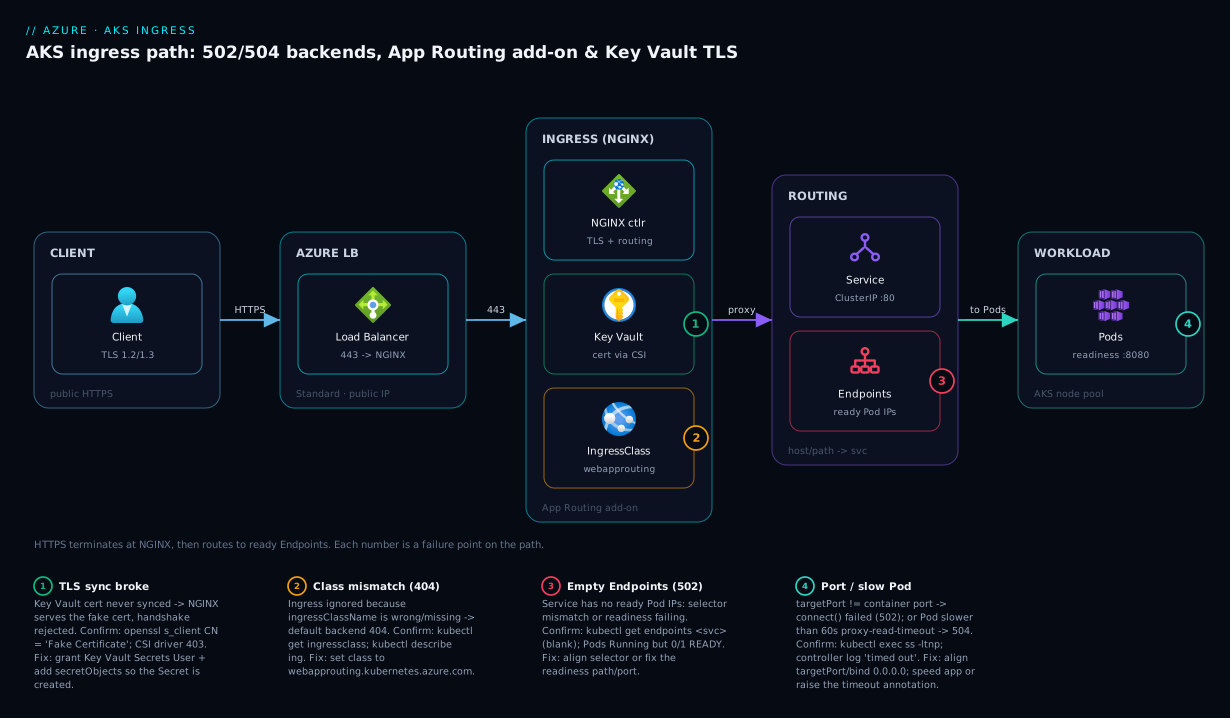
The diagram traces an HTTPS request exactly as it flows on AKS, and marks the hop where each failure class bites. Read it left to right. A client sends https://shop.contoso.com/ to the Azure Load Balancer public IP, which forwards to the NGINX ingress controller Pods. NGINX terminates TLS using a certificate that originated in Azure Key Vault and was synced — by the Secret Store CSI driver — into a Kubernetes TLS Secret. NGINX then matches the request’s host and path against your Ingress rules and proxies to the named Service, which resolves to the set of ready Endpoints (Pod IPs passing readiness) and load-balances across your Pods.
The numbered badges sit on the exact hops that fail. Badge 1 is TLS at the controller: if the Key Vault cert never synced, NGINX serves the fake certificate and the handshake is rejected. Badge 2 is the Ingress/IngressClass match: a wrong ingressClassName (especially with the Application Routing add-on’s webapprouting… class) means no rule matches and you get a 404/default backend. Badge 3 is the Service → Endpoints hop: an empty Endpoints set (selector or readiness) yields 502 no live upstreams. Badge 4 is the Pod port/readiness: a targetPort that does not match the container port refuses the connection (connect() failed), and a slow Pod trips the 60 s proxy timeout into a 504. The legend narrates each as symptom, the confirming command, and the fix — that is the whole method: localise the symptom to a hop, run the named check, apply the fix.
Real-world scenario
Beacon Tickets runs a ticketing API on AKS: a Deployment of six replicas behind a ClusterIP Service, published via the Application Routing add-on (managed NGINX) with TLS certificates from Key Vault, in Central India. Traffic averages 300 requests/second with a sharp spike when a popular event opens sales. The platform team is three engineers; the cluster runs a 3-node Standard_D4s_v5 user pool.
The incident began the morning a new event went on sale. At 10:00 the API started returning 502 Bad Gateway to roughly 20% of callers, climbing as load rose. The on-call engineer’s reflex was to restart the NGINX controller Pods. That cleared it for about two minutes, then the 502s returned — a classic sign the controller was fine and the upstream was the problem. Second reflex: scale the API Deployment from 6 to 12 replicas. The error rate barely moved, and now the cluster was burning more nodes.
The breakthrough came from asking the right first question: does the Service have ready endpoints? kubectl get endpoints ticket-svc -n tickets showed only two addresses, not twelve — ten Pods were Running but 0/1 READY. kubectl describe pod on a not-ready Pod showed the readiness probe failing: it hit / with a 200-expectation, but a recent deploy had moved the health endpoint to /healthz and / now returned a 302 redirect to the login page. NGINX, with only two ready upstreams under a 300 rps spike, was overwhelming them and 502-ing the overflow. Scaling to twelve had added unready Pods, not capacity — which is why it did nothing.
While confirming, a second problem surfaced. The browser padlock was now throwing ERR_CERT_AUTHORITY_INVALID. openssl s_client -connect tickets.beacon.in:443 returned CN “Kubernetes Ingress Controller Fake Certificate.” The Key Vault certificate had auto-rotated overnight (a 90-day policy), and the synced TLS Secret still held the old cert — except the controller had restarted (from reflex one) and re-read state, and the CSI sync had not refreshed because the add-on identity’s role assignment had been scoped to the wrong vault after a recent resource-group reorg. The CSI driver logs showed 403 Forbidden. So there were two independent failures coinciding: a readiness-probe regression causing 502s, and a Key Vault RBAC scope error causing the fake cert.
The fix landed in two parts. Immediately: correct the readiness probe to httpGet /healthz: 8080, which moved all twelve Pods to READY within thirty seconds and cleared the 502s (they then scaled back to six). Then: re-create the Key Vault Secrets User assignment for the add-on identity scoped to the correct vault, after which the CSI driver re-synced the rotated certificate into the TLS Secret and NGINX served the real cert. The post-incident rule on the wall: “A 502 behind ingress is a question about Endpoints, not the controller — and a fake cert means the sync chain broke, never the cert itself.” They added two alerts: one on Endpoints count dropping below replica count, and one on the served-certificate CN matching the fake-cert string.
The incident as a timeline, because the order of moves is the lesson.
| Time | Symptom | Action taken | Effect | What it should have been |
|---|---|---|---|---|
| 10:00 | 502 at 20%, climbing | (alert fires) | — | Ask: does the Service have ready endpoints? |
| 10:04 | 502 at 25% | Restart NGINX controller | +2 min relief, recurs | Don’t restart the controller blind |
| 10:09 | 502 at 30% | Scale API 6 → 12 | No change, more nodes | Don’t scale unready Pods |
| 10:20 | Still failing | kubectl get endpoints |
Only 2 of 12 Ready | The breakthrough |
| 10:25 | Root cause 1 | describe pod: readiness on / 302 |
Probe regression found | — |
| 10:30 | Fake cert too | openssl s_client → fake CN |
KV sync broke | Check CSI 403 |
| 10:40 | Mitigated | Fix probe to /healthz; re-scope KV role |
502 clears, real cert served | Correct fix |
Advantages and disadvantages
The “managed ingress controller fronting label-selected Pods” model both causes this class of problem and makes it diagnosable. Weigh it honestly.
| Advantages (why this model helps you) | Disadvantages (why it bites) |
|---|---|
The controller, Endpoints, readiness and CSI status are all queryable with kubectl — you rarely lack data |
The HTTP status you see (502/504) is the controller’s complaint, abstracting the real cause; you must dig |
Readiness probes automatically pull bad Pods out of Endpoints, protecting users |
A wrong readiness probe silently empties Endpoints and 502s the whole Service — Running ≠ Ready |
| The Application Routing add-on removes Helm upgrade/operations toil | The add-on owns and reconciles its config; direct edits revert, surprising teams used to self-installed NGINX |
| Key Vault keeps certs out of git and auto-rotates them | The CSI sync chain has five links; any break serves the fake cert with no obvious “denied” error |
Annotations tune timeouts/limits per Ingress without touching the controller |
Defaults bite: 60 s proxy timeout, 1m body size — both cause incidents until tuned |
| Scaling Pods is a one-liner and load spreads automatically | Scaling masks readiness/port bugs — adding unready Pods adds no capacity |
| One LB + one controller serves many hosts/paths cheaply | A single misrouted IngressClass or host typo 404s an entire app |
The model is right for standard web apps and APIs where you want declarative routing and managed certificates rather than operating a reverse proxy by hand. It bites hardest on teams that treat the Application Routing add-on like a self-installed chart, that conflate Running with Ready, and that wire Key Vault TLS for the first time without walking the sync chain. Every disadvantage is manageable — but only if you know it exists, which is the point of this article.
Hands-on lab
Reproduce a 502 from an empty-Endpoints readiness bug, watch it, and fix it — all on a small AKS cluster you tear down at the end. Run in Cloud Shell (Bash) with kubectl configured.
Step 1 — Variables and a tiny cluster (or reuse one).
RG=rg-aks-ingress-lab
LOC=centralindia
AKS=aks-ing-lab
az group create -n $RG -l $LOC -o table
az aks create -g $RG -n $AKS --node-count 2 --node-vm-size Standard_B2s \
  --network-plugin azure --generate-ssh-keys -o table
az aks get-credentials -g $RG -n $AKS --overwrite-existing
Step 2 — Enable the Application Routing add-on (managed NGINX).
az aks approuting enable -g $RG -n $AKS
kubectl get ingressclass     # expect: webapprouting.kubernetes.azure.com
kubectl get pods -n app-routing-system
Step 3 — Deploy an app, a Service, and an Ingress — but with a BROKEN readiness probe (reproduce the bug).
kubectl create namespace shop
cat <<'EOF' | kubectl apply -n shop -f -
apiVersion: apps/v1
kind: Deployment
metadata: { name: shop }
spec:
  replicas: 2
  selector: { matchLabels: { app: shop } }
  template:
    metadata: { labels: { app: shop } }
    spec:
      containers:
        - name: web
          image: mcr.microsoft.com/azuredocs/aks-helloworld:v1
          ports: [ { containerPort: 80 } ]
          readinessProbe:
            httpGet: { path: /does-not-exist, port: 80 }   # WRONG path → never Ready
            initialDelaySeconds: 3
            periodSeconds: 5
---
apiVersion: v1
kind: Service
metadata: { name: shop-svc }
spec:
  selector: { app: shop }
  ports: [ { port: 80, targetPort: 80 } ]
---
apiVersion: networking.k8s.io/v1
kind: Ingress
metadata: { name: shop-ing }
spec:
  ingressClassName: webapprouting.kubernetes.azure.com
  rules:
    - http:
        paths:
          - path: /
            pathType: Prefix
            backend: { service: { name: shop-svc, port: { number: 80 } } }
EOF
Step 4 — Watch it 502. Get the ingress public IP and curl it:
IP=$(kubectl get svc -n app-routing-system -o jsonpath='{.items[?(@.spec.type=="LoadBalancer")].status.loadBalancer.ingress[0].ip}')
echo "Ingress IP: $IP"
curl -s -o /dev/null -w "%{http_code}\n" http://$IP/        # expect 502
kubectl get endpoints shop-svc -n shop                      # expect: <none> (empty)
kubectl get pods -n shop                                    # Running but 0/1 READY
The empty Endpoints with 0/1 READY Pods is the dead giveaway: readiness is failing, so no Pod joins Endpoints, so NGINX has no upstream → 502.
Step 5 — Fix the readiness probe. Point it at a path the app actually serves:
kubectl patch deploy shop -n shop --type=json -p='[
  {"op":"replace","path":"/spec/template/spec/containers/0/readinessProbe/httpGet/path","value":"/"}
]'
kubectl rollout status deploy/shop -n shop
kubectl get endpoints shop-svc -n shop      # now shows Pod IPs
curl -s -o /dev/null -w "%{http_code}\n" http://$IP/   # expect 200
Step 6 — Tear down.
az group delete -n $RG --yes --no-wait
Expected end state: after the probe fix, Endpoints lists two addresses, the Pods read 1/1 READY, and the curl returns 200. You reproduced and fixed the most common AKS ingress 502 end to end.
Common mistakes & troubleshooting
This is the centerpiece. The playbook below spans the basic wiring failures and the advanced add-on/TLS failures. Find your symptom, run the exact confirm command, apply the fix.
| # | Symptom | Root cause | Confirm (exact command / portal path) | Fix |
|---|---|---|---|---|
| 1 | 502 on every request to a host | Service has empty Endpoints (selector mismatch) |
kubectl get endpoints <svc> -n <ns> (blank) |
Align Service selector to Pod labels |
| 2 | 502 with Pods Running but 0/1 READY |
Readiness probe failing → excluded from Endpoints |
kubectl describe pod <pod> → Conditions Ready=False |
Fix probe path/port to what the app serves |
| 3 | 502 connect() failed (111: refused) |
targetPort ≠ real container port, or app binds 127.0.0.1 |
kubectl exec … ss -ltnp; describe svc |
Set targetPort to real port; bind 0.0.0.0 |
| 4 | 502 only on one host/path | Ingress servicePort not a real Service port |
kubectl describe ing vs get svc ports |
Point service.port at an existing Service port |
| 5 | 404 / “default backend - 404” | Wrong/missing ingressClassName |
kubectl get ingressclass; describe ing |
Set class to the controller’s (e.g. webapprouting…) |
| 6 | 504 Gateway Time-out under load | Upstream slower than 60 s proxy-read-timeout |
Controller log timed out; kubectl top pod |
Speed app; raise proxy-read-timeout annotation |
| 7 | 503 during deploys | All replicas not-ready mid-rollout | kubectl get pods -l <selector> all 0/1 |
maxUnavailable lower; PodDisruptionBudget; readiness gate |
| 8 | 413 Request Entity Too Large | Body exceeds 1m proxy-body-size |
Controller log client intended to send too large body |
proxy-body-size annotation (e.g. 50m) |
| 9 | My controller config keeps reverting | Edited managed objects; add-on reconciles | Re-get shows change gone |
Use NginxIngressController CRD instead |
| 10 | Browser TLS error / “Fake Certificate” | Key Vault cert never synced to Secret |
openssl s_client CN = fake cert |
Walk the 5-link CSI chain; fix the broken link |
| 11 | CSI driver 403 Forbidden fetching cert |
Identity lacks Key Vault Secrets User | kubectl logs -l app=secrets-store-csi-driver |
Grant Secrets User on the correct vault scope |
| 12 | TLS Secret is NotFound |
secretObjects missing or no Pod mounts volume |
kubectl get secret <tls-secret>; SPC pod status |
Add secretObjects; ensure a Pod mounts the SPC |
| 13 | HTTPS works, HTTP returns wrong app | Missing/incorrect tls block or host typo |
kubectl describe ing rules/tls |
Fix tls.hosts/secretName and rules.host |
| 14 | Old cert served after rotation | CSI sync not refreshed after KV rotation | openssl dates; secretproviderclasspodstatus |
Restart syncer/controller; check rotation poll |
| 15 | Two ingress controllers conflict | Self-installed NGINX + add-on both default class | kubectl get ingressclass two defaults |
Make one non-default; set ingressClassName per Ingress |
| 16 | Path matches wrong backend | pathType Prefix vs Exact / rule order |
kubectl describe ing paths |
Use correct pathType; avoid overlapping prefixes |
Per-symptom detail on the ones that fool people
Empty Endpoints (rows 1–2). This is the 502 you will hit most. kubectl get endpoints is the single decisive check — blank means NGINX has no upstream. The fork is selector (Pods exist but labels do not match) versus readiness (Pods match but fail the probe). Never restart the controller for this; it changes nothing because the controller is healthy.
Port contract (rows 3–4). Two ports, two mismatches. connect() failed (111: Connection refused) in the controller log means the connection reached a Pod whose port was closed — targetPort is wrong or the app binds loopback. A 502 on one host with others working points at that Ingress’s servicePort not matching the Service.
The reconcile surprise (row 9). With the Application Routing add-on, any direct edit to the managed controller Deployment/ConfigMap/IngressClass is reverted on the next reconcile loop. The supported path is the NginxIngressController CRD. Teams migrating from self-installed ingress-nginx hit this within a day.
The fake-certificate tell (rows 10–14). Whenever TLS is wrong, openssl s_client is faster than reading five objects. CN Kubernetes Ingress Controller Fake Certificate proves the sync chain broke (links 1–4). A real CN with a past notAfter is genuine expiry — rotate in Key Vault. The most common break is secretObjects missing from the SecretProviderClass (no Secret is ever created) or the identity lacking Key Vault Secrets User.
Best practices
- Make readiness probes shallow and honest. Point them at a dedicated
/healthzthat returns 200 when this Pod can serve a request — not/(redirects) and not a path that hits a slow downstream. Readiness, not liveness, is what joinsEndpoints. - Always alert on
Endpointscount vs replica count. A drop below the replica count is your earliest, cleanest 502 signal — earlier than the 502s themselves. - Reference an explicit
ingressClassNameon everyIngress. Do not rely on default-class behaviour, especially when both a self-installed and a managed controller could exist. - For the Application Routing add-on, never edit managed objects directly. Customise only through the
NginxIngressControllerCRD andaz aks approuting— anything else is reverted. - Serve TLS from Key Vault, and alert on the served-cert CN. An alert that fires when the presented certificate CN equals the fake-cert string catches a broken sync chain before users do.
- Grant the cluster identity exactly
Key Vault Secrets Userscoped to the specific vault — no broader, and re-verify the scope after any resource-group reorg. - Tune
proxy-read-timeoutperIngress, not globally. Raise it only on the endpoints that legitimately run long; a global raise hides every slow endpoint. - Keep the request path stateless. Avoid session affinity unless a legacy app demands it; affinity concentrates load and undermines even spreading across Pods.
- Set sane
proxy-body-sizefor upload endpoints rather than discovering the 1m default via a 413 in production. - Use a
PodDisruptionBudgetand conservativemaxUnavailableso a rollout never drops every ready Pod and 503s the Service. - Treat
Ingress,ServiceandSecretProviderClassas reviewed code (Bicep/YAML in git), not hand-edits — most of these incidents are a one-line manifest error.
Security notes
Ingress is the front door, so its security posture is the cluster’s exposed surface.
- Terminate TLS at the controller with a real Key Vault certificate, never the fake self-signed cert, and prefer TLS 1.2+ via the controller’s
ssl-protocolsconfig. Centralising certs in Key Vault keeps private keys out of git and enables rotation. - Use least-privilege identity for cert access. The add-on/workload identity needs only Key Vault Secrets User on the one vault. Avoid
Key Vault Administratoror subscription-wide grants. This builds on Managed Identity: System vs User-Assigned Patterns. - Scope the public surface. Use an internal load balancer (
azure-load-balancer-internal: "true"via theNginxIngressControllerCRD) for private workloads, and front the public ingress with a WAF when you need OWASP protection — the WAF patterns are covered in Application Gateway with WAF and End-to-End TLS. - Restrict who can edit
IngressandSecretProviderClassvia Kubernetes RBAC; an attacker who can rewrite anIngresshost ortls.secretNamecan hijack routing or downgrade TLS. - Do not expose
Secrets broadly. The synced TLSSecretholds the private key — keep it in the app namespace, restrictget/liston Secrets, and never echo it in logs. - Validate certificate rotation end to end. Auto-rotation in Key Vault is only safe if the CSI sync refreshes the
Secret; test the rotation path so you do not serve an expired cert or fall back to the fake one.
Cost & sizing
AKS ingress cost is dominated by a few line items, and most “sizing” here is right-sizing the controller and the backing load balancer, not the certificates.
| Cost driver | What it is | Rough figure | How to right-size |
|---|---|---|---|
| Azure Load Balancer (Standard) | The public IP + LB fronting the controller | ~₹1,500–2,000/mo + data | One LB serves all hosts/paths via one controller |
| Controller Pod resources | CPU/memory the NGINX Pods consume | Fits in existing node pool | 2–3 replicas; modest requests; HPA on load |
| Public IP | Static IP for the ingress | ~₹250–350/mo | Reuse one IP across many Ingress hosts |
| Key Vault operations | Secret/cert reads by the CSI driver | Pennies | Reasonable rotation poll; do not over-poll |
| Application Routing add-on | The managed controller itself | No extra add-on charge | You pay only for the LB/IP/compute it uses |
| Outbound data | Egress through the LB | Per-GB | Cache; keep chatty traffic in-cluster |
The right-sizing rules: one controller, one load balancer, many hosts — do not spin up an LB per app; route by hostname and path on a single ingress. Run the controller with 2–3 replicas for availability and an HPA if request volume is spiky, but its footprint is small relative to your app Pods. Key Vault and certificate costs are negligible; the meaningful spend is the Standard Load Balancer and its data processing, so keep east-west traffic in-cluster and only send genuinely external traffic through ingress. The Application Routing add-on adds no licence cost — you pay for the underlying LB, IP and compute it consumes, which you would pay for a self-installed controller anyway.
Interview & exam questions
1. Why does an AKS Ingress return 502 when all the Pods show Running?
Because ingress routes to ready Endpoints, not to Pods. A Pod can be Running (liveness passing) yet excluded from Endpoints if its readiness probe fails. With empty Endpoints, NGINX has no upstream and returns 502. Check kubectl get endpoints <svc>.
2. What is the difference between a 502 and a 504 from the NGINX ingress controller?
A 502 Bad Gateway means NGINX got a bad or no answer from the upstream (no endpoints, connection refused/reset). A 504 Gateway Time-out means the upstream was reached but did not respond within the proxy-read-timeout (default 60 s). 502 is a wiring problem; 504 is a slowness problem.
3. How does the Application Routing add-on differ from a self-installed ingress-nginx?
It is a managed controller that Azure deploys and reconciles: direct edits to its Deployment/ConfigMap/IngressClass are reverted. You customise it through the NginxIngressController CRD and az aks approuting, and its default class is webapprouting.kubernetes.azure.com.
4. Walk the chain that serves a Key Vault certificate on AKS ingress.
Cluster identity authenticates the Secret Store CSI driver to Key Vault; the identity has Key Vault Secrets User; a SecretProviderClass names the vault/cert and (via secretObjects) a target Secret; a Pod mounts the volume so the cert syncs into a kubernetes.io/tls Secret; the Ingress tls block references that Secret. Any broken link serves the fake cert.
5. A browser shows a certificate error on an AKS ingress. What is your first command?
openssl s_client -connect host:443 -servername host then read the subject. CN “Kubernetes Ingress Controller Fake Certificate” means the Key Vault sync chain broke; a real CN with a past notAfter means genuine expiry — rotate in Key Vault.
6. Your Ingress returns default backend - 404. Why?
No Ingress rule matched the request — usually a wrong ingressClassName (the controller ignores the Ingress), a host that does not match any rule, or a pathType/path that does not match. Confirm with kubectl describe ingress and kubectl get ingressclass.
7. The controller log shows connect() failed (111: Connection refused). What does it indicate?
NGINX reached a Pod but its port was closed: the Service targetPort does not match the container’s real listening port, or the app binds 127.0.0.1 instead of 0.0.0.0. Fix the targetPort or the app’s bind address.
8. How do you correctly raise the request timeout for one slow endpoint without affecting others?
Apply nginx.ingress.kubernetes.io/proxy-read-timeout (and proxy-send-timeout) as an annotation on that specific Ingress. A global controller change would hide every slow endpoint; a per-Ingress annotation scopes the change.
9. Why does scaling up Pods sometimes not fix a 502?
If the 502 is from a readiness or port bug, the new Pods are also not-ready (or also refuse the connection), so you add zero ready Endpoints. Scaling adds capacity only when existing Pods are healthy and the bottleneck is load.
10. What identity does the Application Routing add-on use to read Key Vault, and what role does it need?
A user-assigned managed identity created by the add-on; it needs Key Vault Secrets User (RBAC) on the vault — a certificate’s key material is fetched as a secret. Find its objectId via az aks show … ingressProfile.webAppRouting.identity.
11. How do you give a workload identity-based DIY setup access to Key Vault for TLS?
Federate a workload identity to the Kubernetes service account used by the syncer/controller, grant that identity Key Vault Secrets User, and reference it in the SecretProviderClass (clientID). This is the non-add-on path.
12. Map to certs: these questions map to AZ-104 (manage AKS, Key Vault, networking), AZ-500 (secure ingress, identities, Key Vault access), and the CKA/CKAD ingress, Service/Endpoints, and probe objectives.
Quick check
- Your
Ingress502s andkubectl get endpoints shop-svcshows no addresses, yet Pods areRunning. What is the single most likely cause? - The controller log shows
upstream prematurely closed connection. Is this a timeout to tune, or an app problem? - With the Application Routing add-on, you edit the managed
ConfigMapand your change vanishes. What is the supported way to make it stick? - A browser shows a TLS error and
openssl s_clientreports CN “Kubernetes Ingress Controller Fake Certificate.” What broke? - You see
default backend - 404for a host that should work. Name two things to check.
Answers
- Readiness is failing (Pods are
Runningbut notReady, so none joinEndpoints) — or theServiceselector matches no Pods.kubectl describe podConditions decides which. Restarting the controller does nothing. - An app problem — the upstream reset the connection (crash, timeout in the app, keepalive mismatch). It is not a proxy-read timeout; raising timeouts will not fix a reset. Read the Pod logs at that moment.
- Use the
NginxIngressControllercustom resource (andaz aks approutingfor DNS/Key Vault). The add-on reconciles managed objects, so direct edits are reverted. - The Key Vault → CSI →
Secretsync chain broke (one of: identity lacking Key Vault Secrets User, missingsecretObjects, no Pod mounting the volume, or theIngressreferencing the wrongsecretName). The fake cert is the tell, not a real expiry. - The
ingressClassName(does it match the controller’s class?) and the host/pathTypein the rule (does any rule actually match the request’s host and path?).kubectl describe ingressandkubectl get ingressclass.
Glossary
- Ingress controller — the reverse proxy (NGINX on AKS) that terminates TLS and routes HTTP(S) by host/path to Services; emits the 502/503/504 you see.
Ingressobject — the Kubernetes resource declaring host/path → Service routing rules and TLS.IngressClass— selects which controller handles anIngress; the Application Routing add-on’s default iswebapprouting.kubernetes.azure.com.Service— a stable virtual IP/DNS name that load-balances to Pods matching its label selector.Endpoints/EndpointSlice— the set of ready Pod IPs behind aService; emptyEndpointsis the classic 502.- Readiness probe — the check that decides whether a Pod is ready to serve; only ready Pods join
Endpoints. - Application Routing add-on — Azure-managed NGINX ingress controller for AKS, configured via the
NginxIngressControllerCRD andaz aks approuting. NginxIngressController— the custom resource that customises the managed controller in a reconcile-safe way.- Secret Store CSI driver — mounts secrets/certs from external stores (Azure Key Vault) into Pods as volumes and, with
secretObjects, into KubernetesSecrets. SecretProviderClass— declares which Key Vault, certificate, identity and targetSecretthe CSI driver should use.- TLS
Secret— akubernetes.io/tlsSecretholding the certificate and private key that theIngresstlsblock references. - Fake certificate — NGINX’s default self-signed “Kubernetes Ingress Controller Fake Certificate,” served when the real cert is missing — the tell that the sync chain broke.
proxy-read-timeout— the NGINX annotation bounding how long it waits for an upstream response (default 60 s); exceeding it yields 504.targetPort— the container port aServiceforwards to; a mismatch with the real listening port yieldsconnect() failed/ 502.
Next steps
- AKS Cluster Architecture: Control Plane vs Data Plane Explained — the cluster fundamentals beneath ingress.
- AKS Networking: Kubenet vs Azure CNI Models Explained — how Pod IPs are assigned, which changes how the controller reaches backends.
- AKS Pod Cannot Pull Image: ACR Authorization Failures — the companion playbook when the failure is image-pull, not ingress.
- Key Vault 403 Forbidden: Firewall, RBAC, Soft-Delete Recovery — deeper on the Key Vault access failures behind a broken cert sync.
- Application Gateway with WAF and End-to-End TLS — when you front AKS ingress with a WAF and re-encrypt to the backend.